





3751
Of your peers have already watched this video.
20:30 Minutes
The most insightful time you'll spend today!
Business Modernization with Oracle Workloads in Google Cloud
With today’s ever-changing business dynamics, business continuity is a key focus for all of us, and enterprise databases like Oracle play a critical role. We’ll explore how running Oracle workloads in Google Cloud creates a variety of solutions, from a Bare Metal Solution to open source and cloud-native databases, to help reduce your operational overhead and keep your business running smoothly.
This session is led by Paul Miller, Head of Solution Management for DB, Google Cloud. Paul is an accomplished data management leader with over 20 years experience in application development, data management, and solution engineering. He is an emphatic team builder who loves to figure things out. Paul has deep experience on databases from leading enterprise software companies such as Google Cloud and Oracle.
Blue Apron: Offering a better recipe for modern analytics

1644
Of your peers have already read this article.
5:30 Minutes
The most insightful time you'll spend today!
When Blue Apron had issues running its data warehouse on another cloud provider, it built an analytics platform using Looker and Google BigQuery to enable faster business decisions about food inventory.
Blue Apron’s mission is to make incredible home cooking accessible to everyone. Launched in 2012, Blue Apron is reimagining the way that food is produced, distributed, and consumed.

Google Cloud Results
- Enables near real-time business decisions to better manage food inventory and delivery by reducing query times exponentially
- Helps improve customer service and optimize business processes with faster insights
- Reduces costs while reclaiming up to a week per month of engineering
The popularity of meal kit delivery services has surged in recent years as consumer attitudes toward home cooking and grocery shopping have shifted. As a pioneer in the category, Blue Apron helps its customers create incredible home cooking experiences by sending culinary-driven recipes with high-quality ingredients and step-by-step instructions straight to customers’ doors. Blue Apron also offers a monthly wine subscription service and a la carte culinary tools and products through its marketplace.
If that sounds simple, it isn’t. Ingredients for the meal kits must be sourced at the right time, quality, and price. Orders must be packed efficiently and in exactly the right proportions. Most importantly, meal kits must be delivered to the customer fresh and on time.
To meet these criteria and make data meaningful and intuitive to its managers, one of the tools Blue Apron relies on is Looker, an analytics platform that lets business users explore data and ask sophisticated questions using familiar terms.
A Google Cloud partner and winner of the 2016 Google Cloud Global Partner Award for Solution Innovation, Looker integrates its solution with Google Cloud Platform to help customers modernize their analytics.
Blue Apron previously used Looker with a single database instance hosted on another cloud provider. As data volumes grew and queries became more complex, it became difficult to scale. Blue Apron’s only options were choosing ever-larger server classes and increasing storage throughput by purchasing a higher number of provisioned IOPS. To improve speed, scalability, and cost efficiency, Blue Apron moved its data warehouse to Google BigQuery.
“The combination of Looker and Google BigQuery is powerful, allowing us to get data-hungry analysts essential information much faster,” says Sam Chase, Tech Lead, Data Operations at Blue Apron. “Because we choose to pay by the query, it’s also flexible and cost effective—plus storage is cheap, so we can just put data in and query what we need.”
The analytics platform of the future
When you’re making business decisions about a customer’s dinner, speed matters. Looker takes full advantage of the power of Google BigQuery, making it easy to build a data exploration platform. Blue Apron’s applications publish event data to Kafka—approximately 140 million events per day—and data is then streamed into Google BigQuery, which performs lightning-fast queries on both streamed and static data. Now, business users and analytics teams can make decisions based on near real-time information in Looker, instead of waiting until the next business day for results.
“After we moved to Google BigQuery, query time was reduced exponentially. It’s an astonishing difference, allowing us to run 300 queries per day,” says Sam.
Previously, Blue Apron spent up to a week out of every month optimizing its data warehouse to attempt to improve query performance. With Google BigQuery, all maintenance is handled by Google, reclaiming 25% of up to two engineers’ time. Even when multiple people are using Looker concurrently, query performance never degrades and storage never runs out.
“Because Google BigQuery is architected as a giant, shared cluster, growth is smooth,” says Lloyd Tabb, Founder and CTO of Looker. “Like a race car going from 0 to 120 mph, there are no shift points, just smooth acceleration. To us, it looks like the future.”
An empowering, integrated toolset
Looker takes advantage of aggressive caching and support for date-based table partitioning in Google BigQuery to increase performance, simplify the load process, and improve data manageability. By partitioning data by time, Blue Apron can also take advantage of better long-term storage pricing without sacrificing query performance. When using Google BigQuery with Looker, analysts can easily see how much data is going to be scanned before each query is run.
Blue Apron is also using Looker for Google BigQuery Data Transfer Service to provide actionable analytics for all of the company’s Google marketing data from Google AdWords and DoubleClick by Google in one place to understand campaign performance across channels, saving its data operations team months of work. Using Looker Blocks, marketers can quickly make sense of the data with reports and dashboards, and set alerts when campaign performance hits certain thresholds.
Looker Blocks for Google AdWords and DoubleClick by Google provide all the analysis you’d get straight from the Google console, plus additional value-add analysis that’s impossible to replicate without SQL. Complex metrics such as ROI on ad spend, flexible multi-touch attribution, and predictive lifetime value empower marketers with a better understanding of their customers and where to spend their next dollar.
In addition to these turnkey dashboards and pieces of analysis, marketers can customize views to meet their unique needs and workflows. These capabilities help the Blue Apron marketing team make decisions regarding the allocation of spend to maximize customer acquisition and retention.
“Everyone at Blue Apron is excited about using Google BigQuery with Looker,” says Sam. “Business users and marketers are more empowered to look for answers, instead of waiting for analytics teams. Because users know they can get results rapidly, our business processes are evolving and improving.”
For data cleansing and transformation, Blue Apron uses Google Cloud Dataproc to run fully managed Apache Spark clusters on Google Cloud Platform. It’s also leveraging Google BigQuery integration with Google Workspace to bring data into Google Sheets for further distribution and analysis.
“Transferring data between Google tools is fast because it all happens on the Google network,” says Sam. “We can pull data from Google BigQuery, run transformations with Spark, and then write it back to Google BigQuery. That’s very helpful in providing our business users and data analysts with the richest, most current data.”
A perfect match for better insights
As Blue Apron seeks to expand its reach and deepen its engagement with customers, it is making Google BigQuery and Looker available to more users, providing a high-quality interactive analytics experience. “Our ability to pull a lot of data in and compute fast results affects everyone in our company,” says Sam. “Using Google BigQuery and Looker to iterate quickly and build new models to make our operations more efficient will directly impact our customers.”
For Looker, Google BigQuery represents the next step in data warehouse evolution. “Google BigQuery is a perfect match for Looker, combining easy setup with near infinite scale-out and elasticity,” says Lloyd. “People can make smarter decisions faster that directly benefit their business and customers.”
Three New Features in Cloud SQL for SQL Server Extends its Functionality

3391
Of your peers have already read this article.
4:00 Minutes
The most insightful time you'll spend today!
As a product with a long history in the database ecosystem, SQL Server offers numerous native capabilities that help provide scalability and security to its users. However, it can be time consuming and complex to take advantage of these features. Google Cloud SQL for SQL Server saves your team time by eliminating much of the unnecessary toil (OS patching, version upgrades, replica setup etc.) while still allowing you to leverage the functionality you’re used to. Three new features for Cloud SQL for SQL Server take its functionality even further.
A few months ago, we announced Active Directory (AD) integration had entered preview; now, it is generally available. Equally exciting, we are releasing Cross-Region Replicas (based on SQL Server’s Always On Availability Groups) in preview. Finally, you can try out this great new functionality in our managed database service with the latest release of SQL Server 2019, which is now generally available.
Simple and Secure Windows Authentication with Active Directory
As one of the most requested and critical security capabilities for Cloud SQL for SQL Server, we are pleased to now provide Windows Authentication via Managed Service for Microsoft Active Directory as generally available. Customers should feel confident onboarding their business critical production workloads to the managed service while still maintaining the authentication best practices they rely on today. While identities can be created and managed directly within the managed AD service, many customers choose to establish a trust relationship with their existing on-prem AD footprint to leverage existing identity objects.
What is Cross-Region Replica for SQL Server?
Bringing parity in the Cloud SQL portfolio alongside MySQL and PostgreSQL, Cross-region replica makes it easy to create a fully managed read replica in a different region than that of the primary instance. You can create a replica in any Google Cloud region. The difference for SQL Server is the Availability Group based architecture that paves the way for the service to continue to offer more core compatibility with the SQL Server features our customers depend on. Cloud SQL greatly simplifies the traditional process of provisioning Availability Groups and streamlines it into a few-step workflow.

Using read replicas will allow you to horizontally scale your read workloads. For example, you can configure a reporting dashboard to work against a read replica, and because it’s only reading, it will not affect the primary instance. You can also promote replicas to be Cloud SQL instances and that could help you reduce your recovery point objective (RPO) and recovery time objective (RTO). It can help you with the RPO because the data is constantly replicated and the replica is probably more up to date than your latest backup. It can help you with RTO because promoting the replica, especially in an automated way, is a relatively short process. To get started, check out the documentation for Cross-Region Replica
What’s new in SQL Server 2019?
Providing the most current major and minor versions is a key aspect of maintaining compatibility and security for your database workload. Cloud SQL provides an easy provisioning experience that will now allow you to select from four editions of SQL Server 2019 similar to our current SQL Server 2017 options of Enterprise, Standard, Web, and Express. A few key considerations as you are evaluating the new version should be:
- Compatibility level – A newly created database on a Cloud SQL for SQL Server 2019 Databases instance has a compatibility level of 150 by default.
- Accelerated Database Recovery – Allows instances to reduce the availability impact of restarts and shutdowns.
- TempDB changes – While we recently provided you more control to manage your tempdb files, 2019 also brings optimization to improve performance as well.
- Intelligent query processing – SQL Server 2019 provides direct improvements to the query engine itself which may improve overall query processing and performance.
- Many other performance improvements – capabilities such as verbose truncation warnings, resumable index build, and others. Learn more about supported features here.
To get started, check out documentation for SQL Server 2019.
In conclusion
These three features have been the most common requests from our enterprise customers. Finally, you can bring your own Active Directory domain for SQL Server authentication and authorization, use the latest features from SQL Server 2019 and scale your read workloads as well as leveraging the cross regional replicas for faster disaster-recovery.
To get started, check out the documentation for Cross-Region Replica, Active Directory, and SQL Server 2019. All are available with any new instance created via the console or API, simply follow the instructions in the documentation.
Boost Database Performance with AlloyDB Index Advisor: The Ultimate Optimization Tool

1380
Of your peers have already read this article.
4:00 Minutes
The most insightful time you'll spend today!
Intro
One of the time consuming tasks for DBAs is to maximize query performance. To optimize slow-running queries, they often have to do detailed analysis, understand optimizer plans, and go through a lot of trial and error before getting to the best set of indexes that help with improved query performance. However, even with expert knowledge of a database’s internals, it is challenging to choose an effective set of indexes, especially when workloads change over time. The complexity of queries including several joins, filters, and subqueries make the process of identifying the right set of indexes very challenging for DBAs. Also, the effect of an index on the query plan needs to be taken into account when considering further indexes. Creating an index may cause the query optimizer to select completely different join orders and join/scan methods. This effect is hard to predict and quantify for DBAs.
Imagine if the database itself is intelligent enough to identify such queries, and recommends creating specific B-tree indexes?
Google Cloud’s AlloyDB for PostgreSQL is a fully-managed and fully PostgreSQL-compatible database for demanding transactional and analytical workloads that provides enterprise-grade performance and availability. AlloyDB offers Index Advisor, a built-in feature that helps alleviate the guesswork of tuning query performance with deep analysis of the different parts of a query including subqueries, joins, and filters. It periodically analyzes the database workload, identifies queries that can benefit from indexes, and recommends new indexes that can increase query performance.
How the AlloyDB Index Advisor works
First, let’s review a few AlloyDB terms relevant to the Index Advisor’s work.
- PostgreSQL’s system catalog has schema metadata, such as information about tables and columns, and internal bookkeeping information.
- HypoPG is an open source PostgreSQL extension that helps with hypothetical indexes without actually creating them to see if the index helps with query execution.
- Query Optimizer generates optimal execution plan.
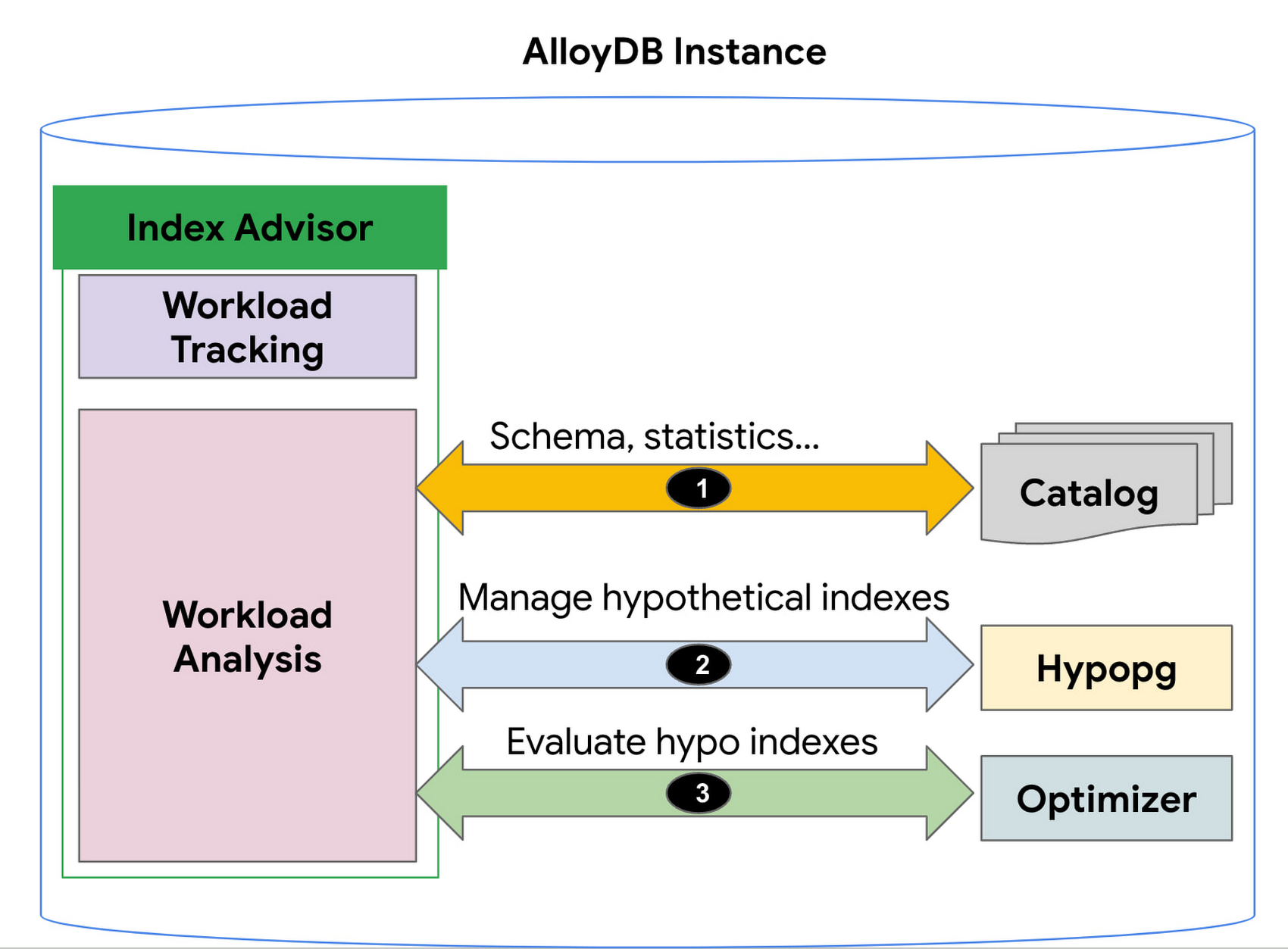
1. AlloyDB’s Index Advisor tracks the user query workload and analyzes it using statistics from the system catalog; it then identifies queries that could be improved significantly and potential candidate indexes for those cases. Note that there could be a large number of candidate indexes.
2. The Index Advisor evaluates each of these queries using hypothetical indexes based on the HypoPG, an open source extension and AlloyDB’s Query Optimizer.
3. The results of this evaluation are used to intelligently select the best set of indexes for the workload and to generate recommendations.
You can then simply copy and run the suggested index creation SQL commands. The Index Advisor consumes minimal resources and analyzes queries at a frequency that you define. It can also be constrained to have a user-specified maximum storage budget for the new indexes it recommends.
How to use the Index Advisor
1. Index Advisor is enabled by default. Its recommendation engine analyzes your workload at the specified frequency (every 24 hours by default) to capture any potential new index recommendations.
2. Run your queries that are representative of your workload to the instance. Index advisor tracks these queries automatically.
3. To request an index recommendation immediately, you can use the google_db_advisor_recommend_indexes() function. This function performs on-demand analysis and recommends indexes for the top 100 queries. SELECT * FROM google_db_advisor_recommend_indexes();
4. To view the recommended indexes and the queries based on periodic analysis, use the following query (also see the Usage Example section). SELECT DISTINCT recommended_indexes, queryFROM google_db_advisor_workload_report r JOIN google_db_advisor_workload_statements sON r.query_id = s.query_id;
Note that Index advisor analyzes queries issued by the connected user. For the user with the pg_read_all_stats role, it analyzes all tracked queries.
Currently, Index advisor only recommends new indexes. In future, the Index Advisor could be used to report unused indexes as well; dropping these can reduce index maintenance overhead for your transactional workload.
Evaluation
We will discuss two cases in this section.
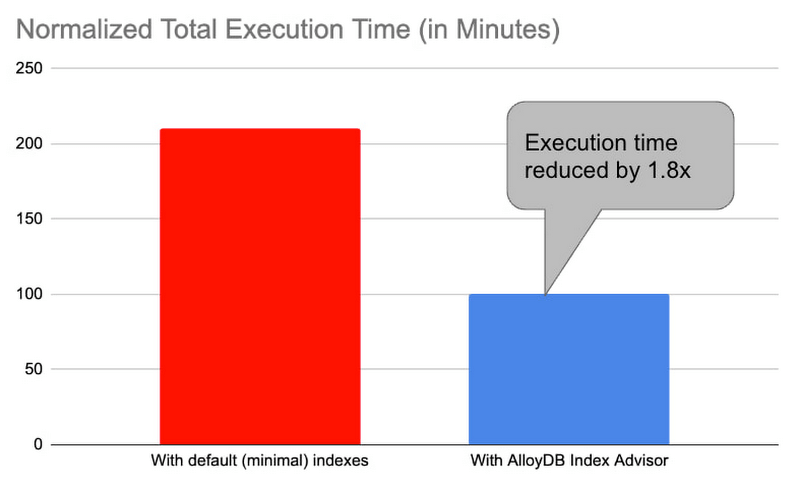
1. Decision support benchmark: We used a sample internal benchmark that modeled a decision support system. The benchmark dataset contained 450+ columns across 24 tables. The result quantified the performance of 100+ complex analytical queries. The benchmark initially had a minimal number of indexes and the normalized total query execution time was around 200+ minutes. We then enabled the AlloyDB Index Advisor and it recommended an additional 17 indexes. Creating those indexes and re-running the queries reduced the total execution time by half to ~100 minutes (1.8x).
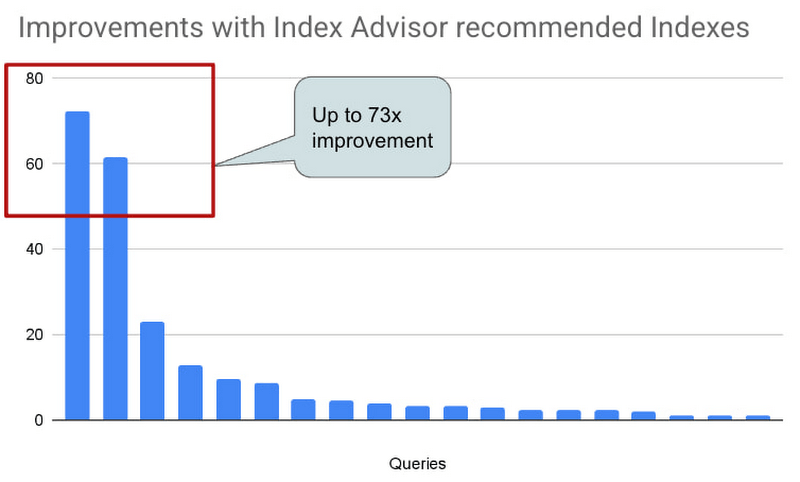
2. Real-world AlloyDB customer workload: This is a real-world workload from a large financial customer. They have a portfolio of complex analytical queries and business insights demand fast response times. Before using Index Advisor, DBAs had already created a few indexes that they considered to be useful to speed up these queries. Many of their queries joined 30+ tables, had 10+ filters and multiple subqueries. Those made it complex for DBAs to correctly identify the most beneficial indexes to create. AlloyDB Index Advisor analyzed these complex structures and identified four additional indexes. By adding the suggested indexes, performance of 17 queries were up by 5x – 73x. The response time of these queries dropped from seconds to milliseconds.
Usage Example
An example: We use the following example to demonstrate the use of Index Advisor. The example simulates a retail application performing analytics on its orders table.
1. Create a sample orders table.
CREATE TABLE orders (
    o_orderkey bigint NOT NULL,
    o_custkey int NOT NULL,
    o_orderstatus "char" NOT NULL,
    o_totalprice numeric(13,2) NOT NULL,
    o_orderdate date NOT NULL,
    o_orderpriority character varying(15) NOT NULL,
    o_clerk character varying(15) NOT NULL,
    o_shippriority int NOT NULL,
    o_comment character varying(79) NOT NULL
);
2. Insert 100K random orders into the table.
INSERT INTO orders
SELECT col, col, substr(md5(random()::text), 1, 1), random(), date '2023-01-01' + col * interval '1 hour', substr(md5(random()::text), 1, 1), concat('clerk', col), col%10, concat('comment', col)
 FROM generate_series(1,1000000) g(col);
3. Analyze the table to populate statistics.
ANALYZE orders;4. Run a query that counts the number of orders in the second week of Jan. You can run the query with timing on so that you can see how long it takes to run the query before and after the index is created.
\timing
SELECT COUNT(*) FROM ORDERS WHERE o_orderdate >= '2023-01-09' and o_orderdate <= '2023-01-15';

Time: 42.196 ms
5. Manually request an index recommendation.
SELECT * FROM google_db_advisor_recommend_indexes();
                      index                       | estimated_storage_size_in_mb
--------------------------------------------------+------------------------------
 CREATE INDEX ON "public"."orders"("o_orderdate") |                           25
(1 row)
6. View recommended indexes for tracked queries.
SELECT DISTINCT recommended_indexes, query
FROM google_db_advisor_workload_report r, google_db_advisor_workload_statements s
WHERE r.query_id = s.query_id AND recommended_indexes != '';
               recommended_indexes                |                                             query
--------------------------------------------------+------------------------------------------------------------------------------------------------
 CREATE INDEX ON "public"."orders"("o_orderdate") | SELECT COUNT(*) FROM ORDERS WHERE o_orderdate >= '2023-01-09' and o_orderdate <= '2023-01-15';
(1 row)
6. View recommended indexes for tracked queries.
SELECT DISTINCT recommended_indexes, query
FROM google_db_advisor_workload_report r, google_db_advisor_workload_statements s
WHERE r.query_id = s.query_id AND recommended_indexes != ”;
recommended_indexes | query
————————————————–+————————————————————————————————
CREATE INDEX ON “public”.”orders”(“o_orderdate”) | SELECT COUNT(*) FROM ORDERS WHERE o_orderdate >= ‘2023-01-09’ and o_orderdate <= ‘2023-01-15’;
(1 row)
7. Add the recommended index.
CREATE INDEX ON "public"."orders"("o_orderdate");8. Re-run the query.
\timing
SELECT COUNT(*) FROM ORDERS WHERE o_orderdate >= '2023-01-09' and o_orderdate <= '2023-01-15';

Time: 1.403 ms  (compared to 42.196ms before the index)
Learn more
- To learn more about AlloyDB’s Index Advisor, see Enable and use the index advisor | AlloyDB for PostgreSQL | Google Cloud
- To learn about AlloyDB, read AlloyDB for PostgreSQL intelligent scalable storage | Google Cloud Blog
- Start building on Google Cloud with $300 in free credits and 20+ always free products. https://cloud.google.com/free
Pay-Go Option for MongoDB on Google Cloud Helps Customers Scale as Required

3355
Of your peers have already read this article.
3:00 Minutes
The most insightful time you'll spend today!
As the volume and velocity of data grows daily, business success depends on the ability to manage it effectively and transform it into actionable insights. Since 2019, Google Cloud and MongoDB have worked together to give businesses the secure, global, and highly performant infrastructure, the sophisticated data intelligence, and the developer-centric tools they need to power modern, data-driven cloud applications. Our partnership with MongoDB continues to deliver richer yet simpler ways to lead with software.
With MongoDB Atlas on Google Cloud, developers can build upon a solid foundation that enables them to work with data the way they want in support of global-scale applications. For example, Forbes, a large business media brand, migrated its platform to Google Cloud and MongoDB Atlas in just six months. The company’s new cloud infrastructure helped the website scale to accommodate record-breaking growth even while making development more nimble. MongoDB’s document model meant developers could build new features quickly, easily incorporate changes, and better handle a growing diversity of data types. It also allowed for more powerful tools, such a machine-language trending story recommendation engine for journalists. Results have been impressive, including:
- 58% faster build time for new products and fixes
- Accelerated release cycle by 4x
- Reduced total cost of ownership by 25%
- 28% increase in subscriptions from new newsletters
The Forbes team is already looking ahead, with plans for improved personalization, loyalty, and management of first-party data. “Our decision to migrate to Google Cloud was made based on the toolset that it offers, scalability, and developer friendliness,” says Vadim Supitsky, Forbes CTO.
Over the course of the partnership between MongoDB and Google Cloud, we have continually added new benefits for our mutual customers, such as the ability to to integrate MongoDB Atlas with Google Cloud products; leveraging BigQuery to create a managed, serverless, scalable architecture; rich data connectivity; and flexible scaling. We’ve also made it easier to migrate MongoDB on-premises instances to MongoDB Atlas on Google Cloud.
Making MongoDB on Google Cloud even more flexible with Pay-Go
That’s why we’re excited to see yet another reason for companies to choose MongoDB Atlas on Google Cloud: A new pay-as-you-go option, available on the Google Cloud Marketplace. With this new offering, developers now have a simplified subscription experience, and enterprises have a simplified way to procure MongoDB in addition to privately negotiated offers already supported on the Google Cloud Marketplace. There are no up-front commitments required to use MongoDB Atlas on Google Cloud, and customers pay only for the resources they use and scale based on their needs. Here are just a few of the benefits of this new service:
- Spin up a MongoDB Atlas cluster on the Google Cloud Console within a few minutes
- No need for a separate credit card payment: You can use your Google Cloud Billing account for your MongoDB Atlas environment
- Receive a single bill for Google Cloud and MongoDB Atlas
- Apply Google Cloud committed spend to MongoDB transactions through Google Cloud Marketplace
- Get started with MongoDB Atlas with 512 MB of storage for free. Atlas free tier clusters are perfect for learning MongoDB or prototyping applications
We’re excited to see even further growth in our continuing partnership with three new developments: First, because resellers are such an important force, we are pleased to share that reseller partners can now make MongoDB Atlas available via the Google Cloud Marketplace. Second, MongoDB and Google Cloud have expanded our joint reach to 28 global regions after adding Toronto, Canada, and Santiago, Chile. And third, we’ve made a joint commitment to early stage companies through MongoDB for Startups and the Google for Startups Cloud Program. Pay-Go is great for startups because it’s easy to scale and you only pay for what you use. Similarly, MongoDB and Google are helping startups get off the ground with our respective programs, which both include credits and support.
Better together
Your company’s transformation hinges on new cloud database capabilities. The first step to building all-new digital experiences is to select the operational database that will power your application and, in essence, run your business.The partnership between MongoDB and Google Cloud gives you the benefits of a modern database service in a tightly integrated, cloud-native way. Since the beginning of our collaborative journey, we have made significant enhancements to the experience for our mutual customers, and we continue to work toward providing a rich developer experience for MongoDB Atlas on Google Cloud.
Discover how customers choose MongoDB and Google Cloud to power the future of customer innovation. For more information on how to get started, visit MongoDB Atlas on Google Cloud Marketplace.
Mrs. T’s Pierogies Moves SAP Systems to Google Cloud for Faster Analytics Capabilities for its SAP Data

6840
Of your peers have already read this article.
1:30 Minutes
The most insightful time you'll spend today!
Pierogies might just be the ultimate comfort food. But when Mrs. T’s Pierogies — the leading manufacturer of frozen pierogies in the US — learned it needed to transition its existing on-premises SAP ECC to S/4HANA, the company sought a little comfort for itself.
Founded in 1952, Mrs. T’s Pierogies now produces more than 650 million pierogies a year. Moving that many pierogies requires a powerful ERP system — and an equally powerful IT infrastructure on which to run it. Mrs. T’s realized that the SAP-mandated transition of its ERP solution to SAP S/4HANA was an opportunity to move its SAP systems to Google Cloud and gain real-time analytics capabilities for faster sales forecasting, more effective trade promotions, and more sophisticated planning.
From necessity to opportunity
Mrs. T’s successfully ran its SAP ECC solution on its own on-premises servers for years. But after SAP decided to sunset the product, Mrs. T’s realized that it faced multiple challenges, including:
- Migrating its SAP ECC 6.0 system from an on-premises leagcy OS to a cloud-based Linux environment
- Moving data from its SAP DB2 database to HANA
- Transitioning from ECC to SAP S/4HANA
That complex transition needed to take place with little or no downtime, since nearly all of the company’s invoices, warehouse movements, and transfer orders used the Electronic Data Interchange (EDI) protocol. Missing even a few hours of EDI transactions would put significant revenue at stake. Adding to the challenge: Some Mrs. T’s customers would not accept an invoice past five days, which left little room for error. Mrs. T’s chose Rackspace Technology, a longtime Google Cloud partner, to oversee the move.
Mrs. T’s could have chosen to run S/4HANA on its legacy hardware but saw migration to Google Cloud as an opportunity to improve key aspects of its business, in particular data analytics. Historically, sales planning and forecasting involved time-consuming manual processes. But the speed, availability, and scalability of Google Cloud meant that Mrs. T’s could take advantage of S/4HANA’s embedded analytics capabilities. Migrating could also open the door to leveraging Google Cloud’s native integration of SAP data to power Google tools such as BigQuery, Google Cloud AI Building Blocks, and more.
The move to Google Cloud also gave Mrs. T’s an opportunity to update its disaster recovery process. Previously, the company backed up to tape. So, if its SAP systems went down, a member of the IT department would have to drive the most recent tape backups an hour to its cold site, where the disaster recovery partner would load the SAP backup tape, boot the system up, switch network connections to that site, and cross their fingers. Not only would downtime be significant, but restored data would be limited to the periodic tape backup.
“Everything just worked”
Once Mrs. T’s decided to migrate to Google Cloud, the company worked with Rackspace Technology to implement the system. The first phase focused on moving the SAP production environment from on-premises infrastructure to Google Cloud and updating its database to HANA, which took place over 12 weeks. The switchover occurred over a weekend and was all but invisible to users. “We came in on Monday and everything just worked,” recalls Timothy Coyle, Director of Information Systems & Technology. In a second four-month phase, the company transitioned from ECC to S/4.
The move to Google Cloud paid dividends immediately. Batch transactions occurred twice as fast and on-screen end-user transactions rendered instantly. The upgrade also gave the finance team access to embedded analytics and monitoring for the first time. With everything now in the cloud, disaster recovery could be dynamic and nearly instantaneous, with a worst-case scenario of just 5 to 10 minutes of downtime.
“Mrs. T’s needed a skilled and experienced partner that could move its SAP environment to Google Cloud with no negative impacts to its business. We knew this migration was a key initiative in Mrs. T’s digital transformation journey,” says Chuck Britton, Google Partner Development Manager at Rackspace. “We also knew that running SAP on Google Cloud would give the business the fast and flexible analytical capabilities it needed for its SAP data.”
From ideation to production, Mrs. T’s migrated from its legacy on-premises infrastructure to a modern SAP S/4HANA solution on Google Cloud in only seven months, with minimal downtime and zero disruptions. Now that the migration is complete, Mrs. T’s has a flexible, highly scalable environment to run the SAP applications and data that fuel the business. Says Coyle, “Our strategic intent for IT is to make processes simpler, people more productive, and infrastructure more secure. This project fits right square in the middle of that strategic philosophy.”
Learn more about ways in which Google Cloud can transform your SAP experience and about Rackspace Google Cloud solutions for SAP customers.
More Relevant Stories for Your Company

Memorystore for Redis Read Replicas to Scale App Read Requests by 6X
Modern applications need to process large-scale data at millisecond latency to provide experiences like instant gaming leaderboards, fast analysis of streaming data from millions of IoT sensors, or real-time threat detection of malicious websites. In-memory datastores are a critical component to deliver the scale, performance, and availability required by these




Replacing Oracle with Cloud Spanner: What Optiva Learnt
Optiva is a Canada-based provider of business support system (BSS) and Operations Support Systems (OSS) software and services to the telecommunications vertical. Optiva sought to improve its product offering. In the way were very tough challenges including a need for accuracy, the need to deal with very high volumes, the

Cloud Bigtable brings database stability and performance to Precognitive
At Precognitive, we were able to start with a blank technology slate to support our fraud detection software products. When we started building the initial version of our platform in 2017, we had some decisions to make: What coding language to use? What cloud infrastructure provider to choose? What database



How Spotify Serves Personalized Music Recommendations
Music for everyone. That’s Spotify’s promise. And it lives up to it by serving over 140 million music lovers across the world. Every day it renders personalized music recommendations to hundreds of millions of happy customers.“Spotify is a global business with a global user base. Being able to provide a
