





3348
Of your peers have already watched this video.
25:30 Minutes
The most insightful time you'll spend today!
Building Globally Scalable Services with Istio and ASM
Building distributed applications is hard! Building globally scalable distributed applications is harder. Maintaining and growing these services as your business grows is even harder.
Learn how to create a globally scalable platform for your business on Google Cloud using service meshes. See how to build a platform on Google Cloud from the ground up.
3625
Of your peers have already watched this video.
15:20 Minutes
The most insightful time you'll spend today!
Building a Bank with Kubernetes: How Monzo is Creating the Best Banking App Ever
Based in London, Monzo is a bank that lives on the smartphone and is built for the way modern customers live today. By solving their problems, treating them fairly and being totally transparent, Monzo believes it can transform the way people bank.
“We are building a full retail bank. What we are trying to be is become the best banking app in the world. This means that instead of showing you cramped indecipherable descriptors that you get from traditional banks, we actually show you the name of the merchant along with the logo and a real-time balance rather than something that’s often delayed by 24 to 48-hours. Basically, we strive to make everything as clear and easy to understand for customers,” says Oliver Beattie, Head of Engineering, Monzo.
In their quest for building the best banking application, Kubernetes is significantly helping Monzo overcome core banking challenges and continuously innovate.
“Kubernetes makes our application extensible. We want our application to be very easy to change not just now but maybe 10 or 20 years from now. As what we have now will not be the gold standard 20 years down the line. We want our application to be better than those the legacy banks have,” says Beattie.
Running multiple services at the same time on a particular application and ensuring speed was a significant hurdle Monzo had to overcome.
“You cannot run 150 services on a single machine and expect all of them to be fast. What we wanted is to treat our application as a big pool of resources, which is what Kubernetes exactly allowed us to do. We can now run one big group of worker machines and run all our applications there and scale them up and down as needed. Owing to Kubernetes we are now able to reduce one-third of our infrastructure costs,” says Beattie.
Watch the full video to get deeper insights into how Kubernetes is helping Monzo build the best banking application ever.
Deploying Ray on GKE: Distributed Computing Made Easy

967
Of your peers have already read this article.
3:30 Minutes
The most insightful time you'll spend today!
The rapidly evolving landscape of distributed computing demands efficient and scalable frameworks. Ray.io is an open-source framework to easily scale up Python applications across multiple nodes in a cluster. Ray provides a simple API for building distributed, parallelized applications, especially for deep learning applications.
Google Kubernetes Engine (GKE) is a managed container orchestration service that makes it easy to deploy and manage containerized applications. GKE provides a scalable and flexible platform that abstracts away the underlying infrastructure.
KubeRay enables Ray to be deployed on Kubernetes. You get the wonderful Pythonic unified experience delivered by Ray, and the enterprise reliability and scale of GKE managed Kubernetes. Together, they offer scalability, fault tolerance, and ease of use for building, deploying, and managing distributed applications.
In this blog post, we share a solution template to get you started easily with Ray on GKE. We discuss the components of the solution and showcase an inference example using Ray Serve for Stable Diffusion.
Overview of the Solution
In this solution template we use KubeRay, an OSS solution for managing Ray clusters on Kubernetes, as the operator for provisioning our workloads. Follow the step-by-step instructions in the README file to get started. The solution contains two groups of resources: platform-level and user-level.
Platform-level resources are expected to be deployed once for each development environment by the system administrator. These include the common infrastructure and GCP service integrations that are shared by all users.
- GKE cluster and node pool. Configurations can be changed in the main.tf file. This module deploys a GKE cluster with a GPU node pool, including required Nvidia drivers for GPUs. You can replace these with other machine types.
- Kubernetes system namespace and service accounts, along with the necessary IAM policy bindings. This allows the platform administrator to provide fine-grained user access control and quota policies for Ray cluster resources.
- KubeRay operator. The operator is responsible for watching for changes in KubeRay resources and reconciling the state of the KubeRay clusters.
- Logging. The `logging_config` section enables logs from system components and workloads to write logs to Cloud logging.
- Monitoring. The `monitoring_config` section enables Managed Prometheus integration. This allows the deployment to automatically scrape system-level metrics and writes them to the managed metrics service.
- Workload identity. This enables your workloads to authenticate with other GCP services using Google IAM service accounts.
User-level resources are expected to be deployed once by each user in the development environment.
- KubeRay cluster. This is the actual Ray cluster that we will be used for your workloads. It is configured to use a Workload Identity pool and a IAM-binded service account that provides fine-grained access to GCP services. You can customize the Ray cluster settings by editing the kuberay-values.yaml file.
- Logging. The solution adds a side car container deployed alongside each KubeRay worker node. This uses fluentbit to forward Ray logs from the head node to Cloud logging. You can edit the fluentbit-config file to change how the logging container filters and flushes logs.
- Monitoring. This module provides a PodMonitoring resource that scrapes metrics from the user’s Ray cluster and uploads data points to Google Managed Prometheus. An optional installation for Grafana dashboard is included and can be accessed through a web browser.
- JupyterHub server. This module installs a JupyterHub notebook server in the user namespace, enabling users to interact directly with their Ray clusters.
Run a Workload on Your Ray Cluster
Let’s try running the provided example with Ray Serve to deploy Stable Diffusion. This example was originally taken from the Ray Serve documentations here. To open the example in Jupyter notebook, go to the external IP for proxy-public in your browser (instructions to get the IP). And then click on File -> Open from URL, and input the raw URL of the notebook to open it.
Since the notebook runs in the same Kubernetes cluster as the Ray cluster, it is able to talk directly to the latter using its cluster-internal service endpoint – thus there is no need to expose the Ray cluster to public internet traffic. For production workloads, you should secure your endpoints with GCP account credentials. Google Cloud Identity Aware Proxy (IAP) can be used to enable fine-grained access control to user resources, such as our Ray cluster, to protect your GCP resources from unnecessary exposure. A full tutorial on how to enable IAP on your GKE cluster can be found here.
The notebook contains code for deploying a pre-trained model to a live endpoint. The last cell makes a call to the created service endpoint:prompt = “a cute cat is dancing on the grass.”input = “%20″.join(prompt.split(” “))resp = requests.get(f”http://example-cluster-kuberay-head-svc:8000/imagine?prompt={input}”)with open(“output.png”, ‘wb’) as f: f.write(resp.content)
Executing the notebook will generate a file with a unique picture of a cute cat. Here is an example we got:

Congratulations! You have now deployed a large model for image generation on GKE.
Logging and Monitoring
As mentioned earlier, this solution enables logging and monitoring automatically. Let’s find those logs.
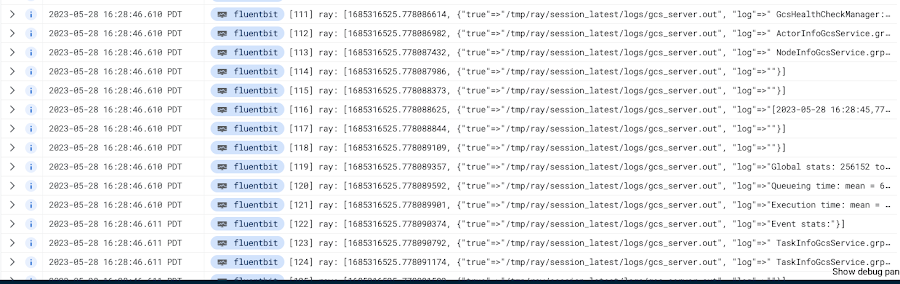
In your Cloud Console, open up Logging -> Log Explorer. In the query text box, enter the following:resource.type=”k8s_container”resource.labels.cluster_name=%CLUSTER_NAME%resource.labels.pod_name=%RAY_HEAD_POD_NAME%resource.labels.container_name=”fluentbit”
You should see the Ray logs from your cluster forwarded here.
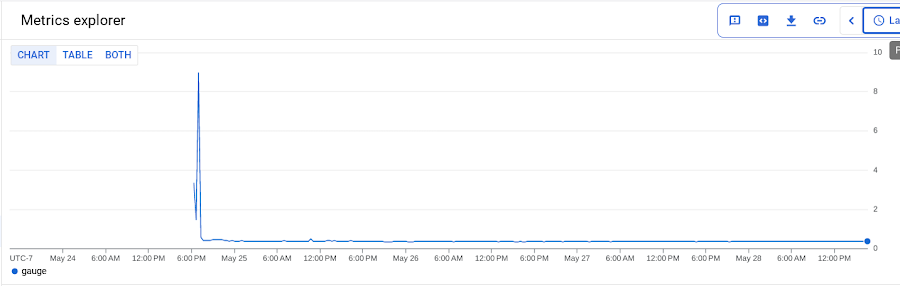
To see your monitoring metrics, go to Metrics Explorer in the Cloud Console. Under the menu for “Target”, select “Prometheus Target” and then “Ray”. Select the metric that you want to see, for instance `prometheus/ray_component_cpu_percentage/gauge`:
The deployment also comes with a Grafana deployment. Follow this guide to open it up and view your Ray cluster’s metrics.
Conclusion
The combination of Ray and GKE offers a simple and powerful solution for building, deploying, and managing distributed applications. Ray’s simplicity makes it an attractive choice for data and model developers while GKE’s scalability and reliability is the defacto choice for enterprise platforms. The solution template presented in this blog post offers a convenient way to get started quickly with KubeRay, the recommended approach to deploy Ray on GKE.
If you have any questions for building Ray on Kubernetes and GKE, you can contact us directly at ray-on-gke@google.com or comment in GitHub. Learn more about building AI Platforms with GKE by visiting our User Guide.
Leverage Apigee X to Access API Backends with Multiple VPCs

4235
Of your peers have already read this article.
4:00 Minutes
The most insightful time you'll spend today!
API gateways are a critical component of a modern architecture. Apigee X is Google Cloud’s API management platform. It also allows users of the legacy Apigee Edge product to leverage Virtual Private Cloud (VPC) products and features, like Cloud Armor and Load Balancers. With these new security and availability advantages come a new set of challenges. The biggest challenge is accessing API backends in multiple VPCs. This introduces VPC peering transitivity restrictions. Only two VPCs can be peered in sequence, but the Apigee X Runtime already consumes one peering connection. This blog post discusses overcoming transitivity limits, with an eye on future managed services that solve the problem.
VPC Peering Transitivity Limits
The main challenge with Apigee X is that customers have backend servers in multiple distinct VPCs. This means that Apigee X Runtime traffic must traverse multiple VPC peering connections. However, peering transitivity limits VPC networking to only one sequential VPC hop.
In the past (Apigee Edge / SaaS) customers did not need to worry about securing their backend APIs across multiple VPCs. Apigee X networking is a new feature, compared to the original Apigee SaaS product.
VPC Connectivity Options
VPC peering is the easiest option. The restriction is that connectivity wise, only one peering hop is allowed, which is already consumed by a connection to the Apigee X Runtime. The Apigee X Runtime resides in a Google managed VPC.
Internal Global Load Balancers (ILBs) with Managed Instance Group (MIG) backends is the second option. This peering solution is complex though.
The open internet is the most parsimonious solution. Apigee X facilitates this, but it would violate the security mandates of many Google Cloud customers.
The final option is Cloud VPN. Cloud VPN supports transitivity across multiple VPC network hops. As well the implementation steps are relatively simple. Traffic does not traverse the open internet for VPCs within Google Cloud.
Apigee X Networking Explained
ApigeeX is a Private Service Access (PSA) based service that is deployed and managed in a tenant project. A tenant project is a project that is tied to the Apigee X Runtime, in a one-to-one relationship. The Apigee X deployment natively manages a load balancer in the customer’s VPC for ingress traffic. By default, egress to non-private routes from Apigee X is through Cloud NAT in the tenant project. The default Apigee X deployment is more suitable for non hub-and-spoke network design.
Single VPC Hub Design
Figure 3 demonstrates the API request flow. External API requests come from the internet and first encounter the XLB. The XLB has the Apigee X Runtime as a backend, using Network Endpoint Group to contain the Apigee X Environment Group domain name. From here the Apigee X Runtime sends the API request over the VPC peering connection to apigee-x-project.
Google Cloud VPN connections allow Virtual Private Clouds (VPCs) to reference each other’s internal resources, with the help of Google Cloud Routers. Cloud Routers advertise each VPCs’ IP address ranges. This enables traffic over the Cloud VPN tunnels to reference resources via their private IP addresses. Additionally, Google Cloud DNS peering facilitates a consumer VPC to reference hostnames in a producer VPC.
From the apigee-x-vpc (consumer), the API request references a backend-project-a-vpc (producer) resource hostname, via DNS peering. This would be the backend identified in an Apigee X API proxy. The request itself does not traverse the DNS peering connection. Instead, the API request goes through a Cloud VPN tunnel. In this way, Cloud VPN is used as a substitute for VPC peering.
Shared VPC Hub Design
A more advanced example is a shared VPC hub project, illustrated in Figure 4. The general idea is the same; use Cloud VPN connections instead of peering connections, advertise routes using Cloud Router and use DNS peering to reference any compute resources by their hostnames.
What is interesting is the idea that the apigee-x-project can use a subnet in a shared VPC, independently of the hub-project, which is in the same shared VPC. Shared VPC subnets do not violate the VPC peering transitivity limit (only two peered VPCs in sequence). This architecture pattern can be scaled to connect multiple shared VPCs via VPN tunnels. This is analogous to cascading hub-and-spoke architecture pattern: the inner hub-and-spoke is the shared VPC (with the apigee-x-project) and the outer hub-and-spoke is the VPN connected backend-projects.
Fixing VPC Peering with Private Service Connect
Private Service Connect (PSC) allows private consumption of services across VPC networks. This feature is coming to Apigee X in the first half of 2022. Private Services Access (PSA) is what enables you to reach services’ internal IP addresses. Apigee X is a PSA service, hence its ability to connect to backends by their internal IP addresses. PSC is the missing piece that will natively support Apigee X backends in other VPCs.
What Next?
Try it out for yourself! We built and shared a working Terraform example in our Github repository. Apigee X opens up users to the products and features of Google Cloud VPCs. VPC transitivity limits do require some work to overcome. Private Service Connect (PSC) will solve Apigee X VPC peering challenges later in 2022. A great next step would be to implement a “wheel” architecture pattern. This is an evolution of the hub-and-spoke design, where spoke VPCs peer to each other. Cloud VPN makes this possible and PSC makes a wheel more feasible to implement. The advantage of a wheel is that spokes no longer rely on a hub VPC; for example productizing APIs in a multi-tenant environment. More details are available in the following ebook: The API Product Mindset
Resources
You can find the Terraform code in the Github repository.
Assuring Compliance in the Cloud: Paper by Google Cloud’s Office of the CISO

4924
Of your peers have already read this article.
1:30 Minutes
The most insightful time you'll spend today!
Cloud transformation and the adoption of modern DevOps technology presents both opportunities and challenges for IT compliance functions. With DevOps style application development, the feedback loop for developers and engineers is much tighter than with traditional application development pipelines, enabling speed and agility of application release cycles. While speedy CI/CD is a critical advantage of DevOps, it also shifts compliance left in the development timeline, and therefore puts pressure on the IT risk & compliance organization to modernize their approach to regulatory compliance as well. With the ongoing shift towards cloud technologies and DevOps, modernization of regulatory compliance is no longer optional for an IT compliance function
Compliance modernization is a broad mandate that spans the way the function is governed; the tools, technology, and analytics it uses; the number and nature of its connections to other parts of the business; verifiability and auditability of the controls’ evidence, the expectations assigned to it; and more.
Public cloud technology is becoming a core part of many industries today, and with this comes some potential risks such as cloud misconfigurations exposing intellectual property, loss of physical control of assets, skillset scarcity around cloud based security and compliance.
Given the constantly changing risk landscape, it is critical that regulations more closely align to address these risks. As regulations and risks evolve, the aim of a modern compliance function is to help an organization stay compliant as it goes through a digital transformation. As organizations go through digital transformation, IT compliance also needs to transform — via upgrading the technology stack, modifying the business processes and most importantly re-skilling people to become cloud aware.
Today we are releasing the new paper by Google Cloud’s Office of the CISO. In the paper we reveal a new approach for modernizing your compliance approach using modern approaches and Google Cloud toolsets. Your team can leverage the paper to add value to enterprises, both by charting a course to the safe use of cloud technology and by reducing risk through the use of the public cloud.
Read the paper “Assuring Compliance in the Cloud.”
Also, review these related resources:
- “Risk Governance of Digital Transformation in the Cloud“ paper
- “Making Compliance Cloud-native” (episode 14) with Zeal Somani
- Google Cloud Compliance resource center
- Our compliance blueprints: PCI DSS on GKE and GCP FedRAMP Blueprint
- Google Cloud security best practices center

4426
Of your peers have already downloaded this article
7:00 Minutes
The most insightful time you'll spend today!
Aspiration is easy, but execution is hard. Few concepts illustrate this as well as digital transformations.
Most businesses today are at some phase of their digital transformation journey. While some are evaluating strategies and solutions, many companies have already embarked on full-scale project implementations. However, one thing is clear. While most business and IT leaders aspire to revamp their businesses, executing a well-defined digital transformation strategy is extremely complicated. The hurdles are both cultural and technological.
This e-Book breaks down the process of creating a digital transformation strategy into ten core dimensions: platform, APIs, outside-in, ecosystem, leadership, funding, metrics, software development lifecycle, talent, and self-service. Read on to understand how companies like Walgreens, Ticketmaster, Magazine Luiza, AccuWeather, and Pitney Bowes, are successfully charting their digital transformation journey with the help of Apigee Compass and evolving their businesses.
More Relevant Stories for Your Company


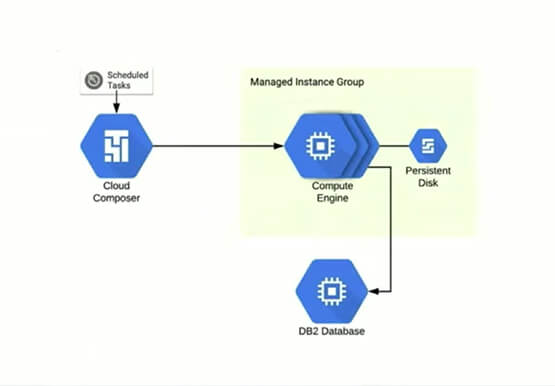

Reduce Costs, Increase Profits by Modernizing Your Mainframe Applications with Google Cloud
Mainframe powers much of global commerce and for decades—with its proprietary platform and legendary lock-in—was resistant to effective competition. Even years after most organizations began adopting public cloud, migrating off the mainframe remains too complex for many organizations to undertake. Google Cloud brings a unique, automated approach to modernization enabling

Why America’s Leading Mortgage Technology Provider Runs its Business on Apigee
Black Knight is a leading provider of technology, data, and analytics to the mortgage industry, catering to both large and mid-tier banks in the United States. Over the past few decades, we tended to manage customer integrations on a case-by-case basis. Whenever a bank needed to connect with a Black Knight

Picsart’s Apigee-powered Pivot: From B2C to B2B, Bringing Graphic Design Capabilities to Businesses
With 150 million users and counting, Picsart was originally founded as a photo and video editing app we use to enhance our everyday life before uploading them to various social media platforms. As its user numbers continue growing, the company began exploring options for incorporating its easy-to-use editing tools into

Four Simple Steps to SRE Implementation
A few months ago, we wrote about how the first step to implementing Site Reliability Engineering (SRE) in an organization is getting leadership on board. So, let’s assume that you’ve gone ahead and done that. Now what? What are some concrete steps you can take to get the SRE ball rolling?
