





3140
Of your peers have already watched this video.
18:45 Minutes
The most insightful time you'll spend today!
Reduce Costs, Increase Profits by Modernizing Your Mainframe Applications with Google Cloud
Mainframe powers much of global commerce and for decades—with its proprietary platform and legendary lock-in—was resistant to effective competition. Even years after most organizations began adopting public cloud, migrating off the mainframe remains too complex for many organizations to undertake.
Google Cloud brings a unique, automated approach to modernization enabling customers to go from mainframe to containers.
Gain operational efficiency
Escape capital-intensive mainframe refresh cycle with Google cloud. Move to a modern cloud-based model to reduce operational cost and improve maintainability.
Deliver agile services
You can also evolve software capabilities for faster and frequent updates. Use cloud-native technologies such as GKE alongside your on-premises workloads and accelerate time to market.
Mitigate risk and get access to talent
Also, eliminate the dependency on scarce skills. Gain access to top engineering talent and avoid vendor lock-in by modernizing to open software languages.
Watch this video where Travis Webb, Cloud Solutions Architect for Enterprise at Google Cloud, takes you through the challenges of modernizing mainframe and the key technical aspects of this solution that make it possible.
Centralized Analytics: Apigee and Cloud Run API Management

897
Of your peers have already read this article.
3:30 Minutes
The most insightful time you'll spend today!
Most enterprise companies enforce strict requirements for how APIs should be exposed to the public internet that require centralized handling of the authentication credentials, the collection of metrics metrics and other classic API management capabilities. Before the introduction of sidecars in Cloud Run, developers either had to implement these requirements within the service itself or add a full-lifecycle API management platform in front of their service as described in a previous blog post.
In this post we want to demonstrate a new way to fulfill the requirement for API management in Cloud Run. Specifically we want to look at how the recently announced multi-container feature in Cloud Run enables a sidecar pattern that can be used by developers of Cloud Run services to add pre-packaged API management capabilities. This includes self-service developer onboarding in a developer portal, credential validation and quota enforcements. As an additional operational benefit the described solution also adds centralized analytics and metrics for APIs that are exposed via Cloud Run.
Our solution for adding API management capabilities for Cloud Run is provided by the following three components:
- The Cloud Run service that hosts a traditional RESTful web application and is fronted by a vanilla Envoy proxy.
- An Apigee Envoy Adapter aka. Remote service that runs in GKE Autopilot and acts as a policy decision point PDP for Envoy’s external authorization filter and is responsible for accepting or rejecting calls to the Cloud Run service.
- An Apigee API Platform that is used to manage the API lifecycle of the Cloud Run service. Apigee also offers a turn-key developer portal where developers can obtain access credentials to access an API.
The user journey of an incoming request to our new Cloud Run Service with API management looks as follows:
- An API Developer self-registers in the Apigee Developer Portal and obtains access credentials for the API
- They call the Cloud Run endpoint and provide their credential for authentication
- In Cloud Run service the Envoy proxy container intercepts the request and initiates a gRPC call to the Apigee Envoy adapter to authenticate the client.
- The Apigee Envoy adapter verifies the request’s credentials and identifies the corresponding API product as defined in Apigee. The Envoy adapter also verifies the call quota associated with the client and sends the analytics data and access logs back to the control plane.
- If the credentials are valid and the client hasn’t exhausted their call quota the Apigee Envoy adapter forwards the request to its co-located container in the Cloud Run service.
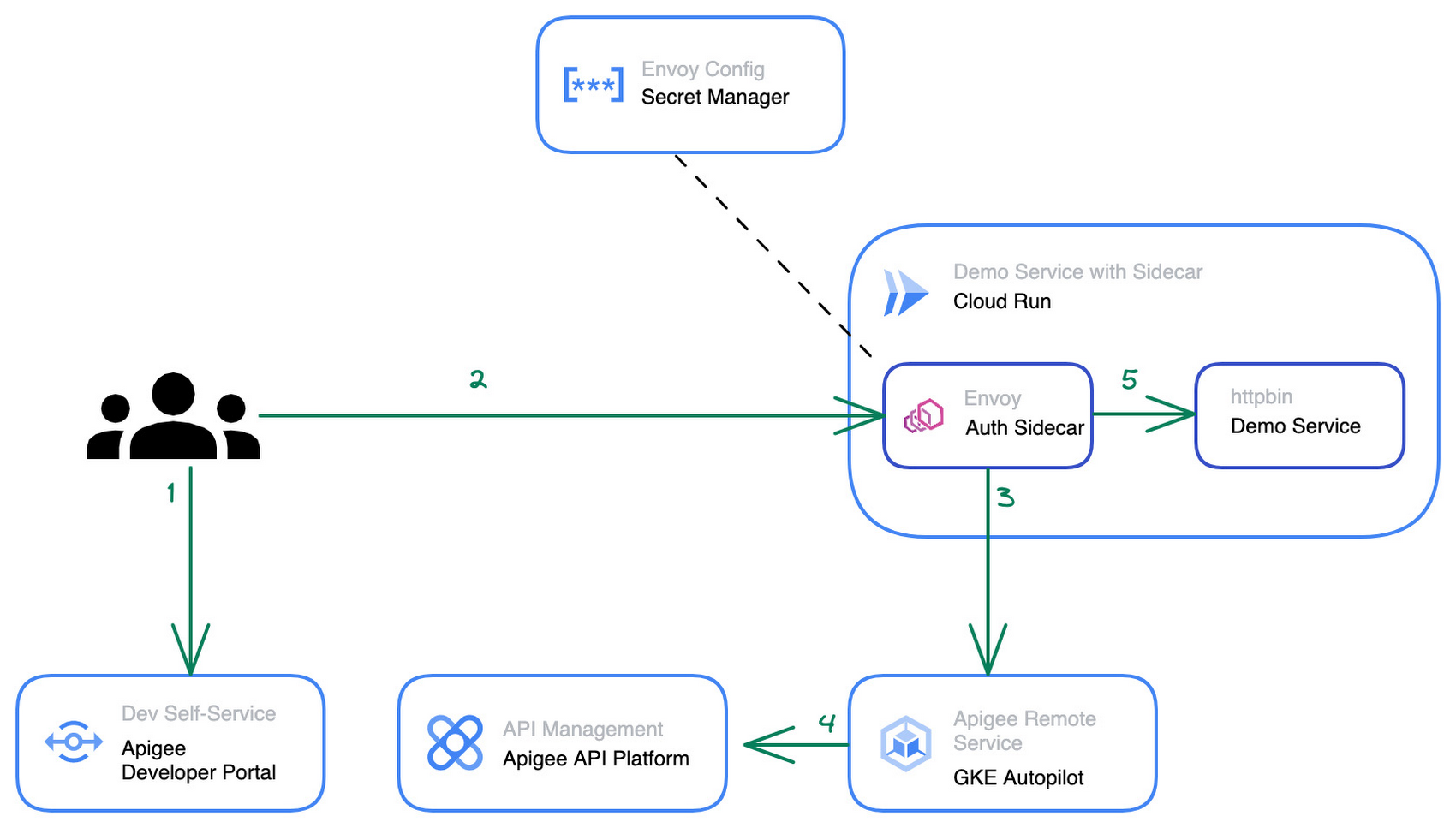
The step by step instructions for how to configure the architecture above can be found in this blog post.
Starting from a pre-existing Apigee installation the Apigee Envoy adapter is used to connect back to the Apigee runtime and control plane for accessing the API product definitions to link the incoming requests to the issued credentials and quotas. The Apigee remote service component can be replicated for high availability and is shared between multiple Cloud Run services that require a gRPC target for the sidecar’s external authorization filter.
The Cloud Run service connects to the Apigee Remote Service via an Envoy proxy that acts as a sidecar to the main application. The configuration for the envoy proxy can either be embedded within a customized Envoy image or mounted via the secret manager integration of cloud run as shown in the diagram above. Externalizing the configuration simplifies the maintenance and upgrade of the sidecar container as it can just pull the latest patch version of Envoy regularly.
The newly added API management capability is transparent for the primary application container within the Cloud Run service and does not require any changes in the application source code. Once the Cloud Run service is re-deployed with the sidecar in place, consuming applications can start to use credentials that they obtained via the Apigee API Management platform or the API developer portal to consume the Cloud Run service. At an operations level the platform operators will start to see requests to the Cloud Run service popping up in Apigee’s analytics dashboards and be able to track consumption and exposure at an API product level.
Next Steps
If you are interested in trying the multi-container support for Cloud Run yourself, check out the release announcement with many more use case descriptions. For another example and a detailed walkthrough on how to use sidecars in Cloud Run to report custom metrics to Google Cloud managed service for Prometheus you can head over to this tutorial in the Cloud Run documentation. Lastly, if you’re interested in the broader picture of how the latest features in Cloud Run are moving serverless forward, then make sure you check out this video.
Streamlining Business Processes with Google Cloud’s Application Integration

884
Of your peers have already read this article.
3:30 Minutes
The most insightful time you'll spend today!
According to a recent Accenture report, large businesses deploy an average of 500 different applications. This trend shows no signs of slowing down, with the majority of respondents signaling plans to acquire even more applications. No surprise, all these applications present a number of integration challenges, which the impending wave of generative AI in software development only promises to further intensify.
Two years ago, we introduced Apigee Integration as an add-on capability to Apigee API Management. From conversations with customers, it’s become clear that you want to access these capabilities directly from the Google Cloud console. Today, we’re announcing the general availability of Application Integration, a standalone Integration Platform as a Service (IPaaS) designed to help you connect your applications visually, with no code. Best of all, you can now get started with Application Integration with no upfront financial commitment, even if you’re not an existing Apigee customer.
What is Application Integration?
As a cloud-native product, Application Integration helps you automate business processes by connecting any application — both home-grown and third-party SaaS — with simple point-and-click configurations, so you can quickly and easily construct, maintain, and scale your integrations. Application Integration offers the following features:
Visual integration designer: An Intuitive drag-and-drop interface allows anyone to build workflows with no complex coding or manual processes. With the visual integration designer, anyone can simply drag-and-drop individual control elements (such as edges, forks, and joins) to build custom integration patterns of any complexity.

Plug-and-play connectors: A library of 75+ pre-built connectors makes it easy to connect to a number of Google Cloud services (e.g., BigQuery, Pub/Sub) and many third-party applications, including Salesforce, MongoDB, and NetSuite.

Automated triggers and transformations: With built-in triggers, you can execute integrations on an API call, Cloud Pub/Sub event, Salesforce events, or using Cloud Scheduler. An intuitive data mapping editor and comprehensive mapping functions enable you to address complex data transformation requirements in no time.

Unified platform: Whether you’re building APIs in Apigee, ingesting data using Pub/Sub, receiving events from Cloud Storage using EventArc, or something else, Application Integration works seamlessly with other integration services to provide comprehensive capabilities for your use case.
Customer praise for Application Integration
In the enterprise, different teams adopt applications to support a task in their business processes. However, the need for information exchange among these teams can spawn complex integrations that require a lot of arduous planning.
Application Integration abstracts these development complexities, so customers can focus on building value. OVO Energy uses Application Integration to automate communications in their critical business processes. “We were looking for an integration solution that was very low-code yet configurable, robust, and scalable,” said Chris Parker, Product Manager at OVO Energy. “We needed a simple solution that allowed us to get data from multiple parts of the company, supplement an existing data point with relevant information and funnel it to the Salesforce Marketing Cloud,” added Graham Vosper, Technology lead at OVO Energy.
But changes in business processes are inevitable, forcing continuous shifts to existing integrations – sometimes even rendering them obsolete. “Using Application Integration was very simple. With just a couple of clicks, our team quickly adapted to this new product and became productive,” said Graham.
A growing library of connectors in Application Integration makes it easy to connect to new applications and ensures any changes in connecting to the end application is automatically supported. OVO Energy has taken notice. “Configurability and traceability in Application Integration allows our developers to build and maintain our integrations without in-depth skills. We now have much better visibility into our information flow and failure rates,” said Graham.
Get started today
Today’s integration problems require a comprehensive approach that spans applications, systems, and data. Application Integration is part of Google Cloud’s Integration Services portfolio, designed to address your end-to-end integration needs. The portfolio covers a wide range of use cases like data integration, API Management, and event-driven architectures. You can get started with Application Integration with no financial commitment by using the free tier. Learn more, explore a sample e-commerce integration, or jumpstart your development with quickstart tutorials.
3686
Of your peers have already watched this video.
3:35 Minutes
The most insightful time you'll spend today!
APIs Help Cleveland Clinic Revamp their IT Infrastructure and Deliver High Quality Healthcare
Cleveland Clinic is one of the largest and most respected hospitals in the United States. Its mission is to provide better care of the sick, investigate their problems, and deliver further education of physicians.
The clinic deployed electronic medical records (EMR) to help doctors deliver greater quality healthcare. But the challenge was, it was not being used at it to its full potential.
“To understand how to use APIs it’s important to understand the challenges that we face. We use the electronic medical record. It’s a great investment we made and it is a great delivery tool but it only gets us so far. For the nurses and the doctors that is not good enough as they are focused in delivering the best possible care,” says Beth Meese, Administrative Director of Technology and Innovations at Cleveland Clinic.
To ensure that the EMR was being used at its full potential the clinic added APIs on top of it.
“Using the Apigee platform, we have been able to write APIs on top of our EMRs and then fill the gap for what the medical records was not able to deliver. APIs help us run analytics, run predictive models, and then surface the data back in a way to the clinicians that they can use to deliver high-quality healthcare,” says Meese.
Leveraging Apigee, Cleveland Clinic was also able to securely give developers access to APIs and reduce a considerable amount of burden from the rest of the IT team.
3750
Of your peers have already watched this video.
38:00 Minutes
The most insightful time you'll spend today!
Microservices in the Cloud with Kubernetes and Istio
Are you building or interested in building microservices? They are a powerful method to build a scalable and agile backend, but managing these services can feel daunting: building, deploying, service discovery, load balancing, routing, tracing, auth, graceful failures, rate limits, and more.
The most suited solution for you is Istio. Istio is built with containers and microservices management in mind. The Apigee Edge API platform provides common visibility and management across both APIs and microservices for organizations of any size.
For instance, within a single Kubernetes cluster—and even with Istio helping mediate—an unreliable or slow microservice can drag the SLA of an entire application down along with it.
The kinds of sophisticated analytics that the Apigee platform provides can help administrators and product managers see these kinds of issues and react to them before it’s too late. Apigee is used by many organizations to enforce various types of quotas, allowing API teams to dynamically adjust how much API load is consumed by each organization who uses an API. This session will show you how the Kubernetes container management system and Istio service mesh can simplify many of the operational challenges of microservices, including an in-depth live demo.

3349
Of your peers have already downloaded this article
5:30 Minutes
The most insightful time you'll spend today!
More Relevant Stories for Your Company

Managing the API Lifecycle: Design, Delivery, and Everything in Between
Digital is disrupting every industry. From drugstore chains to banks to telcos, businesses are becoming software companies and adopting modern software practices. Why? If they don’t adapt to a new market reality, they will fail. As the business context is changing so is the technology stack. Enterprise application architectures are

Latest News: Secure Digital Infrastructure Services with Apigee Advanced API Security for Google Cloud
Organizations in every region and industry are developing APIs to enable easier and more standardized delivery of services and data for digital experiences. This increasing shift to digital experiences has grown API usage and traffic volumes. However, as malicious API attacks also have grown, API security has become an important

Custom Voice Feature Can Help Brands Tweak IVR for Better Customer Experiences
With the rise of digital assistants and conversational interfaces, people have grown accustomed to hearing and speaking to synthetic voices. But what do those voices sound like? Often, pretty repetitive. We’re all familiar with the Google Assistant voice, for example. That’s why we are excited to announce the general availability

Google Maps Platform Can Elevate FinTech Experience with Less Risks and Higher Security
The financial services industry is changing—an estimated $68 trillion in wealth transferring from baby boomers to millennials.1 This means financial service providers will have to deliver the speed, ease-of-use, technological sophistication, and tailored services that millennials have come to expect. In fact, half of all millennials are willing to switch to
