5398
Of your peers have already watched this video.
4:00 Minutes
The most insightful time you'll spend today!
AppSheet is Useful for Schools & Universities to Custom-build Apps
AppSheet, Google Cloud’s no-code platform that eases application development and automation process without writing even a line of code. In the education space, AppSheet can come in handy easily as a unified platform to build custom applications that also integrates seamlessly with Workspace, allowing schools and universities to save on time and resources on updating IT infrastructure.
From updating sheets, sharing documents and study material over drive to scheduling events on Calendar, organizing lectures and team meets over Meets, AppSheet allows easy collaboration and access. Watch the video to build apps that are best for your University or school using Google Cloud’s AppSheet!
FAQs: Everything Your Need to Know About Cloud Computing
6626
Of your peers have already read this article.
1:30 Minutes
The most insightful time you'll spend today!
There are a number of terms and concepts in cloud computing, and not everyone is familiar with all of them. To help, we’ve put together a list of common questions, and the meanings of a few of those acronyms. You can find all these, and many more, in our learning resources.
What are containers?
Containers are packages of software that contain all of the necessary elements to run in any environment. In this way, containers virtualize the operating system and run anywhere, from a private data center to the public cloud or even on a developer’s personal laptop. Containerization allows development teams to move fast, deploy software efficiently, and operate at an unprecedented scale. Read more.
Containers vs. VMs: What’s the difference?
You might already be familiar with VMs: a guest operating system such as Linux or Windows runs on top of a host operating system with access to the underlying hardware. Containers are often compared to virtual machines (VMs). Like virtual machines, containers allow you to package your application together with libraries and other dependencies, providing isolated environments for running your software services. However, the similarities end here as containers offer a far more lightweight unit for developers and IT Ops teams to work with, carrying a myriad of benefits. Containers are much more lightweight than VMs, virtualize at the OS level while VMs virtualize at the hardware level, and share the OS kernel and use a fraction of the memory VMs require. Read more.
What is Kubernetes?
With the widespread adoption of containers among organizations, Kubernetes, the container-centric management software, has become the de facto standard to deploy and operate containerized applications. Google Cloud is the birthplace of Kubernetes—originally developed at Google and released as open source in 2014. Kubernetes builds on 15 years of running Google’s containerized workloads and the valuable contributions from the open source community. Inspired by Google’s internal cluster management system, Borg, Kubernetes makes everything associated with deploying and managing your application easier. Providing automated container orchestration, Kubernetes improves your reliability and reduces the time and resources attributed to daily operations. Read more.
What is microservices architecture?
Microservices architecture (often shortened to microservices) refers to an architectural style for developing applications. Microservices allow a large application to be separated into smaller independent parts, with each part having its own realm of responsibility. To serve a single user request, a microservices-based application can call on many internal microservices to compose its response. Containers are a well-suited microservices architecture example, since they let you focus on developing the services without worrying about the dependencies. Modern cloud-native applications are usually built as microservices using containers. Read more.
What is ETL?
ETL stands for extract, transform, and load and is a traditionally accepted way for organizations to combine data from multiple systems into a single database, data store, data warehouse, or data lake. ETL can be used to store legacy data, or—as is more typical today—aggregate data to analyze and drive business decisions. Organizations have been using ETL for decades. But what’s new is that both the sources of data, as well as the target databases, are now moving to the cloud. Additionally, we’re seeing the emergence of streaming ETL pipelines, which are now unified alongside batch pipelines—that is, pipelines handling continuous streams of data in real time versus data handled in aggregate batches. Some enterprises run continuous streaming processes with batch backfill or reprocessing pipelines woven into the mix. Read more.
What is a data lake?
A data lake is a centralized repository designed to store, process, and secure large amounts of structured, semistructured, and unstructured data. It can store data in its native format and process any variety of it, ignoring size limits. Read more.
What is a data warehouse?
Data-driven companies require robust solutions for managing and analyzing large quantities of data across their organizations. These systems must be scalable, reliable, and secure enough for regulated industries, as well as flexible enough to support a wide variety of data types and use cases. The requirements go way beyond the capabilities of any traditional database. That’s where the data warehouse comes in. A data warehouse is an enterprise system used for the analysis and reporting of structured and semi-structured data from multiple sources, such as point-of-sale transactions, marketing automation, customer relationship management, and more. A data warehouse is suited for ad hoc analysis as well custom reporting and can store both current and historical data in one place. It is designed to give a long-range view of data over time, making it a primary component of business intelligence. Read more.
What is streaming analytics?
Streaming analytics is the processing and analyzing of data records continuously rather than in batches. Generally, streaming analytics is useful for the types of data sources that send data in small sizes (often in kilobytes) in a continuous flow as the data is generated. Read more.
What is machine learning (ML)?
Today’s enterprises are bombarded with data. To drive better business decisions, they have to make sense of it. But the sheer volume coupled with complexity makes data difficult to analyze using traditional tools. Building, testing, iterating, and deploying analytical models for identifying patterns and insights in data eats up employees’ time. Then after being deployed, such models also have to be monitored and continually adjusted as the market situation or the data itself changes. Machine learning is the solution. Machine learning allows businesses to enable the data to teach the system how to solve the problem at hand with machine learning algorithms—and how to get better over time. Read more.
What is natural language processing (NLP)?
Natural language processing (NLP) uses machine learning to reveal the structure and meaning of text. With natural language processing applications, organizations can analyze text and extract information about people, places, and events to better understand social media sentiment and customer conversations. Read more.
Learn more
This is just a sampling of frequently asked questions about cloud computing. To learn more, visit our resources page at cloud.google.com/learn.
Accelerate Developer Productivity with Google Workspace

5781
Of your peers have already read this article.
3:30 Minutes
The most insightful time you'll spend today!
The software development process requires complex, cross-functional collaboration while continuously improving products and services. Our customers who build software say that they value Google Workspace for its ability to drive innovation and collaboration throughout the entire software development life cycle. Developers can hold standups and scrums in Google Chat, Meet, and Spaces, create and collaborate on requirements documentation in Google Docs and Sheets, build team presentations in Google Slides, and manage their focus time and availability with Google Calendar.
Development teams also use many other tools to get work done, like tracking issues and tasks in Atlassian’s Jira, managing workloads with Asana, and incident management in PagerDuty. One of the benefits of Google Workspace is that it’s an open platform tailored to improve the performance of your tools by seamlessly integrating them together. We’re constantly expanding our ecosystem and improving Google Workspace, giving you the power to push your software development even further.
Make software development more agile
Google Workspace gives you real-time visibility into project progress and decisions to help you ship quality code fast and stay connected with your stakeholders, all without switching tools and tabs. By leveraging applications from our partners, you can pull valuable information out of silos, making collaborating on requirements, code reviews, bug triage, deployment updates, and monitoring operations easy for the whole team. This allows your teams to stay focused on their priorities while keeping everyone aligned, ensuring collaborators are always in the loop.
Plan and execute together
When combined with integrations, Google Workspace makes the software development planning process more collaborative and efficient. For example, many organizations use Asana—a leading work management platform—to coordinate and manage everything from daily tasks to cross-functional strategic initiatives. To make the experience more seamless, Asana built integrations so users can always have access to their tasks and projects with Google Drive, Gmail, and Chat. With these integrations for Google Workspace, you can turn your conversations into action and create new tasks in Asana—all without leaving Google Workspace.
“We’ve seen exceptional, heavy adoption of tasks being created from within the Gmail add-on. Our customers and community have also shown very strong interest in future development work, which is something we’ll continue to prioritize.” Strand Sylvester, Product Manager, Asana
To date, users have installed the Asana for Gmail add-on over 2.5 million times, as well as over 3.8 million installs of the Asana for Google Workspace add-on for Google Drive.

Start coding quickly
Google Workspace makes it easy for product managers, UX designers, and engineers to agree on what they’re building and why. By bringing all stakeholders, decisions, and requirements into one place—whether it’s a Gmail or Google Chat conversation, or a document in Google Docs, Sheets, or Slides—Google Workspace removes friction, helping your teams finalize product specifications and get started right away.
Integrations like GitHub for Google Chat make the entire development process fit easily into a developer’s workflow. With this integration, teams can quickly push new commits, make pull requests, do code reviews, and provide real-time feedback that improves the quality of their code—all from Google Chat.

Speed up testing
Integrations like Jira for Google Chat accelerate the entire QA process in the development workflow. The app acts as a team member in the conversation, sending new issues and contextual updates as they are reported to improve the quality of your code and keep everyone informed on your Jira projects.

Ship code faster
Developers use Jenkins—a popular open-source continuous integration and continuous delivery tool—to build and test products continuously. Along with other cloud-native tools, Jenkins supports strong DevOps practices by letting you continuously integrate changes into the software build.
With Jenkins for Google Chat, development and operations teams can connect into their Jenkins pipeline and stay up to date by receiving software build notifications directly in Google Chat.

Proactively monitor your services
Improving the customer experience requires capturing and monitoring data sources to improve application and infrastructure observability. Google Workspace supports DevOps teams and organizations by helping stakeholders collaborate and troubleshoot more effectively. When you integrate Datadog with Google Chat, monitoring data becomes part of your team’s discussion, and you can efficiently collaborate to resolve issues as soon as they arise.
The integration makes it easy to start a discussion with all the relevant teams by sharing a snapshot of a graph in any of your Chat spaces. When an alert notification is triggered, it allows you to notify each Chat space independently, precisely targeting your communication to the right teams.

Improve service reliability
Orchestrating business-wide responses to interruptions is a cross-functional effort. When revenue and brand reputation depends on customer satisfaction, it’s important to proactively manage service-impacting events. Google Workspace supports response teams by ensuring that urgent alerts reach the right people by providing teams with a central space to discover incidents, find the root cause, and resolve them quickly.
PagerDuty for Google Chat empowers developers, DevOps, IT operations, and business leaders to prevent and resolve business-impacting incidents for an exceptional customer experience—all from Google Chat. See and share details with link previews, and perform actions by creating or updating incidents. By keeping all conversations in a central space, new responders can get up to speed and solve issues faster without interrupting others.

Accelerate developer productivity
Integrating your DevOps tools with Google Workspace allows your development teams to centralize their work, stay focused on what’s important—like managing their work—build code quickly, ship quality products, and communicate better during service impacting incidents. For more apps and solutions that help centralize your work so you and your teams can connect, create, and get things done, check out Google Workspace Marketplace, where you’ll find more than 5,300 public applications that integrate directly into Google Workspace.
GCP Launches Datastream, A Serverless Change Data Capture and Replication Service

5612
Of your peers have already read this article.
1:30 Minutes
The most insightful time you'll spend today!
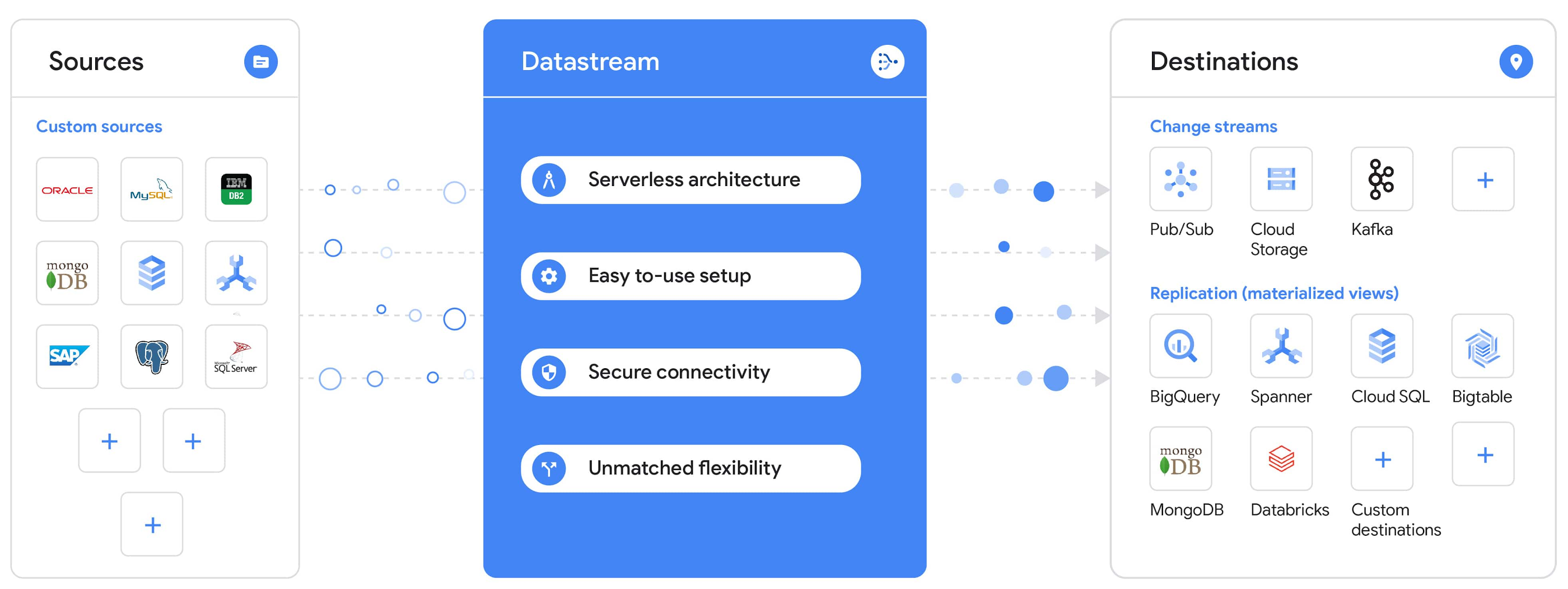
Today, we’re announcing Datastream, a serverless change data capture (CDC) and replication service, available now in preview. Datastream allows enterprises to synchronize data across heterogeneous databases, storage systems, and applications reliably and with minimal latency to support real-time analytics, database replication, and event-driven architectures. You can now easily and seamlessly deliver change streams from Oracle and MySQL databases into Google Cloud services such as BigQuery, Cloud SQL, Google Cloud Storage, and Cloud Spanner, saving time and resources and ensuring your data is accurate and up-to-date.
“Global companies are demanding change data capture to provide replication capabilities across disparate data sources, and provide a real-time source of streaming data for real-time analytics and business operations,” says Stewart Bond, Director, Data Integration and Intelligence Software Research at IDC.
However, companies are finding it difficult to realize these capabilities because commonly used data replication offerings are costly, cumbersome to set up, and require significant management and monitoring overhead to run flexibly or at scale. This leaves customers with a difficult-to-maintain and fragmented architecture.
Datastream’s differentiated approach
Datastream is taking on these challenges with a differentiated approach. Its serverless architecture seamlessly and transparently scales up or down as data volumes shift in real time, freeing teams to focus on delivering up-to-date insights instead of managing infrastructure. It also provides the streamlined customer experience, ease of use, and security that our customers have come to expect from Google Cloud, with private connectivity options built into the guided setup experience.
Datastream integrates with purpose-built and extensible Dataflow templates to pull the change streams written to Cloud Storage, and create up-to-date replicated tables in BigQuery for analytics. It also leverages Dataflow templates to replicate and synchronize databases into Cloud SQL or Cloud Spanner for database migrations and hybrid cloud configurations.
Datastream also powers a Google-native Oracle connector in Cloud Data Fusion’s new replication feature for easy ETL/ELT pipelining. And by delivering change streams directly into Cloud Storage, customers can leverage Datastream to implement modern, event-driven architectures.
Customers tell us about the benefits they’ve found using Datastream. That includes Schnuck Markets, Inc., “Leveraging Datastream, we’ve been able to replicate data from our on-premises databases to BigQuery reliably and with little impact to our production workloads. This new method replaced our batch processing and allowed for insights to be leveraged from BigQuery quicker,” says Caleb Carr, principal technologist from Schnuck Markets. “Furthermore, implementing Datastream removed the need for our analytics group to reference on-premises databases to do their work and support our business users.”
Cogeco Communications, Inc. used Datastream to also realize the value of low-latency data access. “Datastream unlocked new customer interaction opportunities not previously possible by enabling low-latency access in BigQuery to our operational Oracle data.” says Jean-Lou Dupont, Senior Director, Enterprise Architecture, Cogeco Communications, Inc. “This streamlined integration process brings data from hundreds of disparate Oracle tables into a unified data hub. Datastream enabled us to achieve this with 10X time and effort efficiency.”
In addition, Major League Baseball (MLB) used Datastream’s replication capabilities to migrate their data from Oracle to Cloud SQL for PostgreSQL. “As we’re modernizing our applications, replicating the database data reliably out of Oracle and into Cloud SQL for PostgreSQL is a critical component of that process,” says Shawn O’Rourke, manager of technology at MLB. “Using Datastream’s CDC capabilities, we were able to replicate our database securely and with low latency, resulting in minimal downtime to our application. We can now standardize on this process and repeat it for our next databases, regardless of scale.”
Our partner HCL has worked with many organizations looking to get more out of their data and plan for the future. “HCL customers across every industry are looking for ways to extract more value out of their vast amounts of data,” says Siva G. Subramanian, Global Head for Data & Analytics at HCL Google Business Unit. “CDC plays a big part in the solutions we offer to our customers using Google Cloud. Datastream enables us to deliver a secure and reliable solution to our customers that’s easy to set up and maintain. CDC is a key and integrated part of Google Cloud Data Solutions.”
“Google Cloud’s new CDC offering, Datastream, is a differentiator for Google among hyperscale cloud service providers, by supporting replication of data from Oracle and MySQL databases into the Google Cloud environment using a serverless cloud-native architecture, which removes the burden of infrastructure management for organizations, and provides elastic scalability to handle real-time workloads,” says Stewart Bond, Director, Data Integration and Intelligence Software Research at IDC.
Datastream under the hood
Datastream reads CDC events (inserts, updates, and deletes) from source databases, and writes those events with minimal latency to a data destination. It leverages the fact that each database source has its own CDC log—for MySQL it’s the binlog, for Oracle it’s LogMiner—which it uses for its own internal replication and consistency purposes. Using Google-native, agentless, high-scale log reader technology, Datastream can quickly and efficiently generate change streams populated by events based on the database’s CDC log while minimizing performance impact on the source database.
Each generated event includes the entire row of data from the database, with the data type and value of each column. The original source data types, whether it’s, for example, an Oracle NUMBER type or a MySQL NUMERIC type, are normalized into Datastream unified types. The unified types represent a lossless superset of all possible source types, and the normalization means data from different sources can easily be processed and queried downstream in a source-agnostic way. Should a downstream system need to know the original source data type, it can perform a quick API call to Datastream’s Schema Registry, which stores up-to-date, versioned schemas for every data source. This also allows for in-flight downstream schema drift resolution as source database schemas change.
The generated streams of events, referred to as “change streams,” are then written as files, either in JSON or Avro format during preview or in other formats like Parquet in the future, into a Cloud Storage bucket organized by source table and event times. Files are rotated as table schemas change, so events in a single file always have the same schema, as well as on a configurable file size or rotation frequency setting. This way customers can find the best balance between the speed of data availability and the file size that makes the most sense for their business use case.
Through its integration with Dataflow, Datastream powers up-to-date, replicated tables for analytics over BigQuery, and for data replication and synchronization to Cloud SQL and Spanner. Datastream refers to these constantly updated tables as “materialized views.” They are kept up-to-date via Dataflow template-based upserts into Cloud SQL or Spanner, or through consolidations into BigQuery. The consolidations, performed as part of the Dataflow template, take the change streams that are written into a log table in BigQuery, and push those changes into a final table, which mirrors the table from the source.

Datastream offers a variety of secure connectivity methods to sources, so your data is always safe in transit. And with its serverless architecture, Datastream can scale up and down readers and processing power to seamlessly keep up with the speed of data and ensure minimal latency end to end. As data volumes decrease, Datastream automatically scales back down—the result is a “pay for what you use” pricing model, where you never have to pay for idle machines or worry about bottlenecks and delays during data peaks.
Get started with Datastream
Datastream, now available in preview, supports streaming change data from Oracle and MySQL sources, hosted either on-premises or in the cloud, into Cloud Storage. You can start streaming your data today for $2 per GB of data processed by Datastream.
To get started, head over to the Datastream area of your Google Cloud console, under Big Data, and click Create Stream. There you can:
- Initiate stream creation, and see what actions you need to take to set up your source and destination for successful streaming.
- Define your source and destination, whose connectivity information is saved as connection profiles you can re-use for other streams. Sources support multiple connectivity options, with both private and public connectivity options to suit your business needs.
- Select the source data you’d like to stream, and which you’d like to exclude.
- Test your stream to ensure it will be successful when you’re ready to go.
Start your stream and your database’s CDC data will start to flow to your Cloud Storage bucket! From there you can integrate with Dataflow templates to load data into BigQuery, Spanner, or Cloud SQL. Datastream’s preview is supported in us-central1, europe-west1, and asia-east1, with additional regions coming soon.https://www.youtube.com/embed/FZG4w4Vbj38?enablejsapi=1&
Datastream will become generally available later this year, and will soon expand its support to also include PostgreSQL and SQL Server as sources, as well as out-of-the-box integration with BigQuery for easy delivery of up-to-date replicated tables for analytics, and message queues like Pub/Sub for real-time change stream access.
For more resources to help get you started with change streaming, check out the Datastream documentation.
Bigbasket: Delivering Groceries Across 25 Cities in India

7327
Of your peers have already read this article.
1:30 Minutes
The most insightful time you'll spend today!
When Bigbasket was founded in December 2011, it guaranteed to deliver goods within a one-hour delivery slot of its customers’ choosing or it would refund them 10 percent of their orders. The company also introduced an express service, delivering groceries within 90 minutes of an order being placed.
Bigbasket needed a mapping platform that could help it meet its delivery times, and offer a familiar interface to customers. MediaAgility, a digital consulting company, recommended Google Maps Platform to Bigbasket.
When customers use the Bigbasket mobile app to place orders, they select their locations on a Google Map. The prices and availability of groceries varies according to location, so a customer’s location determines the cost of the order and what can be ordered.
Google Maps Platform Results
- Bigbasket handles more than one million orders per month, and delivers in more than two dozen cities in India
- Bigbasket now has more than four million customers
- Orders are delivered on time, increasing customer loyalty
It is also used to determine driver routes. Bigbasket used the Maps Javascript API to build a web-based app for the company’s backend that tracks all orders and delivery progress. Dispatchers use the Directions API to match drivers with orders and customers, and the Distance Matrix API to get estimate the time of arrival for deliveries. As dispatchers track the progress of deliveries on the map, they can tweak routes as necessary.
“We’ve built Bigbasket from the ground up using Google Maps Platform. It makes sure we have the right customer locations and deliver to them on time. We couldn’t have started Bigbasket without Google Maps. It helps us to be fast and efficient, and make sure our customers get what they’ve ordered quickly,” said Pramod Jajoo, Chief Technology Officer, Bigbasket
Securing apps using Anthos Service Mesh

3993
Of your peers have already read this article.
1:30 Minutes
The most insightful time you'll spend today!
Hi there! I’m David Challoner from Access Site Reliability Engineering (SRE), here with Anthony Bushong from Developer Relations to talk about how Corp Eng is adopting Anthos Service Mesh internally at Google.
Corp Eng is Google’s take on “Enterprise IT”. A big part of the Corp Eng mission is running the first and third party software that powers internal business processes – from legal and finance to floor planning and even the app hosting our cafe menus – all with the same security or production standards as any of Google’s first party applications.
Googlers need to access these applications, which sometimes then need to access other applications or other Google Cloud services. This traffic can cross different trust boundaries which can trigger different policies.
Access SRE runs the systems that mediate this access, and we implemented Anthos Service Mesh as part of our solution to secure the way Googlers access these applications.
But why?
You can probably tell, but the applications Corp Eng is responsible for have disparate requirements. This often means that certain applications are tied to disparate infrastructure due to legal, business or technical reasons – which can be challenging when those infrastructures work and operate differently.
Enter Anthos. Google Cloud built Anthos to provide a consistent platform interface unifying the experience of working with apps on these varying underlying infrastructures, with the Kubernetes API at its foundation.
So when searching for the right tool to build a common authorization framework to mediate access to CorpEng services, we turned to Anthos – specifically Anthos Service Mesh, powered by the open-source project, Istio. Whether these services were deployed in Google Cloud, in Corp Eng data centers, or at the edge onsite at actual Google campuses, Anthos Service Mesh delivered a consistent means for us to program secure connectivity.
To frame the impact ASM had on our organization, it’s helpful to introduce the roles of the folks who manage and use it:
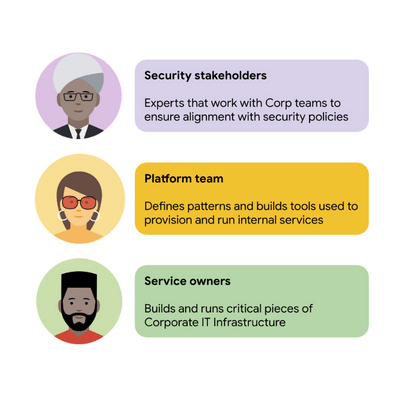
For security stakeholders, ASM provides an extensible policy enforcement point running next to each application capable of provisioning a certificate based on the identity of the workload and enforcing mandatory fine-grained application-aware access controls.
For platform operators, ASM is delivered as a managed product, which reduces operational overhead by providing out-of-the-box release channels, maintenance windows, and a published Service Level Objective(SLO).
For service owners, ASM enables the decoupling of their applications from networking concerns, while also providing features like rate limiting, load shedding, request tracing, monitoring, and more. Features like these were typically only available for applications that ran on Borg, Google’s first-party cluster manager that ultimately inspired the creation of Kubernetes.
In sum, we were able to secure access to a plethora of different services with minimal operational overhead, all while providing service owners granular traffic control.
Let’s see what this looks like in practice!
The architecture
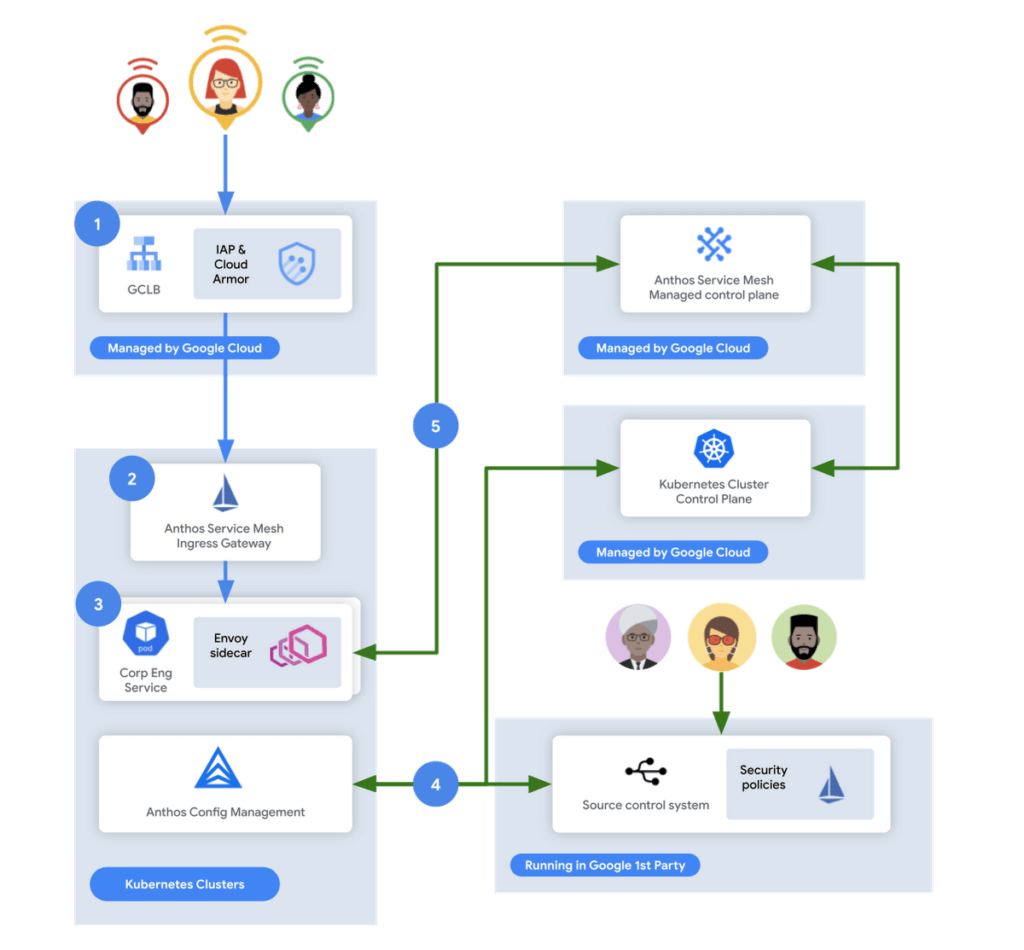
In this flow, user access first reaches the Google Cloud Global Load Balancer [1], configured with Identity Aware Proxy (IAP) and Cloud Armor. IAP is the publicly available implementation of Google’s internal philosophy of BeyondCorp, providing an authentication layer that works from untrusted networks without the need for a VPN.
Once a user is authenticated, their request then flows to the Ingress Gateway provided by Anthos Service Mesh [2]. This provides additional checks that traffic flows to services only when the request has come through IAP, while also enforcing mutual TLS (mTLS) between the Anthos Service Mesh Gateway to the Corp services owned by various teams.
Finally, additional policies are enforced by the sidecar running in every single service Pod [3]. Policies are pulled from source control using Anthos Config Management[4], and are propagated to all sidecars by the managed control plane provided by Anthos Service Mesh[5].
Managing the mesh
If you’re not familiar with how Istio works, it follows the pattern of a control plane and a data plane. We talked a little bit about the data plane – it is made up of the sidecar containers running alongside all of our service Pods. The control plane, however, is what’s responsible for updating these sidecars with the policies we want to enforce:
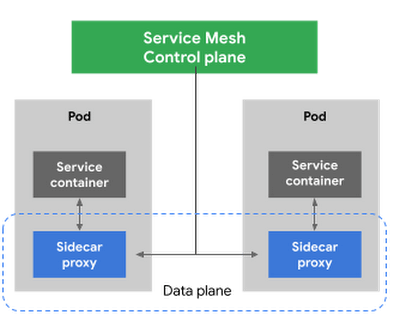
Figure 3 – High-level architecture for Istio
Thus, it is critical for us to ensure that the control plane is healthy. This is where Anthos Service Mesh gives our platform owners a huge advantage with its support for a fully-managed control plane. To provision cloud resources, like many other companies, our organization uses Terraform, the popular open-source infrastructure as code project. This gave us a declarative and familiar means for provisioning the Anthos Service Mesh control plane.
First, you enable the managed control plane feature for GKE by creating the google_gke_hub_feature resource below using Terraform.
resource "google_gke_hub_feature" "feature_asm" {
name = "servicemesh"
location = "global"
provider = google-beta
}
Keep in mind that at publication time, this is only available via the google-bet provider in Terraform.
Once created, we then provision a ControlPlaneRevision custom resource in a GKE cluster to spin up a managed control plane for ASM in that cluster:
apiVersion: mesh.cloud.google.com/v1alpha1
kind: ControlPlaneRevision
metadata:

name: asm-managed

namespace: istio-system
spec:

type: managed_service

channel: regular
Using this custom resource, we are able to set the release channel for the ASM managed control plane. This allows for our platform team to define the pace of upgrades in accordance with our team’s needs.
In addition to managing the control plane, ASM also provides management functionality around the data plane to ensure each sidecar Envoy is kept up to date with the latest security updates and is compatible with the control plane – one less thing for service operators to worry about. It does this using Kubernetes Mutating Admission Webhooks and Namespace labels to modify our Pod workload definitions to inject the appropriate sidecar proxy version.
Syncing mandatory access policies
With the core Anthos Service Mesh components in place, our security practitioners can define consistent, mandatory security policies for every single GKE cluster, using Istio APIs.
For example, one policy is enforcing strict mTLS between Pods using automatically provisioned workload identity certificates. Earlier, we talked about how this is enforced between the Istio Gateway; that same policy enforces mTLS between all Pods in our cluster.

Another policy we implement is denying all egress traffic by default, requiring service teams to explicitly declare their outbound dependencies. The following is an example of using an Istio Service Entry to allow granular access to a specific external service – in this case, Google. This helps prevent unintended access to external services.
apiVersion: networking.istio.io/v1alpha3

kind: ServiceEntry
metadata:

name: google
spec:

hosts:
  - www.google.com

ports:
  - number: 443

name: https

protocol: HTTPS

resolution: DNS

location: MESH_EXTERNAL
EOF
These policies are automatically synced to all service mesh namespaces in each cluster using Anthos Config Management. By using our internal source control system as a source of truth, Anthos Config Management can sync and reconcile policies across all of our GKE clusters, ensuring that these policies are in place for every single one of our services. You can find more details about our implementation of Anthos Config Management here.
With this in place, our team plans on eventually migrating away from security automation that operates solely based on explicit IP, port and protocol policies.
Integration with Identity-aware Proxy
The publicly available version of the BeyondCorp proxy used by CorpEng is called Identity-aware Proxy (IAP), which offers an integration with Anthos Service Mesh. IAP allows you to authenticate users trying to access your services and apply Context-Aware-Access policies. This integration comes with two main benefits:
- Ensuring that user traffic to services in the service mesh only come through Identity-aware Proxy
- Enforcing Context-aware access (CAA) trust levels for devices, defined by multiple device signals we collect
Identity-aware Proxy allows us to capture this information in a Request Context Token (RCToken), which is a JSON Web Token (JWT) created by Identity-aware Proxy that can be verified by ASM. IAP inserts this JWT into the Ingress-Authorization header. Using Istio Authorization Policies similar to the following policy, any requests without this JWT are denied:
apiVersion: security.istio.io/v1beta1
kind: AuthorizationPolicy
metadata:
name: iap-gateway-require-jwt
namespace: istio-system
spec:
selector:
matchLabels:
app: istio-iap-ingressgateway
action: DENY
rules:
- from:
- source:
notRequestPrincipals: ["*"]
Here is an example policy that requires a fullyTrustedDevice access level – this might be a device in your organization that is known to be corporate-owned, fully-updated, and running an IT-approved configuration :
apiVersion: security.istio.io/v1beta1
kind: AuthorizationPolicy
metadata:
  name: require-fully-trusted-device
  namespace: fooService
spec:
  selector:
    matchLabels:
      app: fooService
  action: ALLOW
  rules:
  - from:
    - source:
       requestPrincipals: ["*"]
    when:
    - key: request.auth.claims[google.access_levels]
      values: ["accessPolicies/$orgId/accessLevels/fullyTrustedDevice"]
This allows our security team to not only secure service to service communications, or outbound calls from services, but also specifically require incoming requests come from trusted devices and authenticated users using a trusted device.
Enabling service teams
As an SRE, one of our priorities is ensuring Service-level indicators (SLIs), SLOs, and Service-level agreements (SLAs) exist for services. Anthos Service Mesh helps us empower service owners to do this for their services, as it exposes horizontal request metrics like latency and availability to all services in the mesh.
Before Anthos Service Mesh, each application had to export these separately (if at all). With ASM service owners can easily define their Service’s SLOs in the cloud console or via terraform using these horizontally exported metrics. This then allows us to integrate SLOs into our higher-level service definitions so we can enable SLO monitoring and alerting by default. You can see the SRE book for more details on SLOs and Error budgets.
The takeaway
ASM is a powerful tool that enterprises can use to modernize their IT infrastructure. It provides:
- A shared environment-agnostic enforcement point to manage security policy
- A unified way to provision identities, describe application dependencies
This also enables previously unheard of operational capabilities such as distributed tracing or incremental canary rollouts – which were difficult to find in the typical enterprise application landscape.
Because it can be incrementally adopted and composed with existing authorization systems to close gaps – barriers to adoption are low and we recommend you start evaluating it today!
More Relevant Stories for Your Company

Khan Academy’s Shortcut to Growth: The Trick Behind the Scenes
Based in Mountain View, California, Khan Academy is a not-for-profit that produces and posts a vast collection of free educational online videos about math and science topics ranging from algebra and trigonometry to biology and economics. Millions of students, educators, and self-learners around the world watch the videos, both on the Khan

Memorystore for Redis Read Replicas to Scale App Read Requests by 6X
Modern applications need to process large-scale data at millisecond latency to provide experiences like instant gaming leaderboards, fast analysis of streaming data from millions of IoT sensors, or real-time threat detection of malicious websites. In-memory datastores are a critical component to deliver the scale, performance, and availability required by these

Swiggy: Delivering Local Food Within 40 Minutes
Founded in 2014, Swiggy started small, delivering food to a few neighborhoods in Bengaluru, India. As the company grew, the team wanted a mapping technology that could help expand the service throughout India. Swiggy needed a scalable mapping platform that covered a wide geographic area and offered tools to help