





3689
Of your peers have already watched this video.
3:35 Minutes
The most insightful time you'll spend today!
APIs Help Cleveland Clinic Revamp their IT Infrastructure and Deliver High Quality Healthcare
Cleveland Clinic is one of the largest and most respected hospitals in the United States. Its mission is to provide better care of the sick, investigate their problems, and deliver further education of physicians.
The clinic deployed electronic medical records (EMR) to help doctors deliver greater quality healthcare. But the challenge was, it was not being used at it to its full potential.
“To understand how to use APIs it’s important to understand the challenges that we face. We use the electronic medical record. It’s a great investment we made and it is a great delivery tool but it only gets us so far. For the nurses and the doctors that is not good enough as they are focused in delivering the best possible care,” says Beth Meese, Administrative Director of Technology and Innovations at Cleveland Clinic.
To ensure that the EMR was being used at its full potential the clinic added APIs on top of it.
“Using the Apigee platform, we have been able to write APIs on top of our EMRs and then fill the gap for what the medical records was not able to deliver. APIs help us run analytics, run predictive models, and then surface the data back in a way to the clinicians that they can use to deliver high-quality healthcare,” says Meese.
Leveraging Apigee, Cleveland Clinic was also able to securely give developers access to APIs and reduce a considerable amount of burden from the rest of the IT team.
A Guide to Anthos Hybrid Environment Reference Architecture
1275
Of your peers have already read this article.
1:30 Minutes
The most insightful time you'll spend today!
To help improve your security posture, improve the reliability of your applications, and reduce configuration drift in your environment, we’re excited to announce a new Anthos reference architecture.
Written in collaboration across our product, engineering, support, and field teams, this new reference architecture helps you plan, deploy, and configure the required components for Anthos hybrid environments.
Anthos hybrid environments give you the flexibility to deploy on-premises components that run container-based workloads and VMs using Anthos clusters on VMware and Anthos clusters on bare metal. You can continue to utilize existing investments in your on-premises infrastructure, and start to add components like Anthos Config Management. When you’re ready to bring everything together, you can add additional Google Cloud-based services like Artifact Registry, Cloud Monitoring, and Identity and Access Management (IAM).
The following sneak peek covers some of our best practices for architecting an Anthos hybrid environment. For more detailed guidance and planning information, see the full Anthos hybrid environment reference architecture.
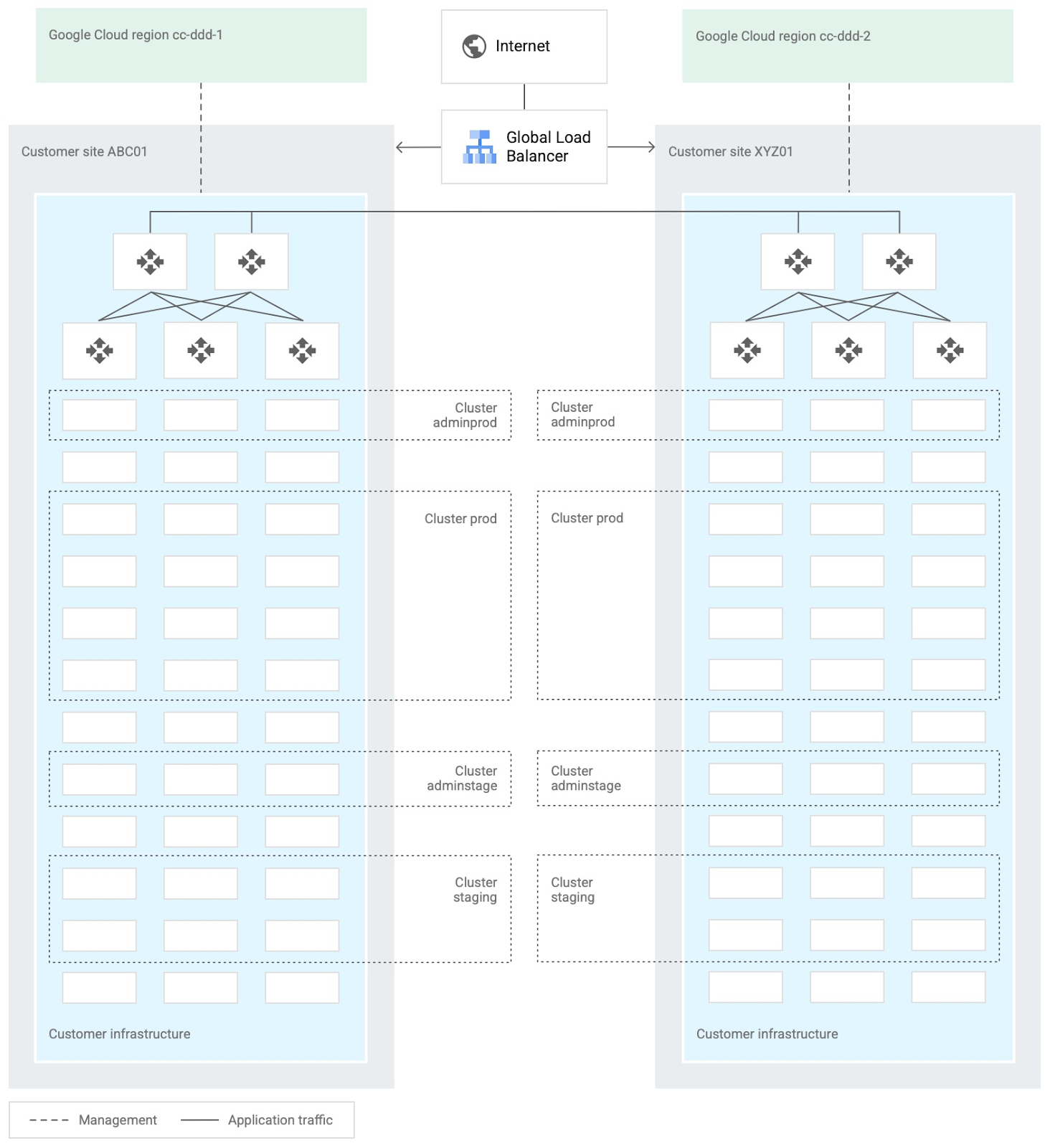
When you design and deploy an Anthos hybrid environment, we recommend that you use two or more on-premises computing customer sites and two or more Google Cloud regions. In your sites, run multiple clusters. This approach is recommended for several reasons, such as:
- Disaster recovery. If one cluster or site fails, you can continue to run workloads.
- Multiple environments, like production and staging, to test infrastructure changes.
- Different cluster types in each environment: admin clusters and user clusters. This approach separates administrative resources, which is a security best-practice.
The following diagram shows an example of an Anthos hybrid environment that’s spread across customer sites and regions, with different clusters for admin and user workloads and for production and staging:
In each site, you can use Anthos clusters on VMware or Anthos clusters on bare metal. For both products, we recommend the following:
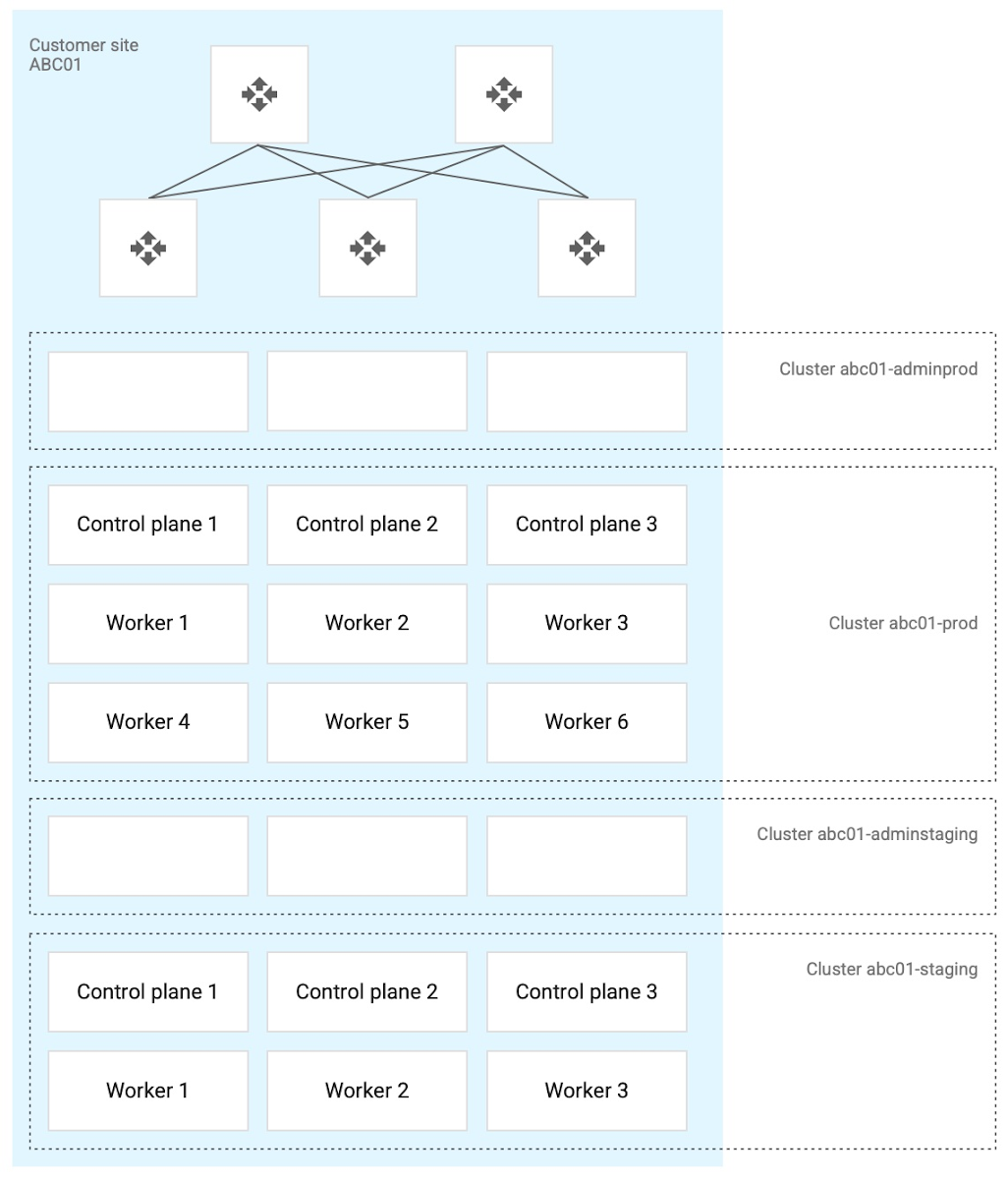
- Use a highly available (HA) control plane with three members for continued control plane availability concurrently with operating system upgrades, control plane software updates, or single-machine hardware or kernel failures.
- Deploy two admin clusters so that admin cluster configuration changes and updates can be tested in the staging environment first.
The following diagram shows an example of Anthos clusters on bare metal with control plane and worker nodes spread across physical machines. With Anthos clusters on VMware, the control plane and worker nodes are spread across VMware VMs:
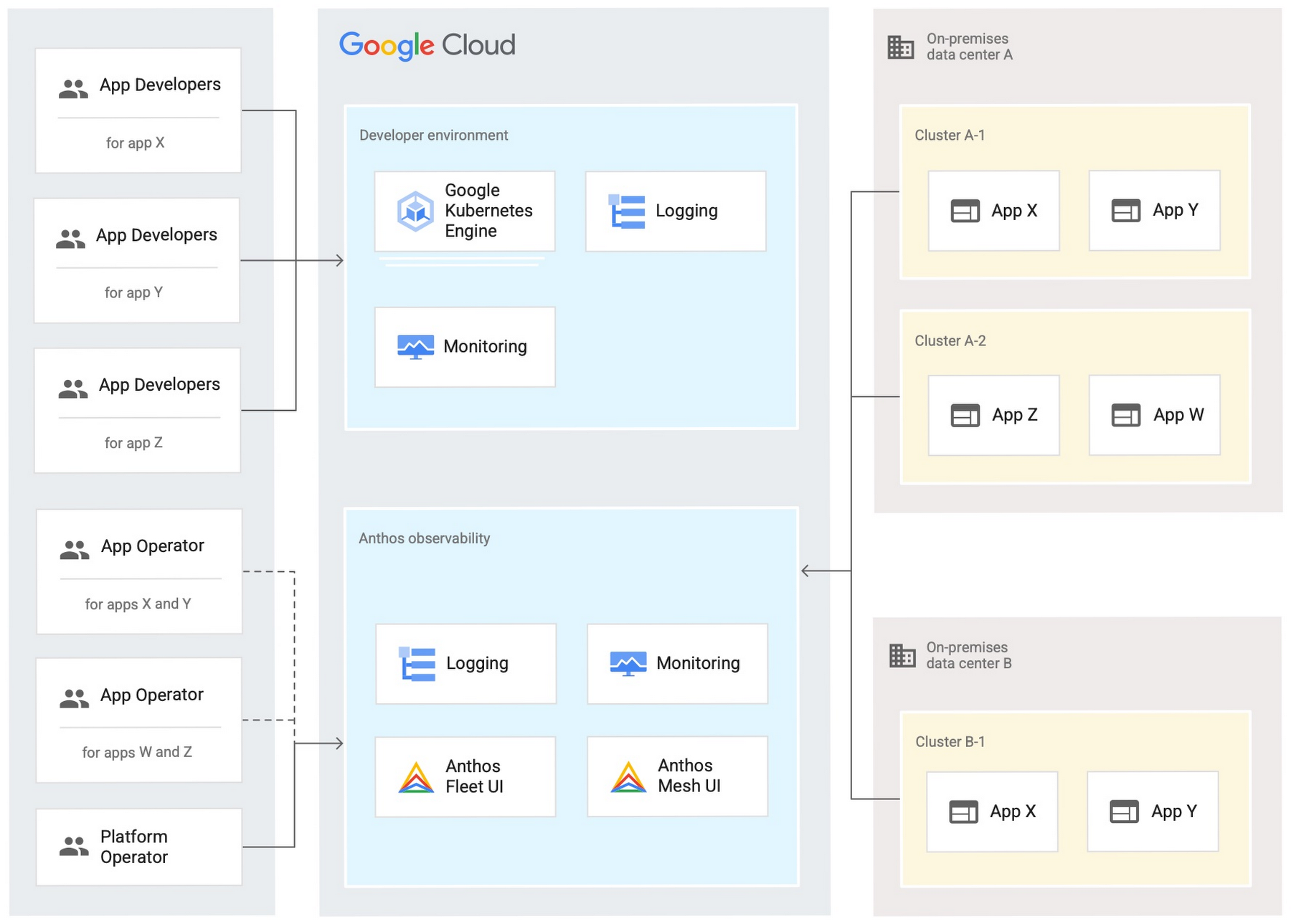
Configure your on-premises clusters and applications to send logging and monitoring data back to Google Cloud for analysis and review. Different personas should only be granted access to the environments they need. The following diagram shows how application developers and application or platform operators can then view logging and monitoring data in Google Cloud:
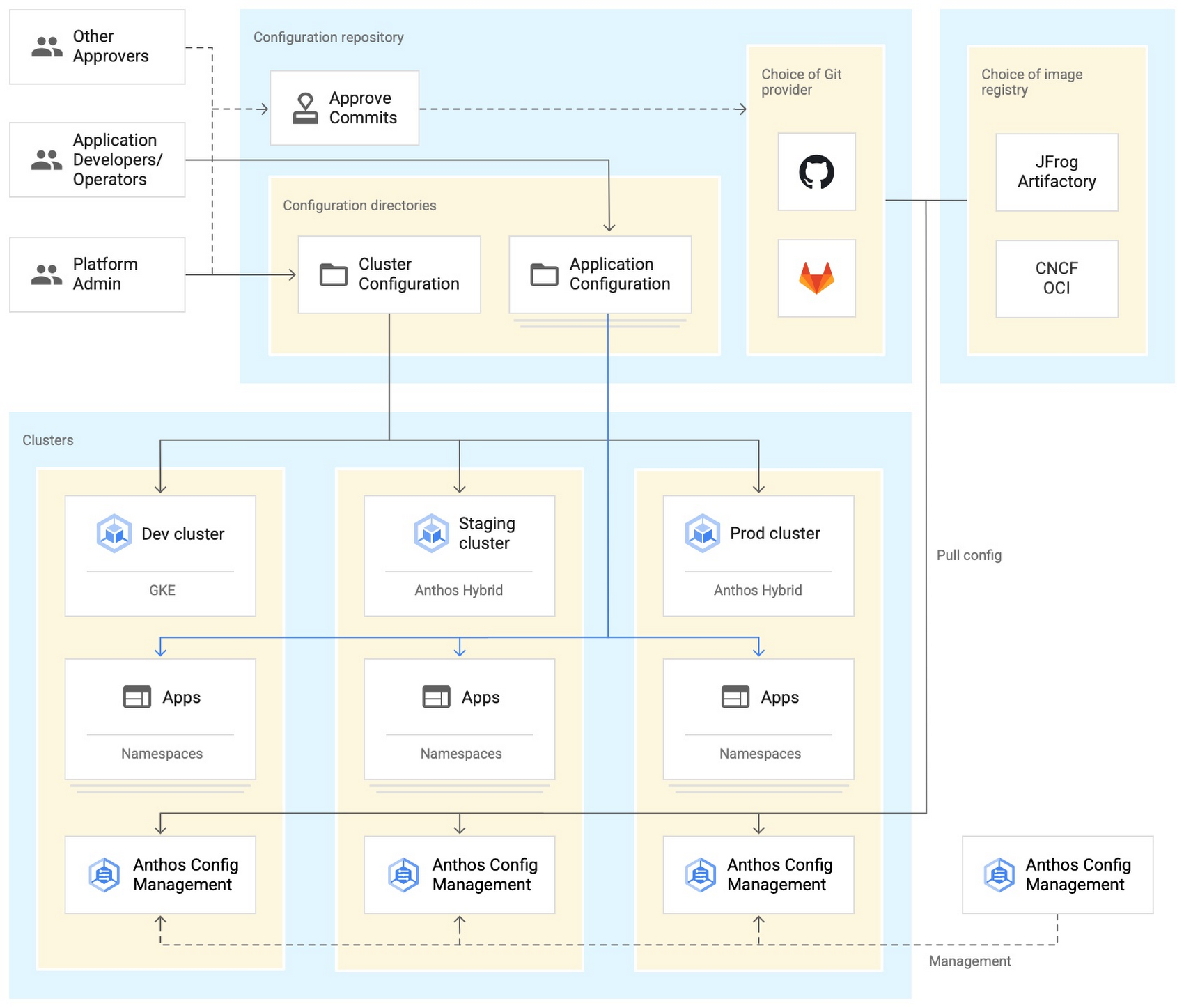
Use Anthos Config Management to manage Kubernetes objects in your clusters. Anthos Config Management is a GitOps-style tool that uses a Git repository or Open Container Initiative (OCI) as its storage mechanism and source of truth. Git provider workflows allow multiple stakeholders to participate in review of changes.
As shown in the following diagram, a common Anthos Config Management deployment uses one folder containing configuration for all clusters. Use separate additional folders to hold configuration data, one for application:
Plan and implement a way to secure the network traffic in your Anthos hybrid environment. The following services help with authentication, connectivity, and communication in a cluster:
- Anthos Identity Service connects clusters to on-site identity providers to authenticate local access.
- Connect gateway and workforce identity federation can provide secure cloud-mediated access to mobile workforce clusters without using a VPN.
- Workload Identity provides on-premises workloads with managed short-lifetime credentials for access to cloud resources.
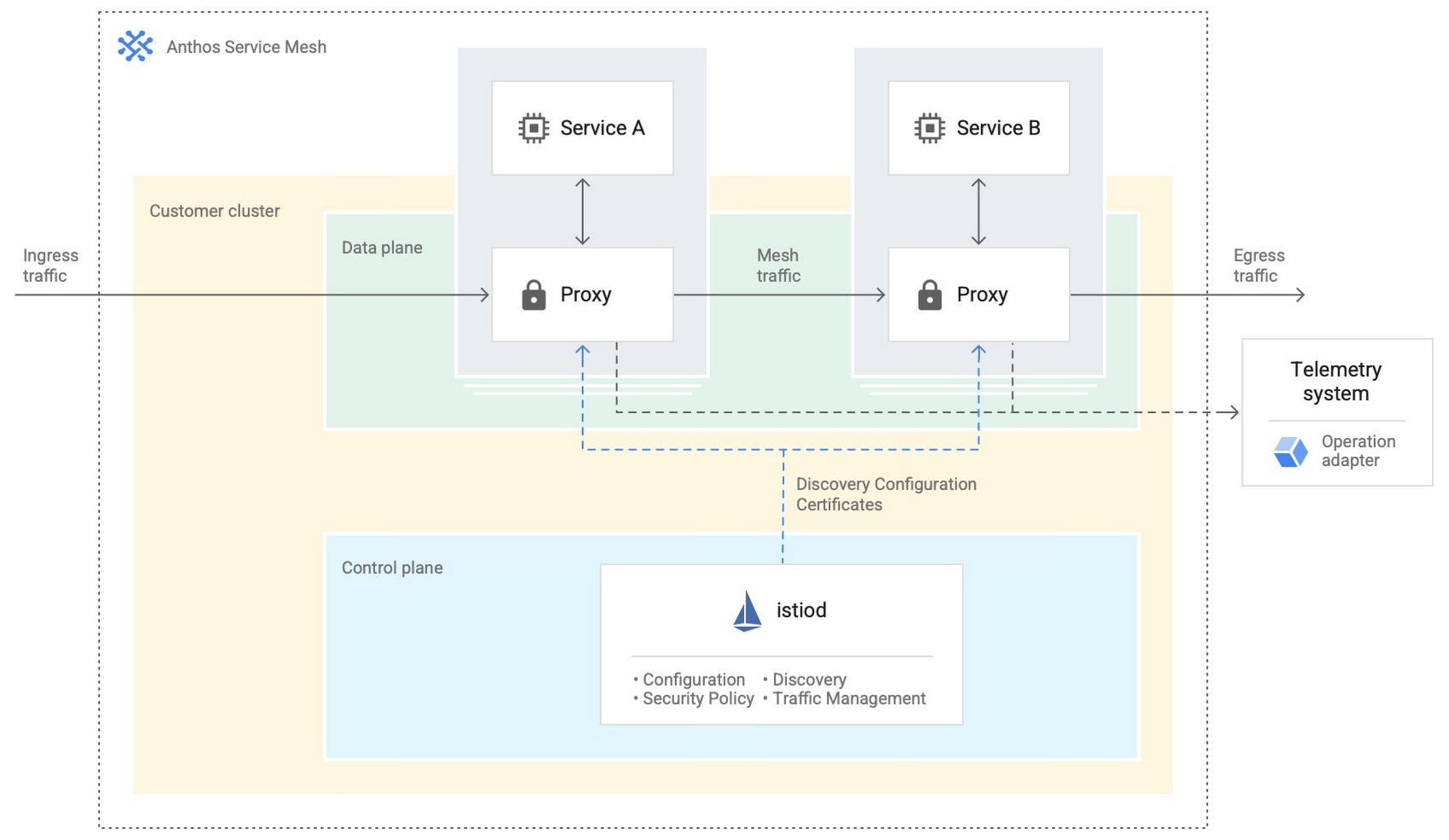
- Anthos Service Mesh encrypts and controls communication between services in the same cluster.
The following diagram shows how Anthos Service Mesh can control the flow of traffic between services within your clusters:
You don’t have to implement all these cloud-based services as part of your initial on-premises deployments. As you become more comfortable and want to expand your capabilities, you can add in some of these hybrid offerings. But, we hope that this blog post has given you some ideas to think about when you start to plan and design your own Anthos hybrid environments.
For more detailed guidance and planning information, see the full Anthos hybrid environment reference architecture. Let us know what you think!
A Pro’s Tip on Choosing the Right Google Cloud Compute Options

5734
Of your peers have already read this article.
2:00 Minutes
The most insightful time you'll spend today!
Where should you run your workload? It depends…Choosing the right infrastructure options to run your application is critical, both for the success of your application and for the team that is managing and developing it. This post breaks down some of the most important factors that you need to consider when deciding where you should run your stuff!
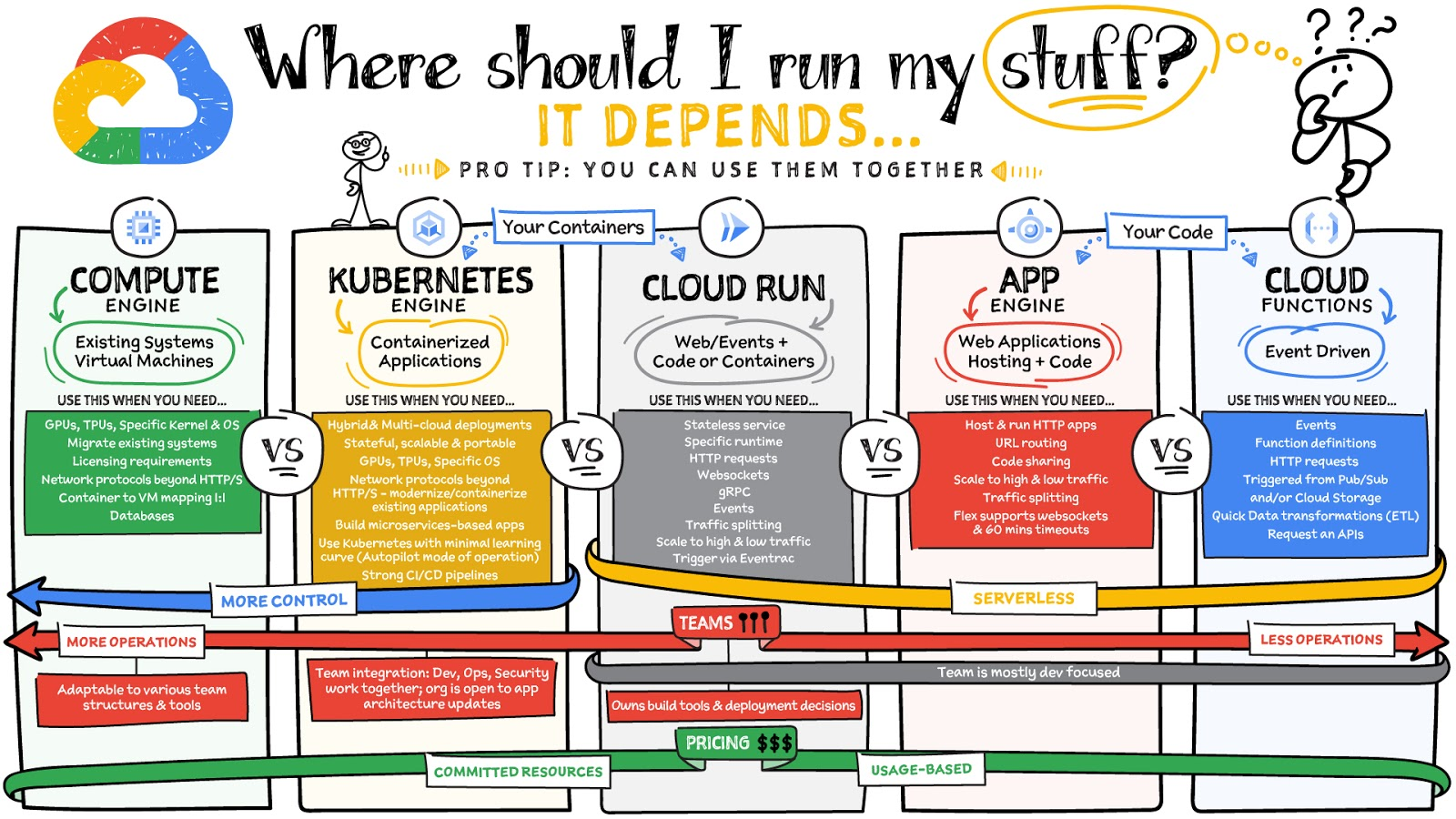
What are these services?
- Compute Engine – Virtual machines. You reserve a configuration of CPU, memory, disk, and GPUs, and decide what OS and additional software to run.
- Kubernetes Engine – Managed Kubernetes clusters. Kubernetes is an open-source system for automating deployment, scaling, and management of containerized applications. You create a cluster and configure which containers to run; Kubernetes keeps them running and manages scaling, updates and connectivity.
- Cloud Run – A fully managed serverless platform that runs individual containers. You give code or a container to Cloud Run, and it hosts and auto scales as needed to respond to web and other events.
- App Engine – A fully managed serverless platform for complete web applications. App Engine handles the networking, application scaling, and database scaling. You write a web application in one of the supported languages, deploy to App Engine, and it handles scaling, updating versions, and so on.
- Cloud Functions – Event-driven serverless functions. You write individual function code and Cloud Functions calls your function when events happen (for example, HTTP, Pub/Sub, and Cloud Storage changes, among others).
What level of abstraction do you need?
- If you need more control over the underlying infrastructure (for example, the operating system, disk images, CPU, RAM, and disk) then it makes sense to use Compute Engine. This is a typical path for legacy application migrations and existing systems that require a specific OS.
- Containers provide a way to virtualize an OS so that multiple workloads can run on a single OS instance. They are fast and lightweight, and they provide portability. If your applications are containerized then you have two main options.
- You can use Google Kubernetes Engine, or GKE, which gives you full control over the container down to the nodes with specific OS, CPU, GPU, disk, memory, and networking. GKE also offers Autopilot, when you need the flexibility and control but have limited ops and engineering support.
- If, on the other hand, you are just looking to run your application in containers without having to worry about scaling the infrastructure, then Cloud Run is the best option. You can just write your application code, package it into a container, and deploy it.
- If you just want to code up your HTTP-based application and leave the scalability and deployment of the app to Google Cloud then App Engine — a serverless, fully-managed option that is designed for hosting and running web applications — is a good option for you.
- If your code is a function and just performs an action based on an event/trigger, then deploying it with Cloud Functions makes sense.
What is your use case?
- Use Compute Engine if you are migrating a legacy application with specific licensing, OS, kernel, or networking requirements. Examples: Windows-based applications, genomics processing, SAP HANA.
- Use GKE if your application needs a specific OS or network protocols beyond HTTP/s. When you use GKE, you are using Kubernetes, which makes it easy to deploy and expand into hybrid and multi-cloud environments. Anthos is a platform specifically designed for hybrid and multi-cloud deployments. It provides single-pane-of-glass visibility across all clusters from infrastructure through to application performance and topology. Example: Microservices-based applications.
- Use Cloud Run if you just need to deploy a containerized application in a programming language of your choice with HTTP/s and websocket support. Examples: websites, APIs, data processing apps, webhooks.
- Use App Engine if you want to deploy and host a web based application (HTTP/s) in a serverless platform. Examples: web applications, mobile app backends
- Use Cloud Functions if your code is a function and just performs an action based on an event/trigger from Pub/Sub or Cloud Storage. Example: Kick off a video transcoding function as soon as a video is saved in your Cloud Storage bucket.
Need portability with open source?
If your requirement is based on portability and open-source support take a look at GKE, Cloud Run, and Cloud Functions. They are all based on open-source frameworks that help you avoid vendor lock-in and give you the freedom to expand your infrastructure into hybrid and multi-cloud environments. GKE clusters are powered by the Kubernetes open-source cluster management system, which provides the mechanisms through which you interact with your cluster. Cloud Run for Anthos is powered by Knative, an open-source project that supports serverless workloads on Kubernetes. Cloud Functions use an open-source FaaS (function as a service) framework to run functions across multiple environments.
What are your team dynamics like?
If you have a small team of developers and you want their attention focused on the code, then a serverless option such as Cloud Run or App Engine is a good choice because you won’t have to have a team managing the infrastructure, scale, and operations. If you have bigger teams, along with your own tools and processes, then Compute Engine or GKE makes more sense because it enables you to define your own process for CI/CD, security, scale, and operations.
What type of billing model do you prefer?
Compute Engine and GKE billing models are based on resources, which means you pay for the instances you have provisioned, independent of usage. You can also take advantage of sustained and committed use discounts.
Cloud Run, App Engine, and Cloud Functions are billed per request, which means you pay as you go.
Conclusion
It’s important to consider all the relevant factors that play a role in picking appropriate compute options for your application. Remember that no decision is necessarily final; you can always move from one option to another.
To explore these points in more detail, please take a look at the “Where Should I Run My Stuff?” video.
For more #GCPSketchnote, follow the GitHub repo & thecloudgirl.dev. For similar cloud content follow us on Twitter at @pvergadia and @briandorsey
Custom Voice Feature Can Help Brands Tweak IVR for Better Customer Experiences

5136
Of your peers have already read this article.
1:30 Minutes
The most insightful time you'll spend today!
With the rise of digital assistants and conversational interfaces, people have grown accustomed to hearing and speaking to synthetic voices. But what do those voices sound like? Often, pretty repetitive. We’re all familiar with the Google Assistant voice, for example.
That’s why we are excited to announce the general availability of Custom Voice in our Cloud Text-to-Speech (TTS) API, a new feature that lets you train custom voice models with your own audio recordings to create unique experiences.
For businesses looking to build a strong brand identity, establishing a unique voice can help turn mobile app interactions or customer service based on interactive voice responses (IVR) into differentiated customer experiences. Our TTS API has included a speech synthesis service with a static list of voices for some time, but now, with Custom Voice, moving beyond these predefined options is easier than ever.
Custom Voice lets you simply submit your audio recordings to get access to the new voice directly in the TTS API. Custom Voice TTS includes guidance on the audio requirements to help make sure you generate a high quality custom TTS voice model. Once this new model is trained, all you have to do to start using the newly trained voice is reference the model ID in your calls to the Cloud TTS API.
At Google, we are committed to building safe and accountable AI products, not only because it’s the right thing to do, but because it is a critical step in ensuring successful use in production. As part of Google Cloud’s Responsible AI governance process, we conducted a deep ethical evaluation of Custom Voice TTS, and its relation to synthetic media, in order to surface and mitigate potential harms that it may create. If you are interested in Custom Voice TTS, there is a review process to help ensure each use case is aligned with our AI Principles and adequate voice actor consent is given.
Additionally, to verify that voice actors are actually the ones producing the audio, you will need to submit an audio file producing a sentence that Google Cloud chooses (for example: “I agree that my voice will be used to create a synthetic custom Text-to-Speech voice).
We’re looking forward to seeing this API help businesses solve problems in an easy, fast, and scalable way. TTS Custom Voice is now GA in these languages:
English (US)
English (AU)
English (UK)
Spanish (US)
Spanish (Spain)
French (France)
French (Canada)
Italian (Italy)
German (Germany)
Portugues (Brazil)
Japanese (Japan)
We plan to continue expanding this lineup in order to meet your needs. Ready to try for yourself? Contact your seller to get started on your use case evaluation today!
3797
Of your peers have already watched this video.
8:00 Minutes
The most insightful time you'll spend today!
Target Leverages Google Cloud to Create Market-defining Online Experience
In the hyper-competitive world of online retail sales, ease-of-use and transaction speed can make or break business outcomes. However, a few years ago US Retail giant Target was going through a period of uncertainty.
While the company had over 1800 stores across the US with an estimated 85% of US consumers shopping at a Target store and over 25 million people visiting the Target website or using its app each month, it was still losing ground.
In spite of having millions of loyal customers, the company was dangerously late on digital and its technology wasn’t keeping pace with unstable systems to boot. The company faced the twin challenges of trying to operate today’s business as efficiently as possible and creating tomorrow’s business as quickly as possible. On the one hand it needed productivity and stability and on the other it wanted speed and disruption. Not an easy task to accomplish.
That’s when Target decided to use Google Cloud to solve its challenges. See how Target leveraged Google Cloud to create a market-defining online experience that has made customers happier and more loyal.
Google Cloud is a Leader in Q1 2022’s Public Cloud Container Platform: Forrester
3239
Of your peers have already read this article.
2:00 Minutes
The most insightful time you'll spend today!
We’re thrilled to share the news that leading global research and advisory firm Forrester Research has named Google Cloud a Leader in the recently published report The Forrester WaveTM: Public Cloud Container Platforms, Q1 2022. Forrester evaluated the container and cloud-native offerings of a select group of top public cloud container platform vendors across 29 comprehensive criteria.
We are proud that Forrester evaluated the strength and cohesion of our offerings, including Google Kubernetes Engine (GKE), Cloud Run, Anthos, Cloud Build, Cloud Deploy, Cloud Code and more, writing that, “Google Cloud is the best fit for firms that want extensive cutting-edge cloud-native capabilities for distributed workloads spanning public cloud, private cloud, and multicloud environments.”
Google Cloud received the highest possible scores in the criteria of service and application catalogs, microservice development support, service mesh support, serverless and FaaS support, DevOps automation, container image support, control plane configuration, hybrid cloud support, container networking, product vision, supporting products and services, market approach, revenue, and breadth of offering. We also achieved the highest score in the Strategy category of all the vendors evaluated.
Google Cloud is all-in on containers and cloud native
The cloud-native tools and technologies created by Google Cloud are already powering the most innovative, scalable and secure apps around the world, from the most exciting digital natives to the most important enterprise industry leaders. Why? Cloud native means building and running modern apps that intentionally take advantage of the global scale, pervasive automation, elastic infrastructure, and secure resiliency of the public cloud.
For enterprises, cloud native in practice means using containers, Kubernetes, serverless, and DevOps automation to build amazing customer-facing apps quickly, to modernize existing business-critical apps safely, and to operate them all on cost-efficient, powerful, and secure cloud infrastructure globally.Over the past decade, Google Cloud’s technology innovation has fueled various domains of the cloud native ecosystem, such as Kubernetes and Go languages as the foundation, Istio for service mesh, Kubeflow for machine learning, Knative for serverless, and Tekton for CI/CD. Long-term investment and practices in cloud-native power its superior product vision and excellent supporting products and services.
The Forrester Wave: Public Cloud Container Platforms, Q1 2022
Dedicated to simplicity, speed, and scale for your modern apps
Our mission is to create, integrate, scale, and secure the best open source and commercial cloud-native technologies – backed by a consistent cloud control plane – so you can spend more time dreaming of ways to delight your customers and less time building and operating platforms. We are committed to leading in cloud-native open source communities and making containers and Kubernetes accessible to everyone, from everywhere.
Here are a few recent highlights across our container services and tools, aimed at helping you build and modernize your most important apps with cloud native:
The most scalable fully managed Kubernetes service, Google Kubernetes Engine (GKE), achieved an overall solution score of 92 out of 100 in Gartner’s Solution Scorecard. In 2021, we introduced GKE Autopilot, a fully managed, security-hardened Kubernetes service optimized for production workloads. This unique mode of operation allows you to focus on your workloads while Google manages your cluster infrastructure. There’s nothing else like it. Then, we made GKE apps even faster with GKE image streaming. With proven scalability to 15K nodes in a single cluster and innovations such as four-way autoscaling, node auto-upgrades, integrated logging and metrics, cost optimization insights, native backup and restore, and multi-instance GPUs to accelerate machine learning workloads, GKE remains the best choice in managed Kubernetes services.
With Cloud Run, we expanded the range of users who benefit from containers to those who don’t know much about them. Introduced in 2019, Cloud Run combines the serverless attributes of autoscaling and developer experience with the flexibility of containers. Developers can use any language, runtime or binary, and deploy code using buildpacks to automatically build container images from source without worrying about provisioning machines and clusters. Cloud Run goes beyond FaaS and beyond earlier generations of serverless computing. Cloud Run runs more legacy workloads, integrates with Cloud Build for secure and compliant builds, offers deeper cost controls and billing flexibility, and encourages portability. We added support for social feeds, collaborative editing, and multiplayer games that use bidirectional streaming. Minimum instances reduce cold-start delays so you can run more latency-sensitive applications. And recently, we launched support for network file systems, allowing developers to share and persist data between multiple containers and services.
Anthos is at the heart of the Google Distributed Cloud, a portfolio of software and hardware solutions announced in 2021 that extend Google’s container platform services to the data center and the edge. Anthos is how we extend GKE to wherever you need cloud-native apps. Manage clusters on-premises on bare metal and VMware-virtualized servers, on AWS and Azure, and at the edge – all with a Google Cloud-backed control plane for consistent, automated operations at scale. We added a hosted service for configuration management to keep all your clusters in sync, and trimmed our installation footprint and streamlined cluster management with a new multi-cloud API that enables you to use a single API for full lifecycle management of Anthos Kubernetes clusters in AWS or Azure.
Finally, since no public cloud container platform is complete without powerful DevOps tools, we expanded our CI/CD offerings to make your developers even more productive, wherever they build and deploy cloud native apps. Use Cloud Code and Cloud Shell as your go-to cloud-native IDEs. Cloud Build is a fully managed serverless DevOps automation platform for use cases spanning CI/CD, Infrastructure-as-Code, AI/MLOps, and more, across infrastructure GKE, Cloud Run, Cloud Functions and more. Google Cloud Deploy is a fully managed continuous delivery service that provides one-click release promotion and roll-backs, built-in metrics, and out-of-the-box security. Artifact Registry and Container Analysis provide managed artifact repositories, vulnerability scanning, and help secure the software supply chain.Google Cloud has a solid cloud-native innovation roadmap, targeting simplicity at scale for enterprise clients.
The Forrester Wave: Public Cloud Container Platforms, Q1 2022
We are delighted and humbled to be recognized as a Leader in public cloud container platforms by Forrester. Grab your copy of The Forrester WaveTM: Public Cloud Container Platforms, Q1 2022 today and let us know how we can help you build and modernize your most important apps how you want and where you want.
More Relevant Stories for Your Company

Ten Videos to Help You Get Started with Anthos
Do you need to develop, run and secure applications across your hybrid and multicloud environments? Look no further than Anthos, our managed application platform that extends Google Cloud services and engineering practices to your environments so you can modernize apps faster and establish operational consistency across them. To help you

Unlocking Efficient API Management with Apigee and CI/CD Pipelines
In modern software development, automating delivery using Continuous Integration and Continuous Deployment (CI/CD) pipelines draws parallels to automotive assembly lines that doubled the production while cutting down costs by 65%. According to a recent report from Postman, over 51% of respondents indicated that their organizations devote more than half of their development

Streamlining Workflow Executions: Using Cloud Tasks in Google Cloud
Introduction In my previous post, I talked about how you can use a parent workflow to execute child workflows in parallel for faster overall processing time and easier detection of errors. Another useful pattern is to use a Cloud Tasks queue to create Workflows executions and that’s the topic of this
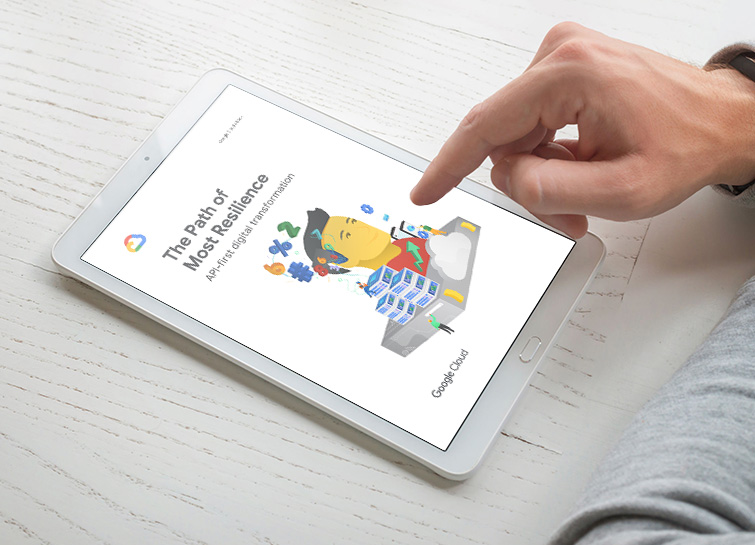
APIs Pivotal to Building Business Resilience
Recently, consumer interactions and relationships among suppliers, partners and customers have turned digital and dynamic, requiring a certain degree of technological reimagining for businesses. To stay relevant with times and build resilience with digital transformation, businesses can explore application programming interfaces or APIs to leverage to make existing data value
