





Unlocking Efficient API Management with Apigee and CI/CD Pipelines

922
Of your peers have already read this article.
3:30 Minutes
The most insightful time you'll spend today!
In modern software development, automating delivery using Continuous Integration and Continuous Deployment (CI/CD) pipelines draws parallels to automotive assembly lines that doubled the production while cutting down costs by 65%. According to a recent report from Postman, over 51% of respondents indicated that their organizations devote more than half of their development efforts to APIs. APIs are a big part of development, so let’s explore why you should integrate them into your CI/CD pipelines. We will also share best practices and tools for integrating Apigee within your organization’s CI/CD processes.
4 reasons to automate your API delivery with CI/CD pipelines
Apigee is a feature-rich API management platform that provides developers with the necessary tools to build, secure, manage, and publish APIs. But what if you want to automate the process of deploying your APIs to Apigee? That’s where CI/CD comes in. By incorporating Apigee into your CI/CD pipeline, you can automate API deployment, promote consistency across environments, and monitor API performance in real-time. Four of these benefits include:
- Cut time to market by and respond faster to customer demands by automating API deployments.
- Catch defects earlier and improve API security by automating the process of testing and securing APIs.
- Slash costs by saving on staffing, tools, and infrastructure required to deploy and manage APIs.
- Improve visibility and compliance by tracking and auditing API usage.
Key tools and useful tips to effectively automate API delivery and management
Integrating API delivery into CI/CD pipelines using products like Cloud Build streamlines the development process. For example, a developer building an application on Google Cloud can deliver APIs side by side with other workloads in tools such as Cloud Run, Google Kubernetes Engine (GKE), Cloud Functions, and App Engine.
Operational automation can include a list of seemingly endless aspects of the development process. But at a high-level, the key components of an effective CI/CD pipeline for API management include:
1. Building and testing API proxies
- If you are new to Apigee, utilize the comprehensive visual tools in the console to build and deploy API proxies using a convenient drag and drop interface. You can elevate their API proxy development by leveraging the VS Code extension and Apigee Emulator. This local setup enables you to use auto-complete features along with local proxy deployment, testing, and seamless code commit to trigger the pipeline for further deployment across Apigee environments.
- Useful tip: Maximize the utility of Apigee, use the Debug tool to inspect every detail of an API transaction. Lastly, remember to export your proxy from the Apigee console and commit it to your source repository. With these best practices in hand, you’re all set to make the most of your Apigee journey.
2. Store and version your API code:
- Ensure robust source code management – foundation of every CI/CD pipeline – to easily track, and manage changes. Use Cloud Source Repositories, a fully managed Git repository for seamless integration with other GCP development (or) leverage common tools like GitHub, GitLab, BitBucket and many more depending on your organization’s approach
- Useful tip: Employing the right branching strategy helps reduce complexity and keeps delivery lean. Check out this community post for different branching strategies and choose the right one for your use case. Ensure frequent commits and merges to your source code to keep your codebase healthy and up-to-date. Regular code reviews also help refine your code and create quality checkpoints.
3. Ensure code quality with static code analysis:
- Regular static code analysis can help you to improve the quality of your code by detecting potential errors and security vulnerabilities. It can also help you to promote code standardization by ensuring that your code follows a consistent style. For static code analysis you can use apigeelint (for analyzing Apigee bundles), JSHint and ESLint (for JavaScript analysis), Checkstyle and PMD (for Java analysis), or SonarQube (for multi-language support)
- Useful tip: Integrate the tool with your code editor so that you can see the results of the analysis as you write code. Define quality gates/thresholds and run the tool as part of your build pipeline. Mark the build as failed if it does not meet the thresholds.
4. Ensure code resilience with unit testing and Code coverage:
- Unit tests focus on individual units of code, such as methods or classes. They help to ensure that each unit of code works as expected. Code coverage measures the percentage of code that is covered by unit tests. A high code coverage percentage indicates that more of your code is being tested, which can help to reduce the risk of errors. You can use these tools for unit testing and code coverage: Mocha and Chai (for JavaScript), JUnit (for Java), Cobertura and Istanbul (nyc) (for code coverage)
- Useful tip: Write unit tests for all of your code. This includes both new code and existing code. Run unit tests during the build process. This will help to ensure that your code is always passing unit tests before it is deployed. Set coverage thresholds and mark the build as failed if it does not meet the thresholds. This will help to ensure that your code is sufficiently covered by unit tests.
5. Configure, Package and Deploy your code:
- Creating a successful API deployment is like constructing a sturdy building. You need a strong blueprint (your Apigee code) that has been carefully planned, packaged into a deployable format (a zip file), and then implemented (imported into Apigee and deployed to an Apigee environment). During the packaging phase, the blueprint is detailed with metadata and manifest, similar to labeling and preparing architectural plans for construction. Moreover, all your Apigee configurations, except sensitive info, can be integrated into your blueprint, ready to be brought to life with the right tools. In terms of tooling, you can choose from a variety of open-source options that are built on Apigee APIs. Some of the commonly utilized ones are Apigee Deploy Maven plugin, apigee cli, apigee-sackmesser, and custom scripts using the Apigee APIs.
- Useful tip: Use an artifact system to store these bundles. This will make it easy to manage and track your bundles. Maintain all the necessary configurations like Target server, Key Value Map, etc as part of the source code repo. This will make it easier to deploy your code to different environments. Use the pipeline and the source code to promote the proxies from lower environments to production. This will help you to ensure that your code is always up-to-date in production.
6. Verify the changes with Functional or integration testing:
- Consider integration testing as a rigorous dress rehearsal for your API’s debut performance. It’s your chance to verify if your API plays its part flawlessly under various scenarios, including when it has to share the stage with third-party systems. To ensure the API is working as expected, you have some powerful tools at your disposal such as Apickli (based on cucumber.js), Postman, and JUnit
- Useful tip: Manage these tests as part of the source code and run different test suites based on the environment deploying to. This will make it easy to track and manage your tests. Run these tests right after the deployment and mark the build as failed if it does not meet the threshold. This will help you to identify and fix any issues that may have been introduced during the deployment. Create rollout plans when the functional tests fail by rolling out to the previous working/stable version. This will help you to minimize the impact of any issues that may have been introduced during the deployment.
Additionally, here are some optional trail markers you can consider on your journey to perfecting your pipeline:
- Testing Your API’s Endurance: Running performance tests ensures your API can withstand the long haul.
- Clear and Accessible Documentation: Keep your developer portal up-to-date with the latest API documentation. Tools like the Apigee Smartdocs Maven plugin can make this a breeze, particularly with the Drupal developer portal.
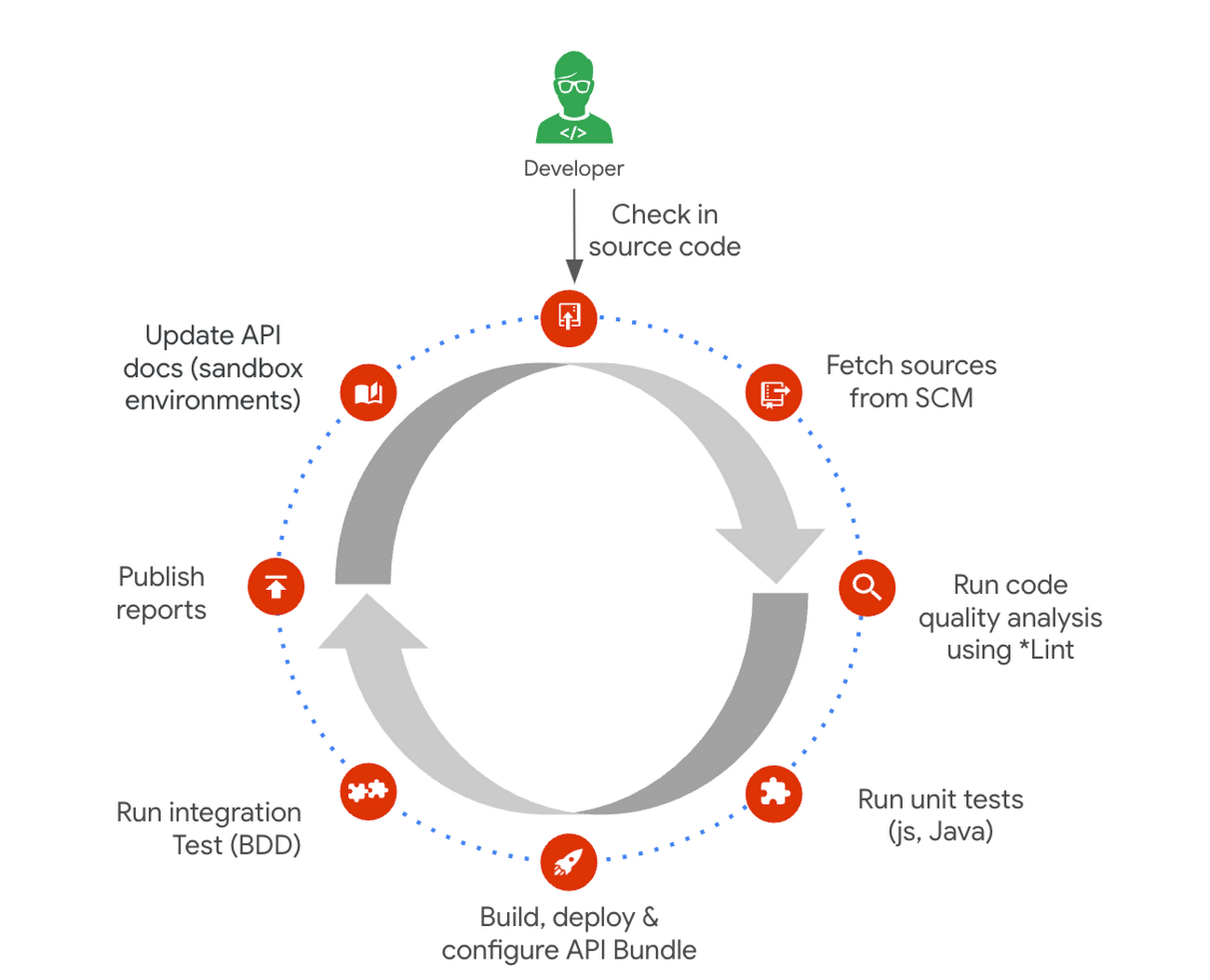
Here is a typical pipeline example with a comprehensive reference implementation we see with most of our customers. It triggers when the developer commits the code to the repo. The pipeline can be executed by any CI/CD platform like Cloud Build.
Get started today
Why wait? Kickstart your Apigee journey today directly from the console or evaluate it for free. Leverage our Accelerators to jumpstart your development using examples or advanced technical guidance. Should you have any questions or need support along the way, our Apigee Community is teeming with experts ready to lend a hand.
Transforming Media Industry: Three Strategies for Media Leaders to Leverage Generative AI

1526
Of your peers have already read this article.
3:30 Minutes
The most insightful time you'll spend today!
The digital era turned the traditional formula for media and entertainment success on its head, ushering in new technologies that have changed how content is produced, distributed, experienced, and monetized. Audiences have more choice, flexibility, and power over what they consume, and today’s media companies have to embrace ongoing transformation or risk falling behind – or becoming irrelevant.
A new wave of transformation is arriving with generative AI, a type of artificial intelligence that can interact with users in natural language and create novel data, ranging from story outlines, reports, and other text outputs to multimodal content like images, videos, and audio. Media and entertainment are inherently about content creation and creativity—so what does this new technology mean for the industry?
At Google Cloud, we see tremendous opportunity for creative industries, from more efficient creation methods to improved user experiences. Let’s explore.
AI for media with Google Cloud
Google Cloud has a long history with large language models (LLMs) and other generative AI technologies—from their influence over the years on products like Document AI, to recent announcements like Generative AI support in Vertex AI, which lets businesses access and tune generative AI foundation models, and Generative AI App Builder, which lets developers build chatbots and other generative apps in minutes.
We’ve helped our global media and entertainment customers with AI for personalization, search and recommendations, predictive analytics, and much more — and with generative AI now on the rise, we have some ideas to help media leaders, technologists, and creators think about and prepare to utilize powerful AI in their work.
Three lenses on innovation in media
The media and entertainment industry is increasingly diverse and complex, with companies spanning over-the-top (OTT) subscription streaming services, 24-hour linear channels, live broadcasts of sporting events, digital journalism, traditional publishing, short-form user-generated social video, and more. More and more, the boundaries between these segments of the media industry are blurring — but common to them all is the focus on providing compelling content in an engaging audience experience that can be directly or indirectly monetized.
With this in mind, we suggest media and entertainment companies look at the application of innovative technologies like generative AI through the following three lenses:
- Improving content creation, production, and management
- Enhancing and personalizing audience experiences
- Improving monetization
Improving content creation, production, and management
Generative AI democratizes many aspects of content creation, opening new ways to create written material, illustrations, sound effects, special effects, and more. Its recent maturation has been so rapid, some in the media industry have expressed concern that generative AI implies the end of creative professions. We think the opposite is more likely: just as photography, audio recordings, and computer generated images have enabled new modes of creativity, rather than making old ones obsolete, generative AI has the potential to both enable new forms of expression and enhance familiar ones.
For example, journalists could use generative AI to speed up research by helping them synthesize and analyze large volumes of information, or to help them create initial drafts or summaries of editorial content. Film and television producers could leverage the technology to accelerate the post-production editing process, with new AI-enabled interfaces for rapidly adjusting or enhancing scene details such as lighting and color. Broadcasters could use generative AI to make vast libraries of video footage searchable and accessible for use in telling more compelling stories. The potential use cases go on and on.
Far from undermining incredible creative professions, generative AI is poised to free writers, artists, editors, and many others from the tedious and mundane aspects of their work, empowering them to focus more of their time on creativity.
Enhancing and personalizing audience experiences
Every media organization in the world today faces the reality that for most consumers, switching costs are extremely low. This puts incredible pressure on these companies to invest in delivering low-friction and compelling audience experiences that help mitigate subscribers from churning and viewers from abandoning content experiences for competitive platforms.
Generative AI can help media companies engage and retain viewers, such as by enabling more powerful search and recommendations on their digital content platforms. With its increasingly multimodal capabilities extending from natural language to both audio and video content, generative AI is well-positioned to power more personalized audience experiences.
Consumers often complain about “the paradox of choice” or their inability to find something interesting to watch on streaming platforms that have incredibly vast libraries of content available on demand. Imagine a not-too-distant future wherein a consumer can simply ask the content platform they’re using to help them find a specific show to watch based on mood, specific types of scenes, combinations of actors, award nominations, or practically anything they can think to ask. And that’s just the tip of the iceberg — imagine generative AI’s potential to curate, assemble, and even create personalized content for a viewer to consume!
Improving monetization
As consumers’ content consumption further expands from traditional theatrical and linear television programming to include digital offerings across an array of platforms, devices, and content types, media companies face the challenge of maintaining and improving monetization. The conventional economics and approaches to advertising and subscription models are proving, in many cases, not to deliver sufficient ROI.
Generative AI has the potential to help media companies improve their monetization of audience experiences. As mentioned previously, enhanced personalization can play a role in mitigating churn, which in turn can help sustain and grow subscription and advertising revenues. Going beyond this, generative AI can be leveraged to drive even greater advertising revenues via more targeted, contextual, and personalized advertisements. Imagine both display and video advertisements that are generated on the fly to personalize product specifics, messaging, style, colors, and innumerable other characteristics to drive greater engagement and higher click-through rates (CTR), and thus higher advertising CPMs (cost per thousand impressions).
Coming up next
Generative AI presents a significant opportunity for media companies to fundamentally transform content creation, engagement, and monetization. Compelling services are already on the market — but there is far more to come.
Google Cloud continues to build on its deep experience and expertise with AI, and we are committed to working with the industry to develop compelling, accessible, trusted, and responsible AI solutions that will drive meaningful business outcomes. We are excited to create the future together with our global media customers and partners across the ecosystem. To learn more about this disruptive topic, read “Debunking five generative AI misconceptions” from Google Cloud vice president of AI & Business Solutions Phil Moyer, or explore our Trusted Tester Program for generative AI.
Manage Packages Using Artifact Registry in Google Cloud Functions with Private Dependencies

3385
Of your peers have already read this article.
2:30 Minutes
The most insightful time you'll spend today!
Late last year, we announced that Artifact Registry was going GA, allowing GCP customers to manage their packages within the same platform as they were being deployed. In this blogpost, we want to show you how to do exactly that with a private dependency.
Private dependencies allow your packages to be shared with only a select group of viewers. If your codebase is already private, a private dependency can help modularize functionality using the same methodologies you use in your open source projects. Furthermore, you can experimentally develop your private dependency without breaking your overall codebase by pinning the version of the dependency on a working release. It can also provide necessary and durable abstraction if multiple projects depend on the same functionality. It does so by allowing multiple teams access to up-to-date and tested code rather than relying on copying and pasting fragmented code snippets.
With Artifact Registry, you can now wire together your serverless processes with your private dependencies without ever leaving Google Cloud Platform. This blogpost will discuss one example of how you can host your private dependency and later deploy to a serverless host like Google Cloud Functions using Cloud Build to automate the deployment.
Before getting started, take a look at the sample code here to copy and follow along.
Creating a package
Let’s walk through deploying a Google Cloud Function with a simple private dependency written in Node. Our example dependency will return the input given in unicode. It’s index.js file will look like this:
const unicode = require('to-unicode');// This function returns the input in unicode.module.exports = (input) => {return unicode(input);};
First, you’ll want to prepare your package to upload to Artifact Registry. For Node, this package should have a package.json file, which should dictate the entry point and information about the package. You can create a simple one like the one below by running the command npm init -y.
For the name of the package you should specify your scope. A scope allows you to group packages, which is helpful if you want to publish a private package; alternatively, publishing without a scope would make the repository public by default. In this blogpost, we’re going to use the scope @example, but you should name it after your private dependency’s group (i.e., your company, team or project).
{"name": "@example/blog-repo","version": "1.0.0","description": "A sample repository for blogpost demonstration purposes.","main": "index.js","scripts": {"test": "echo \"Error: no test specified\" && exit 1","artifactregistry-login": "npx google-artifactregistry-auth"},"author": "Blogpost Authors","license": "ISC","devDependencies": {"google-artifactregistry-auth": "^2.1.0"},"dependencies": {"to-unicode": "^1.0.2"}}
Another important detail in this file is that the devDependencies property contains the dependency for authenticating to the google artifact registry. To authenticate, you will use the command in the scripts section later in this tutorial.
Uploading the package to Artifact Registry & setting up authentication
Follow the instructions on these guides for creating an npm package repository on Artifact Registry, without configuring npm or pushing the repository. Next, you’ll want to configure the .npmrc file. To do so, simply add an empty file titled .npmrc, which should live at the base of your repository. To configure this file to deploy to the registry you just created, run the following command, and add the output to the .npmrc file. (Note: you may need to install the Google Cloud SDK before running the command.)
gcloud alpha artifacts print-settings npm –scope=@example
—repository=blog-repo —location=”us-central1”
Copy that output into your .npmrc file. Ultimately, it should look like this, substituting <projectId> for your Google Cloud Platform project ID.
@example:registry=https://us-central1-npm.pkg.dev/<projectId>/blog-repo///us-central1-npm.pkg.dev/<projectId>/blog-repo/:_authToken=""//us-central1-npm.pkg.dev/<projectId>/blog-repo/:always-auth=true
Then, you can push the package to the artifact repository. To do so, run this command (ensuring that you’ve copied the scripts portion from the package.json file above):
npm run artifactregistry-login <path to your .npmrc file>
This command allows you to refresh your access token when pushing your repository.
Then, simply publish by running:
npm publish
You can confirm you’ve deployed your library by searching for the repo in Artifact Registry in your Google Cloud Platform dashboard.
Setting up your Google Cloud Function
Once you have set up a repository in Artifact Registry, you can start to build your applications on top of it. Take a simple serverless example, like a Google Cloud Function:
const unicode = require('@example/blog-repo');const escapeHtml = require('escape-html');exports.mygcf= (req, res) => {res.send(`Hello ${escapeHtml(unicode(req.query.name || req.body.name || 'World'))}!`);};
This simple Cloud Function uses our private dependency to print out “Hello World” to the specified URL in unicode (it actually uses the same example in this tutorial). But how will Cloud Function successfully pull the private dependency? By using the .npmrc file you created in your original repository.
To see it in action, follow instructions for creating a simple Google Cloud Function. You can follow the tutorial exactly, ensuring that the following three key elements are in your function:
- When you create the index.js file (as done in the tutorial), it should live at the base of the repository, and should use the private dependency you’ve set up in artifact registry (like the example above),
- Its package.json should list:
- Your dependency with the version as listed in Artifact Registry
- A script to authenticate with artifact registry (just as for your dependency)
{"name": "mygcf","version": "1.0.0","description": "","main": "index.js","scripts": {"test": "echo \"Error: no test specified\" && exit 1","artifactregistry-login": "npx google-artifactregistry-auth .npmrc"},"author": "","license": "ISC","dependencies": {"escape-html": "^1.0.3","@example/blog-repo": "1.0.0","ini":: "^2.0.0"}}
- And, most importantly, you should copy over your
.nmprcfile to the base of this Google Cloud Function to authenticate your npmrc token.
Then, you can deploy the function using the following command:
gcloud functions deploy mygcf --runtime nodejs12 --trigger-http --allow-unauthenticated
To see it in action, simply follow the http trigger link (from the tutorial) and check out your input in unicode.
Automate and protect your Cloud Function
The command above will deploy the function, but it does so by exposing your token in your .npmrc file, and by forcing you to manually re-authenticate each time you redeploy the function. To automate the redeployment of the function in a safe manner, you can add a cloudbuild.yaml file to the root of your Cloud Function package.
First, let’s start by creating a helper function to modify the .npmrc file. You should save the following file to the root of your Cloud Function package, and name it npmrc-parser.js:
const fs = require('fs');const ini = require('ini');function main(pathToAuthToken, pathToNpmrc) {const config = ini.parse(fs.readFileSync(pathToNpmrc, 'utf-8'));const token = config[pathToAuthToken];config[pathToAuthToken] = "${TOKEN}";fs.writeFileSync(pathToNpmrc, ini.stringify(config));console.log(token);return token;}const args = process.argv.slice(2);main(...args);
Next, let’s create the file cloud build file. To do so, copy the following file in the root of your directory, and title it cloudbuild.yaml:
steps:- name: nodeentrypoint: npmargs: ['run', 'artifactregistry-login']- name: nodeentrypoint: npmargs: ['install']- name: nodeentrypoint: /bin/bashargs:- -c- |token=$(node npmrc-parser.js ${_PATHTOTOKEN} ${_PATHTONPMRC})echo $tokenecho $token > _TOKEN- name: gcr.io/cloud-builders/gcloudentrypoint: /bin/bashargs:- -c- |gcloud functions deploy "${_FUNCTIONNAME}" \--trigger-http \--runtime nodejs12 \--allow-unauthenticated \--set-build-env-vars TOKEN="$(cat _TOKEN)"
The first two steps of the build file will authenticate your private dependency, and install all dependencies on the project. The third step will call the custom helper function we created above to prepare your .npmrc file. This function takes two arguments, pathToAuthToken, and pathToNpmrc. The pathToAuthToken is the left-hand side of the authToken assignment in your .npmrc file. It should look something like this, replacing projectId with your own project:
"//us-central1-npm.pkg.dev/<projectId>/blog-repo/:_authToken"
The pathToNpmrc would be wherever you’ve saved your .npmrc file. In this case, the value would look like so:
".npmrc"
This build step removes the token value on the file and saves it to a variable, and replaces the .npmrc file with the environment variable TOKEN. So, the Cloud Function never stores the actual token in the source code, and the .npmrc file that is saved locally looks like this:
@example:registry=https://us-central1-npm.pkg.dev/<projectId>/blog-repo/
//us-central1-npm.pkg.dev/<projectId>/blog-repo/:_authToken=””
//us-central1-npm.pkg.dev/<projectId>/blog-repo/:always-auth=true
The last step in the build file redeploys the function, replacing the environment variable in the .npmrc file with the token value we just created. To run the build steps, you can set up a trigger, or run the following command manually, replacing the variables as we’ve described above:
gcloud builds submit --config=cloudbuild.yaml \ --substitutions=_PATHTOTOKEN="<PATHTOTOKEN>",_PATHTONPMRC="<PATHTONPMRC>",_FUNCTIONNAME="<CLOUDFUNCTIONNAME>"
Before running, make sure you’ve set the appropriate permissions for your Cloud Build function.
That’s all there is to it! Once set up this way, your Google Cloud Function can pull in your private dependency from Artifact Registry without hosting on any external package managers, and without any manual deployment steps.
Automate publishing your private dependency
To speed up the deployment of your local package to Artifact Registry, you can also add a Cloud Build file to your Artifact Registry package that will trigger a publishing event when changes are saved to your package. You can follow the setup steps here, but here is a snippet of a sample cloudbuild.yaml file that would live in your private dependency:
steps:- name: gcr.io/cloud-builders/npmargs: ['run', 'artifactregistry-login']- name: gcr.io/cloud-builders/npmargs: ['publish','${_PACKAGE}']
What about other languages and runtimes?
Even though this blog post focuses on Node.js, Cloud Functions and Artifact Registry support other runtimes as well, like Python and Java. For example, with Python the steps for deploying the module to Python aren’t much more complicated than Node. Once you’ve readied your private dependency and published to Artifact Registry, you can start creating a Google Cloud Function like the one above, but in Python. Next, you will want to fetch and package these dependencies locally.
How Barilla Created a Social Media Style App to Improve Efficiency

5636
Of your peers have already read this article.
3:30 Minutes
The most insightful time you'll spend today!
Google Cloud Results
- Replaced conflicting, time-consuming paper logs with a near real-time, transparent app
- Scaled rapidly and easily to accommodate new teams thanks to Google App Engine
- Enables photographic and video communication to replace confusing text
- New factory solution rolled out in just 15 days
In 1877, Pietro Barilla set up a small bakery to make pasta and baked goods for the people of Parma, Italy. Today, Barilla applies its 140 years of baking knowledge on a global scale, with six major manufacturing sites in Italy and an international network employing over 8,000 people. As the world’s leading producer of pasta, Barilla knows that when it comes to making quality food, great communication is key. That’s why the company plans to become a completely digital, looking to technology to improve the way it works.
Teams at the Barilla factory in Cremona work along a production line more than one-kilometer long, staffed by three shifts of workers a day. When one shift handed over to the next or requested machine maintenance teams, they used paper notebooks and unofficial instant messaging to communicate. That meant there was no authoritative, real-time record of events, communication was messy, oversight was poor, and teams had to hold daily morning meetings to synchronise notes.
Barilla worked with the Google Cloud Partner Injenia to create a solution, beginning with a consultative process on the factory floor.
“We had the idea to to start from the bottom and work up,” says Cristiano Boscato at Injenia. “Barilla’s top staff were brilliant about letting us do it. Eight of us from Injenia spent months on the factory lines with Barilla workers, collecting ideas on Google Docs, making presentations with Slides and collecting feedback with Forms. The CollaborAction app we created is the result of an amazing partnership.”
Co-designing a team social network
“Everything at the Cremona plant was managed offline, with paper,” explains Alessandra Ardrizzoia, Digital Engagement Senior Manager at Barilla. “Workers on the line would track events in notebooks, the shift leader would have another notebook, and the leader of the maintenance team would have yet another notebook. Everybody wrote their own text description of events, so there would be mismatches in the information going around.”
To resolve this, teams would meet at 8:30am every day to reconstruct a consistent narrative. In addition, machine maintenance workers were already using instant messaging to communicate with the line. Barilla and Injenia looked for a solution that could deliver a searchable, single version of events, with the ease of use of a mobile messaging application.
After consulting factory workers for ideas, Injenia created CollaborAction, a custom-built app that brought G Suite collaboration tools together on an Google App Engine platform, using Google Cloud SQL to index files. Google+, Google Drive and Hangouts were not only highly available and easy-to-use, they also “helped with fast adoption, with interfaces that workers could already relate to.” Meanwhile Google App Engine enabled the Injenia team to deliver updates and new versions at speed, as part of a feedback process with workers who offered suggestions through a link to Forms embedded in the app.
Google+ provides an intuitive social media dashboard that workers felt comfortable with. Now teams use company tablets placed at intervals along the line to log in, report issues to other teams, photograph problems, schedule maintenance, give status updates through Hangouts chat, and have visibility on the whole process as it takes place.
“Everyone in the Cremona plant was really happy with the new social collaboration process. Because they were involved in designing the solution, they felt involved and really engaged with the process,” says Alessandra. “And now that everyone is aligned with CollaborAction, all the work in the plant is more effective. They are more agile and can use their time in more added-value activities.”
Optimization and a national roll-out
Created in Cremona, now CollaborAction connects over 1,000 users in six of Barilla’s factories in Italy. “The pilot at Cremona took one month, and adoption has been easier and faster in every plant we’ve taken it to,” says Cristiano. “We have another five or six plants more, and it takes no more than 15 days to introduce. That’s incredible.”
Because CollaborAction is a mobile app built on Google App Engine, scaling to meet new demand has been simple. Now maintenance teams use the app on smartphones, line workers use it on tablets, and shift leaders use it on laptops, so the entire team is aligned in close to real-time on a single version of events. And now teams communicate with video and photographs as well as text, there’s less room for confusion, as Alessandra explains. “It’s no problem understanding what’s happening in a video or picture, compared to a message that just says ‘something is going wrong.’ On a production line, where one part leads into the next, that speed makes a difference, and means we don’t have to throw as much food away when something breaks down.”
“Now we’re collecting feedback from all of the plants using CollaborAction and using it to create a standardised solution that we can apply across all of our plants,” says Alessandra. “We’re side-by-side with the workers in that sense, trying to address their needs with new features. It’s a way to make the workers feel like part of the solution, and that the app represents their needs and their voice.”
Solving a universal problem
By the end of 2018, Barilla and Injenia aim to have deployed CollaborAction to 2,700 employees at 18 factories worldwide. Barilla has already collected more than 50,000 posts with the app, including around 20,000 photographs and videos, and is now considering ways to apply Cloud Machine Learning Engine to create a maintenance chatbot or direct IoT connection with machinery.
“CollaborAction hasn’t just made our maintenance processes faster and more efficient, its also exponentially increased the knowledge and understanding employees have about their work,” says Alessandra. “It’s improving team spirit, too, such as when employees use CollaborAction to arrange to play soccer. It’s become the main communication tool for the entire plant.”
A 100-year Old Business’ Digital Evolution with Apigee API Management

3858
Of your peers have already read this article.
3:00 Minutes
The most insightful time you'll spend today!
Editor’s note: James Fairweather, chief innovation officer at Pitney Bowes, has played a key role in modernizing the product offerings at this century-old global provider of innovative shipping solutions for businesses of all sizes. In today’s post, he discusses some key challenges the Pitney Bowes team overcame during its digital transformation, and some of the benefits it has enjoyed from building new digital competencies.
Pitney Bowes will celebrate its 100th birthday in April 2020. Over the past century, we’ve enjoyed great success in markets associated with shipping and mailing. Yet, as with so many established and successful enterprises, we faced slowing growth in the markets that served us so well for so long. While package growth was accelerating, the mail market was declining, creating opportunities and challenges.
To change our growth trajectory and “build a bridge” to Pitney Bowes’ second century, we needed to offer more value to our clients. We needed to move to growth markets, and that required new digital competencies. In 2015, we began a deliberate journey to transform our services, including shipping and location intelligence, for the digital world and make them available via the cloud. We learned a lot throughout this journey. In this post we’ll take a look at three things, in particular, that led to the success of this project—and will help future projects succeed, as well.
Setting expectations and realistic milestones
Organizations tend to undertake product development with a sense of optimism—and it’s often not particularly realistic. You set out thinking something will take a certain amount of time and that you will incur a specific cost, but estimates in technology and development may be optimistic, and costs almost always incrementally increase throughout the development process.
With a digital transformation effort, there’s an additional challenge: You aren’t really heading to a well-defined destination, so the path your team takes can be even more ambiguous. Digital transformation doesn’t have an end state. It’s a process of constant evolution.
For these reasons, and more, it’s important to set informed, realistic expectations—in schedule, in budget, in project scope. It’s also critical that you identify milestones along the way, and recognize and celebrate when you reach them.
When you’re working on a massive, multi-year corporate transformation, after all, it can be hard to recognize that every little action you take each week, everything you win day-to-day, is a part of your progress, your change. So, it’s really important, as a leader, to bring consistency and execution discipline—and be able to point to the progress being made and celebrate accomplishments.
We did our best to follow this advice during our digital transformation. Late 2015 was a critical time for Pitney Bowes as we laid out the technology strategy that would get us to the next century. We were aware of the potential hazards that could arise. You set the strategy, celebrate its publication as an accomplishment… and then nothing happens. To avoid this issue, we broke our strategy out into specific tactics supported by numerous smaller, interim goals. When we started putting big, green checkmarks next to each accomplished milestone, people started realizing that we were making real progress, and were serious about our execution.
One key milestone, for example, was implementing an API management platform. This comprised several granular goals: Selecting a partner, training a subset of our 1,100 team members on the platform, and rolling out our first offering that was built on top of that capability.
We knew that an API platform would be a key part of our digital transformation for three major reasons. First, we had acquired several companies, but their technologies were difficult to share for use cases across the organization. Every time a team needed to use our geocoding or geoprocessing capability, for example, they had to spin up a new environment. By building these capabilities as APIs across the organization, it made it easy to democratize their usage and speed up development.
Secondly, we were running a big enterprise business system platform transformation program and wanted our product teams to be able to consume data from our back-end business systems. This meant that we needed a solid catalog of all these services, so new members of the team could easily find and use them.
Finally, we had a couple of business units that wanted to go to market with APIs. They had a business strategy that entailed selling a service or value, with a vision to build a platform or ecosystem around these capabilities. An API platform (specifically, Google Cloud’s Apigee API management platform) is a huge accelerant in enabling all three of these objectives—it’s how you do this well.
Reusability and the Commerce Cloud
The Apigee platform and team helped us build a key offering that arose from our digital transformation: the Pitney Bowes Commerce Cloud. It’s a set of cloud-based solutions and APIs that are built on our assets and connect our new cloud solutions to our enterprise business systems, such as billing and package management.
Today, we have close to 200 APIs delivered from the Commerce Cloud in the areas of location intelligence, shipping, and global ecommerce. The Commerce Cloud isn’t just a success as a customer-facing platform, however. We often talk about whether our development teams themselves have leveraged its services when developing new products. These discussions help us understand whether a product team has thought through the digital capabilities we’ve already built, assessed which capabilities fits into its roadmap, and adopted the right technology, capabilities, and practices to align with our corporate digital transformation strategy.
Internal use of these shareable services shaves up to 70% off of our design cycles, because so many decisions are already made. Commerce Cloud adoption means you’ve gotten on the path internally, lowered the friction, and are aligned with the broader company digital transformation strategy.
Measuring success
We’re proud of what we’ve accomplished so far at Pitney Bowes. But pride only takes you so far. To determine a project’s success, you need to be able to measure it.
We do have some encouraging external measures: our percentage of revenue from new products climbed to roughly 20% of sales in 2018, compared to 5% back in 2012. And our Shipping APIs, which enable customers to integrate U.S. Postal Service capabilities into their own solutions, has gone from a standing start to an over $100 million business in a few years.
On top of those external results, our business has transformed. We’re no longer just participating in a one-time sale of a product, software, or services; we’re participating in transactions every day that drive client outcomes. The more you can improve the quality and effectiveness of those services, the more you and your client enjoy the benefits of the commercial relationship. That’s a very big business model transformation for Pitney Bowes.
We’ve also sped up our time to market and tightened our service-level agreements. But perhaps most importantly, we’ve developed and adopted a new set of internal processes and a mindset that helps us quickly adapt to changing market conditions. Again, digital transformation isn’t a destination. It’s really a set of processes that enable us to be nimble and keep building a bridge to Pitney Bowes’ future.
For more on the Pitney Bowes transformation, check out these videos and this case study.
3751
Of your peers have already watched this video.
38:00 Minutes
The most insightful time you'll spend today!
Microservices in the Cloud with Kubernetes and Istio
Are you building or interested in building microservices? They are a powerful method to build a scalable and agile backend, but managing these services can feel daunting: building, deploying, service discovery, load balancing, routing, tracing, auth, graceful failures, rate limits, and more.
The most suited solution for you is Istio. Istio is built with containers and microservices management in mind. The Apigee Edge API platform provides common visibility and management across both APIs and microservices for organizations of any size.
For instance, within a single Kubernetes cluster—and even with Istio helping mediate—an unreliable or slow microservice can drag the SLA of an entire application down along with it.
The kinds of sophisticated analytics that the Apigee platform provides can help administrators and product managers see these kinds of issues and react to them before it’s too late. Apigee is used by many organizations to enforce various types of quotas, allowing API teams to dynamically adjust how much API load is consumed by each organization who uses an API. This session will show you how the Kubernetes container management system and Istio service mesh can simplify many of the operational challenges of microservices, including an in-depth live demo.
More Relevant Stories for Your Company

Google Cloud Next ’22 to Commence in October: Block Your Calendar!
We’re excited to announce that Google Cloud Next returns on October 11–13, 2022. Join us for keynotes from industry luminaries and engage live with Google developers. Explore dynamic content across various learning levels, and dive deep into technologies and solutions spanning the Google Cloud and Google Workspace portfolios. Participate in breakout sessions,

Secret Manager: Keeping Your Organization’s Secrets Safer!
Secret Manager is a Google Cloud service that provides a secure and convenient way to store API keys, passwords, certificates, and other sensitive data. It is the central place and single source of truth to manage, access, and audit secrets across Google Cloud. Since its launch, Secret Manager has helped secure

Your Guide to Kubernetes Best Practices
Kubernetes made a splash when it brought containerized app management to the world a few years back. Now, many of us are using it in production to deploy and manage apps at scale. Along the way, we’ve gathered tips and best practices on using Kubernetes and Google Kubernetes Engine (GKE) to your

How APIs are Helping Malaysia’s Largest Investment Company Innovate Quickly
Permodalan Nasional Berhad (PNB) is one of Malaysia’s largest investment institutions with more than RM300 billion ($71 milion) in assets under management. Through our wholly-owned company, Amanah Saham Nasional Berhad (ASNB), we manage 14 funds with a total value of RM235.74 billion ($56.34 million) as of Dec. 31, 2018. To expand
