






The Rise of Cloud-Based Security Analytics and Operations Technologies
READ FULL INTRODOWNLOAD AGAIN3439
Of your peers have already downloaded this article
14:30 Minutes
The most insightful time you'll spend today!
Latest Update: Keep Your Accounts Secure with Sensitive Actions

2741
Of your peers have already read this article.
2:00 Minutes
The most insightful time you'll spend today!
At Google Cloud, we operate in a shared fate model, working in concert with our customers to help achieve stronger security outcomes. One of the ways we do this is to identify potentially risky behavior to help customers determine if action is appropriate. To this end, we now provide insights on what we are calling Sensitive Actions.
Sensitive Actions, now available in Preview, are focused on understanding IAM account, or user account, behavior. They are changes made in a Google Cloud environment that are security relevant — and therefore important to be aware of and evaluate — because they may be precursors to an attack, an effort to make other attacks possible, or part of an effort to monetize a compromised account. They can quickly highlight potentially malicious activities that are facilitated by authentication cookie theft, and are another defense-in-depth mechanism that Google Cloud offers to help address this attack vector.
The Sensitive Actions that are detected today will appear in two places. They are available in Security Command Center Premium, the primary source for security and risk alerts in Google Cloud, as Observations from the Sensitive Actions Service. They are also available in Cloud Logging, where we recommend that customers integrate them into their monitoring workflows.
Sensitive Actions include the following list of action names (mapped to the MITRE ATT&CK tactics that these actions may correspond to) and descriptions:
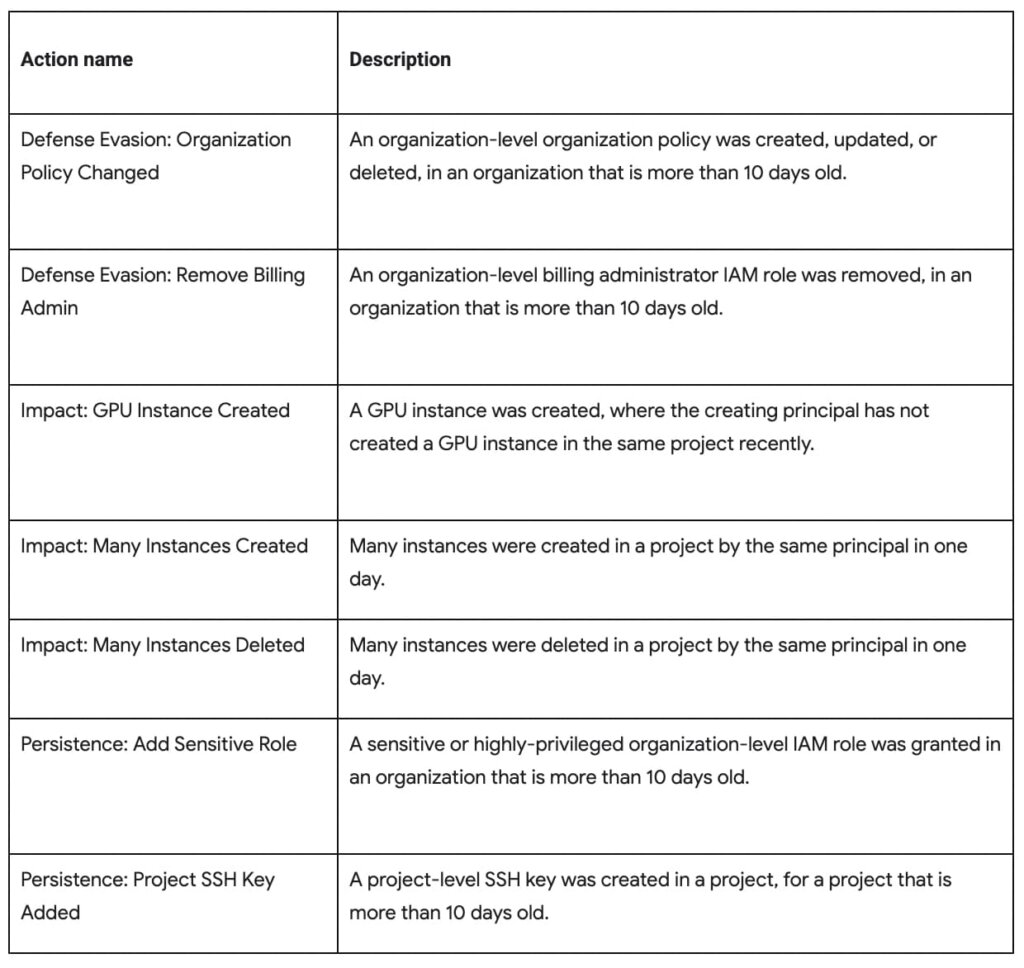
To ensure that adversaries do not have mechanisms to disable this protection or hide logs from users, Sensitive Actions is an on-by-default service now enabled for Cloud customers. In cases where customers have certain privacy controls or policy restrictions applied to their logging pipeline, their logs will not be analyzed by this service.
You can learn more about Sensitive Actions and our overall recommendations for keeping your account secure by visiting our documentation here.
All About Cloud Run, its Scalability and Management Features

7386
Of your peers have already read this article.
3:00 Minutes
The most insightful time you'll spend today!
Mindful Containers is a fictitious company that is creating containerized microservice applications. They need a fully managed compute environment for deploying and scaling serverless containerized microservices. So, they are considering Cloud Run.
They are excited about Cloud Run because it abstracts away the cluster configuration, monitoring, and management so they can focus on building the features for their apps. Cloud Run is a fully-managed compute environment for deploying and scaling serverless containerized microservices.

What is Cloud Run?
Cloud Run is a fully-managed compute environment for deploying and scaling serverless HTTP containers without worrying about provisioning machines, configuring clusters, or autoscaling.
- No vendor lock-in – Because Cloud Run takes standard OCI containers and implements the standard Knative Serving API, you can easily port over your applications to on-premises or any other cloud environment.
- Fast autoscaling – Microservices deployed in Cloud Run scale automatically based on the number of incoming requests, without you having to configure or manage a full-fledged Kubernetes cluster. Cloud Run scales to zero— that is, uses no resources—if there are no requests.
- Split traffic – Cloud Run enables you to split traffic between multiple revisions, so you can perform gradual rollouts such as canary deployments or blue/green deployments.
- Custom domains – You can set up custom domain mapping in Cloud Run and it will provision a TLS certificate for your domain.
- Automatic redundancy – Cloud Run offers automatic redundancy so you don’t have to worry about creating multiple instances for high availability
How to use Cloud Run
With Cloud Run, you write your code in your favorite language and/or use a binary library of your choice. Then push it to Cloud Build to create a container build. With a single command—“gcloud run deploy”—you go from a container image to a fully managed web application that runs on a domain with a TLS certificate and auto-scales with requests.
How does Cloud Run work?
Cloud Run service can be invoked in the following ways:
HTTPS: You can send HTTPS requests to trigger a Cloud Run-hosted service. Note that all Cloud Run services have a stable HTTPS URL. Some use cases include:
- Custom RESTful web API
- Private microservice
- HTTP middleware or reverse proxy for your web applications
- Prepackaged web application
gRPC: You can use gRPC to connect Cloud Run services with other services—for example, to provide simple, high-performance communication between internal microservices. gRPC is a good option when you:
- Want to communicate between internal microservices
- Support high data loads (gRPC uses protocol buffers, which are up to seven times faster than REST calls)
- Need only a simple service definition you don’t want to write a full client library
- Use streaming gRPCs in your gRPC server to build more responsive applications and APIs
WebSockets: WebSockets applications are supported on Cloud Run with no additional configuration required. Potential use cases include any application that requires a streaming service, such as a chat application.
Trigger from Pub/Sub: You can use Pub/Sub to push messages to the endpoint of your Cloud Run service, where the messages are subsequently delivered to containers as HTTP requests. Possible use cases include:
- Transforming data after receiving an event upon a file upload to a Cloud Storage bucket
- Processing your Google Cloud operations suite logs with Cloud Run by exporting them to Pub/Sub
- Publishing and processing your own custom events from your Cloud Run services
Running services on a schedule: You can use Cloud Scheduler to securely trigger a Cloud Run service on a schedule. This is similar to using cron jobs. Possible use cases include:
- Performing backups on a regular basis
- Performing recurrent administration tasks, such as regenerating a sitemap or deleting old data, content, configurations, synchronizations, or revisions
- Generating bills or other documents
Executing asynchronous tasks: You can use Cloud Tasks to securely enqueue a task to be asynchronously processed by a Cloud Run service. Typical use cases include:
- Handling requests through unexpected production incidents
- Smoothing traffic spikes by delaying work that is not user-facing
- Reducing user response time by delegating slow background operations, such as database updates or batch processing, to be handled by another service,
- Limiting the call rate to backend services like databases and third-party APIs
Events from Eventrac: You can trigger Cloud Run with events from more than 60 Google Cloud sources. For example:
- Use a Cloud Storage event (via Cloud Audit Logs) to trigger a data processing pipeline
- Use a BigQuery event (via Cloud Audit Logs) to initiate downstream processing in Cloud Run each time a job is completed
How is Cloud Run different from Cloud Functions?
Cloud Run and Cloud Functions are both fully managed services that run on Google Cloud’s serverless infrastructure, auto-scale, and handle HTTP requests or events. They do, however, have some important differences:
- Cloud Functions lets you deploy snippets of code (functions) written in a limited set of programming languages, while Cloud Run lets you deploy container images using the programming language of your choice.
- Cloud Run also supports the use of any tool or system library from your application; Cloud Functions does not let you use custom executables.
- Cloud Run offers a longer request timeout duration of up to 60 minutes, while with Cloud Functions the requests timeout can be set as high as 9 mins.
- Cloud Functions only sends one request at a time to each function instance, while by default Cloud Run is configured to send multiple concurrent requests on each container instance. This is helpful to improve latency and reduce costs if you’re expecting large volumes.
Pricing
Cloud Run comes with a generous free tier and is pay per use, which means you only pay while a request is being handled on your container instance. If it is idle with no traffic, then you don’t pay anything.
Conclusion
After learning about the ease of set up, scalability, and management capabilities of Cloud Run the Mindful Containers team is using it to deploy stateless microservices. If you are interested in learning more, check out the documentation.https://www.youtube.com/embed/oR4btKLRdn4?enablejsapi=1&
For more #GCPSketchnote, follow the GitHub repo. For similar cloud content follow me on Twitter @pvergadia and keep an eye out on thecloudgirl.dev
How to Configure GCP for Live Network Forensics

3049
Of your peers have already read this article.
3:00 Minutes
The most insightful time you'll spend today!
Forensics is the application of science to criminal and civil laws. It is a proven approach for gathering and processing evidence at a crime scene. An integral step in the forensics process is the isolation of the scene without contaminating or modifying the evidence. The isolation step prevents any further contamination or tampering with possible evidence. The same philosophy can be applied to the investigation of digital events.
In this post we will review methods, tactics and architecture designs to isolate an infected VM while still making it accessible to forensic tools. The goal is to allow access so that data and evidence can be captured while protecting other assets. There are many forensic tools for networking that can be used to analyze the captured traffic. This post does not cover these tools but rather how to configure GCP to capture live traffic in the most efficient and secured way. Once traffic is captured, customers can use whatever tools they prefer to run the analysis. More details about these tools and required agents can be found here and details about open source tooling that Google and others are developing are available here.
In cloud security context, when a VM shows signs of compromise, the most common immediate reaction is to take a snapshot, shut down the instance and relocate the image snapshot to an isolated environment, a method known as “dead analysis”. However, shutting down the instance will impede an important step in the investigation and digital forensics, as some important information in a buffer or the RAM may be lost.
The other forensic approach is “live analysis”, in which the VM is kept on and evidence is gathered from the VM directly. Live forensics enables the imaging of RAM, bypasses most hard drives and software encryption, determines the cause of abnormal traffic, and is extremely useful when dealing with active network intrusions. This process is usually performed by forensic analysts. For example, if there is a good chance the malware resides only in memory then live forensics is, in some cases, the only way to capture and analyze the malware. In this method, in addition to disk and memory evidence, a forensic analysis can also capture live-network from data sent over the compromised VM network interfaces. Some of the benefits of collecting live networks are reconstruction and visualizing traffic flow in real-time, in particular during active network intrusions or attacks.
In the cloud, a VM must be isolated when it becomes apparent that an incident has happened, in order to protect other VMs from being infected. Our Cloud Forensics 101 session covers the process and required artifacts, such as logs, that need to be collected for cloud forensics.
What happens when your image is compromised
Let’s now assume that one of the VMs in your infrastructure has been compromised and alarms are coming from products such as GCP’s Cloud Security and Command Center, Chronicle backstory or your SIEM.
An incident response plan consists of 3 phases: preparation (actions taken before an attack), detection (actions taken during an attack) and response (actions taken after an attack). During the detection phase, the Computer Security Incident Response Team (CSIRT) or threat analysts decide whether live acquisition analysis is required. If live forensics is required, for example when it is vital to acquire a VM’s RAM, then one of the first courses of action is to isolate and contain the VM from the rest of the world and connect the Forensics VPC to the VM for investigation. The forensics VPC resides in a forensics GCP project, it includes digital forensics tools to capture evidence from the VM such as SANS Investigative Forensics Toolkit – SIFT, The Sleuth Kit, Autopsy, Encase, FTK and alike. These tools are already installed, configured, tested and ready to use. The forensics project will also save and preserve evidence such as disk and memory images for forensic review.
We’ll cover two scenarios in this post, the first scenario is to isolate the image and connect the forensics VPC to the image for live acquisition.
In the second scenario we will also capture live traffic from the isolated image for live network digital forensics. To capture live traffic from the infected VM, we will leverage the GCP Packet Mirroring service to duplicate all traffic going in and out of the VM and send it to a Forensics VPC for analysis. Network forensics analysis tools such as Palo Alto VM-Series for IDS, ExtraHop Reveal(x), CheckPoint CloudGuard, Arkime (formerly Moloch), Corelight are installed, configured and ready for deployment in the Forensics VPC, these tools will be used to analyze the duplicate network traffic.
Isolating the infected VM from other resources and connecting the forensics VPC
As part of the Incident Response plan preparation phase, the CSIRT created a Google Cloud Forensics Project. Since the Forensics project will be used only when needed, it’s better to automate the creation of the project and its resources with a tool such as Terraform. It is important to grant access to this project only to individuals and groups who deal with incident response and forensics, such as CSIRT. As shown in figure 1, the Forensics project on the right includes its own VPC, non-overlapped subnet and VM images with pre-installed and pre-configured forensics tools. Internal load-balancer and instance-groups are also configured, we will use these resources to capture live traffic, as described later in this post.
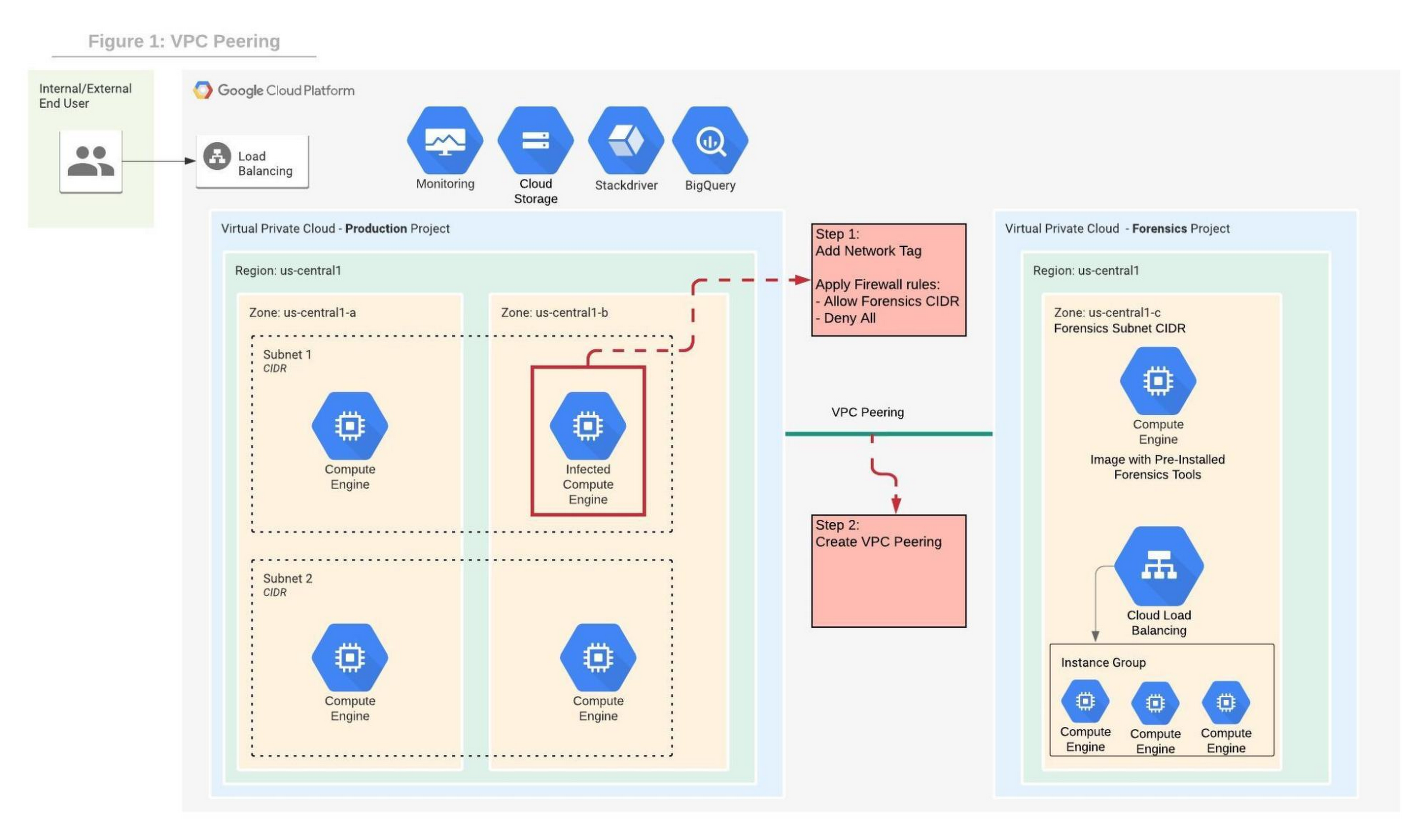
In order to contain the spread of any malware or network activity, such as data exfiltration, we’ll isolate the VM with VPC firewall rules. The GCP VPC firewall is a distributed firewall that always enforces its rules, protecting the instances regardless of their configuration and operating systems. In other words, the compromised VM cannot override the firewall enforcement if its policies follow the principle of least privilege . Rules can be applied to all instances in the network, target network tags or service accounts.
Step 1 in the diagram above shows how an infected VM is isolated from the rest of the network by firewall rules that deny any ingress and egress traffic from any CIDR beside the forensics subnet CIDR. The infected VM is tagged with a unique network tag, for example “<image-name>_InfectedVM”, then firewalls rules are applied on the network tag. This ensures that the infected VM is isolated from the project and the Internet while enabling access to the VM via VPC peering which we’ll configure in step-2. You can learn more about VPC firewalls rules here.
In step 2, the VPC from the forensics project is peered with the VPC in the production project. When VPC peering is established routes are exchanged between the VPCs. By default, VPC peering exchanges all subnet routes, however, custom routes can also be filtered if required. At this point, the VM from the forensics project can communicate with the infected VM and start the live forensics analysis job using the pre-installed and pre-configured forensics tools.
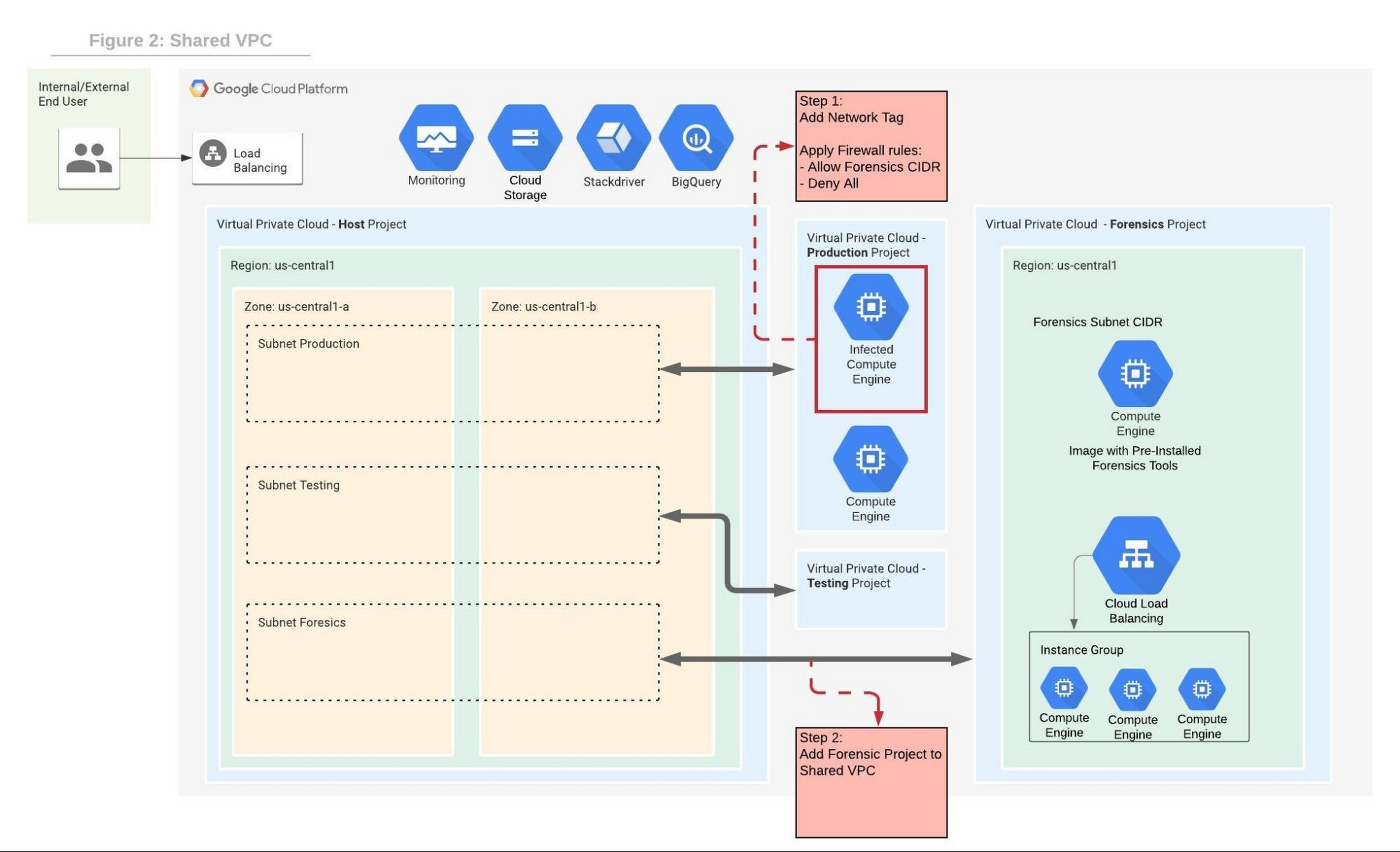
Shared VPC is a network construct that allows you to connect resources from multiple projects, called service-projects, to a common VPC in a host-project. VPCs from different projects can securely communicate with each other via the hosted project network while centralizing the network administration. Figure 2 depicts Shared VPC topology, rather than using VPC peering, during step 2 the Forensics project is simply attached to the host project. After the attachment, the Shared VPC allows the forensics tools to communicate with the infected VMs.
Capturing live network traffic with Google Traffic Mirroring
If live network forensics is required, for example during active network intrusions, then the incoming and outgoing traffic needs to be duplicated and captured. While VPC Flow logs capture the networking metadata telemetry, this is not enough for live network forensics analysis. GCP Packet Mirroring clones the traffic of a specified instance in a VPC and forwards it to a specified internal load balancer which collects the mirrored traffic and sends it to an attached instance group. Packet mirroring captures all the traffic from the specified subnet, network tags, or instance name.
Figure 3 depicts the steps that allow the compromised VM to communicate with the rest of the world (for example beaconing with C&C) while capturing all traffic for investigation in a peered VPC deployment.
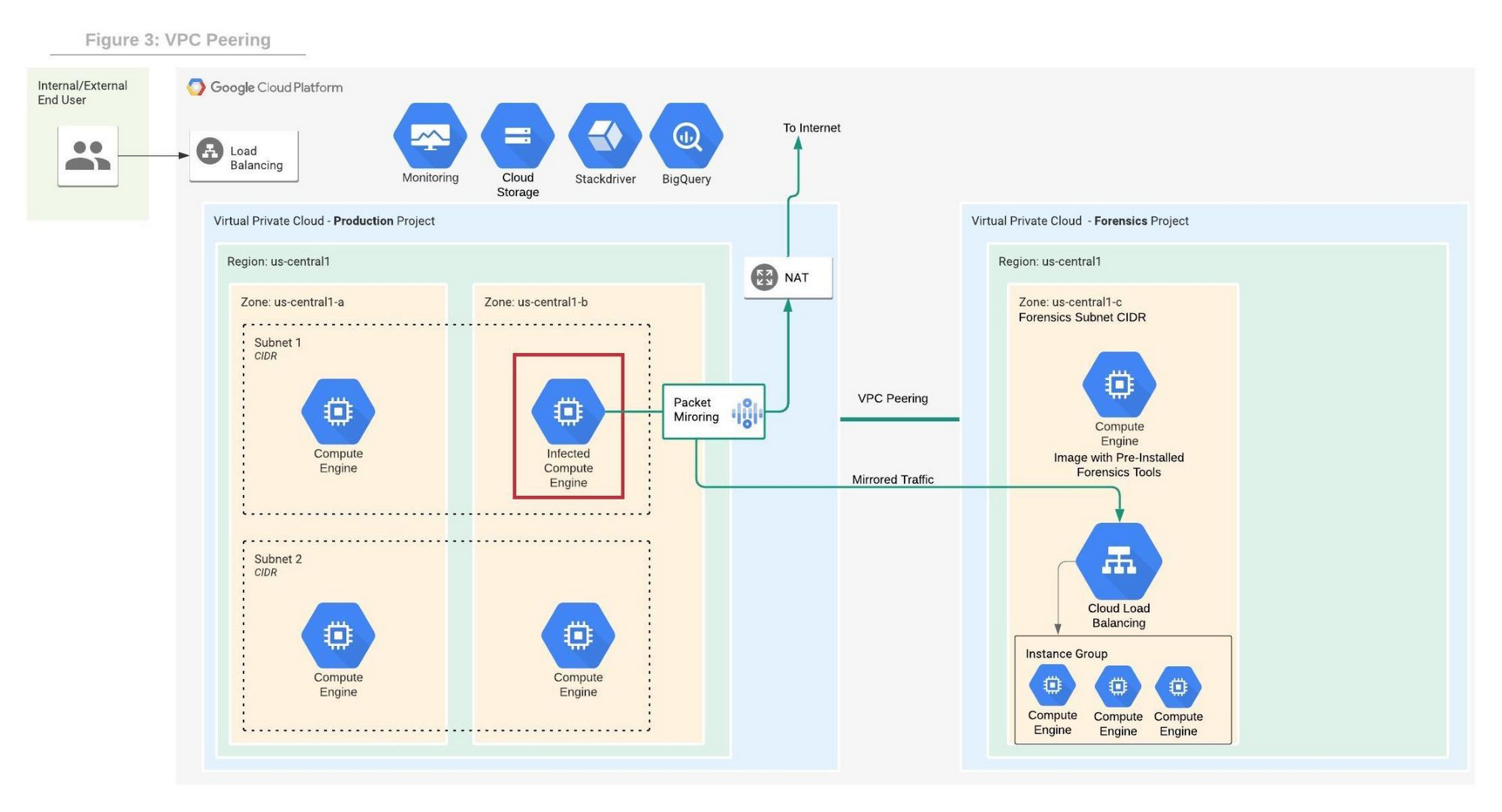
Figure 4 depicts the steps that allow the compromised VM to communicate with the rest of the world while capturing all traffic for investigation in a shared VPC deployment.
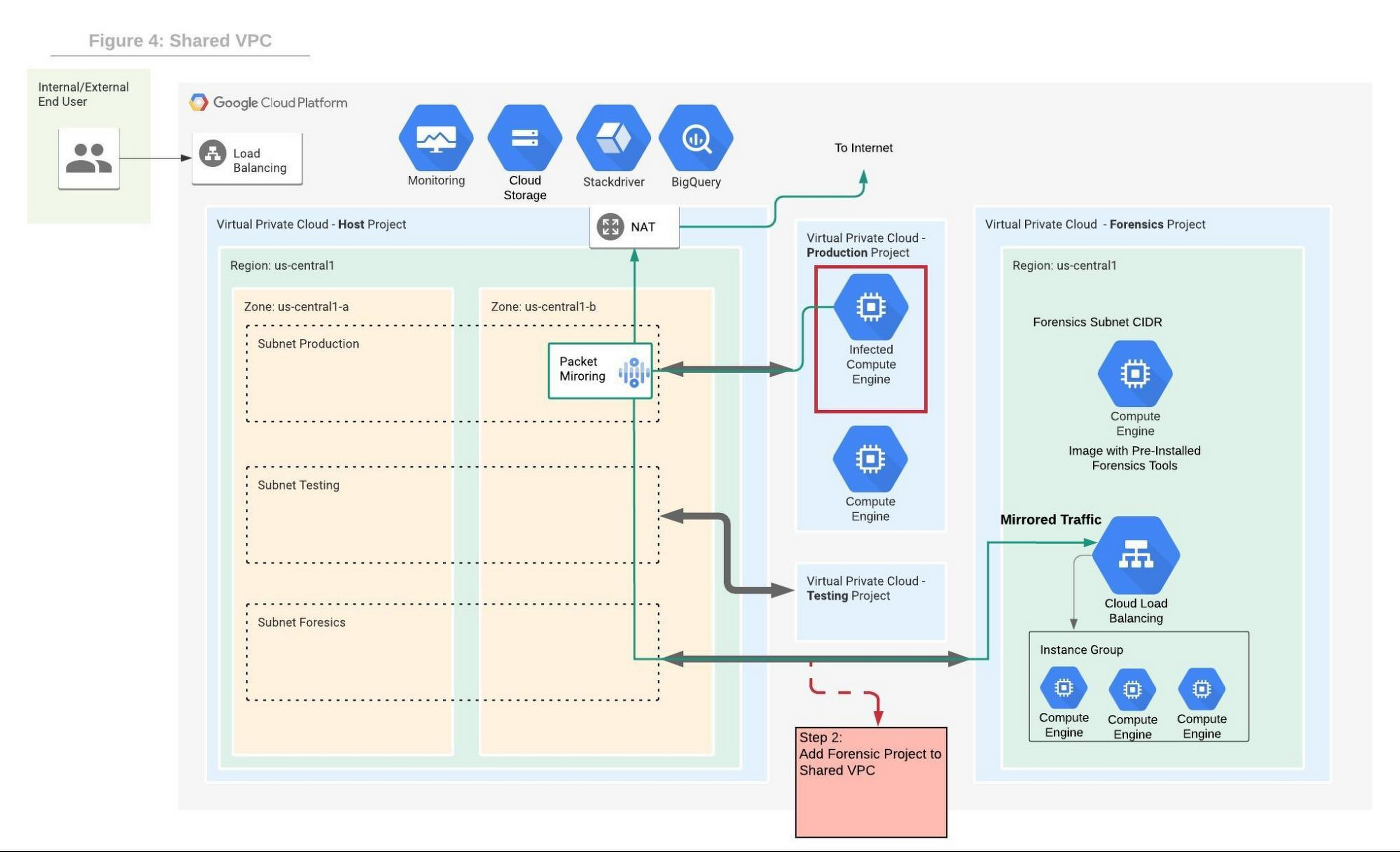
We will use the Forensics’ project internal load balancer and the instance group VMs which include packet capture and analysis tools. Note that production and forensics networks must be in the same region. Detailed steps to configure packet mirroring are available on this page.
If you are using a Shared VPC then check the Packet Mirroring configuration for Shared VPC for configuration details. Figure 4 depicts the packet mirroring flow in a shared VPC topology.
It is recommended to automate and periodically test the process to make sure that in case of an incident, the entire setup and Forensics toolchain can be quickly deployed. If after initial investigation a suspicious destination, such as a Command and Control [C&C] Server, has been identified, then the Packet Mirroring policy can be adjusted with a policy filter that only mirrors traffic from that C&C server IP address.
An incident management plan must be in place for companies using cloud services, and this plan should also include the option of using live acquisition when necessary. design and preparation for forensics acquisition allows the company to build the infrastructure that can be deployed and connected to the appropriate VM automatically. The architectures described in this post can help the process of collecting and preserving vital evidence for the forensic process, while the incident response team resolves the incident.
What Users and System Designers Must Learn from Google’s Best Practices for Password Management

5276
Of your peers have already read this article.
3:00 Minutes
The most insightful time you'll spend today!
Updated for 2021: This post includes updated best practices including the latest from Google’s Best Practices for Password Management whitepapers for both users and system designers.
Account management, authentication and password management can be tricky. Often, account management is a dark corner that isn’t a top priority for developers or product managers. The resulting experience often falls short of what some of your users would expect for data security and user experience.
Fortunately, Google Cloud brings several tools to help you make good decisions around the creation, secure handling and authentication of user accounts (in this context, anyone who identifies themselves to your system—customers or internal users). Whether you’re responsible for a website hosted in Google Kubernetes Engine, an API on Apigee, an app using Firebase, or other service with authenticated users, this post lays out the best practices to follow to ensure you have a safe, scalable, usable account authentication system.
1. Hash those passwords
My most important rule for account management is to safely store sensitive user information, including their password. You must treat this data as sacred and handle it appropriately.
Do not store plaintext passwords under any circumstances. Your service should instead store a cryptographically strong hash of the password that cannot be reversed—created with Argon2id, or Scrypt. The hash should be salted with a value unique to that specific login credential. Do not use deprecated hashing technologies such as MD5, SHA1 and under no circumstances should you use reversible encryption or try to invent your own hashing algorithm. Use a pepper that is not stored in the database to further protect the data in case of a breach. Consider the advantages of iteratively re-hashing the password multiple times.
Design your system assuming it will be compromised eventually. Ask yourself “If my database were exfiltrated today, would my users’ safety and security be in peril on my service or other services they use?” As well as “What can we do to mitigate the potential for damage in the event of a leak?”
Another point: If you could possibly produce a user’s password in plaintext at any time outside of immediately after them providing it to you, there’s a problem with your implementation.
If your system requires detection of near-duplicate passwords, such as changing “Password” to “pAssword1”, save the hashes of common variants you wish to ban with all letters normalized and converted to lowercase. This can be done when a password is created or upon successful login for pre-existing accounts. When the user creates a new password, generate the same type of variants and compare the hashes to those from the previous passwords. Use the same level of hashing security as with the actual password.
2. Allow for third-party identity providers if possible
Third-party identity providers enable you to rely on a trusted external service to authenticate a user’s identity. Google, Facebook, and Twitter are commonly used providers.
You can implement external identity providers alongside your existing internal authentication system using a platform such as Identity Platform. There are a number of benefits that come with Identity Platform, including simpler administration, a smaller attack surface, and a multi-platform SDK. We’ll touch on more benefits throughout this list.
3. Separate the concept of user identity and user account
Your users are not an email address. They’re not a phone number. They’re not even a unique username. Any of these authentication factors should be mutable without changing the content or personally identifiable information (PII) in the account. Your users are the multi-dimensional culmination of their unique, personalized data and experience within your service, not the sum of their credentials. A well-designed user management system has low coupling and high cohesion between different parts of a user’s profile.
Keeping the concepts of user account and credentials separate will greatly simplify the process of implementing third-party identity providers, allowing users to change their username, and linking multiple identities to a single user account. In practical terms, it may be helpful to have an abstract internal global identifier for every user and associate their profile and one or more sets of authentication datavia that ID as opposed to piling it all in a single record.
4. Allow multiple identities to link to a single user account
A user who authenticates to your service using their username and password one week might choose Google Sign-In the next without understanding that this could create a duplicate account. Similarly, a user may have very good reason to link multiple email addresses to your service. If you’ve properly separated user identity and authentication, it will be a simple process to link several authentication methods to a single user.
Your backend will need to account for the possibility that a user gets part or all the way through the signup process before they realize they’re using a new third-party identity not linked to their existing account in your system. This is most simply achieved by asking the user to provide a common identifying detail, such as email address, phone, or username. If that data matches an existing user in your system, require them to also authenticate with a known identity provider and link the new ID to their existing account.
5. Don’t block long or complex passwords
NIST publishes guidelines on password complexity and strength. Since you are (or will be very soon) using a strong cryptographic hash for password storage, a lot of problems are solved for you. Hashes will always produce a fixed-length output no matter the input length, so your users should be able to use passwords as long as they like. If you must cap password length, do so based on the limits of your infrastructure; often this is a matter of memory usage (memory used per login operation * potential concurrent logins per machine), or more likely—the maximum POST size allowable by your servers. We’re talking numbers from hundreds of KB to over 1MB. Seriously. Your application should already be hardened to prevent abuse from large inputs. This doesn’t create new opportunities for abuse if you employ controls to prevent credential stuffing and hash the input as soon as possible to free up memory.
Your hashed passwords will likely already consist of a small set of ASCII characters. If not, you can easily convert a binary hash to Base64. With that in mind, you should allow your users to use literally any characters they wish in their password. If someone wants a password made of Klingon, Emoji, and ASCII art with whitespace on both ends, you should have no technical reason to deny them. Just make sure to perform Unicode normalization to ensure cross-platform compatibility. See our system designers whitepaper (PDF) for more information on Unicode and supported characters in passwords.
Any user attempting to use an extreme password is probably following password best practices (PDF) including using a password manager, which allows the entry of complex passwords even on limited mobile device keyboards. If a user can input the string in the first place (i.e., the HTML specification for password input disallows line feed and carriage return), the password should be acceptable.
6. Don’t impose unreasonable rules for usernames
It’s not unreasonable for a site or service to require usernames longer than two or three characters, block hidden characters, and prevent whitespace at the beginning and end of a username. However, some sites go overboard with requirements such as a minimum length of eight characters or by blocking any characters outside of 7-bit ASCII letters and numbers.
A site with tight restrictions on usernames may offer some shortcuts to developers, but it does so at the expense of users and extreme cases will deter some users.
There are some cases where the best approach is to assign usernames. If that’s the case for your service, ensure the assigned username is user-friendly insofar as they need to recall and communicate it. Alphanumeric generated IDs should avoid visually ambiguous symbols such as “Il1O0.” You’re also advised to perform a dictionary scan on any randomly generated string to ensure there are no unintended messages embedded in the username. These same guidelines apply to auto-generated passwords.
7. Validate the user’s identity
If you ask a user for contact information, you should validate that contact as soon as possible. Send a validation code or link to the email address or phone number. Otherwise, users may make a typo in their contact info and then spend considerable time using your service only to find there is no account matching their info the next time they attempt login. These accounts are often orphaned and unrecoverable without manual intervention. Worse still, the contact info may belong to someone else, handing full control of the account to a third party.
8. Allow users to change their username
It’s surprisingly common in legacy systems or any platform that provides email accounts not to allow users to change their username. There are very good reasons not to automatically release usernames for reuse, but long-term users of your system will eventually come up with significant reasons to use a different username and they likely won’t want to create a new account.
You can honor your users’ desire to change their usernames by allowing aliases and letting your users choose the primary alias. You can apply any business rules you need on top of this functionality. Some orgs might limit the number of username changes per year or prevent a user from displaying or being contacted via anything but their primary username. Email address providers are advised to never re-issue email addresses, but they could alias an old email address to a new one. A progressive email address provider might even allow users to bring their own domain name and have any address they wish.
If you are working with a legacy architecture, this best practice can be very difficult to meet. Even companies like Google have technical hurdles that make this more difficult than it would seem. When designing new systems, make every effort to separate the concept of user identity and user account and allow multiple identities to link to a single user account and this will be a much smaller problem. Whether you are working on existing or greenfield code, choose the right rules for your organization with an emphasis on allowing your users to grow and change over time.
9. Let your users delete their accounts
A surprising number of services have no self-service means for a user to delete their account and associated PII. Depending on the nature of your service, this may or may not include public content they created such as posts and uploads. There are a number of good reasons for a user to close an account permanently and delete all their PII . These concerns need to be balanced against your user experience, security, and compliance needs. Many if not most systems operate under some sort of regulatory control (such as PCI or GDPR), which provides specific guidelines on data retention for at least some user data. A common solution to avoid compliance concerns and limit data breach potential is to let users schedule their account for automatic future deletion.
In some circumstances, you may be legally required to comply with a user’s request to delete their PII in a timely manner. You also greatly increase your exposure in the event of a data breach where the data from “closed” accounts is leaked.
10. Make a conscious decision on session length
An often overlooked aspect of security and authentication is session length. Google puts a lot of effort into ensuring users are who they say they are and will double-check based on certain events or behaviors. Users can take steps to increase their security even further.
Your service may have good reason to keep a session open indefinitely for non-critical analytics purposes, but there should be thresholds after which you ask for password, 2nd factor, or other user verification.
Consider how long a user should be able to be inactive before re-authenticating. Verify user identity in all active sessions if someone performs a password reset. Prompt for authentication or 2nd factor if a user changes core aspects of their profile or when they’re performing a sensitive action. Re-authenticate if the user’s location changes significantly in a short period of time. Consider whether it makes sense to disallow logging in from more than one device or location at a time.
When your service does expire a user session or requires re-authentication, prompt the user in real time or provide a mechanism to preserve any activity they have not saved since they were last authenticated. It’s very frustrating for a user to take a long time to fill out a form, only to find all their input has been lost and they must log in again.
11. Use 2-Step Verification
Consider the practical impact on a user of having their account stolen when choosing 2-Step Verification (also known as two-factor authentication, MFA, or 2FA) methods. Time-based one-time passwords (TOTP), email verification codes, or “magic links” are consumer-friendly and relatively secure. SMS 2FA auth has been deprecated by NIST due to multiple weaknesses, but it may be the most secure option your users will accept for what they consider a trivial service.
Offer the most secure 2FA auth you reasonably can. Hardware 2FA such as the Titan Security Key are ideal if feasible for your application. Even if a TOTP library is unavailable for your application, email verification or 2FA provided by third-party identity providers is a simple means to boost your security without great expense or effort. Just remember that your user accounts are only as secure as the weakest 2FA or account recovery method.
12. Make user IDs case-insensitive
Your users don’t care and may not even remember the exact case of their username. Usernames should be fully case-insensitive. It’s trivial to store usernames and email addresses in all lowercase and transform any input to lowercase before comparing. Make sure to specify a locale or employ Unicode normalization on any transformations.
Smartphones represent an ever-increasing percentage of user devices. Most of them offer autocorrect and automatic capitalization of plain-text fields. Preventing this behavior at the UI level might not be desirable or completely effective, and your service should be robust enough to handle an email address or username that was unintentionally auto-capitalized.
13. Build a secure auth system
If you’re using a service like Identity Platform, a lot of security concerns are handled for you automatically. However, your service will always need to be engineered properly to prevent abuse. Core considerations include implementing a password reset instead of password retrieval, detailed account activity logging, rate-limiting login attempts to prevent credential stuffing, locking out accounts after too many unsuccessful login attempts, and requiring two-factor authentication for unrecognized devices or accounts that have been idle for extended periods. There are many more aspects to a secure authentication system, so please see the further reading section below for links to more information.
Further reading
There are a number of excellent resources available to guide you through the process of developing, updating, or migrating your account and authentication management system. I recommend the following as a starting place:
- Our Modern Password Security for System Designers whitepaper (PDF)
- The related Modern password security for users whitepaper (PDF)
- NIST 800-063B covers Authentication and Lifecycle Management
- OWASP continually updates their Password Storage Cheat Sheet
- OWASP goes into even more detail with the Authentication Cheat Sheet
- Google Cloud Identity Platform is a multi-protocol customer identity and access management solution, with robust authentication features
- Google’s Firebase Authentication site has a rich library of guides, reference materials and sample code
Thwart Ransomware Threats with Google Cloud’s 5 Pillars of Protection

3135
Of your peers have already read this article.
2:00 Minutes
The most insightful time you'll spend today!
Ransomware, a form of malware that encrypts a user’s or organization’s most important files or data rendering them unreadable, isn’t a novel threat in the world of computer security. These destructive, financially-motivated attacks where cybercriminals demand payment to decrypt data and restore access have been studied and documented for many years. Today’s reality shows us that these attacks have become more pervasive, impacting essential services like healthcare or pumping gasoline. Yet despite attempts to stop this threat, ransomware continues to impact organizations across all industries, significantly disrupting business processes and critical national infrastructure services and leaving many organizations looking to better protect themselves. Organizations that continue to rely on legacy systems are especially vulnerable to ransomware threats, as these systems may not be regularly patched and maintained.
For more than 20 years Google has been operating securely in the cloud, using our modern technology stack to provide a more defensible environment that we can protect at scale. We strive to make our security innovations available in our platforms and products for customers to use as well. This underpins our work to be the industry’s most trusted cloud, and while the threat of ransomware isn’t new, our responsibility to help protect you from existing or emerging threats never changes. In this post, we share guidance on how organizations can increase their resilience to ransomware and how some of our Cloud products and services can help.
Develop a comprehensive, defensive security posture to protect against ransomware
Robust protection against ransomware (and many other threats) requires multiple layers of defense. The National Institute of Standards and Technology (NIST) outlines five main functions in the Cybersecurity Framework that serve as the primary pillars for a successful and comprehensive cybersecurity program in any public or private sector organization. Below are the recommendations from NIST and examples of how our Cloud technologies can help address ransomware threats:
Pillar #1 – Identify: Develop an understanding of what cybersecurity risks you need to manage for the scope of your assets, systems, data, people, and capabilities. In the case of ransomware, this covers which systems or processes are most likely to be targeted in a ransomware attack, and what the business impact would be if specific systems were rendered inoperable. This will help prioritize and focus efforts to manage risks.
Our CISO Guide to Security Transformation whitepaper outlines steps for a risk-informed, rather than risk-avoidance, approach to security with the cloud. A risk-informed approach can help you address the most important security risks, instead of addressing the risks that you already know how to mitigate. Cloud service providers make this risk-informed approach easier and more efficient for you by developing and maintaining many of the controls and tools that you need to mitigate modern security threats. Services like Cloud Asset Inventory provide a mechanism to discover, monitor, and analyze all your assets in one place for tasks like IT ops, security analytics, auditing, and governance.
Pillar #2 – Protect: Create safeguards to ensure delivery of critical services and business processes to limit or contain the impact of a potential cybersecurity incident or attack. In the case of ransomware, these safeguards may include frameworks like zero trust that protect and strongly authenticate user access and device integrity, segment environments, authenticate executables, reduce phishing risk, filter spam and malware, integrate endpoint protection, patch consistently and provide continuous controls assurance. Some examples of products and strategies to involve in this step include:
- A cloud-native, inherently secure email platform: Email is at the heart of many ransomware attacks. It can be exploited to phish credentials for illegitimate network access and/or to distribute ransomware binaries directly. Advanced phishing and malware protection in Gmail provides controls to quarantine emails, defends against anomalous attachment types, and protects from inbound spoofing emails. Security Sandbox detects the presence of previously unknown malware in attachments. As a result, Gmail prevents more than 99.9 percent of spam, phishing, and malware from reaching users’ inboxes. Unlike frequently-exploited legacy on-premises email systems, Gmail is continually and automatically updated with the latest security improvements and protections to help keep your organization’s email safe.
- Strong protection against account takeovers: Compromised accounts allow ransomware operators to gain a foothold in victim organizations, perform reconnaissance, get unauthorized access to data and install malicious binaries. Google’s Advanced Protection Program provides the strongest defense against account takeovers and has yet to see a user that participates in the program be successfully phished. Further, Google Cloud employs many layers of machine learning systems for anomaly detection to differentiate between safe and anomalous user activity across browsers, devices, application logins, and other usage events.
- Zero trust access controls that limit attacker access and lateral movement: BeyondCorp Enterprise provides a turnkey solution for implementing zero trust access to your key business applications and resources. In a zero trust access model, authorized users are granted point-in-time access to individual apps, not the entire corporate network, and permissions are continuously evaluated to determine if access is still valid. This prevents the lateral movement across the network that ransomware attackers rely on to hunt for sensitive data and spread infections. BeyondCorp’s protections can even be applied to RDP access to resources, one of the most common ways that ransomware attackers gain and maintain access to insecure legacy Windows Server environments.
- Enterprise threat protections for Chrome: Leveraging Google Safe Browsing technology, Chrome warns users of millions of malware downloads each week. Threat protection in BeyondCorp Enterprise delivered through Chrome can prevent infections from previously unknown malware including ransomware, with real-time URL checks and deep scanning of files.

- Endpoints designed for security: Chromebooks are designed to protect against phishing and ransomware attacks with a low on-device footprint, read-only, constantly invisibly updating Operating System, sandboxing, verified boot, Safe Browsing and Titan-C security chips. Rollout of ChromeOS devices for users who work primarily in a browser can reduce an organization’s attack surface, such as relying too much on legacy Windows devices, which have been found to often be vulnerable to attacks.
Pillar #3 – Detect: Define continuous ways to monitor your organization and identify potential cybersecurity events or incidents. In the case of ransomware, this may include watching for intrusion attempts, deploying Data Loss Prevention (DLP) solutions to detect exfiltration of sensitive data from your organization, and scanning for early signs of ransomware execution and propagation.
The ability to spot and stop malicious activity associated with ransomware as early as possible is key to preventing business disruptions. Chronicle is a threat detection solution that identifies threats, including ransomware, at unparalleled speed and scale. Google Cloud Threat Intelligence for Chronicle surfaces highly actionable threats based on Google’s collective insight and research into Internet-based threats. Threat Intel for Chronicle allows you to focus on real threats in the environment and accelerate your response time.
DLP technologies are also useful in helping detect data that could be appealing to ransomware operators. With data discovery capabilities like Cloud DLP, you can detect sensitive data that’s accessible to the public when it should not be and detect access credentials in exposed code.
Pillar #4 – Respond: Activate an incident response program within your organization that can help contain the impact of a security (in this case, ransomware) event.
During a ransomware attack or security incident, it’s critical to secure your communications both internally to your teams and externally to your partners and customers. Many organizations with legacy Office deployments have shifted to Google Workspace because it offers a more standardized and secure online collaboration suite, and in the event of a security incident, a new instance can quickly be stood up to provide a separate, secure environment for response actions.
Pillar #5 – Recover: Build a cyber resilience program and back-up strategy to prepare for how you can restore core systems or assets affected by a security (in this case, ransomware) incident. This is a critical function for supporting recovery timelines and lessening the impact of a cyber event so you can get back to operating your business.
Immediately after a ransomware attack, a safe point-in-time backup image that is known not to be infected must be identified. Actifio GO provides scalable and efficient incremental data protection and a unique near-instant recovery capability for data. This near-instant recovery facilitates identifying a clean restore point quickly, enabling resumption of business functions rapidly. Actifio GO is infrastructure-agnostic and can protect applications on-premises and in the cloud.
In Google Workspace, if files on your computer were infected with malware but you sync them to Google Drive, you may be able to recover those files. Additionally, ensuring that you have a strong risk transfer program in place, like our Risk Protection Program, is a critical element of a comprehensive approach to managing cyber risk.
Key ransomware prevention and mitigation considerations for business and IT leaders
As you plan for a comprehensive defense posture against ransomware threats, here are some key questions to consider:
- Does your organization have a ransomware plan, and what does it entail? Remember to demand a strong partnership with your cloud providers based on a shared understanding of risk and security objectives.
- How are you defending your organization’s data, systems and employees against malware?
- Are your organization’s systems up to date and patched continuously?
- Are you watching for data exfiltration or other irregularities?
- What is your comprehensive zero trust approach, especially strongly authenticating my employees when they access information?
- Are you taking the right back ups to high assurance immutable locations and testing that they are working properly? This should include testing that does a periodic restore of key assets and data.
- What drills are you conducting to battle-test your organization’s risk management and response to cyber events or incidents?
Ransomware attacks will continue to evolve
Recently, ransomware groups have evolved their tactics to include stealing data prior to it being encrypted, with the threat of extorting this data through leaks. Additionally, some ransomware operators have used the threat of distributed-denial-of-service (DDoS) attacks against victim organizations as an attempt to further compel them to pay ransoms. DDoS attacks can also serve as a distraction, occupying security teams while attackers seek to accomplish other objectives such as data exfiltration or encryption of business-critical data. By deploying Google Cloud Armor — which can scale to absorb massive DDoS attacks— you can help protect services deployed in Google Cloud, other clouds, or on-premise against DDoS attacks.
Protecting against ransomware is a critical issue for all organizations, and these questions and best practices are only the start of building a mature and resilient cybersecurity posture. It’s important to remember that you can’t focus on a single piece of defense; you need a comprehensive cybersecurity program that enables you to identify, prevent, detect, respond, and recover from threats. Above all, you need a range of solutions from a battle-tested and highly-resilient cloud platform that works across these elements in an integrated way with your business. To learn more about how Google Cloud can help you implement a comprehensive cybersecurity program to protect against threats like ransomware and more, visit our Google Cloud Security Best Practices Center.
More Relevant Stories for Your Company

New Capabilities in Cloud Asset Inventory Allow Better Visibility into Google Cloud Environments
Businesses that operate in complex cloud environments, large fleets, or sophisticated security operations all require visibility into their cloud assets in order to keep their teams nimble and their data secure. Cloud Asset Inventory (CAI) helps these teams understand their Google Cloud and Anthos environments by providing complete visibility, real-time monitoring, and

Cloud Security : The First Priority for Enterprises
Cloud-based solutions were a technology life raft for organizations during the COVID-19 pandemic as employees took to the virtual office and companies scrambled to adjust to a distributed, remote reality. However, these rapid and substantial changes in the role of cloud technologies on the business came with an increased focus

Defining cloud’s future: How autonomic data security can help
“Ninety percent of all data today was created in the last two years—that’s 2.5 quintillion bytes of data per day,” according to business data analytics company Domo. That would be a mind-bending statistic, except that it’s already five years old. As data usage has undergone drastic expansion and changes in

Confidential GKE Nodes: Now Available on Compute Optimized C2D VMs
Today, we are happy to announce that Confidential GKE Nodes are available on compute optimized C2D VMs. Many companies have adopted Google Kubernetes Engine (GKE) as a key component in their application infrastructure. In some cases, the advantages of using containers and Kubernetes can surpass those of traditional architectures, but
