





New Capabilities in Cloud Asset Inventory Allow Better Visibility into Google Cloud Environments

4706
Of your peers have already read this article.
2:00 Minutes
The most insightful time you'll spend today!
Businesses that operate in complex cloud environments, large fleets, or sophisticated security operations all require visibility into their cloud assets in order to keep their teams nimble and their data secure. Cloud Asset Inventory (CAI) helps these teams understand their Google Cloud and Anthos environments by providing complete visibility, real-time monitoring, and powerful asset analysis capabilities. Today, Cloud Asset Inventory gets four new capabilities that help you understand your environment more clearly and easily than ever before.
New user interface eases asset and insight discovery
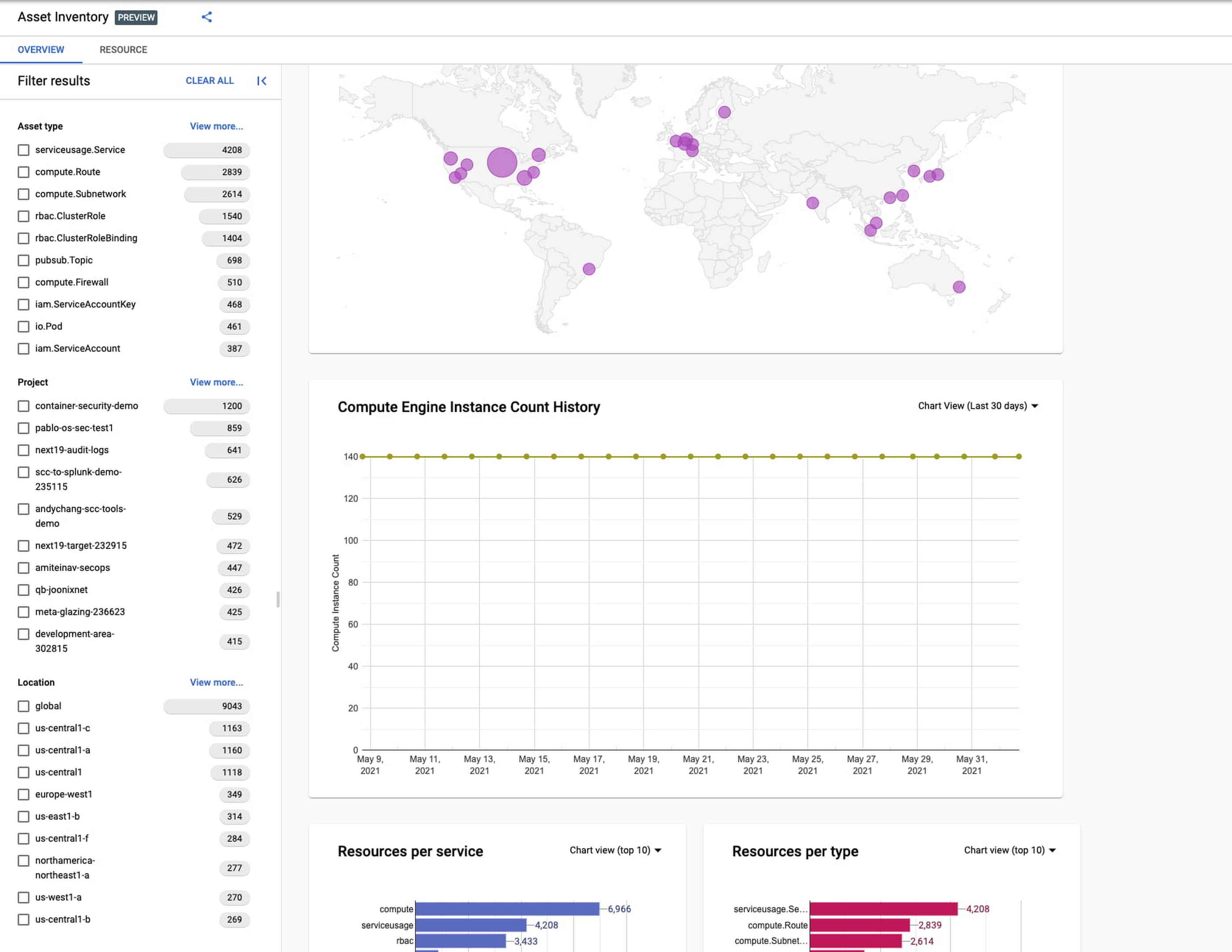
Cloud Asset Inventory console preview is now publicly available for GCP and Anthos customers. This preview provides insights into your cloud footprint, history and details of resource usage with powerful filtering and search capabilities. For example, you can view your global distribution of resources and policies, how your GCE VM footprint has been changing over time, as well as full metadata and change history for all your assets. The CAI console can be filtered at the organization, folder, or project-level, so each user can view the resources they have permissions for down to project level granularity.
Asset discovery and Datadog integration
A new asset list service in CAI provides quick and comprehensive asset discovery, including asset history, without needing to export the data to a storage destination. Datadog, a leading multi-cloud monitoring and security service provider, relies on deep integration with CAI for service and asset discovery. Datadog has been piloting and taking full advantage of the newly released asset list service. Datadog Product Manager, Steve Harrington, commented:
“Google’s new Cloud Asset Inventory API provides us with an immensely valuable, single source of truth for determining the resources present in a given GCP environment. Along with its rich metadata, this enables us to enhance multiple aspects of our integration with GCP, including streamlined metric collection and ingestion of custom labels. We plan to continue building around Cloud Asset Inventory in the future to improve existing features, and are envisioning ways it could help us provide entirely new insights to our customers.”
Answer “who can access what resources?”
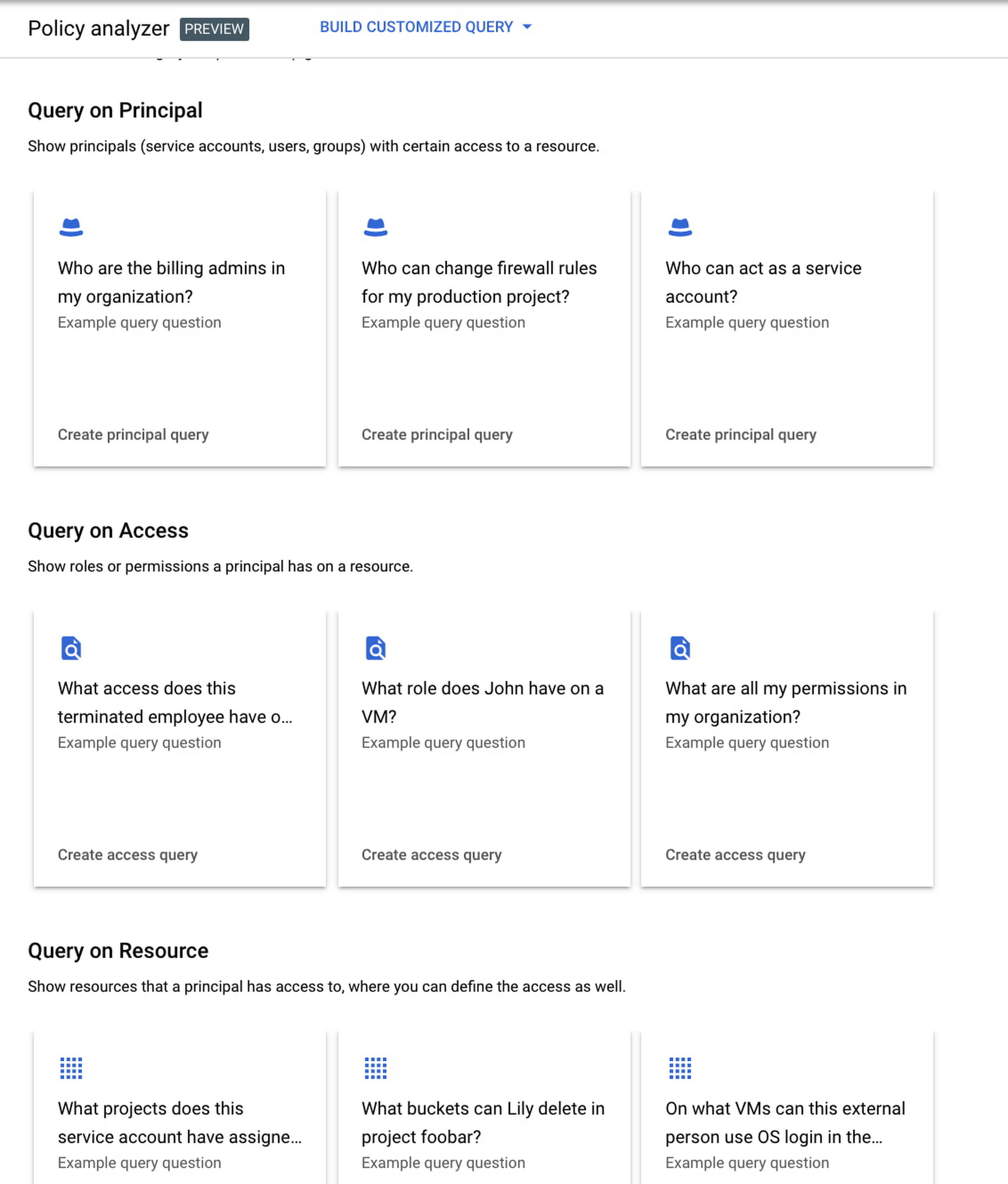
Determining authoritative answers to security-related questions like “Who can read data from my storage bucket that contains PII?” or “Does a terminated employee still have any remaining access to my system?” can be difficult and time consuming. This is why access management and identity certification is one of the top security priorities for enterprises running workloads in the cloud. To help alleviate this challenge, the new Policy Analyzer capability in CAI thoroughly analyzes the relationship between IAM policies and resources. The analysis includes powerful and efficient group expansion, service account impersonation, conditional access analysis, resource expansion, and more. You can even export the results to a BigQuery table or Cloud Storage bucket for further analysis and record keeping. CAI’s enhanced UI makes it even easier for you to build your own flexible queries and quickly get to a comprehensive answer.
Create asset posture visibility
Cloud Asset Inventory now provides seven types of Asset Insights through the Active Assist platform. These new asset insights help proactively detect anomalies within your organization’s IAM policies, which may be opportunities to improve your security posture. The insights can be aggregated at the Organization, Folder or Project level.
The seven new Asset Insights include:
- External members in IAM policies.
- External users that impersonate your service accounts.
- External members as policy editors.
- External users who can view cloud storage buckets.
- Terminated users/groups that are still in IAM policies
- IAM policies containing all users or all authenticated users.
- Projects with only terminated users as owners.
As a Google Cloud customer you can get started and use all the recently released capabilities and features immediately; check out our documentation to see how. We’d love to hear your feedback; email us with any questions or concerns!
Best Practices for Cost Optimization in the Cloud

5419
Of your peers have already read this article.
3:30 Minutes
The most insightful time you'll spend today!
When customers migrate to Google Cloud Platform (GCP), their first step is often to adopt Compute Engine, which makes it easy to procure and set up virtual machines (VMs) in the cloud that provide large amounts of computing power. Launched in 2012, Compute Engine offers multiple machine types, many innovative features, and is available in 20 regions and 61 zones!
Compute Engine’s predefined and custom machine types make it easy to choose VMs closest to your on-premises infrastructure, accelerating the workload migration process cost effectively. Cloud allows you the pricing advantage of ‘pay as you go’ and also provides significant savings as you use more compute with Sustained Use Discounts.
As Technical Account Managers, we work with large enterprise customers to analyze their monthly spend and recommend optimization opportunities. In this blog, we will share the top recommendations that we’ve developed based on our collective experience working with GCP customers.
Getting ready to save
Before you get started, be sure to familiarize yourself with the VM instance pricing page—required reading for anyone who needs to understand the Compute Engine billing model and resource-based pricing. In addition to those topics, you’ll also find information about the various Compute Engine machine types, committed use discounts and how to view your usage, among other things.
Another important step to gain visibility into your Compute Engine cost is using Billing reports in the Google Cloud Console and customizing your views based on filtering and grouping by projects, labels and more. From there you can export Compute Engine usage details to BigQuery for more granular analysis. This allows you to query the datastore to understand your project’s vCPU usage trends and how many vCPUs can be reclaimed. If you have defined thresholds for the number of cores per project, usage trends can help you spot anomalies and take proactive actions. These actions could be rightsizing the VMs or reclaiming idle VMs.
Now, with these things under your belt, let’s go over the five ways you can optimize your Compute Engine resources that we believe will give you the most immediate benefit.
1. Apply Compute Engine rightsizing recommendations
Compute Engine’s rightsizing recommendations feature provides machine type recommendations that are generated automatically based on system metrics gathered by Stackdriver Monitoring over the past eight days. Use these recommendations to resize your instance’s machine type to more efficiently use the instance’s resources. It also recommends custom machine types when appropropriate. Compute Engine makes viewing, resizing and other actions easier right from the Cloud Console as shown below.
Recently, we expanded Compute Engine rightsizing capabilities from just individual instances to managed instance groups as well. Check out the documentation for more details.

For more precise recommendations, you can install the Stackdriver Monitoring agent which collects additional disk, CPU, network, and process metrics from your VM instances to better estimate your resource requirements. You can also leverage the Recommender API for managing recommendations at scale.
2. Purchase Commitments
Our customers have diverse workloads running on Google Cloud with differing availability requirements. Many customers follow a 70/30 rule when it comes to managing their VM fleet—they have constant year-round usage of ~70%, and a seasonal burst of ~30% during holidays or special events.
If this sounds like you, you are probably provisioning resources for peak capacity. However, after migrating to Google Cloud, you can baseline your usage and take advantage of deeper discounts for Compute workloads. Committed Use Discounts are ideal if you have a predictable steady-state workload as you can purchase a one or three year commitment in exchange for a substantial discount on your VM usage.
We recently released a Committed Use Discount analysis report in the Cloud Console that helps you understand and analyze the effectiveness of the commitments you’ve purchased. In addition to this, large enterprise customers can work with their Technical Account Managers who can help manage their commitment purchases and work proactively with them to increase Committed Use Discount coverage and utilization to maximize their savings.
3. Automate cost optimizations
The best way to make sure that your team is always following cost-optimization best practices is to automate them, reducing manual intervention.
Automation is greatly simplified using a label—a key-value pair applied to various Google Cloud services. For example, you could label instances that only developers use during business hours with “env: development.” You could then use Cloud Scheduler to schedule a serverless Cloud Function to shut them down over the weekend or after business hours and then restart them when needed. Here is an architecture diagram and code samples that you can use to do this yourself.
Using Cloud Functions to automate the cleanup of other Compute Engine resources can also save you a lot of time and money. For example, customers often forget about unattached (orphaned) persistent disk, or unused IP addresses. These accrue costs, even if they are not attached to a virtual machine instance. VMs with the “deletion rule” option set to “keep disk” retain persistent disks even after the VM is deleted. That’s great if you need to save the data on that disk for a later time, but those orphaned persistent disks can add up quickly and are often forgotten! There is a Google Cloud Solutions article that describes the architecture and sample code for using Cloud Functions, Cloud Scheduler, and Stackdriver to automatically look for these orphaned disks, take a snapshot of them, and remove them. This solution can be used as a blueprint for other cost automations such as cleaning up unused IP addresses, or stopping idle VMs.
4. Use preemptible VMs
If you have workloads that are fault tolerant, like HPC, big data, media transcoding, CI/CD pipelines or stateless web applications, using preemptible VMs to batch-process them can provide massive cost savings. In fact, customer Descartes Labs reduced their analysis costs by more than 70% by using preemptible VMs to process satellite imagery and help businesses and governments predict global food supplies.
Preemptible VMs are short lived— they can only run a maximum of 24 hours, and they may be shut down before the 24 hour mark as well. A 30-second preemption notice is sent to the instance when a VM needs to be reclaimed, and you can use a shutdown script to clean up in that 30-second period. Be sure to fully review the full list of stipulations when considering preemptible VMs for your workload. All machine types are available as preemptible VMs, and you can launch one simply by adding “-preemptible” to the gcloud command line or selecting the option from the Cloud Console.
Using preemptible VMs in your architecture is a great way to scale compute at a discounted rate, but you need to be sure that the workload can handle the potential interruptions if the VM needs to be reclaimed. One way to handle this is to ensure your application is checkpointing as it processes data, i.e., that it’s writing to storage outside the VM itself, like Google Cloud Storage or a database. As an example, we have sample code for using a shutdown script to write a checkpoint file into a Cloud Storage bucket. For web applications behind a load balancer, consider using the 30-second preemption notice to drain connections to that VM so the traffic can be shifted to another VM. Some customers also choose to automate the shutdown of preemptible VMs on a rolling basis before the 24-hour period is over, to avoid having multiple VMs shut down at the same time if they were launched together.
5. Try autoscaling
Another great way to save on costs is to run only as much capacity as you need, when you need it. As we mentioned earlier, typically around 70% of capacity is needed for steady-state usage, but when you need extra capacity, it’s critical to have it available. In an on-prem environment, you need to purchase that extra capacity ahead of time. In the cloud, you can leverage autoscaling to automatically flex to increased capacity only when you need it.
Compute Engine managed instance groups are what give you this autoscaling capability in Google Cloud. You can scale up gracefully to handle an increase in traffic, and then automatically scale down again when the need for instances is lowered (downscaling). You can scale based on CPU utilization, HTTP load balancing capacity, or Stackdriver Monitoring metrics. This gives you the flexibility to scale based on what matters most to your application.
High costs do not compute
As we’ve shown above, there are many ways to optimize your Compute Engine costs. Monitoring your environment and understanding your usage patterns is key to understanding the best options to start with, taking the time to model your baseline costs up front. Then, there are a wide variety of strategies to implement depending on your workload and current operating model.
For more on cost management, check out our cost management video playlist. And for more tips and tricks on saving money on other GCP services, check out our blog posts on Cloud Storage, Networking and BigQuery cost optimization strategies. We have additional blog posts coming soon, so stay tuned!
Vulnerability Exploitability eXchange: Prioritize cybersecurity risk for the healthcare industry

2553
Of your peers have already read this article.
1:30 Minutes
The most insightful time you'll spend today!
Diagnosing and treating chronic pain can be complex, difficult, and full of uncertainties for a patient and their treating physician. Depending on the condition of the patient and the knowledge of the physician, making the correct diagnosis takes time, and experimenting with different treatments might be required.
This trial-and-error process can leave the patient in a world of pain and confusion until the best remedies can be prescribed. It’s a situation similar to the daily struggle that many of today’s security operations teams face.
Screaming from the mountain tops “just patch it!” isn’t very helpful when security teams aren’t sure if applying a patch might create even worse issues like crashes, incompatibility, or downtime. Like a patient with chronic pain, they may not know the source of the pain in their system. Determining which vulnerabilities to prioritize patching, and ensuring those fixes actually leave you with a more secure system, is one of the hardest tasks a security team can face. This is where a Vulnerability Exploitability eXchange (VEX) comes in.
The point of VEX
In previous blogs, we’ve discussed how establishing visibility and awareness into patient safety and technology is vital to creating a resilient healthcare system. We’ve also looked at how combining software bills of materials (SBOM) with Google’s Supply chain Levels for Software Artifacts (SLSA) framework can help build more secure technology that enables resilience.
The SBOM provides visibility into the software you’re using and where it comes from, while SLSA provides guidelines that help increase the integrity and security of software you then build. Rapid diagnostic assessments can be added to that equation with VEX, which the National Telecommunications and Information Administration describes as a “companion” document that lives side-by-side with SBOM.
To go back to our medical metaphor, VEX is a mechanism for software providers to tell security teams where to look for the source of the pain. VEX data can help with software audits when inventory and vulnerability data need to be captured at a specific point in time. That data also can be embedded into automated security tools to make it easier to prioritize vulnerability patching.
You can then think of SBOM as the prescription label on a bottle of medication, SLSA as the child-proof lid and tamper-proof seal guaranteeing the safety of the medication, and VEX as the bottle’s safety warnings. As a diagnostic aide, a VEX can help security teams make accurate diagnoses of “what could hurt” and system weaknesses before the bad guys do.
Yet making an accurate assessment of that threat model can be challenging, especially when looking at the software we use to run systems. The ability to quickly and accurately evaluate an organizations’ weaknesses and pain points can be vital to hastening response to a vulnerability and stopping cyberattacks before they become destructive. We believe that VEX is an important part of the equation to help secure the software supply chain.
As an example, look no further than the Apache Log4j vulnerabilities revealed in December 2021. Global industries including healthcare were dealt another blow when Apache’s Log4j 2 logging system was found to be so vulnerable that relatively unsophisticated threat actors could quickly infiltrate and take over systems. Through research conducted by Google and information contributed by CISA, we learned of examples of where vulnerabilities in Log4j 2, a single software component, could potentially impact thousands of companies using software that depend on it because of its near-ubiquitous use.
While a VEX would not capture zero-day vulnerabilities, it would be able to inform security teams of other known vulnerabilities in Log4j 2. Once vulnerabilities have been published, security teams could use SBOM to find them, and use VEX to understand if remediation is a priority or not.
How does VEX contribute to visibility?
A key reason we focus on visibility mechanisms like SBOM and SLSA is because they give us the ability to understand our risks. Without the ability to see into what we must protect, it can be difficult to determine how to quickly reduce risk.
Visibility is a crucial first step to stopping malicious hackers. Yet without context, visibility leaves security teams overwhelmed with data. Why? Well, where would you start when trying to mitigate the 30,000 known vulnerabilities affecting just open source software, according to the Open Source Vulnerabilities database(OSV)? NIST’s National Vulnerability Database (NVD) is tracking close to 181,000 vulnerabilities. We’ll be patching into the next millennium if we adopt a “patch everything” approach.
It’s impossible to address every vulnerability individually. To make progress, security teams need to be able to prioritize findings and go after the ones that will have the greatest impact first. The goal of a VEX artifact is to make prioritization a little easier.
While SBOMs are created or changed when the material included in a build is updated, VEXs are intended to be changed and distributed when a new vulnerability or threat has changed. This means that VEX and SBOM should be maintained separately. Since security researchers and organizations are constantly discovering new cybersecurity vulnerabilities and threats, a more dynamic mechanism like VEX can help ensure builders and operators have the ability to quickly ascertain the risks of the software they are using.
Let’s dig into this VEX example from CycloneDX. You can see the list of vulnerabilities found, third parties who track and report those vulnerabilities, vulnerability ratings per CVSS, and most importantly, a statement from the developer that guides the operator reading the VEX to those vulnerabilities that are exploitable and need to be protected. At the bottom, you’ll see the VEX “affects” an SBOM.
This information allows the user of the VEX document to refer to its companion SBOM. By necessity, the VEX is intentionally decoupled from the SBOM because they need to be updated at different times. A VEX document will need to be updated when new vulnerabilities emerge. An SBOM will need to be updated when changes to the software are made by a manufacturer. Although they can and need to be updated separately, the contents of each document can stay aligned because they are linked.
Increasing resilience powered by visibility—SBOM+VEX+SLSA
VEX could dramatically improve how security vulnerabilities are handled. It’s not uncommon to find operators buried in vulnerabilities, best-guessing the ones that need fixing, and trying to make sense of tens (and sometimes hundreds) of pages of documentation to determine the best, lowest impact fix.
With SBOM+SLSA+VEX, operators are using software-driven mechanisms to conduct analyses and evaluate risk instead of relying on intuition and best guesses. The tripartite SBOM+SLSA+VEX approach provides an up-to-date list of issues and perspective on what needs attention. This is a transformative development in security—enabling teams to get a better handle on doing vulnerability mitigation, starting where it could hurt the most.
Driven by repeated cyberattacks on critical infrastructure such as healthcare, government regulators have taken a more interested stance in software security and supply chains. Strengthening the effectiveness of SBOMs in the United States is a big part of the newly proposed Protecting and Transforming Cyber Health Care (PATCH) Act. The law would require medical device manufacturers adhere to minimum cybersecurity standards in their products, including the creation of SBOMs for their devices, and plans to monitor and patch any cybersecurity vulnerabilities that are discovered during the device’s lifetime.
Meanwhile, new draft medical device cybersecurity guidance from the FDA continues that agency’s involvement in aggressively encouraging medical device manufacturers to improve the cybersecurity resilience of their products. The White House spoke for SBOMs, as well. An Executive Order from May 2021 lays out requirements for secure software development, including the production and distribution of SBOM for software used by the federal government.
Regardless of how these initiatives pan out, Google believes controls like those provided by SBOM+SLSA+VEX are critical to protect software and build a resilient healthcare ecosystem. This approach provides detailed, critical risk exposure data to security teams so they can take necessary steps to reduce immediate and long-term risks.
What do we suggest you do?
At Google, we are working with the Open Source Security Foundation on supporting SBOM development. Our Know, Prevent, Fix report on secure software development creates a broader outline of how Google thinks about securing open source software from preventable vulnerabilities. You can read more about these efforts for securing workloads on Google Cloud from our Cloud Architecture Center. Take a look at Cloud Build, a Google Cloud service that can be used to generate up to SLSA Level 2 build artifacts.
Customers often have difficulty getting full visibility and control over vulnerabilities because of their dependence on open source software (OSS). Assured Open Source Software (Assured OSS) is the Google Cloud service that helps teams both secure the external OSS packages they use and overcome avoidable vulnerabilities by simply eliminating them from the code base. Finally, ask us about Google’s Cybersecurity Action Team, the world’s premier security advisory team and its singular mission supporting the security and digital transformation of governments, critical infrastructure, enterprises, and small businesses.
If you’re a software supplier, please consider our suggestions above. Whether you are or not, you should begin:
- Contractually mandating SBOM+VEX+SLSA (or their equivalent) artifacts to be provided for all new software.
- Train procurement teams to ask for and use SBOM+VEX+SLSA to make purchasing decisions. There should be no reason an organization procures software or hardware with known, preventable issues. Even if they do, the information these mechanisms provide should help security teams decide if they can live with the risks before equipment enters their networks.
- Establishing a governance program that ensures those who control procurement decisions are aware of and owning the risks associated with software they are buying.
- Enabling security teams to build pipelines to ingest SBOM+VEX+SLSA artifacts into their security operations and use it to strategically advise and drive mitigation activities.
At Google, we believe the path to resilience begins with building visibility and structural awareness into the software, hardware, and equipment it rides on as a critical first step. Time will tell if VEX becomes widely adopted, but the point behind it won’t change—we can’t know how we are vulnerable without visibility. VEX is an important concept in this regard.
Next month, we’ll be shifting gears slightly to focus on building resilience by establishing a security culture that obsesses over its patients and products.
Google Cloud & Siemplify Join Forces to Empower Companies to Manage Threat Responses Better

2973
Of your peers have already read this article.
1:30 Minutes
The most insightful time you'll spend today!
At Google Cloud, we are committed to advancing invisible security and democratizing security operations for every organization. Today, we’re proud to share the next step in this journey with the acquisition of Siemplify, a leading security orchestration, automation and response (SOAR) provider. Siemplify shares our vision in this space, and will join Google Cloud’s security team to help companies better manage their threat response.
In a time when cyberattacks are rapidly growing in both frequency and sophistication, there’s never been a better time to bring these two companies together. We both share the belief that security analysts need to be able to solve more incidents with greater complexity while requiring less effort and less specialized knowledge. With Siemplify, we will change the rules on how organizations hunt, detect, and respond to threats.
Providing a proven SOAR capability unified with Chronicle’s innovative approach to security analytics is an important step forward in our vision. Building an intuitive, efficient security operations workflow around planet-scale security telemetry will further realize Google Cloud’s vision of a modern threat management stack that empowers customers to go beyond typical security event and information management (SIEM) and extended detection and response (XDR) tooling, enabling better detection and response at the speed and scale of modern environments.
“We’re excited to join Google Cloud and build on the success we’ve had in the market helping companies address growing security threats,” said Amos Stern, CEO at Siemplify. “Together with Chronicle’s rich security analytics and threat intelligence, we can truly help security professionals transform the security operations center to defend against today’s threats.”
The Siemplify platform is an intuitive workbench that enables security teams to both manage risk better and reduce the cost of addressing threats. Siemplify allows Security Operation Center analysts to manage their operations from end-to-end, respond to cyber threats with speed and precision, and get smarter with every analyst interaction. The technology also helps improve SOC performance by reducing caseloads, raising analyst productivity, and creating better visibility across workflows.
We plan to invest in SOAR capabilities with Siemplify’s cloud services as our foundation and the team’s talent leading the way. Our intention is to integrate Siemplify’s capabilities into Chronicle in ways that help enterprises modernize and automate their security operations.
We’re looking forward to welcoming the Siemplify team to Google Cloud and working with them to help security operations teams accomplish so much more in defense of their organizations. You can read Siemplify CEO Amos Stern’s blog for more on this exciting news.

5533
Of your peers have already downloaded this article
1:30 Minutes
The most insightful time you'll spend today!
Security in public clouds differs intrinsically from customer-owned infrastructure because there is shared responsibility for security between the customer and the cloud provider.
Cloud Security is different from on-premises security because of the combination of the following:
- Differences in security primitives, visibility, and control points within the infrastructure, products
- and services.
- New cloud-native development methodologies like containerization and DevSecOps.
- The continued velocity and variety of new cloud products and services and how they can be
- consumed.
- Cultural shifts in how organizations deploy, manage, and operate systems.
Here is a Google Cloud Security Foundations Guide to help you develop a security blueprint for your cloud deployments.
Predicting Cyber Attacks: Security Command Center Introduces Attack Path Simulation

1157
Of your peers have already read this article.
3:30 Minutes
The most insightful time you'll spend today!
To help secure increasingly complex and dynamic cloud environments, many security teams are turning to attack path analysis tools. These tools can enable them to better prioritize security findings and discover pathways that adversaries can exploit to access and compromise cloud assets such as virtual machines, databases, and storage buckets.
Other attack path tools rely on static, point-in-time snapshots of an organization’s cloud footprint, which often contain sensitive data about their environment, how it is configured, and where the most sensitive data resides.
At Google Cloud, we are taking a different approach. We are excited to announce today at the Google Cloud Security Summit that we are adding attack path simulation to Security Command Center, our built-in security and risk management solution for Google Cloud. This new risk management capability automatically analyzes a customer’s Google Cloud environment to pinpoint where and, importantly, how vulnerable resources may be attacked, so security teams can stay one step ahead of adversaries.
We expect attack path simulation capabilities to be available in Security Command Center Premium later this summer.
Unlike some third-party security products, Security Command Center continuously scans an organization’s cloud environment gathering near real-time data about cloud resources and security vulnerabilities. Our attack path simulation engine uses this information to automatically generate and render high-risk attack paths, without the hands-on toil of having to repeatedly run manual queries.
A different approach to attack path analysis
Other attack path analysis tools involve significant operational toil. The static, point-in-time snapshots that these tools generate have to be sent to an external provider, which can add risk. Then security teams have to follow up with complex queries before they can identify likely attack paths.
Google Cloud’s advanced attack simulation engine leverages our first-party, agentless visibility of Google Cloud assets, the relationships between assets, and the current state of defenses. Attack path simulation is fully automated with no need to manually run queries. Simulations run in the Google Cloud environment, and do not send snapshots outside your environment, avoiding exposure of sensitive information.
See what attackers can see
Effective attack path analysis should mimic how a real-world attacker can reach and compromise high value resources. This is why Security Command Center simulates how attackers try many different ways to infiltrate a cloud environment. SCC then generates attack path graphs to give defenders insight into how adversaries could exploit a single security weakness or various combinations of security vulnerabilities to access valuable assets. SCC also provides detailed information on how to remediate issues and shore up defenses based on its findings
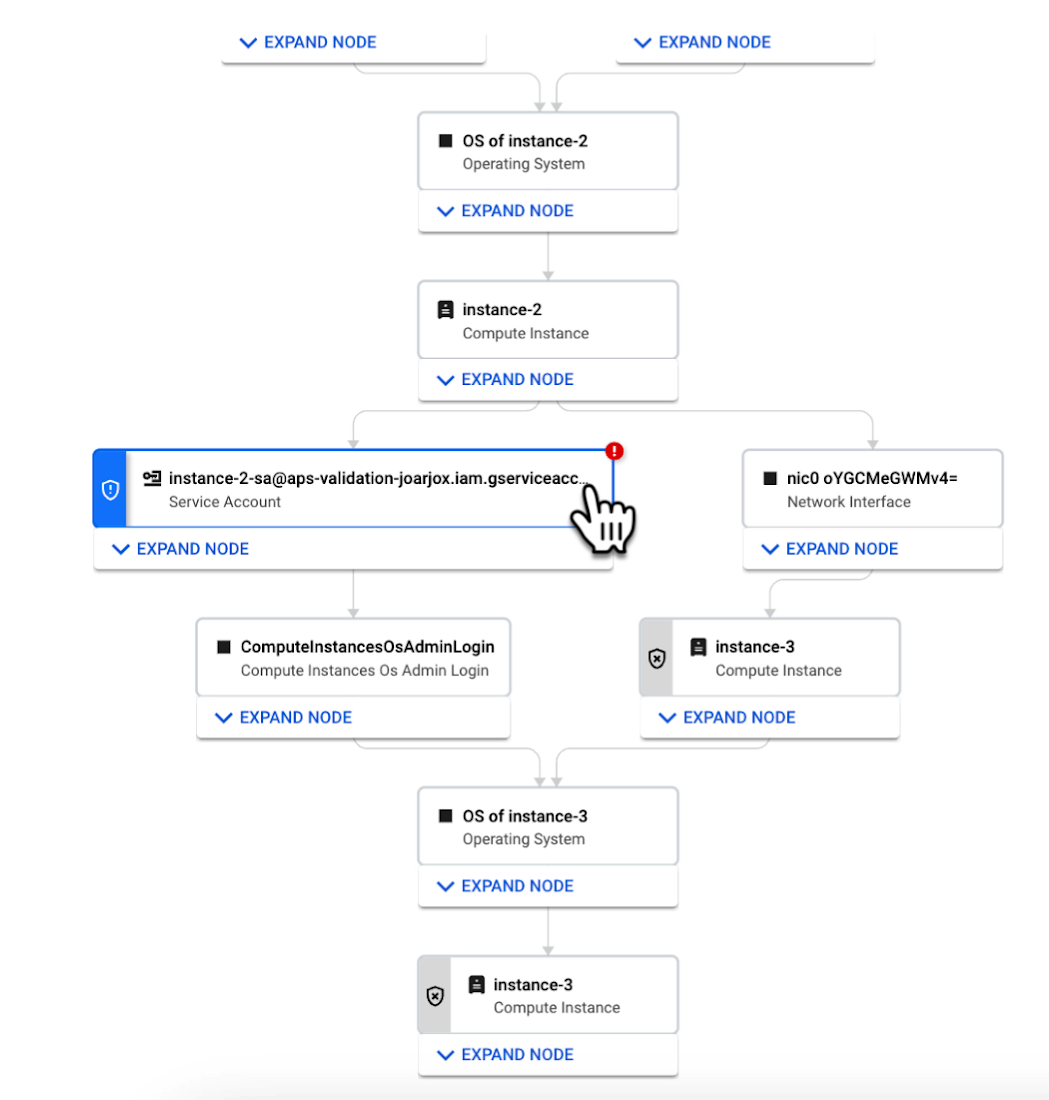
We are delivering combined attack path simulation and analysis as a managed service. There are no agents to install or manage. Results automatically reflect changes in your organization’s Google Cloud environment. Because our attack path simulations are conducted on models of an organization’s cloud resources, there is no performance or operational impact to the live production environment.
Better security prioritization
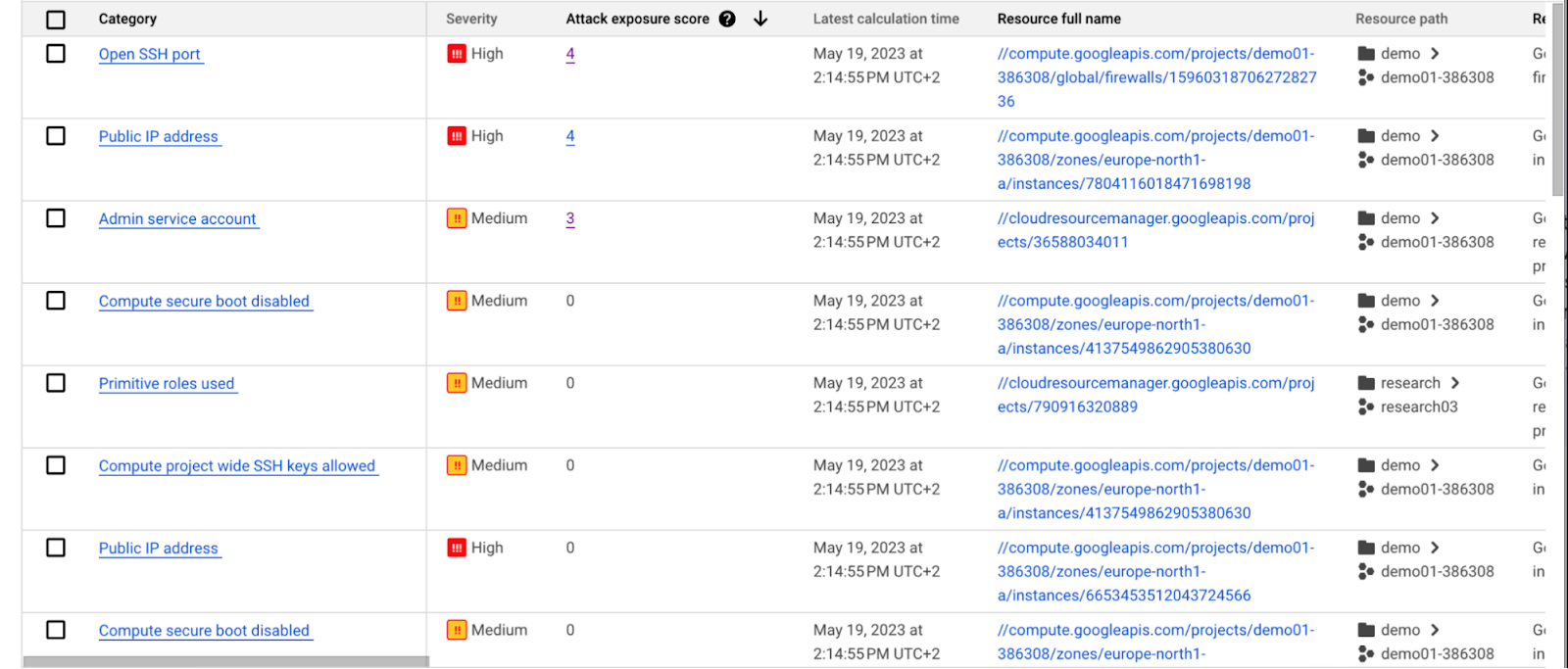
Security Command Center automatically computes an attack exposure score for misconfigurations and vulnerabilities that expose valuable resources to attackers. The score is a measure of cyber risk. It takes into account how exposed valued resources are, and the paths of least resistance for attackers to reach those resources.
Security teams can use these scores to prioritize remediation efforts and improve their overall risk posture.
How attack path analysis has already reduced risk for customers
Dozens of customers have already used our attack path capabilities in private Preview to improve their security posture and reduce their operational risk.
Security Command Center alerted one customer to a finding with a high attack exposure score. The finding was related to a service account whose keys were not being rotated. After reviewing the attack paths related to this finding, the cloud security manager discovered that even though the service account was named “test,” it provided access to storage buckets outside of the test environment.
If an attacker had been able to steal the credentials for this test account, they could have easily accessed production data. The security manager removed administrator privileges on the account. The attack path simulation enhanced their understanding of the severity of the finding, and helped convince them to make it a high-priority fix.
Another customer using attack path simulation needed to assess which security findings created the greatest risk. Two findings related to the same service account with high exposure scores rose to the top of the list. The attack paths revealed that the service account had access to more than 500 storage buckets. If an attacker were to gain access to this account they would be able to read, write, or delete data across any of those buckets, many of which contained sensitive business data and confidential customer information.
Using Security Command Center’s attack path results, the security team remediated the risk by limiting permissions to the storage buckets needed for that specific role.
Next steps
Attack path simulation capabilities are planned for availability later this summer. We expect forthcoming enhancements to use Security AI Workbench to translate complex attack graphs to human-readable explanations of attack exposure, including impacted assets and recommended mitigations.
You can learn more about Nordnet Bank’s experience using attack path simulation at our Security Summit session. To get started with Security Command Center today, please go to the Google Cloud console.
More Relevant Stories for Your Company



Modernize Your Security Posture for Cloud-Native Applications with Anthos
Modern security approaches have moved beyond a traditional perimeter-based security model. As many organizations seek to adopt cloud-native architectures and are deploying applications in hybrid and multi-cloud environments they demand a more flexible and extensible approach towards security. Learn how to address security issues as early in the development and

Cloud KMS with Cloud Storage: Better Performance for High-intensity Workloads
Encryption is critical for securing sensitive data while it is stored and transits the cloud. Today, Cloud Storage encrypts data server-side with standard Google-managed encryption keys by default, and can also encrypt data with customer-managed encryption keys that are stored and managed by Cloud Key Management Service (Cloud KMS). While customers have

Securing apps using Anthos Service Mesh
Hi there! I'm David Challoner from Access Site Reliability Engineering (SRE), here with Anthony Bushong from Developer Relations to talk about how Corp Eng is adopting Anthos Service Mesh internally at Google. Corp Eng is Google's take on "Enterprise IT". A big part of the Corp Eng mission is running


A Security Practitioners Guide to Best Practice GCP Security
Building secure services using GCP is easy, when you know all the tools available to you. Selecting the right services and configurations to meet your security needs requires you to know your tools. In this practical session, you will go beyond the theory, and will go through best practices for
