






4125
Of your peers have already downloaded this article
10:32 Minutes
The most insightful time you'll spend today!
Secret Manager: Keeping Your Organization’s Secrets Safer!

3289
Of your peers have already read this article.
2:00 Minutes
The most insightful time you'll spend today!
Secret Manager is a Google Cloud service that provides a secure and convenient way to store API keys, passwords, certificates, and other sensitive data. It is the central place and single source of truth to manage, access, and audit secrets across Google Cloud. Since its launch, Secret Manager has helped secure millions of workloads and continues to provide industry-first features like replication policies and support for VPC perimeters. This blog post explores new Secret Manager capabilities and integrations that will help keep your secrets safer.
New tier, free of charge
No, you’re not dreaming – Secret Manager now has a tier that is free of charge! With this tier, each month per billing account you can have up to:
- 6 secret versions
- 3 rotation events
- 10,000 API calls
This enables you to experience the value of Secret Manager with minimal financial risk and pairs nicely with existing services that offer a free tier like Cloud Run and Cloud Functions. For existing Secret Manager customers, this change will go into effect next billing cycle. Learn more about the Secret Manager free tier in the documentation.
Increased SLA
To meet the growing availability and reliability requirements of our customers, the Secret Manager SLA is now 99.95%! With this update, Secret Manager guarantees that all valid requests will succeed 99.95% of the time. This means you can depend on Secret Manager for even your most critical workloads. Additional details are available in the updated Secret Manager SLA.
Geo-expansion
In addition to the free tier and increased SLA, Secret Manager is now available in all public Google Cloud regions! With Secret Manager’s replication policies, you can choose the specific regions in which to replicate your secret, which means you can store secret payloads in geographical proximity to your workloads or users to reduce latency. This is also very useful if you have legal or regulatory requirements to store data in a particular locality. For more information, check out the list of Secret Manager locations in the documentation.
Compliance certifications
For customers wishing to use Secret Manager to store and process regulated data, Secret Manager is validated for compliance use cases including ISO 27001, ISO 27017, ISO 27018, SOC 1, SOC 2, SOC 3, PCI DSS, and HIPAA. Combined with the increased SLA and geographical availability, this makes Secret Manager suitable for use with regulated workloads.
Customer-Managed Encryption Keys (CMEK)
Secret Manager has always encrypted payloads in transit with TLS and at rest with AES-256. For customers that want additional control over the keys used to encrypt their secret payloads, Secret Manager now supports Customer-Managed Encryption Keys (CMEK). Secret Manager CMEK supports software-backed keys via Cloud KMS, hardware-backed keys via Cloud HSM, and even externally-managed keys via Cloud EKM. Learn how to enable CMEK support for Secret Manager in our tutorial.
Expiration and TTLs
While it was previously possible to expire access to a secret using IAM conditions, the underlying secret would continue to exist. Secret Manager now supports auto-expiring secrets which permanently deletes a secret at a specified timestamp or TTL. Since it is also possible to update a secret’s TTL, services can “lease” a secret and renew their lease on a periodic basis. If the service does not extend the lease by updating the TTL, the secret is automatically deleted.
Expiring secrets can be used in combination with IAM conditions to more safely expire secrets. For more information on expiring secrets and safety measures, see the guide on creating and managing expiring secrets.
Etags and server-side filtering
For customers that create or manage Secret Manager secrets via the API or an SDK, concurrency controls and performance are extremely important. This is why Secret Manager now supports Etags and server-side filtering! Etags help prevent concurrent modifications to the same secret by providing optimistic concurrency controls, while server-side filtering can dramatically reduce payload size and client-side computational overhead. Together, these enable stronger consistency guarantees and performance improvements to your applications. Learn more about Secret Manager Etags and Secret Manager server-side filtering in the documentation.
Code, build, run, deploy, monitor, and orchestrate
Secrets – like API keys, passwords, and certificates – are an integral part of most modern software applications. It is crucial that developers, operators, and security teams are empowered to build, operate, and observe software securely. That is why Secret Manager is now integrated with popular tools and technologies used throughout the application development lifecycle:
- Code – Software engineers can create and access secrets directly from their preferred IDEs with Cloud Code. In VS Code, IntelliJ, or the Cloud Shell Editor, developers can browse secrets and insert code snippets for access secrets, all from the comfort of their local IDE.
- Build – Release engineers can access secrets as part of CI builds using the Cloud Build Secret Manager integration. This could be used, for example, to authenticate to a Docker registry or communicate with the GitHub API. For customers that use other CI systems, there is also a GitHub Action for accessing Secret Manager secrets.
- Run (on serverless) – Developers can mount secrets to be available as environment variables or via the filesystem through the native Cloud Run Secret Manager integration. Since the secrets are resolved in Cloud Run’s control plane, developers can use this integration to avoid a tight coupling between their applications and Secret Manager to enable hybrid cloud deployments or better local development experiences.
- Run (on Kubernetes) – Developers can mount secrets from GKE, Anthos, or any Kubernetes cluster using the Secret Manager CSI driver. This vendor-agnostic driver exposes secrets via environment variables or the filesystem and enables hybrid cloud deployments using the same interface as other public cloud providers and HashiCorp Vault.
- Deploy – To complement the existing Secret Manager Terraform integration, operators can now manage Secret Manager via Kubernetes Config Connector (KCC). KCC allows operators to manage Google Cloud resources through Kubernetes and the familiar Kubernetes APIs.
- Monitor – With the Secret Manager Cloud Asset Inventory (CAIS) integration, security teams can understand secret usage across specific projects, folders, or the entire organization.
- Orchestrate – Secret Manager Event Notifications enable DevOps and security teams to subscribe to Pub/Sub topics for when secrets or secret versions are changed. This enables customers to create deeply-integrated workflows, such as creating a ServiceNow ticket when a new secret version is added. Additionally, Secret Manager Rotation Scheduling enables DevOps teams to build automatic rotation flows like the ones described in the rotation guide.
Best practices
The Secret Manager best practices guide ensures customers get the maximum security benefits from Secret Manager. Security is non-binary, and this guide covers nuanced topics like access controls, coding practices, and secret administration. While not an exhaustive list, the Secret Manager best practices guide answers some of the most common questions and concerns around using Secret Manager in production deployments.
Towards seamless security
Secrets management is an important part of every organization’s security toolkit. With Secret Manager, you can easily manage, audit, and access secrets like API keys and credentials across Google Cloud, Anthos, and on-premises. These new features and integrations make it easy to adopt Secret Manager whether you are a hobbyist working on a side project or a large enterprise with thousands of employees.
To get started, check out the Secret Manager documentation.
5058
Of your peers have already watched this video.
2:50 Minutes
The most insightful time you'll spend today!
FedEx Ground Makes Talent Recruitment More Effective with AI
FedEx Ground is a package shipping company and is a subsidiary of FedEx. It wanted to make hiring easier, and more intuitive so that it could hire the best people.
“We need to have every advantage we can to recruit and retain talent. That’s what led us to the work with Google and its capabilities,” says Matt Tokorcheck, VP, Operations, Support and Engineering, FedEx Ground
The challenge was the narrow slotting of job roles. The openings were listed under specific headings which revolved around job types or departments–and if applicants didn’t fit or understand those categories, they didn’t apply.
Take, for example, applicants that came from the military. “Many of my fellow service members and veterans expressed difficulty in finding a job post the military because a lot of the skill sets that they’ve developed and honed over their military career aren’t as useful in the civilian world,” says David Henderson, Industrial Engineer, FedEx.
So FedEx Ground decided to work with Google Cloud’s AI-powered talent solution.
“As a job seeker when you come to our career site to search for jobs, that search is powered by Jibe and the Google Jobs API. And it really matches the keywords that a job seeker inputs with the jobs that are available at FedEx Ground, says Shailesh Bokil, MD, Talent Acquisition and Planning, Fedx Ground.
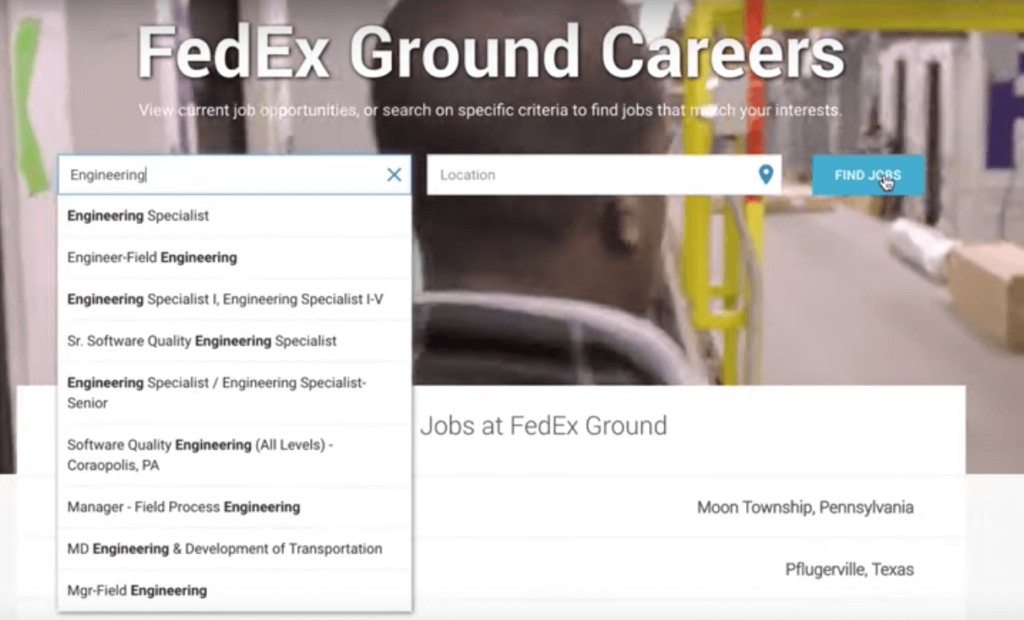
This makes job hunting a very intuitive experience for applicants.
“When I type into the search bar, I was immediately prompted to input my MOS, which is your military occupational specialty. And what it (the system) does is it takes the skills that are developed while serving in that MOS0 and matches them with skill sets that employers are looking. When I input 12A (an MOS), immediately I was getting results back for various engineer positions.
To find out more about how FedEx Ground employs AI-powered talent solution, watch the video.
Elevating SAP Operations: Cardinal Health Implements Google Cloud Bare Metal Solution

2010
Of your peers have already read this article.
1:30 Minutes
The most insightful time you'll spend today!
Over the past few years, Google Cloud has become the platform of choice for a growing number of SAP enterprise customers. That’s especially true for companies looking to migrate large and challenging SAP workloads, including those moving to S/4HANA systems as part of a cloud modernization strategy.
Google Cloud’s Bare Metal Solution (BMS) for SAP systems plays an important role in our success with these customers. Our BMS offerings are dedicated, single-tenant systems that combine uncompromising performance with the advantages of fully managed cloud infrastructure solutions. With SAP-certified BMS offerings available in North America and Europe, we’re offering SAP customers a set of high-end infrastructure capabilities.
Cardinal Health: Building for the future
Cardinal Health, Inc. is a distributor of pharmaceuticals, a global manufacturer and distributor of medical and laboratory products, and a provider of performance and data solutions for healthcare facilities. With operations in more than 30 countries and approximately 46,500 employees, Cardinal Health is a crucial link between the clinical and operational sides of healthcare. The company serves 90% of U.S. hospitals, more than 60,000 U.S. pharmacies and more than 10,000 specialty physician offices and clinics.
Over the past several years, a series of acquisitions drove a major expansion of Cardinal Health’s business. These acquisitions also created an increasingly complex and unwieldy IT environment that included a variety of ERP systems and dozens of other legacy applications, in addition to multiple ERP instances.
Cardinal Health’s technology modernization strategy will migrate its business away from these legacy systems to a single, modern digital platform. This includes leveraging the Google Cloud Large Memory Bare Metal Solution to modernize and consolidate its SAP application architecture within its Pharma segment with a single, massively scalable SAP S/4HANA system and BigQuery to unify SAP data with a fully managed enterprise data warehouse.
Scaling up to support SAP consolidation goals
Cardinal Health’s SAP modernization effort presented significant challenges. The migration process had to take place within a very narrow window and at 100% accuracy to avoid significant financial and operational impacts. Additionally, Cardinal Health’s strategy of consolidating its pharma business onto a single SAP HANA scale-up instance, with no performance or capacity issues, would require Google Cloud to scale its SAP-certified server systems beyond their previous 12TB upper limit.
Google Cloud raised the bar with its SAP-certified Bare Metal Solution server options—one that supports up to 672 vCPUs and 18TB of memory, and another with up to 896 vCPUs and 24TB of memory. Additionally, customers have multiple storage options, offering up to a maximum of 96TB and 400,000 IOPS per system. Both offerings, along with a high-performance storage SKU, are certified for SAP HANA online transaction processing (OLTP) and meet SAP standard sizing requirements.
Our work with Cardinal Health involved some of the first production deployments of Google Cloud Large Memory Bare Metal Solution 24TB VMs to run the company’s SAP HANA in-memory database. Cardinal Health got what it needed: modern, fully managed, and SAP-certified cloud infrastructure that can support a single, consolidated scale-up SAP HANA instance for the company’s pharma operations. Google Cloud BMS also ensures that Cardinal Health’s SAP environment can scale effortlessly to support its goals, including plans to transform and migrate 200+ million business records onto its HANA system.
In addition, Cardinal Health leveraged Google Cloud’s ability to run SAP application servers on virtualized systems alongside its SAP HANA instance running on a 24TB BMS server. This hybrid approach to SAP cloud infrastructure offered significant advantages in terms of efficiency and cost-effectiveness: Cardinal Health’s use of the BMS server played a big role in achieving significant improvements in reporting and decision-making efficiency, as well as millions in cost savings over the first five years of the effort.
On top of these quantitative improvements, Google Cloud delivered the SAP migration for Cardinal Health in a single weekend—without user impacts or business disruptions.
An even bigger future for bare metal on Google Cloud
Based on raw performance, the Google Cloud server offerings define the cutting edge for our SAP customers. In fact, SAP’s certification of our 24TB Bare Metal Solution configuration earned us a world-record SAP HANA benchmark for Intel-based servers of 892,270 SAPS. And customers that combine our BMS server and high-performance storage offerings can expect to reload even the biggest SAP HANA datasets, following a full system restart, in as little as 30 minutes—a fraction of the time required in the past for an SAP HANA “rehydration” procedure.
More SAP customers are facing the same challenges that drove Cardinal Health to embark upon its modernization efforts: rapid business growth, pressure to consolidate sprawling and often chaotic SAP environments, and SAP HANA systems that now routinely require multi-TB memory capacities to run efficiently. For Google Cloud Bare Metal Solution customers, these industry-leading benchmarks translate directly into success with real-world SAP cloud modernization and growth initiatives.
It probably won’t take long for today’s boundary-pushing 24TB Bare Metal Solution systems to become tomorrow’s mainstream SAP HANA infrastructure. What we know for sure is that Google Cloud will be ready with cutting-edge solutions for our biggest and most demanding SAP customers.
3252
Of your peers have already watched this video.
24:00 Minutes
The most insightful time you'll spend today!
Building Cloud-native Apps at Scale with Kubernetes and Other Dev Tools
Developer productivity is directly linked to customer value generation, higher levels of customer satisfaction and faster time to market. To help build cloud-native applications that cater to customer demands and at scale, experts at Google Cloud share insights on CI/CD tools, processes and interfaces for deploying and developing Google Kubernetes Engine applications. Watch the video on Modernizing App Development and Delivery with the Google Cloud Golden Path from Next ’21 to also learn about developer tools like Cloud Code and Skaffold.
What Users and System Designers Must Learn from Google’s Best Practices for Password Management

5284
Of your peers have already read this article.
3:00 Minutes
The most insightful time you'll spend today!
Updated for 2021: This post includes updated best practices including the latest from Google’s Best Practices for Password Management whitepapers for both users and system designers.
Account management, authentication and password management can be tricky. Often, account management is a dark corner that isn’t a top priority for developers or product managers. The resulting experience often falls short of what some of your users would expect for data security and user experience.
Fortunately, Google Cloud brings several tools to help you make good decisions around the creation, secure handling and authentication of user accounts (in this context, anyone who identifies themselves to your system—customers or internal users). Whether you’re responsible for a website hosted in Google Kubernetes Engine, an API on Apigee, an app using Firebase, or other service with authenticated users, this post lays out the best practices to follow to ensure you have a safe, scalable, usable account authentication system.
1. Hash those passwords
My most important rule for account management is to safely store sensitive user information, including their password. You must treat this data as sacred and handle it appropriately.
Do not store plaintext passwords under any circumstances. Your service should instead store a cryptographically strong hash of the password that cannot be reversed—created with Argon2id, or Scrypt. The hash should be salted with a value unique to that specific login credential. Do not use deprecated hashing technologies such as MD5, SHA1 and under no circumstances should you use reversible encryption or try to invent your own hashing algorithm. Use a pepper that is not stored in the database to further protect the data in case of a breach. Consider the advantages of iteratively re-hashing the password multiple times.
Design your system assuming it will be compromised eventually. Ask yourself “If my database were exfiltrated today, would my users’ safety and security be in peril on my service or other services they use?” As well as “What can we do to mitigate the potential for damage in the event of a leak?”
Another point: If you could possibly produce a user’s password in plaintext at any time outside of immediately after them providing it to you, there’s a problem with your implementation.
If your system requires detection of near-duplicate passwords, such as changing “Password” to “pAssword1”, save the hashes of common variants you wish to ban with all letters normalized and converted to lowercase. This can be done when a password is created or upon successful login for pre-existing accounts. When the user creates a new password, generate the same type of variants and compare the hashes to those from the previous passwords. Use the same level of hashing security as with the actual password.
2. Allow for third-party identity providers if possible
Third-party identity providers enable you to rely on a trusted external service to authenticate a user’s identity. Google, Facebook, and Twitter are commonly used providers.
You can implement external identity providers alongside your existing internal authentication system using a platform such as Identity Platform. There are a number of benefits that come with Identity Platform, including simpler administration, a smaller attack surface, and a multi-platform SDK. We’ll touch on more benefits throughout this list.
3. Separate the concept of user identity and user account
Your users are not an email address. They’re not a phone number. They’re not even a unique username. Any of these authentication factors should be mutable without changing the content or personally identifiable information (PII) in the account. Your users are the multi-dimensional culmination of their unique, personalized data and experience within your service, not the sum of their credentials. A well-designed user management system has low coupling and high cohesion between different parts of a user’s profile.
Keeping the concepts of user account and credentials separate will greatly simplify the process of implementing third-party identity providers, allowing users to change their username, and linking multiple identities to a single user account. In practical terms, it may be helpful to have an abstract internal global identifier for every user and associate their profile and one or more sets of authentication datavia that ID as opposed to piling it all in a single record.
4. Allow multiple identities to link to a single user account
A user who authenticates to your service using their username and password one week might choose Google Sign-In the next without understanding that this could create a duplicate account. Similarly, a user may have very good reason to link multiple email addresses to your service. If you’ve properly separated user identity and authentication, it will be a simple process to link several authentication methods to a single user.
Your backend will need to account for the possibility that a user gets part or all the way through the signup process before they realize they’re using a new third-party identity not linked to their existing account in your system. This is most simply achieved by asking the user to provide a common identifying detail, such as email address, phone, or username. If that data matches an existing user in your system, require them to also authenticate with a known identity provider and link the new ID to their existing account.
5. Don’t block long or complex passwords
NIST publishes guidelines on password complexity and strength. Since you are (or will be very soon) using a strong cryptographic hash for password storage, a lot of problems are solved for you. Hashes will always produce a fixed-length output no matter the input length, so your users should be able to use passwords as long as they like. If you must cap password length, do so based on the limits of your infrastructure; often this is a matter of memory usage (memory used per login operation * potential concurrent logins per machine), or more likely—the maximum POST size allowable by your servers. We’re talking numbers from hundreds of KB to over 1MB. Seriously. Your application should already be hardened to prevent abuse from large inputs. This doesn’t create new opportunities for abuse if you employ controls to prevent credential stuffing and hash the input as soon as possible to free up memory.
Your hashed passwords will likely already consist of a small set of ASCII characters. If not, you can easily convert a binary hash to Base64. With that in mind, you should allow your users to use literally any characters they wish in their password. If someone wants a password made of Klingon, Emoji, and ASCII art with whitespace on both ends, you should have no technical reason to deny them. Just make sure to perform Unicode normalization to ensure cross-platform compatibility. See our system designers whitepaper (PDF) for more information on Unicode and supported characters in passwords.
Any user attempting to use an extreme password is probably following password best practices (PDF) including using a password manager, which allows the entry of complex passwords even on limited mobile device keyboards. If a user can input the string in the first place (i.e., the HTML specification for password input disallows line feed and carriage return), the password should be acceptable.
6. Don’t impose unreasonable rules for usernames
It’s not unreasonable for a site or service to require usernames longer than two or three characters, block hidden characters, and prevent whitespace at the beginning and end of a username. However, some sites go overboard with requirements such as a minimum length of eight characters or by blocking any characters outside of 7-bit ASCII letters and numbers.
A site with tight restrictions on usernames may offer some shortcuts to developers, but it does so at the expense of users and extreme cases will deter some users.
There are some cases where the best approach is to assign usernames. If that’s the case for your service, ensure the assigned username is user-friendly insofar as they need to recall and communicate it. Alphanumeric generated IDs should avoid visually ambiguous symbols such as “Il1O0.” You’re also advised to perform a dictionary scan on any randomly generated string to ensure there are no unintended messages embedded in the username. These same guidelines apply to auto-generated passwords.
7. Validate the user’s identity
If you ask a user for contact information, you should validate that contact as soon as possible. Send a validation code or link to the email address or phone number. Otherwise, users may make a typo in their contact info and then spend considerable time using your service only to find there is no account matching their info the next time they attempt login. These accounts are often orphaned and unrecoverable without manual intervention. Worse still, the contact info may belong to someone else, handing full control of the account to a third party.
8. Allow users to change their username
It’s surprisingly common in legacy systems or any platform that provides email accounts not to allow users to change their username. There are very good reasons not to automatically release usernames for reuse, but long-term users of your system will eventually come up with significant reasons to use a different username and they likely won’t want to create a new account.
You can honor your users’ desire to change their usernames by allowing aliases and letting your users choose the primary alias. You can apply any business rules you need on top of this functionality. Some orgs might limit the number of username changes per year or prevent a user from displaying or being contacted via anything but their primary username. Email address providers are advised to never re-issue email addresses, but they could alias an old email address to a new one. A progressive email address provider might even allow users to bring their own domain name and have any address they wish.
If you are working with a legacy architecture, this best practice can be very difficult to meet. Even companies like Google have technical hurdles that make this more difficult than it would seem. When designing new systems, make every effort to separate the concept of user identity and user account and allow multiple identities to link to a single user account and this will be a much smaller problem. Whether you are working on existing or greenfield code, choose the right rules for your organization with an emphasis on allowing your users to grow and change over time.
9. Let your users delete their accounts
A surprising number of services have no self-service means for a user to delete their account and associated PII. Depending on the nature of your service, this may or may not include public content they created such as posts and uploads. There are a number of good reasons for a user to close an account permanently and delete all their PII . These concerns need to be balanced against your user experience, security, and compliance needs. Many if not most systems operate under some sort of regulatory control (such as PCI or GDPR), which provides specific guidelines on data retention for at least some user data. A common solution to avoid compliance concerns and limit data breach potential is to let users schedule their account for automatic future deletion.
In some circumstances, you may be legally required to comply with a user’s request to delete their PII in a timely manner. You also greatly increase your exposure in the event of a data breach where the data from “closed” accounts is leaked.
10. Make a conscious decision on session length
An often overlooked aspect of security and authentication is session length. Google puts a lot of effort into ensuring users are who they say they are and will double-check based on certain events or behaviors. Users can take steps to increase their security even further.
Your service may have good reason to keep a session open indefinitely for non-critical analytics purposes, but there should be thresholds after which you ask for password, 2nd factor, or other user verification.
Consider how long a user should be able to be inactive before re-authenticating. Verify user identity in all active sessions if someone performs a password reset. Prompt for authentication or 2nd factor if a user changes core aspects of their profile or when they’re performing a sensitive action. Re-authenticate if the user’s location changes significantly in a short period of time. Consider whether it makes sense to disallow logging in from more than one device or location at a time.
When your service does expire a user session or requires re-authentication, prompt the user in real time or provide a mechanism to preserve any activity they have not saved since they were last authenticated. It’s very frustrating for a user to take a long time to fill out a form, only to find all their input has been lost and they must log in again.
11. Use 2-Step Verification
Consider the practical impact on a user of having their account stolen when choosing 2-Step Verification (also known as two-factor authentication, MFA, or 2FA) methods. Time-based one-time passwords (TOTP), email verification codes, or “magic links” are consumer-friendly and relatively secure. SMS 2FA auth has been deprecated by NIST due to multiple weaknesses, but it may be the most secure option your users will accept for what they consider a trivial service.
Offer the most secure 2FA auth you reasonably can. Hardware 2FA such as the Titan Security Key are ideal if feasible for your application. Even if a TOTP library is unavailable for your application, email verification or 2FA provided by third-party identity providers is a simple means to boost your security without great expense or effort. Just remember that your user accounts are only as secure as the weakest 2FA or account recovery method.
12. Make user IDs case-insensitive
Your users don’t care and may not even remember the exact case of their username. Usernames should be fully case-insensitive. It’s trivial to store usernames and email addresses in all lowercase and transform any input to lowercase before comparing. Make sure to specify a locale or employ Unicode normalization on any transformations.
Smartphones represent an ever-increasing percentage of user devices. Most of them offer autocorrect and automatic capitalization of plain-text fields. Preventing this behavior at the UI level might not be desirable or completely effective, and your service should be robust enough to handle an email address or username that was unintentionally auto-capitalized.
13. Build a secure auth system
If you’re using a service like Identity Platform, a lot of security concerns are handled for you automatically. However, your service will always need to be engineered properly to prevent abuse. Core considerations include implementing a password reset instead of password retrieval, detailed account activity logging, rate-limiting login attempts to prevent credential stuffing, locking out accounts after too many unsuccessful login attempts, and requiring two-factor authentication for unrecognized devices or accounts that have been idle for extended periods. There are many more aspects to a secure authentication system, so please see the further reading section below for links to more information.
Further reading
There are a number of excellent resources available to guide you through the process of developing, updating, or migrating your account and authentication management system. I recommend the following as a starting place:
- Our Modern Password Security for System Designers whitepaper (PDF)
- The related Modern password security for users whitepaper (PDF)
- NIST 800-063B covers Authentication and Lifecycle Management
- OWASP continually updates their Password Storage Cheat Sheet
- OWASP goes into even more detail with the Authentication Cheat Sheet
- Google Cloud Identity Platform is a multi-protocol customer identity and access management solution, with robust authentication features
- Google’s Firebase Authentication site has a rich library of guides, reference materials and sample code
More Relevant Stories for Your Company

Leveraging Intelligent Behavior Detection to Protect User Sensitive APIs
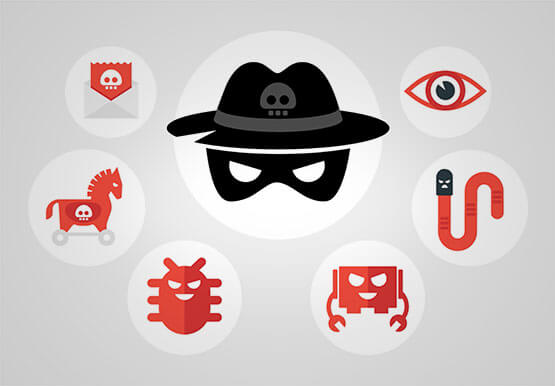
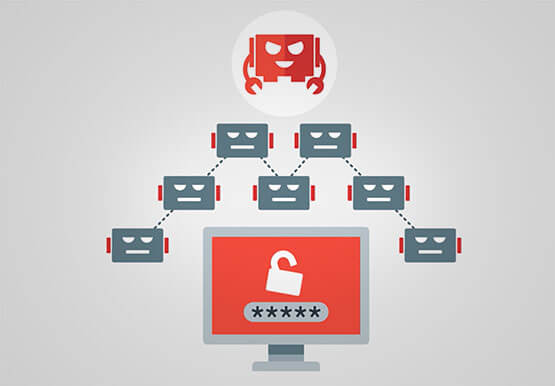
Malicious actors are out there, and APIs are their new target. External threats could be attacking your APIs as you read this, and your business might not even know it. Attacks can come in the form of software applications that run automated tasks and they are everywhere. A growing percentage

Shifting Down: A New Way to Cloud for Developers
Application developers are the backbone of the modern cloud economy. The role of developers is felt in the seen and the unseen, from the smartphone apps we use every day to the network optimization that is powering a sustainable future. Given your importance in transforming so many fundamental aspects of

How Barilla Created a Social Media Style App to Improve Efficiency
Google Cloud Results Replaced conflicting, time-consuming paper logs with a near real-time, transparent appScaled rapidly and easily to accommodate new teams thanks to Google App EngineEnables photographic and video communication to replace confusing textNew factory solution rolled out in just 15 days In 1877, Pietro Barilla set up a small

ShareChat Builds its Diverse, Hyperlocal Social Network. Thanks to Google Cloud
Editor’s note: Today’s guest post comes from Indian social media platform ShareChat. Here’s the story of how they improved performance, app development, and analytics for serving regional content to millions of users using Google Cloud. How do you create a social network when your country has 22 major official languages and
