





Shifting Down: A New Way to Cloud for Developers

909
Of your peers have already read this article.
4:30 Minutes
The most insightful time you'll spend today!
Application developers are the backbone of the modern cloud economy. The role of developers is felt in the seen and the unseen, from the smartphone apps we use every day to the network optimization that is powering a sustainable future. Given your importance in transforming so many fundamental aspects of society and industry, you’re facing more pressure than ever to remain innovative in the face of changing markets and industries. With limited time, shrinking budgets, increasingly complex environments, and compounding operational responsibilities, it’s no wonder that one of our most popular developer sessions last year at Next was focused on burnout.
Google remains a consistent advocate and ally of developers, from our ongoing contributions to open source projects like TensorFlow and Kubernetes to our free learning paths and certifications. The Application Developer spotlight session at Next ‘23 will lay out our aspiration to build a new way to cloud for developers. We favor “shifting down” instead of “shifting left,” to give you a cloud experience that is easy, fast, and secure.
An easy way to get started — with a trial at no charge for new users
Whether you’re just starting to create a new application, or laying the groundwork for your burgeoning developer career, navigating a new platform and its services can pose formidable challenges. Key details, like the more suitable Google Cloud service for running a dynamic website or estimating the cost of an application, may seem elusive. Moreover, as you transition from design to execution, it’s crucial to understand functional aspects like which APIs should be enabled or the IAM roles necessary for managing your services.
Today, we’re thrilled to announce the general availability of Jump Start Solutions to streamline your introduction to Google Cloud. These application and infrastructure solutions shift many of the tasks at the initial learning and researching phase down to the platform. Jump Start Solutions adhere to best practice principles and can be launched with a single click. Plus, new Google Cloud customers can take advantage of the $300 credit sign up trial. Whether you’re looking to explore, learn, or find a launching pad for creating production-ready applications, Jump Start Solutions are an easy starting point. Each solution comes with an estimated cost, comprehensive reference architecture, and tutorials.
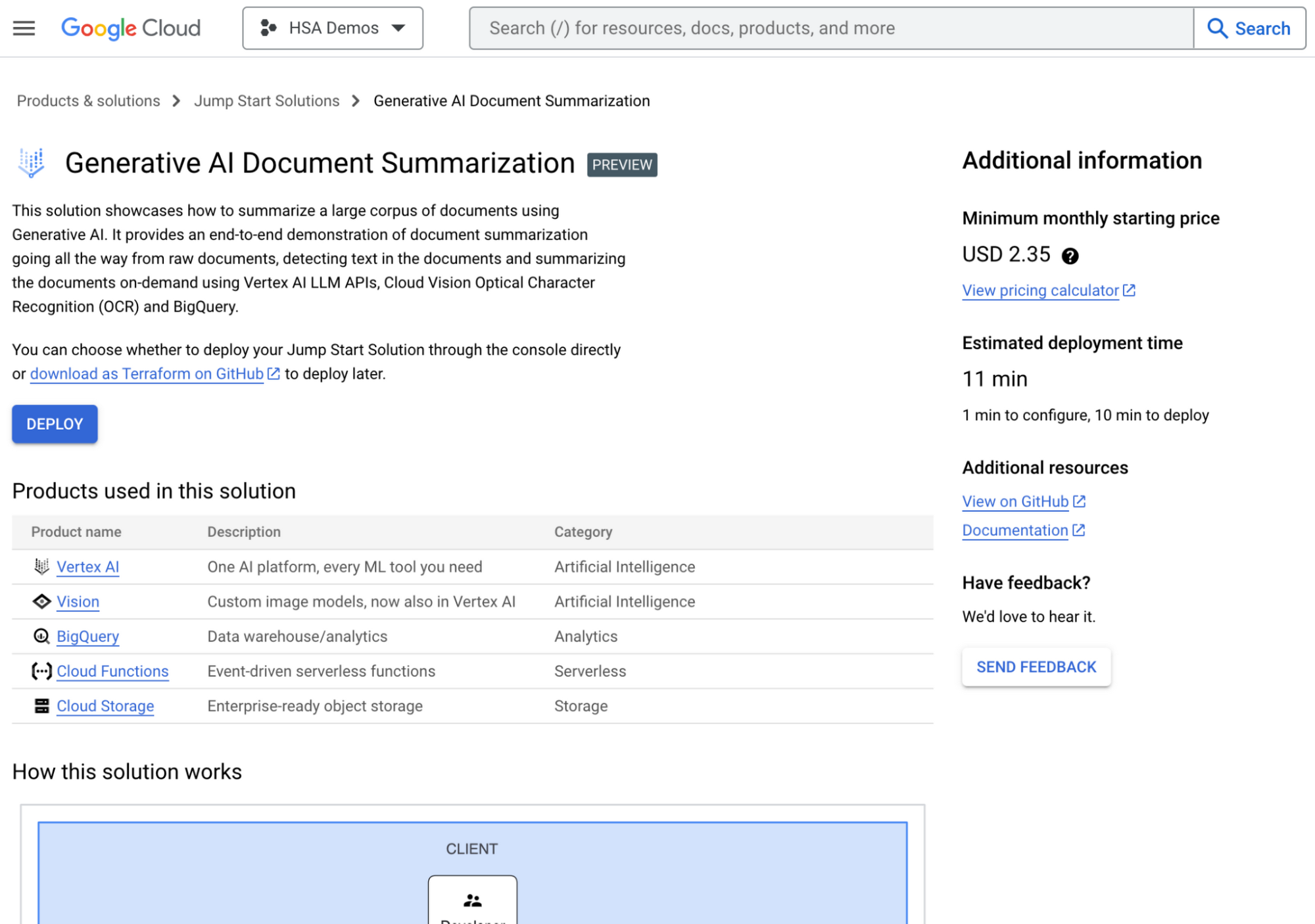
The Generative AI document summarization solution in the Google Cloud Console
Some of our 14 solutions available today include a generative AI-powered document summarization app and an AI-powered image processing app. These are just the beginning of a wide range of solutions which help you lay a secure and stable foundation from which to build, innovate, and grow.
Speeding up your development with AI and automation
Imagine training a generative AI model using the best practices, documentation, and architecture guidance of Google Cloud and applying that to your coding experience. No longer will you have to leave your IDE to research how to complete a coding task, no more repeating low-value manual tasks, and no more hunting for expert guidance.
Duet AI is now in preview across many services in Google Cloud to help shift the burden of researching, coding, and testing, down to the platform. A few of the ways developers can use Duet AI include:
- Code Completion and Code generation in your IDEs. You get recommendations as you type for full functions and code blocks based on comments, fixes for errors found in the code, and generation of unit tests for code directly in your IDE.
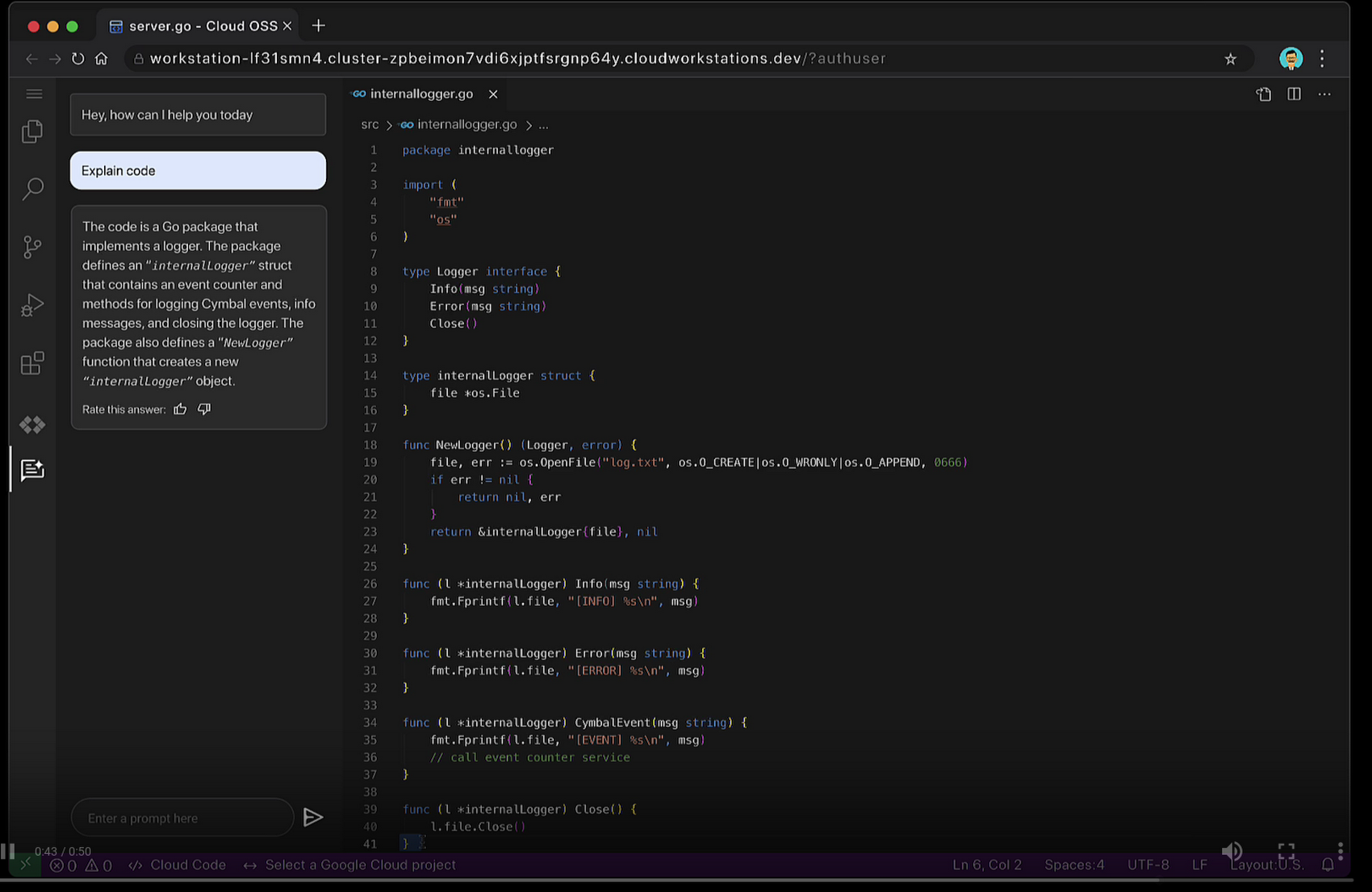
- Chat assistance so you can use natural language to ask questions about code bases and APIs, and retrieve coding best practices. Chat assistance is available across many Google Cloud products, such as in the Cloud Console, Cloud Workstations, BigQuery, Spanner, and Apigee.
Duet AI in Google Cloud supports 20+ programming languages such Go, Java, Javascript, Python, and SQL. Thanks to Cloud Code, you can use Duet AI with many popular IDEs such as VSCode, and JetBrains IDEs like IntelliJ, PyCharm, GoLand, and Webstorm. And, with Duet AI’s source citations, suggestions provided by Duet AI are automatically flagged when directly quoting at length from a source to help you comply with any license requirements.
Enterprise companies like Wayfair who are committed to enhancing developer productivity are already using Duet AI, and are excited about how it makes life easier for their developers.
“At Wayfair, developer productivity is top of mind for us. We are excited to incorporate Duet AI in our efforts to have developers across Wayfair build applications incredibly fast! With Duet AI, we can increase developer productivity, and joy at the same time.” – Mark Quigley, Director of Engineering Enablement, Wayfair
Shifting down interoperability
Modern application development stacks are a mosaic of in-house creativity and essential third-party applications such as CRM, ERP, or payment systems. What is the lifeblood linking these siloed pieces? Integration. Building integrations demands time-consuming development work, niche skills, and deep understanding of third party systems like SAP or Salesforce. These compounding complexities can delay delivery and increase budget costs. We envision a world where platforms shoulder the burden of integration, liberating developers to innovate with their regained time.
Today, we’re pleased to announce the general availability of Application Integration – a no-code integration platform as a service (iPaaS) designed to empower you to weave together your applications. Its intuitive drag-and-drop interface transforms the complex task of integration into a simple point-and-click journey. With 75+ pre-built connectors you can link Google Cloud services like BigQuery, Cloud Storage with third-party applications like Salesforce, MongoDB, Oracle, and SAP.
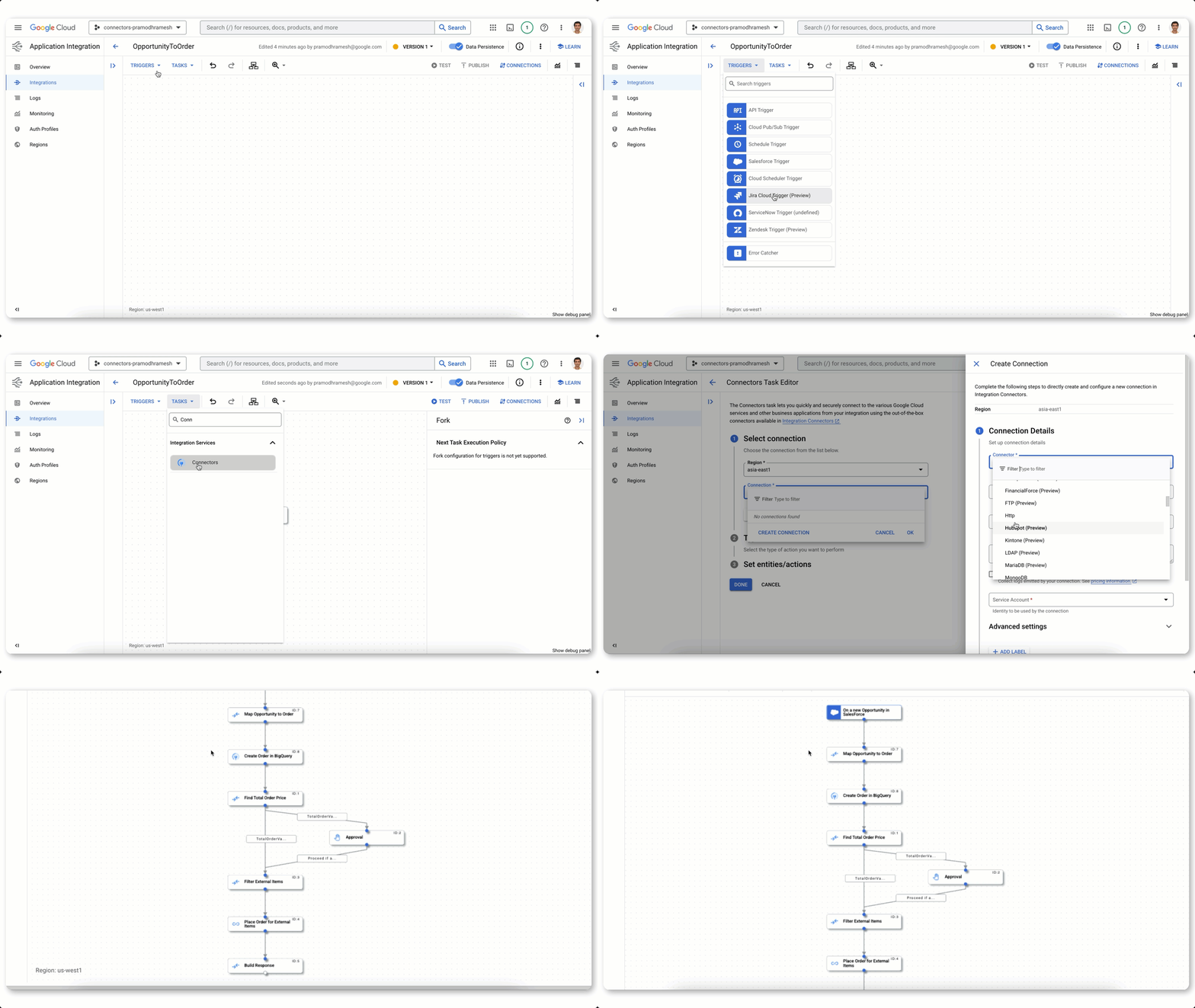
Building an integration flow using connectors, visual designer, and automated triggers
Further, Duet AI in Application Integration can shift even more work away from you and onto the platform. Using natural language, you can generate a recommended list of integration flows. Because Duet AI pulls context from your environment, it generates flows using your existing APIs and assets. To further harden your integration flows, Duet AI automatically generates documentation and test cases in a single click.
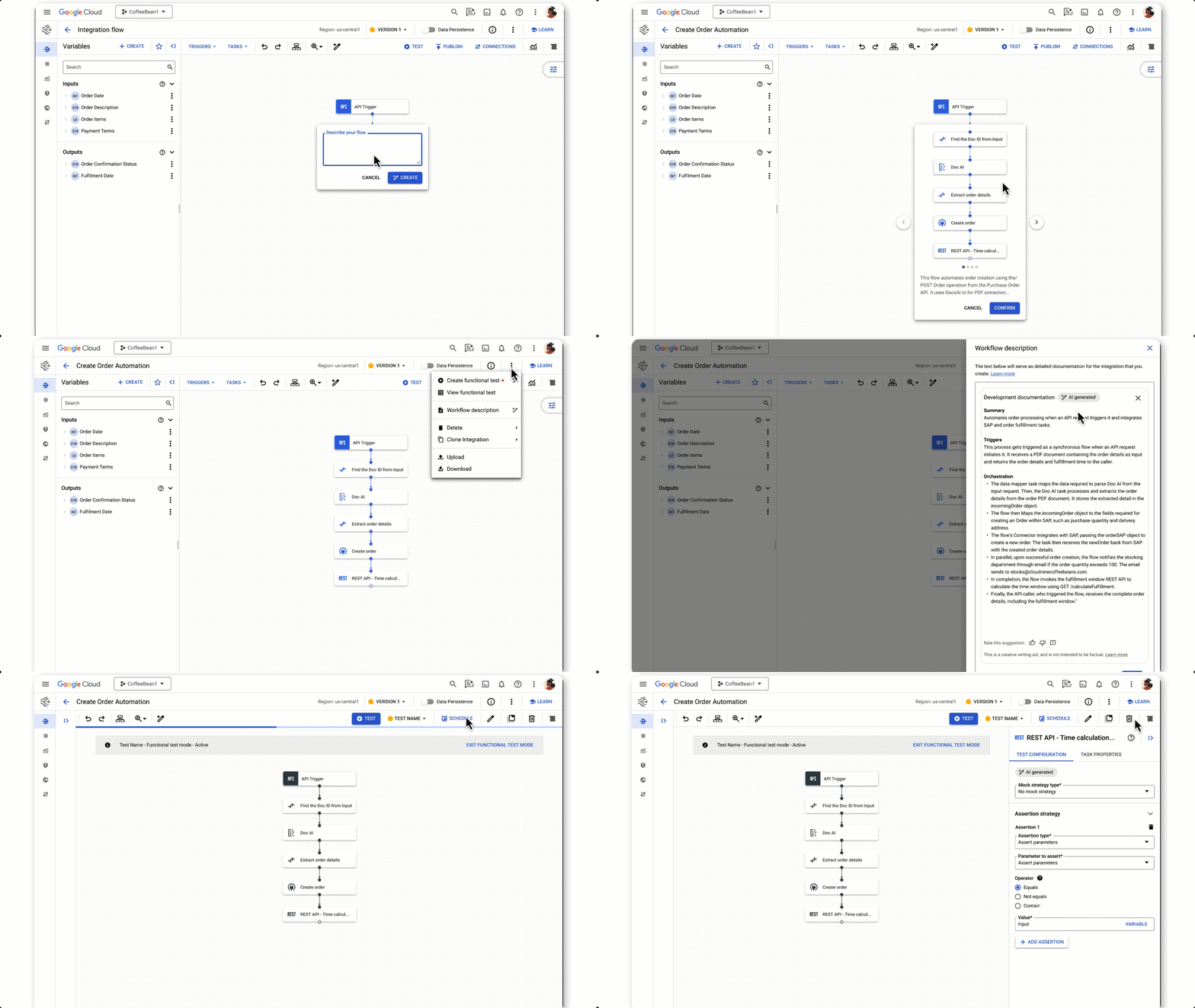
Using Duet AI to build integration flows, documentation, and tests with natural language
Secure, platform-driven application development
With the world’s attention on how AI will shape the future, the challenges created by distributed workforces continue to be felt. Developer teams need help with onboarding, access to consistent tools and libraries, and development environments powerful enough for today’s workloads.
We recently announced the general availability of Cloud Workstations, powerful, secure and customizable development environments available anywhere, using a browser, local IDE, or terminal. Cloud Workstations can shift the burden of provisioning, scaling, managing and securing developer environments down to the platform. And like many other services across Google Cloud, you can use Duet AI in Cloud Workstations to help make you more efficient with everything from writing code to implementing best practices.
While the reality of geographically dispersed and rapidly growing development teams highlights the need to address traditional concerns, such as platform and data security, even greater scrutiny is placed on the software supply chain.
An expanded partnership with GitLab for secure DevOps
Google Cloud continues to grow at a fast pace and that means we are constantly welcoming many new developers to our platform. We know the tools you choose for software development are an important factor in your success. We want to make it easy to use the tools you love. Today we announced that Google Cloud and GitLab are partnering to offer a secure DevOps solution that can shift the work to connect our technologies down to the platform while giving you integrated source management, artifact management, CI/CD, and enhanced security features.
Developers already using Google Cloud gain access to GitLab’s comprehensive AI-powered DevSecOps platform and GitLab customers gain access to Google Cloud’s Secure Software Supply Chain technologies like Supply-chain Levels for Software Artifacts (SLSA), software bill of materials (SBOM), and Binary Authorization policies.
We can help you gain value from Google Cloud faster with deeply integrated partner tooling. That’s exactly what we are doing with our expanded GitLab partnership. Learn more on GitLab’s blog. You can also sign up to stay informed about the latest partnership developments.
Start shifting down with Google Cloud
At the heart of Google Cloud is a simple, yet powerful idea: to empower you to do what you excel at — coding exceptional software. In the fast-paced era of digital transformation, we understand the mounting pressures that developers face, which is why we believe it’s the responsibility of platforms to shoulder the burdens hindering your creative process. We’re helping you by streamlining your onboarding experience, optimizing your coding efficiency, and shifting the weight of security from you to the platform. We’re not alone in this journey; we’re collaborating with partners like Gitlab at our side. So if you’re an application developer, check out Google Cloud. It’s the new way to cloud on the cloud platform that’s designed to make your life easier.

3986
Of your peers have already downloaded this article
2:00 Minutes
The most insightful time you'll spend today!
Digital is disrupting every industry. From drugstore chains to banks to telcos, businesses are becoming software companies and adopting modern software practices. Why? If they don’t adapt to a new market reality, they will fail.
As the business context is changing so is the technology stack. Enterprise application architectures are evolving from integration-centric enterprise service bus (ESB) architectures to application-centric, microservices, platform-as-a-service (PaaS), multi-cloud, and API-driven architectures.
APIs are the lynchpin to the success of these digital businesses. All applications use APIs to access application services and data through APIs. These services can be microservices or cloud workloads or legacy SOAP services or IoT. To ensure that applications and developers can effectively use these services to build partner, consumer, and internal apps, companies need to deliver secure, scalable, easy-to-use modern APIs.
Over the last few years, we’ve participated in hundreds of enterprises’ API-led digital transformation initiatives. This guide distills our learnings from these customer engagements and shares best practices about managing APIs across the lifecycle.
Gartner found that 77% of app development supporting digital business will occur in-house. Seventy percent of organizations claim to be either using or investigating microservices, and nearly one-third currently use them in production, according to a report from NGINX.
Download the E-book to gain deeper insights into efficient API management.
Application Rationalization: Your App Development Team is Gonna Love It!

3594
Of your peers have already read this article.
2:00 Minutes
The most insightful time you'll spend today!
On April 6th, 2022, Google Cloud established a new partnership with CAST, to help accelerate the migration and application modernization programs of customers worldwide, complementing the Google capabilities already available through the Google Cloud Application Modernization Program (CAMP).
Application Rationalization (App Rat) is the first step towards a cloud adoption or migration journey, through which you go over the application inventory to determine which applications should be Retired, Retained, Refactored, Replatformed, or Reimagined.
Why is this important to you?
Have the majority of your in-house applications still not moved to the cloud? How much time does your development team spend on support (bug fix, tickets, etc.) versus feature(s) development? Have Infrastructure/Platform dependencies ever delayed product rollout? Would an auto-scalable, managed cloud, increase stakeholder buy-in?
Can Google simplify this journey?
Google Cloud Application Modernization Program (CAMP) has been designed as an end-to-end framework to help guide organizations through their modernization journey by assessing where they are today, and provide a path forward. When it comes to App Rationalization, this depends on what your role is.
Step 1 (Assess): Who is the target audience? The Platform team (or) the Application team?
This determines what kind of challenges we are trying to solve. For e.g. the centralized platform team wants to set some guardrails on how the App teams deploy their apps. Streamlining this would allow the platform team to mature themselves into the SRE territory. The application team, on the other hand, loves flexibility, and the ability to perform Continuous Delivery.
These examples are only the tip of the iceberg. Most of the enterprise customers have a majority of their applications in the legacy world. Unless we move those business critical applications to the cloud, it’s impossible to mature as an enterprise. For more information, check State of DevOps 2021 report.
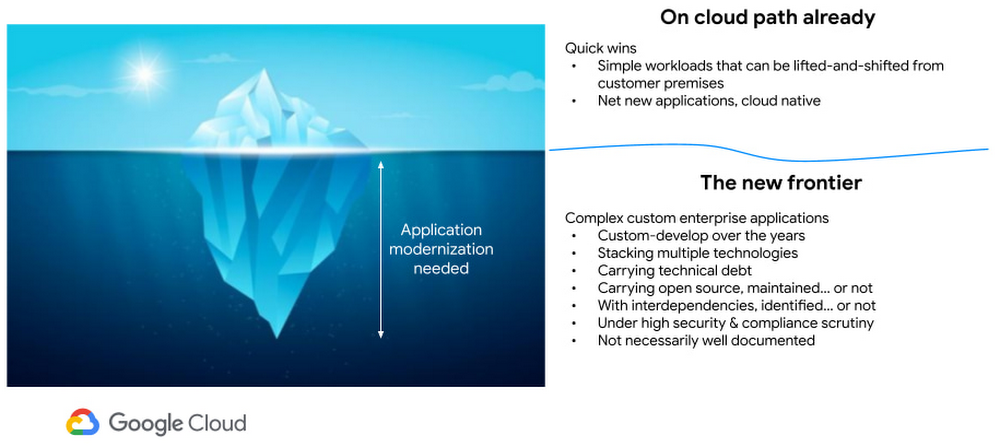
Step 2 (Analyze): Google Cloud offers the tooling and the framework to analyze your legacy applications.
Platform Owner (persona), usually have very little information on which workloads are a good fit for modernization.
Google’s StratoZone® SaaS platform provides customers with a data-driven cloud decision framework. The StratoProbe® Data Collector Application delivers the ability to easily deploy and scale the discovery of a customer’s IT environment for Private, Public, or Hybrid-cloud planning. To ease and accelerate the VM migration journey, Google Cloud offers assistance and guidance in making the right decisions when deciding to go to cloud.
Google’s mFit aims at unblocking customers in their transformation by providing workload selection for successful on-boarding, at scale, to Anthos, GKE and Cloud Run , in both pre-sales (e.g. proof-of-concept/proof-of-value) and post-sales (e.g. pilot and at scale execution) scenarios.
App and/or Business Owners (persona), get involved in a 1-week workshop, using CAST Highlight, which would provide rapid portfolio assessment through automated source code analysis for Cloud Readiness, Open Source risks, Resiliency, and Agility.
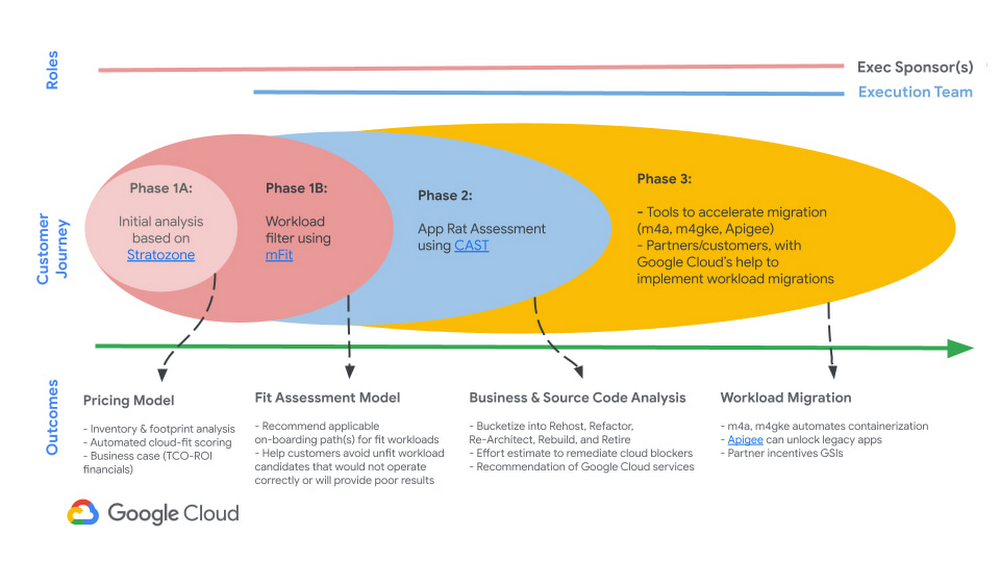
Step 3 (Plan & execute): Each organization is different. Some may follow the “Migration Factory” approach, and some may follow “Modernization Factory”, and some may follow both. Irrespective of which approach you choose to follow, it is important to plan just enough, so that you can start your execution. Ensure to set the OKRs, that would help with the right measurements, before you start the execution. The actual learning from the execution helps the team(s) to learn more about the cloud migration process, and refine it based on their organization.
Using CAST Highlight in the assessment step previously, we get the recommendation for the analyzed applications. From there, for certain workloads, we can use Migrate to Containers, to automate the containerization of suitable workloads. However, there are certain applications that require manual code changes. You have a few options for that,
- Our experts can help you get started.
- Our partners can help you
Step 4 (Measure & reiterate): Measure the progress using the predefined metrics in the previous step. Celebrate the wins. Consistently share the learnings and best practices with the developer community. Pick the next challenge
Take the next step
Tell us what you’re solving for. A Google Cloud expert will help you find the best solution.
A Guide to Anthos Hybrid Environment Reference Architecture
1266
Of your peers have already read this article.
1:30 Minutes
The most insightful time you'll spend today!
To help improve your security posture, improve the reliability of your applications, and reduce configuration drift in your environment, we’re excited to announce a new Anthos reference architecture.
Written in collaboration across our product, engineering, support, and field teams, this new reference architecture helps you plan, deploy, and configure the required components for Anthos hybrid environments.
Anthos hybrid environments give you the flexibility to deploy on-premises components that run container-based workloads and VMs using Anthos clusters on VMware and Anthos clusters on bare metal. You can continue to utilize existing investments in your on-premises infrastructure, and start to add components like Anthos Config Management. When you’re ready to bring everything together, you can add additional Google Cloud-based services like Artifact Registry, Cloud Monitoring, and Identity and Access Management (IAM).
The following sneak peek covers some of our best practices for architecting an Anthos hybrid environment. For more detailed guidance and planning information, see the full Anthos hybrid environment reference architecture.
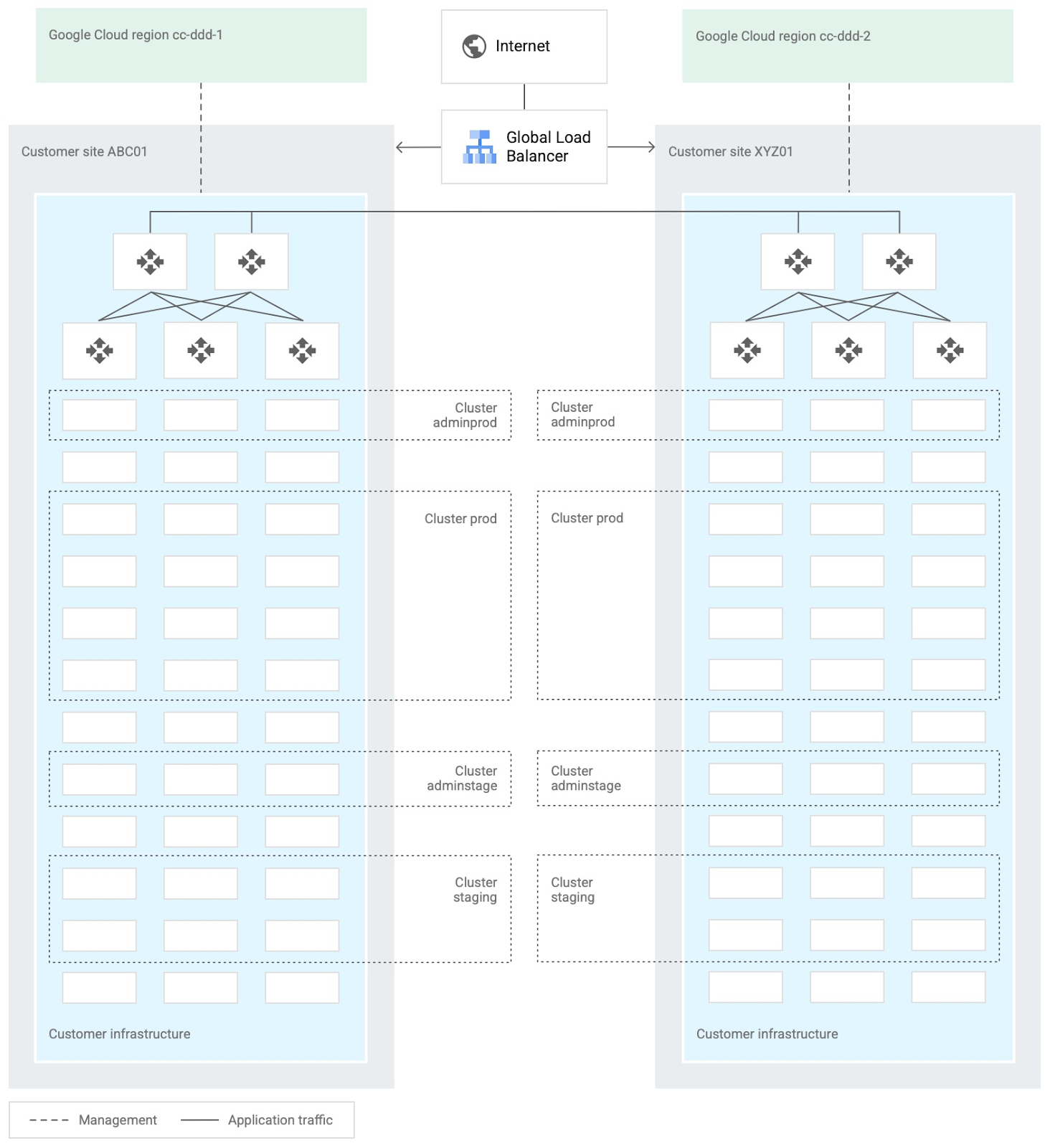
When you design and deploy an Anthos hybrid environment, we recommend that you use two or more on-premises computing customer sites and two or more Google Cloud regions. In your sites, run multiple clusters. This approach is recommended for several reasons, such as:
- Disaster recovery. If one cluster or site fails, you can continue to run workloads.
- Multiple environments, like production and staging, to test infrastructure changes.
- Different cluster types in each environment: admin clusters and user clusters. This approach separates administrative resources, which is a security best-practice.
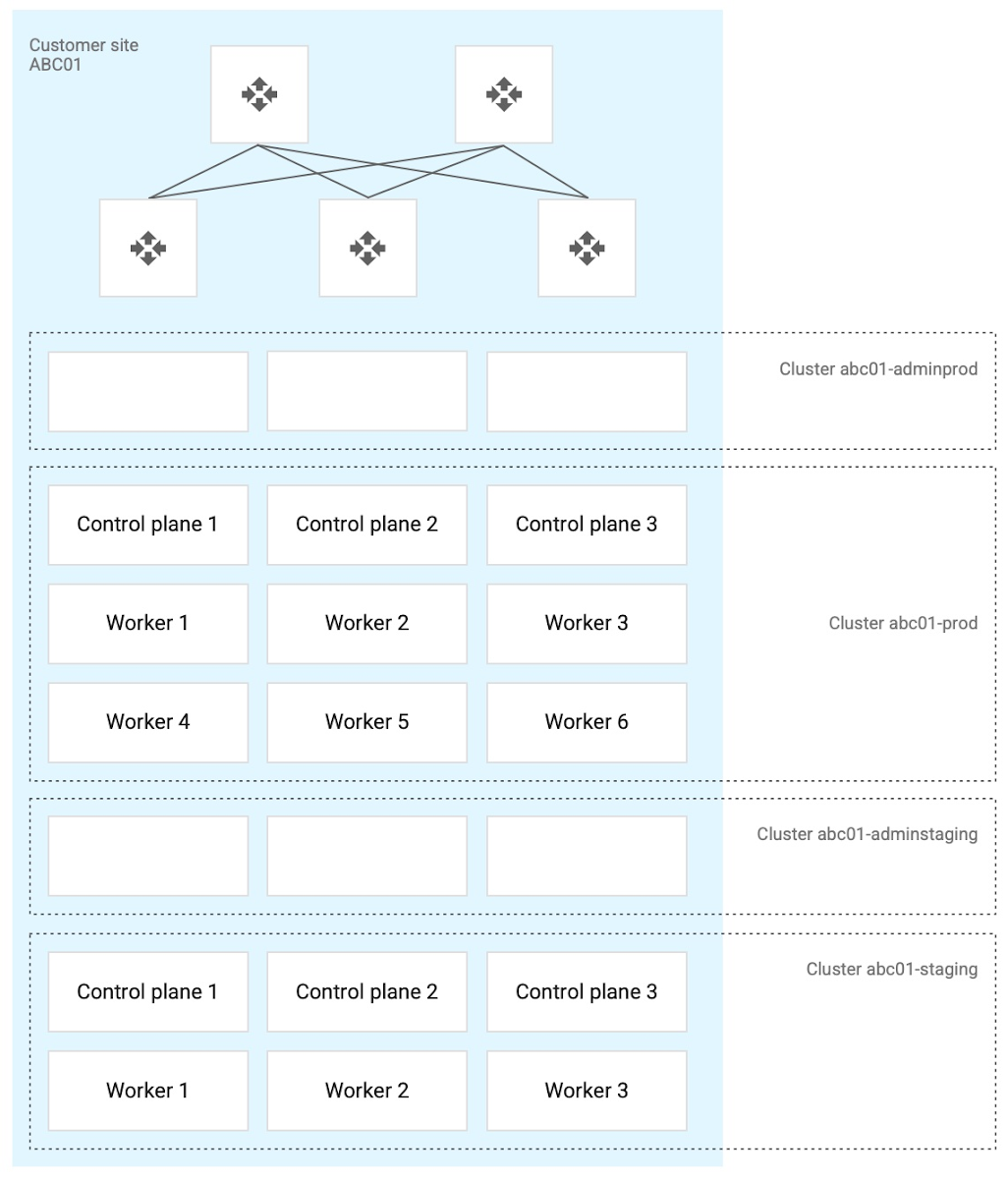
The following diagram shows an example of an Anthos hybrid environment that’s spread across customer sites and regions, with different clusters for admin and user workloads and for production and staging:
In each site, you can use Anthos clusters on VMware or Anthos clusters on bare metal. For both products, we recommend the following:
- Use a highly available (HA) control plane with three members for continued control plane availability concurrently with operating system upgrades, control plane software updates, or single-machine hardware or kernel failures.
- Deploy two admin clusters so that admin cluster configuration changes and updates can be tested in the staging environment first.
The following diagram shows an example of Anthos clusters on bare metal with control plane and worker nodes spread across physical machines. With Anthos clusters on VMware, the control plane and worker nodes are spread across VMware VMs:
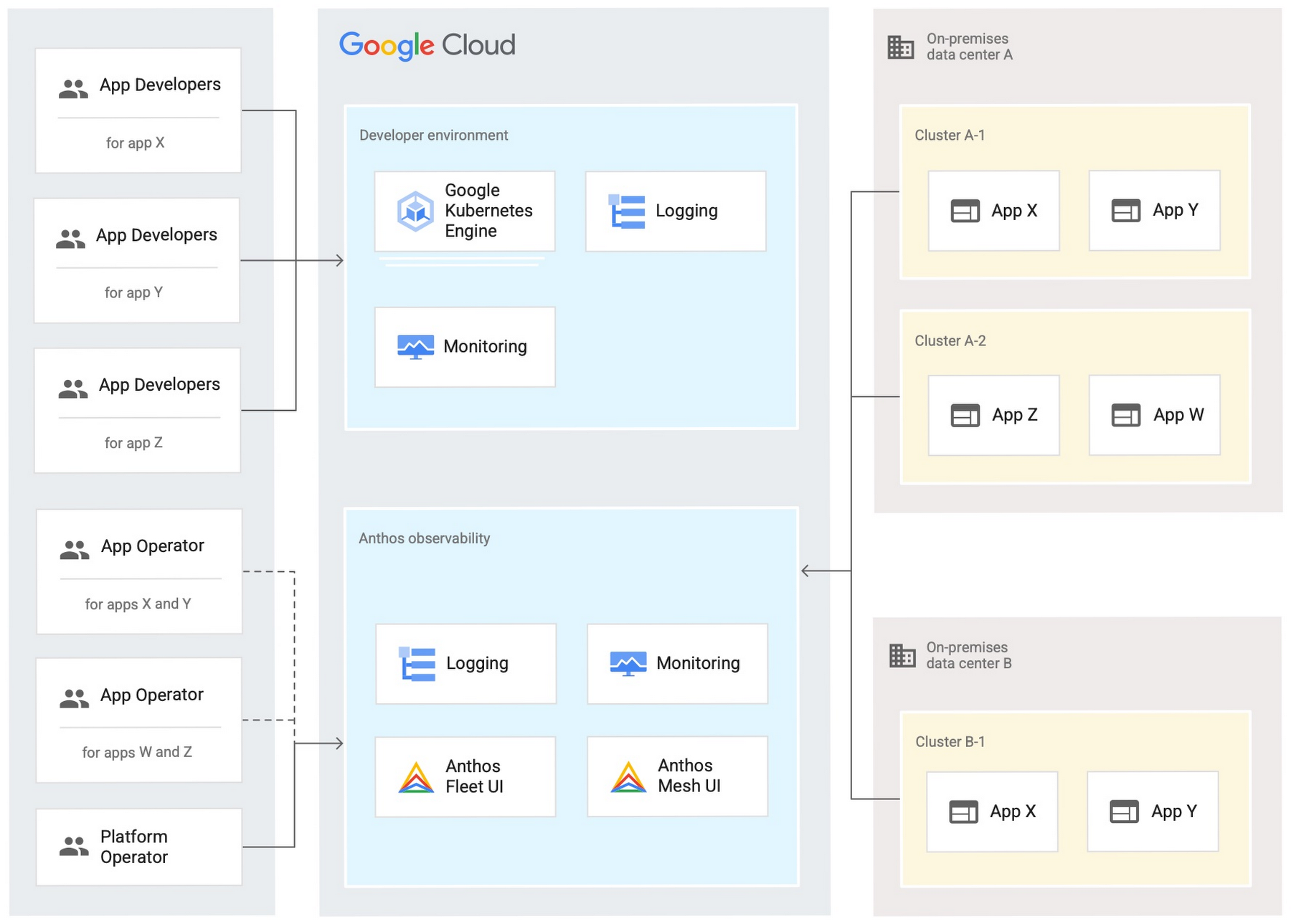
Configure your on-premises clusters and applications to send logging and monitoring data back to Google Cloud for analysis and review. Different personas should only be granted access to the environments they need. The following diagram shows how application developers and application or platform operators can then view logging and monitoring data in Google Cloud:
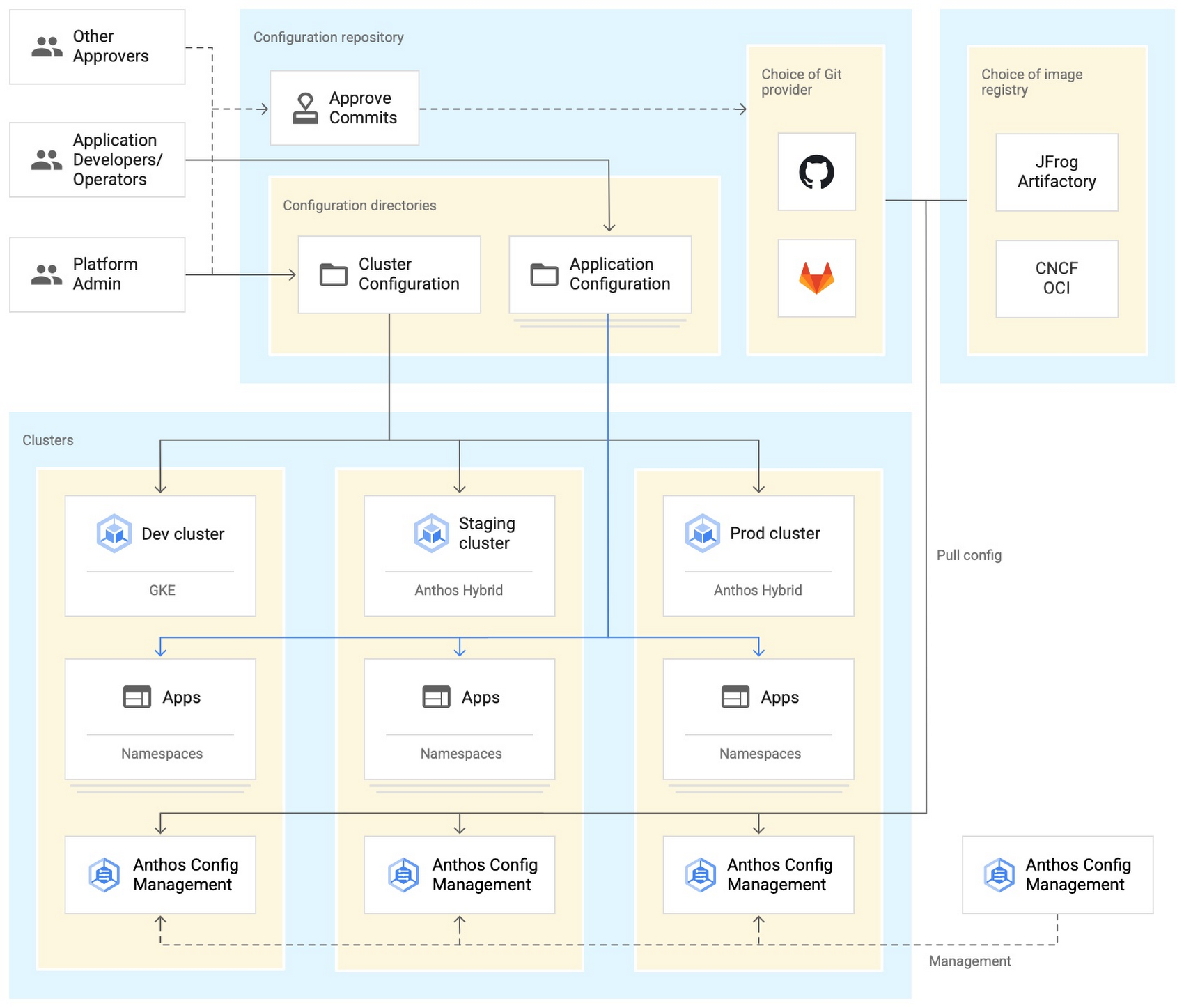
Use Anthos Config Management to manage Kubernetes objects in your clusters. Anthos Config Management is a GitOps-style tool that uses a Git repository or Open Container Initiative (OCI) as its storage mechanism and source of truth. Git provider workflows allow multiple stakeholders to participate in review of changes.
As shown in the following diagram, a common Anthos Config Management deployment uses one folder containing configuration for all clusters. Use separate additional folders to hold configuration data, one for application:
Plan and implement a way to secure the network traffic in your Anthos hybrid environment. The following services help with authentication, connectivity, and communication in a cluster:
- Anthos Identity Service connects clusters to on-site identity providers to authenticate local access.
- Connect gateway and workforce identity federation can provide secure cloud-mediated access to mobile workforce clusters without using a VPN.
- Workload Identity provides on-premises workloads with managed short-lifetime credentials for access to cloud resources.
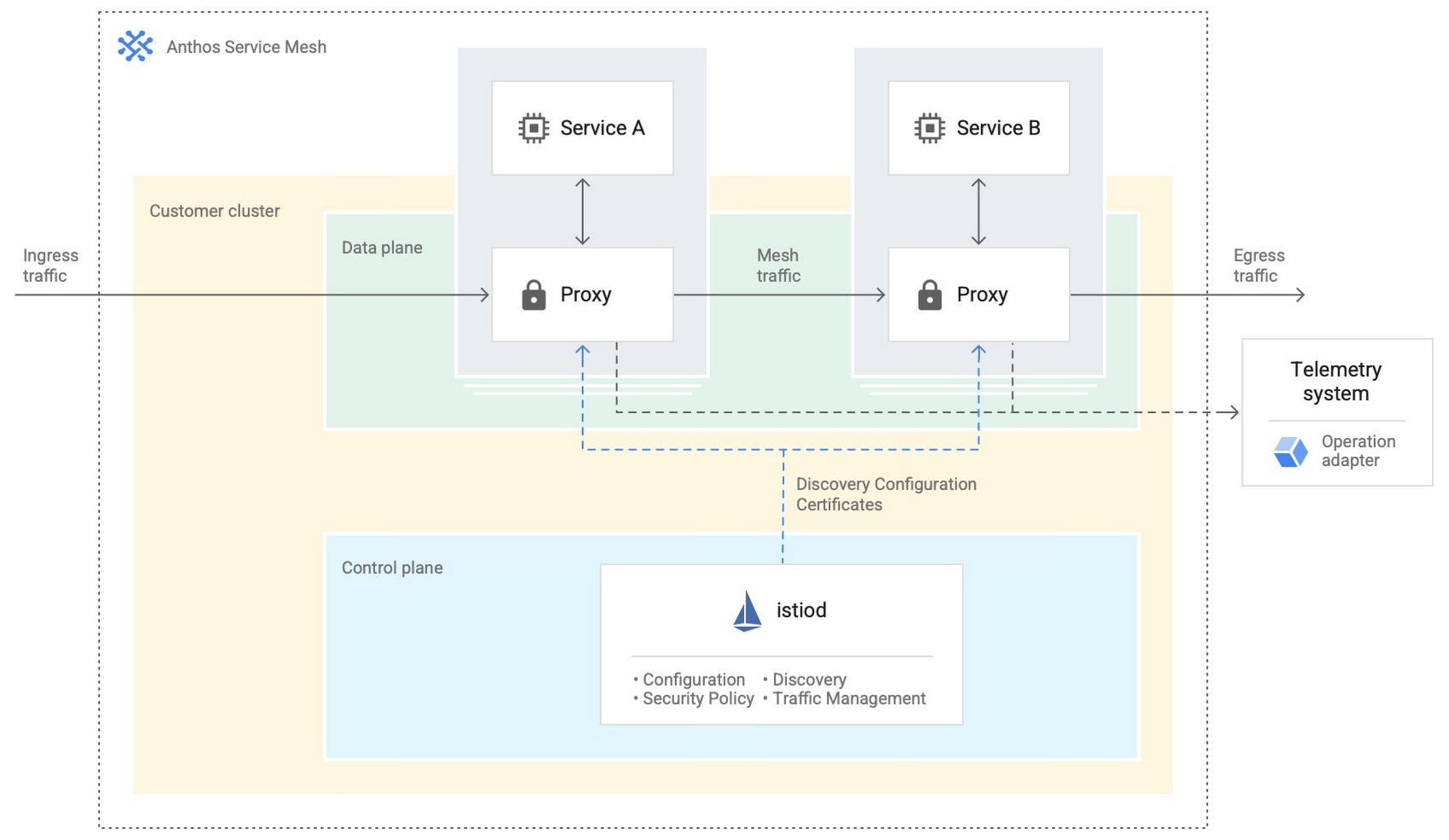
- Anthos Service Mesh encrypts and controls communication between services in the same cluster.
The following diagram shows how Anthos Service Mesh can control the flow of traffic between services within your clusters:
You don’t have to implement all these cloud-based services as part of your initial on-premises deployments. As you become more comfortable and want to expand your capabilities, you can add in some of these hybrid offerings. But, we hope that this blog post has given you some ideas to think about when you start to plan and design your own Anthos hybrid environments.
For more detailed guidance and planning information, see the full Anthos hybrid environment reference architecture. Let us know what you think!
Four Simple Steps to SRE Implementation

3186
Of your peers have already read this article.
3:00 Minutes
The most insightful time you'll spend today!
A few months ago, we wrote about how the first step to implementing Site Reliability Engineering (SRE) in an organization is getting leadership on board. So, let’s assume that you’ve gone ahead and done that. Now what? What are some concrete steps you can take to get the SRE ball rolling? In this blog post, we’ll take a look at what you as an IT leader can do to fast-track SRE within your team.
Step 1: Start small and iterate
“Rome wasn’t built in a day,” the saying goes, but you do need to start somewhere. When it comes to implementing SRE principles, the approach that I (and my team) found to be the most effective is to start with a proof of concept, learn from our mistakes, and iterate!
Start by identifying a relevant application and/or team
There are many factors that go into choosing a specific team or application for your SRE proof of concept. Most of the time, though, this is a strategic decision for the organization, which is outside the scope of this article. Possible candidates can be a team shifting from traditional operations or DevOps to SRE, or a need to increase reliability to a business-critical product. No matter the reason, it’s crucial to select an application that is:
- Critical to the business. Your customers should care deeply about its uptime and reliability.
- Currently in development. Pick an application in which the business is actively investing resources.
- In a perfect world, the application provides data and metrics regarding its behaviour.
Conversely, stay away from proprietary software. If the application wasn’t built by you, it’s not a good candidate for SRE! You need the ability to make strategic decisions about—and engineering changes to—the application as needed.
Pro tip: In general, if you have workloads both on-premises and in the cloud, try to start with the cloud-based app. If your engineers come from a traditional operations environment, changing their thinking away from ‘bare metal’ and infrastructure metrics will be easier for a cloud-based app, as managed infrastructure turns practitioners into users and forces them to consume it like developers (APIs, infrastructure as code, etc.)
Remember: Set realistic goals. Discouraging your team with unrealistic expectations early on will have a negative effect on the initiative.
Step 2: Empower your teams
Implementing SRE principles requires fostering a learning culture, and in that regard, team enablement means both training them, i.e., in regards to knowledge, as well as empowering them.
Building a training program is a topic in and of itself, but it’s important to think about an enablement strategy at an early stage. Especially in large organizations, you need to address topics like internal upskilling, hiring and scaling the team as well as onboarding and creating a learning community.
Your enablement strategy should also accommodate employees at different levels and in different functions. For example, higher leadership’s training will look very different from practitioners’ training. Leadership’s education should be sufficient to get buy-in and to be able to make organizational decisions. To drive change in the entire organization, additional training to leadership on cultural concepts and practices might be required.
When it comes to engineering leadership and/or middle management (managers that manage managers), training should be a combination of high-level cultural concepts to help foster the required culture, and technical SRE practices that are deep enough to understand prioritization, resource allocation, process creation, and future needs.
When it comes to practitioners, ideally you want the entire organization to be aligned both from a knowledge perspective as well as culturally. But as we’ve mentioned earlier, it’s best to start simple, with just one team.
The starting point for those teams should be to understand reliability and key concepts like SLAs, SLOs, SLIs and error budgets. These are important because SRE is focused on the customer experience. Measuring whether systems meet customer expectations requires a shift in mindset and can take time.
After identifying your first application and/or the team responsible for it, it’s time to identify the app’s user journeys, the set of interactions a user has with a service to achieve a single goal—for example, a single click or a multi-step pipeline, and rank them according to business impact. The most critical ones are called Critical User Journeys (CUJ), and these are where you should start drafting SLO/SLIs.

Pro tip: There are some general technical practices that can help you embrace SRE faster. For example, using less repos rather than more can help you reduce silos within the organization and better utilize resources.
Likewise, prioritizing automatic processes and self-healing systems can benefit reliability, but also team satisfaction, helping the organization retain talent.
Final note: Similar to the way that you make architecture decisions, your chosen technology, solutions and implementation tools should enable you to do what you are trying to do and not vice versa.
Step 3: Scale those learnings
After you establish these SRE practices with one or a few teams, the next step is to think about building an SRE community and formalized processes across the organization. In some organizations, you can do this in parallel to the end of step 2, and in some organizations, only after you have a few successful implementations under your belt.
In this phase, you’ll probably want to address community, culture, enablement and processes. You will need to address them all, especially as they are intertwined, but which one you prioritize will depend on your organization.
Creating an SRE community in the organization is important both from a learning perspective, but also to establish a knowledge base of best practices, train subject-matter experts, help create needed guardrails, and align processes.
Building a community goes hand in hand with fostering an empowered culture and training teams. The idea is that early adopters are ambassadors for SRE who share their learnings and train other teams in the organization.
It is also useful to identify potential ambassadors or champions in individual development teams who are passionate about SRE and will help with the adoption of those practices.
It is also crucial to create repeatable trainings for each functional role, including onboarding sessions. Onboarding new team members is a critical aspect of training and fostering an empowered SRE culture. Therefore it is vital to be mindful about your onboarding process and make sure that the knowledge is not lost when team members change roles.
LEARN MOREDeploying SRE training best practices to productionHow to “SRE” an SRE training program
During this phase, you also want to foster an org-wide culture that promotes psychological safety, accepts failure as normal and enables the team to learn from mistakes. For that, leadership must model the desired culture and promote transparency.
Finally, having structured and formalized processes can help reduce the stress around emergency response—especially being on-call. Processes can also provide clarity and make teams more collaborative and effective.
In order to have the most impact, start by prioritizing the most painful areas under your team’s remit—for example, clean up noisy alerts to avoid (or address) alert fatigue, automate your change management processes and involve only the necessary people to save team bandwidth. Team members shouldn’t work on software engineering projects while doing on-call incident management, and vice-versa. Make sure they have enough bandwidth to do both, separately. Similar to other areas, you want to use data to drive your decisions. As such, identify where your teams spend the most time, and for how long.
If you find that it is challenging to collect this kind of data, be it quantitative or qualitative, a good starting point is often your emergency response processes, as those have a direct impact on the business, especially around the escalation process, incident management and related policies.
Pro tip: All the above practices contribute to reducing silos and align goals across the organization; those should include also your vendors and engineering partners. To that end, make sure your contracts with them capture those goals as well.
Step 4: Embody a data-driven mindset
Starting the SRE journey can take time, even if you’re just implementing it for one team. Two quick wins that you can start with that will make a positive impact are collecting data and doing blameless postmortems.
In SRE we try to be as data-driven as possible, so creating a measurement culture in your organization is crucial. When prioritizing data collection, ideally look for data that represents the customer experience. Collecting that data will help you identify your gaps and help you prioritize according to business needs and by extension your customer expectations.
Another thing that you can do is run or improve postmortems, which are an essential way of learning from failure and fostering a strong SRE culture. From our experience, even organizations that do run postmortems can benefit from them much more with a few minor improvements. It is important to remember that postmortems should be blameless in order to make the team feel safe to share and learn from failures. And to make tomorrow better than today, i.e., not repeat the same problems, it’s important that postmortems include action items and are assigned to an owner.
Creating a shared repository for postmortems can have a tremendous impact on the team: it increases transparency, reduces silos, and contributes to the learning culture. It also shows the team that the organization “practices what it preaches.” Implementing a repository can be as easy as creating a shared drive.
Pro tip: Postmortems should be blameless and actionable.
On the SRE fast track
Of course, no two organizations are alike, and no two SRE teams are either. But by following these steps, you can help get your team on the path to SRE success faster. To learn more about developing an effective SRE practice, check out the following resources.
Develop for Compute Engine in your IDE with Cloud Code

2808
Of your peers have already read this article.
2:30 Minutes
The most insightful time you'll spend today!
When developing services with Compute Engine, our customizable compute service that lets you create and run virtual machines on Google’s infrastructure, you’ll likely find yourself frequently switching between your code editor, terminal, and the Google Cloud Console.
Cloud Code is a set of IDE plugins for popular IDEs like VS Code and IntelliJ that make it easier to develop applications that use Google Cloud services. And now, Cloud Code makes it easy to develop with Compute Engine by incorporating common workflows with your favorite IDE’s user interface.
Specifically, this new integration between Compute Engine and Cloud Code makes it easier to manage your commonly used virtual machines in the IDE, view details about them, connect to them over SSH, upload your application files to them, and view their logs.
Before you begin
Let’s demonstrate how the new integration works in Cloud Code for VS Code. Install Cloud Code for VS Code, and once installed, open its icon on the activity bar on the left and find “Compute Engine”:
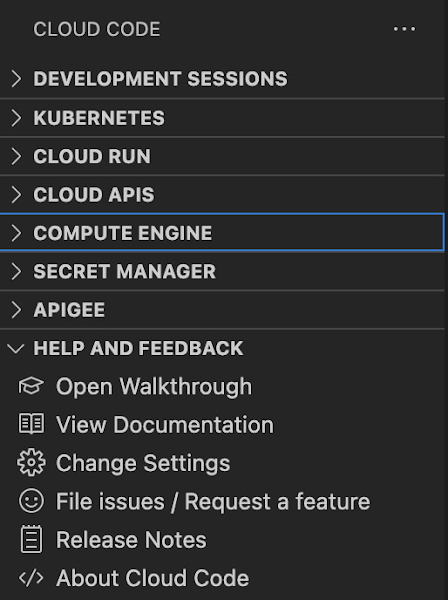
Cloud Code for Jetbrains IDEs (such as IntelliJ) could be installed similarly, and you will find Compute Engine in the list of your IDE tool windows.
View your VMs
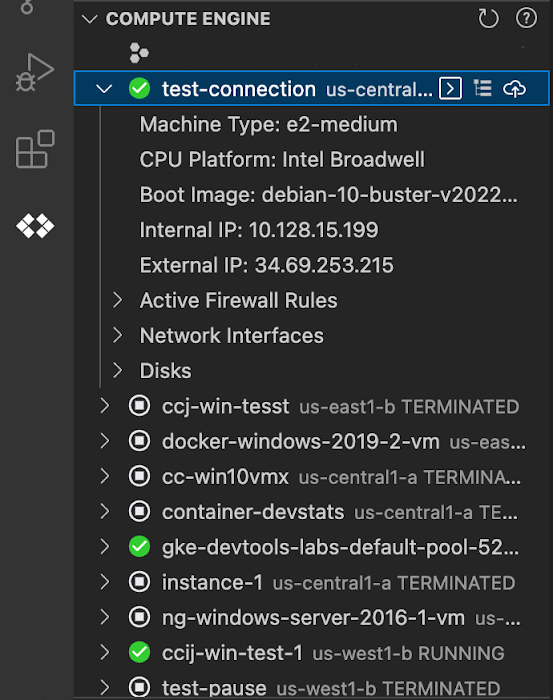
Cloud Code makes it easy to see all relevant VMs in your GCP project and view details needed to effectively work with the VM from the IDE. To start working with a Compute Engine VM in the IDE, navigate to Cloud Code’s new Compute Engine explorer. From there, you can see all the VMs in your current Cloud project. Clicking on a VM will display details such as machine type, boot image, IP address and more. You can also right click on a VM for a quick link to the Google Cloud Console where you can take additional action.
Connect to your VMs over SSH
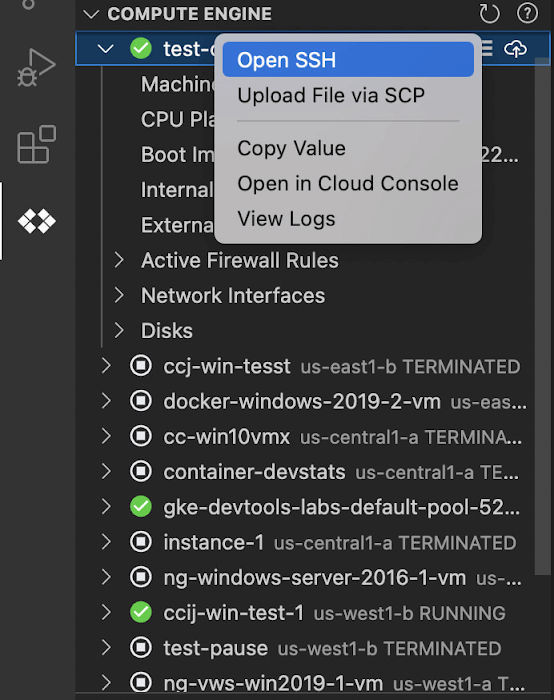
Once you’ve found the VM you want to work with, Cloud Code makes it easy to connect to that VM over SSH. Again, find the VM you want to connect to in Cloud Code’s Compute Engine explorer, right click it, and select “Open SSH”. Cloud Code will then establish an SSH connection from your IDEs terminal into the VM. If there’s any difficulty establishing a connection, Cloud Code can run a troubleshooting diagnostic to help resolve the issue.
Many organizations maintain VMs that don’t have a public IP address, making it difficult to establish an SSH connection to them. For those VMs that use Identity-Aware Proxy, Cloud Code can still securely connect to them over SSH, even without a public IP address.
Upload files to your VMs
You might want to try a debug version of your application, run a script, or try a new code in an environment identical to production, in this case on a development VM instance which might not have access to full source code or is not a part of your CI/CD pipeline. Cloud Code provides an easy way to upload your code files into a VM instance.
Find the VM you want to connect to in Cloud Code’s Compute Engine explorer, right click it, and select “Upload File via SCP”. Choose a file from your local system and Cloud Code will upload it to a VM instance using SCP. Once upload completes, Cloud Code offers to open a new SSH connection to access the files and work with them on a remote VM instance. Again, if there’s any difficulty establishing a connection, Cloud Code can run a troubleshooting diagnostic to help resolve the issue.
View your VM logs
As you’re working with your VM, you can right click it and select to view the VM instance logs. From Visual Studio Code this will open a logs viewer in the IDE. From IntelliJ, the logs viewer in the Cloud Console will be opened. If you’ve configured application logs to be collected with Cloud Logging, you can also view those in these logs viewers as well.
Get Started
We invite you to try out Compute Engine with Cloud Code to better streamline your development workflow. To learn more, check out the Compute Engine documentation for Visual Studio Code and JetBrains IDEs. If you’re new to development with IDEs, you can take the first step by installing Visual Studio Code or IntelliJ.
More Relevant Stories for Your Company

Google Cloud Partnership Helps Lowe’s SRE Team Achieve 20X More Releases Per Month
Editor’s note: Today we hear from the Lowe’s SRE team. They share about how they have been able to increase the number of releases they can support by adopting Google’s Site Reliability Engineering (SRE) framework and leveraging their partnership with Google Cloud. At Lowe’s, we’ve made significant progress in our multiyear technology transformation.
How to Choose the Right ML Model for Your Applications
Many of our customers want to know how to choose a technology stack for solving problems with machine learning (ML). There are many choices for these solutions available, some that you can build and some that you can buy. We’ll be focusing on the build side here, exploring the various

Streamlining Business Processes with Google Cloud’s Application Integration
According to a recent Accenture report, large businesses deploy an average of 500 different applications. This trend shows no signs of slowing down, with the majority of respondents signaling plans to acquire even more applications. No surprise, all these applications present a number of integration challenges, which the impending wave of

How APIs Help National Bank of Pakistan Modernize the Banking Experience
NBP, Pakistan’s largest government-owned bank, serves private and commercial customers and also acts as the government treasury bank. This means that it handles all government transactions—including disbursements and cash collection. In the past, every government transaction had to be handled physically through the NBP branch network. But in a populous
