






3481
Of your peers have already downloaded this article
1:30 Minutes
The most insightful time you'll spend today!
How Google Cloud’s PSO Supports Customers’ Migration Goals

5023
Of your peers have already read this article.
2:00 Minutes
The most insightful time you'll spend today!
Google Cloud’s Professional Services Organization (PSO) engages with customers to ensure effective and efficient operations in the cloud, from the time they begin considering how cloud can help them overcome their operational, business or technical challenges, to the time they’re looking to optimize their cloud workloads.
We know that all parts of the cloud journey are important and can be complex. In this blog post, we want to focus specifically on the migration process and how PSO engages in a myriad of activities to ensure a successful migration.
As a team of trusted technical advisors, PSO will approach migrations in three phases:
- Pre-Migration Planning
- Cutover Activities
- Post-Migration Operations
While this post will not cover in detail all of the steps required for a migration, it will focus on how PSO engages in specific activities to meet customer objectives, manage risk, and deliver value. We will discuss the assets, processes and tools that we leverage to ensure success.
Pre-Migration Planning
Assess Scope
Before the migration happens, you will need to understand and clarify the future state that you’re working towards. From a logistical perspective, PSO will be helping you with capacity planning to ensure sufficient resources are available for your envisioned future state.
While migration into the cloud does allow you to eliminate many of the considerations for the physical, logistical, and financial concerns of traditional data centers and co-locations, it does not remove the need for active management of quotas, preparation for large migrations, and forecasting. PSO will help you forecast your needs in advance and work with the capacity team to adjust quotas, manage resources, and ensure availability.
Once the future state has been determined, PSO will also work with the product teams to determine any gaps in functionality. PSO captures feature requests across Google Cloud services and makes sure they are understood, logged, tracked, and prioritized appropriately with the relevant product teams. From there, they work closely with the customer to determine any interim workarounds that can be leveraged while waiting for the feature to land, as well as providing updates on the upcoming roadmap.
Develop Migration Approach and Tooling
Within Google Cloud, we have a library of assets and tools we use to assist in the migration process. We have seen these assets help us successfully complete migrations for other customers efficiently and effectively.
Based on the scoping requirements and tooling available to assist in the migration, PSO will help recommend a migration approach. We understand that enterprises have specific needs; differing levels of complexity and scale; regulatory, operational, or organization challenges that will need to be factored into the migration. PSO will help customers think through the different migration options and how all of the considerations will play out.
PSO will work with the customer team to determine the best migration approach for moving servers from on-prem to Google Cloud. PSO will walk customers through different migration approaches, such as refactoring, lift-shift, or new installs. From there, the customer can determine the best fit for their migration. PSO will provide guidance on best practices and use cases from other customers with similar use cases.
Google offers a variety of cloud native tools that can assist with asset discovery, the migration itself, and post-migration optimization. PSO, as one example, will help work with project managers to determine the best tooling that accommodates the customer’s requirements for migrating servers. PSO will also engage Google product team to ensure the customer fully understands the capabilities of each tool and the best fit for the use case. Google understands from a tooling perspective, one size does not fit all, thus PSO will work with the customer on determining the best migration approach and tooling for different requirements.
Cutover Activities
Once all of the planning activities have been completed, PSO will assist in making sure the cutover is successful.
During and leading up to critical customer events, PSO can provide proactive event management services which deliver increased support and readiness for key workloads. Beyond having a solid architecture and infrastructure on the platform, support for this infrastructure is essential and TAMs will help ensure that there are additional resources to support and unblock the customer where challenges arise.
As part of event management activities, PSO liaises with the Google Cloud Support Organization to ensure quick remediation and high resilience for situations where challenges arise. A war room is usually created to facilitate quick communication about the critical activities and roadblocks that arise. These war rooms can give customers a direct line to the support and engineering teams that will triage and resolve their issues.
Post-Migration Activities
Once cutover is complete, PSO will continue to provide support in areas such incident management, capacity planning, continuous operational support, and optimization to ensure the customer is successful from start to finish.
PSO will serve as the liaison between the customer and Google engineers. If support cases need to be escalated, PSO will ensure the appropriate parties are involved and work to get the case resolved in a timely manner. Through operational rigor, PSO will work with the customer in determining if certain Google Cloud services will be beneficial to the customer objectives. If services will add value to the customer, PSO will help enable the services so it aligns with the customer’s goal and current cloud architecture. In cases where there are missing gaps in services, PSO will proactively work with the customer and Google engineering teams to close the gaps by enabling additional functionality in the services.
PSO will continue to work with the engineering teams to consistently review and provide recommendations on the customer’s cloud architecture in ensuring the most optimal and cost efficient design along with adhering to Google’s best practices guidelines.
Aside from migrations, PSO is also responsible for providing continuous training of Google Cloud to customers. To ensure consistent development of Google Cloud, PSO will work with the customer to jointly develop a learning roadmap to ensure the customer has the necessary skills to succeed in delivering successful projects in Google Cloud.
Conclusion
Google PSO will be actively engaged throughout the customer’s cloud journey to ensure the necessary guidance, methodology, and tools are presented to the customer. PSO will engage in a series of activities from pre-migration planning to post migration in key areas such as capacity planning to ensure sufficient resources are allocated for future workloads to providing support on technical cases for troubleshooting. PSO will serve as a long-term trusted advisor who will be the voice of the customer and provide the reliability and stability of the customer’s Google Cloud environment.
Click here if you’d like to engage with our PSO team on your migration. Or, you can also get started with a free discovery and assessment of your current IT landscape.

Evernote Ditches Private Cloud for Google Cloud and Improves Performance and Uptime
DOWNLOAD CASE STUDY4375
Of your peers have already downloaded this article
1:30 Minutes
The most insightful time you'll spend today!
More than 200 million Evernote users now more securely store billions of notes and attachments—the equivalent of roughly 10 copies of every modern book ever published. The company’s private cloud was no longer enough to scale to support such a dynamic infrastructure, so Evernote migrated its service to Google Cloud Platform and closed its data center, allowing employees to focus on product innovation instead of maintenance.
Evernote moved 5 billion notes and 12 billion attachment files to Google Cloud Platform, an endeavor that was expected to take 9-12 months. Evernote used the Google Professional Services team to guide it through solution planning, architecting, and migrating 3.5PB of data in only 70 days, and with minimal customer impact.
Customers benefit from the data processing power of Google Cloud Platform and are enjoying noticeable performance boosts. And because Google Cloud Platform encrypts customer data stored at rest by default, Evernote offers increased security, giving customers peace of mind that their data is safe.
And rather than pouring resources into day-to-day infrastructure maintenance and monitoring, Evernote’s employees can now focus more time and energy into developing new features and responding to customer needs.
Google Extends Support for Windows Server Containers on Anthos for Faster App Modernization and Consistent Dev Experience

5587
Of your peers have already read this article.
3:00 Minutes
The most insightful time you'll spend today!
Today, many applications in organizations’ data centers run on Windows Server. Modernizing these traditional Windows apps onto Kubernetes promises a host of benefits: a consistent platform across environments, better portability, scalability, availability, simplified management and speed of deployment, just to name a few. But how? Rewriting traditional .NET applications to run on Linux with .NET Core can be challenging and time-consuming. There is, however, a lower-toil, more developer friendly option.
Last year, we announced support for Windows Server containers running on Google Kubernetes Engine (GKE), our cloud-based managed Kubernetes service, which lets you take the advantage of containers without porting your apps to .NET core or rewriting them for Linux. Today, we’re going a step further with support for Windows Server containers on Anthos clusters on VMware in your on-premises environment. Now available in preview, you can consolidate all your Windows operations across on-prem and Google Cloud.
Bringing Windows Server support to our family of Kubernetes-based services—GKE running on Google Cloud, and Anthos everywhere—with the same experience, lets you modernize apps faster and achieve a consistent development and deployment experience across hybrid and cloud environments. Further, by running Windows and Linux workloads side by side, you get operational consistency and efficiency—no need to have multiple teams specializing in different tooling or platforms to manage different workloads. The single-pane-of-glass view and the ability to manage policies from a central control plane simplifies the management experience, while bin packing multiple Windows applications drives better resource utilization, leading to infrastructure and license savings.
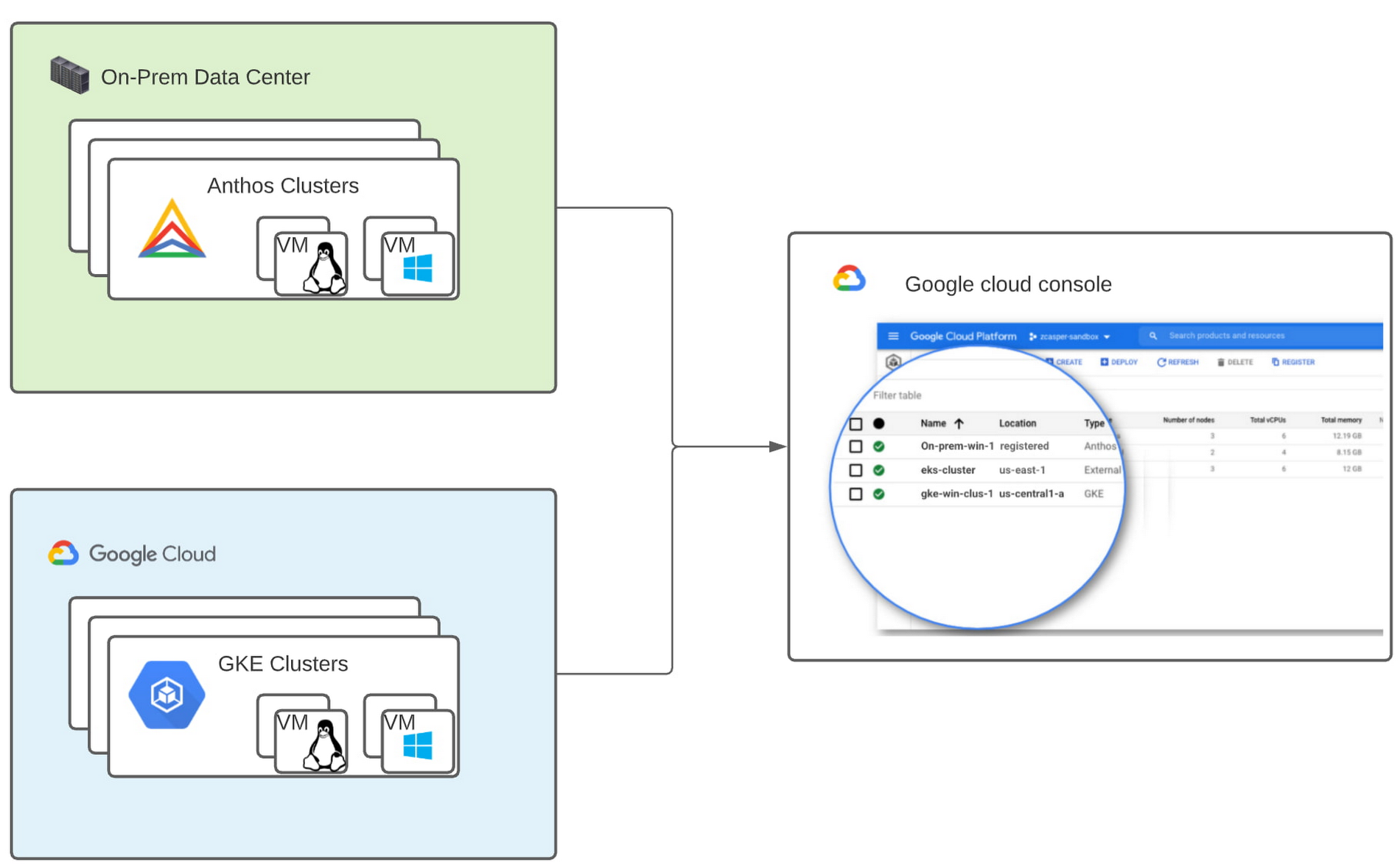
With all these benefits, it’s no surprise that customers such as Thales, a French multinational firm specializing in aerospace and security services, have been able to reap significant benefits by moving Windows applications to GKE.
“We moved our Windows applications from VMs to Windows containers on GKE and now have a unified mechanism for Linux and Windows-based application management, scaling, logging, and monitoring. Earlier, setting up these applications in VMs and configuring them for high availability used to take up to a week, and the applications were not easily scalable,” said Najam Siddiqui, Solutions Architect at Thales. “Now with GKE, the setup takes only a few minutes. GKE’s automatic scaling and built-in resiliency features make scaling and high-availability setup seamless. Also, manually maintaining the VMs and applying security patches used to be tedious, which is now handled by GKE.”
Let’s take a deeper look at the architecture that lets you run your Windows container-based workloads on-prem.
Windows Server running on-prem with Anthos
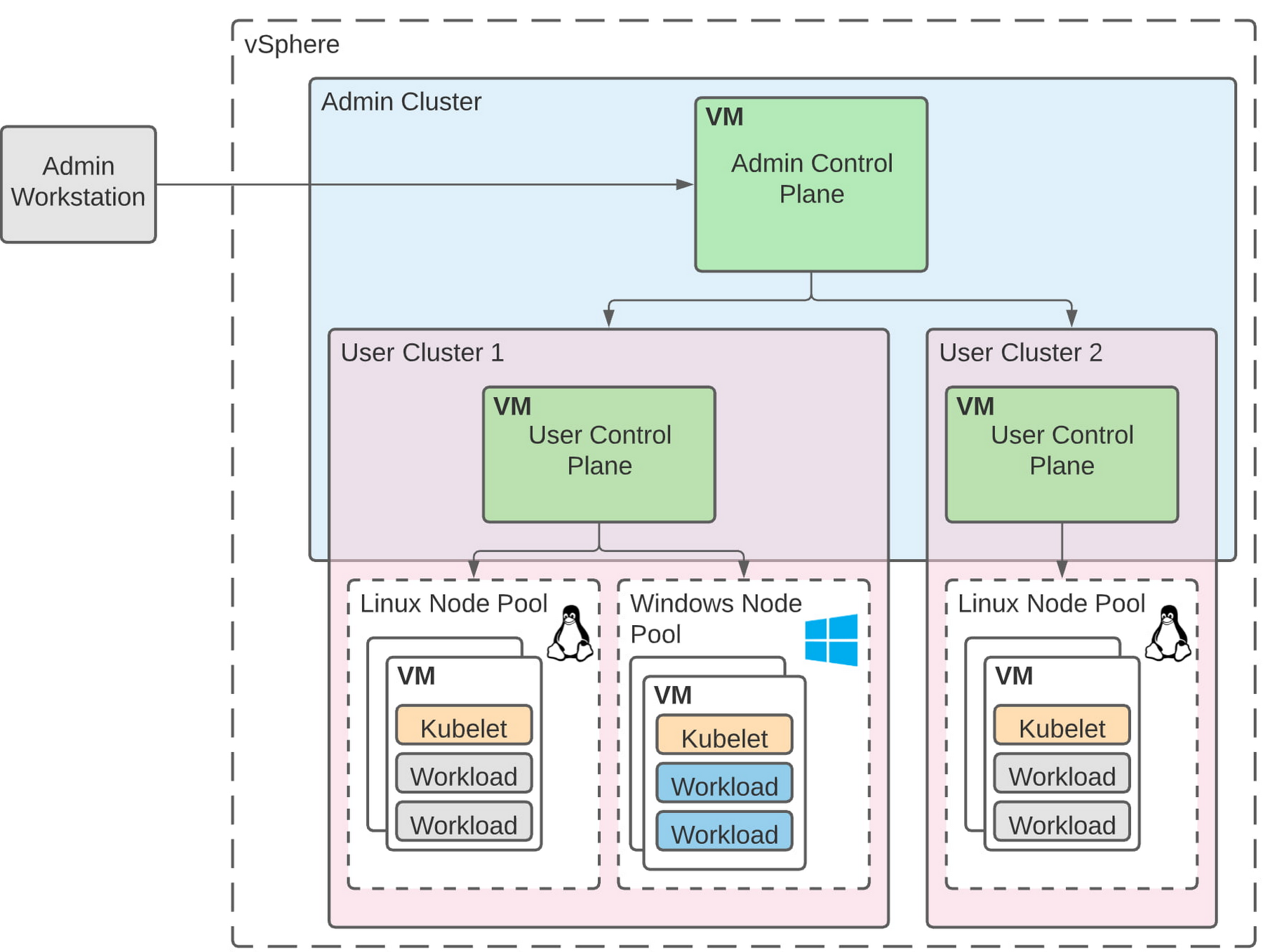
The diagram below illustrates the high-level architecture of running Windows container-based workloads in an on-prem GKE cluster with Anthos. Windows server node-pools can be added to an existing or new Anthos cluster. Kubelet and Kube-proxy run natively on Windows nodes, allowing you to run mixed Windows and Linux containers in the same cluster. The admin cluster and the user cluster control plane continue to be Linux-based, providing you a consistent orchestration experience and management ease across Windows and Linux workloads.
Get started today
When considering modernizing your on-prem Windows estate, we recommend running Windows Server containers on Anthos in your own data center. If you are new to Anthos, the Anthos getting started page and the Coursera course on Architecting Hybrid Cloud with Anthos are good places to start. You can also find detailed documentation on our website, and our partners are eager to help you with any questions related to the published solutions, as is the GCP sales team. And as always, please don’t hesitate to reach out to us at anthos-onprem-windows@google.com if you have any feedback or need help unblocking your use case.
5524
Of your peers have already watched this video.
1:30 Minutes
The most insightful time you'll spend today!
Pega Systems Migrates SAP Servers to Google Cloud in Just 9 Weeks!
Pega Systems’ financial data on SAP environs were on a hosting platform that lacked agility. By moving nearly 30 SAP servers to Google Cloud in just 9 weeks, Pega Systems was able to unlock data and integrate BigQuery into SAP HANA to deliver personalization for clients and embark on an exciting journey with Google Cloud! Watch now.
6702
Of your peers have already downloaded this article
4:30 Minutes
The most insightful time you'll spend today!
Unlocking the Power of Data and Creativity with
the Cloud: The WPP Story
More Relevant Stories for Your Company

Google Cloud’s Professional Service Organization: How it Accelerates Operational Health Review Cloud Migration
Introduction The Google Cloud Professional Services Organization's (PSO) mission is to help our customers get the most out of Google products. PSO is responsible for customer success by sharing our technical expertise in order to unlock business value from the cloud by providing cloud strategy and best practice advice, implementation guidance, and

Google Cloud Celebrates Journey of 3 Inspiring Founders for the Asian Pacific American Heritage Month
May is Asian Pacific American Heritage Month —a time for us to come together to celebrate and remember the important people and history of Asian and Pacific Island heritage. This feature highlights three AAPI founders from the Google For Startups community. Read on to learn how these three founders built

Lending DocAI Shortens Borrowers’ Journey on Roostify
The home lending journey entails processing an immense number of documents daily from hundreds of thousands of borrowers. Currently, home lending document processing relies on some outdated digital models and a high dependency on manual labor, resulting in slow processing times and higher origination costs. Scaling a business that sorts
What’s Google Cloud Firestore Database and What are it’s Benefits for Business and Developers?
Cloud Firestore is a NoSQL document database that simplifies storing, syncing, and querying data for your mobile and web apps at global scale. Cloud Firestore is a fast, fully managed, serverless, cloud-native NoSQL document database that simplifies storing, syncing, and querying data for your mobile, web, and IoT apps at
