






Modernize your Windows Server Workloads using Google Cloud Platform
READ FULL INTRODOWNLOAD AGAIN6247
Of your peers have already downloaded this article
1:30 Minutes
The most insightful time you'll spend today!
How Lowe’s SRE Team Decreases Mean-time-to-recovery (MTTR)

3364
Of your peers have already read this article.
1:30 Minutes
The most insightful time you'll spend today!
Editor’s Note: In a previous blog, we discussed how home improvement retailer Lowe’s was able to increase the number of releases it supports by adopting Google’s Site Reliability Engineering (SRE) framework on Google Cloud. Lowe’s went from one release every two weeks to 20+ releases daily, helping meet its customer needs faster and more effectively. Today, the Lowe’s SRE team shares how they used SRE principles to decrease their mean-time-to-recovery (MTTR) by over 80 percent.
The stakes of managing Lowes.com have never been higher, and that means spotting, troubleshooting and recovering from incidents as quickly as possible, so that customers can continue to do business on our site.
To do that, it’s crucial to have solid incident engineering practices in place. Resolving an incident means mitigating the impact and/or restoring the service to its previous condition. The average time it takes to do this is called mean time to recovery (MTTR). Tracking this metric helps us stay on top of the overall reliability of our systems at Lowe’s, while simultaneously improving the speed with which we recover. Our goal is to keep the MTTR metric as low as possible, so that failures don’t negatively impact our business. Here are the four areas we addressed to drive holistic improvement in our MTTR.
Lowe’s incident reporting process
To reduce MTTR, we created a seamless incident reporting process following SRE principles. Our incident reporting process is a workflow that starts at the time an incident occurs, and ends with an SRE captain who closes the action items after a postmortem report. With this approach, we are able to limit the number of critical incidents. The reporting process involves three core components: monitoring, alerting, and blameless postmortems.
Monitoring and alerting
Having proper monitoring and alerting in place is crucial when it comes to incident management. Monitoring and alerting tools let you detect issues as soon as they occur, and notify the right person in the shortest possible time to take action. From a measurement standpoint, we track this as our mean time to acknowledge (MTTA). This is the average time it takes from when an alert is triggered, to when work on the issue begins.
At the time of an incident, our monitoring and alerting tools notify the on-call SRE first responder via PagerDuty in the form of a phone call, text message and email. Our SRE software engineering team has done a lot of automation to enable various Service Level Indicator (SLI) alerts and Service Level Agreement (SLA) notifications. The on-call SRE then initiates a triage call with our service/domain stakeholders to resolve the incident. As a result, we reduced our MTTA from 30 minutes in 2019, to one minute – a 97 percent decrease.
Blameless postmortems: learning from incidents
A postmortem is a written record of an incident, its impact, the actions taken to resolve it, the root cause and the follow-up actions to prevent the incident from recurring (see example here). A blameless postmortem builds on that and is a core part of an SRE culture, and our culture at Lowe’s. We ensure that individuals are not singled out, and the outcome for all postmortems are directed toward learnings and process improvement.
For us, the postmortem process is the biggest part of our incident workflow. When an SRE creates a new postmortem report, the first step is to conduct a postmortem session with domain stakeholders to review the report. The postmortem then goes into the review stage and gets reviewed by more stakeholders in our weekly postmortem meeting. In the final stage of this process, the SRE captain will close the report once everyone in the weekly meeting agrees that the report is complete.
To conduct a successful postmortem, it is critical to keep the focus on identifying gaps and issues with the system and operations processes, rather than an individual, and generate concrete actions to address the problems we’ve identified. To ensure this, we follow a couple of best practices:
- We start by gathering the facts from the person who identified the problem, and each SLI owner has to identify a gap or the next SLI upstream owner who created the impact for them.
- Every SLI owner is provided full opportunity to present their case, and identifying the issue is done as a community exercise.
- Once action items and process changes are identified, an owner is nominated to complete the actions, or they will volunteer.
- For easy reference, we publish and store postmortems in our incident knowledge base. This process helps SREs continuously improve as future incidents arise.
Continuous Improvement
Encouraging a culture of honest, transparent and direct feedback that you need for blameless postmortems is often an iterative process that needs sponsorship from executives, empowering incident captains to lead the entirety of the discussion and outcomes. Running successful postmortems, and completing action items from them, needs to be recognized and accounted for in SRE performance objective assessment. As shared in Google’s SRE book, the best practice is to ensure that writing effective postmortems is a rewarded and celebrated practice, with leadership’s acknowledgement and participation. This is possibly the hardest part to accomplish in an effective postmortem during a cultural transformation unless you have full buy-in from leadership.
However, it’s all well worth it. This process is a key part of how we were able to improve our MTTR over time—from two hours in 2019 to just 17 minutes!
Our SRE incident reporting process has also transformed how our company solves issues. By streamlining this workflow from alerting, to solving an issue, to blameless postmortems, we have reduced our MTTR by 82 percent and our MTTA by 97 percent. Most importantly, our team is learning from every incident and becoming better engineers as a result. Visit the SRE Google Cloud website to learn more about implementing SRE best practices in the cloud.
Acknowledgement
Special thanks to Rahul Mohan Kola Kandy, Vivek Balivada, and the Digital SRE team at Lowe’s for contributing to this blog post.
Multicloud Mindset: Thinking About Open Source and Security in a Multicloud World

2769
Of your peers have already read this article.
1:30 Minutes
The most insightful time you'll spend today!
There’s never been a better time to talk about multicloud, and the Google Cloud Multicloud Mindset series on Twitter Spaces was created to do just that! This series takes place once every two weeks and features live conversations with top experts about the latest multicloud topics. You can join the 15-minute Q&A to ask your top questions and listen to episodes later offline for up to 30 days after we chat.
If you happened to miss our last few episodes, we recommend checking out our introduction blog to the series for what you missed. Let’s dive into our latest episodes, discussing the impact of open source and novel security challenges in multicloud environments.
Episode #5: ‘The intersection of open source and multicloud’
Open source technology has been an integral part of computing since its earliest era, predating even the birth of technology hubs like Silicon Valley. Open source projects have been responsible for giving us some of the most popular software in the world, such as Mozilla Firefox and the operating system Linux.
In the fifth episode, we sat down with Mike Coleman, Cloud Developer Advocate at Google Cloud, and took a closer look into the history of open source technologies, the role they play in a multicloud world, and the developer perspective on using these technologies to do their work.
The concept of multicloud anchors on the ability to run workloads across clouds and being able to pick the providers that are best suited for specific parts of workloads. Adopting open source technologies and languages empower companies to use the tools they need, regardless of cloud provider, without the fear of getting locked into a specific provider.
“As you think about moving across different environments, whether that be cloud to cloud, or developer desktop to ultimate destination, whether that be your data center or the cloud. Open source software allows you to do that…and multicloud is just an extension of that. This idea that I need to run the same software wherever I go.” — Mike Coleman, Cloud Developer Advocate at Google Cloud
If you’ve ever wanted a developer’s take on the impact of multicloud and the influence of open source in software development and digital transformation trends, you’ll want to tune into this episode.
You can access the full conversation on Twitter Spaces.
Episode #6: ‘Novel challenges in security with multicloud’
In the sixth episode of the series, we chatted with Dr. Anton Chuvakin, Security Advisor at Office of the CISO at Google Cloud, about how security leaders and architects are shifting away from traditional security models, which are increasingly insufficient for multicloud environments.
As more organizations adopt multicloud approaches, the question of how to maintain security in these complex environments and the increasing burden on SecOps teams is top of mind. As Dr. Chuvakin noted, the challenges in the cloud facing more traditional teams range from types of telemetry and logs to volumes and lack of clarity on detection use cases. However, these issues intensify when extended to include multiple clouds, where learning how to do something on one provider may be completely different on another.
“If you end up multicloud, you need to know public cloud and how it works at a better level than you would if you’re going to a single provider. Just like if you’re trying to repair three cars, you need to first learn how to repair cars. You need to have more cloud knowledge to do multicloud, not less. You need to have more powerful superpowers in the public cloud computing area because you can’t just learn one provider and call it a day.” — Dr. Anton Chuvakin, Security Advisor at Office of the CISO at Google Cloud
During the discussion, he offered three tips for tackling multicloud security:
- Learn cloud more, not less if you’re going multicloud. Multicloud requires more cloud knowledge because you can’t learn a single provider and call it a day. You’ll need to understand the differences in order to be able to secure multiple cloud environments.
- Focus on learning cloud identity management and how it compares to your traditional identity management service functions. Start with identifying the differences and similarities in what you see in one cloud and then continue with other clouds you use.
- Explore where your threat areas change in cloud environments when you plan detection and response activities to understand if your detection is covered across clouds.
If your organization is embracing multicloud, this is a great episode to listen and learn more about cloud security, the primary considerations and challenges facing security teams, and some helpful best practices for thinking about security in multicloud environments.
We’ll be sharing the latest topics and episodes with you every month in this blog series. Until next time.
How Companies can Improve Scalability, Flexibility, and Reliability While Reducing Costs: Tips from Route4Me

3977
Of your peers have already read this article.
3:30 Minutes
The most insightful time you'll spend today!
Google Cloud Results
- Improves application performance by 8x to 12x; customers can create increasingly complex optimized driving routes in single-digit seconds
- Improves customer satisfaction via increased reliability and greater application performance
- Focuses on adding value to customers by improving software and algorithms, not infrastructure management
- Saves 5x in infrastructure costs
In 2009, Dan Khasis needed to rent an apartment. His search had him driving around the greater New York City area in unfamiliar areas, scattershot-style, often ending up where he started. The frustrating experience led the serial entrepreneur to launch Route4Me, a smartphone navigation app to help consumers create driving routes optimized for multiple stops.
Soon, business users recognized Route4Me’s value and requested enhancements specifically for them. While route optimization apps for big businesses already existed, they were almost exclusively offline desktop programs that were expensive to purchase, deploy, and get trained on. Recognizing the opportunity, Route4Me developed an affordable route optimization solution across various devices, such as smartphones, smartwatches, and telematics devices. The software was tailored to logistics-intensive businesses such as last-mile delivery services and business units conducting field sales, field service, and field marketing functions.
As Route4Me grew its user base, it became clear that its infrastructure of rented, dedicated servers from various providers wasn’t sustainable. “The hardware costs seemed low, but there were many risks and hidden costs,” says Dan Khasis, Co-founder and CEO at Route4Me. For example, “Multi-zone disaster recovery, high availability, automated failover, and on-demand surging of many nodes was simply impossible,“ he adds.
Because under the hood Route4Me’s routing optimization platform requires complex computations, the company needed a globally scalable infrastructure capable of delivering low latency and high throughput. Route4Me also needed to stay competitive by developing and delivering new services as quickly and efficiently as possible.
For these and other reasons, Route4Me moved 100% into the cloud. “Like many entrepreneurial software companies, we test all the latest technologies we can find before upgrading. Typically we go with the fastest technology, with a strong bias towards open source and open standards,” Khasis says. Based on extensive testing, Route4Me selected Google Cloud Platform (GCP). Along with the scalability, flexibility, reliability, and low-cost structure of GCP, Route4Me had already migrated its entire platform to containerized microservices, which Khasis says “are extremely stable and reliable” on Google Kubernetes Engine. While Route4Me has proprietary routing and route optimization engines, it uses Google Maps for high-precision geocoding and as the frontend.
With GCP, Route4Me has reduced its IT infrastructure costs while delivering faster route optimizations and more reliable service to customers. Because of GCP, the company is also planning to add services that will deliver the fastest possible routing simulations and calculations to customers at a price that Khasis says is “impossible without a mature cloud-based platform like GCP.”
Unexpected savings, pleasant surprises
The migration to GCP and Kubernetes Engine required Route4Me to revamp its Service-Oriented Architecture (SOA) and convert millions of lines of code into containerized microservices running on Kubernetes Engine. With more than 150 microservices and thousands of add-on modules and features offered on the Route4Me platform, the migration took several months. But the transition, which began in May 2017 and concluded toward year’s end, went smoothly. “Thanks to the reliability and open source portability of Google Kubernetes Engine, Route4Me experienced one-tenth of the problems that we’ve had when onboarding to other cloud providers,” says Khasis.
Halfway into the migration, Route4Me engineers discovered an unexpected cost savings. The ability to run preemptible virtual machine (VM) instances with Kubernetes Engine resulted in a 90% savings in infrastructure costs, according to Khasis.
The engineering team was also pleasantly surprised by the improved intra-system latency and performance between the Google network and those of third-party systems and other data centers that Route4Me connects to. Overall latency dropped from 8x to 12x. “Where it used to take 8 to 14 seconds to plan a complicated route, now it takes as little as 2 seconds,” Khasis says. Route4Me is also running most of its transactional and operational data through Google BigQuery for a variety of business use cases, including complex machine learning tasks such as geospatial analytics, geospatial pattern detection, and synthetic density.
Scaling while delivering great performance
Route4Me algorithms take into account such data as driving distance, driving time, who’s driving, the day of the week, the vehicle being used, weather conditions, and dozens of other attributes. “All those scenarios and data have to be run in near real time,” Khasis explains. The Route4Me system must access multiple internal and external databases, aggregate all the information in parallel, and deliver it using a high-speed infrastructure platform.
“Our core services and algorithms work much faster on a Google architecture, bringing the total time to solve a complex route problem down to single-digit seconds.” “Many of those steps are resource-intensive,” Khasis adds. “With Kubernetes Engine clusters, we can do much more, scaling up and down as needed, and still deliver great performance to customers around the world.”
Because of its scale, Route4Me built its own automation system for marketing, support, and communications with its customers. “Since we moved our proprietary marketing automation system to GCP, we began delivering our omni-channel marketing communications more reliably, and the correct message reached customers faster and at just the right moment,” says Khasis. “That’s translated to happier customers and increased revenue.”
Customer satisfaction has increased, too, because Route4Me’s users experience far fewer slowdowns than before due to the reliability of GCP. The reliability also means the company spends less time worrying about certain clusters or servers going down for extended periods of time. “We have zero sysadmins, which was the Achilles heel of some of my previous startups,” says Khasis. “So we can focus on software development rather than infrastructure management.”
In order to scale as needed and develop new features, Khasis had expected the company would need to hire more SysAdmin, DevOps, and SecOps staff. “But once we migrated to the modern GCP environment, we didn’t have to make those hires. We saved a lot of money by not having to hire, train, and manage more people,” explains Khasis.
Flexible GCP pricing, in which customers only pay for what they use, has saved Route4Me money on its IT infrastructure. “Preemptible server pricing on GCP is so aggressive,” Khasis says. “If servers are automatically shut off for a certain time period, we don’t pay for them for that period. And if servers are on for a certain amount of time, we get an automatic 30% discount. We’re saving money on the platform with fixed and dynamic workloads.”
Per-second billing with GCP also helps Route4Me cut costs. “If it only takes 25 seconds to do something, we only pay for those 25 seconds,” Khasis says. For the same 25 seconds, other cloud providers might charge for 10 minutes usage or even an hour.”
Road map for the future
In the coming year, Route4Me plans to offer additional add-ons as part of its self-service marketplace, providing customers with transparent pricing on highly complex route optimizations. The service will be extremely valuable to heavy users. For instance, if an organization has to visit 50,000 locations by a certain time, it might wonder if it needs to add 20 people to make that happen and how much it’s going to cost. “Because we’re on GCP, our customer can run a variety of complicated routing scenarios to see which one is the most efficient in seconds instead of minutes,” says Khasis. “As far as I know, none of our competitors can offer that kind of service, giving us an edge as well as a new revenue stream.”
Going forward, Route4Me will begin migrating a huge portion of its core routing optimization platform to Google Google Cloud Spanner. “We want to take further advantage of Cloud Spanner, which comes closest to the CAP theorem and permits us to operate an infinitely scalable and nearly indestructible platform,” Khasis says.
As one example, Route4Me receives telematics data, such as GPS coordinates, from Internet of Things (IoT) devices in smartphones and vehicles, and performs complex algorithmic analysis running on Cloud Spanner. This provides real-time return on investment (ROI) information, so customers can see how much money they’re saving by using Route4Me routing optimization services.
“In order to help as many logistics-intensive businesses as possible, we intend to migrate our proprietary mapping, routing, and route optimization services to Cloud Spanner to take advantage of its extreme reliability and redundancy, and the multi-availability zones of Google Cloud Platform,” says Khasis.
Route4Me also plans to leverage Google machine learning technology, in part to make its routing solution available for use in autonomous and drone vehicles, as well as decentralized edge computing deployments. In addition, Google security and encryption technology will help the company expand its offerings to the heavily regulated medical industry.
Over 60 Route4Me team members use G Suite for almost everything. ”We’re interested in using everything possible with G Suite. We get inspiration from G Suite, too. A lot of thinking and effort went into improving G Suite, and we use that as inspiration to improve own products.”
New Histogram Features in Cloud Logging Make it Easier to Track Log Volumes, Errors and Anomalies!

3395
Of your peers have already read this article.
2:30 Minutes
The most insightful time you'll spend today!
Visualizing trends in your logs is critical when troubleshooting an issue with your application. Using the histogram in Logs Explorer, you can quickly visualize log volumes over time to help spot anomalies, detect when errors started and see a breakdown of log volumes. But static visualizations are not as helpful as having more options for customization during your investigations.
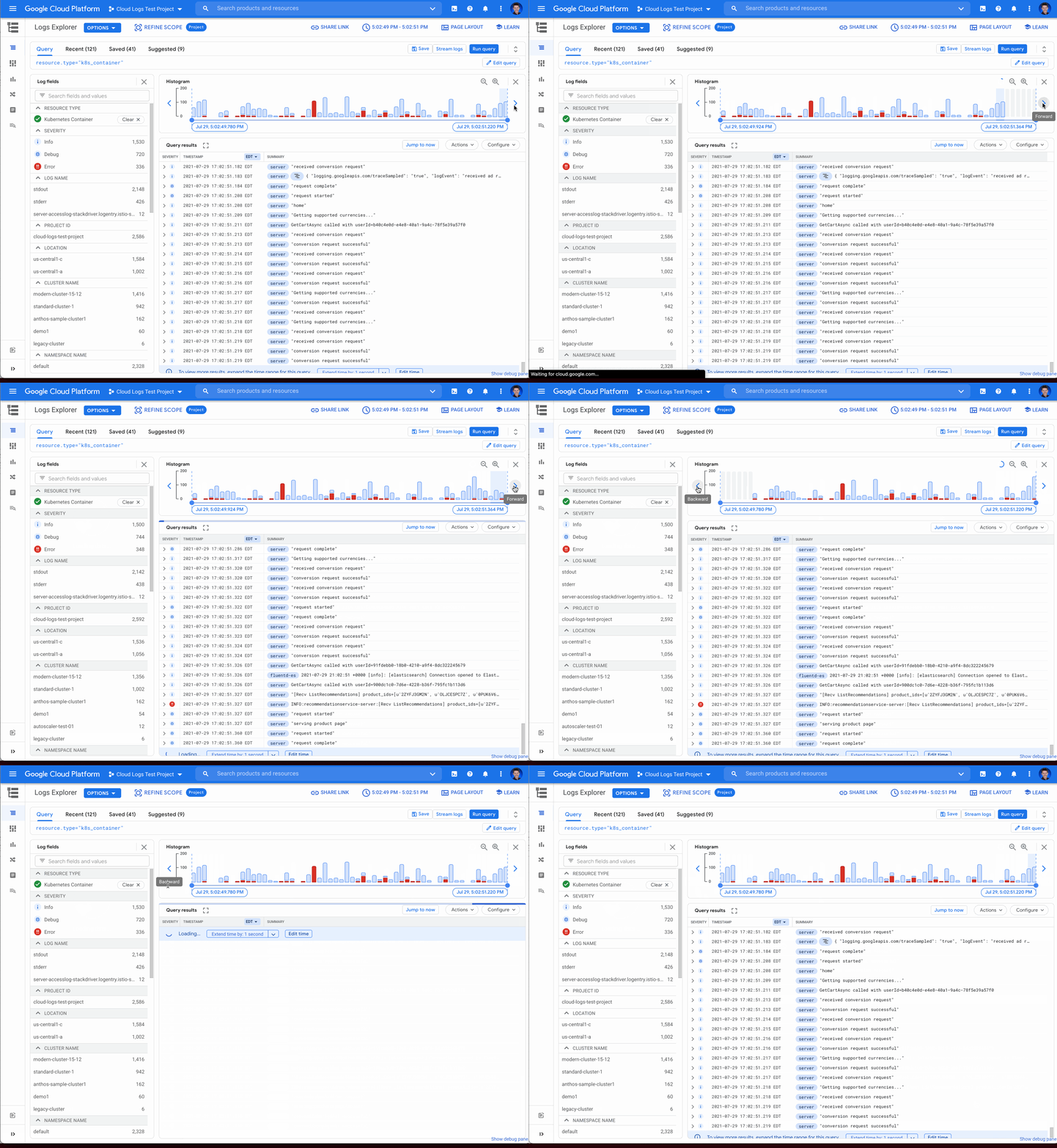
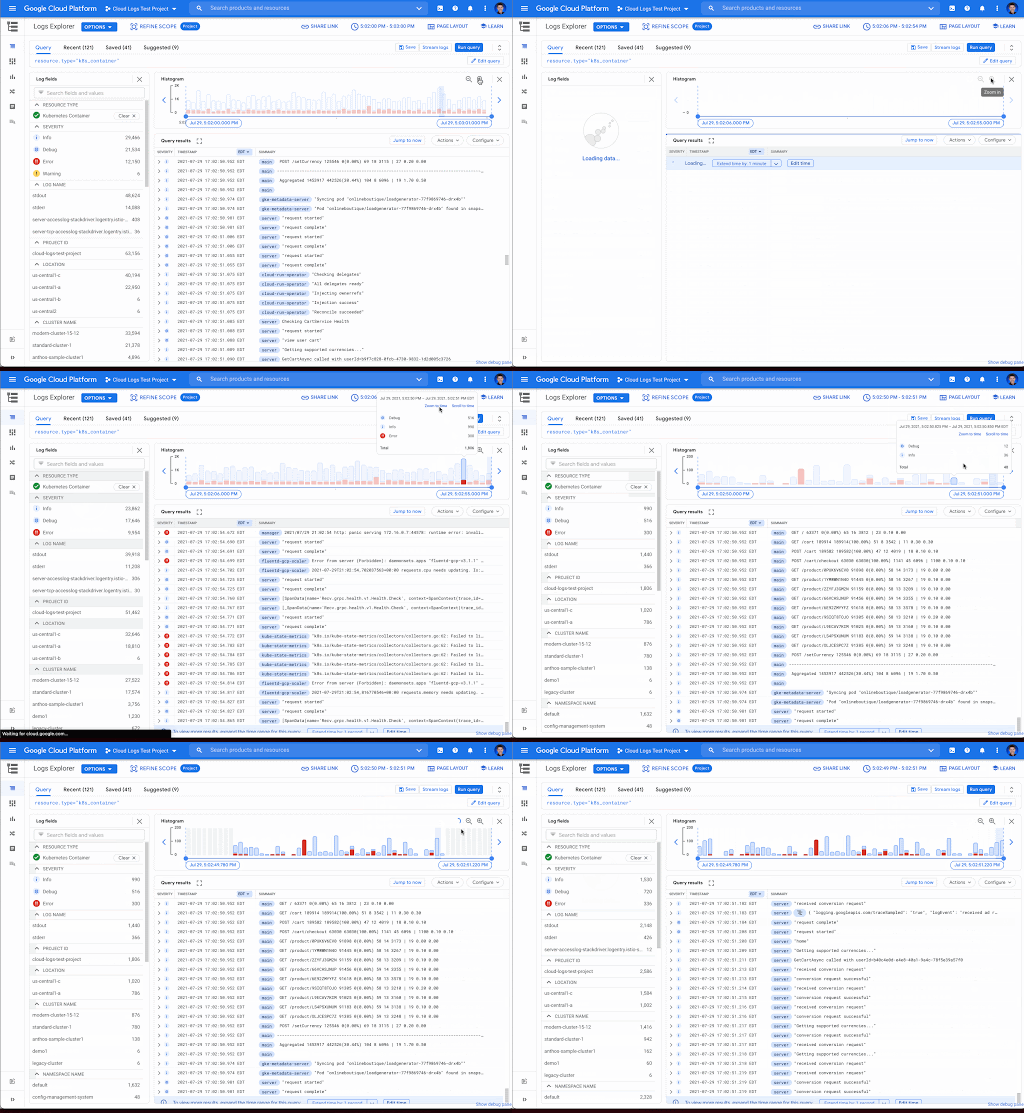
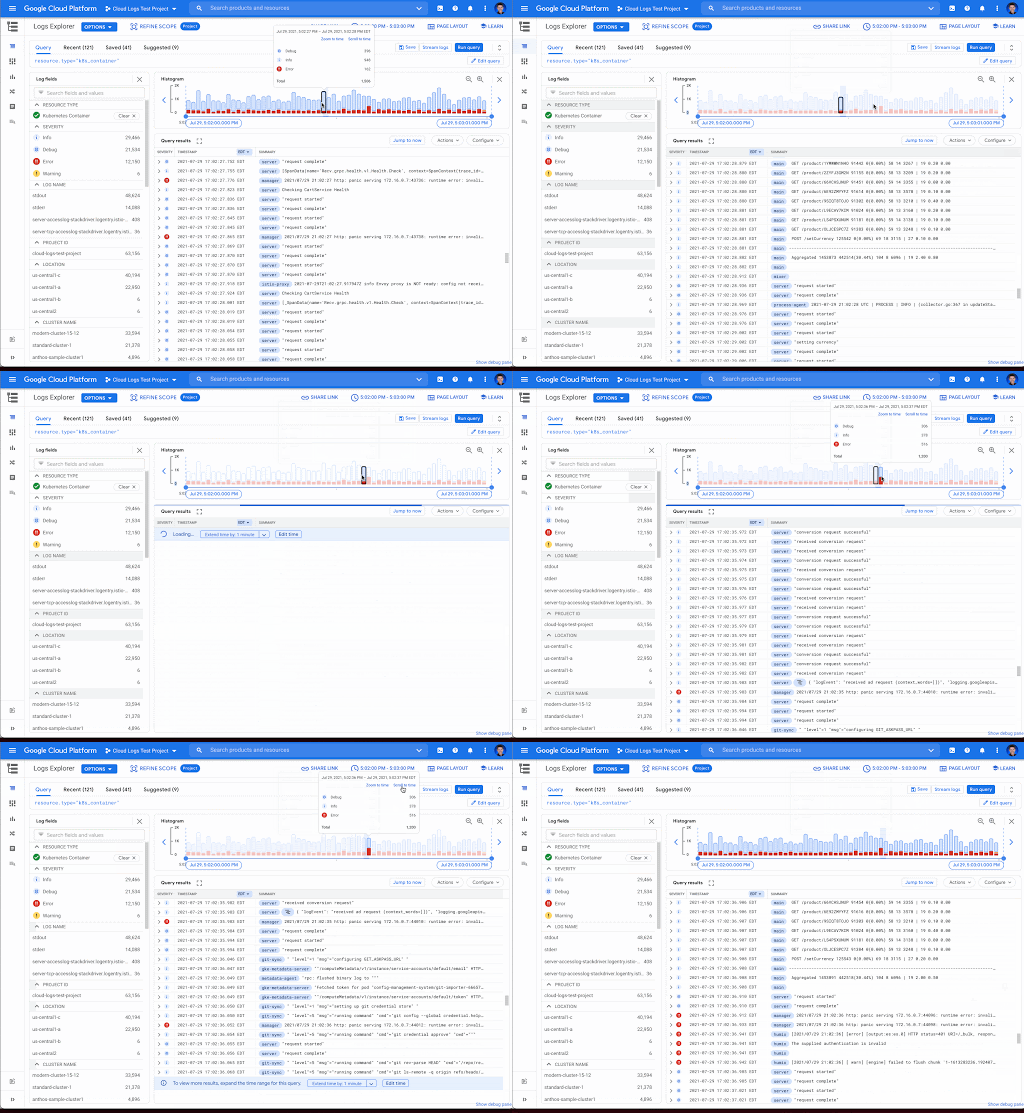
That’s why we’re excited to announce that we recently added three new query controls along with separate colors for log severity to the histogram. These new features make it even easier to refine and analyze your logs by time range. The new histogram controls help find logs before or after the current period, jump to a specific time range represented in a histogram bar and zoom in/out of the current time window in the histogram.
Histogram colors
The histogram now makes it easier to view the breakdown of logs by severity with the introduction of color coding. For example, the severity colors make it easy to spot an increasing number of errors even when the volume of requests is relatively constant. Looking at the histogram below, the red vs blue shading makes it clear that there has been an increase in overall log volume and provides a visual breakdown of errors within that log volume.

Pan left/right to scroll through time
Sometimes in your troubleshooting journey, you may want to look at the logs directly before or after the current set of logs. Perhaps there was an unexpected spike in errors at the beginning of the time range and you need to see the logs in the time period directly preceding the current time range. Pressing the left arrow on the left side of the histogram shifts the time range earlier while the arrow on the right side of the histogram shifts the time range ahead. Either arrow will refine the time range in the query and rerun the query to return the logs in the new time range.
Zooming in or out
Zooming in or out from a given time range may be useful to visualize fine-grained details or a broader trend Clicking the zoom in or out icons in the upper right corner of the histogram refines the time range in the query and then reruns the query, returning the logs in the newly defined time range.
Scrolling to time
If you see a large spike in logs volume in the histogram, it’s useful to quickly review the logs generated during that spike. Clicking on the histogram bar that contains the spike now scrolls you to the logs generated during that time period.
Where to find the histogram
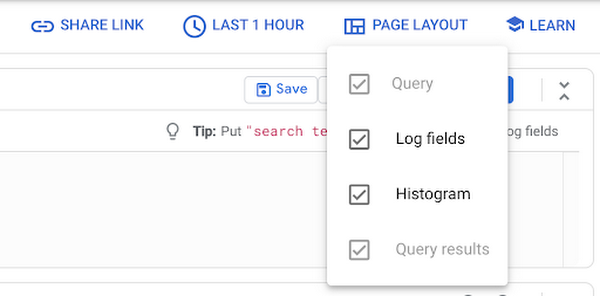
The histogram is a panel in Logs Explorer that can be displayed or hidden using the controls in the Page Layout menu. When you no longer want to display the histogram, click the “X” button in the upper right corner to quickly close it. To open it again, use the same Page Layout menu to enable the histogram display.
Get started with the histogram
These improvements move the histogram from a utility for visualization to an integral part of the troubleshooting journey. We are continuously working to launch new features that make Cloud Logging the best place to troubleshoot your Google Cloud logs. If you are not already a Cloud Logging user, review this getting started documentation or watch a quick video on troubleshooting services on Google Kubernetes Engine (GKE) to learn more. If you have specific questions or feedback, please join the discussion on our Google Cloud Community, Cloud Operations page.

3354
Of your peers have already downloaded this article
10:00 Minutes
The most insightful time you'll spend today!
Operational resilience continues to be a key focus for financial services firms. Regulators from around the world are refocusing supervisory approaches on operational resilience to support the soundness of financial firms and the stability of the financial ecosystem. Our new white paper discusses the continuing importance of operational resilience to the financial services sector, and the role that a well-executed migration to Google Cloud can play in strengthening it.
More Relevant Stories for Your Company

Explore Google Cloud SQL’s 3 Fault Tolerance Mechanism to Ease Data Pro
If you’re managing a crucial application that has to be fully fault-tolerant, you need your system to be able to handle every fault, no matter the type and scope of failure, with minimal downtime and data loss. Protecting against these faults means juggling numerous variables that can impact performance as

APAC’s Retail Digital Pulse by Google Cloud and IDC Retail Index
In the post COVID-19 pandemic world, some retail businesses have aced digital transformation while others are still lagging behind. The Google Cloud commissioned IDC Retail Insights analyzed over 1, 108 retailers across seven nations in the Asia Pacific region and across eight different segments (online, drugstores, speciality shops, convenience stores,

LearningMate & Google Cloud Partnership to Aid Equitable Educational Opportunities
A “one size fits all” approach to education no longer works in today’s classrooms. Using cloud-based technologies, schools and educators can take a more personalized approach to education–one that suits each student’s unique learning style, abilities, and needs. Taking the lead toward more equitable educational opportunities worldwide, education technology pioneer,

Google Cloud and Univision Partnership to Up the Ante in UX for Spanish-speaking Audience
The past year has given everyone lots to think about—about our priorities as people and as businesses. As the world retreated behind closed doors, we saw how shared interests and experiences can bring us together. As the world grappled with a common enemy, we witnessed just how differently individuals, communities
