






How Google Helped the Indian Govt Choose Airport Sites: The Inside Story
READ FULL INTRODOWNLOAD AGAIN5264
Of your peers have already downloaded this article
6:45 Minutes
The most insightful time you'll spend today!
3139
Of your peers have already watched this video.
19:30 Minutes
The most insightful time you'll spend today!
Becoming Future-Proof: AI-Powered Integrated Business Planning on Google Cloud
If there’s one thing that the pandemic will leave us with it’s this: A deep desire to be better prepared. Not prepared for the next possible catastrophe because that’s hard to do, but better prepared for the repercussions of such disaster.
In this video, Stephan de Barse, Executive Vice President, o9 Solutions, talks about some of the ripple effects of large-scale disruption including demand variability and supply variability.
He shares practical insights on how large retailers and manufacturers can leverage next-generation technology to improve demand forecasting, visibility, and drive a faster response while optimizing their decision-making processes.
He also shares learnings from COVID-19 as well as the critical capabilities needed by industry leaders to become more agile and resilient in the post-pandemic world.
End Security Risks with the Unattended Projects Recommender Feature

6149
Of your peers have already read this article.
3:00 Minutes
The most insightful time you'll spend today!
In fast-moving organizations, it’s not uncommon for cloud resources, including entire projects, to occasionally be forgotten about. Not only such unattended resources can be difficult to identify, but they also tend to create a lot of headaches for product teams down the road, including unnecessary waste and security risks.
To help you prune your idle cloud resources, we’re excited to introduce Unattended Project Recommender. It’s a new feature of Active Assist that provides you with a one-stop shop for discovering, reclaiming, and shutting down unattended projects. With actionable and automatic recommendations, you no longer have to worry about wasting money or mitigating security risks presented by your idle resources. Unattended Project Recommender uses machine learning to identify, with a high degree of confidence, projects that are likely abandoned based on API and networking activity, billing, usage of cloud services, and other signals. This feature is available via the Recommender API today, making it easy for you to integrate with your company’s existing workflow management and communication tools, or export results to a BigQuery table for custom analysis.
Thousands of projects can be unattended in large organizations, presenting major security risks
Your cloud projects can go abandoned or unattended for a number of reasons — ranging from a test environment that’s no longer needed, to project cancellation, to project owner switching jobs, and more. Not only can such projects contribute to your cloud bill (waste) but they may contain security issues such as open firewalls or privileged service account keys that attackers can exploit to get a hold of your cloud resources for cryptocurrency mining or, worse, compromise your company’s sensitive data. These security risks tend to grow over time because the latest best practices and patches are usually not applied to unattended projects.
We experience this issue here at Google, too… In fact, it has been on Google’s internal security team’s radar for some time now, so we joined forces and looked into this problem together, starting with our very own “google.com” organization cloud projects. We quickly found some projects that were unattended, but remediating this issue was easier said than done due to challenges in several areas:
- Detection: With lots of signals available to you via sources like Cloud Monitoring, what are the right ones you should look at (e.g. API, networking, user activity)? How can you tell the difference between an unattended project and a project that has a low level of activity by design (e.g. a “shell” project that holds an auth token)?
- Remediation: Once you have identified a project that seems abandoned, how do you go about ensuring that it’s indeed an unattended project? How do you reduce the risk of deleting something that might be essential to a production workload, causing irreversible data loss? How do you solve this at the scale of your entire organization, beyond a one-time cleanup?
Over the course of 2021 we built and tested a Google-internal prototype first, cleaning up many of our internal unattended projects, and then worked with a number of Google Cloud customers to build and tune this feature based on real-life data (thank you to all of our early adopters for working with us and your generous feedback that helped us shape this feature!) It was not uncommon for us to come across organizations with thousands of unattended projects, and we’re very excited to bring Unattended Project Recommender to all customers, in public preview.
Discovering and acting on unattended project recommendations
Unattended Project Recommender analyzes usage activity across all projects under your organization, including the following data:
- API activity (e.g. service accounts with authentication activity, API calls consumed)
- Networking activity (ingress and egress)
- Billing activity (e.g. services with billable usage)
- User activity (e.g. active project owners)
- Cloud services usage (e.g. number of active VMs, BigQuery jobs, storage requests)
Based on these signals, it can generate recommendations to clean up projects that have low usage activity (where “low usage” is defined using a machine learning model that ranks projects in your organization by level of usage), or recommendations to reclaim projects that have high usage activity but no active project owners. Here’s what an example post-processed summary list of recommendations can look like for the “foobar” organization that has 3 projects:
Project ID: demo-project-307815Recommendation: CLEANUP_PROJECTProject ID: new-projectRecommendation: N/AProject ID: bobs-playground-projectRecommendation: RECLAIM_PROJECT
In addition to the recommendations, you can also examine the underlying project activity insights that the recommendations are based upon. The insights provide additional information that can be useful for integration with your organization’s existing workflows and automation (e.g. send an auto-generated email or chat message to project owners based on the list provided by the owners field). Here’s an example insight payload:
content:activeAppengineInstanceDailyCount: 0activeCloudsqlInstanceDailyCount: 0activeGceInstanceDailyCount: 3activeServiceAccountDailyCount: 1apiClientDailyCount: 18922 // Daily average API calls producedbigqueryInflightJobDailyCount: 0bigqueryInflightQueryDailyCount: 0bigqueryStorageDailyBytes: 0bigqueryTableDailyCount: 0consumedApiDailyCount: 0 // Daily average API calls consumeddatastoreApiDailyCount: 0gcsObjectDailyCount: 11gcsRequestDailyCount: 0gcsStorageDailyBytes: 2663548hasActiveOauthTokens: false // OAuth tokens used in the last 180 dayshasBillingAccount: truenumActiveUserOwners: 1owners: // List of project owners- activeOnProject: falsemember: user:user1@example.com- activeOnProject: truemember: user:user2@example.comserviceWithBillableUsage:– Cloud Storage- Compute EnginevpcEgressDailyBytes: 264456938 // Daily average VPC egress bytesvpcIngressDailyBytes: 392435047 // Daily average VPC ingress bytesusagePercentile: 20 // Level of usage relative to other projects
GCP projects are used in many different ways and for many different purposes. In case you get a recommendation to delete a project that’s being used in a way that’s out of the scope for this feature, you can dismiss the recommendation and it will stop showing up for the given project.
Restoring deleted projects
When you choose to shut down a project using the projects.delete() method, it gets marked for deletion. After a project is marked for deletion, it becomes unusable, all resources within that project are shut down, and a 30-day wait period for the project and all of its data to get fully deleted begins.
In case a useful project is accidentally shut down, you have the option to restore the project within that 30-day wait period. Since restoring allows you to recover most but not necessarily all of your project data and resources, we recommend carefully examining the utilization insights associated with a project and considering any additional utilization signals that may not be captured by the Unattended Project Recommender before taking the cleanup action.
Early customer success stories
A number of enterprise customers are already using Unattended Project Recommender to keep their organizations clean of unattended projects and resources.
Decathlon, a French sporting goods retailer, is excited for the insight Unattended Project Recommender will bring to their environment, and are already deploying it as a part of their latest cloud security initiatives.
“After a thorough test of this feature and the validation of our CISO, we ended up deleting our first 775 projects, and no one complained! A great help to improve our security. The next step for us will be to operationalize it at scale, and implement a company wide policy for unattended resource management.” —Adeline Villette, Cloud Security Officer
For Veolia, one of the world’s largest water, waste and energy management companies, not only does this feature reduce security risks and waste, but also helps drive cultural shift and alignment with its ecological transformation strategy.
“This feature allows us to reduce our costs and security debt on assets that are no longer in use, and is also fully in line with Veolia’s philosophy of limiting its carbon footprint. After having tested Unattended Project Recommender on more than 3,000 projects throughout our organization, we are looking to bring it as proactive alerts to our project owners at scale.”—Thomas Meriadec, Product Manager
Box, a secure cloud content management provider, views it as a foundation for building a repeatable process to remediate unused resources.
“Unattended Project Recommender is a great fit for us. It gives us a unified view of project usage across our entire organization and enables us to address security risks of legacy projects in a systematic and organized manner, ensuring an even safer environment.” —Matt Bowes, Staff Security Engineer
Getting started with the Unattended Project Recommender
To help you get started, we’ve prepared a Cloud Shell tutorial (source code) that you can use to find unattended project recommendations within your own Projects/Folders/Organization. Click this button to clone the tutorial from GitHub and run in your Cloud Shell environment:

As you can see, listing recommendations for your projects only takes a few clicks with the tutorial (special thanks to Lanre Ogunmola, Security & Compliance Specialist, for making this look so easy)! For additional detail on using the gcloud CLI or API to discover unattended project recommendations, please refer to the documentation page.
You can also automatically export all recommendations from your Organization to BigQuery and then investigate the recommendations with DataStudio or Looker, or use Connected Sheets that let you use Google Workspace Sheets to interact with the data stored in BigQuery without having to write SQL queries.
As with any other Recommender, you can choose to opt out of data processing at any time by disabling the appropriate data groups in the Transparency & control tab under Privacy & Security settings.
We hope that you can leverage Unattended Project Recommender to improve your cloud security posture and reduce cost, and can’t wait to hear your feedback and thoughts about this feature! Please feel free to reach us at active-assist-feedback@google.com and we also invite you to sign up for our Active Assist Trusted Tester Group if you would like to get early access to the newest features as they are developed.
Start-up Paves Way for More Inclusive Clinical Research: Honoring Black Founders of Acclinate with Google Cloud

8444
Of your peers have already read this article.
4:00 Minutes
The most insightful time you'll spend today!
Editor’s note: February is Black History Month—a time for us to come together to celebrate the diverse set of experiences, perspectives and identities that make up the Black experience. Over the next few weeks, we will highlight Black-led startups and how they use Google Cloud to grow their businesses. Today’s feature highlights Acclinate and its founders, Del and Tiffany.
As patients, as caregivers, and as parents taking our own children to the doctor, we want recommended medications to be safe and effective. It’s a right everyone deserves.
It’s known that certain medications don’t work in the same way in all populations. For example, Albuterol, a medication often prescribed for asthma, is less effective in 67% of all Puerto Ricans and 47% of Black Americans. These problems—which can have deadly consequences—result from historically limited diversity in pharmaceutical clinical trials.
We founded our startup Acclinate to integrate culture and technology to achieve more inclusive clinical research. Help pharmaceutical companies and healthcare organizations access and engage communities of color so research is more inclusive.

Bridging the health equity gap by building trust
It’s important that health research organizations access and engage communities of color so their efforts reflect all the people they serve. Take a disease like diabetes, which affects a significantly higher proportion of Black Americans. When you look at even recent clinical trials for diabetic drugs, the representation of Black Americans among participants is only in the low single digits, despite comprising 13 percent of the U.S. population and more than 40 percent of diabetes patients in this country. Industry leaders have been aware of the lack of diversity issue, but some have chosen to ignore it or brush it aside. The biggest problem, in our opinion, is that there have been no penalties for not achieving higher diversity figures in clinical trials, and only minor financial repercussions to pharma/biotech companies when their treatments either do not work across all groups once approved, or there is a lack of uptake by all groups due to the lack of testing in those groups. The lack of clinical trial diversity has adversely impacted the reputation of the industry and the ability to recruit diverse populations in the future.
Acclinate integrates culture and technology to promote diverse patient representation in medical research. Our approach is not transactional. We build trust through our #NOWINCLUDED community, which is an ongoing, ever-expanding digital platform that educates and engages with communities of color on health issues.
#NOWINCLUDED includes a website app, and social media presence where members can learn information about diseases, particularly those with greater negative impacts on people of color, such as cancer, diabetes, and cardiovascular diseases. Members can share stories and ask questions. By providing access to trusted resources about these health issues and the latest clinical research, we empower Black people to take control of their health and consider participating in research that is shaping the future of healthcare.
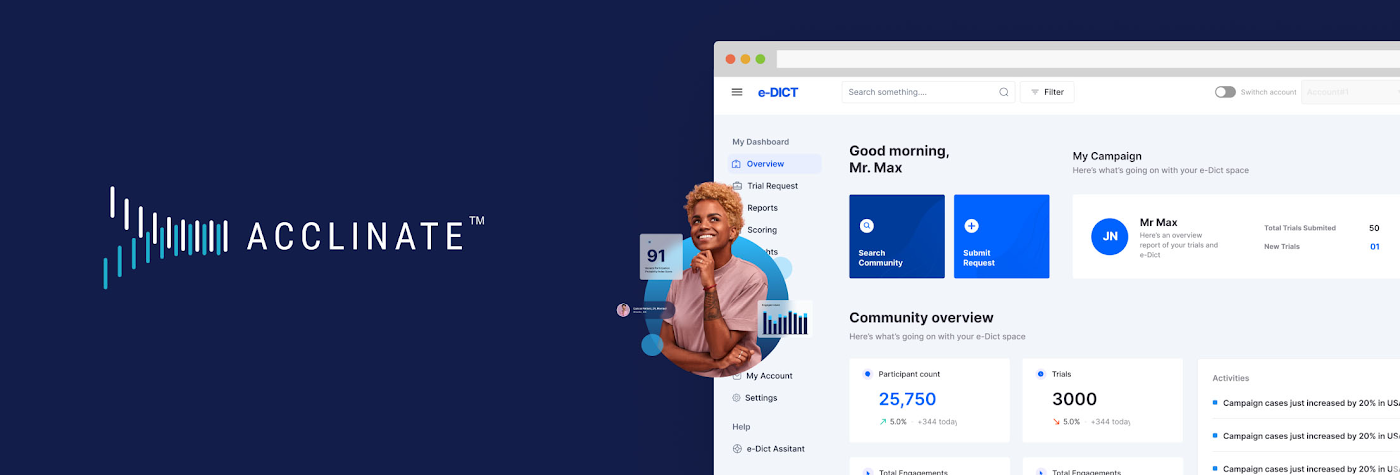
For healthcare-related organizations, we offer the opportunity to better understand the attitudes, aspirations, and unmet needs of underrepresented minority communities. Data from #NOWINCLUDED feeds our HIPAA-compliant SaaS platform, e-DICT™ (Enhanced Diversity in Clinical Trials), which uses predictive analytics and machine learning to identify individuals matching the requirements and most likely to be receptive to participation in a particular clinical trial.
Acclinate scales its platform with Google Cloud
We rely on Google Cloud services, including Vertex AI, to know whom to ask, when to ask, and how to ask for clinical trial participation. With Vertex AI, we enjoy a unified platform for developing our artificial intelligence models, including tools for preparing and storing our datasets. We can easily train and compare models using AutoML, which requires minimal ML expertise or effort with its intuitive graphical interface. This allows us to leverage more than ten ordinal and categorical data points to determine in real time a community member’s likelihood to enroll, which we call our Participation Probability Index (PPI). Our models evolve in an iterative process the more we interact with, and learn about, our community members.
We follow the pay-per-use Google Cloud Platform architecture model using serverless technology, which helps reduce infrastructure management costs and lets us focus on product development and engaging with communities across the U.S.
CloudSQL, a fully managed relational database service, integrates easily with BigQuery so we can glean insights for our clients in real time, all with Google Cloud’s robust security, governance, and reliability controls. Virtual Private Cloud (VPC) gives us scalable and flexible networking for our cloud-based resources and services. We also use Identity and Access Management (IAM) to simplify oversight of Google Cloud resource permissions for different user groups and roles, with appropriate security protections.
API Gateway manages our APIs using Cloud Functions, which both use consumption-based pricing, plus give our developers consistent and highly secure access to our services through a well-defined REST API. We use Memorystore for Redis to reduce platform latency. This is done with a fully managed service powered by the Redis in-memory data store, which builds application caches for fast data access. All of this comes together to provide an outstanding experience for our platform’s users and contributors.
- DSC00049.JPG
- DSC00010 (2).JPG
- pitch del tiff.jpg
Expanding influence with the Google for Startups Accelerator for Black Founders
Three months of one-on-one Google support and mentorship as part of the most recent Google for Startups Accelerator : Black Founders cohort not only helped us build our product, but also helped us earn external credibility. People use Google every day, so whether we’re trying to engage in conversations with industry experts or with somebody in a rural community, it is helpful to have the buy-in of a globally-recognized brand as we take on a historically difficult, systemic issue with challenges around trust. Getting access to the products, best practices, and people we need to build and grow through the Accelerator program has been priceless. For example, working with the Google AdWords team helped us generate important traffic from people interested in learning more about #NOWINCLUDED or sharing their story with us. Jason Scott, who leads the Google for Startups Accelerator: Black Founders program, is still connecting us to people in his network and identifying key opportunities for us months after the program wrapped. He continues to demonstrate that he is invested in seeing us succeed.
Our company has made great progress against our goals, in part thanks to receiving capital from the Google for Startups Black Founders Fund. We received $100K in non-dilutive funding along with Google Cloud credits, Google.org Ads grants, and hands-on support. We used the funds to pay for the transition and development costs associated with moving to Google Cloud. The Google support and accountability has been incredible. After receiving the Google for Startups Black Founders Fund award, we’ve gone on to raise another $1M and moved our cloud from Salesforce to Google Cloud.
We also had the amazing opportunity to be selected as one of six companies to take part in a face-to-face web conference with Sundar Pichai, Google’s CEO. We were thrilled to hear him explain his vision around health equity and the role Google plays. Ultimately, for us, it’s not just about the funding we get, but we are also gratified to receive support from an entity that truly believes in addressing this issue. We know Google is aligned with our mission of health and racial equity.
Championing diversity in clinical trials
Our 2022 looks bright. We expanded our presence to Washington, D.C. as part of the Johnson & Johnson Innovation JLABS ecosystem. We were also selected to take part in the BLUE KNIGHT initiative created between Johnson & Johnson Innovation and the Biomedical Advanced Research and Development Authority (BARDA) under the U.S. Department of Health and Human Services.
Acclinate is also on track to have contracts with five of the top 25 largest biopharmaceutical companies in the U.S this year. They’ve taken note, as has the Food and Drug Administration (FDA), that the lack of diversity in clinical trials represents a significant health concern—to the extent that the FDA has provided strong guidance for pharmaceutical companies to diversify their clinical trials. At the same time, the industry is also responding to pressure from communities of people of color to make equitable representation a priority.
Today, we are in the fortunate but challenging position to have significant inbound opportunities coming our way. In response, we continue to recruit and hire talented people to join our team. On the technology side, we are happy to be aligned with Google Cloud to have powerful cloud infrastructure that will scale with us, as well as high-caliber champions united in partnership. With people’s lives at stake, we are passionate in our commitment to helping ensure medications do what they are supposed to do: heal and improve the quality of life for everyone who takes them.
Hear Acclinate cofounders Del Smith and Tiffany Whitlow chat with Google’s Head of Startup Developer Ecosystem Jason Scott and fellow Black Founders Fund recipient Bobby Bryant about building on Google Cloud in a recent Google for Startups Instagram Live.
If you want to learn more about how Google Cloud can help your startup, visit our page here to get more information about our program, and sign up for our communications to get a look at our community activities, digital events, special offers, and more
Global Communication Made Easy with Translation Hub
2511
Of your peers have already read this article.
3:30 Minutes
The most insightful time you'll spend today!
Hello! ¡Hola! 你好! नमस्ते! Bonjour! Being greeted in your own language can instantly put a smile on your face, and organizations around the world recognize that messages become more inclusive and powerful when translated into many languages.
As the Head of Product Management for Translation AI at Google Cloud, I am always looking to make our user’s lives easier when it comes to language tools—like Google Cloud’s Document Translation API, which has been used to translate over 2.5 billion documents across Google Translate and our Cloud customers.
But during my time working on translation products, I have seen enterprise users making compromises, like sacrificing cost and speed of translation for quality, or paying much more for high-quality translations and making peace with the slow turnaround times and high costs. That’s why we are excited to see momentum building behind Translation Hub, which launched earlier this year. Built to address organizations’ localization and translation challenges and delight users with an incredibly intuitive and administratively simple offering, Translation Hub makes it easy to translate content at scale—users just need to select the files to be translated, choose the output languages, and then they’re off and running.
In this article, we’ll take a closer look at Translation Hub’s powerful features, and the ways it is helping customers do more with their content.
Enterprise translation, reimagined: fast, lean, and intuitive
Translation Hub is a fully-managed, self-serve translation offering, powered by Google AI and built for the enterprise. With Translation Hub, businesses can instantaneously translate content into 135 languages with a single click, via an intuitive interface that integrates human reviews (i.e., a “human in the loop”) where required.
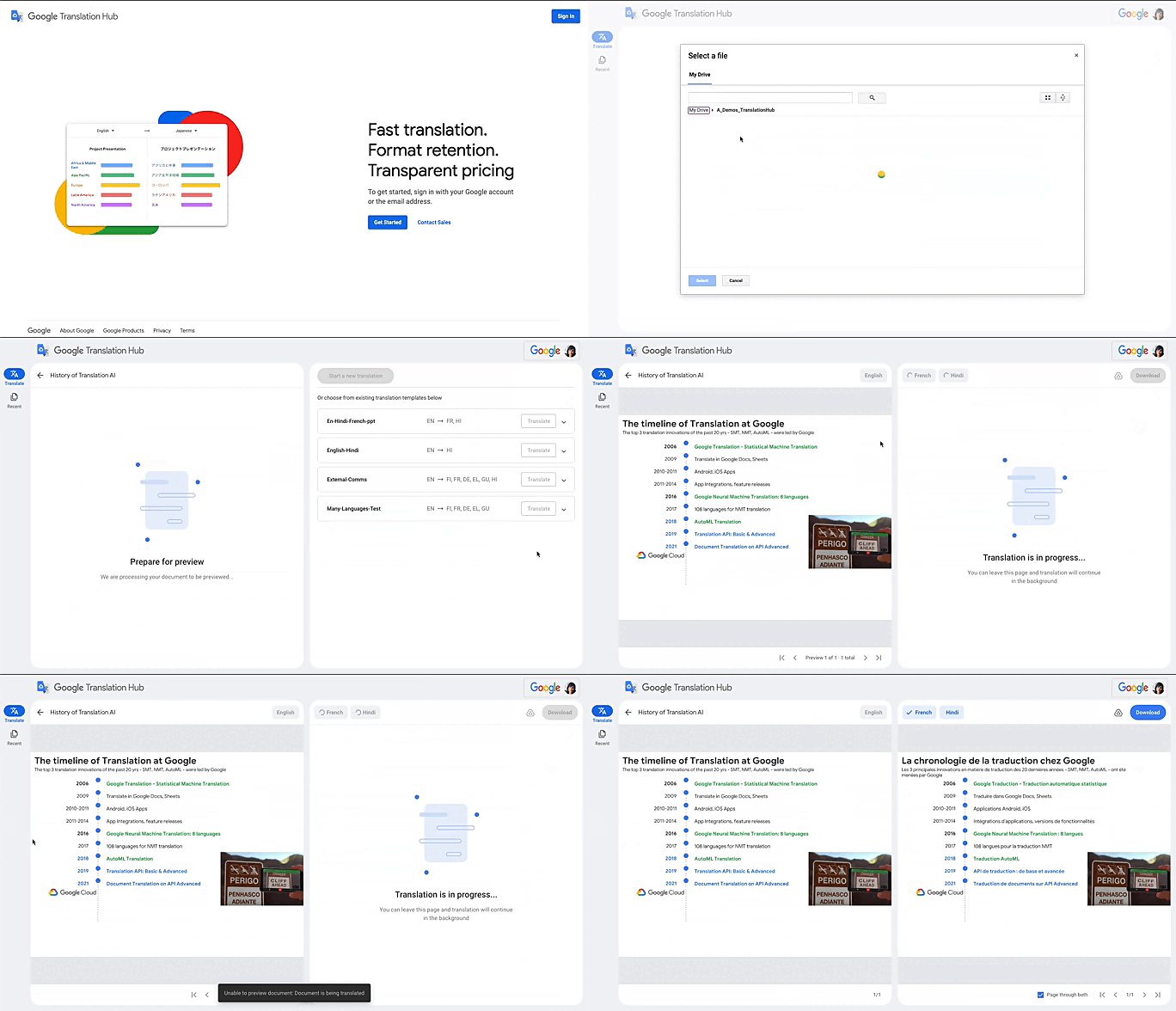
Translation Hub is designed to be both easy to manage and use. Each organization’s Translation Hub administrator uses the Google Cloud console to onboard and manage business users, typically by adding their email, which triggers an invite to the business user. Once a business user is added, they can sign in and start requesting translations and post-editing reviews.
With advanced features like “Glossary” and “Custom Translation Models (AutoML Translation),” Translation Hub makes it easy for enterprises to control the terminology and inject domain-specific context to meet their unique needs. Furthermore, Translation Hub ensures that organizations own their Translation Memory, for use in future translations or to leverage as a rich, human-validated source of training data for custom translation models (e.g., AutoML Translation). For example, when a user edits a phrase or segment through Translation Hub, this is immediately captured and used in the next translation for all future users who initiate translation where the same content or segment appears.
One of my favorite features is that Translation Hub preserves the layout and format of documents, saving both time and money. And while Translation Hub works with Google Drive (you can ingest and export documents to Drive) and is compatible with all our Google Workspace content sources (e.g., Slides, Docs etc.), it also supports many of the most commonly used formats, like documents and presentations created in Microsoft Office, and scanned and native PDFs.
Organizations need to be able to share the output of AI-powered translation with localization teams or agencies, for review. They need to save time by leveraging glossaries or customer machine learning (ML) models. They need these capabilities in one cohesive platform—and they need all of this to be user-friendly for all kinds of business users. It’s the difference between being able to automate translations in a few scenarios and being able to translate at scale. Google Cloud’s mission is to accelerate every organization’s ability to digitally transform, and with Translation Hub, our customers can leverage the best of AI for their content translations without sacrificing speed, quality or cost.
All of Google’s Translation Innovations within a single product
Translation Hub uses Google Cloud’s Translation API, AutoML Translation, and innovations in Neural Machine Translation Quality Prediction and Translation Memory—all technologies we’ve put to good use inside Google. For example, our localization teams have realized more than $80 million in cost avoidance and savings since 2021, using Google Cloud AutoML Translation and localization expertise.
“In just three months of using Translation Hub and AutoML translation models, we saw our translated page count go up by 700% and translation cost reduced by 90%,” said Murali Nathan, digital innovation and employee experience lead, at materials science company Avery Dennison. “Beyond numbers, Google’s enterprise translation technology is driving a feeling of inclusion among our employees. Every Avery Dennison employee has access to on-demand, general purpose, and company-specific translations. English language fluency is no longer a barrier, and our employees are beginning to broadly express themselves right in their native language.”
To get started with Translation Hub, visit our solution page, and for a deep dive, check out this Google Next ‘22 session, including more details about Avery Dennison’s use case.
New Capabilities in BigQuery to Ease Anomalies Detection in the Absence of Labeled Data

6348
Of your peers have already read this article.
4:00 Minutes
The most insightful time you'll spend today!
When it comes to anomaly detection, one of the key challenges that many organizations face is that it can be difficult to know how to define what an anomaly is. How do you define and anticipate unusual network intrusions, manufacturing defects, or insurance fraud? If you have labeled data with known anomalies, then you can choose from a variety of supervised machine learning model types that are already supported in BigQuery ML. But what can you do if you don’t know what kind of anomaly to expect, and you don’t have labeled data? Unlike typical predictive techniques that leverage supervised learning, organizations may need to be able to detect anomalies in the absence of labeled data.
Today we are announcing the public preview of new anomaly detection capabilities in BigQuery ML that leverage unsupervised machine learning to help you detect anomalies without needing labeled data. Depending on whether or not the training data is time series, users can now detect anomalies in training data or on new input data using a new ML.DETECT_ANOMALIES function (documentation), with the following models:
- Autoencoder model, now in Public Preview (documentation)
- K-means model, already GA (documentation)
- ARIMA_PLUS time series model, already GA (documentation)
How does anomaly detection with ML.DETECT_ANOMALIES work?
To detect anomalies in non-time-series data, you can use:
- K-means clustering models: When you use
ML.DETECT_ANOMALIESwith a k-means model, anomalies are identified based on the value of each input data point’s normalized distance to its nearest cluster. If that distance exceeds a threshold determined by the contamination value provided by the user, the data point is identified as an anomaly. - Autoencoder models: When you use
ML.DETECT_ANOMALIESwith an autoencoder model, anomalies are identified based on the reconstruction error for each data point. If the error exceeds a threshold determined by the contamination value, it is identified as an anomaly.
To detect anomalies in time-series data, you can use:
- ARIMA_PLUS time series models: When you use
ML.DETECT_ANOMALIESwith an ARIMA_PLUS model, anomalies are identified based on the confidence interval for that timestamp. If the probability that the data point at that timestamp occurs outside of the prediction interval exceeds a probability threshold provided by the user, the datapoint is identified as an anomaly.
Below we show code examples of anomaly detection in BigQuery ML for each of the above scenarios.
Anomaly detection with a k-means clustering model
You can now detect anomalies using k-means clustering models, by running ML.DETECT_ANOMALIES to detect anomalies in the training data or in new input data. Begin by creating a k-means clustering model:
Language: SQL
CREATE MODEL `mydataset.my_kmeans_model`OPTIONS(MODEL_TYPE = 'kmeans',NUM_CLUSTERS = 8,KMEANS_INIT_METHOD = 'kmeans++') ASSELECT* EXCEPT(Time, Class)FROM`bigquery-public-data.ml_datasets.ulb_fraud_detection`;
With the k-means clustering model trained, you can now run ML.DETECT_ANOMALIES to detect anomalies in the training data or in new input data.
To detect anomalies in the training data, use ML.DETECT_ANOMALIES with the same data used during training:
Language: SQL
SELECT*FROMML.DETECT_ANOMALIES(MODEL `mydataset.my_kmeans_model`,STRUCT(0.02 AS contamination),TABLE `bigquery-public-data.ml_datasets.ulb_fraud_detection`);
To detect anomalies in new data, use ML.DETECT_ANOMALIES and provide new data as input:
Language: SQL
SELECT*FROMML.DETECT_ANOMALIES(MODEL `mydataset.my_kmeans_model`,STRUCT(0.02 AS contamination),(SELECT * FROM `mydataset.newdata`));

How does anomaly detection work for k-means clustering models?
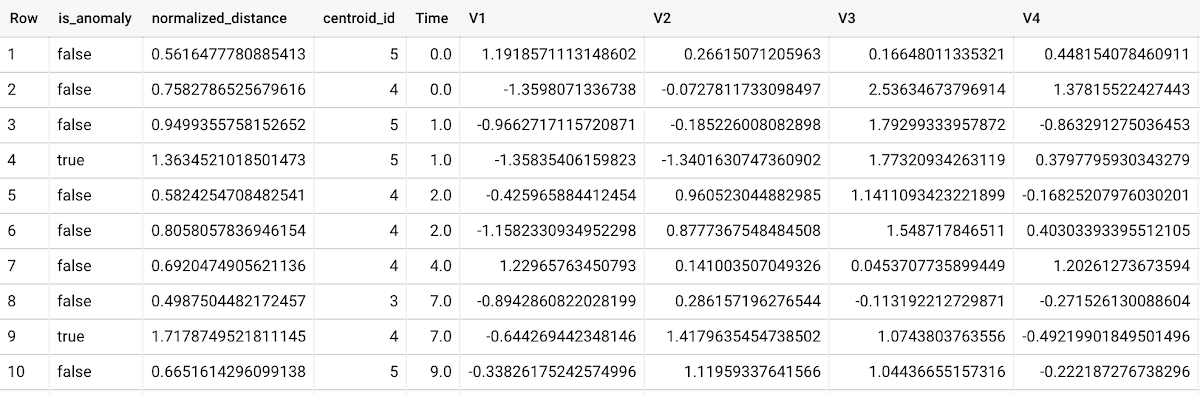
Anomalies are identified based on the value of each input data point’s normalized distance to its nearest cluster, which, if exceeds a threshold determined by the contamination value, is identified as an anomaly. How does this work exactly? With a k-means model and data as inputs, ML.DETECT_ANOMALIES first computes the absolute distance for each input data point to all cluster centroids in the model, then normalizes each distance by the respective cluster radius (which is defined as the standard deviation of the absolute distances of all points in this cluster to the centroid). For each data point, ML.DETECT_ANOMALIES returns the nearest centroid_id based on normalized_distance, as seen in the screenshot above. The contamination value, specified by the user, determines the threshold of whether a data point is considered an anomaly. For example, a contamination value of 0.1 means that the top 10% of descending normalized distance from the training data will be used as the cut-off threshold. If the normalized distance for a datapoint exceeds the threshold, then it is identified as an anomaly. Setting an appropriate contamination will be highly dependent on the requirements of the user or business.
For more information on anomaly detection with k-means clustering, please see the documentation here.
Anomaly detection with an autoencoder model
You can now detect anomalies using autoencoder models, by running ML.DETECT_ANOMALIES to detect anomalies in the training data or in new input data.
Begin by creating an autoencoder model:
Language: SQL
CREATE MODEL `mydataset.my_autoencoder_model`OPTIONS(model_type='autoencoder',activation_fn='relu',batch_size=8,dropout=0.2,hidden_units=[32, 16, 4, 16, 32],learn_rate=0.001,l1_reg_activation=0.0001,max_iterations=10,optimizer='adam') ASSELECT* EXCEPT(Time, Class)FROM`bigquery-public-data.ml_datasets.ulb_fraud_detection`;
To detect anomalies in the training data, use ML.DETECT_ANOMALIES with the same data used during training:
Language: SQL
SELECT*FROMML.DETECT_ANOMALIES(MODEL `mydataset.my_autoencoder_model`,STRUCT(0.02 AS contamination),TABLE `bigquery-public-data.ml_datasets.ulb_fraud_detection`);
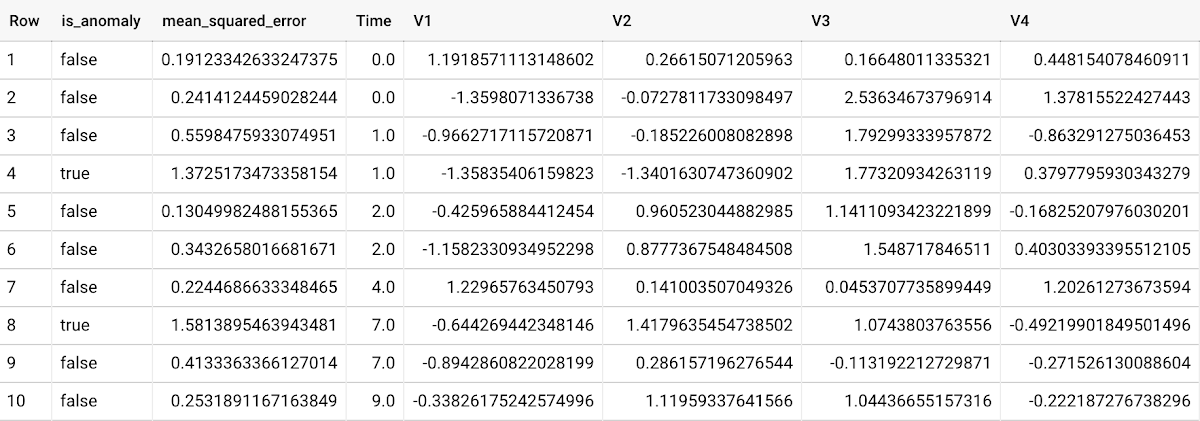
To detect anomalies in new data, use ML.DETECT_ANOMALIES and provide new data as input:
Language: SQL
SELECT*FROMML.DETECT_ANOMALIES(MODEL `mydataset.my_autoencoder_model`,STRUCT(0.02 AS contamination),(SELECT * FROM `mydataset.newdata`));

How does anomaly detection work for autoencoder models?
Anomalies are identified based on the value of each input data point’s reconstructed error, which, if exceeds a threshold determined by the contamination value, is identified as an anomaly. How does this work exactly? With an autoencoder model and data as inputs, ML.DETECT_ANOMALIES first computes the mean_squared_error for each data point between its original values and its reconstructed values. The contamination value, specified by the user, determines the threshold of whether a data point is considered an anomaly. For example, a contamination value of 0.1 means that the top 10% of descending error from the training data will be used as the cut-off threshold. Setting an appropriate contamination will be highly dependent on the requirements of the user or business.
For more information on anomaly detection with autoencoder models, please see the documentation here.
Anomaly detection with an ARIMA_PLUS time-series model
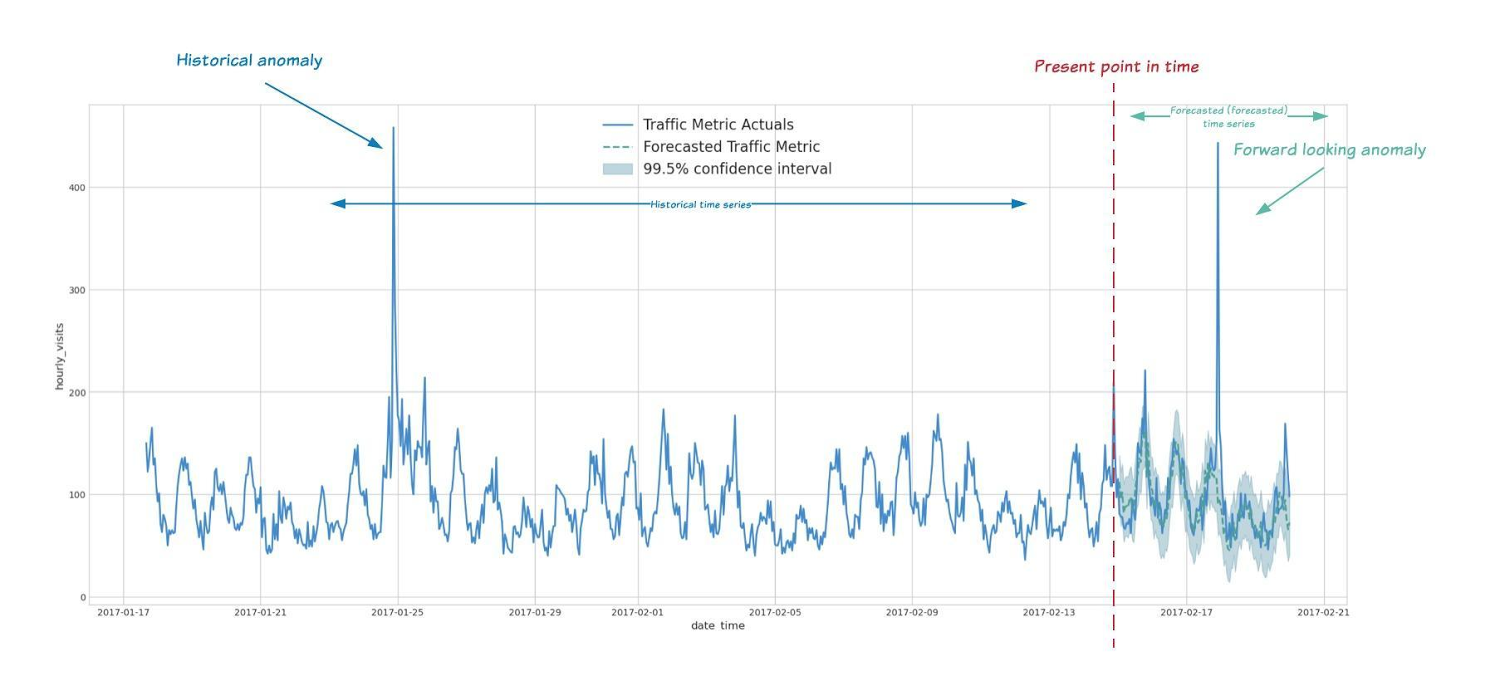
With ML.DETECT_ANOMALIES, you can now detect anomalies using ARIMA_PLUS time series models in the (historical) training data or in new input data. Here are some examples of when might you want to detect anomalies with time-series data:
Detecting anomalies in historical data:
- Cleaning up data for forecasting and modeling purposes, e.g. preprocessing historical time series before using them to train an ML model.
- When you have a large number of retail demand time series (thousands of products across hundreds of stores or zip codes), you may want to quickly identify which stores and product categories had anomalous sales patterns, and then perform a deeper analysis of why that was the case.
Forward looking anomaly detection:
- Detecting consumer behavior and pricing anomalies as early as possible: e.g. if traffic to a specific product page suddenly and unexpectedly spikes, it might be because of an error in the pricing process that leads to an unusually low price.
- When you have a large number of retail demand time series (thousands of products across hundreds of stores or zip codes), you would like to identify which stores and product categories had anomalous sales patterns based on your forecasts, so you can quickly respond to any unexpected spikes or dips.
How do you detect anomalies using ARIMA_PLUS? Begin by creating an ARIMA_PLUS time series model:
Language: SQL
CREATE OR REPLACE MODEL mydataset.my_arima_plus_modelOPTIONS(MODEL_TYPE='ARIMA_PLUS',TIME_SERIES_TIMESTAMP_COL='date',TIME_SERIES_DATA_COL='total_amount_sold',TIME_SERIES_ID_COL='item_name',HOLIDAY_REGION='US') ASSELECTdate,item_description AS item_name,SUM(bottles_sold) AS total_amount_soldFROM`bigquery-public-data.iowa_liquor_sales.sales`GROUP BYdate,item_nameHAVINGdate BETWEEN DATE('2016-01-04') AND DATE('2017-06-01')AND item_name IN ("Black Velvet", "Captain Morgan Spiced Rum","Hawkeye Vodka", "Five O'Clock Vodka", "Fireball Cinnamon Whiskey");
To detect anomalies in the training data, use ML.DETECT_ANOMALIES with the model obtained above:
Language: SQL
SELECT*FROMML.DETECT_ANOMALIES(MODEL `mydataset.my_arima_plus_model`,STRUCT(0.8 AS anomaly_prob_threshold));
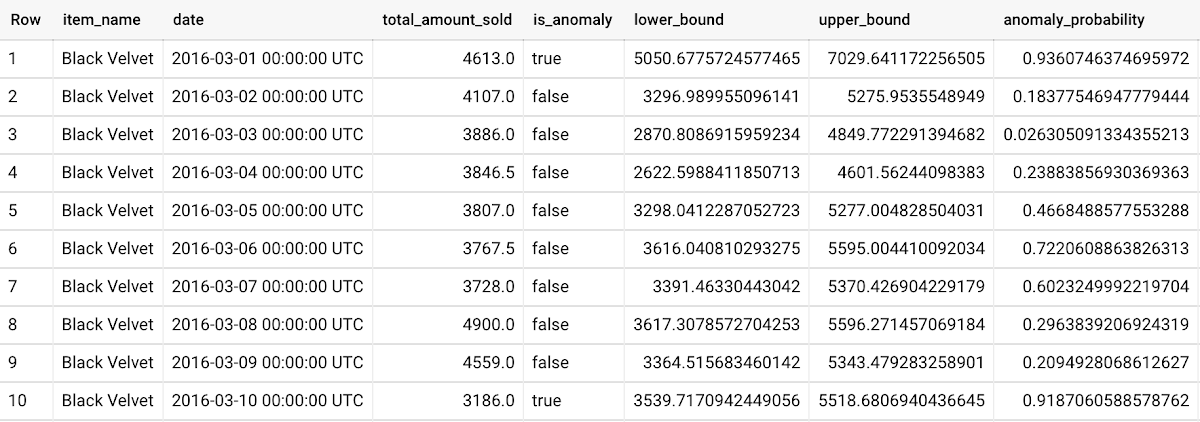
To detect anomalies in new data, use ML.DETECT_ANOMALIES and provide new data as input:
Language: SQL
WITHnew_data AS (SELECTdate,item_description AS item_name,SUM(bottles_sold) AS total_amount_soldFROM`bigquery-public-data.iowa_liquor_sales.sales`GROUP BYdate,item_nameHAVINGdate BETWEEN DATE('2017-06-02')AND DATE('2017-10-01')AND item_name IN ('Black Velvet','Captain Morgan Spiced Rum','Hawkeye Vodka',"Five O'Clock Vodka",'Fireball Cinnamon Whiskey') )SELECT*FROMML.DETECT_ANOMALIES(MODEL `mydataset.my_arima_plus_model`,STRUCT(0.8 AS anomaly_prob_threshold),(SELECT*FROMnew_data));
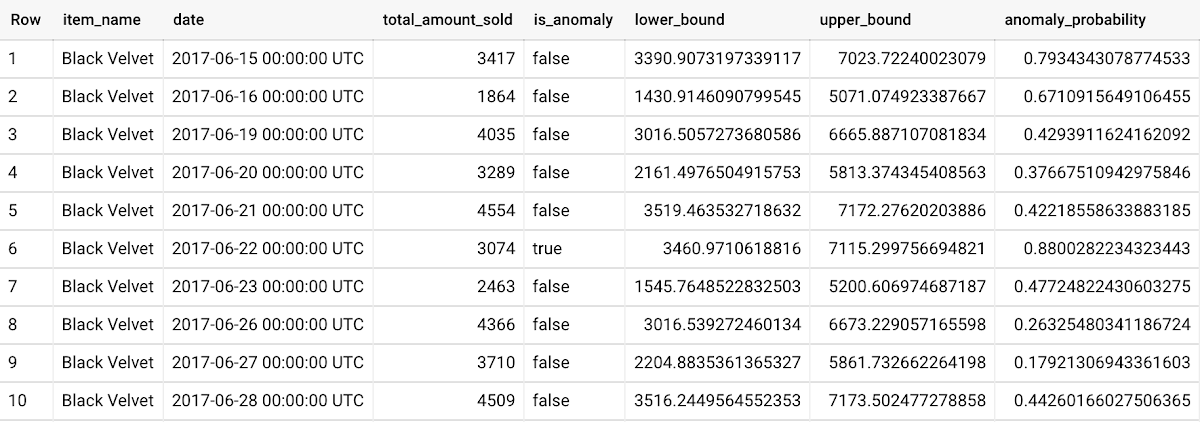
For more information on anomaly detection with ARIMA_PLUS time series models, please see the documentation here.
Thanks to the BigQuery ML team, especially Abhinav Khushraj, Abhishek Kashyap, Amir Hormati, Jerry Ye, Xi Cheng, Skander Hannachi, Steve Walker, and Stephanie Wang.
More Relevant Stories for Your Company

Google Cloud Helped Digitec Galaxus Personalize Over 2 Million Newsletters in a Week
Digitec Galaxus AG is the biggest online retailer in Switzerland, operating two online stores: Digitec, Switzerland's online market leader for consumer electronics and media products, and Galaxus, the largest Swiss online shop with a steadily growing range of consistently low-priced products for almost all daily needs. Known for its efficient, personalized shopping experiences,

An Out-of-the-box, End-to-end Solution for Contact Centers!
Providing best-in-class customer service is crucial for the success of your business. Contact centers are a critical touch point, as they have to balance between representing your brand and prioritizing customer care. When your customers seek help and support, they expect efficient service that is accessible through modern voice and

Japanese Used Car Operator Uses Machine Learning to Improve Marketing
Since 1994, IDOM, Japan’s leading buyer and retailer of used cars, has enjoyed success in the auto industry with a simple yet traditional business model: buy pre-owned vehicles directly from car owners and auction them to third-party dealers, or sell them to other consumers at retail stores. In an increasingly

Innovate Faster & More Flexibly: How Our Commitment to Open Source Unlocks AI and ML Innovation
At Google, we believe anyone should be able to quickly and easily turn their artificial intelligence (AI) idea into reality. Open source software (OSS) has become increasingly important to this goal, heavily influencing the pace of innovation in AI and machine learning (ML) ecosystems. Over the last two decades, ML
