






Google is the Top Provider for Continuous Integration Tools, According to Forrester
READ FULL INTRODOWNLOAD AGAIN3604
Of your peers have already downloaded this article
12:30 Minutes
The most insightful time you'll spend today!

How to Pick a Database that is Suitable for Your Application

7050
Of your peers have already read this article.
2:30 Minutes
The most insightful time you'll spend today!
Picking the right database for your application is not easy. The choice depends heavily on your use case—transactional processing, analytical processing, in-memory database, and so on—but it also depends on other factors. This post covers the different database options available within Google Cloud across relational (SQL) and non-relational (NoSQL) databases and explains which use cases are best suited for each database option.

Relational databases
In relational databases information is stored in tables, rows and columns, which typically works best for structured data. As a result they are used for applications in which the structure of the data does not change often. SQL (Structured Query Language) is used when interacting with most relational databases. They offer ACID consistency mode for the data, which means:
- Atomic: All operations in a transaction succeed or the operation is rolled back.
- Consistent: On the completion of a transaction, the database is structurally sound.
- Isolated: Transactions do not contend with one another. Contentious access to data is moderated by the database so that transactions appear to run sequentially.
- Durable: The results of applying a transaction are permanent, even in the presence of failures.
Because of these properties, relational databases are used in applications that require high accuracy and for transactional queries such as financial and retail transactions. For example: In banking when a customer makes a funds transfer request, you want to make sure the transaction is possible and it actually happens on the most up-to-date account balance, in this case an error or resubmit request is likely fine.
There are three relational database options in Google Cloud: Cloud SQL, Cloud Spanner, and Bare Metal Solution.
Cloud SQL: Provides managed MySQL, PostgreSQL and SQL Server databases on Google Cloud. It reduces maintenance cost and automates database provisioning, storage capacity management, back ups, and out-of-the-box high availability and disaster recovery/failover. For these reasons it is best for general-purpose web frameworks, CRM, ERP, SaaS and e-commerce applications.
Cloud Spanner: Cloud Spanner is an enterprise-grade, globally-distributed, and strongly-consistent database that offers up to 99.999% availability, built specifically to combine the benefits of relational database structure with non-relational horizontal scale. It is a unique database that combines ACID transactions, SQL queries, and relational structure with the scalability that you typically associate with non-relational or NoSQL databases. As a result, Spanner is best used for applications such as gaming, payment solutions, global financial ledgers, retail banking and inventory management that require ability to scale limitlessly with strong-consistency and high-availability.
Bare Metal Solution: Provides hardware to run specialized workloads with low latency on Google Cloud. This is specifically useful if there is an Oracle database that you want to lift and shift into Google Cloud. This enables data center retirements and paves a path to modernize legacy applications.
Non-relational databases
Non-relational databases (or NoSQL databases) store compex, unstructured data in a non-tabular form such as documents. Non-relational databases are often used when large quantities of complex and diverse data need to be organized. Unlike relational databases, they perform faster because a query doesn’t have to access several tables to deliver an answer, making them ideal for storing data that may change frequently or for applications that handle many different kinds of data.
For example, an apparel store might have a database in which shirts have their own document containing all of their information, including size, brand, and color with room for adding more parameters later such as sleeve size, collars, and so on.
Qualities that make NoSQL databases fast:
- Eventual consistency: stores usually exhibit consistency at some later point (e.g., lazily at read time)
- Horizontal scaling, usually using hashed distributions
- Typically, they are optimized for a specific workload pattern (i.e., key-value, graph, wide-column)
- Typically, they don’t support cross shard transactions or flexible isolation modes.
Because of these properties, non-relational databases are used in applications that require large scale, reliability, availability, and frequent data changes.They can easily scale horizontally by adding more servers, unlike some relational databases, which scale vertically by increasing the machine size as the data grows. Although, some relations databases such as Cloud Spanner support scale-out and strict consistency.
Non-relational databases can store a variety of unstructured data such as documents, key-value, graphs, wide columns, and more. Here are your non-relational database options in Google Cloud:
- Document databases: Store information as documents (in formats such as JSON and XML). For example: Firestore
- Key-value stores: Group associated data in collections with records that are identified with unique keys for easy retrieval. Key-value stores have just enough structure to mirror the value of relational databases while still preserving the benefits of NoSQL. For example: Datastore, Bigtable, Memorystore
- In-memory database: Purpose-built database that relies primarily on memory for data storage. These are designed to attain minimal response time by eliminating the need to access disks. They are ideal for applications that require microsecond response times and can have large spikes in traffic. For example: Memorystore
- Wide-column databases: Use the tabular format but allow a wide variance in how data is named and formatted in each row, even in the same table. They have some basic structure while preserving a lot of flexibility. For example: Bigtable
- Graph databases: Use graph structures to define the relationships between stored data points; useful for identifying patterns in unstructured and semi-structured information. For example: JanusGraph
There are three non-relational databases in Google Cloud:
- Firestore: Is a serverless document database which scales on demand and acts as a backend-as-a-service. It is DBaaS that increases the speed of building applications. It is perfect for all general purpose uses cases such as ecommerce, gaming, IoT and real time dashboards. With Firestore users can interact with and collaborate on live and offline data making it great for real-time application and mobile apps.
- Cloud Bigtable: Cloud Bigtable is a sparsely populated table that can scale to billions of rows and thousands of columns, enabling you to store terabytes or even petabytes of data. It is ideal for storing very large amounts of single-keyed data with very low latency. It supports high read and write throughput at sub-millisecond latency, and it is an ideal data source for MapReduce operations. It also supports the open-source HBase API standard to easily integrate with the Apache ecosystem including HBase, Beam, Hadoop and Spark along with Google Cloud ecosystem.
- Memorystore: Memorystore is a fully managed in-memory data store service for Redis and Memcached at Google Cloud. It is best for in-memory and transient data stores and automates the complex tasks of provisioning, replication, failover, and patching so you can spend more time coding. Because it offers extremely low latency and high performance, Memorystore is great for web and mobile, gaming, leaderboard, social, chat, and news feed applications.
Conclusion
Choosing a relational or a non-relational database largely depends on the use case. Broadly, if your application requires ACID transactions and your data structure is not going to change much, select a relational database.
In Google Cloud use Cloud SQL for any general-purpose SQL database and Cloud Spanner for large-scale globally scalable, strongly consistent use cases. In general, if your data structure may change later and if scale and availability is a bigger requirement than consistency then a non-relational database is a preferable choice. Google Cloud offers Firestore, Memorystore, and Cloud Bigtable to support a variety of use cases across the document, key-value, and wide column database spectrum.
For more comparison resources on each database check out the overview. For more hands-on experience with Bigtable, check out our on-demand training here and learn about migrating databases to managed services check out this whitepaper.
https://youtube.com/watch?v=2TZXSnCTd7E%3Fenablejsapi%3D1%26
For more #GCPSketchnote, follow the GitHub repo. For similar cloud content follow me on Twitter @pvergadia and keep an eye out on thecloudgirl.dev.
Announcing Apigee’s Pay-as-you-go pricing to provide flexibility and scale seamlessly

3169
Of your peers have already read this article.
2:30 Minutes
The most insightful time you'll spend today!
Apigee is Google Cloud’s API management platform that enables organizations to build, operate, manage and monetize their APIs. Customers from industries around the world trust Apigee to build and scale their API programs.
While some organizations operate with mature API-first strategies, others might still be working on a modernization strategy. Even within an organization, different teams often end up with diverse use cases and choices for API management. From our conversations with customers, we are increasingly hearing the need to align our capabilities and pricing with such varied workloads.
We’re excited to introduce a Pay-as-you-go pricing model to enable customers to unlock Apigee’s API management capabilities whilst retaining the flexibility to manage their own costs. Starting today, customers will have the option to use Apigee by paying only for what they are using. This new pricing model is offered as a complement to the existing Subscription plans (or) the ability to evaluate it for free.
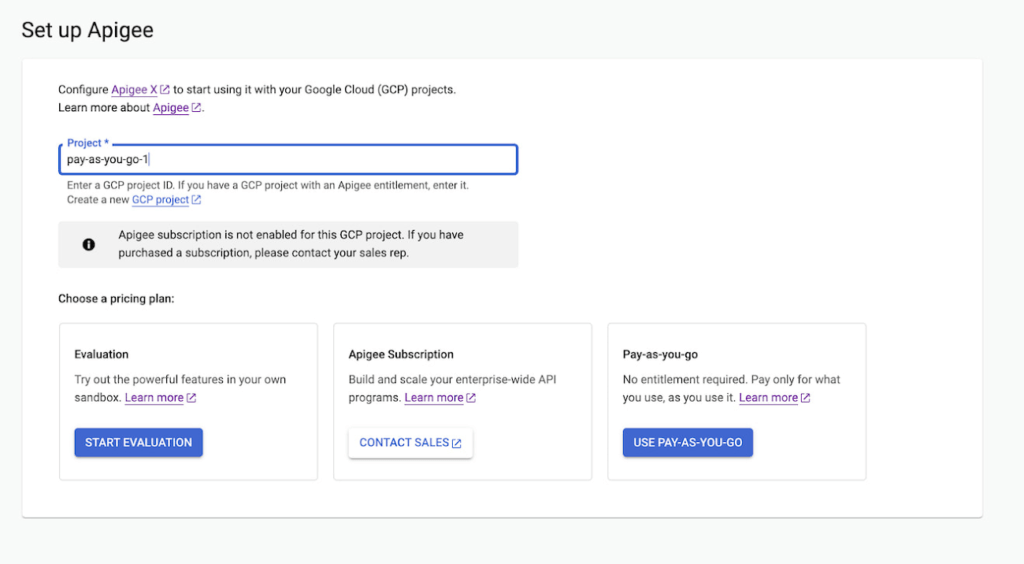
Start small, but powerful with Pay-as-you-go pricing
The new Pay-as-you-go pricing model offers flexibility for organizations to:
- Unlock the value of Apigee with no upfront commitment: Get up and running quickly without any upfront purchasing or commitment
- Maintain flexibility and control in costs: Adapt to ever-changing needs whilst maintaining low costs. You can continue to automatically scale with Pay-as-you-go or switch to Subscription tiers based on your usage
- Provide freedom to experiment: Every API management use case is different and with Pay-as-you-go you can experiment with new use cases by unlocking value provided by Apigee without a long term commitment
Pay-as-you-go pricing works just like the rest of your Google Cloud bills, allowing you to get started without any license commitment or upfront purchasing. As part of the Pay-as-you-go pricing model, you will only be charged based on your consumption of
- Apigee gateway nodes: You will be charged on your API traffic based on the number of Apigee gateway nodes (a unit of environment that processes API traffic) used per minute. Any nodes that you provision would be charged every minute and billed for a minimum of one minute.
- API analytics: You will be charged for the total number of API requests analyzed per month. API requests, whether they are successful or not, are processed by Apigee analytics. Analytics data is preserved for three months.
- Networking usage: You will be charged on the networking (such as IP address, network egress, forwarding rules etc.,) based on usage
When is Pay-as-you-go pricing right for me?
Apigee offers three different pricing models
- Evaluation plan to access Apigee’s capabilities at no cost for 60 days
- Subscription plans across Standard, Enterprise or Enterprise plus based on your predictable but high volume API needs
- Pay-as-you-go without any startup costs
Subscription plans are ideal for use cases with predictable workloads for a given time period, whereas Pay-as-you-go pricing is ideal if you are starting small with a high value workload. Here are a few use cases where organizations would choose Pay-as-you-go if they want to:
- Establish usage patterns before choosing a Subscription model
- Evolve their API program by starting with high value and low volume API use cases
- Manage and protect your applications build on Google cloud infrastructure
- Migrate or modernize your services gradually without disruption
Next steps
Every organization is increasingly relying on APIs to build new applications, adopt modern architectures or create new experiences. In such transformation journeys, Apigee’s Pay-as-you-go pricing will provide flexibility for organizations to start small and scale seamlessly with their API management needs.
- To get started with Apigee’s Pay-as-you-go pricing go to console or try it for free here
Check out our documentation and pricing calculator for further details on Apigee’s Pay-as-you-go pricing for API management. For comparison and other information, take a look at our pricing page.
4935
Of your peers have already watched this video.
9:37 Minutes
The most insightful time you'll spend today!
L’Oréal: Managing Big-data Complexity with Google Cloud
L’Oreal is a global company with a presence in 150 countries worldwide. Between managing all of its brands and requirements for different countries, L’Oreal looks to data to make insightful business decisions. How does L’Oreal unify its data across all its systems and databases? How does L’Oreal make the data accessible to thousands of employees? In this video, Antoine Castex, Enterprise Architect at L’Oreal, discusses with Martin Omander how L’Oreal built a serverless, multi-cloud warehouse based on Google Cloud.
Chapters:
0:00 – Intro
0:23 – Why does L’Oreal need a new data warehouse?
0:51 – Who is the L’Oreal group?
1:35 – Which systems does L’Oreal use?
2:14 – How does L’Oreal manage complexity?
3:59 – What is ELT?
4:57 – Who are L’Oreal’s data consumers?
5:41 – How L’Oreal built the data warehouse
8:51 – L’Oreal’s future plans
9:10 – Wrap up
Google Cloud Workflows → https://goo.gle/3q20M1V
Cloud Run → https://goo.gle/3CSWbXG
Eventarc → https://goo.gle/3B7qhFy
BigQuery → https://goo.gle/3KHgyJ3
Looker → https://goo.gle/3Rx4Ind
Checkout more episodes of Serverless Expeditions → https://goo.gle/ServerlessExpeditions
Subscribe to Google Cloud Tech → https://goo.gle/GoogleCloudTech
Speeding up migrations to Google Cloud with migVisor by EPAM

3095
Of your peers have already read this article.
2:30 Minutes
The most insightful time you'll spend today!
Application modernization is quickly becoming one of the pillars of successful digital transformation and cloud migration initiatives. Many organizations are becoming aware of the dramatic benefits that can be achieved by moving legacy, on-premises apps and databases into cloud native infrastructure and services, such as reduced Total Cost of Ownership (TCO), elimination of expensive commercial software licenses, and improved performance, scalability, security and availability.
The complexity of applications and databases to a cloud-centric architecture requires a rapid, accurate, and customized assessment of modernization potential and identification of challenges. Addressing business and functional drivers, TCO calculations, uncovering technological challenges and cross-platform incompatibilities, preparation of migration, and rollback plans can be essential to the success and outcome of the migration.
These cloud migration initiatives are often divided into three high-level phases:
- Discovery: identifying and cataloging the source inventory. Output is usually an inventory of source apps, databases, servers, networking, storage, etc. The discovery of existing assets within a data center is usually straightforward and can often be highly automated.
- Pre-migration readiness: the planning phase. This includes the analysis of the current portfolio of the databases and applications for migration readiness, determining the target architecture, identifying technological challenges or incompatibilities, calculating TCO, and preparing detailed migration plans.
- Migration execution: where the rubber hits the road. During this phase of the migration process, database schemas are actively converted, the application data access layer is refactored, data is replicated from source to target, often in real-time, and the application is deployed in its determined compute platform(s).
Successful evaluation and planning phase as part of the pre-migration readiness phase can bolster confidence in investment towards modernization. Skipping or inaccurately completing the pre-migration phase can lead to a costly and sub-optimal result. Relying on manual pre-migration assessments can lead to long migration timelines, reduced success rates and poor confidence in the post-migration state, increased risk and total migration cost.
Some of the commonly asked question during pre-migration include:
- How compatible are my source databases, which are often commercial and proprietary in nature, with their open-source cloud-native alternatives? For example, how compatible are my Oracle workloads and usage patterns with Cloud SQL for PostgreSQL?
- What’s my degree of vendor lock-in with my current technology stack? Are proprietary features and capabilities being used that are incompatible with open-source database technologies?
- How tightly-coupled are my applications with my current database engine technology? Can my applications be deployed as-is, refactored for cloud readiness with ease, or will it be a big undertaking?
- How much effort will my migration require? How expensive will it be? What will be my run-rate in Google Cloud post-migration and my ROI?
- Can we identify quick-win applications and databases to start with?
There is a direct association between the accuracy and speed of the pre-migration phase and the outcome of the migration itself. The faster and more accurately organizations complete the required pre-migration analysis, the more cost efficient and successful the migration itself will usually be.
EPAM Systems, Inc., a leader in digital transformation, worked with Google Cloud as a preferred partner to accelerate cloud migrations beginning with pre-migration assessments. Leveraging EPAM’s migVisor for Google Cloud—a unique pre-migration accelerator that automates the pre-migration process—and EPAM’s consulting and support services, organizations can quickly generate a cloud migration roadmap for rapid and systematic pre-migration analysis. This approach has resulted in the completion of thousands of database assessments for hundreds of customers.
migVisor is agentless, non-intrusive, and hosted in the EPAM cloud. migVisor seamlessly connects to your source databases and runs SQL queries to ascertain the database configuration, code, schema objects and infrastructure setup. Scanning of source databases is done rapidly and without interruption to production workloads.
migVisor prepares customers to land applications in Google Cloud and its managed suite of databases services and platforms such as Cloud SQL, bare metal hosting, Spanner and Cloud Bigtable. migVisor supports re-hosting (lift-and-shift), re-platforming, and re-factoring.
“EPAM’s recent application assessment update to its migration tooling system, migVisor, will bring a new level of transparency to the entire application and database modernization process”, said Dan Sandlin, Google Cloud Data GTM Director at Google Cloud. “This enables organizations to make the most of digital technologies and provides a clear IT ecosystem transformation that allows our customers to build a flexible foundation for future innovation.”
Previously, migVisor focused on assessments of the source databases and the compatibility of customers’ existing database portfolio with cloud-centric database technologies. Coming this quarter, migVisor adds support for application assessments, augmenting its existing and class-leading capabilities in the database space.
The addition of application modernization assessment functionality in migVisor, combined with EPAM’s certification and specialization in Google Cloud Data Management and hands-on engineering experience, strengthens EPAM’s position as a leader for large-scale digital transformation projects and migVisor as a trusted product for cloud migration assessments to Google Cloud customers. EPAM provides customers an end-to-end solution for faster and more cost-effective migrations. Assessments that used to take weeks can now be completed in mere days.
Within minutes of registering for an account, anyone can start using migVisor by EPAM to automatically assess applications and application code. Visit the migVisor page to learn more and sign up for your account.
ShareChat Builds its Diverse, Hyperlocal Social Network. Thanks to Google Cloud

9263
Of your peers have already read this article.
3:00 Minutes
The most insightful time you'll spend today!
Editor’s note: Today’s guest post comes from Indian social media platform ShareChat. Here’s the story of how they improved performance, app development, and analytics for serving regional content to millions of users using Google Cloud.
How do you create a social network when your country has 22 major official languages and countless active regional dialects? At ShareChat, we serve more than 160 million monthly active users who share and view videos, images, GIFs, songs, and more in 15 different Indian languages. We also launched a short video platform in 2020, Moj, which already supports over 80 million monthly active users.
Connecting with people in the language they understand
As mobile data and smartphones have become more affordable in India, we noticed a large new segment of people, many in rural areas, being welcomed onto the internet. However, many of them didn’t speak English, and when it comes to accessing content and information—language plays a significant role. Instead of joining other social media sites where English reigned supreme, new internet users chose to join language or dialect-specific Whatsapp groups where they felt more comfortable instead.
So, we set out to build a platform where people can share their opinions, document their lives, and make new friends, all in their native language. ShareChat simplifies content and people discovery by using a personalized content newsfeed to deliver language-specific content to the right audience.
Given the high-intensity data and high volume of content and traffic, we rely heavily on IT infrastructure. On top of that, a large number of our users rely on 2G networks to post, like, view, or follow each other. Our platform needs to deliver great experiences to people who are spread out across the country and different networks without any reduction in performance.
The right cloud partner to support future growth
ShareChat was born in the cloud—we already knew how to scale systems to serve a large customer base with our existing cloud provider. But like many companies, we struggled with over-provisioning compute and storage to accommodate unpredictable traffic and avoid running out of storage. With demand rising for local language content and an increase in online interactions in response to the COVID-19 crisis, we realized that we would need a more efficient way to scale dynamically and allocate resources as needed.
Google Cloud was a natural choice for us. We wanted to partner with a technology-first company that would make it easy (and cost-effective) to manage a strong technology portfolio that would allow us to build whatever we wanted. Google is at the forefront of technology innovation and provided everything we needed to build, run, and manage our applications (including creating an efficient DevOps pipeline to fix and release new features quickly).
We had a few issues in mind at the start of discussions with the Google Cloud team, but over time, as we got information and support from them, we realized that these were the partners we wanted in our corner when it came time to tackle our most challenging problems. In the end, we decided to take our entire infrastructure to Google Cloud.
To support millions of users, we deploy and scale using Google Kubernetes Engine. While we analyze our data using a combination of managed data cloud services, such as Pub/Sub for data pipelines, BigQuery for analytics, Cloud Spanner for real-time app serving workloads, and Cloud Bigtable for less-indexed databases. We also rely on Cloud CDN to help us distribute high-quality and reliable content delivery at low latency to our users.
We now use just half the total core consumption of our legacy environment to run ShareChat’s existing workloads.
Google Cloud delivers better outcomes at every level
By moving to Google Cloud, we saw major benefits in several key areas:
Zero-downtime migration for users
At the time of migration, we had over 70 terabytes of data, consisting of 220 tables—some of which were up to 14 terabytes with nearly 50 billion rows. Due to our data’s interdependencies, moving services over one at a time wasn’t an option for us.
Even though we were migrating such large volumes of data, we didn’t want to impact any of our customers. Latency spikes for out-of-sync data might affect message delivery. For instance, if a message or notification was delayed, we didn’t want to risk a bad user experience causing someone to abandon ShareChat.
To prepare for the move, we ran a proof-of-concept cluster for over four months to test database performance in a real-world scenario for handling more than a million queries per second. Using an open-source API gateway, we replicated our legacy data environment into Google Cloud for performance testing and capacity analysis. As soon as we were confident Google Cloud could handle the same traffic as our previous cloud environment, we were ready to execute.
Using wrappers, we were able to migrate without having to change anything in our existing application code. The entire migration of 60 million users to Google Cloud took five hours—without any data loss or downtime. Today, ShareChat has grown to 160 million users, and Google Cloud continues to give us the support we need.
Scaling globally to meet unexpected demand
We rely on real-time data to drive everything on ShareChat by tracking everything that goes on in our app—from messages and new groups to content people like or who they follow. Our users create more than a million posts per day, so it’s critical that our systems can process massive amounts of data efficiently.
We chose to migrate to Spanner for its global consistency and secondary index. Unlike our legacy NoSQL database, we could scale without having to rethink existing tables or schema definitions and keep our data systems in sync across multiple locations. It’s also cost-effective for us—moving over 120 tables with 17 indexes into Cloud Spanner reduced our costs by 30%.
Spanner also replicates data seamlessly in multiple locations in real time, enabling us to retrieve documents if one region fails. For instance, when our traffic unexpectedly grew by 500% over just a few days, we were able to scale horizontally with zero lines of code change. We were also launching our Moj video app simultaneously, and we were able to move it to another region without a single issue.
Simplifying development and deployment
On average, we experience about 80,000 requests per second (RPS) –nearly 7 billion RPS per day. That means daily push notifications sent out to the entire user base about daily trending topics can often result in a spike of 130,000 RPS in just a few seconds.
Instead of over-provisioning, Google Kubernetes Engine (GKE) enables us to pre-scale for traffic spikes around scheduled events, such as holidays like Diwali, when millions of Indians send each other greetings.
Migrating to GKE has also enabled us to adopt more agile ways of work, such as automating deployment and saving time with writing scripts. Even though we were already using container-based solutions, they lacked transparency and coverage across the entire deployment funnel.
Kubernetes features, such as sidecar proxy, allows us to attach peripheral tasks like logging into the application without requiring us to make code changes. Kubernetes upgrades are managed by default, so we don’t have to worry about maintenance and stay focused on more valuable work. Clusters and nodes automatically upgrade to run the latest version, minimizing security risks and ensuring we always have access to the latest features.
Low latency and real-time ML predictions
Even though many of our users may be accessing ShareChat outside of metropolitan areas, it doesn’t mean they’re more patient if the app loads slowly or their messages are delayed. We strive to deliver a high-performance experience, regardless of where our users are.
We use Cloud CDN to cache data in five Google Cloud Point of Presence (PoP) locations at the edge in India, allowing us to bring content as close as possible to people and speeding up load time. Since moving to Cloud CDN, our cache hit ratio has improved from 90% to 98.5%—meaning our cache can handle 98.5% of content requests.
As we expand globally, we’d like to use machine learning to reach new people with content in different languages. We want to build new algorithms to process real-time datasets in regional languages and accurately predict what people want to see. Google Cloud gives us an infrastructure optimized to handle compute-intensive workloads that will be useful to us both now—and in the future.
The confidence to build the best platform
Our current system now performs better than before we migrated, but we are continuously building new features on top of it. Google’s data cloud has provided us with an elegant ecosystem of services that allows us to build whatever we want, more easily and faster than ever before.
Perhaps the biggest advantage of partnering with Google Cloud has been the connection we have with the engineers at Google. If we’re working to solve a specific problem statement and find a specific solution in a library or a piece of code, we have the ability to immediately connect with the team responsible for it.
As a result, we have experienced a massive boost in our confidence. We know that we can build a really good system because we not only have a good process in place to solve problems—we have the right support behind us.
More Relevant Stories for Your Company

Highmark & Google’s Secure-by-design Technique to Bring the Living Health Solution to Life
In an industry as highly regulated as healthcare, building a single secure and compliant application that tracks patient care and appointments at a clinic requires a great deal of planning from development and security teams. So, imagine what it would be like to build a solution that includes almost everything

Google Cloud Celebrates Journey of 3 Inspiring Founders for the Asian Pacific American Heritage Month
May is Asian Pacific American Heritage Month —a time for us to come together to celebrate and remember the important people and history of Asian and Pacific Island heritage. This feature highlights three AAPI founders from the Google For Startups community. Read on to learn how these three founders built

Rhode Island’s VCC Platform Built on GCP Helps Jobseekers Get Back to Work!
2020 brought many challenges, especially as in-person operations were shut down, and many were left vulnerable to unemployment. The State of Rhode Island responded to these challenges, by modernizing their workforce development operations and moving completely to a custom online platform called the Virtual Career Center, also nicknamed “the VCC.”

Fully-managed-zero-trust Security Solution, Traffic Director Integrated with CA Service
We created Traffic Director to bring to you a fully managed service mesh product that includes load balancing, traffic management and service discovery. And now, we’re happy to announce the availability of a fully-managed zero-trust security solution using Traffic Director with Google Kubernetes Engine (GKE) and Certificate Authority (CA) Service. When platform administrators and security
