





Highmark & Google’s Secure-by-design Technique to Bring the Living Health Solution to Life

6558
Of your peers have already read this article.
3:30 Minutes
The most insightful time you'll spend today!
In an industry as highly regulated as healthcare, building a single secure and compliant application that tracks patient care and appointments at a clinic requires a great deal of planning from development and security teams. So, imagine what it would be like to build a solution that includes almost everything related to a patient’s healthcare, including insurance and billing. That’s what Highmark Health (Highmark)—a U.S. health and wellness organization that provides millions of customers with health insurance plans, a physician and hospital network, and a diverse portfolio of businesses–decided to do.
Highmark is developing a solution called Living Health to re-imagine healthcare delivery, and it is using Google Cloud and the Google Cloud Professional Services Organization (PSO) to build and maintain the innovation platform supporting this forward thinking experience. Considering all the personal information that different parties like insurers, specialists, billers and coders, clinics, and hospitals share, Highmark must build security and compliance into every part of the solution.
In this blog, we look at how Highmark Health and Google are using a technique called “secure-by-design” to address the security, privacy, and compliance aspects of bringing Living Health to life.
Secure-by-design: Preventive care for development
In healthcare, preventing an illness or condition is the ideal outcome. Preventive care often involves early intervention—a course of ideas and actions to ward off illness, permanent injury, and so on. Interestingly, when developing a groundbreaking delivery model like Living Health, it’s a good idea to take the same approach to security, privacy, and compliance.
That’s why Highmark’s security and technology teams worked with their Google Cloud PSO team to implement secure-by-design for every step of design, development, and operations. Security is built into the entire development process rather than waiting until after implementation to reactively secure the platform or remediate security gaps.
It’s analogous to choosing the right brakes for a car before it rolls off the assembly line instead of having an inspector shut down production because the car failed its safety tests. The key aspect of secure-by-design is an underlying application architecture created from foundational building blocks that sit on top of a secure cloud infrastructure. Secure-by-design works to ensure that these building blocks are secure and compliant before moving on to development.
The entire approach requires security, development, and cloud teams to work together with other stakeholders. Most importantly, it requires a cloud partner, cloud services, and a cloud infrastructure that can support it.
Finding the right cloud and services for secure-by-design
Highmark chose Google Cloud because of its leadership in analytics, infrastructure services, and platform as a service. In addition, Google Cloud has made strategic investments in healthcare interoperability and innovation, which was another key reason Highmark decided to work with Google. As a result, Highmark felt that Google Cloud and the Google Cloud PSO were best suited for delivering on the vision of Living Health—its security and its outcomes.
“Google takes security more seriously than the other providers we considered, which is very important to an organization like us. Cloud applications and infrastructure for healthcare must be secure and compliant,” explains Highmark Vice President and Chief Information Security Officer, Omar Khawaja.
Forming a foundation for security and compliance
How does security-by-design with services work? It starts with the creation and securing of the foundational platform, allowing teams to harden and enforce specified security controls. It’s a collaborative process that starts with input from cross-functional teams—not just technology teams—using terms they understand, so that everyone has a stake in the design.
A strong data governance and protection program classifies and segments workloads based on risk and sensitivity. Teams build multiple layers of defense into the foundational layers to mitigate against key industry risks. Google managed services such as VPC Service Controls help prevent unauthorized access. Automated controls such as those in Data Loss Prevention help teams quickly classify data and identify and respond to potential sources of data risk. Automation capabilities help ensure that security policies are enforced.
After the foundational work is done, it’s time to assess and apply security controls to the different building blocks, which are Google Cloud services such as Google Kubernetes Engine, Google Compute Engine, and Google Cloud Storage. The goal is to make sure that these and similar building blocks, or any combination of them, do not introduce additional risks and to ensure any identified risks are remediated or mitigated.
Enabling use cases, step by step
After the foundational security is established, the security-by-design program enables the Google Cloud services that developers then use to build use cases that form Living Health. The service enablement approach allows Highmark to address complexity by providing the controls most relevant for each individual service.
For each service, the teams begin by determining the risks and the controls that can reduce them. The next step is enforcing preventive and detective controls across various tools. After validation, technical teams can be granted an authorization to operate, also called an ATO. An ATO authorizes the service for development in a use case.
For use cases with greater data sensitivity, the Highmark teams validate the recommended security controls with an external trust assessor, who uses the HITRUST Common Security Framework, which maps to certifications and compliance such as HIPAA, NIST, GDPR, and more. A certification process follows that can take anywhere from a few weeks to a few months. In addition to certification, there is ongoing monitoring of the environment for events, behavior, control effectiveness, and control lapses or any deviation from the controls.
The approach simplifies compliance for developers by abstracting compliance requirements away. The process provides developers a set of security requirements written in the language of the cloud, rather than in the language of compliance, providing more prescriptive guidance as they build solutions. Through the secure-by-design program, the Highmark technology and security teams, Google, the business, and the third-party trust assessor all contribute to a secure foundation for any architectural design with enabled Google Cloud services as building blocks.
Beating the learning curve
Thanks to the Living Health project, the Highmark technology and security teams are trying new methods. They are exploring new tools for building secure applications in the cloud. They are paying close attention to processes and the use case steps and, when necessary, aligning different teams to execute. Because everyone is working together collaboratively toward a shared goal, teams are delivering more things on time and with predictability, which has reduced volatility and surprises.
The secrets to success: Bringing everyone to the table early and with humility
Together, Highmark and Google Cloud PSO have created over 24 secure-by-design building blocks by bringing everyone to the table early and relying on thoughtful, honest communication. Input for the architecture design produced for Highmark came from privacy teams, legal teams, security teams, and the teams that are building the applications. And that degree of collaboration ultimately leads to a much better product because everyone has a shared sense of responsibility and ownership of what was built.
Delivering a highly complex solution like Living Health takes significant, more purposeful communication and execution. It is also important to be honest and humble. The security, technology, and Google teams have learned to admit when something isn’t working and to ask for help or ideas for a solution. The teams are also able to accept that they don’t have all the answers, and that they need to figure out solutions by experimenting. Khawaja puts it simply, “That level of humility has been really important and enabled us to have the successes that we’ve had. And hopefully that’ll be something that we continue to retain in our DNA.”
Budget-Friendly Log Management: Four Steps to Cost Optimization in Google Cloud

1219
Of your peers have already read this article.
4:30 Minutes
The most insightful time you'll spend today!
As part of our ongoing series on cost management for observability data in Google Cloud, we’re going to share four steps for getting the most out of your logs while on a budget. While we’ll focus on optimizing your costs within Google Cloud, we’ve found that this works with customers with infrastructure and logs on prem and in other clouds as well.
Step 1: Analyze your current spending on logging tools
To get started, create an itemized list of what volume of data is going where and what it costs. We’ll start with the billing report and the obvious line items including those under Operations Tools/Cloud Logging:
- Log Volume – the cost to write log data to disk once (see our previous blog post for an explanation)
- Log Storage Volume – the cost to retain logs for more than 30 days
If you’re using tools outside Cloud Logging, you’ll also need to include any costs related to these solutions. Here’s a list to get you started:
- Log vendor and hardware costs — what are you paying to observability vendors? If you’re running your own logging solution, you’ll want to include the cost of compute and disk.
- If you export logs within Google Cloud, include Cloud Storage and BigQuery costs
- Processing costs — consider the costs for Kafka, Pub/Sub or Dataflow to process logs. Network egress charges may apply if you’re moving logs outside Google Cloud.
- Engineering resources dedicated to managing your logging tools across your enterprise often are significant too!
Step 2: Eliminate waste — don’t pay for logs you don’t need
While not all costs scale directly with volume, optimizing your log volume is often the best way to reduce spend. Even if you are using a vendor with a contract that locks you into a fixed price for a period of time, you may still have costs in your pipeline that can be reduced by avoiding wasteful logs such as Kafka, Pub/Sub or Dataflow costs.
Finding chatty logs in Google Cloud
The easiest way to understand which sources are generating the highest volume of logs within Google Cloud is to start with our pre-built dashboards in Cloud Monitoring. To access the available dashboards:
- Go to Monitoring -> Dashboards
- Select “Sample Library” -> “Logging”
This blog post has some specific recommendations for optimizing logs for GKE and GCE using prebuilt dashboards.
As a second option, you can use Metrics Explorer and system metrics to analyze the volume of logs. For example, type “log bytes ingested” into the filter. This specific metric corresponds to the Cloud Logging “Log Volume” charge. There are many ways to filter this data. To get a big picture, we often start with grouping by both “resource_type” and “project_id”.
To narrow down the resource type in a particular project, add a “project_id” filter. Select “sum” under the Advanced Options -> Click on Aligner and select “sum”. Sort by volume to see the resources with the highest log volume.
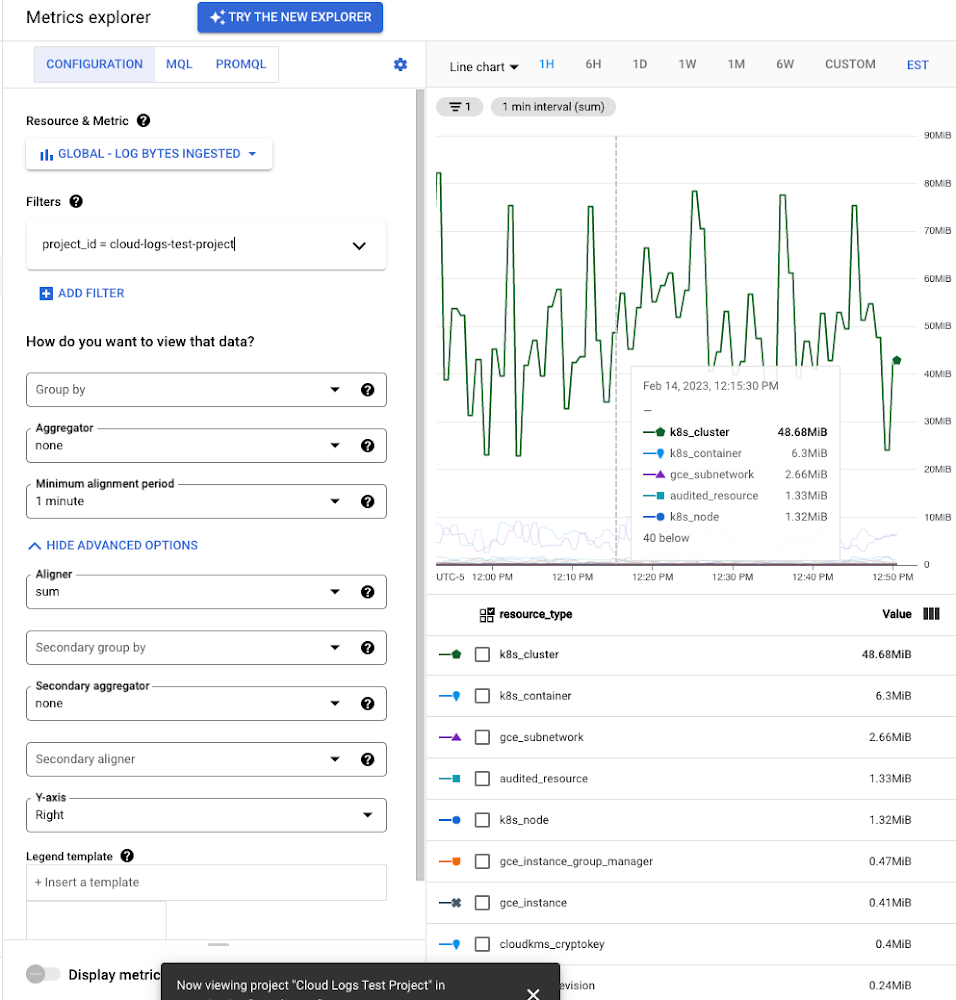
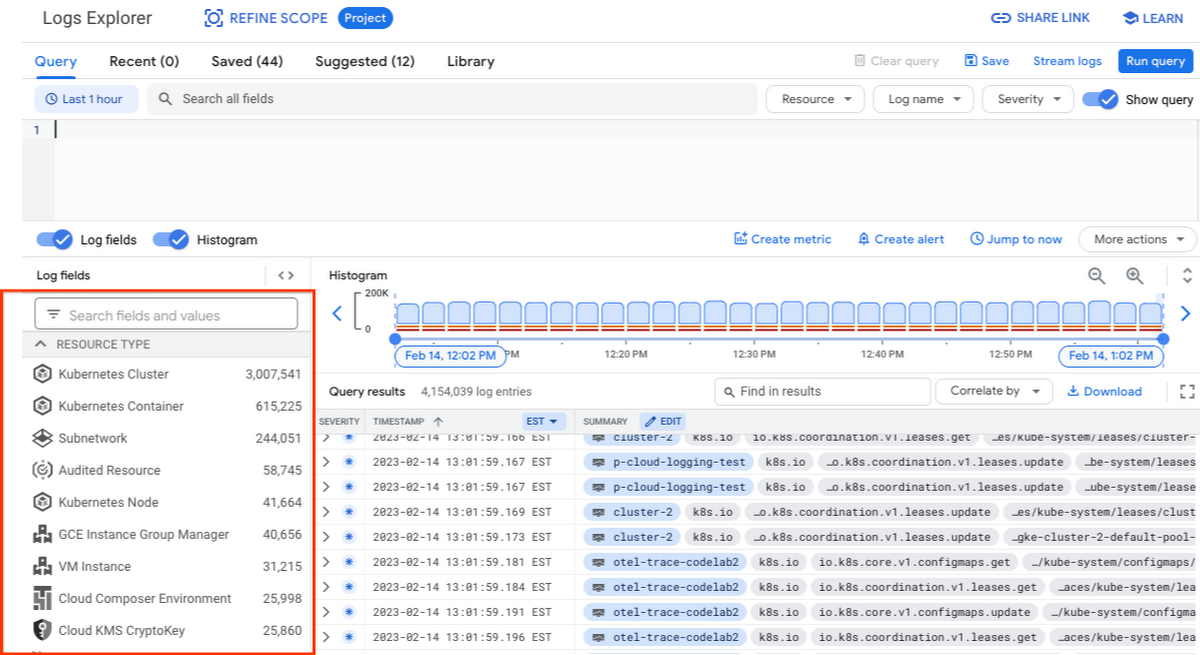
While these rich metrics are great for understanding volumes, you’ll probably want to eventually look at the logs to see whether they’re critical to your observability strategy. In Logs Explorer, the log fields on the left side help you understand volumes and filter logs from a resource type.
Reducing log volume with the Logs Router
Now that we understand what types of logs are expensive, we can use the Log Router and our sink definitions to reduce these volumes. Your strategy will depend on your observability goals, but here are some general tools we’ve found to work well.
The most obvious way to reduce your log volume is not to send the same logs to multiple storage destinations. One common example of this is when a central security team uses an aggregated log sink to centralize their audit logs but individual projects still ingest these logs. Instead, use exclusion filters on the _Default log sink and any other log sinks in each project to avoid these logs. Exclusion filters also work on log sinks to BigQuery, Pub/Sub, or Cloud Storage.
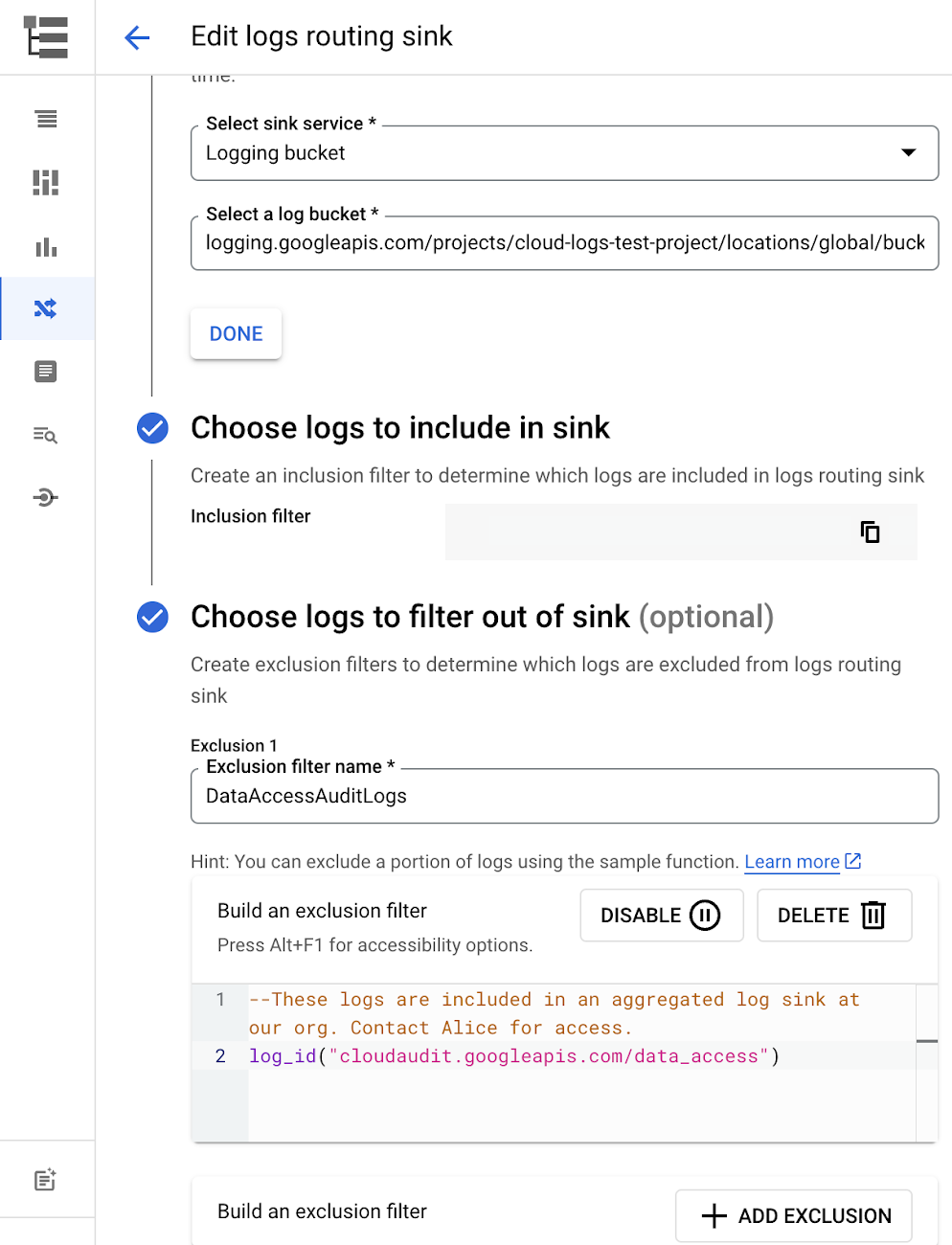
Similarly, if you’re paying to store logs in an external log management tool, you don’t have to save these same logs to Cloud Logging. We recommend keeping a small set of system logs from GCP services such as GKE in Cloud Logging in case you need assistance from GCP support but what you store is up to you, and you can still export them to the destination of your choice!
Another powerful tool to reduce log volume is to sample a percentage of chatty logs. This can be particularly useful with 2XX log balancer logs, for example. This can be a powerful tool, but we recommend you design a sampling strategy based on your usage, security and compliance requirements and document it clearly.
Step 3: Optimize costs over the lifecycle of your logs
Another option to reduce costs is to avoid storing logs for more time than you need them. Cloud Logging charges based on the monthly log volume retained per month. There’s no need to switch between hot and cold storage in Cloud Logging; doubling the default amount of retention only increases the cost by 2%. You can change your custom log retention at any time.
If you are storing your logs outside of Cloud Logging, it is a good idea to compare the cost to retain logs and make a decision.
Step 4: Setup alerts to avoid surprise bills
Once you are confident that the volume of logs being routed through log sinks fit in your budget, set up alerts so that you can detect any spikes before you get a large bill. To alert based on the volume of logs ingested into Cloud Logging:
- Go to the Logs-based metrics page. Scroll down to the bottom of the page and click the three dots on “billing/bytes_ingested” under System-defined metrics.
- Click “ Create alert from metric”
- Add filters (For example: use resource_id or project_id. This is optional).
- Select the logs based metric for the alert policy.
You can also set up similar alerts on the volume for log sinks to Pub/Sub, BigQuery or Cloud Storage.
Conclusion
One final way to stretch your observability budget is to use more Cloud Operations. We’re always working to bring our customers the most value possible for their budget such as our latest feature, Log Analytics, which adds querying capabilities but also makes the same data available for analytics, reducing the need for data silos. Many small customers can operate entirely on our free tier. Larger customers have expressed their appreciation for the scalable Log Router functionality available at no extra charge that would otherwise require an expensive event store to process data. So it’s no surprise that a 2022 IDC report showed that more than half of respondents surveyed stated that managing and monitoring tools from public cloud platforms provide more value compared to third-party tools. Get started with Cloud Logging and Monitoring today.
Want to Code for the Cloud? Get Started with the Native App Development Track

6756
Of your peers have already read this article.
2:00 Minutes
The most insightful time you'll spend today!
Earlier this year, we launched the Google Cloud skills challenge, which provides 30 days of free access to training to build your cloud knowledge and an opportunity to earn skill badges that showcase your Google Cloud competencies. Today, we’re adding a Native App Development track to the skills challenge, joining the Getting Started, Data Analytics, Kubernetes, Machine Learning (ML) and Artificial Intelligence (AI) tracks.
The Native App Development track is designed for cloud developers who want to learn to build serverless web apps and Google Assistant applications on Google Cloud using Cloud Run and Firebase. Specifically, you’ll have an opportunity to earn three skill badges in the Native App Dev track: Serverless Firebase Development, Serverless Cloud Run Development, and Build Interactive Apps with Google Assistant. To earn a skill badge, you complete a series of hands-on labs and take a final assessment challenge lab to test your skills.
Here’s an overview of each badge.
Serverless Firebase Development
To earn this skill badge, you’ll learn how to build serverless web apps, import data into a serverless database, and build Google Assistant applications using Firebase, Google’s backend-as-service platform for creating mobile and web applications.
Serverless Cloud Run Development
For this badge, you’ll discover how to use Cloud Run, a fully managed serverless platform, to connect and leverage data stored in Cloud Storage. You’ll learn how to use Cloud Run to build a resilient, asynchronous system with Pub/Sub, build a REST API gateway as well as build and expose services.
Build Interactive Apps with Google Assistant
To earn the final skills badge, you’ll build Google Assistant applications by creating a project in the Actions console, integrating Dialogflow, testing your action in the Actions simulator, and adding Cloud Translation API to your assistant application.
Ready to jump into the skills challenge? Sign up here.
You can also check out this quick video below to learn how to join the skills challenge.
3345
Of your peers have already watched this video.
4:56 Minutes
The most insightful time you'll spend today!
API Management with Istio
Kubernetes can be a great orchestration platform for your microservices but these services can grow complex and difficult to manage. Istio simplifies the life of organizations contemplating a “microservices” approach, or who are simply deploying many services that communicate with each other. Istio creates a “service mesh” that routes traffic between interrelated services in a secure and robust way so that the developers of each individual service can focus on what a service does rather than the details of how it communicates. Both Istio and Apigee provide complementary capabilities to teams building APIs and services in today’s world.
Join us as we walk you through Istio and several ways it can help you wrangle your applications. In this video, we’ll be working with Apigee to manage a full API.
5051
Of your peers have already watched this video.
21:00 Minutes
The most insightful time you'll spend today!
Uber’s Story of Scaling Their App with Millions of Concurrent Requests
Uber has millions of concurrent customers who use the platform to book rides and place food delivery orders, generating billions of database transactions per day. In just a click of a button, Uber captures users’ intent which bases their fulfillment model to meet the customers’ demand, and match it to active providers that address their demand with supply.
Uber’s fulfillment platform capability is the lifeline powering every line of business and also allows rapid scaling of new verticals. Hundreds of microservices at Uber depend on this fulfillment platform as a source of truth for all their active booking, delivery or order session. The events generated by this platform are used by hundreds of offline data sets to power business decisions. Additionally over hundreds of developers at Uber extend the platform with APIs, events and codes to build 120+ unique fulfillment flows!
Watch the video to learn about Uber’s decision to move from on-prem to Google Cloud’s Cloud Spanner while still taking live orders at scale and meeting customers’ expectations.
AI Features in Apigee X Helps Build and Manage APIs at Scale

5272
Of your peers have already read this article.
2:00 Minutes
The most insightful time you'll spend today!
APIs are the backbone of digital transformation. Via APIs, you can securely share data and functionality with developers both inside and outside of your organizational boundaries, letting you build applications faster, seamlessly connect and interact with partners, and drive new business revenue.
Because APIs encompass business-critical information, any downtime or performance degradation can lead to significant loss in revenue, customers, and brand value. Therefore, there’s mounting pressure on operations teams to ensure that APIs are always available and performing as expected. If the APIs go down, so too do the services that fuel customer experiences and on which the organization relies for collaboration and business processes.
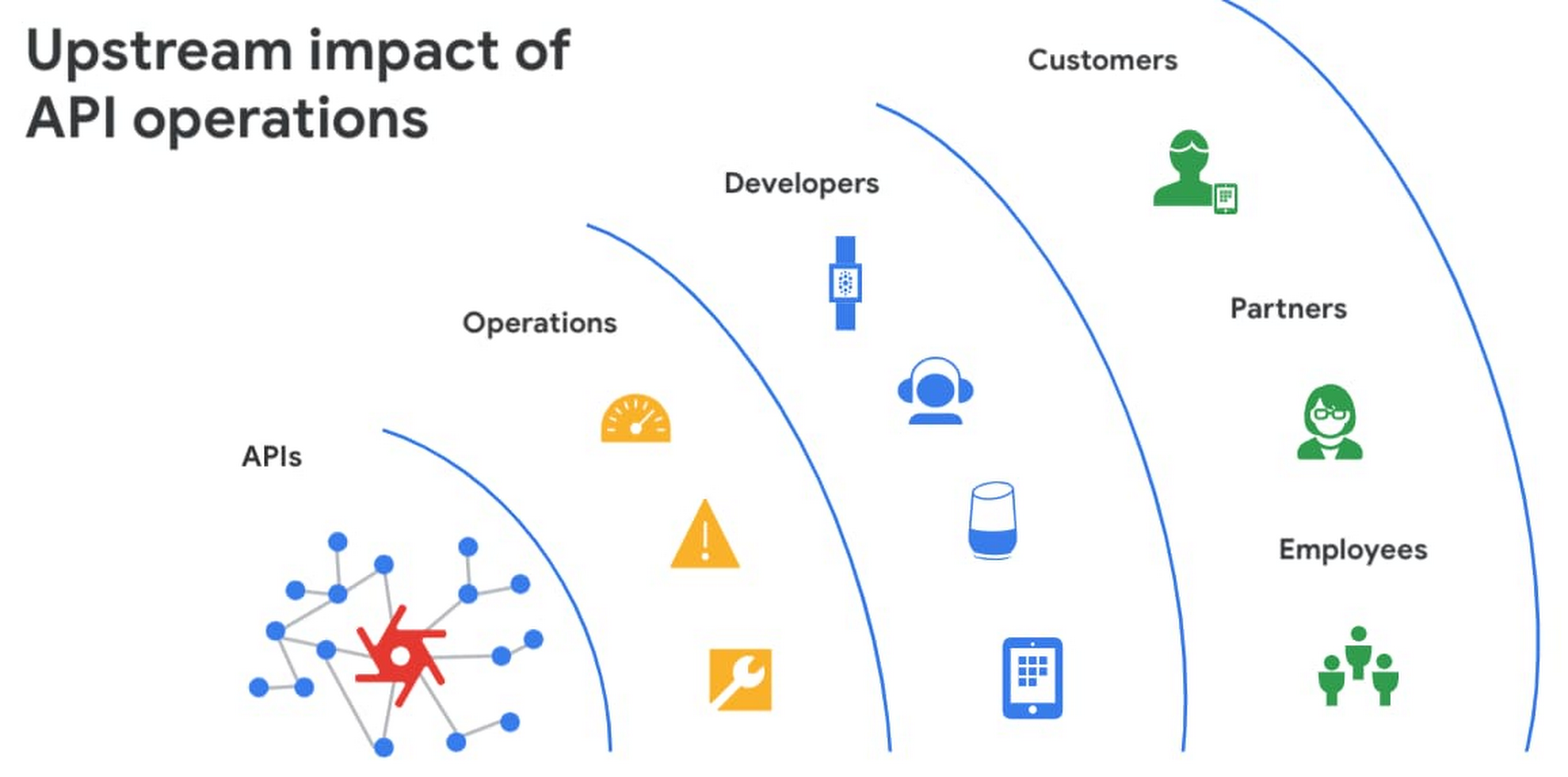
However, as you build and scale your API programs, it becomes practically impossible for API operators to manually monitor and manage all your APIs. To help, we brought the power of industry-leading AI and ML technologies to API operations via Apigee X, a major release of our API management platform. Apigee X seamlessly weaves together Google Cloud’s expertise in AI, security and networking to help you efficiently build and manage APIs at scale.
Put your API data into action
Apigee applies machine learning to your API metadata and provides you the required tools that simplify various aspects of API operations. A great example of AI for APIs is anomaly detection:
- AI-powered rules trigger alerts based on a set of predefined conditions that are determined by applying Google’s industry-leading machine learning models to your historical API data.
- Auto-thresholds adjust the monitoring criteria of your APIs and set them to pattern-based values.
- Reduce overhead results because operators don’t have to manually monitor anomalies or adjust the monitoring thresholds on APIs.
“By applying AI and ML models to our historical API data, these advanced features are able to alert us about scenarios we haven’t thought of. Such automation capabilities significantly reduce our upfront efforts. And from a security perspective, the actionable insights help us ensure that our proxies are exposed only over secure HTTPs ports and adhere to compliance requirements. We’re also able to closely monitor user activity and quickly pull out reports during audits.” – Adam Brancato, Sr. Manager, Global Technology and Security at Citrix

As our customers scale their API programs, they find it extremely useful to harness AI-powered capabilities. In our recent State of the API Economy 2021 report, we found a 230% increase in enterprises’ use of anomaly detection, bot protection, and security analytics features.

To learn more about Apigee X, and see AI and machine learning in action, check out this video, and to try Apigee X for free, click here.
More Relevant Stories for Your Company

Business Evolution with API Ecosystems
During uncertain times, ecosystem partnerships that leverage APIs have proven to help companies scale and address gaps in their businesses. Apigee customers, like CHAMP Cargosystems, have pursued API-first ecosystem models to enter adjacent markets, create new customer interaction models, and rapidly grow their brand reach and partner ecosystems. As a

Deploying Ray on GKE: Distributed Computing Made Easy
The rapidly evolving landscape of distributed computing demands efficient and scalable frameworks. Ray.io is an open-source framework to easily scale up Python applications across multiple nodes in a cluster. Ray provides a simple API for building distributed, parallelized applications, especially for deep learning applications. Google Kubernetes Engine (GKE) is a managed container orchestration

Seven Steps to Making DevOps a Reality
When it comes to creating a business that can thrive in the digital age, the benefits of DevOps are clear. In a recent survey sponsored by Google Cloud, Harvard Business Review Analytic Services found that about two-thirds of the respondents who use DevOps have seen benefits that impact their bottom line, including

Google Unveils New Cloud Region in Delhi NCR to Power India’s Digitization
In the past year, Google has worked to surface timely and reliable health information, amplify public health campaigns, and help nonprofits get urgent support to Indians in need. Now, we are continuing to focus on helping India’s businesses accelerate their digital transformation, deepening our commitment to India’s digitization and economic recovery.
