






Forrester Study Finds 72% ROI from Moving Expensive, Traditional OS and Software to Google Cloud!
READ FULL INTRODOWNLOAD AGAIN3172
Of your peers have already downloaded this article
20:00 Minutes
The most insightful time you'll spend today!
DB Corp Opts For Google Cloud to Drive Transformation to Real-Time Operation

3864
Of your peers have already read this article.
2:30 Minutes
The most insightful time you'll spend today!
About DB Corp
DB Corp is India’s largest newspaper publisher delivering 62 editions in four languages and selling about 62 million copies per day. The business also has an extensive online and mobile presence.
Google Cloud Result
- Reduced time to complete sales reports and updates from a week to two hours
- Delivered a single source of truth and real-time data to support decision-making
- Hindi news source material with 95 percent accuracy
Headquartered in Bhopal, India, and listed on the Bombay Stock Exchange, DB Corp is India’s largest newspaper group. DB Corp publishes 62 editions in four languages and sells about 6 million newspaper copies per day. Beyond newspapers, DB Corp operates 29 radio stations, 13 portals and two mobile apps.
Like the media industry in general, DB Corp is having to adapt to readers’ increasing preference for accessing news content online – particularly on mobile devices. However, online advertising is yet to fill the gap left by the leakage of advertising revenues from print. Further disruption occurred when the Indian Government’s implemented a demonetization program in November 2016 that prompted a sharp surge in e-commerce transactions and online banking.
Facing a tsunami of change, DB Corp is developing and executing new strategies to engage consumers and build revenues. These plans include evolving from an IT-supported business to an IT enabled company, and finally to an IT-led business that complements its newspapers with online news and updates throughout the day. DB Corp is building e-commerce properties that leverage its print brands and is moving to increase advertising across its mobile services. Furthermore, the business is looking to capture information about readers and customers to tailor its publications and services more closely to their needs.
Expertise in managing large data volumes behind GCP selection
However, DB Corp’s on-premises infrastructure and traditional applications could not deliver the flexibility and agility needed to support the transition to real-time news delivery. In late 2015, DB Corp started evaluating public and private cloud services, including cloud-based application suites and platform as a service offerings. This process led the business to deploy G-Suite and start working with Google Cloud Platform (GCP). “We selected GCP due to Google’s experience in delivering cloud services, and because nobody else manages data volumes of the magnitude that they do,” says R D Bhatnagar, Chief Technology Officer, DB Corp. “We were also impressed by the fact GCP had a local team with the skills and expertise to educate us about how best to use its products.”
DB Corp is migrating its websites and key applications to GCP. The business is also upgrading its network to remove bandwidth restrictions that could impede the value provided by GCP services. The scale and scope of DB Corp’s G Suite and GCP projects has required the business to engage four partners and access technical expertise and support from Google itself. Technical and business experts from the platform as a service provider are providing monthly updates and training sessions with various groups within the organisation, including user communities and the board of directors.
The Google projects at DB Corp are driving a sharp increase in the speed, agility and performance of the business. “As a senior leader within the organisation, I see the key benefits of GCP and other technologies being lower cost; greater efficiency; and improved business continuity,” says Bhatnagar. “For example, the current data center team can be redeployed to other initiatives as the technical experts at GCP will be undertaking most of the management and maintenance tasks.
DB Corp is already making business and financial performance data available in real time from a single source, enabling business teams to make sound, consistent decisions about digital strategies and other key activities. These teams may also address issues or problems before they compromise the quality of content and services provided to consumers.
Deploying Chrome for Meetings across various offices has enabled teams to communicate and collaborate effectively in real time, breaking down geographic barriers, ensuring each member is on the same page and ensuring the business transformation proceeds smoothly. Sales teams are using Google Forms and Google Sheets to centralize and control tasks such as sales forecasting, reducing the time required to complete reports and updates from up to a week to two hours.
Furthermore, various teams are using calendars to improve organization and productivity. For example, editorial teams are using calendars to track Indian holidays and festivals and deliver relevant content to readers. Reporters are also using Google Cloud Speech API and Google Cloud Translation API services to capture and document interviews and source material for articles at accuracy rates of 95 percent for Hindi alone.
How Google Cloud Helps SAP Admins Create Scalable, Secure Networks

6653
Of your peers have already read this article.
3:00 Minutes
The most insightful time you'll spend today!
SAP forms the critical backbone of thousands of enterprises, supporting critical business functions such as finance, supply chain, warehouse management, and more. Google Cloud provides a highly scalable and resilient infrastructure to run such workloads and offers tools, such as Smart Analytics and Machine Learning that can accelerate your organization’s digital transformation.
In fact, a recent study by Forrester found that running SAP on Google Cloud can generate a 160% return on investment and a payback period of six months or less, thanks to legacy infrastructure cost savings, downtime avoidance, and productivity improvements.
How you deploy your SAP systems across your network has a tremendous impact on its availability, resilience, and performance. In addition to separate production and high-availability (HA) environments, SAP deployments typically include sandbox, development, quality assurance (QA), and disaster recovery environments as well.
Because most of the Google network is virtual, SAP administrators can easily design complex landscapes that suit your organization’s SAP deployment and organizational structure while also meeting security and operational requirements.
As you get started with SAP on Google Cloud, you’ll need to decide how to configure your networking to ensure the availability and performance of various SAP systems. Here’s a look at your options.
VPC and shared VPC
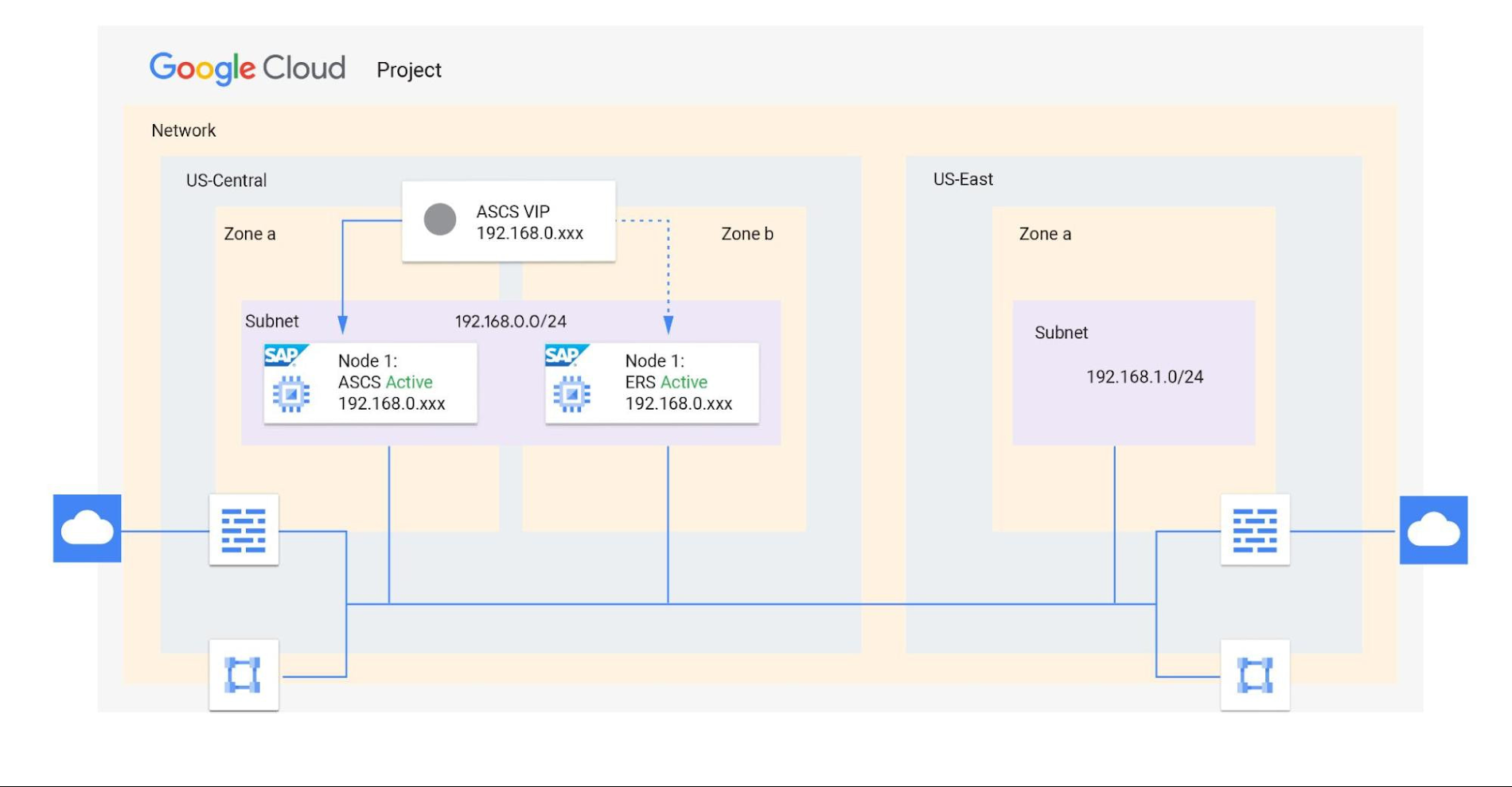
A virtual private cloud (VPC) is a secure, isolated private network hosted within Google Cloud. VPCs are global in Google Cloud, so a single VPC can span multiple regions without communicating across the public internet. Similarly, subnets can span across zones within a region. A zone represents a single failure domain, so typical SAP deployments place production and HA systems in different zones to ensure resiliency. Google Cloud simplifies this type of deployment, because subnets containing both production and HA systems can span multiple zones.
This capability also simplifies SAP clustering, since the cluster’s virtual IP (VIP) address can be in the same range as those of the production and HA machines. This configuration shields the floating IP using Google internal load balancers and is applicable to HA clustering of the application layer (ASCS and ERS) and the HANA database layer (HANA Primary and Secondary).
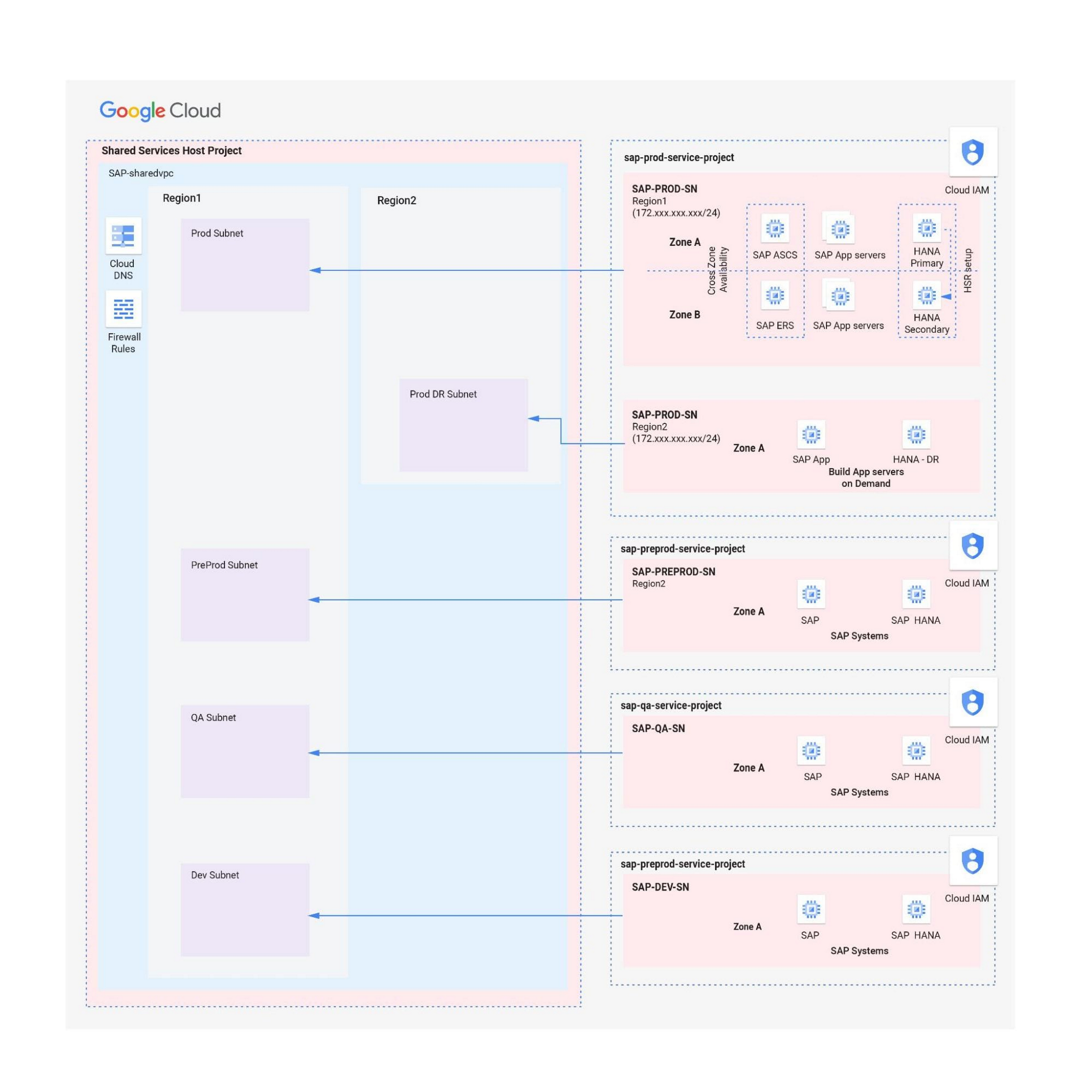
Shared VPCs are a feature unique to Google Cloud that allows an organization to connect resources from multiple projects to a common VPC network. This lets them communicate with each other securely and efficiently using internal IPs. You can also centrally control the network for all SAP projects (service) from the Host project while using firewalls to inspect communication between compute engines in the same subnet, and between those in different subnets. (Best practice is to limit the communication between these systems to only the required ports — typically via SAP remote function call (RFC) communication at Layer 4.)
When designing your network, start with a host project containing one or more Shared VPC networks. You can attach additional service projects to a host project, which allows them to participate in the Shared VPC. It’s common practice to have multiple service projects operated and administered by various departments or teams in your organization.
Depending on your needs, you can deploy SAP on a single Shared VPC or multiple ones. The two scenarios differ in terms of network control, SAP environment isolation, and network inspection. Let’s look more closely at these differences.
Scenario 1: Deploying SAP on a single Shared VPC
If you require only a single network inspection, deploying SAP on a single Shared VPC has the advantage of simplicity and reduces administrative overhead.
- Network control: The Shared VPC serves as the network hub, allowing central network management based on identity access management (IAM) roles for the network team(s) in both production and non-production environments.
- SAP environment isolation: You can create projects and subnets for each SAP environment. Projects help group resources together for finer IAM control and billing visibility, while subnets provide network isolation for individual SAP environments. In service projects, compute engines can communicate by default; however, you can adopt simple firewall rules to block communication between compute engines within a subnet or in separate subnets.
- Network inspection: Use Google Cloud firewalls to allow only the required ports for communication between SAP systems. Leverage network tags and service accounts to define granular control for both north-south and east-west traffic.
Scenario 2: Multiple Shared VPCs for SAP deployment
In scenarios requiring additional network inspections, you can create multiple Shared VPCs, typically one per environment. Use peering between these Shared VPCs to enable RFC communication among the SAP development, QA, and production systems.
- Network isolation: Multiple Shared VPCs are completely isolated from each other except via specific ports opened in Google Cloud firewalls. This allows additional East-West traffic inspection by a Network Virtual Appliance (NVA) within a Google Cloud network.
- Network control:As the number of Shared VPCs increases, activities such as peering and firewall policies also increase. This diminishes the central network control that Shared VPCs offer, so the network team should plan to manage the policies in each VPC separately.
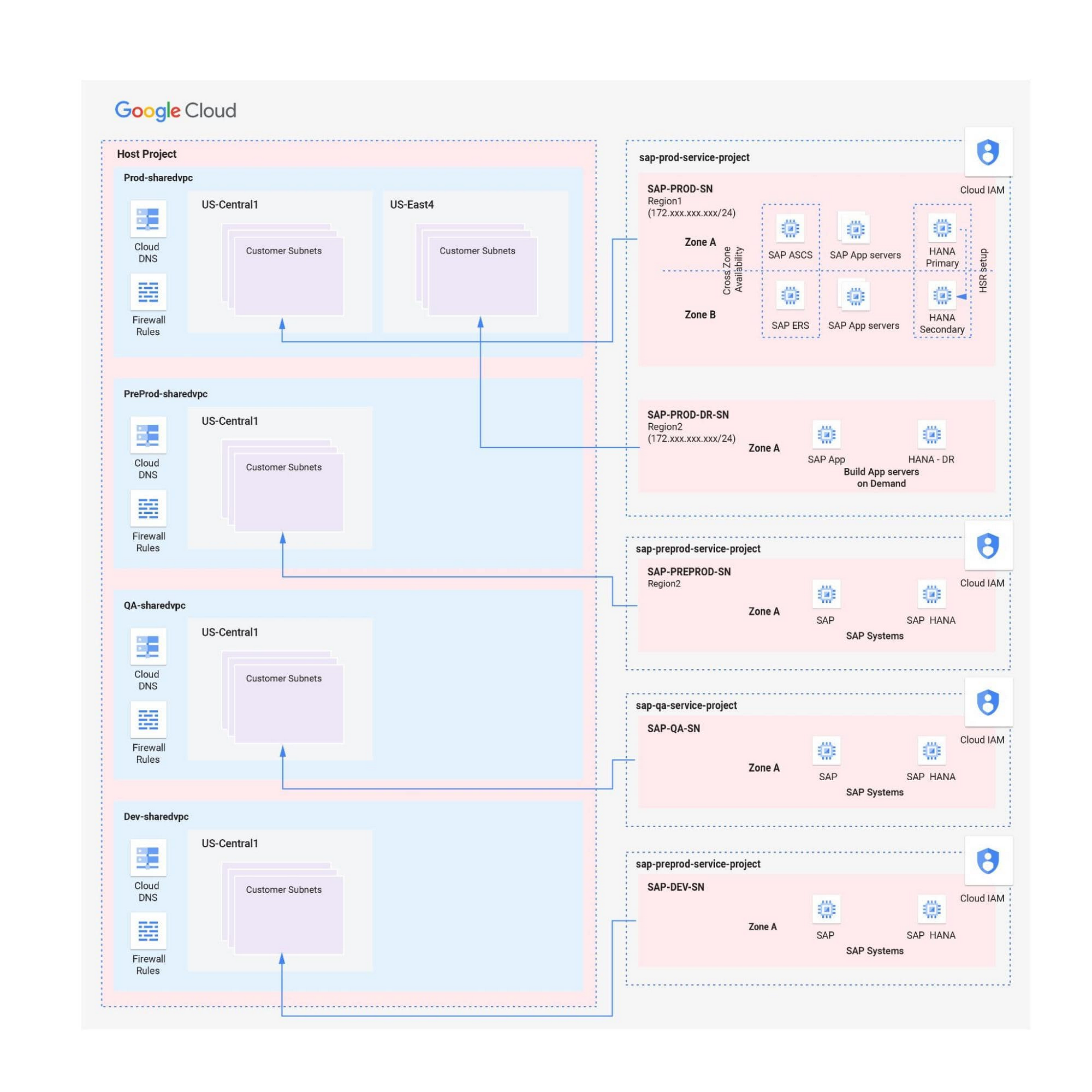
Hybrid scenarios – for example, one Shared VPC for the production environment and one Shared VPC for all non-production systems — are also possible. This arrangement allows network inspection between production and non-production systems, and limits the number of central network administration layers to two.
Configuring the networking environment for multiple SAP systems can be a complex process. Thanks to Google Cloud’s Shared Virtual Clouds and other tools, SAP administrators can create scalable, secure networks that provide logic, resilience, and visibility to their cloud deployments.Learn more about these networking capabilities and our full offerings for SAP customers.
The Power of Two: Best Practices for Mergers & Acquisitions on Google Cloud

3381
Of your peers have already read this article.
3:00 Minutes
The most insightful time you'll spend today!
Congratulations! Your company just acquired or merged with another organization, beginning an important new chapter in its history. But like with many business deals, the devil is in the details — particularly when it comes to integrating the two companies’ cloud domains and organizations. In this blog post, we look at how to approach mergers and acquisitions (M&A) from the perspective of Google Cloud. These are the best practices that your Google Cloud Technical Account Managers follow — or that we recommend you follow if you plan to perform the integration yourself.
Although there are various M&A scenarios, here are the two most common ones we will focus on:
- Both entities engaged in the M&A have some presence on Google Cloud and are looking for some level of integration
- Only one of the entities has a presence on Google Cloud, and is looking at best ways to work together
Depending on your situation, your approach to integrating the two companies will vary substantially.
When both companies have a Google Cloud presence
In the first scenario, let’s assume company A is acquiring company B. Prior to the M&A, both companies have their own Google Cloud Organizations — the top level structures in the Google Cloud resource hierarchy — and have one or more billing accounts associated with them. There are also various Folders and Projects below each Google Cloud Organization. In this scenario, here are the key questions to ask:
- How do you plan to integrate/consolidate two distinct Google Cloud Organizations?
- How do you plan to organize the billing structure?
- How do you handle Projects under the two Organizations?
- What is the identity management strategy for the two Organizations?
For each of these key questions, go ahead and formulate a detailed plan of action. If you have access to the Technical Account Manager service through Google Cloud Premium Support, you can reach out to them to further develop this plan.
Understanding Google Cloud Organizations
From an organizational integration standpoint, when each entity in an M&A has its own Google Cloud Organization, you have various options: no integration, partial, or full.
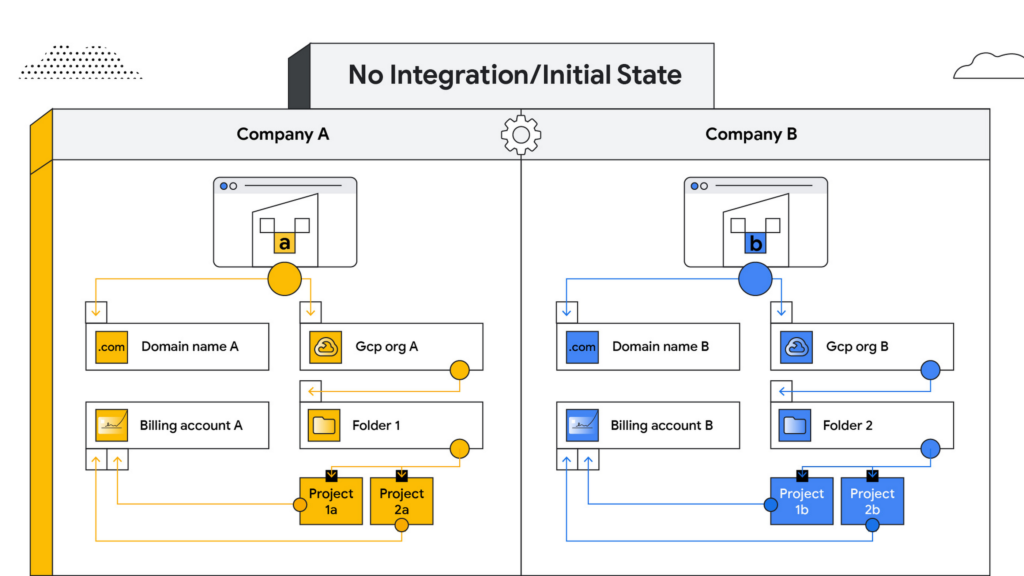
No integration – When company B operates as an independent entity from company A, no migration is required. One caveat is if company A has negotiated better pricing terms/discounts and support packages with Google Cloud. In that case, you can sign an affiliate addendum by working with your Google Cloud account team to help unlock the same benefits for company B.
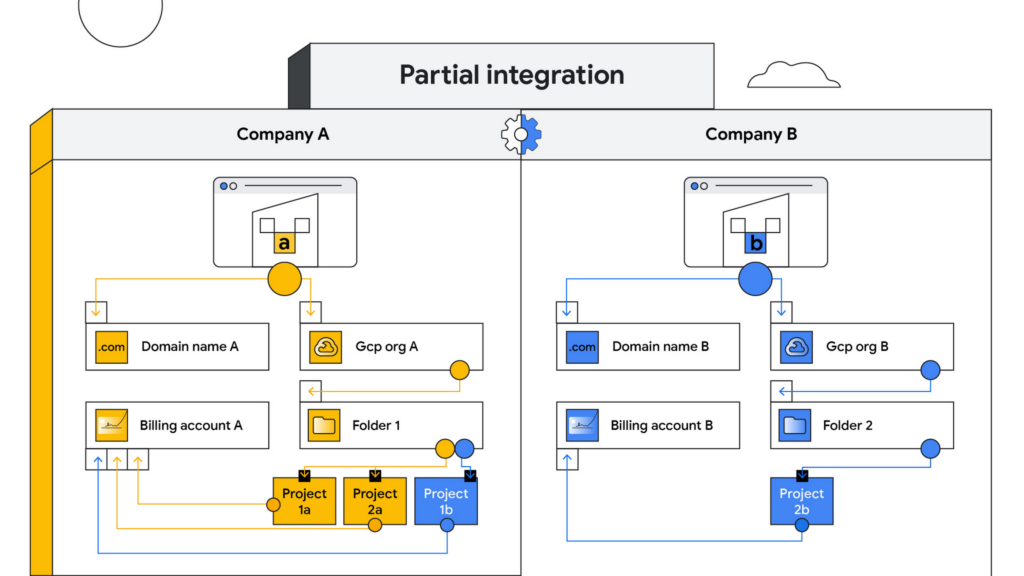
Partial integration – Some projects move over to company A from company B and others stay with Company B. There can be some shared access between the two companies and each of the organizations can continue to use their existing identity providers. This can be a self-serve or a paid services engagement with Google Cloud depending on the complexity of the two companies and how many project migrations need to take place between them.
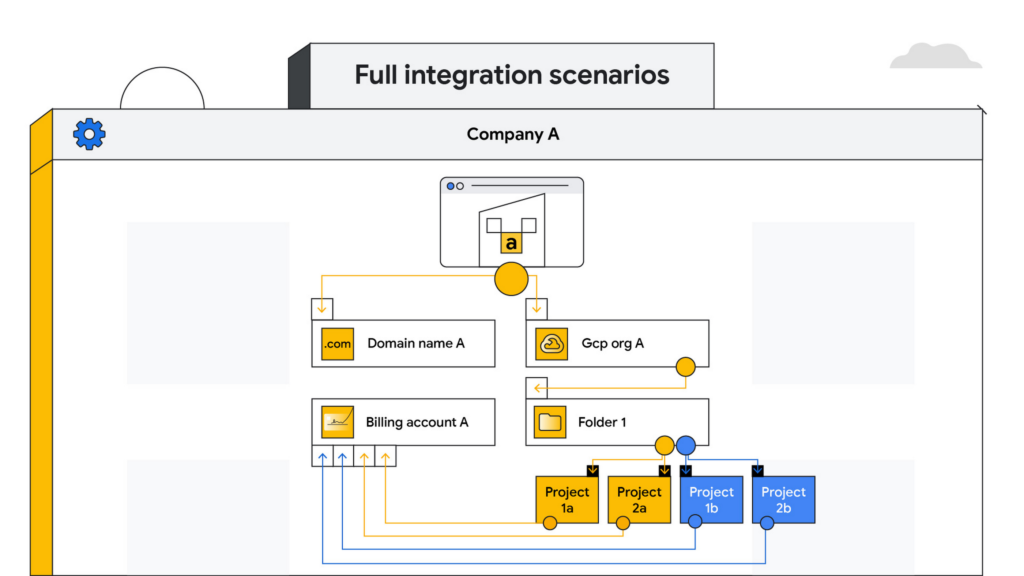
Full integration – Company B is fully incorporated into company A. This means you go through a full billing, Google Workspace identity and project migration from company B into company A. This can be a complex process and we highly recommend engaging your Google Cloud account teams to scope out a paid services engagement to go through this transition.
Planning your project migration
No matter what you want your end state to look like, project migration requires careful planning. Again, if you have an assigned Technical Account Manager, please reach out to them to ensure that you have a conversation around best practices before starting this migration.
If you’re taking a self-service approach, at a high level, we recommend leveraging the Resource Manager API to manage your project migrations. Do keep in mind that there are several prerequisites and required permissions documented here that need to be assigned before going down this path.
In addition, please be sure to read the billing and identity management considerations below to ensure that you are covering all of the bases associated with such a migration, as your choices can fundamentally alter your Google Cloud footprint.
Billing considerations
When deciding how to structure your Organizations and billing accounts, our recommendation is to always limit the number of Organization nodes and use the Folder structure to manage departments/teams within it. Creating additional Organization nodes is only advised in cases where you require a level of isolation for certain Projects from central administration for a specific business reason, for example, if the company being acquired already has their own Organization node and there is a business justification to let it operate as a standalone entity.
Warning: If you have multiple Organization nodes, be aware that you will not have central visibility across all your organizational resources, and that policy management across different Organization nodes can be cumbersome. You will also have to manage multiple Workspace accounts and manage identities across them, which can be difficult, especially when operating at scale.
From a billing account management perspective, our recommendation is to create one central billing account that lives within the Organization node with tags and labels incorporated for additional granularity. However, there are a few business cases which warrant the creation of additional billing accounts such as:
- You need to split charges for legal or accounting purposes
- Invoices are paid in multiple currencies
- You need to segregate usage to draw down on a Google Cloud promotional credit
- Subsidiaries need their own invoice
Keep in mind that committed-use and spend-based discounts and promotional credits cannot be shared across billing accounts and are provisioned on a per-billing-account basis. As such, more billing accounts can make it harder to leverage these discounts and credits.
Identity management
As you might expect, merging two entities has identity management implications. Cloud Identity is the solution leveraged by Google Cloud to help you manage your user and group identities. Even if the acquired company only uses the productivity products that are part of Google Workspace, the identities would still be managed by Cloud Identity.
Google Workspace considerations
To move large amounts of content into a Google Workspace domain, we recommend one of three options, depending on your end goal and data complexity:
- For general migrations: Leverage Google Workspace Migrate to move data into your Workspace domain from either another Workspace domain or a third-party productivity solution
- For manual migrations: Use the Export tool to move your organization’s data to a Cloud Storage archive so you can selectively download exported data by user and service
- For complex Google Workspace scenarios: Speak with your Google Cloud Technical Account Manager about the possibility of using a custom scoped engagement to merge two Google Workspace environments without business interruption
When only one company is on Google Cloud
Now, let’s consider the scenario where only company A has a presence on Google Cloud but company B does not. The approach you take to integrate the two organizations largely depends on your desired end state — full, partial or no integration.
If the plan is to eventually integrate company B into company A, your approach here will have a lot of similarities with the ‘full integration’ option mentioned above — just at a later point in time.
You may also run into a scenario where company B has a presence on an alternative cloud platform and you need to migrate resources into or out of Google Cloud. Again, similar to the partial integration option called out above, a paid engagement or a self-service exercise would be a good fit depending on the complexity of the desired end state.
Here to help
A merger or acquisition is an exciting milestone for any company, but one that needs to be managed carefully. Once you carefully review these considerations, develop a plan of action for your organization. You can also engage Google’s Professional Services for a paid engagement or Google’s Technical Account Management Service for a self-managed process to achieve the desired results.
If you are going through or considering going through M&A at your organization and have a different scenario than what we have discussed, please feel free to reach out to your account teams for guidance or contact us at https://cloud.google.com/contact.
Dual Run: A Proven Solution for Secure Mainframe Modernization

953
Of your peers have already read this article.
4:30 Minutes
The most insightful time you'll spend today!
CIOs are again evaluating their mainframe investments, balancing rising operational costs and difficulty finding talent with the perceived costs and risks of moving critical applications to the cloud. Increased business agility, technical innovation, computing elasticity, customer insights, and a growing talent pool all encourage CIOs to migrate and modernize from “Big Iron” onto public cloud platforms.
Google Cloud recently announced Dual Run, a new mainframe modernization solution, to help customers mitigate the risk involved in mainframe migrations and accelerate their migration to the cloud. Leaders can leverage Dual Run in their quest to ensure their mainframe modernization projects will succeed and pay off so let’s dive a little deeper into what Dual Run is, how it works, and how it can help you.
Mainframe modernization with a proven technology
Since so many businesses still run mainframes, we decided to partner with Banco Santander—one of the largest banks in the world—to bring Dual Run to our enterprise customers, since they had already built a solution. In fact, Dual Run was built on top of Banco Santander’s unique technology which has already demonstrated proven results in the regulated financial services industry. Now that Dual Run is available, Banco Santander has been using it to bring their data and workloads onto Google Cloud’s trusted infrastructure.
The concept is not new, but the solution is unique
Dual Run enables you to run a parallel production system, allowing you to simultaneously run workloads on your mainframes and on Google Cloud. While many enterprises running mainframes have thought about parallel production concept and a few even tried before, Google Cloud is unique among the hyperscalers to provide such a solution as an offering to its customers.
With a parallel production run, you can perform real-time testing of your applications on Google Cloud and quickly gather data on performance and stability with no disruption to your business. Once you’re satisfied with the functional and performance equivalence of the two systems, you can make the new Google Cloud environment your system of record, while existing mainframe systems can be used as a backup or decommissioned.
In addition to the transformative benefits you get from moving to Google Cloud–such as AI-based scalability, speed, and security–migrating mainframes with Dual Run offers you even more benefits:
Mitigate migration risk: Dual Run reduces risk during the migration by running your business critical systems in parallel with powerful reporting to track the difference between your current and target systems. This ensures there is no impact or risk to your existing mainframes while migrating to Google Cloud.
Secure migration investments: Avoid costly migration mistakes by basing your decisions and actions on empirical data acquired from your production system.
Reduce business testing effort: Compare the functional equivalence of outcomes in the current and target system with production data and drastically reduce the testing cycles of your migrated workload.
Accelerate migration: Speed up the entire mainframe migration process with a well-defined framework, automation components, predefined dashboards, and a tested approach. Empirical reporting available in Dual Run also enables customers in regulated industries to more readily respond to regulator reviews and requests for information.
Your migration journey with Dual Run
Dual Run is packaged with several automation components to aid your migration journey, from assessment all the way through to production.
This chart shows how Dual Run plays a key role throughout your mainframe modernization journey:
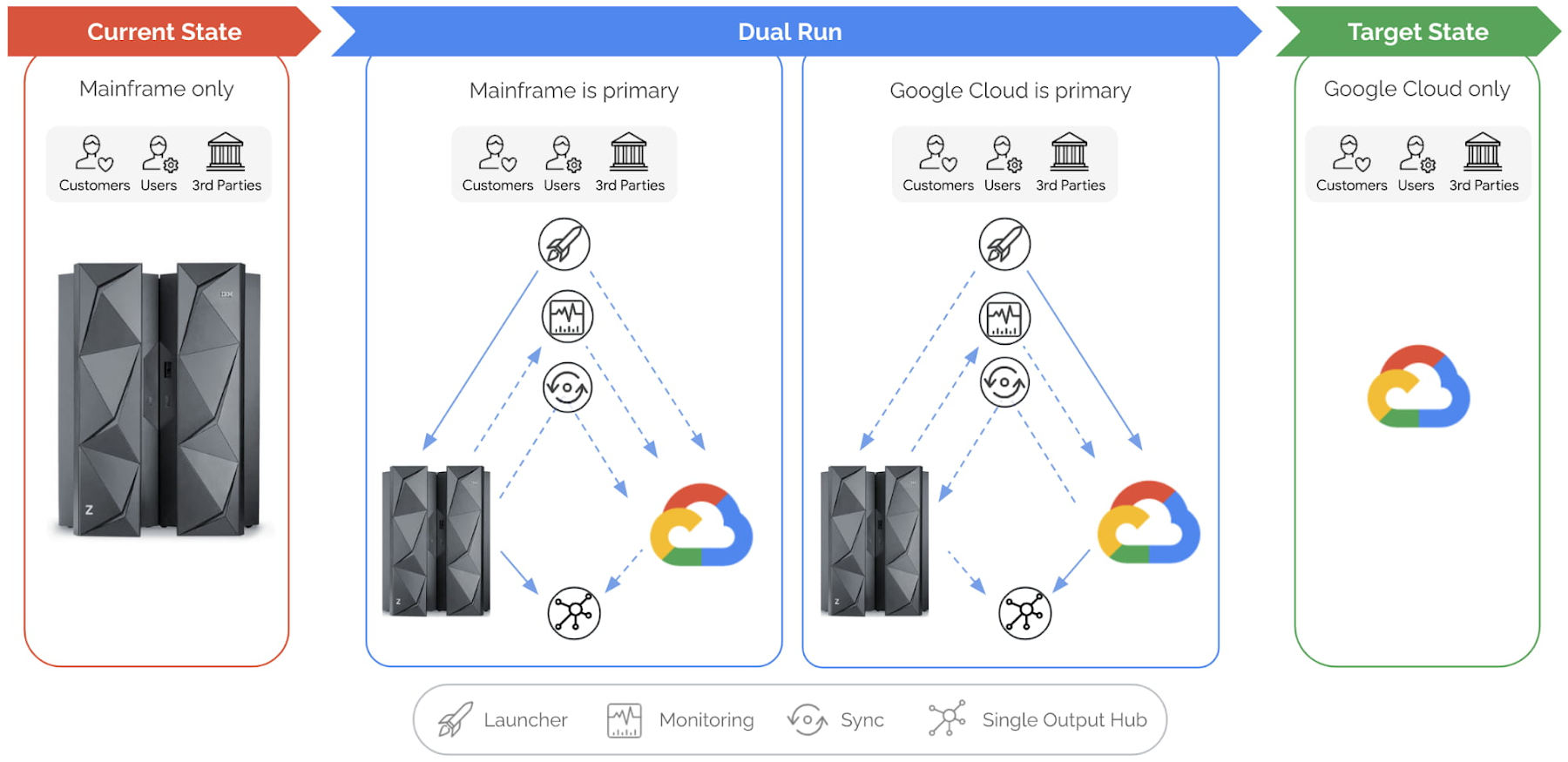
Let’s explore this illustration in a bit more detail, phase by phase:
Current state: This is your starting point, when your production workloads are still running in your mainframe. Dual Run helps you assess your mainframe workload for compatibility on Google Cloud.
After this assessment, Dual Run’s conversion engine helps address the incompatibilities in your current application and then migrates the application and data to Google Cloud. At this stage, you have your current application executing on the mainframe and your migrated application is ready to be executed or tested on Google Cloud.
Dual Run state: In this state, the migrated workload will be executed in two stages.
Dual Run stage 1:
In the first stage of Dual Run, your mainframe will remain as the “primary” system — meaning the response and outputs to other systems are sent from your mainframe — while the migrated workload will be executed in parallel in Google Cloud as “secondary.”
Dual Run performs the following actions as a cyclical process, repeated until you reach your desired migrated application quality is achieved:
- All workloads — batch & transactions — executed in the mainframe are replicated in Google Cloud
- The outcomes from both systems are validated to report any differences, enabling you to take corrective actions in migrated applications
- The functional and performance differences between the two systems will be observed, and the mainframe and Google Cloud data are periodically synchronized to bring both the systems in sync
Typically, most of your migration time will be spent in the first stage of Dual Run until you are satisfied with the results. The key goal for this stage is that your primary, business-critical mainframe workload is not disturbed while your migrated application is tuned to provide the exact same results as your current application.
Dual Run stage 2:
When the Dual Run reporting and results confirm that the migrated application matches your mainframe system, Google Cloud then becomes the “primary” system, while your mainframe will still be executed in parallel as “secondary.” Dual Run will enable you to do a smooth switch between primary and secondary systems through a configuration management system.
Target state: In this final state, the mainframe can be decommissioned while the Dual Run components are removed, enabling an optimal and efficient business execution with Google Cloud.
Summary
For any business or organization that has to migrate or modernize their mainframes, Dual Run offers a unique solution to achieve this with reduced risk and time. In fact, what we’re seeing from our customers is that Dual Run offers the right combination of proven experience, engineering, and strategic partnership that is essential for mainframe migration success. If you would like to learn more, check out our mainframe modernization website.
Ease Your Migration and Modernization Journey with Microsoft and Windows on Google Cloud Demo Center

8278
Of your peers have already read this article.
2:00 Minutes
The most insightful time you'll spend today!
If you’re looking to migrate and modernize your Microsoft and Windows workloads, Google Cloud is your premiere destination. No matter what migration strategy you’ve selected or what value you’re looking to achieve, with Google Cloud you’re able to:
- simplify your migration and modernization journey
- reduce your on-prem footprint and increase agility
- optimize license usage to reduce costs
- modernize to reduce single-vendor dependencies
- rely on enterprise-class support backed by Microsoft
Whether you’re looking to migrate applications running on Windows virtual machines, adopt Windows containers in Google Kubernetes Engine (GKE), convert SQL databases to Cloud SQL, or something else, Google Cloud offers you the first-class experience you need.
But we don’t want you to take our word for it. Try it out yourself with our new online Microsoft and Windows on Google Cloud Demo Center without any commitment or friction.

The demo center uses hands-on guided simulations to walk you through several scenarios for solving business critical challenges with Google Cloud’s Microsoft and Windows solutions. Because these are all simulated, you’ll see how it works without any deployment, configuration, or commitment. It’s a seamless way for you to see exactly how Google Cloud can help you.
Run dedicated hardware and optimize with sole tenant
Sometimes you might want to run your workloads on dedicated hardware (with oversubscription options) for compliance, licensing, and management. Google Cloud provides sole-tenant nodes that allow you to easily deploy your virtual machines onto dedicated machines to avoid “noisy neighbor” issues, address regulatory or licensing constraints, and optimize inter-VM communications.
Plus, the CPU Overcommit option allows oversubscribing sole-tenant node resources by up to 2x, therefore helping save on per-physical core licensing for many licensed workloads like SQL Server.
Learn how to set up a sole tenant group and node.
Optimize license costs with premium images & custom VMs
One of the easiest ways to optimize your cloud experience with virtual machines (VM) is to pick the right VM image. Google Cloud provides premium license-included VM images that are thoroughly tested and optimized, including SQL Server options with pay-as-you-go licensing. These are great for workloads that don’t need to run all the time or when you do not have spare licenses for bring your own license (BYOL).
Explore some Windows & SQL images and learn how CPU/Memory options can help optimize deployment and save on licensing.
Modernize your databases with Managed SQL Server
Sometimes you need to manage your SQL Server instance to achieve certain business or operational goals. But more often, managing SQL Server deployments can be undifferentiated: backups, high-availability, updates, and patching are just some of the many things you have to take care of when going the do-it-yourself route. One way to modernize your database tier is to migrate to a managed service like Cloud SQL, which is a fully managed Relational Database service for SQL.
Explore the process of creating an instance in just a few clicks!
Extract apps from VMs and move to containers in GKE with Migrate for Anthos
Many Windows workloads running on virtual machines such as Internet Information Services (IIS) are ideal candidates for migrating to containers without major changes like rewriting or rearchitecting. However, doing this migration manually can be tedious, which is why Migrate for Anthos can help easily re-platform a .NET app running on IIS into a container-based app.
Simulate intelligently extracting, migrating, and modernizing applications to run natively on containers in GKE and Anthos clusters.
Move .NET applications to GKE on Windows without code changes
When you’re looking to go fully cloud native, you can leverage Windows containers in GKE without rewriting your .NET applications. Simply create clusters with Windows nodes and deploy containerized Windows workloads in a few clicks, even alongside Linux containers. These deployments reduce operational overhead with features such as auto-upgrade, auto-repair, and release channels.
Learn how easy it is to build a GKE cluster with a Windows node and deploy an app.
Now that you’ve gotten a feel for what’s available, go check out the Demo Center. You can also visit us at Windows and Microsoft on Google Cloud to learn more.
More Relevant Stories for Your Company
Delivering 10X Improvement to Risk and Regulatory Reporting Through Cloud and AI
Enterprise agility and the ability to innovate, adapt and respond quickly to the ever-changing risk and regulatory landscape is no longer a choice, but the cornerstone of successful digital transformation and commercial growth. Traditional access to and ways of managing data invariably create challenges in dealing with multiple data repositories,

Quick Recap on Google Cloud: Latest News, Launches, Updates, Events and More
Want to know the latest from Google Cloud? Find it here in one handy location. Check back regularly for our newest updates, announcements, resources, events, learning opportunities, and more. Tip: Not sure where to find what you’re looking for on the Google Cloud blog? Start here: Google Cloud blog 101: Full list

Conversations on Government Security with Dmitri Alperovitch, CrowdStrike’s Founder and Former CTO
As I was preparing for my fireside chat with Dmitri Alperovitch, Founder and Former CTO of CrowdStrike and Executive Chairman of the Silverado Policy Accelerator, for the Google Cloud Government Security Summit taking place on Tuesday, July 20th, I was reflecting about recent developments in cybersecurity, Zero Trust best practices – including aspects

Why VMs Need to Be First-Class Citizens Across Hybrid IT and Multicloud Architectures
As enterprise apps migrate to public clouds, VM migration strategies need to align with business priorities and budgets, according to research firm IDC. This is because virtual servers continue to support mission-critical enterprise workloads. Mature VMware environments support a wide range of critical workloads in environments that have been fine-tuned
