





Why VMs Need to Be First-Class Citizens Across Hybrid IT and Multicloud Architectures
READ FULL INTRODOWNLOAD AGAIN3360
Of your peers have already downloaded this article
2:30 Minutes
The most insightful time you'll spend today!
Accelerating Success: Tips and Techniques for Optimizing and Scaling Your Startup

3157
Of your peers have already read this article.
2:30 Minutes
The most insightful time you'll spend today!
At Google Cloud, we want to provide you with the access to all the tools you need to grow your business. Through the Google Cloud Technical Guides for Startups, leverage industry leading solutions with how-to video guides and resources curated for startups.
This multi-series contains 3 chapters: Start, Build and Grow, which matches your startup’s journey:
- The Start Series: Begin by building, deploying and managing new applications on Google Cloud from start to finish.
- The Build Series: Optimize and scale existing deployments to reach your target audiences.
- The Grow Series: Grow and attain scale with deployments on Google Cloud.
Additionally, at Google we have the Google for Startups Cloud Program, which is designed to help your business get off the ground and enable a sustainable growth plan for the future. The start of the Build Series delineates the benefits of the program, the application process, and more to help your business get started on Google Cloud.
A quick recap of the Build Series
Once you have applied for the Google for Startups Cloud Program, there’s so much to explore and try out on Google Cloud.
Figuring out a rapid but solid application development process can be key to many businesses in reducing time to market. Furthermore, learning what database to use to handle application data can be tricky. Deep dive into our Firestore video which walks through how Firestore can help you unlock application innovation with simplicity and speed.
We then move on to a deep dive into BigQuery and how it can help businesses. BigQuery is designed to support analysis over petabytes of data regardless of whether it’s structured or unstructured. This video is the goto video for getting started on BigQuery!
If you are someone looking to run your Spark and Hadoop jobs faster and on the cloud, look to Dataproc. To learn more about Dataproc and how this has helped other customers with their Hadoop clusters, click the video below to learn all things Dataproc related.
Next, we find out what Dataflow can bring to your business; some advantages, sample architectures, demos on the console, and how other customers are using Dataflow.
We also talked about Machine Learning, starting from selecting the right ML solution to Machine Learning APIs on cloud to exploring Vertex AI. Following that we look into API management in Google Cloud and how Apigee helps operate your APIs with enhanced scale, security, and automation.
We ended the series with the last two episodes focusing around security deep-dive and using Cloud Tasks and Cloud Scheduler.
Coming up next – The Grow Series
Dive into the next chapter of this multi-series, with our upcoming Grow Series, where we will be focusing on growing and attaining scale with deployments on Google Cloud.
Check out our website and join us by checking out the video series on the Google Cloud Tech channel, and subscribe to stay up to date.
See you in the cloud!
4 Steps to a Successful Cloud Migration

3951
Of your peers have already read this article.
2:00 Minutes
The most insightful time you'll spend today!
Digital transformation and migration to the cloud are top priorities for a lot of enterprises. At Google Cloud, we’re working hard to make this journey easier. For example, we recently launched Migrate for Compute Engine and Migrate for Anthos to simplify cloud migration and modernization. These services have helped customers like Cardinal Health perform successful, large-scale migrations to GCP.
But we understand that the migration journey can be daunting. To make things easier, we developed a whitepaper on application migration featuring investigative processes and advice to help you design an effective migration and modernization strategy. This guide outlines the four basic steps you need to follow to migrate successfully and efficiently:
- Build an inventory of your applications and infrastructure: Understanding how many items, such as applications and hardware appliances, exist in your current environment is an important first step.
- Categorize your applications: Analyze the characteristics of all of your applications and evaluate them across two dimensions: migration to cloud, and modernization.
- Decide whether or not to migrate an application to the cloud: Not all applications should move to the cloud quite yet. The whitepaper lists the questions to ask to determine whether or not to migrate a given application.
- Pick your migration strategy: For the applications you decided to migrate, decide on your ideal strategy—pure lift and shift, containers, cloud managed services, or a combination thereof.
There’s a lot to consider when you start thinking about digital transformation, and every cloud modernization project has its nuances and unique considerations. The secret to success is understanding the advantages and disadvantages of the options at your disposal, and weighing them against what you want to transform and why. To learn how to migrate and modernize your applications with Google Cloud, download this whitepaper.
Pacemaker’s Automated Alerts and Alert Reporting: No More Outages for SAP Systems on Google Cloud!

3260
Of your peers have already read this article.
6:00 Minutes
The most insightful time you'll spend today!
When critical services fail, businesses risk losing revenue, productivity, and trust. That’s why Google Cloud customers running SAP applications choose to deploy high availability (HA) systems on Google Cloud.
In these deployments Linux operating system clustering provides application and guest awareness for the application state and automates recovery actions in case of failure — including cluster node, resource or node failover or failed action.
Pacemaker is the most popular software Linux administrators use to manage their HA clusters, which includes automating notifications about events — including failover fencing and node, attribute, and resource events — and reporting on events. With automated alerts and reports, Linux administrators can not only learn about events as they happen, but they can also make sure other stakeholders are alerted to take action when critical events occur. They can even discover past events to assess the overall health of their HA systems.
Here, we break down the steps to setting up automated alerts for HA cluster events and alert reporting.
How to Deploy the Alert Script
To set up event-based alerts, you’ll need to take the following steps to execute the script.
1. Download the script file ‘gcp_crm_alert.sh’ from
https://github.com/GoogleCloudPlatform/pacemaker-alerts-cloud-logging
2. Under root user, add exec flag for the script and execute deployment with:
chmod +x ./gcp_crm_alert.sh./gcp_crm_alert.sh -d
3. Confirm that the deployment runs successfully. If it does, you will see the following INFO log messages:
In the Red Hat Enterprise Linux (RHEL) system:
gcp_crm_alert.sh:2022-01-24T23:48:30+0000:INFO:'pcs alert recipient add gcp_cluster_alert value=gcp_cluster_alerts id=gcp_cluster_alert_recepient options value=/var/log/crm_alerts_log' rc=0
In the SUSE Linux Enterprise Server (SLES):
gcp_crm_alert.sh:2022-01-25T00:13:27+00:00:INFO:'crm configure alert gcp_cluster_alert /usr/share/pacemaker/alerts/gcp_crm_alert.sh meta timeout=10s timestamp-format=%Y-%m-%dT%H:%M:%S.%06NZ to { /var/log/crm_alerts_log attributes gcloud_timeout=5 gcloud_cmd=/usr/bin/gcloud }' rc=0Now, in the event of a cluster node, resource, node failover, or failed action, Pacemaker will start the alert mechanism. For further details on the alerting agent, check out the Pacemaker Explained documentation.
How to Use Cloud Logging for Alert Reporting
Alerted events are published in Cloud Logging. Below is an example of the log record payload, where the cluster alert key-value pairs get recorded in the jsonPayload node.
{
"insertId": "ktildwg1o3fbim", "jsonPayload": { "CRM_alert_recipient": "/var/log/crm_alerts_log", "CRM_alert_attribute_name": "", "CRM_alert_kind": "resource", "CRM_alert_status": "0", "CRM_alert_rsc": "STONITH-sapecc-scs", "CRM_alert_rc": "0", "CRM_alert_timestamp_usec": "", "CRM_alert_interval": "0", "CRM_alert_node_sequence": "21", "CRM_alert_task": "start", "CRM_alert_nodeid": "", "CRM_alert_timestamp": "2022-01-25T00:17:06.515313Z", "CRM_alert_timestamp_epoch": "", "CRM_alert_desc": "ok", "CRM_alert_target_rc": "0", "CRM_alert_version": "1.1.15", "CRM_alert_attribute_value": "", "CRM_alert_node": "sapecc-ers", "CRM_alert_exec_time": "" }, "resource": { "type": "global", "labels": { "project_id": "gcp-tse-sap-on-gcp-lab" } }, "timestamp": "2022-01-25T00:17:09.662557309Z", "severity": "INFO", "logName": "projects/gcp-tse-sap-on-gcp-lab/logs/sapecc-ers%2F%2Fvar%2Flog%2Fcrm_alerts_log", "receiveTimestamp": "2022-01-25T00:17:09.662557309Z" }
To get notified of a resource event — for example, when the HANA topology resource monitor fails — you can use the following filter for the alerting definition:
jsonPayload.CRM_alert_node=("hana-venus" OR "hana-mercury") -jsonPayload.CRM_alert_status="0" jsonPayload.CRM_alert_rsc="rsc_SAPHanaTopology_SBX_HDB00" jsonPayload.CRM_alert_task="monitor" To define an alert for a fencing event, your can apply this filter: jsonPayload.CRM_alert_node=("hana-venus" OR "hana-mercury") jsonPayload.CRM_alert_kind="fencing" The fencing log entry gets recorded with warning severity to give you deeper insight, and this additional information is also helpful for more specific filtering criteria: {   "insertId": "1plznskfjsxt82",   "jsonPayload": {     "CRM_alert_attribute_value": "",     "CRM_alert_recipient": "/var/log/crm_alerts_log",     "CRM_alert_rsc": "",     "CRM_alert_rc": "0",     "CRM_alert_timestamp_usec": "529261",     "CRM_alert_desc": "Operation reboot of hana-mercury by hana-venus for crmd.2361@hana-venus: OK (ref=2a9bf814-9adf-4247-af3f-94ac254fc3ca)", "CRM_alert_target_rc": "",     "CRM_alert_nodeid": "",     "CRM_alert_kind": "fencing",     "CRM_alert_node_sequence": "33",     "CRM_alert_task": "st_notify_fence",     "CRM_alert_status": "",     "CRM_alert_exec_time": "",     "CRM_alert_attribute_name": "",     "CRM_alert_timestamp_epoch": "1643072786",     "CRM_alert_version": "1.1.19",     "CRM_alert_timestamp": "2022-01-25T01:06:26.529261Z",     "CRM_alert_interval": "",     "CRM_alert_node": "hana-mercury"   },   "resource": {     "type": "global",     "labels": {       "project_id": "gcp-tse-sap-on-gcp-lab"     }   },   "timestamp": "2022-01-25T01:06:27.267017052Z",   "severity": "WARNING",   "logName": "projects/gcp-tse-sap-on-gcp-lab/logs/hana-venus%2F%2Fvar%2Flog%2Fcrm_alerts_log", "receiveTimestamp": "2022-01-25T01:06:27.267017052Z"
}
Alerts can be delivered through multiple channels, including text and email. Below is an example of an email notification for our earlier example, when we defined an alert for a HANA topology resource monitor failure:
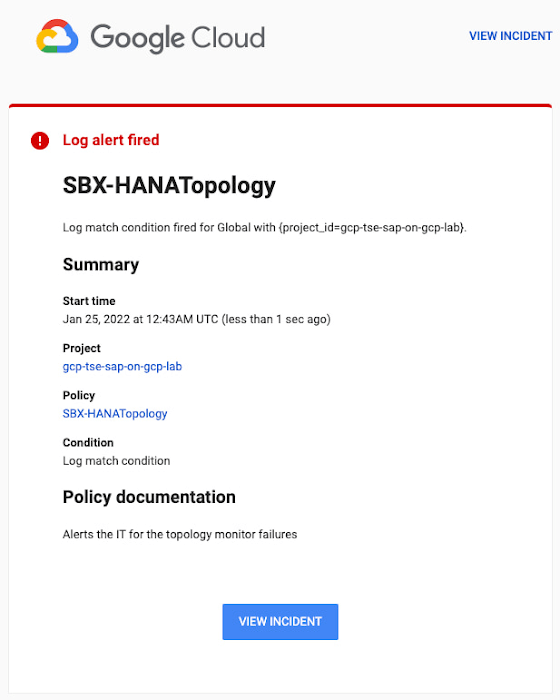
You can write and apply filters to your log-based alerts to isolate certain types of incidents and analyze events over time. For example, the following script will surface a resource event occurring within a two-hour window on a specific date:
timestamp>="2022-01-25T00:00:00Z" timestamp<="2022-01-25T02:00:00Z"
jsonPayload.CRM_alert_kind="resource"
With the ability to analyze these logged alerts over time, determine whether event patterns warrant any action.
[SIDEBAR]
The alert script prints details in the standard output and in the log file /var/log/crm_alerts_log, and this can grow over time. We recommend that the log file is set with the Linux logrotate service in order to limit the file system space. Use the following command to create the necessary logrotate setting for the alerting log file:
cat > /etc/logrotate.d/crm_alerts_log << END-OF-FILE /var/log/crm_alerts_log { create 0660 root root rotate 7 size 10M missingok compress delaycompress copytruncate dateext dateformat -%Y%m%d-%s notifempty } END-OF-FILE [END SIDEBAR]
Tips for Troubleshooting When you first deploy your alert script, how can you tell for certain that you’ve done it correctly? Use the following commands to test it out:
In RHEL:
pcs alert show
In SLES:
sudo crm config show | grep -A3 gcp_cluster_alert
You should see the following if the script is correct:
In RHEL:
Alerts: Alert: gcp_cluster_alert (path=/usr/share/pacemaker/alerts/gcp_crm_alert.sh) Description: "Cluster alerting for hana-node-X" Options: gcloud_cmd=/usr/bin/gcloud gcloud_timeout=5 Meta options: timeout=10s timestamp-format=%Y-%m-%dT%H:%M:%S.%06NZ Recipients: Recipient: gcp_cluster_alert_recepient (value=gcp_cluster_alerts) Options: value=/var/log/crm_alerts_log In SLES:
alert gcp_cluster_alert "/usr/share/pacemaker/alerts/gcp_crm_alert.sh" \ meta timeout=10s timestamp-format="%Y-%m-%dT%H:%M:%S.%06NZ" \ to "/var/log/crm_alerts_log" attributes gcloud_timeout=5 gcloud_cmd="/usr/bin/gcloud" If the commands do not display the alerts properly, re-deploy the script.
In case there is an issue with the script, or if the Cloud Logging records are not presenting as expected, examine the script log file /var/log/crm_alerts_log. The errors and warning can be filtered with:
egrep '(ERROR|WARN)' /var/log/crm_alerts_log
Any Pacemaker alert failures will be recorded in the messages and/or Pacemaker log. To examine recent alert failures, use the following command:
egrep '(gcp_crm_alert.sh|gcp_cluster_alert)' \ /var/log/messages /var/log/pacemaker.log
Keep in mind, though, that the Pacemaker log location may be different in your system from the one in the example above.
From reactive to proactive
Your SAP applications are too critical to risk outages. The most effective way to manage high availability clusters for your SAP systems on Google Cloud is to take full advantage of Pacemaker’s alerting capabilities, so you can be proactive in ensuring your systems are healthy and available.
Learn more about running SAP on Google Cloud.
VM End-to-end: Series Transcript on Conversation on VMs and their Role to Cloud-native Future

3292
Of your peers have already read this article.
1:30 Minutes
The most insightful time you'll spend today!
VMs and their relevance to a cloud-native future: A conversation
Last week, we published the first episode of VM End-to-End, a series of curated conversations between a “VM skeptic” and a “VM enthusiast”. Join Brian and Carter as they explore why VMs are some of Google’s most trusted and reliable offerings, and how VMs benefit companies operating at scale in the cloud. Here’s a transcript of the first episode:
Carter Morgan (VM skeptic): My team asked me to research VMs and see how they compare to other cloud-native approaches, like microservices, containers, and serverless. And to be honest with you, I am not excited about it at all. So I’ve brought in someone who is, Brian, resident VM expert. Welcome, Brian!
Brian Dorsey (VM enthusiast): Hello. I’m super happy to be here, because I am really excited about VMs.
Carter: How? See this is why I wanted to bring you here. I don’t understand how you can be so excited about VMs, already?
Brian: How can you not? It is like the best of both worlds. You’ve got a stable, reliable system you can run anything on, and you’re in the cloud, close to all of the new features, and you get new automation tooling.
Carter: See, that’s what I’m kind of skeptical about. When I think about the features of a modern system, I’m not sure that a VM can provide me with those.
Brian: Okay. Well, let’s be kind of specific there. What do you mean by a modern system?
Carter: When I think about a modern system, I think about things like modularity. I think about scalability and reliability. I want automation. I don’t want to have to do everything manually. I even think about portability and being able to move my workloads wherever they need to go. I also don’t want to implement everything by hand. I don’t want to have to do everything myself. Is that something I can get with a VM?
Brian: Yeah. Great, because I actually think we can get most of that, and I wonder, why not? Let’s go one level deeper and then we’ll come back out. In your mind, what is a VM?
Carter: Oh, you’re putting me on the spot, Brian?!
Brian: Yep.
Carter: Okay. A VM, it’s a computer, but it’s a virtualization. It’s a slice of a computer. And so, what it lets you do is it lets you run multiple operating systems on one machine, so it looks like you have multiple machines running on one physical machine.
Brian: Yep. Absolutely. And in the cloud kind of not.
Carter: Oh, what?
Brian: Yeah. So here’s why I say not. The obstructions are all there, so you’ve got memory CPU, disk, networking. And instead of from one computer, in the cloud, that’s coming from all of the computers in a data center. So the CPU is coming from a lot of machines. The networking is from the whole data center. And so, I like to think about it as instead of a slice of a computer, it’s a slice of the data center
Carter: Instead of a slice of a computer, it’s a slice of a data center. That sounds interesting. Impressive, even. But also abstract. Do you have some examples of features that you can get from a cloud VM that you can’t get from a traditional VM on one machine?
Brian: My turn to be specific. Yeah. I think one example is like bin packing. You talk about these VMs, and their different shapes. So you have one that needs a lot of CPU and another that needs a lot of memory. Maybe you’ve got a bunch of them that need a lot of CPU and they don’t fit so well in the same box without orphaning some of the memory or CPU. And if you’re running those in a whole data center, or you can basically just leave it to Google to solve that problem, you can just have whatever shape machine you want and we’ll figure out where to put it. Basically, that lets you customize your machines to exactly what you need.
Carter: Okay. That’s very interesting, because that’s a hard problem. And so, if you can just let Google handle where your workloads are going to go, that’s a good benefit. If that’s the only benefit of cloud VMs though, I’m not sure I’m sold on them over other approaches. Is there anything else we got?
Brian: Absolutely. There’s a ton of stuff we could talk about in terms of automation and other things. But I think another really concrete example is disks, and it’s kind of my favorite there, because you think about a physical disk and you read and write blocks from it, right? It’s a block device. In the data center level, those blocks could be on hundreds or thousands of different machines, and so all of them are working together to give you more reliability and make things smoother, more predictable in terms of performance. So what you get out of it is something that looks a lot like a SAN, you can take backups of disks that are running even, or if you’ve run out of space, like I think almost all of us have, you can just make the disk bigger. So, things like that.
Carter: That’s impressive, especially like you’re saying being able to run and just scale up, scale down or resize. Okay. Then another very targeted question. It’s going to sound like a dig. I don’t mean it to you. Google’s putting a lot of effort and resources into Google Kubernetes Engine (GKE). And so, is Google even still investing in VMs?
Brian: Absolutely. Where do you think these containers run? Every Kubernetes cluster is running on top of a whole bunch of VMs. And so, everything you learned about VMs applies to those clusters that you’re running. Also, another example is our managed databases, so Cloud SQL. So if you’re running Postgres or MySQL on a Cloud SQL, that’s running on VMs. And there’s a bunch of other examples, too.
Carter: I can’t get away from VMs, even if I tried, it sounds like.
Brian: Nope.
Carter: Okay. The way you’re saying that is making me think that maybe I need to rethink my idea that VMs are just old, dusty pieces of technology. So I want to be clear, definitively, are you saying that VMs have a place in a cloud-native future?
Brian: Absolutely. I want to take old and dusty and turn that into mature and reliable. Then the future part, all these things are built on top of it and we’re building new things over time. So we’ve got tools for scaling clusters of machines up and down. That’s using Kubernetes, but you can use it directly. And we keep investing and doing more and more things there. So, absolutely, part of the future as well.
Carter: Okay. Then what about if I wanted to switch to them? I’m pretty familiar with Kubernetes. It’s fairly easy to get started. What about with VM? Is it going to take me years to get started on these?
Brian: No. It’s just a computer. Basically, anything that’s already running on a computer somewhere, even if you don’t have the team who built it nearby, you can run that on a VM and in turn you can run it on a cloud VM and get a bunch of the cloud benefits as well.
Carter: All right. I must admit that you’ve swayed me a little bit. I’m still skeptical, but what you said made a lot of sense. I still have a lot of questions. I want to know about keeping costs down. I want to know how to update VMs. I have this idea in my head that they’re really slow to start and stop. Stateful data, I’m curious about that.
Brian: Awesome. How much time do you have?
Carter: All right. You know what, let’s have this convo another day, and maybe, just maybe we can agree that VMs do matter in a cloud-native future.
Being Cloud-native Means Sustainability and Growth-native for Nuuly!

3413
Of your peers have already read this article.
3:00 Minutes
The most insightful time you'll spend today!
They say black never goes out of style. It’s something the team at Nuuly, URBN’s digital rental and resale business, know well. And it’s not just true of the company’s garments but their gadgets, too.
“I was having an offhand conversation with a UX designer recently,” Rebecca Sandercock, Nuuly’s strategy and insights manager, recalled in a recent interview from the company’s sunny, South Philly headquarters. “The designer was talking about how we had chosen dark mode for a number of interfaces internally because it actually saves so much on electrical output. They had the data to back that decision up, but more importantly, it’s just the kind of thing everyone is thinking about all the time here.”
Of course most every business is thinking about sustainability in some way these days. What makes Nuuly stand out is how quickly it can act, thanks in large part to the technology platform that’s made the entire enterprise possible.
“We’re kind of sustainable by our very nature,” Kim Gallagher, Nuuly’s director of marketing and customer success, said.
While she meant the rental and resale business, which helps customers buy fewer clothes and sees Nuuly items worn many times by many people—Gallagher could just as well have been referring to the sustainability inherent in, and enabled by, cloud computing.

There are the obvious, and oft-cited, advantages, such as how centralized data centers can operate more efficiently (some have been carbon neutral since the beginning). Yet there are even more subtle yet substantial benefits. In a marketplace and climate that are both changing faster and faster, sustainability requires a certain amount of agility. Such adaptability and scalability are intrinsic to the cloud technology that threads its way throughout Nuuly.
It turns out that being cloud native also means being sustainability native—as well as growth native. Since its 2019 launch, Nuuly’s net sales have risen roughly 6x over the first three fiscal years.
Cloud fits any situation
When URBN was developing Nuuly—launching in just 10 months—it chose to create everything from scratch on Google Cloud. Despite being part of a larger organization with decades of history and expertise, the company recognized the limitations presented by legacy systems and, more importantly, the necessity of building a wholly new platform that could be fully responsive.
The company has to react not only to new fashion trends but, crucially, the changing behaviors of customers. And not just their evolving tastes but also shopping habits, delivery preferences, unexpected customer service requests—is this a pattern, or a stain?—and social media chatter.
The pressure for a successful launch was high. The URBN portfolio, which also includes Urban Outfitters, Anthropologie, and Free People, had to keep evolving to satisfy a new generation of shopper who exists in an increasingly crowded and demanding digital marketplace.
The cloud’s responsiveness has thus proven its worth in creating a financially sustainable business as well as an environmentally sustainable one. Those even go hand in hand, as Gallagher points out: “Every customer who keeps renting is one who isn’t buying more occasion-specific clothes that go unworn most of the time.”
Dr. Alan Rosenwinkel, director of data science at URBN, had heard from his team about one garment that has become an emblem for the power of the platform. “It had been rented 25 different times before someone loved it enough to buy it and keep it forever,” he explained. (It’s also an emblem of the power of the cloud, that they would have the data awareness to track a single item so closely.)
It’s a new way of shopping made possible by a new way of computing. As one writer for Business Insider cheered, Nuuly “completely cured my addiction to fast-fashion.”
It makes for a healthy business, too. Sales for fiscal year 2019 exceeded $8 million and surpassed $24 million in 2020—one of the few URBN segments to grow during a tough year for fashion—and reached $47 million in 2021. The subscriber base had grown to 51,000 at the end of January.
Agility drives sustainability drives agility
For digital retailers to achieve such customer enthusiasm often relies as much on how the clothes get there as how they look. And those deliveries turn out to be a prime example of where Nuuly’s sustainability and technology meet.
For now, all shipping is handled through a state-of-the-art distribution center in Bucks County on the Philadelphia outskirts. Garments are shipped six-at-a-time, in fully reusable packaging, using ground transportation to keep the carbon footprint to a minimum. In certain limited geographic areas, shipments were sometimes taking longer than the two to five days most members would find acceptable.

“If we were an older company or weren’t set up from a technology perspective to be agile, we might have just said, ‘All right, we’re going to just go to three-day shipping for everyone,’” Rosenwinkel said. “That would drive up the cost, and the environmental impact. But we were able to be more strategic and more targeted about it.”
By regularly analyzing customer sentiment and retention data through BigQuery and Cloud Composer, and tying those to historical shipping times, Nuuly has been able to understand how shipping speed impacts its customers. Using a custom-built order management system, deliveries can be automatically adjusted to arrive more quickly, particularly when certain regions or days of the week are proving difficult to reach customers in time. These accelerated deliveries, like all Nuuly shipments, are made via UPS’s Carbon Offset program.
“Because we have the data, and the platforms to analyze it all,” Rosenwinkel said, “we’re delivering faster with the bare minimum impact on cost and emissions.”
It’s just one example of how modern retailers must juggle so many demands from consumers, workers, suppliers, and even regulators. Adding sustainability to that mix could be seen as a burden, but Nuuly shows how the right technology can lead to a holistic approach that makes all those interests work together even better.
And it allows for more opportunities and more kinds of sustainability, reaching from the designer’s atelier to the customer’s doorstep.
Sustainable details at every level
Back at the distribution center, workers can experience sustainability in a different way, as data is leveraged to enhance their well-being.
All workers are equipped with customized Android devices that help guide order tracking and fulfillment, plus cleaning, repairs, and reselling of garments as needs change throughout their lifecycle. Yet the insights go even deeper. The data science team has closely analyzed routes and repetitive motions for workers to keep their strenuous jobs as low-impact as the company’s broader environmental footprint.
“Through machine learning, we estimate we’ll be able to save our workers over 300,000 miles of steps over a five year period,” Rosenwinkel said. That’s enough walking to circumnavigate the globe 12.5 times.

The company has also applied ingenuity to one of the most notorious aspects of digital retail: packaging. Made from 100% post-consumer recycled materials like plastic bottles, Nuuly’s reusable carriers require no disposable bags or hangers to send goods back and forth. And once the packages have reached their end of life, the team is working with designers on ways to repurpose them into items that can then be offered for rental or sale on Nuuly.
“We’re really looking at the circular economy from every angle,” Gallagher said. “It’s built into the business.”
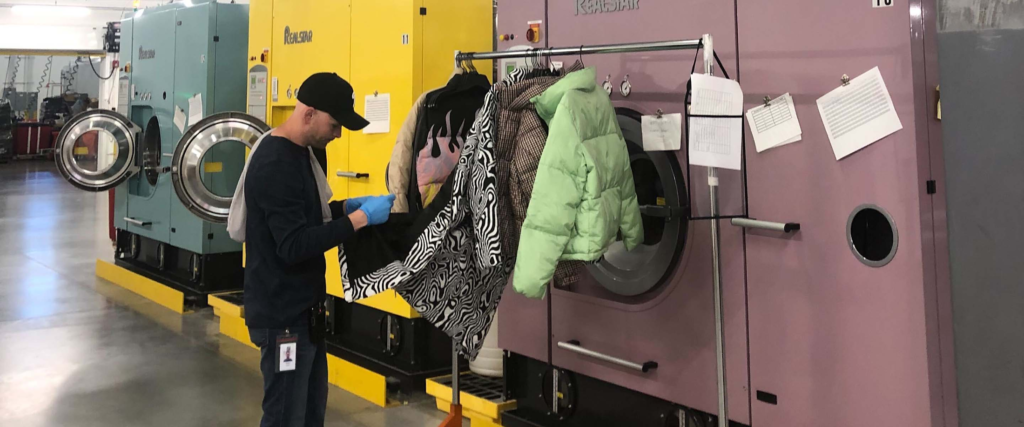
That includes not just the research the team did on-site at the Dry Cleaning & Laundry Institute—”We went to laundry school,” Gallagher jokes—but the digital tools that take those lessons even further. The team is always looking for ways to optimize fabric care, both to cut down on chemicals and water usage and extend the life of a garment. By analyzing the lifespan of every item, Nuuly not only makes them last longer but can identify problems faster. Employees even use custom apps to mark stains and damage so repair teams can more easily identify and fix the issues.
With its meticulous inventory tracking, Nuuly can even take marginal items, like a white gown or jeans with a small stain, and turn them into a custom dye job or an upcycling opportunity with a partner. These reworked items are then inserted back into the Nuuly Rent inventory as part of a growing collection of one-of-a-kind pieces, called Re_Nuuly.
Other services have launched quickly and easily thanks to the company’s cloud-enabled backend. Wanting to encourage more community and more reuse, the company created Nuuly Thrift. Debuting last fall after just a year in development, the team built everything from new interfaces to an evolved point of sale system.

It’s enabled Nuuly to offer many garments for rent or sale simultaneously, with “truly real-time inventories,” Rosenwinkel said. “So when it’s gone on one site, it shows up as gone on every site—no more surprises.”
Except for the good kind.
“I like to think we’re helping our customers think about ownership in a completely new way,” Sandercock said. “Once they run out of a use for a garment, they can offer it back, and sell it, and someone else will get to enjoy it and give it a new life. And Nuuly, we get to keep it in the community and keep it in the ecosystem, which is really cool—we’re taking extended responsibility over what happens to the clothing we create.”
More Relevant Stories for Your Company
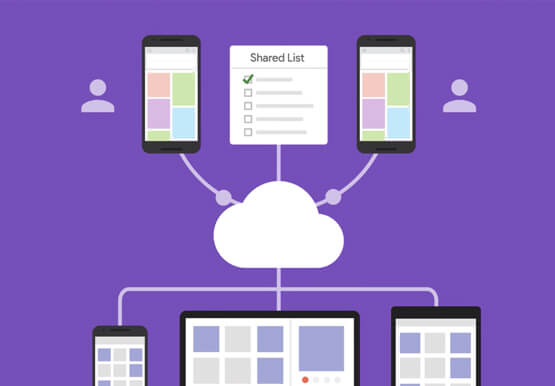

What’s Google Cloud Firestore Database and What are its Benefits for Business and Developers?
Cloud Firestore is a NoSQL document database that simplifies storing, syncing, and querying data for your mobile and web apps at global scale. Cloud Firestore is a fast, fully managed, serverless, cloud-native NoSQL document database that simplifies storing, syncing, and querying data for your mobile, web, and IoT apps at

The Future of Cloud Computing: Choose Your Own Services and Payment Options
As the saying goes, “it’s hard to make predictions, especially about the future.” Some organizations find it challenging to predict what cloud resources they’ll need in months or years ahead. Every organization is on its own unique cloud journey. To help, we’re developing new ways for customers to consume and

Learning Should be Your Resolution for 2022: Register for Google Cloud Skills Boost
Start your 2022 New Year’s resolutions by learning at no cost how to use Google Cloud with the following training opportunities: 30 day access to Google Cloud Skills Boost Register by January 31, 2022 and claim 30 days free access to Google Cloud Skills Boost to complete the Getting Started with

The Cloud-First Imperative To Accelerate Digital Transformation
In a study of 360 business and technology decision makers and influencers from Indian enterprises, conducted by Forrester Consulting, it is revealed that public cloud adoption in India is on the rise with 2 in 3 organizations planning to increase their cloud spending by 5% or more in the next
