





Delivering 10X Improvement to Risk and Regulatory Reporting Through Cloud and AI
4986
Of your peers have already read this article.
2:30 Minutes
The most insightful time you'll spend today!
Enterprise agility and the ability to innovate, adapt and respond quickly to the ever-changing risk and regulatory landscape is no longer a choice, but the cornerstone of successful digital transformation and commercial growth. Traditional access to and ways of managing data invariably create challenges in dealing with multiple data repositories, reconciliations, fire-drills, etc.
In response, the move to cloud is increasing significantly. It enables risk analytics and regulatory reporting at scale in a secure environment with data storage, management and encryption capabilities as a standard. In addition, as regulatory reporting requirements become more granular, machine learning can help facilitate new insights and allow for risk management to become more embedded into operational processes.
This webinar will address the day-to-day challenges in risk management and regulatory compliance, while also exploring how technological innovations can provide massive improvements and potential.
Key themes
- Real-life data challenges in the eyes of risk managers: can compliance, fraud detection and identifying liquidity positions be improved through the use of AI?
- Innovative approaches to streamline regulatory reporting to derive deeper customer insights from data at the moment of truth.
- Reimagining operations: how to modernise the data infrastructure to accommodate data explosion, drive flexibility and deliver a more cost effective outcome.

ATB Financial Focuses on Customer Experience with the Speed it Gains in the Cloud
DOWNLOAD CASE STUDY3831
Of your peers have already downloaded this article
5:30 Minutes
The most insightful time you'll spend today!
As senior vice president and head of technology enablement for ATB Financial, Barry Hensch has a mission: creating a seamless experience for the Alberta, Canada-based bank’s nearly 800,000 customers by leveraging the latest digital technology. ATB is a purpose-driven financial institution owned and operated by Alberta’s provincial government, with about C$55.1 billion in assets under management between its banking and wealth-management arms. The full-service bank also boasts a large market share of small businesses in the province.
As part of ATB’s drive to meet its customers’ ever growing expectations, Hensch has embarked on an ambitious digital transformation strategy, migrating the bank’s vast SAP infrastructure onto Google Cloud. The move takes hardware capacity and maintenance concerns entirely off his plate so he and his team can pursue innovations that bring true value to the customer.
Hensch recently discussed ATB’s cloud journey, the new capabilities the cloud has opened up for ATB, and where the company plans to go using Google Cloud’s artificial intelligence and machine learning capabilities.
What Swiggy and You Can Learn From This Company’s Use of ML to Engage Customers

9637
Of your peers have already read this article.
1:45 Minutes
The most insightful time you'll spend today!
The app economy has enabled a huge range of unique business models to flourish. One such model is online food ordering and delivery services, in which apps leverage geo-location data to aggregate local food choices and offer personalized options to consumers.
A leading company in this space is Just Eat. Launched in the UK in 2001 with a vision of ‘serving the world’s greatest menu. Brilliantly.’ The company has capitalized on the popularity of online food delivery and grown its presence across 12 markets.
Just Eat acts as an intermediary between take-out food outlets and hungry customers, giving local restaurants access to a broader base of potential diners, while providing consumers with an easy and secure way to order and pay for food from their favourite restaurants.
Today the company helps 27 million customers find food from more than 112,000 restaurants—everything from homemade Italian pasta, to Chinese noodle bowls, to fish-and-chips.
Data is the fuel of Just Eat’s rapid growth, but it wasn’t always looked at that way. In its early days, Just Eat struggled with the deluge of information and faced fragmentation across its systems. In fact, the company realized its legacy data vendor wasn’t capable of ingesting 90 percent of the data produced by its food platform. This was incredibly frustrating for Just Eat’s analysts and data scientists, who had to waste time cleaning up sources instead of leveraging the data to create a better user experience.
Just Eat turned to Google Cloud, and now uses machine learning (ML) to power sophisticated consumer recommendations on both its app and website. It also makes heavy use of features offered by Google Cloud Platform, including BigQuery for running analytics on its customer data set and Cloud Pub/Sub for messaging app users with relevant offers in real-time.
Having all of Just Eat’s data in one platform has translated into real value for its customers. With Google Cloud tools, Just Eat has created its own proprietary Customer Ontology framework, which today contains 5.5 billion features that better understand consumers’ behavior and food habits, and provides insights into previous visits.
Just Eat recently created an “Adventurous Index” to map its customers according to their ordering habits, enabling them to tailor their marketing and user experiences. For example, mid-adventurous customers are shown a choice of restaurants that serve their most ordered cuisine, while adventurous customers can choose from restaurants that serve a wider variety. This not only has prompted consumers to be more adventurous with their choices, but also has led to more business at a more diverse set of restaurants.
Matt Cresswell, Director of Customer Platforms at Just Eat said that Google Cloud has become integral to its product delivery: “Consumer food choice is a hugely nuanced topic. We know that individuals have their own unique journeys when they use Just Eat. We’ve sought to create a truly one-to-one relationship with every customer. The changes we’ve made to the platform mean they can access the dishes they enjoy at the touch of a fingertip, and find inspiration to discover new dishes they’ll love. We’re grateful to Google Cloud for helping us support our customers on their culinary explorations.”
New Histogram Features in Cloud Logging Make it Easier to Track Log Volumes, Errors and Anomalies!

3398
Of your peers have already read this article.
2:30 Minutes
The most insightful time you'll spend today!
Visualizing trends in your logs is critical when troubleshooting an issue with your application. Using the histogram in Logs Explorer, you can quickly visualize log volumes over time to help spot anomalies, detect when errors started and see a breakdown of log volumes. But static visualizations are not as helpful as having more options for customization during your investigations.
That’s why we’re excited to announce that we recently added three new query controls along with separate colors for log severity to the histogram. These new features make it even easier to refine and analyze your logs by time range. The new histogram controls help find logs before or after the current period, jump to a specific time range represented in a histogram bar and zoom in/out of the current time window in the histogram.
Histogram colors
The histogram now makes it easier to view the breakdown of logs by severity with the introduction of color coding. For example, the severity colors make it easy to spot an increasing number of errors even when the volume of requests is relatively constant. Looking at the histogram below, the red vs blue shading makes it clear that there has been an increase in overall log volume and provides a visual breakdown of errors within that log volume.

Pan left/right to scroll through time
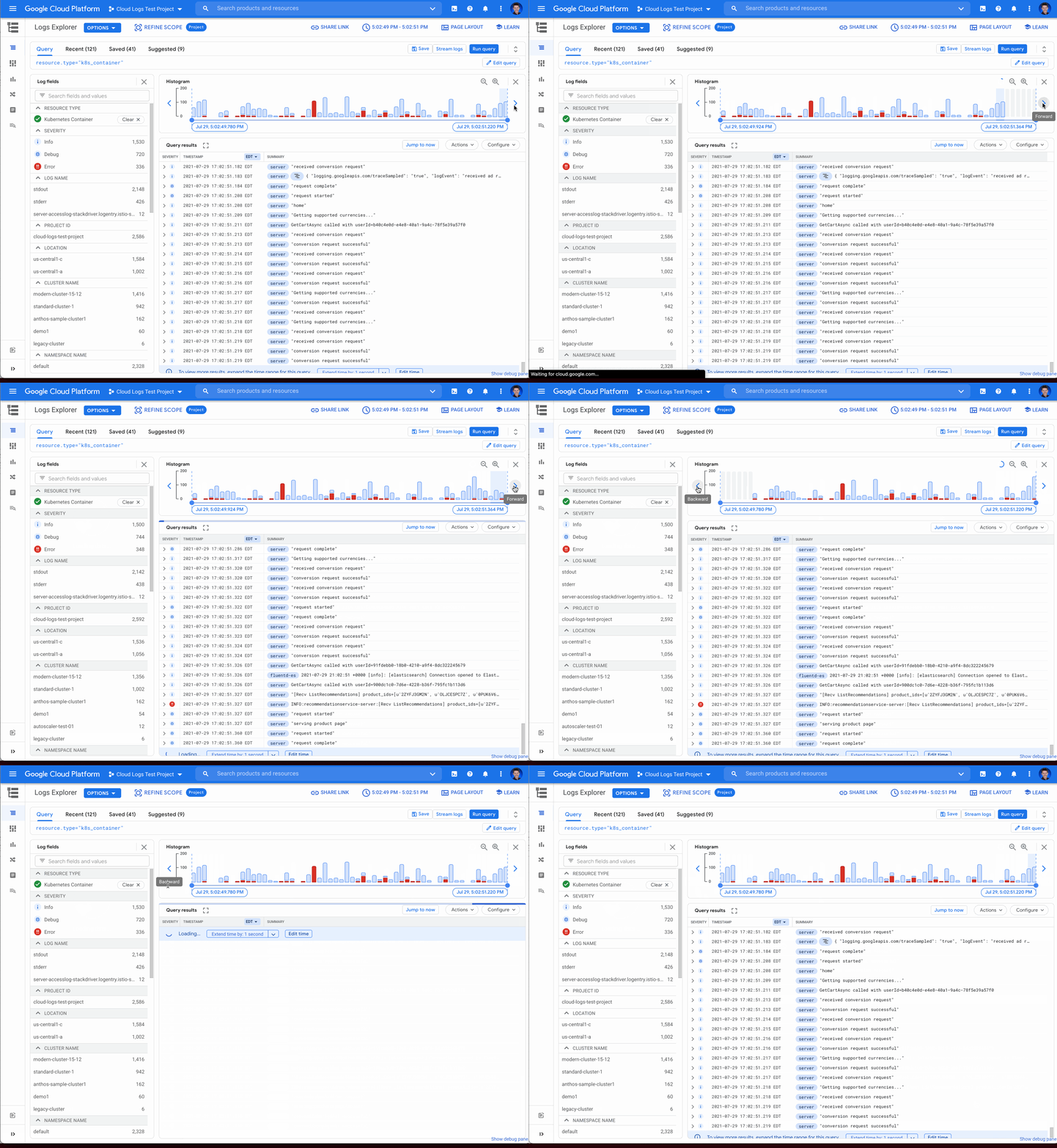
Sometimes in your troubleshooting journey, you may want to look at the logs directly before or after the current set of logs. Perhaps there was an unexpected spike in errors at the beginning of the time range and you need to see the logs in the time period directly preceding the current time range. Pressing the left arrow on the left side of the histogram shifts the time range earlier while the arrow on the right side of the histogram shifts the time range ahead. Either arrow will refine the time range in the query and rerun the query to return the logs in the new time range.
Zooming in or out
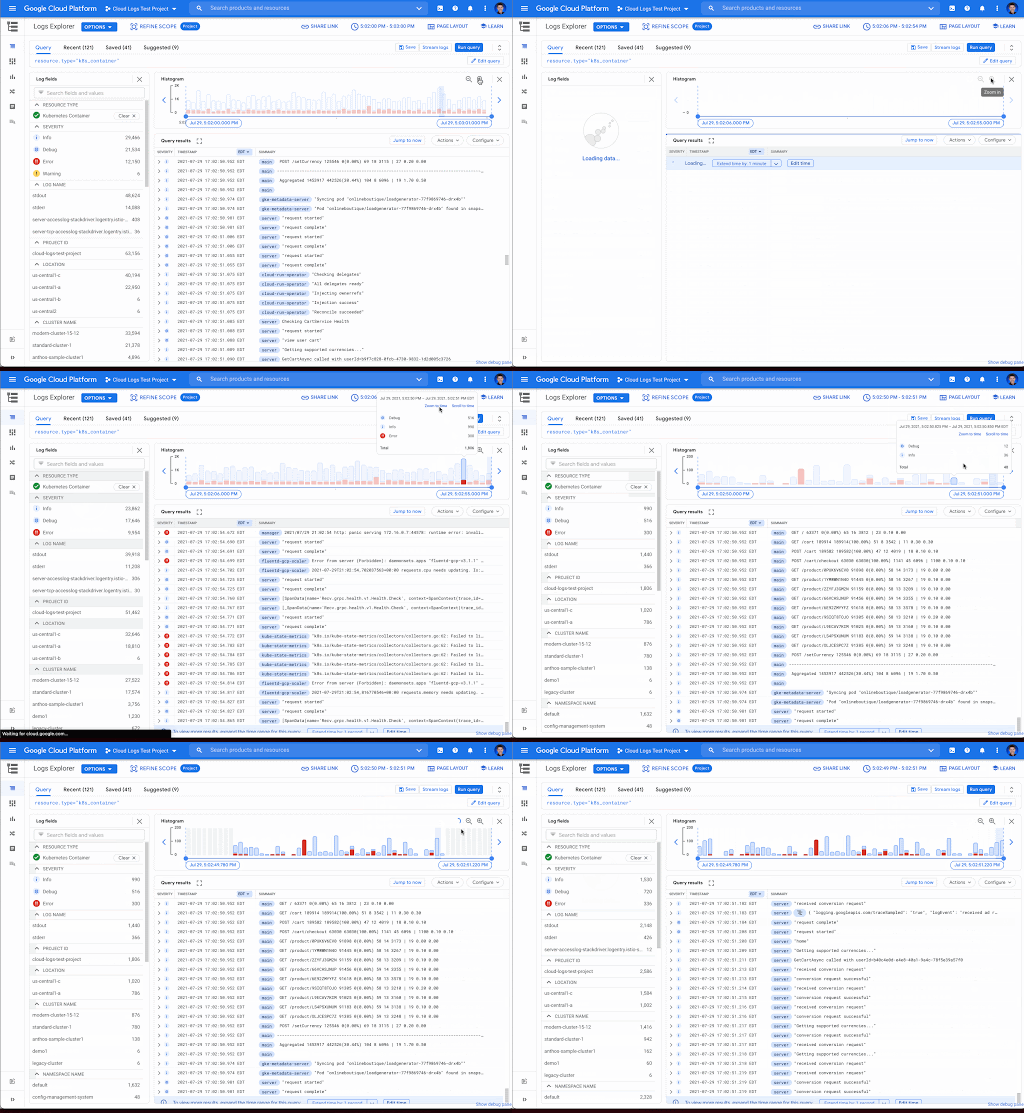
Zooming in or out from a given time range may be useful to visualize fine-grained details or a broader trend Clicking the zoom in or out icons in the upper right corner of the histogram refines the time range in the query and then reruns the query, returning the logs in the newly defined time range.
Scrolling to time
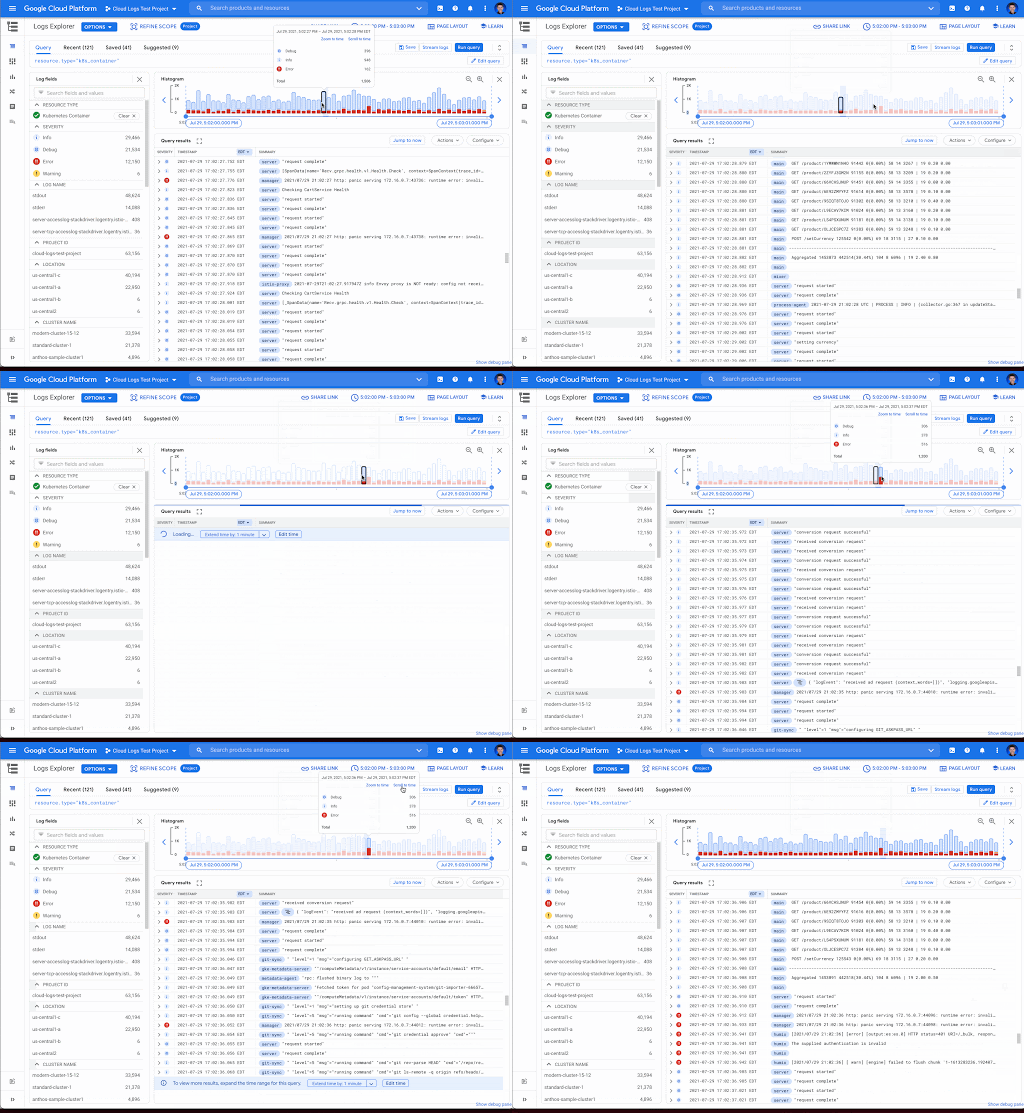
If you see a large spike in logs volume in the histogram, it’s useful to quickly review the logs generated during that spike. Clicking on the histogram bar that contains the spike now scrolls you to the logs generated during that time period.
Where to find the histogram
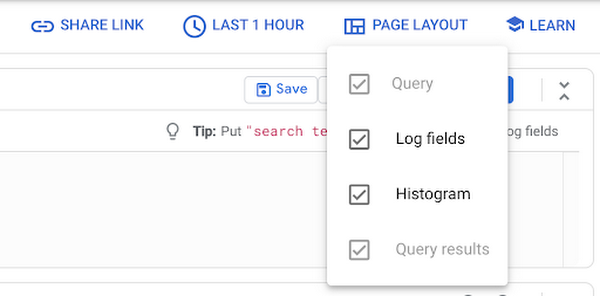
The histogram is a panel in Logs Explorer that can be displayed or hidden using the controls in the Page Layout menu. When you no longer want to display the histogram, click the “X” button in the upper right corner to quickly close it. To open it again, use the same Page Layout menu to enable the histogram display.
Get started with the histogram
These improvements move the histogram from a utility for visualization to an integral part of the troubleshooting journey. We are continuously working to launch new features that make Cloud Logging the best place to troubleshoot your Google Cloud logs. If you are not already a Cloud Logging user, review this getting started documentation or watch a quick video on troubleshooting services on Google Kubernetes Engine (GKE) to learn more. If you have specific questions or feedback, please join the discussion on our Google Cloud Community, Cloud Operations page.

3829
Of your peers have already downloaded this article
2:30 Minutes
The most insightful time you'll spend today!
Every business is a digital business. That’s what you’ll hear from technology folks these days. But, what exactly is a digital business? How does one define it?
Simply put, digital businesses are those that have thoroughly capitalized on the opportunity to connect people with technology. There are four parts to a digital business:
Real-time data and analytics: To stay relevant in the age of Big Data, businesses must analyze copious amounts of data to derive actionable insights—both from historical data, and in real time.
Fast, flexible application development: Rapid and continuous delivery of software to your stakeholders is no longer optional. Businesses need platforms for their applications strategy — from using container-based development tools to fully managed serverless platforms.
Secure, reliable infrastructure: How secure is your on-prem datacenter? What happens if it goes down? How many dedicated security engineers do you have on staff? What’s the cost of a system upgrade? What digital businesses need is a secure and reliable infrastructure that can power their applications.
Constant collaboration and productivity: Digital businesses are designed to keep teams seamlessly connected not only to each other, but also to the applications that keep the company running. This enables everything and everyone to work together, no matter where they sit—across the office or across the ocean.
Download this infographic to know more.
7 Common Myths About Cloud Computing That Must Be Banished

4270
Of your peers have already read this article.
3:15 Minutes
The most insightful time you'll spend today!
No discussion about the emerging technologies that are shaping our future is complete without a mention of cloud computing. Unfortunately, too many of these discussions are filled with misinformation and fear-mongering. And while it’s always advisable to approach new technologies with a degree of healthy skepticism, this should always be backed by facts.
Here are seven of the most common myths about cloud computing that you shouldn’t take at face value:
An On-Premises Data Centre is More Secure Than the Cloud
One of the first concerns cloud skeptics cite as the case against it is the possibility of a data breach or cyber attack. However, the overwhelming majority of professionals agree that cloud computing offers much more security than an on-premises data centre. Not only do cloud solutions come with the requisite infrastructure, but they’re also maintained by some of the finest security personnel in the world, who work for cloud service providers.
Cloud Computing is Too Expensive
The concerns surrounding the cost of cloud computing have been blown vastly out of proportion. While the cost of implementation varies from one business to another, cloud computing’s ‘pay-as-you-go’ model helps prevent unnecessary spending on infrastructure. In fact, some providers offer users their service without any up-front costs or termination fees. However, it is up to an enterprise to evaluate whether this model will be more cost-effective for their requirements, as opposed to building a data centre.
Migration to the Cloud Will Result in Extended Downtime
There’s a reason that the old adage ‘Time is money’ is as popular as it is. Irrespective of its industry, geography, size or nature, no organisation can afford more than the bare minimum downtime. However, cloud migration doesn’t have to be synonymous with lost time and money. In fact, most popular cloud service providers offer seamless, live migration, and may only result in negligible downtime where the existing servers are extremely outdated.
My Business is Too Small for Cloud Computing
Cloud computing was once thought of as the prerogative of big companies that have massive computing power and infrastructure needs. However, a quick glance through the pros and cons of the technology shows that this isn’t the case. In fact, small and medium organisations might just find it to be more useful. Not only does cloud adoption save the cost of building a data centre, but also the human resource expenditure that comes with having to maintain it. Moreover, offerings like Google Apps for Business consolidate a multitude of services into one platform, making them easier to implement and maintain.
Cloud Computing is Only Good for Storage and Analytics
Data storage and analytics are among the cloud’s most popular uses. However, this doesn’t mean that the technology is only of use to technology and data science departments. Figures from 2011 showed that the bulk of cloud spending in the Asia Pacific region is concentrated in the functions of customer service, marketing, sales, manufacturing and human resource management. Seamless flow of accurate and up-to-date information is department-agnostic, and if leveraged in the right way, can be a game-changer for every organisation.
I Won’t Have Enough Control on the Cloud
Cloud solutions aren’t as rigid as most people assume. Between the public, private and hybrid cloud, there are a host of options that businesses can choose from when it comes to cloud migration. Each of these offers a different degree of customisation and flexibility, which companies can pick from, on the basis of their requirements and skill level.
Cloud Computing is Digital Transformation
Deploying cloud solutions can put organisations on the fast track to success in the digital age. However, it is far from the only component that is needed to make the big transition. It’s not unheard of for vendors and IT professionals to make cloud computing seem like the be-all and end-all solution to all of a business’ digital woes. This is why, senior management should have a clearly defined purpose and realistic expectations in mind before migrating to the cloud.
More Relevant Stories for Your Company

Consumption Packs Shorten’s Customers Transition to Google Cloud and Boosts Partners’ Financial Growth
When we launched Partner Advantage, we committed to making it predictable and easy for partners to drive business with us. Since launch, those commitments have been validated by channel experts like CRN, which gave Partner Advantage a 5-Star award for 2022, and by the fact that our partners have seen

Know the Leaders of Google Cloud Public Sector Community
At Google Cloud, being a strategic partner is part of our DNA. Whether it’s listening closely to our customers, helping to build team skills for innovation or simply being there (since we know the cloud is 24/7), we get excited about working hands-on with customers to deliver new solutions. As

Accelerating AI Inference at Scale: Introducing Google Cloud TPU v5e
Google Cloud’s AI-optimized infrastructure makes it possible for businesses to train, fine-tune, and run inference on state-of-the-art AI models faster, at greater scale, and at lower cost. We are excited to announce the preview of inference on Cloud TPUs. The new Cloud TPU v5e enables high-performance and cost-effective inference for

Explore The New Era of Flexibility: Streamlined AWS-to-Google Cloud Migration
As an IT leader, you’re asked to do it all: innovate and optimize your tech stack for business outcomes — all while being secure and compliant. It takes heroic efforts to achieve innovation and progress while also tightening budgets and teams. This is why many of you are considering migrating applications
