






CFO Watch: A Handy Guide to Financial Governance in the Cloud
READ FULL INTRODOWNLOAD AGAIN3949
Of your peers have already downloaded this article
4:30 Minutes
The most insightful time you'll spend today!
Largest Beauty Retailer in the US Powers Digital Transformation with Google Cloud Smart Analytics

9244
Of your peers have already read this article.
3:15 Minutes
The most insightful time you'll spend today!
Digital technology offers increasing flexibility and choice to consumers. As a result, the retail industry is dramatically shifting toward more tailored and personalized experiences for shoppers, and businesses are rethinking how they deliver value to customers.
This couldn’t be more true for the beauty retailing industry where leading companies are turning to digital technology to create customized shopping experiences.
At Google Cloud, we’re particularly excited about our work with Ulta Beauty, the largest beauty retailer in the United States with more than 1196 stores in all 50 states, and how the company is using Google Cloud technology solutions to power personalization and redefine beauty retailing.
Established in 1990, Ulta Beauty has had incredible success as a company, and as customers become more discerning and curious about their purchases, the company is finding new ways to meet their changing needs.
Recently, leaders at Ulta Beauty recognized a huge opportunity to complement and enhance the shopping experience by helping beauty enthusiasts navigate through more than 500 brands and 25,000 products carried in their stores and online channel.
They decided to leverage the data from Ulta Beauty’s successful Ultamate Rewards loyalty program to create and offer more unique and personalized user experiences.
With more than 30 million members generating data through sales, transactions, product reviews, and social media engagement, Ulta Beauty’s Loyalty Program creates a comprehensive data set, and the company sought the right technology partner to help organize, analyze and transform that data into valuable insights for its customers.
Ulta Beauty’s leaders knew they had an opportunity to leverage data analytics and machine learning to reach customers in new ways, enhance the guest experience, and continue to grow their active loyalty member base. After considering a number of cloud providers, they chose to expand their existing partnership with Google Cloud.
“Google Cloud listened to our needs and worked in tandem with our engineering team to address our challenges,” said Michelle Pacynski, vice president of digital innovation at Ulta Beauty. “The ease of working with the Google Cloud team and their breadth of experience made the decision a no-brainer, laying the foundation for a great partnership.”
In 2019, Ulta Beauty announced it was working with Google Cloud Platform to unify and organize its data, using:
- BigQuery to perform data analysis and generate dynamic content, personalized product recommendations, and event-based messages for customers.
- Cloud Storage to provide highly available, secure, resilient and cost-effective access to data across the entire enterprise.
- Compute Engine for the high-performance scalability needed to grow with customer demand while painlessly migrating existing applications to the cloud.
- Anthos to build a hybrid cloud foundation that allows their applications to take advantage of all this data, combining the power and flexibility of GKE with the ability to leverage their existing investment in secure infrastructure on-premises.
Our partnership with Ulta Beauty has enabled increased engagement with customers in store and online, and the creation of new tools and capabilities, including a new Virtual Beauty Advisor tool to deliver tailored recommendations and help shoppers choose the right products, and a Customer Conversation Platform that’s enabling deeper connections with guests, ultimately driving customer loyalty.
“It’s been a really efficient process so far due in part to the ease of working with the Google team,” said Michelle Pacynski, vice president of digital innovation at Ulta Beauty. “They’re experienced, approachable, and their can-do style makes for a great partnership. They listened to our needs and worked in tandem with our engineering team, figuring things out, and getting it done.”
Google Cloud’s Role in Minimizing Memory Errors Impact for SAP Customers
3734
Of your peers have already read this article.
2:00 Minutes
The most insightful time you'll spend today!
Every cloud system begins with high-quality hardware infrastructure. Sometimes, however, hardware breaks — and when it happens, our most important goal is to minimize the impact on our customers and their cloud workloads.
Memory errors are the most common type of hardware failure, and they’re also one of the most challenging in terms of their impact on production workloads and system reliability. That’s why we’re excited to share what Google Cloud has been doing to minimize the impact of memory errors. If your business runs SAP HANA in the cloud, this is an important innovation — one that Google Cloud is proud to deliver to our customers.
Memory errors: A big problem with a long history
First things first: Memory errors are a high priority because they happen often. And when they happen, the disruption can have far-reaching effects on your customers and your business.
In 2009, Google Cloud published the first major study on memory reliability. We found an average error rate of over 8% per year in DIMM modules installed in production systems. Given that each generation of DDR RAM packs more capacity into smaller packages, it’s safe to think that memory hardware has become less reliable since then.
Memory error impacts: They could be worse, but they’re far from good
What happens when a system detects a bad segment in a DIMM module? While data loss or corruption from memory errors is not common, some errors are correctable but some are not, potentially resulting in a critical system failure..
Modern CPUs are equipped with error-correcting memory features and are very good at correcting simple errors with ECC (Error Correction Code). The challenge is that most of the software that runs on a host system — whether it’s a hypervisor, a virtual machine, an operating system, a database or an application — will crash instantly when it encounters an uncorrectable memory error. In a cloud environment, this kind of crash can take down cached data and even data saved to a local SSD. The crashed applications will recover, but the process means several minutes of downtime. The more data you have, the longer this process will take.
Sometimes, that’s merely an inconvenience. Other times, it’s a very big deal. A Google Cloud customer running business-critical SAP applications and an in-memory HANA database might measure downtime costs well over $10,000 per minute in lost revenue and other direct impacts. Many HANA databases load into terabytes of memory, and it can take an hour or longer to get everything restarted and back to normal after a crash. For SAP HANA, a fast recovery with up to 10 minutes of downtime requires a redundant replica provisioned all the time, doubling the cost.
And statistically speaking, when a HANA instance occupies almost all of the memory on a host system, it’s also the most likely application to stumble across a memory error. You can see why this would be a problem.
The ‘victim neighbor’ VM challenge
There’s a final problem to consider when a memory error takes out production applications: what we call the “victim neighbor” issue.
In any cloud, a single physical host is a multi-tenant environment that might run dozens of VMs, potentially owned by dozens of different customers. A memory error won’t just crash the VM actually using the bad section, it will crash every VM running on the system. That’s a standard VM response to memory errors on a host system, and it will happen to any VM architecture available on the market today to avoid memory corruption.
Overall, this “victim neighbor” effect accounts for more than 90% of the VMs that get knocked down by a memory error on a physical server. That’s a huge blast radius for such a common problem.
A practical solution to memory-error impacts
You can see why managing this problem is a big deal for Google Cloud. While we know that some failures are inevitable, we have developed another way to tackle the problem. Google Cloud already maintains some unique and valuable tools, such as Live Migration, that help our customers minimize unplanned downtime.When we integrate these tools with recent work that leverages error-handling capabilities built into CPUs (courtesy of Intel) and into certain applications (in particular, SAP HANA), we get a solution that dramatically reduces downtime and disruptions related to memory errors — in many cases, to the point where customers won’t even know there was a problem.
The Google Cloud solution: Memory poisoning recovery
At a big picture level, we refer to our solution as Memory Poisoning Recovery (MPR). It combines some existing Google Cloud capabilities, some new capabilities, and some important third-party capabilities at the CPU (Intel) and application (SAP HANA) levels. MPR can be broken down into two main processes:
Memory Error Isolation
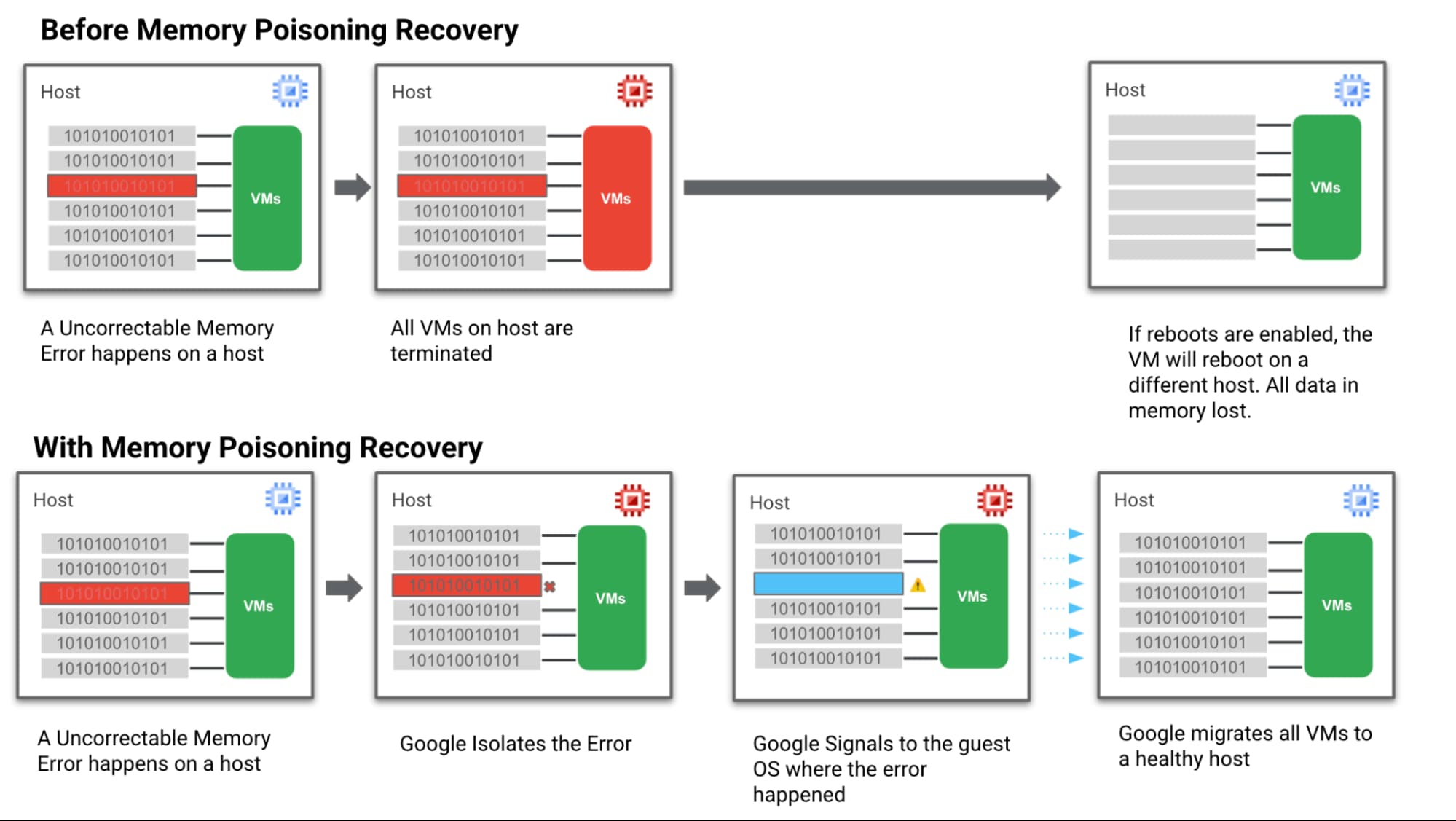
- Step 1: We hardened our VM technology to be more robust against memory errors. We intercept and analyse the memory error coming from the system. Then we flag the signaled region of a memory DIMM with an uncorrectable error as “poisoned”.
- Step 2: Then we trigger processes to keep track of these “poisoned” regions and the VMs they affect so they can’t affect data integrity.
Memory Error Recovery
- Step 3: Then we notify the Guest OS & the MCE-aware applications that a memory error has been recorded, in a manner that allows the applications to execute application relevant memory error handling.
- Step 4: At the same time we communicate with Google Cloud Live Migration to begin moving guest VMs off the affected host. This ensures customers are running on a healthy host which reduces the probability of more uncorrectable errors happening and avoids further downtime.
Below is a simple visual of how this all works:
How MPR makes life better for customers
Let’s look again at the different groups of Google Cloud customers involved in a memory error scenario and how we can help them achieve a happier ending after a crash — starting with the customer running the VM and application that actually triggered the memory error.
Customer Group: MCE-Aware SAP HANA with Fast Restart enabled on a VM directly affected by a memory error.
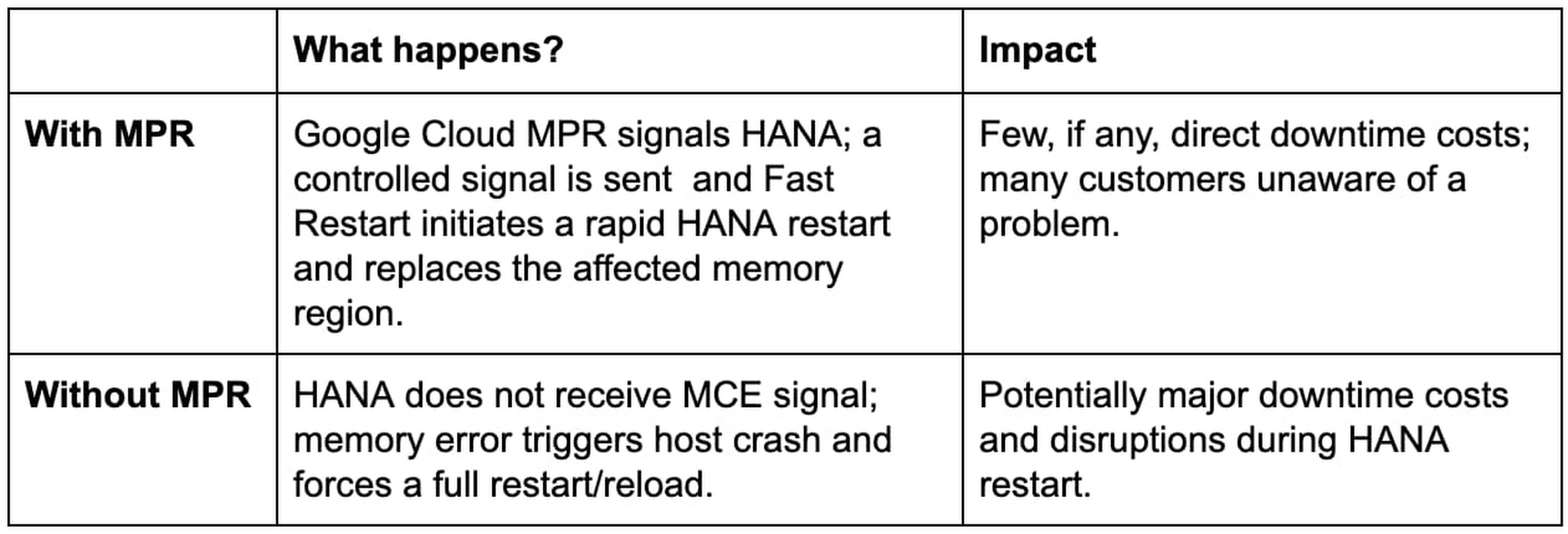
Customer Group: Customers running other, non MCE Aware applications on a VM directly affected by a memory error

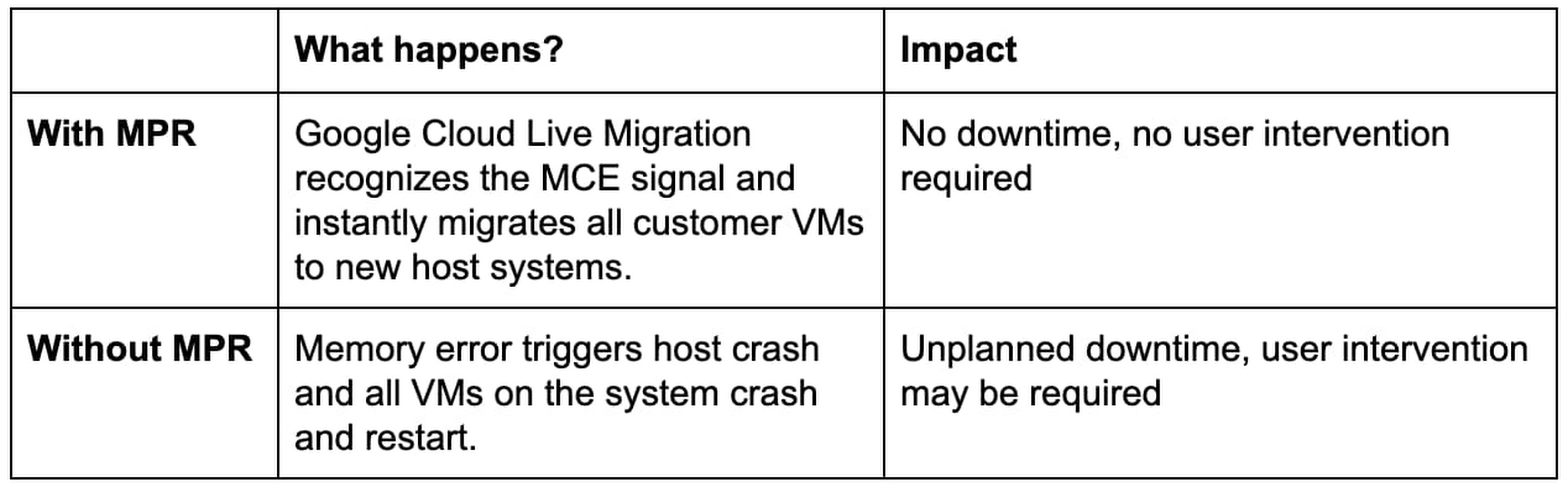
Next, our “victim neighbors” group probably won’t even know there was a problem with the host system. Google Cloud Live Migration will move them to a new host, instantly and automatically, and avoid the crash-and-restart scenario.
Customer Group: Customers running other, any application on a VM not directly affected by a memory error
Simple steps for taking advantage of MPR
Our MPR capabilities will be available on our Google Cloud memory-optimized Compute Engine second generation instances in Q4 of 2021. We’ll continue to roll out the capability during the months ahead to additional instances and look for new ways to work with applications that adopt a MCE Aware architecture.
Most customers in the “victim neighbor” category will not need to lift a finger to experience the benefits. By marrying our Live Migration feature to some awareness of those MCE signals, we ensure that it hears the alarm first and gets a critical head start on the migration process before issues begin with the guest VMs. Our customers land safely on a new host, and their applications keep running.
For our SAP customers running HANA, MPR is all about protecting against loss. Unplanned downtime for a HANA environment is incredibly expensive, the recovery process from a hard crash is extremely long, and the business disruptions can be truly damaging to the business. Thanks to MPR, all of that cost and worry can get compressed almost to nothing — with Fast Restart reducing what can be an hour or more of downtime to a matter of seconds.
But our SAP customers have to take a critical first step to claim these benefits. Fast Restart is a crucial piece of the MPR solution, and it is not enabled by default. Configuring your SAP HANA instance for Fast Restart involves changing a few configuration settings; the process is fast, easy, and doesn’t involve risk.
Finally, if you’re not running your workloads — SAP or otherwise — on Google Cloud, consider the benefits of running on a cloud that mitigates a hardware reliability issue affecting businesses of every size and industry. And consider the value of tools like Live Migration that already help Google Cloud customers improve uptime and reduce risk.
Hardware failures happen, and they probably always will. But we’re proving how valuable it can be to avoid the bad things that usually happen when memory failures occur. Right now, only Google Cloud has a practical solution to this very difficult problem.
Learn more about Fast Restart for SAP HANA, Live Migration and other key Google Cloud capabilities for your SAP environment.
What You Need to Know About Compute Engines

6526
Of your peers have already read this article.
1:30 Minutes
The most insightful time you'll spend today!
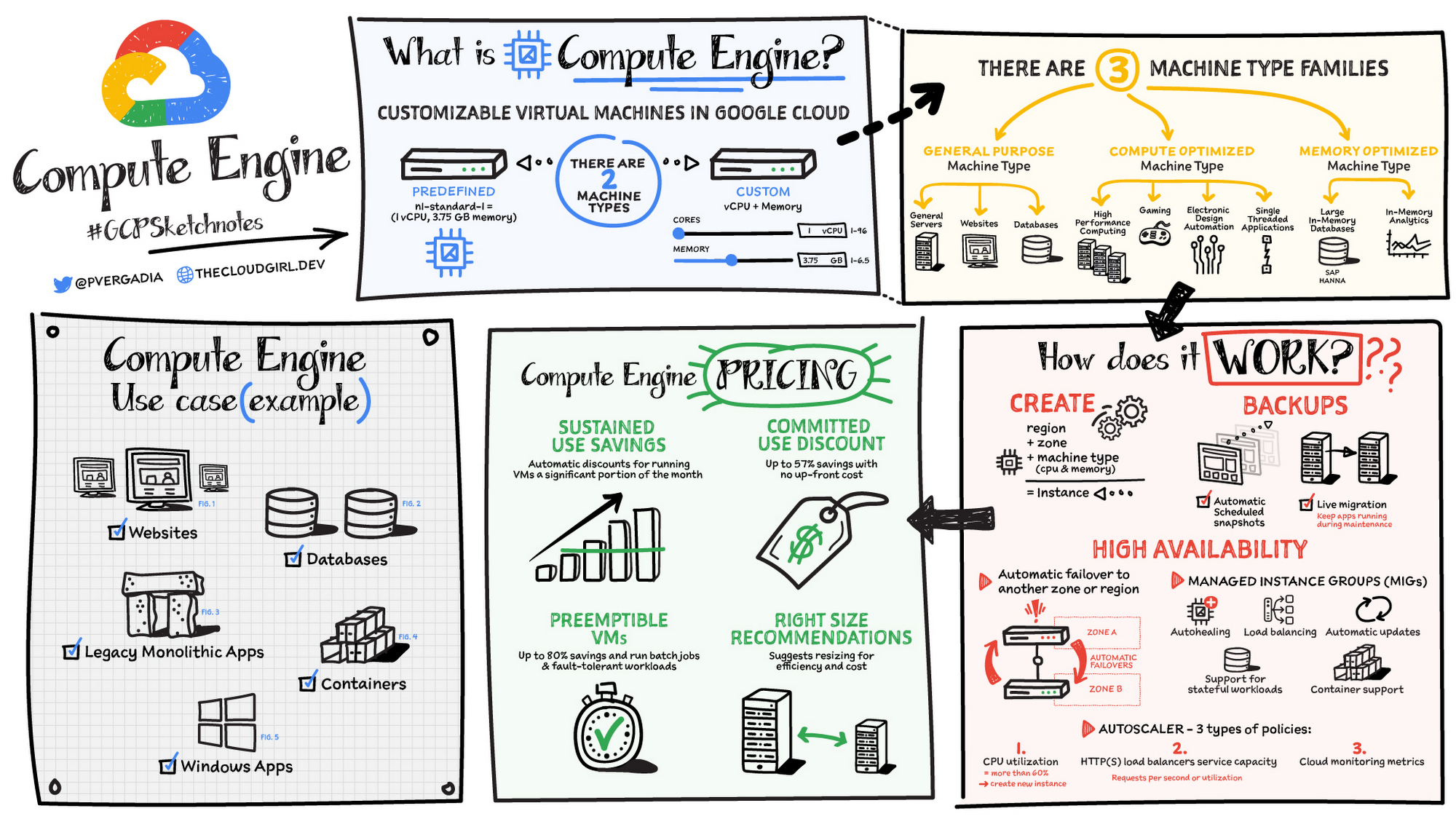
Compute Engine is a customizable compute service that lets you create and run virtual machines on Google’s infrastructure. You can create a Virtual Machine (VM) that fits your needs. Predefined machine types are pre-built and ready-to-go configurations of VMs with specific amounts of vCPU and memory to start running apps quickly. With Custom Machine Types, you can create virtual machines with the optimal amount of CPU and memory for your workloads. This allows you to tailor your infrastructure to your workload. If requirements change, using the stop/start feature you can move your workload to a smaller or larger Custom Machine Type instance, or to a predefined configuration.
Machine types
In Compute Engine, machine types are grouped and curated by families for different workloads. You can choose from general-purpose, memory-optimized, compute-optimized and accelerator-optimized families.
- General-purpose machines are used for Day-to-day computing at a lower cost and for balanced price/performance across a wide range of VM shapes. The use cases that best fit here are web serving, app serving, back office applications, databases, cache, media-streaming, microservices, virtual desktops, development environments.
- Memory-Optimized machine are recommended for ultra high-memory workloads such as in-memory analytics and large in-memory databases such as SAP HANA
- Compute-Optimized machines are recommended for ultra high performance workloads such as High Performance Computing (HPC), Electronic Design Automation (EDA), gaming, video transcoding, single-threaded applications.
- Accelerator-Optimized machines are optimized for high performance computing workloads such as Machine learning (ML), Massive parallelized computations and High Performance Computing (HPC)
How does it work?
You can create a VM instance using a boot disk image, a boot disk snapshot, or a container image. The image can be a public operating system (OS) image or a custom one. Depending on where your users are you can define the zone you want the virtual machine to be created in. By default all traffic from the internet is blocked by the firewall and you can enable the HTTP(s) traffic if needed.
Use snapshot schedules (hourly, daily, or weekly) as a best practice to back up your Compute Engine workloads. Compute Engine offers live migration by default to keep your virtual machine instances running even when software or hardware update occurs. Your running instances are migrated to another host in the same zone instead of requiring your VMs to be rebooted.
Availability
For High Availability (HA) Compute Engine offers automatic failover to other regions or zones in event of a failure. Managed instance groups (MIGs) help keep the instances running by automatically replicating instances from a predefined image. They also provide application based autohealing health checks. If an application is not responding on a VM, the auto healer automatically recreates that VM for you. Regional MIGs let you spread app load across multiple zones. This replication protects against zonal failures. MIGs work with load balancing services to distribute traffic across all of the instances in the group.
Compute Engine offers autoscaling to automatically add or remove VM instances from a managed instance group based on increases or decreases in load. Autoscaling lets your apps gracefully handle increases in traffic, and it reduces cost when the need for resources is lower. You define the autoscaling policy for automatic scaling based on the measured load, CPU utilization, requests per second or other metrics.
Active Assist’s new feature, predictive autoscaling, helps improve response times for your applications–When you enable predictive autoscaling, Compute Engine forecasts future load based on your Managed Instance Group’s (MIG) history and scales it out in advance of predicted load, so that new instances are ready to serve when the load arrives. Without predictive autoscaling, an autoscaler can only scale a group reactively, based on observed changes in load in real time. With predictive autoscaling enabled, the autoscaler works with real-time data as well as with historical data to cover both the current and forecasted load. That makes predictive autoscaling ideal for those apps with long initialization times and whose workloads vary predictably with daily or weekly cycles. For more information, see How predictive autoscaling works or check if predictive autoscaling is suitable for your workload, and to learn more about other intelligent features, check out Active Assist.
Pricing
You pay for what you use. But you can save cost by taking advantage of some discounts! Sustained use saving are automatic discounts applied for running instances for a significant portion of the month. If you know your usage upfront, you can take advantage of committed use discounts which can lead up to significant savings without any upfront cost. And by using short lived preemptive instances you can save up to 80%, they are great for batch jobs and fault tolerant workloads. You can also optimize resource utilization with automatic recommendations. For example if you are using a bigger instance for a workload that can run on a smaller instance you can save costs applying these recommendations.
Security
Compute Engine provides you default hardware security. Using Identity and Access Management (IAM) you just have to ensure that proper permissions are given to control access to your VM resources. All the other basic security principles apply, if the resources are not related and don’t require network communication amongst themselves, consider hosting them on different VPC networks. By default, users in a project can create persistent disks or copy images using any of the public images or any images that project members can access through IAM roles. You may want to restrict your project members so that they can create boot disks only from images that contain approved software that meet your policy or security requirements. You can define an organization policy that only allows Compute Engine VMs to be created from approved images. This can be done by using the Trusted Images Policy to enforce images that can be used in your organization.
By default all VM families are Shielded VMs. Shielded VMs are virtual machine instances that are hardened with a set of easily configurable security features to ensure that when your VM boots, it’s running a verified bootloader and kernel — is the default for everyone using Compute Engine, at no additional charge. For more details on Shielded VMs refer to the documentation here.
For additional security, you also have the option to use Confidential VM to encrypt your data in use, while it’s being processed in Compute Engine. For more details on Confidential VM refer to the documentation here.
Use cases
There are many use cases Compute Engine can serve in addition to running websites and databases. You can also migrate your existing systems onto Google Cloud, with Migrate for Compute Engine, enabling you to run stateful workloads in the cloud within minutes rather than days or weeks. Windows, Oracle or VMware applications have solution sets enabling a smooth transition to Google Cloud. To run windows applications either bring your own license leveraging Sole-tenant nodes or using the included licenced images.
Conclusion
Whatever your application use case may be, from legacy enterprise applications to digital native applications, Compute Engine’s families will fit it. For a more in-depth look into Compute Engine check out the documentation.
For more #GCPSketchnote, follow the GitHub repo. For similar cloud content follow me on Twitter @pvergadia and keep an eye out on thecloudgirl.dev
Medical Data Breakthrough: Google Aids PicnicHealth’s Growth

4879
Of your peers have already read this article.
3:30 Minutes
The most insightful time you'll spend today!
In the fragmented world of U.S. healthcare, patients often have to wait in line or on hold, navigate multiple patient portals, and fill out numerous request forms—all in pursuit of their own medical history. Healthcare technology startup PicnicHealth is on a mission to put control back with the patient, where it belongs.
PicnicHealth’s growth, from closing successful venture rounds to winning machine learning (ML) competitions, speaks to not only improvements and opportunities in healthcare, but also how startups are leveraging Google Workspace and Google Cloud services to accelerate momentum.
The company does the heavy lifting of collecting records and leverages human-in-the-loop ML to transcribe and validate them with an abstraction team of medical professionals. The records are then structured into a complete medical history that patients can access and share with providers to get better care.
But PicnicHealth helps to improve patient health on more than one front. It allows patients to contribute their data to de-identified medical research, building high-quality, anonymized datasets that researchers and life sciences companies can use to better understand disease progression and treatment in the real world.
Google Workspace has been part of PicnicHealth from day one, helping the founders collaborate and shape the company’s vision using cloud-synced documents and spreadsheets to collaborate and model predictions. “I’ve had a Gmail account since 2006, and in college 100% of people worked out of Google Docs. Workspace continues to be the best choice for online collaboration, and that’s why it’s still the default standard for startups,” said Troy Astorino, CoFounder & CTO of PicnicHealth. “When we started PicnicHealth, my co-founder Noga Leviner was in San Francisco and I was in Southern California, and of course we used Workspace.”
Today, Google Workspace continues to play a central role in the company’s collaboration. “We create design documents in Google Docs, primarily for engineering and product changes, and get really healthy, vibrant discussions through comments,” noted Astorino. “This practice has grown beyond engineering and is used for everything from how the company operates to communication norms.”
Google Workspace offers everything the team needs to collaborate, no matter where employees are. PicnicHealth’s team has spread from San Francisco to being distributed across the country and around the world. Instant collaboration is crucial.
“We work in a complex domain where people need a lot of information to make good decisions,” said Astorino. “Google Workspace allows us to operate in a mode of default transparency, where people can easily get the information they need even if it wasn’t intentionally or directly shared with them. Whether it’s working in Docs or scheduling in Calendar, we can operate much more effectively than we could otherwise.”
By any measure, PicnicHealth’s trajectory is one of record success. The startup is a 2014 alumni of Y Combinator, a program that helped launch household names like Airbnb, DoorDash, and Dropbox. Three years later, the team went on to win the $1 million grand prize at Google’s Machine Learning Competition. And the momentum has continued— PicnicHealth has recently announced a $60 million Series C round, bringing the amount raised to date to over $100 million. With the Series C, PicnicHealth is investing in expanding its reach to more patients across over 30 diseases.
As a healthcare startup, PicnicHealth faced a very particular set of challenges, especially when working with and accessing data. Data fragmentation and interoperability are only some of the challenges of realizing the value of big data in the cloud. The healthcare industry is notoriously difficult to navigate due to sensitive data protection laws and regulations like the Health Insurance Portability and Accountability Act (HIPAA).
PicnicHealth started in the cloud on Amazon Web Services (AWS). However, after migrating over to Kubernetes and facing an expanding list of requirements for HIPAA compliance, the company started to explore alternatives.
“We needed to be HIPAA compliant, which was going to be painful on AWS, and we wanted to get away from managing and operating our own Kubernetes clusters,” recalled Astorino. “We had heard good things about GKE (Google Kubernetes Engine). And particularly valuable for us, — many technical requirements you need for HIPAA compliance are configured by default on Google Cloud.”
PicnicHealth would have had to implement a lot of changes and get specialized instance types to get their existing configuration to work. So, they began experimenting with Google Cloud and discovered a much smoother experience.
“It was a lot easier to manage in terms of product setup and developer experience,” said Astorino. “There is a sane product hierarchy of resources you can access and use through Google Cloud and the relationships between them, from coordinated IAM (identity and access management) to using Google Groups for granting permissions. Overall, it’s cleaner.”
Astorino added that the move has also opened the doors to taking advantage of other services in the Google Cloud ecosystem like Cloud SQL, BigQuery, and Cloud Composer. PicnicHealth also uses Security Command Center because it easily integrates with everything but also helps meet various compliance frameworks’ requirements, providing visibility, near-real-time asset discovery, and security information and event management.
But most importantly, the integrated ecosystem has simplified the work needed for PicnicHealth to create a secure environment for employees to use when working with sensitive medical records while still providing all the tools they need. For example, abstractors not only use Google Workspace but also have Chromebooks because they are easy to manage and secure.
Altogether, Google Cloud helps form a technology stack that has enabled the startup to build a massive labeled dataset containing over 100 million labeled medical data concepts. In turn, it accelerates PicnicHealth’s ability to generate highly-performant AI models and feed other ML pipelines, which has been vital for processing and reviewing data at scale.
To learn more about how Google Workspace and Google Cloud help startups like PicnicHealth accelerate their journey, visit our startups solutions pages for Google Workspace and Google Cloud.
Google Cloud Announces General Availability of BigQuery Row-level Security

6593
Of your peers have already read this article.
3:00 Minutes
The most insightful time you'll spend today!
Data security is an ongoing concern for anyone managing a data warehouse. Organizations need to control access to data, down to the granular level, for secure access to data both internally and externally. With the complexity of data platforms increasing day by day, it’s become even more critical to identify and monitor access to sensitive data. In many cases, sensitive data is co-mingled with non-sensitive data, and access restrictions to sensitive data need to be enabled based on factors like data location or presence of financial information. There may also be nuances where data is sensitive for some groups of users, while for others, it is not.
Today, we’re pleased to announce the general availability of BigQuery row-level security, which gives customers a way to control access to subsets of data in the same table for different groups of users. Row-level security (RLS) extends the principle of least privilege access and enables fine-grained access control policies in BigQuery tables. BigQuery currently supports access controls at the project-, dataset-, table- and column-level. Adding RLS to the portfolio of access controls now enables customers to filter and define access to specific rows in a table based on qualifying user conditions—providing much needed peace of mind for data professionals.
“Our digital transformation and migration of data to the cloud magnifies the business value we can extract from our information assets. However, granular data access control is essential to comply with international regulatory and contractual requirements. BigQuery row-level security helps us comply with data residency and export restrictions,” says Jarrett Garcia, Iron Mountain’s Enterprise Data Platform Senior Director. “It enables us to manage fine-grained access controls without replicating data. What used to take months for approval and access provisioning can now be done more efficiently and effectively. We are looking forward to implementing additional data security capabilities on the BigQuery roadmap to address other critical business use cases.”
How BigQuery row-level security works
Row-level security in BigQuery enables different user personas access to subsets of data in the same table. Customers who are currently using authorized views to enable these use cases can leverage RLS for ease of management. To express the concept of RLS, we have introduced a new entity in BigQuery called row access policy. Row access policies map a group of user principals to the rows that they can see, defined by a SQL filter predicate.
Secure logic rules created by data owners and administrators determines which user can see which rows through the creation of a row-level access policy. The row-level access policies created on a target table by administrators or data owners are applied when a query is run on the table. One table can have multiple policies applied to it.
Below is an example, where row-level access policies have been created to filter data based on users’ “region”.

In the illustrated scenario above, row-level access policies have been created to verify a querying user’s region and to give them access only to the subset of data relevant to that region. Access policies are granted to a grantee list which support all types of IAM principles such as individual users, groups, domains or service accounts. In this example, when a user queries the table, row-level access policies are evaluated to assess which, if any, policies are applicable to that user. The group ‘sales-apac’ is granted access to view a subset of rows where region = ‘APAC’ whereas the group ‘sales-us’ is granted access to view a subset of rows where the region = ’US’. Likewise, users in both groups will see rows in both regions, and users in neither group will not see any rows.
Row-level access policies can also be created using the SESSION_USER() function to restrict access only to rows that belong to the user running the query. If none of the row access policies are applicable to the querying user, the user will have no access to the data in the table.
When a user queries a table with a row-level access policy, BigQuery displays a banner notice indicating that their results may be filtered by a row-level access policy. This notice displays even if the user is a member of the `grantee_list`.

When to put BigQuery row-level security to work
Row-level access policies are useful when you have a need to limit access to data based on filter conditions. The row-access policies’ filter predicate supports arbitrary SQL, and is conceptually similar to the WHERE clause of a SQL query. Filter predicates support the SESSION_USER() function to restrict access only to rows that belong to the user running the query. If none of the row access policies are applicable to the querying user, the user will have no access to the data in the table. Currently, the column used for filtering must be in the table, but we anticipate adding support for subqueries in the filter expression, opening up access to use cases where data is filtered based on lookup tables and calculated values. Row-level access policies can be created, updated and dropped using DDL statements. You will be able to see the list of row-level access policies applied to a table using the BigQuery schema pane in the Cloud Console, which simplifies the management of policies per table, or by using the bq command-line tool.
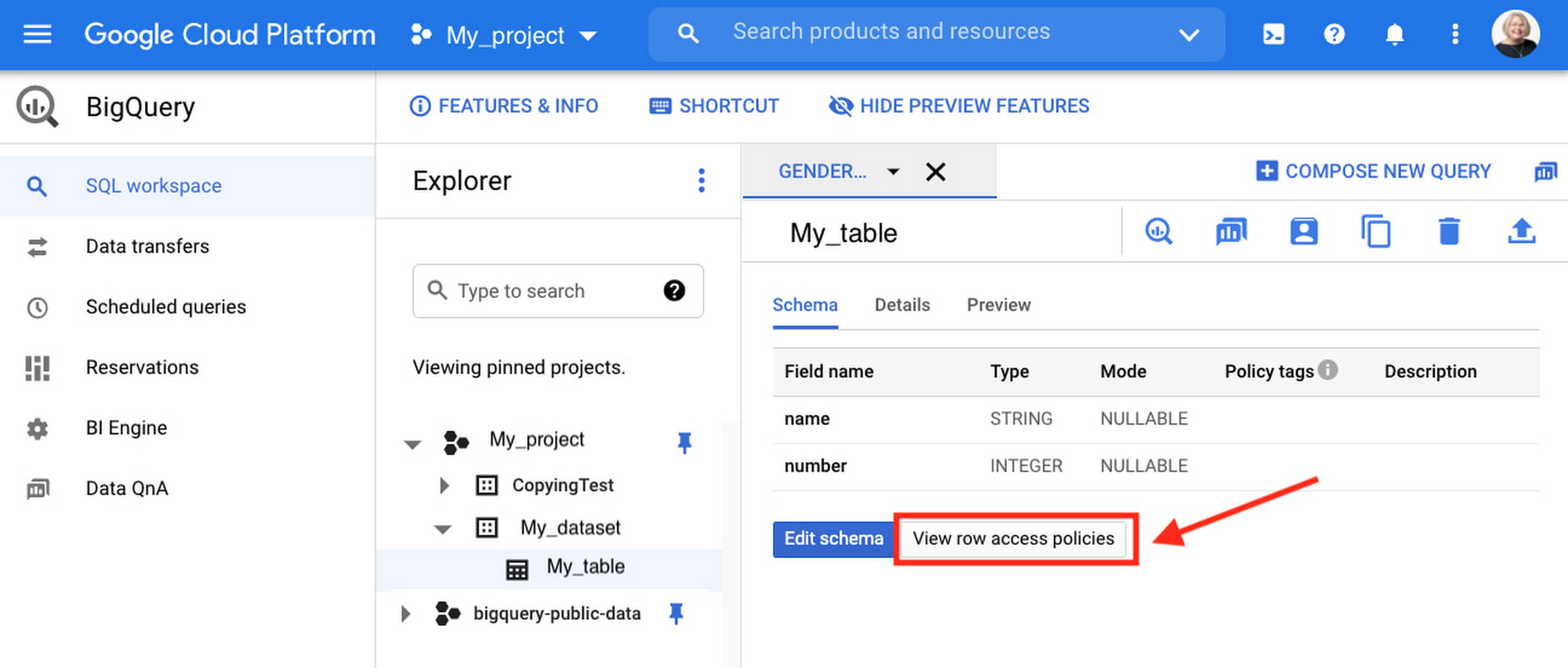
Row-level security is compatible with other BigQuery security features, and can be used along with column-level security for further granularity. Since row-level access policies are applied on the source tables, any actions performed on the table will inherit the table’s associated access policies, to ensure access to secure data is protected. Row-level access policies are applicable to every method used to access BigQuery data (API, Views, etc).
Try it out
We’re always working to enhance BigQuery’s (and Google Cloud’s) data governance capabilities, to provide more controls around managing your data. With row-level security, we are adding deeper protections for your data. You can learn more about BigQuery row-level security in our documentation and best practices.
More Relevant Stories for Your Company


How McKesson Gains Insights by Running SAP on Google Cloud
McKesson, a 185-yeal old, $200 billion, Fortune 6 pharmaceuticals and health information technology company, with over 80,000 employees migrated their SAP solution to Google Cloud for advanced healthcare analytics. With changing consumer expectations, the company needed to change its architecture to be able to better serve its customers. And the
Google Leads the Pack in Cloud Data Warehouse: Forrester Research
Cloud data warehouse solutions are changing the way firms build and support data platforms for insights. From provisioning a cloud data warehouse in minutes without requiring any technical expertise to allowing business analysts and other nontechnical users to access, store, and process large amounts of data for insights, they allow

Google Announces New Cloud Region in Toronto
For over a decade, we’ve been investing in Canada to become a go-to cloud partner for organizations across the country. Whether they’re in financial services, media and entertainment, retail, telecommunications or the public sector, a rapidly growing number of organizations located or operating in Canada are choosing Google Cloud to

Google’s Research and Data Insights Solutions to Power Drug Development and Clinical Research
In order to be successful, research needs to be replicable, so scientists can build on past work and insights. However, an article in Nature warned that as much as 50% of published drug development research could not be reproduced in subsequent trials. As a result, promising drug candidates sometimes led to disappointment,
