





How PLAID’S Multi-cloud Approach with Anthos Clusters on AWS Drives Higher Business Growth

5439
Of your peers have already read this article.
3:00 Minutes
The most insightful time you'll spend today!
Editor’s note: Today’s post comes from Naohiko Takemura, Head of Engineering, and Kosukex Oya, Engineer, both from Japanese customer experience platform PLAID. The company runs its platform in a multicloud environment through Anthos clusters on AWS and shares more on its experiences and best practices.
At PLAID, our mission is to maximize the value of people through data, and we are developing a range of products that focus on improving customer experience. Our core product is a customer experience platform, KARTE, that can analyze the behavior and emotions of website visitors and application users, enabling businesses to deliver relevant communications in real time. We make KARTE available as a service to functions such as human resources and industries such as real estate and finance, and run the platform in a multicloud environment to achieve high-speed response and meet availability requirements. This is where Anthos comes in.
We introduced KARTE in 2015 and updated the system configuration in line with the addition of new functions and the need to increase scale. Our multicloud configuration is optimized through Anthos clusters on AWS, which give us access to the capabilities of Google Kubernetes Engine (GKE).
KARTE runs in two groups of server instances in each cloud; one group runs the management screens used by clients, and the other provides content for visitors to our website. In Google Cloud, the management system runs in GKE and content is delivered through Compute Engine.
We initially developed and operated the core of our services on another provider and from 2016 began to transition to Google Cloud due to its strong data processing capabilities. The products that handled big data, such as Cloud Bigtable and BigQuery, were attractive because they could handle data in real time and were compatible with KARTE. Now most functions, including peripheral aspects, run in Google Cloud, because we thought if we built a system centered on these products, it would become efficient to build other parts on Google Cloud.
While we considered migrating everything to Google Cloud, we decided to leverage its strengths alongside those of our existing provider, AWS. We felt a multicloud approach could create more opportunities and deliver higher growth than a mono-cloud environment.
We completed our move to a multicloud environment in 2017 and found that by building systems with almost the same content on two cloud services to leverage the strengths of each, we could reduce costs and improve performance and availability.
However, as KARTE grew, and the content of the service increased in complexity, we began to experience new problems. The increased load on the system due to an influx of in-house engineers from 2018 onwards impacted the scalability and development speeds of our conventional monolithic architecture running in virtual machines. We opted for an approach based on microservices and containerization, excluding the components that enabled real-time analysis as these had been modernized since initially being deployed in 2016, and the management screens, as the infrastructure running these did not require crisp tuning. Our key priority was to improve the ability of our engineers to deliver quickly.
From 2019, we turned to promoting microservices that make full use of container technology. When deciding to move from a target built on virtual machines to containerization, we evaluated the ease of use of GKE and decided to build in Google Cloud. At the same time, the number of systems with strict service level obligations was increasing, so to ensure higher availability, we considered running these in a multi cloud environment. The announcement of Anthos clusters on AWS at Google Cloud Next ‘19 in San Francisco provided an answer.
We had been wondering how to achieve the equivalent smooth operation of GKE in our AWS environment, and welcomed the Anthos clusters on AWS announcement. We consulted with a Google Cloud customer engineer through an early access program and quickly gained an opportunity to work with this version of Anthos. This allowed us to provide feedback and requests for improvement, and this paved the way for us to implement the product to take advantage of its functionality and future enhancements. With Google Cloud, we have been able to continue to interact closely with the development team to understand and provide input into the product roadmap.
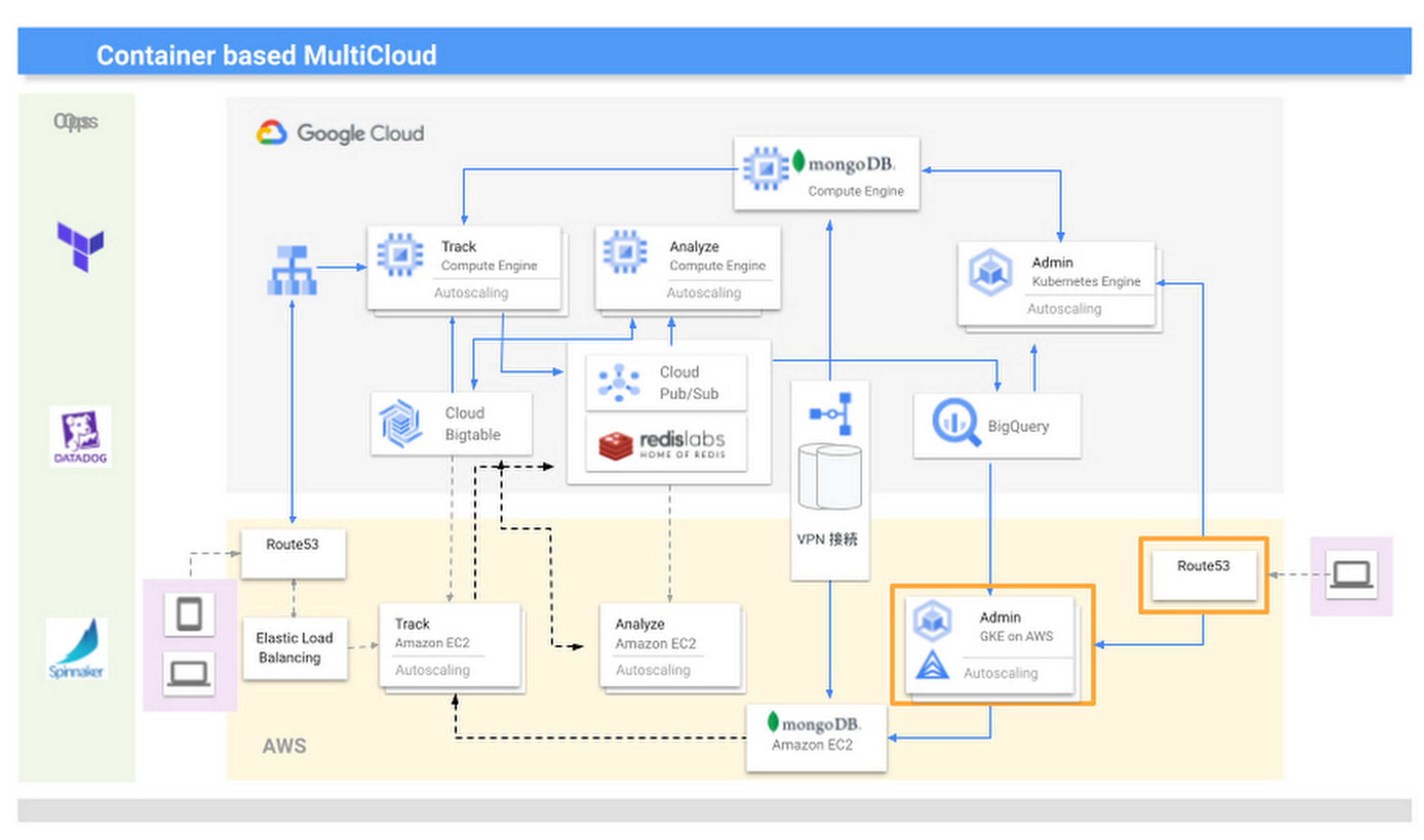
We are now realizing the benefits of multicloud, including faster development speeds and higher availability. For businesses in general, we recommend they take a thoughtful approach to multicloud—while for us, multicloud is a useful mechanism that enables us to provide large-scale data analysis in real time, other businesses should consider whether multicloud is right for them and if so, the role of a technology like Anthos. They should also start small before ramping up. Moving forward, we are keen to see what other products Google Cloud is creating that can help drive our business to a higher level.
Google is the Top Provider for Continuous Integration Tools, According to Forrester
DOWNLOAD WHITEPAPER3595
Of your peers have already downloaded this article
12:30 Minutes
The most insightful time you'll spend today!
Google’s continuous integration (CI) and continuous delivery (CD) platform, Cloud Build, emerges as a Leader for Continuous Integration.
“Google Cloud Build comes out swinging, going toe to toe with other cloud giants. Google Cloud Build is relatively new when compared to the other public cloud CI offerings, they had a lot to prove, and they did so.”
— Forrester Wave: Continuous Integration Tools
Forrester Wave on Continuous Integration identifies most significant continuous integration (CI) tool providers and shows how each vendor measures up on 27 criteria. Download the full report to see what makes Cloud Build a Leader in Continuous Integration.

In the report, you will learn:
- Where the market stands and where it’s going
- Why Google has the strongest score for security and compliance within CI/CD
- How Cloud Build ranks amongst the other vendors on performance and scalability
- How Cloud Build’s enterprise strategy and vision are superior to other vendors
Bigbasket: Delivering Groceries Across 25 Cities in India

7308
Of your peers have already read this article.
1:30 Minutes
The most insightful time you'll spend today!
When Bigbasket was founded in December 2011, it guaranteed to deliver goods within a one-hour delivery slot of its customers’ choosing or it would refund them 10 percent of their orders. The company also introduced an express service, delivering groceries within 90 minutes of an order being placed.
Bigbasket needed a mapping platform that could help it meet its delivery times, and offer a familiar interface to customers. MediaAgility, a digital consulting company, recommended Google Maps Platform to Bigbasket.
When customers use the Bigbasket mobile app to place orders, they select their locations on a Google Map. The prices and availability of groceries varies according to location, so a customer’s location determines the cost of the order and what can be ordered.
Google Maps Platform Results
- Bigbasket handles more than one million orders per month, and delivers in more than two dozen cities in India
- Bigbasket now has more than four million customers
- Orders are delivered on time, increasing customer loyalty
It is also used to determine driver routes. Bigbasket used the Maps Javascript API to build a web-based app for the company’s backend that tracks all orders and delivery progress. Dispatchers use the Directions API to match drivers with orders and customers, and the Distance Matrix API to get estimate the time of arrival for deliveries. As dispatchers track the progress of deliveries on the map, they can tweak routes as necessary.
“We’ve built Bigbasket from the ground up using Google Maps Platform. It makes sure we have the right customer locations and deliver to them on time. We couldn’t have started Bigbasket without Google Maps. It helps us to be fast and efficient, and make sure our customers get what they’ve ordered quickly,” said Pramod Jajoo, Chief Technology Officer, Bigbasket
3619
Of your peers have already watched this video.
15:20 Minutes
The most insightful time you'll spend today!
Building a Bank with Kubernetes: How Monzo is Creating the Best Banking App Ever
Based in London, Monzo is a bank that lives on the smartphone and is built for the way modern customers live today. By solving their problems, treating them fairly and being totally transparent, Monzo believes it can transform the way people bank.
“We are building a full retail bank. What we are trying to be is become the best banking app in the world. This means that instead of showing you cramped indecipherable descriptors that you get from traditional banks, we actually show you the name of the merchant along with the logo and a real-time balance rather than something that’s often delayed by 24 to 48-hours. Basically, we strive to make everything as clear and easy to understand for customers,” says Oliver Beattie, Head of Engineering, Monzo.
In their quest for building the best banking application, Kubernetes is significantly helping Monzo overcome core banking challenges and continuously innovate.
“Kubernetes makes our application extensible. We want our application to be very easy to change not just now but maybe 10 or 20 years from now. As what we have now will not be the gold standard 20 years down the line. We want our application to be better than those the legacy banks have,” says Beattie.
Running multiple services at the same time on a particular application and ensuring speed was a significant hurdle Monzo had to overcome.
“You cannot run 150 services on a single machine and expect all of them to be fast. What we wanted is to treat our application as a big pool of resources, which is what Kubernetes exactly allowed us to do. We can now run one big group of worker machines and run all our applications there and scale them up and down as needed. Owing to Kubernetes we are now able to reduce one-third of our infrastructure costs,” says Beattie.
Watch the full video to get deeper insights into how Kubernetes is helping Monzo build the best banking application ever.
How Eventrac and Workflows Integration Helps Implement Hybrid Architecture in Google Cloud

6535
Of your peers have already read this article.
3:00 Minutes
The most insightful time you'll spend today!
I previously talked about Eventarc for choreographed (event-driven) Cloud Run services and introduced Workflows for orchestrated services.
Eventarc and Workflows are very useful in strictly choreographed or orchestrated architectures. However, you sometimes need a hybrid architecture that combines choreography and orchestration.
For example, imagine a use case where a message to a Pub/Sub topic triggers an automated infrastructure workflow or where a file upload to a Cloud Storage bucket triggers an image processing workflow. In these use cases, the trigger is an event but the actual work is done as an orchestrated workflow.
How do you implement these hybrid architectures in Google Cloud? The answer lies in Eventarc and Workflows integration.
Eventarc triggers
To recap, an Eventarc trigger enables you to read events from Google Cloud sources via Audit Logs and custom sources via Pub/Sub and direct them to Cloud Run services:

One limitation of Eventarc is that it currently only supports Cloud Run as targets. This will change in the future with more supported event targets. It’d be nice to have a future Eventarc trigger to route events from different sources to Workflows directly.
In absence of such a Workflows enabled trigger today, you need to do a little bit of work to connect Eventarc to Workflows. Specifically, you need to use a Cloud Run service as a proxy in the middle to execute the workflow.
Let’s take a look at a couple of concrete examples.
Eventarc Pub/Sub + Workflows integration
In the first example, imagine you want a Pub/Sub message to trigger a workflow.
Define and deploy a workflow
First, define a workflow that you want to execute. Here’s a sample workflows.yaml that simply decodes and logs the Pub/Sub message body:
main:params: [args]steps:- init:assign:- headers: ${args.headers}- body: ${args.body}...- pubSubMessageStep:call: sys.logargs:text: ${"Decoded Pub/Sub message data is " + text.decode(base64.decode(args.body.message.data))}severity: INFODeploy the workflow with a single command:gcloud workflows deploy ${WORKFLOW_NAME} --source=workflow.yaml --location=${REGION}
Deploy a Cloud Run service to execute the workflow
Next, you need a Cloud Run service to execute this workflow. Workflows has an execution API and client libraries that you can use for your favorite language. Here’s an example of the execution code from a Node app.js file. It simply passes the received HTTP request headers and body to the workflow and executes it:
const execResponse = await client.createExecution({parent: client.workflowPath(GOOGLE_CLOUD_PROJECT, WORKFLOW_REGION, WORKFLOW_NAME),execution: {argument: JSON.stringify({headers: req.headers, body: req.body})}});
Deploy the Cloud Run service with the Workflows name and region passed as environment variables:
gcloud run deploy ${SERVICE_NAME} \--image gcr.io/${PROJECT_ID}/${SERVICE_NAME} \--region=${REGION} \--allow-unauthenticated \--update-env-vars GOOGLE_CLOUD_PROJECT=${PROJECT_ID},WORKFLOW_REGION=${REGION},WORKFLOW_NAME=${WORKFLOW_NAME}
Connect a Pub/Sub topic to the Cloud Run service
With Cloud Run and Workflows connected, the next step is to connect a Pub/Sub topic to the Cloud Run service by creating an Eventarc Pub/Sub trigger:
gcloud eventarc triggers create ${SERVICE_NAME} \--destination-run-service=${SERVICE_NAME} \--destination-run-region=${REGION} \--location=${REGION} \--event-filters="type=google.cloud.pubsub.topic.v1.messagePublished"
This creates a Pub/Sub topic under the covers that you can access with:
export TOPIC_ID=$(basename $(gcloud eventarc triggers describe ${SERVICE_NAME} --format='value(transport.pubsub.topic)'))
Trigger the workflow
Now that all the wiring is done, you can trigger the workflow by simply sending a Pub/Sub message to the topic created by Eventarc:
gcloud pubsub topics publish ${TOPIC_ID} --message="Hello there"
In a few seconds, you should see the message in Workflows logs, confirming that the Pub/Sub message triggered the execution of the workflow:

Eventarc Audit Log-Storage + Workflows integration
In the second example, imagine you want a file creation event in a Cloud Storage bucket to trigger a workflow. The steps are similar to the Pub/Sub example with a few differences.
Define and deploy a workflow
As an example, you can use this workflow.yaml that logs the bucket and file names:
main:params: [args]steps:...- log:call: sys.logargs:text: ${"Workflows received event from bucket " + bucket + " for file " + file}severity: INFO
Deploy a Cloud Run service to execute the workflow
In the Cloud Run service, you read the CloudEvent from Eventarc and extract the bucket and file name in app.js using the CloudEvent SDK and the Google Event library:
const cloudEvent = HTTP.toEvent({ headers: req.headers, body: req.body });//"protoPayload" : {"resourceName":"projects/_/buckets/events-atamel-images-input/objects/atamel.jpg}";const logEntryData = toLogEntryData(cloudEvent.data);const tokens = logEntryData.protoPayload.resourceName.split('/');const bucket = tokens[3]
Executing the workflow is similar to the Pub/Sub example, except you don’t pass in the whole HTTP request but rather just the bucket and file name to the workflow:
const execResponse = await client.createExecution({parent: client.workflowPath(GOOGLE_CLOUD_PROJECT, WORKFLOW_REGION, WORKFLOW_NAME),execution: {argument: JSON.stringify({bucket: bucket, file: file})}});
Connect Cloud Storage events to the Cloud Run service
To connect Cloud Storage events to the Cloud Run service, create an Eventarc Audit Logs trigger with the service and method names for Cloud Storage:
gcloud eventarc triggers create ${SERVICE_NAME} \--destination-run-service=${SERVICE_NAME} \--destination-run-region=${REGION} \--location=${REGION} \--event-filters="type=google.cloud.audit.log.v1.written" \--event-filters="serviceName=storage.googleapis.com" \--event-filters="methodName=storage.objects.create" \--service-account=${PROJECT_NUMBER}-compute@developer.gserviceaccount.com
Trigger the workflow
Finally, you can trigger the workflow by creating and uploading a file to the bucket:
echo "Hello World" > random.txtgsutil cp random.txt gs://${BUCKET}/random.txt
In a few seconds, you should see the workflow log the bucket and object name.
Conclusion
In this blog post, I showed you how to trigger a workflow with two different event types from Eventarc. It’s certainly possible to do the opposite, namely, trigger a Cloud Run service via Eventarc with a Pub/Sub message (see connector_publish_pubsub.workflows.yaml) from Workflows or a file upload to a bucket from Workflows.
All the code mentioned in this blog post is in eventarc-workflows-integration. Feel free to reach out to me on Twitter @meteatamel for any questions or feedback.
4574
Of your peers have already watched this video.
1:30 Minutes
The most insightful time you'll spend today!
Introduction to Cloud Shell Editor
Watch the video to understand how Google’s Cloud Shell Editor and its powerful features-packed environment can streamline your development workflows.
More Relevant Stories for Your Company

A 100-year Old Business’ Digital Evolution with Apigee API Management
Editor’s note: James Fairweather, chief innovation officer at Pitney Bowes, has played a key role in modernizing the product offerings at this century-old global provider of innovative shipping solutions for businesses of all sizes. In today’s post, he discusses some key challenges the Pitney Bowes team overcame during its digital transformation,

Take a Look at 30 Eventrac Locations!
New locations in Eventarc Back in August, we announced more Eventarc locations (17 new regions, as well as 6 new dual-region and multi-region locations to be precise). This takes the total number of locations in Eventarc to more than 30. You can see the full list in the Eventarc locations page or by running gcloud
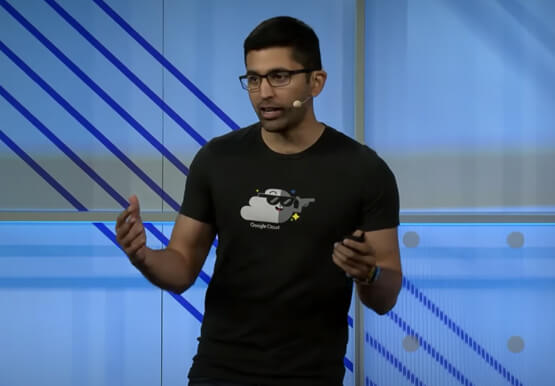

Microservices in the Cloud with Kubernetes and Istio
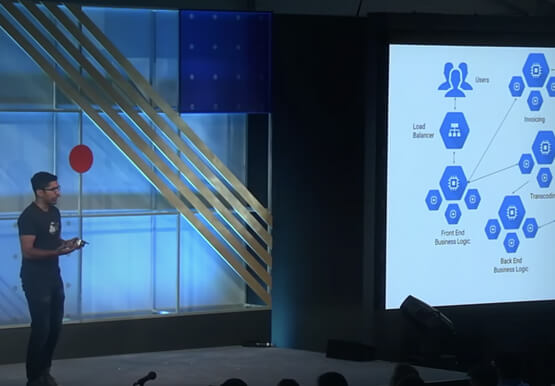
Are you building or interested in building microservices? They are a powerful method to build a scalable and agile backend, but managing these services can feel daunting: building, deploying, service discovery, load balancing, routing, tracing, auth, graceful failures, rate limits, and more. The most suited solution for you is Istio.

Driving Digital Success: Three ROI Criteria for Competitive Advantage
Choosing ROI criteria that drive smart decisions about digital investments is necessary to win in the app economy. But according to an Apigee Institute survey of IT and Marketing executives, there is a wide gap between what corporate leaders believe are the best ROI metrics and what are actually used in most
