






Benchmarking Report for Indian Businesses: The State of Digital Commerce APIs
READ FULL INTRODOWNLOAD AGAIN5821
Of your peers have already downloaded this article
1:40 Minutes
The most insightful time you'll spend today!
Google Extends Support for Windows Server Containers on Anthos for Faster App Modernization and Consistent Dev Experience

5607
Of your peers have already read this article.
3:00 Minutes
The most insightful time you'll spend today!
Today, many applications in organizations’ data centers run on Windows Server. Modernizing these traditional Windows apps onto Kubernetes promises a host of benefits: a consistent platform across environments, better portability, scalability, availability, simplified management and speed of deployment, just to name a few. But how? Rewriting traditional .NET applications to run on Linux with .NET Core can be challenging and time-consuming. There is, however, a lower-toil, more developer friendly option.
Last year, we announced support for Windows Server containers running on Google Kubernetes Engine (GKE), our cloud-based managed Kubernetes service, which lets you take the advantage of containers without porting your apps to .NET core or rewriting them for Linux. Today, we’re going a step further with support for Windows Server containers on Anthos clusters on VMware in your on-premises environment. Now available in preview, you can consolidate all your Windows operations across on-prem and Google Cloud.
Bringing Windows Server support to our family of Kubernetes-based services—GKE running on Google Cloud, and Anthos everywhere—with the same experience, lets you modernize apps faster and achieve a consistent development and deployment experience across hybrid and cloud environments. Further, by running Windows and Linux workloads side by side, you get operational consistency and efficiency—no need to have multiple teams specializing in different tooling or platforms to manage different workloads. The single-pane-of-glass view and the ability to manage policies from a central control plane simplifies the management experience, while bin packing multiple Windows applications drives better resource utilization, leading to infrastructure and license savings.
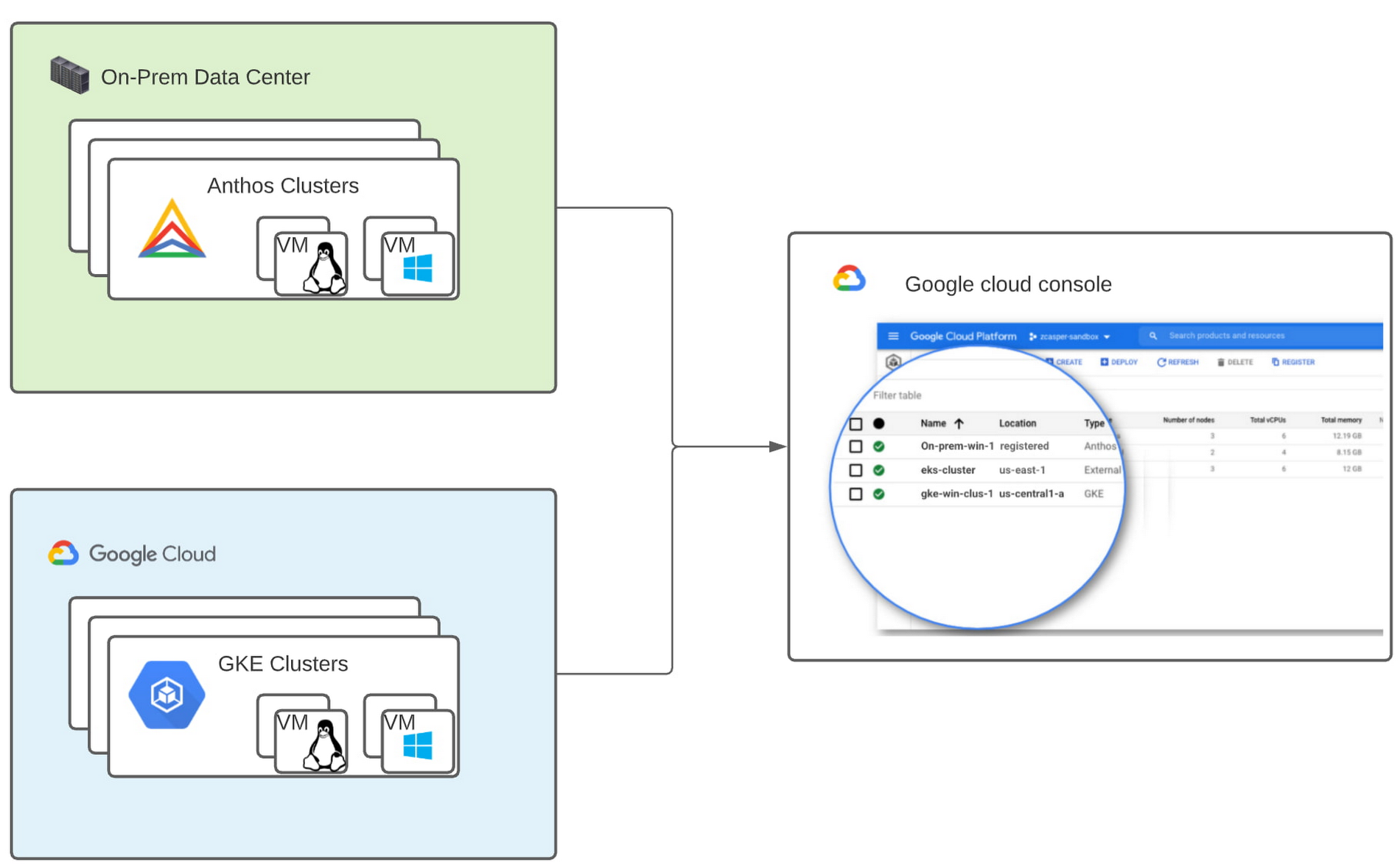
With all these benefits, it’s no surprise that customers such as Thales, a French multinational firm specializing in aerospace and security services, have been able to reap significant benefits by moving Windows applications to GKE.
“We moved our Windows applications from VMs to Windows containers on GKE and now have a unified mechanism for Linux and Windows-based application management, scaling, logging, and monitoring. Earlier, setting up these applications in VMs and configuring them for high availability used to take up to a week, and the applications were not easily scalable,” said Najam Siddiqui, Solutions Architect at Thales. “Now with GKE, the setup takes only a few minutes. GKE’s automatic scaling and built-in resiliency features make scaling and high-availability setup seamless. Also, manually maintaining the VMs and applying security patches used to be tedious, which is now handled by GKE.”
Let’s take a deeper look at the architecture that lets you run your Windows container-based workloads on-prem.
Windows Server running on-prem with Anthos
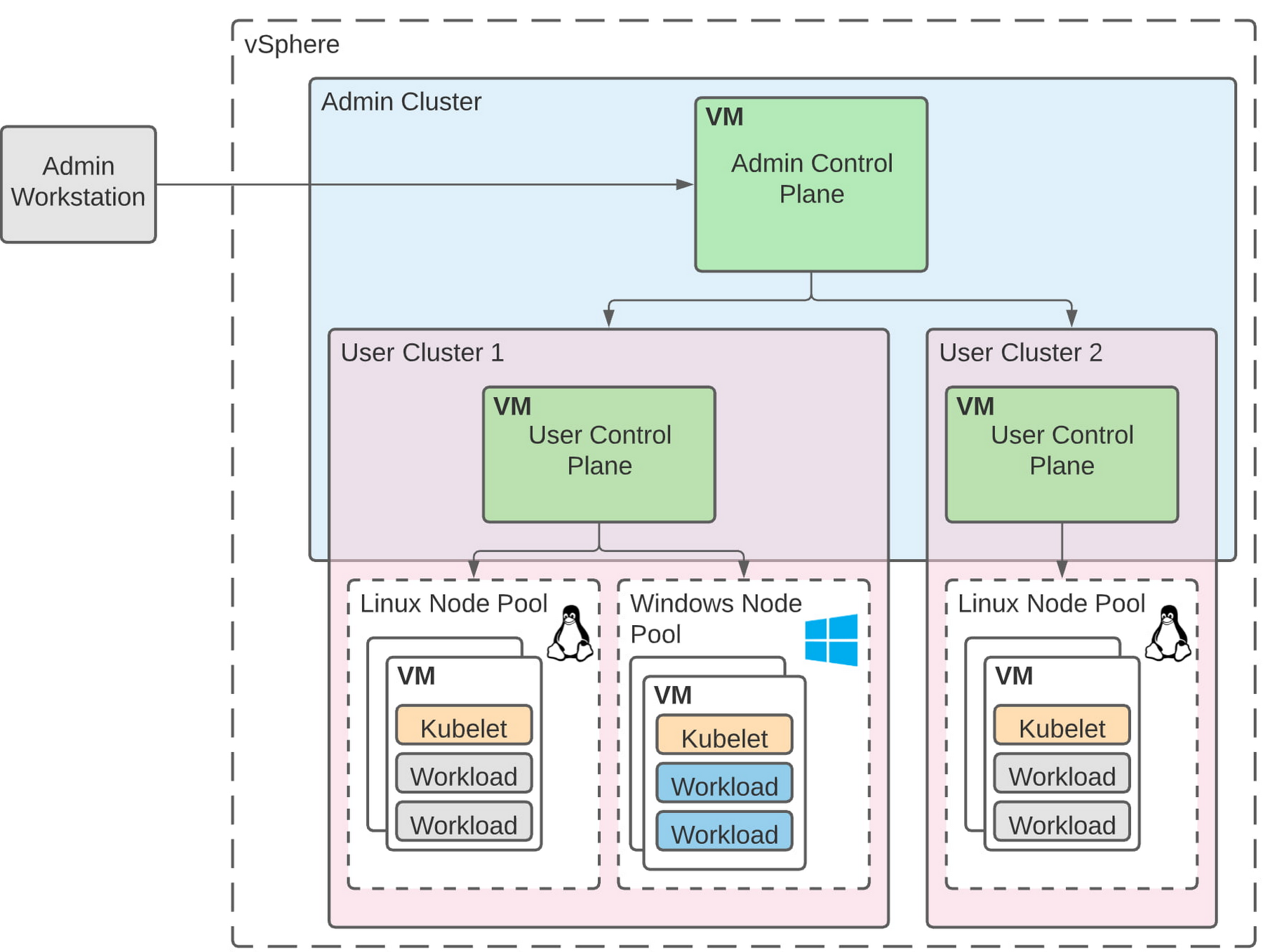
The diagram below illustrates the high-level architecture of running Windows container-based workloads in an on-prem GKE cluster with Anthos. Windows server node-pools can be added to an existing or new Anthos cluster. Kubelet and Kube-proxy run natively on Windows nodes, allowing you to run mixed Windows and Linux containers in the same cluster. The admin cluster and the user cluster control plane continue to be Linux-based, providing you a consistent orchestration experience and management ease across Windows and Linux workloads.
Get started today
When considering modernizing your on-prem Windows estate, we recommend running Windows Server containers on Anthos in your own data center. If you are new to Anthos, the Anthos getting started page and the Coursera course on Architecting Hybrid Cloud with Anthos are good places to start. You can also find detailed documentation on our website, and our partners are eager to help you with any questions related to the published solutions, as is the GCP sales team. And as always, please don’t hesitate to reach out to us at anthos-onprem-windows@google.com if you have any feedback or need help unblocking your use case.
Master AI Prompt Engineering with 6 Proven Tips

1058
Of your peers have already read this article.
2:30 Minutes
The most insightful time you'll spend today!
As AI-powered tools become increasingly prevalent, prompt engineering is becoming a skill that developers need to master. Large language models (LLMs) and other generative foundation models require contextual, specific, and tailored natural language instructions to generate the desired output. This means that developers need to write prompts that are clear, concise, and informative.
In this blog, we will explore six best practices that will make you a more efficient prompt engineer. By following our advice, you can begin creating more personalized, accurate, and contextually aware applications. So let’s get started!
Tip #1: Know the model’s strengths and weaknesses
As AI models evolve and become more complex, it is essential for developers to comprehend their capabilities and limitations. Understanding these strengths and weaknesses can help you, as a developer, avoid making mistakes and create safer, more reliable applications.
For example, an AI model that is trained to recognize images of blueberries may not be able to recognize images of strawberries. Why? Because the model was only trained on a dataset of blueberry images. If a developer uses this model to build an application that is supposed to recognize both blueberries and strawberries, the application would likely make mistakes, leading to an ineffective outcome, and poor user experience.
It’s important to note that AI models have the ability to be biased. This is due to AI models being trained on data that is collected from the real world, and so it can reflect the inequitable power dynamics inherently rooted in our social hierarchy. If the data that is used to train an AI model is biased, then the model will also be biased. This can lead to problems if the model is used to make decisions that affect people by reinforcing societal biases. Addressing these biases is important to ensure that data is fair, promoting equality, and ensuring the responsibility of AI technology. Prompt engineers should be aware of training limitations or biases so they can craft prompts more effectively and understand what kind of prompting is even possible for a given model.
Tip #2: Be as specific as possible
AI models have the ability to comprehend a variety of prompts. For instance Google’s PaLM 2 can understand natural language prompts, multilingual text, and even programming codes like Python and JavaScript. Although AI models can be very knowledgeable, they are still imperfect, and have the ability to misinterpret prompts that are not specific enough. In order for AI models to navigate ambiguity, it is important to tailor your prompts specifically to your desired outcome.
Let’s say you would like your AI model to generate a recipe for 50 vegan blueberry muffins. If you prompt the model with “what is a recipe for blueberry muffins?”, the model does not know that you need to make 50 muffins. It is thus unlikely to list the larger volume of ingredients you’ll need or include tips to help you more efficiently bake such a large number of muffins. The model can only go off the context that is provided. A more effective prompt would be “I am hosting 50 guests. Generate a recipe for 50 blueberry muffins.” The model is more likely to generate a response that is relevant to your request and meets your specific requirements.
Tip #3: Utilize contextual prompts
Utilize contextual information in your prompts to help the model gain an in-depth understanding of your requests. Contextual prompts can include the specific task you want the model to perform, a replica of the output you’re looking for, or a persona to emulate, from a marketer or engineer to a high school teacher. Defining a tone and perspective for an AI model gives it a blueprint of the tone, style, and focused expertise you’re looking for to improve the quality, relevance, and effectiveness of your output.
In the case of the blueberry muffins, it is important to prompt the model using the context of the situation. The model might need more context than generating a recipe for 50 people. If it needs to be aware that the recipe must be vegan friendly, you might prompt the model by asking it to answer by emulating a skilled vegan chef.
By providing contextual prompts, you can help ensure that your AI interactions are as seamless and efficient as possible. The model will be able to more quickly understand your request and it will be able to generate more accurate and relevant responses.
Tip #4: Provide AI models with examples
When creating prompts for AI models, it is helpful to provide examples. This is because prompts act as instructions for the model, and examples can help the model to understand what you are asking for. Providing a prompt with an example looks something like this: “here are several recipes I like – create a new recipe based on the ones I provided.” The model can now understand the your ability and needs in order to make this pastry,
Tip #5: Experiment with prompts and personas
The way you construct your prompt impacts the model’s output. By creatively exploring different requests, you will soon have an understanding of how the model weighs its answers, and what happens when you interfuse your domain knowledge, expertise, and lived experience with the power of a multi-billion parameter large language model.
Try experimenting with different keywords, sentence structures, and prompt lengths to discover the perfect formula. Allow yourself to step into the shoes of various personas, from work personas such as “product engineer” or “customer service representatives,” to parental figures or celebrities such as your grandmother, a celebrity chef, and explore everything from cooking to coding!
By crafting unique, and innovative, requests replete with your expertise and experience, you can learn which prompts provide you with your ideal output. Further refining your prompts, known as ‘tuning,’ allows the model to have a greater understanding and framework for your next output.
Tip #6: Try chain-of-thought prompting
Chain of thought prompting is a technique for improving the reasoning capabilities of large language models (LLMs). It works by breaking down a complex problem into smaller steps, and then prompting the LLM to provide intermediate reasoning for each step. This helps the LLM to understand the problem more deeply, and to generate more accurate and informative answers. This will help you to understand the answer better and to make sure that the LLM is actually understanding the problem.
Conclusion
Prompt engineering is a skill that all workers, across industries and organizations, will need as AI-powered tools are becoming more prevalent. Remember to incorporate these five essential tips the next time you communicate with an AI model, so you can generate the accurate outputs that you desire. AI will forever continue to develop, constantly refining itself as we use it, so I encourage you to remember that learning, for mind and machine, is a never ending journey. Happy Prompting!
How This Leading Trading Company Uses APIs to Build Fintech Apps Quickly and Cost-Effectively

4610
Of your peers have already read this article.
5:10 Minutes
The most insightful time you'll spend today!
Tradier uses the Apigee API management platform from Google to abstract the legacy complexities of capital markets so that developers can build FinTech applications in an agile, nimble, and quick fashion at minimal cost. The company embodies the evolution of what cloud technology can enable in the form of an API-first business delivered as a service.
The rise of API-powered FinTech
Historically, companies that wanted to build systems, applications, or services to interact with the stock market would have to build an entire brokerage operation from scratch. This would include data infrastructure, compliance infrastructure, and storage capabilities. It could take years and massive capital expense to accomplish everything that was required to be ready to serve customers.
Tradier provides this infrastructure as an API-based service so that the same companies can launch investor applications in as little as a few weeks. This democratized access means that FinTech innovation can come from anywhere, giving the same opportunities to create new products to everyone, from enterprise customers to startups.
“Financial markets are becoming fundamentally decentralized and unbundled,” says Dan Raju, co-founder, CEO, and chairman at Tradier. “The services that large legacy banks and brokerage firms used to offer are being supplanted by Tradier’s microservices and APIs, which power innovation.”
More than 200 companies use Tradier to develop and launch new products, or to add new features and functions that they traditionally would not have offered in existing products. With a large and diverse user base, Tradier faced the challenge of managing its partners in way that helps ensure it can grant credentials, track, monitor, and report in an efficient and equitable manner.
At the same time, the company recognized the inherent value of its partners for their power to leverage Tradier APIs to innovate. Tradier’s fundamental market disruption is the partner ecosystem, where the company is engaged along with its partners to deliver value to the entire ecosystem in the form of new products and services.
Embracing an API-powered ecosystem
Tradier has moved beyond providing great APIs toward engaging its ecosystem. If a customer wants a specific dataset, the company doesn’t automatically build a new product. Instead, Tradier looks to the ecosystem to build the product. With this approach, Tradier has taken its capabilities and multiplied them by hundreds.
“The fundamental difference between thinking about an API ecosystem versus an API product is the difference between being a participant who’s enabling innovation and not just a company delivering a set of technical capabilities,” Raju says.
Tradier takes an outside-in approach toward engaging its API ecosystem. Constantly listening to participants and helping to enable and empower them to create value is fundamental to the company’s business model. Rather than simply focusing on building new capabilities on its own, Tradier listens to what functionalities customers need and facilitates development. In many cases, the ecosystem generates the requested product organically rather than Tradier needing to do it.
“I love APIs because they allow you to empower others to create value. The concept of empowering others to create value along with you is what is the most satisfying, and the most fascinating, thing about APIs,” says Raju.
Delivering value at scale
Tradier handles between 500 million to 1 billion API calls and a billion dollars in transactions a month, and all of them run through the Apigee API management platform. Apigee’s last mile forms the single layer that manages Tradier’s infrastructure, including security, analytics, developer interactions, and execution. The company also uses Apigee to comply with an array of regulatory reporting, mandated by Tradier’s status as a FINRA (Financial Industry Regulatory Authority)-regulated entity.
“Apigee is integral to the Tradier offering. They have been great partners and have always collaborated and enabled us to innovate at a pace that helped Tradier attract developers and innovative companies. We see tremendous potential in the synergy of Apigee and Google as it brings to the market a vast extended capability set based on the Google Cloud Platform.”
Tradier is an API-centric ecosystem that delivers value to an entire set of players where the nucleus is the Apigee API management suite, which helps deliver, innovate, publish, manage, monitor, and secure the ecosystem on a day-to-day basis. Simplicity combined with product evangelism is the key to success in the API space, Raju says.
Tradier’s capabilities to innovate, iterate, and travel the journey with its customers, partners, and developers has yielded many rewards. The company’s long history of working with Apigee has enabled it to assemble a set of people and resources for creating engagement, as well as to create a winning set of APIs for delivering FinTech capabilities.
Considering the transformative future
Looking toward a future in which the financial services industry will experience ongoing disruption, Raju predicts that Tradier will continue to leverage APIs to lead the way.
“I think traditional banks are under attack. They are being replaced by a set of nimble, agile players that are offering a lot of new functionality to customers. This is forcing banks to think about how they can digitize their products through APIs so that they can provide the same functionalities as newer players.”
With companies like Tradier and others offering functionality that used to be in-house and exposing it outside, traditional brokerage firms are also being forced to rethink their model. Raju believes that this line of thinking also extends to the Blockchain.
“Exposing Blockchain-like capabilities through APIs is going to be a disruptive influence, and it will be critical for companies to think about how APIs, and more importantly Blockchain, can create value for us.”
Ten Videos to Help You Get Started with Anthos

3459
Of your peers have already read this article.
2:00 Minutes
The most insightful time you'll spend today!
Do you need to develop, run and secure applications across your hybrid and multicloud environments? Look no further than Anthos, our managed application platform that extends Google Cloud services and engineering practices to your environments so you can modernize apps faster and establish operational consistency across them.
To help you get started, we created the Anthos 101 video learning series. It’s a great starting point for understanding the basics of Anthos—and you can watch the whole series in less than an hour.
Let’s dive in.
1. What is Anthos?
Discover what Anthos is and how it helps enterprises manage their applications. You’ll learn about the different tools Anthos offers—like the ability to create environs and platform administrators—to help you modernize and manage your application infrastructure.
https://youtube.com/watch?v=Qtwt7QcW4J8%3Fenablejsapi%3D1%26
2. How to get started with Anthos on Google Cloud
Ready to get started with Anthos? In this lesson, you’ll create your own Anthos deployment. You’ll learn about the different tools on the Anthos dashboard—like the Service Mesh card and Cluster Status cards—plus how to deploy and alter Google Kubernetes Engine (GKE) clusters and Anthos Service mesh via Google Compute Engine.
https://youtube.com/watch?v=ghFiaz7juoA%3Fenablejsapi%3D1%26
3. How to modernize and run Windows apps in Anthos
Running a Windows application that’s in need of modernization? In this lesson, you’ll discover how you can create and deploy a Windows-based application on Anthos, allowing you to modernize existing workloads and manage your application seamlessly. You’ll even learn to do this without requiring access to source code, re-writing, or re-architecting your existing application.
https://youtube.com/watch?v=w6tzIjZhTIk%3Fenablejsapi%3D1%26
4. How to build modern CI/CD with Anthos
Continuous integration? Continuous delivery? These are two things that developers need to think about with container adoption for hybrid or multicloud environments. Learn how Anthos helps you increase your development velocity without compromising the security of your application.
https://youtube.com/watch?v=ayRz5NmM6pI%3Fenablejsapi%3D1%26
5. How to adopt a multi-cluster strategy for your applications in Anthos
There are a number of use cases that might require a multi-cluster strategy, such as maintaining multiple clusters on the cloud and in your own data center. In this lesson, learn the different tools that Anthos offers—such as GKE, Anthos Config Management, and Anthos Service Mesh—to help deploy and manage multiple clusters.
https://youtube.com/watch?v=ZhF-rTXq-Us%3Fenablejsapi%3D1%26
6. How to improve observability using golden signals in Anthos
Observability is important in application development, but without the right tools monitoring your services can be time consuming. In this episode, learn more how Anthos Service Mesh can help you monitor and manage the four Golden Signals—latency, traffic, errors, and saturation—for your application.
https://youtube.com/watch?v=EDcy3KwV22o%3Fenablejsapi%3D1%26
7. How to modernize legacy Java apps with Anthos
Looking to modernize legacy Java applications? In this lesson, you’ll learn the three categories of Java applications and their unique paths for modernization via Anthos. This can help you reduce your dependency on high-cost proprietary software, decrease operational overhead, and increase software delivery speed.
https://youtube.com/watch?v=hQWcx9iyF7E%3Fenablejsapi%3D1%26
8. How to apply a zero trust model for your deployments using Anthos
It’s time to rethink traditional security models when it comes to network observability and consistency for IAM permissions. In this lesson, learn how you can adopt a zero trust posture with Anthos. This allows you to better secure your network, detect underlying network compromises, and ensure workloads are secure before deployment.
https://youtube.com/watch?v=_qG2vazlozY%3Fenablejsapi%3D1%26
9. How to go beyond business continuity with Anthos
Sometimes a business continuity plan that only covers traditional backup and disaster recovery methods simply isn’t enough. In this lesson, learn how Anthos helps resolve issues like data redundancy, scaling without code changes, implementing measurable SLOs, and much more. You’ll also discover how Anthos can help you manage your application beyond the confines of traditional backup and disaster recovery approaches.
https://youtube.com/watch?v=kUxqdjbgcXs%3Fenablejsapi%3D1%26
10. How to simplify identity with Anthos
Managing identities across hybrid and multicloud environments can be troublesome and hard to keep track of. Luckily, Anthos is capable of simplifying identity management for users and workloads. In this lesson, you’ll learn how Anthos can extend and enable existing capabilities, while allowing you to manage IAM permissions across multiple Anthos and GKE environments.
https://youtube.com/watch?v=6P-4ZEwZqZQ%3Fenablejsapi%3D1%26
11. How to optimize costs with Anthos
Learn how you can optimize costs with Anthos through greater observability, improving existing operations, and many other practices.
https://youtube.com/watch?v=8mGICSTRoYw%3Fenablejsapi%3D1%26
Keep learning
This is just a starting point for learning about Anthos. To deepen your knowledge, check out our free on-demand training: Getting started with Anthos. Or, you can download our Anthos Under the Hood ebook, or get hands-on right now with the Anthos sandbox.
How Barilla Created a Social Media Style App to Improve Efficiency

5657
Of your peers have already read this article.
3:30 Minutes
The most insightful time you'll spend today!
Google Cloud Results
- Replaced conflicting, time-consuming paper logs with a near real-time, transparent app
- Scaled rapidly and easily to accommodate new teams thanks to Google App Engine
- Enables photographic and video communication to replace confusing text
- New factory solution rolled out in just 15 days
In 1877, Pietro Barilla set up a small bakery to make pasta and baked goods for the people of Parma, Italy. Today, Barilla applies its 140 years of baking knowledge on a global scale, with six major manufacturing sites in Italy and an international network employing over 8,000 people. As the world’s leading producer of pasta, Barilla knows that when it comes to making quality food, great communication is key. That’s why the company plans to become a completely digital, looking to technology to improve the way it works.
Teams at the Barilla factory in Cremona work along a production line more than one-kilometer long, staffed by three shifts of workers a day. When one shift handed over to the next or requested machine maintenance teams, they used paper notebooks and unofficial instant messaging to communicate. That meant there was no authoritative, real-time record of events, communication was messy, oversight was poor, and teams had to hold daily morning meetings to synchronise notes.
Barilla worked with the Google Cloud Partner Injenia to create a solution, beginning with a consultative process on the factory floor.
“We had the idea to to start from the bottom and work up,” says Cristiano Boscato at Injenia. “Barilla’s top staff were brilliant about letting us do it. Eight of us from Injenia spent months on the factory lines with Barilla workers, collecting ideas on Google Docs, making presentations with Slides and collecting feedback with Forms. The CollaborAction app we created is the result of an amazing partnership.”
Co-designing a team social network
“Everything at the Cremona plant was managed offline, with paper,” explains Alessandra Ardrizzoia, Digital Engagement Senior Manager at Barilla. “Workers on the line would track events in notebooks, the shift leader would have another notebook, and the leader of the maintenance team would have yet another notebook. Everybody wrote their own text description of events, so there would be mismatches in the information going around.”
To resolve this, teams would meet at 8:30am every day to reconstruct a consistent narrative. In addition, machine maintenance workers were already using instant messaging to communicate with the line. Barilla and Injenia looked for a solution that could deliver a searchable, single version of events, with the ease of use of a mobile messaging application.
After consulting factory workers for ideas, Injenia created CollaborAction, a custom-built app that brought G Suite collaboration tools together on an Google App Engine platform, using Google Cloud SQL to index files. Google+, Google Drive and Hangouts were not only highly available and easy-to-use, they also “helped with fast adoption, with interfaces that workers could already relate to.” Meanwhile Google App Engine enabled the Injenia team to deliver updates and new versions at speed, as part of a feedback process with workers who offered suggestions through a link to Forms embedded in the app.
Google+ provides an intuitive social media dashboard that workers felt comfortable with. Now teams use company tablets placed at intervals along the line to log in, report issues to other teams, photograph problems, schedule maintenance, give status updates through Hangouts chat, and have visibility on the whole process as it takes place.
“Everyone in the Cremona plant was really happy with the new social collaboration process. Because they were involved in designing the solution, they felt involved and really engaged with the process,” says Alessandra. “And now that everyone is aligned with CollaborAction, all the work in the plant is more effective. They are more agile and can use their time in more added-value activities.”
Optimization and a national roll-out
Created in Cremona, now CollaborAction connects over 1,000 users in six of Barilla’s factories in Italy. “The pilot at Cremona took one month, and adoption has been easier and faster in every plant we’ve taken it to,” says Cristiano. “We have another five or six plants more, and it takes no more than 15 days to introduce. That’s incredible.”
Because CollaborAction is a mobile app built on Google App Engine, scaling to meet new demand has been simple. Now maintenance teams use the app on smartphones, line workers use it on tablets, and shift leaders use it on laptops, so the entire team is aligned in close to real-time on a single version of events. And now teams communicate with video and photographs as well as text, there’s less room for confusion, as Alessandra explains. “It’s no problem understanding what’s happening in a video or picture, compared to a message that just says ‘something is going wrong.’ On a production line, where one part leads into the next, that speed makes a difference, and means we don’t have to throw as much food away when something breaks down.”
“Now we’re collecting feedback from all of the plants using CollaborAction and using it to create a standardised solution that we can apply across all of our plants,” says Alessandra. “We’re side-by-side with the workers in that sense, trying to address their needs with new features. It’s a way to make the workers feel like part of the solution, and that the app represents their needs and their voice.”
Solving a universal problem
By the end of 2018, Barilla and Injenia aim to have deployed CollaborAction to 2,700 employees at 18 factories worldwide. Barilla has already collected more than 50,000 posts with the app, including around 20,000 photographs and videos, and is now considering ways to apply Cloud Machine Learning Engine to create a maintenance chatbot or direct IoT connection with machinery.
“CollaborAction hasn’t just made our maintenance processes faster and more efficient, its also exponentially increased the knowledge and understanding employees have about their work,” says Alessandra. “It’s improving team spirit, too, such as when employees use CollaborAction to arrange to play soccer. It’s become the main communication tool for the entire plant.”
More Relevant Stories for Your Company

Introducing a strong alternative to CentOS: Rocky Linux Optimized for Google Cloud
As CentOS 7 reaches end of life, many enterprises are considering their options for an enterprise-grade, downstream Linux distribution on which to run their production applications. Rocky Linux has emerged as a strong alternative that, like CentOS, is 100% compatible with Red Hat Enterprise Linux. In April 2022, we announced
Minimum Instances for Cloud Functions to Keep Performances Going for Serverless Apps
Cloud Functions, Google Cloud’s Function as a Service (FaaS) offering, is a lightweight compute platform for creating single-purpose, standalone functions that respond to events, without needing an administrator to manage a server or runtime environment. Over the past year we have shipped many new important capabilities on Cloud Functions: new




Leveraging Intelligent Behavior Detection to Protect User Sensitive APIs
Malicious actors are out there, and APIs are their new target. External threats could be attacking your APIs as you read this, and your business might not even know it. Attacks can come in the form of software applications that run automated tasks and they are everywhere. A growing percentage

Container Platforms on Google Cloud Maximize Developer Efficiency, Speed-up Time to Market and Eliminate IT Overhead!
Every tech company and growing startup faces pressure to make efficient use of technical talent. Increasingly, this means determining if and how the cloud can help this talent focus on things like product development instead of IT overhead. These challenges are the starting place for our new whitepaper “The future
