





Container Platforms on Google Cloud Maximize Developer Efficiency, Speed-up Time to Market and Eliminate IT Overhead!

3376
Of your peers have already read this article.
2:30 Minutes
The most insightful time you'll spend today!
Every tech company and growing startup faces pressure to make efficient use of technical talent. Increasingly, this means determining if and how the cloud can help this talent focus on things like product development instead of IT overhead. These challenges are the starting place for our new whitepaper “The future of infrastructure will be containerized,” which is informed by our work with tech companies and startups who’ve chosen Google Cloud across a range of industries, from healthcare and manufacturing to software, fintech and e-commerce.
For example, if your tech company or startup is in the cloud but spends lots of resources on custom tooling and maintenance, you’re almost certainly under-leveraging what the cloud can do. You might also be locking yourself into an architecture that won’t let you easily adapt or change things as your needs evolve.
The whitepaper examines these challenges to growth and explains how tech companies and startups can use managed container platforms in the cloud to maximize developer efficiency, accelerate time to market, and eliminate IT management that doesn’t help differentiate the business. In this blog post, we’ll explore one element of this discussion: infrastructure management. Be sure to check out the full whitepaper for all the details.
The case for containers and Kubernetes
Compared to previous virtualization technologies, containers are more lightweight, faster, more portable, and easier to manage—and a managed container platform like Kubernetes can extend these advantages even further. That’s why we’re seeing a massive shift to containers and Kubernetes.
Simply put, infrastructure and technical debt can slow down tech companies and startups. Traditional virtual machines (VMs) are neither simple to manage nor likely to maximize your workloads. Maximizing the cloud isn’t just about renting cheap resources—it’s about embracing modern, more efficient ways of operating that let businesses spend more time serving customers.
VMs virtualize at the hardware level and thus require higher degrees of management, less portability, and less consistent and efficient scaling. Containers, in contrast, virtualize further up the stack, at the OS level, meaning they contain the libraries and dependencies needed to run apps and services but are significantly more lightweight, easier to manage, and can accommodate modern operating models. VMs aren’t built for the speed at which today’s tech companies and startups need to move, but with a robust container orchestration like Kubernetes, startups can leverage proven patterns for running reliable, secure infrastructure at scale.
Kubernetes is open source and platform-agnostic, offering all the common tooling out of the box to secure and speed up each stage of the build-and-deploy life cycle. Everything is automated, with the complexity abstracted away—the vast majority of infrastructure-as-code is eliminated as the platform shifts to infrastructure-as-data, with users able to tell Kubernetes what they want rather than writing code to tell it what to do. In terms of both time saved in the present and flexibility preserved for the future, Kubernetes can be vastly more valuable than proprietary tech stacks or even a management-heavy implementation of VMs running in the cloud.
Kuberetes also lets tech companies and startups reduce management overhead according to their needs, with many different approaches available for different workloads:
- Kubernetes gives traditional workloads the benefits of a modern platform by letting organizations separate apps from VMs and put them in containers.
- Managed computing platforms turn cloud services into platforms-as-a-service, giving tech companies and startups the power and flexibility of containers and the convenience of serverless. There’s no server, no cluster configuration, and no maintenance, which means organizations can dramatically reduce overhead labor without compromising control.
- For workloads that don’t require much control over cluster configuration, tech companies and startups can use Google Kubernetes Engine (GKE) in Autopilot mode to provision clusters, while paying for only the workload, not the cluster. In this way, they can eliminate cluster administration while optimizing security and saving potentially substantial amounts of money.
- For more cloud-native applications, serverless options like Cloud Run, eliminate underlying infrastructure and serve as the end-to-end host for applications, data, and even analysis. A serverless platform lets organizations start running containers with minimal complexity in a fully-managed environment with security, performance, scalability, and best practices baked in.
Accelerating time to market while preserving future freedom
Tech company and startup leaders should also consider the value of the Kubernetes community and its surrounding ecosystem, as its stable innovation defines today’s industry standards and best practices. The technology benefits in terms of speed, complexity, and labor are clear when it comes to containers, but as an open-source platform with many active contributors, it is also an onramp to future architecture innovations. Being cutting-edge and developer-oriented, Kubernetes can also help organizations to attract top technical talent, in addition to letting them empower developers they already employ. And not to be neglected, because Kubernetes is open source, it offers transparency in proprietary solutions, limiting the risks of lockin. Top to bottom, it provides a framework for tech companies and startups to bring innovations to their customers, faster. To learn more, read the full whitepaper or visit the Google Cloud for startups and tech companies page.

Microservices Done Right: How Indian Businesses Can Build a Highly Scalable Business
DOWNLOAD E-BOOK4322
Of your peers have already downloaded this article
4:30 Minutes
The most insightful time you'll spend today!
Microservices represent a new form of API-based application architecture that enables enterprises to leverage continuous iteration/continuous deployment (CI/CD) tools and processes within containerized architectures and PaaS.
Nearly 70% of organizations are either using or investigating microservices, and nearly one-third are using them in production.
These are powerful techniques popularized by many companies, including Amazon, Netflix, and Airbnb. Amazon championed the approach and proved it to be useful in ensuring effective communication within teams and enabling the company to deploy code to production hundreds of times of day two.
At Netflix, one of the earliest adopters of microservices, roughly 30 independent teams have delivered over 500 microservices.
However, companies have struggled with security, with a lack of visibility into usage and performance of the microservices APIs, and with building agile microservices for clean reuse.
Their challenges include bolstering security in a zero-trust environment, ensuring compliance, providing transparent control to mitigate risk, improving the developer experience, and encouraging and increasing microservices reuse.
Managed microservices are the solution; companies are making strategic investments in API management platforms for their microservices success. All microservices have APIs and enterprises need to manage their microservices in the same way as they manage APIs.
AgroStar: Small farms in India getting big help from the cloud

13237
Of your peers have already read this article.
3:30 Minutes
The most insightful time you'll spend today!
AgroStar has launched a cloud-based mobile app that is helping to boost crop yields and encourage best practices for small farmers in India. Launched as an on-premises ecommerce platform selling farm tools in 2008, the firm turned to Google Cloud Platform (GCP) to expand its offering. It now uses cloud-based analytics and is deploying ML models to provide timely advice in five languages on everything from seed optimization, crop rotation, and soil nutrition to pest control.
A 2018 survey underscored the demand for agricultural planning for Indian farmers. While farming remains a dominant sector in India, employing half of its labor force, 70 percent of small farmers – those cultivating fewer than three acres – said their crops are damaged by unforeseen weather and pests. An even higher number – 74 percent – say they lack access to farming-related information.
Widening that gap is the relative lack of access to new, higher yield seeds and improved soil analyses for small farmers, who must otherwise rely on traditional methods. “It could take a few years for innovative information to trickle down from universities to small, grassroots farmers,” says Pritesh Gudge, AgroStar Software Engineer. “Today, just by clicking through our Android application, farmers learn about new, effective farming practices and receive advice customized to their crop and soil.”
Connecting a million farmers in the cloud
Operating in the Indian states of Gujarat, Maharashtra, Rajasthan, Orissa, Bihar, and Karnataka, AgroStar is closing the knowledge gap with a full-service, cloud-based SaaS solution – the only one of its kind in India. It combines agronomy, data science, and analytics to help farmers by providing a variety of resources.
AgroStar has reached over a million farmers through its Android app, the AgroStar Agri-Doctor. The mobile client is available as a web-based or full-featured native app. Both provide access to the firm’s knowledge base hosted on GCP, a Q&A forum that connects farmers to each other to help understand and better solve problems and to learn about innovative practices and products. Farmers can also click through to follow local and national market trends that help forecast crop prices.
In addition to the self-service knowledge base, AgroStar provides access to agronomy experts who use cloud-based analytics tools and historical data to provide season-and locale-specific advice to each farmer. “We are now tracking thousands of calls in 5 languages each day,” says Pritesh.
The AgroStar app also provides links to purchase and then track the delivery of farm tools and supplies such as cultivators and fertilizers. An in-house platform manages fulfillment centers and a doorstep delivery network simplifies the supply chain while giving farmers what they need, when they need it. By procuring directly from the manufacturers and primary distributors of farm supplies, Agrostar is achieving cost savings, which it passes on to farmers.
Build fast, pivot faster
From the start, the human and environmental variables of farming in India, not to mention the volume of AgroStar’s few hundred thousand monthly active users, made a highly scalable cloud-based solution inevitable. Farmers rely on the firm’s Agri-Doctor app to provide advice in multiple languages on topics that range widely throughout three growing seasons, each with distinct crop nutrition and rotation cycles and farm implementation requirements.
“For farmers, the focus keeps changing every month, and every season,” says Pritesh. “To serve our growing community, we needed a platform that could process images at high volume, fulfill tools and seed orders across thousands of miles, and respond to multilingual queries. We quickly moved away from spreadsheets and server-based solutions – we needed to build fast and pivot faster.”
Ending late-night deployments
The firm’s first cloud experience was with an AWS solution. At the time, AWS was the only cloud provider in India, but AgroStar wanted to find a solution that was easier to use and offered better integration with Android devices. “Deployment and processing costs were very high, and the developer tools and documentation were not as intuitive as we needed,” says Pritesh.
When GCP service arrived in India in October 2017, AgroStar embarked on a platform re-implementation that made possible dramatic changes in the way it developed and deployed its solution. Using Google Kubernetes Engine (GKE) for crop advice management and Compute Engine for its production application services, the firm built the backend for the Agri-Doctor discussion forum in only three weeks. The platform’s microservice architecture is implemented in Python and Golang and deployed on GCP.
AgroStar began to realize significant efficiencies in its build, deploy, and test cycles. “We previously needed to work overnight to deploy to production,” says Pritesh. “Now using Google for Kubernetes containers and a rolling update strategy, we can deploy during the day without any problems or interruptions to service.”
The move to GCP streamlined AgroStar’s stack. “We were running 12 independent instances on AWS,” says Pritesh. “With Google Kubernetes Engine, we are deployed on a single cluster at a cost savings of $1,300 per month and growing.”
Improving customer response times by 85 percent
With a managed deployment capability, AgroStar can devote more time and resources to executing on its platform and Agri-Doctor app development plan. A strategic goal was managing customer response times as the firm grew its base. GCP has helped the firm meet that goal, achieving an 85 percent improvement in customer response times even as traffic grew significantly.
“With our on-premises solution, we could handle around 100 customers daily, which took 30 to 50 minutes for each customer,” says Pritesh. “We now handle thousands of customers daily, taking only 4 to 5 minutes for each one.”
AgroStar used Firebase to implement its Agri-Doctor app. A real-time cloud database, Firebase provides an API that enables the Agri-Doctor advice forum to be synchronized across all its far-flung mobile clients, effectively sharing knowledge base updates with one million users in near real time.
Using cloud tools to manage and monitor
Cloud Pub/Sub, Kafka, and Cloud Dataflow manage data ingestion and queueing of event and transaction data to the analytics layer. BigQuery fetches and persists data to Cloud Storage. Cloud SQL and dashboards powered by Tableau deliver farmer crop and soil profiles within minutes.
Cloud IAM helps AgroStar control access to all its cloud resources. And Stackdriver, the integrated logging aggregation capability for GCP, helps monitor and speed debugging on every tier of the AgroStar solution.
Machine learning to enhance yields
AgroStar is developing a variety of ML components to improve responsiveness and extend its platform offerings.
To speed up the diagnosis of and treatment for crop blight, AgroStar is building a deep learning pipeline using TensorFlow. The pipeline relies on GoogLeNet models that use multi-layered convolutional visual pattern recognition. It will assess uploaded images to support a disease-detection capability on the mobile app. Based on the commercially successful AI algorithms that automated postal code processing, GoogLeNet offers improved performance and computational efficiencies by using a creative layering technique that distinguishes them from older, sequential recognition engines.
To improve its customer search experience, AgroStar is developing an ML pipeline that shrinks fetch times by suggesting tags mapped to stored data. Processed using TPUs, Cloud Natural Language and Video AI, the tags provide a metadata layer that supports queries in any of the ten natural languages that AgroStar farmers can use.
The AgroStar search pipeline consists of Long Short-Term Memory (LSTM) models of Recurrent Neural Networks. Recurrent networks exhibit “memory” through iterative processing and are distinguished from feedforward networks by a feedback loop connected to their past decisions, ingesting their own outputs moment after moment as input.
Implementing a recommendation engine
The firm is also adapting the Random Forests TensorFlow AI model to develop a crop and product recommendation engine. The model is trained by consuming numerical (rainfall, humidity, water availability per acre) and categorical (soil type, water sources) parameters to suggest appropriate products by season, region, and locale.
To simplify the product suggestion experience, AgroStar developers are testing Cloud Dialogflow, the Google Cloud conversational interface, to build a chatbot capability into its mobile app. The bot will track a farmer’s crop schedules and answer simple questions by linking to the recommendation engine.
AgroStar is also extending its analytics platform with AI-powered sales planning and forecasting. Using linear regression models implemented in TensorFlow and powered by Cloud ML Engine, the capability will enhance supply chain logistics as the company scales its operations across India.
To provide a credit on-demand offering for a range of seed-to-harvest cycle products, AgroStar is attempting to use Vision API to create an AI model that will convert uploaded photos of customer application records into standard data formats. The firm’s credit policy features a grace period in which farmers begin paying back loans after harvested crops go to market.
A versatile and friendly development ecosystem
AgroStar credits the convivial tools and documentation that GCP offers and its incremental, pay-as-you-go pricing model for both the firm’s success and its ability to manage growth.
“What Google Cloud offers is extremely good documentation and extremely simple-to-use tools and interfaces across all services,” says Pritesh. “It helped us initially deploy our platform and at every scale that we have required since then, and its cost effectiveness enabled us to staff up to meet new feature milestones.”
Meet the 8 Sponsors of 2021 State of DevOps Reports

3258
Of your peers have already read this article.
4:00 Minutes
The most insightful time you'll spend today!
Google Cloud and the DORA research team are excited to announce our eight sponsors for the 2021 State of DevOps report. We recently launched the 2021 State of DevOps survey, a 25-min survey for the DevOps community to share how they are using DevOps to improve software delivery performance. So if you haven’t taken the survey yet, this is your chance!
For those unfamiliar with the State Of DevOps report, it is the largest and longest running research of its kind. It provides an independent view into how teams and companies can drive powerful business outcomes, no matter what stage of the DevOps journey
With the State of DevOps reports we aim to capture how teams and companies are driving excellence in technology delivery through the implementation of DevOps practices, no matter what stage of the DevOps journey your team is in. If you’re wondering how your team measures up in your industry take our DevOps Quick Check and discover which capabilities you should focus on to improve your performance.
To capture a diverse array of information on how those in the DevOps community are performing, our eight sponsors of the 2021 State of DevOps survey are focussed on helping organizations of all sizes and industries to develop and deliver software faster across the whole DevOps lifecycle. Captured below, you’ll find more information on our sponsors for this year and why they chose to sponsor the State Of the DevOps 2021 Report.

Armory enables enterprise companies to ship better software, faster through trusted, reliable, safe, and secure deployments — at its core, Armory is powered by Spinnaker OSS.
“Armory exists to unlock innovation through software. To achieve this, we help enterprises reliably deploy software at scale, naturally aligning with DevOps practices to improve software delivery performance. Given this, we applaud efforts like the State of DevOps Report that provides an independent view into the practices and capabilities that organizations can employ to drive better performance.”
Carl Timm, Senior Director of Product Marketing at Armory

The world’s best software teams deliver quality code, confidently, with CircleCI. The world’s best software teams use CircleCI to go from next-up to feature shipped, at the speed ambitious businesses require.
“Though the DevOps space is only over a decade old, it moves incredibly quickly. Google’s State of DevOps report is both a reflection and projection of the industry, capturing how DevOps culture drives business results and where DevOps practitioners can look to improve. At CircleCI, we rely heavily on this survey data to glean valuable insights into our market and our customers overall. We also build upon these insights to guide our own research into how engineering teams move code through pipelines in our annual State of Software Delivery report. Taken together, this research highlights teams’ reported and actual behavior and paints a vibrant picture of how technology-driven organizations drive for success.”
Emma Webb, VP, Corporate Communications, CircleCI
Continuous Delivery Foundation
CD Foundation is an open-source community improving the world’s ability to deliver software with security and speed.
“Good decision-making is based on good data. Open source is a critical piece of the technology roadmap for DevOps, and the 2021 State of DevOps Report will provide actionable information for high performing teams in organizations of all types and sizes. The report will show where open source and DevOps intersect, and in a space that is changing so quickly, new relevant data is critical,” said Tracy Miranda, Continuous Delivery Foundation Executive Director. “CD Foundation members are deeply involved with producing this annual report, with over 10 years of historic research. Thank you to Google and our other members who have worked so hard on it. This report is a tangible result of working together.”
Tracy Miranda, Continuous Delivery Foundation Executive Director

Deloitte provides audit and assurance, tax, consulting, and risk and financial advisory services to a broad cross-section of the largest corporations and governmental agencies. At Deloitte, they are continuously evolving how they work and how they look at marketplace challenges so they can continually deliver measurable, sustainable results for their clients and communities.
“Software delivery is evolving rapidly and we know our customers need unique and compelling insights to make the right decisions. State of DevOps is a widely used report and considered as an Industry standard to understand the drivers for excellence in Software Development and Delivery. Deloitte is excited to help the team at DORA and Google Cloud in publishing this report through our sponsoring since we believe the insights from this report will help make software delivery better.”
Manoj Mishra, Consulting Managing Director, Deloitte Consulting LLP
GitLab is the open DevOps platform built from the ground up as a single application for all stages of the DevOps lifecycle enabling Product, Development, QA, Security, and Operations teams to work concurrently on the same project.
“We’re happy to sponsor the DORA Report and the vital work behind it. The more we understand the DevOps journey, the better we and our GitLab community can contribute to its future. We’re particularly interested to see this year’s results and the impact COVID-19 and remote work have had on DevOps. We appreciate the chance to be part of this exciting, informative process.”
Brendon O’Leary, Senior Developer Evangelist

Liquibase helps millions of developers easily manage database schema changes by enabling teams to track, version, and deploy database changes by delivering on the promise of CI/CD for the database.
“With their rigorous methodology, the DORA research team delivers actionable information with the simple goal of helping organizations of any size accelerate the development and delivery of software. Liquibase is honored to sponsor the 2021 State of DevOps Report and its role in helping so many organizations build value for their customers and shareholders”
Matt Geise, VP of Marketing at Liquibase

PagerDuty is a digital operations management platform that empowers the right action, when seconds matter.
“As a leader in digital operations management, PagerDuty is proud to sponsor this year’s report as it aligns with our dedication to helping DevOps professionals make better decisions. This report will inform tech and business leaders about the trends/challenges developers are facing and the opportunities there are to accelerate their own DevOps transformation.”
Carolyn Guss, VP of Corporate Marketing
Sysdig is driving the secure DevOps movement, empowering organizations to confidently secure containers, Kubernetes and cloud.
“There is a learning curve with all new technology, cloud is no exception. Learning from mistakes and sharing best practices is how we will ultimately ship secure applications, faster. For seven years, DORA and Google have partnered to understand the State of DevOps to help vendors and cloud practitioners to learn from each other and implement standards for best practices,”
Loris Degioanni, CTO and founder of Sysdig
Google Cloud, the DORA team, and our sponsors are very excited about this year’s report. We look forward to hearing from you, your colleagues, and networks about how DevOps is integrated into your workflow and ways we can help to further improve your performance. Please share your experience with software delivery by completing our survey that will be used to foster the next generation of DevOps best practices. To provide ample time for the DevOps community to contribute to this industry wide report we have extended the deadline for the survey until July 2nd.
Thank you to everyone who has participated so far, and the Google Cloud DORA team looks forward to hearing from even more of you soon!
10162
Of your peers have already watched this video.
1:00 Minutes
The most insightful time you'll spend today!
Predict User Churn on Gaming Apps with Google Analytics Data using BigQuery ML
User retention can be a major challenge for mobile game developers. According to the Mobile Gaming Industry Analysis in 2019, most mobile games only see a 25% retention rate for users after the first day. To retain a larger percentage of users after their first use of an app, developers can take steps to motivate and incentivize certain users to return. But to do so, developers need to identify the propensity of any specific user returning after the first 24 hours.
In this blog post, we will discuss how you can use BigQuery ML to run propensity models on Google Analytics 4 data from your gaming app to determine the likelihood of specific users returning to your app.
You can also use the same end-to-end solution approach in other types of apps using Google Analytics for Firebase as well as apps and websites using Google Analytics 4. To try out the steps in this blogpost or to implement the solution for your own data, you can use this Jupyter Notebook.
Using this blog post and the accompanying Jupyter Notebook, you’ll learn how to:
- Explore the BigQuery export dataset for Google Analytics 4
- Prepare the training data using demographic and behavioural attributes
- Train propensity models using BigQuery ML
- Evaluate BigQuery ML models
- Make predictions using the BigQuery ML models
- Implement model insights in practical implementations
Google Analytics 4 (GA4) properties unify app and website measurement on a single platform and are now default in Google Analytics. Any business that wants to measure their website, app, or both, can use GA4 for a more complete view of how customers engage with their business. With the launch of Google Analytics 4, BigQuery export of Google Analytics data is now available to all users. If you are already using a Google Analytics 4 property, you can follow this guide to set up exporting your GA data to BigQuery.
Once you have set up the BigQuery export, you can explore the data in BigQuery. Google Analytics 4 uses an event-based measurement model. Each row in the data is an event with additional parameters and properties. The Schema for BigQuery Export can help you to understand the structure of the data.
In this blogpost, we use the public sample export data from an actual mobile game app called “Flood It!” (Android, iOS) to build a churn prediction model. But you can use data from your own app or website.
Here’s what the data looks like. Each row in the dataset is a unique event, which can contain nested fields for event parameters.
SELECT *FROM `firebase-public-project.analytics_153293282.events_*`TABLESAMPLE SYSTEM (1 PERCENT)
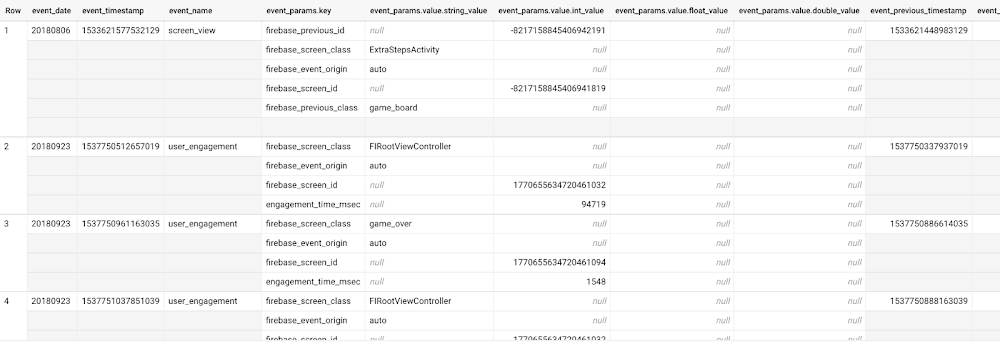
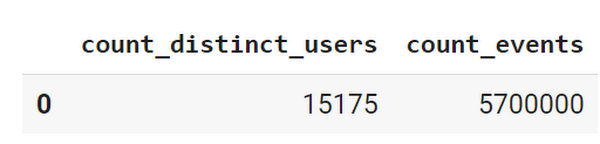
This dataset contains 5.7M events from over 15k users.
SELECTCOUNT(DISTINCT user_pseudo_id) as count_distinct_users,COUNT(event_timestamp) as count_eventsFROM`firebase-public-project.analytics_153293282.events_*
Our goal is to use BigQuery ML on the sample app dataset to predict propensity to user churn or not churn based on users’ demographics and activities within the first 24 hours of app installation.
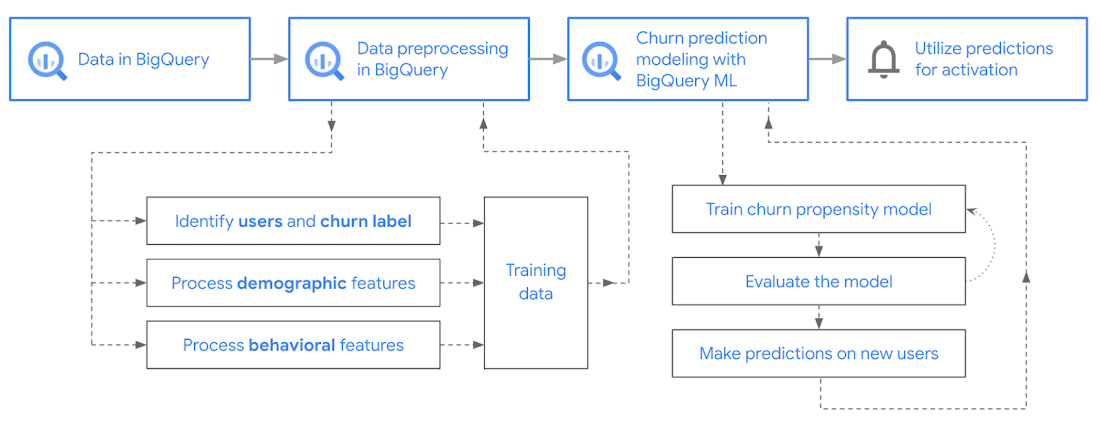
In the following sections, we’ll cover how to:
- Pre-process the raw event data from GA4
- Identify users & the label feature
- Process demographic features
- Process behavioral features
- Train classification model using BigQuery ML
- Evaluate the model using BigQueryML
- Make predictions using BigQuery ML
- Utilize predictions for activation
Pre-process the raw event data
You cannot simply use raw event data to train a machine learning model as it would not be in the right shape and format to use as training data. So in this section, we’ll go through how to pre-process the raw data into an appropriate format to use as training data for classification models.
This is what the training data should look like for our use case at the end of this section:
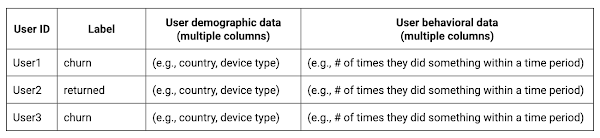
Notice that in this training data, each row represents a unique user with a distinct user ID (user_pseudo_id).
Identify users & the label feature
We first filtered the dataset to remove users who were unlikely to return the app anyway. We defined these ‘bounced’ users as ones who spent less than 10 mins with the app. Then we labeled all remaining users:
- churned: No event data for the user after 24 hours of first engaging with the app.
- returned: The user has at least one event record after 24 hours of first engaging with the app.
For your use case, you can have a different definition of bounce and churning. Also you can even try to predict something else other than churning, e.g.:
- whether a user is likely to spend money on in-game currency
- likelihood of completing n-number of game levels
- likelihood of spending n amount of time in-game etc.
In such cases, label each record accordingly so that whatever you are trying to predict can be identified from the label column.
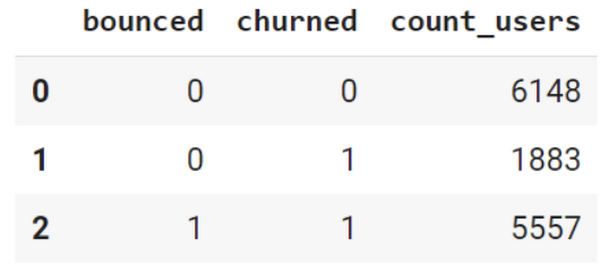
From our dataset, we found that ~41% users (5,557) bounced. However, from the remaining users (8,031), ~23% (1,883) churned after 24 hours:
SELECTbounced,churned,COUNT(churned) as count_usersFROMbqmlga4.returningusersGROUP BY 1,2ORDER BY bounced
To create these bounced and churned columns, we used the following snippet of SQL code.
...#churned = 1 if last_touch within 24 hr of app installation, else 0IF (user_last_engagement < TIMESTAMP_ADD(user_first_engagement,INTERVAL 24 HOUR),1,0 ) AS churned,#bounced = 1 if last_touch within 10 min, else 0IF (user_last_engagement <= TIMESTAMP_ADD(user_first_engagement,INTERVAL 10 MINUTE),1,0 ) AS bounced,...
You can view the Jupyter Notebook for the full query used for materializing the bounced and churned labels.
Process demographic features
Next, we added features both for demographic data and for behavioral data spanning across multiple columns. Having a combination of both demographic data and behavioral data helps to create a more predictive model.
We used the following fields for each user as demographic features:
geo.countrydevice.operating_systemdevice.language
A user might have multiple unique values in these fields — for example if a user uses the app from two different devices. To simplify, we used the values from the very first user engagement event.
CREATE OR REPLACE VIEW bqmlga4.user_demographics AS (WITH first_values AS (SELECTuser_pseudo_id,geo.country as country,device.operating_system as operating_system,device.language as language,ROW_NUMBER() OVER (PARTITION BY user_pseudo_id ORDER BY event_timestamp DESC) AS row_numFROM `firebase-public-project.analytics_153293282.events_*`WHERE event_name="user_engagement")SELECT * EXCEPT (row_num)FROM first_valuesWHERE row_num = 1 #first engagement);
Process behavioral features
There is additional demographic information present in the GA4 export dataset, e.g. app_info, device, event_params, geo etc. You may also send demographic information to Google Analytics through each hit via user_properties. Furthermore, if you have first-party data on your own system, you can join that with the GA4 export data based on user_ids.
To extract user behavior from the data, we looked into the user’s activities within the first 24 hours of first user engagement. In addition to the events automatically collected by Google Analytics, there are also the recommended events for games that can be explored to analyze user behavior. For our use case, to predict user churn, we counted the number of times the follow events were collected for a user within 24 hours of first user engagement:
user_engagementlevel_start_quickplaylevel_end_quickplaylevel_complete_quickplaylevel_reset_quickplaypost_scorespend_virtual_currencyad_rewardchallenge_a_friendcompleted_5_levelsuse_extra_steps
The following query shows how these features were calculated:
WITHevents_first24hr AS (SELECTe.*FROM`firebase-public-project.analytics_153293282.events_*` eJOINbqmlga4.returningusers rONe.user_pseudo_id = r.user_pseudo_idWHERETIMESTAMP_MICROS(e.event_timestamp) <= r.ts_24hr_after_first_engagement)SELECTuser_pseudo_id,SUM(IF(event_name = 'user_engagement', 1, 0)) AS cnt_user_engagement,# ... repeated for all behavior data ...SUM(IF(event_name = 'use_extra_steps', 1, 0)) AS cnt_use_extra_steps,FROMevents_first24hrGROUP BY1
View the notebook for the query used to aggregate and extract the behavioral data. You can use different sets of events for your use case. To view the complete list of events, use the following query:
SELECTevent_name,COUNT(event_name) as event_countFROM`firebase-public-project.analytics_153293282.events_*`GROUP BY 1ORDER BYevent_count DESC
After this we combined the features to ensure our training dataset reflects the intended structure. We had the following columns in our table:
- User ID:
user_pseudo_id
- Label:
churned
- Demographic features
countrydevice_osdevice_language
- Behavioral features
cnt_user_engagementcnt_level_start_quickplaycnt_level_end_quickplaycnt_level_complete_quickplaycnt_level_reset_quickplaycnt_post_scorecnt_spend_virtual_currencycnt_ad_rewardcnt_challenge_a_friendcnt_completed_5_levelscnt_use_extra_stepsuser_first_engagement
At this point, the dataset was ready to train the classification machine learning model in BigQuery ML. Once trained, the model will output a propensity score between churn (churned=1) or return (churned=0) indicating the probability of a user churning based on the training data.
Train classification model
When using the CREATE MODEL statement, BigQuery ML automatically splits the data between training and test. Thus the model can be evaluated immediately after training (see the documentation for more information).
For the ML model, we can choose among the following classification algorithms where each type has its own pros and cons:
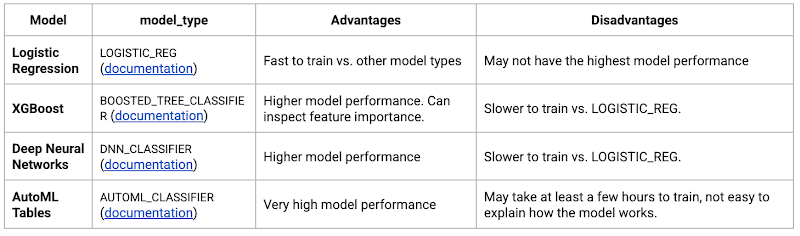
Often logistic regression is used as a starting point because it is the fastest to train. The query below shows how we trained the logistic regression classification models in BigQuery ML.
CREATE OR REPLACE MODEL bqmlga4.churn_logregTRANSFORM(EXTRACT(MONTH from user_first_engagement) as month,EXTRACT(DAYOFYEAR from user_first_engagement) as julianday,EXTRACT(DAYOFWEEK from user_first_engagement) as dayofweek,EXTRACT(HOUR from user_first_engagement) as hour,* EXCEPT(user_first_engagement, user_pseudo_id))OPTIONS(MODEL_TYPE="LOGISTIC_REG",INPUT_LABEL_COLS=["churned"]) ASSELECT*FROMbqmlga4.train
We extracted month, julianday, and dayofweek from datetimes/timestamps as one simple example of additional feature preprocessing before training. Using TRANSFORM() in your CREATE MODEL query allows the model to remember the extracted values. Thus, when making predictions using the model later on, these values won’t have to be extracted again. View the notebook for the example queries to train other types of models (XGBoost, deep neural network, AutoML Tables).
Evaluate model
Once the model finished training, we ran ML.EVALUATE to generate precision, recall, accuracy and f1_score for the model:
SELECT*FROMML.EVALUATE(MODEL bqmlga4.churn_logreg)

The optional THRESHOLD parameter can be used to modify the default classification threshold of 0.5. For more information on these metrics, you can read through the definitions on precision and recall, accuracy, f1-score, log_loss and roc_auc. Comparing the resulting evaluation metrics can help to decide among multiple models.Furthermore, we used a confusion matrix to inspect how well the model predicted the labels, compared to the actual labels. The confusion matrix is created using the default threshold of 0.5, which you may want to adjust to optimize for recall, precision, or a balance (more information here).
SELECTexpected_label,_0 AS predicted_0,_1 AS predicted_1FROMML.CONFUSION_MATRIX(MODEL bqmlga4.churn_logreg)
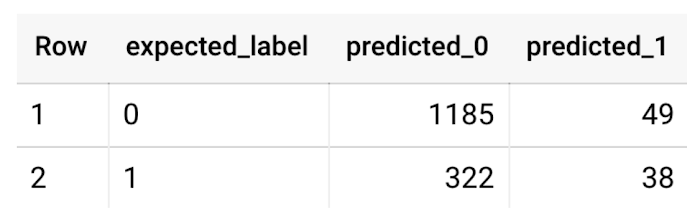
This table can be interpreted in the following way:

Make predictions using BigQuery ML
Once the ideal model was available, we ran ML.PREDICT to make predictions. For propensity modeling, the most important output is the probability of a behavior occurring. The following query returns the probability that the user will return after 24 hrs. The higher the probability and closer it is to 1, the more likely the user is predicted to return, and the closer it is to 0, the more likely the user is predicted to churn.
SELECTuser_pseudo_id,returned,predicted_returned,predicted_returned_probs[OFFSET(0)].prob as probability_returnedFROMML.PREDICT(MODEL bqmlga4.churn_logreg,(SELECT * FROM bqmlga4.train)) #can be replaced with a proper test dataset
Utilize predictions for activation
Once the model predictions are available for your users, you can activate this insight in different ways. In our analysis, we used user_pseudo_id as the user identifier. However, ideally, your app should send back the user_id from your app to Google Analytics. In addition to using first-party data for model predictions, this will also let you join back the predictions from the model into your own data.
- You can import the model predictions back into Google Analytics as a user attribute. This can be done using the Data Import feature for Google Analytics 4. Based on the prediction values you can Create and edit audiences and also do Audience targeting. For example, an audience can be users with prediction probability between 0.4 and 0.7, to represent users who are predicted to be “on the fence” between churning and returning.
- For Firebase Apps, you can use the Import segments feature. You can tailor user experience by targeting your identified users through Firebase services such as Remote Config, Cloud Messaging, and In-App Messaging. This will involve importing the segment data from BigQuery into Firebase. After that you can send notifications to the users, configure the app for them, or follow the user journeys across devices.
- Run targeted marketing campaigns via CRMs like Salesforce, e.g. send out reminder emails.
You can find all of the code used in this blogpost in the Github repository:
What’s next?
Continuous model evaluation and re-training
As you collect more data from your users, you may want to regularly evaluate your model on fresh data and re-train the model if you notice that the model quality is decaying.
Continuous evaluation—the process of ensuring a production machine learning model is still performing well on new data—is an essential part in any ML workflow. Performing continuous evaluation can help you catch model drift, a phenomenon that occurs when the data used to train your model no longer reflects the current environment.
To learn more about how to do continuous model evaluation and re-train models, you can read the blogpost: Continuous model evaluation with BigQuery ML, Stored Procedures, and Cloud Scheduler
More resources
If you’d like to learn more about any of the topics covered in this post, check out these resources:
- BigQuery export of Google Analytics data
- BigQuery ML quickstart
- Events automatically collected by Google Analytics 4
- Qwiklabs: Create ML models with BigQuery ML
Or learn more about how you can use BigQuery ML to easily build other machine learning solutions:
- How to build demand forecasting models with BigQuery ML
- How to build a recommendation system on e-commerce data using BigQuery ML
Let us know what you thought of this post, and if you have topics you’d like to see covered in the future! You can find us on Twitter at @polonglin and @_mkazi_.Thanks to reviewers: Abhishek Kashyap, Breen Baker, David Sabater Dinter.
How to Modernize Your Apps with Migrate to Anthos

3388
Of your peers have already read this article.
3:10 Minutes
The most insightful time you'll spend today!
In a perfect cloud world, you would host all your applications in containers running on Kubernetes and Istio, benefitting from the portability and improved resource utilization of containers, plus a robust orchestration platform with advanced application management, networking, and security functionality. This is easy to do if you’re developing a new application, but it can be hard for existing applications to take advantage of those capabilities.
Many of the applications that you may want to move to the cloud have been around a long time, and you may not have the application-specific knowledge that would be required to rewrite them to be more cloud-native—or it would be incredibly time-consuming to do so.
Another option is to lift-and-shift to a virtual machine (VM) hosting platform like Compute Engine, but that means you still need to maintain the VMs. Even if you’re not able to fully modernize an existing app, it would still be great to get some of the benefits of containers and Kubernetes.
What is Migrate for Anthos?
Enter Migrate for Anthos, a fast and easy way to modernize your existing applications with a service that encapsulates them in a container. Moving your physical servers or existing VMs into Kubernetes containers gives you crucial portability and resource utilization benefits without having to rewrite the underlying application.
Since Migrate for Anthos is built for Google Kubernetes Engine (GKE), you also automatically capture the scaling and flexibility benefits of a managed Kubernetes environment in the cloud. Migrate for Anthos recently became generally available.
Converting an application with Migrate for Anthos happens in two phases. First, it creates a generic container wrapper around your application that makes it seem like it is still running in a full VM environment. Then, you launch Migrate for Anthos software on your Kubernetes cluster that runs the containerized application.
You can find more details about this in the documentation and in our blog post: Migrating from Compute Engine to Kubernetes Engine with Migrate for Anthos.
As the name suggests, Migrate for Anthos works with Anthos GKE. However, you can also use Migrate for Anthos with only GKE—all it requires is your application and a GKE cluster running the Migrate for Anthos software.
Getting started with Migrate for Anthos
Migrate for Anthos works with a variety of workloads, but not all. It’s particularly adept at migrating legacy applications, stand-alone applications, and monolithic applications. As you start the modernization process, here are some questions to ask to determine whether to use Migrate for Anthos with your applications:
1. Should this app be in the cloud?
By its nature, the cloud may not be able to support some characteristics of your on-prem environment, such as geography and legal compliance. The best way to find out whether the cloud will work for each of your applications is to plan out a full migration. That will allow you to identify groups of applications that can benefit from cloud offerings such as a global network and ease of resizing resources. After that, try out a proof of concept by testing the apps in the cloud to see if it fits your business needs.
2. Should this app be in Kubernetes?
Containerizing an application simplifies workload administration, improves scalability (both up and down), and increases host utilization. Kubernetes orchestrates the containers and GKE handles node upgrades, while add-ons like Istio let you manage network and security policies independently of your application.
With those advantages, it’s easy to think that containers are always the right way to go, but there are some cases where it may make sense to stick with VMs. Strict hardware requirements, specialized kernel modules, and license constraints may be harder to run with containers, negating their advantages.
3. Should this app migration use Migrate for Anthos?
Migrating your apps or workloads to the cloud isn’t just about shifting where the compute resources run; it’s also an opportunity to modernize them with containers. Using Migrate for Anthos (or Migrate for Compute Engine) gives you the ability to get your workloads in the cloud quickly, with minimal upfront downtime that’s easy to plan for.
However, even if you use the Migrate for Anthos wrapper, your application is still the same application. The benefits of the modern platform may not outweigh a legacy application and a rewrite may be the only way to meet your business needs. There are also some specific services from your VM that may not work with Migrate for Anthos, for example licensing requirements.
Migrate for Anthos can also be the first step in a larger migration effort. Once you’ve migrated the application to GKE, you can gradually break up a monolithic app into microservices by manually rewriting parts. Spreading out the migration effort gets you in the cloud sooner, giving you more time to modernize.
Next steps
A successful modernization starts with creating a full migration plan, testing the workloads, and monitoring them. You can experience the benefits of modernization with Migrate for Anthos by picking a small workload and trying it out for yourself!
More Relevant Stories for Your Company

Google Maps’ Cloud-based Styling Features Betters UX, Control and Flexibility
This year at Google I/O, we announced the general availability of Cloud-based maps styling for the Maps JavaScript API. In an effort to provide you with more options and more control to help create the best experience for your users, today we’re releasing new features to Cloud-based maps styling. You may

BigQuery Omni: Your Solution for Multi-Cloud Geospatial Analytics
As we become increasingly reliant on technology to make decisions, geospatial data is becoming more critical than ever. It is a powerful resource that can be used to solve a variety of problems, from tracking the movement of goods, identifying interest areas and potential areas of disaster. Geospatial data incorporates

Bit Capital Rolls Out a Digital Financial Solution in Under 3 Months and at 2/3 the Cost
In the past few years, a series of new technologies and regulatory changes has been transforming Brazil’s financial industry. The concept of blockchain added security and agility to financial transactions. The open banking system being deployed by the country’s Central Bank (BC) allows for platform integration and data sharing -with

Securing apps using Anthos Service Mesh
Hi there! I'm David Challoner from Access Site Reliability Engineering (SRE), here with Anthony Bushong from Developer Relations to talk about how Corp Eng is adopting Anthos Service Mesh internally at Google. Corp Eng is Google's take on "Enterprise IT". A big part of the Corp Eng mission is running
