





1 Developer. 5 Months. A Revenue Generating App With 100K Users With Firebase

7869
Of your peers have already read this article.
5:30 Minutes
The most insightful time you'll spend today!
This is a guest post authored by Firebase customer, Anton Ivanov, Founder & CEO of DealCheck
Real estate investing is a fantastic way to build a stream of passive income and grow your wealth. Numerous studies have pointed out that real estate investing has created more millionaires throughout history than any other form of investing (like this one and this one). So why don’t more people do it?
I asked myself this very question a few years ago after talking to a group of friends about the success I’ve had with real estate, and listening to their reasons why they think it’s out of their reach.
A common theme among them was that they viewed it as something too difficult to learn and master. There were too many steps, the learning curve was steep and there was a lot of room for mistakes for somebody just starting out, especially when analyzing the financial performance of potential investment properties.
Traditionally, most investors used spreadsheets to do the math – which works only if you know what and how you’re calculating something. But if you don’t know that, it’s very easy to make mistakes and overlook things. And no one wants to make mathematical errors before a huge purchase like an investment property.

Where do I even begin?!
And that’s when I had the idea to build DealCheck – a cloud-based, easy-to-use property analysis tool for real estate investors and agents. I wanted to create a platform that would help new investors learn the ropes and avoid costly mistakes, but at the same time provide the flexibility to perform more advanced analysis with a click of a button.
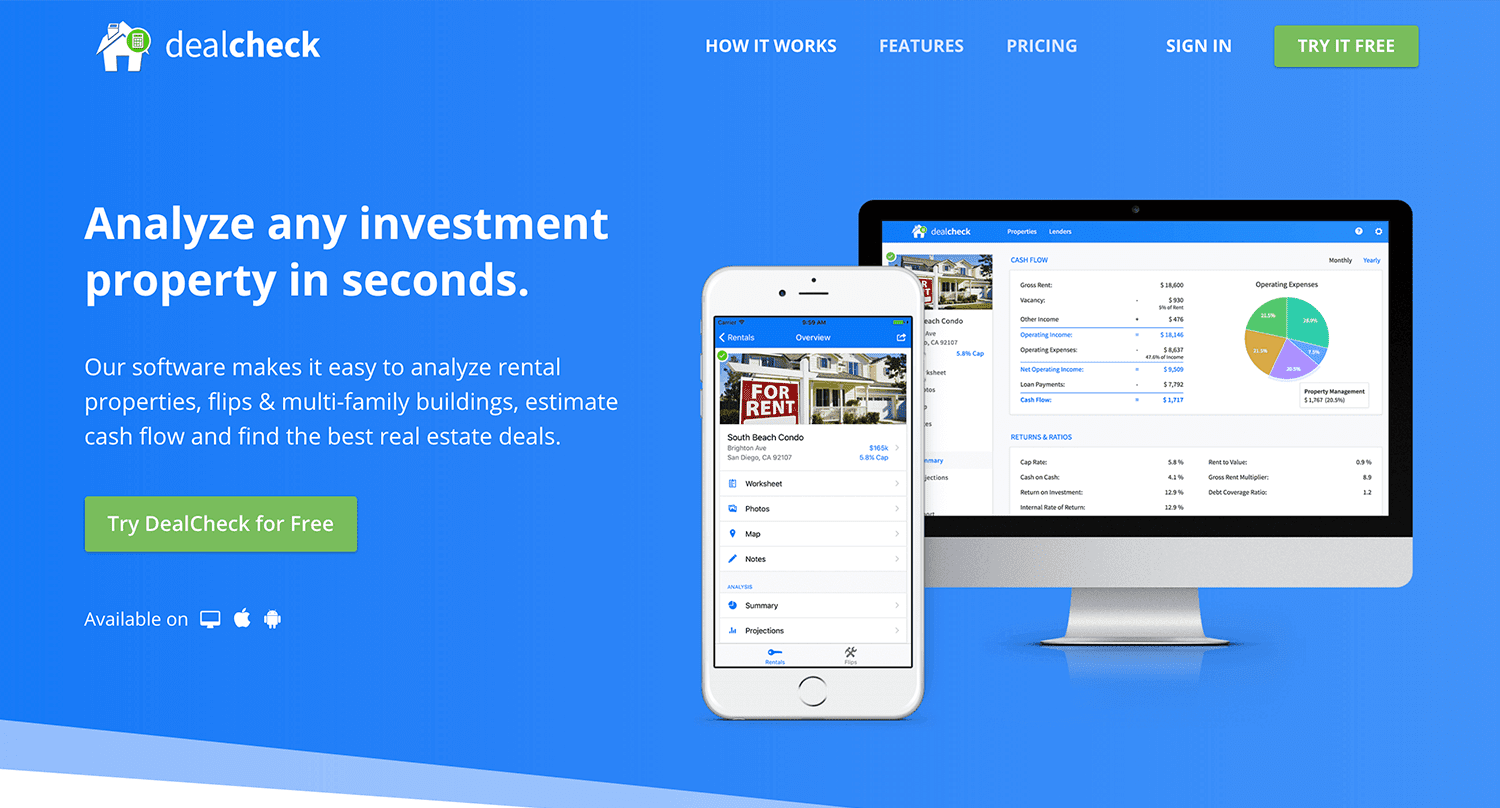
Making real estate investing easier and more accessible.
The Challenges of Solo Development
I was working as a front-end engineer at the time, so I knew I could build the UI myself, but what about the back-end, data storage, authentication, and a bunch of other things you need for a full-functioning cloud app?
I didn’t know anybody I could bring on as a co-founder, so I set out to research what technologies and platforms I could leverage to help me with the back-end and server infrastructure.
Firebase kept popping up again and again and I began to look at it in more detail. It was then recently acquired by Google and its collection of BaaS (backend-as-a-service) modules seemed to offer the exact solution I needed to build DealCheck.
I was especially impressed with the documentation for each feature and how well all of the different technologies could be tied together to create one unified platform.
It wasn’t long before I signed up and started building the first MVP of the app.
Using Firebase to Quickly Build a Scalable Backend
As the only developer on the project, I had limited time and resources to spend on building the back-end, so I set out to use every Firebase feature that was available at the time to my advantage.
My goal was actually to write as little server-side code as possible and instead focus on leveraging the different Firebase modules to solve three specific challenges:
Challenge #1 – Authentication and User Management
The first one was authentication and user management. DealCheck’s users needed the ability to create their accounts so they can view and analyze properties on any device (more on that later). I wanted to have the ability to sign in with email, Facebook or a Google account.
Firebase Authentication was designed specifically for this purpose and I used it to handle pretty much the entire authentication flow. Out-of-the-box, it has support for all the major social networks, cross-network credential linking and the basic account management operations like email changes, password resets and account deletions.
There was no server-side code required at all – I just needed to build the UI on the front-end.
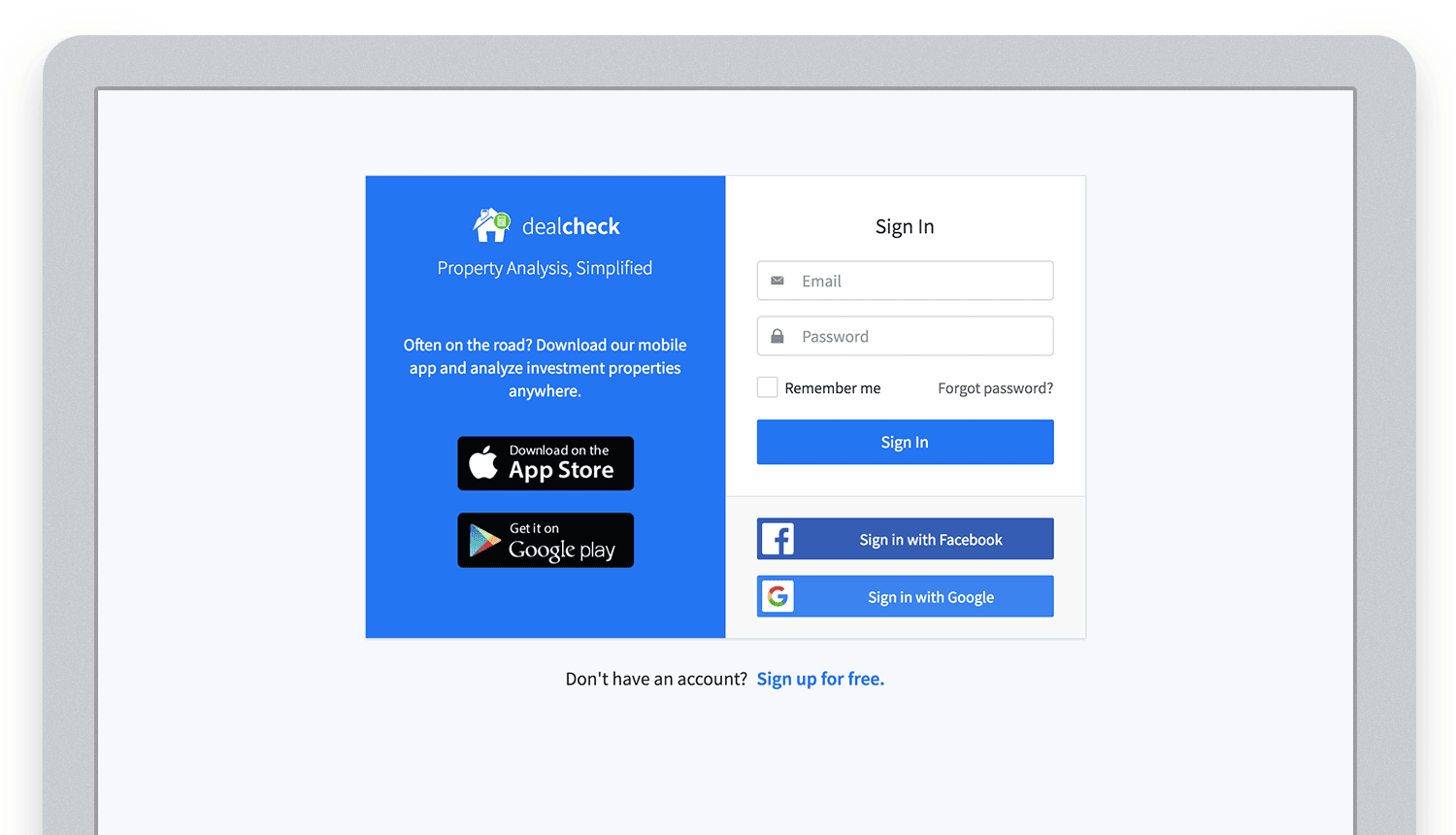
Email, Facebook and Google sign in powered by Firebase.
And as an added benefit, Firebase Authentication ties directly into the Realtime Database product to create a declarative permissions and access control framework that’s easy to implement and maintain. This helped me make sure user data was protected from unauthorized access, but also facilitate data sharing among users.
Challenge #2 – Cloud Storage with Cross-Device Sync
Next up was data storage. I knew that I wanted DealCheck’s users to be able to use the app and analyze properties online, on iOS and Android. So I needed a real-time, cloud-based database solution that could sync data across any device.
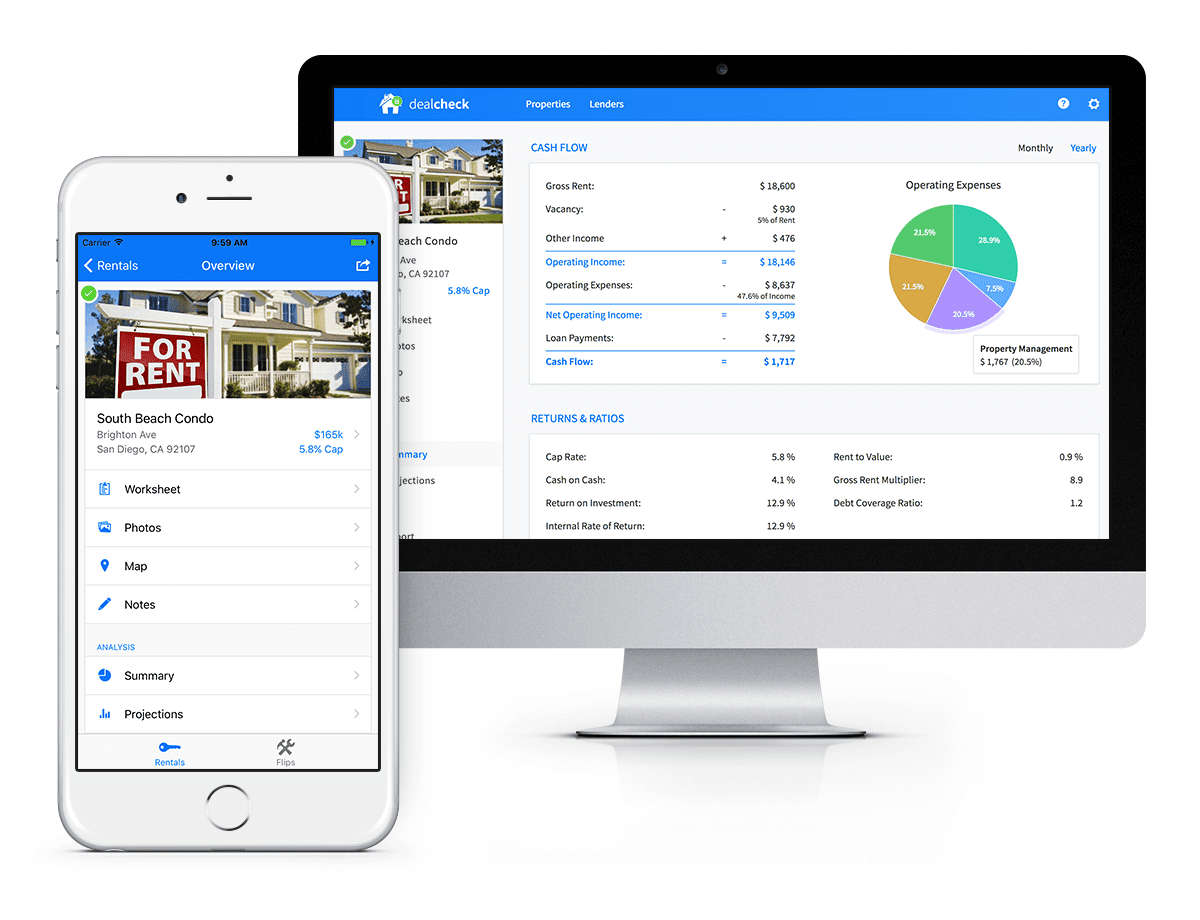
Syncing data across web and mobile is not easy!
Firebase Realtime Database is a NoSQL, JSON-based database solution that was designed exactly for this purpose, and I was actually surprised how great it worked. I used the official AngularJS bindings for Firebase on the front-end to read and write to it directly from the client.
I had to do some extra work on mobile to implement an offline mode with syncing after reconnections, but all-together the code required to make everything work was minimal.
As I mentioned, Firebase Authentication tied directly to the database to facilitate access control, so I really didn’t need to do anything extra there. And I was able to set up automatic daily backups of all the data with a click of a button.
Challenge #3 – Third-Party Integrations
Up to now, I had written exactly 0 lines of server-side code and everything was handled by the client directly. As DealCheck’s development progressed, however, I knew that I would need a server to handle some operations that could not be done in the client.
I wasn’t very experienced with server maintenance and DevOps, but fortunately the Firebase Cloud Functions product was able to solve all of my needs. Cloud Functions are essentially single-purpose functions that can be triggered (or executed) based on a specific HTTP request or events coming from the Authentication, Realtime Database or other Firebase products.
Each function can be run once based on a specific event trigger to perform its prescribed task. You don’t have to worry about provisioning a server instance or managing load – everything is done automatically for you by Firebase.
What’s even cooler, is that Cloud Functions can access the Realtime Database and Cloud Storage buckets of the same project, performing operations on them server-side, as needed.
This is how DealCheck processes subscription payments through Stripe, validates Apple and Google Play mobile subscription receipts, integrates with third-party APIs and updates database records without user interaction.
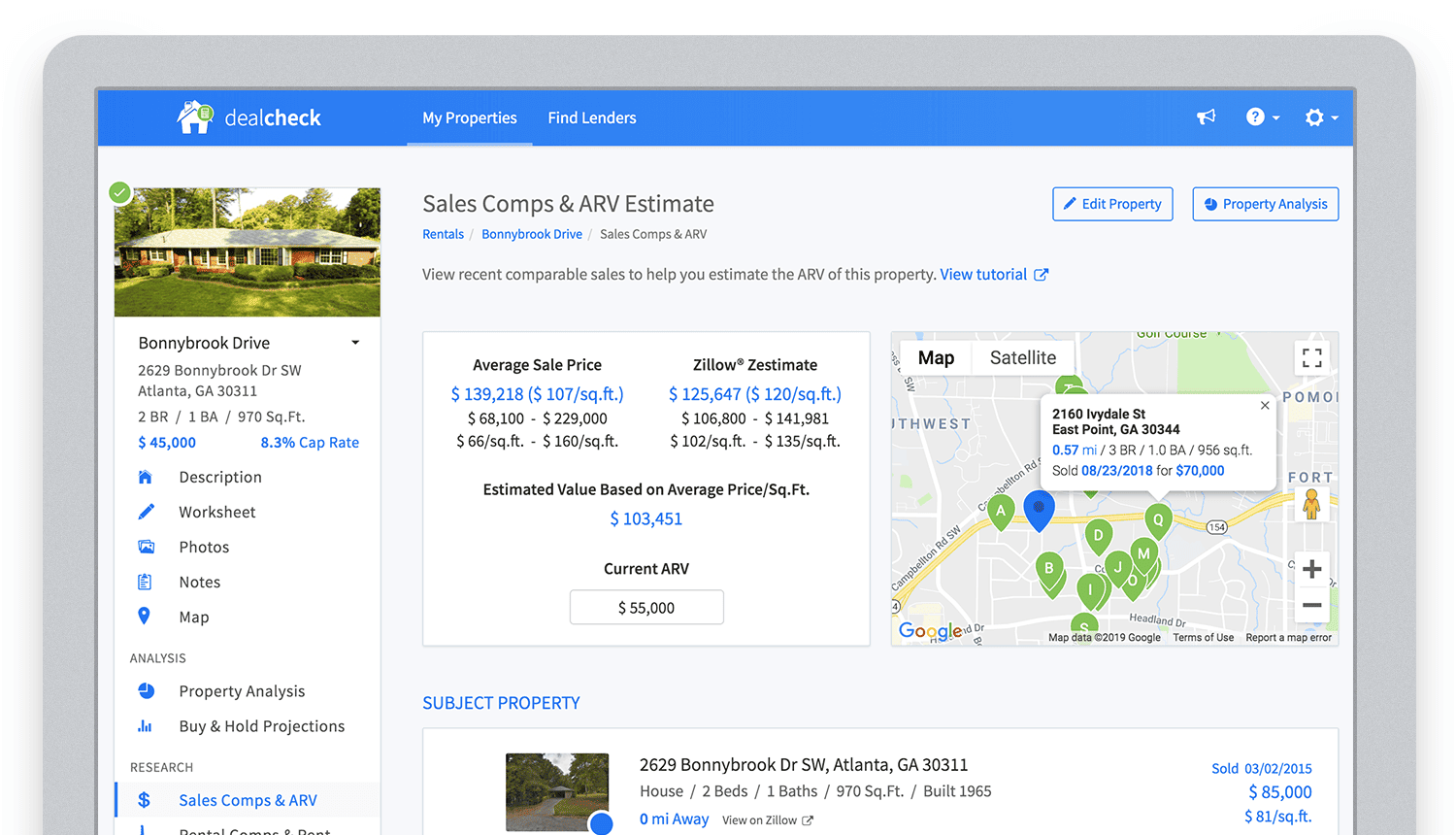
Bringing in sales comparable data from third-party providers into DealCheck.
Cloud Functions became the “glue” that tied the entire back-end infrastructure together.
Growing from an MVP to 100,000 Users with Firebase
The first version of the DealCheck app was built and launched in less than 5 months with just me on the development team. I definitely don’t think that would have been possible without Firebase powering the back-end infrastructure. Maybe the project wouldn’t have ever launched at all.
While Firebase is awesome for quick MVP development, it’s definitely designed to power production applications at scale as well. As DealCheck grew from a small side-project to one of the most popular real estate apps with over 100k users, all of the Firebase products that we use scaled to support the increasing load.
Moreover, the fantastic interoperability of all Firebase modules allows us to develop and release new features much faster because of the reduced coding requirements and ease of configuration.
So next time you’re looking to build an ambitious project with a small team – take a look at how Firebase can help you reduce development time and provide a suite of powerful tools that scale as your business grows.
This is exactly how DealCheck grew from a simple idea to make property analysis easier and faster, to an app that is helping tens of thousands of people grow their wealth and passive income through real estate investing. It’s a truly awesome and fulfilling experience to see your work positively impact so many people and it wouldn’t have been possible without Firebase.
5 Ways You Need to Know to Reduce Costs with Containers

3180
Of your peers have already read this article.
2:30 Minutes
The most insightful time you'll spend today!
“Cloud Wisdom Weekly: for tech companies and startups” is a new blog series we’re running this fall to answer common questions our tech and startup customers ask us about how to build apps faster, smarter, and cheaper. In this installment, Google Cloud Product Manager Rachel Tsao explores how to save on compute costs with modern container platforms.
Many tech companies and startups are built to operate under a certain degree of pressure and to efficiently manage costs and resources. These pressures have only increased with inflation, geopolitical shifts, and supply chain concerns, however, creating urgency for companies to find ways to preserve capital while increasing flexibility. The right approach to containers can be crucial to navigating these challenges.
In the last few years, development teams have shifted from virtual machines (VMs) to containers, drawn to the latter because they are faster, more lightweight, and easier to manage and automate. Containers also consume fewer resources than VMs, by leveraging shared operating systems. Perhaps most importantly, containers enable portability, letting developers put an application and all its dependencies into a single package that can run almost anywhere.
Containers are central to an organization’s agility, and in our conversations with customers about why they choose Google Cloud, we hear frequently that services like Google Kubernetes Engine (GKE) and Cloud Run help tech companies and startups to not only go to market quickly, but also save money. In this article, we’ll explore five ways to help your business quickly and easily reduce compute costs with containers.
5 ways to control compute costs with containers
Whether your company is an established player that is modernizing its business or a startup building its first product, managed containerized products can help you reduce costs, optimize development, and innovate. The following tips will help you to evaluate core features you should expect of container services and include specific advice for GKE and Cloud Run.
- Identify opportunities to reduce cluster administration
Most companies want to dedicate resources to innovation, not infrastructure curation. If your team has existing Kubernetes knowledge or runs workloads that need to leverage machine types or graphics processing units (GPUs), you may be able to simplify provisioning with GKE Autopilot. GKE Autopilot provisions and manages the cluster’s underlying infrastructure, all while you pay for only the workload, not 24/7 access to the underlying node-pool compute VMs. In this way, it can reduce cluster administration while saving you money and giving you hardened security best practices by default.
- Consider serverless to maximize developer productivity
Serverless platforms continue the theme of empowering your technical talent to focus on the most impactful work. Such platforms can promote productivity by abstracting away aspects of infrastructure creation, letting developers work on projects that drive the business while the platform provider oversees hardware and scalability, aspects of security, and more.
For a broad range of workloads that don’t need machine types or GPUs, going serverless with Cloud Run is a great option for building applications, APIs, internal services, and even real-time data pipelines. Analyst research supports that Cloud Run customers achieve faster deployments with less time spent monitoring services, resulting in reinvested productivity that lets these customers do more with fewer resources.
Designed with high scalability in mind, and an emphasis on the portability of containers, Cloud Run also supports a wide range of stateless workloads, including jobs that run to completion. Moreover, it lets you maximize the skills of your existing team, as it does not require cluster management, a Kubernetes skillset or prior infrastructure experience. Additionally, Cloud Run leverages the Knative spec and a container image as a deployment artifact, enabling an easy migration to GKE if your workload needs change.
With Cloud Run, gone are the days of infrastructure overprovisioning! The platform scales down to zero automatically, meaning your services always have the capacity to meet demand, but do not incur costs if there is no traffic.
- Save with committed use discounts
Committed use discounts provide discounted pricing in exchange for committing to a minimal level of usage in a region for a specified term. If you are able to reliably predict your resource needs, for instance, you can get a 17% discount for Cloud Run (for either one year or three years), and either a 20% discount (for one year) or a 45% discount (for three years) on GKE Autopilot.
- Leverage cost management features
Minimum and maximum instances are useful for ensuring your services are ready to receive requests but do not cause cost overages. For Google Cloud customers, best practices for cost management include building your container with Cloud Build, which offers pay-for-use pricing and can be more cost efficient than steady-state build farms.
Relatedly, if you choose to leverage serverless containers with Cloud Run, you can set minimum instances to avoid the lag (i.e., the cold start) when a new container instance is starting up from zero. Minimum instances are billed at one-tenth of the general Cloud Run cost. Likewise, if you are testing and want to avoid costs spiraling, you can set a maximum number of instances to ensure your containers do not scale beyond a certain threshold. These settings can be turned off anytime, resulting in no costs when your service is not processing traffic. To have better oversight of costs, you can also view built-in billing reports and set budget alerts on Cloud Billing.
- Match workload needs to pricing models
GKE Autopilot is great for running highly reliable workloads thanks to its Pod-level SLA. But if you have workloads that do not need a high level of reliability (e.g., fault tolerant batch workloads, dev/test clusters), you can leverage spot pricing to receive a discount of 60% to 91% compared to regularly-priced pods. Spot Pods run on spare Google Cloud compute capacity as long as resources are available. GKE will evict your Spot Pod with a grace period of 25 seconds during times of high resource demand, but you can automatically redeploy as soon as there is available capability. This can result in significant savings for workloads that are a fit.
Innovation requires balance
Put into practice, these tips can help you and your business to get the most out of containers while controlling management and resource costs. That said, it is worth noting that while managing cloud costs is important, the relationship between “cloud” and “cost” is often complex. If you are adopting cloud computing with only the primary goal of saving money, you may soon run into other challenges. Cloud services can save your business money in many ways, but they can also help you get the most value for your money. This balance between cost efficiency and absolute cost is important to keep in mind so that even in challenging economic landscapes, your tech company or startup can continue growing and innovating.
Beyond cost savings, many tech and startup companies are seeking improved business agility, which is the ability to deploy new products and features frequently and with high quality. With deployment best practices built into GKE Autopilot and Cloud Run, you can transform the way your team operates while maximizing productivity with every new deployment.
You can learn if your existing workloads are appropriate for containers with this fit assessment and these guides for migrating to containers. For new workloads, you can leverage these guides for GKE Autopilot and Cloud Run. And for more tips on cost optimization, check out our Architecture Framework for compute, containers, and serverless.
If you want to learn more about how Google Cloud can help your startup, visit our page here to get more information about our program and apply for our Google for Startups Cloud Program, and sign up for our communications to get a look at our community activities, digital events, special offers, and more.

Realize the True Potential of Omnichannel- Five Principles to Transform the Customer Experience
DOWNLOAD E-BOOK3693
Of your peers have already downloaded this article
12min Minutes
The most insightful time you'll spend today!
Most organisations trying to create an omni-channel customer experience approach the strategy in a siloed and individual manner. Often, businesses focus more on delivering a checklist of individual assets than enabling cohesive experiences as per the customer’s requirement.
A comprehensive omni-channel strategy should not merely focus on the forms of digital assets but take into account the over-all customer experience that they create. Both business and IT need to work in conjunction to provide customers a consistent, engaging, entertaining, and seamless experiences across multiple channels.
Read this E-book to understand how well-managed APIs and a developer-centric perspective enables companies to create a user-friendly experience and meet evolving customer expectations. By managing APIs as products that enable developers to match each market shift with a new digital service or app, businesses can realize the true promise of omnichannel experience.
Learn from real-life examples of companies like Walgreens, Burberry, and Ticketmaster and how these companies are leveraging API platforms to understand user behaviour and insights to create better product strategies, improve customer interactions, and increase customer loyalty.
Secret Manager: Keeping Your Organization’s Secrets Safer!

3287
Of your peers have already read this article.
2:00 Minutes
The most insightful time you'll spend today!
Secret Manager is a Google Cloud service that provides a secure and convenient way to store API keys, passwords, certificates, and other sensitive data. It is the central place and single source of truth to manage, access, and audit secrets across Google Cloud. Since its launch, Secret Manager has helped secure millions of workloads and continues to provide industry-first features like replication policies and support for VPC perimeters. This blog post explores new Secret Manager capabilities and integrations that will help keep your secrets safer.
New tier, free of charge
No, you’re not dreaming – Secret Manager now has a tier that is free of charge! With this tier, each month per billing account you can have up to:
- 6 secret versions
- 3 rotation events
- 10,000 API calls
This enables you to experience the value of Secret Manager with minimal financial risk and pairs nicely with existing services that offer a free tier like Cloud Run and Cloud Functions. For existing Secret Manager customers, this change will go into effect next billing cycle. Learn more about the Secret Manager free tier in the documentation.
Increased SLA
To meet the growing availability and reliability requirements of our customers, the Secret Manager SLA is now 99.95%! With this update, Secret Manager guarantees that all valid requests will succeed 99.95% of the time. This means you can depend on Secret Manager for even your most critical workloads. Additional details are available in the updated Secret Manager SLA.
Geo-expansion
In addition to the free tier and increased SLA, Secret Manager is now available in all public Google Cloud regions! With Secret Manager’s replication policies, you can choose the specific regions in which to replicate your secret, which means you can store secret payloads in geographical proximity to your workloads or users to reduce latency. This is also very useful if you have legal or regulatory requirements to store data in a particular locality. For more information, check out the list of Secret Manager locations in the documentation.
Compliance certifications
For customers wishing to use Secret Manager to store and process regulated data, Secret Manager is validated for compliance use cases including ISO 27001, ISO 27017, ISO 27018, SOC 1, SOC 2, SOC 3, PCI DSS, and HIPAA. Combined with the increased SLA and geographical availability, this makes Secret Manager suitable for use with regulated workloads.
Customer-Managed Encryption Keys (CMEK)
Secret Manager has always encrypted payloads in transit with TLS and at rest with AES-256. For customers that want additional control over the keys used to encrypt their secret payloads, Secret Manager now supports Customer-Managed Encryption Keys (CMEK). Secret Manager CMEK supports software-backed keys via Cloud KMS, hardware-backed keys via Cloud HSM, and even externally-managed keys via Cloud EKM. Learn how to enable CMEK support for Secret Manager in our tutorial.
Expiration and TTLs
While it was previously possible to expire access to a secret using IAM conditions, the underlying secret would continue to exist. Secret Manager now supports auto-expiring secrets which permanently deletes a secret at a specified timestamp or TTL. Since it is also possible to update a secret’s TTL, services can “lease” a secret and renew their lease on a periodic basis. If the service does not extend the lease by updating the TTL, the secret is automatically deleted.
Expiring secrets can be used in combination with IAM conditions to more safely expire secrets. For more information on expiring secrets and safety measures, see the guide on creating and managing expiring secrets.
Etags and server-side filtering
For customers that create or manage Secret Manager secrets via the API or an SDK, concurrency controls and performance are extremely important. This is why Secret Manager now supports Etags and server-side filtering! Etags help prevent concurrent modifications to the same secret by providing optimistic concurrency controls, while server-side filtering can dramatically reduce payload size and client-side computational overhead. Together, these enable stronger consistency guarantees and performance improvements to your applications. Learn more about Secret Manager Etags and Secret Manager server-side filtering in the documentation.
Code, build, run, deploy, monitor, and orchestrate
Secrets – like API keys, passwords, and certificates – are an integral part of most modern software applications. It is crucial that developers, operators, and security teams are empowered to build, operate, and observe software securely. That is why Secret Manager is now integrated with popular tools and technologies used throughout the application development lifecycle:
- Code – Software engineers can create and access secrets directly from their preferred IDEs with Cloud Code. In VS Code, IntelliJ, or the Cloud Shell Editor, developers can browse secrets and insert code snippets for access secrets, all from the comfort of their local IDE.
- Build – Release engineers can access secrets as part of CI builds using the Cloud Build Secret Manager integration. This could be used, for example, to authenticate to a Docker registry or communicate with the GitHub API. For customers that use other CI systems, there is also a GitHub Action for accessing Secret Manager secrets.
- Run (on serverless) – Developers can mount secrets to be available as environment variables or via the filesystem through the native Cloud Run Secret Manager integration. Since the secrets are resolved in Cloud Run’s control plane, developers can use this integration to avoid a tight coupling between their applications and Secret Manager to enable hybrid cloud deployments or better local development experiences.
- Run (on Kubernetes) – Developers can mount secrets from GKE, Anthos, or any Kubernetes cluster using the Secret Manager CSI driver. This vendor-agnostic driver exposes secrets via environment variables or the filesystem and enables hybrid cloud deployments using the same interface as other public cloud providers and HashiCorp Vault.
- Deploy – To complement the existing Secret Manager Terraform integration, operators can now manage Secret Manager via Kubernetes Config Connector (KCC). KCC allows operators to manage Google Cloud resources through Kubernetes and the familiar Kubernetes APIs.
- Monitor – With the Secret Manager Cloud Asset Inventory (CAIS) integration, security teams can understand secret usage across specific projects, folders, or the entire organization.
- Orchestrate – Secret Manager Event Notifications enable DevOps and security teams to subscribe to Pub/Sub topics for when secrets or secret versions are changed. This enables customers to create deeply-integrated workflows, such as creating a ServiceNow ticket when a new secret version is added. Additionally, Secret Manager Rotation Scheduling enables DevOps teams to build automatic rotation flows like the ones described in the rotation guide.
Best practices
The Secret Manager best practices guide ensures customers get the maximum security benefits from Secret Manager. Security is non-binary, and this guide covers nuanced topics like access controls, coding practices, and secret administration. While not an exhaustive list, the Secret Manager best practices guide answers some of the most common questions and concerns around using Secret Manager in production deployments.
Towards seamless security
Secrets management is an important part of every organization’s security toolkit. With Secret Manager, you can easily manage, audit, and access secrets like API keys and credentials across Google Cloud, Anthos, and on-premises. These new features and integrations make it easy to adopt Secret Manager whether you are a hobbyist working on a side project or a large enterprise with thousands of employees.
To get started, check out the Secret Manager documentation.
Release of Go 1.18 is A New Milestone for Development of Secure Apps

3204
Of your peers have already read this article.
1:30 Minutes
The most insightful time you'll spend today!
On March 15th, the Go team announced Go 1.18 GA, the latest release of the Go programming language. The culmination of over a decade of design delivers the features our developers demanded: generics, fuzzing, and module workspaces. With this release, Go becomes the first major language to integrate fuzz testing into its core toolchain without using third-party support, further establishing Go as a preferred language for developing secure applications.
Go was created at Google in 2007, designed to help developers build fast, reliable, and secure software. Unlike traditional languages, Go was built for the modern multi-core computing world. Go has emerged as a modern language for developing cloud applications, services, and infrastructure. Today Go powers several of Google’s largest products, and is used by many customers to scale their businesses. Organizations big and small love Go and the community of Go developers, known as “gophers” has grown into a global network with over 2 million users worldwide.
Using the power of Go in the Cloud
When looking at the public repos, over 75% of CNCF projects including Kubernetes are written in Go and 10% of developers are writing in Go worldwide (as of May 2021). Google delivers high performance infrastructure to run key, cloud native, Open Source projects. Our modern cloud infrastructure is based on Kubernetes at its core and our strong support for Istio and Knative have formed the base of some of our leading services like Google Kubernetes Engine (GKE), our managed application platform with Anthos, Cloud Functions, and Cloud Run. Google uses Go extensively for a wide range of applications from our indexing platform that powers Google Search, to the server side optimizations that power Chrome’s 1B+ users, to the infrastructure on which Google cloud is built.
Release Highlights
With this new release of Go 1.18, Generics are the biggest change to Go since the language was created. Go developers told us that they feel that Go lacks critical features, with generics being the main missing piece. With Go 1.18, new and existing Go developers can take advantage of the productivity, performance, and maintenance benefits that generics can bring. We’ve already begun to see the new kinds of libraries and projects gophers are building with generics in its short beta period, and expect this creativity to grow as time goes on.
This Go release also brings native support for fuzzing. Fuzzing is a type of vulnerability testing that throws arbitrary data at a piece of software to expose unknown errors and is emerging as a common testing scheme in enterprise development. Go is now the first major language to provide fuzzing support with no third-party integrations necessary, allowing developers to start building secure software with minimal additional cost. Go’s innovative approach to fuzzing can provide not only security for the current code but also ongoing protection as code and dependencies evolve. With attacks on software becoming more common and complex, vulnerability detection can be a critical part of the enterprise development lifecycle, and Go’s fuzzing capabilities catch vulnerabilities earlier in the lifecycle.
Build securely using Go
At Google we are helping to make Open Source software secure. Open source software is a connective tissue for much of the online world. At Google, we’ve been working to raise awareness of the state of open source security and are committed to helping secure the software supply chain for organizations. Go has been designed to create secure applications, helping to minimize risk as much as possible. Go applications compile down to a single binary without local dependencies. It’s not uncommon to see an application built using only the standard library, or only a couple well-vetted Go dependencies. Go’s dependency management uses tamper-evident transparency log, with built in tooling that helps ensure your dependencies are what you can expect. Go has native encryption, which is used across much of the internet, including key components of Google. Go even supports distroless containers, where there are zero local dependencies to worry about. Google Cloud products like Cloud Build, for CI/CDand Artifact Registry, for container management, and have direct access to Go’s vulnerability database and can provide you instant warnings about security threats.
“At Google we are committed to helping to secure the online infrastructure and applications upon which the world depends. A critical aspect of this mission is being able to understand and verify the security of open source dependency chains. The 1.18 release of Go is an important step towards helping to ensure that developers are able to build secure applications, understand risk when vulnerabilities are discovered, and reduce the impact of cybersecurity attacks” said Eric Brewer, VP Infrastructure, Google Fellow
This launch is a significant milestone for Go that helps developers from around the world build more performant and secure applications that run on any infrastructure. For more information on this release and how to get started with Go, please visit.
3436
Of your peers have already watched this video.
1:30 Minutes
The most insightful time you'll spend today!
Lowe’s: Building a Centralized Price Management Solution
Watch how American retail company specializing in home improvement Lowe’s used Google Cloud to build a centralized price management solution. The company’s application development team leveraged Google Cloud to enable the improvement of their software development life cycle – from code development to CI/CD and monitoring.
More Relevant Stories for Your Company

Arab Bank Accelerates its App Development and Testing Using Apigee and Anthos
Founded in 1930 and headquartered in Jordan, Arab Bank is one of the oldest banks in the Middle East. Operating out of 28 countries, we’ve earned our customers’ trust with a prudent approach to operations and respect for the cultures and customs in the region. With a few exceptions where cloud providers

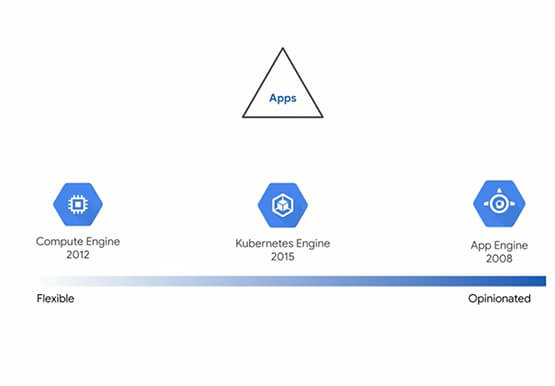
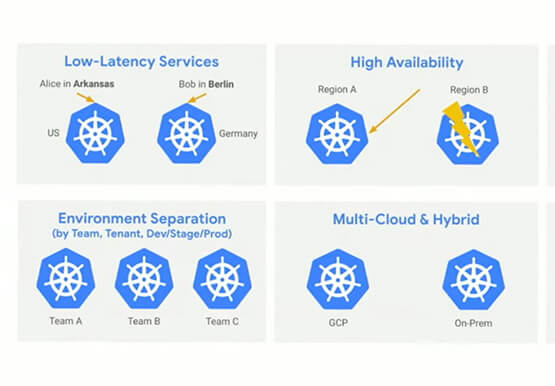

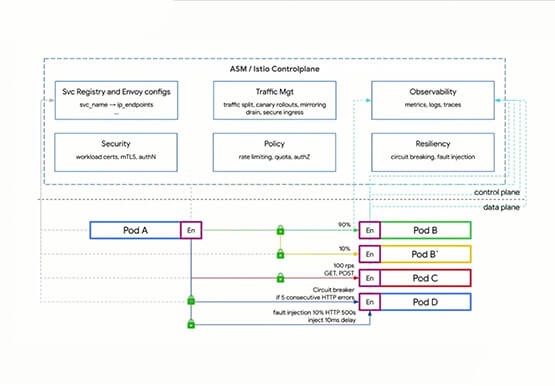
Building Globally Scalable Services with Istio and ASM
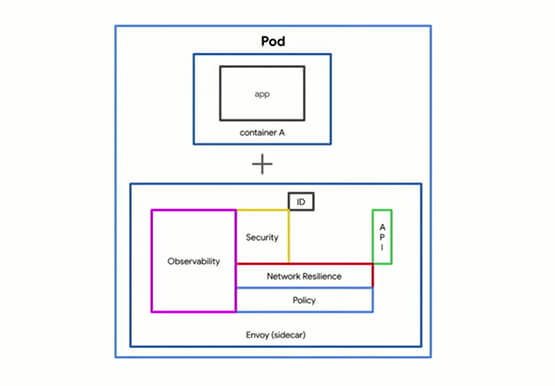
Building distributed applications is hard! Building globally scalable distributed applications is harder. Maintaining and growing these services as your business grows is even harder. Learn how to create a globally scalable platform for your business on Google Cloud using service meshes. See how to build a platform on Google Cloud


Target Leverages Google Cloud to Create Market-defining Online Experience
In the hyper-competitive world of online retail sales, ease-of-use and transaction speed can make or break business outcomes. However, a few years ago US Retail giant Target was going through a period of uncertainty. While the company had over 1800 stores across the US with an estimated 85% of US

How to Build a Platform on Google Cloud from the Ground Up
Building distributed applications is hard! Building globally scalable distributed applications is harder. Maintaining and growing these services as your business grows is even harder. Watch this video to know how to create a globally scalable platform for your business on Google Cloud using service meshes. It shows how to build
