





Manage IAM permissions with the Google Cloud mobile app

1214
Of your peers have already read this article.
2:00 Minutes
The most insightful time you'll spend today!
What’s new with Permissions Management on the Cloud Mobile App
Identity and Access Management (IAM) is the foundation of a strong cloud security posture, ensuring that the right access and permissions for cloud resources are granted across your organization. The Google Cloud mobile app gives cloud administrators the ability to quickly and easily manage their organization’s cloud identities and access from the mobile platform of their choice.
Permissions management is one of the top user-requested features for the Cloud mobile app based on feedback we’ve received. The Permissions tab is used by more than half of our mobile users every month, highlighting the importance of easily managing permissions on-the-go.
We are excited to announce the availability of enhanced permissions management on the Google Cloud mobile app. This new capability enables you to easily view, assign and search for all the roles in your organization.
Manage permissions easily on-the-go
The Cloud mobile app has expanded beyond supporting the three basic roles of Owner, Editor, and Reader, to supporting all the roles in your organization. Administrators are not only able to see all the roles but also assign these roles across their organization:
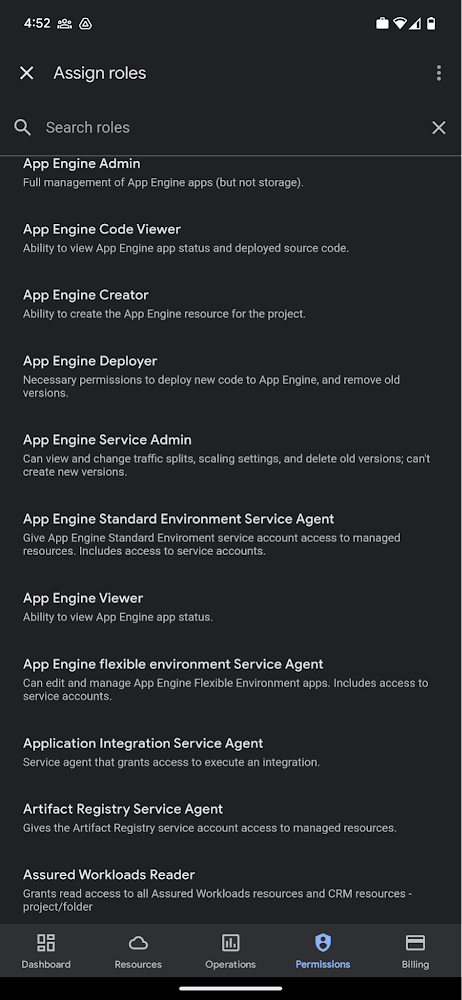
Administrators can also easily view a list of users, and click into each to see all the roles assigned to each user. On top of that, you can easily leverage the search capability to check if a role is assigned and modify its assignment. You can even assign multiple roles at the same time for easy editing. The app will show you a summary of changes before you will proceed.
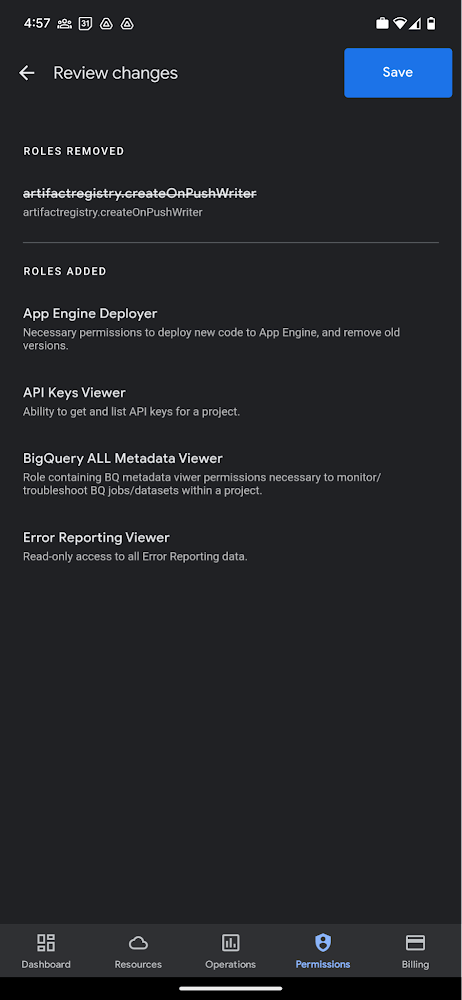
The layout is optimized for mobile, with the categories of information organized for easy viewing. Currently assigned roles are always displayed on the top of the screen so they are easily accessible. Basic roles appear below, followed by all other roles grouped by Google Cloud products.
Get started on the Google Cloud app today
To summarize we’ve enhanced permissions management on the Google Cloud mobile app with:
- Smoother navigation
- Support for all the roles in your organization
- Easy search for assigned roles
- Ability to review changes before applying
Give enhanced permission management a try and explore the possibilities by downloading the app today from Google Play or the Apple App Store. If you have any feedback, we would love to hear from you – simply click on the “send feedback” button in the app to share your experience.
The {$persona} Survival Guide: A Roadmap for Successful Transformation

2461
Of your peers have already read this article.
1:30 Minutes
The most insightful time you'll spend today!
Part of being a security leader whose organization is taking on a digital transformation is preparing for hard questions – and complex answers – on how to implement a transformation strategy.
In our previous CISO Survival Guide blog, we discussed how financial services organizations can more securely move to the cloud. We examined how to organize and think about the digital transformation challenges facing the highly-regulated financial services industry, including the benefits of the Organization, Operation, and Technology (OOT) approach, as well as embracing new processes like continuous delivery and required cultural shifts.
As part of Google Cloud’s commitment to shared fate, today we offer tips on how to ask the right questions that can help create the conversations that lead to better transformation outcomes for your organization. While there often is more than one right answer, a thoughtful, methodical approach to asking targeted questions and maintaining an open mind about the answers you hear back can help achieve your desired result. These questions are designed to help you figure out where to start and where to end your organization’s security transformation. By asking the following questions, CISOs and business leaders can develop a constructive, focused dialogue which can help determine the proper balance between implementing security controls and fine-tuning the risk tolerance set by the executive management and the board of directors.
To start the conversation, begin by asking:
- What defines our organization’s culture?
- How can we best integrate the culture with our security goals?
CISOs should ask business leaders:
- What makes a successful transformation?
- What are the key goals of the transformation?
- What data is (most) valuable?
- What data can be retired, reclassified, or migrated?
- What losses can we afford to take and still function?
- What is the real risk that the organization is willing to accept?
Business leaders should ask CISOs and the security team:
- What are the best practices for protecting our valuable data?
- What is the business impact of implementing those controls?
- What are the top threats that we need to address?
CISOs and business leaders should ask:
- Which threats are no longer as important?
- Where could we potentially use spending for more cost-effective controls such as firewalls and antivirus software?
- What benefits do we get from refactoring our applications?
- Are we really transforming, or lifting and shifting?
- How should we perform identity and access management to meet our business objectives?
- What are the core controls needed to ensure enterprise-level performance for the first workloads?
CISOs and risk teams should ask:
- How can we use the restructuring of an existing body of code to streamline security functions?
- How should we monitor our security posture to ensure we are aligned with our risk appetite?
Business and technical teams should ask:
- What’s our backup plan?
- What do we do if that fails?
Practical advice and the realities of operational transformation
Some organizations have been working in the cloud for more than a decade and have already addressed many operational procedures, sometimes with painful lessons learned along the way. If you’ve been operating in the cloud securely for that long, we recognize that there’s a lot to be gained from understanding your approaches to culture, operational expertise, and technology.
However, there are still many organizations that have not thought through how they will operate in a cloud environment until it’s almost ready – and at that point, it might be too late. If you can’t detail how a cloud environment will operate before its launch, how will you know who should be responsible for maintaining it?
Who are the critical stakeholders, along with those responsible for engineering and maintaining specific systems, who should be identified at the start of the transformation? There are likely several groups of stakeholders, such as those aligned with operations for transformation, and those focused on control design for cloud aligned with operations.
If you don’t have the operators involved in the design phase, you’re destined to create clever security controls with very little practical value because those tasked with day-to-day maintenance most likely won’t have the expertise or training to effectively operate these controls.
This is complicated by the fact that many organizations are struggling to recruit and retain resources with the right skills to operate in the cloud. We believe that training current employees to learn new cloud skills, and giving them the time away from other responsibilities, can help build skilled, diverse cloud security teams.
If your organization continually experiences high turnover in security leadership and skilled staff, it’s up to you to navigate your culture to ensure greater consistency. You can, of course, choose to supplement internal knowledge with trusted partners – however, that’s an expensive strategy for ongoing operational cost.
We met recently with a security organization that turns over skilled staff and leadership every two to three years. This rate of churn results in a continual resetting of security goals. This particular team joked that it’s like “Groundhog Day” as they constantly re-evaluate their best security approaches yet make no meaningful progress. This is not a model to emulate.
Many security controls fail not because they are improperly engineered, but because the people who use them – your security team – are improperly trained and insufficiently motivated. This is especially true for teams with high turnover rates and other organizational misalignments. A security control that blocks 100% of attacks might be engineered correctly, but if you can’t efficiently operate it, the effectiveness of the control will plummet to zero over time. Worse, it then becomes a liability because you incorrectly assume you have a functioning control.
In our next blog, we will highlight several proven approaches that we believe can help guide your security team through your organization’s digital transformation.
To learn more now, check out:
Introducing New Capabilities for Secure Transformations

2756
Of your peers have already read this article.
2:30 Minutes
The most insightful time you'll spend today!
Organizations large and small are realizing that digital transformation and the changing threat landscape require a grounds up effort to transform security. At Google Cloud, we continue to invest in our vision of invisible security where advanced capabilities are engineered into our platforms, operations are simplified, and stronger security outcomes can be achieved.
We made five major security announcements at Google Cloud Next:
- Introducing Chronicle Security Operations, to help detect, investigate, and respond to cyberthreats with the speed, scale, and intelligence of Google
- Introducing Confidential Space, to help unlock the value of secure data collaboration
- Advancing digital sovereignty on Europe’s terms, to address growing demand for cloud solutions with high levels of control, transparency, and sovereignty
- Introducing Software Delivery Shield, to help improve software supply chain security
- New and expanded Google Cloud partnerships with leaders across the security ecosystem
Today at Next ‘22, we’re introducing additional new security products, partnerships, and solutions across security analytics, anti-fraud measures, device security, Zero Trust, and open source software security to help our customers around the world address their most pressing security challenges.
Our Assured Open Source Software service, which we announced earlier this year, is now available in Preview. Assured OSS enables enterprise and public sector users of open source software to easily incorporate the same trusted OSS packages that Google uses into their own developer workflows. You can sign up for the Preview of Assured OSS here.
Security teams must continually measure and manage risk in their cloud environments. Earlier this year we acquired Foreseeti, a startup focused on attack simulation and risk quantification. We’re excited to announce that the integration of Foreseeti’s groundbreaking technology, which can help teams understand their exposure and prioritize contextualized vulnerability findings, will be coming to Security Command Center in Preview in Q4. Security Command Center will use Forseeti’s advanced attack path simulations to help you apply targeted remediations before attackers can take advantage of high-risk vulnerabilities.
To help organizations better manage risks in their online channels, reCAPTCHA Enterprise and Signifyd will partner to bring to market a joint anti-fraud and abuse solution. This solution will combine the behavioral analysis capabilities of reCAPTCHA Enterprise with the anti-fraud capabilities of Signifyd to help enterprises reduce abuse, account takeovers, and payment fraud.
We continue to invest in new initiatives with our BeyondCorp Alliance partners. Palo Alto Networks customers can now pair Prisma Access with BeyondCorp Enterprise Essentials to help secure private and SaaS app access while mitigating internet threats across managed and unmanaged devices with a secure enterprise browsing experience.
We now package best practices and implementation experience for our customers in Zero Trust Advisory solutions. Our Cybersecurity Action Team and select partners can help guide you through the Zero Trust journey with exploratory workshops, architecture reviews, customized recommendations, and implementation support.
Google Cloud Armor, which was instrumental in stopping the largest Layer 7 DDoS attack to date, was named a Strong Performer in The Forrester Wave™: Web Application Firewalls, Q3 2022. This is our debut in the WAF Wave, and it’s encouraging to see the recognition for the product in this market segment.
Google Workspace has received several security updates and advances. They bring data loss prevention (DLP) to Google Chat to help prevent sensitive information leaks, new Trust rules for Google Drive for more granular control of internal and external sharing, and Client-side encryption (CSE) in Gmail and Google Calendar to help address a broad range of data sovereignty and compliance requirements. You can learn more in our Workspace blog.
Learn more at Google Cloud Next
Our growing team at Google Cloud Security remains focused on delivering solutions that can make governments and enterprises safer with Google, in our trusted cloud and through products that bring our security capabilities to on-premises environments and other clouds. Learn more about these announcements and capabilities by attending the Security sessions at Google Cloud Next all this week and on-demand soon after.
Confidential GKE Nodes: Now Available on Compute Optimized C2D VMs

1255
Of your peers have already read this article.
1:30 Minutes
The most insightful time you'll spend today!
Today, we are happy to announce that Confidential GKE Nodes are available on compute optimized C2D VMs.
Many companies have adopted Google Kubernetes Engine (GKE) as a key component in their application infrastructure. In some cases, the advantages of using containers and Kubernetes can surpass those of traditional architectures, but migrating to and operating apps in the cloud often requires strategic planning to reduce risk and prevent data breaches. This is where Confidential GKE Nodes can be utilized to enhance the security of your GKE clusters or node pools.
Confidential GKE Nodes leverage specialized hardware to encrypt data in-use and are ideal for organizations processing sensitive data in the cloud. To make it easier to start using Confidential GKE Nodes, GKE standard workloads you run today can run as confidential GKE workloads without code changes on your end.
Security underpinnings of Confidential GKE Nodes
As we expand the Confidential Computing product portfolio from Confidential VMs to Confidential GKE Nodes to Confidential Dataproc, ensuring high performance is key. Confidential GKE Nodes are built on the same technology foundation as Confidential VM and utilize the Secure Encrypted Virtualization (SEV) capability of AMD EPYC™ processors. This feature allows you to keep data encrypted in memory with node-specific, dedicated keys that are generated and managed by the processor. The keys are generated in hardware during node creation and reside solely within the processor, making them unavailable to Google Cloud or other nodes running on the host.
Combined with the high performance of C2D VMs
Previously, Confidential GKE Nodes were generally available only on general purpose N2D VMs, but now they’re also available on compute optimized C2D VMs. The C2D machine series provides VM sizes ranging from 2 vCPUs to 112 vCPUs, offers up to 896 GB of memory, and are suited for performance-intensive workloads. C2D standard and C2D high-CPU machines serve compute-bound workloads including high-performance web servers and media transcoding. C2D high-memory machines serve specialized workloads such as high-performance computing (HPC) and electronic design automation (EDA), which require more memory.
Confidential GKE Nodes on compute-optimized C2D VMs could be a fit for use cases that require high performance and security. You can achieve encryption in-use for data processed inside your GKE cluster or just on specific node pools, without significant performance degradation. This is relevant for industries such as financial services, healthcare, retail, blockchain, and telecommunications, which often have sensitive data or personally identifiable information (PII) that requires additional security measures.
How MATRIXX used Confidential GKE Nodes
MATRIXX Software chose Confidential GKE Nodes to provide transparent encryption for data in-use to supplement encryption for data at-rest to secure personal subscriber data as required by privacy regulations.
MATRIXX Digital Commerce Platform (DCP) is a real-time 5G monetization for the communications industry, serving many of the world’s largest operator groups, regional carriers, and emerging digital service providers. MATRIXX used Google Cloud Confidential GKE Nodes to deliver a cloud-first digital commerce solution that enables commercial and operational agility for current and new telco business models.
A whitepaper titled “Protecting Your 5G Revenue Stream in the Cloud,” described how when MATRIXX DCP is deployed with Confidential Computing on Google Cloud, “its subscriber data, account balances, network events and charges/revenue streams are encrypted in use without making any code changes to the application or compromising on performance.”
Confidential GKE Nodes are globally available
At Google Cloud, we’re committed to investing in Confidential Computing, so we’ve expanded our support to VM families like C2D VMs. Confidential GKE Nodes running on C2D VMs are available in regions across the globe, including us-central1 (Iowa), asia-southeast1 (Singapore), us-east1 (South Carolina), us-east4 (North Virginia), asia-east1 (Taiwan), and europe-west4 (Netherlands). Note that Confidential GKE Nodes are available where C2D or N2D machines are available.
Pricing for Confidential GKE Nodes
There is no additional cost to deploy Confidential GKE Nodes, other than the costs of Compute Engine and Confidential VM pricing.
Try out Confidential GKE Nodes for cluster-level enablement
- First, go to the Google Kubernetes Engine page in the Google Cloud console. In the top navigation bar, click Create. In the Create Cluster modal, choose ‘Standard: You manage your cluster’ and click Configure.
- Next, from the left navigation pane, under Cluster, click Security. Select the ‘Enable Confidential GKE Nodes’ checkbox.
- Then, from the left navigation pane again, under Node Pools, click Nodes. Under Machine Configuration and Machine family, select the Compute-optimized tab, and choose a C2D machine type.
Configure the rest of the cluster as desired and click Create.
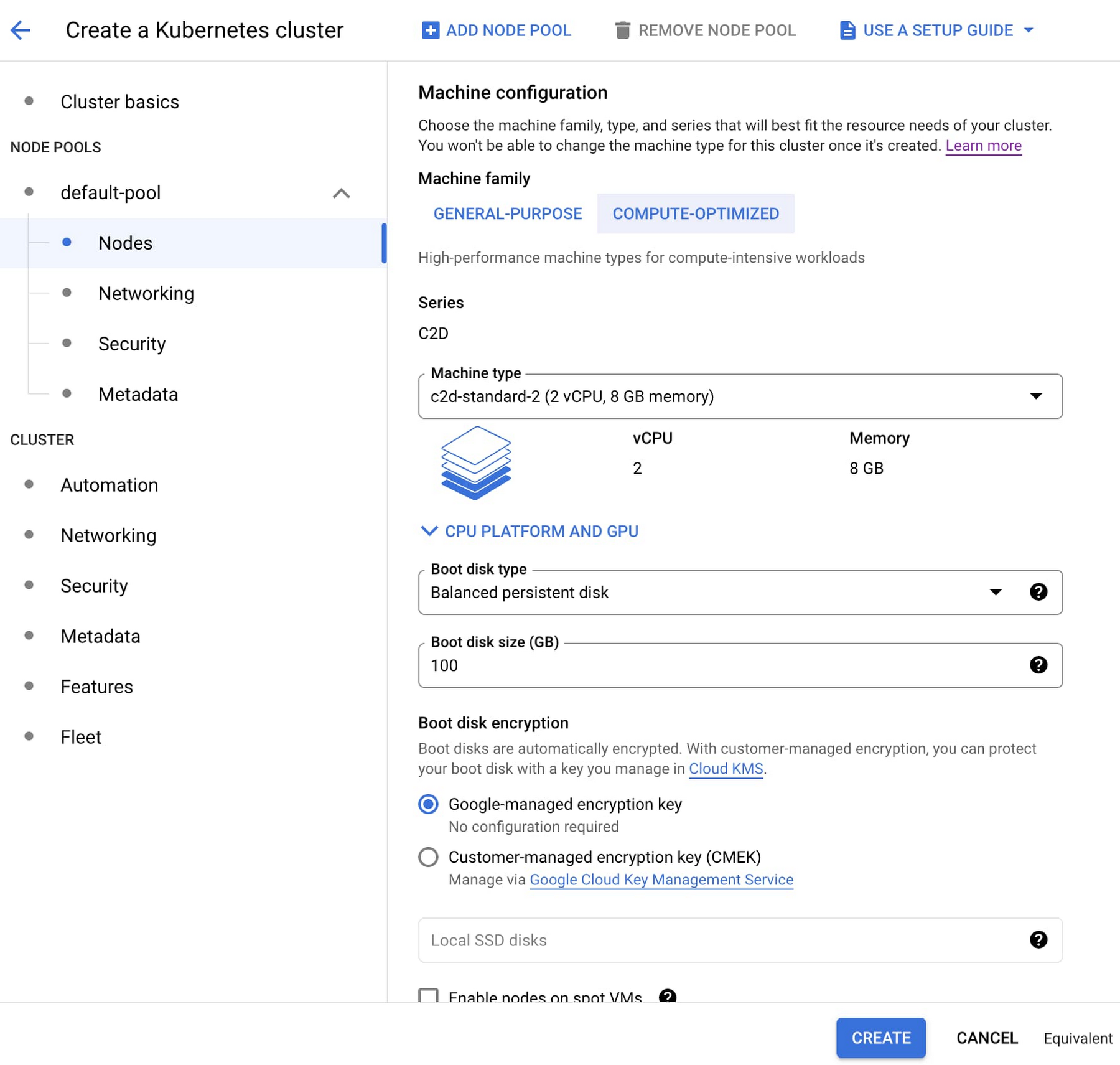
Making secure design choices should be easy, especially when the workloads involve high-performance processing of sensitive data. You can help protect your sensitive applications and data today by adding Confidential GKE Nodes to your GKE workloads. Learn more about Confidential Computing here.
Google Launches Smart Canvas to Stir-up Collaboration in Google Workspace

5457
Of your peers have already read this article.
2:00 Minutes
The most insightful time you'll spend today!
After more than a year of remote collaboration, many people are showing signs of digital fatigue. Throughout the pandemic, millions of employees bridged the physical distances with their colleagues by making themselves more available, joining a deluge of virtual meetings, and leaning into a dizzying array of tools and applications. As part of our mission to build the future of work, we’re addressing these challenges in Google Workspace.
As we announced today at I/O, we’re launching smart canvas—a new product experience that delivers the next evolution of collaboration for Google Workspace. Between now and the end of the year, we’re rolling out innovations that make it easier for people to stay connected, focus their time and attention, and transform their ideas into impact.
Specifically, we’re enhancing the apps that hundreds of millions of people use every day—like Docs, Sheets, and Slides—to make them even more flexible, interactive, and intelligent. With smart canvas, we’re bringing the content and connections that transform collaboration into a richer, better experience in Google Workspace.
When we launched Google Docs and Sheets 15 years ago, these apps introduced the world to a new way of working. They enabled anytime, anywhere teamwork—a stark contrast to the legacy tools that were designed for an era of individual work on office desktops. For over a decade now, we’ve been pushing documents away from being just digital pieces of paper and toward collaborative, linked content inspired by the web. Smart canvas is our next big step.https://www.youtube.com/embed/SDBbFETGiA4?enablejsapi=1&
Making collaboration more flexible and helpful
The evolving hybrid work model gives new urgency to existing collaboration challenges. How do teams stay focused and connected as they work together, regardless of where people are located? With smart canvas, we’re building deeper connections across Google Workspace to transform collaboration anywhere it happens.
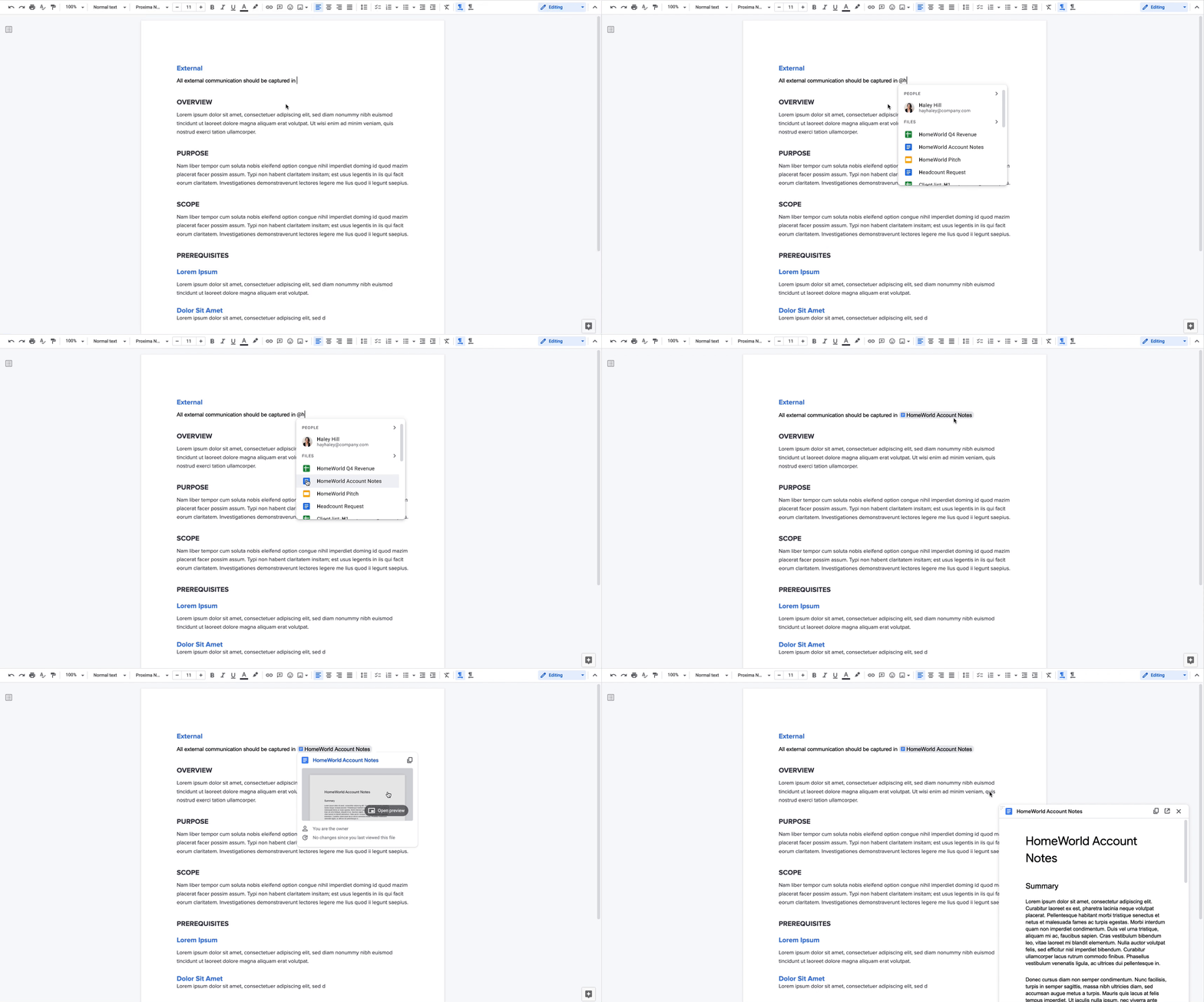
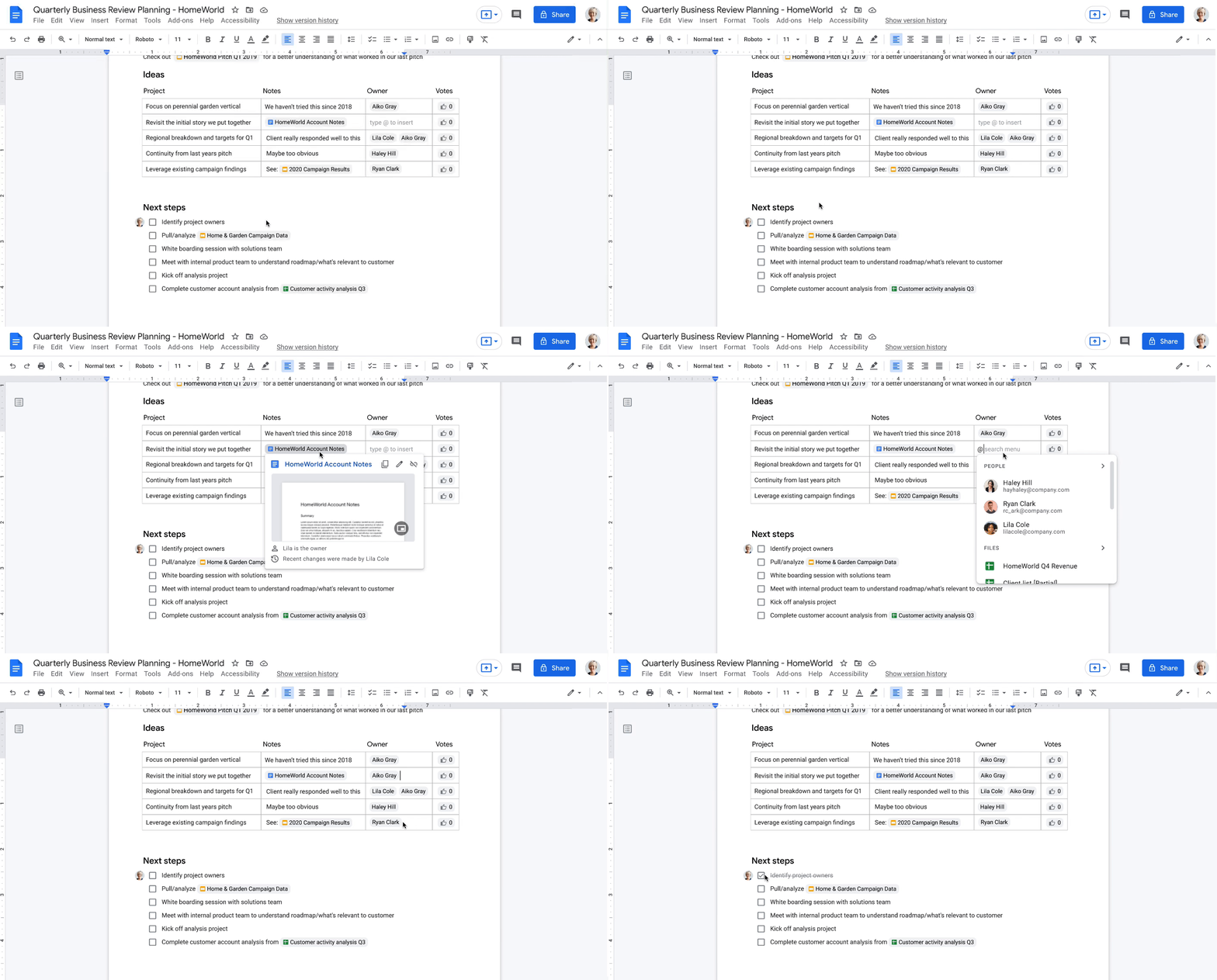
For example, we’re taking something that people already use every day—@-mentions—to open up new, powerful collaboration capabilities. New interactive building blocks—smart chips, templates, and checklists—will connect people, content, and events into one seamless experience.
Already available, when you @ mention a person in a document, a smart chip shows you additional information like the person’s location, job title, and contact information. And starting today, we’re introducing new smart chips in Docs for recommended files and meetings. To insert smart chips into your work, simply type “@” to see a list of recommended people, files, and meetings. From web or mobile, your collaborators can then quickly skim associated meetings and people or preview linked documents, all without changing tabs or contexts. Smart chips will come to Sheets in the coming months.
Additionally, we’re making it easier to drive projects forward by streamlining common team workflows. Starting today in Docs, checklists are available on web and mobile, and you’ll soon be able to assign checklist action items to other people. These action items will show up in Google Tasks, making it easier for everyone to manage a project’s To Do list.
We’re also introducing table templates in Docs. Topic-voting tables will allow you to easily gather team feedback while project-tracker tables will help you capture milestones and statuses on the fly. And a new document template for capturing meeting notes will automatically import any relevant information from a Calendar meeting invite, including smart chips for attendees and attached files.
With our new pageless format in Docs, you’ll be able to remove the boundaries of a page to create a surface that expands to whatever device or screen you’re using, making it easier to work with wide tables, large images, or detailed feedback in comments. And if you want to print or convert to PDF, you’ll be able to easily switch back to a paginated view.
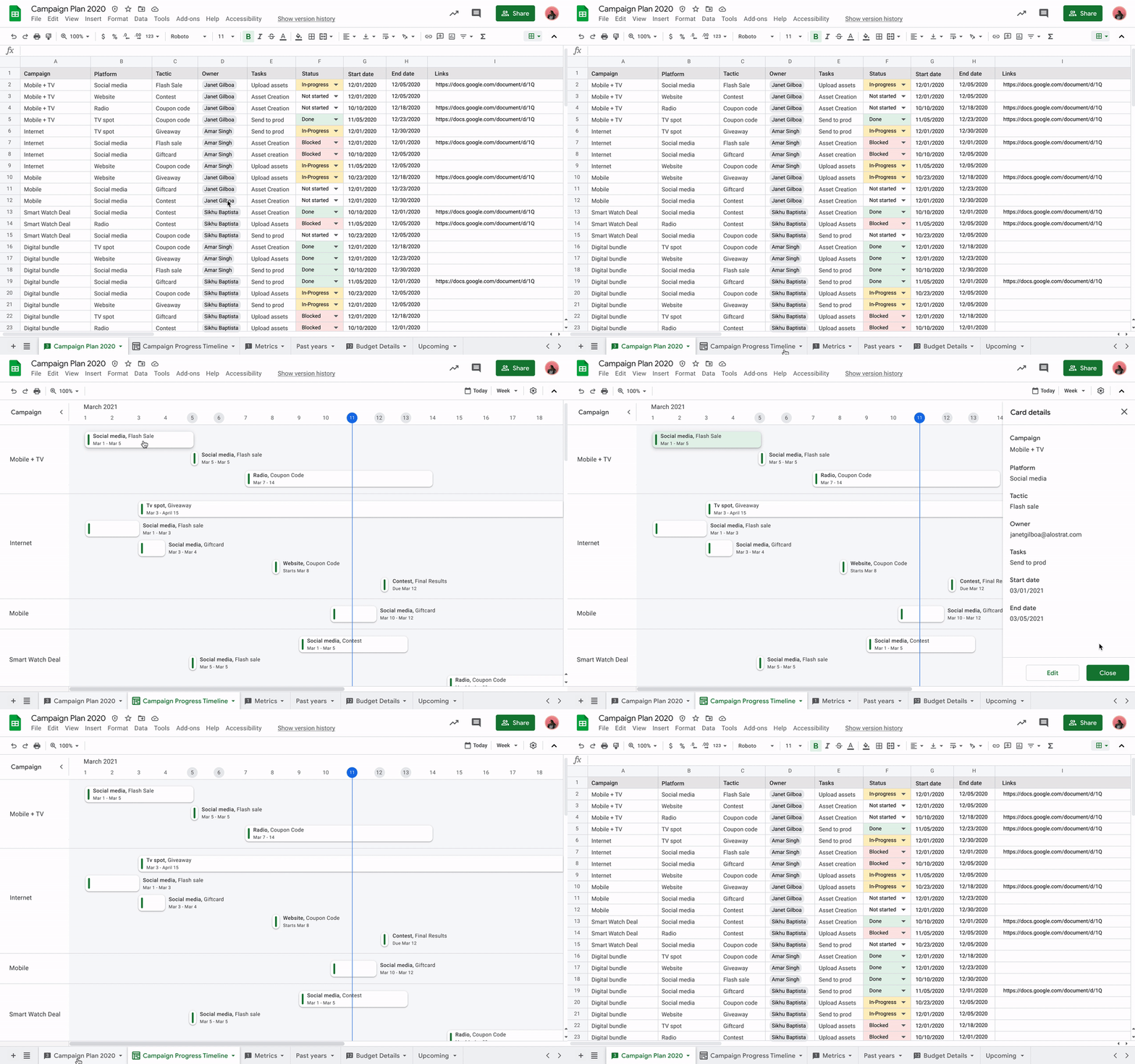
Meanwhile, you’ll be able to toggle between new views in Sheets to better manage and interact with your data. Our first launch will be a timeline view that makes tracking tasks easier and faster. This flexible view allows you to organize your data by owner, category, campaign, or whichever attribute fits best. Using a dynamic, interactive timeline strengthens your ability to manage things like marketing campaigns, project milestones, schedules, and cross-team collaborations.
Fostering human connection—wherever people work
With smart canvas and innovations in Google Meet, we’re making it easy to bring the voices and faces of your team directly into the collaboration experience, to help people share ideas and solve problems together from anywhere. As part of that, we’re building tighter integrations between our communication and collaboration tools so you can pull content into conversations and conversations into content.
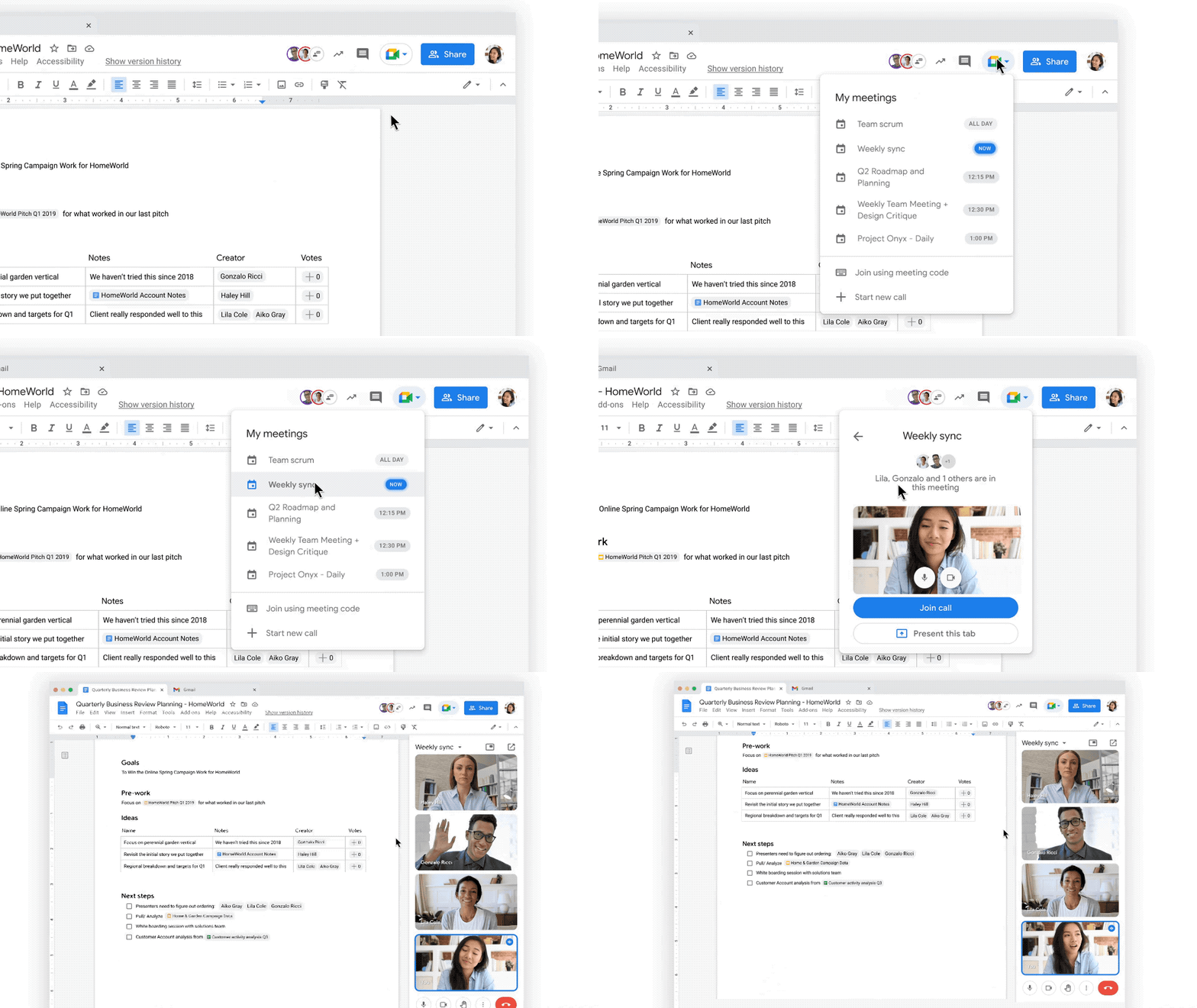
Starting today, we’re rolling out the ability to present your content to a Google Meet call on the web directly from the Doc, Sheet, or Slide where you’re already working with your team. Jumping between collaborating in a document and a live conversation without skipping a beat helps the project—and the team—stay focused. And in the fall, we’re bringing Meet directly to Docs, Sheets, and Slides on the web, so people can actually see and hear each other while they’re collaborating.
Live captions and translations in Google Meet will also play a crucial role in keeping people connected as they work together in distributed teams. We currently offer live captions in five languages, with more on the way. And we’re introducing live translations of captions later this year, starting with English-language live captions translated into Spanish, Portuguese, French, or German, with many more languages to follow.
With recent enhancements to Google Meet, we’re also giving people more control and flexibility over the meeting experience, including more space to see people and content, plus the ability to pin and unpin content and video feeds. And to help with meeting fatigue, you can now turn off your self-feed entirely.
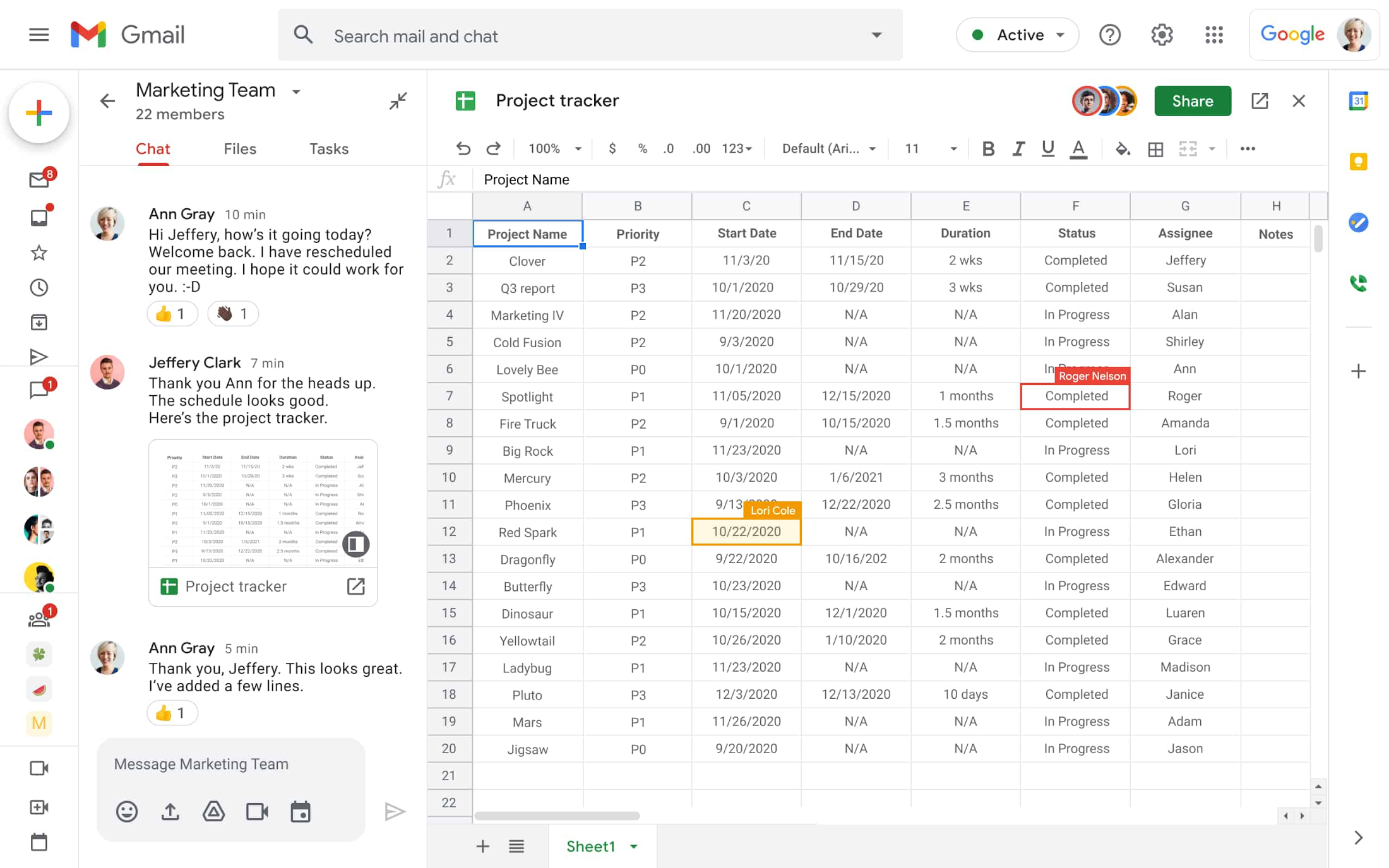
Because we know that collaboration is fluid and fast-moving, we’re making it easier for teams to give feedback on the fly and to move seamlessly between conversations and building content together. Teams can now jump from a discussion in Google Chat directly to building content together. Creating and editing Sheets and Docs from Google Chat rooms is already live in our web experience, and we’ll enable it for Slides in the coming weeks. And to gauge the team’s reactions along the way, we’re introducing emoji reactions in Docs in the next few months.
Working smarter and safer
Google Workspace is already infused with powerful intelligence that enables people to make the best use of their time and attention. Whether it’s with the two billion grammar suggestions we surface in Docs every month, or the intelligent file suggestions in Drive’s Priority and Quick Access features that cut file finding time by 50%.
To help everyone work smarter, in the next few months we’re introducing additional assisted writing features in Docs on the web. This includes warnings about offensive words and language, as well as other stylistic suggestions that can speed up editing and help make your writing more impactful. We’re also adding more assisted analysis functionality in our Sheets web experience, with formula suggestions that make it easier for everyone, not just analysts, to derive insights from data. Sheets intelligence helps you build and troubleshoot formulas, making data analysis faster and reducing errors.
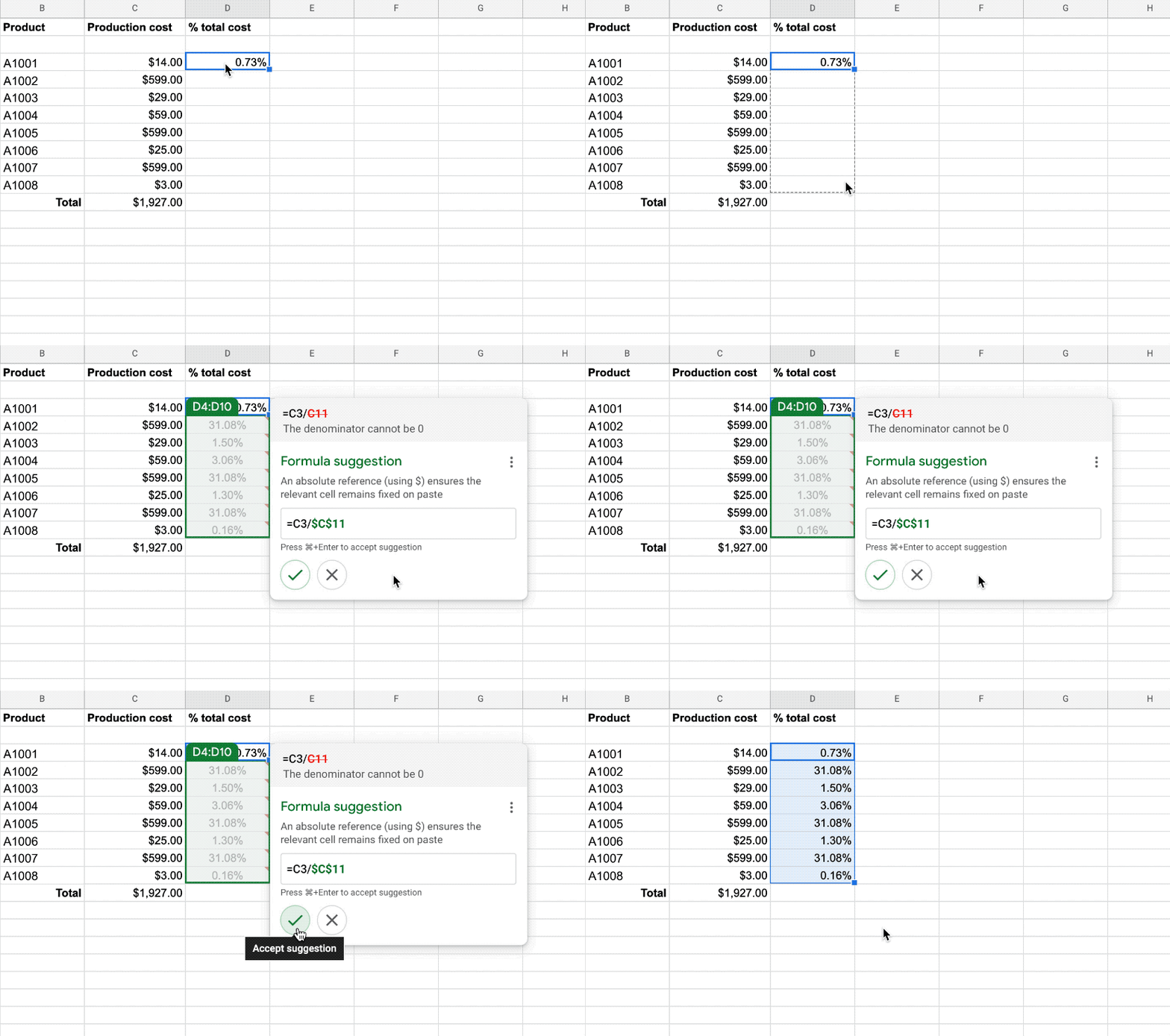
As smart canvas evolves, we’re making it easy for businesses to connect the apps and tools they rely on to Google Workspace. This builds on our history of supporting a variety of add-on features that take the friction out of collaboration—from adding e-signatures directly in Google Workspace with DocuSign to the Salesforce connector that integrates with Sheets. To help people work even smarter, we recently announced that AppSheet Automation is generally available, so that you can automate time-consuming tasks—like approving invoices and onboarding new hires—without having to write a single line of code.
Looking ahead, we’re planning to build additional APIs so you can bring the information and actions you need from third-party tools directly into smart canvas elements like smart chips, checklists, and table templates.
And because trust is at the center of all collaboration within Google Workspace, today we’re also launching advanced capabilities that help protect users against security threats and abuse as they work together.
Transforming how people work to deliver real-world innovation
While there’s no one way to collaborate, we know from our customers that transforming how people work results in real-world innovation.
Google Workspace fuels a new way of working together. It lets our teams around the world—whether they’re in the office, at home, or in the grocery store aisle—work more flexibly and translate their ideas into new ways of delighting customers.
—Thibaud Cainne, Global Head of Tech Infra and Digital Workplace, Carrefour
Transformation happens at all levels, and often in every tool. We were able to get 17,000 of our people to make the shift from Excel to Google Sheets in just six months by demonstrating how we could optimize, automate, and connect spreadsheets and their data. That kind of collaboration leads to real-world innovation for our clients.
—Monica Andrea Diaz Pinzon, Chief of Digital Transformation (Special Projects), Banco Davivienda
We built a digital hub on Google Workspace to transform the way we connect with employees and partners across multiple locations and organizations. It allowed us to spin up major research projects in days instead of months, including delivery of major COVID-19 vaccine studies.
—Justin Riordan-Jones, Head of System and Information (Research), Department of Health & Social Care, National Institute for Health Research (UK)
As smart canvas drives the next era of collaboration in Google Workspace, we remain committed to providing a solution that’s flexible, helpful, and that fuels innovation for organizations in every industry. On the frontlines, in corporate offices, and across the countless workspaces in between, Google Workspace will continue to transform how work gets done.
4548
Of your peers have already watched this video.
31:00 Minutes
The most insightful time you'll spend today!
How Google Secures its Data Centers: Watch Video
Security is in the DNA of Google Cloud’s dozens of data centers, complex network and workloads scattered the globe. Take a tour to the nucleus of data center’s six layers of physical security designed to keep unauthorized access at bay, and also learn about Google Cloud’s security fundamentals to leverage the same philosophy on Google Cloud. Watch now!
More Relevant Stories for Your Company

Three Lesser-Known Ways to Protect Your Customers and Business From Phishing and Fraud
Your users are critical to your business, and you need security controls to keep them — and your business — safe. Built from years of Google Cloud technology and experience, these security features focus on keeping users safe on the web. You can reduce online fraud (chargebacks, hijackings, and abuse)

How Firewall Insights can Simplify Corporate Firewall Rules
Corporate firewalls typically include a massive number of rules, which accumulate over time as new workloads are added. When rules stack up piecemeal like this, misconfigurations occur that, at best, create headaches for security administrators, and at worst, create vulnerabilities that lead to security breaches. To address this, we have

2022’s First Cloud CISO Perspectives: Recap of the Megatrends, Releases and News
I’m excited to share our first Cloud CISO Perspectives post of 2022. It's already shaping up to be an eventful year for our industry and we’re only in month one. There’s a lot to recap in this post, including the U.S. government’s recent efforts to address critical security issues, like

Redefining and Simplifying Security Analytics
Today’s security professionals face not only an ever-expanding list of threats, old and new, but also an excruciating choice of security approaches and tools. Nearly 2000 security vendors are trying to sell to large enterprises and small businesses. Most organizations have already invested heavily in cybersecurity solutions. From firewalls to
