





Vulnerability Exploitability eXchange: Prioritize cybersecurity risk for the healthcare industry

2563
Of your peers have already read this article.
1:30 Minutes
The most insightful time you'll spend today!
Diagnosing and treating chronic pain can be complex, difficult, and full of uncertainties for a patient and their treating physician. Depending on the condition of the patient and the knowledge of the physician, making the correct diagnosis takes time, and experimenting with different treatments might be required.
This trial-and-error process can leave the patient in a world of pain and confusion until the best remedies can be prescribed. It’s a situation similar to the daily struggle that many of today’s security operations teams face.
Screaming from the mountain tops “just patch it!” isn’t very helpful when security teams aren’t sure if applying a patch might create even worse issues like crashes, incompatibility, or downtime. Like a patient with chronic pain, they may not know the source of the pain in their system. Determining which vulnerabilities to prioritize patching, and ensuring those fixes actually leave you with a more secure system, is one of the hardest tasks a security team can face. This is where a Vulnerability Exploitability eXchange (VEX) comes in.
The point of VEX
In previous blogs, we’ve discussed how establishing visibility and awareness into patient safety and technology is vital to creating a resilient healthcare system. We’ve also looked at how combining software bills of materials (SBOM) with Google’s Supply chain Levels for Software Artifacts (SLSA) framework can help build more secure technology that enables resilience.
The SBOM provides visibility into the software you’re using and where it comes from, while SLSA provides guidelines that help increase the integrity and security of software you then build. Rapid diagnostic assessments can be added to that equation with VEX, which the National Telecommunications and Information Administration describes as a “companion” document that lives side-by-side with SBOM.
To go back to our medical metaphor, VEX is a mechanism for software providers to tell security teams where to look for the source of the pain. VEX data can help with software audits when inventory and vulnerability data need to be captured at a specific point in time. That data also can be embedded into automated security tools to make it easier to prioritize vulnerability patching.
You can then think of SBOM as the prescription label on a bottle of medication, SLSA as the child-proof lid and tamper-proof seal guaranteeing the safety of the medication, and VEX as the bottle’s safety warnings. As a diagnostic aide, a VEX can help security teams make accurate diagnoses of “what could hurt” and system weaknesses before the bad guys do.
Yet making an accurate assessment of that threat model can be challenging, especially when looking at the software we use to run systems. The ability to quickly and accurately evaluate an organizations’ weaknesses and pain points can be vital to hastening response to a vulnerability and stopping cyberattacks before they become destructive. We believe that VEX is an important part of the equation to help secure the software supply chain.
As an example, look no further than the Apache Log4j vulnerabilities revealed in December 2021. Global industries including healthcare were dealt another blow when Apache’s Log4j 2 logging system was found to be so vulnerable that relatively unsophisticated threat actors could quickly infiltrate and take over systems. Through research conducted by Google and information contributed by CISA, we learned of examples of where vulnerabilities in Log4j 2, a single software component, could potentially impact thousands of companies using software that depend on it because of its near-ubiquitous use.
While a VEX would not capture zero-day vulnerabilities, it would be able to inform security teams of other known vulnerabilities in Log4j 2. Once vulnerabilities have been published, security teams could use SBOM to find them, and use VEX to understand if remediation is a priority or not.
How does VEX contribute to visibility?
A key reason we focus on visibility mechanisms like SBOM and SLSA is because they give us the ability to understand our risks. Without the ability to see into what we must protect, it can be difficult to determine how to quickly reduce risk.
Visibility is a crucial first step to stopping malicious hackers. Yet without context, visibility leaves security teams overwhelmed with data. Why? Well, where would you start when trying to mitigate the 30,000 known vulnerabilities affecting just open source software, according to the Open Source Vulnerabilities database(OSV)? NIST’s National Vulnerability Database (NVD) is tracking close to 181,000 vulnerabilities. We’ll be patching into the next millennium if we adopt a “patch everything” approach.
It’s impossible to address every vulnerability individually. To make progress, security teams need to be able to prioritize findings and go after the ones that will have the greatest impact first. The goal of a VEX artifact is to make prioritization a little easier.
While SBOMs are created or changed when the material included in a build is updated, VEXs are intended to be changed and distributed when a new vulnerability or threat has changed. This means that VEX and SBOM should be maintained separately. Since security researchers and organizations are constantly discovering new cybersecurity vulnerabilities and threats, a more dynamic mechanism like VEX can help ensure builders and operators have the ability to quickly ascertain the risks of the software they are using.
Let’s dig into this VEX example from CycloneDX. You can see the list of vulnerabilities found, third parties who track and report those vulnerabilities, vulnerability ratings per CVSS, and most importantly, a statement from the developer that guides the operator reading the VEX to those vulnerabilities that are exploitable and need to be protected. At the bottom, you’ll see the VEX “affects” an SBOM.
This information allows the user of the VEX document to refer to its companion SBOM. By necessity, the VEX is intentionally decoupled from the SBOM because they need to be updated at different times. A VEX document will need to be updated when new vulnerabilities emerge. An SBOM will need to be updated when changes to the software are made by a manufacturer. Although they can and need to be updated separately, the contents of each document can stay aligned because they are linked.
Increasing resilience powered by visibility—SBOM+VEX+SLSA
VEX could dramatically improve how security vulnerabilities are handled. It’s not uncommon to find operators buried in vulnerabilities, best-guessing the ones that need fixing, and trying to make sense of tens (and sometimes hundreds) of pages of documentation to determine the best, lowest impact fix.
With SBOM+SLSA+VEX, operators are using software-driven mechanisms to conduct analyses and evaluate risk instead of relying on intuition and best guesses. The tripartite SBOM+SLSA+VEX approach provides an up-to-date list of issues and perspective on what needs attention. This is a transformative development in security—enabling teams to get a better handle on doing vulnerability mitigation, starting where it could hurt the most.
Driven by repeated cyberattacks on critical infrastructure such as healthcare, government regulators have taken a more interested stance in software security and supply chains. Strengthening the effectiveness of SBOMs in the United States is a big part of the newly proposed Protecting and Transforming Cyber Health Care (PATCH) Act. The law would require medical device manufacturers adhere to minimum cybersecurity standards in their products, including the creation of SBOMs for their devices, and plans to monitor and patch any cybersecurity vulnerabilities that are discovered during the device’s lifetime.
Meanwhile, new draft medical device cybersecurity guidance from the FDA continues that agency’s involvement in aggressively encouraging medical device manufacturers to improve the cybersecurity resilience of their products. The White House spoke for SBOMs, as well. An Executive Order from May 2021 lays out requirements for secure software development, including the production and distribution of SBOM for software used by the federal government.
Regardless of how these initiatives pan out, Google believes controls like those provided by SBOM+SLSA+VEX are critical to protect software and build a resilient healthcare ecosystem. This approach provides detailed, critical risk exposure data to security teams so they can take necessary steps to reduce immediate and long-term risks.
What do we suggest you do?
At Google, we are working with the Open Source Security Foundation on supporting SBOM development. Our Know, Prevent, Fix report on secure software development creates a broader outline of how Google thinks about securing open source software from preventable vulnerabilities. You can read more about these efforts for securing workloads on Google Cloud from our Cloud Architecture Center. Take a look at Cloud Build, a Google Cloud service that can be used to generate up to SLSA Level 2 build artifacts.
Customers often have difficulty getting full visibility and control over vulnerabilities because of their dependence on open source software (OSS). Assured Open Source Software (Assured OSS) is the Google Cloud service that helps teams both secure the external OSS packages they use and overcome avoidable vulnerabilities by simply eliminating them from the code base. Finally, ask us about Google’s Cybersecurity Action Team, the world’s premier security advisory team and its singular mission supporting the security and digital transformation of governments, critical infrastructure, enterprises, and small businesses.
If you’re a software supplier, please consider our suggestions above. Whether you are or not, you should begin:
- Contractually mandating SBOM+VEX+SLSA (or their equivalent) artifacts to be provided for all new software.
- Train procurement teams to ask for and use SBOM+VEX+SLSA to make purchasing decisions. There should be no reason an organization procures software or hardware with known, preventable issues. Even if they do, the information these mechanisms provide should help security teams decide if they can live with the risks before equipment enters their networks.
- Establishing a governance program that ensures those who control procurement decisions are aware of and owning the risks associated with software they are buying.
- Enabling security teams to build pipelines to ingest SBOM+VEX+SLSA artifacts into their security operations and use it to strategically advise and drive mitigation activities.
At Google, we believe the path to resilience begins with building visibility and structural awareness into the software, hardware, and equipment it rides on as a critical first step. Time will tell if VEX becomes widely adopted, but the point behind it won’t change—we can’t know how we are vulnerable without visibility. VEX is an important concept in this regard.
Next month, we’ll be shifting gears slightly to focus on building resilience by establishing a security culture that obsesses over its patients and products.
Case Study: How Exabeam Unlocked its Ability to Scale for Storage & Ingest Data from More Than 500 Security Vendors

3098
Of your peers have already read this article.
2:30 Minutes
The most insightful time you'll spend today!
Editor’s note: The post is part of a series highlighting our awesome partners, and their solutions, that are Built with BigQuery.
Exabeam, a leader in SIEM and XDR, provides security operations teams with end-to-end Threat Detection, Investigation, and Response (TDIR) by leveraging a combination of user and entity behavioral analytics (UEBA) and security orchestration, automation, and response (SOAR) to allow organizations to quickly resolve cybersecurity threats. As the company looked to take its cybersecurity solution to the next level, Exabeam partnered with Google Cloud to unlock its ability to scale for storage, ingestion, and analysis of security data.
Harnessing the power of Google Cloud products including BigQuery, Dataflow, Looker, Spanner and Bigtable, the company is now able to ingest data from more than 500 security vendors, convert unstructured data into security events, and create a common platform to store them in a cost-effective way. The scale and power of Google Cloud enables Exabeam customers to search multi-year data and detect threats in seconds
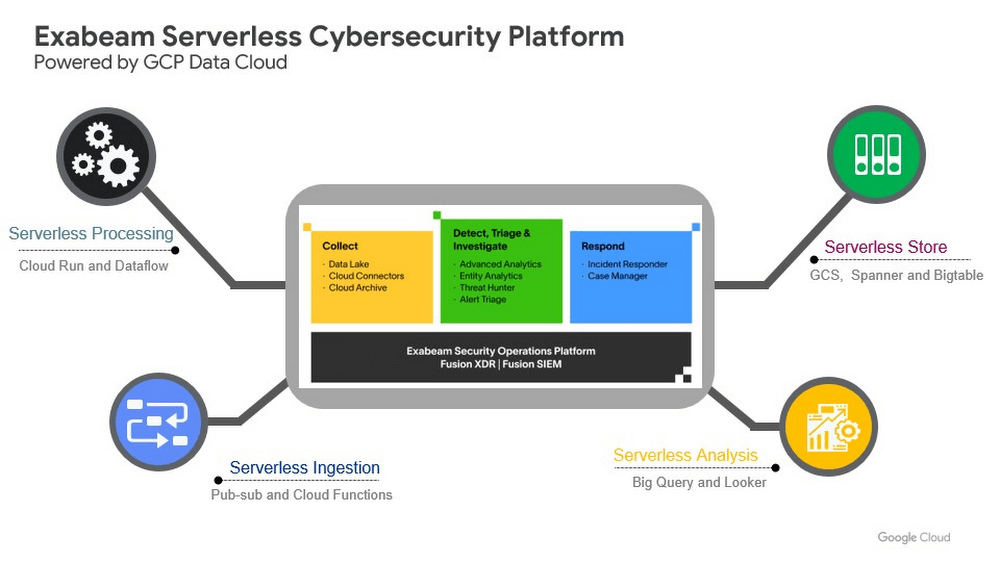
Google Cloud provides Exabeam with three critical benefits.
- Global scale security platform. Exabeam leveraged serverless Google Cloud data products to speed up platform development. The Exabeam platform supports horizontal scale with built-in resiliency (backed by 99.99% reliability) and data backups in three other zones per region. Also, multi-tenancy with tenant data separation, data masking, and encryption in transit and at rest are backed up in the data cloud products Exabeam uses from Google Cloud.
- Scale data ingestion and processing. By leveraging Google’s compute capabilities, Exabeam can differentiate itself from other security vendors that are still struggling to process large volumes of data. With Google Cloud, Exabeam can provide a path to scale data processing pipelines. This allows Exabeam to offer robust processing to model threat scenarios with data from more than 500 security and IT vendors in near-real time.
- Search and detection in seconds. Traditionally, security solutions break down data into silos to offer efficient and cost-effective search. Thanks to the speed and capacity of BigQuery, Security Operations teams can search across different tiers of data in near real time. The ability to search data more than a year old in seconds, for example, can help security teams hunt for threats simultaneously across recent and historical data.
Exabeam joins more than 700 tech companies powering their products and businesses using data cloud products from Google, such as BigQuery, Looker, Spanner, and Vertex AI. Google Cloud announced the Built with BigQuery initiative at the Google Data Cloud Summit in April, which helps Independent Software Vendors like Exabeam build applications using data and machine learning products. By providing dedicated access to technology, expertise, and go-to-market programs, this initiative can help tech companies accelerate, optimize, and amplify their success.
Google’s data cloud provides a complete platform for building data-driven applications like those from Exabeam — from simplified data ingestion, processing, and storage to powerful analytics, AI, ML, and data sharing capabilities — all integrated with the open, secure, and sustainable Google Cloud platform. With a diverse partner ecosystem and support for multi-cloud, open-source tools, and APIs, Google Cloud can help provide technology companies the portability and the extensibility they need to avoid data lock-in.
To learn more about Exabeam on Google Cloud, visit www.exabeam.com. Click here to learn more about Google Cloud’s Built with BigQuery initiative.
All About Cloud Run, its Scalability and Management Features

7407
Of your peers have already read this article.
3:00 Minutes
The most insightful time you'll spend today!
Mindful Containers is a fictitious company that is creating containerized microservice applications. They need a fully managed compute environment for deploying and scaling serverless containerized microservices. So, they are considering Cloud Run.
They are excited about Cloud Run because it abstracts away the cluster configuration, monitoring, and management so they can focus on building the features for their apps. Cloud Run is a fully-managed compute environment for deploying and scaling serverless containerized microservices.

What is Cloud Run?
Cloud Run is a fully-managed compute environment for deploying and scaling serverless HTTP containers without worrying about provisioning machines, configuring clusters, or autoscaling.
- No vendor lock-in – Because Cloud Run takes standard OCI containers and implements the standard Knative Serving API, you can easily port over your applications to on-premises or any other cloud environment.
- Fast autoscaling – Microservices deployed in Cloud Run scale automatically based on the number of incoming requests, without you having to configure or manage a full-fledged Kubernetes cluster. Cloud Run scales to zero— that is, uses no resources—if there are no requests.
- Split traffic – Cloud Run enables you to split traffic between multiple revisions, so you can perform gradual rollouts such as canary deployments or blue/green deployments.
- Custom domains – You can set up custom domain mapping in Cloud Run and it will provision a TLS certificate for your domain.
- Automatic redundancy – Cloud Run offers automatic redundancy so you don’t have to worry about creating multiple instances for high availability
How to use Cloud Run
With Cloud Run, you write your code in your favorite language and/or use a binary library of your choice. Then push it to Cloud Build to create a container build. With a single command—“gcloud run deploy”—you go from a container image to a fully managed web application that runs on a domain with a TLS certificate and auto-scales with requests.
How does Cloud Run work?
Cloud Run service can be invoked in the following ways:
HTTPS: You can send HTTPS requests to trigger a Cloud Run-hosted service. Note that all Cloud Run services have a stable HTTPS URL. Some use cases include:
- Custom RESTful web API
- Private microservice
- HTTP middleware or reverse proxy for your web applications
- Prepackaged web application
gRPC: You can use gRPC to connect Cloud Run services with other services—for example, to provide simple, high-performance communication between internal microservices. gRPC is a good option when you:
- Want to communicate between internal microservices
- Support high data loads (gRPC uses protocol buffers, which are up to seven times faster than REST calls)
- Need only a simple service definition you don’t want to write a full client library
- Use streaming gRPCs in your gRPC server to build more responsive applications and APIs
WebSockets: WebSockets applications are supported on Cloud Run with no additional configuration required. Potential use cases include any application that requires a streaming service, such as a chat application.
Trigger from Pub/Sub: You can use Pub/Sub to push messages to the endpoint of your Cloud Run service, where the messages are subsequently delivered to containers as HTTP requests. Possible use cases include:
- Transforming data after receiving an event upon a file upload to a Cloud Storage bucket
- Processing your Google Cloud operations suite logs with Cloud Run by exporting them to Pub/Sub
- Publishing and processing your own custom events from your Cloud Run services
Running services on a schedule: You can use Cloud Scheduler to securely trigger a Cloud Run service on a schedule. This is similar to using cron jobs. Possible use cases include:
- Performing backups on a regular basis
- Performing recurrent administration tasks, such as regenerating a sitemap or deleting old data, content, configurations, synchronizations, or revisions
- Generating bills or other documents
Executing asynchronous tasks: You can use Cloud Tasks to securely enqueue a task to be asynchronously processed by a Cloud Run service. Typical use cases include:
- Handling requests through unexpected production incidents
- Smoothing traffic spikes by delaying work that is not user-facing
- Reducing user response time by delegating slow background operations, such as database updates or batch processing, to be handled by another service,
- Limiting the call rate to backend services like databases and third-party APIs
Events from Eventrac: You can trigger Cloud Run with events from more than 60 Google Cloud sources. For example:
- Use a Cloud Storage event (via Cloud Audit Logs) to trigger a data processing pipeline
- Use a BigQuery event (via Cloud Audit Logs) to initiate downstream processing in Cloud Run each time a job is completed
How is Cloud Run different from Cloud Functions?
Cloud Run and Cloud Functions are both fully managed services that run on Google Cloud’s serverless infrastructure, auto-scale, and handle HTTP requests or events. They do, however, have some important differences:
- Cloud Functions lets you deploy snippets of code (functions) written in a limited set of programming languages, while Cloud Run lets you deploy container images using the programming language of your choice.
- Cloud Run also supports the use of any tool or system library from your application; Cloud Functions does not let you use custom executables.
- Cloud Run offers a longer request timeout duration of up to 60 minutes, while with Cloud Functions the requests timeout can be set as high as 9 mins.
- Cloud Functions only sends one request at a time to each function instance, while by default Cloud Run is configured to send multiple concurrent requests on each container instance. This is helpful to improve latency and reduce costs if you’re expecting large volumes.
Pricing
Cloud Run comes with a generous free tier and is pay per use, which means you only pay while a request is being handled on your container instance. If it is idle with no traffic, then you don’t pay anything.
Conclusion
After learning about the ease of set up, scalability, and management capabilities of Cloud Run the Mindful Containers team is using it to deploy stateless microservices. If you are interested in learning more, check out the documentation.https://www.youtube.com/embed/oR4btKLRdn4?enablejsapi=1&
For more #GCPSketchnote, follow the GitHub repo. For similar cloud content follow me on Twitter @pvergadia and keep an eye out on thecloudgirl.dev
Boost Security with Google’s reCAPTCHA Enterprise Fraud Prevention

1180
Of your peers have already read this article.
2:30 Minutes
The most insightful time you'll spend today!
Today, we are putting the power of Google’s insights and intelligence in the hands of risk, fraud, and security teams everywhere. We are pleased to announce the general availability of reCAPTCHA Enterprise Fraud Prevention, a new product that uses Google’s own fraud models, machine learning, and intelligence from protecting more than 6 million websites to help stop payment fraud.
reCAPTCHA Enterprise Fraud Prevention can help protect payment transactions by identifying targeted manual attacks and large-scale fraud attempts. It automatically trains fraud models based on behavior and transaction data to identify events that are likely fraudulent and could cause a dispute or chargeback if accepted.
When threat actors are identified and blocked on any site in the reCAPTCHA network, the intelligence is made available to help protect other organizations from those same attackers. Organizations can then use the scores to send the transaction for manual review or directly block suspicious transactions, drive increased trust in their legitimate transactions, reduce the amount of friction for good users, and reduce erroneous rejection rates.
“Being a safe and trusted place to give and receive help is our top priority. We are constantly innovating, refining and enhancing our fraud defenses and Google’s reCAPTCHA Enterprise Fraud Prevention adds another layer of industry-leading protection for our users. Combining Google’s rich security expertise with GoFundMe’s focus on fraud prevention is already showing promising results as we strive to keep our platform the safest place to give online,” said Matthew Murray, director of risk, GoFundMe.
According to data obtained from our customers using reCAPTCHA Enterprise Fraud Prevention in private Preview, the new solution can help drive comprehensive value for organizations by:
- Reducing fraud losses: Get behavior modeling (not just mouse movements), stop financial damage created by account takeovers (ATOs), and connect fraud and abuse intelligence across your site and application.
- Increasing legitimate sales: Fraud Prevention can help businesses increase their revenue by providing insights to understand who good users are, who may otherwise be caught in an overly aggressive, customer restrictive fraud model.*
These benefits are enabled for organizations by:
- Preventing advanced attacks: Stopping sophisticated attacks in an environment where attackers use cloud fraud infrastructure, and data leaks, virtual cards and VPN usage are on the rise
- Increasing trust in good transactions: Focus on good approval rates through a unique combination of supervised and unsupervised models
- Improving customer experience: By preventing fraudulent transactions with zero user friction, Fraud Prevention can help businesses protect legitimate users and increase customer retention
Our customers have used these new capabilities in preview in customer experiences that include online checkouts and payment transactions. Fraud Prevention has been used by merchants and payment processors to block millions of dollars in fraudulent transactions in a frictionless way.
reCAPTCHA Enterprise provides a comprehensive online fraud detection platform that helps prevent fraudulent, spammy, and abusive digital client activity across your web and application footprint. This platform includes Account Defender, which protects users from account takeovers (ATO), frictionless bot management capabilities, and password leak detection to identify compromised accounts. With an additional API call for Fraud Prevention, organizations can leverage a comprehensive solution to secure financial transactions along with core reCAPTCHA Enterprise capabilities.
To get started, organizations can install a score-based site key on each part of the payment user flow front end and send transaction data when a purchase occurs. This site key helps train site-specific fraud models and start returning fraud scores for each transaction.
Ready to put reCAPTCHA Enterprise Fraud Prevention to work? Contact our fraud specialists or your customer success CSM team and sign up with the free tier. You learn more about these new capabilities in reCAPTCHA Enterprise in our product documentation. You can also register for our webinar where our experts will be discussing this capability in great detail on June 1, 2023.
Coming up at our Security Summit on June 13-14, you can hear how reCAPTCHA Enterprise helped GoFundMe secure their donors from fraud. Sign up here for free Security Summit registration.
Your Cloud Defense Enhanced: Google Introduces End-to-End TDIR in Chronicle Security Operations

1177
Of your peers have already read this article.
4:30 Minutes
The most insightful time you'll spend today!
As cloud adoption continues to grow, so too does the number of cloud-born security threats. However, cloud environments can present significant opportunities to improve security with the right tools and processes in place.
When it comes to effective threat detection, investigation and response (TDIR) in the cloud, modern solutions must ensure that the entire security operations workflow — from data analysis through detection to response — are working in tandem to deliver the insights, context, and processes needed for cyber defenders to respond to threats with speed and precision.
At Google Cloud, we believe that modern security operations should rely less on customer engineering and more on packaged outcomes delivered by solution providers. With this in mind, we are excited to announce today at our annual Security Summit that Chronicle Security Operations now provides turnkey TDIR for Google Cloud. By integrating with our cloud-focused Security Command Center Premium (SCC) and Google Cloud telemetry, Chronicle can collect and analyze data from Google Cloud, detect and investigate threats, and automate responses to mitigate risks.
In our recent State of Cloud Threat Detection and Response Survey, 71% of respondents said that “entire classes of threats are eliminated by migrating to the cloud,” and 82% stated that “the cloud affords the ability to process more data, including on-prem data, which can improve detection across the board.”
To take advantage of all that the cloud can do for security, organizations should to do more than “lift and shift” their existing security tools and processes to the cloud. The cloud presents a different attack surface, often across several cloud services and data repositories, and each can have different attack tactics, potential misconfigurations, and context.
This update to Chronicle helps enable teams to:
- Detect with confidence. Out-of-the-box detection rule sets developed by Google threat researchers surface cloud attack vectors and provide high fidelity, contextualized alerts that quickly give insight into potential threats in your Google Cloud environment.
- Investigate with full context. Visualize threat storylines, complete with cloud-specific context that is correlated with additional data and context from across your environment for fast and efficient investigations.
- Respond with speed and precision. Streamline workflows and automate response actions with prebuilt playbooks and best practices designed specifically for Google Cloud. Chronicle SOAR’s case management and team collaboration help ensure fast and timely response.
- Simplify data ingestion. Chronicle automatically ingests, normalizes and contextualizes cloud telemetry from a variety of Google Cloud services (such as Cloud Asset Inventory, Google Kubernetes Engine, Google Compute Engine, cloud audit logs, and Cloud DLP), reducing the need for complex and time-consuming engineering.
Putting Google Cloud TDIR to work
Let’s take a closer look at how our end-to-end cloud TDIR workflow manages a potential Google Cloud attack.
Setting up cloud TDIR in Chronicle only takes a few clicks. Security Command Center’s built-in threat detection identifies attacks against Google Cloud resources. These findings, as well as audit, NAT, DNS, and firewall logs, are ingested into Chronicle to provide additional insight and context into Google Cloud threats.
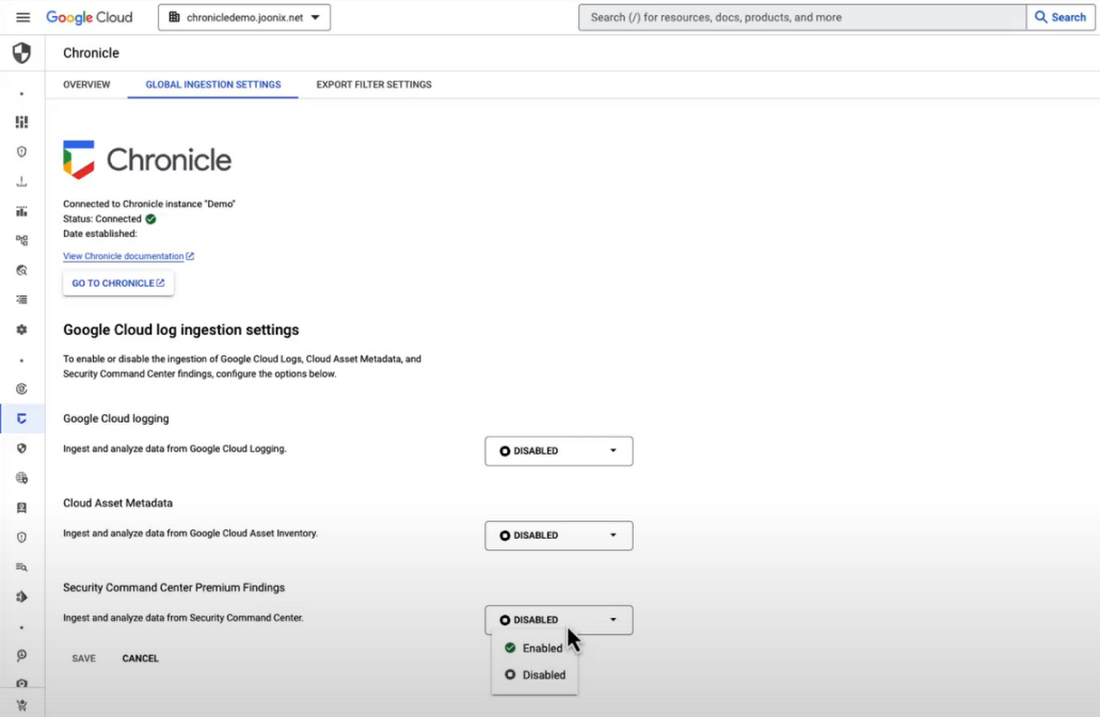
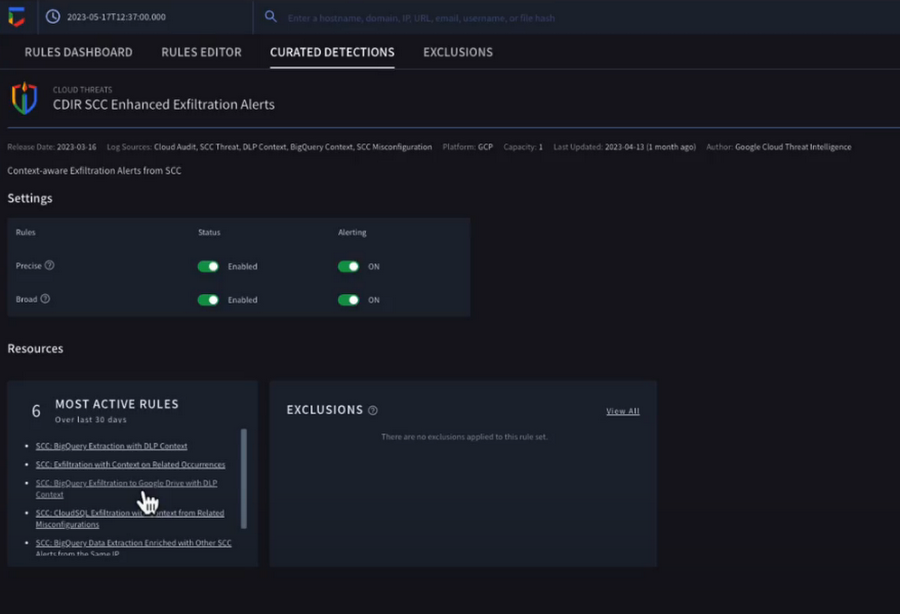
Chronicle now provides detection rules for Google Cloud threats. These rules correlate SCC findings with Chronicle’s advanced detection engine to reveal the broad scope of malicious activity, giving you visibility and more contextual information into what’s going on in your environment. In our example, Chronicle alerts on suspicious activity that can indicate an attempt to exfiltrate data from BigQuery.
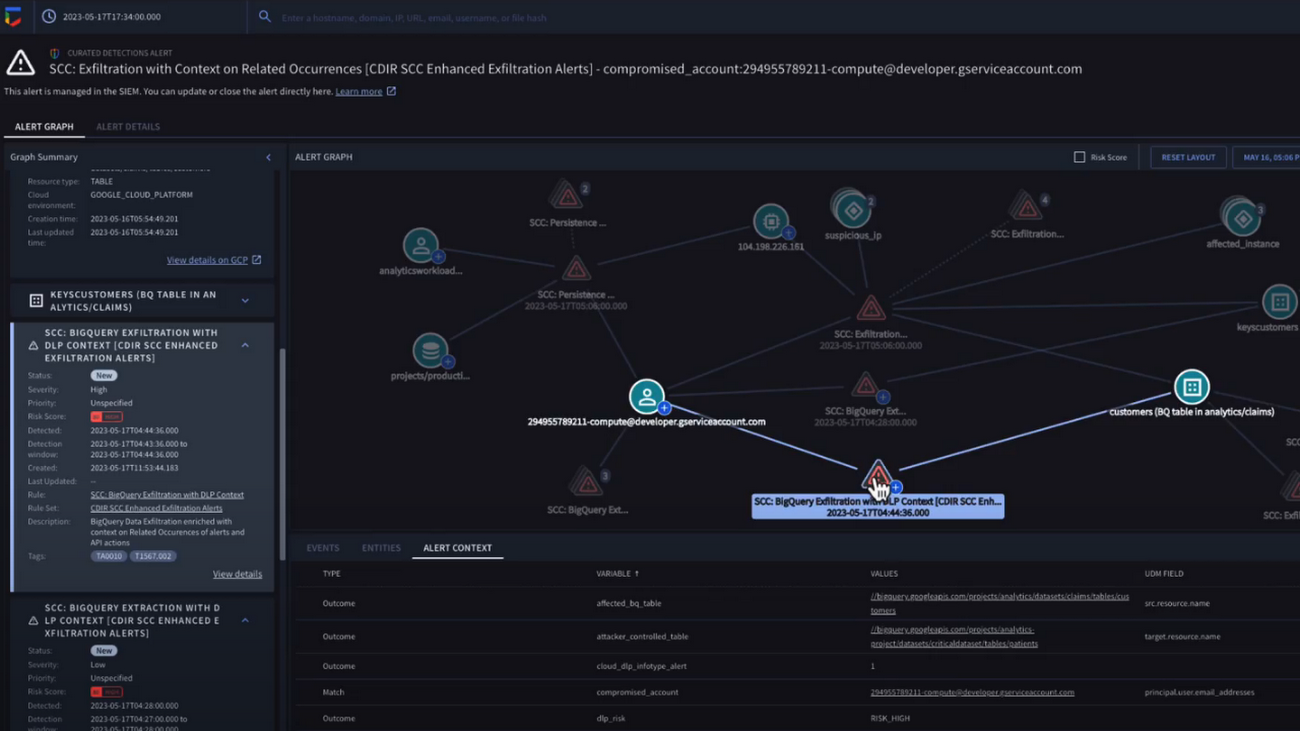
The new Chronicle Alert Graph surfaces key details of primary alerts you’re investigating in seconds. Combining cloud alerts and telemetry and correlating that with vital context from other sources (such as user data, endpoint data, and threat intelligence,) you can explore the visual representation of an alert’s relationship to other alerts and entities, dig into the potential attack paths, get quick summaries of implicated security artifacts, and pivot into your Google Cloud Console to do a deeper dive into potentially-impacted resources.
In our example, we can see a BigQuery exfiltration event associated with a customer and that it’s associated with a particular service account tied to a Google Cloud org. Alert context below tells us more about what’s been impacted. It shows us that cloud credentials in the form of encryption keys and email addresses were associated with the event.
Chronicle case management automatically groups any related alerts into threat-centric cases, uniting the information that matters and making it simple for you to see and understand the scope of the event.
In our example, Chronicle groups these alerts together based on common source address and username, and the case wall provides the summary of the alerts and actions that are taking place across the entire case.
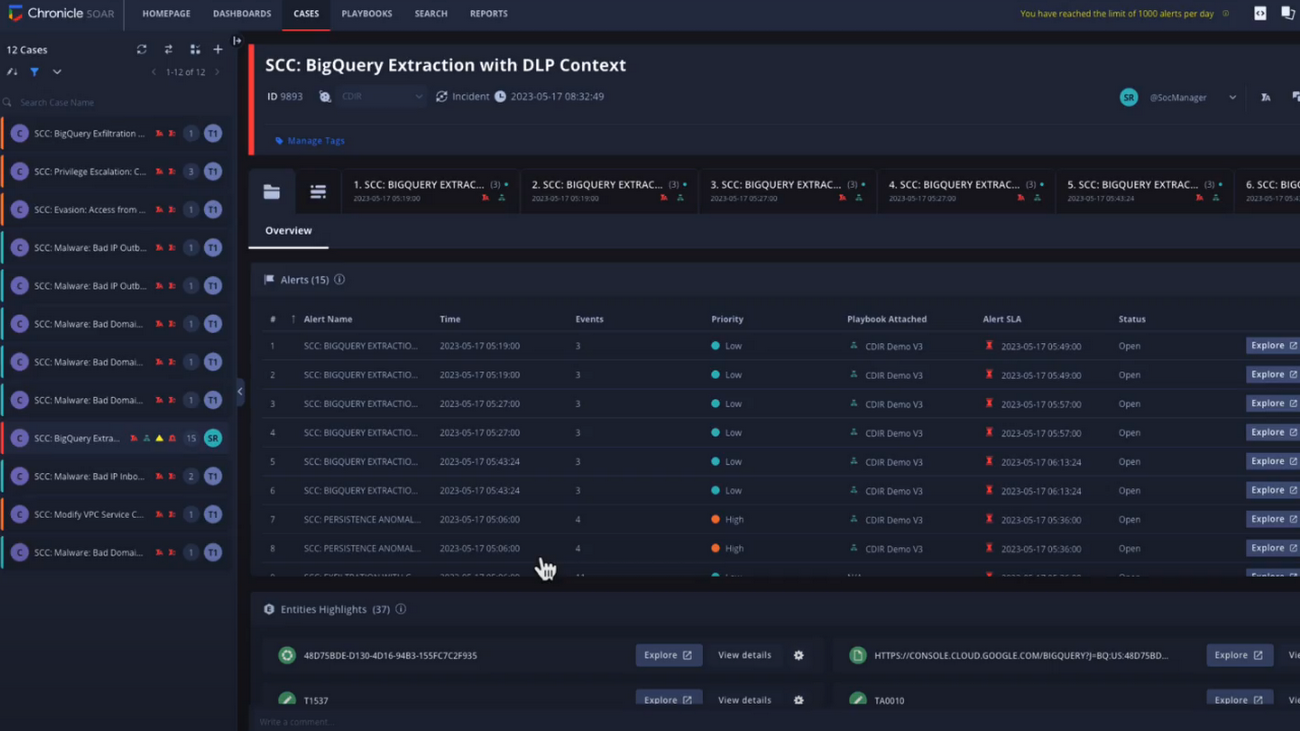
Chronicle playbooks, designed specifically for Google Cloud, automate your desired response processes. In our example, when an alert was generated a playbook automatically ran through predefined steps that gathered data, enrichment, and took automated remediation steps to prevent this service account and instance from continuing.
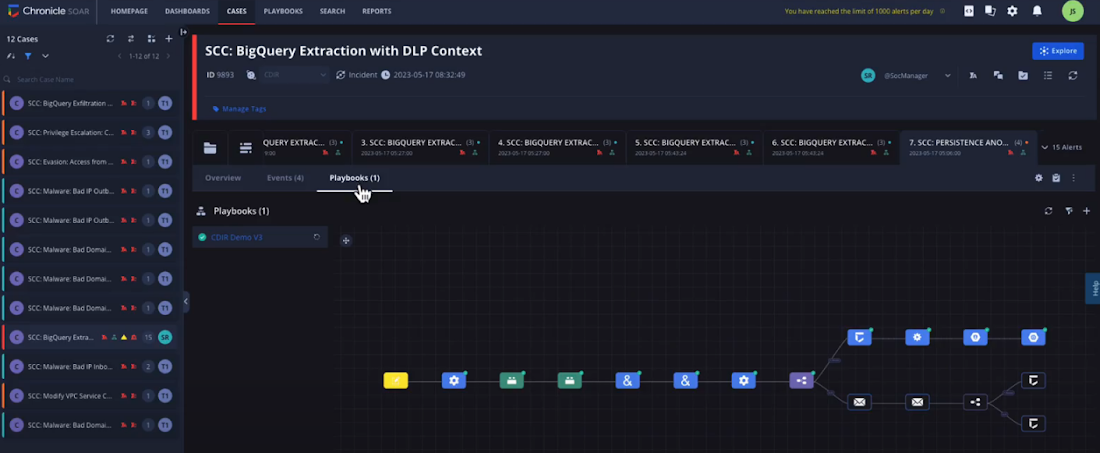
Ready to detect with confidence, investigate with broad context, respond with speed and precision, and simplify data ingestion? Chronicle Security Operations is your go-to for turnkey, end-to-end threat detection, investigation, and response on Google Cloud.
Tune in to our Security Summit session to learn more and see a demo of the new Google Cloud TDIR capabilities.
Google Products Helps HMH’s Healthcare Staff Work from Anywhere Efficiently and Securely!

10235
Of your peers have already read this article.
3:00 Minutes
The most insightful time you'll spend today!
Hackensack Meridian Health (HMH) executive Mark Eimer explains how an ambitiously-timed rollout of a comprehensive suite of Google products helped the entire organization—from doctors to IT staff—achieve better security, cultivate a more equitable work environment, and ultimately, improve patient outcomes.
How does a recently merged, 17-hospital healthcare system fast-track a platform migration and hardware rollout securely and in a way that improves work for everyone, regardless of location or role? These are the questions that kept me up at night in early 2020, when the pandemic demanded a “big bang”—something our legacy laptops and operating systems couldn’t handle.
We began our work with Google in 2020 with the adoption of Chrome as our default browser. As we migrated platforms, keeping patient data safe was of the utmost importance to us, along with providing every staff member with the tools they needed to work virtually. Our staff often experienced issues accessing our web-based applications using Internet Explorer or Edge Browser, a problem that went away when we switched to Chrome. Chrome’s versatile compatibility also made it easier for my team to migrate all of our web-based operations, and Chrome’s security and manageability were key components to making this switch a huge win for the organization.
The success of this migration led us to extend our Google partnership to patient care applications—where Google’s expertise in AI and ML helps scale the use of diagnostics tools and improve other aspects of the patient journey.

Achieving security at every step
Like so many other healthcare organizations, we’ve been concerned about ransomware attacks. This is part of why we moved to Google Workspace and distributed over 3,000 Chrome OS devices in kiosk mode in March of 2020, when many of us went remote due to the pandemic. We were very concerned about team members accessing corporate applications through home devices that were running EOL operating systems (WIN7), as well as a general lack of antivirus and encryption measures.
We were protected by the fact that Google’s software and hardware both had built-in security features that we needed to stave off sophisticated attackers. For example, Chrome OS automatically updates to the latest security update and encrypts data living outside the cloud on the hardware. These features protected us from security-related disruptions, letting us securely move a huge library of file shares and emails across thousands of accounts to Google Chrome OS in just four months.
A year later, in March 2021, we migrated the enterprise over to Google Workspace and saw an immediate reduction in spam by 30% from the inherent built-in AI/ML. This meant staff were less likely to receive (and click through) phishing attempts. My team could connect, create, and collaborate easily and securely—even as more of us were working from home and needed to access sensitive data remotely.
Leveling the playing field
As an organization, we were surprised by how many team members didn’t have personal computers at home. We quickly decided that if we needed team members to work from home, the health network would have to supply hardware. Chromebooks’ lower price tag compared to PCs—on top of their built-in security controls—allowed us to purchase, deploy, and support that initial distribution of 3,000 Chromebooks to team members in less than three weeks, providing devices to every eligible remote employee instead of just a select few. This was vital to reaching our equitable technology goal as part of our diversity and inclusion initiative: everybody has the same tools to do good work.
When all employees have what they need to do their jobs well, we get better patient outcomes. Before we began this cloud adoption journey, patient and staff experiences were different within the hospitals and outside of them.
Now it’s the same wherever our staff is, and we’ve seen efficiency and accessibility benefits extend to the patient side. For example, we built a web-based contact center that supports 80 locations that use Workspace and Chrome OS devices. Since customer service, admin, and providers are all on the same system, it has become a one-stop shop for patients.
Furthermore, through the Grow with Google program, we were able to provide another benefit to employees that drove our equity goals. Google trained 50 non-IT staff members—from environmental services, food and nutrition, and other non-tech areas who were interested in making a career change to IT—on the Google products we were using. They may not have thought about switching to a career in IT before the Grow with Google program came to our organization, but through this partnership, they now have that opportunity.
A strategic, long-term partner
With any large-scale rollout, the work doesn’t end once laptops are in employee hands. Google has shown their commitment to long-term collaboration as they continuously optimize their products for the unique needs of healthcare providers and go the extra mile in tailoring tools to our staff’s workflows.
For example, on the Chrome OS side, the Google team has helped our registration desks and document centers with device integration for hardware like credit card readers and e-signature pads. They’ve also helped us meet security and privacy requirements mandated by state and federal governments around HIPAA, Medicaid, and Medicare reimbursements. Over this next year, we’ll look at a feature roadmap with Google Cloud to deliver further enhancements, iterating on the product itself to meet our needs for the present and the future.

Delivering the future of healthcare
The benefits we’ve seen around security and usability—and the ability to provide all staff with equal access to Google’s technology—are why we’re expanding our partnership with Google to both the administrative and clinical sides of HMH. In addition to further Google rollouts with corporate, next year we’re distributing Chromebooks to all 350 of our ambulatory clinics.
We’re also working with the Google professional services team to create a custom AI model that analyzes 3D mammogram images. This AI model will enable two providers to read mammograms—which adheres to international best practices but is currently rare in the US—without requiring additional time. Conducting double readings of mammograms will yield better health outcomes for our patients, such as a lower patient recall rate and an increased accuracy in detecting breast cancer.
We’re currently building the model using a variety of Google Cloud products, including Cloud Healthcare API. Once complete, this model is expected to be trained, deployed, and maintained in Google’s Vertex AI, allowing our providers to be more productive as they make clinical decisions with AI support. As the model is proven over time, we plan to make the predictive services accessible to other healthcare organizations.
With Google, we’re able to achieve a unified architecture for storing data as well as training and deploying AI models, which enable our staff to work more efficiently and securely from anywhere. While I may not be able to predict the future as accurately as AI can, I foresee our continued partnership with Google as a key part of HMH’s improved provider and patient outcomes.
More Relevant Stories for Your Company

Three Reasons Why Enterprises Must Think Next-gen Serverless
As we reflect on the past year, Heraclitus' phrase “The only constant in life is change” has never rang more true. With the pandemic, companies had to shift operations, launch new products and adapt to extreme demand patterns, sometimes within a matter of weeks. To respond to customer needs faster

reCAPTCHA & Cloud Armor: Helping Organizations Adopt Bot Management Strategies
Unwelcome web traffic from bots has proliferated, becoming a significant contributor to business and operational risk. The motivations of bot controllers range from disruption of business through DDoS attacks to fraud such as credential stuffing, denial of inventory, scraping, and fraudulent card use. Google is well positioned to help detect



How does Google Pick its Data Center ?
Google is well known for its sustainable tech and hardware initiatives. Did you know alongside its environmental friendly designs of its data centers, it takes into account various factors such as redundant power supplies, data replication, network connectivity, etc. Watch the video to learn more.

10 Reasons that Make Google Cloud the Champion of IaaS
When you choose to run your business on Google Cloud you benefit from the same planet-scale infrastructure that powers Google’s products such as Maps, YouTube, and Workspace. We have picked 10 ways in which Google Cloud Infrastructure services outshine alternatives in the market in how they simplify your operations, save
