





Google Maps’ Cloud-based Styling Features Betters UX, Control and Flexibility

3358
Of your peers have already read this article.
2:00 Minutes
The most insightful time you'll spend today!
This year at Google I/O, we announced the general availability of Cloud-based maps styling for the Maps JavaScript API. In an effort to provide you with more options and more control to help create the best experience for your users, today we’re releasing new features to Cloud-based maps styling. You may already be familiar with these features from the consumer Google Maps web and mobile apps—Landmarks and Building Footprints. We’re also releasing updates to our industry optimized map styles to provide even more map details while providing the flexibility to craft the best experience for your users. Let’s take a look.
Help users quickly scan and orient themselves with Landmarks
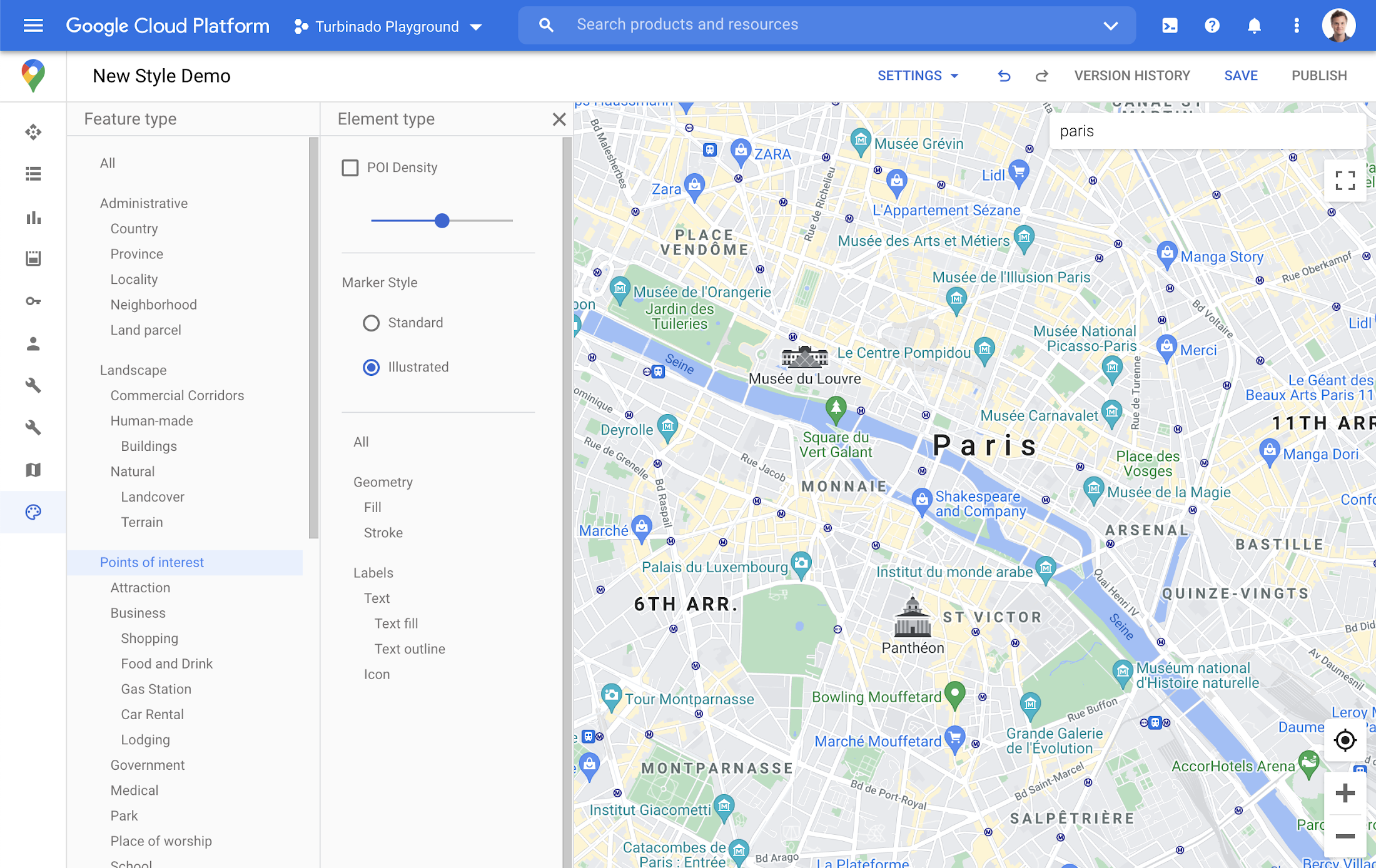
You may have noticed some enhancements for prominent places in the consumer Google Maps web and mobile apps, these landmarks help show your users points of interest that help them orient and navigate cities they are exploring or visiting.

You now have the ability to bring this same experience to your users by creating maps using Cloud-based maps styling. This feature is available in 100 cities globally including New York, Dubai, Paris, Mumbai, and Singapore. To enable landmarks for your map, log into the Cloud console and in our style editor navigate to the Points of interest feature type and select ‘Illustrated’ under Marker Style.
Simplify maps features by switching to Building Footprints
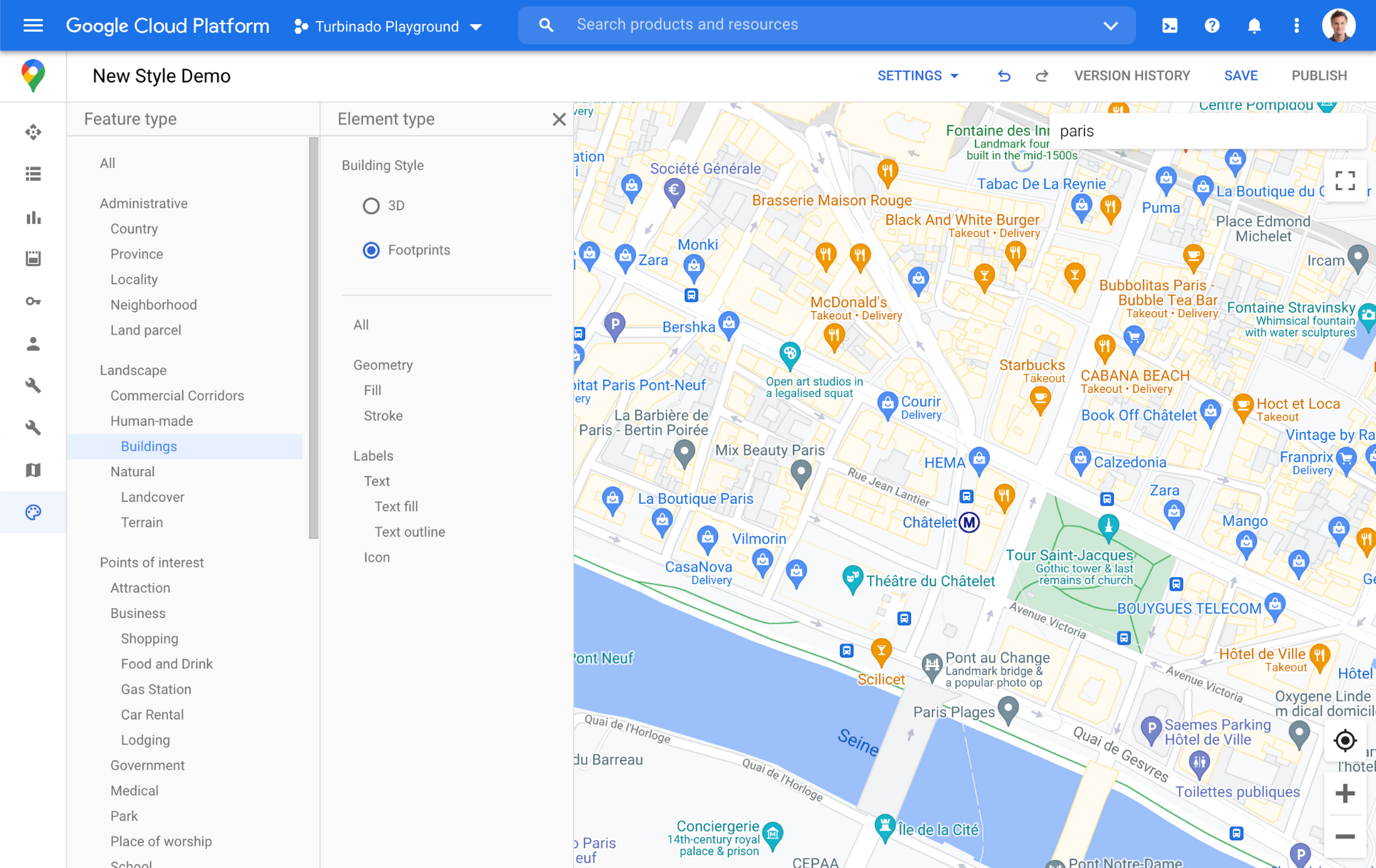
Sometimes less is more. In dense, highly vertical cities, showing 3D building heights can add cognitive load for users. Now, in addition to 3D buildings, we offer building footprints as an option in the style editor. Building footprints can provide a strikingly different basemap balance and composition to better support use cases that may not benefit from the added complexity that 3D buildings can present.

Fill and stroke geometries can also be styled independently to support various color themes. To enable Building Footprints, log into the Cloud console and in our style editor navigate to Buildings and choose ‘Footprints’ under building style.
Industry Optimized Map Styles now include Landmarks and Building Footprints, plus Detailed Street Maps
In January of this year we launched Industry Optimized Map Styles for the travel, real estate, retail, and logistics industries, providing customers with pre-styled map configurations, available via Cloud-based maps styling. Landmarks are now included in all of our Industry Optimized Map Styles and we have turned on Building Footprints in the travel style map. If you are already an Industry Optimized Map Styles user, these new features will be applied to your map with no action needed from you. If you would like to disable these changes, you can use the style editor to turn off these features.
For Industry Optimized Map Styles only, we are also excited to enable Detailed Street Maps. You may have seen these features in our consumer products at Google I/O, released back in August of 2020 for the consumer Google Maps web and mobile apps. Detailed Street Maps are available in San Francisco, New York, London, and Tokyo, and we are targeting expansion to 50 new cities by the end of 2021.
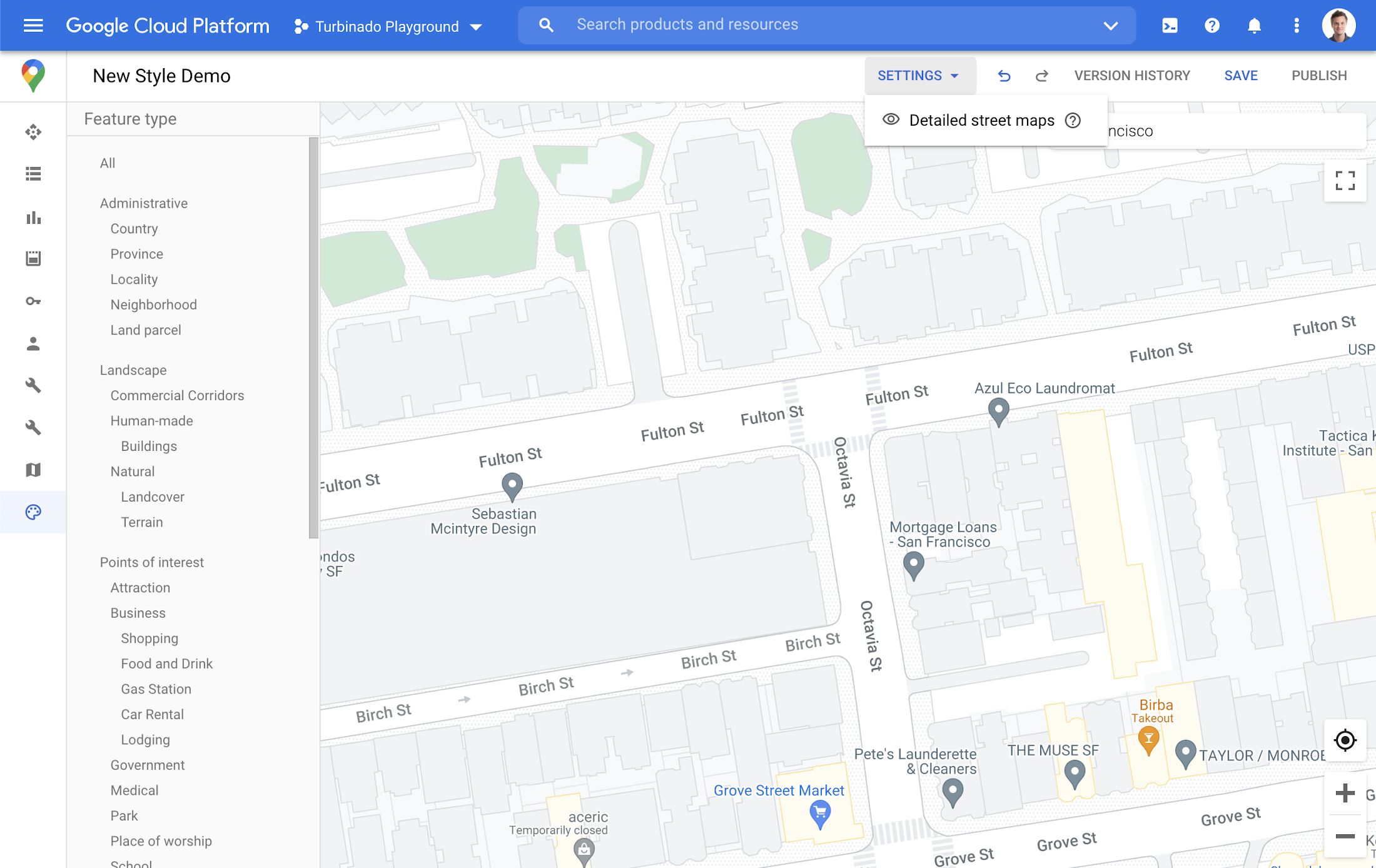
Detailed Street Maps are on by default for all Industry Optimized Map Styles and we created a new settings menu to change the visibility, as needed. We are working on bringing the full styling capability for Detailed Street Maps features to all Cloud-based maps styles in the future.
Landmarks and Building Footprints as well as the updates to Industry Optimized Map Styles are only available via Cloud-based map styling in the Google Cloud Console and are included in Google Maps Platform pricing. Learn more about how to use Landmarks and Building Footprints and Industry Optimized Map Styles. To get started with Cloud-based map styling, check out our documentation for JavaScript.
For more information on Google Maps Platform, visit our website.
Container Platforms on Google Cloud Maximize Developer Efficiency, Speed-up Time to Market and Eliminate IT Overhead!

3372
Of your peers have already read this article.
2:30 Minutes
The most insightful time you'll spend today!
Every tech company and growing startup faces pressure to make efficient use of technical talent. Increasingly, this means determining if and how the cloud can help this talent focus on things like product development instead of IT overhead. These challenges are the starting place for our new whitepaper “The future of infrastructure will be containerized,” which is informed by our work with tech companies and startups who’ve chosen Google Cloud across a range of industries, from healthcare and manufacturing to software, fintech and e-commerce.
For example, if your tech company or startup is in the cloud but spends lots of resources on custom tooling and maintenance, you’re almost certainly under-leveraging what the cloud can do. You might also be locking yourself into an architecture that won’t let you easily adapt or change things as your needs evolve.
The whitepaper examines these challenges to growth and explains how tech companies and startups can use managed container platforms in the cloud to maximize developer efficiency, accelerate time to market, and eliminate IT management that doesn’t help differentiate the business. In this blog post, we’ll explore one element of this discussion: infrastructure management. Be sure to check out the full whitepaper for all the details.
The case for containers and Kubernetes
Compared to previous virtualization technologies, containers are more lightweight, faster, more portable, and easier to manage—and a managed container platform like Kubernetes can extend these advantages even further. That’s why we’re seeing a massive shift to containers and Kubernetes.
Simply put, infrastructure and technical debt can slow down tech companies and startups. Traditional virtual machines (VMs) are neither simple to manage nor likely to maximize your workloads. Maximizing the cloud isn’t just about renting cheap resources—it’s about embracing modern, more efficient ways of operating that let businesses spend more time serving customers.
VMs virtualize at the hardware level and thus require higher degrees of management, less portability, and less consistent and efficient scaling. Containers, in contrast, virtualize further up the stack, at the OS level, meaning they contain the libraries and dependencies needed to run apps and services but are significantly more lightweight, easier to manage, and can accommodate modern operating models. VMs aren’t built for the speed at which today’s tech companies and startups need to move, but with a robust container orchestration like Kubernetes, startups can leverage proven patterns for running reliable, secure infrastructure at scale.
Kubernetes is open source and platform-agnostic, offering all the common tooling out of the box to secure and speed up each stage of the build-and-deploy life cycle. Everything is automated, with the complexity abstracted away—the vast majority of infrastructure-as-code is eliminated as the platform shifts to infrastructure-as-data, with users able to tell Kubernetes what they want rather than writing code to tell it what to do. In terms of both time saved in the present and flexibility preserved for the future, Kubernetes can be vastly more valuable than proprietary tech stacks or even a management-heavy implementation of VMs running in the cloud.
Kuberetes also lets tech companies and startups reduce management overhead according to their needs, with many different approaches available for different workloads:
- Kubernetes gives traditional workloads the benefits of a modern platform by letting organizations separate apps from VMs and put them in containers.
- Managed computing platforms turn cloud services into platforms-as-a-service, giving tech companies and startups the power and flexibility of containers and the convenience of serverless. There’s no server, no cluster configuration, and no maintenance, which means organizations can dramatically reduce overhead labor without compromising control.
- For workloads that don’t require much control over cluster configuration, tech companies and startups can use Google Kubernetes Engine (GKE) in Autopilot mode to provision clusters, while paying for only the workload, not the cluster. In this way, they can eliminate cluster administration while optimizing security and saving potentially substantial amounts of money.
- For more cloud-native applications, serverless options like Cloud Run, eliminate underlying infrastructure and serve as the end-to-end host for applications, data, and even analysis. A serverless platform lets organizations start running containers with minimal complexity in a fully-managed environment with security, performance, scalability, and best practices baked in.
Accelerating time to market while preserving future freedom
Tech company and startup leaders should also consider the value of the Kubernetes community and its surrounding ecosystem, as its stable innovation defines today’s industry standards and best practices. The technology benefits in terms of speed, complexity, and labor are clear when it comes to containers, but as an open-source platform with many active contributors, it is also an onramp to future architecture innovations. Being cutting-edge and developer-oriented, Kubernetes can also help organizations to attract top technical talent, in addition to letting them empower developers they already employ. And not to be neglected, because Kubernetes is open source, it offers transparency in proprietary solutions, limiting the risks of lockin. Top to bottom, it provides a framework for tech companies and startups to bring innovations to their customers, faster. To learn more, read the full whitepaper or visit the Google Cloud for startups and tech companies page.
Transform ‘Dark Data’ from Documents with Document AI, Cloud Functions and Workflows

8193
Of your peers have already read this article.
2:00 Minutes
The most insightful time you'll spend today!
At enterprises across industries, documents are at the center of core business processes. Documents store a treasure trove of valuable information whether it’s a company’s invoices, HR documents, tax forms and much more. However, the unstructured nature of documents make them difficult to work with as a data source. We call this “dark data” or unstructured data that businesses collect, process and store but do not utilize for purposes such as analytics, monetization, etc. These documents in pdf or image formats, often trigger complex processes that have historically relied on fragmented technology and manual steps. With compute solutions on Google Cloud and Document AI, you can create seamless integrations and easy to use applications for your users. Document AI is a platform and a family of solutions that help businesses to transform documents into structured data backed by machine learning. In this blog post we’ll walk you through how to use Serverless technology to process documents with Cloud Functions, and with workflows of business processes orchestrating microservices, API calls, and functions, thanks to Workflows.
At Cloud Next 2021, we presented how to build easy AI-powered applications with Google Cloud. We introduced a sample application for handling incoming expense reports, analyzing expense receipts with Procurement Document AI, a DocAI solution for automating procurement data capture from forms including invoices, utility statements and more. Then organizing the logic of a report approval process with Workflows, and used Cloud Functions as glue to invoke the workflow, and do analysis of the parsed document.

We also open sourced the code on this Github repository, if you’re interested in learning more about this application.

In the above diagram, there are two user journeys: the employee submitting an expense report where multiple receipts are processed at once, and the manager validating or rejecting the expense report.
First, the employee goes to the website, powered by Vue.js for the frontend progressive JavaScript framework and Shoelace for the library of web components. The website is hosted via Firebase Hosting. The frontend invokes an HTTP function that triggers the execution of our business workflow, defined using the Workflows YAML syntax.
Workflows is able to handle long-running operations without any additional code required, in our case we are asynchronously processing a set receipt files. Here, the Document AI connector directly calls the batch processing endpoint for service. This API returns a long-running operation: if you poll the API, the operation state will be “RUNNING” until it has reached a “SUCCEEDED” or “FAILED” state. You would have to wait for its completion. However, Workflows’ connectors handle such long-running operations, without you having to poll the API multiple times till the state changes. Here’s how we call the batch processing operation of the Document AI connector:
- invoke_document_ai:call: googleapis.documentai.v1.projects.locations.processors.batchProcessargs:name: ${"projects/" + project + "/locations/eu/processors/" + processorId}location: "eu"body:inputDocuments:gcsPrefix:gcsUriPrefix: ${bucket_input + report_id}documentOutputConfig:gcsOutputConfig:gcsUri: ${bucket_output + report_id}skipHumanReview: trueresult: document_ai_response
Machine learning uses state of the art Vision and Natural Language Processing models to intelligently extract schematized data from documents with Document AI. As a developer, you don’t have to figure out how to fine tune or reframe the receipt pictures, or how to find the relevant field and information in the receipt. It’s Document AI’s job to help you here: it will return a JSON document whose fields are: line_item, currency, supplier_name, total_amount, etc. Document AI is capable of understanding standardized papers and forms, including invoices, lending documents, pay slips, driver licenses, and more.
A cloud function retrieves all the relevant fields of the receipts, and makes its own tallies, before submitting the expense report for approval to the manager. Another useful feature of Workflows is put to good use: Callbacks, that we introduced last year. In the workflow definition we create a callback endpoint, and the workflow execution will wait for the callback to be called to continue its flow, thanks to those two instructions:
- create_callback:call: events.create_callback_endpointargs:http_callback_method: "POST"result: callback_details...- await_callback:try:call: events.await_callbackargs:callback: ${callback_details}timeout: 3600result: callback_requestexcept:as: esteps:- update_status_to_error:...
In this example application, we combined the intelligent capabilities of Document AI to transform complex image documents into usable structured data, with Cloud Functions for data transformation, process triggering, and callback handling logic, and Workflows enabled us to orchestrate the underlying business process and its service call logic.
Going further
If you’re looking to make sense of your documents, turning dark data into structured information, be sure to check out what Document AI offers. You can also get your hands on a codelab to get started quickly, in which you’ll get a chance at processing handwritten forms. If you want to explore Workflows, quickstarts are available to guide you through your first steps, and likewise, another codelab explores the basics of Workflows. As mentioned earlier, for a concrete example, the source code of our smart expense application is available on Github. Don’t hesitate to reach out to us at @glaforge and @asrivas_dev to discuss smart scalable apps with us.
Google Cloud Accelerates Financial Organizations’ Journey towards Digital Transformation

10454
Of your peers have already read this article.
2:00 Minutes
The most insightful time you'll spend today!
When I reflect back on the past year and the pandemic, I’m struck by how the reliance on remote work and operations has changed the fundamentals of business forever. For the financial services industry, this rings particularly true. Many conversations I’m having right now with organizations revolve around embracing a transformation cloud, and thinking of cloud computing not just as an infrastructure decision, but also as the locus for transformation throughout the company.
Today, as we welcome the industry to our Financial Services Summit, we’ll demonstrate just how Google Cloud accelerates a financial organization’s digital transformation through app and infrastructure modernization, data democratization, people connections, and trusted transactions. We hope you’ll join us.
How we’re helping financial services firms build their transformation clouds
At Google Cloud, we continue to focus on areas where we can bring the best of our capabilities to banking, capital markets, insurance, and payments customers around the world. Our work with financial services industry customers has given us a deep understanding of the real-world, specific use cases that matter most to them. This groundwork led us to engineer products and solutions that are open and flexible, not ones that force them to rip out existing investments in ERP or other early IaaS cloud implementations.
It’s why we’ve engineered solutions such as Lending DocAI, Open Banking with Apigee, and Datashare for financial services to help transform the industry. These solutions were created with our customers’ security and compliance top-of-mind and are built at the intersection of user-optimized experience, technology, and sovereignty.
At their core, financial institutions want to drive growth, reduce costs, mitigate risk, stay compliant, and increase efficiency. As a result, when we partner with them on their transformation journeys, we consider three essential focus areas:
- Enabling the human experience and connected interactions
- Building an open and intelligent data foundation for better insights
- Providing the most trusted and secure cloud in the industry
Enabling humans and connected interactions
A company’s transformation is about more than technology; people and culture ultimately drive change. HSBC, for example, recognized its business users would benefit from guided answers to common questions around risk policy compliance, and turned to Google Cloud to leverage AI and machine learning bots to assist employees, ease the burden on policy experts, and improve the user experience. Using Dialogflow, a core component of Contact Center AI, HSBC was able to build a conversational platform that quickly and accurately addresses user needs at scale.
Another example is Equifax, which used Google Workspace to support collaboration not only internally between employees, but also externally with customers. Customers can use Google Cloud solutions for financial services to build these sorts of technology-enabled human interactions quickly and easily—supporting organizational change at scale.
Building an open and intelligent data foundation for smarter, faster insights
The real impact of Google Cloud solutions for financial services comes when the whole company has access to the right information at the right time, and can act more intelligently on that data. Our solutions help businesses safely leverage their data and get a complete 360-degree view of their customers’ information, which can often be scattered across multiple systems (CRM, lending, credit, etc.). This helps financial institutions improve the overall customer experience—and sometimes even develop new products quickly.
Indeed, all financial institutions are looking for ways to grow revenue and reduce expenses, and data can be a critical ingredient to doing both effectively. As daily transactions rise, so does the volume and complexity of data. But to implement new customer experience innovations (and new revenue streams), financial institutions must first capture data effectively. This is why AXA Switzerland, for example, uses real-time analytics on Google Cloud to gain cross-industry insights about future trends and customer preferences.
Financial services organizations also need the confidence of building on a platform that provides choice, flexibility, and agility to move fast. It’s why we have an open cloud approach that allows Google Cloud services to run in different physical locations such as on-premises, other public clouds, and the edge. Customers can also harness the power of data and AI through our open APIs, machine-learning services, and analytics engines on any major cloud platform. This is why companies like Macquarie Bank are taking advantage of Google Cloud’s open, hybrid architecture to modernize and empower its developers.
Compliant and secure to address risk and regulatory needs
As a highly regulated industry, financial services is focused on security and compliance, risk and regulations, and fraud detection and prevention. Google Cloud offers unique capabilities to earn customers’ trust as part of our continuing work to be the most trusted cloud in the industry. Google Cloud provides a secure foundation that you can verify and independently control. Our cloud technology reduces risk and data loss, because it is built on comprehensive zero-trust architecture. Finally, we offer a shared-fate model built on best practices in risk management via automation, guidance, and insurance. This is why customers like BBVA have confidence anywhere their systems may operate.
On the regulatory front, global legislators and regulators continue to focus on the stability of the industry that only a decade ago went through one of the biggest liquidity crises in history. With this oversight comes strong expectations of risk mitigation. Google Cloud offers a single, global set of controls, reviewed by financial institutions and regulators around the world, and verified in collaborative audits—making compliance simpler and less costly for our customers.
Finally, Google Cloud allows financial services firms to operate confidently with advanced security tools that help protect data, applications, and infrastructure, as well as their customers from fraudulent activity, spam, and abuse. We help protect your data against threats, using the same infrastructure and security services we use for our own operations, ensuring you never have to trade-off between ease of use and security. Google Cloud encrypts data at-rest and in-transit. And we now also offer the ability to encrypt data-in use, while it’s being processed for customer VM and container workloads.
Let us help you with your transformation cloud journey
We’ve seen leading financial services companies embrace Google Cloud to help them move beyond infrastructure toward the next phase of their cloud evolution. This is an era where no company is better positioned to lead than Google Cloud, and we’re excited to help you with your journey.
Learn more about Google Cloud for financial services.
Kitabisa is shaping the future of fundraising with Google Cloud

3112
Of your peers have already read this article.
3:30 Minutes
The most insightful time you'll spend today!
The name Kitabisa means “we can” in Bahasa Indonesia, the official language of Indonesia, and captures our aspirational ethos as Indonesia’s most popular fundraising platform. Since 2013, Kitabisa has been collecting donations in times of crisis and natural disasters to help millions in need. Pursuing our mission of “channeling kindness at scale,” we deploy AI algorithms to foster Southeast Asia’s philanthropic spirit with simplicity and transparency.
Unlike e-commerce platforms that can predict spikes in demand, such as during Black Friday, Kitabisa’s mission of raising funds when disasters like earthquakes strike is by definition unpredictable. This is why the ability to scale up and down seamlessly is critical to our social enterprise.
In 2020, Indonesia’s COVID-19 outbreak coincided with Ramadan. Even in normal times, this is a peak period, as the holy month inspires charitable activity. But during the pandemic, the crush of donations pushed our system beyond the breaking point. Our platform went down for a few minutes just as Indonesia’s giving spirit was at its height, creating frustrations for users.
A new cloud beginning
That’s when we realized we needed to embark on a new cloud journey, moving from our monolithic system to one based on microservices. This would enable us to scale up for surges in demand, but also scale down when a wave of giving subsides. We also needed a more flexible database that would allow us to ingest and process the vast amounts of data that flood into our system in times of crisis.
These requirements led us to re-architect our entire platform on Google Cloud. Guided by a proactive Google Cloud team, we migrated to Google Kubernetes Engine (GKE) for our overall containerized computing infrastructure, and from Amazon RDS to Cloud SQL for MySQL and PostgreSQL, for our managed database services.
The result surpassed our expectations. During the following year’s Ramadan season, we gained a 50% boost in computing resources to easily handle escalating crowdfunding demands on our system. This was thanks to both the seamless scaling of GKE and recommendations from the Google Cloud Partnership team on deploying and optimizing Cloud SQL instances with ProxySQL to optimize our managed database instances.
A progressive journey to kindness at scale
While Kitabisa’s mission has never wavered, our journey to optimized performance took us through several stages before we ultimately landed on our current architecture on Google Cloud.
Origins on a monolithic provider
Kitabisa was initially hosted on DigitalOcean, which only allowed us to run monolithic applications based on virtual machines (VMs) and a stateful managed database. This meant manually adding one VM at a time, which led to challenges in scaling up VMs and core memory when a disaster triggered a spike in donations.
Conversely, when a fundraising cycle was complete, we could not scale down automatically from the high specs of manually provisioned VMs, which was a strain on manpower and budgetary resources.
Transition to containers
To improve scalability, Kitabisa migrated from DigitalOcean to Amazon Web Services (AWS), where we hoped deploying load balancers would provide sufficient automated scaling to meet our network needs. However, we still found manual configurations to be too costly and labor-intensive.
We then attempted to improve automation by switching to a microservices-based architecture. But on Amazon Elastic Container Service (Amazon ECS) we hit a new pain point: when launching applications, we needed to ensure that they were compatible with CloudFormation in deployment, which reduced the flexibility of our solution building due to vendor locking.
We decided it was “never too late” to migrate to Kubernetes, which is a more agile containerized solution. Given that we were already using AWS, it seemed natural to move our microservices to Amazon Elastics Kubernetes Service (Amazon EKS). But we soon found that provisioning Kubernetes clusters with EKS was still a manual process that required a lot of configuration work for every deployment.
Unlocking automated scalability
At the height of the COVID-19 crisis, faced with mounting demands on our system, we decided it was time to give Google Kubernetes Engine (GKE) a try. Since Kubernetes is a Google-designed solution, it seemed likeliest that GKE would provide the most flexible microservices deployment, alongside better access to new features.
Through a direct comparison with AWS, we discovered that everything from provisioning Kubernetes clusters to deploying new applications became fully automated, with the latest upgrades and minimal manual setups. By switching to GKE, we can now absorb any unexpected surge in donations, and add new services without expanding the size of our engineering team. The transformative value of GKE became apparent when severe flooding hit Sumatra in November 2021, affecting 25,000 people. Our system easily handled the 30% spike in donations.
Moving to Cloud SQL and ProxySQL
Kitabisa was also held back by its monolithic database system, which was prone to crashing under heavy demand. We started to solve the problem by moving from a stateful DigitalOcean database to a stateless Redis one, which freed us from relying on a single server, giving us better agility and scale.
But the strategy left a major pain point because it still required us to self-manage databases. In addition, we were experiencing high database egress costs due to the need to execute data transfers from a non-Google Cloud database into BigQuery.
In December 2021, we migrated our Amazon RDS to Cloud SQL for MySQL, and immediately saved 10% in egress costs per month. But one of the greatest benefits came when the Google Cloud team recommended using the open source proxy for MySQL to improve the scalability and stability of our data pipelines.
Cloud SQL’s compatibility allowed us to use connection pooling tools such as ProxySQL to better load balance our application. Historically, creating a direct connection to a monolithic database was a single point of failure that could end up in a crash. With Cloud SQL plus ProxySQL, we create layers in front of our database instances. It serves as a load balancer that allows us to connect simultaneously to multiple database instances, by creating a primary and a read replica instance. Now, whenever we have a read query, we redirect the query to our read replica instance instead of the primary instance.
This configuration has transformed the stability of our database environment because we can have multiple database instances running at the same time, with the load distributed across all instances. Since switching to Cloud SQL as our managed database, and using ProxySQL, we have experienced zero downtime on our fundraising platform even when a major crisis hits.
We are also saving costs. Rather than having a separate database for each different Kubernetes cluster, we’ve merged multiple database instances into one instance. We now group databases according to business units instead of per service, yielding database cost reductions of 30%.
Streamlining with Terraform deployment
There’s another key way in which Google Cloud managed services have allowed us to optimize our environment: using Terraform as an infrastructure-as-a-code tool to create new applications and upgrades to our platform.
We also managed to automate the deployment of Terraform code into Google Cloud with the help of Cloud Build, and no human intervention. That means our development team can focus on creative tasks, while Cloud Build deploys a continuous stream of new features to Kitabisa.
The combination of seamless scalability, resilient data pipelines, and creative freedom is enabling us to drive the future of our platform, expanding our mission to inspire people to create a kinder world in other Asian regions.
We believe that having Google Cloud as our infrastructure backbone will be a critical part of our future development, which will include adding exciting new insurtech features. Now firmly established on Google Cloud, we can go further in shaping the future of fundraising to overcome turbulent times.
Google’s Default Messaging Apps for AT&T Android Users Ensure Richer Conversations

5548
Of your peers have already read this article.
1:30 Minutes
The most insightful time you'll spend today!
Today, we’re announcing that we’re working with AT&T to establish Messages by Google as the default messaging application for all AT&T customers in the United States using Android phones. The collaboration aims to help accelerate the industry toward global Rich Communication Services (RCS) coverage and interoperability to offer a consistent, secure, and enhanced messaging experience for all Android users around the world.
“Many AT&T customers have enjoyed the advantages of RCS for years when texting with friends and family,” said David Christopher, executive vice president and general manager – AT&T Mobility. “We look forward to working closely with Google to extend these benefits to even more of our customers as they enjoy richer conversations with others around the world.”
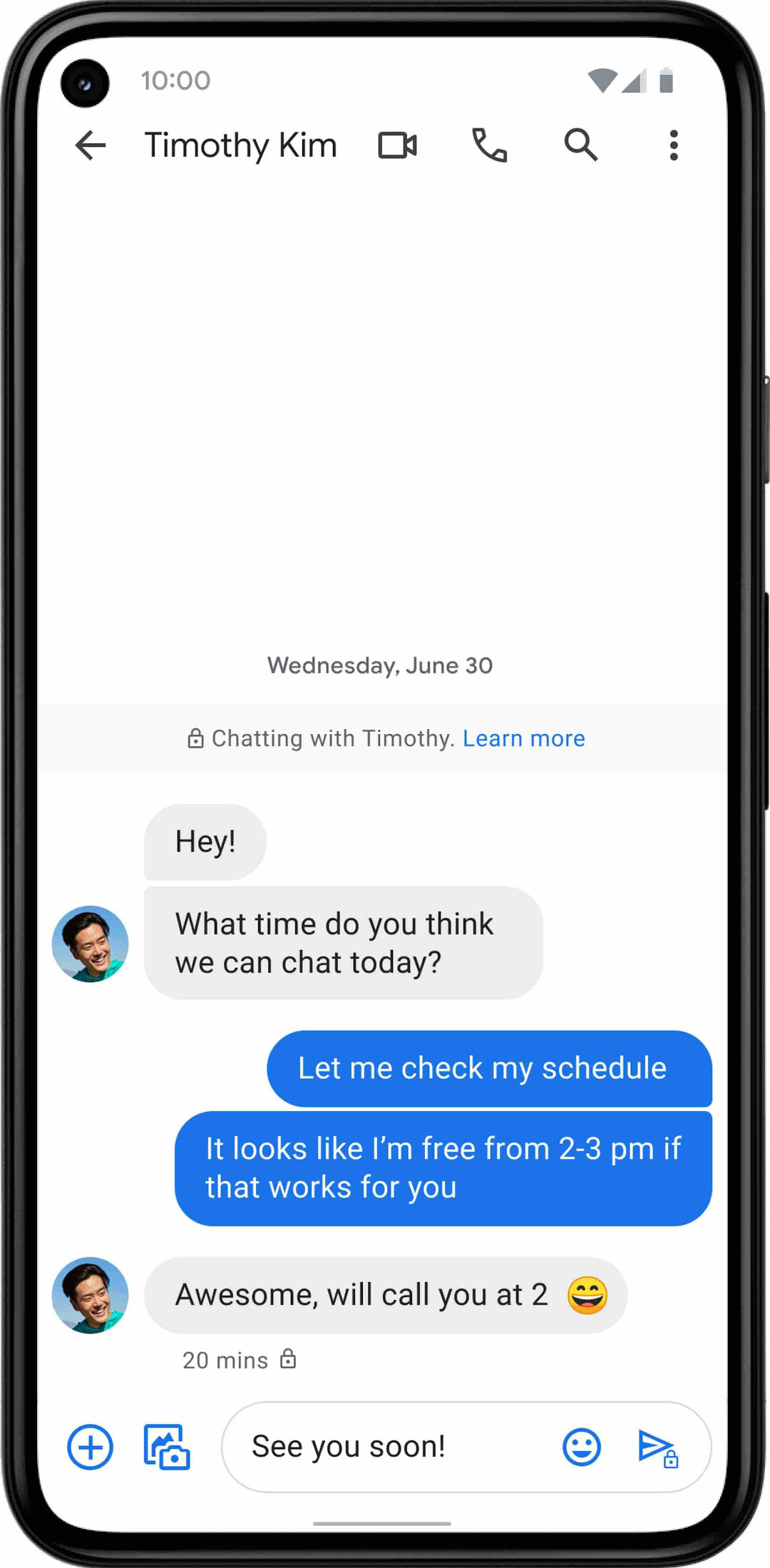
Working together, AT&T and Google will continue the momentum to upgrade SMS with enhanced messaging features offered in Messages, which includes the support of chat features based on the open RCS standard. With Messages as the default messaging application, all AT&T customers using Android devices will get enhanced features so they can:
- Share full-resolution pictures from a recent event or vacation
- Send a higher-quality video of that soccer goal and the celebration that followed
- Know when someone is replying to a text
- Send and receive messages over Wi-Fi or data
- Participate in group chats where it’s easy to add someone else to the conversation, or let someone leave, without starting a brand new thread

In addition to these features, we’re also rolling out end-to-end encryption for one-on-one RCS conversations between people using Messages and people who have chat features enabled.
For years, we’ve been working with the mobile industry and device makers to bring enhanced and secure messaging to everyone on Android. Today’s announcement—that AT&T customers using Android devices will soon be able to enjoy these features by default—is a major step forward.
More Relevant Stories for Your Company

Manage Packages Using Artifact Registry in Google Cloud Functions with Private Dependencies
Late last year, we announced that Artifact Registry was going GA, allowing GCP customers to manage their packages within the same platform as they were being deployed. In this blogpost, we want to show you how to do exactly that with a private dependency. Private dependencies allow your packages to be

2022’s First Cloud CISO Perspectives: Recap of the Megatrends, Releases and News
I’m excited to share our first Cloud CISO Perspectives post of 2022. It's already shaping up to be an eventful year for our industry and we’re only in month one. There’s a lot to recap in this post, including the U.S. government’s recent efforts to address critical security issues, like

Google is the Top Provider for Continuous Integration Tools, According to Forrester
Google’s continuous integration (CI) and continuous delivery (CD) platform, Cloud Build, emerges as a Leader for Continuous Integration. “Google Cloud Build comes out swinging, going toe to toe with other cloud giants. Google Cloud Build is relatively new when compared to the other public cloud CI offerings, they had a

MerPay Platform Scales its Reach to Millions of Users using Cloud Spanner
Editor’s note: To launch a new mobile payment platform, Mercari needed a database solution strong on scalability, availability, and performance. Here’s how Cloud Spanner delivered those results. E-commerce companies need to connect customers to their services securely, reliably, with zero downtime. When Mercari, Inc. launched a new mobile payment platform, we chose Cloud
