





Vizrt’s Story of ‘Lift and Shift’ and Delivering Phenomenal Performance with Google Cloud

3229
Of your peers have already read this article.
3:00 Minutes
The most insightful time you'll spend today!
When moving software applications from on-premise hardware to the cloud, it often “just works,” but it’s never guaranteed. This is especially the case for applications that are hardware intensive. This blog post examines what happened when a media company took software for real-time video broadcasts into the cloud. We’ll share how we, Google Cloud, collaborated with media software provider Vizrt to meet the demanding requirements of an eSports broadcaster. Together, we delivered a solution that not only met but exceeded the expected performance from a cloud-based deployment.
Video broadcasting in the cloud
Video broadcasts are a very hardware-intensive workflow. By needing to process and store data streams in near-real-time, broadcasts stress GPU, memory, disk, and CPU. In addition, the performance requirements quickly increase as producers add additional video streams into the mix, such as in this case, an eSports broadcast.
Vizrt’s customer wanted to increase their broadcast production by doubling the amount of camera feeds from 8 to 16, to have a more compelling and elaborate production.
At the heart of the eSports broadcasters’ production was Viz Vectar Plus, Vizrt’s software-based 4K switcher. While the client wanted to move more of its production into the cloud, Viz Vectar Plus was designed initially for on-premise hardware. So, when they tried a straightforward “lift and shift ” to the cloud, it surprised no one that the software didn’t run as well. They turned to Google Cloud and Vizrt to make it run the way they needed it to.
Troubleshooting lift and shift
Initially, we suspected that the issue could be in the design of the cloud deployment, i.e., the configuration of the VM hosting the software. So the focus of our troubleshooting was to find a cloud configuration that 1) made sure the software worked to spec and 2) did so optimally considering costs, robustness, and performance. Furthermore, we wanted to ensure that all components met performance specifications, particularly throughput, IOPS, and network bandwidth, as this was a video media application. Only after we validated the cloud deployment would we ask Vizrt to investigate the code itself. We would:
- Set up a test environment.
- Benchmark the environment.
- Test various configurations.
- Validate that the vendor software was optimally using the configuration.
This high-level methodology is straightforward. However, we approached the details in a particular order, considering we were optimizing for broadcast video. We honed in on the optimal cloud configuration by testing the following elements, prioritized in order of expected impact:
- VM type: The VM type largely dictates the available memory and CPU configurations. However, because this was a VM workflow, we had to pick N1’s. Today, they are the only VM type that can be attached to GPUs, which are practically a requirement for broadcast video.
- Disk type: Video broadcasts require high I/O speeds to handle high-quality video streams. We went from an HDD to a much-faster SSD.
- CPU size: We increased the VM CPU cores from 16 in increments up to 32. Increasing CPU size indeed increased performance, but did not return the level of performance we needed.
- SSD size: We increased the SSD size (and the accompanying higher IOPS and throughput that comes with increasing the size) enabling more simultaneous recordings. Again, this only partially worked.
- Disk count. We noticed read/write problems when the application was reading/writing with a single drive. There are two typical ways to approach this: 1) Separate read/writes tasks among two discs and 2) striping the data streams across discs. Implementing these had improved but marginal improvements in performances.
After our testing, we arrived at the following optimal configuration:
- VM: n1-standard-32 instance w/ 500Gb boot drive
- GPU: 1 T4 GPU
- SSD: 1 persistent disk with 1TB*
* We would later determine that two SSDs for separate read and write operations would be more optimal
This configuration was able to produce between 6 – 12 streams. Compared to the on-premise target of 8 streams, this was about as good but was not the customer’s target of 16. So we would need Vizrt to take the ball from here to optimize the software itself.
Optimizing media applications for cloud
We provided Vizrt our recommended configuration, performance notes, and the following best practices that are generally applicable to cloud-based video workloads:
- Separate read and write operations to two different disks to enable higher performance for both operations.
- A second 1 TB SSD persistent disk can be attached to the VM instance to increase performance.
With this information, Vizrt engineers worked their magic, providing daily patches to test; with each daily iteration the overall solution was found quickly. Not only were they able to meet the broadcaster’s request of 16 feeds, but they were also able to go even further to 44. Over a 5x improvement by optimizing for the cloud!
Teamwork in troubleshooting
Because of the specialized nature of media and entertainment, workflow situations across multiple companies are common as specialized applications hand their work from one to another.
“By working in partnership with Google Cloud we managed to build a system that can scale in ways that probably none of us thought would be possible. This allowed Viz Vectar Plus to run fully in the cloud using NDI and opened up amazing possibilities for making shows,” Dr. Andrew Cross, President R&D, Vizrt Group. “We ended up with great feedback from the customer, who were appreciative of how Google Cloud and Vizrt collaborated on a solution.”
The results speak for themselves: A satisfied customer with over a 5x improvement in results. That’s what we call a good game.
How We Built a Brand New Bank on Google Cloud and Cloud Spanner: The First Scalable, Enterprise-grade, Database Service

6576
Of your peers have already read this article.
6:30 Minutes
The most insightful time you'll spend today!
Editor’s note: Technology today lets companies of any size take on entire industries simply with an innovative business model plus digital distribution. Take Shine, a French startup whose platform helps freelancers manage their finances — and their administrative commitments. Here, Raphael Simon, Shine’s CTO and co-founder, talks about why Shine built a new bank on Google Cloud Platform, and in particular Cloud Spanner.
More and more people are deciding to take the plunge and start a freelance career. Some of them by choice, others out of necessity. One of their biggest pain points is dealing with administrative tasks.
In some countries, especially in Europe, the administrative burden of being a freelancer is similar to what a company of 10 or more people deals with. A freelancer doesn’t necessarily have the time or skills to manage all this paperwork. So we are building a new bank for freelancers from the ground up that helps automate administrative tasks associated with their business.
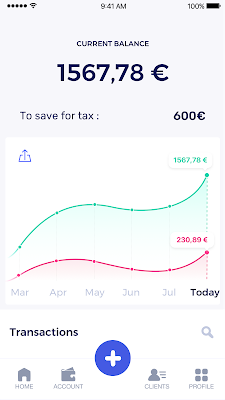
Shine’s banking services and financial tools make it as easy to work as a freelancer as it is to work for a larger company. We deal with administrative tasks on behalf of the freelancer so that he or she can focus on their job: finding and wowing clients.

Building our infrastructure
As a new bank, we had the opportunity to build our infrastructure from the ground up. Designing an infrastructure and choosing a database presents tough decisions, especially in the financial services world. Financial institutions come under tremendous scrutiny to demonstrate stability and security. Even a tiny leak of banking data can have tremendous consequences both for the bank and its clients, and any service interruption can trigger a banking license to be suspended or a transaction to be declined.
At the same time, it’s vital for us to optimize our resources so we can maximize the time we spend developing user-facing features. In our first six months, we iterated and validated a prototype app using Firebase, and secured our seed funding round (one of the largest in Europe in 2017).
Based on our positive experience with Firebase, plus the ease-of-use and attractive pricing that Google Cloud offered, we decided to build our platform on Google Cloud Platform (GCP).
We were drawn to GCP because it has a simple, consistent interface that is easy to learn. We chose App Engine flexible environment with Google Cloud Endpoints for an auto-scaling microservices API. These helped us reduce the time, effort, and cost in terms of DevOps engineers, so we could invest more in developing features, while maintaining our agility.
We use Cloud Identity and Access Management (Cloud IAM) to help control developer access to critical parts of the application such as customer bank account data. It was quite a relief to lean on a reliable partner like Google Cloud for this.
Database decisions
Next came time to choose a database. Shine lives at the financial heart of our customers’ businesses and provides guidance on things like accounting and tax declaration. The app calculates the VAT for each invoice and forecasts the charges they must pay each quarter.
Due to the sensitivity of our customers’ data, the stakes are high. We pay careful attention to data integrity and availability and only a relational database with support for ACID transactions (Atomicity, Consistency, Isolation, Durability) can meet this requirement.
At the same time, we wanted to focus on the app and user experience, not on database administration or scalability issues. We’re trying to build the best possible product for our users, and administering a database has no direct value for our customers. In other words, we wanted a managed service.
Cloud Spanner combines a globally distributed relational database service with ACID transactions, industry-standard SQL semantics, horizontal scaling, and high availability. Cloud Spanner provided additional security, high-availability, and disaster recovery features out-of-the-box that would have taken months for us to implement on our own. Oh, and no need to worry about performance — Cloud Spanner is fast. Indeed, Cloud Spanner has been a real asset to the project, from the ease-of-use of creating an instance to scaling the database.
Cloud Spanner pro tips
We began working with Cloud Spanner and have learned a lot along the way. Here are some technical notes about our deployment and some best practices that may be useful to you down the road:
- Cloud Spanner allows us to change a schema in production without downtime. We always use a NOT NULL constraint, because we generally think that using NULL leads to more errors in application code. We always use a default value when we create an entity through our APIs and we use Cloud Dataflow to set values when we change a schema (e.g., adding a field to an entity).
- With microservices, it’s generally a good practice to make sure every service has its own database to ensure data isolation between the different services. However, we adopted a slightly different strategy to optimize our use of Cloud Spanner. We have an instance on which there are three databases — one for production, one for staging and one for testing our continuous integration (CI) pipeline. Each service has one or more interleaved tables that are isolated from others services’ tables (we do not use foreign-keys between tables from different services). This way our microservices data are not tightly “coupled”.
- We created an internal query service that performs read-only queries to Cloud Spanner to generate a dashboard or do complex queries for analytics. It is the only service where we allow joins between tables across services.
- We take advantage of Cloud Spanner’s scalability, and thus don’t delete any data that could one day be useful and/or profitable.
- We store all of our business logs on Cloud Spanner, for example connection attempts to the application. We append the ‘-Logs’ suffix to them.
- When possible, we always create an interleave.
In short, implementing Cloud Spanner has been a good choice for Shine:
- It’s saved us weeks, if not months, of coding.
- We feel we can rely on it since it’s been battle-tested by Google.
- We can focus on building a disruptive financial services product for freelancers and SMBs.
And because Cloud Spanner is fully managed and horizontally scalable, we don’t have to worry about hardware, security patches, scaling, database sharding, or the possibility of a long and risky database migration in the future. We are confident Cloud Spanner will grow with our business, particularly as we expand regionally and globally. I strongly recommend Cloud Spanner to any company looking for a complete database solution for business-critical, sensitive, and scalable data.
STAC-M3 Tick History Analytics in Google Cloud Benchmark Results Reveals it is 18X Faster than Previous Version

4774
Of your peers have already read this article.
5:00 Minutes
The most insightful time you'll spend today!
The Securities Technology Analysis Center (STAC®), an organization that improves technology discovery and assessment in the finance industry through dialog and research, recently audited the STAC-M3™ benchmark suite on Google Cloud (SUT ID KDB211210). These enterprise tick-analytics benchmarks assess the ability of a solution stack such as database software, servers, and storage, to perform a variety of I/O-intensive and compute-intensive operations on historical market data.
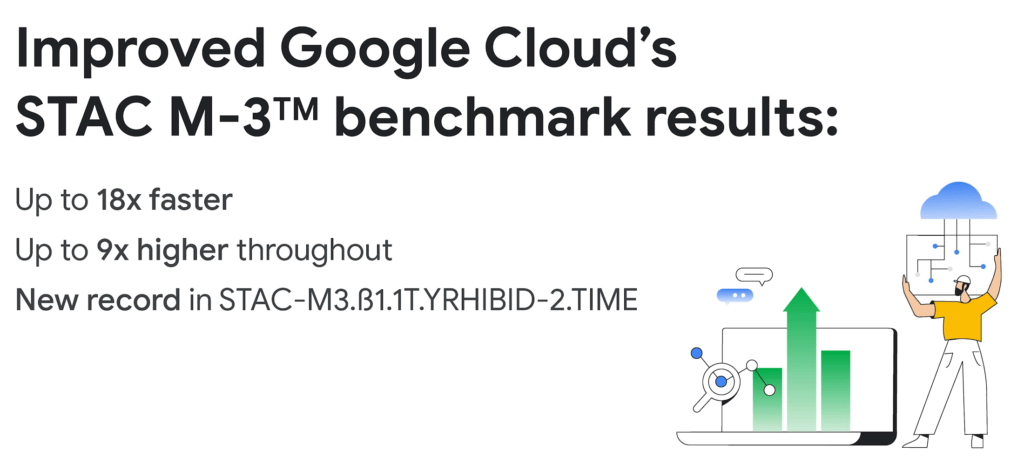
Following up on our previous STAC-M3 benchmark audit (SUT ID KDB181001), a redesigned Google Cloud architecture leveraged the most recent version of kdb+ 4.0, the time-series database from KX, and achieved significant improvements: 35 out of 41 benchmarks ran faster in the new cluster – by up to 18x faster than Google Cloud’s prior results. Key highlights include the following:
Compared to the previous STAC-M3 Antuco suite results on Google Cloud:
- Was faster in 13 of 17 mean response-time benchmarks
- Was 18x faster – a 94% reduction in run time – in the version of Year-High Bid that allows caching (STAC-M3.ß1.1T.YRHIBID-2.TIME), which also set an overall record for all published results
- Had 9x higher throughput in Year-High Bid (STAC-M3.ß1.1T.YRHIBID.MBPS)
Compared to the previous STAC-M3 Kanaga suite results on Google Cloud:
- Was faster in 22 of 24 mean response-time benchmarks
- Was over 10x faster in all four Market Snapshot workloads (STAC-M3.ß1.10T.YR[2,3,4,5]-MKTSNAP.TIME)
- Had 5x the throughput in Year-High Bid involving 2 years of data (STAC-M3.ß1.1T.2YRHIBID.MBPS)
“The STAC-M3 standard was designed by financial firms to reveal the performance of tick analytics stacks. Generational improvements like those exhibited by Google Cloud’s most recent STAC-M3 audit, are important data points for firms evaluating new architectures for performance and scale,” said Peter Nabicht, President of STAC.
These performance results may translate to real-world advantages that may be difficult for investment firms to achieve in static and costly on-premises environments: immediate answers in high data velocity markets, more thoroughly explored research theories by adding data or new quantitative approaches, and reduced costs by releasing cloud resources more quickly.
STAC-M3: High-speed tick analytics
Designing for record-breaking results
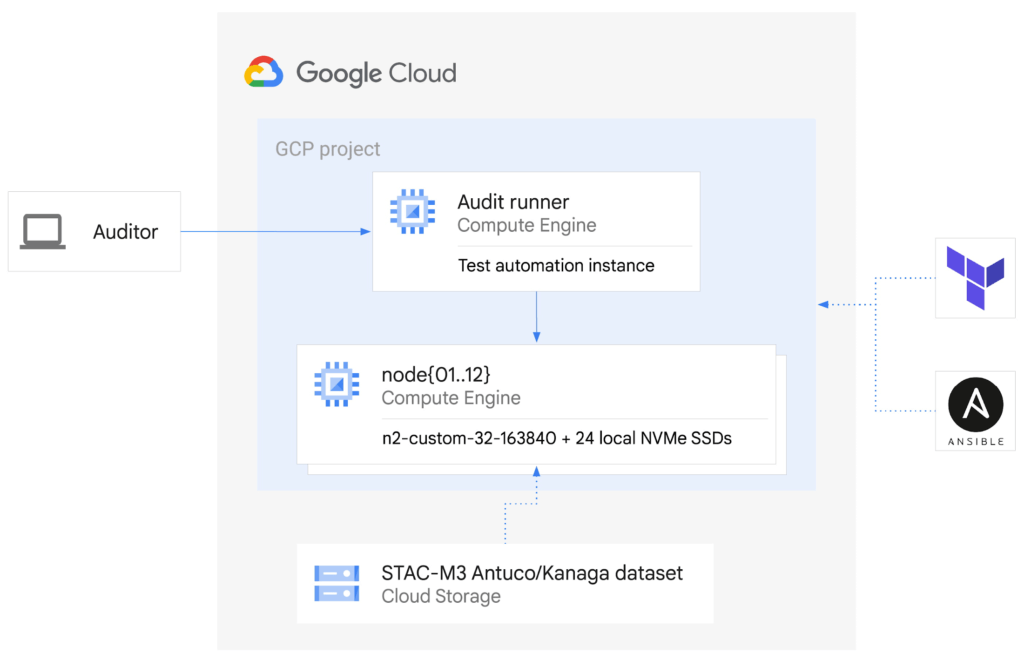
In our STAC-M3 audit, the stack under test (SUT) was designed to take advantage of horizontal scalability in the cloud by sharding data across independent compute nodes. The cluster of 12 Google Compute Engine N2 instances was powered by Intel Cascade Lake, with each node using 32 vCPUs, 160GiB of memory, and 9TiB of local NVMe SSDs. The full STAC-M3 Antuco and Kanaga data set was split across the cluster and kdb+ scripts distributed queries between nodes.
This configuration was the sweet spot for this particular workload, but this architecture does not need to be limited to 12 nodes for other workloads – the data sharding algorithm could scale to any number of nodes as required by workload demands. Since scaling out the cluster in this manner increases the total pool of available storage, this architecture can continue scaling out to petabytes of storage across hundreds of nodes.
The ability to spawn large clusters with hundreds of thousands of processors on demand at low cost, and to delete the resources when jobs complete, not only changes the economics of running computations on large financial data sets, it also opens up opportunities to explore solutions to new types of problems that were previously overlooked due to the constraints of fixed hardware on-premises. You can check the pricing of this VM configuration using the Google Cloud Pricing Calculator. The costs can be reduced even further by using preemptible VMs.
While the new cluster used a similar number of nodes, cores, and total memory as the previously-audited cluster, the redesigned architecture allowed us to harness the low latency and high throughput of Local NVMe SSDs.
Resources on demand
The cluster was created on demand using Terraform and Ansible during testing and auditing. The use of infrastructure as code (IaC) techniques ensured that the cluster, fully loaded with the STAC-M3 data set, could be created when needed and then removed when benchmarking was complete. It also meant that the cluster configuration was enforced by code on each deployment, eliminating configuration variance and drift. The full IaC definition to create the cluster can be retrieved from the report in the STAC Vault.
Each time the cluster was created, data was streamed to Local SSDs from Google Cloud Storage, our reliable and secure object storage, at up to the line rate of 32Gbps per node. The entire 57TiB STAC-M3 Antuco and Kanaga data was replicated from Cloud Storage to local storage in approximately 20 minutes.
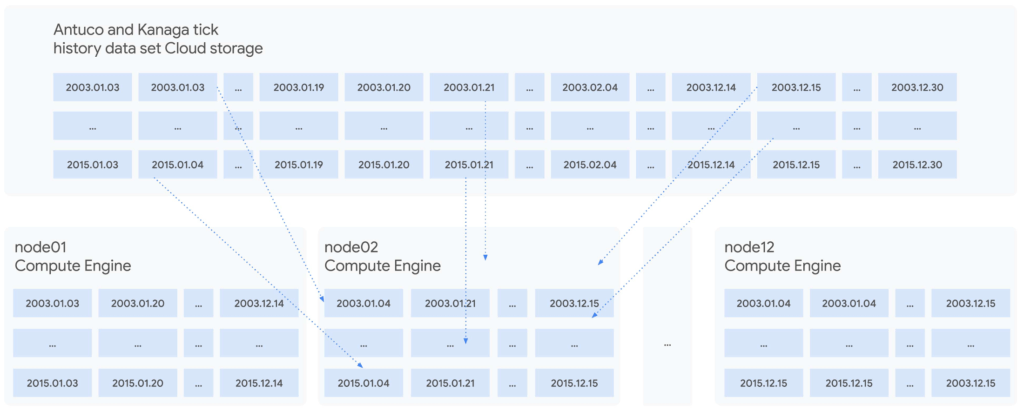
Since each node was independent and responsible for its own shard of data, doubling the cluster size would cut the synchronization time in half, or copy twice as much data in the same amount of time. Using higher bandwidth options of up to 100Gbps would triple the possible throughput for a relatively small incremental cost, trading an approximately 11%-23% price increase at current list prices for a 200% data synchronization performance increase. Taking advantage of fast networking to cache sharded data in parallel to a large cluster makes storing bulk data in Cloud Storage viable for even the largest workloads.
For quants working on vast data sets in sprawling compute clusters, the ability to fully describe infrastructure as declarative code, create elastic resources on demand, cache data quickly from cheap bulk storage, and turn resources off when computations complete is a dramatic change compared to waiting months to grow on-premises clusters – and a compelling reason to use cloud infrastructure.
To see how we designed and optimized the cluster for API-driven cloud resources, read our new whitepaper.
STAC-A2™: Calculating derivatives risk
In 2018, we showed that cloud instances can outperform bare metal when analyzing large tick history data sets in the demanding suite of STAC-M3 benchmarks. Last year, Google Cloud’s partner Appsbroker showed that the same was true for calculating derivatives risk in STAC-A2 on Google Cloud. You can read about how Appsbroker built its record-breaking STAC-A2 compute cluster on Google Cloud in its blog post, or access the STAC Report directly. Here are the highlights:
Compared to all other publicly reported solutions, this solution, based on a cluster of 10 virtual machines, had:
- The highest throughput (STAC-A2.β2.HPORTFOLIO.SPEED)
- The fastest cold time in the large problem size (STAC-A2.β2.GREEKS.10-100k-1260.TIME.COLD)
Compared to a solution involving an 8-node, on-premises cluster (SUT ID INTC181012), this 10-node, cloud-based solution:
- Had 5 times the maximum paths (STAC-A2.β2.GREEKS.MAX_PATHS)
- Had 10% greater throughput (STAC-A2.β2.HPORTFOLIO.SPEED)
- Was 18% faster in cold runs of the large problem size (STAC-A2.β2.GREEKS.10-100k-1260.TIME)
- Was 9% faster in cold runs of the baseline problem size (STAC-A2.β2.GREEKS.TIME.COLD)
Finding market advantages with Google Cloud
Across the investment management industry, every firm is seeking many of the same competitive advantages. However, finding unique opportunities and managing larger and larger data sets is becoming a major strain. Cloud is fundamentally changing how quants tackle the problem while empowering them to manage risk and generate higher returns.
Building on-premises computing clusters with tens or hundreds of thousands of cores and petabytes of storage requires huge up-front investments and lead time measured in months or years. Google Cloud makes the same scale available to its customers, provisioned on demand and paid per use. More importantly, the elasticity of cloud resources enables agility that is simply not available in a fixed data center cluster – the agility to explore, experiment, iterate, and respond to markets faster than before.
Scaling out to tens of thousands of cores in minutes and then removing the resources immediately not only changes the speed at which questions can be answered; it encourages different and more frequent questions, asked simultaneously on many independent clusters, free from the constraints of fixed on-premises hardware.
It is this flexibility and power that enables financial services firms to leverage larger data sets and get results, backtest, research, and analyze large amounts of data, faster and whenever they need it.
Download our whitepaper to learn more about our latest STAC-M3 tick history analytics benchmark results and how to optimize cloud infrastructure for high-speed market data analysis.
6 Tips for Stress-Free Google Cloud Billing

1331
Of your peers have already read this article.
1:30 Minutes
The most insightful time you'll spend today!
If you took one look at the title of this blog and thought, “just show me how, because I already know a million reasons why I’m stressed about billing things” then check out the interactive tutorial right here.
For everyone else, read on, because we’ll walk through some common sense tips, and a few step-by-step tutorials for all things billing related. If you’ve ever wished you could sit down with someone from Google Cloud, and walk through your bill, the console, and your options — you’re in the right place! Consider this Cloud Billing 101 – an intro level course that’ll get you started on the right foot.
6 simple tips to manage your Google Cloud billing accounts:
- Get to know your billing statement and console: Knowledge is power, after all. Take a tour of the billing console so you can better understand your options, along with what’s included in your monthly bill and the different components.
- Set up authorized users, alerts and budgets: Make sure anyone who needs to have access to payment settings is authorized. Allocate budgets for projects, and get notifications when your usage or spending exceeds a certain amount so you can take action as needed.
- Use cost-saving tools: We’ve got a range of tools and services to help you save money, like Committed Use Discounts, and even Recommenders for actionable, AI-powered intelligent recommendations around your cost trends and product usage.
- Optimize your resources: Use the Google Cloud Resource Manager to see how your resources are being used and identify areas for optimization, temporarily suspend, or even shut down unused projects.
- Review your billing history with reporting and data visualization: Regularly check your billing history with reports to help track your spending, identify any trends or patterns, and even anticipate future costs. You can even export your data to BigQuery for detailed analysis, or use a tool like Google Data Studio to visualize your data.
- Use the pricing calculator: Estimate your monthly costs and make informed decisions with the Google Cloud pricing calculator. It can help you get a ballpark figure for your usage, and determine if your use case fits within cost-free parameters.
I hope these common sense pointers and tutorials empower you to effectively manage your Google Cloud billing and stay on top of your spending. Get started right now by managing your billing methods and payment settings in this 5-minute tutorial, and then take a tour of the billing console to get familiar with your setup.
Developers and Practitioners’ Guide for Moving On-prem Data Warehouse to BigQuery

5430
Of your peers have already read this article.
3:00 Minutes
The most insightful time you'll spend today!
Data teams across companies have continuous challenges of consolidating data, processing it and making it useful. They deal with challenges such as a mixture of multiple ETL jobs, long ETL windows capacity-bound on-premise data warehouses and ever-increasing demands from users. They also need to make sure that the downstream requirements of ML, reporting and analytics are met with the data processing. And, they need to plan for the future – how will more data be handled and how new downstream teams will be supported?
Checkout how Independence Health Group is addressing their enterprise data warehouse (EDW) migration in the video above.
Why BigQuery?
On-premises data warehouses become difficult to scale so most companies’ biggest goal is to create a forward looking system to store data that is secure, scalable and cost effective. GCP’s BigQuery is serverless, highly scalable, and cost-effective and is a great technical fit for the EDW use-case. It’s a multicloud data warehouse designed for business agility. But, migrating a large, highly-integrated data warehouse from on-premise to BigQuery is not a flip-a-switch kinda migration. You need to make sure your downstream systems dont break due to inconsistent results in migrating datasets, both during and after the migration. So..you have to plan your migration.
Data warehouse migration strategy
The following steps are typical for a successful migration:
- Assessment and planning: Find the scope in advance to plan the migration of the legacy data warehouse
- Identify data groupings, application access patterns and capacities
- Use tools and utilities to identify unknown complexities and dependencies
- Identify required application conversions and testing
- Determine initial processing and storage capacity for budget forecasting and capacity planning
- Consider growth and changes anticipated during the migration period
- Develop a future state strategy and vision to guide design
- Migration: Establish GCP foundation and begin migration
- As the cloud foundation is being set up, consider running focused POCs to validate data migration processes and timelines
- Look for automated utilities to help with any required code migration
- Plan to maintain data synchronization between legacy and target EDW during the duration of the migration. This becomes a critical business process to keep the project on schedule.
- Plan to integrate some enterprise tooling to help existing teams span both environments
- Consider current data access patterns among EDW user communities and how they will map to similar controls available in Big Query.
- Key scope includes code integration and data model conversions
- Expect to refine capacity forecasts and refine allocation design. In Big Query there are many options to balance cost and performance to maximize business value. For example, you can use either on-demand or flat-rate slot pricing or a combination of both.
- Validation and testing
- Look for tools to allow automated, intelligent data validation
- Scope must include both schema and data validation
- Ideally solutions will allow continuous validation from source to target system during migration
- Testing complexity and duration will be driven by number and complexity of applications consuming data from the EDW and rate of change of those applications
A key to successful migration is finding Google Cloud partners with experience migrating EDW workloads. For example, our Google Cloud partner Datametica offers services and specialized Migration Accelerators for each of these migration stages to make it more efficient to plan and execute migrations.
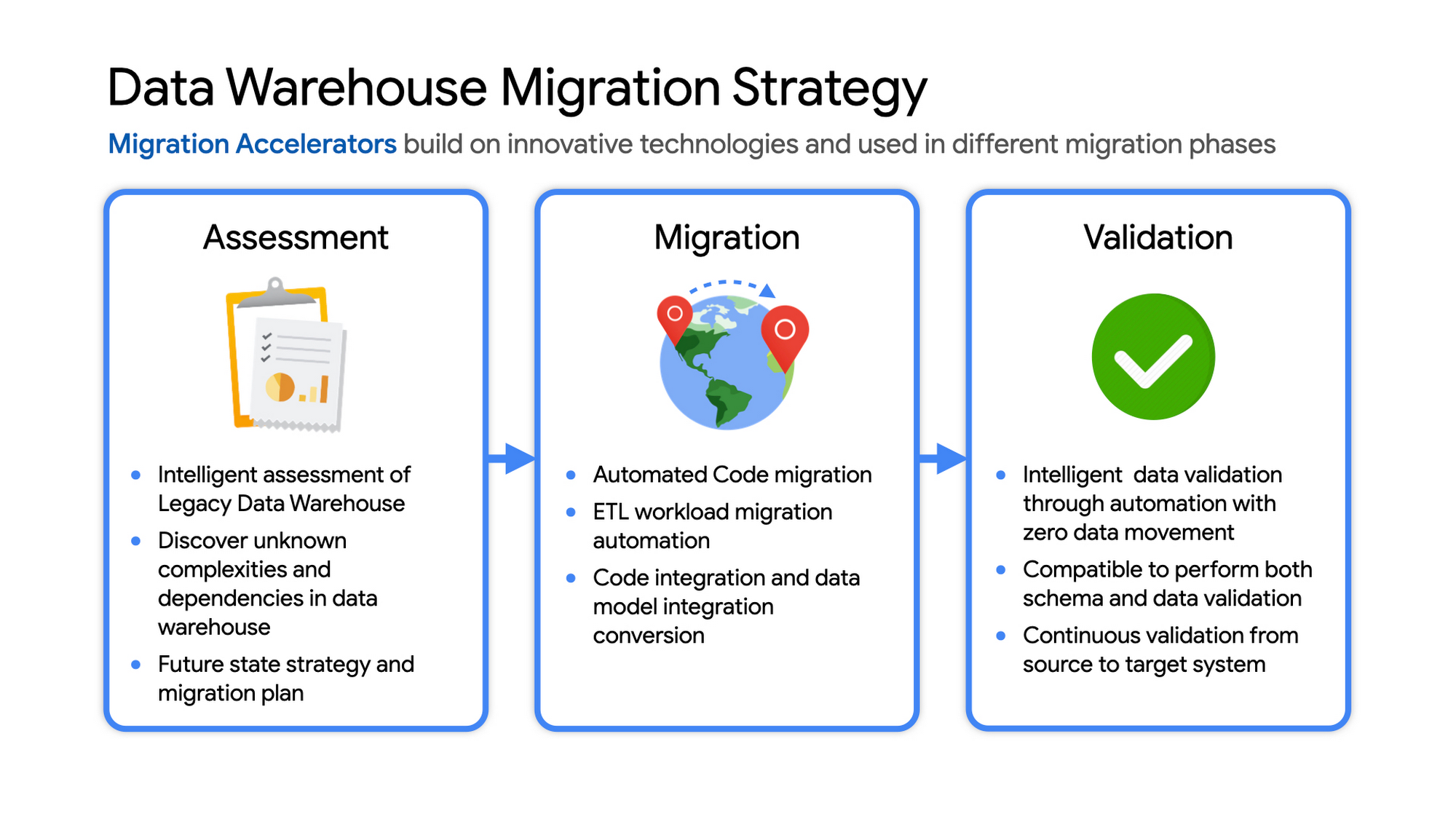
Data warehouse migration: Things to consider
- Financial benefits of open source: Target moving to ‘Open Source’ where none of the services have license fees. For example BigQuery uses Standard SQL; Cloud Composer is managed Apache Airflow, Dataflow is based on Apache Beam. Taking these as managed services provides the financial benefits of open source, but avoids the burden of maintaining open source platforms internally.
- Serverless: Move to “serverless” big data services. The majority of the services used in a recommended GCP data architecture scale on demand allowing more cost effective alignment with needs. Using fully managed services lets you focus engineering time on business roadmap priorities, not building and maintaining infrastructure.
- Efficiencies of a Unified platform: Any data warehouse migration involves integration with services that surround the EDW for data ingest and pre-processing and advanced analytics on the data stored in the EDW to maximize business value. A cloud provider like GCP offers a full breadth of integrated and managed ‘big data’ services with built-in machine learning. This can yield significantly reduced long-term TCO by increasing both operational and cost efficiency when compared to EDW-specific point solutions.
- Establishing a solid cloud foundation: From the beginning, take the time to design a secure foundation that will serve the business and technical needs for workloads to follow. Key features include: Scalable Resource Hierarchy, Multi-layer security, multi-tiered network and data center strategy and automation using Infrastructure-as-Code. Also allow time to integrate cloud-based services into existing enterprise systems such as CI/CD pipelines, monitoring, alerting, logging, process scheduling, and service request management.
- Unlimited expansion capacity: Moving to cloud sounds like a major step, but really look at this as adding more data centers accessible to your teams. Of course, these data centers offer many new services that are very difficult to develop in-house and provide nearly unlimited expansion capacity with minimal up-front financial commitment. .
- Patience and interim platforms: Migrating an EDW is typically a long running project. Be ready to design and operate interim platforms for data synchronization, validation and application testing. Consider the impact on up-stream and down-stream systems. It might make sense to migrate and modernize these systems concurrent with the EDW migration since they are probably data sources and sinks and may be facing similar growth challenges. Also be ready to accommodate new business requirements that develop during the migration. Take advantage of the long duration to have existing your operational teams learn new services from the partner leading the deployment so your teams are ready to take over post-migration.
- Experienced partner: An EDW migration can be a major undertaking with challenges and risks during migration, but offers tremendous opportunities to reduce costs, simplify operations and offer dramatically improved capacities to internal and external EDW users. Selecting the right partner reduces the technical and financial risks, and allows you to plan for and possibly start leveraging these long-term benefits early in the migration process.
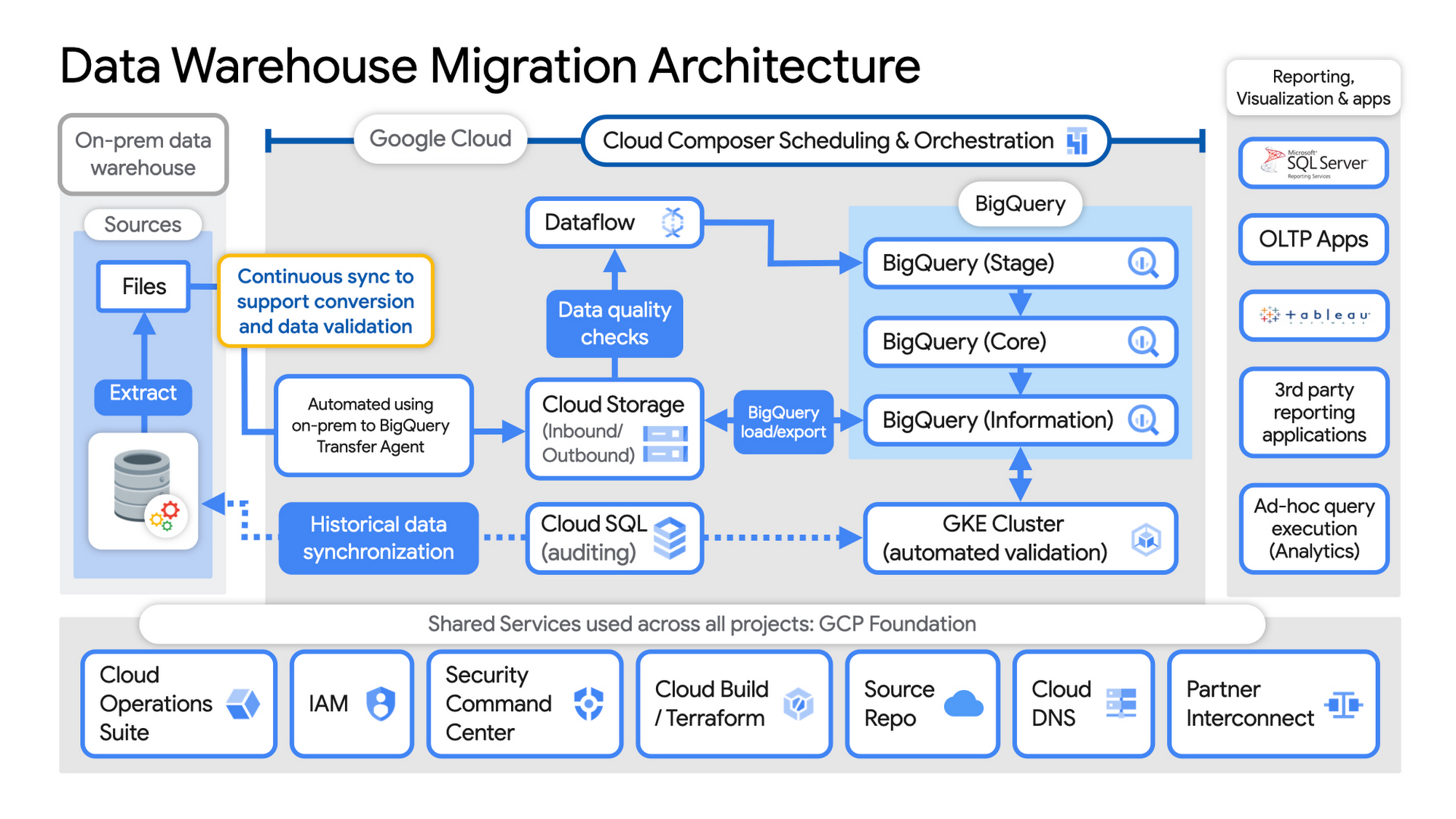
Example Data Warehouse Migration Architecture
- Setup foundational elements. In GCP these include, IAM for authorization and access, cloud resource hierarchy, billing, networking, code pipelines, Infrastructure as Code using Cloud Build with Terraform ( GCP Foundation Toolkit), Cloud DNS and a dedicated/partner Interconnect to connect to the current data centers.
- Activate monitoring and security scanning services before real user data is loaded using Cloud Operations for monitoring and logging and Security Command Center for security monitoring.
- Extract files from on-premise legacy EDW and move to Cloud Storage and establish on-going synchronization using Big Query Transfer services.
- From Cloud Storage, process the data in Dataflow and Load/Export data to BigQuery.
- Validate the export using Datametica’s validation utilities running in a GKE cluster and Cloud SQL for auditing and historical data synchronization as needed. Application teams test against the validated data sets throughout the migration process.
- Orchestrate the entire pipeline using Cloud Composer, integrated with on-prem scheduling services as needed to leverage established processes and keep legacy and new systems in sync.
- Maintain close coordination with teams/services ingesting new data into the EDW and down-streams analytics teams relying on the EDW data for on-going advanced analytics.
- Establish fine-grained access controls to data sets and start making the data in Big Query available to existing reporting, visualization and application consumption tools using BigQuery data connectors for ‘down-stream’ user access and testing.
- Incrementally increase Big Query flat-rate processing capacity to provide the most cost-effective utilization of resources during migration.
To learn more about migrating from on-premises Enterprise Data Warehouses (EDW) to Bigquery and GCP here.
Go Green with Google’s Latest Tool and Pick the Most Sustainable Cloud Region

5679
Of your peers have already read this article.
1:30 Minutes
The most insightful time you'll spend today!
As a Google Cloud customer, your carbon footprint is already carbon neutral: Google first achieved carbon neutrality in 2007, and has been purchasing enough solar and wind energy to match 100% of its global electricity consumption since 2017. Now, Google is targeting a new sustainability goal: operating on carbon-free energy (CFE) 24/7, everywhere, by 2030.
We want to empower you to make more sustainable decisions and progress with us towards this 24/7 carbon-free future. Earlier this year, we published the carbon characteristics of our Google Cloud regions. Later, we introduced a simple tool to help you pick a Google Cloud region, taking variables like price, latency and sustainability into account. Our next question was: what’s the best way to surface that sustainability info when you’re actually picking a region for your cloud resources?
Starting today, we are indicating regions with the lowest carbon impact inside Cloud Console location selectors. Available today for Cloud Run and Datastream, you’ll see it roll out to more Google Cloud offerings over time:
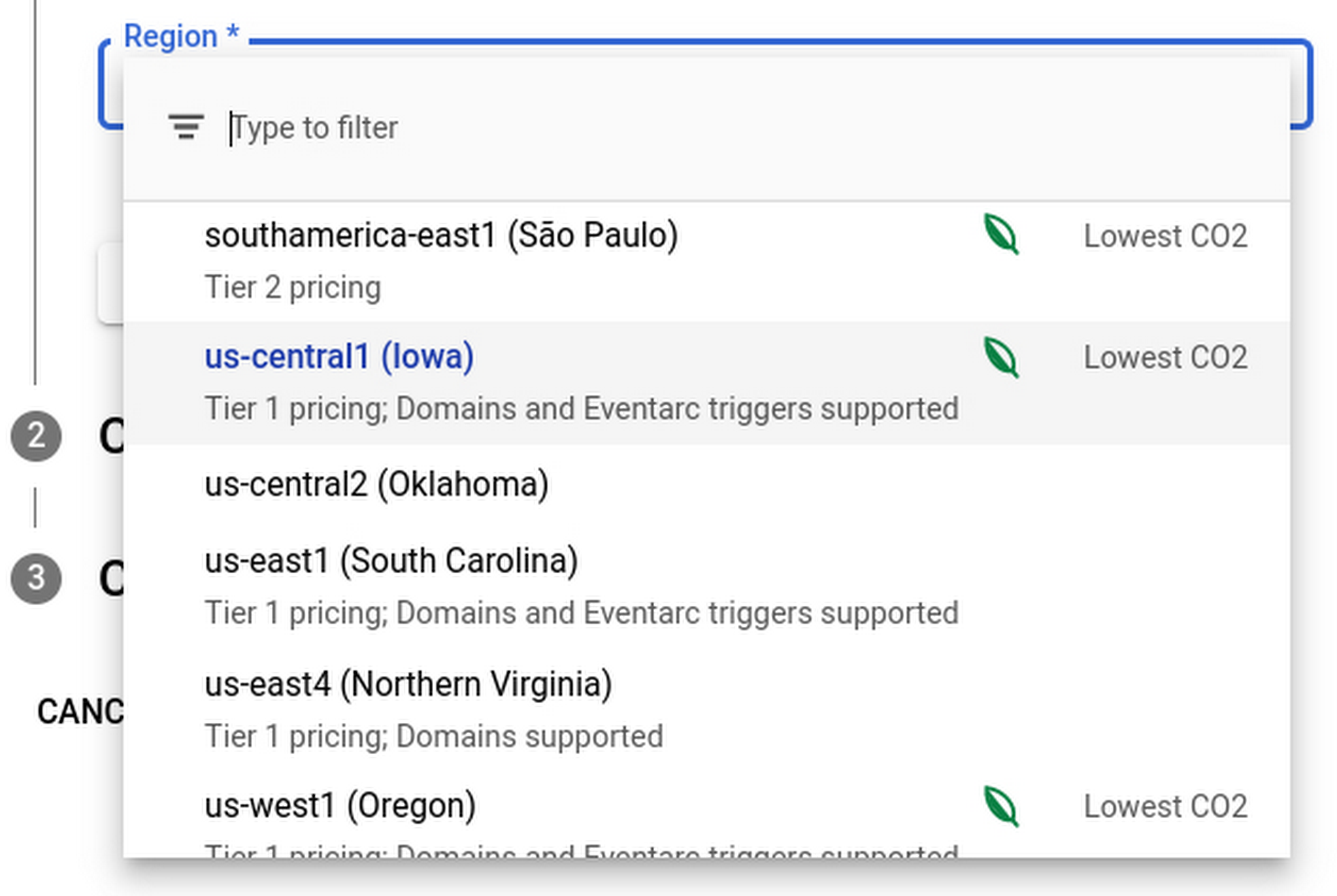
Regions that feature the “Lowest CO2” and the leaf have a CFE% of at least 75%, or, if the information is not available for this region yet, a grid carbon intensity of maximum 200 gCO2eq/kWh. You can read more about how we calculate these metrics in our documentation.
Before releasing this feature, we ran experiments to measure its impact: Users who were exposed to the enhanced region picker were 19% more likely to select a “low carbon” region for their Cloud Run service—a significant lift. These results show that by displaying carbon information in context of when you make the decision of picking a region, we are helping you make more sustainable decisions.
By sharing and displaying carbon information of Google Cloud regions, together we’re making tangible progress towards our goal of a carbon-free future. Learn more about Carbon free energy for Google Cloud regions.
More Relevant Stories for Your Company

withVR Uses the Power of VR to Prep People with Speech Disorders for Real-life Speaking Situations
Editor’s note: Meet Gareth Walkom, an entrepreneur dedicated to helping others with speech disorders. Turning life experience into innovation Did you know that 3% of Americans have a speech disorder, while 1% of the world’s population have a stutter? Just getting what they need in everyday interactions can be stressful,

Public Cloud’s Zero Trust Architecture Keeps Enterprise Data Safe
Over the past decade, cybersecurity has posed an increasing risk for organizations. In fact, cyber incidents topped the recent Allianz Risk Barometer for only the second time in the survey’s history. The challenges in combating these risks only continue to grow. Adversaries tend to be agile and are consistently looking



HSBC Looks to Google Cloud to Transform Banking
HSBC, a global bank that is a central part of global commerce with a presence in 67 countries, serving 38 million customers ranging from individuals to small businesses to corporations and governments, and having over $2.5 trillion assets in its balance sheet, had a vision of being a cloud first

Medical Data Breakthrough: Google Aids PicnicHealth’s Growth
In the fragmented world of U.S. healthcare, patients often have to wait in line or on hold, navigate multiple patient portals, and fill out numerous request forms—all in pursuit of their own medical history. Healthcare technology startup PicnicHealth is on a mission to put control back with the patient, where
