





Unlocking Efficient API Management with Apigee and CI/CD Pipelines

927
Of your peers have already read this article.
3:30 Minutes
The most insightful time you'll spend today!
In modern software development, automating delivery using Continuous Integration and Continuous Deployment (CI/CD) pipelines draws parallels to automotive assembly lines that doubled the production while cutting down costs by 65%. According to a recent report from Postman, over 51% of respondents indicated that their organizations devote more than half of their development efforts to APIs. APIs are a big part of development, so let’s explore why you should integrate them into your CI/CD pipelines. We will also share best practices and tools for integrating Apigee within your organization’s CI/CD processes.
4 reasons to automate your API delivery with CI/CD pipelines
Apigee is a feature-rich API management platform that provides developers with the necessary tools to build, secure, manage, and publish APIs. But what if you want to automate the process of deploying your APIs to Apigee? That’s where CI/CD comes in. By incorporating Apigee into your CI/CD pipeline, you can automate API deployment, promote consistency across environments, and monitor API performance in real-time. Four of these benefits include:
- Cut time to market by and respond faster to customer demands by automating API deployments.
- Catch defects earlier and improve API security by automating the process of testing and securing APIs.
- Slash costs by saving on staffing, tools, and infrastructure required to deploy and manage APIs.
- Improve visibility and compliance by tracking and auditing API usage.
Key tools and useful tips to effectively automate API delivery and management
Integrating API delivery into CI/CD pipelines using products like Cloud Build streamlines the development process. For example, a developer building an application on Google Cloud can deliver APIs side by side with other workloads in tools such as Cloud Run, Google Kubernetes Engine (GKE), Cloud Functions, and App Engine.
Operational automation can include a list of seemingly endless aspects of the development process. But at a high-level, the key components of an effective CI/CD pipeline for API management include:
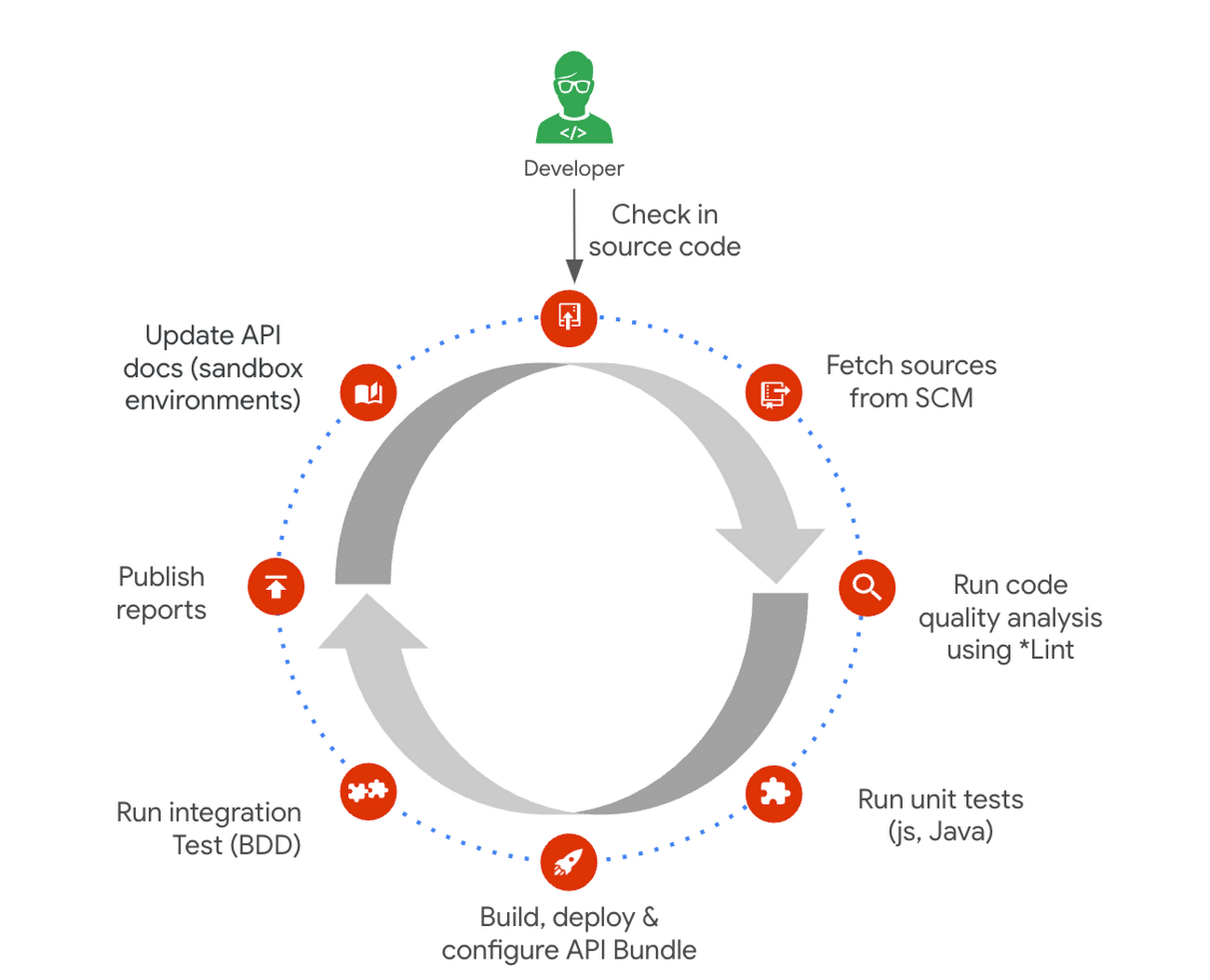
1. Building and testing API proxies
- If you are new to Apigee, utilize the comprehensive visual tools in the console to build and deploy API proxies using a convenient drag and drop interface. You can elevate their API proxy development by leveraging the VS Code extension and Apigee Emulator. This local setup enables you to use auto-complete features along with local proxy deployment, testing, and seamless code commit to trigger the pipeline for further deployment across Apigee environments.
- Useful tip: Maximize the utility of Apigee, use the Debug tool to inspect every detail of an API transaction. Lastly, remember to export your proxy from the Apigee console and commit it to your source repository. With these best practices in hand, you’re all set to make the most of your Apigee journey.
2. Store and version your API code:
- Ensure robust source code management – foundation of every CI/CD pipeline – to easily track, and manage changes. Use Cloud Source Repositories, a fully managed Git repository for seamless integration with other GCP development (or) leverage common tools like GitHub, GitLab, BitBucket and many more depending on your organization’s approach
- Useful tip: Employing the right branching strategy helps reduce complexity and keeps delivery lean. Check out this community post for different branching strategies and choose the right one for your use case. Ensure frequent commits and merges to your source code to keep your codebase healthy and up-to-date. Regular code reviews also help refine your code and create quality checkpoints.
3. Ensure code quality with static code analysis:
- Regular static code analysis can help you to improve the quality of your code by detecting potential errors and security vulnerabilities. It can also help you to promote code standardization by ensuring that your code follows a consistent style. For static code analysis you can use apigeelint (for analyzing Apigee bundles), JSHint and ESLint (for JavaScript analysis), Checkstyle and PMD (for Java analysis), or SonarQube (for multi-language support)
- Useful tip: Integrate the tool with your code editor so that you can see the results of the analysis as you write code. Define quality gates/thresholds and run the tool as part of your build pipeline. Mark the build as failed if it does not meet the thresholds.
4. Ensure code resilience with unit testing and Code coverage:
- Unit tests focus on individual units of code, such as methods or classes. They help to ensure that each unit of code works as expected. Code coverage measures the percentage of code that is covered by unit tests. A high code coverage percentage indicates that more of your code is being tested, which can help to reduce the risk of errors. You can use these tools for unit testing and code coverage: Mocha and Chai (for JavaScript), JUnit (for Java), Cobertura and Istanbul (nyc) (for code coverage)
- Useful tip: Write unit tests for all of your code. This includes both new code and existing code. Run unit tests during the build process. This will help to ensure that your code is always passing unit tests before it is deployed. Set coverage thresholds and mark the build as failed if it does not meet the thresholds. This will help to ensure that your code is sufficiently covered by unit tests.
5. Configure, Package and Deploy your code:
- Creating a successful API deployment is like constructing a sturdy building. You need a strong blueprint (your Apigee code) that has been carefully planned, packaged into a deployable format (a zip file), and then implemented (imported into Apigee and deployed to an Apigee environment). During the packaging phase, the blueprint is detailed with metadata and manifest, similar to labeling and preparing architectural plans for construction. Moreover, all your Apigee configurations, except sensitive info, can be integrated into your blueprint, ready to be brought to life with the right tools. In terms of tooling, you can choose from a variety of open-source options that are built on Apigee APIs. Some of the commonly utilized ones are Apigee Deploy Maven plugin, apigee cli, apigee-sackmesser, and custom scripts using the Apigee APIs.
- Useful tip: Use an artifact system to store these bundles. This will make it easy to manage and track your bundles. Maintain all the necessary configurations like Target server, Key Value Map, etc as part of the source code repo. This will make it easier to deploy your code to different environments. Use the pipeline and the source code to promote the proxies from lower environments to production. This will help you to ensure that your code is always up-to-date in production.
6. Verify the changes with Functional or integration testing:
- Consider integration testing as a rigorous dress rehearsal for your API’s debut performance. It’s your chance to verify if your API plays its part flawlessly under various scenarios, including when it has to share the stage with third-party systems. To ensure the API is working as expected, you have some powerful tools at your disposal such as Apickli (based on cucumber.js), Postman, and JUnit
- Useful tip: Manage these tests as part of the source code and run different test suites based on the environment deploying to. This will make it easy to track and manage your tests. Run these tests right after the deployment and mark the build as failed if it does not meet the threshold. This will help you to identify and fix any issues that may have been introduced during the deployment. Create rollout plans when the functional tests fail by rolling out to the previous working/stable version. This will help you to minimize the impact of any issues that may have been introduced during the deployment.
Additionally, here are some optional trail markers you can consider on your journey to perfecting your pipeline:
- Testing Your API’s Endurance: Running performance tests ensures your API can withstand the long haul.
- Clear and Accessible Documentation: Keep your developer portal up-to-date with the latest API documentation. Tools like the Apigee Smartdocs Maven plugin can make this a breeze, particularly with the Drupal developer portal.
Here is a typical pipeline example with a comprehensive reference implementation we see with most of our customers. It triggers when the developer commits the code to the repo. The pipeline can be executed by any CI/CD platform like Cloud Build.
Get started today
Why wait? Kickstart your Apigee journey today directly from the console or evaluate it for free. Leverage our Accelerators to jumpstart your development using examples or advanced technical guidance. Should you have any questions or need support along the way, our Apigee Community is teeming with experts ready to lend a hand.
Google Announces Cloud Functions’ Native Integration with Secret Manager

3281
Of your peers have already read this article.
2:00 Minutes
The most insightful time you'll spend today!
Google Cloud Functions provides a simple and intuitive developer experience to execute code from Google Cloud, Firebase, Google Assistant, or any web, mobile, or backend application. Oftentimes that code needs secrets—like API keys, passwords, or certificates—to authenticate to or invoke upstream APIs and services.
While Google Secret Manager is a fully-managed, secure, and convenient storage system for such secrets, developers have historically leveraged environment variables or the filesystem for managing secrets in Cloud Functions. This was largely because integrating with Secret Manager required developers to write custom code… until now. We listened to customer feedback and today we are announcing Cloud Functions has a native integration with Secret Manager!
This native integration has many key benefits including:
- Zero required code changes. Cloud functions that already consume secrets via environment variables or files bundled with the source upload simply require an additional flag during deployment. The Cloud Functions service resolves and injects the secrets at runtime and the plaintext values are only visible inside the process.
- Easy environment separation. It’s easy to use the same codebase across multiple environments, e.g., dev, staging, and prod, because the secrets are decoupled from the code and are resolved at runtime.
- Supports the 12-factor app pattern. Because secrets can be injected into environment variables at runtime, the native integration supports the 12-factor pattern while providing stronger security guarantees.
- Centralized secret storage, access, and auditing. Leveraging Secret Manager as the centralized secrets management solution enables easy management of access controls, auditing, and access logs.
Cloud Functions’ native integration with Secret Manager is available in preview to all Google Cloud customers today. Let’s take a deeper dive into this new integration.
Example
Suppose the following cloud function invoked via HTTP uses a secret token to invoke an upstream API:
const https = require('https');const token = process.env.TOKEN;exports.secretDemo = (req, res) => {https.get(`https://upstream-api.example.com?token=${token}`, (innerRes) => {innerRes.on('end', () => { res.send('OK') });}).on('error', (err) => {res.send(`Error: ${err}`);});}
Without Cloud Functions’ native integration with Secret Manager, this function is deployed via:
$ gcloud functions deploy "secretDemo" \--runtime "nodejs14" \--trigger-http \--allow-unauthenticated \--set-env-vars "TOKEN=abcd1234"
This approach has a number of drawbacks, the biggest of which being that anyone with viewer permissions on the Google Cloud project can see the environment variables set on a cloud function.
To improve the security of this code, migrate the secret to Secret Manager in the same project:
$ gcloud secrets create "token" \--replication-policy "automatic" \--data-file - <<< "abcd1234"
Finally, without changing any code in the function re-deploy with slightly different flags:
$ gcloud beta functions deploy "secretDemo" \--runtime "nodejs14" \--trigger-http \--allow-unauthenticated \--set-secrets "TOKEN=my_token:latest"
It’s truly that easy to migrate from hard-coded secrets to using secure secret storage with Secret Manager! To add even more layers of security, consider running each cloud function with a dedicated service account and practice the principle of least privilege. Learn more in the Secret Manager Best Practices guide.
Making security easy
Security and proper secrets management are core pillars of modern software development, and we’re excited to provide customers a way to improve the security of their cloud functions. To learn more about the new native integration, check out the Cloud Functions documentation. You can also learn more about Cloud Functions or learn more about Secret Manager.
Simplify Cloud Development with Duet AI on Google Cloud

1532
Of your peers have already read this article.
4:00 Minutes
The most insightful time you'll spend today!
Cloud developers — you’ve got it all. You can code in your choice of languages, enjoy portability with containers, minimize complexity with serverless, and manage the entire software lifecycle by following DevOps principles. But let’s face it, building and onboarding new cloud applications still requires a lot of manual planning, synthesis, and, yes, hard work. You need to research and plan your deployment, create a workable, secure architecture, and of course, you need to write the actual code,
For the last several decades, the cloud has been primarily a “do it yourself” model with volumes of options that have made development more complicated. The cloud went from overwhelmingly exciting to…. a bit overwhelming.
What if we all could bring that excitement back? What if you had some help that was available whenever and wherever you needed it?
Say hello to Duet AI for Google Cloud
Powered by Google’s state-of-the-art generative-AI foundation models, Duet AI for Google Cloud is an always-on AI collaborator that provides help to users of all skill levels where they need it. With Duet AI, we’re on a mission to deliver a new cloud experience that’s personalized and intent-driven, and can deeply understand your environment to assist you in building secure, scalable applications, while providing expert guidance.
As we evolve Google Cloud with Duet AI, we are looking to build a cloud platform that is more human-centric, holistic, and helpful, with responsible AI at the center of the experience:
- Human-centric: With Duet AI, we are making Google Cloud more accessible and personal to any type of user at any skill level by providing them with support whenever they need it, from code recommendations for developers, to prompt-based data insights for data engineers, to chat-based app creation for business users.
- Holistic: With generative AI at the center of the cloud experience, cloud development can be more cohesive, with fewer silos across functions, services, and tech stacks, providing a holistic picture in the format you want, wherever you are in Google Cloud.
- Helpful: To deliver smarter, contextual recommendations for building and operating apps with Google Cloud, we pre-trained Codey, one of the foundation models that powers Duet AI, with Google Cloud-specific content like documentation and sample code, and fine-tuned it based on Google Cloud user behaviors and patterns.
- Responsible: Our AI Principles set out our commitment to developing technology responsibly. Your code and recommendations will not be reused for any model learning and development. This helps ensure the privacy of your data and code, and also the integrity of the knowledge space from which our AI models are trained.
New capabilities available in Duet AI for Google Cloud
Here are some of the new capabilities available to get us started on our mission to deliver a new personalized and intent-driven cloud experience:
- Code assistance provides AI-driven code assistance for cloud users such as application developers and data engineers. It gives code recommendations as they type in real time, generates full functions and code blocks, and identifies vulnerabilities and errors in the code, while suggesting fixes.
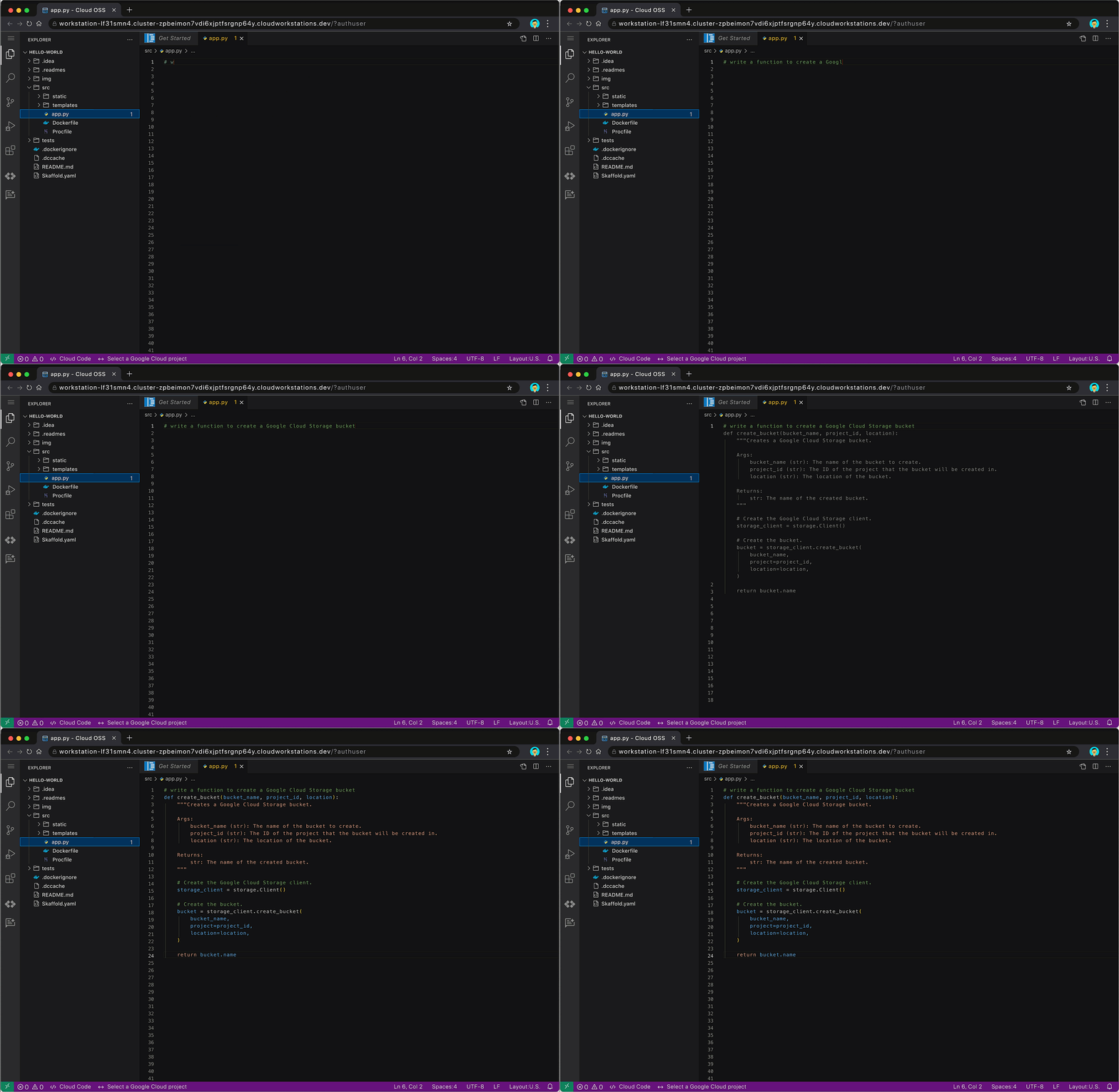
Code assistance auto-generates code for creating a Google Cloud Storage bucket
Code assistance will be available through multiple products and services across Google Cloud, such as in Cloud Workstations, our fully-managed secure development environment, and other code-editing experiences in the Google Cloud Console. Developers will also find code assistance in Cloud Shell Editor or via our Cloud Code IDE extensions for VSCode and JetBrains IDEs. It supports multiple languages including Go, Java, Javascript, Python, and SQL.
- Chat assistance allows people to use simple natural language to get answers on specific development or cloud-related questions. Users can engage with chat assistance to get real-time guidance on various topics, such as how to use certain cloud services or functions, or get detailed implementation plans for their cloud projects. It can also provide architectural or coding best practices, helping to reduce the need to go searching for relevant documents.

Use chat assistance to get the detailed steps for deploying an app on Cloud Run
Chat assistance will also be available across multiple Google Cloud surface areas, for example IDEs, the Cloud Console, and through products and services. Whether you’re a developer, operator, data engineer, or security professional, you’ll be able to leverage chat assistance to help get more work done faster.
Looking to optimize these features further for developers specialized in one particular area? With Generative AI support in Vertex AI, enterprises can fine-tune Codey using their own code base. They can consume these customized Codey models directly from Vertex AI today, and later this year, they will be able to connect it to the built-in Duet AI experience. And don’t worry, if you choose to train Codey with your code, your private data is kept private, and not used in the broader foundation model training corpus. You will have transparency and control over where data is stored and how or if it is used.
- Duet AI for AppSheet will let users create intelligent business applications, connect their data, and build workflows into Google Workspace via natural language. With no coding required, users will be able to build apps by describing their needs in a chat guided by AI-powered prompts. This makes app creation accessible to more users, which can allow developer teams to focus their time on other high-impact work.
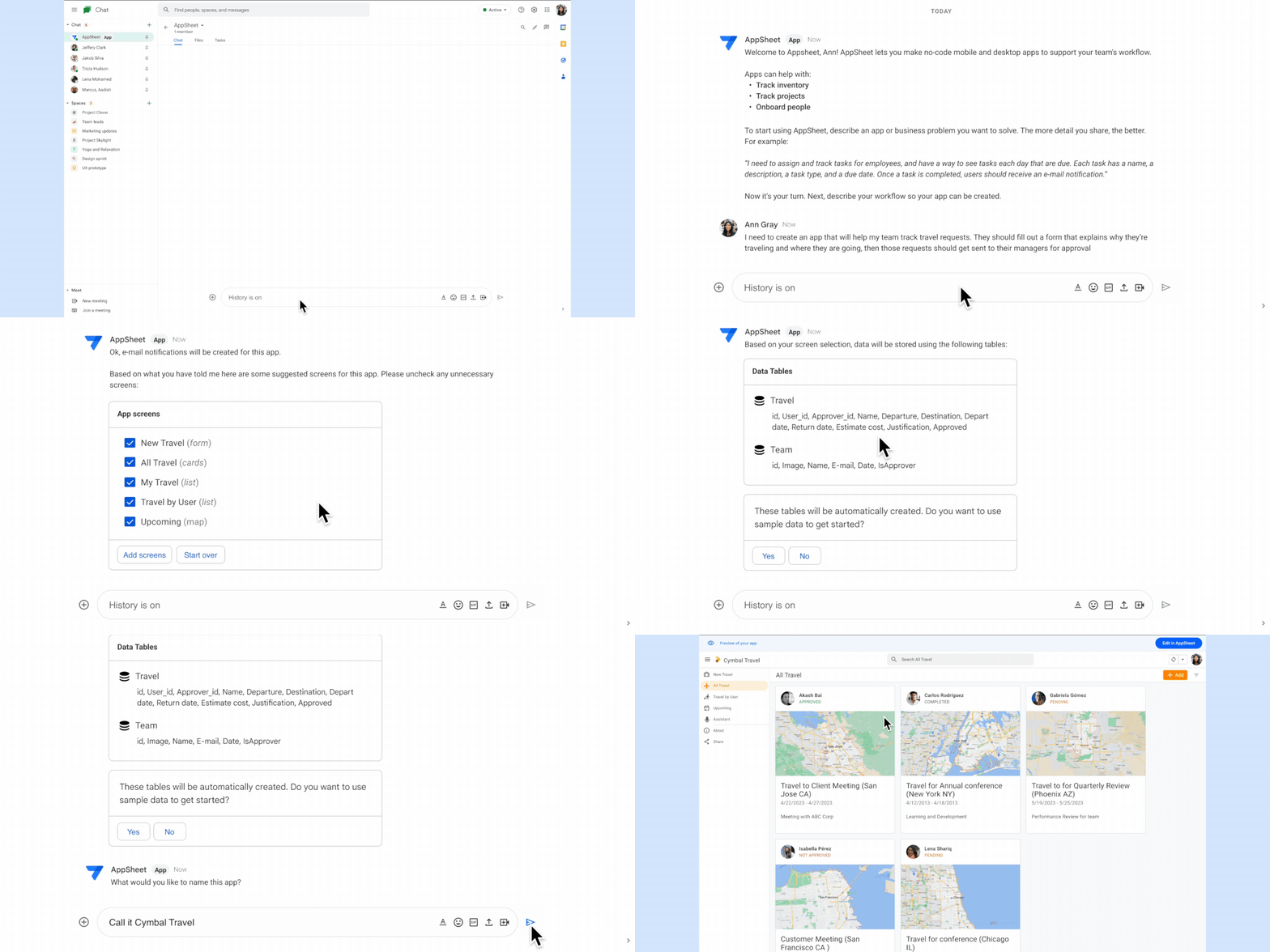
Create business applications with Duet AI for AppSheet using natural language
Experiment with Duet AI for Google Cloud today
We believe that having an assistant who is constantly evolving by your side will not only reduce an already overwhelmed developer’s workload, but also bring back the excitement of cloud development. With Duet AI, you can navigate the cloud with more confidence, ease, and — dare we say it — fun.
And this is just the beginning. The future of the cloud experience that we are shaping with Duet AI is full of possibilities. We believe the future of developer productivity is more targeted personalized assistance. Check here to see our vision for Duet AI for Google Cloud – the redefinition of productivity in the workplace through unique end-to-end AI assisted technologies.
These early features of Duet AI for Google Cloud are available today for limited users and we will be expanding access very soon. Sign up here to join Google Cloud’s AI Trusted Tester Program.
AL/ML and Data Products Delivered through Google Cloud Makes them Leader of Gartner 2022 Magic Quadrant

4886
Of your peers have already read this article.
2:00 Minutes
The most insightful time you'll spend today!
Gartner® named Google as a Leader in the 2022 Magic Quadrant™ for Cloud AI Developer Services report. This evaluation covered Google’s language, vision and structured data products including AutoML, all of which we deliver through Google Cloud. We believe this recognition is a reflection of the confidence and satisfaction that customers have in our language, vision, and AutoML products for developers. Google remains a Leader for the third year in a row, based upon the completeness of our vision and our ability to execute.
Developers benefit in many ways by using Cloud AI services and solutions. Customers recognize the advantages of Google’s AI and ML services for developers, such as Vertex AI, BigQuery ML, AutoML and AI APIs. In addition, customers benefit from the pace of progress in the field of Responsible AI and actionable ethics processes applied to all customer and partner solutions leveraging Google Cloud technology, as well as our core architecture including the Vertex AI platform, vision, conversational AI, language and structured data, and optimization services and key vertical industry solutions.
We believe that our ‘Leader’ placement validates this vision for AI developer tools. Let’s take a closer look at some of the report findings.
ML tools purpose-built for developers
Google’s machine learning tools have been built by developers, for developers, based on the groundbreaking research generated from Google Research and DeepMind. This developer empathy drives product development, which supports the developer community to achieve deep value from Google’s AI and ML services. An example of this is the unification of all of the tools needed for building, deploying and managing ML models into one ML platform, Vertex AI, resulting in accelerated time to production. They also cite BigQuery ML, AutoML for language, vision video and tabular data) and prebuilt ML APIs (such as speech and translation) as having high utility for developers at all levels of ML expertise to build custom AI and quickly infuse AI into their applications.
Leading organizations like OTOY, Allen Institute for AI and DeepMind (an Alphabet subsidiary) choose Google for ML, and enterprises like Twitter, Wayfair and The Home Depot shared more about their partnership with Google in their recent sessions at Google Next 2021.
Responsible AI principles and practices
Responsible AI is a critical component of successful AI. A 2020 study commissioned by Google Cloud and the Economic Intelligence Unit highlighted that ethical AI does not only prevent organizations from making egregious mistakes, but that the value of responsible AI practices for competitive edge, as well as talent acquisition and retention are notable. At Google, we not only apply our ethics review process to first party platforms and solutions, to ensure that our services design-in responsible AI from the outset, we also consult with customers and partners based on AI principles to deliver accountability and avoid unfair biases. In addition, our best-in-class tools provide developers with the functionality they need to evaluate fairness and biases in datasets and models. Our Explainable AI tools such as model cards provide model transparency in a structured, accessible way, and the What-If Tool is essential for developers and data scientists to evaluate, debug and improve their ML models.
Clear and understandable product architecture
Google Cloud’s investment in our ML product portfolio has led to a comprehensive, integrated and open offering that spans breadth (across vision, conversational AI, language and structured data, and optimization services) and depth (core AI services, with features such as Vertex AI Pipelines and Vertex Explainable AI built on top). Industry-specific solutions tailored by Google for retail, financial services, manufacturing, media and healthcare customers, such as Recommendations AI, Visual Inspection AI, Media Translation, Healthcare Data Engine, add another layer leveraging this foundational platform to help organizations and users adopt machine learning solutions more easily.
At Google Cloud, we refuse to make developers jump through hoops to derive value out of our technology; instead, we bring the value directly to them by ensuring that all of our AI and ML products and solutions work seamlessly together. To download the full report, click here. Get started on Vertex AI and talk with our sales team.
Disclaimer:
Gartner, Magic Quadrant for Cloud AI Developer Services, Van Baker, Arun Batchu, Erick Brethenoux, Svetlana Sicular, Mike Fang, May 23, 2022.
Gartner and Magic Quadrant are registered trademarks of Gartner, Inc. and/or its affiliates in the U.S. and internationally and is used herein with permission. All rights reserved.
Gartner does not endorse any vendor, product or service depicted in its research publications, and does not advise technology users to select only those vendors with the highest ratings or other designation. Gartner research publications consist of the opinions of Gartner’s research organization and should not be construed as statements of fact. Gartner disclaims all warranties, expressed or implied, with respect to this research, including any warranties of merchantability or fitness for a particular purpose.
A Pro’s Tip on Choosing the Right Google Cloud Compute Options

5739
Of your peers have already read this article.
2:00 Minutes
The most insightful time you'll spend today!
Where should you run your workload? It depends…Choosing the right infrastructure options to run your application is critical, both for the success of your application and for the team that is managing and developing it. This post breaks down some of the most important factors that you need to consider when deciding where you should run your stuff!
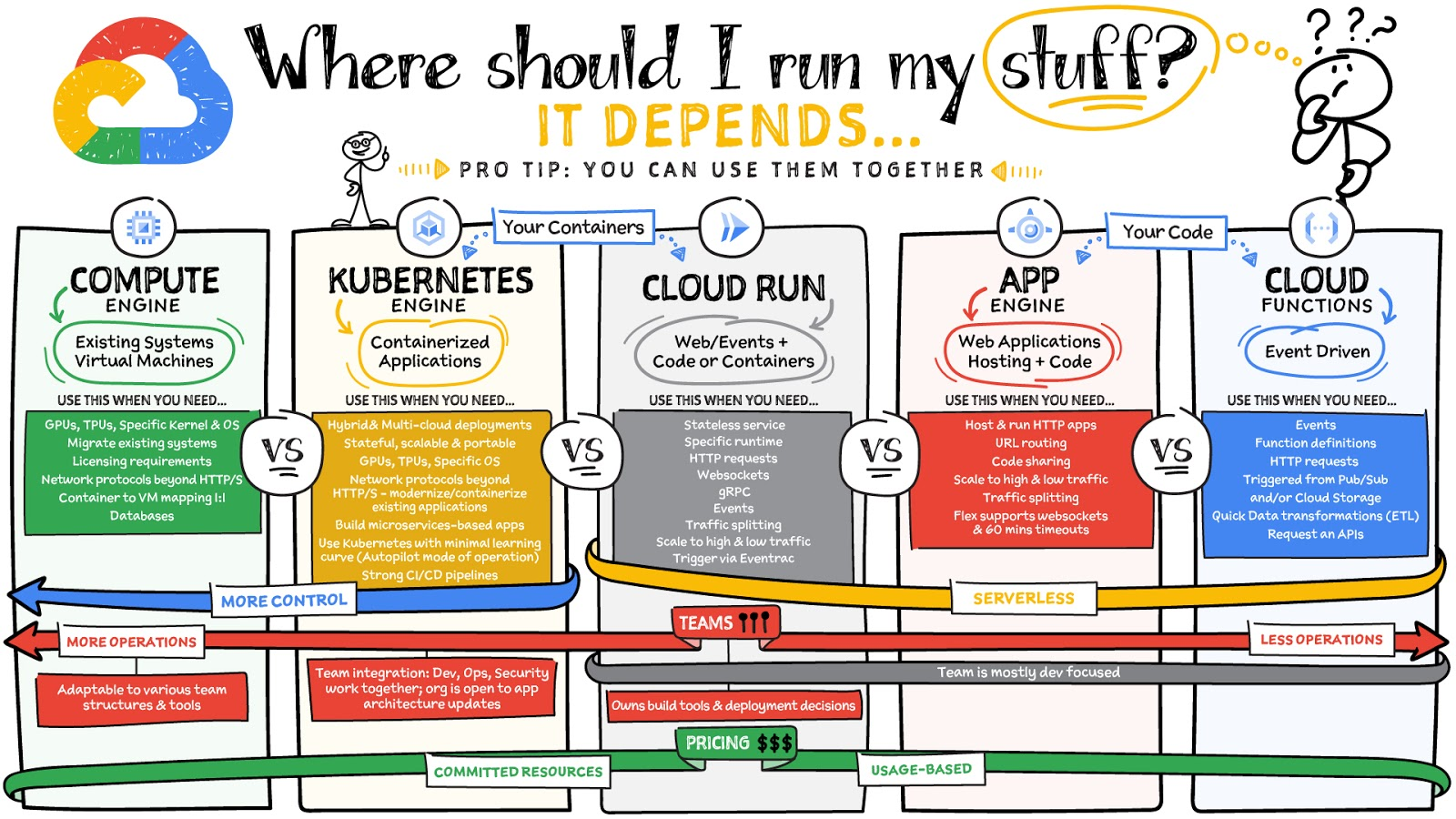
What are these services?
- Compute Engine – Virtual machines. You reserve a configuration of CPU, memory, disk, and GPUs, and decide what OS and additional software to run.
- Kubernetes Engine – Managed Kubernetes clusters. Kubernetes is an open-source system for automating deployment, scaling, and management of containerized applications. You create a cluster and configure which containers to run; Kubernetes keeps them running and manages scaling, updates and connectivity.
- Cloud Run – A fully managed serverless platform that runs individual containers. You give code or a container to Cloud Run, and it hosts and auto scales as needed to respond to web and other events.
- App Engine – A fully managed serverless platform for complete web applications. App Engine handles the networking, application scaling, and database scaling. You write a web application in one of the supported languages, deploy to App Engine, and it handles scaling, updating versions, and so on.
- Cloud Functions – Event-driven serverless functions. You write individual function code and Cloud Functions calls your function when events happen (for example, HTTP, Pub/Sub, and Cloud Storage changes, among others).
What level of abstraction do you need?
- If you need more control over the underlying infrastructure (for example, the operating system, disk images, CPU, RAM, and disk) then it makes sense to use Compute Engine. This is a typical path for legacy application migrations and existing systems that require a specific OS.
- Containers provide a way to virtualize an OS so that multiple workloads can run on a single OS instance. They are fast and lightweight, and they provide portability. If your applications are containerized then you have two main options.
- You can use Google Kubernetes Engine, or GKE, which gives you full control over the container down to the nodes with specific OS, CPU, GPU, disk, memory, and networking. GKE also offers Autopilot, when you need the flexibility and control but have limited ops and engineering support.
- If, on the other hand, you are just looking to run your application in containers without having to worry about scaling the infrastructure, then Cloud Run is the best option. You can just write your application code, package it into a container, and deploy it.
- If you just want to code up your HTTP-based application and leave the scalability and deployment of the app to Google Cloud then App Engine — a serverless, fully-managed option that is designed for hosting and running web applications — is a good option for you.
- If your code is a function and just performs an action based on an event/trigger, then deploying it with Cloud Functions makes sense.
What is your use case?
- Use Compute Engine if you are migrating a legacy application with specific licensing, OS, kernel, or networking requirements. Examples: Windows-based applications, genomics processing, SAP HANA.
- Use GKE if your application needs a specific OS or network protocols beyond HTTP/s. When you use GKE, you are using Kubernetes, which makes it easy to deploy and expand into hybrid and multi-cloud environments. Anthos is a platform specifically designed for hybrid and multi-cloud deployments. It provides single-pane-of-glass visibility across all clusters from infrastructure through to application performance and topology. Example: Microservices-based applications.
- Use Cloud Run if you just need to deploy a containerized application in a programming language of your choice with HTTP/s and websocket support. Examples: websites, APIs, data processing apps, webhooks.
- Use App Engine if you want to deploy and host a web based application (HTTP/s) in a serverless platform. Examples: web applications, mobile app backends
- Use Cloud Functions if your code is a function and just performs an action based on an event/trigger from Pub/Sub or Cloud Storage. Example: Kick off a video transcoding function as soon as a video is saved in your Cloud Storage bucket.
Need portability with open source?
If your requirement is based on portability and open-source support take a look at GKE, Cloud Run, and Cloud Functions. They are all based on open-source frameworks that help you avoid vendor lock-in and give you the freedom to expand your infrastructure into hybrid and multi-cloud environments. GKE clusters are powered by the Kubernetes open-source cluster management system, which provides the mechanisms through which you interact with your cluster. Cloud Run for Anthos is powered by Knative, an open-source project that supports serverless workloads on Kubernetes. Cloud Functions use an open-source FaaS (function as a service) framework to run functions across multiple environments.
What are your team dynamics like?
If you have a small team of developers and you want their attention focused on the code, then a serverless option such as Cloud Run or App Engine is a good choice because you won’t have to have a team managing the infrastructure, scale, and operations. If you have bigger teams, along with your own tools and processes, then Compute Engine or GKE makes more sense because it enables you to define your own process for CI/CD, security, scale, and operations.
What type of billing model do you prefer?
Compute Engine and GKE billing models are based on resources, which means you pay for the instances you have provisioned, independent of usage. You can also take advantage of sustained and committed use discounts.
Cloud Run, App Engine, and Cloud Functions are billed per request, which means you pay as you go.
Conclusion
It’s important to consider all the relevant factors that play a role in picking appropriate compute options for your application. Remember that no decision is necessarily final; you can always move from one option to another.
To explore these points in more detail, please take a look at the “Where Should I Run My Stuff?” video.
For more #GCPSketchnote, follow the GitHub repo & thecloudgirl.dev. For similar cloud content follow us on Twitter at @pvergadia and @briandorsey
Announcing Apigee’s Pay-as-you-go pricing to provide flexibility and scale seamlessly

3168
Of your peers have already read this article.
2:30 Minutes
The most insightful time you'll spend today!
Apigee is Google Cloud’s API management platform that enables organizations to build, operate, manage and monetize their APIs. Customers from industries around the world trust Apigee to build and scale their API programs.
While some organizations operate with mature API-first strategies, others might still be working on a modernization strategy. Even within an organization, different teams often end up with diverse use cases and choices for API management. From our conversations with customers, we are increasingly hearing the need to align our capabilities and pricing with such varied workloads.
We’re excited to introduce a Pay-as-you-go pricing model to enable customers to unlock Apigee’s API management capabilities whilst retaining the flexibility to manage their own costs. Starting today, customers will have the option to use Apigee by paying only for what they are using. This new pricing model is offered as a complement to the existing Subscription plans (or) the ability to evaluate it for free.
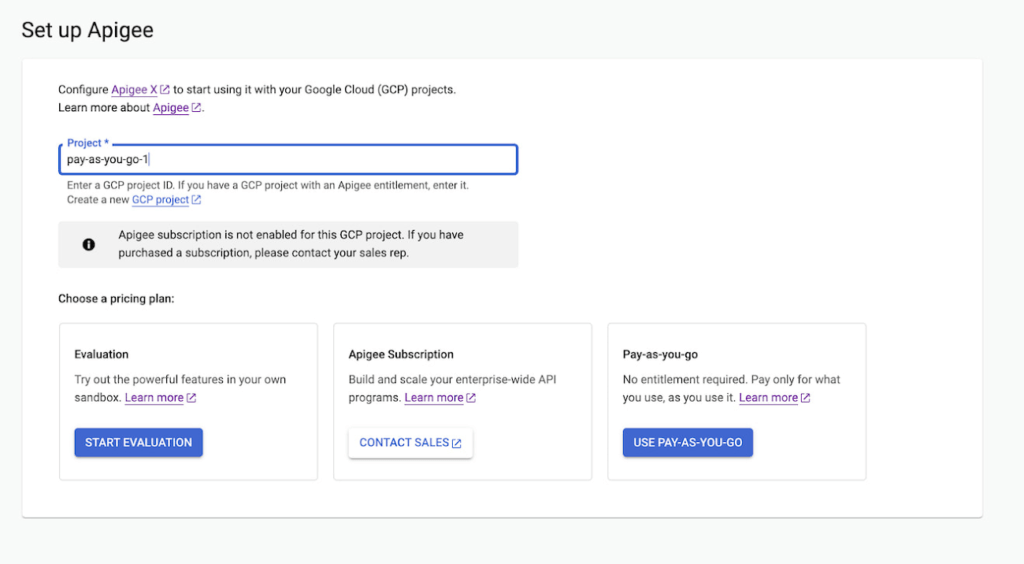
Start small, but powerful with Pay-as-you-go pricing
The new Pay-as-you-go pricing model offers flexibility for organizations to:
- Unlock the value of Apigee with no upfront commitment: Get up and running quickly without any upfront purchasing or commitment
- Maintain flexibility and control in costs: Adapt to ever-changing needs whilst maintaining low costs. You can continue to automatically scale with Pay-as-you-go or switch to Subscription tiers based on your usage
- Provide freedom to experiment: Every API management use case is different and with Pay-as-you-go you can experiment with new use cases by unlocking value provided by Apigee without a long term commitment
Pay-as-you-go pricing works just like the rest of your Google Cloud bills, allowing you to get started without any license commitment or upfront purchasing. As part of the Pay-as-you-go pricing model, you will only be charged based on your consumption of
- Apigee gateway nodes: You will be charged on your API traffic based on the number of Apigee gateway nodes (a unit of environment that processes API traffic) used per minute. Any nodes that you provision would be charged every minute and billed for a minimum of one minute.
- API analytics: You will be charged for the total number of API requests analyzed per month. API requests, whether they are successful or not, are processed by Apigee analytics. Analytics data is preserved for three months.
- Networking usage: You will be charged on the networking (such as IP address, network egress, forwarding rules etc.,) based on usage
When is Pay-as-you-go pricing right for me?
Apigee offers three different pricing models
- Evaluation plan to access Apigee’s capabilities at no cost for 60 days
- Subscription plans across Standard, Enterprise or Enterprise plus based on your predictable but high volume API needs
- Pay-as-you-go without any startup costs
Subscription plans are ideal for use cases with predictable workloads for a given time period, whereas Pay-as-you-go pricing is ideal if you are starting small with a high value workload. Here are a few use cases where organizations would choose Pay-as-you-go if they want to:
- Establish usage patterns before choosing a Subscription model
- Evolve their API program by starting with high value and low volume API use cases
- Manage and protect your applications build on Google cloud infrastructure
- Migrate or modernize your services gradually without disruption
Next steps
Every organization is increasingly relying on APIs to build new applications, adopt modern architectures or create new experiences. In such transformation journeys, Apigee’s Pay-as-you-go pricing will provide flexibility for organizations to start small and scale seamlessly with their API management needs.
- To get started with Apigee’s Pay-as-you-go pricing go to console or try it for free here
Check out our documentation and pricing calculator for further details on Apigee’s Pay-as-you-go pricing for API management. For comparison and other information, take a look at our pricing page.
More Relevant Stories for Your Company

A Human Centered Design to Chart a Superior Customer Journey!
Banking, insurance and fintech companies strive to deliver superior customer experience. By adopting a human centered design for the digital customer journey, platform providers can drive monetization by focusing on interactions, behaviors and events!

BURGER KING Germany: Serving Up Marketing Insights and Supply Chain Visibility Easily
Do hamburgers really come from Hamburg? This may still be a matter of debate, but the popularity of American-style burger joints not just in Hamburg but all over Germany, is clear. Germany’s top two fast food companies are both burger chains. One of them is BURGER KING®, a global brand that welcomes more

Google Named a Leader in the 2019 Gartner Magic Quadrant for Full Life Cycle API Management
The number of APIs within organizations is growing very rapidly not only in IT departments, but also within lines of business (LOBs). Every connected mobile app, every website that tracks users or provides a rich user experience, and every application deployed on a cloud service uses APIs. LOBs see them

Google Cloud Helps Northwell Health to Boost Caregiver Productivity and Access to Right Care Using AI
Lung cancer is the leading cause of cancer death in the United States and like any cancer, early detection is crucial to survival. Screening at-risk populations is an important part of reducing mortality, and if concerning nodules are found on imaging, further testing may be required. Today, we’ll share how
