





Unlocking Economic Potential: Cloud FinOps

3248
Of your peers have already read this article.
4:00 Minutes
The most insightful time you'll spend today!
Built for a CapEx world, most organizations’ finance systems aren’t set up to take advantage of cloud’s dynamic, OpEx-driven consumption patterns.

GETTY
It may not be a household name yet, but chances are you’ve crossed paths with OpenX today. OpenX, a leader in programmatic advertising, operates one of the world’s largest ad exchanges, serving over 250 billion ad requests per day, connecting more than 30,000 brands and reaching nearly one billion consumers. To make it happen, in 2019, OpenX migrated entirely out of its data centers and became the first major ad-exchange platform to move completely to the cloud.
The OpenX CTO, Paul Ryan, knew that this cloud transformation initiative had the potential to increase costs faster than its revenues. To be successful, he needed his engineering, finance, and business teams to forge a new “cost-aware” culture, complete with effective cost visibility and controls. In other words, he needed Cloud FinOps — an operational framework and cultural shift that brings technology, finance, and business together to drive financial accountability and realize business benefits through cloud transformation.
Ryan laid out a cloud migration roadmap that included cost governance and controls around project ownership, established cost responsibility with engineering teams to accurately forecast cloud consumption, and challenged developers to lower per-unit costs — while at the same time improving performance, scalability, speed and global reach.
It worked! In just 9 months, OpenX reduced their per-unit cost by over 60%. The framework allowed OpenX to launch new regions in a matter of days, reduce their time to market for new features by over 50%, and complete their migration in record time — seven months! “We are now able to stop worrying about legacy infrastructure and focus more on our growth categories,” said Ryan. “Our tech stack is getting smarter and more sophisticated by the day, and we have the flexibility to scale our infrastructure in real-time as the business scales and evolves.”
Unblocking Cloud’s Potential
Cloud holds the key to a successful digital transformation. In fact, McKinsey forecasts that by 2030, the Fortune 500 alone may realize over $1 trillion of EBITDA value drivers associated with public cloud enablement. But unlike OpenX, many companies struggle to achieve near-term value objectives from their cloud investments. Surveys reflect that more than 30% of cloud spend in 2021 was wasted or inefficient, while upwards of 80% of CIOs have yet to achieve the business benefits of migrating to the cloud.
Traditional IT finance processes are ill-suited for cloud infrastructure: Traditional planning and budgeting processes are challenged to address dynamic consumption patterns and complex migrations. Centralized IT budgets using traditional allocations fail to provide the necessary visibility into sources of cost overruns. CapEx-focused cost controls have little ability to manage largely OpEx-driven spend. Trend-based forecasting often inaccurately predicts cloud costs. And developer teams lack access to cost-aware architecture patterns to deploy the applications more efficiently.
Enter Cloud FinOps
At Google we’ve worked with many companies, like OpenX, to help organizations realize the transformational benefits of the cloud by cultivating a culture of transparency and embedding agile processes to manage costs. We’ve distilled these learnings into a Cloud FinOps operational framework that gives organizations the financial governance and accountability they need to grow their business sustainably.
GOOGLE CLOUD
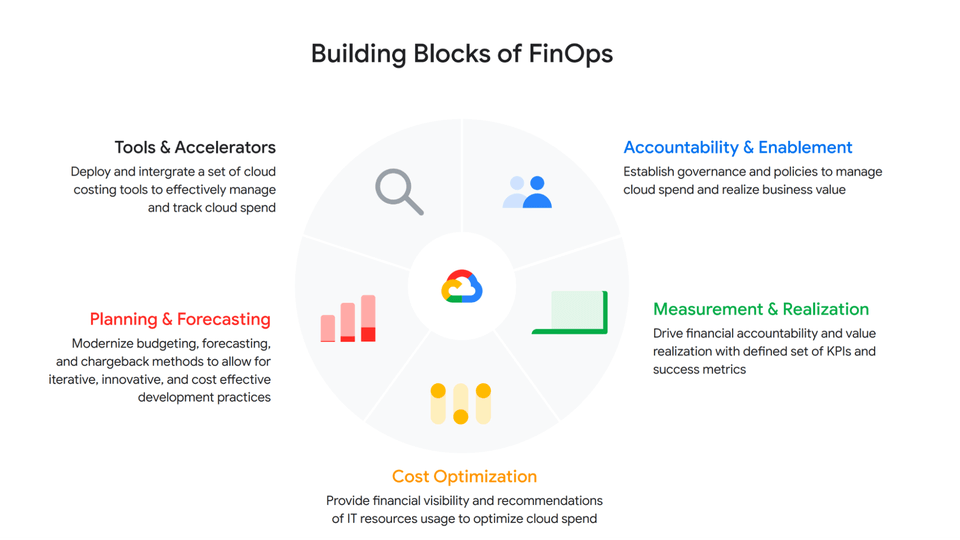
At a high level, a Cloud FinOps approach depends on five key areas:
- Accountability and Enablement
Accountability and enablement aim at instilling a cost-conscious culture across the organization. Oftentimes, this means standing up a cross-functional and dedicated team with members from technology, finance and engineering to establish cloud financial best practices and governance. In various organizations, we’ve seen this through an extension of a Cloud Center of Excellence, a Cloud Business Office or simply a Cloud FinOps team. Enablement focuses on empowering IT, finance and business leaders through training to help them better understand the economics of cloud services and the strategies to efficiently deploy and manage them. Cloud financial training guides teams on how to design cost-effective cloud environments, for example, embracing ”cloud-native” design principles such as auto-scaling/elasticity and Infrastructure as a Code.
- Measurement and Business Value Realization
Effective measurements not only create awareness and enable agile processes, but also support a culture that celebrates success and rewards teams for achieving business objectives. As such, measurement in the service of business value realization is about developing a comprehensive set of long-term benefits and cost KPIs to quantify the total net value of the return on digital transformation. Organizations often start with cost-related KPIs and eventually evolve those KPIs into business value metrics that are mapped to targeted business outcomes.
- Cloud Cost Optimization
Cloud cost optimization is an iterative and continuous process that provides a consistent methodology to manage cloud consumption cost-effectively. There are three key areas of optimization:
Resource optimization – Model cost-effective cloud usage based on utilization and consumption patterns.
Pricing optimization – Manage cloud spend through a continuous analysis of various pricing models. In a Google Cloud context, that might mean Committed Use Discounts, BigQuery flat rate reservations, etc.
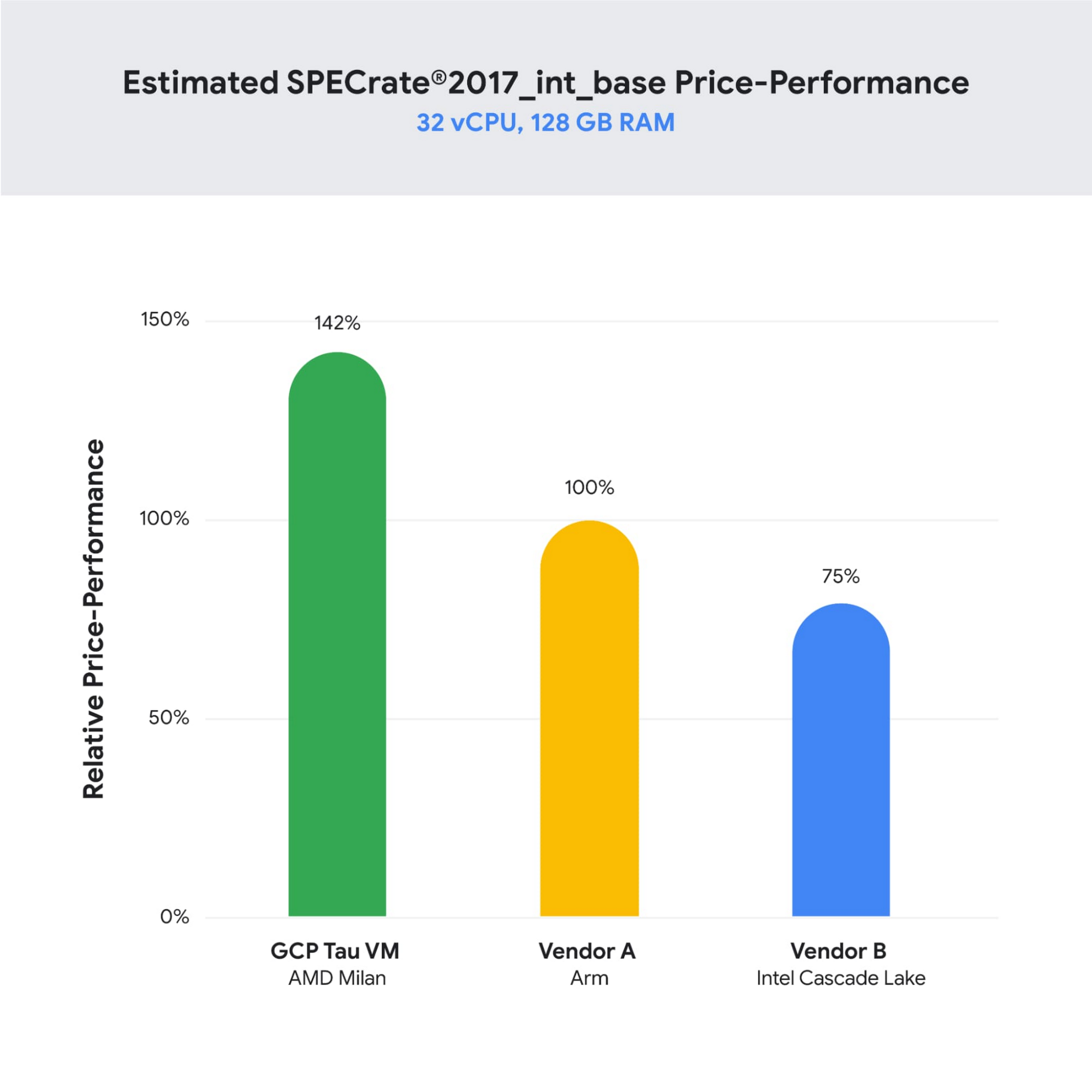
Architecture optimization – Build applications with a cost-aware architecture by leveraging newer generation compute instances (like Tau VMs, which offer an industry-leading 42% better price-performance versus comparable offerings), or using managed services and serverless technology to offload operational overhead.
For example, video hosting, sharing and services platform provider Vimeo built transcoding pipelines by using Google Cloud Spot VMs to optimize their infrastructure spend. To do so, they created fault-tolerant workloads that could withstand preemptions, and in exchange, got up to a 91% discount compared to using regular on-demand instances.
- Planning and Forecasting
In the cloud, accurately forecasting your finances requires rethinking of traditional approaches to depreciation and trend-based forecasting of maintenance and licensing costs. One way to improve the accuracy of your dynamic cloud needs is to use workload-specific forecasting models that leverage a combination of trend-based models for steady-state workloads, driver-based models for scaling applications, as well as monthly variance analysis. In other words, you can define cloud budgets and forecasts by monitoring cloud consumption trends, allocating cloud cost pools with a proper tagging strategy that’s mapped to a chart of accounts in a general ledger, and conducting a cost-benefit analysis based on cloud infrastructure, implementation, and support costs.
- Tools and Accelerators
Without the proper tools and processes in place, understanding and managing cloud costs can be complex — and this especially true as organizations scale their business in the cloud. By deploying proper cloud cost management tools and accelerators such as Looker Cloud Cost Management and automation scripts to set guardrails and enforce cost control policies, organizations can effectively manage and track cloud spend with access to near-real-time billing and cost data to make better informed business decisions.
The key objectives of Google Cloud Cost Management tools are to make it as simple as possible for organizations to get visibility into their current and forecasted costs with built-in reporting and customizable dashboards; help drive greater accountability for cloud spending across the organization by providing flexible ways to organize cloud resources and allocate costs; provide strong financial governance controls to reduce the risk of overspending; and offer intelligent recommendations for optimizing cloud costs and usage.
Start Saving with Cloud
Businesses are continuously seeking to better operate and manage their cloud environments and the need is ever increasing to transparently manage cloud spend, optimize costs, and obtain their desired business agility. By enhancing your Cloud FinOps capabilities and adopting principles of continuous cost optimization, you too can accelerate the business value of cloud computing.
Special thanks to Bruce Warner, Daniel Petibone, Nihar Jhawar and FinOps Foundation community for their contributions and sharing their domain expertise to this important Cloud FinOps topic.
How Eventrac and Workflows Integration Helps Implement Hybrid Architecture in Google Cloud

6525
Of your peers have already read this article.
3:00 Minutes
The most insightful time you'll spend today!
I previously talked about Eventarc for choreographed (event-driven) Cloud Run services and introduced Workflows for orchestrated services.
Eventarc and Workflows are very useful in strictly choreographed or orchestrated architectures. However, you sometimes need a hybrid architecture that combines choreography and orchestration.
For example, imagine a use case where a message to a Pub/Sub topic triggers an automated infrastructure workflow or where a file upload to a Cloud Storage bucket triggers an image processing workflow. In these use cases, the trigger is an event but the actual work is done as an orchestrated workflow.
How do you implement these hybrid architectures in Google Cloud? The answer lies in Eventarc and Workflows integration.
Eventarc triggers
To recap, an Eventarc trigger enables you to read events from Google Cloud sources via Audit Logs and custom sources via Pub/Sub and direct them to Cloud Run services:

One limitation of Eventarc is that it currently only supports Cloud Run as targets. This will change in the future with more supported event targets. It’d be nice to have a future Eventarc trigger to route events from different sources to Workflows directly.
In absence of such a Workflows enabled trigger today, you need to do a little bit of work to connect Eventarc to Workflows. Specifically, you need to use a Cloud Run service as a proxy in the middle to execute the workflow.
Let’s take a look at a couple of concrete examples.
Eventarc Pub/Sub + Workflows integration
In the first example, imagine you want a Pub/Sub message to trigger a workflow.
Define and deploy a workflow
First, define a workflow that you want to execute. Here’s a sample workflows.yaml that simply decodes and logs the Pub/Sub message body:
main:params: [args]steps:- init:assign:- headers: ${args.headers}- body: ${args.body}...- pubSubMessageStep:call: sys.logargs:text: ${"Decoded Pub/Sub message data is " + text.decode(base64.decode(args.body.message.data))}severity: INFODeploy the workflow with a single command:gcloud workflows deploy ${WORKFLOW_NAME} --source=workflow.yaml --location=${REGION}
Deploy a Cloud Run service to execute the workflow
Next, you need a Cloud Run service to execute this workflow. Workflows has an execution API and client libraries that you can use for your favorite language. Here’s an example of the execution code from a Node app.js file. It simply passes the received HTTP request headers and body to the workflow and executes it:
const execResponse = await client.createExecution({parent: client.workflowPath(GOOGLE_CLOUD_PROJECT, WORKFLOW_REGION, WORKFLOW_NAME),execution: {argument: JSON.stringify({headers: req.headers, body: req.body})}});
Deploy the Cloud Run service with the Workflows name and region passed as environment variables:
gcloud run deploy ${SERVICE_NAME} \--image gcr.io/${PROJECT_ID}/${SERVICE_NAME} \--region=${REGION} \--allow-unauthenticated \--update-env-vars GOOGLE_CLOUD_PROJECT=${PROJECT_ID},WORKFLOW_REGION=${REGION},WORKFLOW_NAME=${WORKFLOW_NAME}
Connect a Pub/Sub topic to the Cloud Run service
With Cloud Run and Workflows connected, the next step is to connect a Pub/Sub topic to the Cloud Run service by creating an Eventarc Pub/Sub trigger:
gcloud eventarc triggers create ${SERVICE_NAME} \--destination-run-service=${SERVICE_NAME} \--destination-run-region=${REGION} \--location=${REGION} \--event-filters="type=google.cloud.pubsub.topic.v1.messagePublished"
This creates a Pub/Sub topic under the covers that you can access with:
export TOPIC_ID=$(basename $(gcloud eventarc triggers describe ${SERVICE_NAME} --format='value(transport.pubsub.topic)'))
Trigger the workflow
Now that all the wiring is done, you can trigger the workflow by simply sending a Pub/Sub message to the topic created by Eventarc:
gcloud pubsub topics publish ${TOPIC_ID} --message="Hello there"
In a few seconds, you should see the message in Workflows logs, confirming that the Pub/Sub message triggered the execution of the workflow:

Eventarc Audit Log-Storage + Workflows integration
In the second example, imagine you want a file creation event in a Cloud Storage bucket to trigger a workflow. The steps are similar to the Pub/Sub example with a few differences.
Define and deploy a workflow
As an example, you can use this workflow.yaml that logs the bucket and file names:
main:params: [args]steps:...- log:call: sys.logargs:text: ${"Workflows received event from bucket " + bucket + " for file " + file}severity: INFO
Deploy a Cloud Run service to execute the workflow
In the Cloud Run service, you read the CloudEvent from Eventarc and extract the bucket and file name in app.js using the CloudEvent SDK and the Google Event library:
const cloudEvent = HTTP.toEvent({ headers: req.headers, body: req.body });//"protoPayload" : {"resourceName":"projects/_/buckets/events-atamel-images-input/objects/atamel.jpg}";const logEntryData = toLogEntryData(cloudEvent.data);const tokens = logEntryData.protoPayload.resourceName.split('/');const bucket = tokens[3]
Executing the workflow is similar to the Pub/Sub example, except you don’t pass in the whole HTTP request but rather just the bucket and file name to the workflow:
const execResponse = await client.createExecution({parent: client.workflowPath(GOOGLE_CLOUD_PROJECT, WORKFLOW_REGION, WORKFLOW_NAME),execution: {argument: JSON.stringify({bucket: bucket, file: file})}});
Connect Cloud Storage events to the Cloud Run service
To connect Cloud Storage events to the Cloud Run service, create an Eventarc Audit Logs trigger with the service and method names for Cloud Storage:
gcloud eventarc triggers create ${SERVICE_NAME} \--destination-run-service=${SERVICE_NAME} \--destination-run-region=${REGION} \--location=${REGION} \--event-filters="type=google.cloud.audit.log.v1.written" \--event-filters="serviceName=storage.googleapis.com" \--event-filters="methodName=storage.objects.create" \--service-account=${PROJECT_NUMBER}-compute@developer.gserviceaccount.com
Trigger the workflow
Finally, you can trigger the workflow by creating and uploading a file to the bucket:
echo "Hello World" > random.txtgsutil cp random.txt gs://${BUCKET}/random.txt
In a few seconds, you should see the workflow log the bucket and object name.
Conclusion
In this blog post, I showed you how to trigger a workflow with two different event types from Eventarc. It’s certainly possible to do the opposite, namely, trigger a Cloud Run service via Eventarc with a Pub/Sub message (see connector_publish_pubsub.workflows.yaml) from Workflows or a file upload to a bucket from Workflows.
All the code mentioned in this blog post is in eventarc-workflows-integration. Feel free to reach out to me on Twitter @meteatamel for any questions or feedback.
How Google Cloud’s Scalable Data Storage and High Compute Resources Fuel Investment Research

6278
Of your peers have already read this article.
1:30 Minutes
The most insightful time you'll spend today!
Investment management is a heavily data-driven industry—portfolio managers and investment researchers require a large number of data sources to guide them in shaping their investment strategies.
New cloud capabilities and technologies enable investment managers to process data faster than ever before and iterate on ideas quickly to fuel innovation in the signal generation process and gain a competitive edge.
Using the cloud for investment research workflows makes it easier to onboard data from data providers, spin up large compute workloads in the midst of market volatility or during heavy research cycles, and manage complex machine learning or natural language workflows to gain market insights.
We hear from industry leaders that they’re exploring new ways to run investment research. “Differentiated investment strategies require new types of information sources, and new ways to process that information,” David Easthope, senior analyst, Market Structure and Technology, Greenwich Associates. “And that, of course, relies heavily on having access to reliable and scalable storage, computational, and AI / ML resources. More specifically, quantitative strategies can benefit from the computational platforms and embedded AI/ML capabilities the cloud can offer.”
Google Cloud gives investment managers essential components to work and operate faster as they bring their investment research workflows to the cloud. Here are the key highlights:
1. Simplify, speed up your data acquisition, discovery, and analytics
The foundation of any investment strategy starts with data—acquiring it, detecting patterns, and analyzing it for insights. Enabling data providers to easily share large datasets such as tick history within a high-performance analytics engine can greatly reduce the data engineering overhead when possible.
Once data is onboarded, you can tag business and technical metadata related to your datasets and provide portfolio managers the ability to discover these datasets via a search interface.
We further review analytics options for various scenarios, including aggregating massive datasets, creating dashboards, and incorporating streaming analytics workloads.
2. Take advantage of burst compute workloads
Data engineers and researchers require ready access to burst compute capabilities to perform backtesting, portfolio simulations and run risk calculations. Cloud works well for these workloads due to its elasticity, consumption-based models, and hardware evolution.
Many investment managers are shifting to a container-based strategy along with a Kubernetes-based scheduler for greater consistency, scaling and efficiency in environments with a large number of researchers. Cloud managed services and a rich suite of CI/CD tools can make this vision a reality while improving security and developer productivity.
3. Tackle machine learning (ML) and model deployment with the help from cloud
Quantitative researchers scour vast amounts of market and alternative data sources searching for signals and correlations, while ML engineers have the challenge of taking these signals and moving them to production.
Google Cloud empowers users to create and operationalize their models without wasting valuable time with a comprehensive set of MLOps tools.
In this paper, we explore multiple solutions for ML and model deployment. Those capabilities reduce the amount of time operationalizing ML models, so quants and data scientists have more time to devote to differentiating activities.
4. Get the data you need in less time with Natural Language and Document AI
Thousands of financial filings, news articles, and sell-side research reports are generated every day, and it’s difficult for humans alone to process this volume of information. These documents are often generated in many languages and the ability to do entity recognition, sentiment or syntactical analysis in those languages, or perhaps translate them into the language of the portfolio manager is of critical importance. Google Cloud provides these capabilities through pre-trained models, or allows you to train high-quality models with your own datasets.
Getting started
There are plenty of emerging technologies, tools, and approaches available to help investment managers today. At Google Cloud, we can help you access, organize, and utilize these essential components to make your research faster, reliable, and more valuable.
To learn more about these four keys to better investment research, check out our whitepaper for more.
3624
Of your peers have already watched this video.
1:30 Minutes
The most insightful time you'll spend today!
How McKesson Gains Insights by Running SAP on Google Cloud
McKesson, a 185-yeal old, $200 billion, Fortune 6 pharmaceuticals and health information technology company, with over 80,000 employees migrated their SAP solution to Google Cloud for advanced healthcare analytics.
With changing consumer expectations, the company needed to change its architecture to be able to better serve its customers. And the old on-premise infrastructure was hindering the company from being able to meet those expectations.
Watch this video as Andrew Zitney, SVP and CTO at McKesson, explains how SAP on GCP helps the 180-year old company modernize and meet the changing expectations.
3 Important Factors to Consider for Moving Large-scale On-prem Data to Cloud with Storage Transfer Service

3514
Of your peers have already read this article.
1:30 Minutes
The most insightful time you'll spend today!
Organizations have been moving their on-premises data and applications to the cloud for the past several years, driven by reasons as varied as application modernization and content delivery to archival. In particular, we have seen migration momentum pick up in sectors like media and entertainment, where customers are rethinking how they monetize and store their valuable historical content, often while exploring Google Cloud’s many analytical and AI solutions.
Many of these customers are interested in moving their unstructured data from on-premises appliances to Google’s Cloud Storage. Over the past year, we’ve noticed an uptick in larger migrations, where customers move tens of petabytes or more of on-premises file data to Google’s flexible, secure object storage.
For customers like Telecom Italia/TIM Brasil, Google’s fully managed Storage Transfer Service played a key role in making this transformation possible by moving data from on-premises filesystems to extensible, low-cost Cloud Storage over the network.
“Storage Transfer Service helped us move petabyte-scale data from on-premises filesystem to Google Cloud in a highly performant and fully-managed way,” said Auana Mattar, CIO at Telecom Italia/TIM Brasil. “Setting up the transfer pipeline required performing some tests to figure out the ideal number of agents and networking settings in our on-prem environment. Once the initial setup was done, transferring data was seamless, and the service was able to saturate a 20 Gbps Partner Interconnect link.”
While large-scale cloud migrations can be intimidating, there are a number of actions that customers can take to ensure that a multi-petabyte data transfer goes as smoothly as possible. In the past, we’ve shared general architectural guidance for customers new to their cloud journey. And for customers looking for options, Google has multiple paths to move on-premises file data to the cloud, including our fully offline Transfer Appliance.
In this blog post, we’ll provide an updated perspective focused on how to use Storage Transfer Service to move data from on-prem to the cloud. Specifically, we’ll look at three different factors to consider prior to moving large amounts of data from your on-premises filesystem to Cloud Storage with our Storage Transfer Service.
Understanding the source files and filesystem
If you are moving data from an on-premises filesystem, you should be aware of how your source files, and your source filesystem, can impact transfer performance.
Each copy you make to Cloud Storage incurs some overhead from associated operations like metadata transfer, checksumming, and encryption. This means that, for a given amount of storage, transferring large numbers of very small files will take longer. As a rule of thumb, Storage Transfer Service will be most performant when moving files that are 16 MB or larger.
If you have a large number of smaller files, you may choose to batch them using tools like tar and upload as a single object. This will improve transfer performance but will limit how you can use those files in Cloud Storage. It’s an option best considered for use cases like archival storage, where the data transferred to Google Cloud may not be managed or accessed regularly. Our Nearline, Coldline, and Archive archival tiers offer excellent performance should you ever need to retrieve the archived data.
The source filesystem may also slow down transfer performance, particularly if the filesystem has limited read throughput. Tools like Fio can be used to test read throughput. We’ve included a command below to run a series of 1MB sequential read operations in Fio and to generate a report:
#Install fio> sudo apt install -y fio#Create a new directory fiotest> TEST_DIR=/mnt/mnt_dir/fiotest> sudo mkdir -p $TEST_DIR#Test read throughput> sudo fio --directory=$TEST_DIR --direct=1 --rw=randread --randrepeat=0 --ioengine=libaio --bs=1M --iodepth=8 --time_based=1 --runtime=180 --name=read_test --size=1G
Fio will then generate a report. The final line labeled ‘bw’ represents the total aggregate bandwidth of all threads, and it can be used as a proxy for read throughput. In general, you should strive for read throughput (‘bw’) that is 1.5x of your desired upload throughput or speed. (And one easy way to increase read throughput is to ensure that the filesystem itself is not imposing any limits on maximum throughput.)
Optimizing Storage Transfer Service resources
Within the Storage Transfer Service, there are a few settings that we can adjust ahead of time to ensure optimal performance for a larger workload.
First, we should ensure that we have the right number of transfer agents for our source data. We would advise that, for any transfer job larger than 1 GB, you start with at least three agents in separate VMs, with each agent assigned at least 4 vCPU and 8 GB of RAM. In addition to providing a foundation for performant data transfer, this architecture also ensures that the transfer is fault tolerant should one agent machine become unavailable.
Google Cloud supports up to 100 concurrent agents for a given Google Cloud project. To help you identify the right number of agents to support your workload, you should start your larger transfer first, then wait three minutes after adding each agent to ensure that throughput has stabilized.
In general, each agent can facilitate roughly 1 Gbps of throughput for up to 10 agents, at which point it may be necessary to add more agents for a very large amount of network bandwidth. For example, in one larger migration, a customer with 20 Gbps of dedicated network capacity ran ~30 agents at once. These numbers illustrate what was required at one enterprise data center. Across all of your environments, it is important to test and monitor your throughput via Cloud Monitoring to ensure you have the right configuration for your transfer goals.
Another area to optimize is where and how you install your agents. As we mentioned earlier, agents should be installed in separate VMs, and each host machine should dedicate at least 4 vCPUs and 8 GB of memory per agent. This is a starting off point, and larger, long-running transfers may require additional CPU or memory. For those longer jobs, we advise that you monitor CPU utilization and unused memory closely to ensure optimal performance. You should provision more CPUs when utilization exceeds 70%. Similarly, you should be ready to provision additional memory when the agent has less than 1GB of unused memory.
Preparing your network for large-scale data transfer
The third and final area to consider is your network connectivity. While it can be easy to reduce this to the bandwidth between the source filesystem and the Google Cloud bucket, the network includes two other components that can be easier to configure: first, the network interface from the on-premises agents to the WAN; and second, the agents’ connection to the on-premises filesystem.
For the first component, the network interface from the on-premises agents to the WAN, the general guidance is to not let this become a bottleneck. Specifically, you should ensure that this interface is greater than or equal to the bandwidth you require to read from the filesystem, plus the upload bandwidth to write to Google Cloud. In other words, if you plan on moving 10 Gbps of data from on-premises to Google Cloud, you will need 20 Gbps of bandwidth between the on-premises agents to the WAN: 10 Gbps to read from the networked filesystem, and 10 Gbps to transfer and write to Google Cloud.
On-premises filesystems, and on-premises networks, come in many flavors. For the second component, how the agents connect to an on-premises filesystem, our general rule is to be mindful of latency and to test regularly. It is essential to ensure that agents run on machines that can access a networked filesystem with very low latency.
Finally, if you are trying to maximize transfer performance, make sure you’ve configured your network to avoid bandwidth restrictions between on-premises filesystem and Google Cloud that might impact transfer speed. Storage Transfer Service will allow you to cap the bandwidth used by transfer, making it easy to minimize any impact on other production applications. Consider using tools like lperf3, tcpdump, and gsutil to measure the network bandwidth available to upload to Cloud Storage.
In particular, gsutil is worth some additional detail. Gsutil is a Python tool that can help you perform a number of object storage management tasks in Google Cloud, including checking your agent’s connection to the Cloud Storage APIs. It can be installed via the Google Cloud SDK, or separately. In this case, you should also ensure that gsutil is available in the same on-premises VM as the Storage Transfer Service agent.
If you’d like to use gsutil to test connectivity to Google Cloud, here’s the command:
gsutil cp test.txt gs://my-bucketReplace:my-bucket with the name of your Cloud Storage bucket.
CP is a copy command that lets you copy data from on-premises to the cloud. In this case, gsutil is copying a test document, test.txt, to ensure that you have a connection with the Google Cloud APIs. You will need to create a test document before running this command.
Test twice, transfer once
One overarching theme across all factors is that testing can help you understand performance. For many customers, a large-scale data transfer from an on-premises filesystem to Google Cloud is an unusual event. And as with any unusual event in enterprise IT, it is a great idea to make sure that each party – from network administrators to filesystem and storage experts to cloud architects – is able to test their domain multiple times, to ensure the event will proceed seamlessly.
As you fine tune your testing in advance of a data transfer, you may want to learn more about your options for obtaining more network bandwidth, orchestrating transfer from SMB filesystems, or even how to make the right choices to save money on object storage. And we plan to share more in our blog about how customers have used our transfer offerings in the months ahead. Advanced agent setup | Cloud Storage Transfer Service Documentation
For more information about Storage Transfer Service and how to get started, please take a look at our documentation or get started via the Google Cloud console.
Tau VMs Joins Google Cloud to Offer Cost-effective Performance of Scale-out Workloads

5599
Of your peers have already read this article.
2:00 Minutes
The most insightful time you'll spend today!
Scale-out workloads demand the best combination of performance and price to bring down the cost of delivering applications, all while providing an excellent user experience. We are excited to announce a new virtual machine (VM) family, Tau VMs, coming to Google Cloud. Tau VMs extend Compute Engine’s VM offerings with a new option optimized for cost-effective performance of scale-out workloads.
T2D, the first instance type in the Tau VM family, is based on 3rd Gen AMD EPYCTM processors and leapfrogs the VMs for scale-out workloads of any leading public cloud provider available today, both in terms of performance and workload total cost of ownership (TCO). The x86 compatibility provided by these AMD EPYC processor-based VMs gives you market-leading performance improvements and cost savings, without having to port your applications to a new processor architecture.
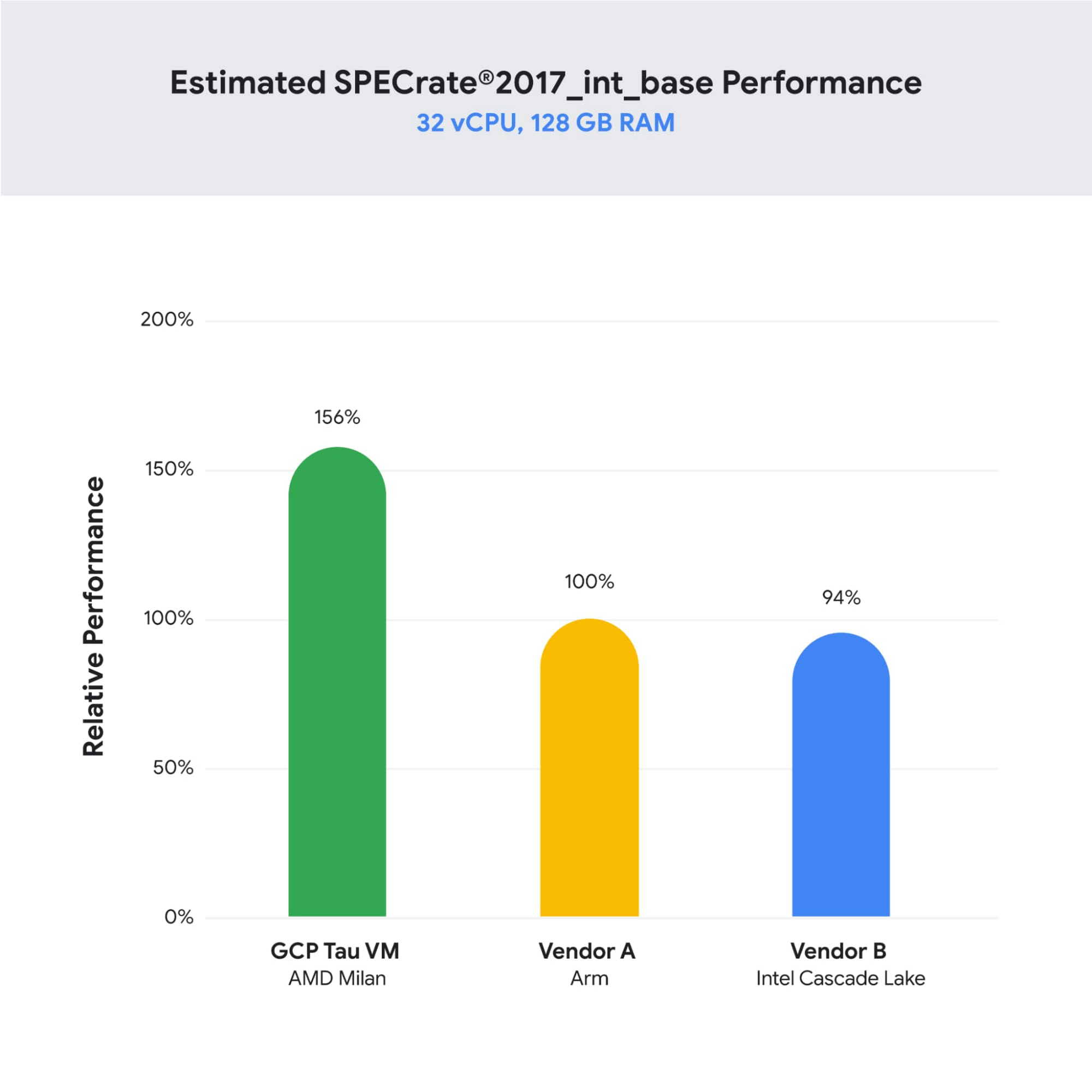
As illustrated below, Tau VMs offer 56% higher absolute performance and 42% higher price-performance (est. SPECrate2017_int_base) compared to general-purpose VMs from any of the leading public cloud vendors.
SPECrate is a trademark of the Standard Performance Evaluation Corporation. More information available at www.spec.org
What our customers and partners are saying
Snap
“At Snap, it is critical for our business to continue improving our scale-out compute infrastructure for key Snapchat capabilities like AR, Lenses, Spotlight and Maps,” said Cody Powell, Senior Engineering Manager, Snap Inc. “We were impressed when we tested Google Cloud’s new Tau VMs with Google Kubernetes Engine. While it’s early days, we believe we can gain double digits in infrastructure performance improvements for key workloads—enabling us to do more with less and invest even more in new features for our amazing Snapchat community.”
Twitter
“High performance at the right price point is a critical consideration as we work to serve the global public conversation,” said Nick Tornow, Platform Lead, Twitter. “We are excited by initial tests that show potential for double digit performance improvement. We are collaborating with Google Cloud to more deeply evaluate benefits on price and performance for specific compute workloads that we can realize through use of the new Tau VM family.”
DoiT
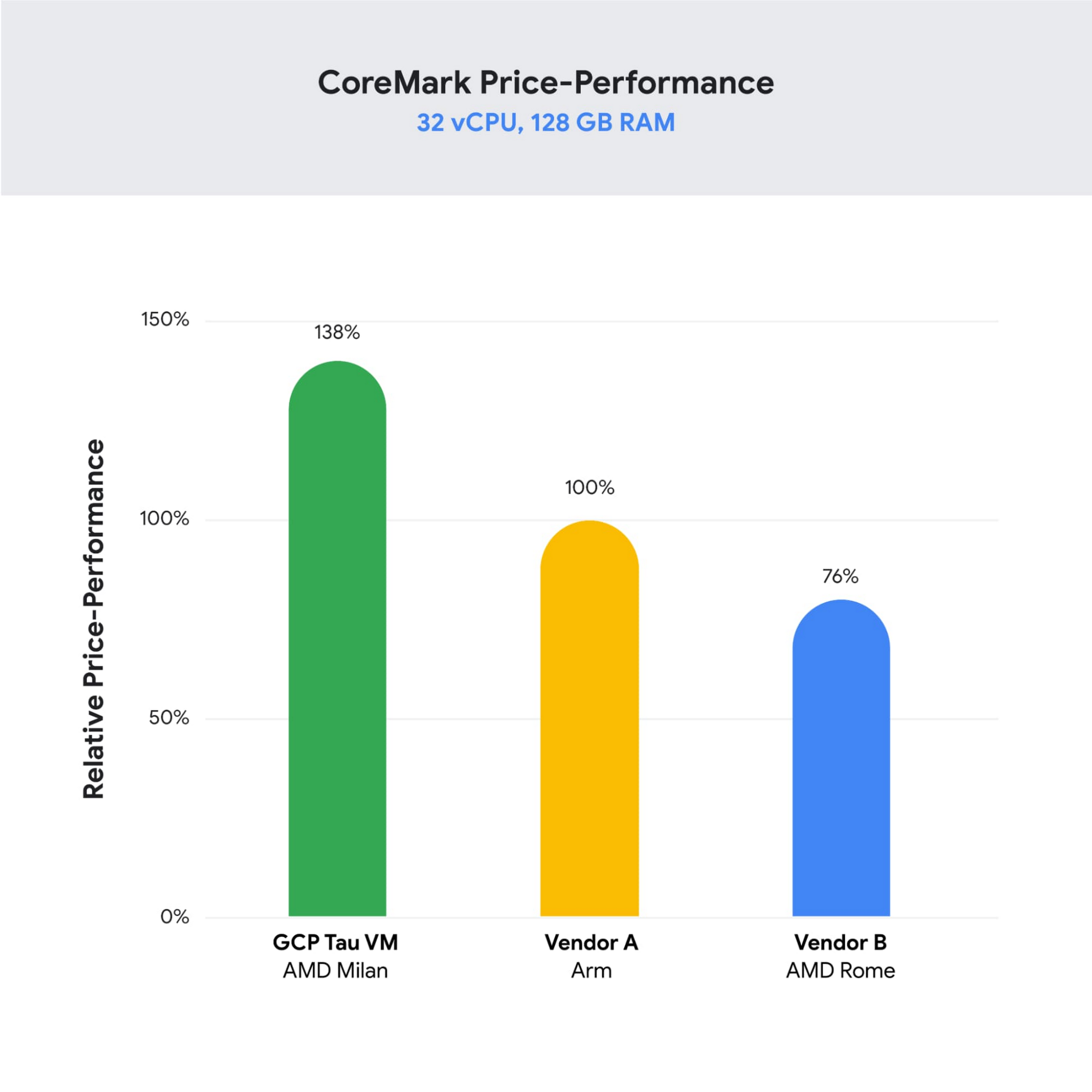
“DoiT partners with leading cloud vendors who are focused on growth and cost optimization,” said Yoav Toussia-Cohen, CEO, DoiT International. “In our preliminary testing of Google’s new Tau VMs with the Coremark benchmark, we were thrilled to see the incredible performance at 50% better than a comparable ARM-based offering from another leading public cloud. With Tau VMs, Google Cloud has set a new bar for price-performance, making the cloud even more accessible to digital-native companies. We are excited to bring Google’s Tau VMs to our joint customers.”
Designed for demanding scale-out workloads
Tau VMs bring the benefit of Google’s long-standing experience engineering platforms for scale-out workloads to our customers. They come in multiple predefined VM shapes, with up to 60vCPUs per VM, and 4GB of memory per vCPU. They offer up to 32 Gbps networking bandwidth and a wide range of network attached storage options, making Tau VMs ideal for scale-out workloads including web servers, containerized microservices, data-logging processing, media transcoding, and large-scale Java applications.
Google Kubernetes Engine support
Google Kubernetes Engine (GKE) is the de facto standard for organizations looking for advanced container orchestration, delivering the highest levels of reliability, security, and scalability. GKE supports Tau VMs on day 1, helping you optimize price-performance for your containerized workloads. You can add Tau VMs to your GKE clusters by specifying the T2D machine type in your GKE node-pools.
Pricing
Tau VMs will be priced to support significant TCO and price-performance improvements for your cloud applications. A 32vCPU VM with 128GB RAM will be priced at $1.3520 per hour for on-demand usage in us-central1.
Coming soon to a Google Cloud region near you
If you are interested in trying out T2D VMs when they become available in Q3 2021 please sign-up here.
More Relevant Stories for Your Company
What CFOs Need to Do to Prepare for 2021
In 2020, we’ve witnessed tremendous change not only to our daily lives, but also how businesses work.A key lesson for CFOs and finance leaders: Those who digitized early found faster and most lasting success.The growth we are likely to witness in 2021 is also going to need digitization, but of

Google Unveils Topaz, the New Subsea Cable Connecting Asia and Canada
There’s a new subsea cable in town: Topaz, the first-ever fiber cable to connect Canada and Asia. Once complete, Topaz will run from Vancouver to the small town of Port Alberni on the west coast of Vancouver Island in British Columbia, and across the Pacific Ocean to the prefectures of
Guide to Google’s Underwater Infrastructure
From data centers and cloud regions to subsea cables, Google is committed to connecting the world. Our investments in infrastructure aim to further improve our network—one of the world’s largest—which helps improve global connectivity, supporting users and Google Cloud customers. Our subsea cables play a starring role in this work,

ATB Financial Focuses on Customer Experience with the Speed it Gains in the Cloud
As senior vice president and head of technology enablement for ATB Financial, Barry Hensch has a mission: creating a seamless experience for the Alberta, Canada-based bank’s nearly 800,000 customers by leveraging the latest digital technology. ATB is a purpose-driven financial institution owned and operated by Alberta’s provincial government, with about
