





Uniting Data and Analytics in One Place: Apache Iceberg and BigLake
1146
Of your peers have already read this article.
2:30 Minutes
The most insightful time you'll spend today!
When your data is siloed data across lakes and warehouses, it can be hard to transform outcomes with your data. Apache Iceberg is an open table format that provides data management capabilities for data hosted on object stores and enables organizations to run analytics and AI use cases over a single copy of data. A growing community of data engineers, customers, and industry partners are contributing, integrating, and deploying Iceberg, making it the standard for organizations building open-format lakehouses.
To help customers on this journey, we announced support for Iceberg through BigLake in October, 2022. Since its preview, many customers have started building lakehouse workloads using Apache Iceberg as their data management layer, and this support is now generally available.
Unify analytics, streaming and AI use cases over a single copy of data
You can use open-source engines to process and ingest data into Iceberg tables, and BigQuery can query those tables. Since the preview, customers have also used Spark, Trino and Flink to process Iceberg tables and make those tables available to their BigQuery users. Then, BigLake Metastore provides shared metadata for Iceberg tables across BigQuery and open-source engines, eliminating the need to maintain multiple table definitions. Further, you can provide BigQuery datasets and table properties when creating new Iceberg tables in Spark, and those tables become automatically available for the BigQuery user to query.
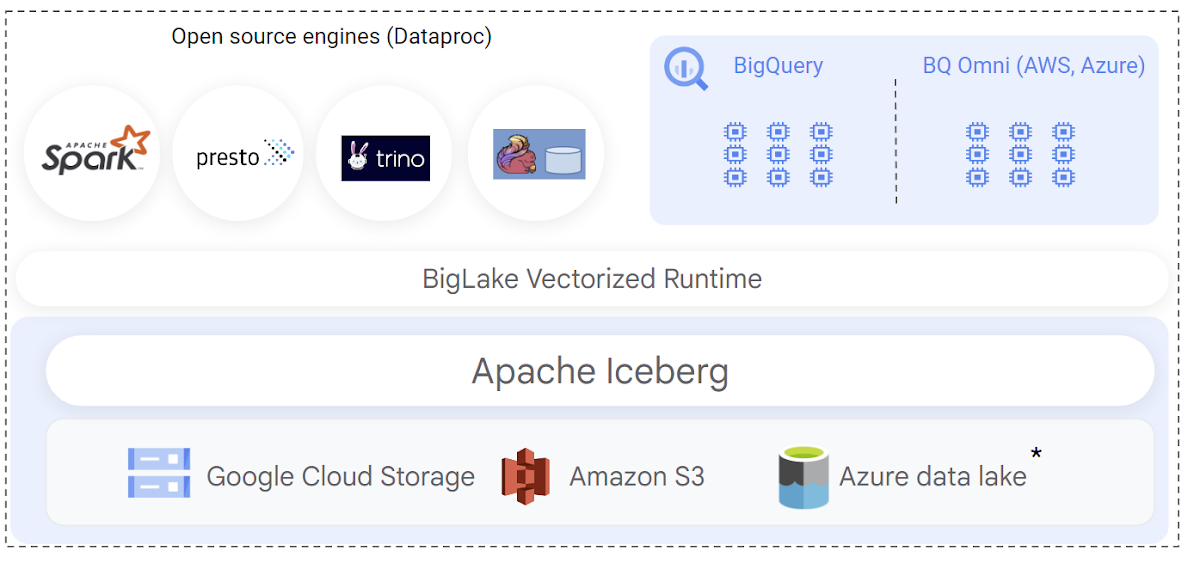
When implementing Iceberg lakehouse workloads, query performance is a top priority for data warehouse users. BigQuery natively integrates with the Iceberg transaction logs and leverages its rich metadata for efficient query planning. Query plans are designed to reduce BigQuery compute consumption by lowering the amount of scanned data, by optimizing joins, and by improving data-plane parallelism. The net result is that you get better query performance and lower slot usage when querying BigLake Iceberg tables.
This GA release also adds support to provide automatic synchronization of table schema in BigQuery when the table is modified through an open-source engine.
Engine-agnostic, industry-leading security and governance built-in
Customers have been telling us that building Iceberg lakehouses in a secure and governed manner is a top priority. BigLake support for Iceberg provides fine-grained access control, including row- and column-level security as well as data masking to simplify this. These features are designed to work independently of the query engine. During the preview, we expanded BigQuery to also support differential privacy for all tables including Iceberg.
You can also define security policies on a BigLake Iceberg table using BigQuery. Security policies are then enforced regardless of the query engine used — BigQuery natively enforces these policies at runtime, and open-source engines can securely access the data using the BigQuery Storage API. The BigQuery Storage API enforces the security policies at the data-plane layer, and is offered via pre-built connectors for Spark, Trino, Presto and TensorFlow. You can also use client libraries to build connectors for custom applications.
New use cases with multi-cloud Iceberg lakehouse
The open nature of Apache Iceberg lets you build multi-cloud lakehouses with uniform management of data. With this launch, you can now create BigLake Iceberg tables on Amazon S3, and query them using BigQuery Omni. BigLake’s performance and fine-grained access control features seamlessly extend to multi-cloud Iceberg tables, so you can securely perform cross-cloud analytics with BigQuery. We’ll extend similar support to Azure data lake Gen 2 in the coming weeks.
Apache Iceberg’s format uniformity across clouds also enables new data sharing use cases to help you share data with your customers, partners and suppliers, regardless of which cloud they are using. BigLake Iceberg tables on Cloud Storage or on Amazon S3 can be shared through Analytics Hub and consumed via BigQuery or OSS engines via BigQuery Storage Read API, providing an open sharing standard and the flexibility to use multiple query engines. A notable example of this is the recently announced Salesforce Data Cloud data sharing use case, which enables bi-directional cross-cloud data sharing between Salesforce and BigQuery and which is powered by Iceberg.
Getting started
To create and query your first Iceberg table, following the documentation. or run a quick proof of concept on our analytics lakehouse with the Iceberg jump start solution.
3758
Of your peers have already watched this video.
20:30 Minutes
The most insightful time you'll spend today!
Business Modernization with Oracle Workloads in Google Cloud
With today’s ever-changing business dynamics, business continuity is a key focus for all of us, and enterprise databases like Oracle play a critical role. We’ll explore how running Oracle workloads in Google Cloud creates a variety of solutions, from a Bare Metal Solution to open source and cloud-native databases, to help reduce your operational overhead and keep your business running smoothly.
This session is led by Paul Miller, Head of Solution Management for DB, Google Cloud. Paul is an accomplished data management leader with over 20 years experience in application development, data management, and solution engineering. He is an emphatic team builder who loves to figure things out. Paul has deep experience on databases from leading enterprise software companies such as Google Cloud and Oracle.
Bitly’s Big Move: A Story of Massive Data Migration to Google’s Cloud Bigtable
967
Of your peers have already read this article.
3:30 Minutes
The most insightful time you'll spend today!
Editor’s note: Bitly, the link & QR Code management platform, migrated 80 billion rows of link data to Cloud Bigtable. Here’s how and why they moved this data from a MySQL database, all in just six days.
Our goal at Bitly is simple: Make your life easier with connections. Whether you’re sharing links online, connecting the physical and digital worlds with custom QR Codes or creating a killer Link-in-bio, we’re here to help make that happen.
Bitly customers run the gamut from your local middle school to most of the Fortune 500 with every use case you can think of in play. On a typical day, we process approximately 360 million link clicks and QR Code scans and support the creation of 6-7 million links or QR Codes for more than 350,000 unique users.
At the heart of our platform is link data consisting of three major datasets for the approximately 40 billion active links in our system (and counting). For years we stored this data in a self-managed, manually sharded MySQL database. While that setup served us well over time, it did present some challenges as we looked to expand and move into the future.
MySQL: Challenges and growing pains
First, performing operational actions like software and security upgrades or database host provisioning — all while keeping the databases 100% available for our customers — was challenging to say the least.
Additionally, the backup and restore process was both costly and time-consuming. Daily backups for the growing dataset took almost an entire day to complete. And if we ever had to restore the entire data set, it would have undoubtedly taken at least two people working for several days — not a fun prospect and thankfully something we never had to do.
While manual sharding for MySQL offers good key distribution across physical and logical shards, it’s pretty high-maintenance — we tried to avoid touching our sharding config because of how error-prone making changes was. And even with a forward-thinking shard allocation, we found this approach to have a limited lifespan.
And finally, when we turned our attention towards multi-region and global distribution, manually sharded MySQL proved to be a major hurdle, especially compared to the convenience of a managed service that handles geo-distribution for us.
As we thought about the future of our data and how to best meet our expansion goals, we determined that an update was necessary. We needed a system more set up for growth and increased reliability, preferably one with built-in functionality for replication and scaling. Investigation and research brought us to Cloud Bigtable, Google Cloud’s enterprise-grade NoSQL database service.
The Bitly link, in a nutshell
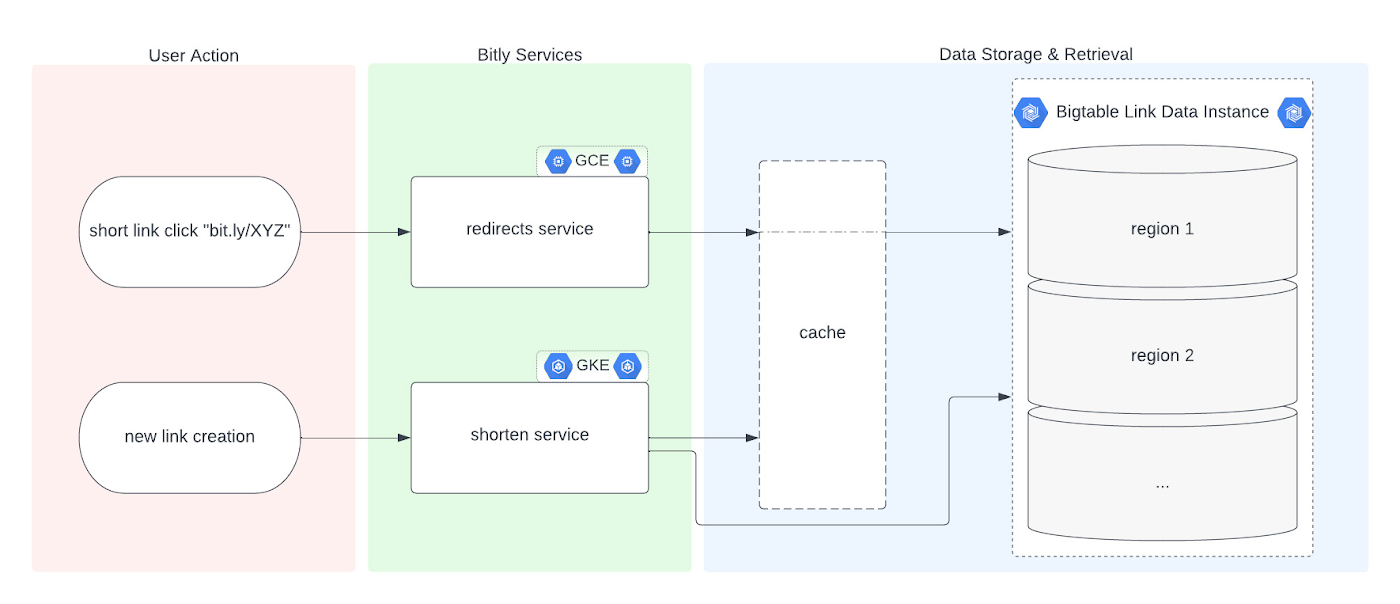
Before we dive into the Bigtable migration, it’s useful to understand the basics of our link management system. When a user shortens a long URL with Bitly, information is saved to the backend data stores through our API layer. This information consists of a Bitly short link and the corresponding destination link for proper routing, as well as some additional metadata. When a user clicks the Bitly short link, our services query these same backend data stores for the redirect destination for the request. This basic flow, which also includes other Bitly link options like custom back-halves, is the backbone of the Bitly link management platform.
Where Bigtable comes in
As mentioned, after researching our options, the solution that best fit our needs was Bigtable. It offered the features we were looking for, including:
- A 99.999% SLA
- Limitless scale
- Single-digit millisecond latency
- A built-in monitoring system
- Multi-region replication
- Geo-distribution, which allows for seamless replication of data across regions and reduces latency
- On-demand scaling of compute resources and storage, which adjusts to user traffic and allows our system to grow and scale as needed
- Seamless integration with our general architecture; we use Google Cloud services for many other parts of our system, including the APIs that interact with these databases
- A NoSQL database that doesn’t require relational semantics, as the datasets we’re migrating are indexed on a single primary key in our applications
Making the move
We targeted three of our major, self-managed datasets to migrate. The larger two were organized in a sharded database architecture. The first thing we did for migration was prepare the new Bigtable database. We iterated over a schema design process and conducted a thorough performance analysis of Bigtable to ensure an uninterrupted user experience during and after the migration. After that, we made minor adjustments to our application code so that it could seamlessly integrate and interact with Bigtable. Finally, we implemented a robust post-migration disaster recovery process to mitigate any potential risks.
During the actual migration, we enabled our applications to start a “dual writes” phase. This involved concurrently writing new link data to both our existing MySQL and the new Bigtable tables. Once data started writing to our Bigtable instance, we ran our migration scripts. We used a Go script to walk each of the existing MySQL datasets and insert each row into Bigtable. This enabled us to clean up outdated information and backfill older records with newer field data.
Cleaning up clutter along the way
In the process of migration, we were actually able to free up a huge amount of storage. Because of the elimination of an early feature of the Bitly platform, we were able to exclude from the migration to Bigtable a little less than half of the total data stored in MySQL. Since we were creating a completely clean dataset, we had the opportunity simply to skip those unneeded rows during the migration.
Altogether, the migration process walked through 80 billion MySQL rows, which resulted in just over 40 billion records finding their new home in Bigtable. In the end, our starting point with Bigtable is a 26 TB dataset, not including replication. A set of concurrent Go scripts running in parallel on a handful of machines allowed us to complete this migration project in six days. (Go rarely disappoints.)
Write twice, cut once – validation before migration
Next up was the data validation and cutover period when we started returning data from Bigtable, but continued to write to MySQL as a precaution in case we needed to roll back at any point.
As we dove into the validation process, we compared the data between MySQL and Bigtable and noted any discrepancies whenever a link was clicked or created. After verifying that all our responses were stable, we proceeded with a gradual cutover process, rolling out in percentages until we reached 100% Bigtable for all writes and reads. After a comfortable run period, we’ll turn off the dual writes completely and finally decommission our workhorse MySQL hosts to live on a farm upstate.
Google’s got Bitly’s back(ups)
Our data is our lifeline, and we’re doing everything we can to ensure it’s always protected. We put together a redundancy plan using both Bigtable backups as well as a process for keeping a copy of the data outside Bigtable for true disaster recovery.
The first line of defense involves a switchover to the backup Bigtable dataset in case we need it. Beyond that, we’ve implemented two more layers of defense to protect against instance failure, corrupted data, and any other data failure that would require a restore of one or more tables from backup.
For this process, we start by creating daily Bigtable backups of our tables that we store for a fixed number of days. Second, we execute a Dataflow job to export our data from Bigtable into Cloud Storage approximately every week. And, if the need arises, we can use Dataflow to import our data back from Cloud Storage into a new Bigtable table.
While running the Dataflow jobs to export from Bigtable to Cloud Storage, we’ve seen an impressive export speed of 7-8 million rows read per second on average and up to 15 million per second at times. All the while, our production reads and writes continued without disruption. When we tested the Cloud-Storage-to-Bigtable restore job, the write speed, expectedly, increased with instance scale — at the maximum node quota for our regions, we observed an average of just under 2 million rows per second written to our new table.
Short links for the long haul
As mentioned above, not only did Bigtable meet our technical requirements and operational needs, but we also chose Bigtable because it sets us up for future growth. Its ability to scale seamlessly over time while improving our system availability SLA was a major factor in our decision.
As we increase our scale by 5x, 10x, or more, it’s imperative that our data backbone scales accordingly and that the SLAs we provide to customers stay stable or even add another coveted “9”. We have big plans in the coming years and Bigtable will help us achieve them.
Interested in learning more? We found the following resources to be useful in our journey to Bigtable evaluation and ultimate adoption:
- Evaluate Bigtable schema design for your relational database and application workloads
- Understand how to increase availability and distribute data globally with Bigtable replication in any region combination of your choice
- Learn more about Bigtable backups and importing/exporting data with Bigtable Dataflow templates
Bonus: If you’re interested in learning more of the nuts and bolts of how we migrated the data, I’ll be talking all about that very topic at GopherCon 2023 this September in San Diego!
3508
Of your peers have already downloaded this article
19:30 Minutes
The most insightful time you'll spend today!
While data has influenced major business decisions throughout the ages, the term “data warehouse” isn’t even half a century old. But it’s an important concept; by centralizing data from many disparate sources, analysts can make more informed decisions. Traditionally, this has meant collecting data in on-premises infrastructure. But as data volumes have grown, these legacy systems have not been able to keep up with changing demands: They are difficult to scale, offer no support for machine learning and artificial intelligence initiatives, and are simply too expensive to maintain.
With increased advances in technology, the introduction of more cost-effective compute and storage options have changed the data warehouse landscape. Now more than ever, businesses need an agile and efficient analytics infrastructure that allows them to derive insights at a fraction of the cost of legacy systems. Modern data warehouses can give organizations the competitive edge, offering customers fast and easy access to business intelligence while seamlessly scaling to meet increased demands.
In this ebook, based on the keynote presentation featuring Forrester Analyst Michele Goetz at the 2019 Future of Your Data Warehouse digital conference, we’ll look at the evolution of data warehousing and how a cloud infrastructure can offer immense benefits for the future.
Firestore Cheatsheet to Unlock Application Innovation

3743
Of your peers have already read this article.
2:00 Minutes
The most insightful time you'll spend today!
Your product teams might ask – “Why does it take so long to build a feature or application?” Building applications is a heavy lift due to the technical complexity, which includes the complexity of backend services that are used to manage and store data. Every moment focused on this technical complexity is a distraction from delivering on core business value. Firestore alters this by having Google Cloud manage your backend complexity through a complete backend-as-a-service!
Firestore is a serverless, NoSQL document database that unlocks application innovation with simplicity, speed and confidence.
It acts as a glue that intelligently brings together the complete Google Cloud backend ecosystem, in-app services from Firebase and core UI frameworks & OS from Google.
What is Firestore?
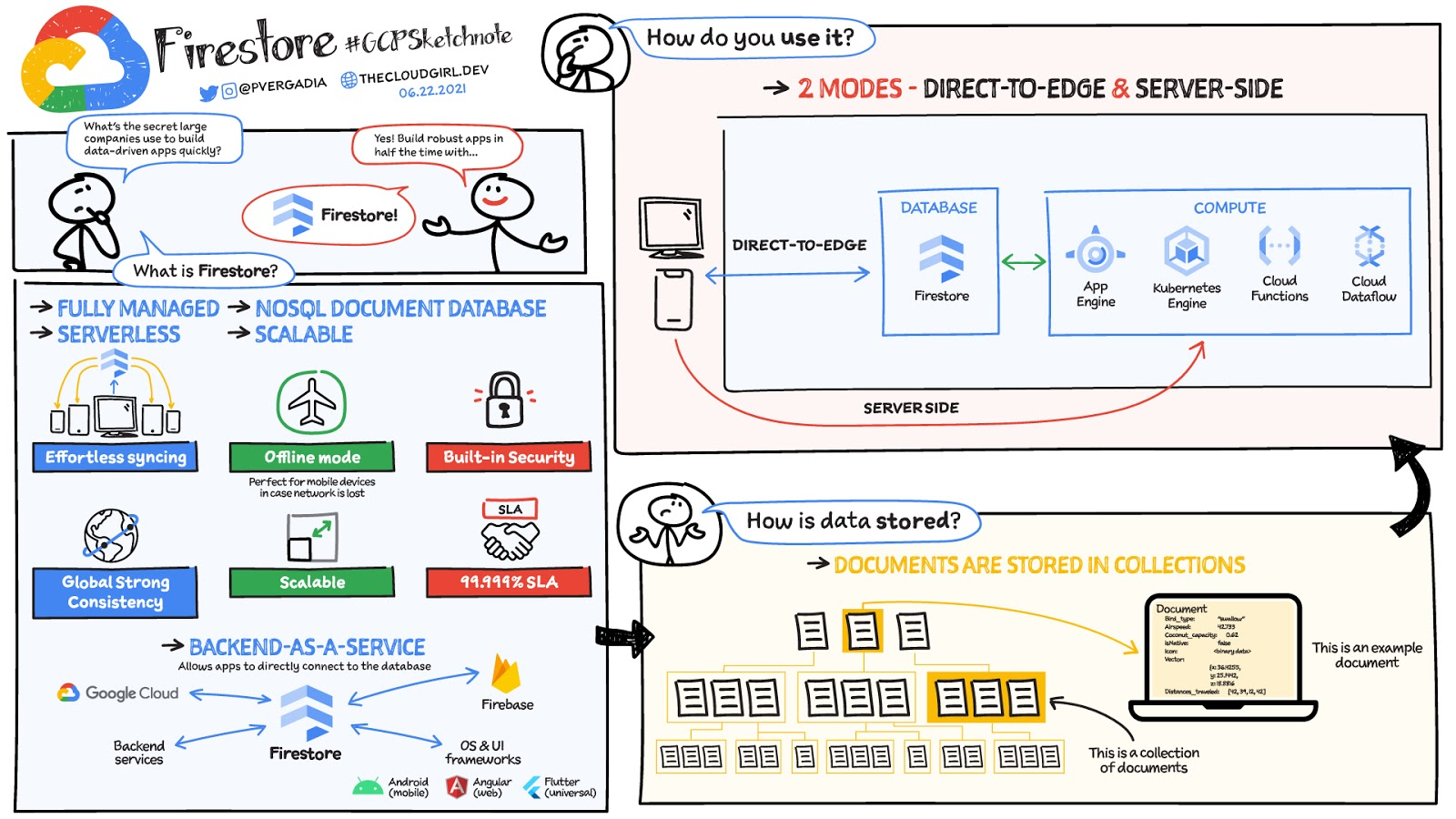
Firestore is a serverless, fully managed NoSQL document database that scales from zero to global scale without configuration or downtime. Here’s what makes Firestore unique:
- Ideal for rapid, flexible and scalable web and mobile development with direct connectivity to the database.
- Supports effortless real time data synchronization with changes in your database as they happen.
- Robust support for offline mode, so your users can keep interacting with your app even when the internet isn’t available or is unreliable.
- Fully customizable security and data validation rules to ensure the data is always protected
- Built-in strong consistency, elastic scaling, high performance & best in class 99.999% availability
- Integration with Firebase and Google Cloud services like Cloud Functions and BigQuery, serverless data warehouse.
- In addition to a rich set of Google Cloud service integrations, Firestore also offers deep one-click integrations with a growing set of 3rd party partners via Firebase Extensions to help you even more rapidly build applications.
Document-model database

Firestore is a Document-model database. All of your data is stored in “documents” and then “collections”. You can think of a document as a JSON object. It’s a dictionary with a set of key-value mappings, where the values can be several different supported data types including strings, numbers or binary values..
These documents are stored in collections. Documents can’t directly contain other documents, but they can point to subcollections that contain other documents, which can point to subcollections, and so on. This structure brings with it a number of advantages. For starters, all queries that you make are shallow, meaning that you can grab a document without worrying about grabbing all the data underneath it. And this means that you can structure your data hierarchically in a way that makes sense to you logically, without having to worry about grabbing tons of unnecessary data.
How to use Firestore?
Firestore can be used in two modes:
- Firestore in Native Mode: This mode is differentiated by its ability to directly connect your web & mobile app to Firestore. Native Mode supports up to 10K writes per second, and over a million connections.
- Firestore in Datastore Mode: This mode supports only server-side usage of Firestore, but supports unlimited scaling, including writes.
Conclusion
Whatever your application use case may be, if you want to build a feature or an application quickly using Firestore backend-as-a-service. For a more in-depth look into Firestore check out the documentation. https://www.youtube.com/embed/moglAjmwmUQ?enablejsapi=1&
For more #GCPSketchnote, follow the GitHub repo. For similar cloud content follow me on Twitter @pvergadia and keep an eye out on thecloudgirl.dev.
Google Cloud’s Firebase Realtime Database and BigQuery AllowsCastbox to Ramp Up Customer Experience

8184
Of your peers have already read this article.
3:30 Minutes
The most insightful time you'll spend today!
Demand for spoken audio content such as podcasts remains robust despite the proliferation of video services and other entertainment options for consumers. Shibin Li, Co-founder of Castbox, credits growth of the global podcast platform to the following: speed and availability, market-leading features, the proliferation of smart devices to deliver audio content, and activities — such as driving and working around the house — that make consuming video difficult.
Founded in 2016 and headquartered in Beijing, China, Castbox enables users to locate, access, and create spoken audio content. Available on iOS and Android, Castbox supports 50 million podcasts, on-demand radio programs, and audiobooks in 70 languages from 175 countries. The platform hosts about 2 million users per day and is the largest podcast platform on Android.
Castbox includes a range of features that build on its core service to provide a high-quality user experience. These features include curated podcast recommendations and in-audio search.
A combination of services
At its inception, Castbox relied on a combination of a multinational cloud services, as well as Google Cloud Platform (GCP) services, including the Google BigQuery analytics data warehouse and Cloud APIs to provide programmatic interfaces with Google Cloud services, and a range of services from the Google mobile development platform Firebase.
However, as Castbox matured and its user base expanded, the business increased its reliance on Google Cloud Platform and Firebase.
“We needed to access stable cloud services as we could not tolerate long periods of downtime that would compromise the user experience,” says Li. “Furthermore, we had to support up to 50,000 concurrent connections, and potentially more in future, without disruption.”
“Based on our analysis of the data in Google BigQuery, we can determine what type of content users are listening to, how long they like to listen to it, and when they like to listen to it. This allows us to recommend similar podcasts to each user based on the preferences he or she expressed, encouraging activity on and return visits to our platform.”
—Shibin Li, Co-Founder, Castbox
Competitive differentiation
Castbox also found machine learning-powered Google Cloud Platform APIs could help deliver features, such as in-audio search, that differentiate the podcast platform from its competitors. In addition, Firebase SDKs and Firebase A/B Testing would enable Castbox to create and analyze new applications, as well as make adjustments based on user feedback. Firebase Realtime Database would allow the business to support tens of thousands of concurrent user connections.
The diligence of the Google Cloud team in advising Li and her team about forthcoming products and services also swayed Castbox towards Google technologies. The business gained the opportunity with Google to join several programs that offered early access to Google innovations.
Signature in-audio search service
Castbox now uses Google Cloud Platform services in the Tokyo, Japan, and U.S. East regions. Cloud Speech-to-Text API plays a key role in delivering Castbox’s signature in-audio search service. This service enables users to search transcriptions of audio content on the platform for words or phrases. The search results incorporate the title of the podcast and the search term in context (for example, within the sentence or sentence excerpt in which it appears). Each use of the word or phrase is time-stamped so it can easily be found. The API enables Castbox developers to apply neural network algorithms to achieve audio-to-text conversion accuracy rates of greater than 96%, while search queries typically experience latency of just 50 milliseconds.
In addition, the latency of comparison data, converting audio to text, is only about 250 milliseconds, contributing to the processing of about 12 minutes worth of audio to text in just 10 minutes. “We can process about 20 hours of audio files in one day,” Li says. “This enables us to transcribe and index all the new episodes of a podcast in that period.”
50,000 concurrent connections
With Firebase Realtime Database, Castbox now supports up to 50,000 concurrent connections to its platform with an average latency per connection of just 10 milliseconds. “Firebase Realtime Database also allows us to continue operating in offline mode, which is extremely helpful if we experience any network disruptions,” Li explains. “When we come back online again, any data is simply synchronized with the database.”
Google BigQuery and the analytics capabilities of Firebase SDKs also enable Castbox to monitor and analyze user behaviors. “Based on our analysis of the data in Google BigQuery, we can determine what type of content users are listening to, how long they like to listen to it, and when they like to listen to it,” Li explains. “This allows us to recommend similar podcasts to each user based on the preferences he or she expressed, encouraging activity on and return visits to our platform.”
“Given our queries may span up to 40 days of data, we may be analyzing up to 1,200 GB at one time. We have no problem doing this with Google BigQuery.”
—Shibin Li, Co-Founder, Castbox
Castbox also uses its analyses of Google BigQuery data to amend banners and summaries on its platform to encourage users to listen to additional content. Furthermore, the service is prepared to make surprise recommendations of content to users based on the preferences and reactions of users with similar tastes.
“We analyze a pool of data growing at up to 30 GB per day,” Li explains. “Given our queries may span up to 40 days of data, we may be analyzing up to 1,200 GB at one time. We have no problem doing this with Google BigQuery.” These analyses also support Castbox’s decision to start creating original content, such as finance and economic news, for its platform.
Checking weekly changes
Castbox does not rely only on analyzing user data to deliver a high-quality experience. The business aggregates user feedback from emails and Google Play reviews to make weekly changes to its platform. It then uses Firebase A/B Testing to check whether these changes are met with a positive user response.
“We are extremely pleased with Google Cloud Platform and Firebase. We have been able to differentiate ourselves from our competitors and provide an attractive option for users at a time when content and entertainment options are exploding. We have a great opportunity with Google to continue to improve the value of our offering to users and build engagement and loyalty.”
—Shibin Li, Co-Founder, Castbox
Castbox’s positive experiences with Google Cloud Platform are encouraging the business to grow its use of the product. “We are trying to move some more services to Google Cloud Platform because it is very stable and scalable,” Li says. The business is keen to explore the capabilities of Cloud Pub/Sub to provide low latency messaging between applications, Cloud Spanner to deliver a distributed relational database service, and Cloud Dataflow to transform and enrich data in stream and batch modes.
“We are extremely pleased with Google Cloud Platform and Firebase,” Li concludes. “We have been able to differentiate ourselves from our competitors and provide an attractive option for users at a time when content and entertainment options are exploding. We have a great opportunity with Google to continue to improve the value of our offering to users and build engagement and loyalty.”
More Relevant Stories for Your Company

Google Cloud Data Heroes Series: Honoring Data Practitioner’s Journey and Learning with GCP
Google Cloud Data Heroes is a series where we share stories of the everyday heroes who use our data analytics tools to do amazing things. Like any good superhero tale, we explore our Google Cloud Data Heroes’ origin stories, how they moved from data chaos to a data-driven environment, what

Is it Cheaper to Run Oracle Workloads on Google Cloud Than On-Prem? Yes, By 78%
On-premises relational database management systems (RDBMS) are the traditional heart of many core business operations, but cloud-based relational databases provide the agility and scalability of the cloud while eliminating many of the onerous tasks associated with maintaining your own infrastructure. To find out how much more value cloud-based relational databases

Customer Voices: How Firms from Across Industries Leverage Google Cloud
From powering everyday operations and accelerating application innovation, to providing tools for specific business needs and executing on big ideas, to advancing the security of technology solutions, companies from across industries have leveraged Google Cloud for business benefits. Companies from across industries have turned to Google Cloud for transforming their

DR for Cloud: Architecting Microsoft SQL Server with Google Cloud
Database disaster recovery (DR) planning is an important component of a bigger DR plan, and for enterprises using Microsoft SQL Server on Compute Engine, it often involves critical data. When you’re architecting a disaster recovery solution with Microsoft SQL Server running on Google Cloud Platform (GCP), you have some decisions to make
