





Tips to Get Most of Google Workspace and Make Hybrid Work Efficient and Effective!

3745
Of your peers have already read this article.
1:30 Minutes
The most insightful time you'll spend today!
In response to the pandemic, an overwhelming 92% of the U.S. workforce is now interested in working in a hybrid or fully remote capacity1. All employers, including government leaders, are now critically focused on finding the right tools and techniques to foster engagement, improve productivity, and strengthen relationships – in-person and virtually – or risk losing and/or retaining top talent.
Creating a positive work environment starts with having the right technology that can provide a variety of meeting tools to make work easier and more productive from any location. Google Workspace enables agency leaders to support their workforce with capabilities to address a variety of needs, from virtual training and learning, to mobilizing emergency response and critical service delivery. Below we’ve highlighted some of our top tips for getting the most out of Google Workspace to make hybrid work more efficient and effective.
Capture meeting agendas in a Google Doc
Create more effective, engaging meetings by attaching an agenda doc to your Google Calendar event and invite your attendees in to comment and review ahead of time. Google Docs, Google Slides, and Google Sheets allow collaborators to leave color-coded comments that can be incorporated into a live video meeting or a face-to-face roundtable meeting.
Engage attendees with interactive features in Google Meet
We’ve added new features to make meetings more interactive and inclusive throughout 2022. New in-meeting reactions, livestream Q&A and polls, and streaming meetings directly to YouTube, and client-side encryption are all coming to Google Meet soon. We’re incorporating Meet directly into Docs, Sheets, and Slides to make it easier to coordinate on projects.
Knowing how to include everyone into a meeting, even while some folks are remote and some are in the office, will be critical to bringing cohesion to the work experience. Government leaders can foster a culture that helps workers be more productive, satisfied, and perhaps even happier with their work lives.
Add focus time to your calendar and see how time is spent
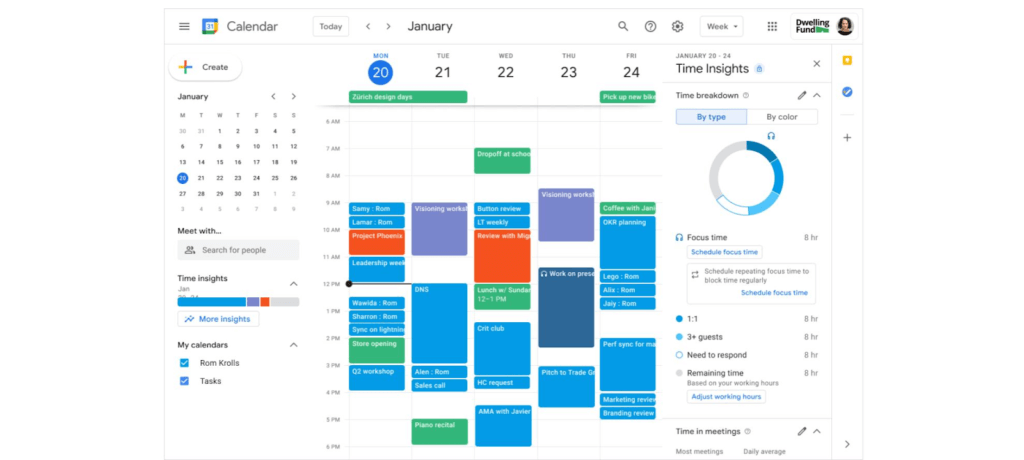
Google Workspace has also introduced product features to promote wellness. This includes focus time on Google Calendar, out of office and do not disturb statuses on Google Chat, or even backgrounds and noise cancellation on Google Meet that allow individuals to separate their home from work. Allowing employees to set boundaries or notify others of working times can help combat work fatigue. Time Insights in Calendar provide individuals with personalized analytics to see how time is spent across meetings and collaborators throughout a week. A secure cloud environment further brings these tools together to create systems of collaboration.
Creating positive outcomes with a culture focused on integrated work environments
The shift to hybrid work has already started leading to more meaningful engagements among all employees. Video calls have connected the new, tech savvy generation of workers with more experienced workers. In a Fedscoop Radio podcast on embracing hybrid-work strategies and tools, Gary Dannoff, Global Google Workspace Strategic Alliance Leader, noted that multigenerational teams with a 25-year age gap between team members are 75% more likely to have positive outcomes than teams with a smaller age span or none. As we return to the office, let’s engage with and support this new culture of cross-cultural, cross-generational, and cross-geographic collaborative environments created by the challenges we all adapted to during the pandemic.
Google Workspace supports a shift toward future-ready workplace cultures while providing the empathy and confidence needed for returning employees. Danoff also explains that to create a “future-proof” culture, you need to shift your mindset towards building a workplace that is future-ready. Using modern technology to foster collaboration in an evolving work environment helps organizations transform how work is done.
Collaborative technology facilitates productivity and constituent engagement
Agencies around the country are embracing the new era of hybrid work. The State of Arizona migrated 36,000 employees to Google Workspace with little disruption to the way people did their jobs. Now, Arizona is planning to expand their platform to support even more departments that require highly regulated data.
To help constituents get back to work, states like Rhode Island and Wisconsin have created Virtual Career Centers that leverage Google Cloud solutions, which includes Google Workspace, where constituents can schedule meetings and video conferences with career coaches, develop and collaborate on resumes using cloud-based document storage, communicate directly with job recruiters, attend virtual job fairs, and apply to open positions.
For more ideas on how to bring a collaborative, innovative culture into the workplace, catch up on content from the Google Workspace Summit.
1 Source: https://www.pwc.com/us/en/library/covid-19/us-remote-work-survey.html#content-free-1-0f39
Google Workspace Now Available to Over 3 Billion Users!

3807
Of your peers have already read this article.
3:00 Minutes
The most insightful time you'll spend today!
Over the past year, Google Workspace rapidly evolved to meet the needs of users as we collectively grappled with remote and hybrid work. First, we launched Google Workspace to commercial customers, which brought together the powerful individual apps people know and love into a single, integrated solution. Then we made Google Workspace available to nonprofits, governments, and schools. And in June, we brought the power of Google Workspace to everyone, enabling more than 3 billion users to transform the way they connect, create, and collaborate. To extend these experiences further, we’ve seen a stunning 4.8 billion apps installed in Google Workspace to date. We’re excited to see so many users personalize their experience by adding third-party apps or by building their own to create a more powerful engine for productivity and collaboration.
As we celebrate the more than 5,300 public apps in the Google Workspace Marketplace that provide users with the opportunity to extend their experience, we’re increasing our investment in the underlying platform. Developers have been able to build applications that integrate with Gmail, Drive, and Docs for years. And today, we’re announcing significant enhancements to the Google Workspace platform by making it just as easy for developers to build applications and integrate with Google Meet, Chat and Spaces.
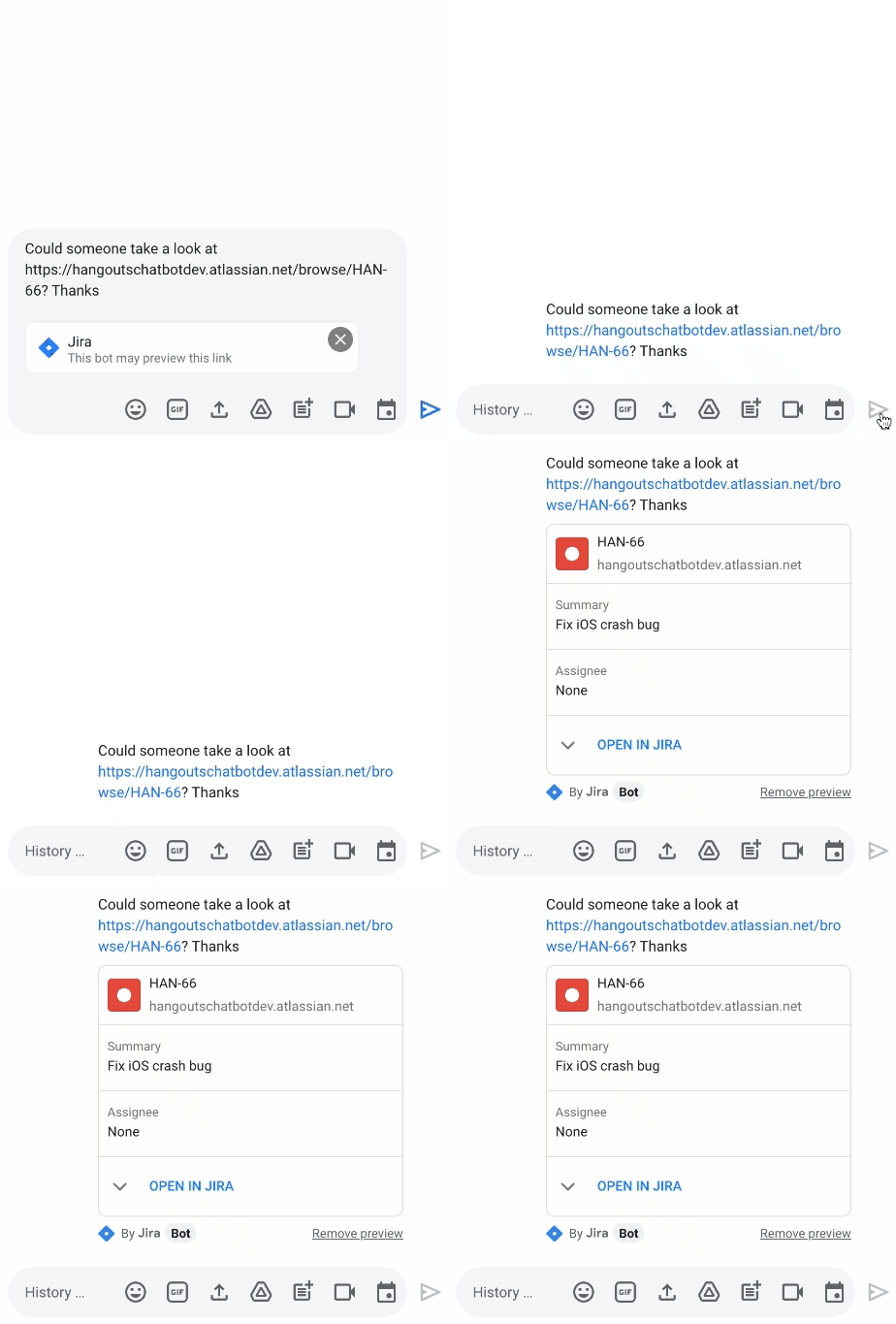
We’re releasing a new Jira integration for Google Chat and Spaces. This integration enables users to create new tickets quickly, see actionable previews, and monitor issues as they come into the space they’re already using for collaboration.
“Modern work requires people to switch contexts and tools faster than ever before. We believe an open ecosystem and tight integrations among the tools that users rely on every day is vital to their success. Since 2017, our Trello integration with Gmail has been installed by more than 7 million people. Today, we are excited to build on the partnership between Atlassian and Google to propel work collaboration further with the integration of Jira with Google Chat and Spaces,” said Joff Redfern, Chief Product Officer, Atlassian.
As work continues to evolve, we’re especially committed to the concept of collaboration equity: the ability for everyone to participate and drive impact no matter their location, technical ability, language preference, or device. Carrefour Property – Carmila is evolving how they innovate by connecting frontline workers to those in the office with our no-code development platform AppSheet. For example, after discovering a problem, onsite managers previously had to send an email, enter data into a spreadsheet, and sometimes attend a meeting to explain the issue. Now, with AppSheet, they can simply input the data on their phone in a single step, and the team back at headquarters can see and act on the issue while also tracking all the other issues being reported from other locations.
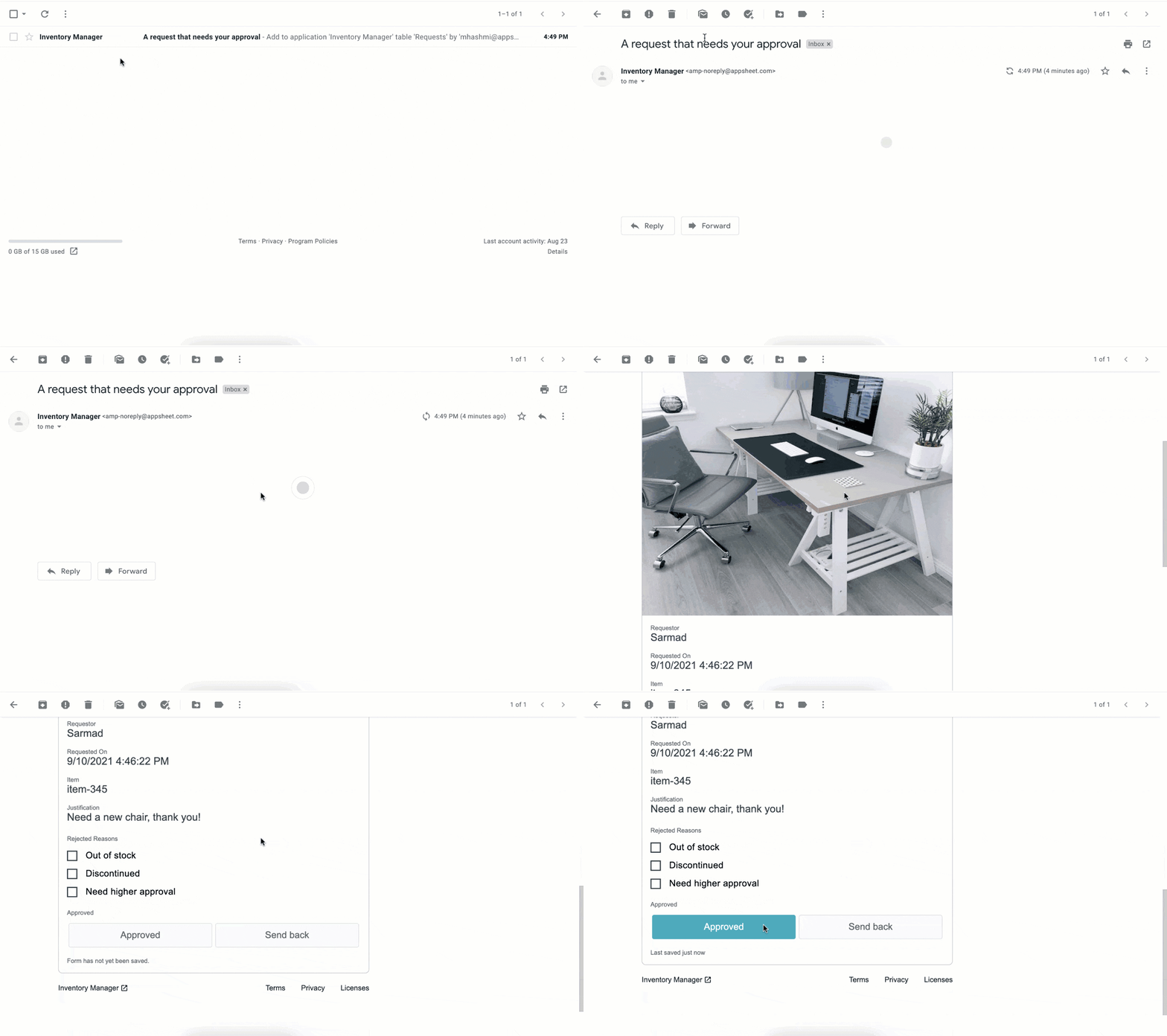
We continue to empower frontline workers and IT teams alike, bringing more flexibility into Google Workspace by integrating AppSheet into Gmail. This new integration allows anyone—regardless of their coding experience—to reclaim time with custom, no-code apps and automations. Budgets and vacation requests can be approved, inventories and asset management systems can be updated, and much more—all with AppSheet and directly from your inbox.
New investments in security
As we continue to deliver delightful new experiences for users, we are keeping security at the forefront; it’s infused in every layer of our product design so that customers have the flexibility and trust needed to operate in a secure environment. To build on this commitment, we’re announcing Google’s new Work Safer offering to help organizations, their employees, and partners collaborate and communicate securely and privately in today’s hybrid work environment. Work Safer will provide companies with access to best-in-class security for email, meetings, and messages, documents, and more. It uniquely brings together the cloud-native, zero-trust solutions of Google Workspace with industry-leading solutions from across Google and its cybersecurity partners, CrowdStrike and Palo Alto Networks.
To further strengthen security and privacy across the Google Workspace platform, we’re also announcing four key new capabilities:
- In June, we announced that Client-side encryption (CSE) was available in beta for Drive, Docs, Sheets, and Slides. Now we’re bringing CSE to Google Meet, giving customers complete control over encryption keys while helping them meet data sovereignty and compliance requirements. We’re also pleased to announce the beta of our Key Access Service Public APIs, which enables customers to directly manage their encryption keys without the need for a third-party partner.
- Data Loss Prevention (DLP) for Chat is now in beta. This is a continuation of our ongoing commitment to help organizations protect their sensitive data and information from getting into the wrong hands, without impacting the end-user experience. With DLP for Chat, you can enable the power of spontaneous conversation between individuals and teams, while preventing sensitive and confidential information from leaving your organization. Interested customers can sign up for the Client-side encryption and DLP for Chat betas today.
- Drive labels are now generally available. Organizations are now able to classify files stored in Drive based on their sensitivity level. Labels integrate with Google Workspace Data Loss Prevention, making it easier to manage external sharing, downloading, and printing of sensitive files.
- We’re rolling out additional protections to safeguard against abusive content and behavior. If a user opens a file that we think is suspicious or dangerous, we’ll display a warning to the user to help protect them and their organization from malware, phishing, and ransomware. This functionality is now available in Google Docs and will be rolling out soon for Google Sheets and Slides.
Fueling the future of work and collaboration
Our mission is to empower everyone with an innovative and seamless experience that gives people—no matter their location or technical ability—the opportunity to drive real impact. At its core, the vision of the Google Workspace platform is to help you build your own innovation momentum, while providing a foundation of security and privacy. I hope you’ll join me at the Google Cloud Next ’21 event where you can learn more about the Google Workspace vision, and even better, see these new experiences in action.
In sync for better efficiency: Effective collaboration strategies for distributed workforces

3194
Of your peers have already read this article.
2:30 Minutes
The most insightful time you'll spend today!
Workplace collaboration continues to evolve as hybrid work expands its footprint. While both “same-time” and “staggered-time” (or asynchronous) collaboration modes each have their place in the hybrid work environment, organizations and teams sometimes overuse one mode over another. That’s probably because in-person meetings or collaborating in real time have been the default for many organizations, leading to a “same-time” bias, even as new tools make working across time zones and locations seamless. Ultimately, the key for making collaboration scalable and to support employee wellbeing is choosing the right method and tool for the task at hand. With that in mind, here are some ways to get the most out of same-time and staggered-time collaboration in your organization.
Making same-time collaboration more valuable
Historically, many organizations have valued same-time interactions for the fast, direct exchange of information and feedback. They also bring teams together and build human connections. While all these outcomes are powerful and important, same-time collaboration also has some drawbacks — especially in a hybrid environment.
First, same-time interactions can be difficult to arrange. Coordinating schedules requires advanced planning, especially when employees are distributed across time zones or working outside of traditional business hours. Second, back-to-back scheduling can contribute to meeting fatigue. In our recently commissioned global hybrid work survey with Economist Impact, 72% of respondents acknowledged that virtual meetings improve inclusion and participation. At the same time, 68% said there are too many virtual meetings in general, suggesting that even though employees value same-time collaboration, they want it in moderation.

To address these challenges, organizations should consider the collaboration scenarios in which same-time interactions can make the greatest impact. It’s particularly useful when consensus or immediate action is needed, as in briefings, decision-making, and crisis management.
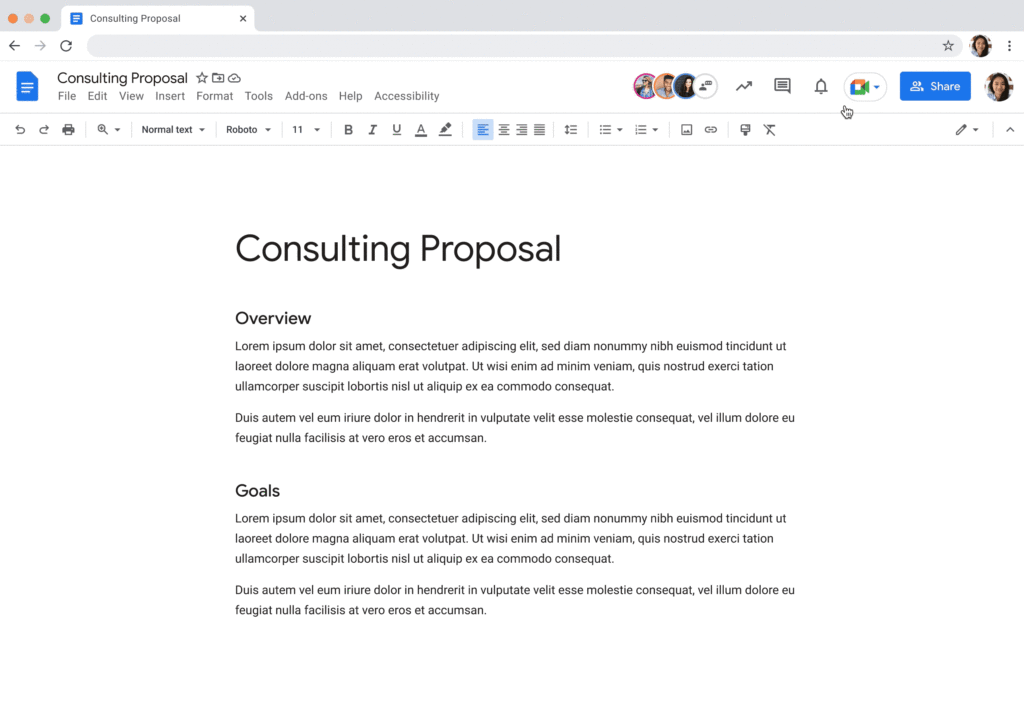
For effective same-time collaboration in a hybrid environment, your employees need tools that help them coordinate real-time interactions and minimize time spent switching apps and context. With Google Workspace, teams can create and access a shared agenda or Google Doc inside a Google Calendar invite, helping align expectations and goals before, during, and after scheduled same-time work sessions. And, the more integrated your collaboration tools are, the easier it is for employees to get right to work when inspiration strikes or a quick decision is needed. For example, team members can initiate spontaneous work sessions by starting a Google Meet directly from Docs, Sheets, or Slides.
Additionally, consider how you can bring real-world collaboration activities into virtual environments to enhance same-time collaboration for distributed teams. For instance, digital whiteboard tools, like Jamboard and Miro in Google Meet, allow people to brainstorm, ideate, and problem-solve in real time from anywhere. Interactive solutions like these empower employees to work together in new ways.
Expanding what’s possible with staggered-time collaboration
Widespread adoption of hybrid work has prompted organizations to turn more frequently to staggered-time collaboration — where team members are free to share and respond to information in their own time. A key benefit of staggered collaboration is improving the experience and wellbeing of employees — specifically, by promoting participation across the team and support for flexible work habits. Allowing team members to engage when they’re most productive, or when it doesn’t interfere with their scheduled focus time, supports their wellbeing. It can also help employees feel heard, valued, and empowered. Staggered-time collaboration can also give team members who may feel uncomfortable or vulnerable speaking up in real time, or who just need time to think about their feedback, a more inviting way to share their perspectives.
Staggered-time collaboration can enhance a range of collaboration scenarios, including assigning tasks and action items, knowledge- and resource-sharing, brainstorming, and giving feedback. To make these interactions successful, employees need secure, intuitive tools that give them the information they need to do their jobs from anywhere, at any time. For example, in Spaces, team members can initiate and take part in group chat threads devoted to project- and topic-based discussions, as well as access files and tasks, to stay in the loop whenever they’re able to participate. For people working on a task or project at varied times, creating a dynamic, single source of truth makes all the difference.
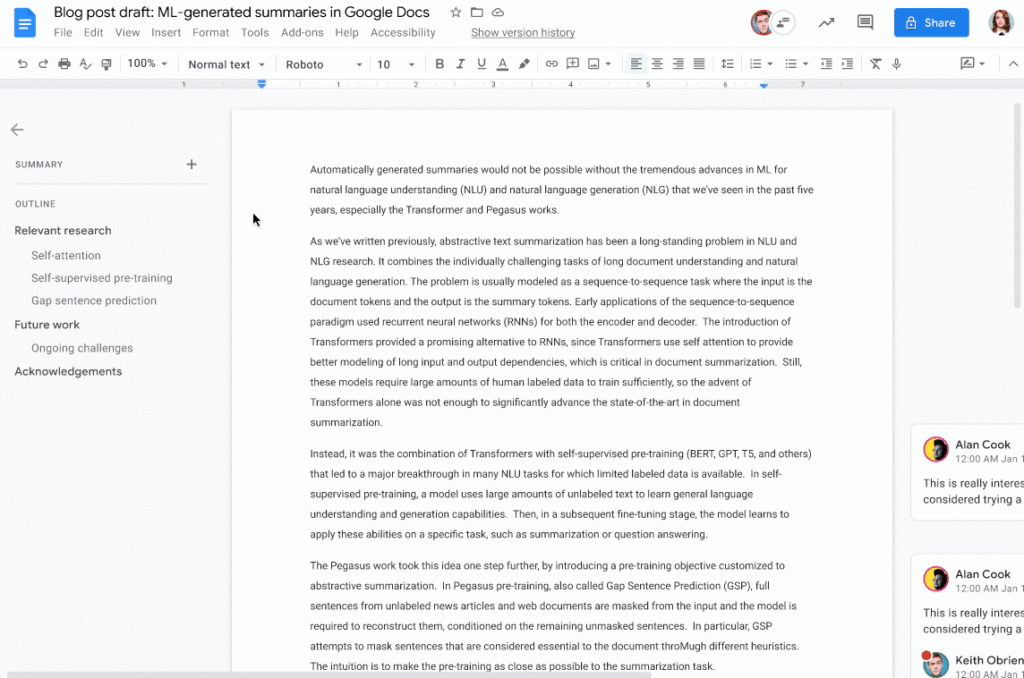
When collaborating on shared documents, a feature like smart canvas enables teammates to assign tasks, build checklists, and share files using @-mentions for easy information access. Meanwhile, automated, built-in summaries in Docs help the team get up to speed without losing focus. Features like these help everyone stay on the same page (literally), even if they’re contributing to a project at different times.
Flexibility and collaboration are not mutually exclusive
Helping people know which tasks call for real-time collaboration and which tasks are better done on their own time is critical for sustaining productivity and wellbeing in a hybrid work world. Employees who are empowered to work in ways that complement their needs, preferences, and schedules typically reward their organization for that flexibility. As Holger Reisinger, Paul Sephton, and Dane Fetterer wrote for the Harvard Business Review, “When leaders give employees the freedom to choose where and when they work, it signals they trust them to do the job they were hired to do. The data shows that that trust is then paid back…at a very high rate, building a tight-knit culture of inclusivity and belonging.”
When you create team norms around same-time and staggered-time collaboration, you can help your employees stay productive and connected — to each other and the broader organization. And by giving them tools that support seamless, secure collaboration experiences from anywhere, the impact on productivity, employee wellbeing, and morale can be transformational.
The Story Behind How Woolworth Innovates to Better Customer Experience

4397
Of your peers have already read this article.
2:30 Minutes
The most insightful time you'll spend today!
As one of Australia and New Zealand’s most innovative retailers, Woolworths is always looking for ways to use technology to give its customers more convenient ways to shop. This innovative approach does not stop with our customers. Our extensive staff needs intuitive technology to enable them to work more efficiently, collaboratively and effectively. To do this, they need to be able to access the right applications and information, from any location, using any device.
This is why we’ve decided to move to G Suite and Chrome. Changing to a cloud-based suite of tools is a key part of our strategy to use technology to promote greater collaboration, productivity, and effectiveness. Over the next 12 months, we will be rolling out Gmail, Google Calendar and Google Hangouts Meet to the staff in our national and state offices. This is the first phase of what we hope will be a company-wide transformation of our workplace technology.
We are also actively looking at how we can innovate with Google+, Google Drive and Google Sites to transform the way we approach other aspects of our business.
The move to G Suite and Chrome builds on the successful roll-out of Gmail and our ‘Tap to Support’ app on iPads to Woolworths supermarket store managers last year. The custom-made application, built on Google App Engine, helps our managers stay on the shop floor and focused on customers by allowing them to log a support ticket with our national support office in just one click rather than being tied to a PC in the back office.
Soon more of our staff will be able to experience the productive and collaborative benefits of being able to work from any device, anywhere. Geographically dispersed teams, like our merchandising or state-based workers, will be able to use Google Docs to collaborate in real-time.
Going Google will transform the way our employees interact with technology and collaborate with each other at every level of the organization. We’re looking forward to providing our staff with access to intuitive consumer technology at work and see the move to Google as the beginning of our journey towards a more efficient and innovative style of working.
Geneva Business School: Empowering the business leaders of tomorrow with collaborative mindsets

3954
Of your peers have already read this article.
3:30 Minutes
The most insightful time you'll spend today!
Education is about more than just imparting information. For the Geneva Business School (GBS), education is about teaching the necessary skills to adapt, survive, and thrive in the world after pupils have graduated. With a diverse, international student body spread out over five campuses, the school prides itself on fostering leadership, communication, and productivity skills as well as academic achievement. In 2016, GBS began searching for ways to help its students work together and improve communication. To do that, it turned to Google Workspace for Education.
“We wanted our content stored in a digital environment where the students could collaborate on projects even when working remotely,” says Carlos Moreno Gonzalez, Barcelona Campus Director at Geneva Business School. “For us the solution was Google Workspace.”
Improving collaboration, increasing accountability
Prior to 2016, GBS’ online course components were designed to be worked on individually. Students could download course materials from extranet sites to work offline on traditional word processing and spreadsheet software. If they were working together, they had to be physically in the same room or would communicate over email. GBS places a strong emphasis on collaborative work, but in such a fragmented setup, it could be hard for professors to work out exactly who had contributed what in each group.
“In just a few clicks you can get a really good picture of the whole class. Whenever we tried this before Google Classroom, we would enter the grades manually and it took forever.”
Sabrina Espasandin, Instructional Designer and Google Trainer, Geneva Business School
For GBS, the solution came from its Barcelona campus, which has a reputation as something of an innovation hub, says Sabrina Espasandin, Instructional Designer and Google Trainer at the school. “It’s smaller than the main campus in Switzerland so there’s more scope for experimenting with new technologies,” she says. GBS wanted to do more than just upgrade its email. The objective was to build an entire online platform enabling students, faculty, and staff to not only communicate with each other, but also to use it as a productivity platform for documents, spreadsheets, presentations, and more.
Connecting students and professors with Google Classroom
After evaluating its options, the Barcelona campus chose to implement Google Workspace for Education in early 2016, largely because of the widespread adoption of Google tools by students in their personal lives. “Most of our students were very familiar with Google tools and how Google works,” says Carlos. “It made the transition much easier for them.” With such a radical change, GBS also made sure to provide adequate training for everybody to help them overcome any issues that might arise during the transition. “There was a little pushback from people who had been using the same tools for a long time,” says Sabrina. “But once they saw for themselves the benefits of the new system, we turned sceptics into believers.”
The core of the new system was Google Classroom, a single, online destination where teachers and students could quickly and easily interact with each other no matter where they were. Gmail replaced the traditional email system, easing the load on the campus servers. Live editing in Docs, Sheets, and Slides meant that students could work on projects and presentations at the same time without having to email multiple versions, which could get buried in long threads.
“It’s changed the whole way we work. Students would post questions online, and other students would answer them before the teacher got there. It means the knowledge comes from the class, not just from the professor.” –
Carlos Moreno Gonzalez, Barcelona Campus Director, Geneva Business School
The faculty used Sites as an opportunity to update their course materials from static slideshows that had to be downloaded for offline viewing, into animated, interactive pages online. Meanwhile, Forms proved itself useful as a way for professors to setup quizzes online and, in conjunction with Google Classroom, to help automate the marking process and quickly analyze results.
A new platform, a new way of working
The online hub that GBS built in Barcelona with Google Classroom and Google Workspace was very quickly seen as a success. So much so, that within six months, the school rolled out Google Workspace to all of its other campuses. As of Q3 2018, GBS has activated more than 2,300 user accounts. The students benefit from instant communication, frictionless collaboration, and the ability to work on projects outside the classroom. It also means they are in a better position to answer each other’s questions without having to wait for a response from their teacher.
Meanwhile, GBS’ teachers no longer have to deal with an extranet that required them to upload all their own content in an overly complicated way or spend hours bulk-creating new email addresses at the start of each year. “The time saved in administrative tasks has been massive,” says Sabrina. “User creation is a breeze compared to the past.” In addition, the faculty found a new efficiency with rote tasks, such as grading analysis, which allowed them to spend more time focusing on students and assessing their specific needs.
“In just a few clicks you can get a really good picture of the whole class,” says Sabrina. “Whenever we tried this before Google Classroom, we would enter the grades manually and it took forever.”
“We’ve built a very personalized online platform designed to engage students and reduce dropout rates. With Google, we hope to bring the collaborative spirit we have in our normal classes to our online classrooms.” –
Carlos Moreno Gonzalez, Barcelona Campus Director, Geneva Business School
Meanwhile, Professors have found that, despite fears of an always-online culture, the collaborative nature of the new platform empowers students to help each other instead of just relying on help from the faculty.
“It’s changed the whole way we work,” says Carlos. “Students would post questions online, and other students would answer them before the teacher got there. It means the knowledge comes from the class, not just from the professor.”
With all of GBS migrated to Google Workspace, the search is on for the next leap forward. The school is currently working hard to provide some of its courses entirely online, for students who wish to work remotely but still benefit from GBS’ superior teaching and strong reputation. The content for the new modules will be hosted on Sites, while Google Classroom will serve as a central hub for teacher-student communication. GBS is working to personalize the modules for teachers and students alike. For example, every teacher will have access to a classroom roster that provides quick links to students’ digital portfolios, also hosted on a Google Site.
Building on the knowledge it has acquired in the last two years with various Google tools, the school is trying to make online learning more effective, as well as develop more in-depth measurements of student growth and progression. As it becomes more comfortable with Google Workspace and Google Classroom, GBS can look forward to exploring its new metrics with tools such as Google Data Studio.
“We’ve built a very personalized online platform designed to engage students and reduce dropout rates,” says Carlos. “With Google, we hope to bring the collaborative spirit we have in our normal classes to our online classrooms.”
Go Green with Google’s Latest Tool and Pick the Most Sustainable Cloud Region

5673
Of your peers have already read this article.
1:30 Minutes
The most insightful time you'll spend today!
As a Google Cloud customer, your carbon footprint is already carbon neutral: Google first achieved carbon neutrality in 2007, and has been purchasing enough solar and wind energy to match 100% of its global electricity consumption since 2017. Now, Google is targeting a new sustainability goal: operating on carbon-free energy (CFE) 24/7, everywhere, by 2030.
We want to empower you to make more sustainable decisions and progress with us towards this 24/7 carbon-free future. Earlier this year, we published the carbon characteristics of our Google Cloud regions. Later, we introduced a simple tool to help you pick a Google Cloud region, taking variables like price, latency and sustainability into account. Our next question was: what’s the best way to surface that sustainability info when you’re actually picking a region for your cloud resources?
Starting today, we are indicating regions with the lowest carbon impact inside Cloud Console location selectors. Available today for Cloud Run and Datastream, you’ll see it roll out to more Google Cloud offerings over time:
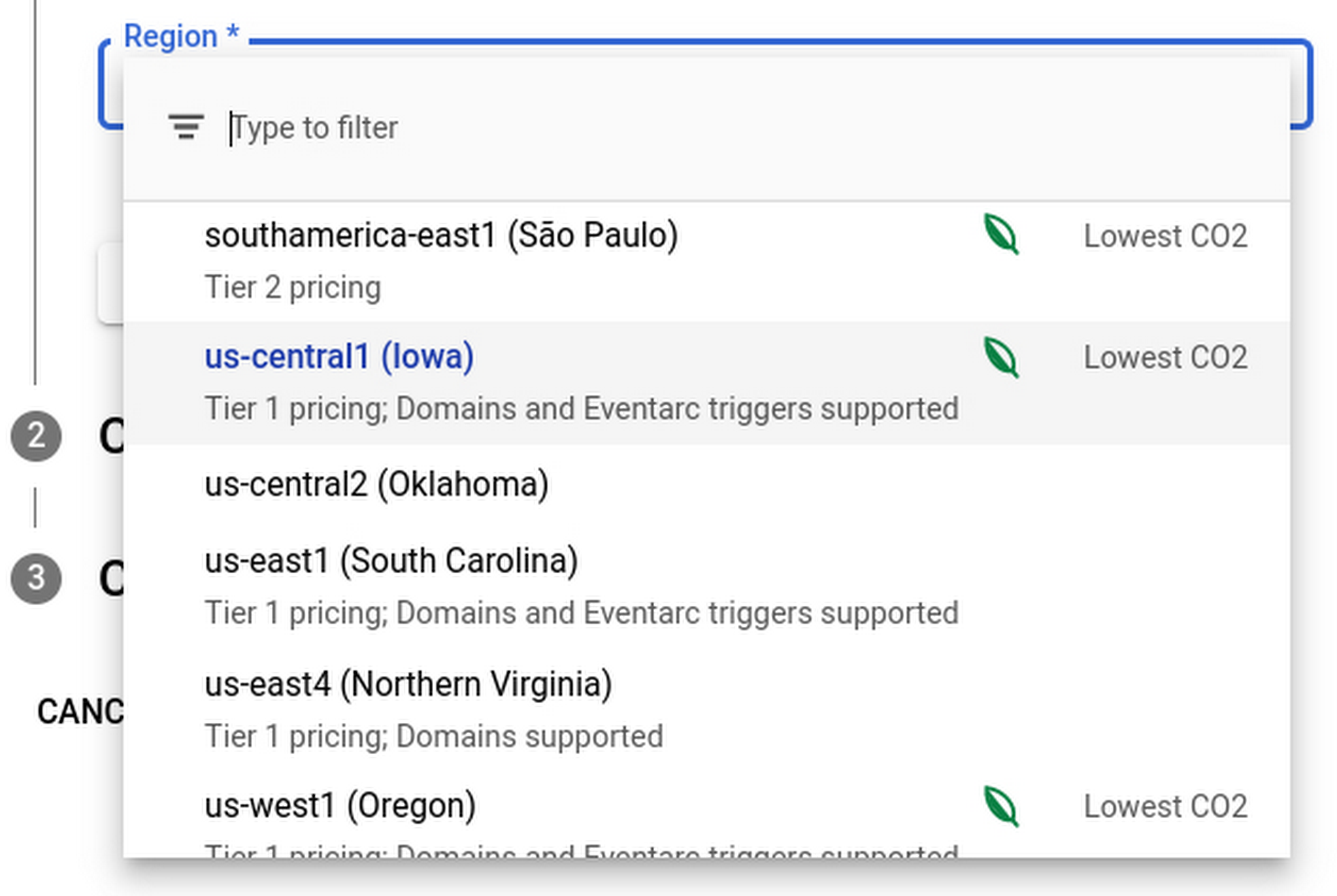
Regions that feature the “Lowest CO2” and the leaf have a CFE% of at least 75%, or, if the information is not available for this region yet, a grid carbon intensity of maximum 200 gCO2eq/kWh. You can read more about how we calculate these metrics in our documentation.
Before releasing this feature, we ran experiments to measure its impact: Users who were exposed to the enhanced region picker were 19% more likely to select a “low carbon” region for their Cloud Run service—a significant lift. These results show that by displaying carbon information in context of when you make the decision of picking a region, we are helping you make more sustainable decisions.
By sharing and displaying carbon information of Google Cloud regions, together we’re making tangible progress towards our goal of a carbon-free future. Learn more about Carbon free energy for Google Cloud regions.
More Relevant Stories for Your Company

Google Launches Smart Canvas to Stir-up Collaboration in Google Workspace
After more than a year of remote collaboration, many people are showing signs of digital fatigue. Throughout the pandemic, millions of employees bridged the physical distances with their colleagues by making themselves more available, joining a deluge of virtual meetings, and leaning into a dizzying array of tools and applications.

ShareChat Builds its Diverse, Hyperlocal Social Network. Thanks to Google Cloud
Editor’s note: Today’s guest post comes from Indian social media platform ShareChat. Here’s the story of how they improved performance, app development, and analytics for serving regional content to millions of users using Google Cloud. How do you create a social network when your country has 22 major official languages and

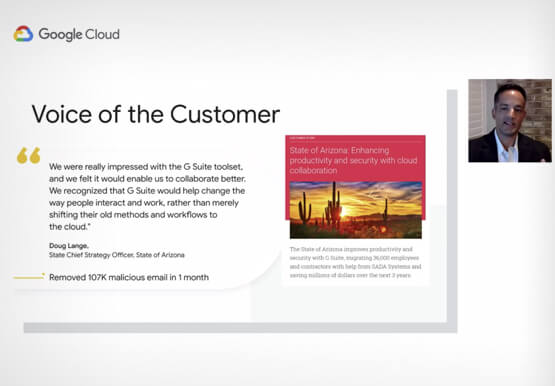


Lessons for the Indian Government: How the State of Arizona Innovates with Emerging Tech
Government agencies of every size and jurisdiction are being called upon to provide accurate and real-time information and deliver essential services across the globe in a world infested by COVID-19. Doug Lange, Chief Strategy Officer, state of Arizona, is primarily responsible for two things. One is Arizona's statewide IT Strategic
Quick Tips: How to Set Up a Business Without Investing Too Much
Running a business is everybody’s dream but only a few get to realize it. Among the many hurdles that entrepreneurs face, setting up the business with everyday tools like business emails, calendars, and finding cost-effective ways to collaborate are imperatives. But it isn’t a struggle in the age of the
