





Three Reasons Why Enterprises Must Think Next-gen Serverless

4925
Of your peers have already read this article.
2:00 Minutes
The most insightful time you'll spend today!
As we reflect on the past year, Heraclitus’ phrase “The only constant in life is change” has never rang more true. With the pandemic, companies had to shift operations, launch new products and adapt to extreme demand patterns, sometimes within a matter of weeks.
To respond to customer needs faster and more efficiently, many companies turned to serverless technology, designing applications with real-time signals and intelligence built in. From apps and sites for healthcare appointments and vaccinations, public-sector employment benefits, contact tracing, retail logistics, curbside delivery, hotel and travel booking—you name it, companies built it with serverless.
Redefining serverless
The world changed, the market changed, our lives changed and we here at Google Cloud also changed, introducing new products to meet our customers’ needs and grow with them.
Serverless technology, in particular, has changed a lot since it was first introduced. Google first launched serverless compute in 2008 with the launch of App Engine, helping customers scale their applications faster and seamlessly. We then added the ability to run Functions as a Service with Cloud Functions, giving customers a simple developer experience with integrated telemetry and observability. In parallel, we also introduced innovations to the container market with Kubernetes. Pretty soon, customers started asking us if we could combine the awesome serverless attributes of auto-scaling and developer experience with the flexibility of containers.
Enter Cloud Run, the next generation of serverless. Serverless is now no longer just about event-driven programming or microservices. It’s also about running complex workloads at scale while still preserving a delightful developer experience. In fact, serverless with Cloud Run is about having a true developer platform with the flexibility to run any language, any library, any binary.
There are three capabilities that make Cloud Run the next-generation of serverless, and not the same ‘serverless’ you find elsewhere:
- A great developer-centric experience
- Versatility: expanding to a broader set of containerized apps
- Built-in DevOps and security
Let’s take a look at the attributes in greater depth.
A great developer experience
Being developer-centric comes from having fully-managed self-operating infrastructure and a great developer experience. We want everyone to be able to develop smart applications and for that we have to make it easy. We also want to be sure we are bringing your technical talent closer to where you generate your business value.
To make things easy, last year we introduced buildpacks, which creates container images directly from source code. No need to learn Docker or containers. Although there are containers underneath, they’re transparent to the developer.
To simplify things further, we also introduced a single “gcloud run deploy” command to build and deploy code to Cloud Run. These types of features are some of the reasons why 98% of Cloud Run users deploy an application on their first try in less than 5 minutes.
In fact, in the past year alone, we added over 25 new features and services to our serverless stack, making development of complex apps easier. One of our main launches was Workflows, which lets you combine Cloud Run with any Google Cloud product or any HTTP-based API service. As a developer, this is very useful when automating complex processes, or integrating GCP’s analytic services across a variety of systems.
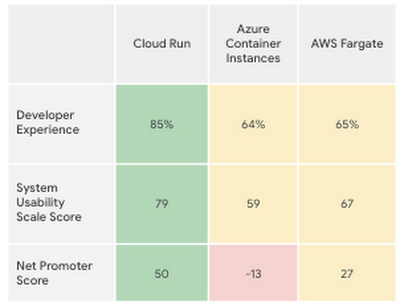
Taken together, all these new features make the Cloud Run developer experience far easier than its competitors’, according to a recent report by User Research International.
Versatility
Next-generation serverless is also about versatility. It supports a wider variety of applications and caters to enterprise requirements. Functions and web apps of course, but also heavyweight applications, and in the fullness of time, also brownfield and third-party containerized apps. This versatility is enabled by the container primitive, which removes restrictions on languages, run times, and hardware.
Being able to run a greater variety of apps on our serverless stack means you can optimize for predictable usage. Today, we announced new spend-based committed use discounts for Cloud Run. Enterprises with stable, steady-state, and predictable usage can now purchase committed use contracts directly in the billing UI. There are no upfront payments, so these discounts are a perfect way to reduce your spend by as much as 17%. RELATED ARTICLEMaximize your Cloud Run investments with new committed use discountsCommitted use discounts in Cloud Run enable predictable costs—and a substantial discount!
Another way we provide versatility is with support for WebSockets and gRPC in Cloud Run. With these new additions, you get the benefits of serverless infrastructure to build responsive, high-performance applications. We also added the use of min instances with Cloud Run. This feature allows you to cut cold-start times and run latency-sensitive applications on Cloud Run! At the same time, you can still scale to zero, or keep a minimum amount of compute available, for example when running brownfield Java applications.
Built-in DevOps
Serverless doesn’t just make it faster for developers to set up their apps—it also helps once the application is up and running, taking a big management load off of operations teams. Notably, serverless systems take care of “scaling” an application up or down. That means that if your application suddenly starts fielding a lot of traffic, the serverless platform automatically spins up more resources to handle the load. No more dreaded timeouts, wheels or hourglasses—or work for your operations team. Likewise, as soon as demand goes down, the platform takes care of decommissioning resources, i.e., scaling down, so that you’re not paying for resources that you no longer need. Want to run your service globally with low latency, without an operations team, and zero stranded costs? Cloud Run takes care of global load balancing and autoscaling to zero for you in every Google Cloud region.
Further, features like support for gradual rollouts and rollbacks allow developers to experiment and test ideas quickly, as well as sophisticated traffic management in Cloud Run. Likewise, Cloud Run provides access to distributed tracing with no setup or configuration, allowing developers to find performance bottlenecks in production.
Next up: serverless security
As part of DevOps best practices, we build in security for your serverless applications at every layer: deployment time, runtime and networking. For example, built-in vulnerability scanning ensures you only deploy artifacts you trust.
Today, we are announcing Cloud Run support for Google Secret Manager and customer-managed encryption keys (CMEK), making it easy to protect data at rest and store sensitive data. We’re also integrating Cloud Run with Binary Authorization, which lets you enforce specific policies to make sure only verified images make it to production. And finally, we added a new integration with Identity-Aware Proxy, support for VPC-SC, and egress controls that you can use to enforce a security perimeter, limiting both who can access specific services and what resources can be accessed when these services run in production. You can read more about these security enhancements here. RELATED ARTICLE4 new features to secure your Cloud Run servicesWe’re improving the security of your Cloud Run environment with things like support for Secret Manager and Binary Authorization.
In summary, the next generation of serverless combines the best of serverless with containers to run a broad spectrum of apps, with no language, networking or regional restrictions. The next generation of serverless will help developers build the modern applications of tomorrow—applications that adapt easily to change, scale as needed, respond to the needs of their customers faster and more efficiently, all while giving developers the best developer experience. Learn more by attending The Power of Serverless, a two-hour virtual event where we’ll lay out our vision for serverless compute, and where serverless subject matter experts will present on in-depth serverless development topics. Hope to see you there!
Want to learn even more about serverless and cloud-native application development? Check out the upcoming Modern App Dev & Delivery workshop, and our Ask the Experts roundtable.
Kohl’s Leverages Google Cloud Platform for Omnichannel Retail

3668
Of your peers have already read this article.
2:30 Minutes
The most insightful time you'll spend today!
Kohl’s is an omnichannel retailer focused on driving traffic, operational efficiency and delivering seamless omnichannel customer experiences.
Ratnakar Lavu is Kohl’s Senior Executive Vice President and Chief Technology Officer. He, and Kohl’s, are at the forefront of retail technology innovation, focusing on a frictionless customer journey across digital, mobile and more than 1,150 stores.
As part of this journey to more closely unify its online and offline experiences for customers, the company was looking for supporting cloud services that would continue to drive best-in-class data center infrastructure; the ability to manage data at a very large scale; and industry leading analytics and machine learning tools to continually understand real time data streams and help personalize experiences for their customers.
Kohl’s recognized the opportunity to take on a cloud partner to help drive the improvement of the speed and reliability of their operations, while they focused on a number of innovations to deepen customer experiences.
“At the time, I was looking for an open and scalable platform to partner with our Kohl’s technology team as we transform our business by shifting to the cloud,” says Ratnakar.
“Google has great engineering talent as well as demonstrated experience solving stability and scale in its own Ads and Search business. At Kohl’s, we need to be bold and innovative in today’s retail environment, and therefore need partners who deeply understand how to manage risk.”
Kohl’s leveraged several capabilities of Google Cloud. For example:
- They built applications to automate deployment, scaling and operations.
- They used monitoring capabilities to monitor for things like response time.
- Scalable technology provided an infrastructure to elastically scale to site traffic.
- They ran their infrastructure across multiple regions for high availability.
In 2017 and 2018, record-setting numbers of customers visited Kohls.com during the Thanksgiving holiday weekend and the digital platform experienced high double-digit growth both years.
The capabilities provided by Google Cloud Platform (GCP) and Google’s data center infrastructure supported Kohl’s servers and systems during these key timeframes.
In addition, the Kohl’s team partnered together with Google’s core engineering team and services organization to optimize applications and make them more reliable.
Google Cloud’s Customer Reliability Engineers (CREs) worked with them in advance of their peak time frames to test the infrastructure for performance, scaling, and fault tolerance.
“Google CRE and services teams collaborated with us as we ran drills and exercises during each phase of preparation for peak time frames,” Ratnakar said. “As we continued to understand better how to scale, monitor, and support our applications in GCP and we are pleased that we worked with the CRE team as partners on monitoring services, alerting teams, and triaging work.”
Delivering 10X Improvement to Risk and Regulatory Reporting Through Cloud and AI
5004
Of your peers have already read this article.
2:30 Minutes
The most insightful time you'll spend today!
Enterprise agility and the ability to innovate, adapt and respond quickly to the ever-changing risk and regulatory landscape is no longer a choice, but the cornerstone of successful digital transformation and commercial growth. Traditional access to and ways of managing data invariably create challenges in dealing with multiple data repositories, reconciliations, fire-drills, etc.
In response, the move to cloud is increasing significantly. It enables risk analytics and regulatory reporting at scale in a secure environment with data storage, management and encryption capabilities as a standard. In addition, as regulatory reporting requirements become more granular, machine learning can help facilitate new insights and allow for risk management to become more embedded into operational processes.
This webinar will address the day-to-day challenges in risk management and regulatory compliance, while also exploring how technological innovations can provide massive improvements and potential.
Key themes
- Real-life data challenges in the eyes of risk managers: can compliance, fraud detection and identifying liquidity positions be improved through the use of AI?
- Innovative approaches to streamline regulatory reporting to derive deeper customer insights from data at the moment of truth.
- Reimagining operations: how to modernise the data infrastructure to accommodate data explosion, drive flexibility and deliver a more cost effective outcome.
Attract Investor Funding by Harnessing the Power of Cloud Operations, Billing, and Customer Care

1399
Of your peers have already read this article.
4:30 Minutes
The most insightful time you'll spend today!
More and more startups are choosing to build their business on Google Cloud, and if yours is one of them — welcome! And even though Google Cloud is easy to use, there’s still a lot to learn, starting with how to create and activate your account, and how to create projects, folders, and organizations as part of Google Cloud’s resource hierarchy. If you prefer, you can also watch our video on how to get started with Google Cloud.
Once you’ve mastered those concepts, you’re ready to learn how to get the most out of your investment in Google Cloud. In this blog, we’ll show you how to manage and monitor your cloud resources with Google Cloud’s operations suite, administer your billing with Cloud Billing, and improve the support you receive with Google Cloud Customer Care. Whether you’re new to Google Cloud or an experienced user, these services will help improve your experience.
Let’s get started!
Improve the performance and reliability of your applications with the operations suite
Sometimes you want to check how your deployment is behaving, or if there is something happening with your server, database, or application that is affecting your customers. With so many tools to check, finding and solving the issue can become overwhelming very quickly. This is where Google Cloud’s operations suite comes in.
This suite of products for integrated monitoring, logging, and tracing managed services for applications and systems running on Google Cloud and beyond. It can help you visualize and monitor incidents with dashboards and Metrics Explorer, manage and analyze log data in real-time all in one place with Cloud Logging, visualize metrics at scale with Cloud Monitoring, manage latency with Cloud Trace, and perform performance and cost management with Cloud Profiler.
Learn more about the operations suite in the video below:
Manage budgets and alerts with Cloud Billing
Google Cloud billing management is easier than you might think. Google Cloud charges for compute resources monthly on a consumption basis, which is different from the traditional upfront purchase model. With the right tools and resources, you can more easily manage your costs and optimize your use of Google Cloud resources.
One of the most important things to do is to set up billing and alerts. This will help you avoid unexpected charges and ensure that you are only paying for the resources you use. You can also use budgets and alerts to track your costs and help ensure that you are staying within your budget.
You can also view your costs through console billing reports, monthly invoices or build customized dashboards on BigQuery, Google Data Studio, or a BI tool of your preference. This allows you to see where your costs come from and identify areas where you can save money. You can also use cost management to optimize your use of Google Cloud resources and get the most out of your investment.
Finally, Google Cloud offers a variety of discounts and optimization options. These can help you save money on your overall costs. For example, you can get a discount if you commit to using Google Cloud for a certain period of time. You can also save money by using preemptible VMs, which are VMs that are available at a lower price but can be terminated at any time.
Google Cloud Customer Care
To meet customer needs and deliver a better experience, we’ve reenvisioned our Customer Care portfolio, a scalable set of offerings built with your needs at the center, so you can simplify and streamline your support experience.
Choose from the core offerings:
- Basic – the support tier you receive when you sign up on Google Cloud. You can use this at no cost but support is offered for billing issues only.
- Standard – simple, flexible way to ensure that your workloads run smoothly on Google Cloud. Standard enables you to receive technical help from Google experts with a four hour response time and 8 hours response time during 5 days a week availability.
- Enhanced – rapid response times and additional services to boost your productivity and help you run in Google Cloud efficiently. There is both case and phone support for technical issues, with a one-hour response time. There is 24/5 availability overall with 24/7 for critical issues. You can also have add-ons or value-add services like Technical Account Adviser Service and Event management.
- Premium – the highest value support offering, supplying incredibly fast response times, a named Technical Account Manager, Customer Aware support and additional services. There is case and phone support for technical issues and also third-party technology support, with a 15-minute response time and a 24/5 availability overall with 24/7 for critical issues.
Watch the video to find out how to purchase support, create support cases and learn more about support.
Supercharge your growth with the Google for Startups Cloud Program
Growing a startup requires technology that can keep up with and enhance your ideas. The Google for Startups Cloud Program provides the tech you need to help develop better software and deliver innovative experiences with confidence. At the same time, you’ll help boost your team’s capabilities with expert cloud guidance, Google Cloud credits, training opportunities, and more.
The program has two tiers:
- Start: for pre-seed startups that have not yet received equity funding. Get up to $2,000 USD in Google Cloud credit that’s valid for two years toward Google Cloud services and even toward a Cloud Customer Care plan with unlimited access to technical support, networking opportunities with the global Google Cloud Startup Community, and more.
- Scale: for seed to series A startups with verified equity funding. Get Google Cloud and Firebase costs covered up to $100,000 USD a year for your first two years, unlimited access to technical support when credits are applied to a Cloud Customer Care plan, partnerships with Google Cloud Startup Customer Engineers and a dedicated Startup Success Manager, networking opportunities with the global Google Cloud Startup Community, co-marketing for select startups, and more.
Once enrolled, Google startup experts will recommend Google products and services that can help your startup grow in the cloud. Learn more about the Google for Startups program, eligibility criteria, credit usage and migration incentives in the our Startup Programs video linked down below.
That’s a wrap!
Let’s recap: The operations suite includes tools to monitor incidents, analyze log data in real-time, manage latency, and more. Cloud Billing offers billing management tools and resources to help you save costs and make the most of your resources. If you need help, Cloud Customer Care services are available to streamline your support experience. Also, if you’re a startup, don’t forget to check the Google for Startups Cloud Program!
The Google Cloud Technical Guides for Startups series has many detailed videos and handbooks to support you on all steps of your startup growth journey. Check out our full playlist on the Google Cloud Tech channel and website. Don’t forget to subscribe to stay up to date.
See you in the cloud!

3593
Of your peers have already downloaded this article
3:30 Minutes
The most insightful time you'll spend today!
Defending the world’s largest network against persistent and constantly evolving cyber threats has driven Google to architect, automate, and develop advanced tools to help keep it ahead. Understanding how Google has built and evolved it’s defenses can help you make smart architectural decisions of your own as you move forward.
- At Google every minute:
- 10 million spam messages are prevented from reaching Gmail customers.
- 694,000 indexed Web pages are scanned for harmful software.
- 7,000 deceitful URLs, executables, and browser extensions that may carry viruses, unwanted content, or phishing attempts are spotted and stopped.
- 6000 instances of unwanted software and nearly 1,000 instances of suspected malware are reported to Chrome users.
- 2 phishing sites and 1 malware site are found and labeled.
Download this e-book to know more about Google’s security at scale.
Transforming Canadian Healthcare and Medical Research with Google Cloud

925
Of your peers have already read this article.
2:30 Minutes
The most insightful time you'll spend today!
Is Cloud an option for Canadian Healthcare healthcare and medical research organizations?
Yes, Canadian healthcare and medical research organizations are moving to the cloud. The cloud market is expected to grow in Canada significantly through 2027.
There are several reasons why Canadian healthcare and medical research organizations are moving to the cloud.
- Reduce costs by eliminating the need to invest in and maintain on-premises infrastructure.
- Enable the healthcare research community to drive their research more expediently to clinical outcomes
- Improve patient satisfaction by making it easier for patients to access their health information and communicate with their providers.
- Improve the quality of care by providing access to patient data and records from anywhere in the country.
Overall, the transition to the cloud is a positive development for Canadian healthcare and medical research organizations.
Canadian healthcare providers face many challenges before they can move to the cloud, such as addressing security and privacy concerns, data sovereignty issues, and ensuring interoperability. To help them overcome these challenges, it is important to provide Healthcare Data Custodians, Infrastructure Architects, and Research Leads with clear guidance on how the cloud can align with Canadian Healthcare Regulations. This will allow them to have a practical understanding of what is required to enhance their cloud journey and facilitate a smoother transition to the cloud.
iSecurity and MD+A Health are actively assisting Canadian healthcare and medical research organizations in comprehending the risks and exploring pathways to embrace the cloud. Through extensive research and analysis, iSecurity and MD+A Health have evaluated Google Cloud as a suitable platform for healthcare. Their diligent efforts have resulted in the production of comprehensive documents that detail their findings via a Threat Risk Assessment (TRA) and a Privacy Impact Report (PIA).
Why a Threat Risk Assessment?
A threat risk assessment is a process of identifying and evaluating threats to an organization and then determining the likelihood and impact of those threats. The goal of a threat risk assessment is to identify the most serious threats and develop mitigation strategies to reduce the likelihood and impact of those threats.
A threat risk assessment typically involves the following steps:
- Identify threats: The first step is to identify all potential threats to the organization. This can be done by brainstorming, interviewing experts, or reviewing historical data.
- Evaluate threats: Once the threats have been identified, they need to be evaluated in terms of their likelihood and impact. The likelihood of a threat is the probability that it will occur, while the impact of a threat is the severity of the consequences if it does occur.
- Prioritize threats: The threats need to be prioritized based on their likelihood and impact. The most serious threats should be addressed first.
- Develop mitigation strategies: Once the threats have been prioritized, mitigation strategies need to be developed to reduce the likelihood and impact of those threats. Mitigation strategies can include things like implementing security controls, training employees, and developing contingency plans.
- Implement mitigation strategies: The mitigation strategies need to be implemented and tested to ensure that they are effective.
- Monitor and review: The threat risk assessment should be monitored and reviewed regularly to ensure that it is still effective.
Why a Privacy Impact Assessment?
A Privacy Impact Assessment (PIA) is a process that organizations use to identify and assess the privacy risks associated with a new or changed information technology (IT) system or project. The goal of a PIA is to help organizations protect the privacy of individuals whose personal information is collected, used, or disclosed by the IT system or project.
PIAs typically include the following steps:
- Identifying the purpose of the IT system or project and the types of personal information that will be collected, used, or disclosed.
- Identifying the privacy risks associated with the IT system or project.
- Assessing the likelihood and severity of the risks.
- Developing and implementing controls to mitigate the risks.
- Monitoring the effectiveness of the controls.
PIAs are an important tool for organizations to help them follow privacy laws and regulations. They can also help organizations build trust with their patients, employees and the research community by demonstrating their commitment to protecting privacy.
The benefits of conducting a PIA:
- Helps organizations identify and assess privacy risks
- Helps organizations develop and implement controls to mitigate privacy risks
- Helps organizations comply with privacy laws and regulations
- Helps organizations build trust with customers and employees
Why Google Cloud?
Google Cloud is committed to providing Canadian healthcare organisations with an environment to expand both their clinical and research environments. Google Cloud has invested significant resources into building out a cloud environment based on best practices coming from Google’s experience running some of the world’s largest platforms.
Some highlights include:
- Built-in security features that help protect your data and applications from unauthorized access, use, disclosure, disruption, modification, or destruction.
- A comprehensive security management platform that helps you assess, prioritize, and address security risks across your organization.
- A team of security experts who can help you design, implement, and manage your security solutions.
- A wide range of security training and resources to help you learn about and stay up-to-date on the latest security threats and best practices.
More Relevant Stories for Your Company

Predict User Churn on Gaming Apps with Google Analytics Data using BigQuery ML
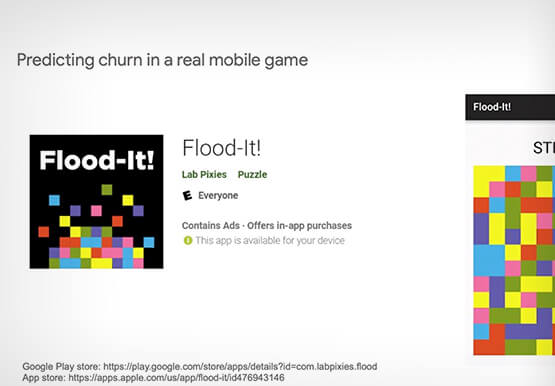
User retention can be a major challenge for mobile game developers. According to the Mobile Gaming Industry Analysis in 2019, most mobile games only see a 25% retention rate for users after the first day. To retain a larger percentage of users after their first use of an app, developers can
Maximizing the Value of Your Cloud Migration
Technology leaders have shifted many apps and workloads to public cloud, and they are not finished; 63% plan further expansion in the next 12 months. According to this newly resealed Forrester report, enterprises are migrating all types of apps and workloads to cloud and the migration provides firms with a

FNM Group Migrates SAP HANA to Google Cloud: Tips for CIOs
Founded in 1877, the FNM Group is Italy’s second largest railway company, operating in the Lombardy region. With 700,000 passengers a day, the core business remains with railway operations, but in recent years the FNM Group has redefined itself as a mobility service provider rather than just a public transport

Navigating the Next Wave of B2B Digital Commerce: Trends and Insights for 2023
Editor’s note: Google Cloud partner commercetools shares how modern technologies like composable commerce, cloud-native infrastructure and artificial intelligence/machine learning (AI/ML) will lead the way in business-to-business (B2B) digital commerce this year. Digital commerce in B2B has been predicted as the next big thing for years; yet, at the start of
