





Beany’s Cloud-Based Accounting Solutions Transform Small Business Finance

1809
Of your peers have already read this article.
2:30 Minutes
The most insightful time you'll spend today!
Many people start a small business that aligns with their passions, but soon discover the day-to-day running of a business is very different than anticipated. Dealing with accounting, finance, and other daily activities can quickly overwhelm even the most promising of new businesses.
Recognizing the unique challenges facing small businesses, we founded Beany. With our personalized accounting platform, small business owners can relax knowing that we will look after all their compliance and advisory needs. Business owners who use Beany also benefit because they end up freeing more time to focus on what they enjoy and do best—likely the main reasons they started their business in the first place. We prepare financial statements, minimize tax and keep an eye that our clients are paying the right amount at the right time. We also advise on business purchase and sale, valuations and forecasting for banks. In fact, we do everything that a business owner needs from their accountant, including a help desk filled with domain experts to provide free & unlimited advice and support.
As we expand our team, we’ll continue to introduce new solutions, services, and integrations that make it even easier for small businesses to prioritize business planning, balance budgets, and keep up with ever-changing tax laws. We also plan to launch Beany in new markets and extend our global footprint beyond New Zealand, Australia, and the UK.
Migrating and scaling Beany
Beany was initially developed and hosted on a virtual private server (VPS) with limited capabilities. As our subscriber base grew, we realized we needed a more scalable, secure solution to eliminate downtime and deliver a reliable customer experience. We also understood it would be challenging for our small engineering team to cost-effectively test and deploy new features without a more agile development environment.
With that in mind, we chose the secure-by-design infrastructure of Google Cloud to power Beany and help us scale our innovative accounting platform. We now use Compute Engine to cost-effectively create virtual machines (VMs) that automatically select optimal amounts of processing and memory.
In addition, we encrypt, store, and archive everything on highly secure Cloud Storage, leveraging a combination of solid-state drives (SSDs) and hard disk drives (HDDs) for hot, nearline, and coldline data. With Cloud Storage, we can replicate data between regions in under 15 minutes to enable rapid recovery and business continuity. This has been really useful moving images to data centers on the other side of the planet quickly as we primarily operate out of Sydney and London.
We also connect, create, and collaborate on Google Workspace using Google Gmail, Docs, Calendar, and Meet. Beany smoothly integrates with Google Sheets to provide live reporting from our application direct to our sales, marketing and support staff. It also makes sharing account data with our accounting clients easy and secure.
Analyzing financial data with Google Cloud AI and machine learning
Joining the Google for Startups Cloud Program gave us immediate access to Google Cloud credits which we use to cost-effectively trial and deploy additional Google Cloud solutions. We continue to evaluate Cloud Code which will help our developers more efficiently create, deploy, and integrate applications directly on Google Cloud. We’re also exploring how Google Cloud AI and machine learning products such as Vertex AI and AutoML can further revolutionize accounting with advanced financial analyses and end-to-end automation of business processes.
We can’t wait to see what we accomplish next as we grow our team and introduce new services and solutions that enable small businesses to streamline operations, lower costs, and increase profits. It’s exciting to help small business owners manage accounting and financial planning so they can spend more time doing what they love and realize their business vision.

Beany team members
If you want to learn more about how Google Cloud can help your startup, visit our page here to get more information about our program, and sign up for our communications to get a look at our community activities, digital events, special offers, and more.
What You Can Learn from ‘Up or Out’ Framework for Cloud Adoption
3224
Of your peers have already read this article.
1:30 Minutes
The most insightful time you'll spend today!
In times of significant disruption, organizations are faced with three choices: Retrench within legacy solutions, pause and do nothing while waiting for more data or different circumstances, or press ahead, potentially even accelerating to realize the desired outcome. In such an environment, it is critical to ensure you’re delivering the greatest possible impact to the business.
In Google Cloud’s Office of the CTO, or OCTO, we have the privilege of co-innovating with customers to explore what’s possible and how we can re-imagine and solve their most strategic challenges. These collaborative innovation engagements are often core to critical transformational projects, which often include the rehosting, evolution, and at times re-architecture of existing business solutions.
We are happy to offer this brand new white paper, where we have distilled the conversations we’ve had with CIOs, CTOs, and their technical staff into several frameworks that can help cut through the hype and the technical complexity, to help devise the strategy that empowers both the business and IT. We called one such framework “up or out.” (And we don’t mean some consulting firm’s hard-nosed career philosophy.)
One model that we found can help enterprises chart their cloud adoption journey delineates cloud migration along two axes—up and out, and we’ll cover this in much greater detail in the white paper itself.
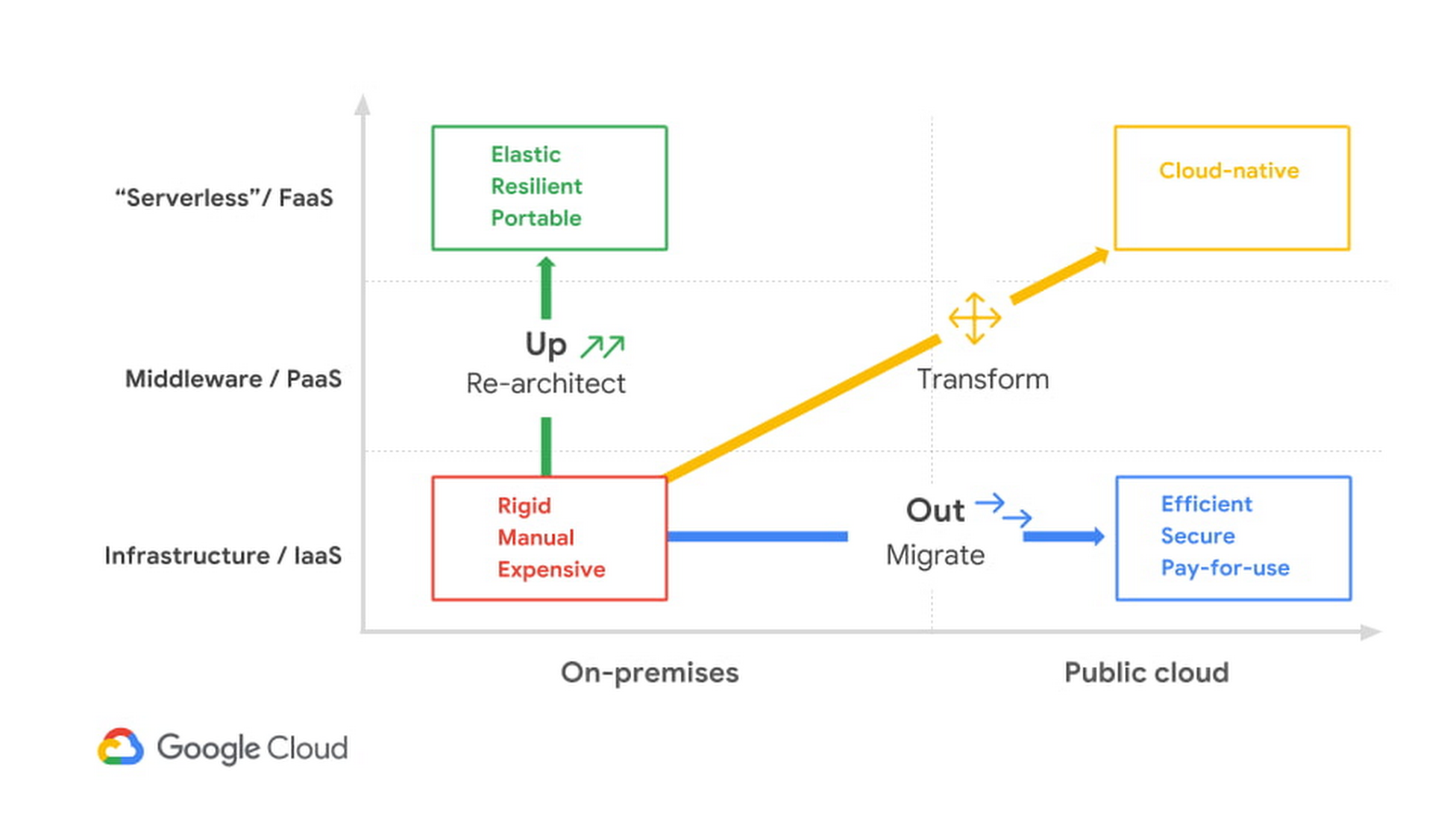
As you can see, there isn’t a single path to the cloud—not for individual enterprises and not even for individual applications. The up or out framework can help an IT organization and its leadership characterize how they can best benefit from migrating their services or workloads. The framework acts as a general pattern that highlights the continuum of approaches to explore, and you can learn all about it by downloading this detailed white paper.
Or, if you’re really ready to jump start your migration today, you can take advantage of our current offer by signing up for a free discovery and assessment.
Google Cloud’s High-performance Compute Speeds Up the Chip Design Process

3498
Of your peers have already read this article.
2:00 Minutes
The most insightful time you'll spend today!
Cloud offers a proven way to accelerate end-to-end chip design flows. In a previous blog, we demonstrated the inherent elasticity of the cloud, showcasing how front-end simulation workloads can scale with access to more compute resources. Another benefit of the cloud is access to a powerful, modern and global infrastructure. On-prem environments do a fantastic job of meeting sustained demand but Electronic Design Automation (EDA) tooling upgrades happen much more frequently (every six to nine months) than typical on-prem data center infrastructure upgrades (every three to five years).
What this means is that your EDA tool can provide much better performance if given access to the right infrastructure. This is especially useful in certain phases of the design process.
Take for example, a physical verification workload. Physical verification is typically the last step in the chip design process. In simplified terms, the process consists of verifying design rule checks (or DRCs) against the process design kit (PDK) provided by the foundry. It ensures that the layout produced from the physical synthesis process is ready for handoff to a foundry (in-house or otherwise) for manufacturing. Physical verification workloads tend to require machines with large memories (1TB+) for advanced nodes. Having access to such compute resources enables more physical verification to run in parallel, increasing your confidence in the design that is being taped out (i.e., sent to manufacturing).
At the other end of the spectrum are functional verification workloads. Unlike the physical verification process described above, functional verification is normally performed in the early stages of design and typically requires machines with much less memory. Furthermore, functional verification (dynamic verification in particular) accounts for the most time (translating directly to the availability of compute) in the design cycle. Verifying faster, an ambition for most design teams, is often tied to availability of right-sized compute resources.
The intermittent and varied infrastructure requirements for verification (both functional and physical) can be a problem for organizations with on-prem data centers. On-prem data centers are optimized for maximizing utilization—this does not directly address access to right-sized compute to deliver the best tool performance. Even if the IT and Computer Aided Design (CAD) departments choose to provision additional suitable hardware, the process of provisioning, acquiring and setting up new hardware on-prem typically takes months for even the most modern organizations. A “hybrid” flow that enables use of on-prem clusters most of the time, but provides seamless access to cloud resources as needed would be ideal.
Hybrid chip design in action
You can improve a typical verification workflow simply by utilizing a hybrid environment that provides instantaneous access to better compute. To illustrate, we chose a front-end simulation workflow, and designed an environment that replicates on-prem and cloud clusters. We also took a few more liberties to simplify the environment (described below). The simplified setup is provided in a GitHub repository for you to try out.
In any hybrid chip design flow, there are a few key considerations:
- Connectivity between on-prem infrastructure and the cloud: Establishing connectivity to the cloud is one of the most foundational aspects of the flow. Over the years, this has also become a very well-understood field, and secure, high availability connectivity is a reality in most setups.
In our tutorial, we represent both on-prem and cloud clusters as two different networks in the cloud where all traffic is allowed to pass between these networks. While this is not a real-world network configuration, it is sufficient to demonstrate the basic connectivity model. - Connection to license server: Most chip design flows utilize tools from EDA vendors. Such tools are typically licensed, and you need a license server with valid licenses to operate the tool. License servers may remain on-prem in the hybrid flow, so long as latency to the license server is acceptable. You can also install license servers in the cloud on a Compute Engine VM (particularly sole-tenant nodes) for lower latency. Check with your EDA vendors to understand if you can rehost your license services in the cloud.
In our tutorial, we use an open source tool (Icarus Verilog Simulator) and therefore, do not need a license server. - Identifying data sources and syncing data: There are three important aspects in running EDA jobs: the EDA tools themselves, the infrastructure where the tools run, and the data sources for the tool run. Tools don’t change much, and can be installed on cloud infrastructure. Data sources, on the other hand, are primarily created on-prem and updated regularly. These could be SystemVerilog files that describe the design, the testbenches or the layout files. It is important to sync data between on-prem and cloud to maintain parity. Furthermore, in production environments, it’s also important to maintain a high-performance syncing mechanism.
In our tutorial, we create a file system hierarchy in the cloud that is similar to one you’d find on-prem. We transfer the latest input files before invoking the tool. - Workload scheduler configuration and job submission transparency: Most environments that leverage batch jobs use job schedulers to access a compute farm. An ideal environment finds the balance between cost and performance, and builds parameters in the system to enable predictive (and prescriptive) wrappers to job schedulers (see picture below).
In our tutorial, we use the open-source SLURM job scheduler and an auto-scaling cluster. For simplicity, the tutorial does not include a job submission agent.

Other cloud-native batch processing environments such as Kubernetes can also provide further options for workload management.
Our on-prem network is called ‘onprem’ and the cloud cluster is called ‘burst’. Characteristics of the on-prem and burst clusters are specified below:


Once set up, we ran the OpenPiton regression for single and two-tile configurations. You can see the results below:

Regressions run on “burst” clusters were on average 30% faster than on “onprem”, delivering faster verification sign-off and physical verification turnaround times. You can find details about the commands we used in the repository.
Hybrid solutions for faster time to market
Of course, on-prem data centers will continue to play a pivotal role in chip design. However, things have changed. Cloud-based, high performance compute has proved itself to be a viable and proven technology for extending on-prem data centers during the chip design process. Companies that successfully leverage hybrid chip design flows will be able to better address the fluctuating needs of their engineering teams. To learn more about silicon design on Google Cloud, read our whitepaper “Using Google Cloud to accelerate your chip design process”.
3468
Of your peers have already watched this video.
25:00 Minutes
The most insightful time you'll spend today!
Modeling and Comparing Cloud Solutions, Costs, and Strategy
Sole-tenant nodes? VMaaS and CloudSimple? N1 vs N2 vs E2 instances? BYO Microsoft or Linux licenses? Understand how the choices available with Google Cloud can maximize your savings while expanding your migration scenarios.
Watch this webinar and learn how to assess your on-premises private cloud and compare your per-VM costs and complete solution against differing Google and third-party cloud solutions to find the best fit based on cost and features.

The Cloud-First Imperative to Accelerate Digital Transformation in BFSI
DOWNLOAD WHITEPAPER3375
Of your peers have already downloaded this article
1:30 Minutes
The most insightful time you'll spend today!
In a study of 60 business and technology decision makers and influencers from Indian BFSI organizations, conducted by Forrester Consulting, it is revealed that public cloud adoption in India is on the rise with 78% of the organizations intending to increase the number of secure or compliance-sensitive workloads in the cloud.
According to the study, public cloud platforms help BFSI organizations to:
- Improve customer experience
- Free up IT time to focus on core differentiators instead of commodity workloads
- Reduce reliance on legacy infrastructure
- Help to scale business faster and more easily
Download this infographic to understand why Indian BFSI organizations are adopting a cloud-first approach to accelerate digital transformation.
You Can Now ‘Listen’ to Over 50 Tech Blogs on Google Cloud Reader

4868
Of your peers have already read this article.
1:30 Minutes
The most insightful time you'll spend today!
🎧 Prefer to listen? Check out this episode on the Google Cloud Reader podcast
If you’re anything like me, you love reading, but also appreciate that sometimes your eyes need to be doing other things; whether it’s finding your exit off the highway, or keeping your puppy from destroying the couch.
And sometimes the thought of sitting down to read something just feels like it’s going to take valuable multi-tasking time away from my day. I know, I know, multitasking can be frowned upon, but it’s the way I live a good chunk of my life, and it’s working out so far. And while I’m not alone in my multitasking, I’m also not alone in my desire for a non-visual way to get this content, or any content.
*Google Cloud Reader enters the chat*
Google Cloud Reader is a podcast that lets you listen to the Google Cloud Blog posts that aren’t as dependent on visuals. This means they’re articles that are, or are adapted to be, less focused on graphs, or code samples, and instead describe the meaning behind those visual aids.
It’s an easy, audible way to absorb content around all things new in Cloud, while still being able to make sure Ruthie doesn’t eat my work from home equipment.

So by now you’re probably thinking “OK, so you started a podcast during the pandemic, even though you definitely seemed like the type to start making sourdough”—and you’re right. My 53 plants agree with you. But rest assured, one can listen to an episode of this podcast *while* creating a macramé plant hanger, or waiting for bread to rise—multitasking, am I right?
We’re a little over 50 episodes/macrame plant hangers in, so you should check it out (Ruth and I would appreciate it).
Some of my personal favorites
- Beginners Guide to Painless Machine Learning – Learn how to get started with Google Cloud AI tools
- Introducing GKE Autopilot: A Revolution in Managed Kubernetes – Learn more about GKE Autopilot, a revolutionary mode of operations for managed Kubernetes that lets you focus on your software, while GKE Autopilot manages the infrastructure.
- Cook up your own ML recipes with AI Platform – Learn about Mars Wrigley’s new ML-inspired recipe experiment on Google Cloud and how you can get started with your own.
- Recovering Global Wildlife Populations using ML – Review Google’s Wildlife Insight’s ML project and help users create an image classification model for motion-sensor cameras (called camera traps) used to help protect wildlife in an non-invasive way by collecting and tagging species via pictures.
Let me know your favorite episodes, and what other articles you’d like to hear on Twitter @jbrojbrojbro!
No matter why you prefer an audio format, we’ve got you covered; Google Cloud Reader, where we read the tech blog for you, and to you.
Get all the Google Cloud Reader on your favorite podcast platform, including Google Podcasts, Apple Podcasts, and Spotify.
More Relevant Stories for Your Company

Google Cloud’s Autism Career Program to Nurture Neurodiverse Talent
My passion for neurodiversity began 10 years ago, when I became involved with Els for Autism, an organization that works with children and adults who have autism, as well as their families. At the time, I had a friend who was struggling to find resources for his son with autism. The

Navigating the Next Wave of B2B Digital Commerce: Trends and Insights for 2023
Editor’s note: Google Cloud partner commercetools shares how modern technologies like composable commerce, cloud-native infrastructure and artificial intelligence/machine learning (AI/ML) will lead the way in business-to-business (B2B) digital commerce this year. Digital commerce in B2B has been predicted as the next big thing for years; yet, at the start of

The Indian COO’s Guide to Modernizing the Business for 2021
Everything COOs need to know to make an informed decisionabout migrating and modernizing their businesses’ coretechnology estate to the cloud.

5 Features IT Departments Love About Google Cloud
Throughout the past couple of years, I have helped a good number of companies, big and small, migrate their systems to the Google Cloud Platform (aka GCP). During the course of these migrations, there are always a few of those moments where people look at a specific Google Cloud feature and say,
