





A Year of Going Carbon-free! Google’s Road to Sustainability Looks Promising
3729
Of your peers have already read this article.
2:00 Minutes
The most insightful time you'll spend today!
Last year, we announced our most ambitious sustainability goal yet: to operate everywhere on 24/7 carbon-free energy by 2030. We’ve set this goal to ensure that Google Cloud continues to be the cleanest cloud in the industry, and to show that full-scale decarbonization of electricity use is possible.
Since setting our target, we’ve made tremendous progress in how we track, buy, and use electricity; advocate for clean energy policies; and support the development of new technologies to help us reach this goal. And we’ve done it all while maintaining a commitment to transparency that we hope will make it easier for other organizations wishing to fully decarbonize their operations as well.
In the spirit of transparency, today we’re releasing the 2020 carbon-free energy percentages (CFE%) for all Google data centers, as well as overall progress on the road to our 2030 goal: In 2020, Google achieved 67% round-the-clock carbon free energy across all its data centers, up from 61% in 2019. In other words, of all the electricity consumed by Google data centers in 2020, two-thirds of it was matched with local, carbon-free sources on an hourly basis.
Though we saw a significant jump in global CFE% in 2020, we expect the numbers to vary from year to year. Ultimately, CFE% is dependent on the amount of new clean energy that comes online in a given year; we may even occasionally see short-term drops in the numbers. What’s most important is that we continue to maintain a long-term trajectory toward our 2030 goal. With meaningful progress in clean energy policy, technologies, and transactional models, we believe 24/7 carbon-free energy is achievable.
Tracking these numbers also allows us to give Google Cloud customers greater control in their own sustainability efforts. Earlier this year we announced Google Cloud Region Picker, a system that helps our customers assess factors like cost, speed, and CFE% as they choose where to run their applications.
To outline some of the events that have helped us get to 67% CFE%, we’ve developed an animation that shows every hour of electricity use in 2020, at all our Google data centers around the world.
Visualizing clean energy: every hour, every day, everywhere
Imagining what every hour in a year looks like is hard enough (there are 8,760 of them, in case you’re wondering). With 23 data centers and 25 cloud regions around the world, we’re aiming to source clean energy for over 200,000 operational hours each year.
https://youtube.com/watch?v=f9ecEokcFlk%3Fenablejsapi%3D1%26
The “A year in carbon-free energy” animation points out significant projects that came online in 2020 to bring our data centers closer to operating entirely on round-the-clock carbon-free energy. It also reflects an unparalleled level of transparency about our carbon-free energy data, showing hour-by-hour where we need to develop new clean energy projects, advocate for policy changes, and in some cases, look to new technologies that can help fill in the gaps left by variable renewable resources.
In the animation, you’ll notice sites with a lot of green at midday (e.g. in Chile or the U.S. Southeast) – a sign that solar is making a big contribution. Other data centers, such as our facilities in the U.S. Midwest, rely more heavily on wind power and are subject to seasonal fluctuations in wind speed.
Preventing the worst impacts of climate change will require decarbonizing the world’s electric grids, as fast as possible. Google is committed to doing as much as possible to clear a path for others and drive collective action to achieve this goal. We’re thrilled to be in good company as we move, together, toward a carbon-free future.
A Pro’s Tip on Choosing the Right Google Cloud Compute Options

5727
Of your peers have already read this article.
2:00 Minutes
The most insightful time you'll spend today!
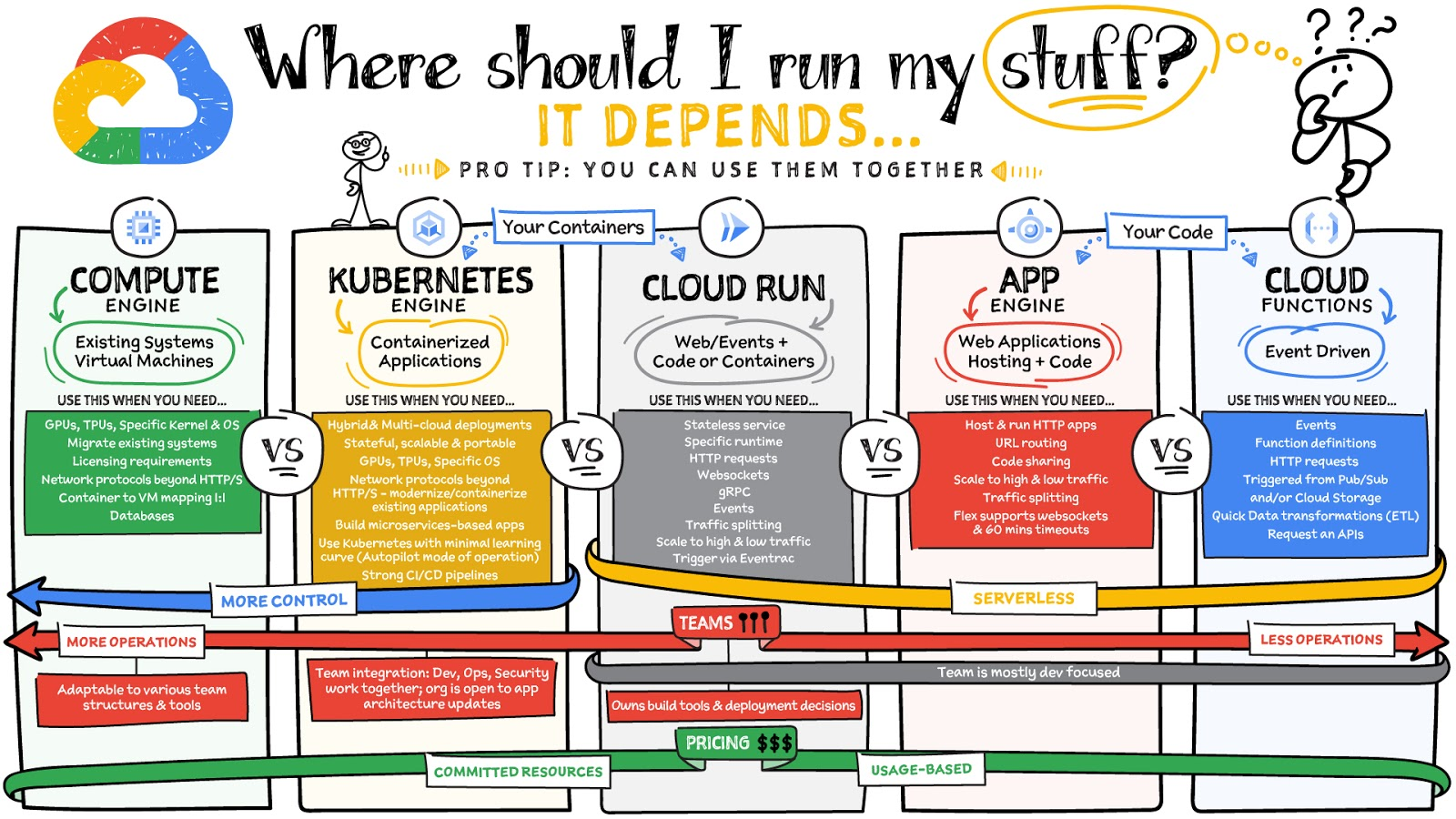
Where should you run your workload? It depends…Choosing the right infrastructure options to run your application is critical, both for the success of your application and for the team that is managing and developing it. This post breaks down some of the most important factors that you need to consider when deciding where you should run your stuff!
What are these services?
- Compute Engine – Virtual machines. You reserve a configuration of CPU, memory, disk, and GPUs, and decide what OS and additional software to run.
- Kubernetes Engine – Managed Kubernetes clusters. Kubernetes is an open-source system for automating deployment, scaling, and management of containerized applications. You create a cluster and configure which containers to run; Kubernetes keeps them running and manages scaling, updates and connectivity.
- Cloud Run – A fully managed serverless platform that runs individual containers. You give code or a container to Cloud Run, and it hosts and auto scales as needed to respond to web and other events.
- App Engine – A fully managed serverless platform for complete web applications. App Engine handles the networking, application scaling, and database scaling. You write a web application in one of the supported languages, deploy to App Engine, and it handles scaling, updating versions, and so on.
- Cloud Functions – Event-driven serverless functions. You write individual function code and Cloud Functions calls your function when events happen (for example, HTTP, Pub/Sub, and Cloud Storage changes, among others).
What level of abstraction do you need?
- If you need more control over the underlying infrastructure (for example, the operating system, disk images, CPU, RAM, and disk) then it makes sense to use Compute Engine. This is a typical path for legacy application migrations and existing systems that require a specific OS.
- Containers provide a way to virtualize an OS so that multiple workloads can run on a single OS instance. They are fast and lightweight, and they provide portability. If your applications are containerized then you have two main options.
- You can use Google Kubernetes Engine, or GKE, which gives you full control over the container down to the nodes with specific OS, CPU, GPU, disk, memory, and networking. GKE also offers Autopilot, when you need the flexibility and control but have limited ops and engineering support.
- If, on the other hand, you are just looking to run your application in containers without having to worry about scaling the infrastructure, then Cloud Run is the best option. You can just write your application code, package it into a container, and deploy it.
- If you just want to code up your HTTP-based application and leave the scalability and deployment of the app to Google Cloud then App Engine — a serverless, fully-managed option that is designed for hosting and running web applications — is a good option for you.
- If your code is a function and just performs an action based on an event/trigger, then deploying it with Cloud Functions makes sense.
What is your use case?
- Use Compute Engine if you are migrating a legacy application with specific licensing, OS, kernel, or networking requirements. Examples: Windows-based applications, genomics processing, SAP HANA.
- Use GKE if your application needs a specific OS or network protocols beyond HTTP/s. When you use GKE, you are using Kubernetes, which makes it easy to deploy and expand into hybrid and multi-cloud environments. Anthos is a platform specifically designed for hybrid and multi-cloud deployments. It provides single-pane-of-glass visibility across all clusters from infrastructure through to application performance and topology. Example: Microservices-based applications.
- Use Cloud Run if you just need to deploy a containerized application in a programming language of your choice with HTTP/s and websocket support. Examples: websites, APIs, data processing apps, webhooks.
- Use App Engine if you want to deploy and host a web based application (HTTP/s) in a serverless platform. Examples: web applications, mobile app backends
- Use Cloud Functions if your code is a function and just performs an action based on an event/trigger from Pub/Sub or Cloud Storage. Example: Kick off a video transcoding function as soon as a video is saved in your Cloud Storage bucket.
Need portability with open source?
If your requirement is based on portability and open-source support take a look at GKE, Cloud Run, and Cloud Functions. They are all based on open-source frameworks that help you avoid vendor lock-in and give you the freedom to expand your infrastructure into hybrid and multi-cloud environments. GKE clusters are powered by the Kubernetes open-source cluster management system, which provides the mechanisms through which you interact with your cluster. Cloud Run for Anthos is powered by Knative, an open-source project that supports serverless workloads on Kubernetes. Cloud Functions use an open-source FaaS (function as a service) framework to run functions across multiple environments.
What are your team dynamics like?
If you have a small team of developers and you want their attention focused on the code, then a serverless option such as Cloud Run or App Engine is a good choice because you won’t have to have a team managing the infrastructure, scale, and operations. If you have bigger teams, along with your own tools and processes, then Compute Engine or GKE makes more sense because it enables you to define your own process for CI/CD, security, scale, and operations.
What type of billing model do you prefer?
Compute Engine and GKE billing models are based on resources, which means you pay for the instances you have provisioned, independent of usage. You can also take advantage of sustained and committed use discounts.
Cloud Run, App Engine, and Cloud Functions are billed per request, which means you pay as you go.
Conclusion
It’s important to consider all the relevant factors that play a role in picking appropriate compute options for your application. Remember that no decision is necessarily final; you can always move from one option to another.
To explore these points in more detail, please take a look at the “Where Should I Run My Stuff?” video.
For more #GCPSketchnote, follow the GitHub repo & thecloudgirl.dev. For similar cloud content follow us on Twitter at @pvergadia and @briandorsey
Take a Look at 30 Eventrac Locations!

4922
Of your peers have already read this article.
2:00 Minutes
The most insightful time you'll spend today!
New locations in Eventarc
Back in August, we announced more Eventarc locations (17 new regions, as well as 6 new dual-region and multi-region locations to be precise). This takes the total number of locations in Eventarc to more than 30. You can see the full list in the Eventarc locations page or by running gcloud eventarc locations list .
What does location mean in Eventarc?
An Eventarc location usually refers to the single region that the Eventarc trigger gets created in. However, depending on the trigger type, the location can be more than a single region:
- Pub/Sub triggers only support single-region locations.
- Cloud Storage triggers support single-region, dual-region, and multi-region locations.
- Cloud Audit Logs triggers support single-region locations and the special
globalregion.
Before looking into trigger location in more detail, let’s look at other locations relevant in Eventarc.
What other locations are relevant in Eventarc?
Triggers connect event sources to event targets:
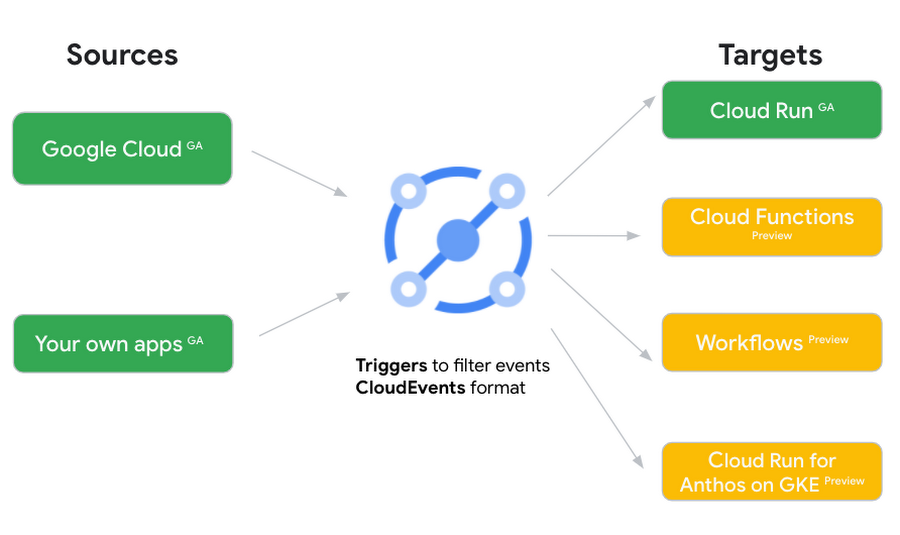
Each event source, event target, and trigger has its own location. Sometimes, these locations have to match and sometimes they can be different.
Here’s an example of a trigger connecting Cloud Storage events from a bucket in the europe-west1 region to a Cloud Run service in the us-central1 region with a trigger located in the europe-west1 region:
gcloud eventarc triggers create trigger-storage \--destination-run-service=hello \--destination-run-region=us-central1 \--location=europe-west1 \--event-filters="type=google.cloud.storage.object.v1.finalized" \--event-filters="bucket=my-bucket-in-europe-west1-region" \--service-account=$PROJECT_NUMBER-compute@developer.gserviceaccount.com
In many cases, you don’t have control over the location of the event source. In the example above, the Cloud Storage bucket is in the europe-west1 region. That’s the location that you need to work with and it has implications for the trigger location (which I’ll get to later).
The location of the event target is the region of the service where you want the events to go. You get to choose this from one of the supported regions when you deploy your Cloud Run service. You typically want this to be in the same region as your event source for latency and data locality reasons (but this is not strictly a requirement). In the example above, the event source (bucket) is in europe-west1 but the event target (Cloud Run service) is in us-central1 as specified by the --destination-run-region flag.
The location of the trigger is dictated by the event source location, but the trigger type also comes into play. It is specified by the –location flag. Let’s take a look at the trigger location for each trigger type in more detail.
Location in Pub/Sub triggers
In a Pub/Sub trigger, you connect a Pub/Sub topic to an event target. Pub/Sub topics are global and not tied to a single region. However, when you create a Pub/Sub trigger, you need to specify a region for it (because Eventarc triggers need to live in a region) with the --location flag as follows:
gcloud eventarc triggers create trigger-pubsub \--destination-run-service=hello \--destination-run-region=us-central1 \--location=us-central1 \--event-filters="type=google.cloud.pubsub.topic.v1.messagePublished" \--transport-topic=projects/your-projectid/topics/your-topic
By specifying a location, Eventarc automatically configures the geofencing feature in Pub/Sub such that events only persist in the specified location. As I noted above, you typically want to (but are not required to) choose the same region for the trigger and the Cloud Run service for lower latency and data locality. You can also use regional Pub/Sub service endpoints to publish to the topic to ensure that all of the data stays in a single region.
Location in Cloud Storage triggers
In a Cloud Storage trigger, you connect a Cloud Storage bucket to an event target. A Cloud Storage bucket can be in a single-region (e.g. europe-west1), dual-region (e.g. eur4), or multi-region (e.g. eu) location. The location of the bucket dictates the location of the trigger and they have to match. The earlier trigger example was for a bucket in the europe-west1 single-region location. Here’s another trigger connecting Cloud Storage events from a bucket in the eu multi-region location. Notice how the location flag matches the bucket region:
gcloud eventarc triggers create trigger-storage \--destination-run-service=hello \--destination-run-region=us-central1 \--location=eu \--event-filters="type=google.cloud.storage.object.v1.finalized" \--event-filters="bucket=my-bucket-in-eu-multi-region" \--service-account=$PROJECT_NUMBER-compute@developer.gserviceaccount.com
If the bucket region and the trigger region do not match, you’ll see an error:
ERROR: (gcloud.eventarc.triggers.create) INVALID_ARGUMENT: The request was invalid: Bucket "my-bucket-in-eu-multi-region" location "eu" does not match trigger location "europe-west1". Try again by creating the trigger in "eu".
Location in Cloud Audit Logs triggers
In a Cloud Audit Logs trigger, you connect any event source that emits Audit Logs to an event target. The location of the event source will dictate the trigger location. This is typically a single region but there is a special global region that’s necessary in some cases.
For example, if you want to read Cloud Storage events from a bucket in the europe-west1 region with an Audit Logs trigger, you will create the trigger with the same location. Note that this will match all buckets in the europe-west1 region as there’s no filter by bucket in Audit Logs:
gcloud eventarc triggers create trigger-auditlog \--destination-run-service=hello \--destination-run-region=us-central1 \--location=europe-west1 \--event-filters="type=google.cloud.audit.log.v1.written" \--event-filters="serviceName=storage.googleapis.com" \--event-filters="methodName=storage.objects.create" \--service-account=$PROJECT_NUMBER-compute@developer.gserviceaccount.com
On the other hand, if you want to match a dual-region or a multi-region bucket such as eu, you will create the trigger with the global location as Audit Logs triggers only support a single or global region. Note that this will match all buckets in all regions globally:
gcloud eventarc triggers create trigger-storage \--destination-run-service=hello \--destination-run-region=us-central1 \--location=global \--event-filters="type=google.cloud.storage.object.v1.finalized" \--event-filters="bucket=my-bucket-in-europe-west1-region" \--service-account=$PROJECT_NUMBER-compute@developer.gserviceaccount.com
As you can see from this example, if you want to read Cloud Storage events, the native Cloud Storage trigger is a much better option, but this example illustrates a typical case in which a global Audit Log trigger is necessary.
That wraps up this closer look at locations in Eventarc. Feel free to reach out to me on Twitter @meteatamel for any questions or feedback.
Vimeo Looks to Google Cloud for High-Quality Video Delivery Service

3592
Of your peers have already read this article.
2:15 Minutes
The most insightful time you'll spend today!
About Vimeo
Vimeo gives video creators the tools to host, share, and sell videos of the highest quality possible. It reaches viewers in over 150 countries who can watch content anytime, on nearly every Internet-connected device.
About Fastly
Fastly helps the world’s most popular digital businesses keep pace with their customer expectations by delivering fast, secure, and scalable online experiences. Businesses trust the Fastly edge cloud platform to accelerate the pace of technical innovation, mitigate evolving threats, and scale on demand.
Google Cloud Result
- Improves video streaming speed and quality
- Increases the number of high-quality videos delivered to users
- Frees Vimeo engineers from IT management so they can improve video delivery platform
- Reduces costs and removes challenge of scaling servers and storage
Vimeo is a video-sharing platform that’s home to imaginative video creators and hundreds of millions of viewers. Sixty million people create, host, and sell high-quality videos on Vimeo, including more than 800,000 who subscribe to the service’s premium tools. Over 240 million people in more than 150 countries watch videos monthly.
Vimeo was using its own servers to allow users to upload videos to its service, a cloud storage platform for storing videos, and as an alternative solution for streaming. It was looking for a solution that would do away with its own servers for uploading. Vimeo built a new adaptive video-delivery service on Google Cloud Platform and the Fastly edge cloud that can scale on demand to meet Vimeo’s growing needs for video streaming.
“Our business is dependent on delivering high-quality video; that’s our competitive edge,” says Naren Venkataraman, Senior Director of Engineering at Vimeo. “Thanks to Fastly and Google Cloud Platform, we’re delivering more high-quality videos than ever at less cost, leading to our continuing success and growth.”
Tuning video delivery
Building a great video experience begins with a fast, reliable upload service. Vimeo replaced its servers for accepting video uploads with Google Cloud Storage, fronted by the Fastly edge cloud to help ensure regional routing and low-latency, high-throughput connections for Vimeo’s publishers. Multi-regional Google Cloud Storage offers fast, resumable upload capability that helps make for better user experience.
The video delivery service transcodes videos and streams them to users—videos are customized depending on network traffic and the devices to which the videos are delivered. The goal is to deliver the highest-quality, smooth playback experience across all platforms over varying network conditions and device capabilities.
Google Compute Engine packages the videos, which are stored on Google Cloud Storage. Google Compute Engine can automatically scale to allow Vimeo to deliver videos on the fly, even when demand spikes and many users stream videos simultaneously across a very diverse library. The low latency of Google Cloud Storage helps with fast startup times, while providing scalable storage to host millions of videos from Vimeo’s loyal community of content creators.
“Fastly and Google Cloud Platform enabled us to build a low-latency, highly scalable, on-the-fly adaptive video streaming packager in a short period of time with a small team,” says Naren.
High-quality video means more users
With Fastly and Google Cloud Platform, Vimeo is delivering more and higher-quality videos to its users because of the platform’s low latency, high bandwidth, and ability to scale. Because of the system’s reliability, fewer users stop watching videos because of delays and glitches. Vimeo engineers do not have to spend their time managing infrastructure and now focus on improving the video delivery service, leading to improved customer satisfaction. Costs are reduced because Vimeo does not have to manage the infrastructure in-house.
“We’ve chosen Google for Fastly’s Cloud Accelerator because at Google innovation happens faster, and Google Cloud Platform is driving cloud computing and cloud storage in the right direction,” says Lee Chen, Head of Strategic Partnerships at Fastly.
Transformation Cloud: A New Wheel of Innovation and Digital Transformation

3360
Of your peers have already read this article.
1:30 Minutes
The most insightful time you'll spend today!
Looking back on the past year, I see challenges—but also reinvention. Reinvention in how children are educated. Reinvention in how medical professionals provide care. Reinvention in how customers purchase products. This reinvention was made possible by all of the IT leaders around the world who had a vision about what could be possible with technology.
Technology has allowed people to work and complete critical activities safely outside of their standard locations. But, it has also enabled transformation in ways we have not seen before: in how people collaborate, in how businesses operate, and most important to me, in how organizations innovate.
Rethinking what it means to transform
The leading indicator for organizations that are accelerating their innovation during this time is how they are thinking about transformation. Instead of asking infrastructure questions about where their apps and services should run, they are asking transformation questions about how to build an environment that enables every person, process, and technology to adapt in order to bring the highest level of innovation to the business.
Innovative companies have moved beyond migrating their data centers to the cloud, changing not only where their business is done but, more importantly, how it is done. For example, Papa John’s recently announced they are building a digital platform that looks at real-time data across the business to improve its loyalty programs, website, and customer and partner experiences. Albertsons Companies is transforming itself by reinventing grocery shopping, both the digital and physical aisle, through shoppable maps, AI-powered conversational commerce, and predictive grocery list building. Airbus is reimagining their work environment to embrace the hybrid work reality. And Siemens is partnering with Google Cloud to reinvent industrial manufacturing with AI to empower employees, automate mundane tasks, and improve product quality.
Here, transformation is made possible with technologies that enable new innovations for their customers versus decisions about where infrastructure should be run. And this aligns with a recent study by Forrester that states the top two IT initiatives for the next 12 months are to increase innovation and to invest in technology that helps employees do their jobs better.1
Some of the best conversations I’ve had with customers are focused on how to:
- Accelerate transformation while also maintaining the freedom to adapt to market needs.
- Make every employee—data scientists to sales associates—smarter with real-time data to make the best decisions.
- Bring people together and enable them to communicate, collaborate, and share with each other when they can not meet in person.
- Protect everything that matters to us—our people, our customers, our data, our customers’ data, and each transaction we undertake.
This new customer thinking is driving new technology requirements—requirements that can be solved through a transformation cloud. A transformation cloud accelerates an organization’s digital transformation through app and infrastructure modernization, data democratization, people connections, and trusted transactions. The result is an organization – and its workers – that can take advantage of all of the benefits of cloud computing to drive innovation.
The new requirements for innovation
Organizations want to work with multiple cloud providers to choose the best technology for each of their apps and services while also mitigating against inevitable cloud outages and vendor lock in. They value the flexibility of open source based solutions and look to our multicloud platforms like Google Kubernetes Engine and Anthos to instill freedom in how they innovate and drive differentiated customer experiences. It is no surprise that, in a recent Google-commissioned IDG research study, 78% of Global IT leaders stated that multi/hybrid cloud support is a major consideration when selecting a cloud provider and 74% preferred open source cloud solutions.2 Customers like MLB, DenizBank, and Macquarie Bank understand the necessity of a multicloud strategy and are taking advantage of Google Cloud’s open, hybrid architecture to give them the maximum flexibility to run their business how and where they want.
These organizations also want to use data to better understand their customers, enhance their products, and improve inventory accuracy in order to make real-time decisions—and bring it together into a cohesive data cloud. They value how analytics solutions democratize access to data for all employees and how embedded AI helps them predict and automate the future. The Forrester study mentioned above also shows that companies focused on improving their use of data for better decision-making, are taking actions to improve data self-service capabilities and make access to data and insights more democratic.3 Customers like Twitter, PayPal, The Home Depot, HSBC, and Stanford Medicine, unify their data across their organizations to power deeper AI-driven business insights, make better real-time decisions, and build and run their data-driven applications.
And while technology is driving many of the transformations we see, so are an organization’s people. Workers are finding new ways to strengthen human connections, deepen their impact, and serve customers while transforming how work happens—as shown in the fact that 59% of organizations in the IDG study accelerated or newly introduced remote working and collaboration capabilities in 2020.4 Customers like Kia Motors, Cambridge Health Alliance, and PwC are using Google Workspace to enable teams of all sizes to connect, create, collaborate, and to drive innovation from any device, and any location.
Finally, the innovation that we see in every digital transaction is matched with new ways to protect and secure the business. Organizations want to protect their employees, customers, and partners against emerging threats, analyze massive amounts of data to secure infrastructure, and build a long term strategy for strategic governance of their assets regardless of their location. Getting this right is essential as organizations see security as a top pain point impeding innovation.5 Customers like Equifax and Evernote are using Google Cloud’s secure platform and security products to extend customer confidence anywhere their systems may operate.
Google Cloud technologies are already powering customers’ transformation clouds
Supporting our customers’ reinventions are our top priority and we believe that together, we can pave the way for what is next. With our investments in multicloud and AI/ML, to sustainable infrastructure, industry solutions, and technology that improves our communities, such as COVID-19 vaccine distribution, we are proud that our customers trust Google Cloud solutions to digitally transform their business.
We have lots more to tell you about in the coming months, starting with our Data Cloud Summit on May 26th. Between this event, and the multiple other events we have this summer, you will learn about how our industry leadership and collaboration with our partners are enabling our customers to build powerful transformation clouds to support their continued reinvention.
1. Forrester Analytics Business Technographics® Priorities And Journey Survey, 2021
2. IDG Communications, Inc: “No Turning Back: How the Pandemic Has Reshaped Digital Business Agendas”, 2021
3. Of the companies that prioritize data in decision making, 37% are improving data self-service capabilities and 30% are making access to data and insights more democratic (Forrester Analytics Business Technographics® Priorities And Journey Survey, 2021)
4. IDG Communications, Inc, “No Turning Back: How the Pandemic Has Reshaped Digital Business Agendas”, 2021
5. 33% of organizations stated Security risks & concerns as a top pain point impeding innovation (IDG Communications, Inc, “No Turning Back: How the Pandemic Has Reshaped Digital Business Agendas”, 2021)
VMware Engine’s Exciting New Updates: A Google Cloud Journey

1333
Of your peers have already read this article.
2:30 Minutes
The most insightful time you'll spend today!
IT leaders today are being asked to simultaneously support their company’s infrastructure, find opportunities for growth, and meet their goals with fewer resources and smaller budgets than before. Recently we highlighted three customers who are leveraging Google Cloud VMware Engine to achieve these goals while lowering their TCO and transforming their organization.
It’s because of these successful customer outcomes that we have been awarded the 2023 VMware Cloud Innovation and SaaS Transformation partner achievement award for delivering solutions that accelerate customers’ digital transformation journey. We’re honored to receive this award and continue to stay focused on delivering tremendous value to our customers.
In the past few months, we’ve also made several updates to Google Cloud VMware Engine. Today’s post provides a recap of the latest milestones that make it easier for you to migrate and run your vSphere workloads in a cloud-first, enterprise-class VMware environment in Google Cloud.
Back in September 2022, we announced a number of updates including the preview of API/CLI support (which is now available). In February 2023, we also talked about how to use NetApp CVS as datastores for VMware Engine.
Key updates this time around include:
Availability of VMware Engine in Delhi, Santiago and Milan regions: This brings the availability of VMware Engine to 17 regions worldwide, each supporting 4 9’s of uptime SLA for clusters 5 or more, serving the needs of our regional and multi-national customers. In addition, we have also added a second zone in the London region.
Filestore datastore support for VMware Engine: Generally Available in all VMware Engine regions, you can use Filestore High Scale and Enterprise tier instances as external NFS datastores for VMware Engine nodes. Filestore is VMware certified as an NFS datastore with VMware Engine. You can size compute and storage capacity independently to meet your workload requirements for your storage-intensive VMs. You can also leverage vSAN for low-latency VM requirements and scale Filestore from TBs to PBs for the capacity hungry VMs. If interested in this feature, please contact your Google account team.
Stretched private clouds: These private clouds stretch across two data zones and a witness zone all within the same Google Cloud region. Stretched private clouds use vSphere and vSAN stretched clusters to provide compute and storage high availability against zone-level failures. This capability is now available in Frankfurt and Sydney regions. Learn more here.
Zerto solution version 9.5u1 support: This recovery solution allows critical infrastructure and application virtual machines (VMs) to be replicated continuously from your on-premises vCenter to your private cloud. Learn more about setting up Zerto here.
Google Cloud Backup and Disaster Recovery (GCBDR): GCBDR is available to protect applications running in VMware Engine, and can be managed within the Google Cloud Console. We recently launched GCBDR under Google Cloud Platform Terms of Service simplifying customers’ purchasing and support experience.
vTPM support: Google Cloud VMware Engine private clouds now support the addition of a Trusted Platform Module (TPM) 2.0 virtual cryptoprocessor to a virtual machine. You can add vTPMs to VMs by following VMware instructions or upgrading your existing VMs to include a vTPM. You can read more about this in the VMware blog.
This brings us to the end of our updates this time. For the latest updates to the service, please bookmark our release notes.
More Relevant Stories for Your Company
Business Value of Google Cloud for SAP Environments
IDC’s research demonstrates the value of running SAP environments on Google Cloud. Customers interviewed by IDC described achieving strong value through improved agility, high performance, and cost and staff efficiencies. The business and operational benefits of running SAP environments on Google Cloud range from lowering downtime to improving productivity to

No More Migration Challenges: How Nine Clients of Google Cloud Achieved Success
Google Cloud's hands-on, tailored partnerships and solutions have helped many businesses around the world to ease their cloud migration journey and achieve desired outcomes! Download the E-book to observe the public cloud landscape and understand the common hurdles to cloud adoption, the benefits of multi-phased migration with Google Cloud, cloud

How Can Brands Evolve in Post-pandemic Era amid Changing Consumer Behavior Patterns
2020 saw an unprecedented change in consumer behaviour around the world, with shoppers finding new ways of discovering, evaluating and buying products. This has created fresh expectations for both brands and retailers to drive consumer closeness, embrace the digital moment and transform their operations to be more agile and sustainable.
Guide to Google’s Underwater Infrastructure
From data centers and cloud regions to subsea cables, Google is committed to connecting the world. Our investments in infrastructure aim to further improve our network—one of the world’s largest—which helps improve global connectivity, supporting users and Google Cloud customers. Our subsea cables play a starring role in this work,
