





Thinking of a Multicloud Journey? Here’s What Our Experts Want You to Consider

4810
Of your peers have already read this article.
3:00 Minutes
The most insightful time you'll spend today!
Do you want to fire up a bunch of techies? Talk about multicloud! There is no shortage of opinions. I figured we should tackle this hot topic head-on, so I recently talked to four smart folks—Corey Quinn of Duckbill Group, Armon Dadgar of Hashicorp, Tammy Bryant Butow of Gremlin, and James Watters of VMware—about what multicloud is all about, key considerations, and why you should (or shouldn’t!) do it.
Five important insights came out of these discussions. If you’re on a multicloud journey or considering one, keep reading.
Do: Choose to do multicloud for the right reasons
Don’t do multicloud because Gartner says so, implores Corey Quinn. Before embarking on a multicloud, define a “why” focused on business value journey, says Armon Dadger. For example, you might want to use services from each public cloud because of their differentiated services, according to Tammy Bryant Butow. Armon also calls out regulatory reasons, existing business relationships, and accommodating mergers and acquisitions. On the topic of M&A, Corey points out that if you acquire a company that uses another cloud, it’s usually expensive and difficult to consolidate. It can be smarter to stay put.
https://youtube.com/watch?v=xFSDexQhCUY%3Fenablejsapi%3D1%26
Don’t: Over-engineer for workload or data portability
Thinking that you’ll build a system that moves seamlessly among the various cloud providers? Hold up, says our group of experts. Armon points out that aspects of your toolchain or architecture may be multicloud—think of some of your workflows or global network routing—but that shifting workloads or data is far from simple. Corey says that trying to engineer for “write once, run anywhere” can slow you down, and ignores the inherent uniqueness that’s part of each platform. Specifically, Corey calls out the per-cloud stickiness of identity management, security features, and even network functionality. And data gravity is still a thing, says James, that causes some to dismiss multicloud outright.
If you’re using multiple public clouds, you take advantage of the distinct value each offers, Armon says. Use native cloud services where possible so that you see the benefits from useful innovations, built-in resilience, and baked-in best practices. The value from that cloud-infused workload may outweigh the benefits of seamless portability.
https://youtube.com/watch?v=B1VH56_L8f8%3Fenablejsapi%3D1%26
Do: Recognize different stakeholder interests and needs
James smartly points out that many multicloud debates happen because people are arguing from different perspectives. Context matters. If you’re an infrastructure engineer who invests heavily in a given cloud’s identity and access management model, multicloud looks tricky. Or if you’re a data engineer with petabytes of data homed in a particular cloud, multicloud may look unrealistic. James highlights that many developers default to multicloud because their local tools—where all the work happens—are multicloud. A developer’s IDE and preferred code framework(s) aren’t tied to any given cloud. Be aware that groups within your organization will come at multicloud from distinct directions. And this may impact your approach!
https://youtube.com/watch?v=I9sqXDqkKBM%3Fenablejsapi%3D1%26
Don’t: Go it alone
Corey talks about the importance of asking others what worked, and what didn’t. Tammy offers her best practices around sharing results from experiments. It’s about sharing knowledge and tapping into it for community benefit. Others have probably tried what you’re trying, and can help you avoid common pitfalls. If you’ve just made an architectural choice that didn’t work out, share it, and help others avoid the pain.
Read research from analysts, go to conferences or watch videos to observe case studies, and join online communities that offer a safe place to share mistakes and learn from others.
https://youtube.com/watch?v=mrSb5vqOfuI%3Fenablejsapi%3D1%26
Do: Experiment first using techniques like multi-region deployments
If you think you can operate systems across clouds, how about you first try doing it across regions in a specific cloud, suggests Corey. Getting a system to properly work across cloud regions isn’t trivial, he says, and that experience can help you uncover where you have architectural or operational constraints that will be even worse across cloud providers.
This is great guidance if your multicloud aspirations involve using multiple clouds to power one application—versus the more standard definition of multicloud where you use different clouds for different applications—but can also surface issues in your support process or toolchain that fail when faced with distributed systems. Start with muti-region deployments and chaos engineering experiments before aggressively jumping into multicloud architectures.
The Google Cloud take
Do the things above. It’s great advice. I’ll add three more things that we’ve learned from our customers.
- Don’t fear multicloud. You’re already doing it. You don’t single-source everything. As Corey mentioned, you probably already have one cloud for productivity tools, another for source code, another for cloud infrastructure. You’ll use software and application services from a mix of providers for a single app. You have that experience in your team and have been doing that for decades. What people do rightly worry about is using more than one infrastructure service beneath an application, as that can introduce latency, security, and logistical hurdles. Make sure you know which model your team is considering.
- Embrace the right foundational components, including Kubernetes. Will everything run on Kubernetes? Of course not. Don’t try to do that. But it also represents the closest thing we have to a multicloud API. Companies are using Kubernetes to stripe a consistent experience across clouds. And this isn’t just to orchestrate containers, but also to manage infrastructure and cloud-native services. Also, consider where you need other fundamental consistency across clouds, including areas like provisioning and identity federation.
- Use Google Cloud as your anchor. Here’s a fundamental question you have to decide for yourself: Are you going to bring your on-premises technology and practices to the cloud, or bring cloud technology and practices on-prem? We sincerely believe in the latter. Anchor to where you’re trying to get to. We offer Anthos as a way to build and run distributed Kubernetes fleets in Google Cloud and across clouds. By using a cloud-based backplane instead of an on-prem one, you’re offloading toil, leveraging managed services for scale and security, and introducing modern practices to the rest of your team.
We learned a lot about multicloud through these discussions, and it seems like others did too. That’s why we’re going to do a second round of interviews with a new crop of experts so that we can keep digging deeper into this topic. Stay tuned!
4338
Of your peers have already watched this video.
20:00 Minutes
The most insightful time you'll spend today!
The New and Upcoming Infrastructure for Google Cloud’s AI and ML Solutions
How does Google manage to provide its customers a differentiated compute platform experience and define ways to fully leverage its infrastructure supporting its cutting-edge AI and ML offerings? Easy-to-use, scalable and ability to create innovative products and services to end-users at low cost of ownership is the narrative behind Google Cloud’s AI and ML solutions. Explore Google Cloud’s ML infrastructure and accelerator innovation for 2021.
Watch the video to find out how Google Cloud’s leadership in AI through Google research, Deep Mind and also practical application of AI within Google Products drive innovative platforms and offerings that cater to customers’ AI and ML use cases!
2922
Of your peers have already watched this video.
14:00 Minutes
The most insightful time you'll spend today!
Productionizing TensorFlow on Google Cloud with TensorFlow Enterprise
Machine learning is transforming every aspect of our lives and developers and enterprises are using ML to build impactful solutions that drive business value.
TensorFlow is one of the most widely used production-ready frameworks for machine learning and it’s open-sourced by Google so that everyone can take advantage of these powerful tools.
But if you are an enterprise trying to use ML there are some challenges you may face.
To address the needs of AI-enabled businesses, Google recently introduced TensorFlow Enterprise. It incorporates enterprise-grade support, cloud scale performance, and Google Cloud-managed services.
Watch Sandeep Gupta, Product Manager, TensorFlow, to learn how to get started and why the best way for businesses to experience TensorFlow is with TensorFlow Enterprise.
Make Your Data Useful with Google Cloud Products and Services

3240
Of your peers have already read this article.
1:30 Minutes
The most insightful time you'll spend today!
While you likely know that data science is the practice of making data useful, you may not have a clear landscape around the tools that can aid each stage of the data science workflow as you use machine learning to tackle your challenges.
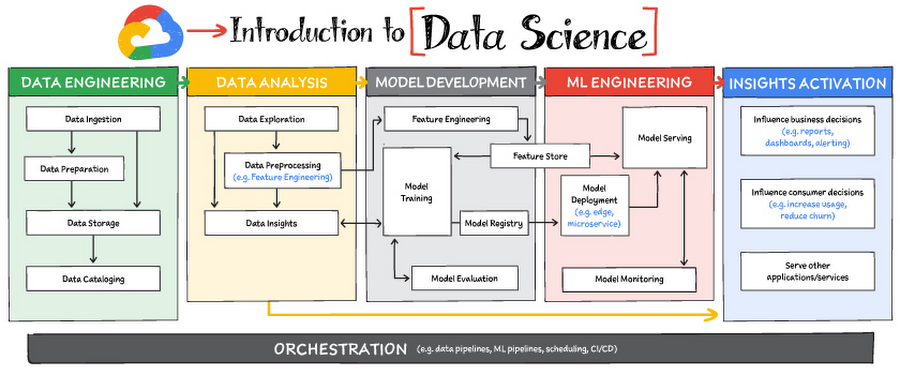
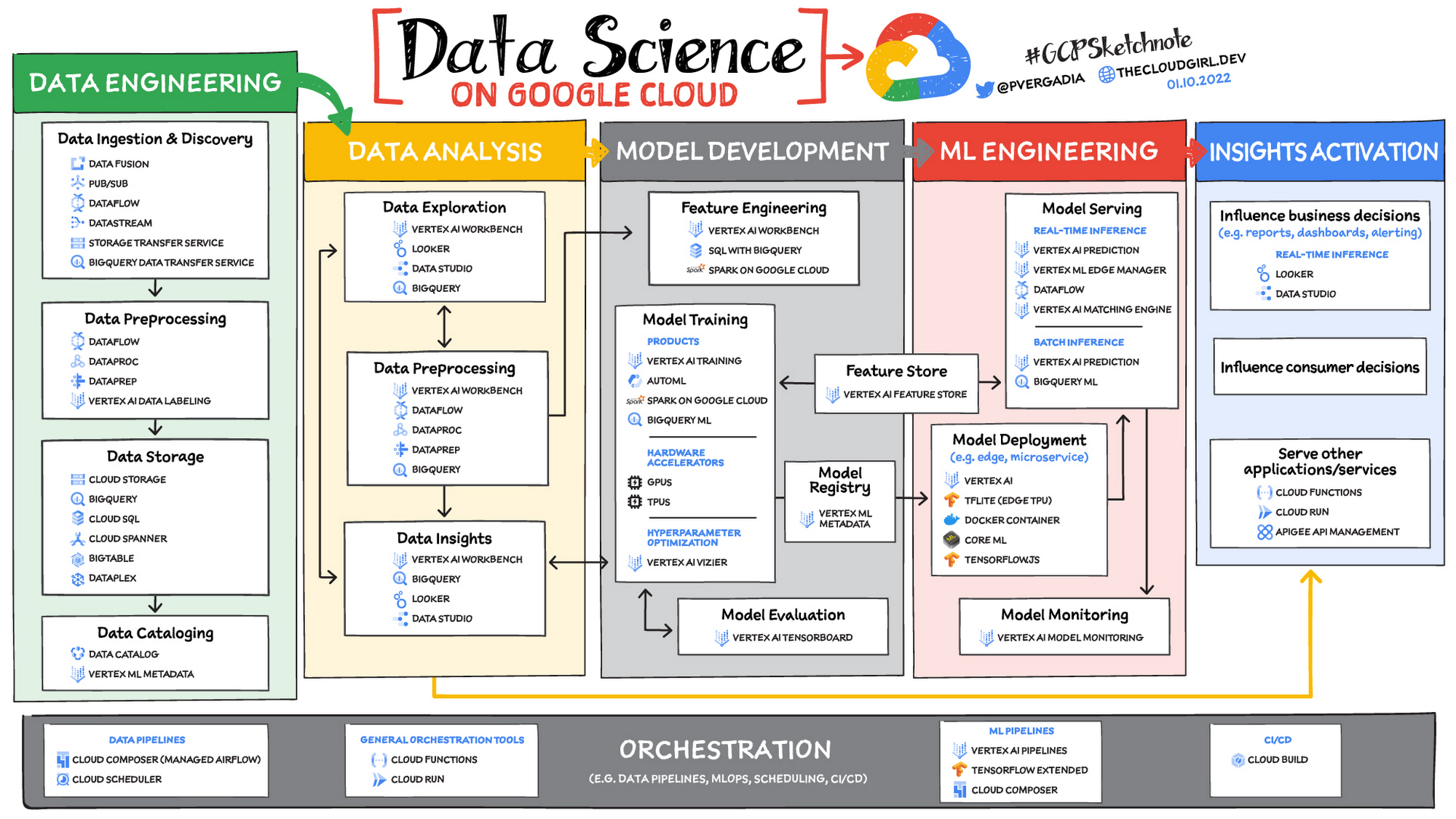
Read on to discover the six broad areas that are critical to the process of making data useful, and some corresponding Google Cloud products and services for those areas.
https://youtube.com/watch?v=EQvLUMjz-g4%3Fenablejsapi%3D1%26
Data engineering
Perhaps the greatest missed opportunities in data science stem from data that exists somewhere, but hasn’t been made accessible for use in further analysis. Laying the critical foundation for downstream systems, data engineering involves the transporting, shaping, and enriching of data for the purposes of making it available and accessible.
Data ingestion and data preprocessing on Google Cloud
Here we consider data ingestion as moving data from one place to another, and data preparation the process of transformation, augmentation, or enrichment prior to consumption. Global scalability, high throughput, real-time access, and robustness are common challenges in this stage. For scalable, real-time, and batch data processing, look into building data ingestion and preprocessing pipelines with Dataflow, a managed Apache Beam service. There’s a reason why Dataflow is called the backbone of analytics on Google Cloud.
If you’re looking for a scalable messaging system to help you ingest data, consider Cloud Pub/Sub, a global, horizontally scalable messaging infrastructure. Cloud Pub/Sub was built using the same infrastructure component that enabled Google products, including Ads, Search, and Gmail, to handle hundreds of millions of events per second.
If you want an easy way to automate data movement to BigQuery, a serverless data warehouse on Google Cloud, look into the BigQuery Data Transfer Service. For transferring data to Cloud Storage, take a look at the Storage Transfer Service. Or, for a no-code data ingestion and transformation tool, check out Data Fusion, which has over 150 preconfigured connectors and transformations. In addition to Dataflow and Data Fusion for data preparation, Spark users may want to look at related products and features for Spark on Google Cloud.
Data storage and data cataloging on Google Cloud
For structured data, consider a data warehouse like BigQuery, or any of the Cloud Databases (relational ones like Cloud SQL and NoSQL ones like Cloud BigTable and Cloud Firestore). For unstructured data, you can always use Cloud Storage. You may also want to consider a data lake. For data discovery, cataloging, and metadata management, consider Data Catalog. For a unified solution, take a look at Dataplex, which integrates a unified data management solution with an integrated analytics experience.
Learn more about data engineering on Google Cloud
- Explore the data engineering learning path
- Discover reference patterns
- Get certified by Google Cloud as a Professional Data Engineer
Data Analysis
From descriptive statistics to visualizations, data analysis is where the value of data starts to appear.
Data exploration, data preprocessing, and data insights
Data exploration, a highly iterative process, involves slicing and dicing data via data preprocessing before data insights can start to manifest through visualizations or simply via simple group-by, order-by operations. One hallmark of this phase is that the data scientist may not yet know which questions to ask about the data. In this somewhat ephemeral phase, a data analyst or scientist has likely uncovered some aha-moments, but hasn’t shared them yet. Once insights are shared, the flow enters the Insights Activation stage, where those insights become used to guide business decisions, influence consumer choices, or become embedded in other applications or services.
On Google Cloud, there are many ways to explore, preprocess, and uncover insights in your data. If you are looking for a notebook-based end-to-end data science environment, check out Vertex AI Workbench, which enables you to access, analyze, and visualize your entire data estate: from structured data at the petabyte-scale in SQL with BigQuery, to processing data with Spark on Google Cloud and its serverless, auto-scaling, and GPU acceleration capabilities. As a unified data science environment, Vertex AI Workbench also makes it easy to do machine learning with TensorFlow, PyTorch, and Spark, with built-in MLOps capabilities.
Finally, if your focus is on analyzing structured data from data warehouses and insight activation for business intelligence, you may want to also consider using Looker, with its rich interactive analytics, visualizations, dashboarding tools, and Looker Blocks to help you accelerate your time-to-insight.
Learn more about data analysis on Google Cloud
- Learn about Vertex AI Workbench for a Jupyter-based fully managed notebook environment
- Learn about how you can use BigQuery for petabyte-scale data analysis
- Learn about Spark on Google Cloud
- Discover the data analyst learning path
- Explore reference patterns for common analytics use cases
Model development
From linear regression to XGBoost, from TensorFlow to PyTorch, the model development stage is where machine learning starts to provide new ways of unlocking value from your data. Experimentation is a strong theme here, with data scientists looking to accelerate iteration speed between models without worrying about infrastructure overhead or context-switching between tools for data analysis and tools for productionizing models with MLOps.
To solve these challenges, once again, as a Jupyter-based fully managed, scalable, and enterprise-ready environment, Vertex AI Workbench makes it easy as the one-stop-shop for data science, combining analytics and machine learning, including Vertex AI services. Apache Spark, XGBoost, TensorFlow, and PyTorch are just some of the frameworks supported on Vertex AI Workbench. Vertex AI Workbench makes managing the underlying compute infrastructure needed for model training easy with the ability to scale vertically and horizontally, and with idle timeouts and auto shutdown capabilities to reduce unnecessary costs. Notebooks themselves can be used for distributed training and hyperparameter optimization, and they include Git integration for version control. Due to the significant reduction in context switching required, data scientists can build and train models 5x faster using Vertex AI Workbench than when using traditional notebooks.
With Vertex AI, custom models can be trained and deployed using containers. You can take advantage of pre-built containers or custom containers to train and deploy your models.
For low-code model development, data analysts and data scientists can use SQL with BigQuery ML to train and deploy models (including XGBoost, deep neural networks, and PCA), directly using BigQuery’s built-in serverless, autoscaling capabilities. Behind-the-scenes, BigQuery ML leverages Vertex AI to enable automated hyperparameter tuning, and explainable AI. For no-code model development, Vertex AI Training provides a point-and-click interface to train powerful models using AutoML, which comes in multiple flavors: AutoML Tables, AutoML Image, AutoML Text, AutoML Video, and AutoML Translation.
Learn more about model development on Google Cloud
- Learn about Vertex AI Workbench for a Jupyter-based fully managed notebook environment
- Learn more about Vertex AI
ML engineering
Once a satisfactory model is developed, the next step is to incorporate all the activities of a well-engineered application lifecycle, including testing, deployment, and monitoring. And all of those activities should be as automated and robust as possible.
Managed datasets and Feature Store on Vertex AI provide shared repositories for datasets and engineered features, respectively, which provide a single source of truth for data and promote reuse and collaboration within and across teams. Vertex AI’s model serving capability enables deployment of models with multiple versions, automatic capacity scaling, and user-specified load balancing. Finally, Vertex AI Model Monitoring provides the ability to monitor prediction requests flowing into a deployed model and automatically alert model owners whenever the production traffic deviates beyond user-defined thresholds and previous historical prediction requests.
MLOps is the industry term for modern, well engineered ML services, with scalability, monitoring, reliability, automated CI/CD, and many other characteristics and functions that are now taken for granted in the application domain. The ML engineering features provided by Vertex AI are informed by Google’s extensive experience deploying and operating internal ML services. Our goal with Vertex AI is to provide everyone with easy access to essential MLOps services and best practices.
Learn more about ML engineering and MLOps on Google Cloud
- Follow the guides, tutorials and documentation for Vertex AI
- Watch this video to learn more about Vertex AI
- Discover the data scientist/machine learning engineer learning path
- Get certified as a Professional ML Engineer
Insights activation
The insights activation stage is where your data has now become useful to other teams and processes. You can use Looker and Data Studio to enable use cases in which data is used to influence business decisions with charts, reports, and alerts.
Data can also influence customer decisions and as a result increase usage or decrease churn, for example. Finally, the data can also be used by other services to drive insights; these services can run outside Google Cloud, inside Google Cloud on Cloud Run or Cloud Functions, and/or using Apigee API Management as an interface.
Learn more about insights activation on Google Cloud
- Watch this video to learn about building interactive ML apps using Looker and Vertex AI
- Learn about Looker, and Looker solutions for eCommerce, Digital Media and more
- Discover a gallery of interactive dashboards created with Data Studio
- Watch this video to understand the difference between Cloud Run and Cloud Functions
Orchestration
All of the capabilities discussed above provide the key building blocks to a modern data science solution, but a practical application of those capabilities requires orchestration to automatically manage the flow of data from one service to another. This is where a combination of data pipelines, ML pipelines, and MLOps comes into play. Effective orchestration reduces the amount of time that it takes to reliably go from data ingestion to deploying your model in production, in a way that lets you monitor and understand your ML system.
For data pipeline orchestration, Cloud Composer and Cloud Scheduler are both used to kick off and maintain the pipeline.
For ML pipeline orchestration, Vertex AI Pipelines is a managed machine learning service that enables you to increase the pace at which you experiment with and develop machine learning models and the pace at which you transition those models to production. Vertex Pipelines is serverless, which means that you don’t need to deal with managing an underlying GKE cluster or infrastructure. It scales up when you need it to, and you pay only for what you use. In short, it lets you just focus on building your data science pipelines.
Learn more about orchestration on Google Cloud
- Read more about Cloud Composer for Airflow-based pipelines
- Try some example notebooks on Github with Vertex AI Pipelines
- Learn different ways to trigger Vertex AI Pipeline runs
- Read the whitepaper on Practitioners Guide to MLOps: A framework for continuous delivery and automation of machine learning
Summary
Google Cloud offers a complete suite of data management, analytics, and machine learning tools to generate insights from data. Want to learn more? Check out the following resources:
Special thanks to the following contributors to this blogpost: Alok Pattani, Brad Miro, Saeed Aghabozorgi, Diptiman Raichaudhuri, Reza Rokni.
3426
Of your peers have already watched this video.
3:53 Minutes
The most insightful time you'll spend today!
How Good Are Google’s Vision, Speech, Translation and Natural Language ML APIs?
Many companies want to be able to adopt machine learning and artificial intelligence quickly into their businesses.
But it isn’t always straight-forward and easy. Custom building the models and setting up and maintaining the infrastructure required for an AI project is time-consuming.
That is where Google’s machine learning APIs come into play.
These ready-to-go ML APIs for vision, speech, translation and natural language can be deployed almost immediately. Imagine being able to tell the state of mind of customers who walk into a store (vision API). Or being able to bridge, easily, India’s significant local language challenges (translation API).
In this short video, you’ll see how easy it is to access—and how accurate—Google’s machine learning APIs for vision, speech, translation and natural language processing.
Watch it now and find new ways to improve your business!
Revolutionizing Finance: Google Cloud’s Role in Auditoria.AI’s Success

1254
Of your peers have already read this article.
4:00 Minutes
The most insightful time you'll spend today!
Be it marketing, sales, or even security, most departments in large organizations today have a range of SaaS tools at their disposal to help make their work more efficient. But people in corporate finance and accounting have been underserved in that respect. Their days are still spent on routine, mundane tasks that keep them away from more stimulating work. Auditoria.AI aims to change that by automating those functions with AI and natural language technology.
We strive to improve the lives of finance and accounting professionals by automating the routine, repetitive, and laborious parts of the finance function, such as copy-and-pasting data, validating documents, and checking for errors on spreadsheets, freeing these teams to focus instead on providing valuable, strategic insights to the business.
To that end, the problems we’re solving affect three major finance functions:
- Accounts Payable, responsible for sending money out of the company, such as bill payments.
- Accounts Receivable, responsible for bringing money into the company, such as invoicing for services.
- General accounting, a broader term consisting of functions of the general ledger team and the CFO, including closing books.
Historically, making these processes more efficient entailed dedicating more personnel to them. But this didn’t necessarily mean more work was done faster and to the highest standards. Many finance professionals are often overworked, dedicating extra hours, weekends, and sometimes holidays to process invoices, collect payments, and close the books on time.
We created solutions for these three finance functions, with our SmartBots taking care of the back-and-forth communications between finance teams, vendors, and customers. In large companies, these micro-transactions add up to thousands per day, resulting in finance professionals spending entire days reading inquiries, interpreting requests, looking for relevant information, and answering as many as possible. But with our AR helpdesk, for example, accounts receivable tasks, such as a request for a copy of an invoice, get automated. Our technology reads emails and attachments to understand what is being requested. Then it connects to the Enterprise Resource Planning (ERP) software to grab the relevant information and attach it to the email, so the recipient gets a response within 60 seconds.
Building the smart assistant that finance teams need
In our automation flow, we constantly handle different types of documents, from invoices and tax forms to receipts and email messages. But processing the interaction between computers and human language is complex. You must detect intent and facts, and understand the context before finding the specific slots of information extraction that may be relevant to specific processes and requests. Our solution adds value by extracting the right information in the right context, from the right document, for the relevant finance function. Instead of building everything from scratch, we turned to Google Cloud’s Document AI to support extracting data from unstructured documents to understand and analyze them.
Document AI comes with pre-built models that help analyze specific parts of our post-production lifecycle. For example, Invoice Parser extracts text and values from invoices, including invoice number, supplier name, invoice amount, tax amount, and invoice due date, all of which are necessary for our SmartBots to execute an extraction workflow. These out-of-the-box features significantly accelerate our own product development process and time-to-market, which are critical for the performance of a startup such as ours.
To ensure a high quality of information extraction, we used to do document readings in-house. Having automated some of that with Document AI, we’re at 85% accuracy extracting files, and with some additional customization efforts, we will achieve 95%+ extraction accuracy.
Meanwhile, we have now streamlined internal processes, which ultimately translates into faster services for our customers. For example, assuming all the information has been provided, it generally took up to 15 minutes to process a tax form. We now do that in seconds.
The value of automation doesn’t stop there. Using DocumentAI to automate structured data extraction from documents, we have managed to:
- Speed up the collection of general ledger entries by 90%+
- Reduce errors and omissions by 85%+
- Close books 20% faster
- Improved the productivity of full-time employees by 60%+
- Reduce process workload by 75%+
- Improve vendor serviceability by 75%+
- Reduce vendor risk and fraud by 50%+
Leveraging automation to focus on more innovation
Automating some of our processes with Document AI also means we have more time to focus on developing new features and further improving our solution. 80-90% of the time used for extracting custom fields from documents has now been automated with an OCR metadata library.
With Document AI taking care of standard extraction, we focus on the intelligence we add to post-extraction. For example, when an invoice comes in from a vendor, our application needs to figure out which vendor it is to match it to the correct records in the ERP. But variations in the documents could interfere with that extraction process. The vendor’s trading name might be slightly different from the company’s name registered in our internal system, delaying the process. With more time on our hands, we’re now working on features enabling our models to leverage logos and other elements extracted from documents to swiftly match them to the correct company registered in our systems.
With the benefits we’ve seen thus far, we look forward to accelerating our international growth. We’ll be relying on Google Cloud’s Document AI to automate operations, potentially in different languages, as we continually remove friction from the work lives of finance and accounting people worldwide.
More Relevant Stories for Your Company

Spark on Google Cloud: How this Helps Customers with Agility, Cost Reduction and Time Spent on Spark
Apache Spark has become a popular platform as it can serve all of data engineering, data exploration, and machine learning use cases. However, Spark still requires the on-premises way of managing clusters and tuning infrastructure for each job. Also, end to end use cases require Spark to be used along with


Metro Consolidates 100 SAP Instances on Google Cloud
German retailer Metro, with operations in 25 countries across Europe and Asia and employing over 150,000 people, decided to consolidate its 100 SAP instances into one SAP S/4HANA system running on the Google Cloud Platform. This helped the company lower costs, increase efficiency, and improve customer experience. In addition, the

Survey: What Everyone Else In Your Industry is Doing with AI
Across industries and use cases, organizations that have implemented ML report demonstrable return on investment and substantial business benefits ranging from better, faster data analysis to improved efficiency and cost savings. The vast majority of early adopters — nearly 90 percent, according to one study — believe that ML provides

The Data Scientist Guide to Preparing and Curating Data for AI
To design and implement a successful machine learning (ML) project, you often need to collaborate with multiple teams, including those in business, sales, research, and engineering. Understanding the essentials of gathering and preparing your data is crucial to align teams, and getting a project off the ground. Building an ML
