





Takeaways from the Google Cloud Public Sector Summit on Prioritizing Tech Investments

4771
Of your peers have already read this article.
3:00 Minutes
The most insightful time you'll spend today!
Editor’s note: Today’s post highlights five takeaways from our session at the first ever Google Cloud Public Sector Summit. To watch the full session, check out All the Right Moves: Prioritizing Investments in Technology.
Now more than ever, government agencies need to invest in digital services to fulfill their missions and better serve communities. Yet modernization isn’t a one-and-done approach; it’s a sustained effort, with multi-year implications, and requires careful consideration of how to integrate existing investments to optimize costs. Digital transformation requires coordination between different programs and agencies, including all of their many competing considerations. In short, maximizing technology investments requires careful planning, strategic thinking, and industry partners that can provide flexibility and security and meet agencies where they are.
I sat down with Suzette Kent, former U.S. federal chief information officer, and Dominic Sale, assistant commissioner for Technology Transformation Services at the General Services Administration (GSA) for a conversation to unpack this important topic and discuss industry best practices.
The panelists had five tips for government employees who are making technology purchasing decisions for their agency.
1. Put the agency’s mission first.Avoid getting distracted by exciting new trends and focus on long-term goals that can impact which procurement strategies or funds could be used. The discussion started with how government agencies could cut through the noise about technology and prioritize which technology is best for their needs. Sale and Kent agreed that an agency should focus on its core mission outcomes and let its technology needs flow from that. Sale also emphasized the importance of having technology design respond to humans’ needs, which has historically been a challenge for government agencies.
For agencies to stay focused on their mission, final decisions about technology need to be made by the program manager who best understands each program’s mission. The government CIO’s role is to be the enabler for the technology and leverage it at the enterprise level, particularly when it comes to sharing infrastructure. The takeaway: enable mission programs by empowering your teams and providing access to authorized, compliant, innovative data platforms that programs can move confidently and quickly with.
2. Invest in interoperability. Agency employees often struggle to balance the need for a positive return on investment (ROI) with requirements for meeting mission objectives. While the panelists agreed that the total cost of ownership was important, they also emphasized taking an expanded view of ROI, including future-proofing and investing in functionality that may not realize its return for many years based on the initiative. Saving money isn’t particularly valuable if the solution doesn’t meet an agency’s needs. When choosing a technology partner, government employees should understand its long-term vision to ensure that the partner fits agency priorities. Partners’ technologies should also integrate seamlessly with existing systems so agencies don’t duplicate investment costs.
For example, Google Anthos extends Google Cloud services and engineering practices into an organization’s existing environment, establishing operational consistency across apps and modernization. With Anthos, agencies can simply and securely build and deploy applications anywhere, integrating cloud services across platforms. This allows them to enjoy a consistent DevOps experience for hybrid and multi-cloud environments and enables new innovation. Most importantly, this enables an enterprise data platform, one of the largest catalysts for mission transformation and applied AI.
3. Take advantage of artificial intelligence (AI) benefits. Over the course of the pandemic, the rapid application of AI has improved government productivity, efficiency, and the ability to deliver critical new services to the public at scale. This has further cemented AI’s role as an essential government technology for the present and future. In fact, Nextgov reports that “46% of government IT specialists plan to use AI and machine learning (ML) for embedded systems in the near future.”
As we’ve seen over the course of the pandemic, government programs can start small with AI pilots before moving into broad deployment. This can help agencies understand AI’s potential before moving to full production. People always supervise AI technologies, and the possibilities are endless. Google Cloud’s Contact Center AI (CCAI) has helped government agencies improve the customer experience, by allowing citizens to schedule vaccine appointments via a platform of their choice with up to 28 languages and dialects, and manage vaccine deployment. The U.S. Navy spends billions annually to fight rust and corrosion on its ships. Inspections of ships, aircraft and vehicles are a time-consuming and critical part of keeping the U.S. Navy at top performance so Google Cloud and Simple Technology Solutions (STS) rapidly built an AI-based corrosion-detection and analysis system. The system detected and analyzed corrosion on vessels with 90% accuracy and will eventually be used to automate inspections of vessels, aircraft, and vehicles—saving billions of dollars. Document AI helps a variety of government agencies scale their document processing, reducing the time it typically takes to process enormous amounts of data and related citizen claims.
Successful adoption of AI also depends on the quality of the data. Ultimately, agencies need high-quality enterprise data pipes so that employees and the community trust the system and public sector agencies. Sale described a GSA project that used AI bots to read legal contracts and look for particular phrases that would indicate a specific use case. Previously, an employee would have had to read through the contracts and search for the information. In this way, AI is saving the government both money and time.
4. Creating better experiences for the public. Sale observed that, “trust is the government’s currency and profit motive.” And trust comes when the public can be served with the same modern tools and technology they’re used to – in real-time and with transparency in mind. For example, agencies can provide transparency in public-facing dashboards for programs and supply services that deliver information in real-time through solutions like CCAI.
Trust also requires that constituents feel that government agencies will keep their data safe and secure. The need for a globally secure infrastructure with systems that are up-to-date and designed with security at every level, underpinned by zero-trust enterprise-wide remains paramount – particularly after the series of recent cyberattacks targeting government IT infrastructure.
5. Finding the right technology partner. Government leaders need technology partners who provide a flexible and interoperable platform to integrate existing investments and maximize technical value. Historically, public sector agencies have largely been forced to adopt private clouds, which has reduced their access to richer features, and hindered their ability to adopt a full range of security and product capabilities. The right partner won’t require government leaders to compromise on functionality or service availability to achieve compliance. The right partner can harness the power of emerging technology to make it Government-ready and the true promise of cloud– the access and integration of open data– to make missions more powerful and impactful for the constituencies they serve.
Security Talks: Addressing the Toughest SOC Challenges with SolarWinds, Chrome, Zero Trust, and More

2512
Of your peers have already read this article.
1:30 Minutes
The most insightful time you'll spend today!
Security operations teams are facing a “perfect storm” of challenges from nation-state actors turning their attention to financial crime, to rising uncertainty and potential complexities because of rapidly advancing cloud migration and IoT adoption, to the long-lamented skills shortage.
Now imagine having to face this trifecta without visibility into your IT and security infrastructure because scale and cost concerns have impeded your ability to ingest and monitor critical telemetry. To help organizations rethink threat detection and broader security team efforts, we showcased at this month’s Google Cloud Security Talks a keynote on why DEI is a cybersecurity imperative, Mandiant’s review of lessons for organizations two years after SolarWinds, how Google Chrome already helps protect your business (and what more you can make do with it,) how best to encourage your organization to pursue Zero Trust, and three key ways in which Chronicle Security Operations can help your organization scale threat detection and actionable outcomes. These include:
1. Operationalizing threat intelligence
Harnessing the power of threat intelligence to acquire context, prioritize risk, and act on detections requires more than just ingesting a set of indicator of compromise (IOC) feeds. Threat intelligence must have breadth and depth of coverage to provide custom details on the tools, tactics, and procedures of threat actors. Explore why part of the “magic” behind Google Cloud’s security is the sheer scale of threat intelligence we can share with our customers.
2. Driving detection as code
We want to enable organizations that are more advanced in their cybersecurity maturity to build their own custom detections and rules, which means offering our customers a powerful detection-authoring platform. Chronicle Security Operations can help analysts build specific detections around, for example, known bad files or a specific registry key change. We also demonstrated how to create more complex detections, such as flagging process execution patterns or crafting a suspicious-behavior trigger from a specific activity sequence.
3. Leveraging curated detections
With curated detections, which we announced in August, we are putting the power of Google Cloud’s intelligence in the hands of security operations teams everywhere. Our detections offer actionable, ready-to-use threat detection content curated, built, and maintained by Google Cloud Threat Intelligence (GCTI) researchers. These detection sets cover a wide variety of threats for your network and beyond, including attacks such as ransomware, remote-access tools (RAT), infostealers, data exfiltration, and suspicious activity.
You can watch all nine of our Security Talks recorded sessions here, and keep an eye out for our next Security Talks, coming in March 2023.
5 Compelling Ways to Practice the Principle of Least Privilege for Security Leaders

3556
Of your peers have already read this article.
4:30 Minutes
The most insightful time you'll spend today!
When it comes to security, managing access is a foundational capability—whether you’re talking about a physical space or your cloud infrastructure. If you were securing an office, you wouldn’t give every employee a master key that can open the front door, the mailbox, and the safe. Likewise, when you’re securing your cloud infrastructure, you should limit employees’ access based on their role and what they require to do their job.
This concept is known as the principle of least privilege, which NIST’s Computer Security Resource Center defines as: “A security principle that restricts the access privileges of authorized personnel… to the minimum necessary to perform their jobs.” In practice, this means assigning credentials and privileges only as needed to both users and services, and removing any permissions that are no longer necessary.
Keeping the principle of least privilege in mind, here are five practical tips to minimize the surface area of exposed resources on Google Cloud Platform (GCP) and defend against some common attacks.
Avoid excessive use of broad primitive roles
Primitive roles like Owner and Editor grant wide-ranging access to all project resources. To tighten access security, consider using more specific predefined roles in Cloud Identity and Access Management (IAM), or defining custom roles that are better suited to your organization. For example, if you have a Cloud SQL database, instead of granting the project-wide Editor role to everybody, you could grant the cloudsql.editor role to users who create new databases, cloudsql.client to those who only need to connect to existing databases, and limit cloudsql.admin to database administrators.
Our policy design page has some sample structures and policies for different types of organizations, including startups, large enterprises, and education and training customers.
Assign roles to groups, not individuals
If you assign an IAM role directly to an individual, they retain the rights granted by that role even if they change roles, move around your organization, or no longer require them. A safer and more maintainable option is to place users into logical groups. For example, to manage databases, you could create db-editors, db-viewers, and db-admins groups, and let users inherit roles from these groups:
Groups can be created within the Admin Console for any G Suite domain, or federated from an external tool like Active Directory. By using groups for ownership, you can also avoid “orphaned” projects and resources—where a project or resource has a single owner who leaves the organization.
You can assign roles at the organization, folder, project, or resource level. This lets larger organizations easily manage roles for, say, a specific developer team or the entire accounting department. Be aware, however, that a child resource cannot limit roles granted by a parent: a user’s project-level cloudsql.viewer role, for example, will override any resource-level restrictions on any database in the same project.
Reduce the risks of default service account behavior
Service accounts are a special type of account intended for apps that need to access data. If the app’s own private credentials are compromised, however, the attacker then has all the access granted to the app by the service account’s roles.
The Compute Engine default service account, which has the editor role, is enabled for all instances created in a project unless you specify otherwise.
Creating a custom service account to use for creating instances and limiting its roles to the minimum necessary significantly reduces risk. For example, many apps using Cloud SQL only need the cloudsql.client role that lets them connect to an existing database.
An alternative approach is to grant the instance service account minimal privileges and create dedicated service accounts for your apps. This gives you more fine-grained control over each app’s privileges, although you will need to carefully manage the service account credentials.
Reduce risk and control access to your project by using networking features
To enable inter-resource communication, new GCP projects initially have a default network connecting all resources in that project. This is convenient for development, but in this default configuration, if an attacker gains unauthorized access to one resource, they may be able to reach others as well.
To limit this risk, don’t use the default network in production and explicitly specify accepted source IP ranges, ports, and protocols in network firewalls. You should also separate sensitive apps into individual virtual private clouds (VPCs), and if inter-app connectivity is required, use a Shared VPC. In each VPC, use different subnets for public facing services (e.g., web servers and bastion hosts) and private backend services. Allocate public IPs only to instances in the public subnet and add firewall rules with network tags to control which services can communicate with each other. Finally, grant permission to create or modify firewalls and routes only to those directly responsible for the network.
The Secure Instances and Apps with Custom Networks codelab walks you through setting up the public/private subnet configuration above. The Policy design for customers article we mentioned earlier also contains sample network designs for common use cases. For guidance on the tradeoffs of single, multiple, and shared VPCs, see Best practices and reference architectures for VPC design.
Consider using managed platforms and services
If you deploy and manage your own applications, you are responsible for security configuration, including the maintenance of accounts and permissions. You can limit your responsibilities by hosting your apps on managed platforms like Cloud Run, App Engine, or Cloud Functions, or by using fully managed services for databases and processing frameworks like Cloud SQL for MySQL and Postgres, Cloud Dataproc for Hadoop and Spark, and Cloud Memorystore for Redis.
A final note
Security is a priority in all aspects of Google Cloud, but cloud security is a shared responsibility, and ultimately you are responsible for making the right configuration and product choices for your organization to protect your data on GCP. These tips are a great starting point to help reduce your attack surface and help you make more informed risk decisions.
Building Effective Visibility into Technology Assets Used in Healthcare

3173
Of your peers have already read this article.
4:00 Minutes
The most insightful time you'll spend today!
When technology just works, it’s easy to trust. But too often, we place our trust in technology that doesn’t deserve it. When we do this with technology to provide healthcare, we put the safety of patients and the security and reliability of our global healthcare system at risk.
The institutions that make up our global healthcare system also place their trust in cybersecurity measures and technology to keep their systems running and repelling the unceasing wave of attacks they face. We often hear about the institutions that succumb to cyberattacks, but we don’t read much about the institutions that have been successful at defending their digital perimeter, and ultimately protected their ability to treat and protect patients.
Why were some institutions successful and others not as much? What cybersecurity capabilities made the healthcare institution resilient from these attacks? As we covered in our previous post on how healthcare can strengthen its cybersecurity resilience, establishing visibility and antifragility practices are necessary to repel attackers and build trust in the security and reliability of the technology our global healthcare system relies on.
As we continue our series on healthcare and cybersecurity, we’ll focus next on establishing sustainable visibility mechanisms so cybersecurity teams working in our global healthcare system can secure and preserve patient care and safety.
Visibility is akin to a patient taking 20 different medications but their doctor only knows about 10 of them. That’s the current state of many healthcare organizations’ relationship to the technology used on their networks and systems: They aren’t always aware of what technology is in use, whether it has vulnerabilities, how serious those vulnerabilities are, or how one weakness could lead to another or cascade out of control.
Visibility maps those technology assets (including the software, hardware, configurations, protections, who built it, and where the component parts come from) and help prioritize the importance of those assets in keeping systems and networks secure, no matter how complex the healthcare organization’s use of technology might be.
Building effective visibility
Building visibility into technology assets requires a structured approach. As mentioned in the first blog in this series, using a guide like the NIST Cybersecurity Framework (CSF) provides an important mental model we can use to get a clear picture of the strengths and weaknesses of an organization’s cybersecurity risk profile, and how it applies to the assets the organization seeks to protect.
Cybersecurity author and leader Sounil Yu’s book Cyber Defense Matrix provides an important interpretation of the NIST CSF framework that can help us better understand what visibility we have into technology assets and how they are protected. Visibility is about more than just seeing all assets we have all at once. It’s also about understanding which assets are mission-critical and must be protected at all costs versus which ones are perhaps important but less crucial overall. Without the right balance, we end up trying to protect everything while not protecting what matters enough. This is where structural awareness comes in.
Structural awareness, or the conscious understanding and state of an organization’s assets, is established as one implements controls captured in the NIST CSF functions Identify and Protect. These controls focus on identifying assets, their bill of materials, their creators, their dependencies on other assets, the protections and vulnerabilities they have, and the threats they face. While visibility helps create an accurate map of technology assets, structural awareness builds on that visibility and answers questions such as, “What are the ways the threat actor could compromise that asset? What could be lost? How would it most likely happen? Would I know?”
Yu says that structural awareness is efficiently achieved with the help of automation, and is not as people-intensive as many practitioners, decision-makers, and executives might think. If a cyberattack is like an explosion, cybersecurity teams’ structural awareness helps them understand how the explosion could happen before (or ‘left of’) it goes ‘boom’.
It’s also important to remember that while structural awareness is related to situational awareness in some ways, they are different concepts. Situational awareness refers to mechanisms that are used to detect and respond to an event. Structural awareness mechanisms are ‘left of boom,’ or mechanisms that protect your assets so that events don’t happen. The goal is to stay ‘left of boom’ and avoid being ‘right of boom’. Being proactive in your protections and being ready to respond in either case is really important, nonetheless.
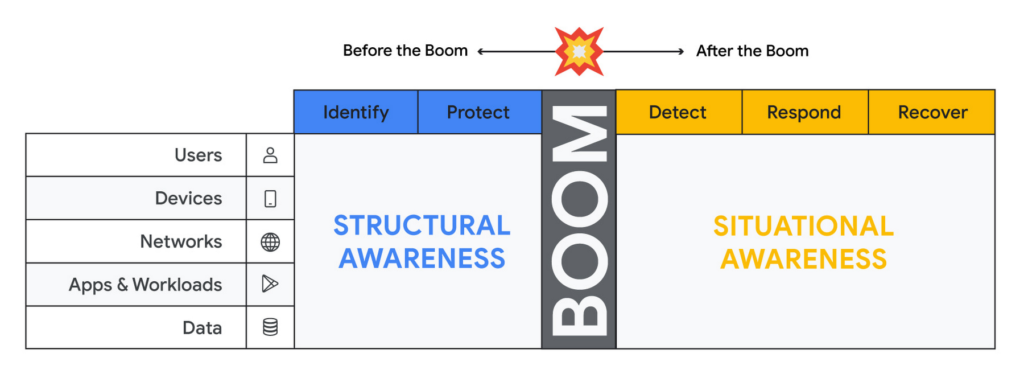
Thinking about assets in terms of users, devices, networks, applications and workloads and data (asset classes), and adopting mechanisms to discover assets of each type through visibility controls suggested by the NIST CSF, will lead to developing structural awareness. Structural awareness can help avoid the boom, but if the boom does happen, it can also help shape the situational awareness needed to react. The Cyber Defense Matrix is an ongoing project, and you can read more about it (and contribute to it) here.
Framing asset discovery for resilience
Cybersecurity teams must map out their organizations’ most critical healthcare services and systems that support them, but that’s easier said than done. Asset discovery can feel overwhelming. Trying to find, count, and audit the hardware, software, users, and data down to the component across even a small part of one’s technology footprint can feel like pushing a dead car up a steep hill. The way to make this easier is to prioritize this effort in the parts of the business where the impact of a quality or safety issue has the potential to create the most harm to the organization and those who depend on it.
A smart place to begin the process to find and evaluate the measurements that an institution uses to monitor those processes.
Healthcare providers: Start with the quality and safety measurements which must be submitted to various regulatory agencies in order to maintain licenses to operate.
- Health insurers: Look at the performance improvement metrics used to ensure subscriber benefits, quality requirements, and legal mandates are being met.
- Health IT services: Use service level agreements for measuring contract compliance with things like uptime, recovery time and point objectives, and response turnarounds.
- Life sciences organizations: Begin with the relevant Good Practice definitions and the metrics used to monitor quality and safety levels of products and services.
When analyzing the types of technology unique to healthcare – like network-connected medical devices such as infusion pumps, implantable pacemakers, ventilators, EKG equipment, and MRI machines – it’s important to ask what are the immediate safety hazards if there was a cyberattack. Not sure how to answer that question? The International Medical Device Regulators Forum produced a risk categorization model that could be helpful in framing that response. Operational technology, like blood bank and sample refrigerators, climate control, air handling, infection control and pneumatic tube systems, may also be used to identify and prioritize inventory efforts.
Once priorities have been set, teams can begin gathering data on critical services, the owners of those services, the systems those owners rely on, and the technology itself.
Inventory tactics on Google Cloud
Building service-technology mapping is not a one-time exercise. Organizations should take the time to automate inventory creation and maintenance, so they can maintain an up-to-date view of all the items in their environment at any given time. This is especially for organizations that have highly dynamic environments.
Google Cloud provides best practices on discovering and cataloging assets in its Cloud Architecture Center. Implement controls found in the Identity and Protect categories using the NIST Framework & Google Cloud technical paper. Automation is your friend when building and maintaining a complete and accurate inventory. Google Cloud Asset Inventory and Security Command Center can be used to inventory a variety of resources running in Google Cloud. Cloud Build, Google Cloud’s CI/CD platform, implements SLSA 1 and provides a trustworthy audit of software artifacts deployed through a managed pipeline. Cloud DLP inventories and labels data stored on Google Cloud Storage and services like BigQuery.
Meanwhile, a number of Google Cloud Marketplace partners have solutions that can help build a comprehensive inventory, and innovation continues to improve our technological options. One emerging field of security technology, called attack surface management, helps discover previously-unknown assets. Finally, our next blog on resilience discusses how to use a software bill of materials (also known by the breezy acronym SBOM) to gain visibility and structural awareness into applications.
It’s important to remember that when starting down this path, the goal is not to gain 100% visibility into every single component on every single device attached to every network supporting every service running. Success or failure is not achieved when the inventory process has reached an arbitrarily-determined ‘percentage complete.’ We want to prioritize expanding visibility and developing structural awareness on assets where safety and quality are at risk, so we can improve their resilience.
And finally, we feel it’s important to emphasize that in the past, healthcare industries have focused mainly on protecting the confidentiality of data. While that’s important, we must evolve security programs beyond protecting confidentiality as its primary (and some cases, only) focus.
To be resilient, we must design and build cybersecurity capabilities that deliver safety, integrity, and availability of the technology that cares for patients directly. As we gain visibility into the technology we depend on to keep us healthy, we improve our understanding about which parts of it we can trust, and which parts we can’t. Improving visibility is an important early step on our path to resilience.
Redefining Network Security with Google Cloud’s Secure Web Proxy

1197
Of your peers have already read this article.
3:30 Minutes
The most insightful time you'll spend today!
Google Cloud provides multiple layers of security to help customers stay ahead of evolving threats and keep their cloud workloads safe. Today at our annual Security Summit, we are excited to announce the general availability of Secure Web Proxy, a new cloud-first network security offering that provides web egress traffic inspection, protection, and control. Secure Web Proxy (Cloud SWP) can help networking and security teams implement Zero Trust networking principles, discover malicious activity, and support forensic investigations
How Secure Web Proxy works
You configure workloads to use Secure Web Proxy as a gateway. Web requests can originate from virtual machine (VM) instances, containers, serverless environments, and workloads outside of Google Cloud connected by Cloud VPN or Cloud Interconnect. Policies and rules in Cloud SWP will be applied to traffic sent from these workloads to the internet.
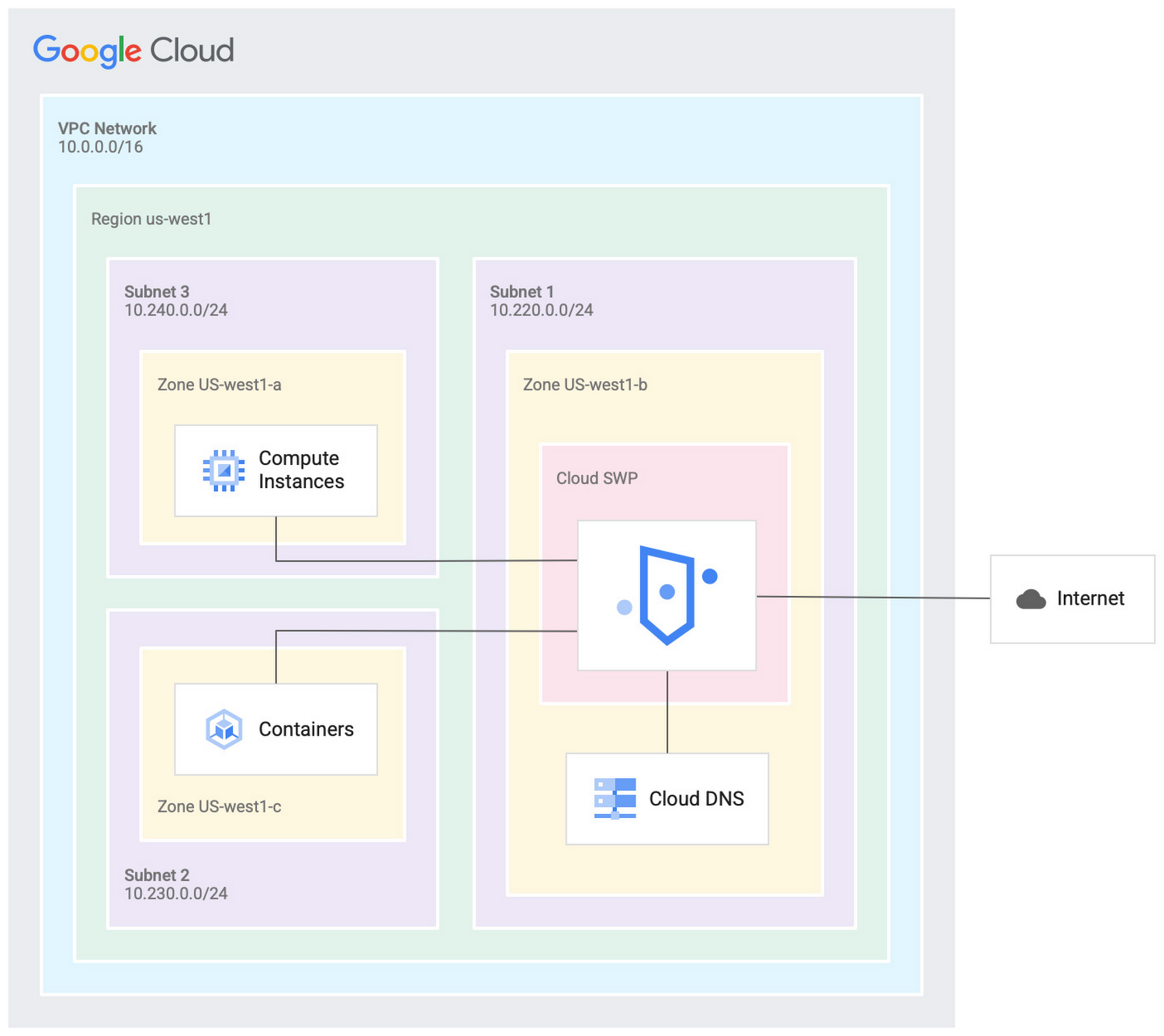
Cloud SWP helps enable organizations to enforce granular access policies, limiting egress web traffic based on source, identities, destination, or request types. With Cloud SWP you can create policies with Google Cloud Identity Access Management (IAM) context using service accounts and secure tags to block egress. For example, you can set a policy to limit a service account to sending traffic to a specific outbound destination.
Secure Web Proxy offers a scalable TLS inspection service that lets you intercept TLS traffic, inspect the encrypted request, and enforce your policies. Cloud SWP integrates with Cloud Logging to record metrics and transaction logs for requests handled by the proxy.
Common use cases for Secure Web Proxy
Many organizations employ a proxy like Cloud SWP to programmatically restrict workload access to only trusted external web services.
You can also use Cloud SWP to monitor outbound access. The proxy identifies traffic that doesn’t conform to policy and logs it to Cloud Logging. This allows you to monitor internet usage, discover and disrupt threats on your network by spotting command and control traffic or anomalous data transfers. Logs can be also used in forensics to investigate security events and incidents involving egress web traffic.
Operational benefits
Secure Web Proxy is another example of how Google Cloud continues to deliver built-in, cloud-first security capabilities that offer operational efficiencies for our customers.
Cloud SWP is easy to deploy and manage because it is a managed service. Unlike frequently deployed proxy solutions, it does not require users to configure virtual machines (VMs) to run and scale the proxy. Security patching is handled automatically. As your business and outbound traffic grows, Cloud SWP takes care of growing your proxy infrastructure for you.
Secure Web Proxy can also help make cloud migrations more seamless. If you are using an on-premises proxy, you can easily port the existing proxy’s policies to Cloud SWP when you migrate the app, maintaining the same egress protection in the cloud as you had on-premises.
Customer testimonials
Preview customers validated the operational and security value of implementing Cloud SWP:
“Google’s Secure Web Proxy is a powerful tool that can help businesses of all sizes protect their cloud workloads from online threats. By using the granular policy controls and TLS inspection, we are ensuring that our cloud applications only access approved external destinations. Additionally we are able to comply with data security regulations,” said David Saleh, director, Cloud Architecture and Application Security, ATB Financial.
“Secure Web Proxy has helped us to improve our security in Google Cloud. We are now able to filter outbound HTTP and HTTPS traffic from our applications. In addition, having a native solution will allow us to replace the VM-based solution we currently have, providing us with cost savings and continuing to deliver on our strategy of replacing products with cloud native services,” said Roberto Vega, cloud analyst, Carrefour.
Getting started with Secure Web Proxy
You can get started with Cloud SWP by visiting our documentation page to learn more about Cloud SWP prerequisite requirements and configuration options. If you want to quickly evaluate Cloud SWP for your cloud environment, use the SWP evaluation guide for step-by-step instructions. Be sure to check out all our sessions at this year’s Google Cloud Security Summit.
4872
Of your peers have already watched this video.
1:30 Minutes
The most insightful time you'll spend today!
How does Google Pick its Data Center ?
Google is well known for its sustainable tech and hardware initiatives. Did you know alongside its environmental friendly designs of its data centers, it takes into account various factors such as redundant power supplies, data replication, network connectivity, etc. Watch the video to learn more.
More Relevant Stories for Your Company

Using Google Cloud’s Backup and DR Service with Logging and Monitoring Tools
Backup and DR data is a valuable business asset, and ensuring that it’s safe and accessible is essential. In particular, you want to be able to monitor your backups to ensure that the data is indeed protected and that you can quickly recover it in the event of a disaster,

The {$persona} Survival Guide: A Roadmap for Successful Transformation
Part of being a security leader whose organization is taking on a digital transformation is preparing for hard questions – and complex answers – on how to implement a transformation strategy. In our previous CISO Survival Guide blog, we discussed how financial services organizations can more securely move to the

Latest Enhancements in reCAPTCHA Enterprise Helps Govts Sites Protect against Digital Frauds
Download our guidebook to learn how reCAPTCHA Enterprise can help strengthen your website security quickly. Cyber threats on the rise In 2021, the United States saw 40.5% of website attacks committed through “bad bots” on the internet, with 37.2% of government website traffic being bad bots, according to research by

How Firewall Insights can Simplify Corporate Firewall Rules
Corporate firewalls typically include a massive number of rules, which accumulate over time as new workloads are added. When rules stack up piecemeal like this, misconfigurations occur that, at best, create headaches for security administrators, and at worst, create vulnerabilities that lead to security breaches. To address this, we have
