





Take a Look at 30 Eventrac Locations!

4929
Of your peers have already read this article.
2:00 Minutes
The most insightful time you'll spend today!
New locations in Eventarc
Back in August, we announced more Eventarc locations (17 new regions, as well as 6 new dual-region and multi-region locations to be precise). This takes the total number of locations in Eventarc to more than 30. You can see the full list in the Eventarc locations page or by running gcloud eventarc locations list .
What does location mean in Eventarc?
An Eventarc location usually refers to the single region that the Eventarc trigger gets created in. However, depending on the trigger type, the location can be more than a single region:
- Pub/Sub triggers only support single-region locations.
- Cloud Storage triggers support single-region, dual-region, and multi-region locations.
- Cloud Audit Logs triggers support single-region locations and the special
globalregion.
Before looking into trigger location in more detail, let’s look at other locations relevant in Eventarc.
What other locations are relevant in Eventarc?
Triggers connect event sources to event targets:
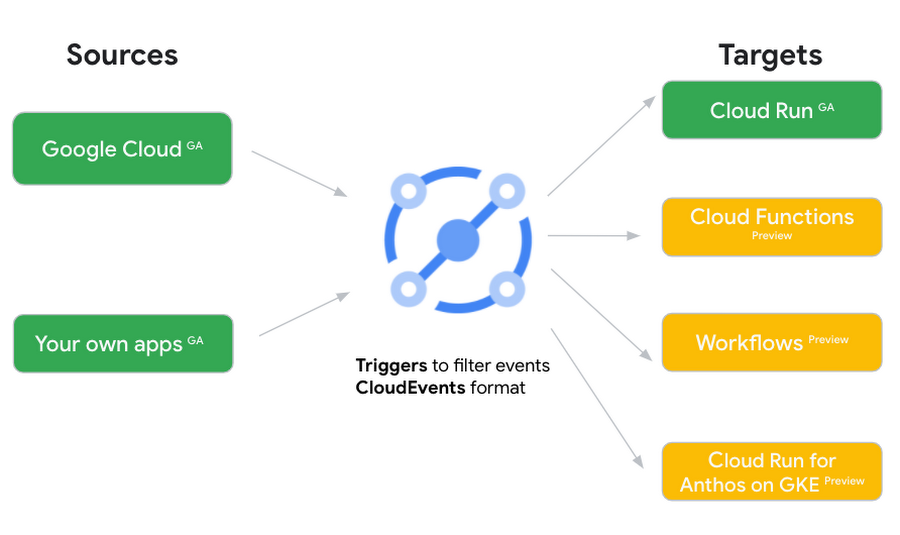
Each event source, event target, and trigger has its own location. Sometimes, these locations have to match and sometimes they can be different.
Here’s an example of a trigger connecting Cloud Storage events from a bucket in the europe-west1 region to a Cloud Run service in the us-central1 region with a trigger located in the europe-west1 region:
gcloud eventarc triggers create trigger-storage \--destination-run-service=hello \--destination-run-region=us-central1 \--location=europe-west1 \--event-filters="type=google.cloud.storage.object.v1.finalized" \--event-filters="bucket=my-bucket-in-europe-west1-region" \--service-account=$PROJECT_NUMBER-compute@developer.gserviceaccount.com
In many cases, you don’t have control over the location of the event source. In the example above, the Cloud Storage bucket is in the europe-west1 region. That’s the location that you need to work with and it has implications for the trigger location (which I’ll get to later).
The location of the event target is the region of the service where you want the events to go. You get to choose this from one of the supported regions when you deploy your Cloud Run service. You typically want this to be in the same region as your event source for latency and data locality reasons (but this is not strictly a requirement). In the example above, the event source (bucket) is in europe-west1 but the event target (Cloud Run service) is in us-central1 as specified by the --destination-run-region flag.
The location of the trigger is dictated by the event source location, but the trigger type also comes into play. It is specified by the –location flag. Let’s take a look at the trigger location for each trigger type in more detail.
Location in Pub/Sub triggers
In a Pub/Sub trigger, you connect a Pub/Sub topic to an event target. Pub/Sub topics are global and not tied to a single region. However, when you create a Pub/Sub trigger, you need to specify a region for it (because Eventarc triggers need to live in a region) with the --location flag as follows:
gcloud eventarc triggers create trigger-pubsub \--destination-run-service=hello \--destination-run-region=us-central1 \--location=us-central1 \--event-filters="type=google.cloud.pubsub.topic.v1.messagePublished" \--transport-topic=projects/your-projectid/topics/your-topic
By specifying a location, Eventarc automatically configures the geofencing feature in Pub/Sub such that events only persist in the specified location. As I noted above, you typically want to (but are not required to) choose the same region for the trigger and the Cloud Run service for lower latency and data locality. You can also use regional Pub/Sub service endpoints to publish to the topic to ensure that all of the data stays in a single region.
Location in Cloud Storage triggers
In a Cloud Storage trigger, you connect a Cloud Storage bucket to an event target. A Cloud Storage bucket can be in a single-region (e.g. europe-west1), dual-region (e.g. eur4), or multi-region (e.g. eu) location. The location of the bucket dictates the location of the trigger and they have to match. The earlier trigger example was for a bucket in the europe-west1 single-region location. Here’s another trigger connecting Cloud Storage events from a bucket in the eu multi-region location. Notice how the location flag matches the bucket region:
gcloud eventarc triggers create trigger-storage \--destination-run-service=hello \--destination-run-region=us-central1 \--location=eu \--event-filters="type=google.cloud.storage.object.v1.finalized" \--event-filters="bucket=my-bucket-in-eu-multi-region" \--service-account=$PROJECT_NUMBER-compute@developer.gserviceaccount.com
If the bucket region and the trigger region do not match, you’ll see an error:
ERROR: (gcloud.eventarc.triggers.create) INVALID_ARGUMENT: The request was invalid: Bucket "my-bucket-in-eu-multi-region" location "eu" does not match trigger location "europe-west1". Try again by creating the trigger in "eu".
Location in Cloud Audit Logs triggers
In a Cloud Audit Logs trigger, you connect any event source that emits Audit Logs to an event target. The location of the event source will dictate the trigger location. This is typically a single region but there is a special global region that’s necessary in some cases.
For example, if you want to read Cloud Storage events from a bucket in the europe-west1 region with an Audit Logs trigger, you will create the trigger with the same location. Note that this will match all buckets in the europe-west1 region as there’s no filter by bucket in Audit Logs:
gcloud eventarc triggers create trigger-auditlog \--destination-run-service=hello \--destination-run-region=us-central1 \--location=europe-west1 \--event-filters="type=google.cloud.audit.log.v1.written" \--event-filters="serviceName=storage.googleapis.com" \--event-filters="methodName=storage.objects.create" \--service-account=$PROJECT_NUMBER-compute@developer.gserviceaccount.com
On the other hand, if you want to match a dual-region or a multi-region bucket such as eu, you will create the trigger with the global location as Audit Logs triggers only support a single or global region. Note that this will match all buckets in all regions globally:
gcloud eventarc triggers create trigger-storage \--destination-run-service=hello \--destination-run-region=us-central1 \--location=global \--event-filters="type=google.cloud.storage.object.v1.finalized" \--event-filters="bucket=my-bucket-in-europe-west1-region" \--service-account=$PROJECT_NUMBER-compute@developer.gserviceaccount.com
As you can see from this example, if you want to read Cloud Storage events, the native Cloud Storage trigger is a much better option, but this example illustrates a typical case in which a global Audit Log trigger is necessary.
That wraps up this closer look at locations in Eventarc. Feel free to reach out to me on Twitter @meteatamel for any questions or feedback.
How the Telegraph is Reimagining Media with Google Cloud

10172
Of your peers have already read this article.
3:30 Minutes
The most insightful time you'll spend today!
Whether they’re reading the newspaper on the way to work, or catching up on the latest headlines on their smartphones, readers expect up-to-the-minute news wherever and whenever makes the most sense for them. As a result, media companies are increasingly looking for ways to improve, expand, and simplify their offerings, and they’re increasingly looking to the cloud to do it.
For more than 160 years The Telegraph has been counted on by readers across the United Kingdom and globally for award-winning news and journalism. An early adopter of cloud technology, it’s been a G Suite customer since 2008 and has already been using Google Cloud Platform to analyze digital behaviors to improve engagement and advertising performance since 2016.
Recently, The Telegraph announced it’s migrating fully to Google Cloud. By migrating all their production and pre-production services, they aim to deliver content faster, provide compelling experiences to readers, and reduce environmental impact.
“We are delighted to announce our newest collaboration with Google Cloud,” said Chris Taylor, Chief Information Officer, The Telegraph. “We have always worked closely with Google as they help us to provide our readers with great experiences on our digital products, collaboration software and internet scale through search. Their continued leadership in projects such as Kubernetes are enabling us to build flexible development environments that truly support DevOps.”
Powering the Digital Publishing Ecosystem
The Telegraph produces large volumes of digital content every day. It was imperative for them to find a cloud provider they could trust to support this ecosystem. By working with Google Cloud they have changed the way they see and engage with data: they can collect new information about their products every second and use that to continually hone their strategy. The Telegraph are placing more confidence and trust in the data captured about their content and now have one of the best available pieces of technology for capturing and analyzing the stories they publish in real-time.
Leveraging AI to support journalists
Time is critical when journalists are on a story, and The Telegraph wants to put important data in the hands of its journalists right when they need it. To do this, it will be using AutoML to classify content for journalists and make it more discoverable. For example, a reporter will be able to bring up relevant assets that link to their stories. It will also apply AutoML to classify Telegraph stock photos to help journalists attach compelling visual content to their stories faster.
Building compelling reader experiences with the help of APIs
Readers have an ever-increasing expectation of personalization. To meet this need, The Telegraph launched My Telegraph, currently live in beta, to offer registered readers personalized news experiences based on their interests or the particular journalists they want to follow. My Telegraph was developed on an API management platform provided by Google Cloud’s Apigee. You can learn more about how it’s applying API management to My Telegraph, in this blog post.
Working for environmental good
The Telegraph is the biggest selling quality newspaper in the UK, an accolade which requires it to print and distribute hundreds of thousands of copies each day. Optimal management of print production is important, and by using a combination of the cloud and machine learning, The Telegraph is better able to predict demand for physical newspapers, maximizing sales and minimizing waste. This makes great business sense for The Telegraph but also has great environmental benefit.
New Map Customization Features for Enhanced User Experiences

5557
Of your peers have already read this article.
1:30 Minutes
The most insightful time you'll spend today!
A customized map can be key to delivering a frictionless experience that engages users and sets you apart in users’ minds–whether you’re a real estate company fine-tuning points of interest (POIs) on a map to help buyers decide where to live, or a regional pharmacy styling a map to ensure your locations stand out from the competition. That’s why we’ve focused on empowering you with these capabilities through features like POI density and POI filtering controls, zoom level customization, and even industry-optimized map styles. But we’re not done helping you take your map to the next level. Today, we’re making two updates generally available—a new Maps SDK for Android and the extension of Cloud-based maps styling features to our Android and iOS SDKs. Together they enhance the native mobile map experience and make it easier for you to deliver consistent, optimized maps across all your platforms. We’ll also give you an early look at additional features that we’re working on.
Update your Maps SDKs for Android for an enhanced user experience
Developers around the world depend on the Maps SDK for Android to power critical experiences like helping drivers make a delivery or helping retailers visually confirm an order’s shipping address. With consumers spending an increasing amount of time in apps, it’s more important than ever that mobile experiences meet the high consumer expectations that come with essential, everyday use.
Today we released version 18.0.0 of the Maps SDK for Android, which delivers an enhanced map experience to app users, thanks to a new renderer. The new renderer introduces optimizations to our tile serving and rendering architecture, reducing payload size. This can help to reduce network load, on-device processing, and memory consumption for a more stable and smoother end-user experience. You’ll also see specific improvements with map labels. Now more fluid and clearly positioned, they pave the way for future marker management features. We’ve also enhanced overall gesture handling for better animations and smoother panning and zooming.
Because the Maps SDK for Android continues to be distributed as part of the Google Play services SDK, you can upgrade to v18.0.0 along with all its improvements with no increase to your APK size.
A consistent cross-platform maps experience with Cloud-based maps styling for mobile
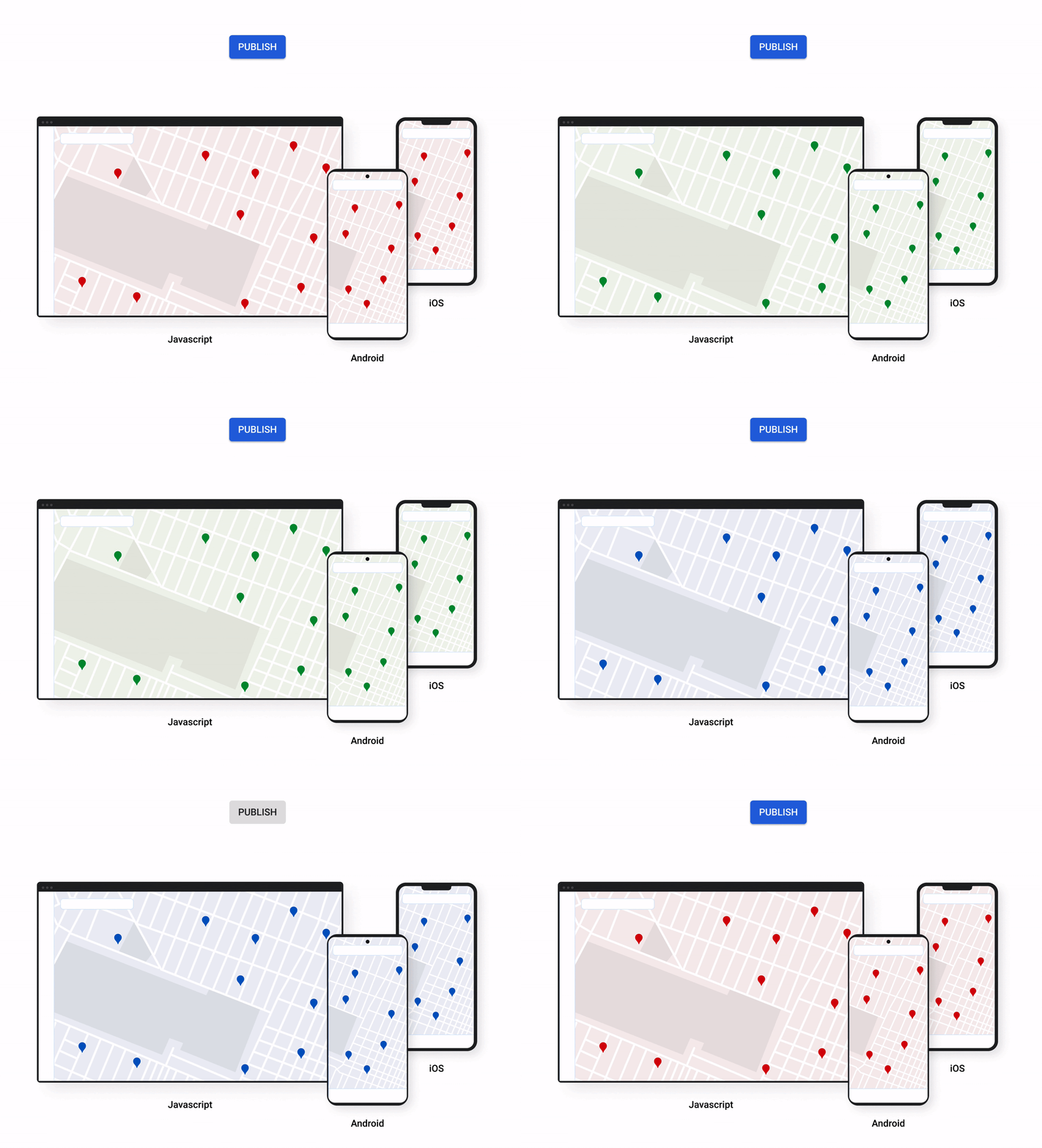
Earlier this year at Google I/O, we announced the general availability of Cloud-based maps styling for JavaScript. Since then customers have used the richer customization capabilities and efficient cloud-enhanced deployment workflow to power millions of mapping experiences, from a curated interactive map of Munich to fun virtual Easter egg hunts hosted by Cadbury. Starting today, Cloud-based maps styling features are supported in the GA versions of our Maps SDK for Android (v18+) and Maps SDK for iOS (V5.0+).
Cloud-based maps styling moves map customization code off the client and into the cloud–where it can be easily modified to use new features or test new configurations. This decoupling of client code and customization code makes it easy to manage a single branded and optimized style across any number of apps across all supported platforms. It also makes it possible to simultaneously publish changes to a map style across platforms and install bases with the click of a button. Cloud-based maps styling is the foundation for a growing set of new customization features including POI filtering and POI boosting, zoom level customization, landmarks, and commercial corridor styling.
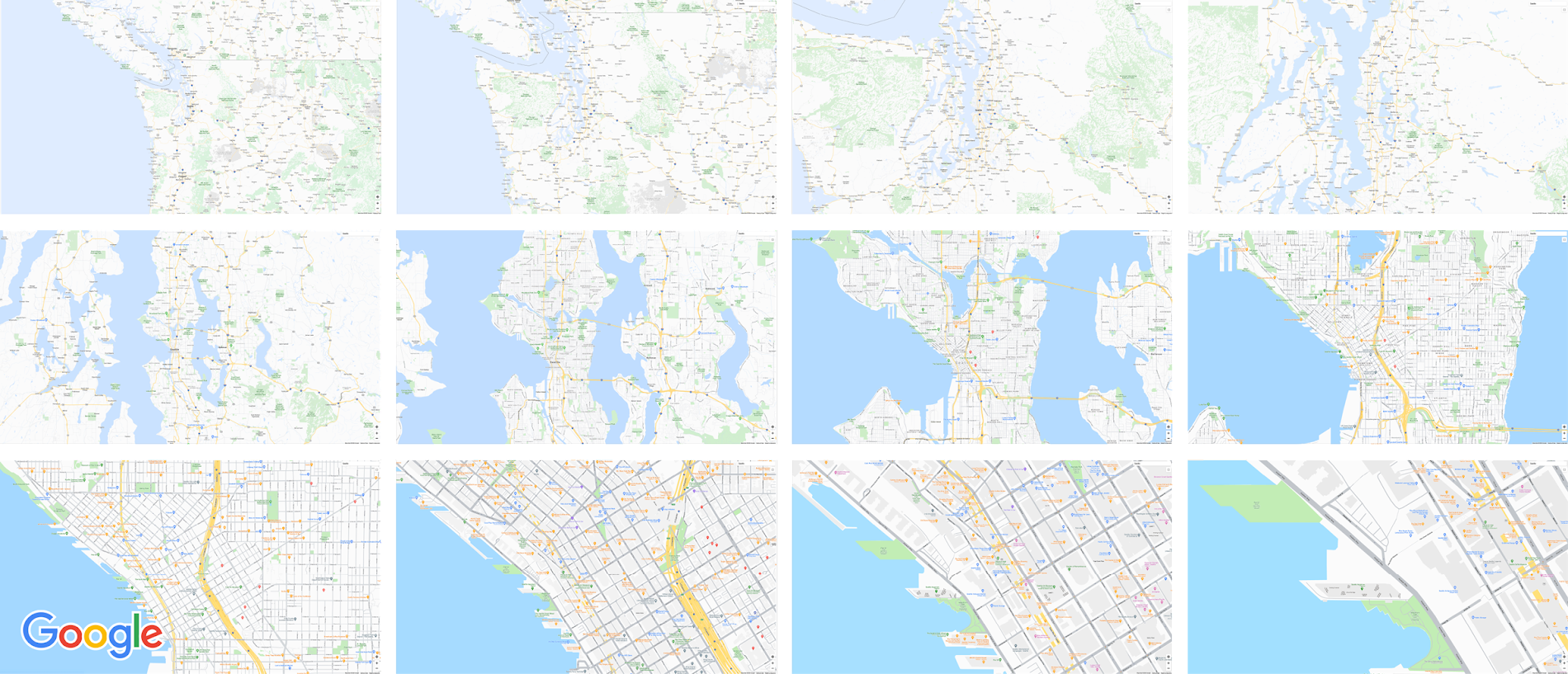
Mobile developers can now take advantage of Cloud-based maps styling features and simple cross-platform customizations for their Dynamic Maps by creating a MapID in Google Cloud Console and using it within their Maps SDK for Android or Maps SDK for iOS. Dynamic maps loaded with a Map ID via our Maps SDK for Android or Maps SDK for iOS will be billed to the same SKU as Maps JavaScript API (Dynamic Maps) and covered under the same $200 monthly credit and volume pricing. Developers can upgrade to the new Maps SDK for Android and continue using client-styled maps for no charge as they always have.
Additional capabilities we’re working on¹
We know you have a range of map customization needs to engage your users with differentiated experiences. We’re working on developing more Cloud-based maps styling features–focused on marker capabilities, map elements, and data-driven styling–to help you do just that. We’re working on a new set of markers capabilities, easier pin customizations, marker collision management, performance optimizations, and the ability to build custom marker elements that you can use to quickly deploy deeply customized, highly optimized marker-driven experiences. For those seeking greater detail in their maps, we’re working on expanding the availability and customization of detailed street maps to even more cities. We’re also working on features to make it easier to programmatically style map elements by exposing new APIs to enable things like the simple creation of choropleths by styling Google geographical boundaries based on your data.
This is just a peek into what we’re excited to be building for our developer community. While we’re working hard to bring these additional features to life, visit our website to learn more and our developer documentation to start customizing and enhancing your mobile maps.
¹Product capabilities, timeframes, and features are subject to change.
3247
Of your peers have already watched this video.
24:00 Minutes
The most insightful time you'll spend today!
Building Cloud-native Apps at Scale with Kubernetes and Other Dev Tools
Developer productivity is directly linked to customer value generation, higher levels of customer satisfaction and faster time to market. To help build cloud-native applications that cater to customer demands and at scale, experts at Google Cloud share insights on CI/CD tools, processes and interfaces for deploying and developing Google Kubernetes Engine applications. Watch the video on Modernizing App Development and Delivery with the Google Cloud Golden Path from Next ’21 to also learn about developer tools like Cloud Code and Skaffold.
SoFi Stadium Personalizes Fan Experiences with Game-changing App Built on Google Cloud and Deloitte

3202
Of your peers have already read this article.
2:00 Minutes
The most insightful time you'll spend today!
Editor’s note: Engineers from SoFi Stadium, Google Cloud, and Deloitte built a fan-ready Personal Concierge app that uses advanced analytics to tailor game-day experiences for every visitor. SoFi’s 10-year partnership with Google Cloud not only pumps up the fans. Advanced analytics also enable stadium employees to securely store, analyze, and action analytics data, and seamlessly collaborate through tools and services included in Google Cloud Workspace.
SoFi Stadium, an industry-leading, outdoor-indoor events facility and home of the Los Angeles Rams and Los Angeles Chargers, is the centerpiece of Hollywood Park, a near 300-acre sports and entertainment destination. With the capacity to host up to 100,000 spectators across a range of luxury and premium seating options, the 3.1 million square-foot SoFi Stadium is the largest in the NFL. Completed in September 2020, it has already secured a global reputation—scheduled to host Super Bowl LVI in 2022, the College Football National Championship Game in 2023, and the Opening and Closing Ceremonies of the Olympic Games in 2028. Under the same roof canopy as the stadium is the 2.5-acre American Airlines Plaza and the 6,000-seat performance venue, YouTube Theater.
Through a long-term partnership with Google Cloud, SoFi Stadium is personalizing fan experiences, enabling a more fulfilling, collaborative, and productive work experience for employees, and delivering game-changing technology to the event space.
Personalizing the experience for every fan
Sports fans are known for their fierce loyalty and camaraderie. While they come to game day ready to cheer with fellow fans, each spectator has a different vision for what will make for a memorable event. SoFi Stadium is helping customers choose their game day flow by extending a personalized, streamlined experience to every stadium goer through several new digital innovations powered by Google Cloud.
First there’s the Personal Concierge App. Powered by Google Cloud and built by Deloitte, this personalized navigation and security tool may be the game day MVP that sports fans have always dreamed of. Hours of precious viewing time can be lost navigating a stadium campus for seating, parking, food, access, and amenities. This application enables fans to quickly locate available parking locations, select the ideal transportation for game day through real-time Google Maps routing, and discover SoFi Stadium events all from their mobile device. Event-goers can also receive digital credentials through the app, enabling them to bypass lines and accelerate their access to luxury viewing suites.
The advanced data analytics accrued from multiple sources and processed through Google Cloud products such as Cloud Scheduler, App Engine, Dataflow, BigQuery, Looker, Firebase, and more, enable SoFi Stadium to anticipate spectator tastes. These Google Cloud tools can remember preferences and provide attendees with real-time personal recommendations around the clock.
Performing at the top of their game with Workspace
Advanced data analytics enhance employee experiences, too. Credentialed team members can securely store and analyze data from multiple sources, create operational dashboards with real-time data, track key performance indicators after events, and better forecast attendance, revenue by product, and other important business metrics.
In addition to deploying a number of Google Cloud solutions including Compute Engine, Kubernetes Engine, Cloud CDN, BigQuery, and others to power the Personal Concierge App, SoFi Stadium is empowering its employees by fully migrating to Google Cloud’s Workspace. Workspace streamlines the stadium’s business operations by fostering fast and seamless access to collaboration and performance tools. Built-in software—including Gmail for business, Docs, Drive, Calendar, and Meet—will help employees work smarter and meet securely from anywhere.
“We couldn’t have picked a better partner to help manage our technology needs,” said Skarpi Hedinsson, Chief Technology Officer, SoFi Stadium and Hollywood Park. “Incorporating Google’s solutions into critical areas of our business ensures we can usher in a new era of innovation in sports and entertainment, raising the bar on what the ultimate fan experience looks like globally.”
Making the big-game even bigger
As Hollywood Park combines the expertise of its team and Google Cloud engineers to power the future of sports and live events, SoFi Stadium prepares to welcome a product of this collaboration with the Infinity Screen by Samsung, the largest video board in sports. With 80 million pixels, weighing 2.2 million pounds, and boasting 120-yards in length, the Infinity Screen by Samsung leverages Google Cloud-based media workflows and optimization technology to power its game-changing screen.
Through its partnership with Google Cloud, SoFi Stadium is actively developing new media streaming and high-speed wireless solutions. In addition, SoFi Stadium has the world’s first 4K/HDR live production facility. These digital innovations are powering a new standard for sports fans and opening a path to redefine what can take game day from good to great.
Managed containers: An enterprise standard at Colgate-Palmolive
925
Of your peers have already read this article.
3:30 Minutes
The most insightful time you'll spend today!
Kubernetes is an increasingly key part of the application deployment strategies at large organizations, and one of the most recommended options for the teams we work with. An idea brought to life at Google, organizations throughout the world use containers and Kubernetes on-premises, in Google Cloud, or in a multi-cloud scenario, and it has emerged as a leading application deployment platform. And because it’s open source, anyone can pop the hood, so to speak, to see how each component of it works, creating a trusted, verifiable framework that users can rely on.
Customers begin their Kubernetes and containerization journeys using various offerings in our product portfolio. Some, like Colgate, started their modernization journey with Kubernetes. Colgate is an $18B global consumer products company with ~34,000 diverse and dedicated people serving over 200 countries and territories. Through science-led innovation, they drive growth and reimagine a healthier future for all people, their pets, and our planet.
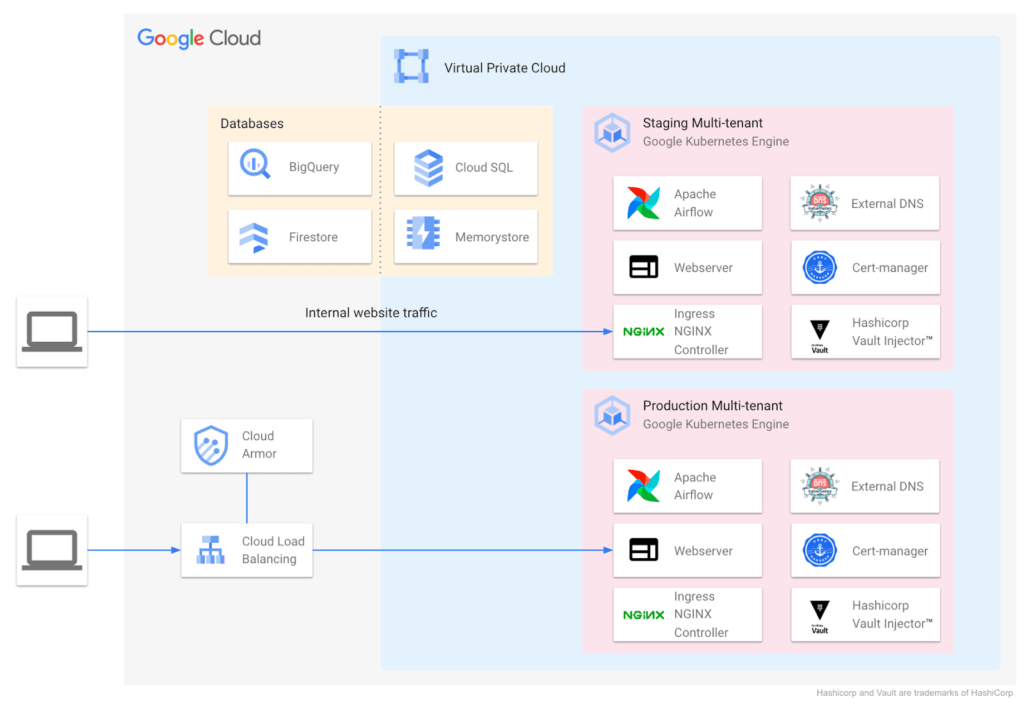
During ideation, they talked through various considerations: What technology strengths does their organization have? What skills do their teams need? What will this initiative look like a decade from now? They implemented the following Kubernetes-focused architecture:
Supporting a variety of use cases and teams
Google Cloud also helped Colgate break new ground over the years, especially in the areas of cloud-native networking, security, monitoring, pub/sub, managed containerization, and multi-tenant environments.
Over time Colgate began to leverage Google’s managed container portfolio, which includes Cloud Run. Cloud Run lets you run containers on top of a serverless platform, unlocking workload possibilities for public websites, private services, APIs and batch jobs and eliminating a lot of the time spent on infrastructure management. Cloud Run also requires no prior knowledge of Kubernetes or containers.
Simplified enterprise-level management
Many teams have found that they prefer the serverless, hands-off approach that Cloud Run provides, and Colgate now evaluates Google Cloud’s serverless solutions alongside GKE for any applications destined for the cloud. At the same time, Cloud Run lets them continue to leverage their investment in workloads based on the Open Container Initiative.
For example, Cloud Run is designed for Kubernetes compatibility with consistent management capabilities such as the ability to manage resources using kubectl via the config controller, and the ability to browse logs and metrics from both platforms in Cloud Logging and Monitoring. Cloud Run and GKE data planes are also interoperable, allowing Cloud Run and GKE services to be exposed behind a VPC behind private IPs using an internal load balancer. Cloud Run as an option has contributed to faster innovation, allowing Colgate to bring smiles to many more faces globally.
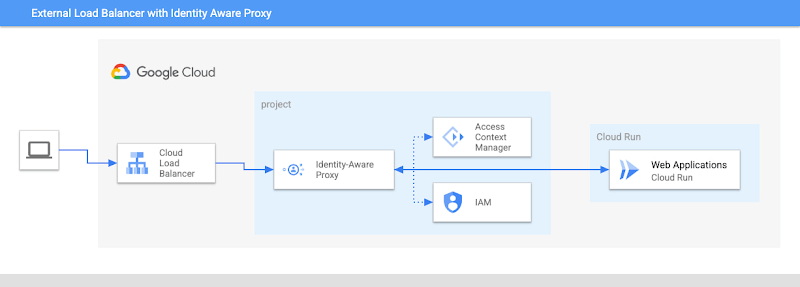
Google’s managed container offerings provide a composable and comprehensive set of solutions for customers’ applications. At Colgate, container-based managed services are used across the stack: on the front-end, where they use Identity-Aware Proxy to manage authentication and External Load Balancers to handle incoming traffic with high availability and low latency; at the application layer, where they can choose from Cloud Functions, Cloud Run, or GKE, depending on the level of control they need over the application; and at the internal load balancing level where NGINX® controllers serve internal applications. Together, these managed services ensure that Colgate has the flexibility to choose the right toolchain and maximize their goals for each use case.
Colgate wanted to build internal applications on Cloud Run in a way that complied with their organization’s policies while maximizing developer productivity. They were able to use new features like the Cloud Run Identity Aware Proxy GA to build a secure, serverless deployment for their applications.
A great partnership with Google Cloud
Colgate and Google Cloud have enjoyed a deep partnership for many years, engaging across many technologies, teams, and design patterns.
They’ve engaged with Product and Engineering across compute, networking, Kubernetes, and serverless as they brought this new way of thinking to their users.
For Colgate and many of our customers looking to address the needs of the modern user, Google’s managed container offerings are a breath of fresh air. Its reliability, scalability, and control offer the flexibility to build applications that meet the demands of both internal and external consumers. In addition, the variety of container offerings available on Google Cloud — GKE and Cloud Run — allow customers to make app deployment decisions based on the amount of Day 2 operations the users are willing to take on. Platform administrators appreciate the reduced management effort, users enjoy reduced downtime, and developers can simply deploy.
Google Cloud contributors: Rex Orioko, Rachel Tsao
Colgate-Palmolive contributors: Matthew Tattoli, Nicholas Farley, and David Wiser
More Relevant Stories for Your Company

How to Pick a Database that is Suitable for Your Application
Picking the right database for your application is not easy. The choice depends heavily on your use case—transactional processing, analytical processing, in-memory database, and so on—but it also depends on other factors. This post covers the different database options available within Google Cloud across relational (SQL) and non-relational (NoSQL) databases

Swiggy: Delivering Local Food Within 40 Minutes
Founded in 2014, Swiggy started small, delivering food to a few neighborhoods in Bengaluru, India. As the company grew, the team wanted a mapping technology that could help expand the service throughout India. Swiggy needed a scalable mapping platform that covered a wide geographic area and offered tools to help

How Toyota’s Google Cloud-powered Voice Assistant Gives a Turboboost to Drivers’ Experience
Over the decades, technology has helped us organize large amounts of physical information in ways that are streamlined, efficient, and easily accessible. Rows upon rows of encyclopedias are no longer needed; simply punch in or speak a query into Google Search and find numerous results at your fingertips. There’s no

How to Build an API Program That Doesn’t Suck
Modern web APIs allow businesses to build compelling experiences that generate, consume, and combine digital assets. They’ve become the foundation upon which digital business is built. But the path to success can be unclear, rough, and challenging. The game has changed, after all, and this requires tossing out many of
