





Supercharging Security with Generative AI

1521
Of your peers have already read this article.
3:30 Minutes
The most insightful time you'll spend today!
At Google Cloud, we continue to invest in key technologies to progress towards our true north star on invisible security: making strong security pervasive and simple for everyone. Our investments are based on insights from our world-class threat intelligence teams and experience helping customers respond to the most sophisticated cyberattacks. Customers can tap into these capabilities to gain perspective and visibility on the most dangerous threat actors that no one else has.
Recent advances in artificial intelligence (AI), particularly large language models (LLMs), accelerate our ability to help the people who are responsible for keeping their organizations safe. These new models not only give people a more natural and creative way to understand and manage security, they give people access to AI-powered expertise to go beyond what they could do alone.
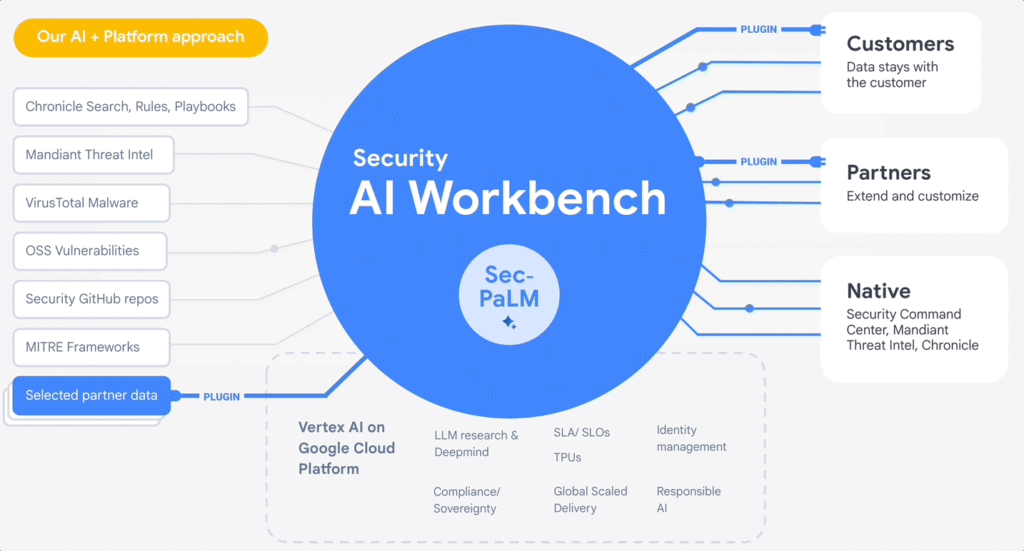
At the RSA Conference 2023, we are excited to announce Google Cloud Security AI Workbench, an industry-first extensible platform powered by a specialized, security LLM, Sec-PaLM. This new security model is fine-tuned for security use cases, incorporating our unsurpassed security intelligence such as Google’s visibility into the threat landscape and Mandiant’s frontline intelligence on vulnerabilities, malware, threat indicators, and behavioral threat actor profiles.
Google Cloud Security AI Workbench powers new offerings that can now uniquely address three top security challenges: threat overload, toilsome tools, and the talent gap. It will also feature partner plug-in integrations to bring threat intelligence, workflow, and other critical security functionality to customers, with Accenture being the first partner to utilize Security AI Workbench.
The platform will also let customers make their private data available to the platform at inference time; ensuring we honor all our data privacy commitments to customers. Because Security AI Workbench is built on Google Cloud’s Vertex AI infrastructure, customers control their data with enterprise-grade capabilities such as data isolation, data protection, sovereignty, and compliance support.
Preventing threats from spreading beyond the first infection
We already provide best-in-class capabilities to help organizations immediately respond to threats. But what if we could not just identify and contain initial infections, but also help prevent them from happening anywhere else? With our AI advances, we can now combine world class threat intelligence with point-in-time incident analysis and novel AI-based detections and analytics to help prevent new infections. These advances are critical to help counter a potential surge in adversarial attacks that use machine learning and generative AI systems. That’s why we’re excited to introduce:
- VirusTotal Code Insight uses Sec-PaLM to help analyze and explain the behavior of potentially malicious scripts, and will be able to better detect which scripts are actually threats.
- Mandiant Breach Analytics for Chronicle leverages Google Cloud and Mandiant Threat Intelligence to automatically alert you to active breaches in your environment. It will use Sec-PaLM to help contextualize and respond instantly to these critical findings.
These new updates build on the existing AI in Google’s industry-leading solutions. For example, Chronicle Security Operations already uses frontline intelligence, integrated reasoning, and machine learning to identify initial infections, prioritize impact, and contain threats. Another example is reCAPTCHA Enterprise, which uses image noising capabilities to help protect your site from adversaries that leverage novel AI advances, greatly enhancing our defenses against bots.
Adding intelligence to reduce toil
At Google Cloud, we help organizations modernize security wherever they are, in part by simplifying their security tools and controls whenever possible. Advances in generative AI can help reduce the number of tools organizations need to secure their vast attack surface areas and ultimately, empower systems to secure themselves. This will minimize the toil it takes to manage multiple environments, to generate security design and capabilities, and to generate security controls. Today, we’re announcing:
- Assured OSS will use LLMs to help us add even more open-source software (OSS) packages to our OSS vulnerability management solution, which offers the same curated and vulnerability-tested packages that we use at Google.
- Mandiant Threat Intelligence AI, built on top of Mandiant’s massive threat graph, will leverage Sec-PaLM to quickly find, summarize, and act on threats relevant to your organization.
These announcements build on existing capabilities that help customers centralize visibility and control, detect targets, and improve security across their platform. For example, Security Command Center (SCC) uses always-on machine learning to detect malicious scripts executing in the customer container environment and immediately alert the customer. In addition, Cloud Data Loss Prevention leverages machine learning to find and classify data, and with Confidential Computing you can collaborate on, train, and deploy sensitive and regulated AI models in the cloud, all while preserving confidentiality.
Evolving how practitioners do security to close the talent gap
At Google, we believe that to truly democratize security, we need to first acknowledge that AI will soon usher in a new era for security expertise that will profoundly impact how practitioners “do” security. Most people who are responsible for security — developers, system administrators, SRE, even junior analysts — are not security specialists by training.
Imagine a world where novices and security experts are paired with AI expertise to free themselves from repetition and burnout, and accomplish tasks that seem impossible to us today. To help power this evolution, we’re embedding Sec-PaLM-based features that can make security more understandable while helping to improve effectiveness with exciting new capabilities in two of our solutions:
- Chronicle AI: Chronicle customers will be able to search billions of security events and interact conversationally with the results, ask follow-up questions, and quickly generate detections, all without learning a new syntax or schema.
- Security Command Center AI: Security Command Center will translate complex attack graphs to human-readable explanations of attack exposure, including impacted assets and recommended mitigations. It will also provide AI-powered risk summaries for security, compliance, and privacy findings for Google Cloud.
These new releases bolster our existing efforts to tackle these issues through capabilities like IAM Recommender, which suggests permissions better suited to actual usage patterns. We will soon be augmenting this capability to cover organizational policies, further enabling the administrator to help improve the security posture of their organization. In addition, Mandiant Automated Defense applies machine learning to help reduce the repetitive Tier 1 alert triage problem and address alert fatigue.
Offering availability
VirusTotal Code Insight, available now in Preview, is our first example of putting Security AI Workbench to work for our customers. We will be rolling out other offerings to trusted testers in coming months, and they will be available in Preview more broadly this summer. Click here for the demo.
Security AI Workbench, including Sec-PaLM and partner integrations, in addition to the product innovations described in our demo, are all building blocks for a larger effort to elevate security across the ecosystem. So far, that effort:
- Provides assistive functions to rapidly develop IT generalist talent to Tier 1 security operator status in a way that wasn’t previously feasible. Security Command Center now can summarize threat intelligence insights and findings for Google Cloud, and Chronicle can quickly generate YARA-L rules or other detections.
- Provides advanced functions such as iterative query and multivariate detection generation, conversational filtering and interaction with results, and smart case awareness to empower advanced Tier 2 and 3 security operators to focus on threat analysis instead of struggling with process and toil. Mandiant Threat Intelligence users now can elevate their core competencies to hunt, investigate, and remediate threats — using the same tools our own Mandiant experts use.
- Fuses threat intelligence and AI-based analytic capabilities, which are unsurpassed in the market. VirusTotal Code Insight enables security teams to help gain insights and identify threats in suspicious code. This can significantly enhance their ability to detect and mitigate potential attacks.
However, this is just an initial step. We’ll continue to iterate and innovate, and we encourage customers and partners to leverage Security AI Workbench in new and exciting ways. Moving forward, we anticipate many new use cases to emerge over time.
Building a safer future
While generative AI has recently captured the imagination, Sec-PaLM is based on years of foundational AI research by Google and DeepMind, and the deep expertise of our security teams. This work includes new efforts to expand our partner ecosystem to provide businesses with security capabilities at every layer of the cybersecurity stack. We have only just begun to realize the power of applying generative AI to security, and we look forward to continuing to leverage this expertise for our customers and drive advancements across the security community.
reCAPTCHA Enterprise Fraud Prevention: Stop Payment Fraud with Google’s Intelligence

1142
Of your peers have already read this article.
3:30 Minutes
The most insightful time you'll spend today!
Today, we are putting the power of Google’s insights and intelligence in the hands of risk, fraud, and security teams everywhere. We are pleased to announce the general availability of reCAPTCHA Enterprise Fraud Prevention, a new product that uses Google’s own fraud models, machine learning, and intelligence from protecting more than 6 million websites to help stop payment fraud.
reCAPTCHA Enterprise Fraud Prevention can help protect payment transactions by identifying targeted manual attacks and large-scale fraud attempts. It automatically trains fraud models based on behavior and transaction data to identify events that are likely fraudulent and could cause a dispute or chargeback if accepted.
When threat actors are identified and blocked on any site in the reCAPTCHA network, the intelligence is made available to help protect other organizations from those same attackers. Organizations can then use the scores to send the transaction for manual review or directly block suspicious transactions, drive increased trust in their legitimate transactions, reduce the amount of friction for good users, and reduce erroneous rejection rates.
“Being a safe and trusted place to give and receive help is our top priority. We are constantly innovating, refining and enhancing our fraud defenses and Google’s reCAPTCHA Enterprise Fraud Prevention adds another layer of industry-leading protection for our users. Combining Google’s rich security expertise with GoFundMe’s focus on fraud prevention is already showing promising results as we strive to keep our platform the safest place to give online,” said Matthew Murray, director of risk, GoFundMe.
According to data obtained from our customers using reCAPTCHA Enterprise Fraud Prevention in private Preview, the new solution can help drive comprehensive value for organizations by:
- Reducing fraud losses: Get behavior modeling (not just mouse movements), stop financial damage created by account takeovers (ATOs), and connect fraud and abuse intelligence across your site and application.
- Increasing legitimate sales: Fraud Prevention can help businesses increase their revenue by providing insights to understand who good users are, who may otherwise be caught in an overly aggressive, customer restrictive fraud model.*
These benefits are enabled for organizations by:
- Preventing advanced attacks: Stopping sophisticated attacks in an environment where attackers use cloud fraud infrastructure, and data leaks, virtual cards and VPN usage are on the rise
- Increasing trust in good transactions: Focus on good approval rates through a unique combination of supervised and unsupervised models
- Improving customer experience: By preventing fraudulent transactions with zero user friction, Fraud Prevention can help businesses protect legitimate users and increase customer retention
Our customers have used these new capabilities in preview in customer experiences that include online checkouts and payment transactions. Fraud Prevention has been used by merchants and payment processors to block millions of dollars in fraudulent transactions in a frictionless way.
reCAPTCHA Enterprise provides a comprehensive online fraud detection platform that helps prevent fraudulent, spammy, and abusive digital client activity across your web and application footprint. This platform includes Account Defender, which protects users from account takeovers (ATO), frictionless bot management capabilities, and password leak detection to identify compromised accounts. With an additional API call for Fraud Prevention, organizations can leverage a comprehensive solution to secure financial transactions along with core reCAPTCHA Enterprise capabilities.
To get started, organizations can install a score-based site key on each part of the payment user flow front end and send transaction data when a purchase occurs. This site key helps train site-specific fraud models and start returning fraud scores for each transaction.
Ready to put reCAPTCHA Enterprise Fraud Prevention to work? Contact our fraud specialists or your customer success CSM team and sign up with the free tier. You learn more about these new capabilities in reCAPTCHA Enterprise in our product documentation. You can also register for our webinar where our experts will be discussing this capability in great detail on June 1, 2023.
Coming up at our Security Summit on June 13-14, you can hear how reCAPTCHA Enterprise helped GoFundMe secure their donors from fraud. Sign up here for free Security Summit registration.
What Users and System Designers Must Learn from Google’s Best Practices for Password Management

5289
Of your peers have already read this article.
3:00 Minutes
The most insightful time you'll spend today!
Updated for 2021: This post includes updated best practices including the latest from Google’s Best Practices for Password Management whitepapers for both users and system designers.
Account management, authentication and password management can be tricky. Often, account management is a dark corner that isn’t a top priority for developers or product managers. The resulting experience often falls short of what some of your users would expect for data security and user experience.
Fortunately, Google Cloud brings several tools to help you make good decisions around the creation, secure handling and authentication of user accounts (in this context, anyone who identifies themselves to your system—customers or internal users). Whether you’re responsible for a website hosted in Google Kubernetes Engine, an API on Apigee, an app using Firebase, or other service with authenticated users, this post lays out the best practices to follow to ensure you have a safe, scalable, usable account authentication system.
1. Hash those passwords
My most important rule for account management is to safely store sensitive user information, including their password. You must treat this data as sacred and handle it appropriately.
Do not store plaintext passwords under any circumstances. Your service should instead store a cryptographically strong hash of the password that cannot be reversed—created with Argon2id, or Scrypt. The hash should be salted with a value unique to that specific login credential. Do not use deprecated hashing technologies such as MD5, SHA1 and under no circumstances should you use reversible encryption or try to invent your own hashing algorithm. Use a pepper that is not stored in the database to further protect the data in case of a breach. Consider the advantages of iteratively re-hashing the password multiple times.
Design your system assuming it will be compromised eventually. Ask yourself “If my database were exfiltrated today, would my users’ safety and security be in peril on my service or other services they use?” As well as “What can we do to mitigate the potential for damage in the event of a leak?”
Another point: If you could possibly produce a user’s password in plaintext at any time outside of immediately after them providing it to you, there’s a problem with your implementation.
If your system requires detection of near-duplicate passwords, such as changing “Password” to “pAssword1”, save the hashes of common variants you wish to ban with all letters normalized and converted to lowercase. This can be done when a password is created or upon successful login for pre-existing accounts. When the user creates a new password, generate the same type of variants and compare the hashes to those from the previous passwords. Use the same level of hashing security as with the actual password.
2. Allow for third-party identity providers if possible
Third-party identity providers enable you to rely on a trusted external service to authenticate a user’s identity. Google, Facebook, and Twitter are commonly used providers.
You can implement external identity providers alongside your existing internal authentication system using a platform such as Identity Platform. There are a number of benefits that come with Identity Platform, including simpler administration, a smaller attack surface, and a multi-platform SDK. We’ll touch on more benefits throughout this list.
3. Separate the concept of user identity and user account
Your users are not an email address. They’re not a phone number. They’re not even a unique username. Any of these authentication factors should be mutable without changing the content or personally identifiable information (PII) in the account. Your users are the multi-dimensional culmination of their unique, personalized data and experience within your service, not the sum of their credentials. A well-designed user management system has low coupling and high cohesion between different parts of a user’s profile.
Keeping the concepts of user account and credentials separate will greatly simplify the process of implementing third-party identity providers, allowing users to change their username, and linking multiple identities to a single user account. In practical terms, it may be helpful to have an abstract internal global identifier for every user and associate their profile and one or more sets of authentication datavia that ID as opposed to piling it all in a single record.
4. Allow multiple identities to link to a single user account
A user who authenticates to your service using their username and password one week might choose Google Sign-In the next without understanding that this could create a duplicate account. Similarly, a user may have very good reason to link multiple email addresses to your service. If you’ve properly separated user identity and authentication, it will be a simple process to link several authentication methods to a single user.
Your backend will need to account for the possibility that a user gets part or all the way through the signup process before they realize they’re using a new third-party identity not linked to their existing account in your system. This is most simply achieved by asking the user to provide a common identifying detail, such as email address, phone, or username. If that data matches an existing user in your system, require them to also authenticate with a known identity provider and link the new ID to their existing account.
5. Don’t block long or complex passwords
NIST publishes guidelines on password complexity and strength. Since you are (or will be very soon) using a strong cryptographic hash for password storage, a lot of problems are solved for you. Hashes will always produce a fixed-length output no matter the input length, so your users should be able to use passwords as long as they like. If you must cap password length, do so based on the limits of your infrastructure; often this is a matter of memory usage (memory used per login operation * potential concurrent logins per machine), or more likely—the maximum POST size allowable by your servers. We’re talking numbers from hundreds of KB to over 1MB. Seriously. Your application should already be hardened to prevent abuse from large inputs. This doesn’t create new opportunities for abuse if you employ controls to prevent credential stuffing and hash the input as soon as possible to free up memory.
Your hashed passwords will likely already consist of a small set of ASCII characters. If not, you can easily convert a binary hash to Base64. With that in mind, you should allow your users to use literally any characters they wish in their password. If someone wants a password made of Klingon, Emoji, and ASCII art with whitespace on both ends, you should have no technical reason to deny them. Just make sure to perform Unicode normalization to ensure cross-platform compatibility. See our system designers whitepaper (PDF) for more information on Unicode and supported characters in passwords.
Any user attempting to use an extreme password is probably following password best practices (PDF) including using a password manager, which allows the entry of complex passwords even on limited mobile device keyboards. If a user can input the string in the first place (i.e., the HTML specification for password input disallows line feed and carriage return), the password should be acceptable.
6. Don’t impose unreasonable rules for usernames
It’s not unreasonable for a site or service to require usernames longer than two or three characters, block hidden characters, and prevent whitespace at the beginning and end of a username. However, some sites go overboard with requirements such as a minimum length of eight characters or by blocking any characters outside of 7-bit ASCII letters and numbers.
A site with tight restrictions on usernames may offer some shortcuts to developers, but it does so at the expense of users and extreme cases will deter some users.
There are some cases where the best approach is to assign usernames. If that’s the case for your service, ensure the assigned username is user-friendly insofar as they need to recall and communicate it. Alphanumeric generated IDs should avoid visually ambiguous symbols such as “Il1O0.” You’re also advised to perform a dictionary scan on any randomly generated string to ensure there are no unintended messages embedded in the username. These same guidelines apply to auto-generated passwords.
7. Validate the user’s identity
If you ask a user for contact information, you should validate that contact as soon as possible. Send a validation code or link to the email address or phone number. Otherwise, users may make a typo in their contact info and then spend considerable time using your service only to find there is no account matching their info the next time they attempt login. These accounts are often orphaned and unrecoverable without manual intervention. Worse still, the contact info may belong to someone else, handing full control of the account to a third party.
8. Allow users to change their username
It’s surprisingly common in legacy systems or any platform that provides email accounts not to allow users to change their username. There are very good reasons not to automatically release usernames for reuse, but long-term users of your system will eventually come up with significant reasons to use a different username and they likely won’t want to create a new account.
You can honor your users’ desire to change their usernames by allowing aliases and letting your users choose the primary alias. You can apply any business rules you need on top of this functionality. Some orgs might limit the number of username changes per year or prevent a user from displaying or being contacted via anything but their primary username. Email address providers are advised to never re-issue email addresses, but they could alias an old email address to a new one. A progressive email address provider might even allow users to bring their own domain name and have any address they wish.
If you are working with a legacy architecture, this best practice can be very difficult to meet. Even companies like Google have technical hurdles that make this more difficult than it would seem. When designing new systems, make every effort to separate the concept of user identity and user account and allow multiple identities to link to a single user account and this will be a much smaller problem. Whether you are working on existing or greenfield code, choose the right rules for your organization with an emphasis on allowing your users to grow and change over time.
9. Let your users delete their accounts
A surprising number of services have no self-service means for a user to delete their account and associated PII. Depending on the nature of your service, this may or may not include public content they created such as posts and uploads. There are a number of good reasons for a user to close an account permanently and delete all their PII . These concerns need to be balanced against your user experience, security, and compliance needs. Many if not most systems operate under some sort of regulatory control (such as PCI or GDPR), which provides specific guidelines on data retention for at least some user data. A common solution to avoid compliance concerns and limit data breach potential is to let users schedule their account for automatic future deletion.
In some circumstances, you may be legally required to comply with a user’s request to delete their PII in a timely manner. You also greatly increase your exposure in the event of a data breach where the data from “closed” accounts is leaked.
10. Make a conscious decision on session length
An often overlooked aspect of security and authentication is session length. Google puts a lot of effort into ensuring users are who they say they are and will double-check based on certain events or behaviors. Users can take steps to increase their security even further.
Your service may have good reason to keep a session open indefinitely for non-critical analytics purposes, but there should be thresholds after which you ask for password, 2nd factor, or other user verification.
Consider how long a user should be able to be inactive before re-authenticating. Verify user identity in all active sessions if someone performs a password reset. Prompt for authentication or 2nd factor if a user changes core aspects of their profile or when they’re performing a sensitive action. Re-authenticate if the user’s location changes significantly in a short period of time. Consider whether it makes sense to disallow logging in from more than one device or location at a time.
When your service does expire a user session or requires re-authentication, prompt the user in real time or provide a mechanism to preserve any activity they have not saved since they were last authenticated. It’s very frustrating for a user to take a long time to fill out a form, only to find all their input has been lost and they must log in again.
11. Use 2-Step Verification
Consider the practical impact on a user of having their account stolen when choosing 2-Step Verification (also known as two-factor authentication, MFA, or 2FA) methods. Time-based one-time passwords (TOTP), email verification codes, or “magic links” are consumer-friendly and relatively secure. SMS 2FA auth has been deprecated by NIST due to multiple weaknesses, but it may be the most secure option your users will accept for what they consider a trivial service.
Offer the most secure 2FA auth you reasonably can. Hardware 2FA such as the Titan Security Key are ideal if feasible for your application. Even if a TOTP library is unavailable for your application, email verification or 2FA provided by third-party identity providers is a simple means to boost your security without great expense or effort. Just remember that your user accounts are only as secure as the weakest 2FA or account recovery method.
12. Make user IDs case-insensitive
Your users don’t care and may not even remember the exact case of their username. Usernames should be fully case-insensitive. It’s trivial to store usernames and email addresses in all lowercase and transform any input to lowercase before comparing. Make sure to specify a locale or employ Unicode normalization on any transformations.
Smartphones represent an ever-increasing percentage of user devices. Most of them offer autocorrect and automatic capitalization of plain-text fields. Preventing this behavior at the UI level might not be desirable or completely effective, and your service should be robust enough to handle an email address or username that was unintentionally auto-capitalized.
13. Build a secure auth system
If you’re using a service like Identity Platform, a lot of security concerns are handled for you automatically. However, your service will always need to be engineered properly to prevent abuse. Core considerations include implementing a password reset instead of password retrieval, detailed account activity logging, rate-limiting login attempts to prevent credential stuffing, locking out accounts after too many unsuccessful login attempts, and requiring two-factor authentication for unrecognized devices or accounts that have been idle for extended periods. There are many more aspects to a secure authentication system, so please see the further reading section below for links to more information.
Further reading
There are a number of excellent resources available to guide you through the process of developing, updating, or migrating your account and authentication management system. I recommend the following as a starting place:
- Our Modern Password Security for System Designers whitepaper (PDF)
- The related Modern password security for users whitepaper (PDF)
- NIST 800-063B covers Authentication and Lifecycle Management
- OWASP continually updates their Password Storage Cheat Sheet
- OWASP goes into even more detail with the Authentication Cheat Sheet
- Google Cloud Identity Platform is a multi-protocol customer identity and access management solution, with robust authentication features
- Google’s Firebase Authentication site has a rich library of guides, reference materials and sample code
Datashare for Financial Services: Securing the Publishers and Consumers’ Access to Market Data

8596
Of your peers have already read this article.
4:30 Minutes
The most insightful time you'll spend today!
Access to the cloud has advanced the distribution and consumption of financial information on a global scale. In parallel, the global financial data landscape has been transformed by an influx of alternative data sources, including social media, meteorological data, satellite imagery, and other data. Exchanges and market data providers now find they need to include these new datasets to enrich their products and compete, which has meant they now must consider cloud-based models to keep up with the demands of their customers who expect easy, quick, flexible and cost-efficient ways to consume market data.
To address these needs, today we’re announcing the general availability of Datashare for financial services, a new Google Cloud solution that brings together the entire capital markets ecosystem—data publishers, and data consumers—to exchange market data securely and easily.
Datashare helps organize third-party financial information, making it accessible and useful to market data publishers and data consumers. We open-sourced the entire Datashare solution so market data publishers can now onboard their licensed datasets to Google Cloud securely, quickly and easily, while data consumers can consume that data as a service in tools of their preference, such as BigQuery.
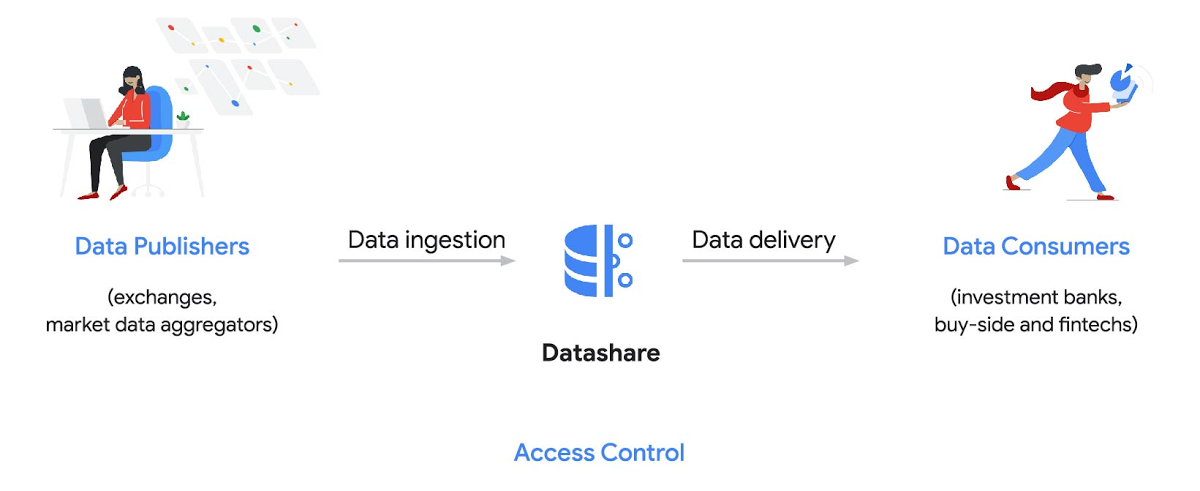
Three ways to distribute and consume your data
Batch data delivery
Datashare provides a batch data delivery mechanism for data publishers to deliver their reference data, historical tick data, alternative market data sources and more via BigQuery, reducing the administrative burden on data consumers to extract insights from data.
Real-time data streaming delivery
By using this event-based data delivery channel for rapidly changing instrument prices, tick data, orders, news and others via Pub/Sub, data consumers can reliably process individual messages or rewind to a point in time to replay a prior market scenario and test model changes.
Monetizing licensed datasets
Market data publishers can onboard their licensed datasets to Google Cloud and make them available via a one-stop-shop on Google Cloud Marketplace, enabling a new sales channel to expand market reach.
Reference architecture
Check out the diagram below to see how you can share your batch and real-time data directly to your Google Cloud customers with BigQuery and Pub/Sub.

As you can see in the above reference architecture, both publishers and consumers can derive several benefits from the solution:
Benefits for data publishers
- You no longer have to maintain your own delivery and licensing infrastructure.
- You can easily package and deliver granular data products and experiments with SQL.
- You can have a solution that scales with your business as data volumes and number of customers grow.
Benefits for data consumers
- Your data is ready for analysis and machine learning (ML)— you no longer have to maintain extract, transform, and load (ETL) pipelines to load files and transform data.
- You can avoid the expense and burden of maintaining multiple copies of large data files.
- You can be more targeted with consumption of data using BigQuery queries, improving performance, and compliance, and reducing cost.
Accessing the datasets
Google Cloud has been working with multiple industry firms on innovating in the market data space. By using Datashare for publishing, data publishers can make their entire datasets available on Google Cloud. Early adopters of Datashare include firms such as OneTick and Accern. OneTick’s datasets include reference and historical futures data (that can be accessed in our console with your login). Accern’s datasets include alternative data such as market sentiment and credit analysis data (that can be accessed in our console with your login).
To make it more helpful, we partnered with Accern to create a hypothetical scenario to describe the data acquisition and analytics process step-by-step.
Accern use case
As a sustainability analyst, you require an economic, social and governance (ESG) dataset to determine which sector is the most widely covered ESG sector by analysts, and to also identify the sector with the lowest ESG sentiment score. Now, you can discover and acquire an ESG dataset in Google Cloud.
Step 1. Navigate to the Financial Services solutions page in the Google Cloud console:

Step 2. Click a dataset, for example Accern AI-Generated ESG Insights, then review the overview details, plans and pricing, documentation and support information. To view the available pricing tiers, click ‘View All Plans’. Once you’ve decided on a tier that you would like to subscribe to, click ‘Select’, choose a billing account and review and accept the terms of service to complete the subscription. Once the steps are complete, click ‘Subscribe’ at the bottom. An overlay window will appear, click ‘Register with Accern’ to activate and complete the subscription.
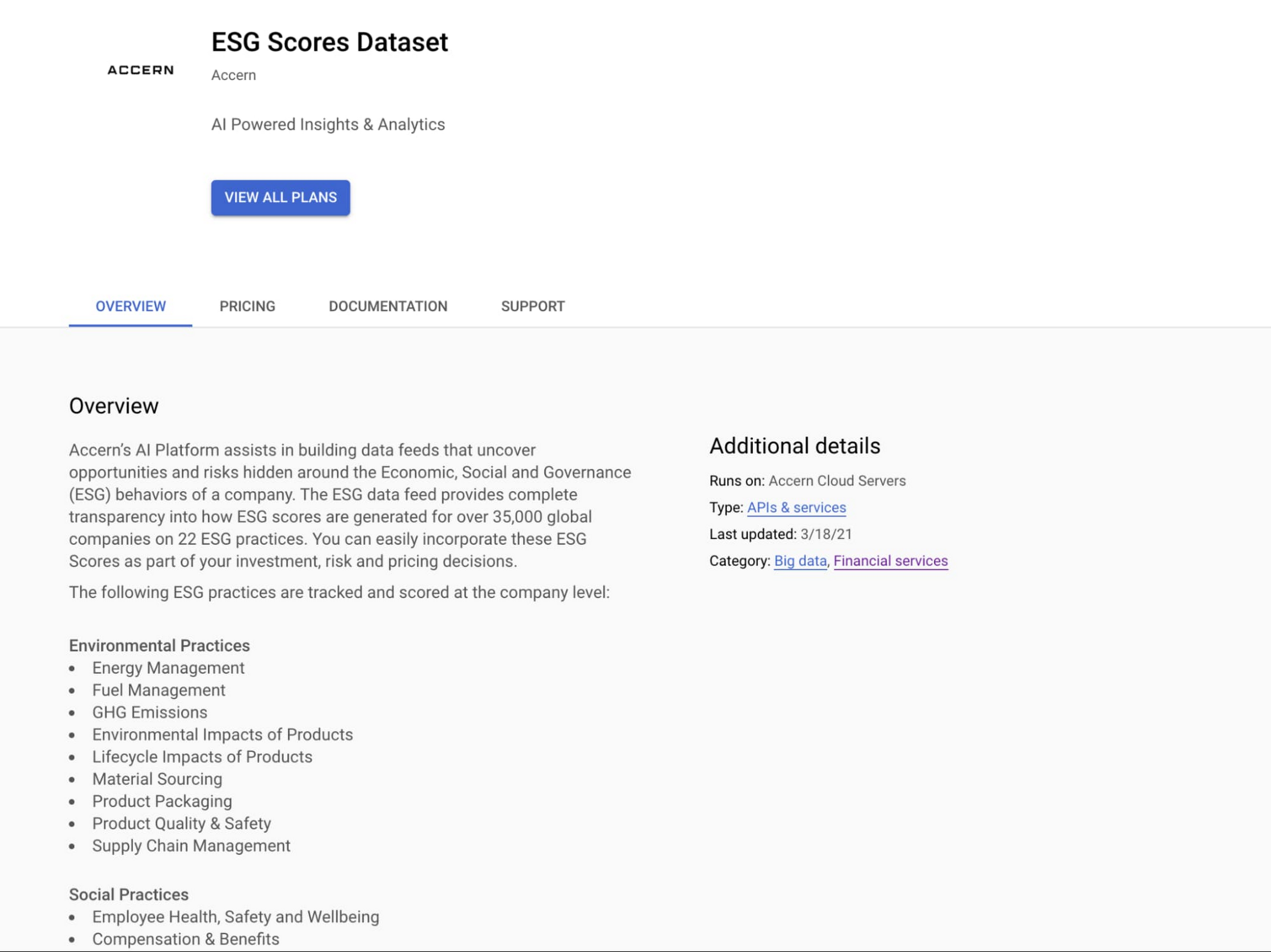

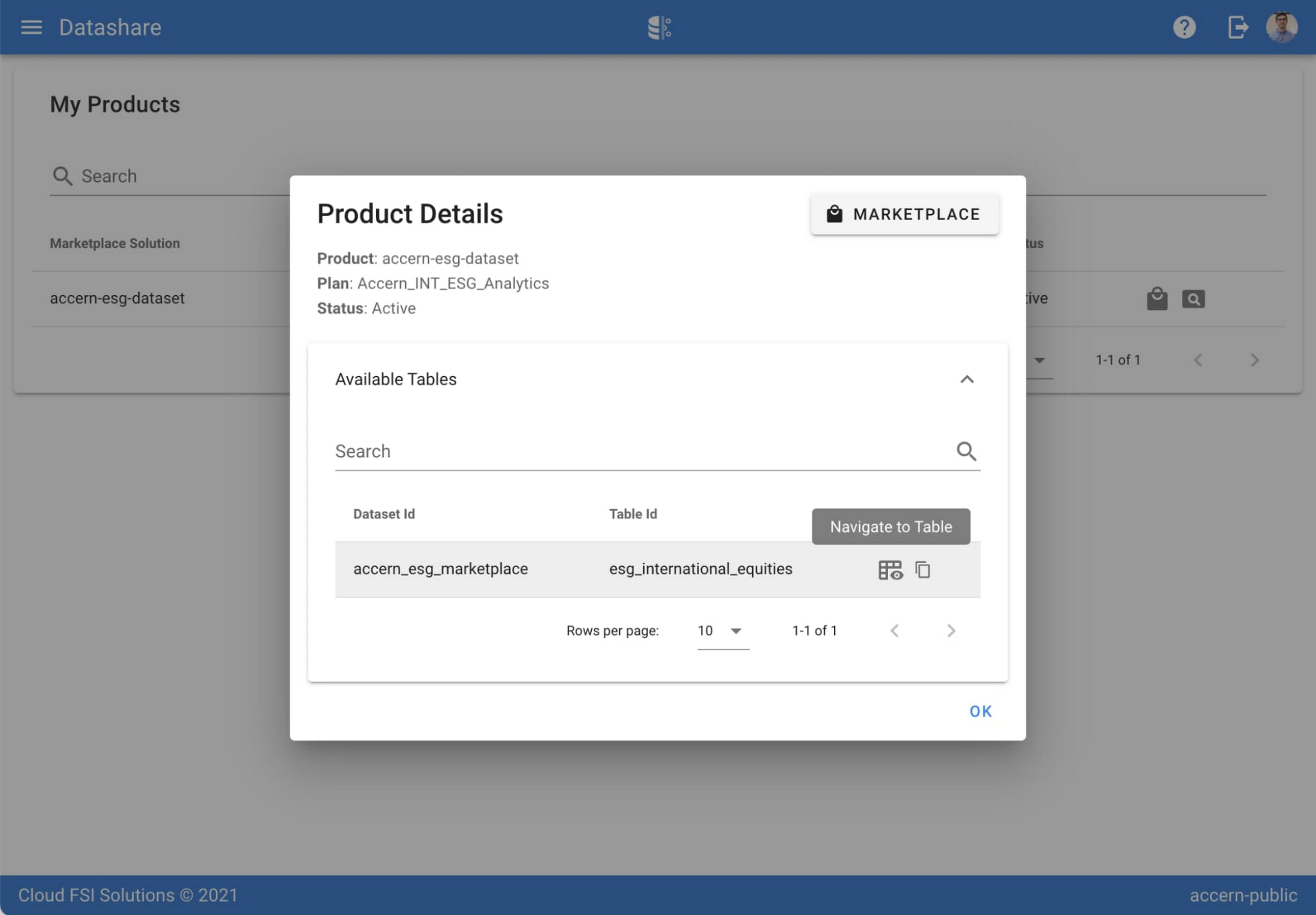
Step 3. Once activation is complete, you’ll be directed to the Datashare ‘My Products’ screen. Voila! You are now subscribed to Accern’s ESG Scores dataset and can access it in your Google Cloud instance using BigQuery. To access the data, click the hour glass icon on the corresponding ‘My Products’ record that you just purchased. An overlay will present you with the details on the dataset and/or table. Click the ‘Navigate to Table’ button to navigate through to the BigQuery console.


Step 4. Now that you have access and are in the BigQuery console, it’s time to generate data insights.
For this example, we’ve eliminated the company identifying information that is included as part of the subscription and aggregated company ESG in a view where each row represents a day, an industry sector, a specific identified ‘ESG Issues’ (event_group and event) and the respective ‘ESG Sentiment’ per issue.

For example, row 1 indicates that within the ‘Healthcare’ sector, there was a ‘Social – Civil Society’ issue identified and it had a negative ESG sentiment score of -15.35.
Step 5. Generate a report by exporting it to Data Studio to build visualizations and conduct additional analysis on the ESG data.
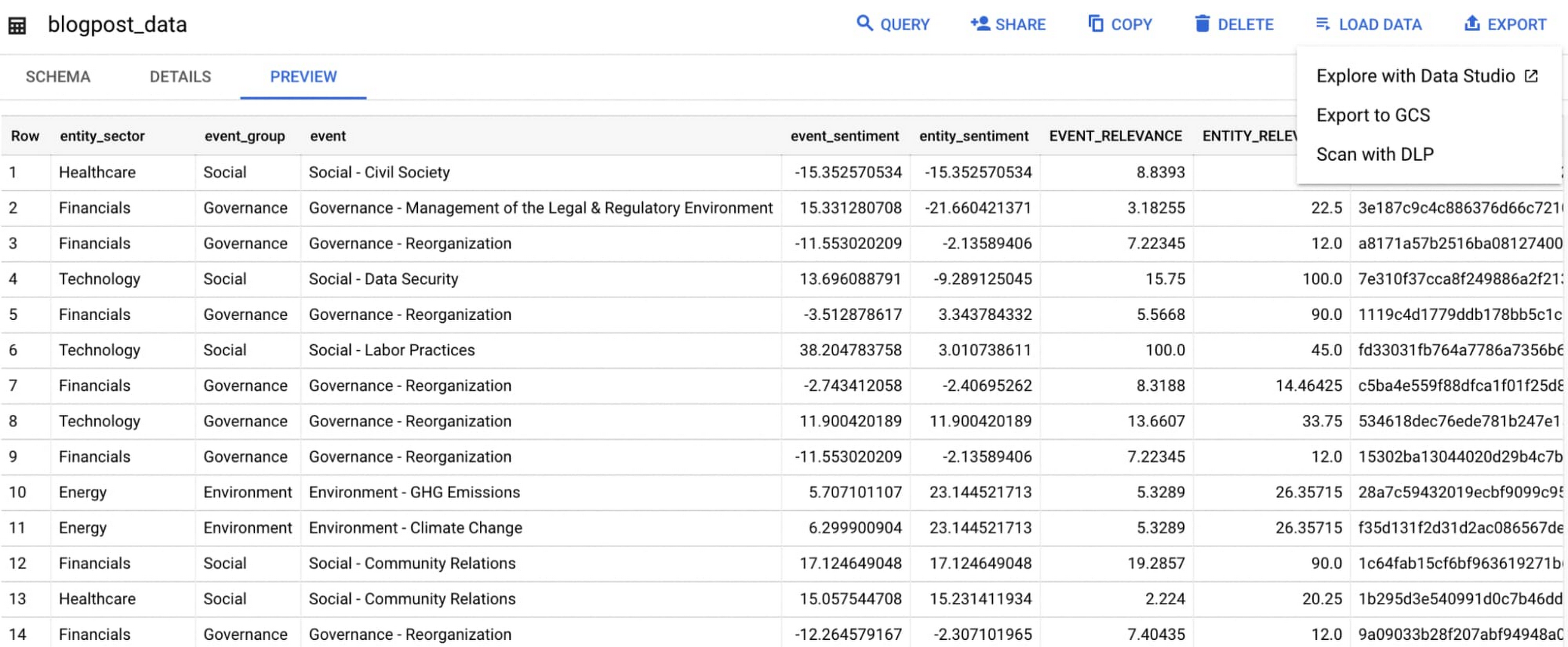
Select ‘Export’ and ‘Explore with Data Studio’.
Step 6. Build a simple/basic report.
Now that the ESG data appears in Data Studio, you can start by building a simple chart to help you understand which industry sectors have the highest volume of discussions around ESG and the overall ESG Sentiment per industry sector.
To build the chart:
- Select the chart type ‘Table’.
- Include
Entity_Sectoras your dimension to aggregate results by ‘Industry Sector.’ - Include
Signal_IDas a measure to count the number of ESG passages identified per ‘Industry Sector.’ - Include
AVG(Event_Sentiment)as a measure to display the overall ESG Sentiment per ‘Industry Sector’ across ESG Issues.

You can see sectors that are most discussed when it comes to ESG related topics and their corresponding ‘ESG Sentiment’ scores.
Step 7. Build your final report in Data Studio.
As a next step you can further drill into the data to understand ESG data specific to each ‘Industry Sector’ and identify positive and negative ESG practices.
Accern has built a more complex sample dashboard and made it available publicly here. You can interact with this report and play around with the data. The dashboard can help to identify material ESG insights for each sector to inform your investment and risk processes. If you have additional questions, you can reach out to Accern directly.

Discovering, accessing and analyzing licensed datasets is quick and easy. Stay tuned for more updates on new licensed datasets.
Publishing your data via Datashare
If you are a publisher of market data, alternative, or exotic data, you can use Datashare to get it published on Google Cloud Marketplace.
Start by joining the Partner Advantage program by registering for the Partner Advantage Portal and applying for the Partner Advantage Build Model engagement. Visit our getting started guide for information to get started on publishing licensed datasets in the Marketplace. Stay tuned for a future blog post about using Datashare to publish datasets in the Marketplace.
More solutions for capital markets
Check out other Google Cloud solutions for capital markets.
Your Cloud Defense Enhanced: Google Introduces End-to-End TDIR in Chronicle Security Operations

1181
Of your peers have already read this article.
4:30 Minutes
The most insightful time you'll spend today!
As cloud adoption continues to grow, so too does the number of cloud-born security threats. However, cloud environments can present significant opportunities to improve security with the right tools and processes in place.
When it comes to effective threat detection, investigation and response (TDIR) in the cloud, modern solutions must ensure that the entire security operations workflow — from data analysis through detection to response — are working in tandem to deliver the insights, context, and processes needed for cyber defenders to respond to threats with speed and precision.
At Google Cloud, we believe that modern security operations should rely less on customer engineering and more on packaged outcomes delivered by solution providers. With this in mind, we are excited to announce today at our annual Security Summit that Chronicle Security Operations now provides turnkey TDIR for Google Cloud. By integrating with our cloud-focused Security Command Center Premium (SCC) and Google Cloud telemetry, Chronicle can collect and analyze data from Google Cloud, detect and investigate threats, and automate responses to mitigate risks.
In our recent State of Cloud Threat Detection and Response Survey, 71% of respondents said that “entire classes of threats are eliminated by migrating to the cloud,” and 82% stated that “the cloud affords the ability to process more data, including on-prem data, which can improve detection across the board.”
To take advantage of all that the cloud can do for security, organizations should to do more than “lift and shift” their existing security tools and processes to the cloud. The cloud presents a different attack surface, often across several cloud services and data repositories, and each can have different attack tactics, potential misconfigurations, and context.
This update to Chronicle helps enable teams to:
- Detect with confidence. Out-of-the-box detection rule sets developed by Google threat researchers surface cloud attack vectors and provide high fidelity, contextualized alerts that quickly give insight into potential threats in your Google Cloud environment.
- Investigate with full context. Visualize threat storylines, complete with cloud-specific context that is correlated with additional data and context from across your environment for fast and efficient investigations.
- Respond with speed and precision. Streamline workflows and automate response actions with prebuilt playbooks and best practices designed specifically for Google Cloud. Chronicle SOAR’s case management and team collaboration help ensure fast and timely response.
- Simplify data ingestion. Chronicle automatically ingests, normalizes and contextualizes cloud telemetry from a variety of Google Cloud services (such as Cloud Asset Inventory, Google Kubernetes Engine, Google Compute Engine, cloud audit logs, and Cloud DLP), reducing the need for complex and time-consuming engineering.
Putting Google Cloud TDIR to work
Let’s take a closer look at how our end-to-end cloud TDIR workflow manages a potential Google Cloud attack.
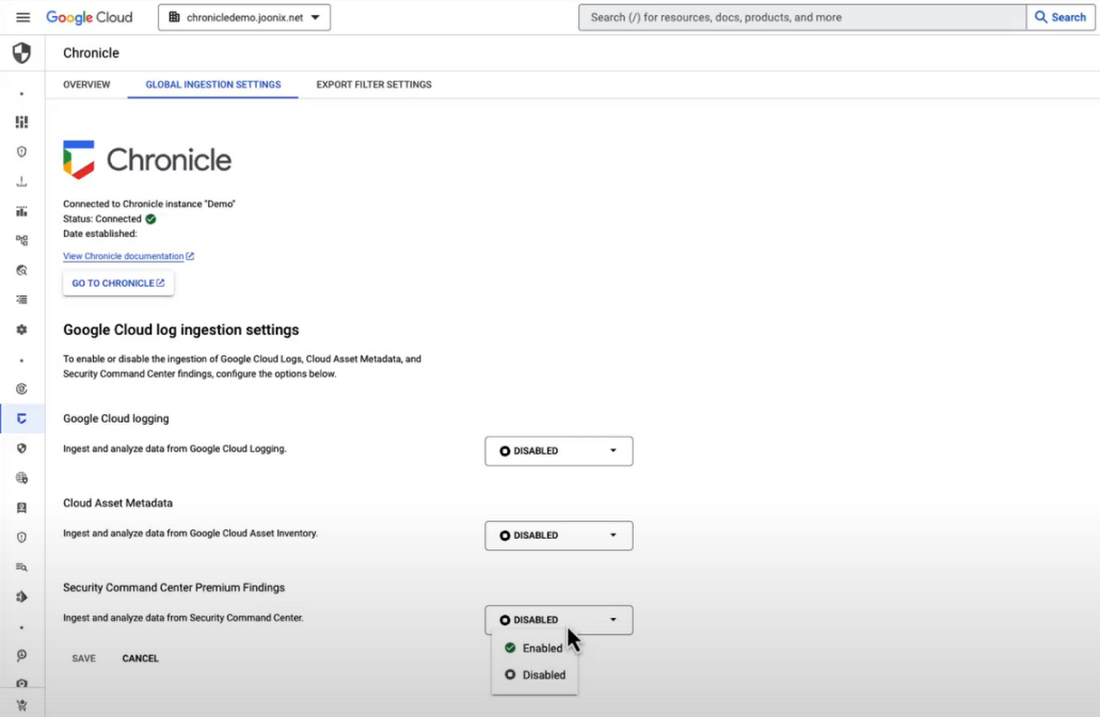
Setting up cloud TDIR in Chronicle only takes a few clicks. Security Command Center’s built-in threat detection identifies attacks against Google Cloud resources. These findings, as well as audit, NAT, DNS, and firewall logs, are ingested into Chronicle to provide additional insight and context into Google Cloud threats.
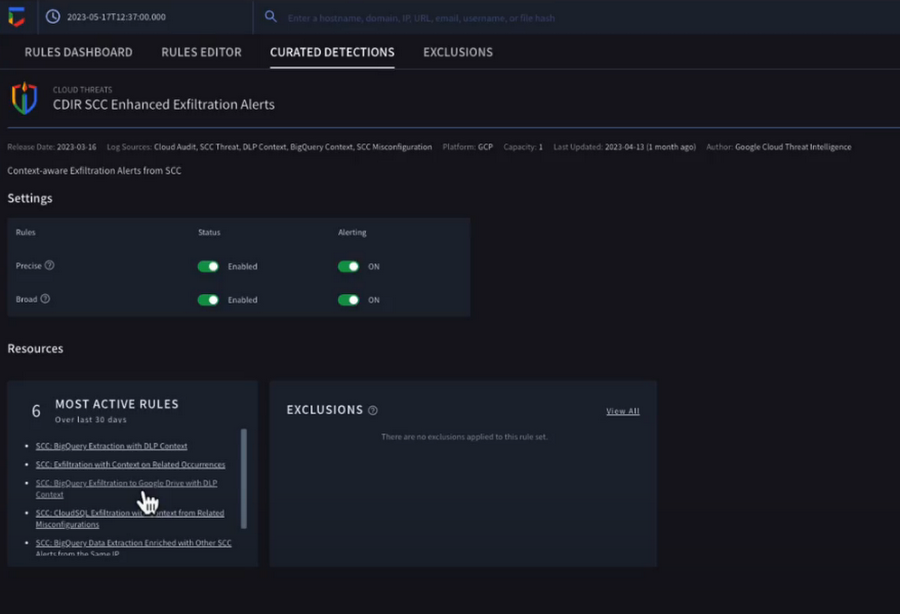
Chronicle now provides detection rules for Google Cloud threats. These rules correlate SCC findings with Chronicle’s advanced detection engine to reveal the broad scope of malicious activity, giving you visibility and more contextual information into what’s going on in your environment. In our example, Chronicle alerts on suspicious activity that can indicate an attempt to exfiltrate data from BigQuery.
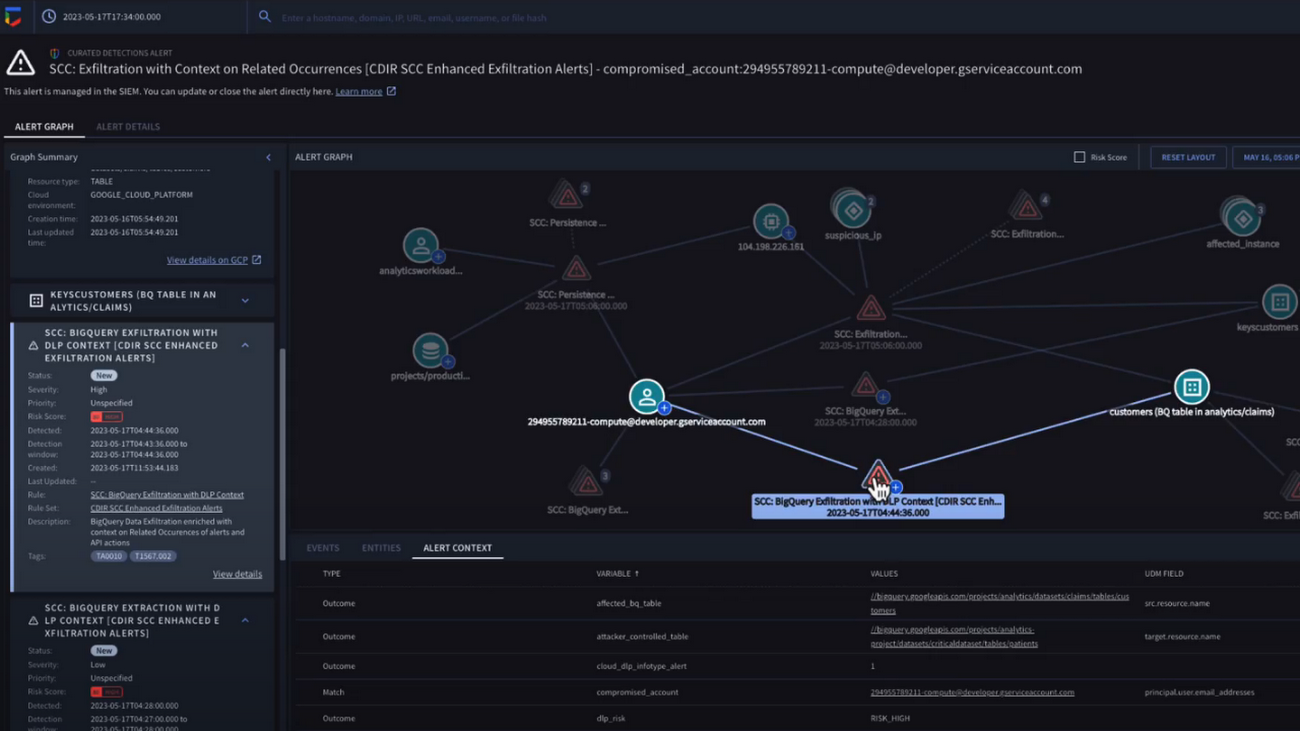
The new Chronicle Alert Graph surfaces key details of primary alerts you’re investigating in seconds. Combining cloud alerts and telemetry and correlating that with vital context from other sources (such as user data, endpoint data, and threat intelligence,) you can explore the visual representation of an alert’s relationship to other alerts and entities, dig into the potential attack paths, get quick summaries of implicated security artifacts, and pivot into your Google Cloud Console to do a deeper dive into potentially-impacted resources.
In our example, we can see a BigQuery exfiltration event associated with a customer and that it’s associated with a particular service account tied to a Google Cloud org. Alert context below tells us more about what’s been impacted. It shows us that cloud credentials in the form of encryption keys and email addresses were associated with the event.
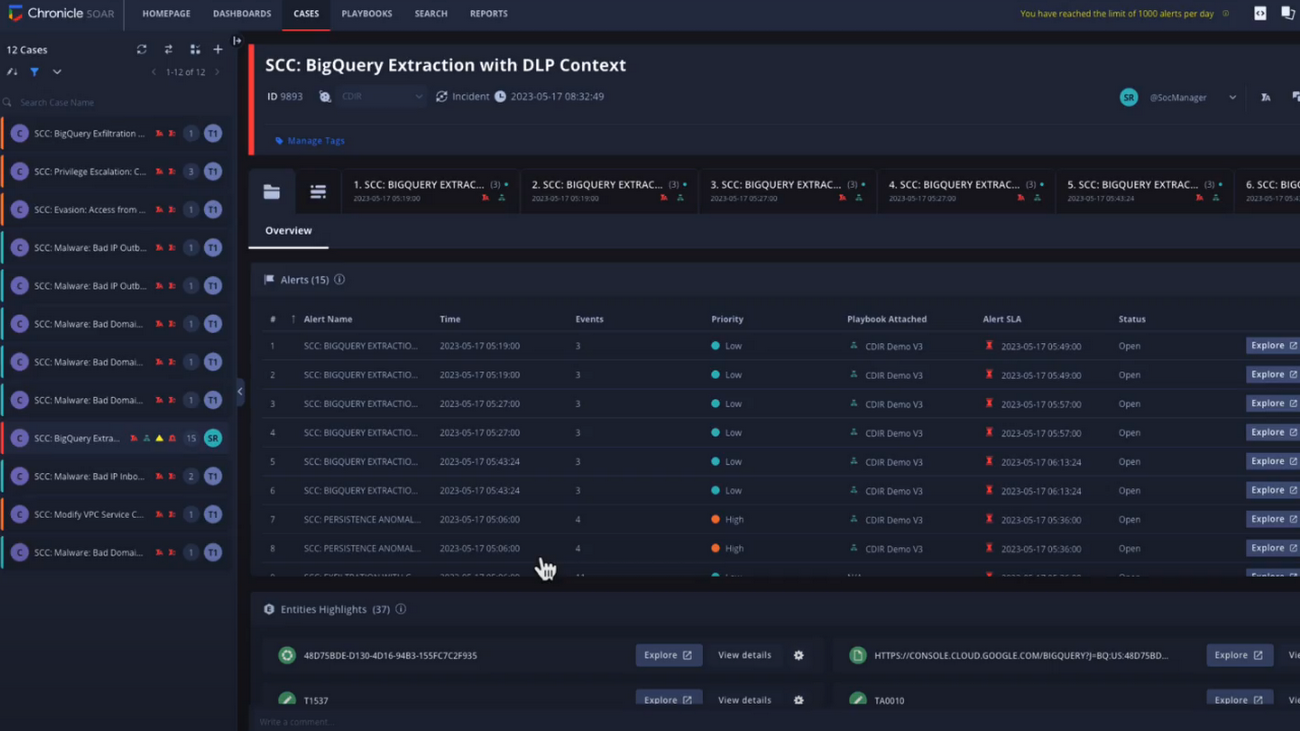
Chronicle case management automatically groups any related alerts into threat-centric cases, uniting the information that matters and making it simple for you to see and understand the scope of the event.
In our example, Chronicle groups these alerts together based on common source address and username, and the case wall provides the summary of the alerts and actions that are taking place across the entire case.
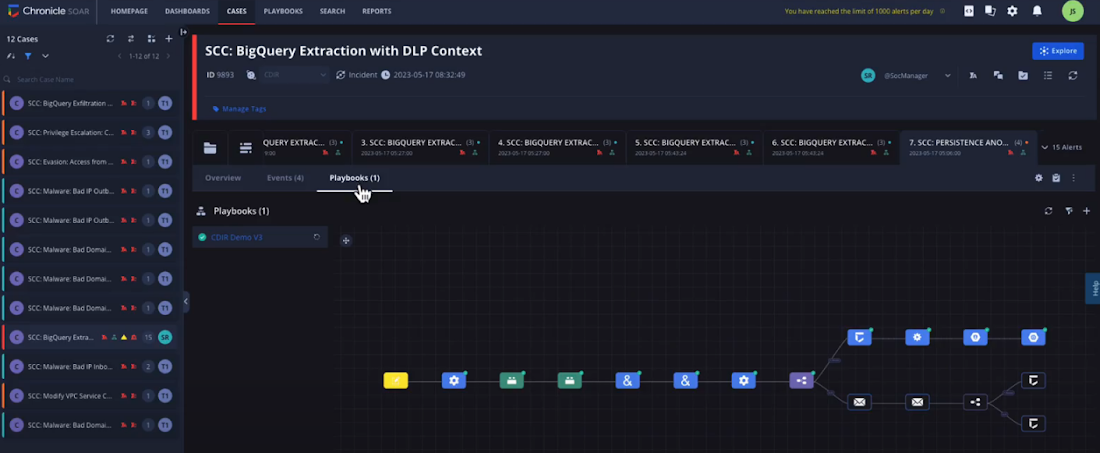
Chronicle playbooks, designed specifically for Google Cloud, automate your desired response processes. In our example, when an alert was generated a playbook automatically ran through predefined steps that gathered data, enrichment, and took automated remediation steps to prevent this service account and instance from continuing.
Ready to detect with confidence, investigate with broad context, respond with speed and precision, and simplify data ingestion? Chronicle Security Operations is your go-to for turnkey, end-to-end threat detection, investigation, and response on Google Cloud.
Tune in to our Security Summit session to learn more and see a demo of the new Google Cloud TDIR capabilities.
Google Cloud’s BeyondCorp Framework Helps Govts Adopt Zero Trust Approach to Security

3086
Of your peers have already read this article.
1:30 Minutes
The most insightful time you'll spend today!
For more than a decade, Google has applied a Zero Trust approach to most aspects of our operations. Zero Trust’s core tenet–that implicit trust in any single component of a complex, interconnected system can create serious security risks–is fundamental to how we operate and build our security architecture.
Early in our security journey, we realized that despite our best efforts user credentials would periodically fall into the hands of malicious actors. This is why we developed the BeyondCorp framework. We needed additional layers of defense against unauthorized access that would not impede user productivity. We also understood that software that interacts with the larger world should not have a perimeter-based trust model. These realizations led to the layered protection in our BeyondProd framework, which extends the Zero Trust paradigm to our production workloads.
Earlier this year, the United States Office of Management and Budget (OMB) released a Federal Strategy to Move the U.S. Government Towards a Zero Trust Architecture. This marks an important step for the U.S. government’s efforts to modernize under Executive Order 14028 on Improving the Nation’s Cybersecurity. In parallel, guidance from the United Kingdom’s National Cyber Security Center (NCSC) has also called for the move to a Zero Trust approach to security and outlined in 2021 its report on Zero Trust architecture design principles.
Adopting a Zero Trust approach can help organizations inside and outside the public sector stay ahead of both regulatory requirements and security threats, but it requires thoughtful planning and execution. Our goal is to bring the best practices for Zero Trust together in one place, leveraging the experiences and knowledge of our existing customers, and Google’s own experience with implementing Zero Trust.
How Google Cloud can help government agencies move toward Zero Trust
Agencies can rely on Google Zero Trust capabilities for remote access, secure collaboration, and boundary security. To better serve the Zero Trust needs of our customers, we introduced BeyondCorp Enterprise in January 2021, a solution that provides Zero Trust secure access to resources and applications in the cloud and on-premises. BeyondCorp Enterprise was built based on years of Google’s own innovation as we implemented Zero Trust globally for ourselves. It leverages the Chrome browser and Google’s global network, and it offers integrated real-time threat and data protection.
Here are five ways BeyondCorp Enterprise can be applied to help organizations adopt the Zero Trust cybersecurity principles set forth in the recent White House memorandum (M-22-09) and other global government guidance for Zero Trust.
- Enable enterprise applications to be used over the public internet: It’s no secret that VPN usage poses daily burdens and long-term challenges for IT and cybersecurity managers, as well as end-users. BeyondCorp Enterprise provides users with seamless and secure access to web applications (including SaaS apps and apps hosted on any cloud), plus central management controls and threat and data protection capabilities, all built-in to the Chrome browser. Through BeyondCorp Enterprise, end-users can access applications simply and still benefit from enterprise-grade security, without sacrificing their productivity or user experience.
- Leverage phishing-resistant MFA to access secure resources: Many cyberattacks start with phishing messages that lead users to infected websites and attempt to steal credentials. The use of phishing-resistant MFA, as recommended by M-22-09, can protect personnel from sophisticated online attacks. BeyondCorp Enterprise supports strong phishing-resistant authentication, by allowing factors such as Titan Security Keys to be used as attributes in access policies that are enforced at the application layer. Organizations can customize how to incorporate phishing-resistant MFA methods into their access policies for individual applications and resources. Phishing protection is also built into the Chrome browser, powered by Google Safe Browsing, and these capabilities block access to malicious content, detect phishing sites, prevent malware transfers, and generate reports of unsafe activity, adding even more protection against bad actors.
- Use context-aware authorization: The U.S. federal strategy states that a Zero Trust architecture should incorporate more granularly and dynamically defined permissions and that every request for access should be evaluated to determine whether it is appropriate. With context-aware authorization, organizations can build and customize access policies to include different contextual signals about a user including their role, their location, and even the time of day. Every interaction between a user and a BeyondCorp-protected resource is evaluated in real-time against the resource’s access policy to ensure users are and remain authorized to access it, with continuous authorization for all interactions at a per request level.
- Incorporate device-level signal into authentication: At Google, we believe that trust must be granted based on what is known about a user’s identity and their device. We are pleased that OMB similarly recommends that authentication incorporate at least one device-level signal alongside identity information. Since BeyondCorp Enterprise supports device-level attributes without requiring users to install agents, this can be done easily by leveraging the Endpoint Verification extension in the Chrome browser, where administrators can gather endpoint security posture information and easily construct and implement granular resource access policies. The ability to collect and utilize this information through an agentless approach is especially helpful for BeyondCorp Enterprise customers who support a workforce with bring-your-own-device policies or unmanaged devices.
- Include the extended workforce in your Zero Trust strategy: A Zero Trust approach aimed to provide secure access to the right users, at the right time, and for the right purposes should be inclusive of all users, not just full-time staff. Government agencies rely on contractors and partners to carry out many important missions. Unfortunately, the extended workforce is often more vulnerable to attacks if they are given too much privileged access or if their security practices are not properly assessed before access is provisioned. At the same time, federal administrators can’t always manage third-party devices or software directly, which can make secure access challenging.
BeyondCorp Enterprise supports a feature called protected profiles, an ideal solution for granting Zero Trust access to the extended workforce. It enables users to securely access resources from unmanaged devices and be protected by the same security capabilities without needing to install agents. Furthermore, administrators can gain visibility into risky activities and view any security events that are generated from within protected profiles.
Applying the NCSC Zero Trust principles on Google Cloud
Last year, the U.K. government’s NCSC launched its Zero Trust architecture design principles to help organizations securely adopt a Zero Trust architecture. To help private and public sector organizations in the U.K., the Google Cybersecurity Action Team (GCAT) released a detailed research paper that outlines how organizations can leverage Google Cloud technologies and services to align with these principles. This is a technical guide aimed at enterprise and security architects charged with developing and executing a Zero Trust strategy under the principles outlined by the NCSC, including:
- Know your architecture, including users, devices, services and data with Google Cloud Professional Services Organization (PSO) who can support discovery, planning and risk mitigation.
- Know your User, Service and Device identities including reference architectures for Cloud Identity.
- Assess your user behavior, device and service health by leveraging built in reporting from Google Cloud and Chronicle.
- Use policies to authorize requests with BeyondCorp Enterprise policy-based authorization.
- Authenticate & Authorize everywhere by reviewing the BeyondCorp and BeyondProd frameworks which combine to deliver ubiquitous authentication and authorization.
- Focus your monitoring on users, devices and services with device management and Cloud native monitoring capabilities.
- Don’t trust any network, including your own. Review details on Google’s Secure by Design infrastructure.
- Choose services designed for Zero Trust. Review how to protect modern and legacy applications with BeyondCorp.
For more detail on how we’re supporting the U.K.’s NCSC, please review our recent research paper for insight into their priorities, and where Google will be discussing Secure by Design principles and how to respond to security incidents.
Zero Trust assessment and planning services for organizations
Organizations that are managing complex environments while undergoing Zero Trust adoption could benefit strongly from experienced support and guidance. The Google Cybersecurity Action Team (GCAT) is committed to helping customers meet Zero Trust security and compliance requirements in the cloud through specialized consulting engagements and workshops for public sector customers. Read more about how growing cybersecurity requirements for U.S. federal government customers via executive orders and White House mandates are being supported through Google Cloud solutions.
GCAT’s multi-week Zero Trust Foundations engagement helps organizations build a strategy to achieve a Zero Trust security model across their operations. Zero Trust Foundations is co-delivered by Google Cloud’s Office of the CISO and our public sector Professional Services Organization. It can help focus and accelerate customers’ Zero Trust efforts by sharing lessons learned from Google’s own BeyondCorp zero-trust journey, and our global implementation of defense-in-depth best practices. Contact us today to learn more.
To learn more about ways Google Cloud can help organizations embarking on a Zero Trust journey, tune into our second annual Google Cloud Security Summit on May 17 and hear directly from customers who are already using our Zero Trust solutions to achieve their organization’s security goals.
About the Authors:
Jeanette Manfra is the former Assistant Director for the Cybersecurity and Infrastructure Security Agency at the Department of Homeland Security. Dan Prieto is the former Director of the Defense Industrial Base Cybersecurity program at the Department of Defense. Both Dan and Jeanette also served in the White House on the staff of the National Security Council’s cybersecurity directorate.
More Relevant Stories for Your Company



Accelerate Your Digital Transformation Through a Modern Infrastructure
Learn about the latest advancements to Google Cloud Platform’s unique infrastructure to accelerate enterprise workloads and build planet scalable solutions. Hear how Google Cloud’s infrastructure enables you to solve problems faster, more securely, and at greater scale. See how Google Cloud is accelerating the support for enterprise workloads like SAP,

Google Cloud Content Protection: Unlock the Power of CSAP for Security
Content production is increasingly happening in the cloud. While moving a creative process that spans three centuries into the modern era brings challenges and risks, MovieLabs is one organization that takes digital transformation seriously. A nonprofit research and development group founded by a consortium of the major Hollywood studios, MovieLabs describes their mission as

How Google Meet Keeps Your Video Conferences Secure
All over the world, businesses, schools and users depend on G Suite to help them stay connected and get work done. Google designs, builds, and operates our products on a secure foundation, aimed at thwarting attacks and providing the protections needed to keep you safe. G Suite and Google Meet

Customer Voices: How Firms from Across Industries Leverage Google Cloud
From powering everyday operations and accelerating application innovation, to providing tools for specific business needs and executing on big ideas, to advancing the security of technology solutions, companies from across industries have leveraged Google Cloud for business benefits. Companies from across industries have turned to Google Cloud for transforming their
