





How Google Meet Keeps Your Video Conferences Secure

6804
Of your peers have already read this article.
4:30 Minutes
The most insightful time you'll spend today!
All over the world, businesses, schools and users depend on G Suite to help them stay connected and get work done. Google designs, builds, and operates our products on a secure foundation, aimed at thwarting attacks and providing the protections needed to keep you safe. G Suite and Google Meet are no exception.
Google Meet’s security controls are turned on by default, so that in most cases, organizations and users won’t have to do a thing to ensure the right protections are in place. Here, we’ll summarize the key capabilities of Google Meet that help protect you.
Proactive protections to combat abuse and block hijacking attempts
Google Meet employs an array of counter-abuse protections to keep your meetings safe. These include anti-hijacking measures for both web meetings and dial-ins.
Google Meet makes it difficult to programatically brute force meeting IDs (this is when a malicious individual attempts to guess the ID of a meeting and make an unauthorized attempt to join it) by using codes that are 10 characters long, with 25 characters in the set. We limit the ability of external participants to join a meeting more than 15 minutes in advance, reducing the window in which a brute force attack can even be attempted. External participants cannot join meetings unless they’re on the calendar invite or have been invited by in-domain participants. Otherwise, they must request to join the meeting, and their request must be accepted by a member of the host organization.
In addition, we’re rolling out several features to help schools keep meetings safe and improve the remote learning experiences for teachers and students, including:
- Only meeting creators and calendar owners can mute or remove other participants. This ensures that instructors can’t be removed or muted by student participants.
- Only meeting creators and calendar owners can approve requests to join made by external participants. This means that students can’t allow external participants to join via video, and that external participants can’t join before the instructor.
- Meeting participants can’t rejoin nicknamed meetings once the final participant has left. This means if the instructor is the last person to leave a nicknamed meeting, students can’t join later without the instructor present.

Secure deployment and access controls for admins and end-users
To limit the attack surface and eliminate the need to push out frequent security patches, Google Meet works entirely in your browser. This means we do not require or ask for any plugins or software to be installed if you use Chrome, Firefox, Safari, or Microsoft Edge. On mobile, we recommend that you install the Google Meet app.
To help ensure that only authorized users administer and access Meet services, we support multiple 2-Step Verification options for accounts that are secure and convenient. These include hardware and phone-based security keys and Google prompt. Additionally, Google Meet users can enroll their account in our Advanced Protection Program (APP), which provides our strongest protections available against phishing and account hijacking and is specifically designed for the highest-risk accounts.
For G Suite Enterprise and G Suite for Education customers, we offer Access Transparency, which logs any Google access to Google Meet recordings stored in Drive, along with the reason for the access (support team actions that you might have requested, for example). Customers can also use data regions functionality to store select/covered data of Google Meet recordings in specific regions (i.e. US or Europe).
Secure, compliant, and reliable meeting infrastructure
In Google Meet, all data is encrypted in transit by default between the client and Google for video meetings on a web browser, on the Android and iOS apps, and in meeting rooms with Google meeting room hardware. Meet adheres to IETF security standards for Datagram Transport Layer Security (DTLS) and Secure Real-time Transport Protocol (SRTP). For every person and for every meeting, Meet generates a unique encryption key, which only lives as long as the meeting, is never stored to disk, and is transmitted in an encrypted and secured RPC (remote procedure call) during the meeting setup.
Security is an integral part of all our operations at Google. Our team of full-time security and privacy professionals supports our software engineering and operations to ensure that security is always a part of how we build and run our services. All of our Google Cloud and G Suite customers benefit from these capabilities, including:
- Secure-by-design infrastructure: Google Meet benefits from Google Cloud’s defense-in-depth approach to security, which utilizes the built-in protections and global-private network that Google uses to secure your information and safeguard your privacy.
- Compliance certifications: Our Google Cloud products, including Google Meet, regularly undergo independent verification of their security, privacy, and compliance controls, including validation against standards such as SOC, ISO/IEC 27001/17/18, HITRUST, and FedRAMP. We support your compliance requirements around regulations such as GDPR and HIPAA, as well as COPPA and FERPA for education.
- Incident management: We have a rigorous process for managing data and security incidents that specifies actions, escalations, mitigation, resolution, and notification of any potential incidents impacting customer data.
- Reliability: Google’s network is engineered to accommodate peak demand and handle future growth. Our network is resilient and engineered to accommodate the increased activity we’ve seen on Google Meet.
- Transparency: At Google Cloud, we’re clear about our commitments regarding customer data: we process customer data according to your instructions; we never use customer data for advertising purposes; and we publish the locations of our Google data centers, which are highly available, resilient, and secure.
During COVID-19 and beyond, we will continue to protect Google Meet users and their data, and keep innovating with new features to make our tools helpful, secure, and safe.
Vulnerability Exploitability eXchange: Prioritize cybersecurity risk for the healthcare industry

2554
Of your peers have already read this article.
1:30 Minutes
The most insightful time you'll spend today!
Diagnosing and treating chronic pain can be complex, difficult, and full of uncertainties for a patient and their treating physician. Depending on the condition of the patient and the knowledge of the physician, making the correct diagnosis takes time, and experimenting with different treatments might be required.
This trial-and-error process can leave the patient in a world of pain and confusion until the best remedies can be prescribed. It’s a situation similar to the daily struggle that many of today’s security operations teams face.
Screaming from the mountain tops “just patch it!” isn’t very helpful when security teams aren’t sure if applying a patch might create even worse issues like crashes, incompatibility, or downtime. Like a patient with chronic pain, they may not know the source of the pain in their system. Determining which vulnerabilities to prioritize patching, and ensuring those fixes actually leave you with a more secure system, is one of the hardest tasks a security team can face. This is where a Vulnerability Exploitability eXchange (VEX) comes in.
The point of VEX
In previous blogs, we’ve discussed how establishing visibility and awareness into patient safety and technology is vital to creating a resilient healthcare system. We’ve also looked at how combining software bills of materials (SBOM) with Google’s Supply chain Levels for Software Artifacts (SLSA) framework can help build more secure technology that enables resilience.
The SBOM provides visibility into the software you’re using and where it comes from, while SLSA provides guidelines that help increase the integrity and security of software you then build. Rapid diagnostic assessments can be added to that equation with VEX, which the National Telecommunications and Information Administration describes as a “companion” document that lives side-by-side with SBOM.
To go back to our medical metaphor, VEX is a mechanism for software providers to tell security teams where to look for the source of the pain. VEX data can help with software audits when inventory and vulnerability data need to be captured at a specific point in time. That data also can be embedded into automated security tools to make it easier to prioritize vulnerability patching.
You can then think of SBOM as the prescription label on a bottle of medication, SLSA as the child-proof lid and tamper-proof seal guaranteeing the safety of the medication, and VEX as the bottle’s safety warnings. As a diagnostic aide, a VEX can help security teams make accurate diagnoses of “what could hurt” and system weaknesses before the bad guys do.
Yet making an accurate assessment of that threat model can be challenging, especially when looking at the software we use to run systems. The ability to quickly and accurately evaluate an organizations’ weaknesses and pain points can be vital to hastening response to a vulnerability and stopping cyberattacks before they become destructive. We believe that VEX is an important part of the equation to help secure the software supply chain.
As an example, look no further than the Apache Log4j vulnerabilities revealed in December 2021. Global industries including healthcare were dealt another blow when Apache’s Log4j 2 logging system was found to be so vulnerable that relatively unsophisticated threat actors could quickly infiltrate and take over systems. Through research conducted by Google and information contributed by CISA, we learned of examples of where vulnerabilities in Log4j 2, a single software component, could potentially impact thousands of companies using software that depend on it because of its near-ubiquitous use.
While a VEX would not capture zero-day vulnerabilities, it would be able to inform security teams of other known vulnerabilities in Log4j 2. Once vulnerabilities have been published, security teams could use SBOM to find them, and use VEX to understand if remediation is a priority or not.
How does VEX contribute to visibility?
A key reason we focus on visibility mechanisms like SBOM and SLSA is because they give us the ability to understand our risks. Without the ability to see into what we must protect, it can be difficult to determine how to quickly reduce risk.
Visibility is a crucial first step to stopping malicious hackers. Yet without context, visibility leaves security teams overwhelmed with data. Why? Well, where would you start when trying to mitigate the 30,000 known vulnerabilities affecting just open source software, according to the Open Source Vulnerabilities database(OSV)? NIST’s National Vulnerability Database (NVD) is tracking close to 181,000 vulnerabilities. We’ll be patching into the next millennium if we adopt a “patch everything” approach.
It’s impossible to address every vulnerability individually. To make progress, security teams need to be able to prioritize findings and go after the ones that will have the greatest impact first. The goal of a VEX artifact is to make prioritization a little easier.
While SBOMs are created or changed when the material included in a build is updated, VEXs are intended to be changed and distributed when a new vulnerability or threat has changed. This means that VEX and SBOM should be maintained separately. Since security researchers and organizations are constantly discovering new cybersecurity vulnerabilities and threats, a more dynamic mechanism like VEX can help ensure builders and operators have the ability to quickly ascertain the risks of the software they are using.
Let’s dig into this VEX example from CycloneDX. You can see the list of vulnerabilities found, third parties who track and report those vulnerabilities, vulnerability ratings per CVSS, and most importantly, a statement from the developer that guides the operator reading the VEX to those vulnerabilities that are exploitable and need to be protected. At the bottom, you’ll see the VEX “affects” an SBOM.
This information allows the user of the VEX document to refer to its companion SBOM. By necessity, the VEX is intentionally decoupled from the SBOM because they need to be updated at different times. A VEX document will need to be updated when new vulnerabilities emerge. An SBOM will need to be updated when changes to the software are made by a manufacturer. Although they can and need to be updated separately, the contents of each document can stay aligned because they are linked.
Increasing resilience powered by visibility—SBOM+VEX+SLSA
VEX could dramatically improve how security vulnerabilities are handled. It’s not uncommon to find operators buried in vulnerabilities, best-guessing the ones that need fixing, and trying to make sense of tens (and sometimes hundreds) of pages of documentation to determine the best, lowest impact fix.
With SBOM+SLSA+VEX, operators are using software-driven mechanisms to conduct analyses and evaluate risk instead of relying on intuition and best guesses. The tripartite SBOM+SLSA+VEX approach provides an up-to-date list of issues and perspective on what needs attention. This is a transformative development in security—enabling teams to get a better handle on doing vulnerability mitigation, starting where it could hurt the most.
Driven by repeated cyberattacks on critical infrastructure such as healthcare, government regulators have taken a more interested stance in software security and supply chains. Strengthening the effectiveness of SBOMs in the United States is a big part of the newly proposed Protecting and Transforming Cyber Health Care (PATCH) Act. The law would require medical device manufacturers adhere to minimum cybersecurity standards in their products, including the creation of SBOMs for their devices, and plans to monitor and patch any cybersecurity vulnerabilities that are discovered during the device’s lifetime.
Meanwhile, new draft medical device cybersecurity guidance from the FDA continues that agency’s involvement in aggressively encouraging medical device manufacturers to improve the cybersecurity resilience of their products. The White House spoke for SBOMs, as well. An Executive Order from May 2021 lays out requirements for secure software development, including the production and distribution of SBOM for software used by the federal government.
Regardless of how these initiatives pan out, Google believes controls like those provided by SBOM+SLSA+VEX are critical to protect software and build a resilient healthcare ecosystem. This approach provides detailed, critical risk exposure data to security teams so they can take necessary steps to reduce immediate and long-term risks.
What do we suggest you do?
At Google, we are working with the Open Source Security Foundation on supporting SBOM development. Our Know, Prevent, Fix report on secure software development creates a broader outline of how Google thinks about securing open source software from preventable vulnerabilities. You can read more about these efforts for securing workloads on Google Cloud from our Cloud Architecture Center. Take a look at Cloud Build, a Google Cloud service that can be used to generate up to SLSA Level 2 build artifacts.
Customers often have difficulty getting full visibility and control over vulnerabilities because of their dependence on open source software (OSS). Assured Open Source Software (Assured OSS) is the Google Cloud service that helps teams both secure the external OSS packages they use and overcome avoidable vulnerabilities by simply eliminating them from the code base. Finally, ask us about Google’s Cybersecurity Action Team, the world’s premier security advisory team and its singular mission supporting the security and digital transformation of governments, critical infrastructure, enterprises, and small businesses.
If you’re a software supplier, please consider our suggestions above. Whether you are or not, you should begin:
- Contractually mandating SBOM+VEX+SLSA (or their equivalent) artifacts to be provided for all new software.
- Train procurement teams to ask for and use SBOM+VEX+SLSA to make purchasing decisions. There should be no reason an organization procures software or hardware with known, preventable issues. Even if they do, the information these mechanisms provide should help security teams decide if they can live with the risks before equipment enters their networks.
- Establishing a governance program that ensures those who control procurement decisions are aware of and owning the risks associated with software they are buying.
- Enabling security teams to build pipelines to ingest SBOM+VEX+SLSA artifacts into their security operations and use it to strategically advise and drive mitigation activities.
At Google, we believe the path to resilience begins with building visibility and structural awareness into the software, hardware, and equipment it rides on as a critical first step. Time will tell if VEX becomes widely adopted, but the point behind it won’t change—we can’t know how we are vulnerable without visibility. VEX is an important concept in this regard.
Next month, we’ll be shifting gears slightly to focus on building resilience by establishing a security culture that obsesses over its patients and products.
AirAsia’s CIO Speaks Up: Why He Decided, What He Did

3317
Of your peers have already read this article.
2:45 Minutes
The most insightful time you'll spend today!
At AirAsia, we operate a fleet of more than 270 aircraft across 23 markets, fly to more than 150 destinations and carry 100m guests each year. We’ve also been named the world’s best low-cost carrier for 11 years running. To accomplish all of this, we rely heavily on our 22,000 Allstars (employees). As AirAsia co-founder Tony Fernandes likes to say, “it has always been about the people.”
With Cloud Identity in place, our IT department can spend less time worrying about managing multiple on-premises directory servers and and can instead focus on delivering value to our Allstar employees.
–Declan Hogan, Group CIO, AirAsia
In my role as CIO, it’s critical that I give our Allstars the tools and technology they need to get their jobs done, while at the same time ensuring that our company’s data is protected and secure. While this is challenging enough in normal circumstances, we’re also in the midst of rapidly moving from legacy on-premises technologies to the cloud. Google Cloud has been a critical partner for us in this journey.
Identity Challenges
AirAsia, like many other enterprises, has relied on a legacy on-premises directory for many years. As our company has quickly grown and expanded to new markets and regions, we’ve had to manage multiple servers across a number of on-premises data centers and the public cloud, which has proved costly and time-consuming.
Our Allstars, located all across Asia, need to easily access a number of legacy on-premises apps in addition to a growing number of SaaS apps. As a business, we also needed a more seamless integration between our HR system of record and our identity solution for user provisioning and lifecycle management.
Deploying Cloud Identity is a key step towards enabling the BeyondCorp (or zero trust) security model, which we feel is the best approach to strengthen our security posture and fight modern threats.
–Declan Hogan, Group CIO, AirAsia
Solving these challenges with our existing on-premises directory was simply not feasible for us.
In recent years, we partnered with Google Cloud to help drive our digital transformation, including moving dozens of workloads and apps to Google Cloud Platform (GCP), deploying G Suite as our collaboration and productivity solution for all of our employees, and replacing thousands of Windows laptops with fast and secure Chromebooks.
We brought up our identity concerns with the Google Cloud team, and after a number of conversations, we decided to deploy Cloud Identity, Google’s cloud-based identity and access management solution, to help address the identity challenges we were facing.
Why Cloud Identity for AirAsia?
We ended up choosing Cloud Identity for a few key reasons. Here at AirAsia, we are eager to move to the cloud as quickly as possible, and moving identity management to the cloud is a key enabler of this and our broader digital transformation. Managing identities from the cloud also enables us to have a single identity and set of credentials for each employee, which they can use to access all of the applications they need to be productive, both in the cloud and on-premises.
In addition, deploying Cloud Identity is a key step towards enabling the BeyondCorp (or zero trust) security model, which we feel is the best approach to strengthen our security posture and fight modern threats.
Cloud Identity also integrates seamlessly with our existing technologies, which includes not only Google Cloud products like GCP, G Suite, and Chrome OS, but also third party tools like Citrix, Papercut, and others.
And finally, Cloud Identity offered us significant cost and resource savings. With Cloud Identity in place, our IT department can spend less time worrying about managing multiple on-premises directory servers and and can instead focus on delivering value to our Allstar employees.
Google Cloud Announces General Availability of BigQuery Row-level Security

6598
Of your peers have already read this article.
3:00 Minutes
The most insightful time you'll spend today!
Data security is an ongoing concern for anyone managing a data warehouse. Organizations need to control access to data, down to the granular level, for secure access to data both internally and externally. With the complexity of data platforms increasing day by day, it’s become even more critical to identify and monitor access to sensitive data. In many cases, sensitive data is co-mingled with non-sensitive data, and access restrictions to sensitive data need to be enabled based on factors like data location or presence of financial information. There may also be nuances where data is sensitive for some groups of users, while for others, it is not.
Today, we’re pleased to announce the general availability of BigQuery row-level security, which gives customers a way to control access to subsets of data in the same table for different groups of users. Row-level security (RLS) extends the principle of least privilege access and enables fine-grained access control policies in BigQuery tables. BigQuery currently supports access controls at the project-, dataset-, table- and column-level. Adding RLS to the portfolio of access controls now enables customers to filter and define access to specific rows in a table based on qualifying user conditions—providing much needed peace of mind for data professionals.
“Our digital transformation and migration of data to the cloud magnifies the business value we can extract from our information assets. However, granular data access control is essential to comply with international regulatory and contractual requirements. BigQuery row-level security helps us comply with data residency and export restrictions,” says Jarrett Garcia, Iron Mountain’s Enterprise Data Platform Senior Director. “It enables us to manage fine-grained access controls without replicating data. What used to take months for approval and access provisioning can now be done more efficiently and effectively. We are looking forward to implementing additional data security capabilities on the BigQuery roadmap to address other critical business use cases.”
How BigQuery row-level security works
Row-level security in BigQuery enables different user personas access to subsets of data in the same table. Customers who are currently using authorized views to enable these use cases can leverage RLS for ease of management. To express the concept of RLS, we have introduced a new entity in BigQuery called row access policy. Row access policies map a group of user principals to the rows that they can see, defined by a SQL filter predicate.
Secure logic rules created by data owners and administrators determines which user can see which rows through the creation of a row-level access policy. The row-level access policies created on a target table by administrators or data owners are applied when a query is run on the table. One table can have multiple policies applied to it.
Below is an example, where row-level access policies have been created to filter data based on users’ “region”.

In the illustrated scenario above, row-level access policies have been created to verify a querying user’s region and to give them access only to the subset of data relevant to that region. Access policies are granted to a grantee list which support all types of IAM principles such as individual users, groups, domains or service accounts. In this example, when a user queries the table, row-level access policies are evaluated to assess which, if any, policies are applicable to that user. The group ‘sales-apac’ is granted access to view a subset of rows where region = ‘APAC’ whereas the group ‘sales-us’ is granted access to view a subset of rows where the region = ’US’. Likewise, users in both groups will see rows in both regions, and users in neither group will not see any rows.
Row-level access policies can also be created using the SESSION_USER() function to restrict access only to rows that belong to the user running the query. If none of the row access policies are applicable to the querying user, the user will have no access to the data in the table.
When a user queries a table with a row-level access policy, BigQuery displays a banner notice indicating that their results may be filtered by a row-level access policy. This notice displays even if the user is a member of the `grantee_list`.

When to put BigQuery row-level security to work
Row-level access policies are useful when you have a need to limit access to data based on filter conditions. The row-access policies’ filter predicate supports arbitrary SQL, and is conceptually similar to the WHERE clause of a SQL query. Filter predicates support the SESSION_USER() function to restrict access only to rows that belong to the user running the query. If none of the row access policies are applicable to the querying user, the user will have no access to the data in the table. Currently, the column used for filtering must be in the table, but we anticipate adding support for subqueries in the filter expression, opening up access to use cases where data is filtered based on lookup tables and calculated values. Row-level access policies can be created, updated and dropped using DDL statements. You will be able to see the list of row-level access policies applied to a table using the BigQuery schema pane in the Cloud Console, which simplifies the management of policies per table, or by using the bq command-line tool.
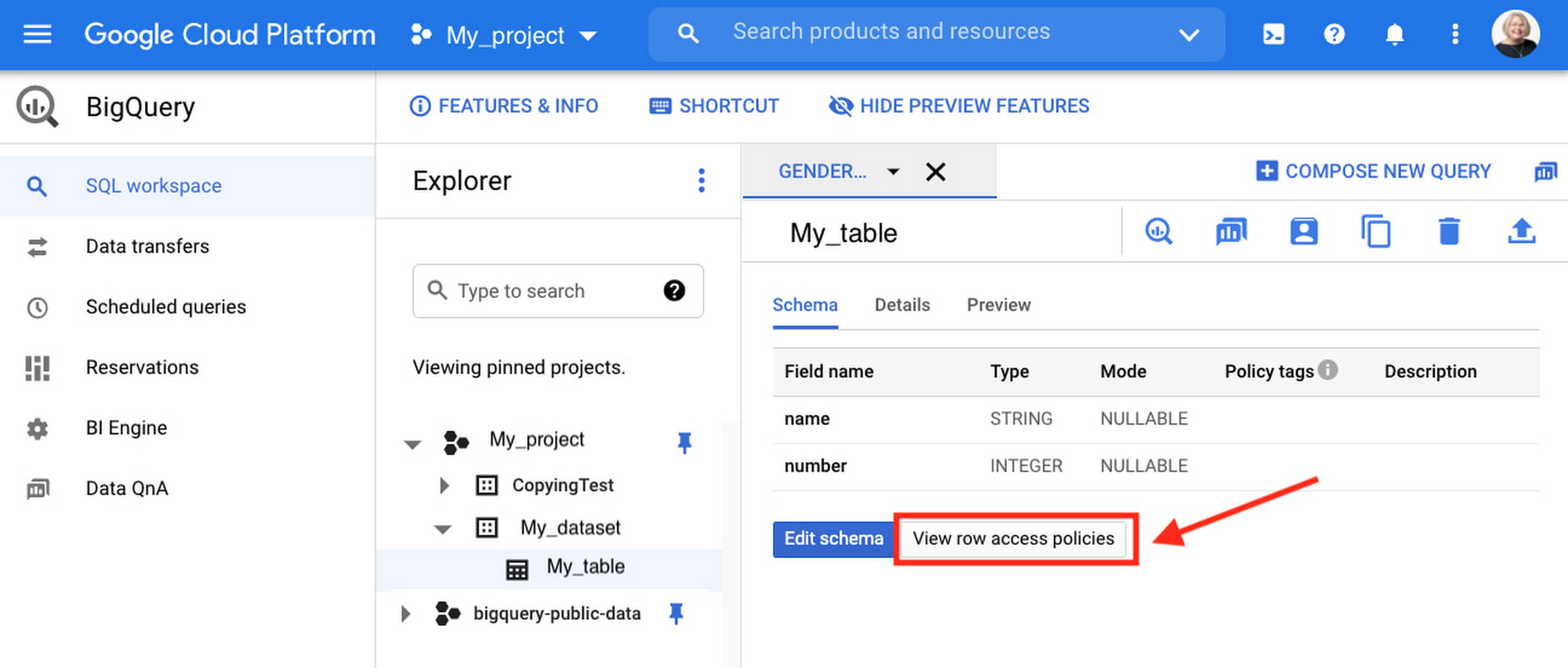
Row-level security is compatible with other BigQuery security features, and can be used along with column-level security for further granularity. Since row-level access policies are applied on the source tables, any actions performed on the table will inherit the table’s associated access policies, to ensure access to secure data is protected. Row-level access policies are applicable to every method used to access BigQuery data (API, Views, etc).
Try it out
We’re always working to enhance BigQuery’s (and Google Cloud’s) data governance capabilities, to provide more controls around managing your data. With row-level security, we are adding deeper protections for your data. You can learn more about BigQuery row-level security in our documentation and best practices.
Google Cloud’s BeyondCorp Framework Helps Govts Adopt Zero Trust Approach to Security

3079
Of your peers have already read this article.
1:30 Minutes
The most insightful time you'll spend today!
For more than a decade, Google has applied a Zero Trust approach to most aspects of our operations. Zero Trust’s core tenet–that implicit trust in any single component of a complex, interconnected system can create serious security risks–is fundamental to how we operate and build our security architecture.
Early in our security journey, we realized that despite our best efforts user credentials would periodically fall into the hands of malicious actors. This is why we developed the BeyondCorp framework. We needed additional layers of defense against unauthorized access that would not impede user productivity. We also understood that software that interacts with the larger world should not have a perimeter-based trust model. These realizations led to the layered protection in our BeyondProd framework, which extends the Zero Trust paradigm to our production workloads.
Earlier this year, the United States Office of Management and Budget (OMB) released a Federal Strategy to Move the U.S. Government Towards a Zero Trust Architecture. This marks an important step for the U.S. government’s efforts to modernize under Executive Order 14028 on Improving the Nation’s Cybersecurity. In parallel, guidance from the United Kingdom’s National Cyber Security Center (NCSC) has also called for the move to a Zero Trust approach to security and outlined in 2021 its report on Zero Trust architecture design principles.
Adopting a Zero Trust approach can help organizations inside and outside the public sector stay ahead of both regulatory requirements and security threats, but it requires thoughtful planning and execution. Our goal is to bring the best practices for Zero Trust together in one place, leveraging the experiences and knowledge of our existing customers, and Google’s own experience with implementing Zero Trust.
How Google Cloud can help government agencies move toward Zero Trust
Agencies can rely on Google Zero Trust capabilities for remote access, secure collaboration, and boundary security. To better serve the Zero Trust needs of our customers, we introduced BeyondCorp Enterprise in January 2021, a solution that provides Zero Trust secure access to resources and applications in the cloud and on-premises. BeyondCorp Enterprise was built based on years of Google’s own innovation as we implemented Zero Trust globally for ourselves. It leverages the Chrome browser and Google’s global network, and it offers integrated real-time threat and data protection.
Here are five ways BeyondCorp Enterprise can be applied to help organizations adopt the Zero Trust cybersecurity principles set forth in the recent White House memorandum (M-22-09) and other global government guidance for Zero Trust.
- Enable enterprise applications to be used over the public internet: It’s no secret that VPN usage poses daily burdens and long-term challenges for IT and cybersecurity managers, as well as end-users. BeyondCorp Enterprise provides users with seamless and secure access to web applications (including SaaS apps and apps hosted on any cloud), plus central management controls and threat and data protection capabilities, all built-in to the Chrome browser. Through BeyondCorp Enterprise, end-users can access applications simply and still benefit from enterprise-grade security, without sacrificing their productivity or user experience.
- Leverage phishing-resistant MFA to access secure resources: Many cyberattacks start with phishing messages that lead users to infected websites and attempt to steal credentials. The use of phishing-resistant MFA, as recommended by M-22-09, can protect personnel from sophisticated online attacks. BeyondCorp Enterprise supports strong phishing-resistant authentication, by allowing factors such as Titan Security Keys to be used as attributes in access policies that are enforced at the application layer. Organizations can customize how to incorporate phishing-resistant MFA methods into their access policies for individual applications and resources. Phishing protection is also built into the Chrome browser, powered by Google Safe Browsing, and these capabilities block access to malicious content, detect phishing sites, prevent malware transfers, and generate reports of unsafe activity, adding even more protection against bad actors.
- Use context-aware authorization: The U.S. federal strategy states that a Zero Trust architecture should incorporate more granularly and dynamically defined permissions and that every request for access should be evaluated to determine whether it is appropriate. With context-aware authorization, organizations can build and customize access policies to include different contextual signals about a user including their role, their location, and even the time of day. Every interaction between a user and a BeyondCorp-protected resource is evaluated in real-time against the resource’s access policy to ensure users are and remain authorized to access it, with continuous authorization for all interactions at a per request level.
- Incorporate device-level signal into authentication: At Google, we believe that trust must be granted based on what is known about a user’s identity and their device. We are pleased that OMB similarly recommends that authentication incorporate at least one device-level signal alongside identity information. Since BeyondCorp Enterprise supports device-level attributes without requiring users to install agents, this can be done easily by leveraging the Endpoint Verification extension in the Chrome browser, where administrators can gather endpoint security posture information and easily construct and implement granular resource access policies. The ability to collect and utilize this information through an agentless approach is especially helpful for BeyondCorp Enterprise customers who support a workforce with bring-your-own-device policies or unmanaged devices.
- Include the extended workforce in your Zero Trust strategy: A Zero Trust approach aimed to provide secure access to the right users, at the right time, and for the right purposes should be inclusive of all users, not just full-time staff. Government agencies rely on contractors and partners to carry out many important missions. Unfortunately, the extended workforce is often more vulnerable to attacks if they are given too much privileged access or if their security practices are not properly assessed before access is provisioned. At the same time, federal administrators can’t always manage third-party devices or software directly, which can make secure access challenging.
BeyondCorp Enterprise supports a feature called protected profiles, an ideal solution for granting Zero Trust access to the extended workforce. It enables users to securely access resources from unmanaged devices and be protected by the same security capabilities without needing to install agents. Furthermore, administrators can gain visibility into risky activities and view any security events that are generated from within protected profiles.
Applying the NCSC Zero Trust principles on Google Cloud
Last year, the U.K. government’s NCSC launched its Zero Trust architecture design principles to help organizations securely adopt a Zero Trust architecture. To help private and public sector organizations in the U.K., the Google Cybersecurity Action Team (GCAT) released a detailed research paper that outlines how organizations can leverage Google Cloud technologies and services to align with these principles. This is a technical guide aimed at enterprise and security architects charged with developing and executing a Zero Trust strategy under the principles outlined by the NCSC, including:
- Know your architecture, including users, devices, services and data with Google Cloud Professional Services Organization (PSO) who can support discovery, planning and risk mitigation.
- Know your User, Service and Device identities including reference architectures for Cloud Identity.
- Assess your user behavior, device and service health by leveraging built in reporting from Google Cloud and Chronicle.
- Use policies to authorize requests with BeyondCorp Enterprise policy-based authorization.
- Authenticate & Authorize everywhere by reviewing the BeyondCorp and BeyondProd frameworks which combine to deliver ubiquitous authentication and authorization.
- Focus your monitoring on users, devices and services with device management and Cloud native monitoring capabilities.
- Don’t trust any network, including your own. Review details on Google’s Secure by Design infrastructure.
- Choose services designed for Zero Trust. Review how to protect modern and legacy applications with BeyondCorp.
For more detail on how we’re supporting the U.K.’s NCSC, please review our recent research paper for insight into their priorities, and where Google will be discussing Secure by Design principles and how to respond to security incidents.
Zero Trust assessment and planning services for organizations
Organizations that are managing complex environments while undergoing Zero Trust adoption could benefit strongly from experienced support and guidance. The Google Cybersecurity Action Team (GCAT) is committed to helping customers meet Zero Trust security and compliance requirements in the cloud through specialized consulting engagements and workshops for public sector customers. Read more about how growing cybersecurity requirements for U.S. federal government customers via executive orders and White House mandates are being supported through Google Cloud solutions.
GCAT’s multi-week Zero Trust Foundations engagement helps organizations build a strategy to achieve a Zero Trust security model across their operations. Zero Trust Foundations is co-delivered by Google Cloud’s Office of the CISO and our public sector Professional Services Organization. It can help focus and accelerate customers’ Zero Trust efforts by sharing lessons learned from Google’s own BeyondCorp zero-trust journey, and our global implementation of defense-in-depth best practices. Contact us today to learn more.
To learn more about ways Google Cloud can help organizations embarking on a Zero Trust journey, tune into our second annual Google Cloud Security Summit on May 17 and hear directly from customers who are already using our Zero Trust solutions to achieve their organization’s security goals.
About the Authors:
Jeanette Manfra is the former Assistant Director for the Cybersecurity and Infrastructure Security Agency at the Department of Homeland Security. Dan Prieto is the former Director of the Defense Industrial Base Cybersecurity program at the Department of Defense. Both Dan and Jeanette also served in the White House on the staff of the National Security Council’s cybersecurity directorate.
Utilizing Google Cloud’s PII Security Features

2610
Of your peers have already read this article.
2:30 Minutes
The most insightful time you'll spend today!
BigQuery is a leading data warehouse solution in the market today, and is valued by customers who need to gather insights and advanced analytics on their data. Many common BigQuery use cases involve the storage and processing of Personal Identifiable Information (PII)—data that needs to be protected within Google Cloud from unauthorized and malicious access.
Too often, the process of finding and identifying PII in BigQuery data relies on manual PII discovery and duplication of that data. One common way to do this is by taking an extract of columns used for PII and copying them into a separate table with restricted access. However, creating unnecessary copies of this data and processing it manually to identify PII increases the risks of failure and subsequent security events.
In addition, the security of PII data is often mandated by multiple regulations and failure to apply appropriate safeguards may result in heavy penalties. To address this issue, customers need solutions that 1) identify PII in BigQuery and 2) automatically implement access control on that data to prevent unauthorized access and misuse, all without having to duplicate it.
This blog will discuss a solution developed by Google Professional Services for leveraging Google Cloud DLP to inspect and classify sensitive data and suggest a solution for using these insights to automatically tag and protect data in BigQuery tables.
BigQuery Auto Tagging solution overview
Automatic DLP can help to identify sensitive data, such as PII, in BigQuery. Organizations can leverage Automatic DLP to automatically search across their entire BigQuery data warehouse for tables that contain sensitive data fields and report detailed findings in the console (see Figure 1 below,) in Data Studio, and in a structured format (such as a BigQuery results table.) Newly created and updated tables can be discovered, scanned, and classified automatically in the background without a user needing to invoke or schedule it. This way you have an ongoing view into your sensitive data.
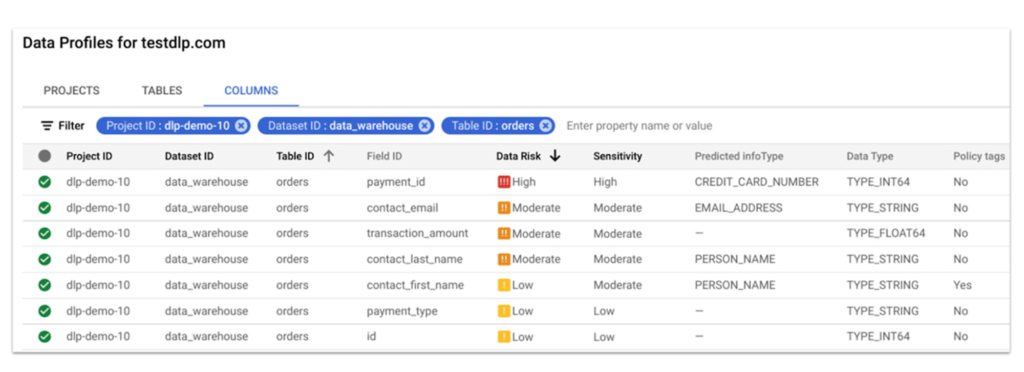
In this blog, we show how a new open source solution called BigQuery Auto Tagging Solution solves our second goal—automating access control on data. This solution sits as a layer on top of Automatic DLP and automatically enforces column-level access controls to restrict access to specific sensitive data types based on user-defined data classification taxonomies (such as high confidentiality or low confidentiality) and domains (such as Marketing, Finance, or ERP System.) This solution minimizes the risk of unrestricted access to PII and ensures that there is only one copy of data maintained with appropriate access control applied down to the column level.
The code for this solution is available on Github at GoogleCloudPlatform/bq-pii-classifier. Please note that while Google does not maintain this code, you can reach out to your Sales Representative to get in contact with our Professional Services team for guidance on how to implement it.
BigQuery and Data Catalog Policy Tags (now Dataplex) have some limitations that you should be aware of before implementing this solution to ensure that it will work for your organization:
- Taxonomies and Policy Tags are not shared across regions: If you have data in multiple regions you will need to create or replicate your taxonomy in each region that you want to apply policy tags.
- Maximum number of 40 taxonomies per project: If you require different taxonomies for different business domains or have replications to support multiple Cloud regions those will count against this quota.
- Maximum number of 100 policy tags per taxonomy: Cloud DLP supports up to 150 infoTypes for classification, however, a single policy taxonomy can only support up to 100 including any nested categories. If you need to support more than 100 data types, you may need to split these across more than one taxonomy.
High-level overview of the solution
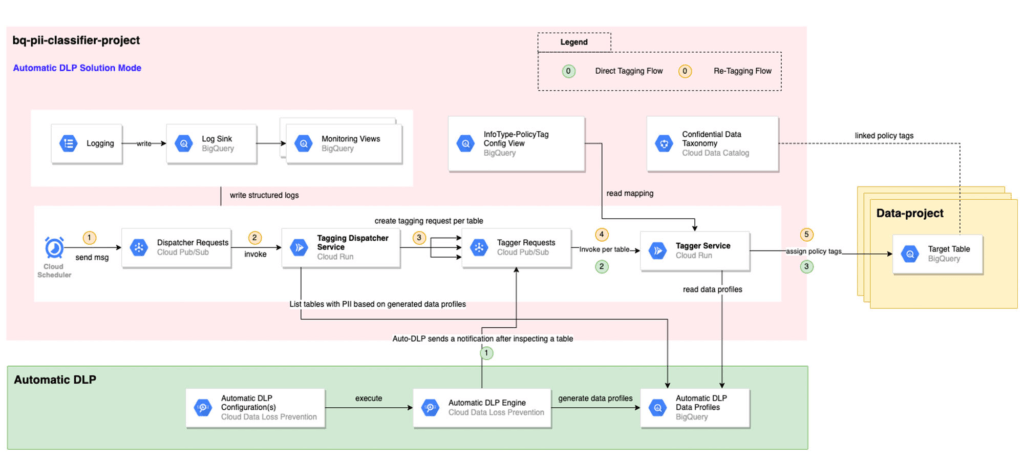
The solution is composed mainly of the following components: Dispatcher Requests topic, Dispatcher service, BigQuery Policy Tagger Requests topic, and BigQuery Policy Tagger service and logging components.
The Dispatcher Service is a Cloud Run service that expects a BigQuery scope to be expressed as inclusion and exclusion lists of projects, datasets, and tables. This Dispatcher service will query Automatic DLP Data Profiles to check if the tables in-scope have data profiles generated. For these tables, it will publish one request per table to the “BigQuery Policy Tagger Requests” PubSub topic. This topic enables rate limiting of BigQuery column tagging operations and apply auto-retries with backoffs.
The “BigQuery Policy Tagger” Service is also a Cloud Run service that receives the information of the DLP scan results of a BigQuery table. This service will determine the final InfoType of each column and apply the appropriate Policy Tags as defined in the InfoType – Policy Tags mapping. Only-one INFO_TYPE is selected and the function assigns the associated policy tag.
Lastly, all Cloud Run services maintain structured logs that are exported by a log sink to BigQuery. There are multiple BigQuery views that help with monitoring and debugging Cloud Run call chains and tagging actions on columns.
Deployment options
After deploying the solution, it can be used in two different ways:
[Option 1] Automatic DLP-triggered immediate tagging:
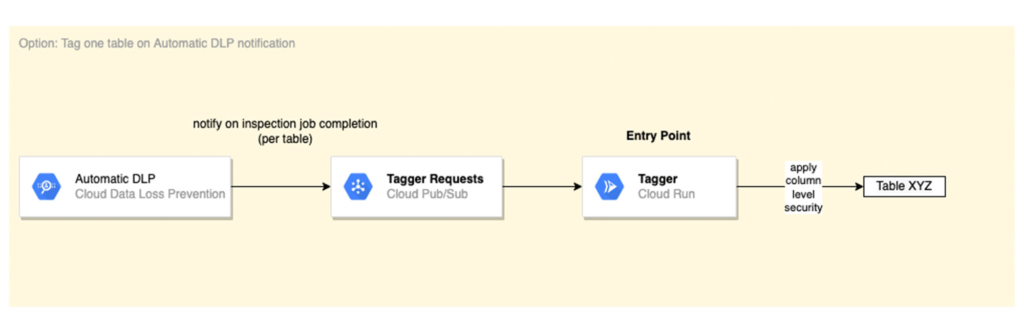
Automatic DLP is configured to send a Pub/Sub notification on each inspection job completion. The Pub/Sub notification includes the resource name and it triggers the Tagger service directly
[Option 2] Scheduled tagging:
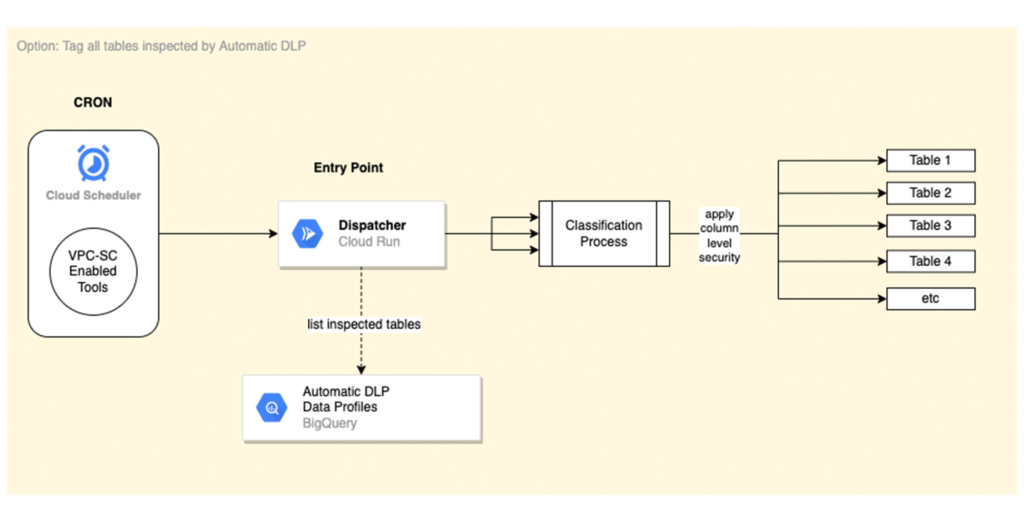
In this scenario, the Dispatcher service is invoked on a schedule with a payload representing a BigQuery scope to list inspected tables by Automatic DLP and create a tagging request per table. You could use Cloud Scheduler (or any Orchestration tool) to invoke the Dispatcher service. If the solution is deployed within a VPC-SC perimeter, other schedulers that support VPC-SC should be used (such as Composer or Custom App.)
In addition, more than one Cloud Scheduler/Trigger could be defined to group projects/datasets/tables that have the same tagging schedule (such as daily or monthly.)
To learn more about Automatic DLP, see our webpage. To learn more about the BQ classifier, see the open source project on Github: GoogleCloudPlatform/bq-pii-classifier and get started today!
More Relevant Stories for Your Company

Protect Users in Apps with Multi-Factor Authentication
These days, using a password alone to secure user accounts containing sensitive, identifiable, or private information just isn’t sufficient. Passwords are often subject to reuse and can easily be phished and stolen. With this in mind, we recently teamed up with researchers from New York University and the University of

How to Evolve Security for the Cloud: McKinsey with Google Cloud
Not too long ago, McKinsey released a report titled “Making a secure transition to the public cloud,” the result of interviews with IT security experts at nearly 100 enterprises around the world. Leveraging the expertise of Google Cloud and McKinsey security experts, the research presents a strategic framework for IT

Google’s ASO to Help U.S. Public Sector Achieve M-21-31 and EO 14028
As sophisticated cyberattack campaigns increasingly target the U.S. public and private sectors during the COVID era, the White House and federal agencies have taken steps to protect critical infrastructure and remote-work infrastructure. These include Executive Order 14028 and the Office of Management and Budget’s Memorandum M-21-31, which recommend adopting Zero

Securing apps using Anthos Service Mesh
Hi there! I'm David Challoner from Access Site Reliability Engineering (SRE), here with Anthony Bushong from Developer Relations to talk about how Corp Eng is adopting Anthos Service Mesh internally at Google. Corp Eng is Google's take on "Enterprise IT". A big part of the Corp Eng mission is running
