





Moving Your Data Warehouse to the Cloud? Here’s What You Need to Know
READ FULL INTRODOWNLOAD AGAIN5497
Of your peers have already downloaded this article
10:30 Minutes
The most insightful time you'll spend today!
3026
Of your peers have already watched this video.
19:00 Minutes
The most insightful time you'll spend today!
Driving Business Transformation in Healthcare Using Google Cloud and AI/ML
Before the COVID-19 pandemic, when you thought of healthcare and AI, a number of ideas sprang to mind. But the world, especially as it relates to healthcare has seen a completely different type of transformation as a result of COVID-19.
This video is about how Google Cloud is helping organizations respond to COVID-19 leveraging AI and ML and Google Cloud’s healthcare and life sciences products as well as some of the work that its partners are doing.
Joe Corkery, Director, Product Management – Google Cloud, and Thomas C. Tsai, MD, MPH – Department of Surgery at Brigham and Women’s Hospital, will run over the application of AI to COVID forecasting, how Google Cloud’s healthcare-specific product offerings are being used to address COVID-19 and highlight work being done by one a Google Cloud partner in that area and how it’s being used to combat COVID-19.
Google and Fervo Agreement to Shape-up Plans for 24/7 Carbon-free Energy by 2030
4809
Of your peers have already read this article.
1:30 Minutes
The most insightful time you'll spend today!
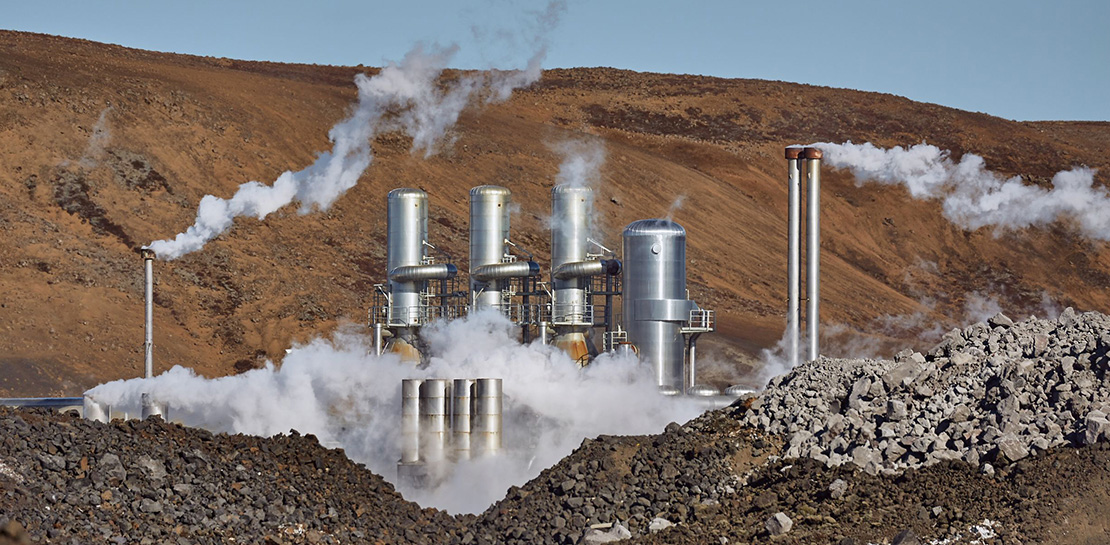
When Google announced our plan to go beyond purchasing renewable power for 100% of our energy usage and operate on 24/7 carbon-free energy by 2030, we noted that achieving this goal will require new transaction structures, advancements in clean energy policy, and innovative new technologies. Today, we’re pleased to announce that one of these new technologies—a first-of-its-kind, next-generation geothermal project—will soon begin adding carbon-free energy to the electric grid that serves our data centers and infrastructure throughout Nevada, including our Cloud region in Las Vegas.
Google and clean-energy startup Fervo have just signed the world’s first corporate agreement to develop a next-generation geothermal power project, which will provide an “always-on” carbon-free resource that can reduce our hourly reliance on fossil fuels. In 2022, Fervo will begin adding “firm” geothermal energy to the state’s electric grid system, where Google’s commitments already include one of the world’s largest corporate solar-plus-storage power purchase agreements.
Importantly, this collaboration also sets the stage for next-generation geothermal to play a role as a firm and flexible carbon-free energy source that can increasingly replace carbon-emitting fossil fuels—especially when aided by policies that expand and improve electricity markets; incentivize deployment of innovative technologies; and increase investments in clean energy research, development, and demonstration (RD&D).
Next-generation geothermal technology
Traditional geothermal already provides carbon-free baseload energy to a number of power grids. But because of cost and location constraints, it accounts for a very small percentage of global clean energy production.
That’s one reason this new approach is so exciting; by using advanced drilling, fiber-optic sensing, and analytics techniques, next-generation geothermal can unlock an entirely new class of resource. And the US Department of Energy has found that with advancements in policy, technology, and procurement, geothermal energy could provide up to 120 GW of firm, flexible generation capacity in the US by 2050.
As part of our agreement, Google is partnering with Fervo to develop AI and machine learning that could boost the productivity of next-generation geothermal and make it more effective at responding to demand, while also filling in the gaps left by variable renewable energy sources. Although this project is still in the early stages, it shows promise.

Using fiber-optic cables inside wells, Fervo can gather real-time data on flow, temperature, and performance of the geothermal resource. This data allows Fervo to identify precisely where the best resources exist, making it possible to control flow at various depths. Coupled with the AI and machine learning development outlined above, these capabilities can increase productivity and unlock flexible geothermal power in a range of new places.
This won’t be the first time that Google is applying software solutions to clean energy applications: we’ve just announced an update to our carbon-intelligent computing program that helps us reduce emissions associated with running applications at Google data centers. And other forms of AI and machine learning are currently being used to increase the value of wind energy.
Already this year, Google has taken significant strides toward sourcing 24/7 carbon-free energy for all our data centers, office campuses, and Cloud regions. On Earth Day, our CEO Sundar Pichai announced that for the first time, five of our global data center sites operated near or at 90% carbon-free energy in 2020.
Not only does this Fervo project bring our data centers in Nevada closer to round-the-clock clean energy, but it also acts as a proof-of-concept to show how firm clean energy sources such as next-generation geothermal could eventually help replace carbon-emitting power sources around the world.
Making Hybrid Work Human: Google Workspace and Economist Impact Survey

5481
Of your peers have already read this article.
2:30 Minutes
The most insightful time you'll spend today!
Google Workspace recently commissioned Economist Impact to complete a global survey (October 2021)* on the state of hybrid work, including its challenges and opportunities. We already knew that the pandemic had fundamentally changed the world of work, but the survey emphasizes the scale, reach, and longevity of those changes..
Over 75% of respondents believe that hybrid/flexible work will be a standard practice within their organizations in the coming three years. Given that 70% of respondents said they never worked remotely before the pandemic, it’s clear that hybrid has become the dominant model for work and that it’s here to stay.
But it’s also clear, as we’ll see below, that hybrid has some serious gaps that need to be addressed if it’s going to be sustainable and successful in the long term.
Defining hybrid work
As part of our work on the hybrid work survey and a broader project with The Economist Group, we interviewed a group of experts across research, consulting, business, and the advocacy world to arrive at a definition of hybrid work that captures all ways work is changing.
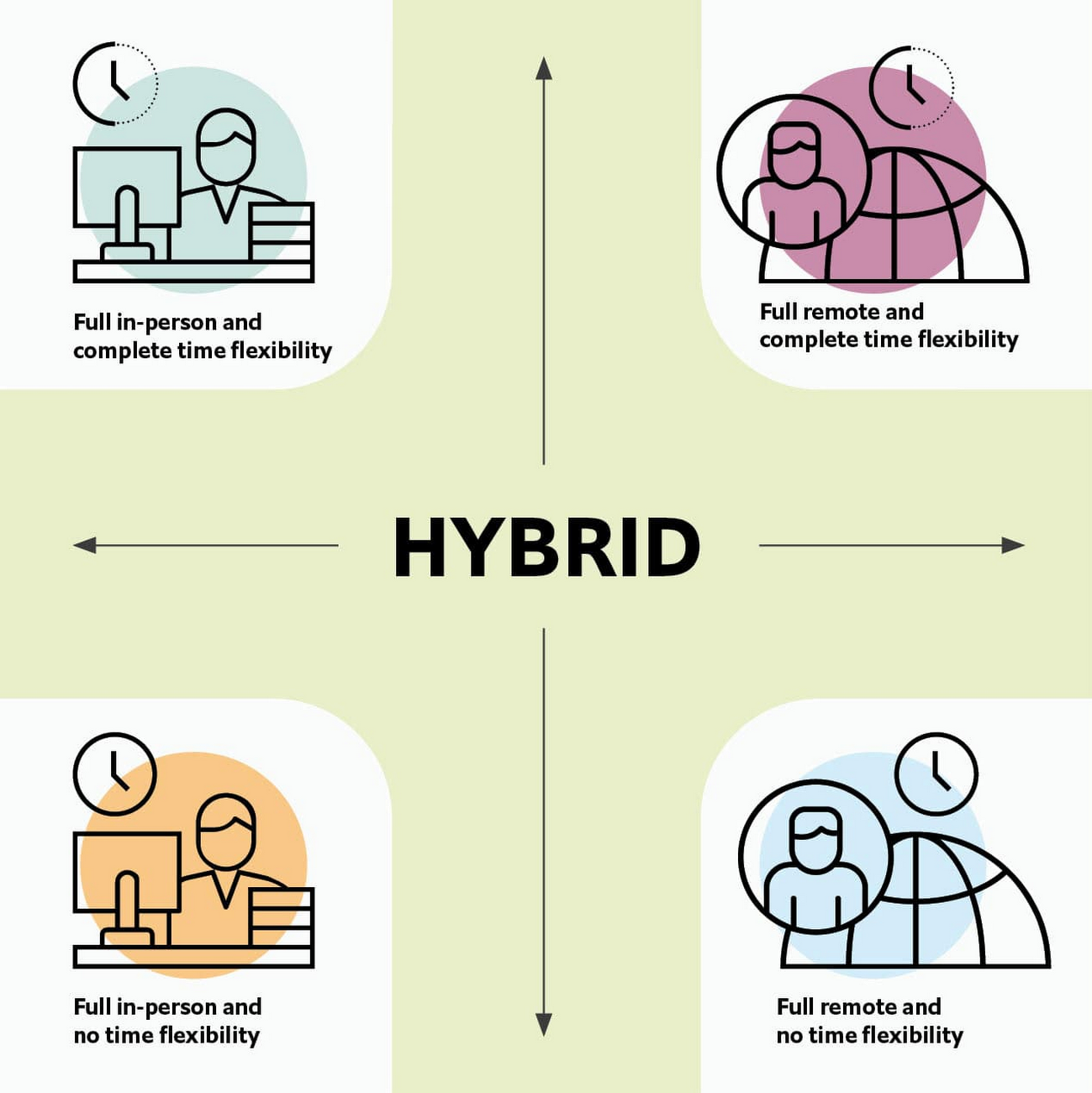
As Brian Kropp, one of the interviewees and vice president at Gartner, puts it: “Hybrid work is not just about different locations, but also different timings and different schedules.”
Harriet Molyneaux, managing director at HSM Advisory, a future-of-work research and advisory group, adds to this notion by describing the time-location work spectrum: “At one end of the spectrum is everyone in the office, nine till five, so both restricted time and location. And then at the other end of the spectrum is anywhere around the world at any time. So no restricted time or location. A hybrid is anything that sits in the middle of that.”
I agree with Brian and Harriet’s views. Flexibility in both location and hours is a core part of our working definition of hybrid work: a spectrum of flexible work arrangements in which an employee’s work location and/or hours are not strictly standardized.
Given this definition and framework, how is hybrid work faring and what lies ahead?
Individual wellbeing is coming at the cost of organizational connection
Early on in the pandemic, productivity remained steady or even increased for many organizations. But it came at a cost, with levels of burnout spiking as employees juggled caregiving, homeschooling, and other demands in their personal lives with work responsibilities.
Based on the survey data, wellbeing has made an upward shift, no doubt aided by things like students returning to schools in many regions and fewer demands being made of working parents. The majority of respondents said that hybrid work, based on their own experiences, can have a positive impact on the physical, mental, financial, and social wellbeing of employees.
But it appears that individual wellbeing is coming at the cost of organizational connection. The majority of respondents said they feel disconnected from their organization and co-workers (57%), that limited networking opportunities negatively impact career growth (62%), and that limited social interactions with co-workers has had a negative impact on their mental health (54%).
To be sustainable, hybrid work models must address this sense of disconnection in real and tangible ways. And it won’t happen just by increasing the number of virtual meetings. Although 72% of people say that virtual meetings improve inclusion and participation, 68% also say there are too many virtual meetings to begin with. We need new ways for people to connect spontaneously.
Hybrid workers are often using tools built for a bygone desktop era
When asked about the most important conditions needed to achieve the long-term success of hybrid work models, the number one choice globally was “new technologies that allow for time and location flexibility.”
Naturally, it was gratifying to see this, since Google Workspace is built on a cloud-based platform that empowers collaboration from anywhere, on any device, but the survey answer also highlights how much organizations have had to scramble to meet the demands of the pandemic. Some had to take legacy, office-centric systems and make them work for a distributed workforce overnight, often leveraging less-than-ideal technologies like VPNs that introduce digital friction.
As a result, top technology concerns of respondents include:
- unreliable internet access (if only all our WiFi connections were hybrid-ready!)
- reliance on slow or outdated tools
- accessing and maintaining files in multiple places
- relying on too many applications in order to get work done
Hybrid work, it seems to me, doesn’t need more applications and collaboration surfaces. It needs deeper, more meaningful connections in the tools and surfaces we already have.
As organizations assess their tech stacks, they should consider whether they can shape the behaviors they want from hybrid employees (e.g., real-time collaboration, ease of information sharing) with the tools they have in place. Or are the limits of the technology determining hybrid employee behavior?
The management and culture gap
In the same way that tools have often been built for a shared physical workspace, organizational culture seems to lag behind the hybrid moment. The majority of respondents said that a lack of face-to-face supervision creates a sense of distrust among managers and employees, and that they feel stressed by increased monitoring associated with flexible work. And more than 62% said that limited networking opportunities with senior employees and co-workers has a negative impact on career growth.
Strikingly, more than 70% of respondents indicated that the culture of trust between managers and employees needed improvement. Training and management best practices (60% of people want more of both) might help fill some of the gaps, but a manager can’t build trust with their hybrid teams by going through a training program.
The role of manager must itself evolve to meet the demands of a hybrid model. How can we empower managers to be the bridge between the “office of one” and the “office of many”? And as I discussed previously on Forbes, driving towards impact rather than output is a more sustainable metric for team engagement and productivity. It also dispenses with monitoring as a core part of a manager’s role, freeing them up to be a coach-and-connector.
How Google Workspace can help bridge the hybrid work gaps
No one has all the answers for how to make hybrid work successful, and I suspect we will see iterations of the model into 2022 and beyond as organizations—including Google—experiment with the right mix of location, culture, processes, and tools.
On the technology front, Google Workspace is uniquely positioned to bridge many of the emerging hybrid work gaps. Over the last year, we’ve delivered a set of innovations that are designed to deepen collaboration experiences while strengthening social connections within and across teams.
For example, we launched smart canvas to bring new collaboration capabilities to the places where people are already working together, helping to keep them connected, rather than having them switch tabs or open new apps. And we delivered Spaces as a central place for collaboration, where teams can share ideas, work on documents together, and manage tasks from a single place. Because all their work is preserved for future reference, team members can easily jump in and contribute at a time that works best for them, seeing a full history of the conversations, context, and content along the way. Spaces helps people maintain individual wellbeing while preserving the health of a group project.
In Google Meet, we’ve introduced real-time captions in multiple languages (in preview now), the ability for people to customize their video tiles, including being able to turn off their own to help with meeting fatigue, and we’ve implemented automatic light adjustments and noise cancellation. These changes help ensure that everyone can be seen and heard.
Meanwhile, features like hand-raise, Q&A, and polls have helped make meetings more inclusive and companion mode (in preview) can bring these to life in hybrid settings, to help ensure that there’s one cohesive conversation between the people in the office and their colleagues working somewhere else. We view companion mode as a bridge between the office and “somewhere else.”
On the personal wellbeing front, we launched Focus Time, which lets people block out their calendars for uninterrupted focus work, and Time Insights in Google Calendar, where employees can look at how they’re spending their time and adjust as needed.
As hybrid work continues to evolve, Google Workspace is committed to supporting wellbeing and seamless collaboration with tools that can remove digital friction and help people maintain connections—to each other and the organizations they work for.
*Survey details: The survey, completed in October 2021, polled a total of 1,244 employees and managers in four regions (North America, Europe, APAC, and Latin America), from more than 15 industries, in every age group, and from both small and large organizations. The focus was on knowledge workers, though it’s important to note that some of those people have been working on the frontlines; 20% of respondents indicated they haven’t worked remotely at all during the pandemic. This includes people in hospitality, retail, transportation and logistics, and healthcare.
Streamlining Business Processes with Google’s Document AI: Invoices, Contracts, and Beyond
1145
Of your peers have already read this article.
3:30 Minutes
The most insightful time you'll spend today!
Editor’s note: In this post, I’ll be showing some amazing ways Document AI can help you extract meaning from your documents – keep reading, or jump directly into a tutorial using the Cloud Console!
Documents are a crucial part of most businesses, used to store and communicate important information. The variety is vast: invoices, contracts, receipts, applications, plus documents unique within industries and geographies. Unfortunately, making the information contained in these documents accessible can be a time-consuming and manual process.

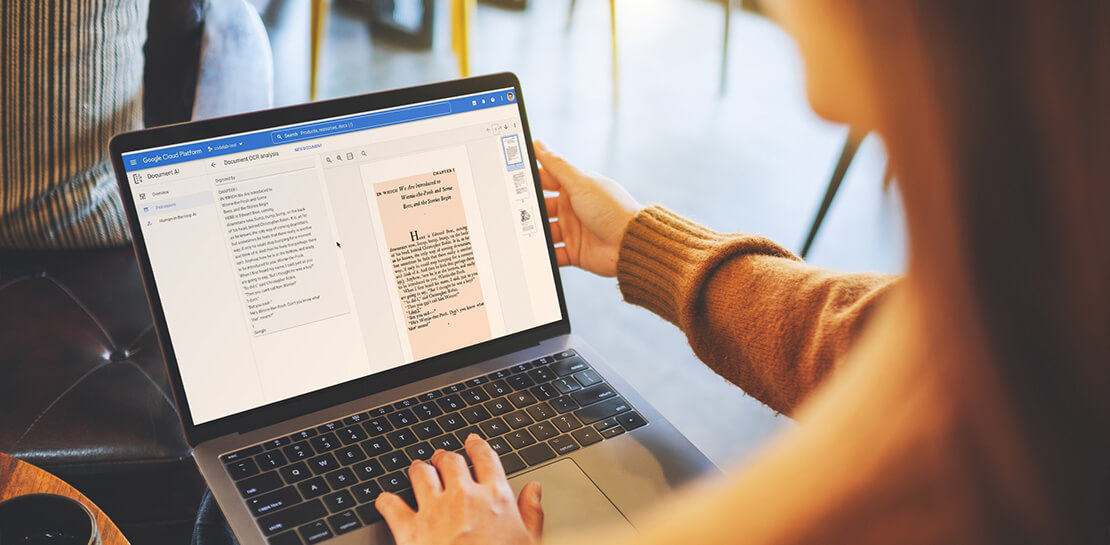
Document AI is a document understanding platform in Google Cloud that takes unstructured data from documents and transforms it into structured data, making them easier to understand, analyze, and consume. By using this technology, you can streamline your document processing workflows, reduce errors, and unlock insights that were previously buried in mountains of paperwork.
Whether you’re a small business owner or an enterprise looking to bring efficiency to your operations, Document AI has something to offer. So let’s take a look and see what it can do!
Understanding documents with Document AI
When we say that Document AI can understand documents, we mean that it is able to analyze the content within documents and derive meaningful insights from it. This goes beyond simply recognizing the characters and words within a document (which is what traditional OCR technology does) – Document AI can actually comprehend the meaning behind the text.
For example, let’s say you have a contract that needs to be processed. Traditional OCR technology might be able to extract the text from the document, but it would not be able to understand the legal terms and clauses within it. Document AI, on the other hand, can actually interpret the meaning of the text and extract key information such as parties involved, terms and conditions, dates, and signatures.
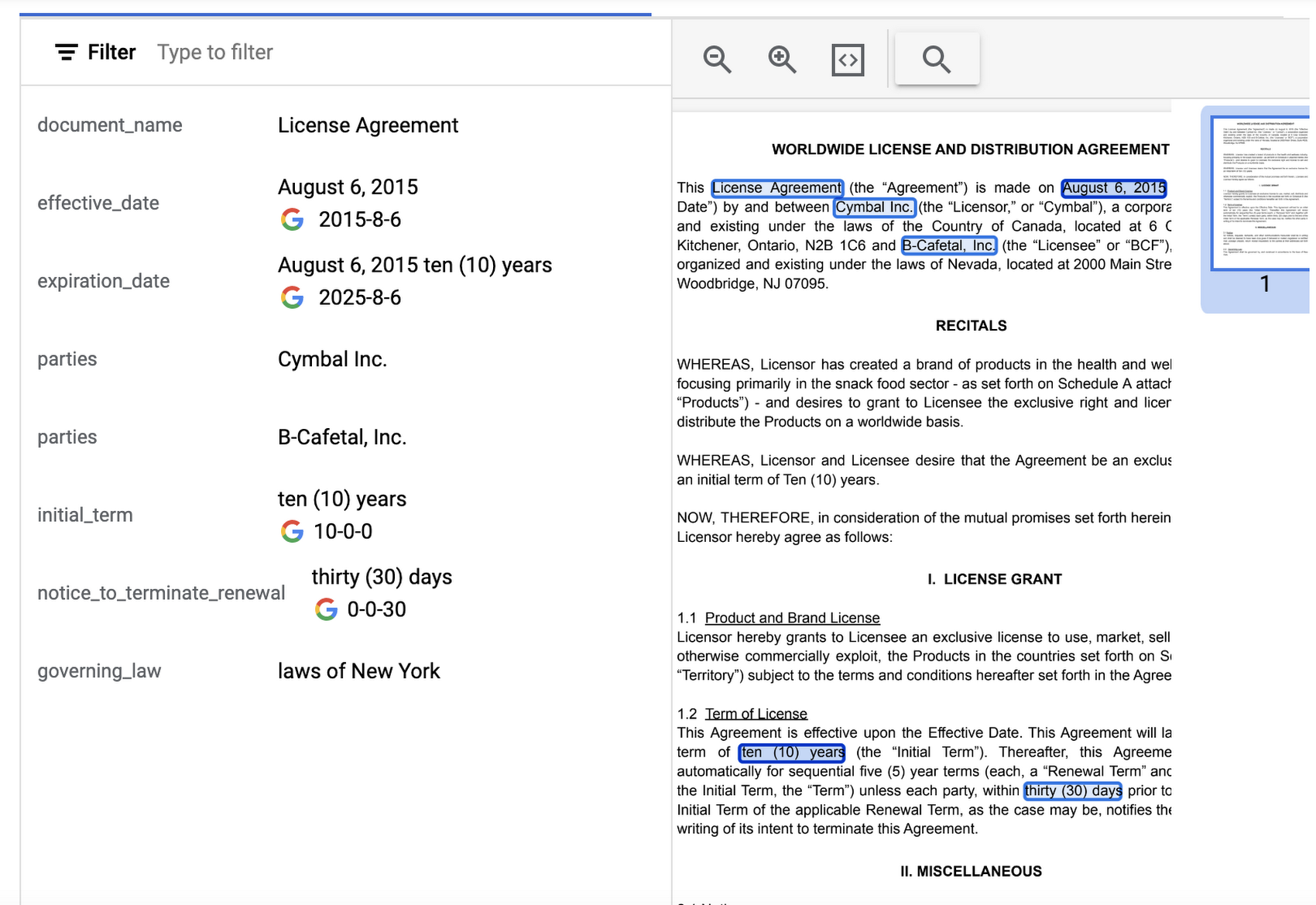
Document AI offers several pre-built models and processors that are specifically designed to extract different types of data from various document types. Within the specific document types, the processors can perform several tasks such as Optical Character Recognition (OCR), form parsing, splitting, classification or entity extraction. These processors can be customized and combined to create powerful document processing workflows that are tailored to a business’s unique needs.
Let’s look closer at a few of the processors available in Document AI, including the Form Parser, Invoice Parser, Expense Parser, Identity Document Proofing Parser, and Intelligent Document Quality Processor.
Form Parser
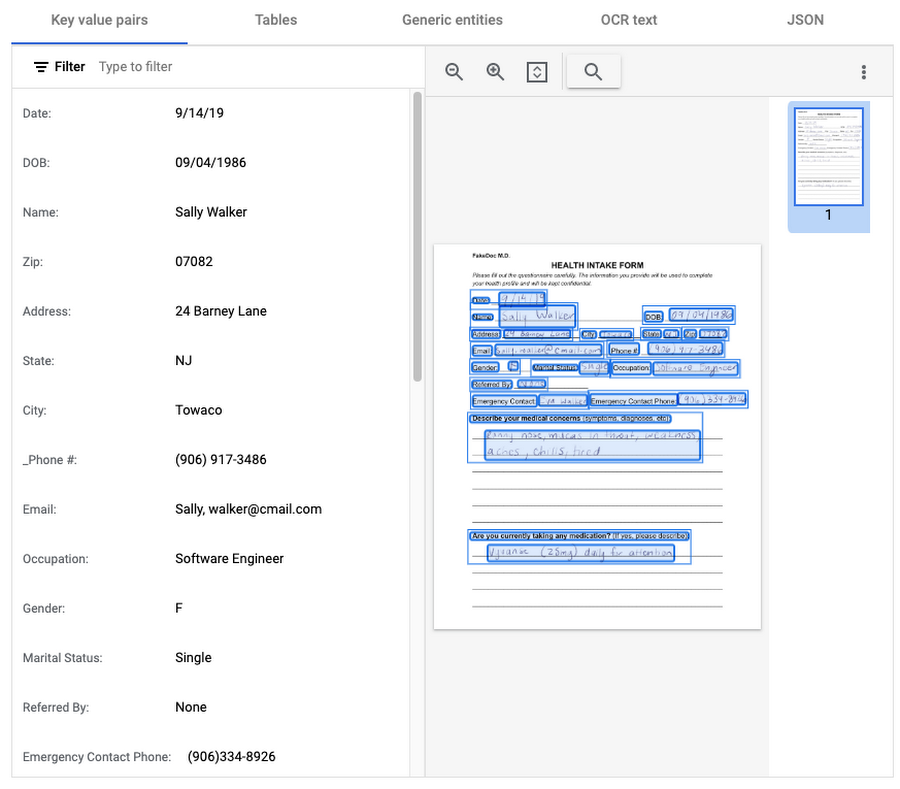
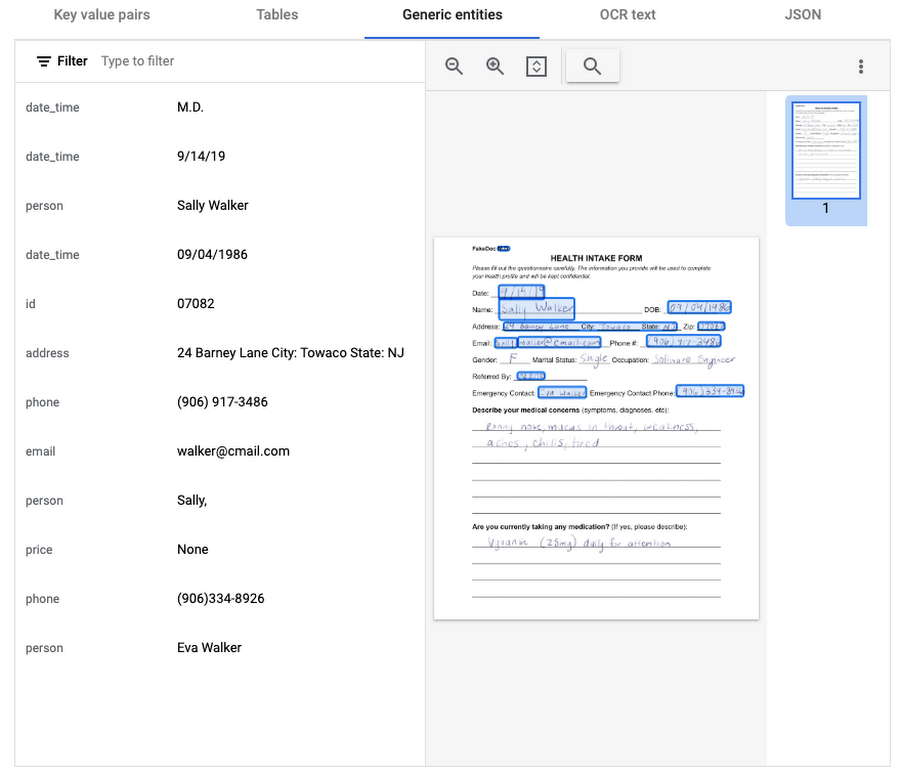
This general processor is designed to extract structured data from forms such as application forms, surveys, and questionnaires. It automatically identifies and extracts data from form fields (key-value pairs), such as names, addresses, dates, and other types of structured data; even checkboxes and tables. This processor also leverages deep learning models to extract generic entities that are common in various document types, meaning it can identify if something is an email address, phone number, datetime, organization, quantity, price, person, and more.
In this visualization of the API response, you can see that Document AI has identified several key value pairs that correspond to the form’s fields and the responder’s answers.
Also of interest is that the form parser recognized certain generic entities including: several dates, an address, phone numbers, email, and two people (the responder and their listed emergency contact).
Invoice Parser
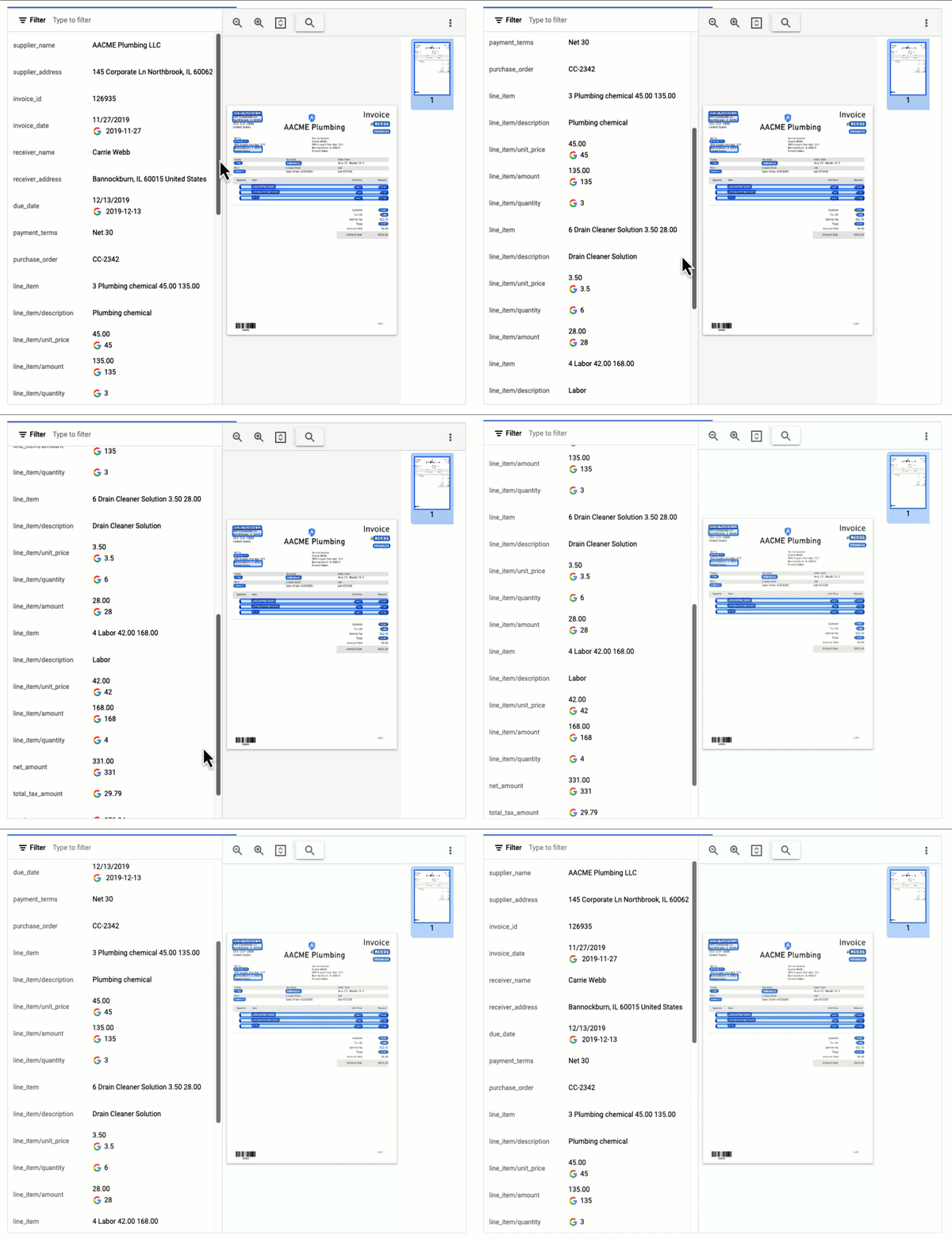
This parser is designed to identify and extract relevant information from invoices including a large number of typical invoice fields, but can also be customized (uptrained) to recognize different invoice layouts, languages, and data fields. Invoices are a critical part of the accounts payable process, making this functionality valuable across industries and companies building A/P features into their products.
In this visualization of the API response, you can see that Document AI has extracted a large number of key-value pairs and even provided normalized values for several of the fields.
Expense Parser
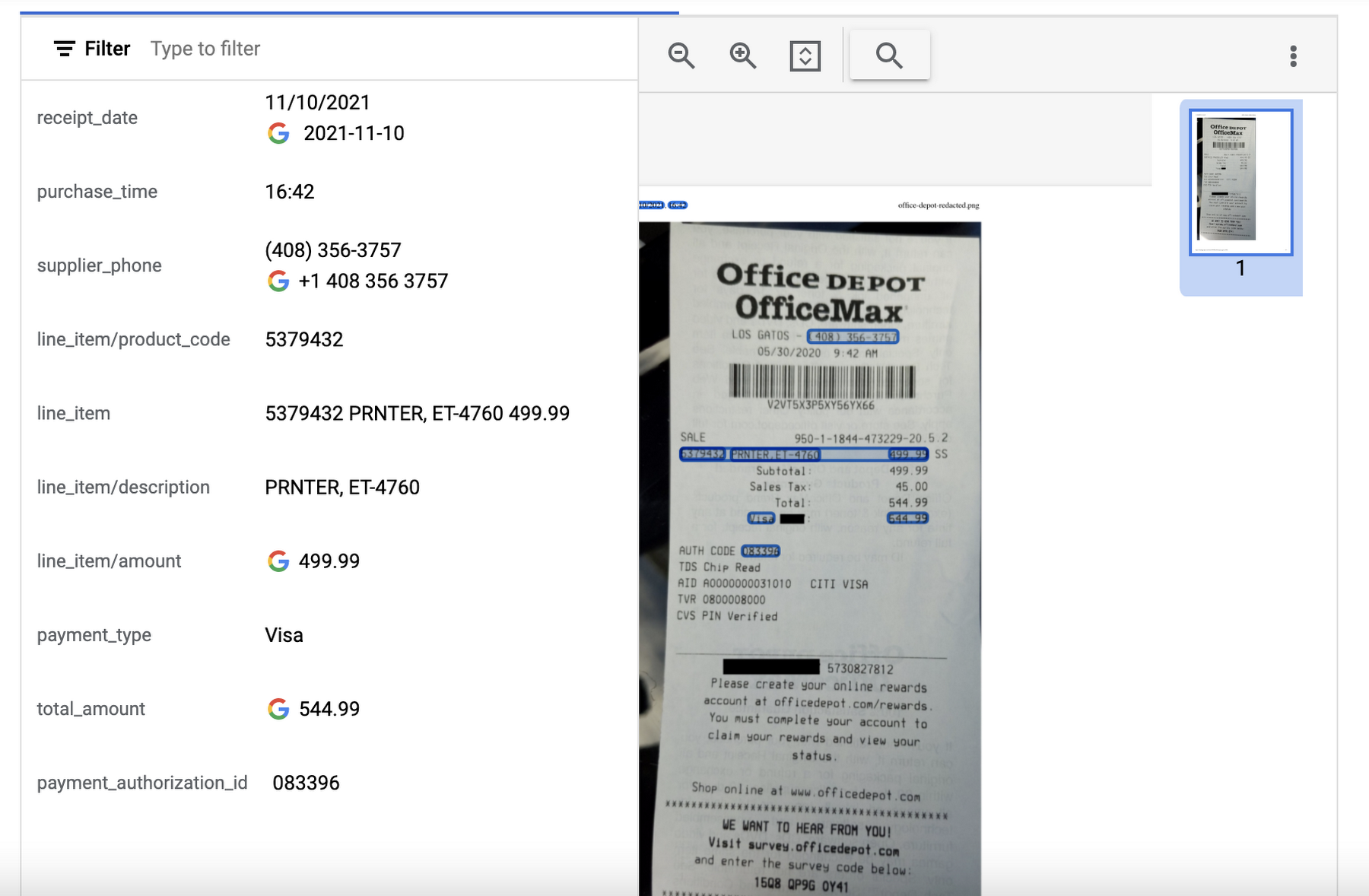
This specialized processor is designed to extract data from receipts and invoices, such as vendor name, date, and total amount paid. It can also identify line items within an invoice and categorize them based on the type of expense (e.g. meals, travel, office supplies). The expense parser makes it easier for you to process expense reports and other financial documents, and it can integrate with other tools and systems to completely automate the entire expense reporting process.
In this visualization of the API response, you can see that Document AI has extracted the text from the receipt and identified several typical entities such as purchase date and time, payment type, and total amount.
Identity Document Proofing Parser
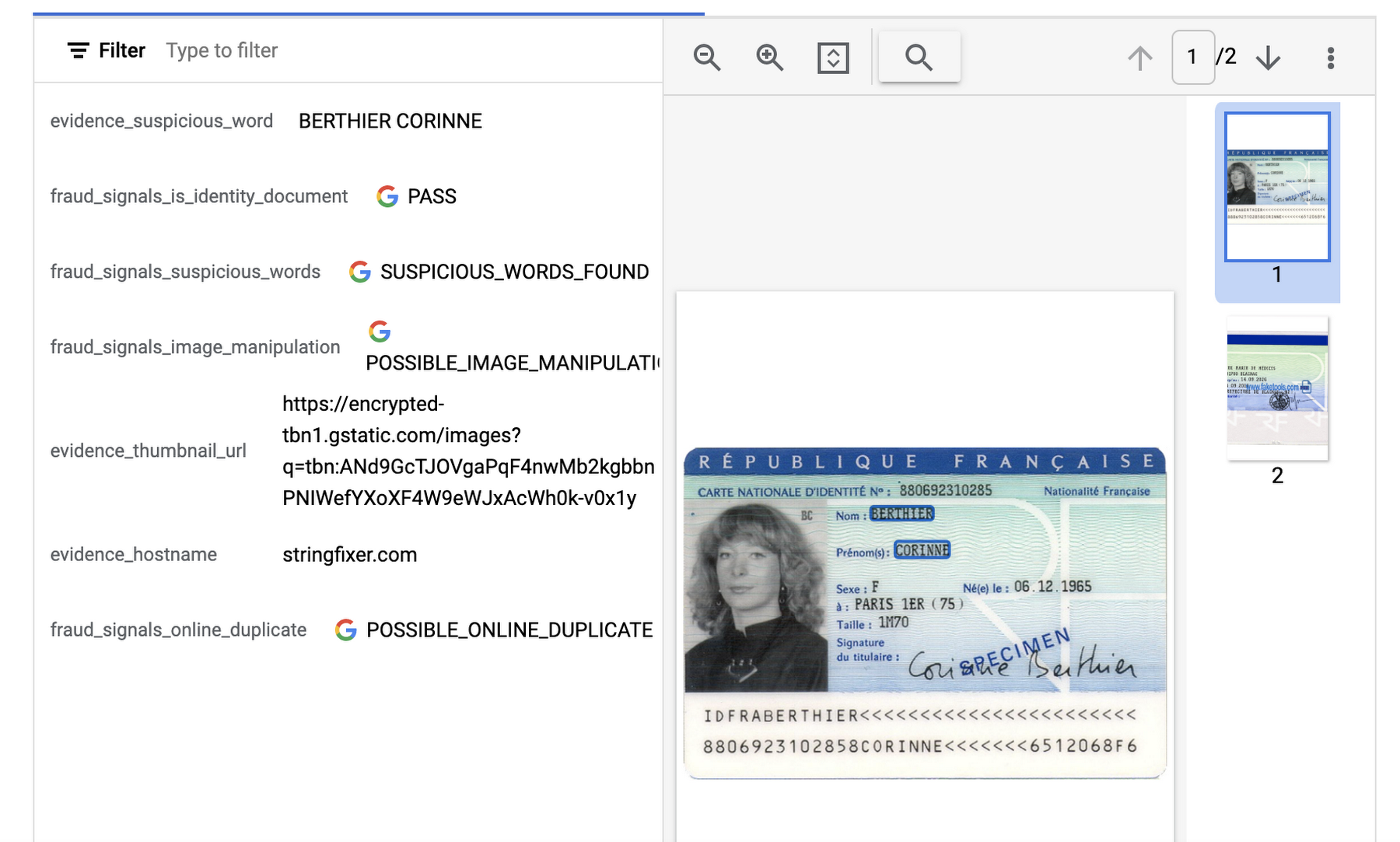
This processor is designed to help predict the validity of ID documents with four different signals.
- is_identity_document detection: Predicts whether an image contains a recognized identity document.
- suspicious_words detection: Predicts whether words are present that aren’t typical on IDs.
- image_manipulation detection: Predicts whether the image was altered or tampered via an image editing tool.
- online_duplicate detection: Predicts whether the image can be found online.
If suspicious words are detected or the image can be found online, additional information is provided to explain these signals.
This can be particularly useful for businesses that need to verify the identity of customers or employees as part of their operations. This processor could be used in conjunction with other processors that extract key information such as name, date of birth, ID number, and expiration date from specific identity documents (US Driver License Parser, US Passport, France National ID Parser, etc.).
In this visualization of the API response, you can see that Document AI has passed the document on the first detection point (is_identity_document), but failed the document for the other three items and provided additional information in the evidence fields.
Intelligent Document Quality Processor
This general use processor is designed to detect a variety of document quality issues, such as missing pages, blurry images, low contrast, inconsistent formatting, and incorrect data, and flag these potential issues which could affect their usability, accuracy, or compliance. It can also identify sensitive information that has not been redacted or missing information required by regulatory standards.
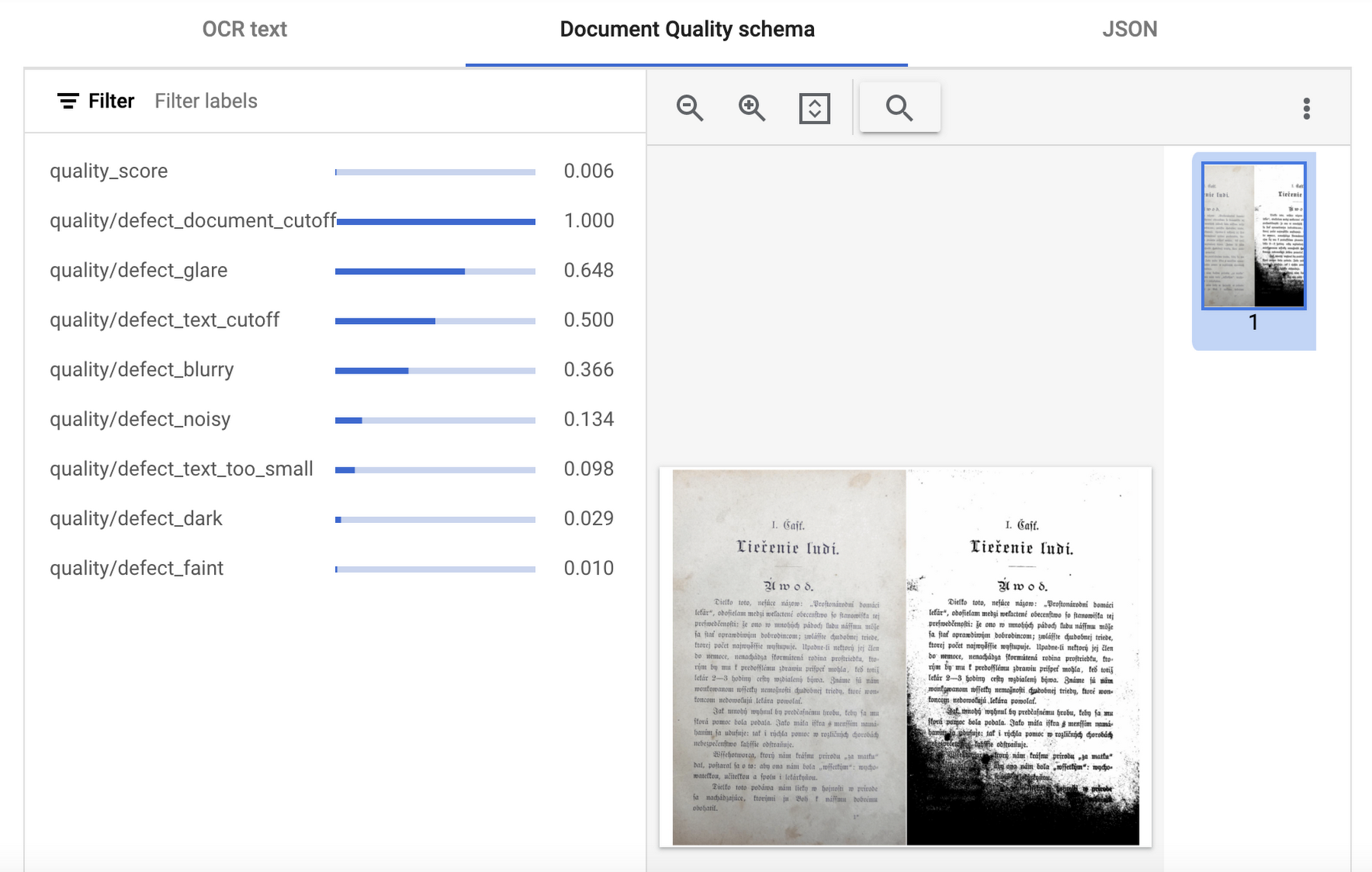
This quality assessment is returned as a quality score from 0 to 1, where 1 means perfect quality. If the quality score detected is lower than 0.5, a list of negative quality reasons (sorted by the likelihood) is also returned.
In this visualization of the API response, you can see that Document AI has determined a quality_score of 0.006 and also provided a list of several reasons including document and text cutoff, blurriness, and glare (among others).
Next steps
These are just a few examples of the types of processors that Document AI offers. Perusing the current documentation, you can find it has more than 40 processors, with each providing several functions, to explore. Document AI also offers you the ability to uptrain certain processors and supports the option to build your own custom processor. Across the board, if a document contains structured or unstructured text, Document AI has the capability to extract valuable data from it.
Get started and learn more by heading to our tutorials in the Cloud Console:
Parent Company of Retail Luxury Brands Leverages Product Recommendation Algorithms and Integrated Client Platform to Entice Customers

3107
Of your peers have already read this article.
3:00 Minutes
The most insightful time you'll spend today!
Whether they meet customers online, offline, or in some combination, retailers share a big problem: How can they offer the right choices, when and how the customer wants, without overwhelming (and often losing) the buyer?
More than anything, this is an information problem. As such, it’s a good candidate for using artificial intelligence (AI) for greater success. Here’s how Richemont tackled the problem.
Richemont owns a portfolio of leading luxury goods brands, recognized for their distinctive heritage, craftsmanship and creativity. It has strengths and specialties in jewelry (Cartier, Van Cleef & Arpels), luxury watches (IWC, Jaeger-LeCoultre, Panerai, Vacheron Constantin), and fashion & accessories (Chloé, Montblanc, dunhill).
People shop for such goods in a number of ways, from online searching to individual meetings in boutiques, and Richemont must be prepared for every context. Understanding which shoppers are likely to buy or repurchase, when to engage directly, and what creation to suggest enables sales associates to spend quality time with clients, engaging at the right time with meaningful advice. Richemont solves these retail challenges with an integrated Client Platform leveraging Google Cloud and its AI/ML capabilities.
Enticing peoples’ desires with Machine Learning
Richemont began by posing two questions:
- Which prospects or clients need extra attention? Specifically, who is likely to convert or to repurchase?
- What would be meaningful items to suggest to each client and prospect?
Both questions were addressed with machine learning algorithms. Their challenges included deploying and monitoring algorithms at scale for several brands across the globe, while addressing the specific business needs for each brand. For instance, it may be more relevant to recommend in-season items for fashion brands, while for watchmakers it is more about cross-fertilization across each brand’s iconic creations.
This graph summarizes the prediction process implemented by Richemont:
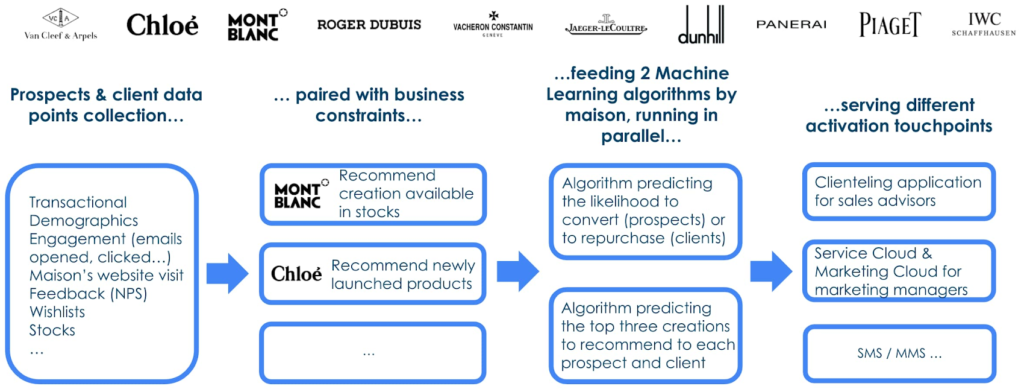
Engagement data (email opened, clicked, SMS/MMS, website visits…) was found crucial to predict conversion of prospects for whom per definition no transaction history is available. For website interactions Richemont leverages the Google x Salesforce Connector.
To deploy the Machine Learning algorithms and to monitor them, Richemont leveraged Vertex AI, along with BigQuery, Cloud Functions and Google Storage, all orchestrated with Google Cloud Composer.
The role of product recommendation algorithms
Richemont used the deep learning library TensorFlow Recommenders to perform the product recommendation tasks. This library enables companies to build state of the art deep learning algorithms to achieve relevant and robust predictions.
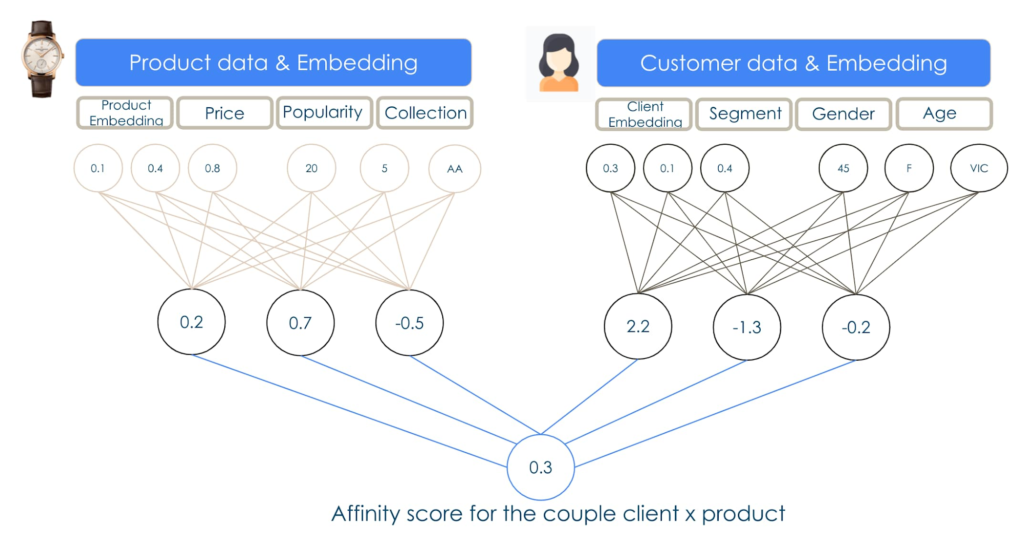
Unlocking client value with integrated technology
Richemont’s innovations show how technology that considers many parts of the customer experience creates more value. In this case, the company used in store applications to invite people with a strong propensity to buy for boutique visits, while others at a different point in the purchasing journey were offered different options more suited to their tastes and inclinations.This solution, now deployed across 11 brands in over 25 countries, shows just one way that AI can improve customer experience, for better customer loyalty.
Key to the process, here and elsewhere, is the way a retailer and its partners put customer understanding at the center of the process. As AI becomes more important not only in retail, but in every industry, this human understanding will become even more important as a fundamental organizing principle. Much is changing, but once again, the winners will be the companies that focus best on their customers.
More Relevant Stories for Your Company

Partnering with Google Cloud is the Key Behind Recent Healthcare Innovations
It’s simply amazing to witness how some of our systems integrators employ Google Cloud solutions to drive innovation in ways we at Google may never have considered—especially in healthcare. According to analyst firm MarketsandMarkets, the market for the Cloud in healthcare is projected to grow 43% between 2020 and 2025

AutoML Vision: Among the Fastest and Easiest Way to Adopt AI for Your Enterprise
What’s among the largest impediment to the adoption of AI within enterprises? Not enough access to skills. According to 80 percent of business respondents to an EY survey, the top challenge to an enterprise AI program is the lack of requisite talent. What companies need today is a way to

Quantum Metric Increases Business 10-fold
At Quantum Metric, we’re in the business of bringing our customers business insights that are based on customer experience data and analytics for mid-market and Fortune 500 companies. Our software, powered by big data, machine intelligence, and Google Cloud, helps our customers identify, quantify, prioritize and measure opportunities to improve
BigQuery Explainable AI for Demystifying the Inner Workings of ML Models. Now GA!
Explainable AI (XAI) helps you understand and interpret how your machine learning models make decisions. We're excited to announce that BigQuery Explainable AI is now generally available (GA). BigQuery is the data warehouse that supports explainable AI in a most comprehensive way w.r.t both XAI methodology and model types. It does this at
