





Streamlining Business Processes with Google’s Document AI: Invoices, Contracts, and Beyond

1147
Of your peers have already read this article.
3:30 Minutes
The most insightful time you'll spend today!
Editor’s note: In this post, I’ll be showing some amazing ways Document AI can help you extract meaning from your documents – keep reading, or jump directly into a tutorial using the Cloud Console!
Documents are a crucial part of most businesses, used to store and communicate important information. The variety is vast: invoices, contracts, receipts, applications, plus documents unique within industries and geographies. Unfortunately, making the information contained in these documents accessible can be a time-consuming and manual process.

Document AI is a document understanding platform in Google Cloud that takes unstructured data from documents and transforms it into structured data, making them easier to understand, analyze, and consume. By using this technology, you can streamline your document processing workflows, reduce errors, and unlock insights that were previously buried in mountains of paperwork.
Whether you’re a small business owner or an enterprise looking to bring efficiency to your operations, Document AI has something to offer. So let’s take a look and see what it can do!
Understanding documents with Document AI
When we say that Document AI can understand documents, we mean that it is able to analyze the content within documents and derive meaningful insights from it. This goes beyond simply recognizing the characters and words within a document (which is what traditional OCR technology does) – Document AI can actually comprehend the meaning behind the text.
For example, let’s say you have a contract that needs to be processed. Traditional OCR technology might be able to extract the text from the document, but it would not be able to understand the legal terms and clauses within it. Document AI, on the other hand, can actually interpret the meaning of the text and extract key information such as parties involved, terms and conditions, dates, and signatures.
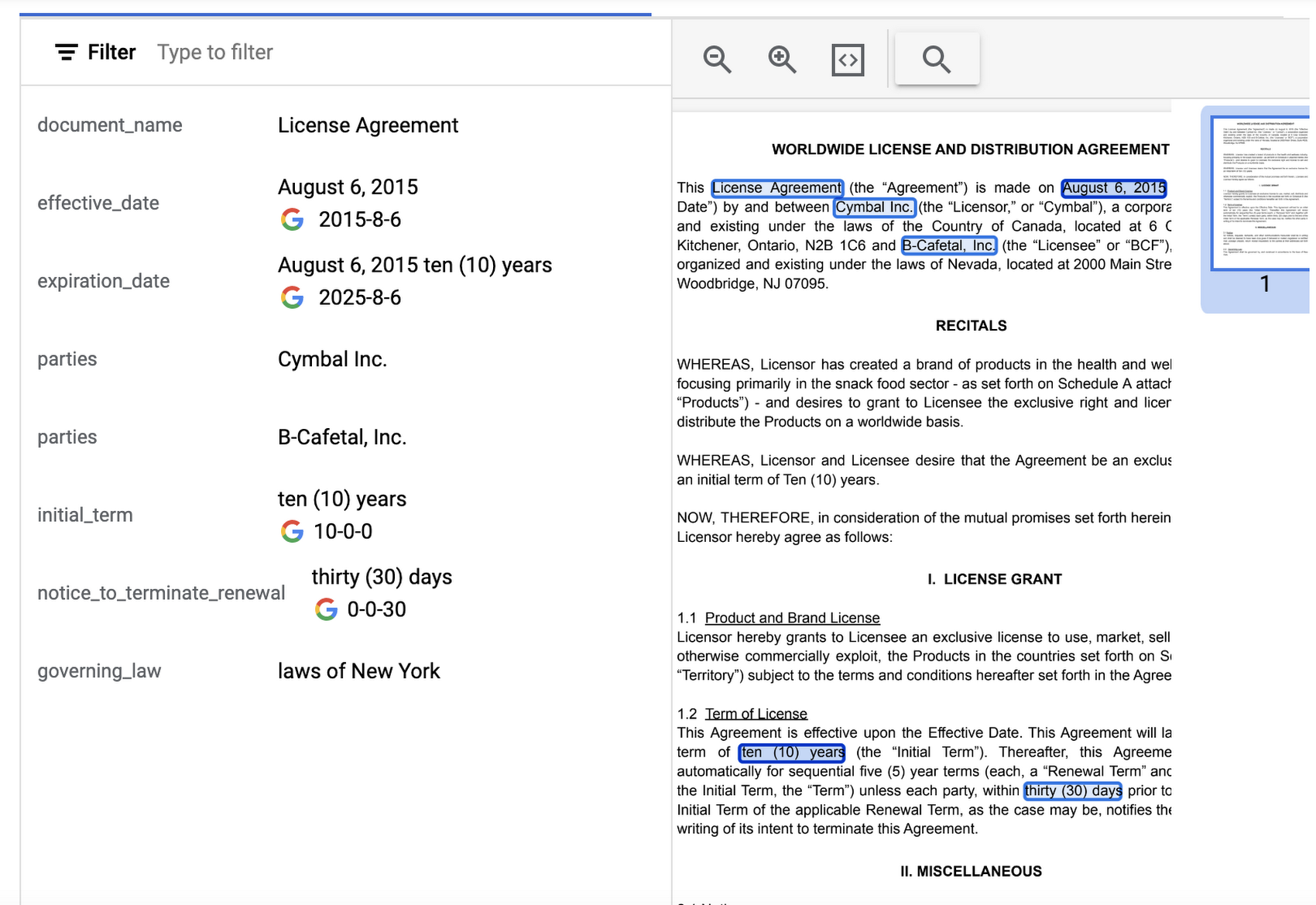
Document AI offers several pre-built models and processors that are specifically designed to extract different types of data from various document types. Within the specific document types, the processors can perform several tasks such as Optical Character Recognition (OCR), form parsing, splitting, classification or entity extraction. These processors can be customized and combined to create powerful document processing workflows that are tailored to a business’s unique needs.
Let’s look closer at a few of the processors available in Document AI, including the Form Parser, Invoice Parser, Expense Parser, Identity Document Proofing Parser, and Intelligent Document Quality Processor.
Form Parser
This general processor is designed to extract structured data from forms such as application forms, surveys, and questionnaires. It automatically identifies and extracts data from form fields (key-value pairs), such as names, addresses, dates, and other types of structured data; even checkboxes and tables. This processor also leverages deep learning models to extract generic entities that are common in various document types, meaning it can identify if something is an email address, phone number, datetime, organization, quantity, price, person, and more.
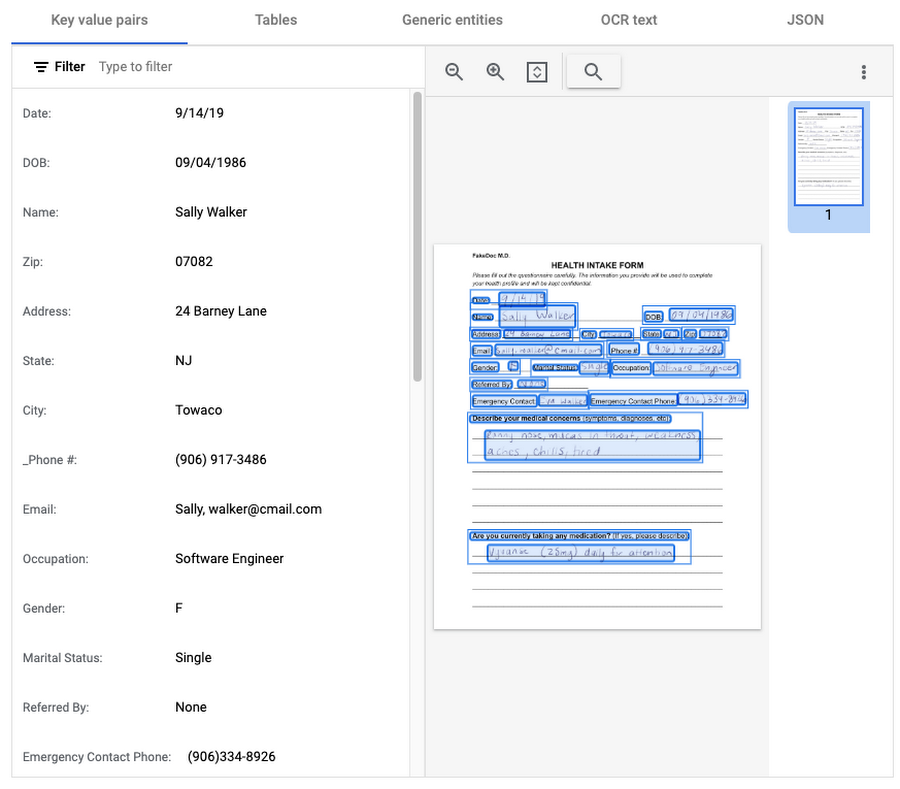
In this visualization of the API response, you can see that Document AI has identified several key value pairs that correspond to the form’s fields and the responder’s answers.
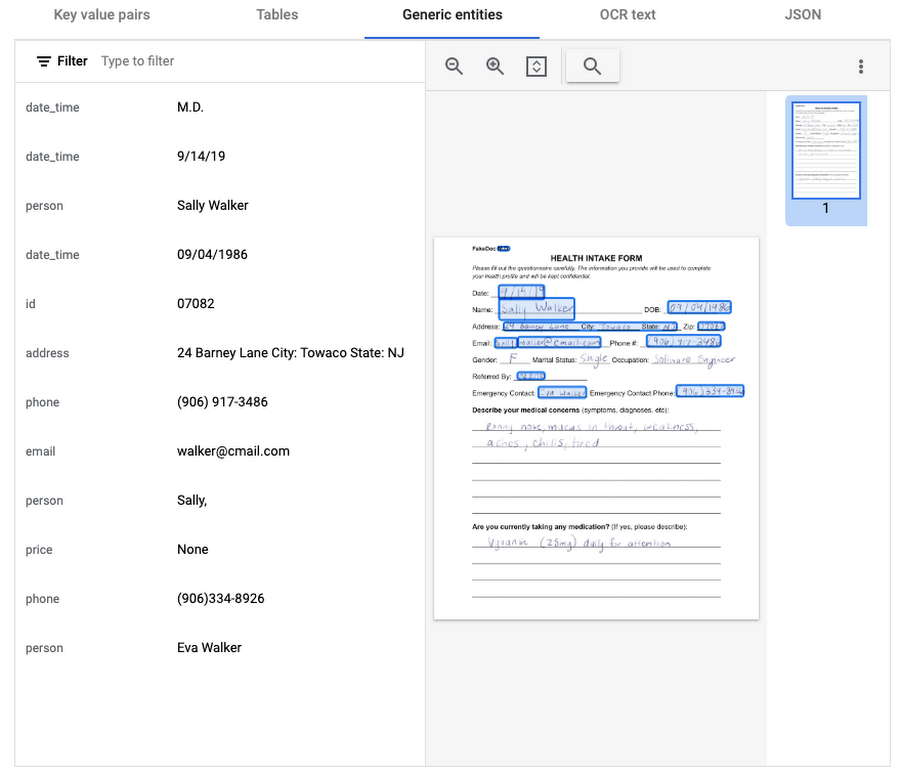
Also of interest is that the form parser recognized certain generic entities including: several dates, an address, phone numbers, email, and two people (the responder and their listed emergency contact).
Invoice Parser
This parser is designed to identify and extract relevant information from invoices including a large number of typical invoice fields, but can also be customized (uptrained) to recognize different invoice layouts, languages, and data fields. Invoices are a critical part of the accounts payable process, making this functionality valuable across industries and companies building A/P features into their products.
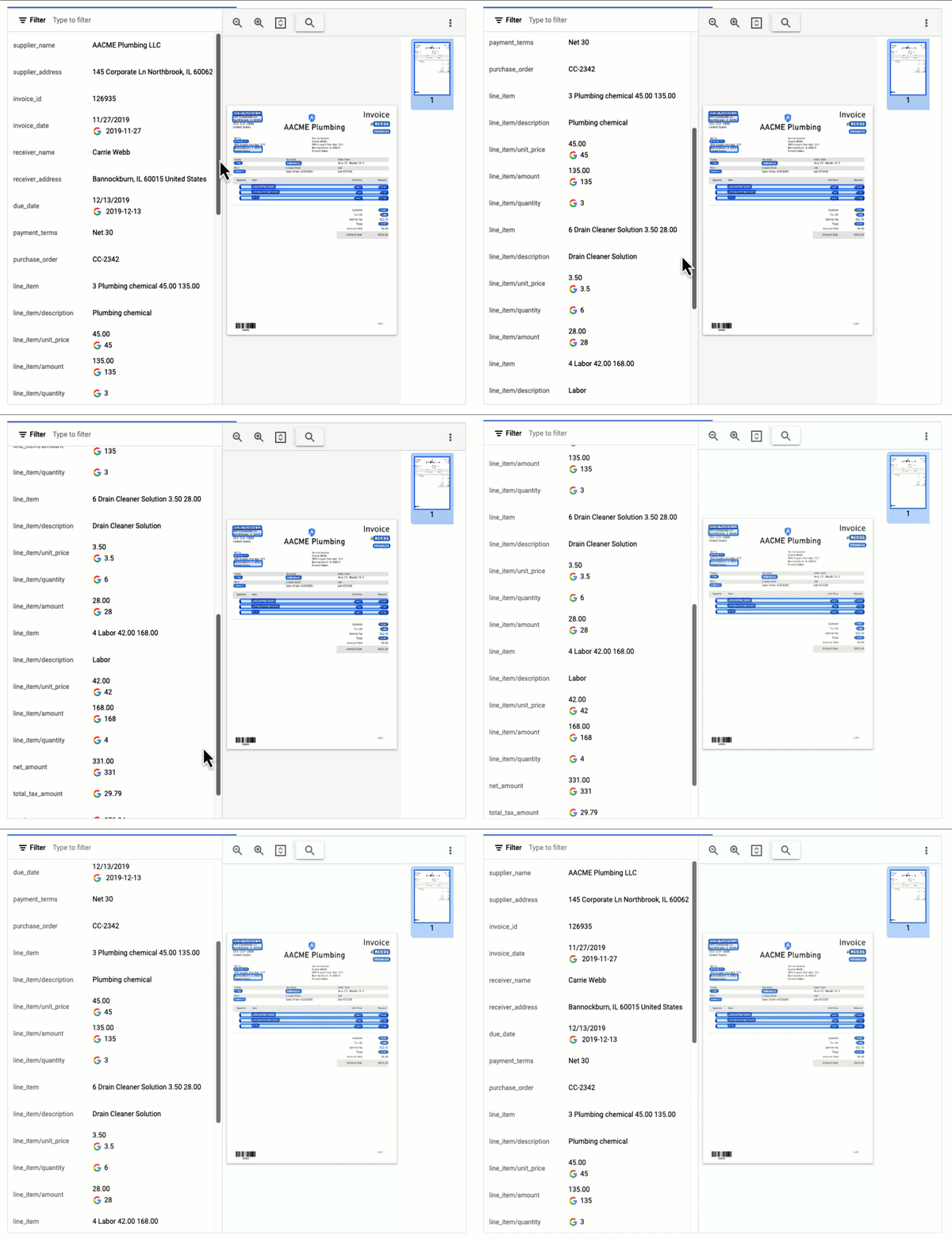
In this visualization of the API response, you can see that Document AI has extracted a large number of key-value pairs and even provided normalized values for several of the fields.
Expense Parser
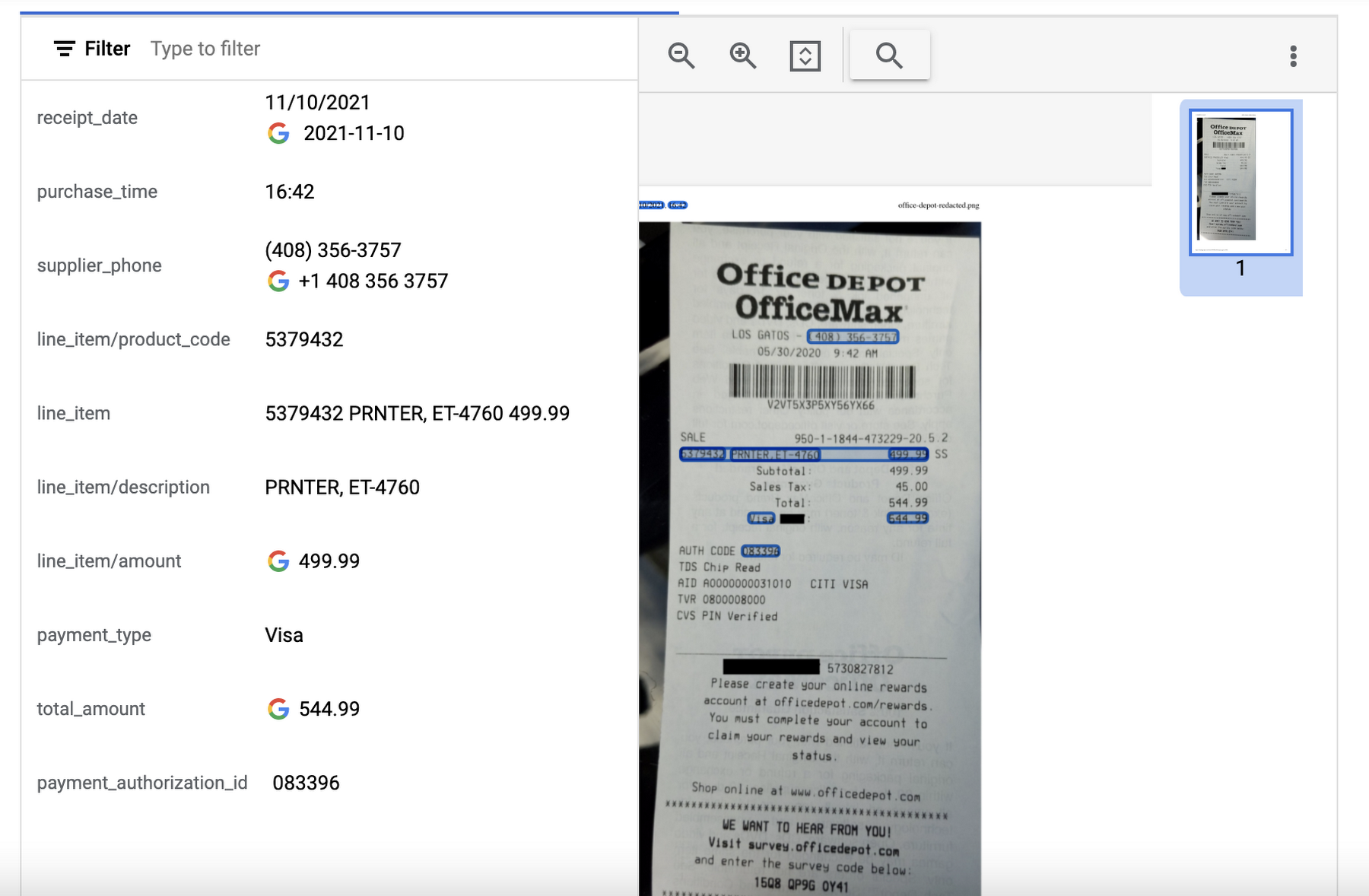
This specialized processor is designed to extract data from receipts and invoices, such as vendor name, date, and total amount paid. It can also identify line items within an invoice and categorize them based on the type of expense (e.g. meals, travel, office supplies). The expense parser makes it easier for you to process expense reports and other financial documents, and it can integrate with other tools and systems to completely automate the entire expense reporting process.
In this visualization of the API response, you can see that Document AI has extracted the text from the receipt and identified several typical entities such as purchase date and time, payment type, and total amount.
Identity Document Proofing Parser
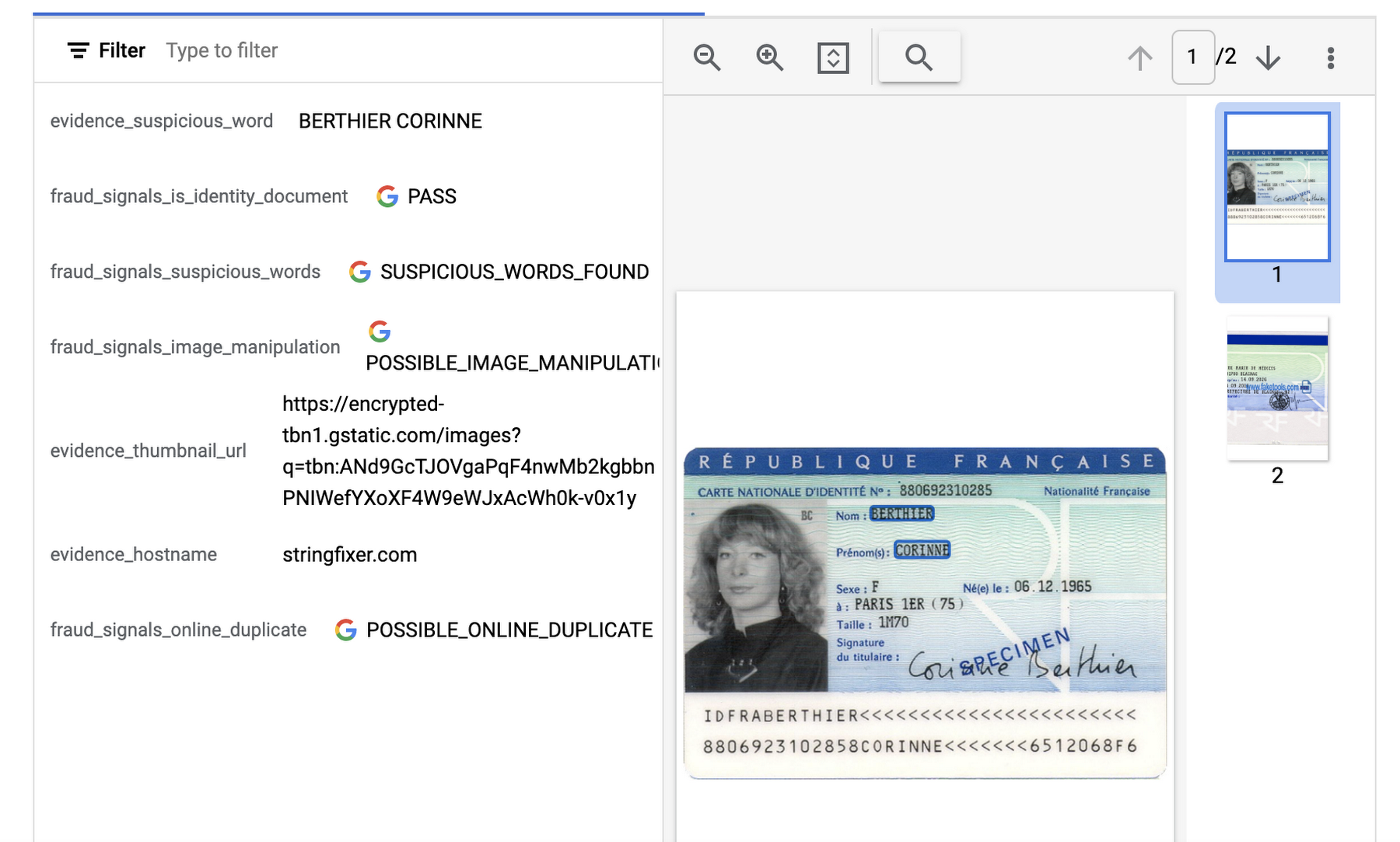
This processor is designed to help predict the validity of ID documents with four different signals.
- is_identity_document detection: Predicts whether an image contains a recognized identity document.
- suspicious_words detection: Predicts whether words are present that aren’t typical on IDs.
- image_manipulation detection: Predicts whether the image was altered or tampered via an image editing tool.
- online_duplicate detection: Predicts whether the image can be found online.
If suspicious words are detected or the image can be found online, additional information is provided to explain these signals.
This can be particularly useful for businesses that need to verify the identity of customers or employees as part of their operations. This processor could be used in conjunction with other processors that extract key information such as name, date of birth, ID number, and expiration date from specific identity documents (US Driver License Parser, US Passport, France National ID Parser, etc.).
In this visualization of the API response, you can see that Document AI has passed the document on the first detection point (is_identity_document), but failed the document for the other three items and provided additional information in the evidence fields.
Intelligent Document Quality Processor
This general use processor is designed to detect a variety of document quality issues, such as missing pages, blurry images, low contrast, inconsistent formatting, and incorrect data, and flag these potential issues which could affect their usability, accuracy, or compliance. It can also identify sensitive information that has not been redacted or missing information required by regulatory standards.
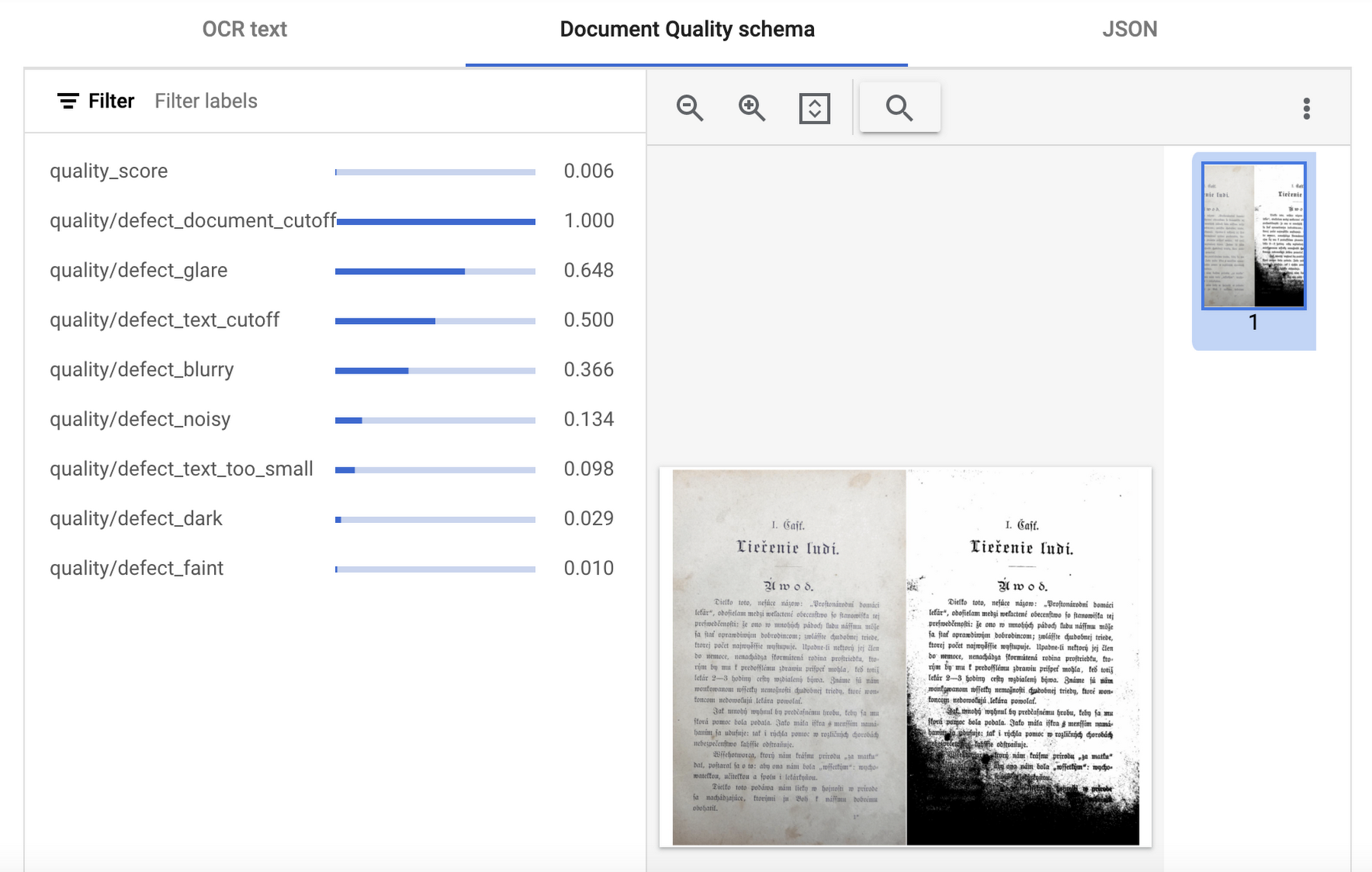
This quality assessment is returned as a quality score from 0 to 1, where 1 means perfect quality. If the quality score detected is lower than 0.5, a list of negative quality reasons (sorted by the likelihood) is also returned.
In this visualization of the API response, you can see that Document AI has determined a quality_score of 0.006 and also provided a list of several reasons including document and text cutoff, blurriness, and glare (among others).
Next steps
These are just a few examples of the types of processors that Document AI offers. Perusing the current documentation, you can find it has more than 40 processors, with each providing several functions, to explore. Document AI also offers you the ability to uptrain certain processors and supports the option to build your own custom processor. Across the board, if a document contains structured or unstructured text, Document AI has the capability to extract valuable data from it.
Get started and learn more by heading to our tutorials in the Cloud Console:
Next-Level Search: Discover the Game-Changing Capabilities of Enterprise Search on Gen App Builder

1199
Of your peers have already read this article.
4:30 Minutes
The most insightful time you'll spend today!
In our conversations with customers, few generative AI use cases have driven as much enthusiasm as generative search. Leaders at enterprises know the limits of traditional enterprise search, with queries producing a list of links based on pattern matching, and significant manual investigation required to find the more relevant answers. In generative AI, these leaders see an opportunity to leverage their data more effectively and deeply, including applying it to conversational apps that can answer complex questions, produce accurate summaries that synthesize many sources, and help people get the information they need, faster.
Enterprise Search on Generative AI App Builder (Gen App Builder) lets organizations create custom chatbots and semantic search applications in as little as a few minutes, with minimal coding needed to get started and enterprise-grade management and security built in. Customers can combine their internal data with the power of Google’s search technologies and generative foundation models, delivering relevant, personalized search experiences for enterprise applications or consumer-facing websites.
To date, most approaches to combining generative AI and search technology have been inadequate for the scale and reliability needed for enterprise use. For example, building search by breaking long documents into chunks and feeding each segment into an AI assistant typically isn’t scalable and doesn’t effectively provide insights across multiple sources. Likewise, many solutions are limited in the data types they can handle, prone to errors, and susceptible to data leakage. Bespoke, do-it-yourself approaches are generally no easier, with production-grade solutions often requiring complex tasks like integrating embeddings data with foundation models and significant use case data testing. Even when organizations make these efforts, the resulting solutions still tend to lack feature completeness and reliability, with significant investments of time and resources required to achieve high-quality results.
These challenges demonstrate that to effectively implement generative search, organizations typically need more than access to powerful foundation models. They also likely need the ability to ground model outputs in specific data, so that outputs are more relevant and less likely to include mistakes or “hallucinations.” They generally need safeguards that protect their data, how it is accessed, and how it is used. And they generally need the process to be high-performant and scalable out of the box, making the functionality easy to use even if the organization lacks data science and machine learning expertise.
Let’s look at how Enterprise Search on Gen App Builder helps customers bypass these scale and reliability challenges, so they can start leveraging generative search quickly.
The intersection of generative AI and enterprise data
Enterprise Search on Gen App Builder lets developers create search engines that help ground outputs in specific data sources for accuracy and relevance, can handle multimodal data such as images, and include controls over how answer summaries are generated. Multi-turn conversations are supported so that users can ask follow up questions as they peruse outputs, and customers have control over their data—including the ability to support HIPAA compliance for healthcare use cases. All of this is available as a fully managed service, so developers can focus on building rather than cloud complexity.
Gen App Builder’s out-of-box capabilities can remove the need for data chunking, generating embeddings, or managing indexes, hiding complexity behind a straightforward interface that lets developers build apps in minutes with little or no coding and no prior machine learning experience. With the ability to ingest large volumes of documents and support for both unstructured and structured data, apps built with Gen App Builder help customers solve the long-standing headache of finding relevant information across the organization, turning tasks that used to take hours into quick searches or conversational explorations with an app.
These capabilities are underpinned by both Google’s foundation models and a variety of Google Search technologies, including:
- Semantic search, which helps deliver more relevant results than traditional keyword-based search techniques by using natural language processing and machine learning techniques to infer relationships within the content and intent from the user’s query input.
- Google’s understanding of how users search for information.
- Google’s expertise in understanding relevance, which considers factors such as content popularity and user personalization of content when determining the order in which search results are displayed.
For more advanced use cases, Gen App Builder can be easily integrated with Vertex AI for in-depth foundation model tuning, enabling flexible input and output search formats.
As always with our AI products, Gen App Builder has been evaluated for alignment with our AI Principles, which is reflected by the product’s many safeguards against bias, toxic content, and unhelpful outputs. Whether for prototypes built in minutes or apps with many custom components, Enterprise Search on Gen App Builder offers a robust suite of user-friendly tools for customers across industries and levels of expertise.
How customers are innovating with Enterprise Search
After gaining access to Enterprise Search on Gen App Builder via our trusted tester program, a number of customers are already leveraging the product for novel use cases.
Priceline is harnessing Gen App Builder and Vertex AI for a range of projects, including internal search engines for employees and a new chatbot to assist customers as they make travel plans. Slated to be available across both desktop and mobile experiences, Priceline’s chatbot will help customers find the right information faster via always-on, personalized experiences, including answering nuanced questions like, “What are the best 4-star hotel options in midtown Manhattan within walking distance to Central Park?” and “Can you help me extend my hotel reservation for an additional night?”
“Priceline is charting a course to transform the novelty of generative AI into lasting value for our customers and our business. We believe it’s not just about having the latest technology; it’s also about practically targeting innovation to the right challenges and opportunities,” said Marty Brodbeck, Chief Technology Officer, Priceline. “With Google Cloud as our AI innovation partner, we’re doubling down on our commitment to delivering the fastest, most seamless and informative booking experience for our customers, from personalized planning and travel inspiration to customer service.”
Vodafone is experimenting with Enterprise Search and foundation models on Gen App Builder to build a tool that can rapidly and securely query documents, search, and understand specific commercial terms and conditions. Vodafone Voice and Roaming Services has over 10,000 contracts with other telecommunications companies worldwide, in a variety of formats such as PDFs, images, and complex tables. Searching this document repository is often a time consuming process for employees.
“Every day we introduce and manage new services like 5G to a roaming footprint comprising more than 700 operators in 210 countries to ensure both Vodafone and our partners’ business customers, holidaymakers, and Internet of Things devices stay connected when abroad. With Enterprise Search on Gen App Builder, we are building an intelligent assistant to securely and quickly search contracts.” said Sherif Bakir, CEO of Vodafone Voice and Roaming Services. “With generative AI, we’re accelerating otherwise protracted processes, increasing productivity and operational efficiency.”
Software startup Trender.ai, which creates customer monitoring and intelligence solutions for B2B relationships, is using Gen App Builder to build a product that can synthesize information from social media, public sources, and CRM data so that users can form more productive, personal relationships with prospects and customers.
“With Enterprise Search on Gen App Builder, we have been able to do things in the last month that we had projected to take 12-18 months on our prior roadmap,” said Betsy Bilhorn, co-founder at Trender.ai. “We had expected it would take at least 12 months to build and train models from an individual’s public social, web, and other data, and to then be able to ask questions like ‘What things are most important to this person?’ or ‘When and how is the best way to make an introduction to this prospect that they’ll respond to?’ Last year, we thought getting to this vision was a bit of a moonshot for a startup our size — but now we were able to achieve this in under a month.”
Stop searching for solutions — start discovering insights
We’re excited to see how customers use Enterprise Search on Gen App Builder to leverage data in powerful ways, discover new insights, and create useful, personal, and efficient experiences.
Today, we’re pleased to help our customers accomplish these goals, with the general availability of Enterprise Search on Gen App Builder for customers on the allowlist (i.e., approved for access). Please contact your Google Cloud sales team for access and pricing details. We are also launching two new features within Enterprise Search on Gen App Builder that are available today in our preview offering: multi-turn search, which supports asking follow-up questions, and content recommendations to find semantically relevant content. Access to the preview offering is available via Google Cloud’s trusted tester program. Read more about Enterprise Search on Gen App Builder and sign up for access on our webpage.
We’re also bringing generative AI features of Enterprise Search to our existing solutions like Contact Center AI and Document AI. As an example, starting this month, customers can preview generative AI-powered search in Document AI Warehouse. To keep up with our latest generative AI news, don’t miss The Prompt or our generative AI primer for executives on Transform with Google Cloud.
Lufthansa: Wind Forecasting with Google Cloud ML Helps Increase On-time Flights

2508
Of your peers have already read this article.
3:30 Minutes
The most insightful time you'll spend today!
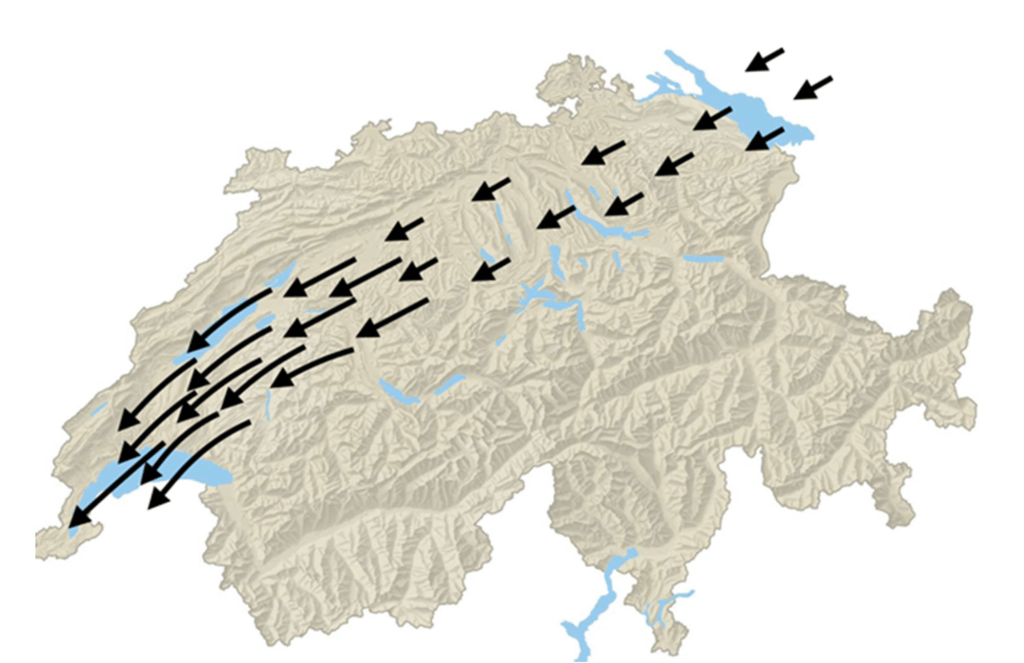
The magnitude and direction of wind significantly impacts airport operations, and Lufthansa Group Airlines are no exception. A particularly troublesome kind is called BISE: it is a cold, dry wind that blows from the northeast to southwest in Switzerland, through the Swiss Plateau. Its effects on flight schedules can be severe, such as forcing planes to change runways, which can create a chain reaction of flight delays and possible cancellations. In Zurich Airport, in particular, BISE can potentially reduce capacity by up to 30%, leading to further flight delays and cancellations, and to millions in lost revenue for Lufthansa (as well as dissatisfaction among their passengers).
Being able to predict this kind of wind well in advance lets the Network Operations Control team schedule flight operations optimally across runways and timeslots, to minimize disruptions to the schedule. However, predicting speed and magnitude can be incredibly difficult to model and thus to predict— which is why Lufthansa reached out to Google Cloud.
Machine learning (ML) can help airports and airlines to better anticipate and manage these types of disruptive weather events. In this blog post, we’ll explore an experiment Lufthansa did together with Google Cloud and its Vertex AI Forecast service, accurately predicting BISE hours in advance, with more than 40% relative improvement in accuracy over internal heuristics, all within days instead of the months it often takes to do ML projects of this magnitude and performance.
“Being impressed with Google’s technology and prowess in the field of AI and machine learning, we were certain that my working together with their expert, to combine our technology with their domain expertise, we would achieve the best results possible,“ said Christian Most, Senior Director, Digital Operations Optimization at Lufthansa Group.
Collecting and preparing the dataset
The goal of Lufthansa and Google Cloud’s project was to forecast the BISE wind for Zurich’s Kloten Airport using deep learning-based ML approaches, then to see if the prediction surpasses internal heuristics-driven solutions and gauge the ease of use and practicality of the deep learning approach in production.
Since deep learning-based techniques require large datasets, the project relies on Meteoswiss simulation data, a dataset consisting of multiple meteorological sensor measurements collected from several weather stations across Switzerland over the past five years. By using this dataset, we obtained data on factors like wind direction, speed, pressure, temperature, humidity and more, at a 10 min resolution, along with some information about the location of the weather stations, such as altitude. These factors, which we hypothesized to be predictive of the BISE, ended up carrying valuable signals, as we would see later.
This collected data was next subjected to an extensive cleaning and feature engineering process using Vertex AI Workbench, in order to prepare the final dataset for training. The cleaning phase included steps to drop the features, or rows, that contained too many missing values, or failed statistical tests for entropy, etc. Since the direction of wind is a circular feature (between 0 and 360 degrees), this column/feature was replaced with two features: the corresponding sine and cosine embedding. The dataset was then flattened such that the columns contained all the relevant features and sensor measurements from all the weather stations at a particular 10-minute interval.
Since the target variable — i.e,. BISE — was not directly available, we engineered a proxy target variable for BISE called “tailwind speed around runway,” which above a certain threshold indicates the presence of BISE along the runway.
Forecasting wind in the Cloud
Once the dataset was ready, Lufthansa and Google Cloud evaluated several options before deciding to experiment and tune Vertex AI Forecast, Google’s AutoML-powered forecasting service, in order to achieve optimum results. Vertex Forecast is capable of the required feature engineering, neural architecture search, and hyper parameter tuning, and it is managed by Google Cloud to score in the top 2.5% in the M5 Forecasting Competition on Kaggle, in a completely automated fashion. These qualities made it an excellent choice for Lufthansa, to reduce the manual overhead of creating, deploying, and maintaining top performing deep learning models.
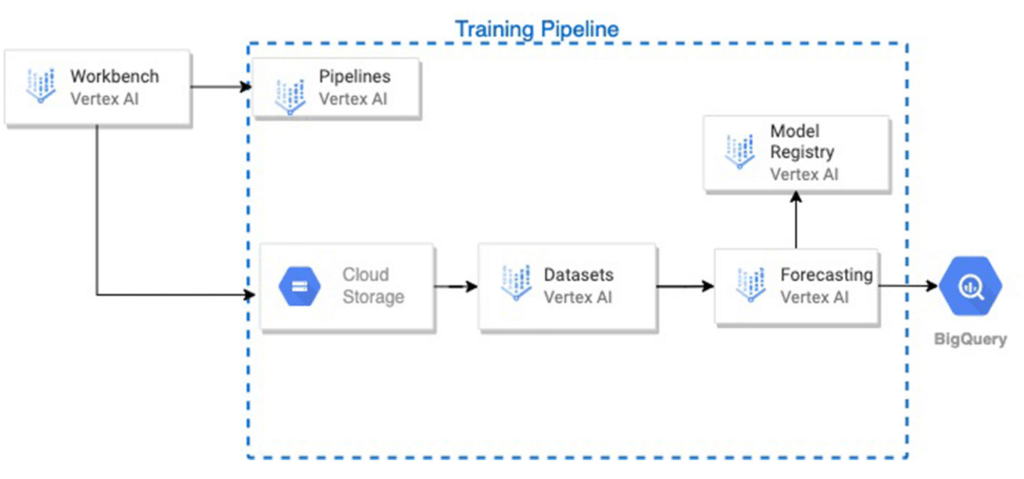
The raw data files were loaded from cloud storage, preprocessed on Vertex AI Workbench. Then, a training pipeline was initiated on Vertex AI Pipelines, which performed the following steps in sequence:
The .csv data file was loaded from Cloud Storage into a Vertex AI managed dataset.
A Vertex AI forecasting training job was initiated with the dataset, and it was also registered as a model in the Vertex AI Model Registry.
Upon completion, the model was evaluated on the test set, and the model’s predictions and the input features and ground truth of the test set, were stored in a user-defined table in BigQuery. Several test metrics were also available on the service and model dashboards.
One of the biggest challenges was the severe imbalance in the dataset, as measurements with BISE were very far and few in between. In order to account for this, instances where BISE occurred, as well the occurrences temporally close to them, were upweighted using weights calculated with methods including Inverse of Square Root of Number of Samples (ISNS), Effective Number of Samples (ENS), and Gaussian reweighting. The formulas for the methods are given below. These weights were supplied as separate columns in the dataset, and were iteratively used thereafter by the service as the “weight” column.
ISNS

ENS

Weighted gaussian

Results and next steps
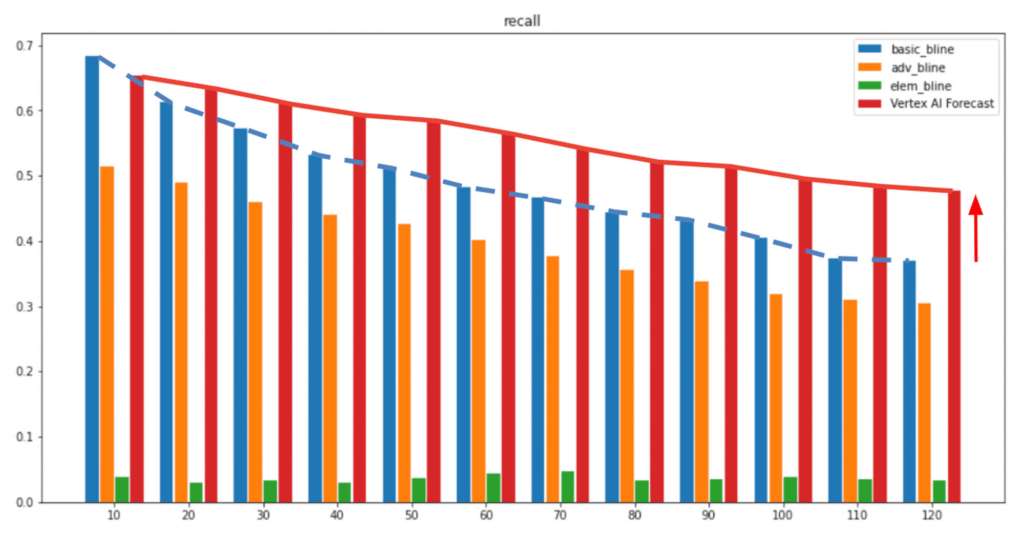
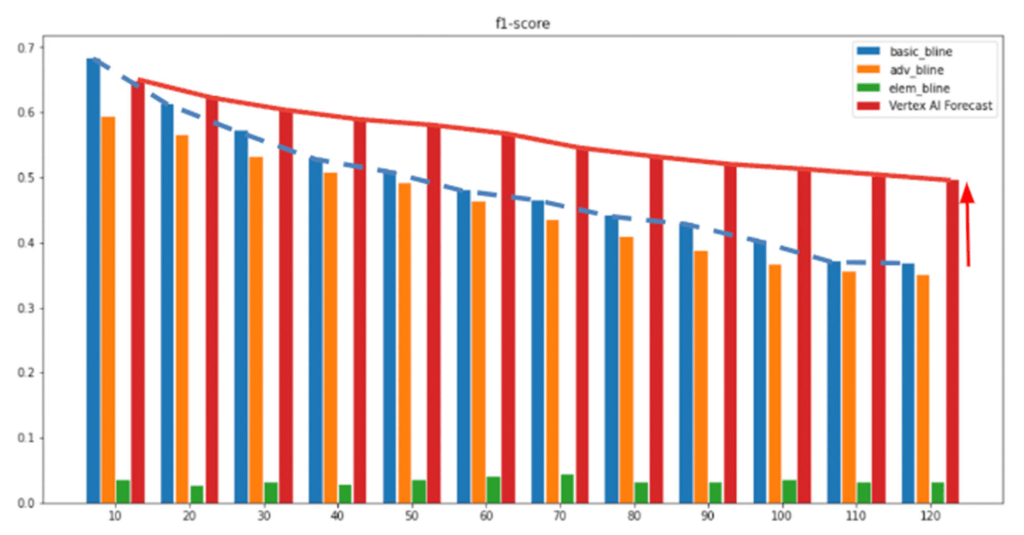
In the above figures, the x-axis represents the forecast horizon and the Y-axis shows the respective metrics (Recall/F1-score). As shown after multiple experiments, we can see Vertex AI Forecast achieved higher recall and precision t (red bar), outperforming Lufthansa’s internal baseline heuristics, with the performance gap widening steadily as the forecast horizon extends further into the future. At the two-hour mark, our custom-configured Vertex AI Forecast model improved by 40% relative to the internal heuristics and 1700% compared to the random guess baseline. As we saw with other experiments, at a six-hour forecast horizon, the performance gap widens even more, with Vertex AI Forecast in the lead. Since forecasting BISE a few hours in advance is very beneficial to prevent flight delays for Lufthansa, this was a great solution for them.
“We are very excited to be able to not only do accurate long term forecasts for the BISE, but also that Vertex AI Forecasting makes training and deploying such models much easier and faster, allowing us to innovate rapidly to serve our customers and stakeholders in the best possible manner,” said Swiss Oliver Rueegg, Product Owner, Swiss International Airlines.
Lufthansa plans to explore productionizing this solution by integrating it into their Operations Decision Support Suite, which is used by the network controllers in the Operations Control Center in Kloten, as well as to work closely with Google’s specialists to integrate both Vertex AI Forecast and other of Google’s AI/ML offerings for their use cases.
Global Communication Made Easy with Translation Hub

2504
Of your peers have already read this article.
3:30 Minutes
The most insightful time you'll spend today!
Hello! ¡Hola! 你好! नमस्ते! Bonjour! Being greeted in your own language can instantly put a smile on your face, and organizations around the world recognize that messages become more inclusive and powerful when translated into many languages.
As the Head of Product Management for Translation AI at Google Cloud, I am always looking to make our user’s lives easier when it comes to language tools—like Google Cloud’s Document Translation API, which has been used to translate over 2.5 billion documents across Google Translate and our Cloud customers.
But during my time working on translation products, I have seen enterprise users making compromises, like sacrificing cost and speed of translation for quality, or paying much more for high-quality translations and making peace with the slow turnaround times and high costs. That’s why we are excited to see momentum building behind Translation Hub, which launched earlier this year. Built to address organizations’ localization and translation challenges and delight users with an incredibly intuitive and administratively simple offering, Translation Hub makes it easy to translate content at scale—users just need to select the files to be translated, choose the output languages, and then they’re off and running.
In this article, we’ll take a closer look at Translation Hub’s powerful features, and the ways it is helping customers do more with their content.
Enterprise translation, reimagined: fast, lean, and intuitive
Translation Hub is a fully-managed, self-serve translation offering, powered by Google AI and built for the enterprise. With Translation Hub, businesses can instantaneously translate content into 135 languages with a single click, via an intuitive interface that integrates human reviews (i.e., a “human in the loop”) where required.
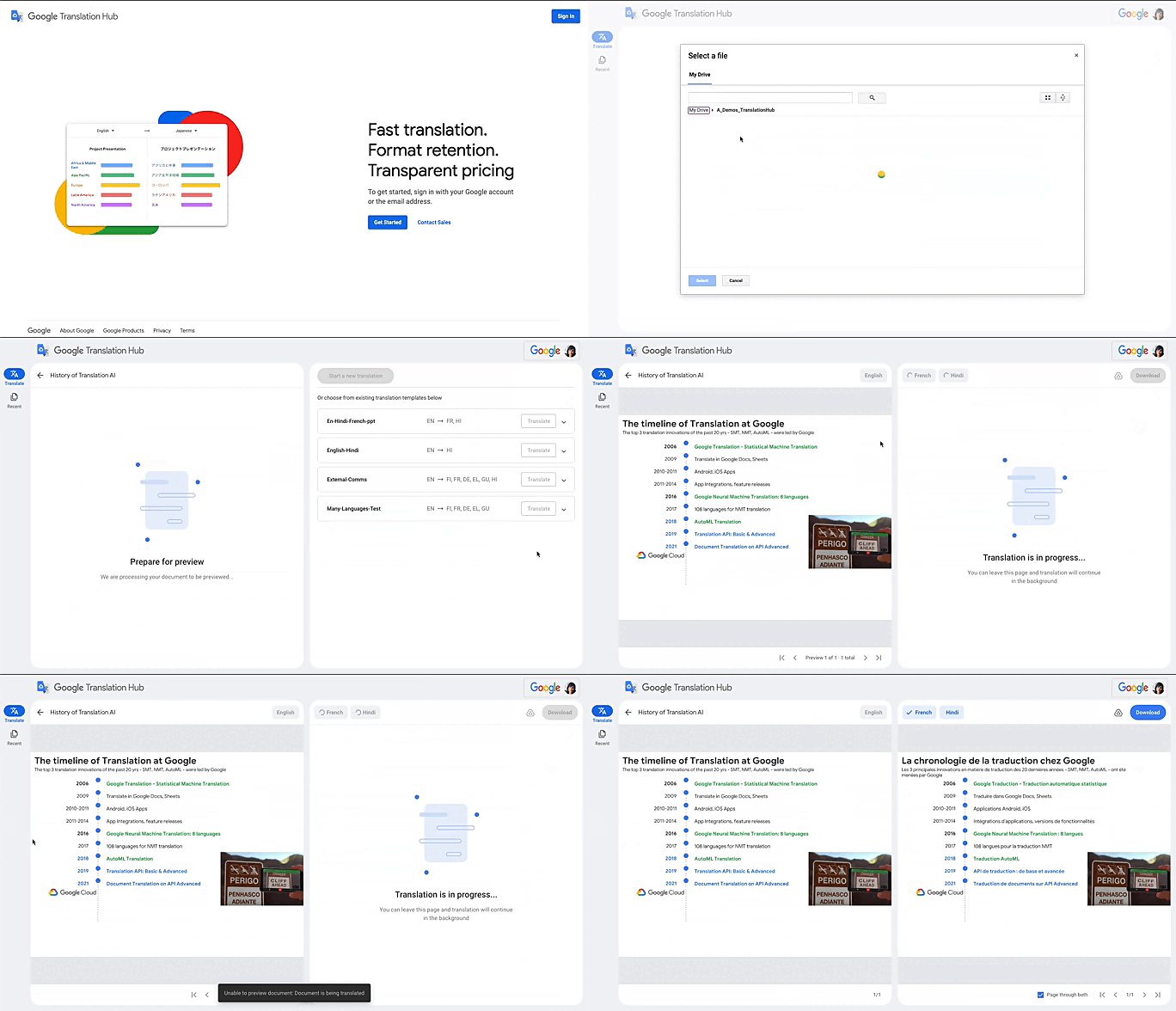
Translation Hub is designed to be both easy to manage and use. Each organization’s Translation Hub administrator uses the Google Cloud console to onboard and manage business users, typically by adding their email, which triggers an invite to the business user. Once a business user is added, they can sign in and start requesting translations and post-editing reviews.
With advanced features like “Glossary” and “Custom Translation Models (AutoML Translation),” Translation Hub makes it easy for enterprises to control the terminology and inject domain-specific context to meet their unique needs. Furthermore, Translation Hub ensures that organizations own their Translation Memory, for use in future translations or to leverage as a rich, human-validated source of training data for custom translation models (e.g., AutoML Translation). For example, when a user edits a phrase or segment through Translation Hub, this is immediately captured and used in the next translation for all future users who initiate translation where the same content or segment appears.
One of my favorite features is that Translation Hub preserves the layout and format of documents, saving both time and money. And while Translation Hub works with Google Drive (you can ingest and export documents to Drive) and is compatible with all our Google Workspace content sources (e.g., Slides, Docs etc.), it also supports many of the most commonly used formats, like documents and presentations created in Microsoft Office, and scanned and native PDFs.
Organizations need to be able to share the output of AI-powered translation with localization teams or agencies, for review. They need to save time by leveraging glossaries or customer machine learning (ML) models. They need these capabilities in one cohesive platform—and they need all of this to be user-friendly for all kinds of business users. It’s the difference between being able to automate translations in a few scenarios and being able to translate at scale. Google Cloud’s mission is to accelerate every organization’s ability to digitally transform, and with Translation Hub, our customers can leverage the best of AI for their content translations without sacrificing speed, quality or cost.
All of Google’s Translation Innovations within a single product
Translation Hub uses Google Cloud’s Translation API, AutoML Translation, and innovations in Neural Machine Translation Quality Prediction and Translation Memory—all technologies we’ve put to good use inside Google. For example, our localization teams have realized more than $80 million in cost avoidance and savings since 2021, using Google Cloud AutoML Translation and localization expertise.
“In just three months of using Translation Hub and AutoML translation models, we saw our translated page count go up by 700% and translation cost reduced by 90%,” said Murali Nathan, digital innovation and employee experience lead, at materials science company Avery Dennison. “Beyond numbers, Google’s enterprise translation technology is driving a feeling of inclusion among our employees. Every Avery Dennison employee has access to on-demand, general purpose, and company-specific translations. English language fluency is no longer a barrier, and our employees are beginning to broadly express themselves right in their native language.”
To get started with Translation Hub, visit our solution page, and for a deep dive, check out this Google Next ‘22 session, including more details about Avery Dennison’s use case.
3365
Of your peers have already watched this video.
31:30 Minutes
The most insightful time you'll spend today!
Contact Center AI: The State of the Union
Did you know 31% of CIOs say that they have already deployed conversational AI platforms? And that this represents a 50% year on year growth?
Much of this is driven by customer preferences. By 2023, customers will prefer speech interfaces to initiate self-service activities. Additionally, by 2023, 40 percent of contact center interactions will be fully automated by AI.
Here are the facts: The latest advances in voice AI are opening the door to a massive transformation of customer experiences. The revolution driven by Contact Center AI (CCAI) is here today and you can benefit from it quickly.
Hear about the state of the Google CCAI offering through real-life customer stories.
Discover Latest Resources on Google Cloud’s Datasets Solution

6340
Of your peers have already read this article.
3:00 Minutes
The most insightful time you'll spend today!
Editor’s note: With Google Cloud’s datasets solution, you can access an ever-expanding resource of the newest datasets to support and empower your analyses and ML models, as well as frequently updated best practices on how to get the most out of any of our datasets. We will be regularly updating this blog with new datasets and announcements, so be sure to bookmark this link and check back often.
August 2021
New dataset: Google Cloud Release Notes
- Looking for a new way to access Google Cloud Release Notes besides the docs, the XML feed, and Cloud Console? Check out the Google Cloud Release Notes dataset. With up-to-date release notes for all generally available Google Cloud products, this dataset allows you to use BigQuery to programmatically analyze release notes across all products, exploring security bulletin updates, fixes, changes, and the latest feature releases.
- Access the dataset

July 2021
Best practice: Use Google Trends data for common business needs
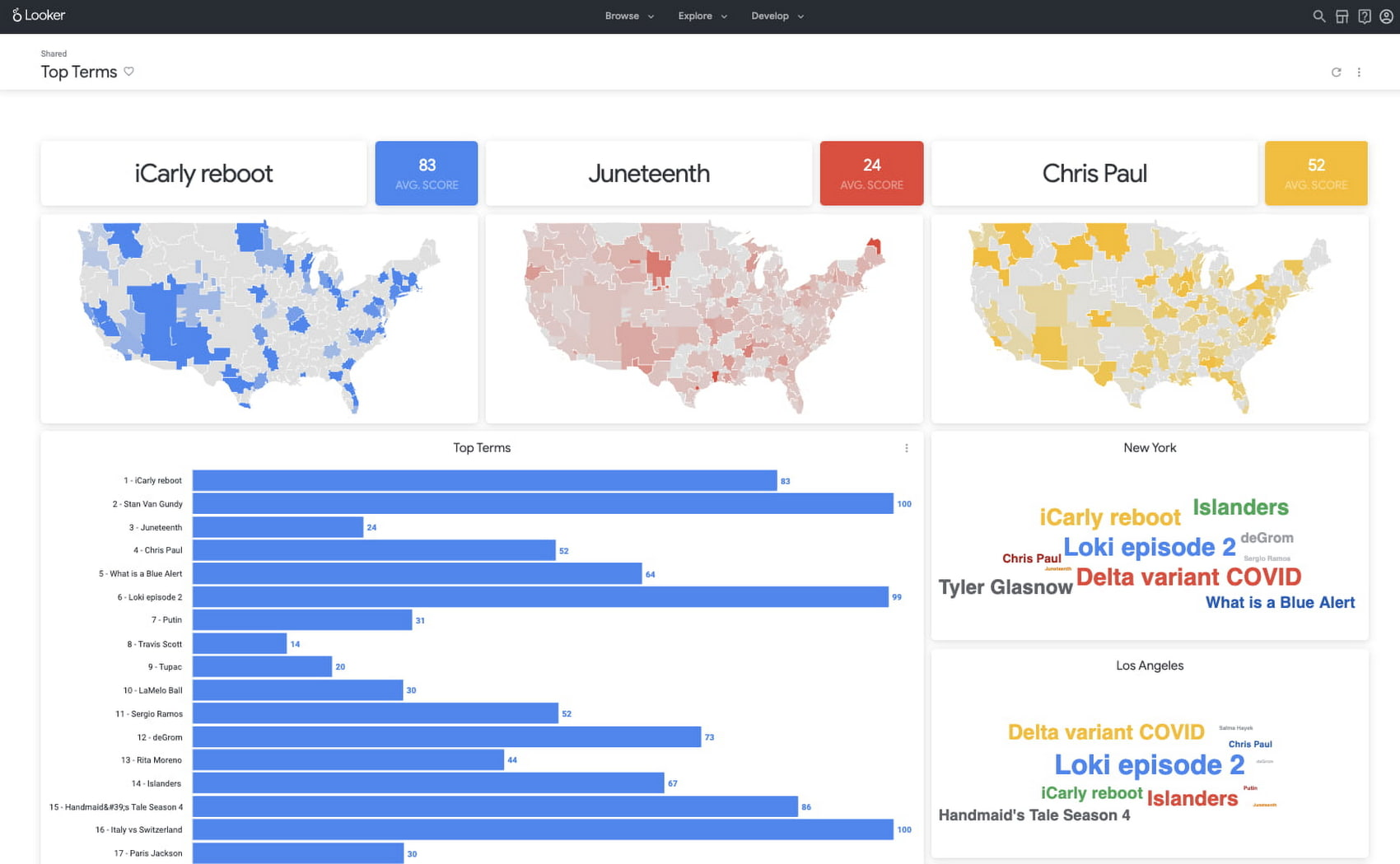
- The Google Trends dataset represents the first time we’re adding Google-owned Search data into Datasets for Google Cloud. The Trends data allows users to measure interest in a particular topic or search term across Google Search, from around the United States, down to the city-level. You can learn more about the dataset here, and check out the Looker dashboard here! These tables are super valuable in their own right, but when you blend them with other actionable data you can unlock whole new areas of opportunity for your team. To learn how to make informed decisions with Google Trends data, keep reading.
- Access the dataset
New dataset: COVID-19 Vaccination Search Insights
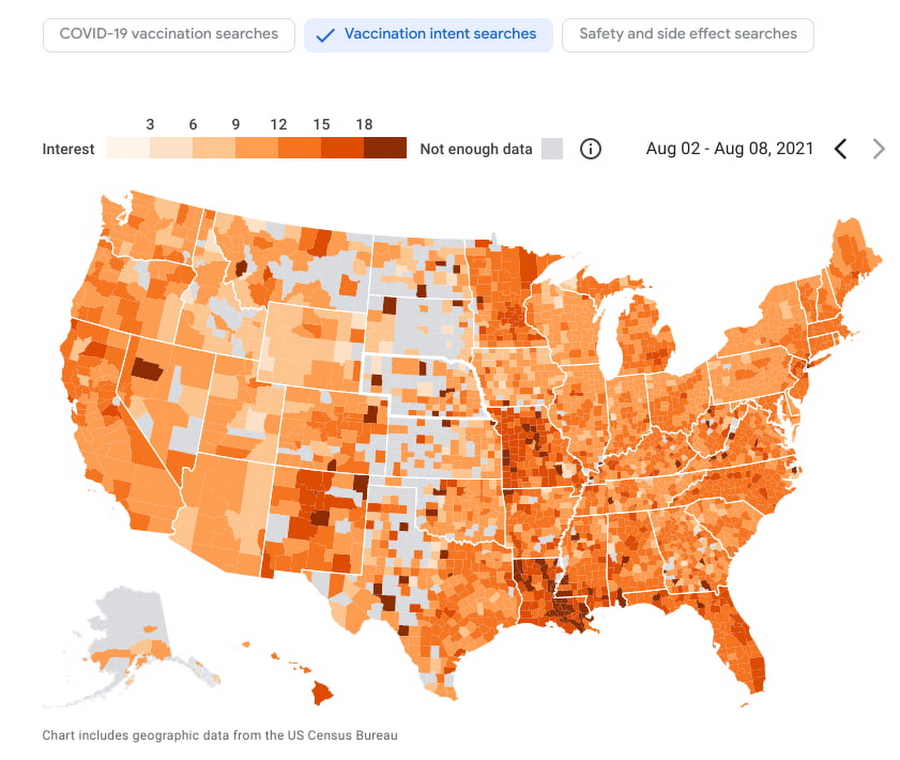
- With COVID-19 vaccinations being a topic of interest around the United States, this dataset shows aggregated, anonymized trends in searches related to COVID-19 vaccination and is intended to help public health officials design, target, and evaluate public education campaigns. Check out this interactive dashboard to explore searches for COVID-19 vaccination topics by region.
- Access the dataset
June 2021
New dataset: Google Diversity Annual Report 2021
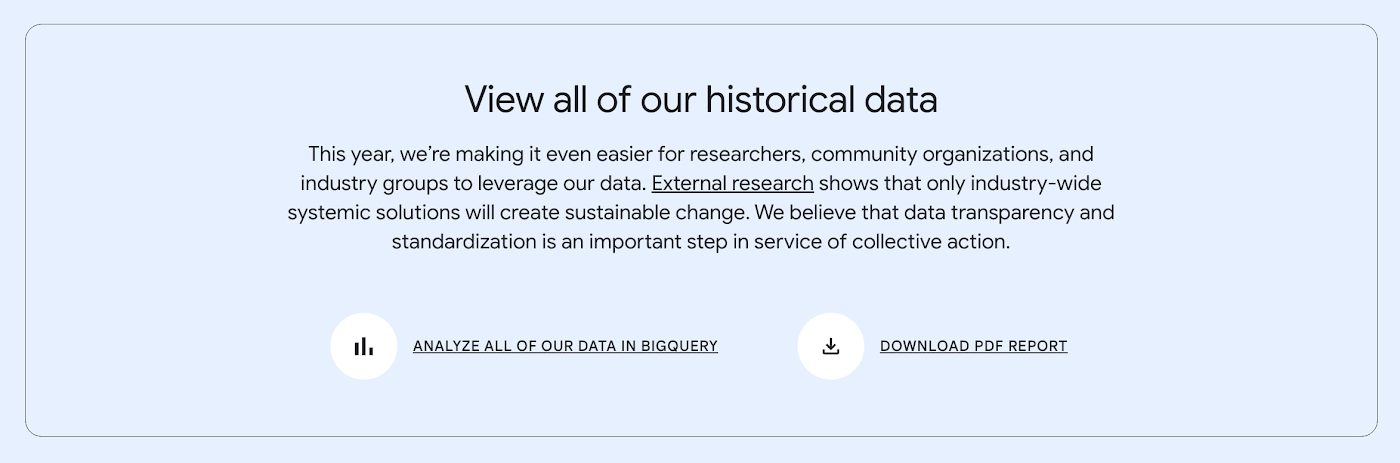
- Since 2014, Google has disclosed data on the diversity of its workforce in an effort to bring candid transparency to the challenges technology companies like Google face in recruitment and retention of underrepresented communities. In an effort to make this data more accessible and useful, we’ve loaded it into BigQuery for the first time ever. To view Google’s Diversity Annual Report and learn more, check it out.
- Access the dataset
New dataset: Google Trends Top 25 Search terms
- The most popular and surging Google Search terms are now available in BigQuery as a public dataset. View the Top 25 and Top 25 rising queries from Google Trends from the past 30-days, including 5 years of historical data across the 210 Designated Market Areas (DMAs) in the US. Keep reading.
- Access the dataset
New dataset: COVID-19 Vaccination Access
- With metrics quantifying travel times to COVID-19 vaccination sites, this dataset is intended to help Public Health officials, researchers, and Healthcare Providers to identify areas with insufficient access, deploy interventions, and research these issues. Check out how this data is being used in a number of new tools.
- Access the dataset

Best practice: Leveraging BigQuery Public Boundaries datasets for geospatial analytics
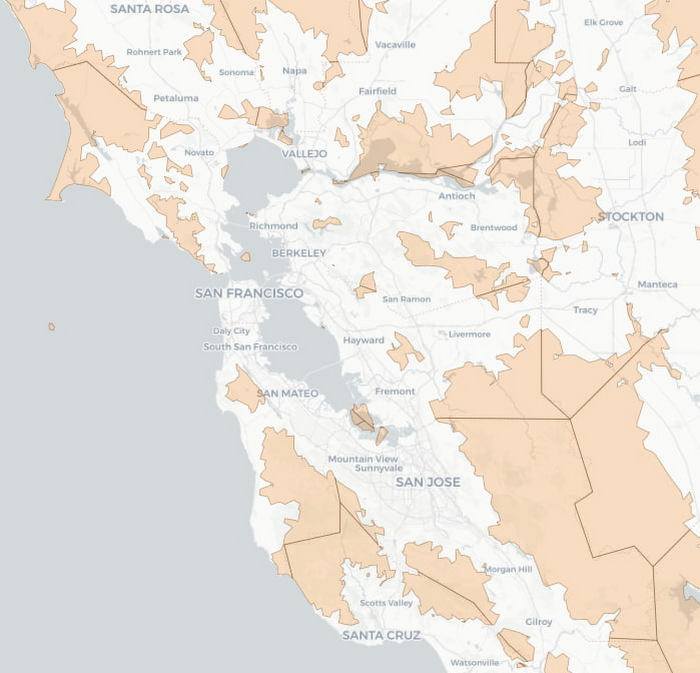
- Geospatial data is a critical component for a comprehensive analytics strategy. Whether you are trying to visualize data using geospatial parameters or do deeper analysis or modeling on customer distribution or proximity, most organizations have some type of geospatial data they would like to use – whether it be customer zipcodes, store locations, or shipping addresses. However, converting geographic data into the correct format for analysis and aggregation at different levels can be difficult. In this post, we’ll walk through some examples of how you can leverage the Google Cloud platform alongside Google Cloud Public Datasets to perform robust analytics on geographic data. Keep reading.
- Access the dataset

Get the metadata and try BigQuery sandbox
When you’ve learned about many of our datasets and pre-built solutions from across Google, you may be ready to start querying them. Check out the full dataset directory and read all the metadata at g.co/cloud/marketplace-datasets, then dig into the data with our free-to-use BigQuery sandbox account, or $300 in credits with our Google Cloud free trial.
More Relevant Stories for Your Company

How to Build a BI Dashboard With Google Data Studio and BigQuery
For as long as business intelligence (BI) has been around, visualization tools have played an important role in helping analysts and decision-makers quickly get insights from data. In our current era of big data analytics, that premise still holds. To provide an integrated platform for building BI dashboards on top


What’s Next for Personalization on Google Cloud
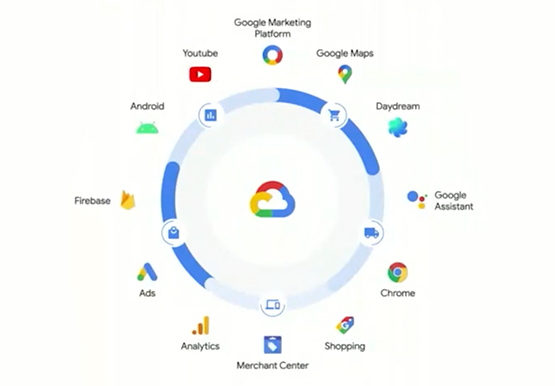
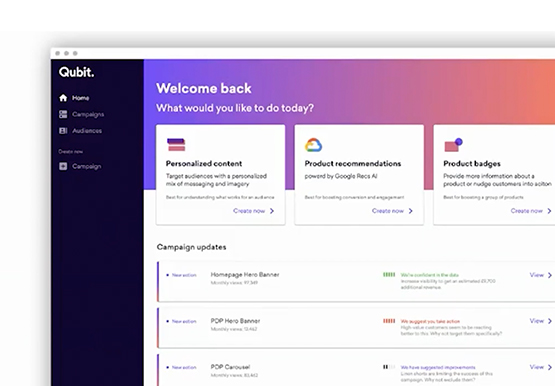
Customer shopping behavior has changed for good. With fewer in-store shopping visits retailers have had to shore up their digital storefronts and explore new ways to meaningfully engage with their customers. Delivering a superior customer experience has become even more of a differentiator for the early movers and personalized recommendations



The New and Upcoming Infrastructure for Google Cloud’s AI and ML Solutions
How does Google manage to provide its customers a differentiated compute platform experience and define ways to fully leverage its infrastructure supporting its cutting-edge AI and ML offerings? Easy-to-use, scalable and ability to create innovative products and services to end-users at low cost of ownership is the narrative behind Google

Enabling Sustainable Agriculture: InstaDeep uses Cloud TPU v4
You are what you eat. We’ve all been told this, but the truth is what we eat is often more complex than we are – genetically at least. Take a grain of rice. The plant that produces rice has 40,000 to 50,000 genes, double that of humans, yet we know
