





How to Build a BI Dashboard With Google Data Studio and BigQuery
READ FULL INTRODOWNLOAD AGAIN5200
Of your peers have already downloaded this article
2:30 Minutes
The most insightful time you'll spend today!
3257
Of your peers have already watched this video.
24:00 Minutes
The most insightful time you'll spend today!
An Introduction to MLOps on Google Cloud
The enterprise machine learning life cycle is expanding as firms increasingly look to automate their production ML systems.
MLOps is an ML engineering culture and practice that aims at unifying ML system development and ML system operation enabling shorter development cycles, increased deployment velocity, and more dependable releases in close alignment with business objectives.
In this video, Nate Keating, Product Manager, Google Cloud, will define and give an overview of MLOps and the discuss the challenges at play. He then shares where data science teams are today and where Google Cloud sees them going. Finally he will demonstrate a simple framework for MLOps based on real processes that he has seen in practice.
Learn how to construct your systems to standardize and manage the life cycle of machine learning in production with MLOps on Google Cloud.
MLOps Framework: Helping You Choose the Right Capabilities to Manage ML Projects
2896
Of your peers have already read this article.
3:00 Minutes
The most insightful time you'll spend today!
Establishing a mature MLOps practice to build and operationalize ML systems can take years to get right. We recently published our MLOps framework to help organizations come up to speed faster in this important domain.
As you start your MLOps journey, you might not need to implement all of these processes and capabilities. Some will have a higher priority than others, depending on the type of workload and business value that they create for you, balanced against the cost of building or buying processes or capabilities.
To help ML practitioners translate the framework into actionable steps, this blog post highlights some of the factors that influence where to begin, based on our experience in working with customers.
The following table shows the recommended capabilities (indicated by check marks) based on the characteristics of your use case, but remember that each use case is unique and might have exceptions. (For definitions of the capabilities, see the MLOps framework.)
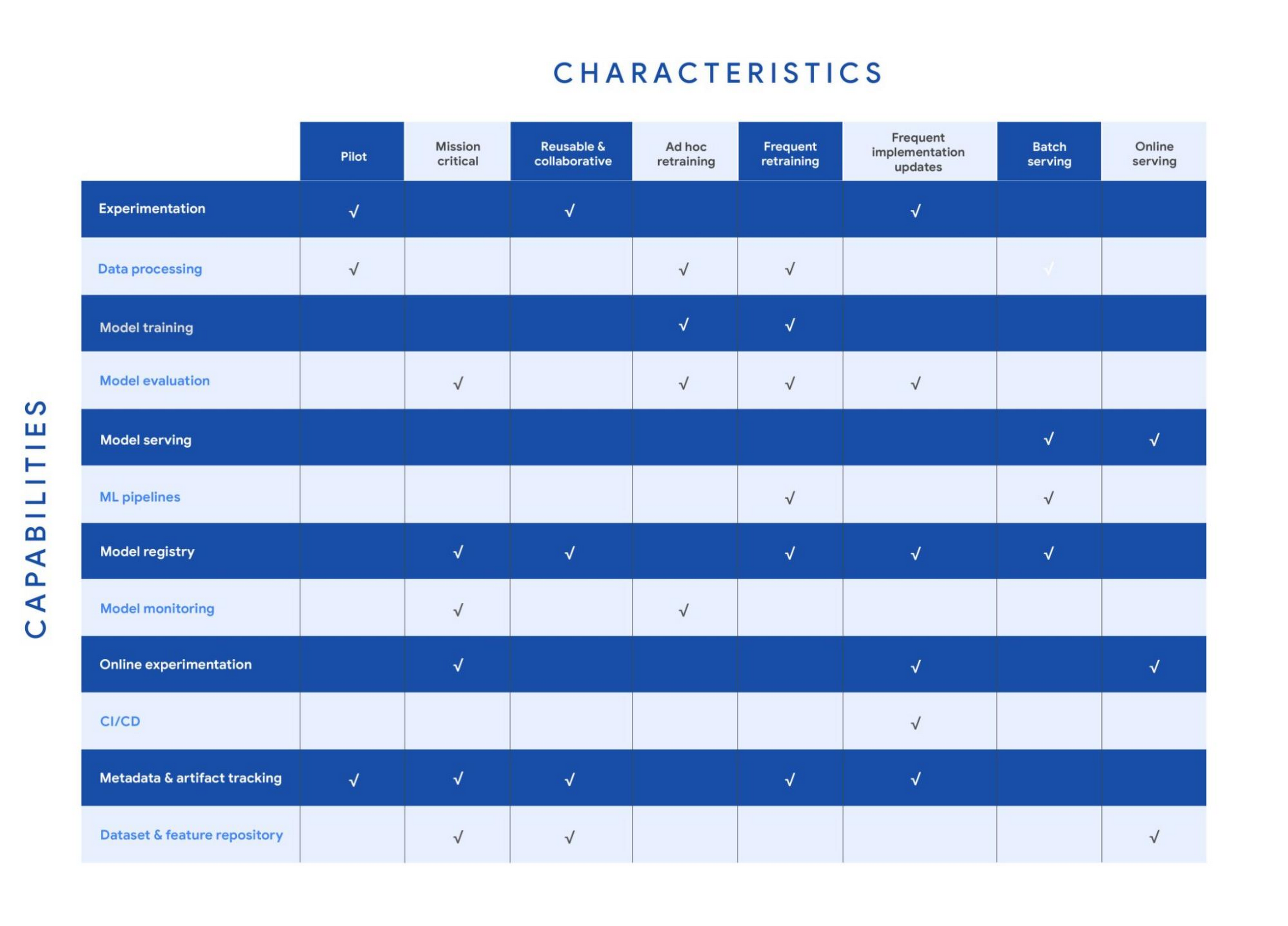
Your use case might have multiple characteristics. For example, consider a recommender system that’s retrained frequently and that serves batch predictions. In that case, you need the data processing, model training, model evaluation, ML pipelines, model registry, and metadata and artifact tracking capabilities for frequent retraining. You also need a model serving capability for batch serving.
In the following sections, we provide details about each of the characteristics and the capabilities that we recommend for them.
Pilot
Example: A research project for experimenting with a new natural language model for sentiment analysis.
For testing a proof of concept, your focus is typically on data preparation, feature engineering, model prototyping, and validation. You perform these tasks using the experimentation and data processing capabilities. Data scientists want to set up experiments quickly and easily and track and compare them. Therefore, you need the ML metadata and artifact tracking capability in order to debug, to provide traceability and lineage, to share and track experimentation configurations, and to manage ML artifacts. For large-scale pilots, you might also require dedicated model training and evaluation capabilities.
Mission-critical
Example: An equities trading model where model performance degradation in production can put millions of dollars at stake.
In a mission-critical use case, failure with the training process or production model has a significant negative impact on the business (a legal, ethical, reputational, or financial risk). The model evaluation capability is important to identify bias and fairness, as well as to provide explainability of the model. Additionally, monitoring is essential to assess the quality of the model during training and to assess how it performs in production. Online experimentation lets you test newly trained models against the one in production using a controlled environment before you replace the deployed model. Such use cases also need a robust model governance process to store, evaluate, check, release, and report on models and to protect against risks. You can enable model governance by using the model registry and metadata and artifact tracking capabilities. Additionally, datasets and feature repositories provide you with high-quality data assets that are consistent and versioned.
Reusable and collaborative
Example: Customer Analytic Record (CAR) features that are used across various propensity modeling use cases.
Reusable and collaborative assets allow your organization to share, discover, and reuse AI data, source code, and artifacts. A feature store helps you standardize the processes of registering, storing, and accessing features for training and serving ML models. Once features are curated and stored, they can be discovered and reused by multiple data science teams. Having a feature store helps you avoid reengineering features that already exist, and saves time on experimentation. You can also use tools to unify data annotation and categorization. Finally, by using ML metadata and artifacts tracking, you help provide consistency, testability, security and repeatability of the ML workflows.
Ad hoc retraining
Example: An object detection model to detect various car parts, which needs to be retrained only when new parts are introduced.
In ad hoc retraining, models are fairly static and you do not retrain them except when the model performance degrades. In these cases, you need data processing, model training, and model evaluation capabilities to train the models. Additionally, because your models are not updated for long periods, you need model monitoring. Model monitoring detects data skews, including schema anomalies, as well as data and concept drifts and shifts. Monitoring also lets you continuously evaluate your model performance, and it alerts you when performance decreases or when data issues are detected.
Frequent retraining
Example: A fraud detection model that’s trained daily in order to capture recent fraud patterns.
Use cases for frequent retraining are ones where model performance relies on changes in the training data. The retraining might be based on time intervals (for example, daily or weekly), or it could be triggered based on events like when new training data becomes available. For this scenario, you need ML pipelines to connect multiple steps like data extraction, preprocessing, and model training. You also need the model evaluation capability to ensure that the accuracy of the newly trained model meets your business requirements. As the number of models you train grows, both a model registry and metadata and artifact tracking help you keep track of the training jobs and model versions.
Frequent implementation updates
Example: A promotion model with frequent changes to the architecture to maximize conversion rate.
Frequent implementation updates involve changes to the training process itself. That might mean switching to a different ML framework, such as changing the model architecture (for example, LSTM to Attention) or adding a data transformation step in your training pipeline. Such changes in the foundation of your ML workflow require controls to ensure that the new code is functional and that the new model matches or outperforms the previous one. Additionally, the CI/CD process accelerates the time from ML experimentation to production, as well as reducing the possibility for human error. Because the changes are significant, online experimentation is necessary to ensure that the new release is performing as expected. You also need other capabilities such as experimentation, model evaluation, model registry, and metadata and artifact tracking to help you operationalize and track your implementation updates.
Batch serving
Example: A model that serves weekly recommendations to a user who has just signed up for a video-streaming service.
For batch predictions, there is no need to score in real time. You precompute the scores and you store them for later consumption, so latency is less of a concern than in online serving. However, because you process a large amount of data at a time, throughput is important. Often batch serving is a step in a larger ETL workflow that extracts, pre-processes, scores, and stores data. Therefore, you need the data processing capability and ML pipelines for orchestration. In addition, a model registry can provide your batch serving process with the latest validated model to use for scoring.
Online serving
Example: A RESTful microservice that uses a model to translate text between multiple languages.
Online inference requires tooling and systems in order to meet latency requirements. The system often needs to retrieve features, to perform inference, and then to return the results according to your serving configurations. A feature repository lets you retrieve features in near real time, and model serving allows you to easily deploy models as an endpoint. Additionally, online experiments help you test new models with a small sample of the serving traffic before you roll the model out to production (for example, by performing A/B testing).
Get started with MLOps using Vertex AI
We recently announced Vertex AI, our unified machine learning platform that helps you implement MLOps to efficiently build and manage ML projects throughout the development lifecycle. You can get started using the following resources:
- MLOps: Continuous delivery and automation pipelines in machine learning
- Getting started with Vertex AI
- Best practices for implementing machine learning on Google Cloud
Acknowledgements: I’d like to thank all the subject matter experts who contributed, including Alessio Bagnaresi, Alexander Del Toro, Alexander Shires, Erin Kiernan, Erwin Huizenga, Hamsa Buvaraghan, Jo Maitland, Ivan Nardini, Michael Menzel, Nate Keating, Nathan Faggian, Nitin Aggarwal, Olivia Burgess, Satish Iyer, Tuba Islam, and Turan Bulmus. A special thanks to the team that helped create this, Donna Schut, Khalid Salama, and Lara Suzuki, and Mike Pope for his ongoing support.
Making Hybrid Work Human: Google Workspace and Economist Impact Survey

5479
Of your peers have already read this article.
2:30 Minutes
The most insightful time you'll spend today!
Google Workspace recently commissioned Economist Impact to complete a global survey (October 2021)* on the state of hybrid work, including its challenges and opportunities. We already knew that the pandemic had fundamentally changed the world of work, but the survey emphasizes the scale, reach, and longevity of those changes..
Over 75% of respondents believe that hybrid/flexible work will be a standard practice within their organizations in the coming three years. Given that 70% of respondents said they never worked remotely before the pandemic, it’s clear that hybrid has become the dominant model for work and that it’s here to stay.
But it’s also clear, as we’ll see below, that hybrid has some serious gaps that need to be addressed if it’s going to be sustainable and successful in the long term.
Defining hybrid work
As part of our work on the hybrid work survey and a broader project with The Economist Group, we interviewed a group of experts across research, consulting, business, and the advocacy world to arrive at a definition of hybrid work that captures all ways work is changing.
As Brian Kropp, one of the interviewees and vice president at Gartner, puts it: “Hybrid work is not just about different locations, but also different timings and different schedules.”
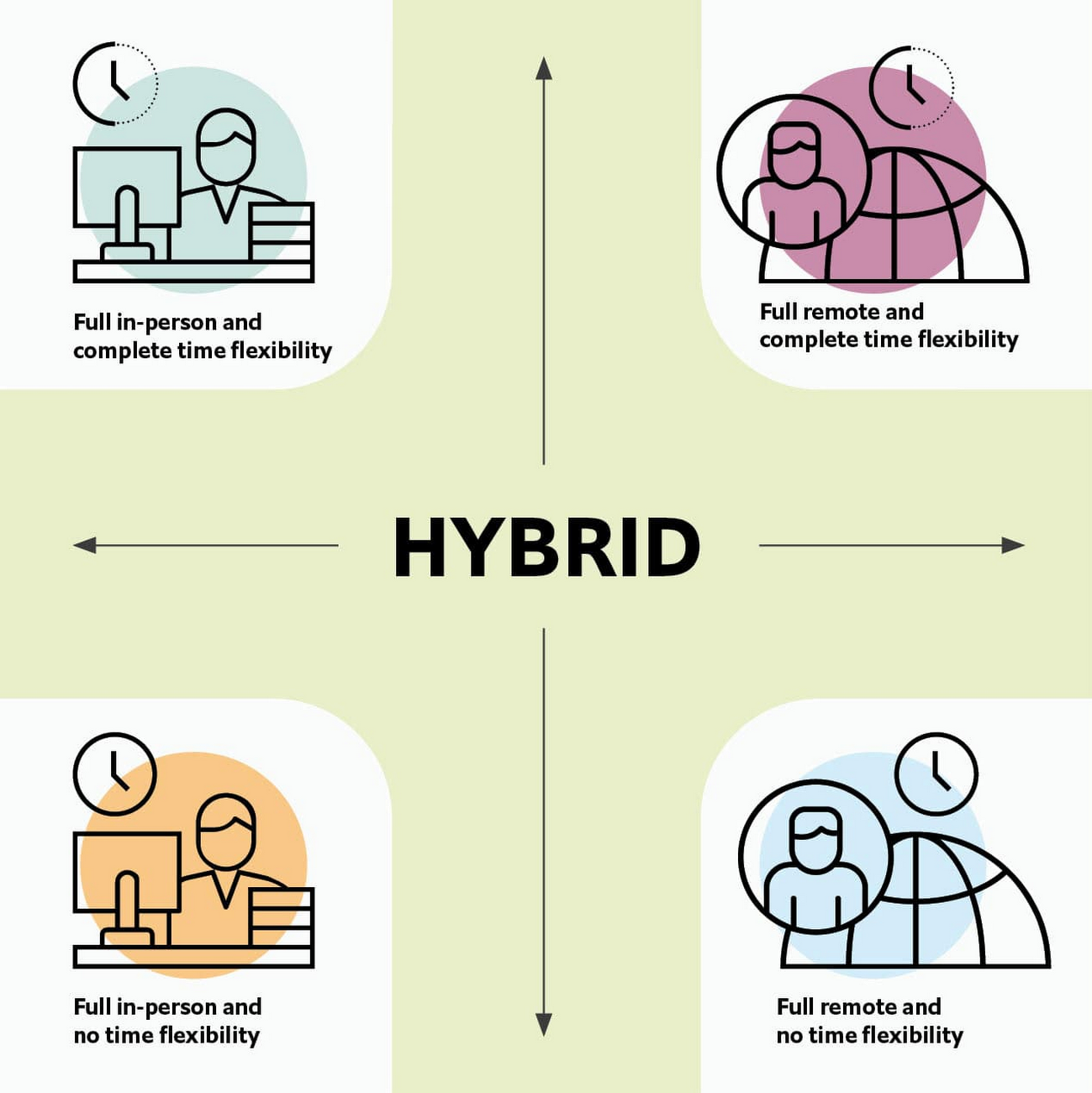
Harriet Molyneaux, managing director at HSM Advisory, a future-of-work research and advisory group, adds to this notion by describing the time-location work spectrum: “At one end of the spectrum is everyone in the office, nine till five, so both restricted time and location. And then at the other end of the spectrum is anywhere around the world at any time. So no restricted time or location. A hybrid is anything that sits in the middle of that.”
I agree with Brian and Harriet’s views. Flexibility in both location and hours is a core part of our working definition of hybrid work: a spectrum of flexible work arrangements in which an employee’s work location and/or hours are not strictly standardized.
Given this definition and framework, how is hybrid work faring and what lies ahead?
Individual wellbeing is coming at the cost of organizational connection
Early on in the pandemic, productivity remained steady or even increased for many organizations. But it came at a cost, with levels of burnout spiking as employees juggled caregiving, homeschooling, and other demands in their personal lives with work responsibilities.
Based on the survey data, wellbeing has made an upward shift, no doubt aided by things like students returning to schools in many regions and fewer demands being made of working parents. The majority of respondents said that hybrid work, based on their own experiences, can have a positive impact on the physical, mental, financial, and social wellbeing of employees.
But it appears that individual wellbeing is coming at the cost of organizational connection. The majority of respondents said they feel disconnected from their organization and co-workers (57%), that limited networking opportunities negatively impact career growth (62%), and that limited social interactions with co-workers has had a negative impact on their mental health (54%).
To be sustainable, hybrid work models must address this sense of disconnection in real and tangible ways. And it won’t happen just by increasing the number of virtual meetings. Although 72% of people say that virtual meetings improve inclusion and participation, 68% also say there are too many virtual meetings to begin with. We need new ways for people to connect spontaneously.
Hybrid workers are often using tools built for a bygone desktop era
When asked about the most important conditions needed to achieve the long-term success of hybrid work models, the number one choice globally was “new technologies that allow for time and location flexibility.”
Naturally, it was gratifying to see this, since Google Workspace is built on a cloud-based platform that empowers collaboration from anywhere, on any device, but the survey answer also highlights how much organizations have had to scramble to meet the demands of the pandemic. Some had to take legacy, office-centric systems and make them work for a distributed workforce overnight, often leveraging less-than-ideal technologies like VPNs that introduce digital friction.
As a result, top technology concerns of respondents include:
- unreliable internet access (if only all our WiFi connections were hybrid-ready!)
- reliance on slow or outdated tools
- accessing and maintaining files in multiple places
- relying on too many applications in order to get work done
Hybrid work, it seems to me, doesn’t need more applications and collaboration surfaces. It needs deeper, more meaningful connections in the tools and surfaces we already have.
As organizations assess their tech stacks, they should consider whether they can shape the behaviors they want from hybrid employees (e.g., real-time collaboration, ease of information sharing) with the tools they have in place. Or are the limits of the technology determining hybrid employee behavior?
The management and culture gap
In the same way that tools have often been built for a shared physical workspace, organizational culture seems to lag behind the hybrid moment. The majority of respondents said that a lack of face-to-face supervision creates a sense of distrust among managers and employees, and that they feel stressed by increased monitoring associated with flexible work. And more than 62% said that limited networking opportunities with senior employees and co-workers has a negative impact on career growth.
Strikingly, more than 70% of respondents indicated that the culture of trust between managers and employees needed improvement. Training and management best practices (60% of people want more of both) might help fill some of the gaps, but a manager can’t build trust with their hybrid teams by going through a training program.
The role of manager must itself evolve to meet the demands of a hybrid model. How can we empower managers to be the bridge between the “office of one” and the “office of many”? And as I discussed previously on Forbes, driving towards impact rather than output is a more sustainable metric for team engagement and productivity. It also dispenses with monitoring as a core part of a manager’s role, freeing them up to be a coach-and-connector.
How Google Workspace can help bridge the hybrid work gaps
No one has all the answers for how to make hybrid work successful, and I suspect we will see iterations of the model into 2022 and beyond as organizations—including Google—experiment with the right mix of location, culture, processes, and tools.
On the technology front, Google Workspace is uniquely positioned to bridge many of the emerging hybrid work gaps. Over the last year, we’ve delivered a set of innovations that are designed to deepen collaboration experiences while strengthening social connections within and across teams.
For example, we launched smart canvas to bring new collaboration capabilities to the places where people are already working together, helping to keep them connected, rather than having them switch tabs or open new apps. And we delivered Spaces as a central place for collaboration, where teams can share ideas, work on documents together, and manage tasks from a single place. Because all their work is preserved for future reference, team members can easily jump in and contribute at a time that works best for them, seeing a full history of the conversations, context, and content along the way. Spaces helps people maintain individual wellbeing while preserving the health of a group project.
In Google Meet, we’ve introduced real-time captions in multiple languages (in preview now), the ability for people to customize their video tiles, including being able to turn off their own to help with meeting fatigue, and we’ve implemented automatic light adjustments and noise cancellation. These changes help ensure that everyone can be seen and heard.
Meanwhile, features like hand-raise, Q&A, and polls have helped make meetings more inclusive and companion mode (in preview) can bring these to life in hybrid settings, to help ensure that there’s one cohesive conversation between the people in the office and their colleagues working somewhere else. We view companion mode as a bridge between the office and “somewhere else.”
On the personal wellbeing front, we launched Focus Time, which lets people block out their calendars for uninterrupted focus work, and Time Insights in Google Calendar, where employees can look at how they’re spending their time and adjust as needed.
As hybrid work continues to evolve, Google Workspace is committed to supporting wellbeing and seamless collaboration with tools that can remove digital friction and help people maintain connections—to each other and the organizations they work for.
*Survey details: The survey, completed in October 2021, polled a total of 1,244 employees and managers in four regions (North America, Europe, APAC, and Latin America), from more than 15 industries, in every age group, and from both small and large organizations. The focus was on knowledge workers, though it’s important to note that some of those people have been working on the frontlines; 20% of respondents indicated they haven’t worked remotely at all during the pandemic. This includes people in hospitality, retail, transportation and logistics, and healthcare.
Google’s Record-breaking Performance Tops the MLPerf Benchmark Results
3126
Of your peers have already read this article.
4:00 Minutes
The most insightful time you'll spend today!
The latest round of MLPerf benchmark results have been released, and Google’s TPU v4 supercomputers demonstrated record-breaking performance at scale. This is a timely milestone since large-scale machine learning training has enabled many of the recent breakthroughs in AI, with the latest models encompassing billions or even trillions of parameters (T5, Meena, GShard, Switch Transformer, and GPT-3).
Google’s TPU v4 Pod was designed, in part, to meet these expansive training needs, and TPU v4 Pods set performance records in four of the six MLPerf benchmarks Google entered using TensorFlow and JAX. These scores are a significant improvement over our winning submission from last year and demonstrate that Google once again has the world’s fastest machine learning supercomputers. These TPU v4 Pods are already widely deployed throughout Google data centers for our internal machine learning workloads and will be available via Google Cloud later this year.
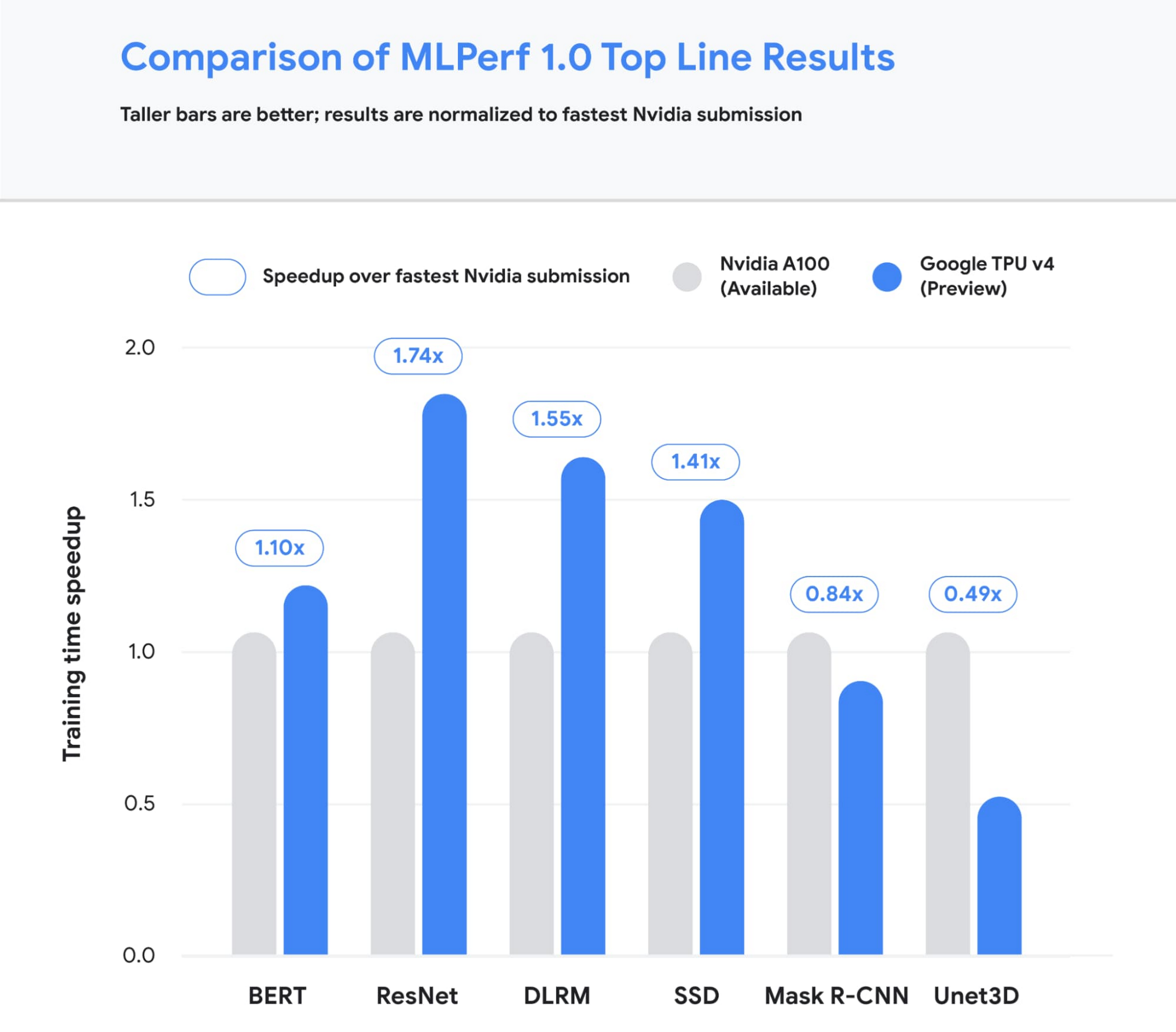
Figure 1: Speedup of Google’s best MLPerf Training v1.0 TPU v4 submission over the fastest non-Google submission in any availability category – in this case, all baseline submissions came from NVIDIA. Comparisons are normalized by overall training time regardless of system size. Taller bars are better.1
Let’s take a closer look at some of the innovations that delivered these ground-breaking results and what this means for large model training at Google and beyond.
Google’s continued performance leadership
Google’s submissions for the most recent MLPerf demonstrated leading top-line performance (fastest time to reach target quality), setting new performance records in four benchmarks. We achieved this by scaling up to 3,456 of our next-gen TPU v4 ASICs with hundreds of CPU hosts for the multiple benchmarks. We achieved an average of 1.7x improvement in our top-line submissions compared to last year’s results. This means we can now train some of the most common machine learning models in a matter of seconds.
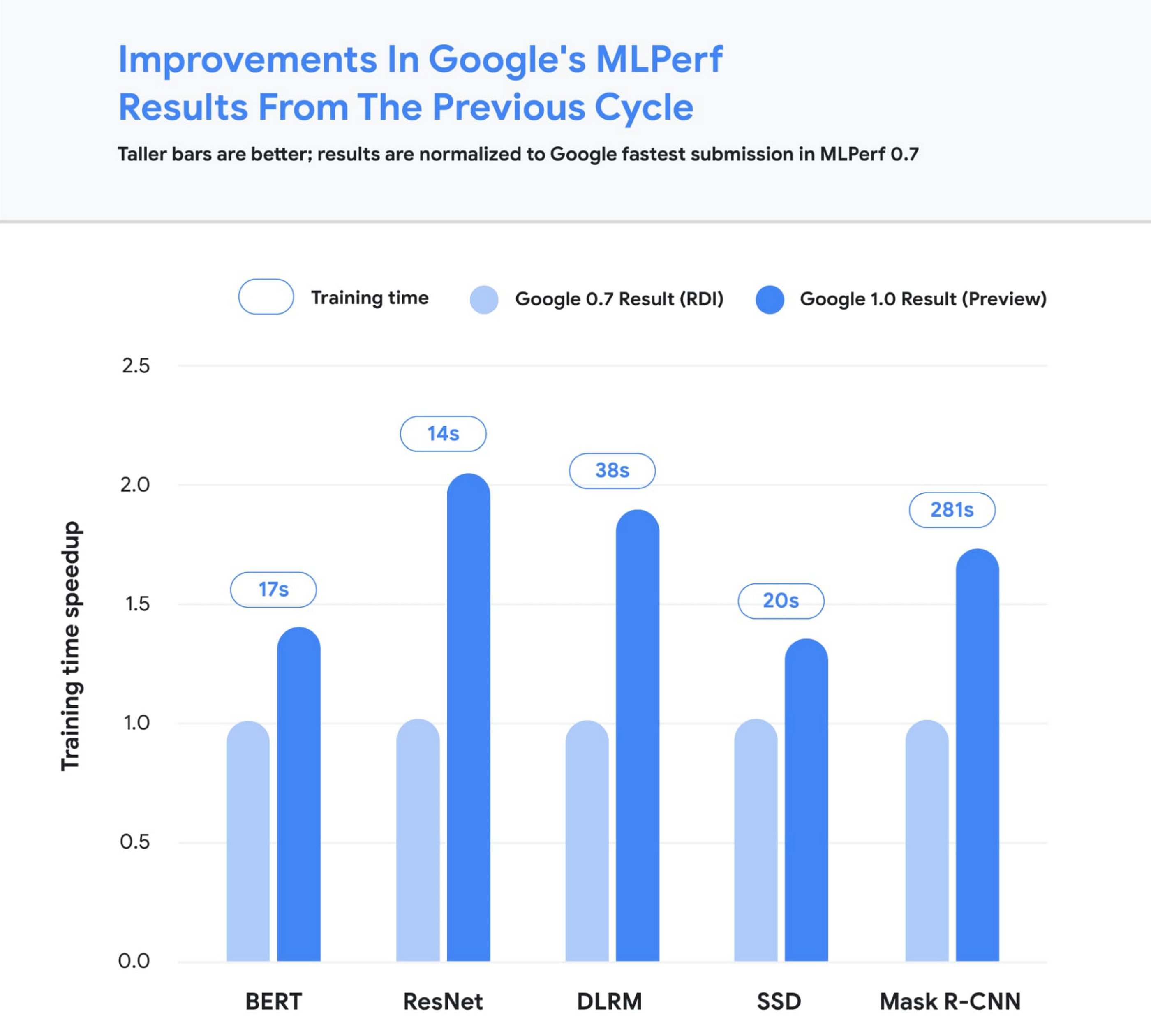
Figure 2: Speedup of Google’s MLPerf Training v1.0 TPU v4 submission over Google’s MLPerf Training v0.7 TPU v3 submission (exception: DLRM results in MLPerf v0.7 were obtained using TPU v4). Comparisons are normalized by overall training time regardless of system size. Taller bars are better. Unet3D not shown since it is a new benchmark for MLPerf v1.0.2
We achieved these performance improvements through continued investment in both our hardware and software stacks. Part of the speedup comes from using Google’s fourth-generation TPU ASIC, which offers a significant boost in raw processing power over the previous generation, TPU v3. 4,096 of these TPU v4 chips are networked together to create a TPU v4 Pod, with each pod delivering 1.1 exaflop/s of peak performance.

Figure 3: A visual representation of 1 exaflop/s of computing power. If 10 million laptops were running simultaneously, then all that computing power would almost match the computing power of 1 exaflop/s.
In parallel, we introduced a number of new features into the XLA compiler to improve the performance of any ML model running on TPU v4. One of these features provides the ability to operate two (or potentially more) TPU cores as a single logical device using a shared uniform memory access system. This memory space unification allows the cores to easily share input and output data – allowing for a more performant allocation of work across cores. A second feature improves performance through a fine-grained overlap of compute and communication. Finally, we introduced a technique to automatically transform convolution operations such that space dimensions are converted into additional batch dimensions. This technique improves performance at the low batch sizes that are common at very large scales.
Enabling large model research using carbon-free energy
Though the margin of difference in topline MLPerf benchmarks can be measured in mere seconds, this can translate to many days worth of training time on the state-of-the-art models that comprise billions or trillions of parameters. To give an example, today we can train a 4 trillion parameter dense Transformer with GSPMD on 2048 TPU cores. For context, this is over 20 times larger than the GPT-3 model published by OpenAI last year. We are already using TPU v4 Pods extensively within Google to develop research breakthroughs such as MUM and LaMDA, and improve our core products such as Search, Assistant and Translate. The faster training times from TPUs result in efficiency savings and improved research and development velocity. Many of these TPU v4 Pods will be operating at or near 90% carbon free energy. Furthermore, cloud datacenters can be ~1.4-2X more energy efficient than typical datacenters, and the ML-oriented accelerators – like TPUs – running inside them can be ~2-5X more effective than off-the-shelf systems.
We are also excited to soon offer TPU v4 Pods on Google Cloud, making the world’s fastest machine learning training supercomputers available to customers around the world. Cloud TPUs support leading frameworks such as TensorFlow, PyTorch, and Jax, and we recently released an all-new Cloud TPU system architecture that provides direct access to TPU host machines, greatly improving the user experience.
Want to learn more?
Please contact your Google Cloud sales representative to request early access to Cloud TPU v4 Pods. We are excited to see how you will expand the machine learning frontier with access to exaflops of TPU computing power!
1. All results retrieved from www.mlperf.org on June 30, 2021. MLPerf name and logo are trademarks. See www.mlperf.org for more information. Chart uses results 1.0-1067, 1.0-1070, 1.0-1071, 1.0-1072, 1.0-1073, 1.0-1074, 1.0-1075, 1.0-1076, 1.0-1077, 1.0-1088, 1.0-1089, 1.0-1090, 1.0-1091, 1.0-1092.
2. All results retrieved from www.mlperf.org on June 30, 2021. MLPerf name and logo are trademarks. See www.mlperf.org for more information. Chart uses results 0.7-65, 0.7-66, 0.7-67, 1.0-1088, 1.0-1090, 1.0-1091, 1.0-1092.
3152
Of your peers have already watched this video.
11:30 Minutes
The most insightful time you'll spend today!
Transitioning Kagglers to TPU with TF 2.x
Kaggle has, historically, become synonymous with machine learning competitions but it’s much more than that. Kaggle is a data science platform. Over 5 million data scientists from all over the world come to Kaggle to not only not only participate in machine learning competitions but to learn data science build their skills, polish their portfolios and share data sets and code.
Earlier on Kaggle introduced TPU support through its competition platform. In this video, Addison Howard, Program Manager, Google Cloud and Phil Culliton, Kaggle Data Scientist, Google Cloud talk about how Kaggler competitors transition from GPU to TPU use – first in Colab, and then in Kaggle notebooks.
More Relevant Stories for Your Company

How to Use Machine Learning to Achieve 300% Increase in Gross Profits
Since 1994, IDOM, Japan’s leading buyer and retailer of used cars, has enjoyed success in the auto industry with a simple yet traditional business model: buy pre-owned vehicles directly from car owners and auction them to third-party dealers, or sell them to other consumers at retail stores. In an increasingly



Driving Business Transformation in Financial Services Using Google Cloud and AI/ML
These are challenging times with financial services institutions navigating the pandemic. Interest rates are an all-time low, and customer expectations are changing with the shift to digital. For example, digital banking has increased from 63 in 2019 to 72 percent today. Then regulatory requirements are evolving and compliance costs are

Accelerate Innovation with Google Cloud’s Managed Database Services
Google Cloud’s managed database services can help you innovate faster and reduce operational overhead. The migration tools and resources included in this whitepaper will help you plan your migration. This whitepaper provides guidance on: Managing services for maximum compatibility with your workloads Leveraging services that are compatible with the most
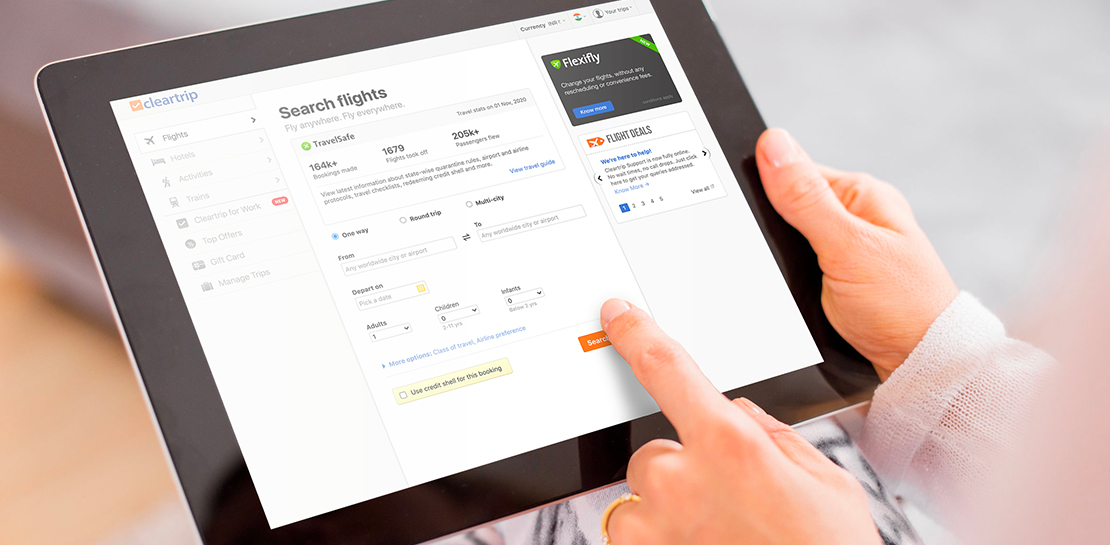
How Cleartrip.com is leveraging Google Cloud to survive the slump in the travel industry
With the novel coronavirus COVID-19 sweeping across continents and fatalities climbing every day, it was only a matter of time before countries closed their borders to contain its spread. In the wake of this decision, travel and tourism, the linchpins of many economies, were among the worst affected. According to
