





Serverless and BigQuery Together on Google Cloud: Behind the L’Oreal Beauty Tech Data Platform

5362
Of your peers have already read this article.
4:00 Minutes
The most insightful time you'll spend today!
Editor’s note: In Today’s guest post we hear from beauty leader L’Oréal about their approach to building a modern data platform on fully managed services: managing the ingest of diverse datasets into BigQuery with Cloud Run, and orchestrating transformations into relevant business domain representations for stakeholders across the organization. Learn more about how businesses have benefited from Cloud Run in Forrester’s report on Total Economic Impact.
L’Oréal was born out of science. For over 100 years, we have always shaped the future of beauty, and taken its eternal quest to new horizons. This has earned us our current position as the world’s uncontested beauty leader (~€ 32 B annual sales in 2021), present in 150 countries with over 85,000 employees.
Today, with the power of our game-changing science, multiplied by cutting-edge technologies, we continue our lifelong journey of shaping the future of beauty.
As a Beauty Tech company, we leverage our decades-long heritage of rich data assets to empower our decision-making with instant, sophisticated analysis.
Because we oversee global brands, which must adapt to local requirements, we need to maintain a deep understanding of what a brands’ data represents, while managing disparate legal and regulatory requirements for different countries. Our end goal is to run a safe, compliant and sustainable data warehouse as efficiently and effectively as possible.
We sync and aggregate internal and external data from a wide variety of sources across organizations and retail stores. This made the management of our data warehouse infrastructure used to be very complex and hard to manage before Google Cloud. L’Oréal’s footprint was so large that we once found it impossible to have a standardized method to handle data. Every process was vendor-specific, and the infrastructure was brittle. We went looking for a solution to our complex data infrastructure needs, and defined the following non-negotiable principles:
- No Ops: The job of a developer at L’Oréal is not to manage servers. We need an elastic infrastructure that scales on demand, so that our developers can focus on delivering customized and inclusive beauty experiences to all consumers, rather than focusing on managing servers.
- Secure: We have strict security and compliance requirements which vary by country, and we employ a zero-trust security strategy. We must keep both our own internal data and customer data safe and encrypted.
- Sustainable : Our data lives in multiple environments, including on-prem data centers and public cloud services. We must be able to securely access and analyze this data while minimizing the complexity and environmental impact of moving and duplicating data.
- End-to-end supervision: Because developers shouldn’t be managing servers, we need a “single pane of glass” dashboard to monitor and triage the system if something goes wrong.
- Easy-to-deploy: Deploying code safely should not compromise velocity. We are constantly developing innovations that push the boundaries of science and reinvent beauty rituals. We need integrated tools to make our code deployment process seamless and safe.
- Event-driven architecture: Our data is used globally by research, product, business and engineering teams with high expectations on data quality and timeliness. Many of our internal processes and analysis are based on near real-time data.
- Data products delivered “as a service”: We want to empower our employees to drive business value at record speed. To that end, we need solutions that enable us to remove the developers from the critical path of solution delivery as much as possible.
- Extract-load-transform (ELT): Our goal is to implement the pattern to load data as soon as possible into the data warehouse to take advantage of SQL transformations.
After considering multiple vendors on the market, with these principles in mind, we landed on end-to-end Google Cloud serverless and data tooling. We were already using Google Cloud for a few processes, including BigQuery, and loved the experience.
We’ve now expanded our use of Google Cloud to fully support the L’Oréal Beauty Tech Data Platform.
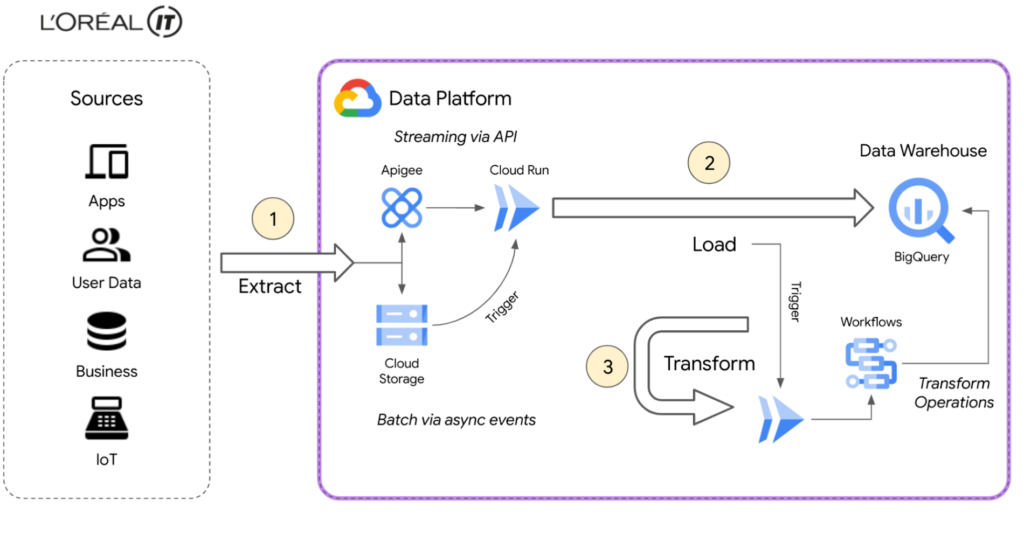
L’Oréal’s Beauty Tech Data Platform incorporates data from two types of sources: directly via API, which is data that adapts easily to our schema and is inserted directly into BigQuery, and bulk data from integrations, which require event-driven transformations using Eventarc mechanisms. These transformations are performed in Cloud Run and Cloud Functions (2nd gen), or directly in SQL. With Google Cloud, we can adapt very quickly.
Today, we currently have 8500 flows for ~5000 users using the native zero-trust capabilities offered by Google Cloud. Indeed, the flows come from Google Cloud and other third-party services.
BigQuery enabled us to adopt standard SQL as our universal language in our data warehouse and meet all expectations for queries and reporting. We were also able to load original data using features like federated queries, and efficiently transitioned from ETL to ELT data ingestion by handling semi-structured data with SQL. This approach of loading original data from sources into BigQuery with non-destructive transformations allows us to reprocess data for new use-cases easily, directly within BigQuery.
Our applications are hosted on multiple environments – on-premises, in Google Cloud, and in other public clouds. This made it difficult for our data engineers and analysts to natively analyze data across clouds until we started using BigQuery Omni. This capability of BigQuery allowed us to globally access and analyze data across clouds through a single pane of glass using the native BigQuery user interface itself. Without BigQuery Omni, it would’ve been impossible for our teams to natively do cross-cloud analytics. Moreover, it eliminated the need for us to move sensitive data, which is not only expensive because of local tax and subsea transport, but also incredibly risky – sometimes even forbidden – because of local regulations.
Today Google Cloud powers our Beauty Tech Data Platform, which stores 100TB of production data in BigQuery and processes 20TB of data each month. We have more than 8000 governed datasets, and 2 millions of BigQuery tables coming from multiple data sources such as Salesforce, SAP, Microsoft, and Google Ads.
For more complex transformations where custom and specific libraries are required, Cloud Workflows help us to manage the complexity very efficiently by orchestrating steps in containers through Cloud Run, Cloud Functions and even BigQuery jobs — the most used way to transform and add value to the L’Oréal data.
Additionally, by using BigQuery and Google Cloud’s serverless compute for API ingestion, bulk data loading, and post-loading transformations, we can keep the entire system in a single boundary of trust at a fraction of the cost. With ingest, queries, and transformations all being fully elastic and on-demand, we no longer have to perform capacity planning for either the compute or analytics components of the system. And of course these services’ pay-as-you-go model perfectly aligns with L’Oréal’s strategy of only paying for something when you use it.
Google Cloud fulfilled the requirements of our Beauty Tech Data Platform. And as if offering us a no-ops, secure, easy-to-deploy, custom-development free, event-based platform with end-to-end supervision wasn’t enough, Google Cloud also helped us with our sustainability efforts.
Being able to measure and understand the environmental footprint of our public cloud usage is also a key part of our sustainable tech roadmap. With Google Cloud Carbon Footprint, we can easily see the impact of our sustainable infrastructure approach and architecture principles. Our Beauty Tech platform is a strategic ambition for L’Oréal: inventing the beauty products of the future while becoming the company of the future.
Sustainable tech is an imperative and a very important step towards this ambition of creating responsible beauty for our consumers, and sustainable-by-design tech services for our employees. We all have a role to play, and by joining forces, we can have a positive impact.
Google Cloud’s data ecosystem and serverless tools are highly complementary, and made it possible to build a next-generation data analytics platform that met all our needs.
Get started using serverless and BigQuery together on Google Cloud today.
Four Key Takeaways from Google and Quantum Metric’s Back-to-School Retail Benchmark Study

4790
Of your peers have already read this article.
2:00 Minutes
The most insightful time you'll spend today!
Is it September yet? Hardly! School is barely out for the summer. But according to Google and Quantum Metric research, the back-to-school and off-to-college shopping season – which in the U.S. is second only to the holidays in terms of purchasing volume1 – has already begun. For retailers, that means planning for this peak season has kicked off as well.
We’d like to share four key trends that emerged from Google research and Quantum Metric’s Back-to-School Retail Benchmarks study of U.S. retail data, explore the reasons behind them, and outline the key takeaways.
- Out-of-stock and inflation concerns are changing the way consumers shop. Back-to-school shoppers are starting earlier every year, with 41% beginning even before school is out – even more so when buying for college1. Why? The behavior is driven in large part by consumers’ concerns that they won’t be able to get what they need if they wait too long. 29% of shoppers start looking a full month before they need something1.
Back-to-school purchasing volume is quite high, with the majority spending up to $500 and 21% spending more than $1,0001. In fact, looking at year-over-year data, we see that average cart values have not only doubled since November 2021, but increased since the holidays1. And keep in mind that back-to-school spending is a key indicator leading into the holiday season.
That said, as people are reacting to inflation, they are comparing prices, hunting for bargains, and generally taking more time to plan. This is borne out by the fact that 76% of online shoppers are adding items to their carts and waiting to see if they go on sale before making the purchase1. And, to help stay on budget and reduce shipping costs, 74% plan to make multiple purchases in one checkout1. That carries over to in-store shopping, when consumers are buying more in one visit to reduce trips and save on gas.
2. The omnichannel theme continues. Consumers continue to use multiple channels in their shopping experience. As the pandemic has abated, some 82% expect that their back-to-school buying will be in-store, and 60% plan to purchase online. But in any case, 45% of consumers report that they will use both channels; more than 50% research online first before ever setting foot in a store2. Some use as many as five channels, including video and social media, and these 54% of consumers spend 1.5 times more compared to those who use only two channels4.
And mobile is a big part of the journey. Shoppers are using their phones to make purchases, especially for deadline-driven, last-minute needs, and often check prices on other retailers’ websites while shopping in-store. Anecdotally, mobile is a big part of how we ourselves shop with our children, who like to swipe on the phone through different options for colors and styles. We use our desktops when shopping on our own, especially for items that require research and represent a larger investment – and our study shows that’s quite common.
3. Consumers are making frequent use of wish lists. One trend we have observed is a higher abandonment rate, especially for apparel and general home and school supplies, compared to bigger-ticket items that require more research. But that can be attributed in part to the increasing use of wish lists. Online shoppers are picking a few things that look appealing or items on sale, saving them in wish lists, and then choosing just a few to purchase. Our research shows that 39% of consumers build one or two wish lists per month, while 28% said they build one or two each week, often using their lists to help with budgeting1.
4. Frustration rates have dropped significantly. Abandonment rates aside, shopper annoyance rates are down by 41%, year over year1. This is despite out-of-stock concerns and higher prices. But one key finding showed that both cart abandonment and “rage clicks” are more frequent on desktops, possibly because people investing time on search also have more time to complain to customer service.
And frustration does still exist. Some $300 billion is lost each year in the U.S. from bad search experiences5. Data collected internationally shows that 80% of consumers view a brand differently after experiencing search difficulties, and 97% favor websites where they can quickly find what they are looking for5.
Lessons to Learn
What are the key takeaways for retailers? In general, consider the sources of customer pain points and find ways to erase friction. Improve search and personalization. And focus on improving the customer experience and building loyalty. Specifically:
80% of shoppers want personalization6. Think about how you can drive personalized promotions or experiences that will drive higher engagement with your brand.
46% of consumers want more time to research1. Drive toward providing more robust research and product information points, like comparison charts, images, and specific product details.
43% of consumers want a discount1, but given current economic trends, retailers may not be offering discounts. In order to appease budget-conscious shoppers, retailers can consider other retention strategies such as driving loyalty using points, rewards, or faster-shipping perks.
Be sure to keep returns as simple as possible so consumers feel confident when making a purchase, and reduce possible friction points if a consumer decides to make a return. 43% of shoppers return at least a quarter of the products they buy and do not want to pay for shipping or jump through hoops1.
How We Can Help
Google-sponsored research shows that price, deals, and promotions are important to 68% of back-to-school shoppers.7 In addition, shoppers want certainty that they will get what they want. Google Cloud can make it easier for retailers to enable customers to find the right products with discovery solutions. These solutions provide Google-quality search and recommendations on a retailer’s own digital properties, helping to increase conversions and reduce search abandonment. In addition, Quantum Metric solutions, available on the Google Cloud Marketplace, are built with BigQuery, which helps retailers consolidate and unlock the power of their raw data to identify areas of friction and deliver improved digital shopping experiences.
We invite you to watch the Total Retail webinar “4 ways retailers can get ready for back-to-school, off-to college” on demand and to view the full Back-to-School Retail Benchmarks report from Quantum Metric.
Sources:
1. Back-to-School Retail Benchmarks report from Quantum Metric
2. Google/Ipsos,Moments 2021, Jun 2021, Online survey, US, n=335 Back to School shoppers
3. Google/Ipsos, Moments 2021, Jun 2021, Online survey, US, n=2,006 American general population 18+
4. Google/Ipsos, Holiday Shopping Study, Oct 2021 – Jan 2022, Online survey, US, n=7,253, Americans 18+ who conducted holiday shopping activities in past two days
5. Google Cloud Blog, Nov 2021, “Research: Search abandonment has a lasting impact on brand loyalty”
6. McKinsey & Company, “Personalizing the customer experience: Driving differentiation in retail”
7. Think with Google, July 2021, “What to expect from shoppers this back-to-school season”
3702
Of your peers have already watched this video.
61:30 Minutes
The most insightful time you'll spend today!
How to Move From Redshift to BigQuery Easily
Enterprise data warehouses are getting more expensive to maintain. Traditional data warehouses are hard to scale and often involve lots of data silos. Business teams need data insights quickly, but technology teams have to grapple with managing and providing that data using old tools that aren’t keeping up with demand. Increasingly, enterprises are migrating their data warehouses to the cloud to take advantage of the speed, scalability, and access to advanced analytics it offers.
With this in mind, we introduced the BigQuery Data Transfer Service to automate data movement to BigQuery, so you can lay the foundation for a cloud data warehouse without writing a single line of code. Earlier this year, we added the capability to move data and schema from Teradata and S3 to BigQuery via the BigQuery Data Transfer Service. To help you take advantage of the scalability of BigQuery, we’ve now added a service to transfer data from Amazon Redshift, in beta, to that list.
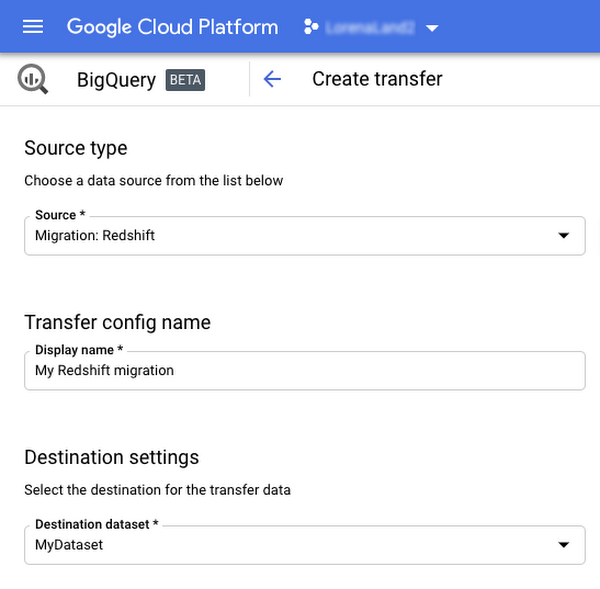
Data and schema migration from Redshift to BigQuery is provided by a combination of the BigQuery Data Transfer Service and a special migration agent running on Google Kubernetes Engine (GKE), and can be performed via UI, CLI or API. In the UI, Redshift to BigQuery migration can be initiated from BigQuery Data Transfer Service by choosing Redshift as a source.
The migration process has three steps:
- UNLOAD from Redshift to S3—The GKE agent initiates an UNLOAD operation from Redshift to S3. The agent extracts Redshift data as a compressed file, which helps customers minimize the egress costs.
- Transfer from S3 to Cloud Storage—The agent then moves data from Amazon S3 to a Cloud Storage bucket using Cloud Storage Transfer Service.
- Load from Cloud Storage to BigQuery—Cloud Storage data is loaded into BigQuery (up to 10 million files).
Watch the video to learn more!
Creating and Using Storage Buckets for Your Data Needs

1392
Of your peers have already read this article.
2:30 Minutes
The most insightful time you'll spend today!
So, you want to store objects on the cloud? But you’re really new to Google Cloud or Cloud Storage and would like someone to walk you through the process step by step?
Today is your lucky day!
I will help you understand the big steps involved in setting up and using Cloud Storage. For a walkthrough of all the steps involved that even includes highlighting of things to select so you don’t spend all your time playing “Where’s Waldo” on the page looking for that one button, click try the tutorial!
Creating buckets, storing objects in them, and adjusting permissions may feel challenging at first, but after you’ve walked through these steps, you’ll be able to create and use the Cloud Storage your project needs.
Resource Hierarchy
Projects contain all of the related parts of your application. Inside projects, you may have buckets, the top level containers in Cloud Storage. Files and folders are stored in buckets. You can grant access to a bucket, folder, or file using Identity and Access Management.

You can do all of that in this interactive tutorial. So let’s get started. I suggest you follow along in the tutorial so you can see the specific keys and screens as I describe them.
Creating a project
Everything in your application will be in a project, even if the only service you are using is storage. Projects need to be associated with a billing account, so if you don’t have one, consider signing up for the Free Trial. You’ll start in the Cloud Console.
Creating a bucket
Once you have a project, you can use storage by navigating to the Cloud Storage page by using either the Navigation menu at the top left of the console or by searching for “Cloud Storage” using the search box at the top of the console.
At the Buckets page of Cloud Storage, you’ll be able to create a bucket. The name of your bucket needs to be globally unique; that is no other bucket in Google Cloud Storage can have the same name. This is because if you or your organization allow your bucket to be accessible on the Internet, it will be at the URL https://storage.googleapis.com/<bucket name>. You can also consider implementing a security feature to prevent data exfiltration, organization restriction headers when you’re finished creating your bucket.. Pick a region close to you for your bucket. In some cases it may make sense to use multi-region or dual-region, but the details are more than I want to get into here. Don’t worry; you can find lots more information on them! Additionally, I won’t go into the details about selecting the appropriate storage class based on access frequency and longevity, but more information can be found here as well our recently introduced Autoclass tiering feature..
Since buckets can be accessed from the Internet, you need to be careful to only make the things you want to be public, public. The default value is to keep your data off of the Internet, so when you create the bucket, there’s an option to “Enforce public access prevention on this bucket” that is already selected. Since we’ll be making items in this bucket public later on, clear the option before confirming the bucket information. Don’t worry; you’ll see how to set that option back later.
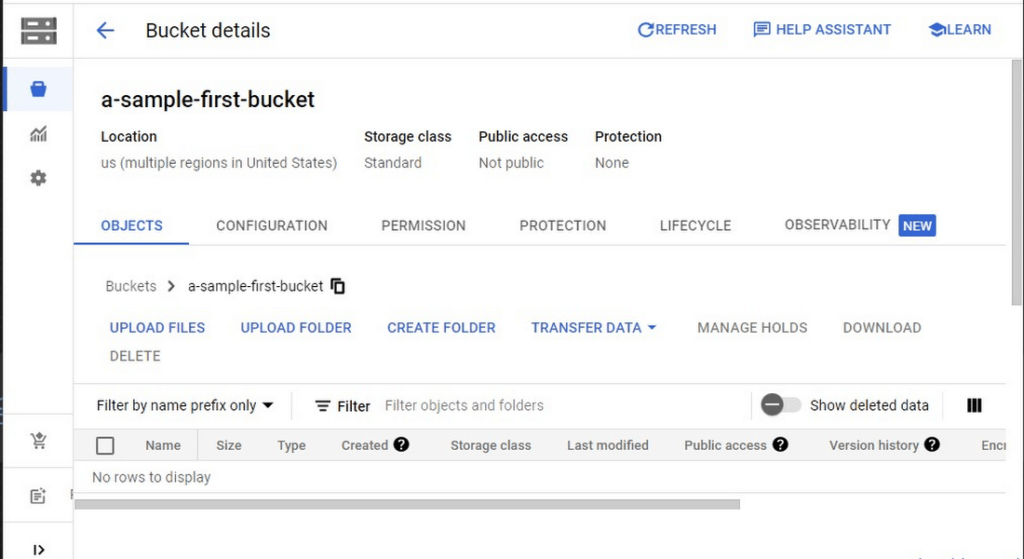
Take a look at the Bucket detail page. There are tabs to see the objects in the bucket, the permissions on the bucket, and much more. There are commands to create folders and to upload files and folders. We’ll do some of this in the next section. You can even find out much more from the Learn option in the upper right.
Adding items to the bucket
Find a file you’d like to upload to this bucket, remembering it will be made public to the Internet later. If you don’t have anything available, there’s a picture of a cat (of course, it’s a cat picture, this is the Internet!) in the interactive tutorial.
Go to the bucket details for your bucket. Using the “Upload files” button, you’ll just upload the file to the bucket by selecting the file from your computer. We won’t get into service classes here, but when you’re ready, there are links in the references.
Of course, if you have a lot of files in a bucket, you probably will want some sort of organization. You can do this by creating folders in your bucket with the “Create Folder” option. Once you’ve done that, you can go to the overflow menu (three vertical dots at the end line with the object information) and select Move. Remember, if you need help finding this, the interactive tutorial will point it out.
Making a bucket public
No surprise, the Bucket details hold lots of information about your bucket. You’ll change the bucket’s permissions in the Permission tab. (I hope that’s not a surprise.) You can then give access to individuals, groups, or all users. For this tutorial, follow the steps to grant access to allUsers. There are a variety of different levels of access you can grant to a user. In this case, just grant the ability to view the object using Storage Object Viewer.
Then go into the Objects tab to find the URL for the object you uploaded. Copy that URL and ensure you can indeed access the object from another tab or incognito window.
Now that you’ve done that, go back to the Permission tab for the bucket and select Prevent Public Access to secure the bucket again.
So, in a nutshell, to make all files in a bucket public, in the Permissions tab:
- Uncheck the option “Remove Public Access Prevention”
- Use Grant Access to give allUsers the Storage Object Viewer role in Cloud Storage.
To make all files in a bucket private, in the Permissions tab select Prevent Public Access.
Cleaning up
There is a charge to keep items in Cloud Storage, so you’ll probably want to delete the object you uploaded by selecting it and pressing Delete. You can delete the bucket in a similar way. The tutorial has details, of course.
While there are lots more details about Cloud Storage, you’ve got the big picture now. Go do something creative and useful with it!
So what now?
If you haven’t walked through the interactive tutorial, give it a try!
Data Warehouse Migration Challenges and How to Meet Them

3848
Of your peers have already read this article.
7:30 Minutes
The most insightful time you'll spend today!
In the last blog post, we discussed why legacy data warehouses are not cutting it any more and why organizations are moving their data warehouses to cloud.
At GCP, we often hear that customers feel that migration is an uphill battle because the migration strategy was not deliberately considered.
Migrating to a modern data warehouse from a legacy environment can require a massive up-front investment in time and resources. There’s a lot to think about before and during the process, so your organization has to take a strategic approach to streamline the process.
At Google Cloud, we work with enterprises shifting data to our BigQuery data warehouse, and we’ve helped companies of all kinds successfully migrate to cloud. Here are some of the questions we frequently hear around migrating a data warehouse to the cloud:
- How do we minimize any migration risks or security challenges?
- How much will it cost?
- How do we migrate our data to the target data warehouse?
- How quickly will we see equal or better performance?
These are big, important questions to ask—and have answered—when you’re starting your migration. Let’s take them in order.
How do we minimize any migration risks or security challenges?
It’s easy to consider an on-premises data warehouse secure because, well, it’s on-site and you can manage its data protection. But if scaling up an on-prem data warehouse is difficult, so is securing it as your business scales.
We’ve built in multiple features to secure BigQuery. For enterprise users, Cloud Identity and Access Management (Cloud IAM) is key to setting appropriate role-based user access to data.
You can also take advantage of SQL’s security views within BigQuery. And all BigQuery data is encrypted at rest and in transit.
You can add the protection of customer-managed encryption keys to establish even stronger security measures. Using virtual private cloud (VPC) security controls can secure your migration path, since it helps reduce data exfiltration risks.
How much will it cost?
The cost of a cloud data warehouse has a different structure from what you’re likely used to with a legacy data warehouse. An on-prem system like Teradata may depend on your IT team paying every three years for the hardware, then paying for licenses for users who need to access the system. Capacity increases come at an additional cost outside of that hardware budget.
With cloud, you’ve got a lot more options for cost and scale. Instead of a fixed set of costs, you’re now working on a price-utility gradient, where if you want to get more out of your data warehouse, you can spend more to do so immediately, or vice versa. While cloud data warehouses help reduce or eliminate capital and fixed costs, they are not all the same.
You’ll find varying levels of simplicity and cost savings across vendors, so it’s important to check out the operational costs of each data warehouse in relation to its performance.
With a cloud data warehouse like BigQuery, TCO becomes an important metric for customers when they’ve migrated to BigQuery (check out ESG’s report on that), and Google Cloud’s flexibility makes it easy to optimize costs.
How do we migrate all of our data to the target data warehouse?
This question encompasses both migrating your extract, transform, load (ETL) jobs and SAS/BI application workloads to the target data warehouse, as well as migrating all your queries, stored procedures, and other extract, load, transform (ELT) jobs.
Actually getting all of a company’s data into the cloud can seem daunting at the outset of the migration journey. We know that most businesses have a lot of siloed data. That might be multiple data lakes set up over the years for various teams, or systems acquired through acquisition that handle just one or two crucial applications. You may be moving data from an on-prem or cloud data warehouse to BigQuery and type systems or representations don’t match up.
One big step you can take to prepare for a successful migration is to do some workload and use case discovery.
That might involve auditing which use cases exist today and whether those use cases are part of a bigger workload, as well as identifying which datasets, tables, and schemas underpin each use case.
Use cases will vary by industry and by job role. So, for example, a retail pricing analyst may want to analyze past product price changes to calculate future pricing. Use cases may include the need to ingest data from a transactional database, transforming data into a single time series per product, storing the results in a data warehouse table, and more.
After the preparation and discovery phase, you should assess the current state of your legacy environment to plan for your migration. This includes cataloging and prioritizing your use cases, auditing data to decide what will be moved and what won’t, and evaluating data formats across your organization to decide what you’ll need to convert or rewrite.
Once that’s decided, choose your ingest and pipeline methods. All of these tasks take both technology and people management, and require some organizational consensus on what success will look like once the migration is complete.
How quickly will we see equal or better performance?
Managing a legacy data warehouse isn’t usually synonymous with speed. Performance often comes at the cost of capacity, so users can’t do the analysis they need till other queries have finished running.
Reporting and other analytics functions may take hours or days, which is especially true for running large reports with a lot of data, like an end-of-quarter sales calculation. As the amount of data and number of users rapidly grows, performance begins to melt down and organizations often face disruptive outages.
However, with a modern cloud data warehouse like BigQuery, compute and storage are decoupled, so you can scale immediately without facing capital infrastructure constraints.
BigQuery helps you modernize because it uses a familiar SQL interface, so users can run queries in seconds and share insights right away. Home Depot is an example of a customer that migrated their warehouse and reduced eight-hour workloads to five minutes.
Moving to cloud may seem daunting, especially when you’re migrating an entrenched legacy system. But it brings the benefits of adopting technology that lets the business grow, rather than simply adopting a tool. It’s likely you’ve already seen that the business demand exists. Now it’s time to stop standing in the way of that demand and instead make way for growth.
Google Introduces BigQuery Connector for SAP to Power Customers’ Data Analytics Strategy

5484
Of your peers have already read this article.
2:00 Minutes
The most insightful time you'll spend today!
Google Cloud has a genuine passion for solving technology problems that make a difference for our customers. With the release of our BigQuery Connector for SAP, we’re taking a another big step towards solving a major challenge for SAP customers with a quick, easy, and inexpensive way to integrate SAP data with BigQuery, our serverless, highly scalable, and cost-effective multi cloud data warehouse designed for business agility.
Solving for simplified data integration
Like most businesses today, SAP customers are eager to unlock the immediate insights and opportunities within their ever-growing stores of business data. However, many are discovering just how hard it can be to take the first step in any modern, cloud-enabled data analytics strategy: combining SAP data with other cloud-native, and enterprise data sets in real-time and at scale. According to a 2020 SAPInsider study, more than half of SAP customers surveyed said data integration was their top analytics pain point. These companies urgently need a rapid, sustainable, cost-effective and scalable way to integrate SAP data with modern cloud data analytics solutions.
The BigQuery Connector for SAP gives our customers a solution: a fast, simple, cost-effective and massively scalable way to make SAP data fully accessible within BigQuery by leveraging customers’ existing SAP Landscape Transformation Replication Server (SLT) tooling and skill sets. It’s the first SAP SLT direct near real-time connector for BigQuery without the need to set up additional infrastructure or third-party middleware, and can be deployed using a variety of embedded or stand-alone deployment options. In fact, most customers can install the BigQuery Connector for SAP in less than an hour—a remarkably easy way to start working with our industry-leading analytics solution that delivers proven and quantifiable business advantages for customers. Additionally, the BigQuery Connector for SAP is not restricted to customers who have deployed their SAP applications on Google Cloud. Customer’s who are running their SAP applications on-premise, or on any cloud, can also deploy and realize the analytical benefits of the solution.
Designing a solution with customer requirements and investments in mind
When the Google Cloud team started work on an analytics data integration tool for our SAP customers, we began with a set of requirements designed to root out the usual sources of cost and complexity. These included:
- The need for real-time performance with deltas replicated in milliseconds
- The ability to integrate data from almost any SAP Netweaver based application running today, regardless of its deployment location (on premises, any cloud, Google Cloud)
- Automatic BigQuery data type mapping with minimal transformation required
- Generation of target tables in BigQuery directly from source, if required
- Application layer integration that avoids the issues of direct database access
- Leveraging customers’ existing SAP skillsets, change data capture, and infrastructure
An important step towards meeting these requirements came when Alphabet, Google’s parent company, decided to leverage SAP SLT as a foundation for developing direct data replication between SAP and BigQuery for its internal corporate landscape. SLT as part of SAP’s strategic Business Technology Platform, supports real-time replication of data from SAP or third-party systems to SAP HANA, however, one of its limitations was direct integration with targets like BigQuery.
SAP SLT was a logical foundation for developing the connector for several reasons:
- It’s widely adopted among SAP customers who likely already leverage SLT for SAP analytics data integration
- It works with almost every non-SaaS SAP application environment running today
- It supports real-time replication performance at massive scale
It was an obvious choice for the Alphabet engineering team who saw immediate value from integrating SAP with BigQuery.
“The BigQuery Connector for SAP has enabled fast, low latency data replication for billions of records from 500+ tables of our most critical financial and supply chain data. Now in one cost-effective BigQuery data lake, this ERP data can be combined with other data sources for previously impossible real-time analytics and ML use cases. This allows us to drive much deeper strategic insights that support business and operational excellence, management and P&L reporting and more.”—Anil Nagalla, Sr. Engineering Director, Financial Systems, Google
SAP data integration with BigQuery enables new value
By leveraging SAP SLT, the BigQuery Connector for SAP can integrate real-time data streams from any SAP system—while also taking advantage of customers’ existing SAP investments and skillsets.
At the same time, the BigQuery Connector for SAP does a lot of heavy lifting on its own. For example, it automatically handles the complex, multi-step process of transforming SAP data types for use in BigQuery—mapping data-type transitions between the SAP and BigQuery environments, creating a target table schema on BigQuery for the transformed data types, building the target BigQuery table, and even adapting as new data types appear in your SAP environment.
For teams that want to fine-tune the BigQuery Connector for SAP’s automated recommendations, the connector supports additional levels of customization and choice. But if you simply want to get the job done and give your data analytics team greater support for their high-value work, then you’ll love just how quickly and easily the BigQuery Connector for SAP turns the complicated work of data integration and performance to process large volumes of data into a done deal. By integrating enterprise data sets in real time, customers can drive differentiated value and unlock new insights and actions that drive a competitive advantage.
The BigQuery Connector for SAP really shines as an enabling tool that transports and transforms your SAP data to power analytics solutions enabled by accelerators like the Google Cloud Cortex Framework: a comprehensive set of reference architectures, deployment accelerators, and integration services designed to give SAP customers a fast and seamless path to value with their data analytics investments. Simply put, the more SAP data you make available within Google Cloud, the easier it is to get meaningful—and often game-changing—insights from these solutions.
Learn more about the BigQuery Connector for SAP
Ready to get started with your own SAP data analytics strategy on Google Cloud? Install the Google Cloud BigQuery Connector for SAP, and discover a faster, simpler, more sustainable way to power your company’s data analytics strategy.
More Relevant Stories for Your Company

Two Ways to Deploy SAP HANA System on Google Cloud
Many of the world’s leading companies run on SAP—and deploying it on Google Cloud extends the benefits of SAP even further. Migrating your current SAP S/4HANA deployment to Google Cloud—whether it resides on your company’s on-premises servers or another cloud service—provides your organization with a flexible virtualized architecture that lets

Dataplex: Google Cloud’s Intelligent Data Fabric to Manage Data and Analytics at Scale
Enterprises are struggling to make high quality data easily discoverable and accessible for analytics, across multiple silos, to a growing number of people and tools within their organization. They are often forced to make tradeoffs—to move and duplicate data across silos to enable diverse analytics use cases or leave their

Incorporating Custom Holidays into Your Time-Series Models with BigQuery ML
About three years ago, JCB, one of the biggest Japanese payment companies, launched a project to develop new high-value services with agility. We set up a policy of starting small from scratch without using the existing system, which we call the concept of “Dejima”, where we focused on improving various aspects

Simplifying Unstructured Data Analytics with BigQuery ML and Vertex AI: A Comprehensive Guide
Unstructured data such as images, speech and textual data can be notoriously difficult to manage, and even harder to analyze. The analysis of unstructured data includes use cases such as extracting text from images using OCR, sentiment analysis on customer reviews and simplifying translation for analytics. All of this data
