





Security Talks: Addressing the Toughest SOC Challenges with SolarWinds, Chrome, Zero Trust, and More

2518
Of your peers have already read this article.
1:30 Minutes
The most insightful time you'll spend today!
Security operations teams are facing a “perfect storm” of challenges from nation-state actors turning their attention to financial crime, to rising uncertainty and potential complexities because of rapidly advancing cloud migration and IoT adoption, to the long-lamented skills shortage.
Now imagine having to face this trifecta without visibility into your IT and security infrastructure because scale and cost concerns have impeded your ability to ingest and monitor critical telemetry. To help organizations rethink threat detection and broader security team efforts, we showcased at this month’s Google Cloud Security Talks a keynote on why DEI is a cybersecurity imperative, Mandiant’s review of lessons for organizations two years after SolarWinds, how Google Chrome already helps protect your business (and what more you can make do with it,) how best to encourage your organization to pursue Zero Trust, and three key ways in which Chronicle Security Operations can help your organization scale threat detection and actionable outcomes. These include:
1. Operationalizing threat intelligence
Harnessing the power of threat intelligence to acquire context, prioritize risk, and act on detections requires more than just ingesting a set of indicator of compromise (IOC) feeds. Threat intelligence must have breadth and depth of coverage to provide custom details on the tools, tactics, and procedures of threat actors. Explore why part of the “magic” behind Google Cloud’s security is the sheer scale of threat intelligence we can share with our customers.
2. Driving detection as code
We want to enable organizations that are more advanced in their cybersecurity maturity to build their own custom detections and rules, which means offering our customers a powerful detection-authoring platform. Chronicle Security Operations can help analysts build specific detections around, for example, known bad files or a specific registry key change. We also demonstrated how to create more complex detections, such as flagging process execution patterns or crafting a suspicious-behavior trigger from a specific activity sequence.
3. Leveraging curated detections
With curated detections, which we announced in August, we are putting the power of Google Cloud’s intelligence in the hands of security operations teams everywhere. Our detections offer actionable, ready-to-use threat detection content curated, built, and maintained by Google Cloud Threat Intelligence (GCTI) researchers. These detection sets cover a wide variety of threats for your network and beyond, including attacks such as ransomware, remote-access tools (RAT), infostealers, data exfiltration, and suspicious activity.
You can watch all nine of our Security Talks recorded sessions here, and keep an eye out for our next Security Talks, coming in March 2023.
Best Practices for Cost Optimization in the Cloud

5426
Of your peers have already read this article.
3:30 Minutes
The most insightful time you'll spend today!
When customers migrate to Google Cloud Platform (GCP), their first step is often to adopt Compute Engine, which makes it easy to procure and set up virtual machines (VMs) in the cloud that provide large amounts of computing power. Launched in 2012, Compute Engine offers multiple machine types, many innovative features, and is available in 20 regions and 61 zones!
Compute Engine’s predefined and custom machine types make it easy to choose VMs closest to your on-premises infrastructure, accelerating the workload migration process cost effectively. Cloud allows you the pricing advantage of ‘pay as you go’ and also provides significant savings as you use more compute with Sustained Use Discounts.
As Technical Account Managers, we work with large enterprise customers to analyze their monthly spend and recommend optimization opportunities. In this blog, we will share the top recommendations that we’ve developed based on our collective experience working with GCP customers.
Getting ready to save
Before you get started, be sure to familiarize yourself with the VM instance pricing page—required reading for anyone who needs to understand the Compute Engine billing model and resource-based pricing. In addition to those topics, you’ll also find information about the various Compute Engine machine types, committed use discounts and how to view your usage, among other things.
Another important step to gain visibility into your Compute Engine cost is using Billing reports in the Google Cloud Console and customizing your views based on filtering and grouping by projects, labels and more. From there you can export Compute Engine usage details to BigQuery for more granular analysis. This allows you to query the datastore to understand your project’s vCPU usage trends and how many vCPUs can be reclaimed. If you have defined thresholds for the number of cores per project, usage trends can help you spot anomalies and take proactive actions. These actions could be rightsizing the VMs or reclaiming idle VMs.
Now, with these things under your belt, let’s go over the five ways you can optimize your Compute Engine resources that we believe will give you the most immediate benefit.
1. Apply Compute Engine rightsizing recommendations
Compute Engine’s rightsizing recommendations feature provides machine type recommendations that are generated automatically based on system metrics gathered by Stackdriver Monitoring over the past eight days. Use these recommendations to resize your instance’s machine type to more efficiently use the instance’s resources. It also recommends custom machine types when appropropriate. Compute Engine makes viewing, resizing and other actions easier right from the Cloud Console as shown below.
Recently, we expanded Compute Engine rightsizing capabilities from just individual instances to managed instance groups as well. Check out the documentation for more details.

For more precise recommendations, you can install the Stackdriver Monitoring agent which collects additional disk, CPU, network, and process metrics from your VM instances to better estimate your resource requirements. You can also leverage the Recommender API for managing recommendations at scale.
2. Purchase Commitments
Our customers have diverse workloads running on Google Cloud with differing availability requirements. Many customers follow a 70/30 rule when it comes to managing their VM fleet—they have constant year-round usage of ~70%, and a seasonal burst of ~30% during holidays or special events.
If this sounds like you, you are probably provisioning resources for peak capacity. However, after migrating to Google Cloud, you can baseline your usage and take advantage of deeper discounts for Compute workloads. Committed Use Discounts are ideal if you have a predictable steady-state workload as you can purchase a one or three year commitment in exchange for a substantial discount on your VM usage.
We recently released a Committed Use Discount analysis report in the Cloud Console that helps you understand and analyze the effectiveness of the commitments you’ve purchased. In addition to this, large enterprise customers can work with their Technical Account Managers who can help manage their commitment purchases and work proactively with them to increase Committed Use Discount coverage and utilization to maximize their savings.
3. Automate cost optimizations
The best way to make sure that your team is always following cost-optimization best practices is to automate them, reducing manual intervention.
Automation is greatly simplified using a label—a key-value pair applied to various Google Cloud services. For example, you could label instances that only developers use during business hours with “env: development.” You could then use Cloud Scheduler to schedule a serverless Cloud Function to shut them down over the weekend or after business hours and then restart them when needed. Here is an architecture diagram and code samples that you can use to do this yourself.
Using Cloud Functions to automate the cleanup of other Compute Engine resources can also save you a lot of time and money. For example, customers often forget about unattached (orphaned) persistent disk, or unused IP addresses. These accrue costs, even if they are not attached to a virtual machine instance. VMs with the “deletion rule” option set to “keep disk” retain persistent disks even after the VM is deleted. That’s great if you need to save the data on that disk for a later time, but those orphaned persistent disks can add up quickly and are often forgotten! There is a Google Cloud Solutions article that describes the architecture and sample code for using Cloud Functions, Cloud Scheduler, and Stackdriver to automatically look for these orphaned disks, take a snapshot of them, and remove them. This solution can be used as a blueprint for other cost automations such as cleaning up unused IP addresses, or stopping idle VMs.
4. Use preemptible VMs
If you have workloads that are fault tolerant, like HPC, big data, media transcoding, CI/CD pipelines or stateless web applications, using preemptible VMs to batch-process them can provide massive cost savings. In fact, customer Descartes Labs reduced their analysis costs by more than 70% by using preemptible VMs to process satellite imagery and help businesses and governments predict global food supplies.
Preemptible VMs are short lived— they can only run a maximum of 24 hours, and they may be shut down before the 24 hour mark as well. A 30-second preemption notice is sent to the instance when a VM needs to be reclaimed, and you can use a shutdown script to clean up in that 30-second period. Be sure to fully review the full list of stipulations when considering preemptible VMs for your workload. All machine types are available as preemptible VMs, and you can launch one simply by adding “-preemptible” to the gcloud command line or selecting the option from the Cloud Console.
Using preemptible VMs in your architecture is a great way to scale compute at a discounted rate, but you need to be sure that the workload can handle the potential interruptions if the VM needs to be reclaimed. One way to handle this is to ensure your application is checkpointing as it processes data, i.e., that it’s writing to storage outside the VM itself, like Google Cloud Storage or a database. As an example, we have sample code for using a shutdown script to write a checkpoint file into a Cloud Storage bucket. For web applications behind a load balancer, consider using the 30-second preemption notice to drain connections to that VM so the traffic can be shifted to another VM. Some customers also choose to automate the shutdown of preemptible VMs on a rolling basis before the 24-hour period is over, to avoid having multiple VMs shut down at the same time if they were launched together.
5. Try autoscaling
Another great way to save on costs is to run only as much capacity as you need, when you need it. As we mentioned earlier, typically around 70% of capacity is needed for steady-state usage, but when you need extra capacity, it’s critical to have it available. In an on-prem environment, you need to purchase that extra capacity ahead of time. In the cloud, you can leverage autoscaling to automatically flex to increased capacity only when you need it.
Compute Engine managed instance groups are what give you this autoscaling capability in Google Cloud. You can scale up gracefully to handle an increase in traffic, and then automatically scale down again when the need for instances is lowered (downscaling). You can scale based on CPU utilization, HTTP load balancing capacity, or Stackdriver Monitoring metrics. This gives you the flexibility to scale based on what matters most to your application.
High costs do not compute
As we’ve shown above, there are many ways to optimize your Compute Engine costs. Monitoring your environment and understanding your usage patterns is key to understanding the best options to start with, taking the time to model your baseline costs up front. Then, there are a wide variety of strategies to implement depending on your workload and current operating model.
For more on cost management, check out our cost management video playlist. And for more tips and tricks on saving money on other GCP services, check out our blog posts on Cloud Storage, Networking and BigQuery cost optimization strategies. We have additional blog posts coming soon, so stay tuned!
The Ultimate Guide to VPC Service Controls: Strengthening Your Security Posture

2508
Of your peers have already read this article.
2:30 Minutes
The most insightful time you'll spend today!
While cloud security skeptics might believe that data in the cloud is just one access configuration mistake away from a breach, the reality is that a well-designed set of defense in depth controls can help minimize the risk of configuration mistakes and other security issues. Our Virtual Private Cloud (VPC) Service Controls can play a vital role in creating an additional layer of security while also making it easier to manage your data in a way that most cloud services can’t do today.
Organizations across industries and business models use cloud services for activities such as processing their data, performing analytics, and deploying systems. VPC Service Controls can empower an organization when deciding how users and data can cross the perimeter of the supported cloud services, if at all. While VPC Service Controls are designed to help stop attackers, they can also enable contextual trusted data sharing (similar to how Zero Trust allows contextual access).
What are VPC Service Controls
VPC Service Controls help administrators define a security perimeter around Google-managed services, which can control communication to and between those services. The Service Controls isolate your Google Cloud resources from unauthorized networks, including the internet. For example, this can help you keep a clear separation between services that are allowed to run in production and services that are not.
VPC Service Controls can help you prevent mistakes that lead to costly data breaches because they control access to your data at a granular level. They add context-aware access controls on these services, and can help you achieve your organization’s Zero Trust access goals.
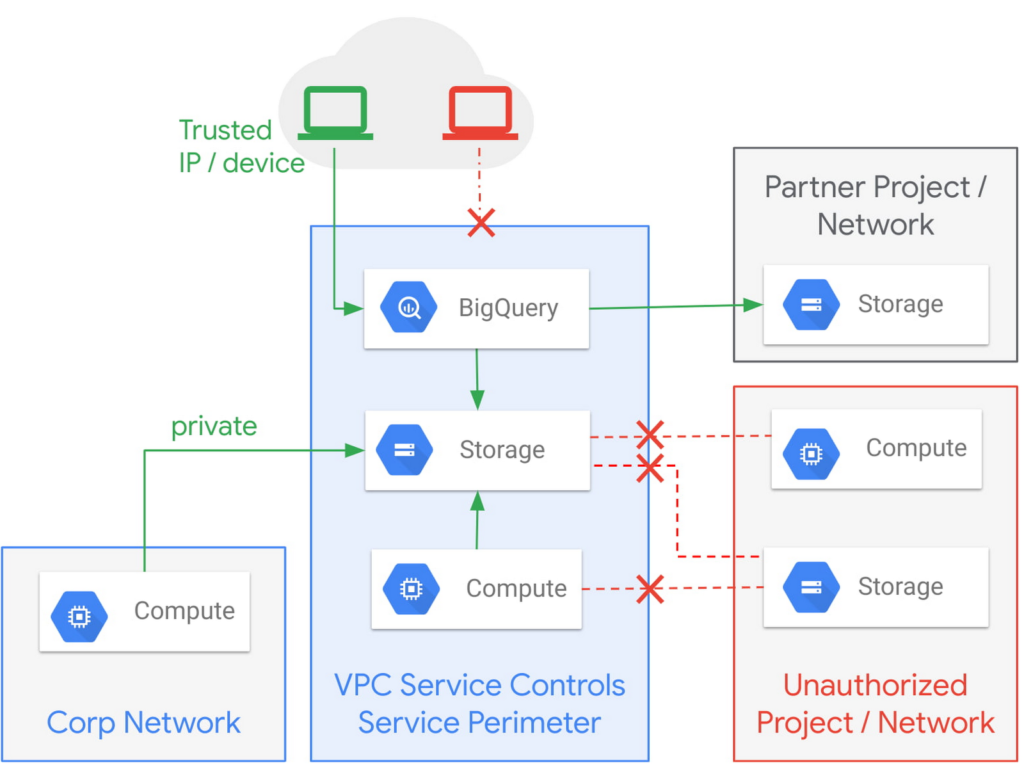
Example of the fine-grained policies based on access context that can be implemented with VPC Service Controls.
Like wearing two layers of clothing made from different fabrics to protect you from winter weather, VPC Service Controls may appear similar to Identity and Access Management (IAM) but they come from a different approach to implementing security. IAM enables granular identity based access control; VPC Service Controls create a security perimeter that protects your cloud resources and sets up private connectivity to Google Cloud’s APIs and services. While it’s recommended to use both, VPC Service Controls have an added bonus: They can support blocking data theft during a breach.
The additional layer of security that VPC Service Controls offer customers is challenging to achieve with on-premise systems or even with other cloud providers. You can think of it as an firewall for APIs that also adds a logical security control around three paths that data can take:
- From the public internet to your resources
- Inside your VPC and the cloud service perimeter
- For service-to-service communication (for example, denying access to someone who wants to load data to BigQuery or exfiltrate data from a BigQuery instance.)
How VPC Service Controls can help stop attackers
VPC Service Controls are used to enforce a security perimeter. They can help isolate resources of multi-tenant Google Cloud services, which can help reduce the risk of data exfiltration or a data breach.
For example, a bank that migrated financial data processing to Google Cloud can use VPC Service Controls to isolate their processing pipeline from public access (or any unauthorized access) by defining a trusted service perimeter.
How VPC Service Controls can enable trusted sharing
VPC Service Controls are used to securely share data across service perimeters with full control over what resource can connect to other resources, or outside the perimeter. This can help mitigate data exfiltration risks stemming from stolen identities, IAM policy misconfigurations, some insider threats, and compromised virtual machines.
Returning to our bank example, that same bank using VPC Service Controls may securely share or access data across Service Perimeters and Organizations. They may allow access to specific partners and for specific operations.
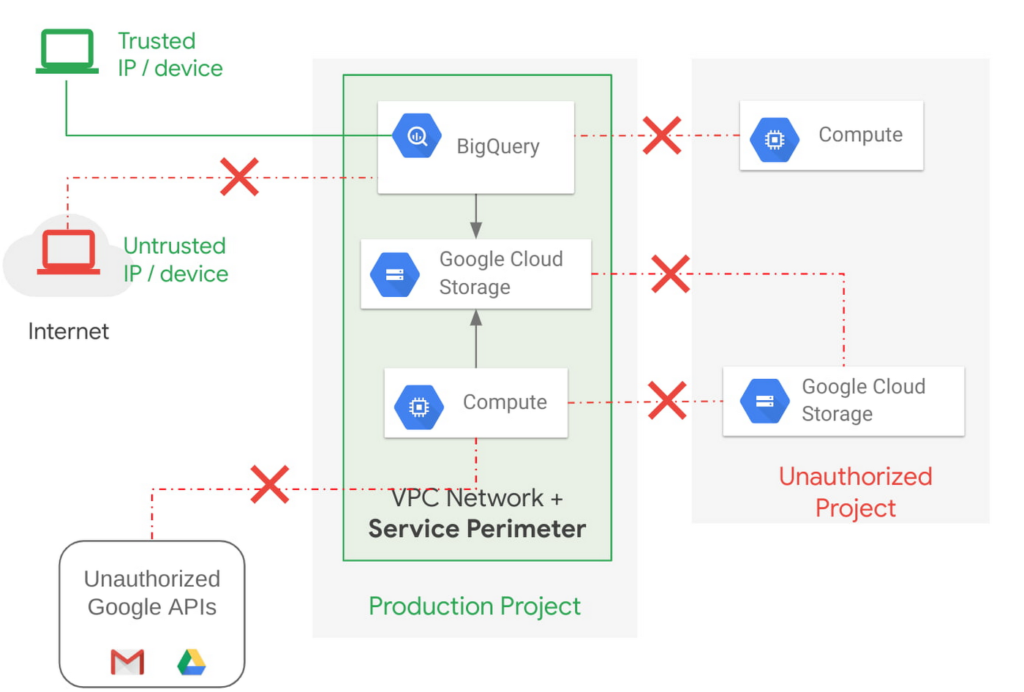
Example of allowing an authorized device plus authorized access.
How VPC Service Controls support Zero Trust access
VPC Service Controls deliver Zero Trust access to multi-tenant Google Cloud services. Clients can restrict access to authorized IPs, client context, user identity, and device parameters while connecting to multi-tenant services from the internet and other services.
A bank can use moving its services to the public cloud as an opportunity to abandon outdated access management approaches and adopt Zero Trust access. VPC Service Controls let them create granular access control policies in Access Context Manager based on attributes such as user location and IP address. For example, it would allow an analyst to only access Big Query from a corporate device on the corporate network during business hours. These policies can help ensure the appropriate security controls are in place when granting access to cloud resources from the Internet.
Next steps with VPC
Check out these pages to learn more about VPC Service Controls for your sensitive cloud deployments, especially for regulated workloads. This blog is the third in our Best Kept Security Secrets series, which includes how to tap into the power of Organization Policy Service and how Cloud EKM can help resolve the cloud trust paradox.
Nine Interesting Google Cloud Identity and Environment Features to Know About!

2917
Of your peers have already read this article.
2:00 Minutes
The most insightful time you'll spend today!
I’ve been at Google Cloud just a few weeks, following years of experience as an AWS Hero and building on other clouds. So last week’s Google Cloud Next–my first!—was a bit of a culture shock. On the GCP podcast, I used the word “intentionality” to describe what I’m seeing: a thoughtful, holistic approach that informs so much of how Google Cloud is put together. Not just in the headline-grabbing new announcements like Google Distributed Cloud, but in the everyday things too.
Things like IAM and project setup. Step 1 of any cloud project is to provision access to an environment, and that’s why I always found it so frustrating in my past life when I had to deal with outdated or clunky stuff like:
- Homebrewed, sketchy SSO tooling and config files
- No centralized identity—I was a different person in every cloud account
- Mysterious logouts, redirects, and missing project context within the cloud console
- Account organization features that were “bolted-on” rather than designed the right way from the beginning
In contrast, I recently shared a Twitter thread about how shockingly right Google Cloud gets identity and environments. It’s probably my favorite thing about Google Cloud so far, and so in this post I want to expand on what I’ve learned. If you’re searching for a better way to access and organize your cloud, let me make you one of today’s lucky 10,000.
Nine things to love about Google Cloud identity and environments
1. You are YOU!
Every user is just a Google account (personal or corporate) that works across projects. For beginners, this lowers the barrier to entry and makes cloud feel like an extension of things you already know. For experts, it reduces the friction of having to juggle a bunch of unrelated identities. I love that you can permit any Google account into a cloud project as a collaborator—even a contributor from outside your organization!
2. No non-IAM root accounts
Google Cloud has been designed from the ground up to avoid the chicken/egg problem of requiring a manually configured superuser that sits outside the rest of the identity management infrastructure. In the Google world, humans use Google accounts, and services use IAM-based service accounts —it’s as straightforward as that. (Even non-Google services can be IAM—yay, workload identity federation!)
3. Project discovery for humans
Project, folder, and organization discovery are baked into the console, like browsing a file system scoped to your access level. This hardly even feels like a feature, it’s so subtle and yet absolutely fundamental. But once you see it, you can’t imagine going back to a world where environments exist in a vacuum with no contextual awareness of each other.
The hierarchical organization model also means that project-per-application-per-environment best practices are the path of least resistance; if anything, I’ve erred on the side of setting up *too many* logical groupings. It’s just too much fun to play with projects and folders!
4. Billing that protects you from yourself
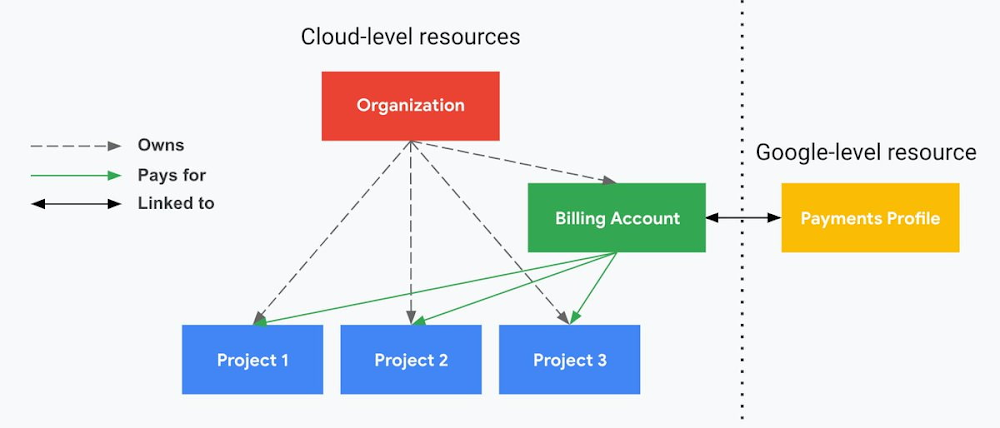
The project context gives you a logical container for the cost of the resources contained within it. My favorite part of this is that your billing entity is managed separately from the project itself. So you can delete a project and feel sure that all associated resources are gone and no longer racking up charges … without also trashing your ability to pay for future projects you might spin up.
(Related: the free tier does not charge you money unless you click a big button that basically says “YES, IT’S OK TO CHARGE ME MONEY.” This guarantee, combined with the familiarity of Google Accounts for access, are the main reasons I now recommend Google Cloud to beginners in my network who are looking for a safe place to learn and explore cloud.)
5. Organizational structure != billing structure
For organizations, billing is decoupled from the organization root. So permissions inheritance is a separate design decision from chargeback, as it should be. This keeps your Google Cloud footprint from converging toward Conway’s Law.
6. SSO that just works
Want to use the CLI? You get SSO out of the box with your Google Account—no corporate organization required, and no manual shuffling with config files and access keys. Or, better yet, you can use Cloud Shell to run gcloud commands right in your browser, even (especially?) on the docs pages. (Random trivia: I think Cloud Shell is the only native cloud service that has the same name across AWS, Azure, and Google Cloud–but Google’s version has been around the longest and as far as I can tell is the most fully-featured.)
7. One group to rule them all
Remember how user entities are just Google accounts? Guess what: you can use Google Groups to manage group access to IAM roles! That’s right: one set of users with permissions across docs, email, and cloud. It’s one reason why Google Workspace makes sense as a core piece of Google Cloud; it really does function like just another cloud service from an identity standpoint.
8. Never lose your place
In other clouds, I’ve experienced a problem I call the Timeout of Doom: when your console session expires, you’re left on a generic error screen and it’s up to you to figure out how to rebuild your context from scratch–starting with remembering what account you used in the first place. Imagine my delight to realize that reaching your Google Cloud console is as easy as bookmarking a single URL. console.cloud.google.com works and remembers who you are (or, at least, suggests the set of people you might be)—no mystery logouts or redirects.
9. Progressive complexity FTW
In my experience it’s been common for cloud providers to design most of their account features for organizations: if you’re an independent developer, you get more exposure to dangerous bills, less access to helpful SSO features, and generally must fend for yourself in a world that wasn’t really created with you in mind.
I love that Google Cloud has found a way to work with enterprises while still maintaining their roots as a cloud that developers love to use. Sign in with your personal Google account, attach it to an organization when-and-if you’re ready, and in the meantime you get the same thoughtfulness around SSO and billing as the giant shop down the street.
I’m not going to tell you my experience has been seamless; there are footguns here (every Google Workspace integration creates a new project?), and I’m still learning. But it’s that “intentionality” thing again. The Google Cloud identity and environment experience feels like it was designed, not just accreted; there’s an elegant simplicity to it that makes cloud feel fresh and exciting to me all over again. I can’t wait to see what’s next.
In the meantime, I highly encourage you to do what I did and spin up a free trial to try things out for yourself. Then hit me up on Twitter with your favorite Google Cloud identity or environment feature!
Embracing Confidential Computing: Secure Your Data in the Cloud

1224
Of your peers have already read this article.
1:30 Minutes
The most insightful time you'll spend today!
As one of the most trusted cloud platform providers, Google is committed to providing our clients secure and reliable environments for their workloads. Google believes the future of computing will increasingly shift to private, encrypted services where users can be confident that their data is not being exposed to cloud providers or their own insiders. Confidential Computing helps make this future possible by keeping data encrypted in memory, and elsewhere outside the CPU, while it is being processed.
Since our first Confidential Computing offering in 2018, Google has been a pioneer in making the technology widely available through our cloud, while also constantly adding new features that allow a wide range of organizations to benefit from it.
Expanding the Confidential Computing portfolio
Today at the RSA Conference 2023, we are announcing several exciting updates to our Confidential Computing portfolio.
We are expanding our portfolio with the next generation of our Confidential Computing VM instances that utilize AMD Infinity Guard technology, specifically AMD SEV-SNP (Secure Encrypted Virtualization-Secure Nested Paging). SEV-SNP adds additional new hardware-based security protections such as strong memory integrity protection and hardware rooted attestation. Confidential VMs on general purpose N2D VMs with SEV-SNP enabled are now in Private Preview. Learn more in our deep dive here.
“Advanced, hardware-based security features – such as AMD Infinity Guard built into AMD EPYC processors – are a crucial part of cloud offerings and the further expansion of cloud computing,” said Ram Peddibhotla, corporate vice president, Cloud Business, AMD. “Our work with Google Cloud delivers on the leadership security features our joint customers demand with nearly effortless implementation and minimal performance impact as more mission critical and business critical workloads move to the cloud.”
Google is committed to ensuring Confidential Computing technology is as secure as possible before releasing products to customers. We constantly evaluate various attack vectors to make certain that Google Cloud Confidential Computing environments are protected against a wide range of attacks.
Throughout last year, Google and Intel collaborated on a research project to identify potential security vulnerabilities in Intel’s new Confidential Computing technology, Trust Domain Extensions (TDX). We’ve recently released the full report and made it available in our blog here.
“We want to make it such that people don’t worry about the security and trustworthiness of their data,” said Anil Rao, vice president and general manager of systems architecture and engineering in the Office of the CTO at Intel. “Organizations use confidential computing to control their data and provide access to trusted parties in a manner that is verifiable, revocable and time sensitive – we have an obligation to make sure the technology is secure. Our early effort with Google solidifies our commitment to perform thorough analysis to address all potential vulnerabilities.”
Confidential Space is now in general availability. Confidential Space builds on Confidential Computing and provides a secure enclave, also known as a Trusted Execution Environment (TEE). Google Cloud customers can leverage the TEE for various privacy-focused use cases such as joint data analysis and machine learning (ML) model training, with trust guarantees that data can stay protected — including hardened protection against cloud service provider access.
Confidential Space allows for new privacy-preserving technologies to take shape, and one such technology is The Privacy Sandbox. This is a crucial step forward as Privacy Sandbox for the Web will phase out third-party cookies and limit covert tracking. By supporting a choice of trusted execution environments, including Confidential Space, the Privacy Sandbox will provide ad-techs with safer alternatives to existing technology, so they can continue building digital businesses while keeping user data private.
“Trusted Execution Environments (TEEs) are already in use across industries such as digital advertising to enable privacy preserving analytics, and we are excited to leverage Google Cloud’s built-in TEE called Confidential Space,” said Gaurav Bhaya, vice president and general manager, Google Ads Measurement.
Building on our history of innovation with Confidential Computing
Google has worked diligently with internal and external partners to validate, audit and publish the security assessment of the hardware, firmware, and software that underpins Confidential Computing.
Last year, a joint security effort between Google Project Zero, Google Cloud, and AMD led to more secure technology for the entire industry, regardless of what service provider you choose for your Confidential Computing deployment. You can learn more in our full report here.
Since then, we have continued to expand the portfolio of Confidential Computing products and services, including Confidential Virtual Machines (CVMs), Confidential GKE, Confidential Dataproc, and Confidential Space. These offerings give our customers more choice in their deployments.
Currently, our Confidential Computing services are widely available across 80% of Google Cloud regions and growing, and we recently added support for Compute-Optimized C2D VMs for Confidential GKE.
Organizations are now leveraging Confidential Computing for joint data analysis and machine learning (ML) model training with trust guarantees that the data they own stays protected and across various other industries by organizations, including AstraZeneca, Bullish, HashiCorp, Matrixx Software, MonetaGo and Yellowdog.
Confidential Computing has also proven to be a helpful additional control for organizations implementing digital sovereignty strategies, providing an encryption capability, and protection for data-in-use where encryption keys are not accessible by the cloud provider.
We can’t wait to see the possibilities this technology will open up for your organization. Check out our Confidential Computing page to learn more.
Your Cloud Defense Enhanced: Google Introduces End-to-End TDIR in Chronicle Security Operations

1176
Of your peers have already read this article.
4:30 Minutes
The most insightful time you'll spend today!
As cloud adoption continues to grow, so too does the number of cloud-born security threats. However, cloud environments can present significant opportunities to improve security with the right tools and processes in place.
When it comes to effective threat detection, investigation and response (TDIR) in the cloud, modern solutions must ensure that the entire security operations workflow — from data analysis through detection to response — are working in tandem to deliver the insights, context, and processes needed for cyber defenders to respond to threats with speed and precision.
At Google Cloud, we believe that modern security operations should rely less on customer engineering and more on packaged outcomes delivered by solution providers. With this in mind, we are excited to announce today at our annual Security Summit that Chronicle Security Operations now provides turnkey TDIR for Google Cloud. By integrating with our cloud-focused Security Command Center Premium (SCC) and Google Cloud telemetry, Chronicle can collect and analyze data from Google Cloud, detect and investigate threats, and automate responses to mitigate risks.
In our recent State of Cloud Threat Detection and Response Survey, 71% of respondents said that “entire classes of threats are eliminated by migrating to the cloud,” and 82% stated that “the cloud affords the ability to process more data, including on-prem data, which can improve detection across the board.”
To take advantage of all that the cloud can do for security, organizations should to do more than “lift and shift” their existing security tools and processes to the cloud. The cloud presents a different attack surface, often across several cloud services and data repositories, and each can have different attack tactics, potential misconfigurations, and context.
This update to Chronicle helps enable teams to:
- Detect with confidence. Out-of-the-box detection rule sets developed by Google threat researchers surface cloud attack vectors and provide high fidelity, contextualized alerts that quickly give insight into potential threats in your Google Cloud environment.
- Investigate with full context. Visualize threat storylines, complete with cloud-specific context that is correlated with additional data and context from across your environment for fast and efficient investigations.
- Respond with speed and precision. Streamline workflows and automate response actions with prebuilt playbooks and best practices designed specifically for Google Cloud. Chronicle SOAR’s case management and team collaboration help ensure fast and timely response.
- Simplify data ingestion. Chronicle automatically ingests, normalizes and contextualizes cloud telemetry from a variety of Google Cloud services (such as Cloud Asset Inventory, Google Kubernetes Engine, Google Compute Engine, cloud audit logs, and Cloud DLP), reducing the need for complex and time-consuming engineering.
Putting Google Cloud TDIR to work
Let’s take a closer look at how our end-to-end cloud TDIR workflow manages a potential Google Cloud attack.
Setting up cloud TDIR in Chronicle only takes a few clicks. Security Command Center’s built-in threat detection identifies attacks against Google Cloud resources. These findings, as well as audit, NAT, DNS, and firewall logs, are ingested into Chronicle to provide additional insight and context into Google Cloud threats.
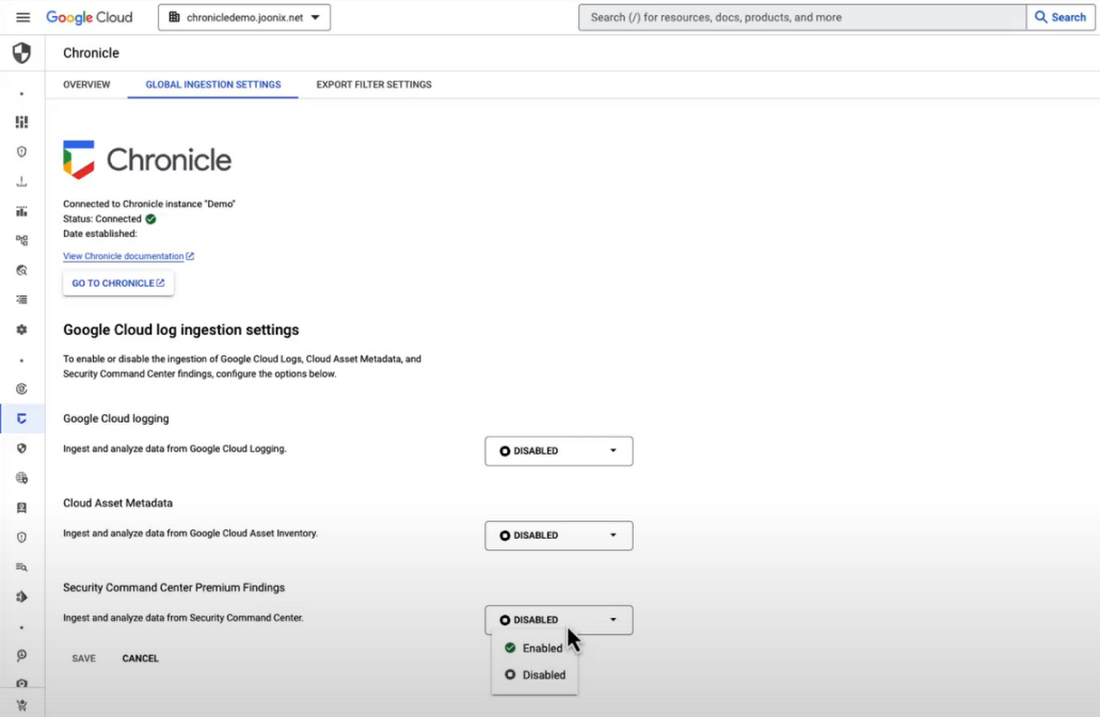
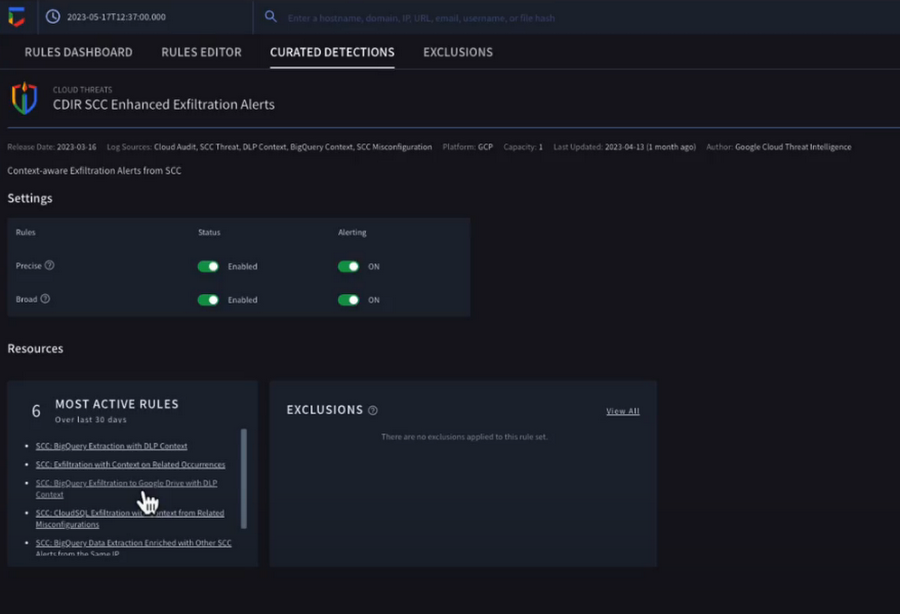
Chronicle now provides detection rules for Google Cloud threats. These rules correlate SCC findings with Chronicle’s advanced detection engine to reveal the broad scope of malicious activity, giving you visibility and more contextual information into what’s going on in your environment. In our example, Chronicle alerts on suspicious activity that can indicate an attempt to exfiltrate data from BigQuery.
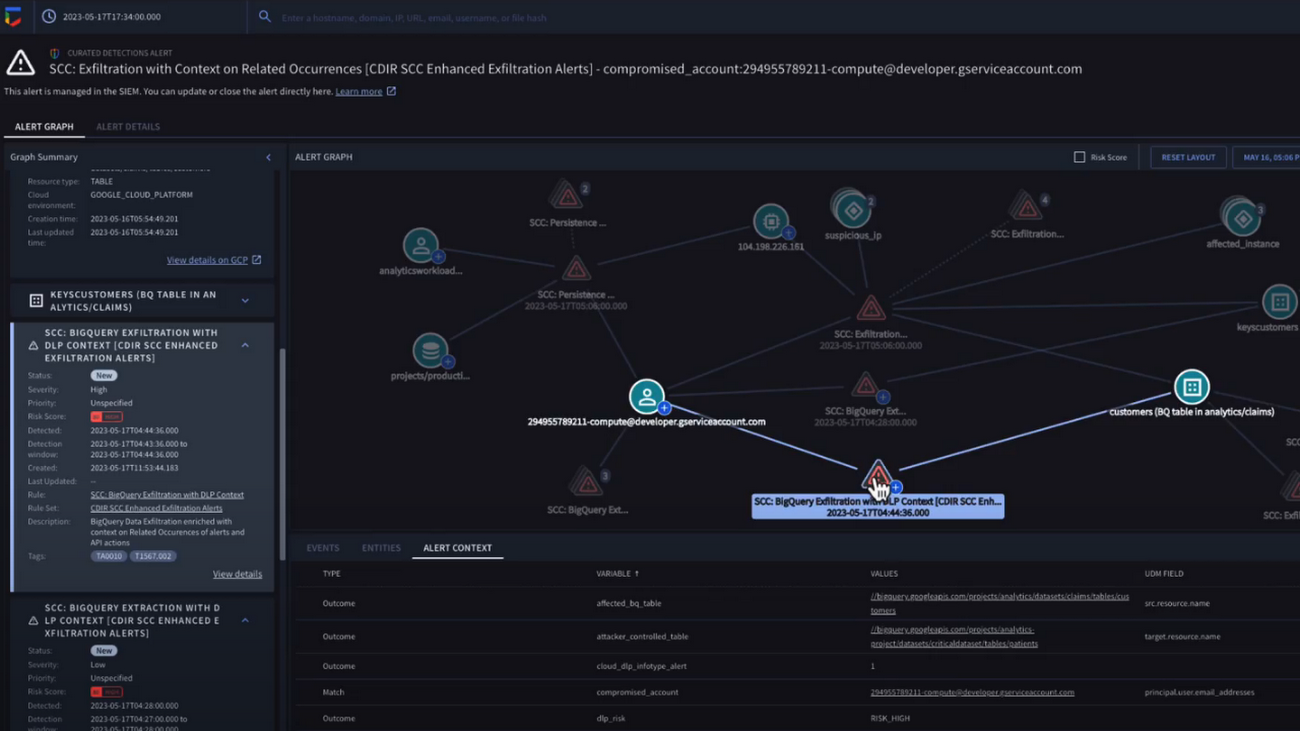
The new Chronicle Alert Graph surfaces key details of primary alerts you’re investigating in seconds. Combining cloud alerts and telemetry and correlating that with vital context from other sources (such as user data, endpoint data, and threat intelligence,) you can explore the visual representation of an alert’s relationship to other alerts and entities, dig into the potential attack paths, get quick summaries of implicated security artifacts, and pivot into your Google Cloud Console to do a deeper dive into potentially-impacted resources.
In our example, we can see a BigQuery exfiltration event associated with a customer and that it’s associated with a particular service account tied to a Google Cloud org. Alert context below tells us more about what’s been impacted. It shows us that cloud credentials in the form of encryption keys and email addresses were associated with the event.
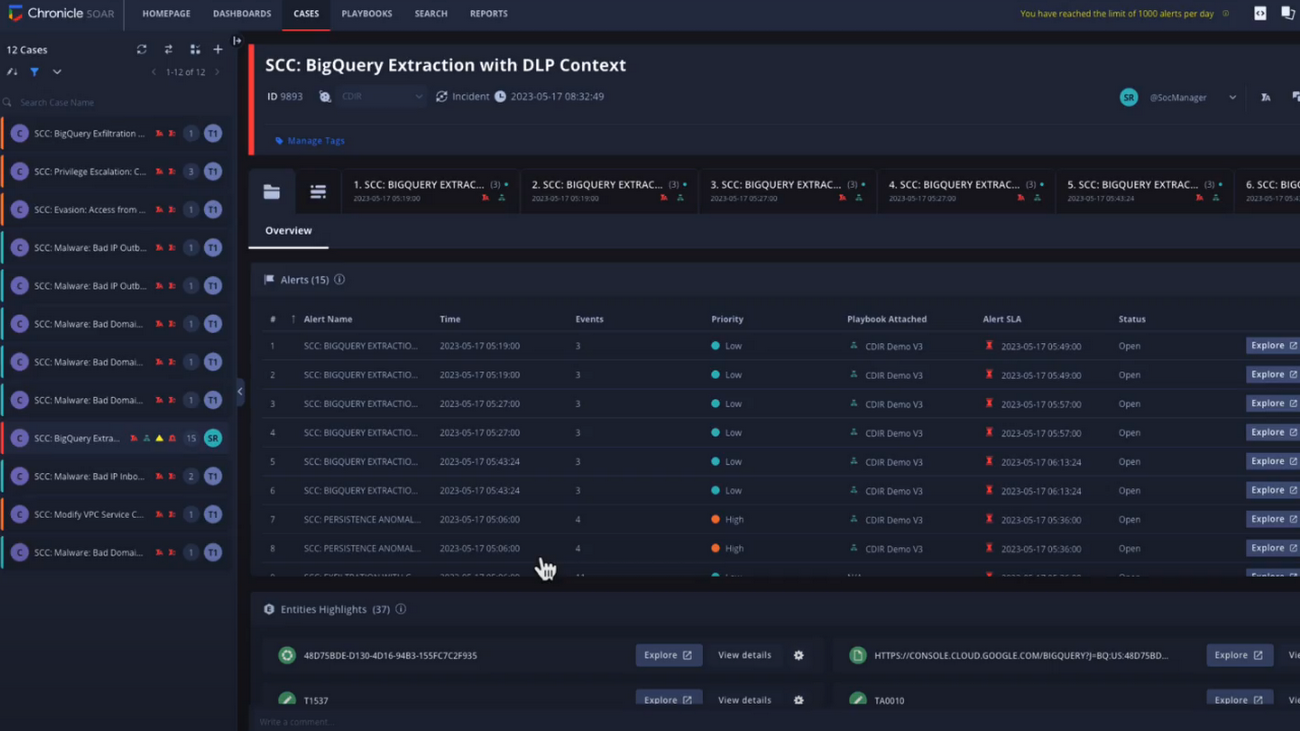
Chronicle case management automatically groups any related alerts into threat-centric cases, uniting the information that matters and making it simple for you to see and understand the scope of the event.
In our example, Chronicle groups these alerts together based on common source address and username, and the case wall provides the summary of the alerts and actions that are taking place across the entire case.
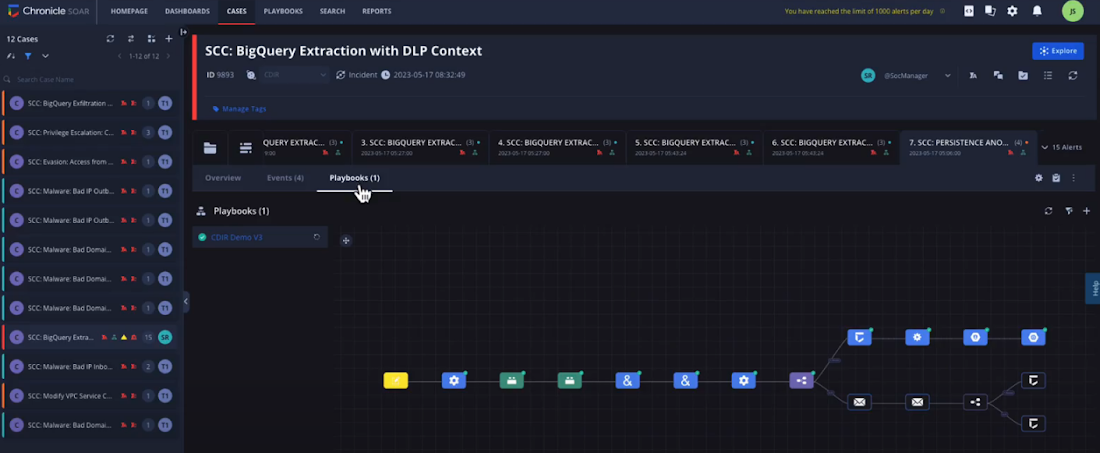
Chronicle playbooks, designed specifically for Google Cloud, automate your desired response processes. In our example, when an alert was generated a playbook automatically ran through predefined steps that gathered data, enrichment, and took automated remediation steps to prevent this service account and instance from continuing.
Ready to detect with confidence, investigate with broad context, respond with speed and precision, and simplify data ingestion? Chronicle Security Operations is your go-to for turnkey, end-to-end threat detection, investigation, and response on Google Cloud.
Tune in to our Security Summit session to learn more and see a demo of the new Google Cloud TDIR capabilities.
More Relevant Stories for Your Company

reCAPTCHA Enterprise Fraud Prevention: Stop Payment Fraud with Google’s Intelligence
Today, we are putting the power of Google’s insights and intelligence in the hands of risk, fraud, and security teams everywhere. We are pleased to announce the general availability of reCAPTCHA Enterprise Fraud Prevention, a new product that uses Google's own fraud models, machine learning, and intelligence from protecting more

Google’s ASO to Help U.S. Public Sector Achieve M-21-31 and EO 14028
As sophisticated cyberattack campaigns increasingly target the U.S. public and private sectors during the COVID era, the White House and federal agencies have taken steps to protect critical infrastructure and remote-work infrastructure. These include Executive Order 14028 and the Office of Management and Budget’s Memorandum M-21-31, which recommend adopting Zero

Announcement: Merger of Google’s Data Processing Terms into CDPA
At Google, we are constantly looking to improve our products, services, and contracts so that we can better serve our customers. To this end, we are pleased to announce that we have updated and merged our data processing terms for Google Cloud, Google Workspace (including Workspace for Education), and Cloud
Assuring Compliance in the Cloud: Paper by Google Cloud’s Office of the CISO
Cloud transformation and the adoption of modern DevOps technology presents both opportunities and challenges for IT compliance functions. With DevOps style application development, the feedback loop for developers and engineers is much tighter than with traditional application development pipelines, enabling speed and agility of application release cycles. While speedy CI/CD
