





reCAPTCHA Enterprise Fraud Prevention: Stop Payment Fraud with Google’s Intelligence

1139
Of your peers have already read this article.
3:30 Minutes
The most insightful time you'll spend today!
Today, we are putting the power of Google’s insights and intelligence in the hands of risk, fraud, and security teams everywhere. We are pleased to announce the general availability of reCAPTCHA Enterprise Fraud Prevention, a new product that uses Google’s own fraud models, machine learning, and intelligence from protecting more than 6 million websites to help stop payment fraud.
reCAPTCHA Enterprise Fraud Prevention can help protect payment transactions by identifying targeted manual attacks and large-scale fraud attempts. It automatically trains fraud models based on behavior and transaction data to identify events that are likely fraudulent and could cause a dispute or chargeback if accepted.
When threat actors are identified and blocked on any site in the reCAPTCHA network, the intelligence is made available to help protect other organizations from those same attackers. Organizations can then use the scores to send the transaction for manual review or directly block suspicious transactions, drive increased trust in their legitimate transactions, reduce the amount of friction for good users, and reduce erroneous rejection rates.
“Being a safe and trusted place to give and receive help is our top priority. We are constantly innovating, refining and enhancing our fraud defenses and Google’s reCAPTCHA Enterprise Fraud Prevention adds another layer of industry-leading protection for our users. Combining Google’s rich security expertise with GoFundMe’s focus on fraud prevention is already showing promising results as we strive to keep our platform the safest place to give online,” said Matthew Murray, director of risk, GoFundMe.
According to data obtained from our customers using reCAPTCHA Enterprise Fraud Prevention in private Preview, the new solution can help drive comprehensive value for organizations by:
- Reducing fraud losses: Get behavior modeling (not just mouse movements), stop financial damage created by account takeovers (ATOs), and connect fraud and abuse intelligence across your site and application.
- Increasing legitimate sales: Fraud Prevention can help businesses increase their revenue by providing insights to understand who good users are, who may otherwise be caught in an overly aggressive, customer restrictive fraud model.*
These benefits are enabled for organizations by:
- Preventing advanced attacks: Stopping sophisticated attacks in an environment where attackers use cloud fraud infrastructure, and data leaks, virtual cards and VPN usage are on the rise
- Increasing trust in good transactions: Focus on good approval rates through a unique combination of supervised and unsupervised models
- Improving customer experience: By preventing fraudulent transactions with zero user friction, Fraud Prevention can help businesses protect legitimate users and increase customer retention
Our customers have used these new capabilities in preview in customer experiences that include online checkouts and payment transactions. Fraud Prevention has been used by merchants and payment processors to block millions of dollars in fraudulent transactions in a frictionless way.
reCAPTCHA Enterprise provides a comprehensive online fraud detection platform that helps prevent fraudulent, spammy, and abusive digital client activity across your web and application footprint. This platform includes Account Defender, which protects users from account takeovers (ATO), frictionless bot management capabilities, and password leak detection to identify compromised accounts. With an additional API call for Fraud Prevention, organizations can leverage a comprehensive solution to secure financial transactions along with core reCAPTCHA Enterprise capabilities.
To get started, organizations can install a score-based site key on each part of the payment user flow front end and send transaction data when a purchase occurs. This site key helps train site-specific fraud models and start returning fraud scores for each transaction.
Ready to put reCAPTCHA Enterprise Fraud Prevention to work? Contact our fraud specialists or your customer success CSM team and sign up with the free tier. You learn more about these new capabilities in reCAPTCHA Enterprise in our product documentation. You can also register for our webinar where our experts will be discussing this capability in great detail on June 1, 2023.
Coming up at our Security Summit on June 13-14, you can hear how reCAPTCHA Enterprise helped GoFundMe secure their donors from fraud. Sign up here for free Security Summit registration.
Google Cloud’s Metric Scope Makes Multi-project Monitoring Simple

4753
Of your peers have already read this article.
2:00 Minutes
The most insightful time you'll spend today!
Customers need scale and flexibility from their cloud and this extends into supporting services such as monitoring and logging. Google Cloud’s Monitoring and Logging observability services are built on the same platforms used by all of Google that handle over 16 million metrics queries per second, 2.5 exabytes of logs per month, and over 14 quadrillion metric points on disk, as of 2020. However, you let us know through consistent feedback that the previous construct of Workspaces for Cloud Monitoring was not providing the flexibility needed for your larger scale projects.
Cloud Operation’s New Approach to Multi-Project Monitoring
We’re happy to announce a new model for multi-project monitoring, which replaces the concept of Workspaces. This overhaul is geared toward maximizing the flexibility you have to manage your monitoring environments by introducing Metrics Scopes. Starting today you can associate your Google Cloud projects with multiple Metrics Scopes! Like Workspaces, Metrics Scopes will still be used to store all of the configuration content for dashboards, alerting policies, uptime checks, notification channels, and group definitions. However there is no limit to the number of Metrics Scopes to which you can associate a project. Prior to this change, a project could only be scoped with a single Workspace. Now, there are virtually unlimited possibilities for how you can set up multi-project monitoring. This unlocks a large variety of options, from more granular permissions to mission-focused configurations. At its most simple implementation though: operators/SREs can now create org-wide Metrics Scopes with monitoring configurations focused on infrastructure health. And developers can leverage Metrics Scopes built on a subset of their organization’s projects that allow them to focus on their application’s performance.
How it works
- When you have a collection of projects, Metrics Scopes enable you to view each project’s metrics in isolation as well as in combination with metrics stored by other projects.
- The Metrics Scope is hosted by a scoping project. This scoping project is the Cloud project that is selected in the Cloud Console project picker.
Example
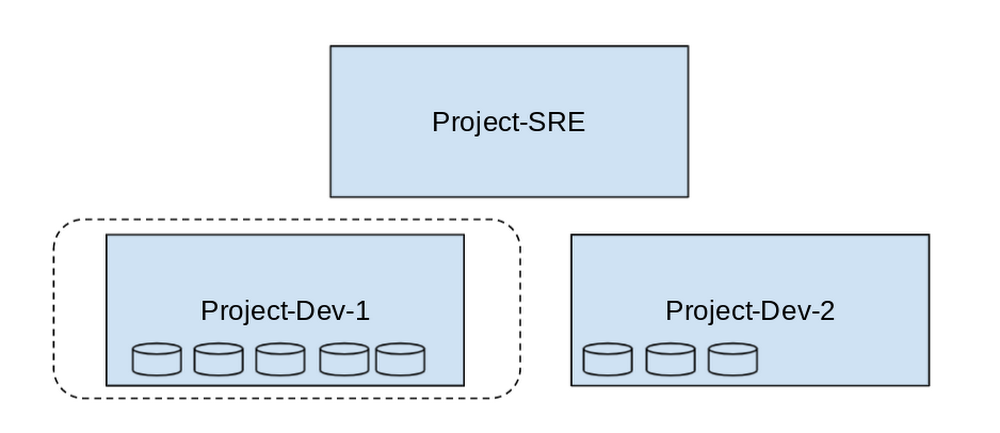
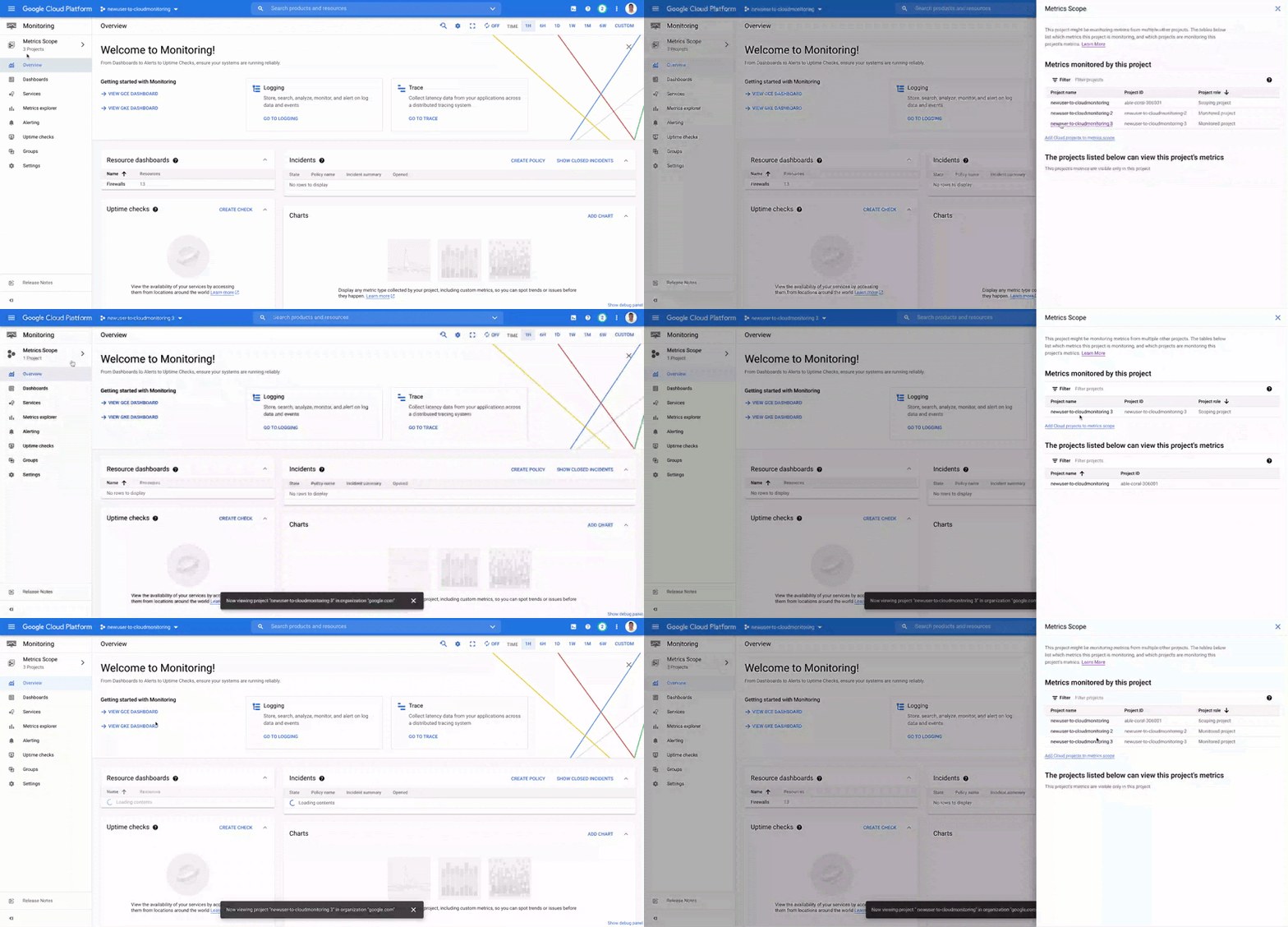
- In this example, Project-SRE is the name of a scoping project to monitor your fleet. You added two developer teams’ projects: Project-Dev-1 and Project-Dev-2, to Project-SRE’s Metrics Scope. If you select Project-SRE with the Cloud Console project picker and then go to the Monitoring page, you view the metrics for all three projects:

- If you select Project-Dev-1 with the Cloud Console project picker and then go to the Monitoring page, you view the Metrics Scope for Project-Dev-1 and you can only see the metrics for that project:
What else is new?
- Metrics Scopes can now monitor up to 375 projects (up from 100).
- New projects automatically start working in Cloud Monitoring without the previous 60-second Workspace creation process.
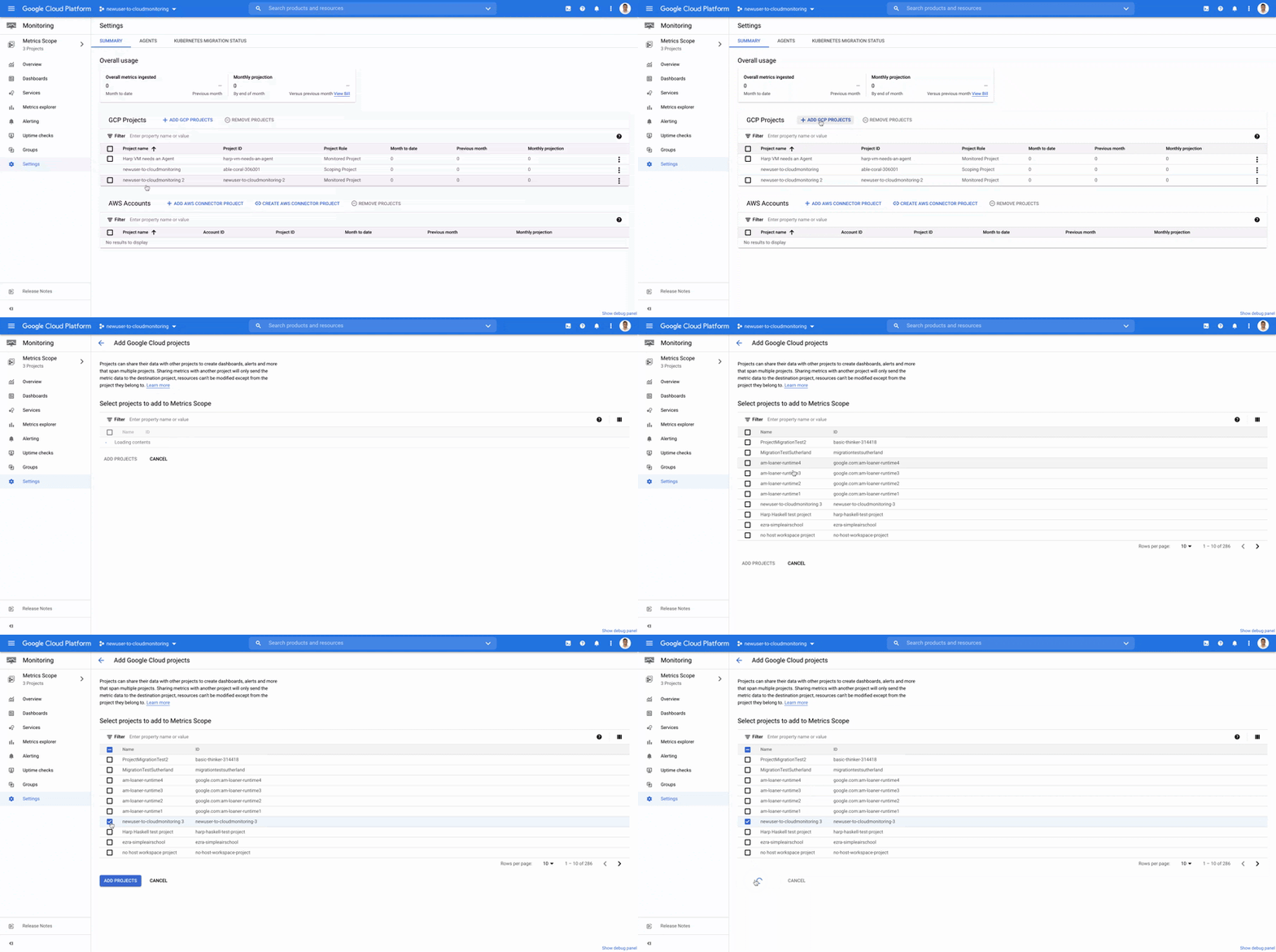
- If you want to monitor more than one project simply add it to your Metrics Scope:
Navigation
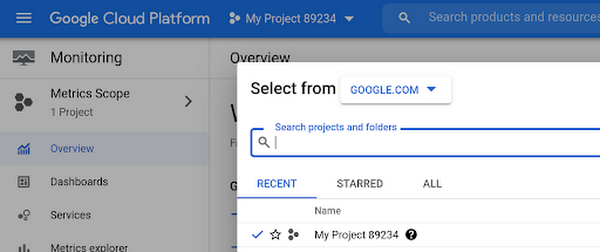
- Mentioned earlier, the Project Picker in the Cloud Console can be used to navigate between Metrics Scopes in Cloud Monitoring:
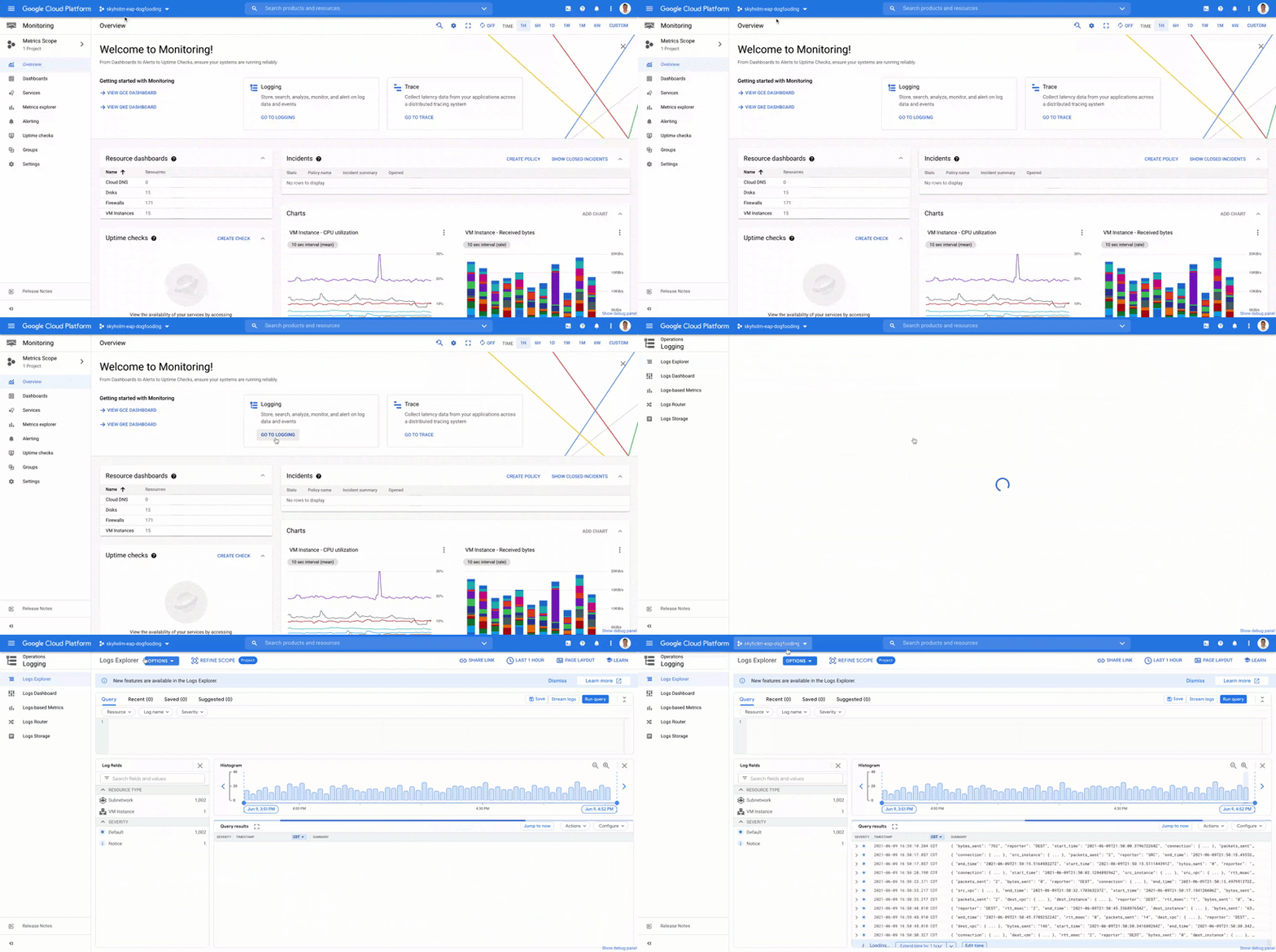
- This is now consistent with many other services across Google Cloud. Specifically, you can see how the project picker stays consistent when navigating from Cloud Monitoring to Cloud Logging:
- Additionally, to make your navigation between Metrics Scopes easy we’ve added the new Metrics Scope Tab and Panel in the UI:
Coming Soon
- The Metrics Scope API is coming within the next quarter! This API will enable you to programmatically manage your monitoring configurations and Metrics Scopes.
Current Workspaces users
If you are already using Workspaces in Cloud Monitoring you may have noticed that they converted to Metrics Scopes weeks ago. There is no additional action required and you can start taking advantage of the additional features of Metrics Scopes today.
Get Started
Companies that are digitally native or in the process of digital transformation have placed an increased operational role on developers and this often creates overlapping sets of responsibilities with Operations and SRE teams. Now multiple developer teams can focus on optimizing the performance of their applications while operators can take a fleet-wide view when maintaining and improving the performance of all of the infrastructure under their purview.For information on configuring a Metrics Scope to include metrics for multiple projects, see Viewing metrics for multiple projects.
5569
Of your peers have already downloaded this article
1:30 Minutes
The most insightful time you'll spend today!
Protecting a global network against persistent and constantly evolving cyber threats is one of the most important challenges faced by Google Cloud. So, how does Google’s global network protects seven different global businesses, each with over 1 billion customers, including popular Google services such as Google Search, YouTube, Maps, and Gmail?
The answer is a multi-step process, which is constantly changing and evolving to stay one step ahead of the malicious hackers and attackers. For instance, it’s network communications protocols—the rules that enable communications between systems—change multiple times per second to make malicious intrusions much harder.
Data in Google Cloud is encrypted both in transit and at rest. Google’s network capacity far exceeds any traffic load it hosts to thwart and DDoS attack. In addition, it has numerous other products, tools, and processes at work to provide defense in depth.
Download this e-book to get a detailed overview of Google Cloud’s approach to security and privacy.
Register to Watch July’s Security Summit

2908
Of your peers have already read this article.
1:30 Minutes
The most insightful time you'll spend today!
Together we can solve for the future of cloud security. Join us to learn how you can stay ahead of the next generation of threats with Google Cloud – whether you need to keep your organization secure in the cloud, on-premises, or in a hybrid environment. Get fresh insights from industry leaders and engage in interactive sessions that can help you solve your most critical security challenges.
Our digital event has ended, but you can still explore our sessions on demand.
The Security Summit is part of our digital Google Cloud Summit series. Check out the other events in the series to explore Google Cloud technology applications in various industries and dive into our latest digital innovations.Original air date:20 July 2021 21:30 Register to watch on demand.
Utilizing Google Cloud’s PII Security Features

2614
Of your peers have already read this article.
2:30 Minutes
The most insightful time you'll spend today!
BigQuery is a leading data warehouse solution in the market today, and is valued by customers who need to gather insights and advanced analytics on their data. Many common BigQuery use cases involve the storage and processing of Personal Identifiable Information (PII)—data that needs to be protected within Google Cloud from unauthorized and malicious access.
Too often, the process of finding and identifying PII in BigQuery data relies on manual PII discovery and duplication of that data. One common way to do this is by taking an extract of columns used for PII and copying them into a separate table with restricted access. However, creating unnecessary copies of this data and processing it manually to identify PII increases the risks of failure and subsequent security events.
In addition, the security of PII data is often mandated by multiple regulations and failure to apply appropriate safeguards may result in heavy penalties. To address this issue, customers need solutions that 1) identify PII in BigQuery and 2) automatically implement access control on that data to prevent unauthorized access and misuse, all without having to duplicate it.
This blog will discuss a solution developed by Google Professional Services for leveraging Google Cloud DLP to inspect and classify sensitive data and suggest a solution for using these insights to automatically tag and protect data in BigQuery tables.
BigQuery Auto Tagging solution overview
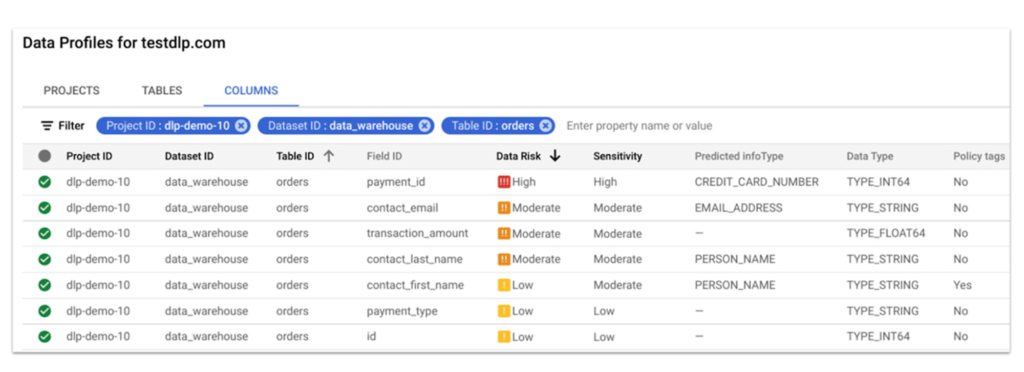
Automatic DLP can help to identify sensitive data, such as PII, in BigQuery. Organizations can leverage Automatic DLP to automatically search across their entire BigQuery data warehouse for tables that contain sensitive data fields and report detailed findings in the console (see Figure 1 below,) in Data Studio, and in a structured format (such as a BigQuery results table.) Newly created and updated tables can be discovered, scanned, and classified automatically in the background without a user needing to invoke or schedule it. This way you have an ongoing view into your sensitive data.
In this blog, we show how a new open source solution called BigQuery Auto Tagging Solution solves our second goal—automating access control on data. This solution sits as a layer on top of Automatic DLP and automatically enforces column-level access controls to restrict access to specific sensitive data types based on user-defined data classification taxonomies (such as high confidentiality or low confidentiality) and domains (such as Marketing, Finance, or ERP System.) This solution minimizes the risk of unrestricted access to PII and ensures that there is only one copy of data maintained with appropriate access control applied down to the column level.
The code for this solution is available on Github at GoogleCloudPlatform/bq-pii-classifier. Please note that while Google does not maintain this code, you can reach out to your Sales Representative to get in contact with our Professional Services team for guidance on how to implement it.
BigQuery and Data Catalog Policy Tags (now Dataplex) have some limitations that you should be aware of before implementing this solution to ensure that it will work for your organization:
- Taxonomies and Policy Tags are not shared across regions: If you have data in multiple regions you will need to create or replicate your taxonomy in each region that you want to apply policy tags.
- Maximum number of 40 taxonomies per project: If you require different taxonomies for different business domains or have replications to support multiple Cloud regions those will count against this quota.
- Maximum number of 100 policy tags per taxonomy: Cloud DLP supports up to 150 infoTypes for classification, however, a single policy taxonomy can only support up to 100 including any nested categories. If you need to support more than 100 data types, you may need to split these across more than one taxonomy.
High-level overview of the solution
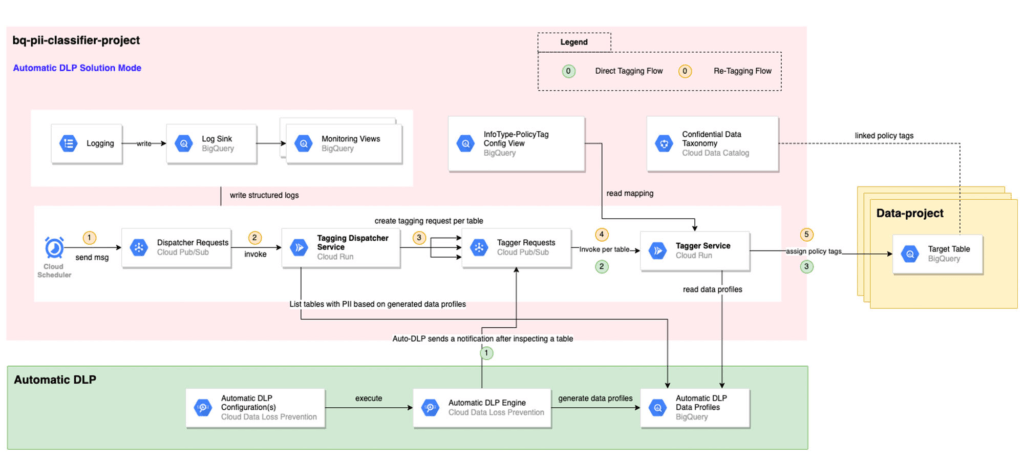
The solution is composed mainly of the following components: Dispatcher Requests topic, Dispatcher service, BigQuery Policy Tagger Requests topic, and BigQuery Policy Tagger service and logging components.
The Dispatcher Service is a Cloud Run service that expects a BigQuery scope to be expressed as inclusion and exclusion lists of projects, datasets, and tables. This Dispatcher service will query Automatic DLP Data Profiles to check if the tables in-scope have data profiles generated. For these tables, it will publish one request per table to the “BigQuery Policy Tagger Requests” PubSub topic. This topic enables rate limiting of BigQuery column tagging operations and apply auto-retries with backoffs.
The “BigQuery Policy Tagger” Service is also a Cloud Run service that receives the information of the DLP scan results of a BigQuery table. This service will determine the final InfoType of each column and apply the appropriate Policy Tags as defined in the InfoType – Policy Tags mapping. Only-one INFO_TYPE is selected and the function assigns the associated policy tag.
Lastly, all Cloud Run services maintain structured logs that are exported by a log sink to BigQuery. There are multiple BigQuery views that help with monitoring and debugging Cloud Run call chains and tagging actions on columns.
Deployment options
After deploying the solution, it can be used in two different ways:
[Option 1] Automatic DLP-triggered immediate tagging:
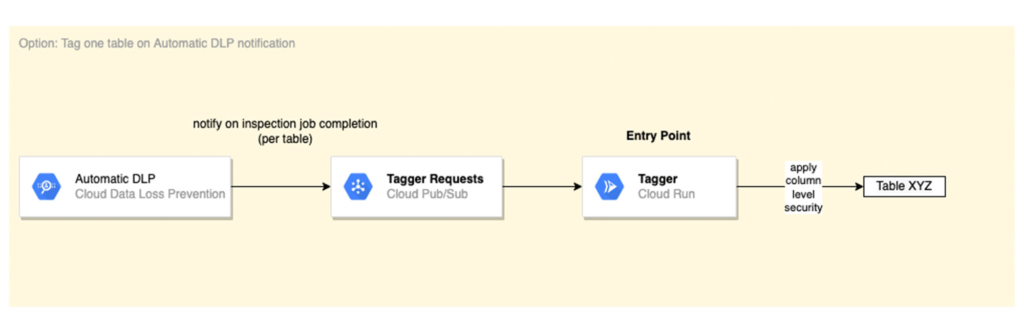
Automatic DLP is configured to send a Pub/Sub notification on each inspection job completion. The Pub/Sub notification includes the resource name and it triggers the Tagger service directly
[Option 2] Scheduled tagging:
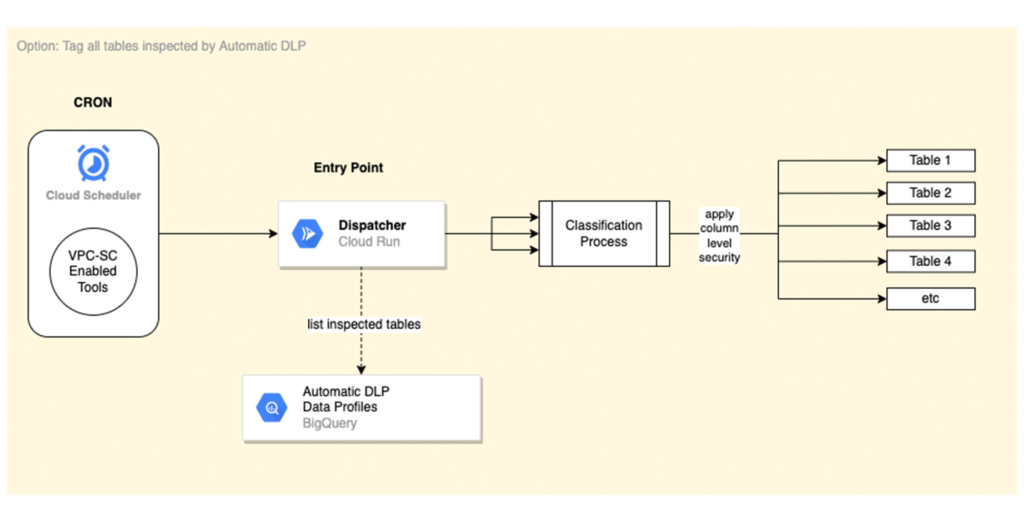
In this scenario, the Dispatcher service is invoked on a schedule with a payload representing a BigQuery scope to list inspected tables by Automatic DLP and create a tagging request per table. You could use Cloud Scheduler (or any Orchestration tool) to invoke the Dispatcher service. If the solution is deployed within a VPC-SC perimeter, other schedulers that support VPC-SC should be used (such as Composer or Custom App.)
In addition, more than one Cloud Scheduler/Trigger could be defined to group projects/datasets/tables that have the same tagging schedule (such as daily or monthly.)
To learn more about Automatic DLP, see our webpage. To learn more about the BQ classifier, see the open source project on Github: GoogleCloudPlatform/bq-pii-classifier and get started today!

5541
Of your peers have already downloaded this article
1:30 Minutes
The most insightful time you'll spend today!
Security in public clouds differs intrinsically from customer-owned infrastructure because there is shared responsibility for security between the customer and the cloud provider.
Cloud Security is different from on-premises security because of the combination of the following:
- Differences in security primitives, visibility, and control points within the infrastructure, products
- and services.
- New cloud-native development methodologies like containerization and DevSecOps.
- The continued velocity and variety of new cloud products and services and how they can be
- consumed.
- Cultural shifts in how organizations deploy, manage, and operate systems.
Here is a Google Cloud Security Foundations Guide to help you develop a security blueprint for your cloud deployments.
More Relevant Stories for Your Company
Google Cloud Leads the Pack Among Data Security Vendors: Forrester
In its 25-criterion evaluation of data security portfolio providers, Forrester identified the 13 most significant ones and researched, analyzed, and scored them. Here's a summary of what Forrester said about Google Cloud Google puts cloud and cloud security at the center of its strategy. Capabilities from Google Cloud Platform, G Suite,

Google Cloud is Every Retailer’s Most Trusted Cloud
Whether they were ready for it or not, the COVID-19 pandemic transformed many retailers into digital businesses. Retailers made huge investments into commerce technologies, customer experience tools, sales and fulfillment technology, and improving digital experiences to continue providing their goods and services to their customers. Now, more than a year

How Google Cloud Helps Educational Institutions Ward off the Risk of Data Breaches
In the US alone, 24.5 million school records have been leaked across 1,327 data breaches since 2005. And when +1.3 billion students moved to remote learning, the pandemic became an accelerant for cyber attacks with the number of attacks in education spiking 30% YoY during July and August 2020. In our experience working with education

Securing apps using Anthos Service Mesh
Hi there! I'm David Challoner from Access Site Reliability Engineering (SRE), here with Anthony Bushong from Developer Relations to talk about how Corp Eng is adopting Anthos Service Mesh internally at Google. Corp Eng is Google's take on "Enterprise IT". A big part of the Corp Eng mission is running
