





Assuring Compliance in the Cloud: Paper by Google Cloud’s Office of the CISO

4909
Of your peers have already read this article.
1:30 Minutes
The most insightful time you'll spend today!
Cloud transformation and the adoption of modern DevOps technology presents both opportunities and challenges for IT compliance functions. With DevOps style application development, the feedback loop for developers and engineers is much tighter than with traditional application development pipelines, enabling speed and agility of application release cycles. While speedy CI/CD is a critical advantage of DevOps, it also shifts compliance left in the development timeline, and therefore puts pressure on the IT risk & compliance organization to modernize their approach to regulatory compliance as well. With the ongoing shift towards cloud technologies and DevOps, modernization of regulatory compliance is no longer optional for an IT compliance function
Compliance modernization is a broad mandate that spans the way the function is governed; the tools, technology, and analytics it uses; the number and nature of its connections to other parts of the business; verifiability and auditability of the controls’ evidence, the expectations assigned to it; and more.
Public cloud technology is becoming a core part of many industries today, and with this comes some potential risks such as cloud misconfigurations exposing intellectual property, loss of physical control of assets, skillset scarcity around cloud based security and compliance.
Given the constantly changing risk landscape, it is critical that regulations more closely align to address these risks. As regulations and risks evolve, the aim of a modern compliance function is to help an organization stay compliant as it goes through a digital transformation. As organizations go through digital transformation, IT compliance also needs to transform — via upgrading the technology stack, modifying the business processes and most importantly re-skilling people to become cloud aware.
Today we are releasing the new paper by Google Cloud’s Office of the CISO. In the paper we reveal a new approach for modernizing your compliance approach using modern approaches and Google Cloud toolsets. Your team can leverage the paper to add value to enterprises, both by charting a course to the safe use of cloud technology and by reducing risk through the use of the public cloud.
Read the paper “Assuring Compliance in the Cloud.”
Also, review these related resources:
- “Risk Governance of Digital Transformation in the Cloud“ paper
- “Making Compliance Cloud-native” (episode 14) with Zeal Somani
- Google Cloud Compliance resource center
- Our compliance blueprints: PCI DSS on GKE and GCP FedRAMP Blueprint
- Google Cloud security best practices center
2022’s First Cloud CISO Perspectives: Recap of the Megatrends, Releases and News

9339
Of your peers have already read this article.
3:00 Minutes
The most insightful time you'll spend today!
I’m excited to share our first Cloud CISO Perspectives post of 2022. It’s already shaping up to be an eventful year for our industry and we’re only in month one. There’s a lot to recap in this post, including the U.S. government’s recent efforts to address critical security issues, like open source software security and zero trust architectures. We’ve also released new resources from our Google Cybersecurity Action Team like the Cloud Security Megatrends and the Boards of Directors whitepaper on cloud risk governance.
Cloud Security Megatrends
We’re often asked if the cloud is more secure than on-prem (and why) so we shared our answer in a recent blog post. At Google Cloud, security by design is our priority. We’ve long adopted zero-trust principles for our baseline security architectures and built a global network that relies on defense in depth layers to protect against configuration errors and attacks. But security is always evolving and that is why we also take advantage of the following megatrends:
- Economy of scale: Decreasing the marginal cost of security raises the baseline level of security.
- Shared fate: A flywheel of increasing trust drives more transition to the cloud, which compels even higher security and even more skin-in-the-game from the cloud provider.
- Healthy competition: The race by deep-pocketed cloud providers to create and implement leading security technologies is the tip of the spear of innovation.
- Cloud as the digital immune system: Every security update the cloud gives the customer is informed by some threat, vulnerability, or new attack technique often identified by someone else’s experience. Enterprise IT leaders use this accelerating feedback loop to get better protection.
- Software-defined infrastructure: Cloud is software defined, so it can be dynamically configured without customers having to manage hardware placement or cope with administrative toil. From a security standpoint, that means specifying security policies as code, and continuously monitoring their effectiveness.
- Increasing deployment velocity: Because of cloud’s vast scale, providers have had to automate software deployments and updates, usually with automated continuous integration/continuous deployment (CI/CD) systems. That same automation delivers security enhancements, resulting in more frequent security updates.
- Simplicity: Cloud becomes an abstraction-generating machine for identifying, creating and deploying simpler default modes of operating securely and autonomically.
- Sovereignty meets sustainability: The cloud’s global scale and ability to operate in localized and distributed ways creates three pillars of sovereignty. This global scale can also be leveraged to improve energy efficiency.
If you’re an IT decision maker, pay attention to these megatrends that will continue to drive and reinforce cloud security and will outpace the security of on-prem infrastructure well into the future.
U.S. Federal government cybersecurity momentum
- Open source software security: Earlier this month, Google participated in the White House Summit on open source software security. The meeting came at a critical time for the industry following December’s Log4j vulnerabilities and was both a recognition of the challenge and an important first step towards addressing it. The open source software ecosystem is not homogenous, despite the fact that the industry often thinks of or treats it this way. Some of it, like Linux, is highly curated, while other critical software is supported through diffuse communities including technology companies and other stakeholders. There is also a long tail of many other critical projects driven by a dedicated community of maintainers around the world, including Googlers. In light of this reality, we welcomed the chance to share our recommendations to advance the future of open source software security. Some work we’ve done includes founding the Open Source Security Foundation, which has been instrumental already in making security improvements. We’ve also helped drive a number of key security initiatives within the open source community including security scorecards, the SLSA framework to improve the security and integrity of open source packages, and Secure Open Source Rewards to financially incentivize improvements to critical open source security projects.
- OMB’s Federal zero trust strategy: The publication of the Office of Management and Budget’s zero trust architecture strategy marks an important step for the U.S. federal government’s efforts to modernize under Executive Order 14028. Google Cloud supports this approach, which recognizes the immense security benefits offered by modern computing architectures. For the past decade, Google has successfully applied zero trust principles through our BeyondCorp and BeyondProd frameworks for providing end-user access and securing our cloud workloads. And we’ve brought these best practices from our own journey to global governments and businesses of any size through solutions like BeyondCorp Enterprise and capabilities like Binary Authorization and Anthos Service Mesh, which are embedded in Anthos, our managed application platform. For Federal agencies embarking on this zero trust journey, the Google Cybersecurity Action Team will offer our expertise by conducting Zero Trust Foundations strategy workshops, which can help organizations in the public and private sectors develop actionable and achievable strategies and plans for zero trust implementation.
Google Cybersecurity Action Team Highlights
Here are the latest updates, products, services and resources across our security teams this month:
Security
- Democratizing security operations: We recently announced that Siemplify, a leading security orchestration, automation and response (SOAR) provider, is joining Google Cloud to help companies better manage their threat response. Providing a proven SOAR capability with Chronicle’s approach to security analytics is an important step forward in our vision to advance invisible security and democratize security operations for every organization.
- Security by design: The Highmark Health security team is using “secure-by-design” techniques to address the security, privacy, and compliance aspects of its Living Health solution with Google Cloud’s Professional Services Organization (PSO). Google has long advocated for and followed security by design principles, which is why we’re continuously building enhanced security, controls, resiliency and more into our cloud products and services.
- Secure collaboration for hybrid work environments: The Google Workspace team shared its recommendations for businesses as they prepare for the future of work, where the hybrid/flexible work model is becoming standard practice and a new approach to security is essential.
- Anthos Policy Controller CIS Benchmark enforcement: A big part of our shared fate philosophy is to build secure products and not just security products. A recent example of this in action is embedding CIS benchmark policy conformance in the Anthos Policy Controller. We believe the more we embed approaches like this into our products, the more application and infrastructure teams can intrinsically embed security at the start and reduce toil for the security team.
- DevOps for technology-driven organizations and startups: A key success factor for many security programs is the partnership and integration with development teams, and there are some great resources and lessons in our DORA research.
- Security by design with Chrome OS: ABN AMRO’s Asia-Pacific region team recently shared how they are using Chrome OS and CloudReady to work securely in the cloud, reduce total cost of ownership, and add flexibility for employees. This is a great example of secure by design principles in the use of Chromium.
Risk & Compliance
- Boards of Directors summary guide to cloud risk governance: The latest whitepaper from the Google Cybersecurity Action Team outlines how boards of directors can prioritize safe, secure, and compliant adoption processes for cloud technologies within their organizations.
- TruSight Risk Assessment of Google Cloud: TruSight recently released a comprehensive
risk assessment report on Google Cloud. Our Enterprise Trust team collaborated on this robust assessment of Google Cloud services to validate the design and implementation of controls. TruSight’s risk assessment of our security controls will help customers accelerate and complete their risk management due diligence. - Data governance: Check out this new blog series on data governance where our teams explain the role of data governance, its importance, and the necessary processes to run an effective data governance program. Implementing data governance will help maximize value derived from business data, build user trust, and ensure compliance with required security measures.
Controls and Products
- Encrypting Data Fusion: To help meet the security, privacy and compliance requirements of customers in regulated industries like finance or public sector, we announced the general availability of Customer Managed Encryption Keys (CMEK) integration for Cloud Data Fusion, which enables encryption of both user data and metadata at rest with a key that customers can control through our Cloud Key Management Service (KMS).
Don’t forget to sign-up for our newsletter if you’d like to have our Cloud CISO Perspectives post delivered every month to your inbox. We’ll be back next month with more updates and security-related news.
How to Evolve Security for the Cloud: McKinsey with Google Cloud

3951
Of your peers have already read this article.
8:30 Minutes
The most insightful time you'll spend today!
Not too long ago, McKinsey released a report titled “Making a secure transition to the public cloud,” the result of interviews with IT security experts at nearly 100 enterprises around the world.
Leveraging the expertise of Google Cloud and McKinsey security experts, the research presents a strategic framework for IT security in cloud and hybrid environments, and provides recommendations on how to migrate to the cloud while keeping security top of mind.
The research shows what many already know: that public cloud adoption is accelerating thanks to increased technical flexibility, simpler scaling, and lower operating costs.
What’s exciting is that the research also reveals that many Chief Information Security Officers (CISOs) no longer view security as an inhibitor to adoption but instead an opportunity.
“In many cases [CISOs] acknowledge that cloud service providers’ security resources dwarf their own,” the authors write—and now these companies are focused on how to best adopt and configure cloud services for increased security.
The research identifies three common archetypes for perimeter security: backhauling, cleansheeting, and adopting cloud provider controls by default.
- Backhauling allows companies to continue managing IT security on-prem, with an external gateway connecting the data center to the public cloud. Approximately half of the companies surveyed currently use this model, but only 11% plan to continue doing so, since it can keep companies from realizing certain cloud benefits, such as agility.
- Cleansheeting requires greater investment and expertise, as it calls for redesigning IT security around a “virtual perimeter” and leveraging multiple cloud-native tools and services.
- Using cloud provider controls is the most cost-effective solution, but—depending on the cloud provider—can limit autonomy and may offer limited capabilities.
McKinsey uses these three models, along with the decision to re-architect applications for the cloud, to identify six “archetypes” for cloud security. Each archetype has its own tradeoffs.
The report also includes a tactical 10-step plan for successful cloud migration. Download it now.
5 Compelling Ways to Practice the Principle of Least Privilege for Security Leaders

3555
Of your peers have already read this article.
4:30 Minutes
The most insightful time you'll spend today!
When it comes to security, managing access is a foundational capability—whether you’re talking about a physical space or your cloud infrastructure. If you were securing an office, you wouldn’t give every employee a master key that can open the front door, the mailbox, and the safe. Likewise, when you’re securing your cloud infrastructure, you should limit employees’ access based on their role and what they require to do their job.
This concept is known as the principle of least privilege, which NIST’s Computer Security Resource Center defines as: “A security principle that restricts the access privileges of authorized personnel… to the minimum necessary to perform their jobs.” In practice, this means assigning credentials and privileges only as needed to both users and services, and removing any permissions that are no longer necessary.
Keeping the principle of least privilege in mind, here are five practical tips to minimize the surface area of exposed resources on Google Cloud Platform (GCP) and defend against some common attacks.
Avoid excessive use of broad primitive roles
Primitive roles like Owner and Editor grant wide-ranging access to all project resources. To tighten access security, consider using more specific predefined roles in Cloud Identity and Access Management (IAM), or defining custom roles that are better suited to your organization. For example, if you have a Cloud SQL database, instead of granting the project-wide Editor role to everybody, you could grant the cloudsql.editor role to users who create new databases, cloudsql.client to those who only need to connect to existing databases, and limit cloudsql.admin to database administrators.
Our policy design page has some sample structures and policies for different types of organizations, including startups, large enterprises, and education and training customers.
Assign roles to groups, not individuals
If you assign an IAM role directly to an individual, they retain the rights granted by that role even if they change roles, move around your organization, or no longer require them. A safer and more maintainable option is to place users into logical groups. For example, to manage databases, you could create db-editors, db-viewers, and db-admins groups, and let users inherit roles from these groups:
Groups can be created within the Admin Console for any G Suite domain, or federated from an external tool like Active Directory. By using groups for ownership, you can also avoid “orphaned” projects and resources—where a project or resource has a single owner who leaves the organization.
You can assign roles at the organization, folder, project, or resource level. This lets larger organizations easily manage roles for, say, a specific developer team or the entire accounting department. Be aware, however, that a child resource cannot limit roles granted by a parent: a user’s project-level cloudsql.viewer role, for example, will override any resource-level restrictions on any database in the same project.
Reduce the risks of default service account behavior
Service accounts are a special type of account intended for apps that need to access data. If the app’s own private credentials are compromised, however, the attacker then has all the access granted to the app by the service account’s roles.
The Compute Engine default service account, which has the editor role, is enabled for all instances created in a project unless you specify otherwise.
Creating a custom service account to use for creating instances and limiting its roles to the minimum necessary significantly reduces risk. For example, many apps using Cloud SQL only need the cloudsql.client role that lets them connect to an existing database.
An alternative approach is to grant the instance service account minimal privileges and create dedicated service accounts for your apps. This gives you more fine-grained control over each app’s privileges, although you will need to carefully manage the service account credentials.
Reduce risk and control access to your project by using networking features
To enable inter-resource communication, new GCP projects initially have a default network connecting all resources in that project. This is convenient for development, but in this default configuration, if an attacker gains unauthorized access to one resource, they may be able to reach others as well.
To limit this risk, don’t use the default network in production and explicitly specify accepted source IP ranges, ports, and protocols in network firewalls. You should also separate sensitive apps into individual virtual private clouds (VPCs), and if inter-app connectivity is required, use a Shared VPC. In each VPC, use different subnets for public facing services (e.g., web servers and bastion hosts) and private backend services. Allocate public IPs only to instances in the public subnet and add firewall rules with network tags to control which services can communicate with each other. Finally, grant permission to create or modify firewalls and routes only to those directly responsible for the network.
The Secure Instances and Apps with Custom Networks codelab walks you through setting up the public/private subnet configuration above. The Policy design for customers article we mentioned earlier also contains sample network designs for common use cases. For guidance on the tradeoffs of single, multiple, and shared VPCs, see Best practices and reference architectures for VPC design.
Consider using managed platforms and services
If you deploy and manage your own applications, you are responsible for security configuration, including the maintenance of accounts and permissions. You can limit your responsibilities by hosting your apps on managed platforms like Cloud Run, App Engine, or Cloud Functions, or by using fully managed services for databases and processing frameworks like Cloud SQL for MySQL and Postgres, Cloud Dataproc for Hadoop and Spark, and Cloud Memorystore for Redis.
A final note
Security is a priority in all aspects of Google Cloud, but cloud security is a shared responsibility, and ultimately you are responsible for making the right configuration and product choices for your organization to protect your data on GCP. These tips are a great starting point to help reduce your attack surface and help you make more informed risk decisions.
Revamping Cloud Security: Google Introduces Attack Path Simulation to Security Command Center

1161
Of your peers have already read this article.
3:30 Minutes
The most insightful time you'll spend today!
To help secure increasingly complex and dynamic cloud environments, many security teams are turning to attack path analysis tools. These tools can enable them to better prioritize security findings and discover pathways that adversaries can exploit to access and compromise cloud assets such as virtual machines, databases, and storage buckets.
Other attack path tools rely on static, point-in-time snapshots of an organization’s cloud footprint, which often contain sensitive data about their environment, how it is configured, and where the most sensitive data resides.
At Google Cloud, we are taking a different approach. We are excited to announce today at the Google Cloud Security Summit that we are adding attack path simulation to Security Command Center, our built-in security and risk management solution for Google Cloud. This new risk management capability automatically analyzes a customer’s Google Cloud environment to pinpoint where and, importantly, how vulnerable resources may be attacked, so security teams can stay one step ahead of adversaries.
We expect attack path simulation capabilities to be available in Security Command Center Premium later this summer.
Unlike some third-party security products, Security Command Center continuously scans an organization’s cloud environment gathering near real-time data about cloud resources and security vulnerabilities. Our attack path simulation engine uses this information to automatically generate and render high-risk attack paths, without the hands-on toil of having to repeatedly run manual queries.
A different approach to attack path analysis
Other attack path analysis tools involve significant operational toil. The static, point-in-time snapshots that these tools generate have to be sent to an external provider, which can add risk. Then security teams have to follow up with complex queries before they can identify likely attack paths.
Google Cloud’s advanced attack simulation engine leverages our first-party, agentless visibility of Google Cloud assets, the relationships between assets, and the current state of defenses. Attack path simulation is fully automated with no need to manually run queries. Simulations run in the Google Cloud environment, and do not send snapshots outside your environment, avoiding exposure of sensitive information.
See what attackers can see
Effective attack path analysis should mimic how a real-world attacker can reach and compromise high value resources. This is why Security Command Center simulates how attackers try many different ways to infiltrate a cloud environment. SCC then generates attack path graphs to give defenders insight into how adversaries could exploit a single security weakness or various combinations of security vulnerabilities to access valuable assets. SCC also provides detailed information on how to remediate issues and shore up defenses based on its findings
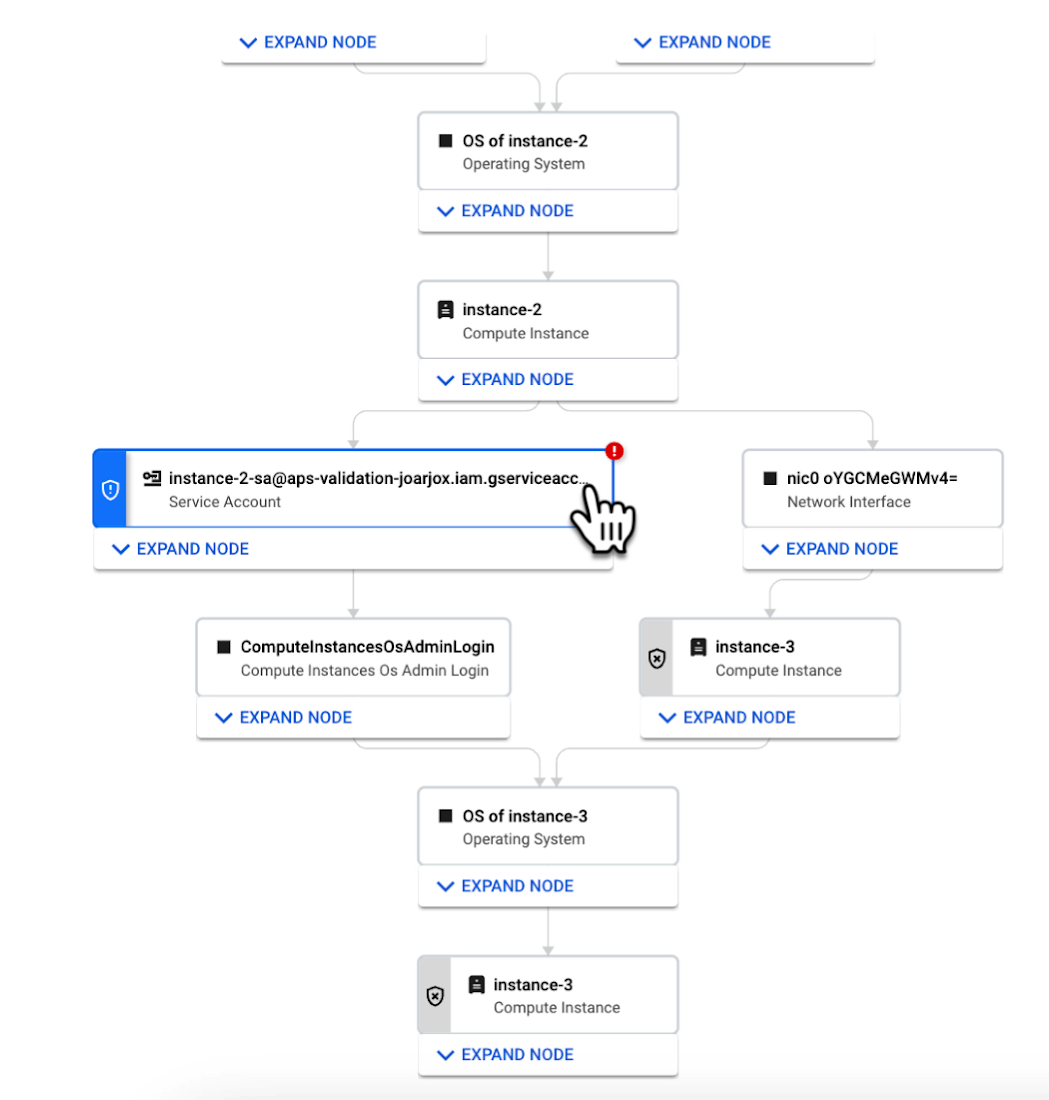
We are delivering combined attack path simulation and analysis as a managed service. There are no agents to install or manage. Results automatically reflect changes in your organization’s Google Cloud environment. Because our attack path simulations are conducted on models of an organization’s cloud resources, there is no performance or operational impact to the live production environment.
Better security prioritization
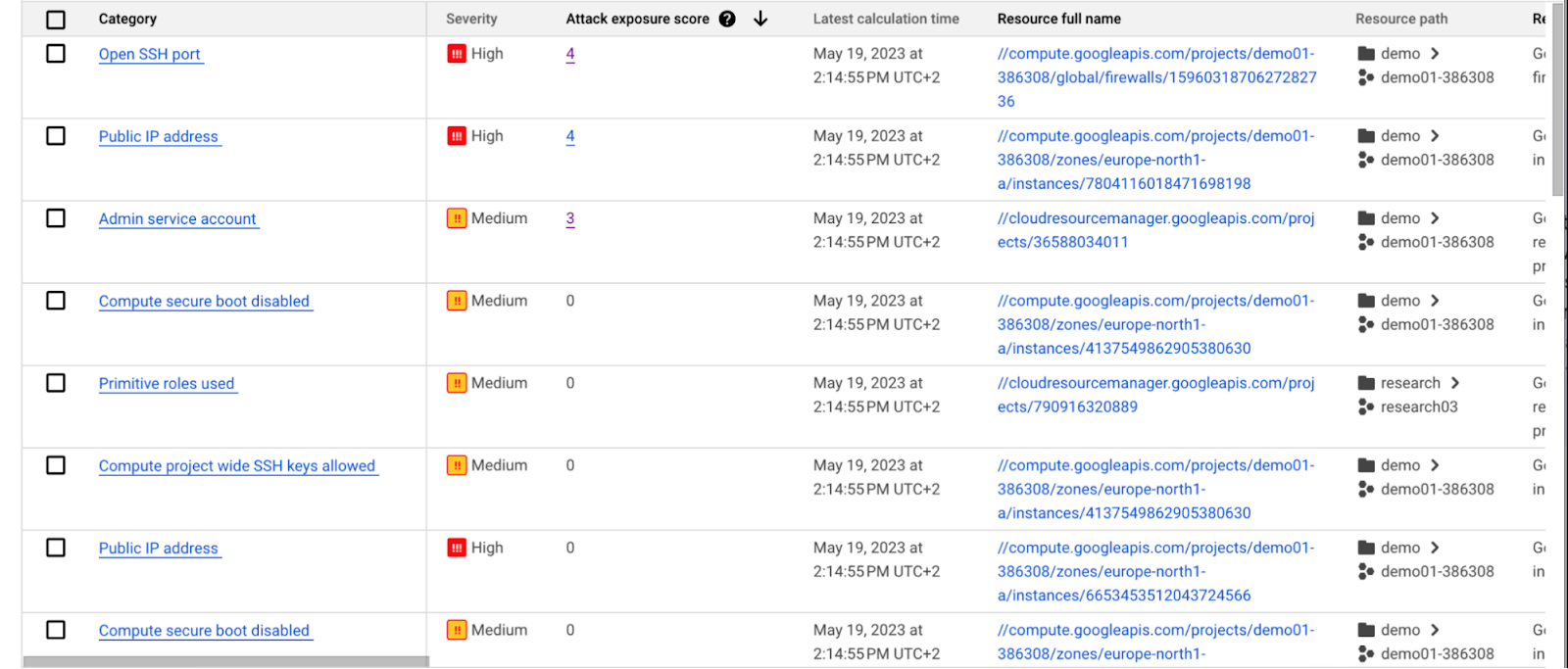
Security Command Center automatically computes an attack exposure score for misconfigurations and vulnerabilities that expose valuable resources to attackers. The score is a measure of cyber risk. It takes into account how exposed valued resources are, and the paths of least resistance for attackers to reach those resources.
Security teams can use these scores to prioritize remediation efforts and improve their overall risk posture.
How attack path analysis has already reduced risk for customers
Dozens of customers have already used our attack path capabilities in private Preview to improve their security posture and reduce their operational risk.
Security Command Center alerted one customer to a finding with a high attack exposure score. The finding was related to a service account whose keys were not being rotated. After reviewing the attack paths related to this finding, the cloud security manager discovered that even though the service account was named “test,” it provided access to storage buckets outside of the test environment.
If an attacker had been able to steal the credentials for this test account, they could have easily accessed production data. The security manager removed administrator privileges on the account. The attack path simulation enhanced their understanding of the severity of the finding, and helped convince them to make it a high-priority fix.
Another customer using attack path simulation needed to assess which security findings created the greatest risk. Two findings related to the same service account with high exposure scores rose to the top of the list. The attack paths revealed that the service account had access to more than 500 storage buckets. If an attacker were to gain access to this account they would be able to read, write, or delete data across any of those buckets, many of which contained sensitive business data and confidential customer information.
Using Security Command Center’s attack path results, the security team remediated the risk by limiting permissions to the storage buckets needed for that specific role.
Next steps
Attack path simulation capabilities are planned for availability later this summer. We expect forthcoming enhancements to use Security AI Workbench to translate complex attack graphs to human-readable explanations of attack exposure, including impacted assets and recommended mitigations.
You can learn more about Nordnet Bank’s experience using attack path simulation at our Security Summit session. To get started with Security Command Center today, please go to the Google Cloud console.
Confidential Computing at Google Cloud

3118
Of your peers have already read this article.
2:00 Minutes
The most insightful time you'll spend today!
This blog includes content from Episode One “Confidentially Speaking” of our Cloud Security Podcast, hosted by Anton Chuvakin (Head of Solutions Strategy) and Timothy Peacock (Product Manager). You should listen to the whole conversation for more insights and deeper context.LEARN MORECloud Security Podcast – Confidentially SpeakingListen to the Cloud Security Podcast with guest Nelly Porter, Group Product Manager @ Google.
We all deal with a lot of sensitive data and today, enterprises must entrust all of this sensitive data to their cloud providers. With on-premises systems, companies used to have a very clear idea about who could access data and who was responsible for protecting that data. Now, data lives in many different places—on-premises, at the edge, or in the cloud.
You may already know that Google Cloud provides encryption for data when it is in transit or at rest by default, but did you also know we also allow you to encrypt data in use—while it’s being processed?
In this podcast episode, Product Manager Nelly Porter gave us a peek under the hood of confidential computing at Google Cloud.
What is confidential computing?
Google Cloud’s Confidential Computing started with a dream to find a way to protect data when it’s being used. We developed breakthrough technology to encrypt data when it is in use, leveraging Confidential VMs and GKE Nodes to keep code and other data encrypted when it’s being processed in memory. The idea is to ensure encrypted data stays private while being processed, reducing exposure.
During the episode, Nelly Porter explained that Google Cloud’s approach is based on hardware and CPU capability. Confidential Computing is built on the newest generation of AMD CPU processors, which have a Secure Encrypted Virtualization extension that enables the hardware to generate encryption keys that are ephemeral and associated with a single VM. Basically, they are never stored anywhere else and are not extractable—the software will never have access to those keys.
“You can do whatever you need to do, but you will be in a cryptographically isolated space that no other strangers passing by can see.”
Memory controllers use the keys to quickly decrypt cache lines when you need to execute an instruction and then immediately encrypts them again. In the CPU itself, data is decrypted but it remains encrypted in memory.
Confidential computing aims to mitigate gaps in data security
Nelly also shed some light on why confidential computing will continue to play a central role in the future of cloud computing. She pointed out that one of the biggest gaps companies are looking to cover is securing data when it is in use.
Data that is encrypted on-premises or in cloud storage, but the biggest risk for companies is when they start working with that data. For instance, imagine you encrypted your data on-premises and only you hold the keys. You upload that data into Cloud Storage buckets—simple, safe, and secure.
But now, you want to train machine learning models based on that data. When you upload it into your environment, it’s no longer protected. Specifically, data in reserved memory is not encrypted.We’re trying to ensure that your data is always protected in whatever state it exists, so fewer people have the opportunity to make mistakes or maliciously expose your data.
Top takeaways about confidential computing
Throughout the conversation, Nelly also shared interesting points about the development and direction of confidential computing at Google Cloud.
Here were our favorite takeaways from the podcast:
We worked hard to make Google Cloud’s approach simple.
We’ve invested a lot of time and effort into investigating the possibilities (and limitations) of confidential computing to avoid introducing residual risks to our approach. For instance, the early introduction of hardware capable of confidential computing in the industry required IT teams to have the resources to rewrite or refactor their app, severely limiting their ability to adopt it within their organizations.
With Confidential Computing, teams can encrypt data in use without making any code changes in their applications. All Google Cloud workloads can run as Confidential VMs, enabled with a single checkbox, making the transition to confidential computing completely simple and seamless.
“A lot of customers understand the values of confidential computing, but simply cannot support re-writing the entire application. It’s why Google Cloud, in particular, decided to take a different approach and use models that were incredibly easy to implement, ensuring that our customers would not have those barriers to cross.”
Confidential computing is for more than just fintech.
There is, of course, a compelling use case for confidential computing at highly-regulated companies in financial, government, life sciences, and public sectors. However, Nelly shared that her team didn’t anticipate that even verticals without significant regulation or compliance requirements would be so interested in this technology, mostly to pre-empt privacy concerns.
Many companies see confidential computing as a way to create cryptographic isolation in the public cloud, allowing them to further ease any user or client concerns about what they are doing to protect sensitive data. For instance, during COVID-19, there was an increase in small research organizations that wanted to collaborate across large datasets of sensitive data.
“Prior to confidential computing, it wasn’t possible to collaborate because you needed the ability to share very sensitive data sets among multiple parties while ensuring none of them will have access to this data, but the results will benefit all of them—and us.”
An open community, working together will be key for the future.
Nelly also shared that there are plans to extend memory protections beyond just CPUs to cover GPUs, TPUs, and FPGAs. Google Cloud is working with multiple industry vendors and companies to develop confidential computing solutions that will cover specific requirements and use cases.
Confidential computing will not be achieved by a single organization – it will require many people to come together. We are a member of the Confidential Computing Consortium, which aims to solve security for data in use and includes other vendors like Red Hat, Intel, IBM, and Microsoft.
“Google alone would not be able to accomplish confidential computing. We need to ensure that all vendors, GPU, CPU, and all of them follow suit. Part of that trust model is that it’s third parties’ keys and hardware that we’re exposing to a customer.”
There are no magic bullets when it comes to security.
Confidential computing is still an emerging, very new technology and unsurprisingly, there are a lot of questions about what it does and how it works. It’s important to remember that there is no such thing as the one-tool-fits-all-threats security solution. Instead, Nelly notes that confidential computing is yet another tool that can be added to your security arsenal.
“No solution will ever be the magic bullet that will make everyone happy and secure, guaranteed. But confidential computing is an addition to our toolbox of defense against gaps we have to take super seriously and invest in solving.”
Did you enjoy this blog post? To listen to the full conversation, head over to Episode One “Confidentially Speaking” of our Cloud Security Podcast, hosted by Anton Chuvakin (Head of Solutions Strategy) and Timothy Peacock (Product Manager).
We also recommend checking out other episodes of the Cloud Security Podcast by Google for more interesting stories and insights about security in the cloud, from the cloud, and of course, what we’re doing at Google Cloud.
More Relevant Stories for Your Company

The Many Risks of Ignoring the Impact of a Tighter Cloud Security Framework
The perimeter has disappeared and access to company data is no longer limited to your physical office or your employees. Instead, in today’s transformed workforce - increasingly connected, collaborative and in the cloud - the security perimeter has become dispersed and elastic, wrapped around each user and device. Moreover, ‘users’

Encryption in Transit: The Next Level in Cloud Security
Security is often a deciding factor when choosing a public cloud provider. At Google Cloud, security is of the utmost importance and the security strategy encompass authentication, integrity, and encryption, for both data at rest and in transit. Hence, Google Cloud encrypts and authenticates all data in transit at one

Stop Cribbing About Shadow IT and Start Taking Charge Now
Employees use tools at their disposal to get work done, but if these tools (often legacy) hamper collaboration or are inflexible, they’ll turn to less secure options for the sake of convenience. According to Gartner, a third of successful attacks experienced by enterprises will come from Shadow IT usage by 2020.

What Users and System Designers Must Learn from Google’s Best Practices for Password Management
Updated for 2021: This post includes updated best practices including the latest from Google's Best Practices for Password Management whitepapers for both users and system designers. Account management, authentication and password management can be tricky. Often, account management is a dark corner that isn't a top priority for developers or product managers. The resulting experience
