





Securing Sensitive Data in the Cloud: Google Cloud’s CDMC-Certified Solution

1120
Of your peers have already read this article.
3:30 Minutes
The most insightful time you'll spend today!
As enterprises accelerate adoption of cloud-based services and products, they face a common challenge: How can they effectively secure and govern rapidly expanding volumes of their most sensitive data in new environments?
Today, Google Cloud released an architectural whitepaper and accompanying source code for a solution which successfully completed an assessment facilitated by KPMG LLP and has been accredited by the Enterprise Data Management Council (EDM Council) as a Cloud Data Management Capabilities (CDMC) Certified Cloud Solution. The architecture, which includes Google Cloud’s BigQuery and Dataplex Data Catalog, has been validated against CDMC’s control framework and can be used by new or existing Google Cloud clients wanting to migrate their sensitive data to the cloud with greater confidence.
“This is an exciting milestone for Google Cloud and the CDMC framework,” said John Bottega, president of EDM Council. “Google is advancing cloud adoption across all industries. Now as a CDMC Certified Cloud Solution, their clients can have the added certainty that Google’s architecture has the key controls and accepted best practices in place to protect their data in the cloud.”
Introducing CDMC
The CDMC framework, developed and published by EDM Council, provides a set of data management capabilities, standards, and best practices for securing their cloud implementations. Contributors to the framework include large global enterprises across regulated industries, major cloud service providers, technology service organizations, and advisory firms.
The EDM Council also provides a data management assessment framework which includes a framework composed of 14 key controls and corresponding assessment procedures, which are used to validate that sensitive data is being managed effectively. To become a CDMC Certified Cloud Solution, the Google Cloud team designed, implemented, and documented a reference architecture which met the control requirements and was then assessed by KPMG LLP.
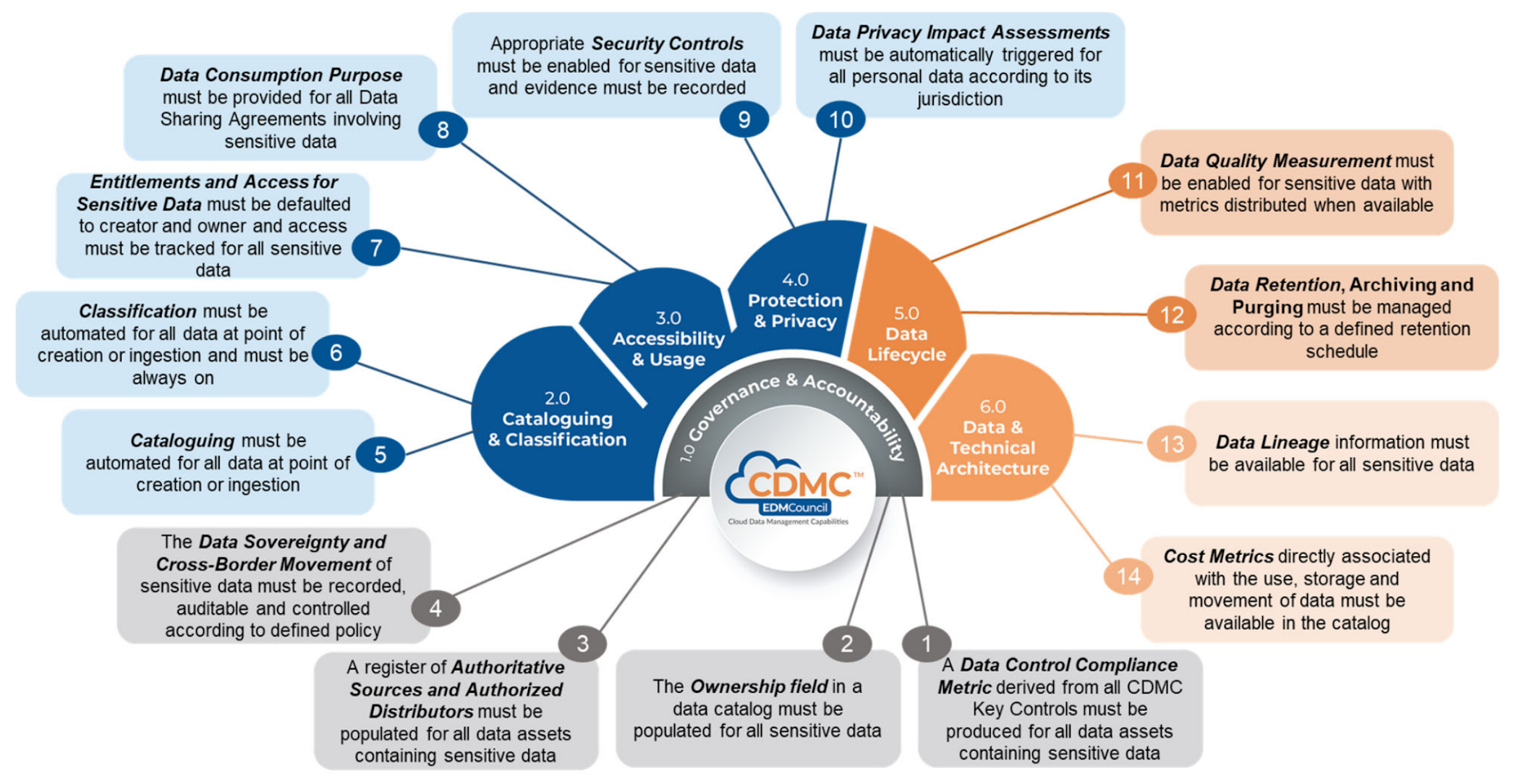
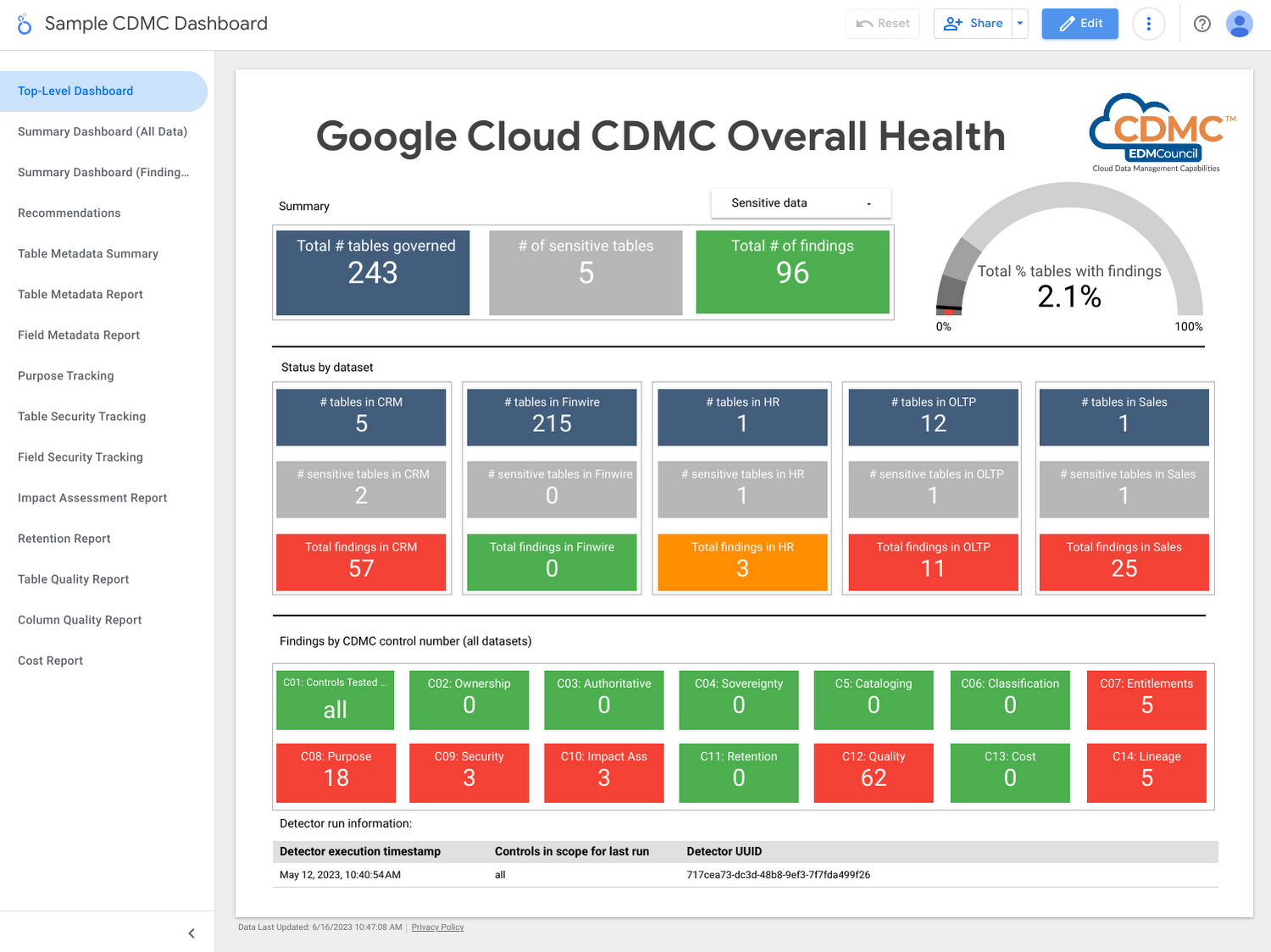
Using the solution, customer data assets are automatically classified and tagged with business metadata, their lifecycle is managed, and a reporting engine that proactively scans and publishes findings provides security administrators information about misconfigurations and security issues via a single dashboard.
Who should use this framework?
- CDOs and CISOs: The CDMC framework provides a systematic approach to handling sensitive data in the cloud and is a good starting point for chief digital officer-level discussions around what governance and security controls should be applied to different types of sensitive data. The Google Cloud CDMC assets can help with determining practical scope and efforts needed to implement the CDMC controls within your organization.
- Data platform architects and engineers: The Google Cloud reference architecture provides reusable patterns that can be adopted and customized to suit the particular needs of your organization, as well as your existing architecture and technology stack.
- Data owners and data stewards: Once implemented, the resulting classification, automation, findings, and reports should reduce the manual burden of effectively governing sensitive data at scale.
Architecture
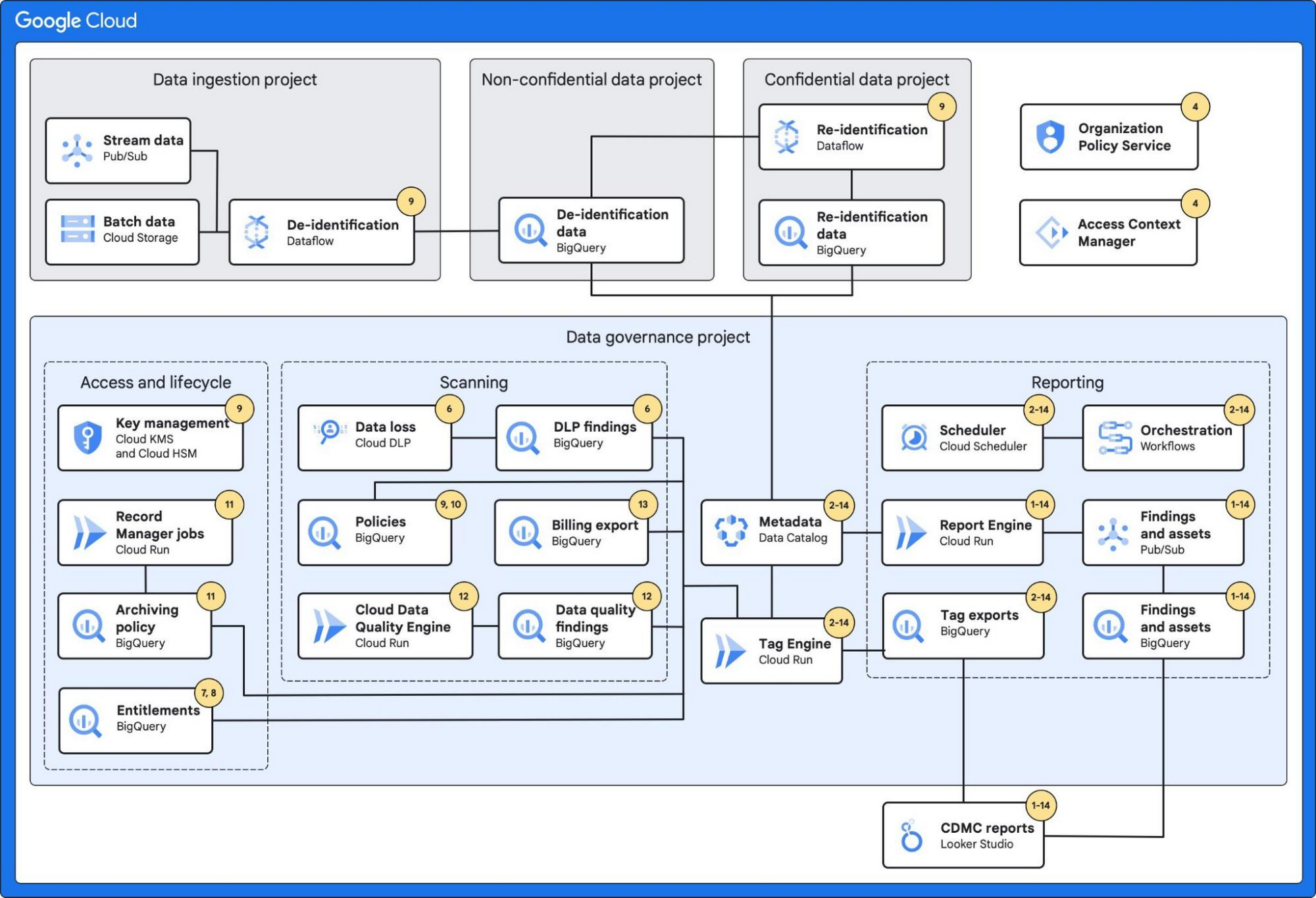
The architecture combines a number of Google Cloud’s services with built-in platform capabilities and data-protection services to protect data at scale.
These services include:
- BigQuery, which can fully manage a serverless data warehouse that enables scalable analysis for petabytes of data.
- Dataplex’s Data Catalog, which can fully manage highly scalable data discovery and metadata management with built-in data lineage features.
- Cloud Data Loss Prevention, which provides tools to classify and mask sensitive data.
- VPC Service Controls, which defines a security perimeter around Google Cloud resources to mitigate data exfiltration risks.
- Looker Studio, which provides a sample dashboard to visualize the overall health of the environment.
Additionally, the architecture leverages:
- Secure Data Warehouse Blueprint, which adheres to practices for data governance when creating, deploying, and operating a data warehouse in Google Cloud.
- Tag Engine, which automates the process of creating and populating metadata tags in Data Catalog.
The diagram below highlights the Google Cloud services used and how they mapped to the 14 CDMC key controls:
Further information
To get started, Google Cloud customers can:
Taking Maps Further: New Website Experience for Product Discovery, Budgeting and Access to Dev Documentation
6649
Of your peers have already read this article.
1:30 Minutes
The most insightful time you'll spend today!
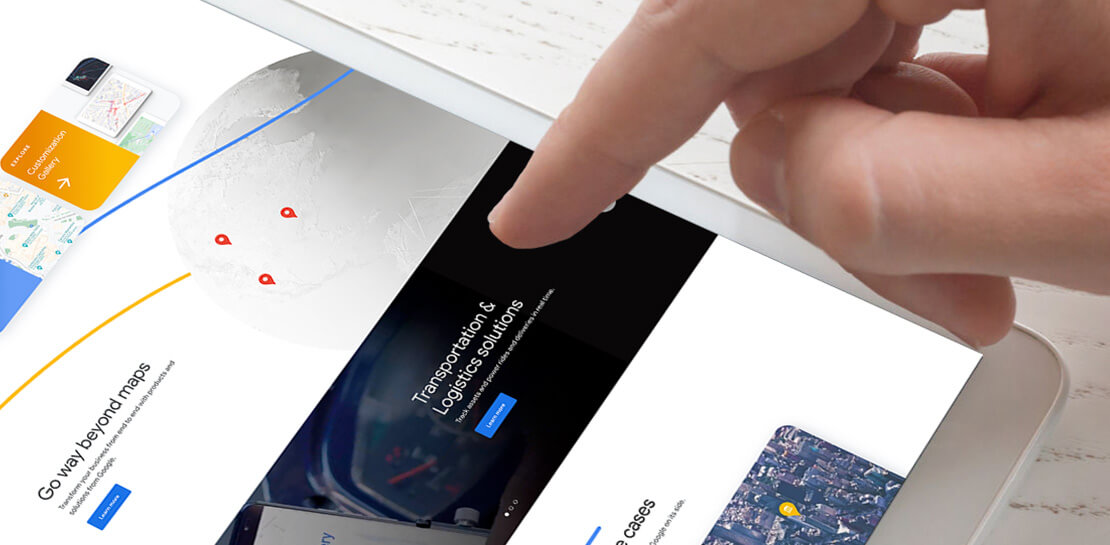
For more than 15 years, developers have used Google Maps Platform to deliver location-based experiences to their end users and used location intelligence to optimize their businesses. Along this journey, we’ve made a variety of changes to better support our community as needs have changed and new industries and technologies have emerged. We started rolling out a new website experience, at https://mapsplatform.google.com, to help you better understand the products and solutions best suited to address your objectives. Plus, now you can directly connect to the developer documentation for each product to get started quickly, and you can visualize usage and associated costs to have a better idea of what to expect before getting started.
Getting to your solution faster
Maps, Routes, Places are building blocks that let you develop implementations for any use case. Building for specific use cases, however, typically requires using a combination of APIs and SDKs. To help you quickly understand what’s possible and what you need to build for your use case, you can now visit the solutions tab to select from a list of popular use cases or industries. Once you’ve selected a use case or industry, you’re taken to a page where you can explore relevant products, read helpful blog posts, see how other customers have deployed for similar use cases, and more.

Direct access to developer documentation
Did you know there are more than a thousand pages of developer documentation created to help you get started, unblock you when you’re stuck, and share best practices? Now when you explore a product or solution from the Google Maps Platform website, you can easily navigate back and forth between our website and documentation. Just tap on JS, iOS, Android or API under the product name to get to the documentation you need.

Budgeting for your project
To help you calculate pricing for your project, we’ve introduced a new pricing calculator. Once you find the product and API or SDK you plan to use, pull the slider to reflect your estimated number of monthly requests. This will automatically update the “monthly cost” column for each product and API or SDK you plan to use. If your estimated monthly requests exceed the slider limit, contact our sales team to learn about volume discounts that start at 20% off.

We hope our new website makes it easier to discover our products and solutions, estimate your budget, and start building with our documentation so you can deliver helpful experiences to your users and optimize your business.
For more information on Google Maps Platform, visit https://mapsplatform.google.com.
10 Reasons that Make Google Cloud the Champion of IaaS

10435
Of your peers have already read this article.
5:00 Minutes
The most insightful time you'll spend today!
When you choose to run your business on Google Cloud you benefit from the same planet-scale infrastructure that powers Google’s products such as Maps, YouTube, and Workspace.
We have picked 10 ways in which Google Cloud Infrastructure services outshine alternatives in the market in how they simplify your operations, save money, and secure your data.
1. Custom Machine Types means no wasted resources
Compute Engine offers predefined machine types that you can use when you create a VM instance. A predefined machine type has a preset number of vCPUs and a preset amount of memory; each type is billed at a set price as described on the Compute Engine pricing page.
If predefined machine types don’t meet your needs, you can create a VM instance with a custom number of vCPUs and custom amount of memory, effectively building a custom machine type. Custom machine types are available only for general-purpose machine families. When you create a custom machine type, you are deploying a custom machine type from the E2, N2, N2D, or N1 machine family on GCP. No other leading cloud vendor offers custom machine types so extensively.
Custom machine types are a good idea for workloads that aren’t a good fit for the predefined machine types and for workloads that require more processing power or memory but don’t need all of the upgrades provided by the next machine type level. This translates into lower operating costs. They are also useful for controlling software licensing costs that are based on the number of underlying compute cores.
Jeremy Lloyd, Infrastructure and Application Modernization Lead at Appsbroker, a Google partner:
“Custom machine types coupled with Google’s StratoZone data center discovery tool provides Appsbroker with the flexibility we need to provide cost efficient virtual machines matched to a virtual machine’s actual utilization. As a result, we are able to keep our customers’ operating costs low while still providing the ability to scale as needed.”
2. Compute Engine Virtual Machines are optimized for scale-out workloads
For scale-out workloads, T2D, the first instance type in the Tau VM family, is based on 3rd Gen AMD EPYC processors and leapfrogs VMs for scale-out workloads of any leading public cloud provider today, both in terms of performance and price-performance. Tau VMs offer 56% higher absolute performance and 42% higher price-performance compared to general-purpose VMs from any leading public cloud vendor (source). The x86 compatibility provided by these AMD EPYC processor-based VMs gives you market-leading performance improvements and cost savings, without having to port your applications to a new processor architecture. Sign up here if you are interested in trying out T2D instances in Preview.
For SAP HANA, Google Cloud has demonstrated with SAP how we can run the world’s largest scale-out HANA system in the public cloud (96TB). With such innovation, you are covered as your business grows exponentially.
3. Largest single node GPU-enabled VM
Google is the only public cloud provider to offer up to 16 NVIDIA A100 GPUs in a single VM, making it possible to train very large AI models. Users can start with one NVIDIA A100 GPU and scale to 16 GPUs without configuring multiple VMs for single-node ML training, without crossing the VM layer.
Additionally, customers can choose smaller GPU configurations—1, 2, 4 and 8 GPUs per VM—providing the flexibility to scale their workload as needed.
The A2 VM family was designed to meet today’s most demanding applications—workloads like CUDA-enabled machine learning (ML) training and inference, for example. This family is built on the A100 GPU which offers up to 20x the compute performance compared to the previous generation GPU and comes with 40 GB of high-performance HBM2 GPU memory. To speed up multi-GPU workloads, the A2 VMs use NVIDIA’s HGX A100 systems to offer high-speed NVLink GPU-to-GPU bandwidth that delivers up to 600 GB/s. A2 VMs come with up to 96 Intel Cascade Lake vCPUs, optional Local SSD for workloads requiring faster data feeds into the GPUs and up to 100 Gbps of networking. A2 VMs provide full vNUMA transparency into the architecture of underlying GPU server platforms, enabling advanced performance tuning. Google Cloud offers these GPUs globally.
4. Non-disruptive maintenance means you worry less about planned downtime
Compute Engine offers live migration (non-disruptive maintenance) to keep your virtual machine instances running even when a host system event, such as a software or hardware update, occurs. Google’s Compute Engine live migrates your running instances to another host in the same zone without requiring your VMs to be rebooted. Live migration enables Google to perform maintenance that is integral to keeping infrastructure protected and reliable without interrupting any of your VMs. When a VM is scheduled to be live-migrated, Google provides a notification to the guest that a migration is imminent.
Live migration keeps your instances running during:
- Regular infrastructure maintenance and upgrades
- Network and power grid maintenance in the data centers
- Failed hardware such as memory, CPU, network interface cards, disks, power, and so on. This is done on a best-effort basis; if a hardware component fails completely or otherwise prevents live migration, the VM crashes and restarts automatically and a hostError is logged.
- Host OS and BIOS upgrades
- Security-related updates
- System configuration changes, including changing the size of the host root partition, for storage of the host image and packages
Live migration does not change any attributes or properties of the VM itself. The live migration process transfers a running VM from one host machine to another host machine within the same zone. All VM properties and attributes remain unchanged, including internal and external IP addresses, instance metadata, block storage data and volumes, OS and application state, network settings, network connections, and so on. This has the benefit of reducing operational and maintenance overhead, helps you build a more robust security posture where infrastructure can be consciously revamped from a known good state and minimizes risks for advanced persistent threats.
Refer to Lessons learned from a year of using live migration in production on Google Cloud from the Google engineering team.
5. Trusted Computing: Shielded VMs guard you against advanced, persistent attacks
Establishing trust in your environment is multifaceted, involving hardware and firmware, as well as host and guest operating systems. Unfortunately, threats like boot malware or firmware rootkits can stay undetected for a long time, and an infected virtual machine can continue to boot in a compromised state even after you’ve installed legitimate software.
Shielded VMs can help you protect your system from attack vectors like:
- Malicious guest OS firmware, including malicious UEFI extensions
- Boot and kernel vulnerabilities in the guest OS
- Malicious insiders within your organization
To guard against these kinds of advanced persistent attacks, Shielded VMs use:
- Unified Extensible Firmware Interface (UEFI) BIOS: Helps ensure that firmware is signed and verified
- Secure and Measured Boot: Helps ensure that a VM boots an expected, healthy kernel
- Virtual Trusted Platform Module (vTPM): Establishes root-of-trust, underpins Measured Boot, and prevents exfiltration of vTPM-sealed secrets
- Integrity Monitoring: Provides tamper-evident logging, integrated with Stackdriver, to help you quickly identify and remediate changes to a known integrity state
The Google approach allows customers to deploy Shielded VMs with only a simple click, thereby easing implementation.
6. Confidential Computing encrypts data while in use
Google Cloud was a founding member of the Confidential Computing Consortium. Along with encryption of data in transit and at rest using customer-managed encryption keys (CMEK) and customer-supplied encryption keys (CSEK), Confidential VM adds a “third pillar” to the end-to-end encryption story by encrypting data while in use. Confidential Computing uses processor-based technology that allows data to be encrypted in use while it is being processed in the public cloud. Confidential VM allows you to to encrypt memory in use on a Google Compute Engine VM by checking a single checkbox.
All Confidential VMs support the previously mentioned Shielded VM features under the covers—you can think of Shielded VM as helping to address VM integrity, while Confidential VM addresses the memory encryption aspect which relies on CPU features. With the confidential execution environments provided by Confidential VM and AMD Secure Encrypted Virtualization (SEV), Google Cloud keeps customers’ sensitive code and other data encrypted in memory during processing. Google does not have access to the encryption keys. In addition, Confidential VM can help alleviate concerns about risk related to either dependency on Google infrastructure or Google insiders’ access to customer data in the clear.
See what Google Cloud partners say about Confidential Computing here.
7. Advanced networking delivers full-stack networking and security services with fast, consistent, and scalable performance
Google Cloud’s network delivers low latency, reduces operational costs and ensures business continuity, enabling organizations to seamlessly scale up or down in any region to meet business needs. Our planet-scale network uses advanced software-defined networking and security with edge caching services to deliver fast, consistent, and scalable performance. With 28 regions, 85 zones, and 146 PoPs connected by 16 subsea fiber cables around the world, Google Cloud’s network offers a full stack of layer 1 to layer 7 services for enterprises to run their workloads anywhere. Enterprises can be assured that they have best-in-class networking and security services connecting their VMs, containers, and bare metal resources in hybrid and multi-cloud environments with simplicity, visibility, and control.
Google Cloud’s network has protected customers from one of the world’s largest DDoS attacks at 2.54 Tbps. With our multi-layer security architecture and products such as Cloud Armor, our customers ran their business with no disruptions. Furthermore, our recent integration of Cloud Armor with reCAPTCHA Enterprise adds best-in-class bot and fraud management to prevent volumetric attacks. Cloud Armor is deployed with our Cloud Load Balancer and Cloud CDN, extending the secure benefits at the network edge for traffic coming into Google Cloud so customers have security, performance, and reliability all built in. Furthermore, we are excited to offer Cloud IDS in preview, which was co-developed with security industry leader, Palo Alto Networks, to run natively in Google Cloud.
Our advanced networking capabilities also extends to GKE and Anthos networking. With the GKE Gateway controller, customers can manage internal and external HTTPS load balancing for a GKE cluster or a fleet of GKE clusters with multi-tenancy while maintaining centralized admin policy and control. Unlike other Kubernetes offerings, we offer eBPF dataplane which brings powerful tooling such as Kubernetes network policy and logging to GKE. eBPF is known to kernel engineers as a “superpower” for its unique architecture to load and unload modules in kernel space, and now this capability is built in with Google Cloud networking.
For observability and monitoring, our customers deploy Network Intelligence Center, Google Cloud’s comprehensive network monitoring, verification and optimization platform. With four key modules in Network Intelligence Center, and several more to come, we are working towards realizing our vision of proactive network operations that can predict and heal network failures, driven by AI/ML recommendations and remediation. Network Intelligence Center provides unmatched visibility into your network in the cloud along with proactive network verification. Centralized monitoring cuts down troubleshooting time and effort, increases network security and improves the overall user experience.
8. Regional Persistent Disk for High Availability
Regional Persistent Disk is a storage option that provides synchronous replication of data between two zones in a region. Regional Persistent Disks can be a great building block if you need to ensure high availability of your critical applications as they offer cost-effective durable storage and replication of data between two zones in the same region.
Regional Persistent Disks are also easy to set up within the Google Cloud Console. If you are designing robust systems or high availability services on Compute Engine, Regional Persistent Disks combined with other best practices such as backing up your data using snapshots enable you to build an infrastructure that is highly available and recoverable in a disaster. Regional Persistent Disks are also designed to work with regional managed instance groups. In the unlikely event of a zonal outage, Regional Persistent Disks allow continued I/O through failover of your workloads to another zone. Regional Persistent Disks can help meet zero RPO and near-zero RTO requirements and other stringent SLAs that your critical applications might require by maximizing application availability and protection of data during events such as host/VM failures and zonal outages.
9. Cloud Storage’s single namespace for dual-region and multi-region means managing regional replication is incredibly simple
Similar to how Persistent Disk makes data more available by replicating data across zones, Cloud Storage provides similar benefits for object storage. Cloud Storage within a region is cross-zone by definition, reducing the risk that a zonal outage would take down your application. Cloud Storage adds to this by also providing a cross-region option that can protect against a regional outage and gets your data closer to distributed users. This comes in the form of Dual-region or Multi-region settings for a bucket. These are the simplest to implement cross-region replication offerings in the industry—just a simple button or API call to enable them. In addition to being simple to implement, they offer an added advantage of using a single bucket name that spans regions.
This is unique in the industry. Competitive offerings currently require setting up and managing two distinct buckets, one in each region and they don’t offer the strong consistency properties Cloud Storage offers across regions. Operations and app development are burdened by this design. Google’s single namespace approach dramatically simplifies application development (the app runs on single region or dual/multi-region without any changes), and provides simpler application restarts and testing for DR.
10. Predictive autoscaling
Customers use predictive autoscaling to improve response times for applications with long initialization times or for applications with workloads that vary predictably with daily or weekly cycles. When you enable predictive autoscaling, Compute Engine forecasts future load based on your Managed Instance Group’s history and scales out the MIG’s in advance of predicted load, so that new instances are ready to serve when the load arrives. Without predictive autoscaling, an autoscaler can only scale a group reactively, based on observed changes in load in real time.
With predictive autoscaling enabled, the autoscaler works with real-time data as well as with historical data to cover both the current and forecasted load. Forecasts are refreshed every few minutes (faster than competing clouds) and consider daily and weekly seasonality, leading to more accurate forecasts of load patterns.
For more information, see How predictive autoscaling works and Checking if predictive autoscaling is suitable for your workload.
These are just a few examples of customer-centric innovation that set Google Cloud infrastructure apart. Bring your applications and let the platform work for you.
Get started by learning about your options for migration, or talk to our sales team to join the thousands of customers who have embarked upon this journey.
Acknowledgement
Special thanks to Dheeraj Konidena (Google) for contributing to this article.
Nine Interesting Google Cloud Identity and Environment Features to Know About!

2921
Of your peers have already read this article.
2:00 Minutes
The most insightful time you'll spend today!
I’ve been at Google Cloud just a few weeks, following years of experience as an AWS Hero and building on other clouds. So last week’s Google Cloud Next–my first!—was a bit of a culture shock. On the GCP podcast, I used the word “intentionality” to describe what I’m seeing: a thoughtful, holistic approach that informs so much of how Google Cloud is put together. Not just in the headline-grabbing new announcements like Google Distributed Cloud, but in the everyday things too.
Things like IAM and project setup. Step 1 of any cloud project is to provision access to an environment, and that’s why I always found it so frustrating in my past life when I had to deal with outdated or clunky stuff like:
- Homebrewed, sketchy SSO tooling and config files
- No centralized identity—I was a different person in every cloud account
- Mysterious logouts, redirects, and missing project context within the cloud console
- Account organization features that were “bolted-on” rather than designed the right way from the beginning
In contrast, I recently shared a Twitter thread about how shockingly right Google Cloud gets identity and environments. It’s probably my favorite thing about Google Cloud so far, and so in this post I want to expand on what I’ve learned. If you’re searching for a better way to access and organize your cloud, let me make you one of today’s lucky 10,000.
Nine things to love about Google Cloud identity and environments
1. You are YOU!
Every user is just a Google account (personal or corporate) that works across projects. For beginners, this lowers the barrier to entry and makes cloud feel like an extension of things you already know. For experts, it reduces the friction of having to juggle a bunch of unrelated identities. I love that you can permit any Google account into a cloud project as a collaborator—even a contributor from outside your organization!
2. No non-IAM root accounts
Google Cloud has been designed from the ground up to avoid the chicken/egg problem of requiring a manually configured superuser that sits outside the rest of the identity management infrastructure. In the Google world, humans use Google accounts, and services use IAM-based service accounts —it’s as straightforward as that. (Even non-Google services can be IAM—yay, workload identity federation!)
3. Project discovery for humans
Project, folder, and organization discovery are baked into the console, like browsing a file system scoped to your access level. This hardly even feels like a feature, it’s so subtle and yet absolutely fundamental. But once you see it, you can’t imagine going back to a world where environments exist in a vacuum with no contextual awareness of each other.
The hierarchical organization model also means that project-per-application-per-environment best practices are the path of least resistance; if anything, I’ve erred on the side of setting up *too many* logical groupings. It’s just too much fun to play with projects and folders!
4. Billing that protects you from yourself
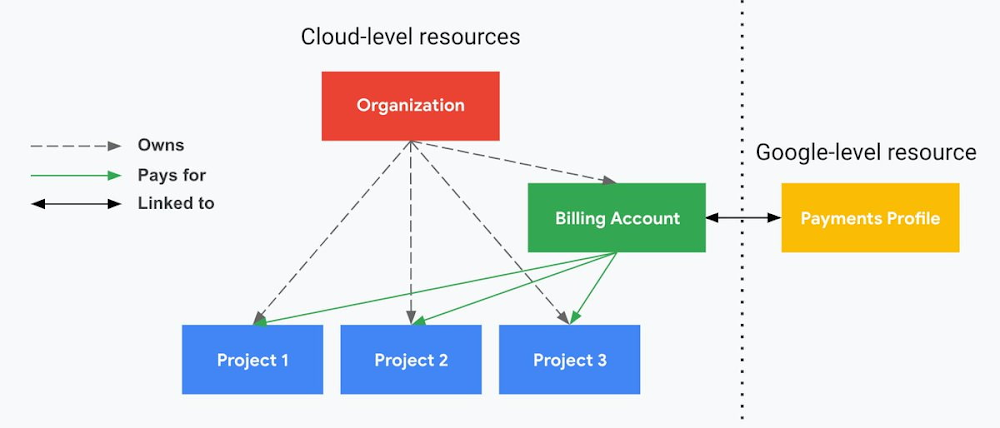
The project context gives you a logical container for the cost of the resources contained within it. My favorite part of this is that your billing entity is managed separately from the project itself. So you can delete a project and feel sure that all associated resources are gone and no longer racking up charges … without also trashing your ability to pay for future projects you might spin up.
(Related: the free tier does not charge you money unless you click a big button that basically says “YES, IT’S OK TO CHARGE ME MONEY.” This guarantee, combined with the familiarity of Google Accounts for access, are the main reasons I now recommend Google Cloud to beginners in my network who are looking for a safe place to learn and explore cloud.)
5. Organizational structure != billing structure
For organizations, billing is decoupled from the organization root. So permissions inheritance is a separate design decision from chargeback, as it should be. This keeps your Google Cloud footprint from converging toward Conway’s Law.
6. SSO that just works
Want to use the CLI? You get SSO out of the box with your Google Account—no corporate organization required, and no manual shuffling with config files and access keys. Or, better yet, you can use Cloud Shell to run gcloud commands right in your browser, even (especially?) on the docs pages. (Random trivia: I think Cloud Shell is the only native cloud service that has the same name across AWS, Azure, and Google Cloud–but Google’s version has been around the longest and as far as I can tell is the most fully-featured.)
7. One group to rule them all
Remember how user entities are just Google accounts? Guess what: you can use Google Groups to manage group access to IAM roles! That’s right: one set of users with permissions across docs, email, and cloud. It’s one reason why Google Workspace makes sense as a core piece of Google Cloud; it really does function like just another cloud service from an identity standpoint.
8. Never lose your place
In other clouds, I’ve experienced a problem I call the Timeout of Doom: when your console session expires, you’re left on a generic error screen and it’s up to you to figure out how to rebuild your context from scratch–starting with remembering what account you used in the first place. Imagine my delight to realize that reaching your Google Cloud console is as easy as bookmarking a single URL. console.cloud.google.com works and remembers who you are (or, at least, suggests the set of people you might be)—no mystery logouts or redirects.
9. Progressive complexity FTW
In my experience it’s been common for cloud providers to design most of their account features for organizations: if you’re an independent developer, you get more exposure to dangerous bills, less access to helpful SSO features, and generally must fend for yourself in a world that wasn’t really created with you in mind.
I love that Google Cloud has found a way to work with enterprises while still maintaining their roots as a cloud that developers love to use. Sign in with your personal Google account, attach it to an organization when-and-if you’re ready, and in the meantime you get the same thoughtfulness around SSO and billing as the giant shop down the street.
I’m not going to tell you my experience has been seamless; there are footguns here (every Google Workspace integration creates a new project?), and I’m still learning. But it’s that “intentionality” thing again. The Google Cloud identity and environment experience feels like it was designed, not just accreted; there’s an elegant simplicity to it that makes cloud feel fresh and exciting to me all over again. I can’t wait to see what’s next.
In the meantime, I highly encourage you to do what I did and spin up a free trial to try things out for yourself. Then hit me up on Twitter with your favorite Google Cloud identity or environment feature!
Workforce Identity Federation: A Seamless Experience for Users

2749
Of your peers have already read this article.
2:30 Minutes
The most insightful time you'll spend today!
At Google Cloud, we’re focused on giving customers new ways to strengthen their security posture. Managing identities and authorization is a core security control that underpins interactions inside and collaboration outside the organization. To address fraud, identity theft, and other security challenges associated with the proliferation of online accounts, many organizations have opted to use centralized identity provider (IdP) products that can help secure and manage identities for their users and SaaS applications, and we want to strengthen support for these solutions and the use cases they support.
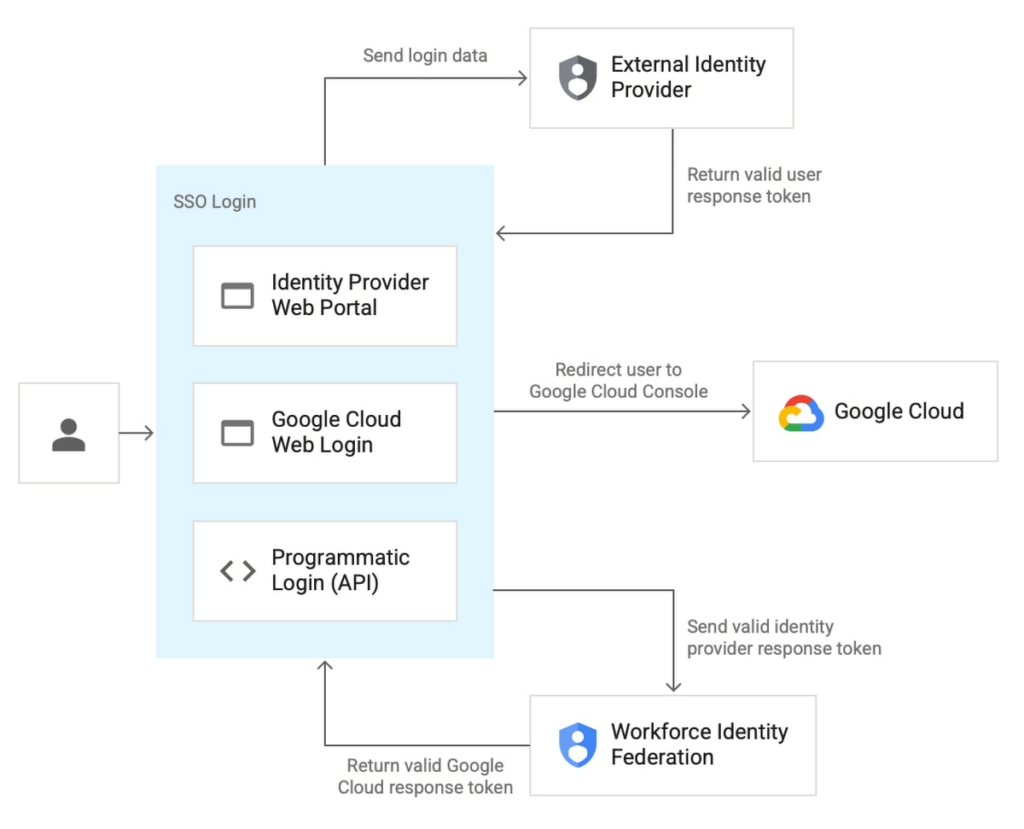
Today we’re pleased to announce Workforce Identity Federation in Preview. This new Google Cloud Identity and Access Management (IAM) feature can rapidly onboard workforce user identities from external IdPs and provide direct secure access to Google Cloud services and resources. Workforce Identity Federation uses a federation approach instead of Directory Synchronization, the method currently used by most organizations for onboarding Google Cloud identities. Workforce Identity Federation provides flexibility to support third-party collaboration use cases and business requirements that can be better addressed by using a localized, customer-managed IdP.
Federating existing identities eliminates the need to maintain separate identities across multiple platforms. This means that organizations using Workforce Identity Federation no longer need to synchronize workforce user identities from their existing identity management solutions to Google Cloud. IdPs can include Identity-as-a-Service (IDaaS) and directory products such as those from ForgeRock, Microsoft, Okta, JumpCloud, or Ping Identity.
Workforce Identity Federation is another example of how we are working to make Google Cloud’s Invisible Security vision a reality, in this case delivering secure access leveraging customers’ current identity and access management solutions without the need for redundant user administration

VMware is one of our customers using Workforce Identity Federation in Preview. Thiru Bhat, director at VMware, explained why he’s excited for the new feature.
“VMware runs its own IdP and we needed a solution to allow our developers to access their Google Cloud projects while maintaining corporate control over identities and permissions. Syncing of user identities outside of our IdP is not permitted per our InfoSec policies and we deployed Google Cloud’s Workforce Identity Federation to fulfill our identity requirements. Workforce Identity Federation feature meets our needs with a solution that is robust and straightforward to configure.”
Here’s a closer look at a few use cases and the benefits from the new Workforce Identity Federation.
Use case: Employee sign-in and authorization
Streamlined authentication experience with fine-grained access control
Workforce Identity Federation can enable your organization’s users to access Google Cloud through the same login experience they already use for their existing IdP for single sign-on. Workforce Identity Federation also can enable fine-grained access through attribute mapping and attribute conditions. Attributes — which some IdPs call claims — contain additional information about users.
Google Cloud can use these attributes to further inform authentication decisions. Attribute mapping lets your administrators map identity attributes that are defined in your IdP to those that Google Cloud can use. Your administrators can configure Google Cloud with attribute conditions to authenticate conditionally — to let only a subset of external identities authenticate to your Google Cloud project based on attributes.
For example, your administrators might want to let only those employees who are part of the accounting team sign in. To do this, your administrators can configure an IdP attribute, such as EmployeeJobFamily. Using attribute mapping, they could map this attribute to a similar attribute in Google Cloud, such as employee_job_family. Then, they could configure an attribute condition, assertion.employee_job_family=="accounting".
Use case: Secure access for partners and vendors
Restricted and secure access to Google Cloud services from a partner or vendor that has their own IdP and associated privacy and data policies
Today, the modern enterprise depends on partners and vendors more than ever. Partners and vendors can help scale enterprise workflows, but they also can introduce new complexities for IT teams, such as how to secure partner or vendor identities in addition to the rest of their enterprise users.
Workforce Identity Federation can enable enterprises to selectively federate users from partner or vendor IdPs without requiring enterprise IT teams to sync or create a separate identity store to use Google Cloud resources.
One common scenario where Workforce Identity Federation can help is when a company hires a partner or vendor to provide outsourced development services using cloud resources (such as when Google Kubernetes Engine (GKE) DevOps services are outsourced to a partner.) The company creates a separate workforce pool for the partner or vendor’s administrator, who can then use their own IdP to grant access to their workforce.
This use case can also help support organizations who have requirements to store and maintain identity information locally in support of data residency or digital sovereignty initiatives. By using a local IdP, either customer-managed or partner-managed, and federating identities to Google Cloud, organizations can further strengthen control over their identity information.
Seamless experience for users, easy access management for administrators
Before Workforce Identity Federation, organizations would need to duplicate user identities from their IdP by creating user accounts in Google Cloud Identity. Workforce Identity Federation can help you access Google Cloud without having to first create Cloud Identity user accounts. It also reduces toil by eliminating the need to maintain two separate identity management systems.
Identity providers such as ForgeRock see tremendous value in the Workforce Identity Federation, and how Google Cloud can work with them to jointly help customers manage workforce identities. Peter Barker, ForgeRock’s Chief Product Officer, said that his company’s partnership with Google Cloud makes identity management easy and secure for administrators and users alike.
“Our strategic partnership with Google Cloud delivers great value to our customers and we’re excited to continue to expand our relationship. This integration with Google Cloud Workforce Identity Federation enables ForgeRock customers to leverage their current IAM investments and makes it easier for employees, contractors, and partners to securely access Google Cloud resources.”
Getting started with Workforce Identity Federation
Workforce Identity Federation is now available in Preview to customers already using Google Cloud. You can learn more about Workforce Identity Federation by visiting our webpage and watching this video.
Please contact your account manager to see if workforce identity federation is the right fit for your organization. And, you can get started with these new capabilities today using our product documentation.
Stop Cribbing About Shadow IT and Start Taking Charge Now

3664
Of your peers have already read this article.
2:20 Minutes
The most insightful time you'll spend today!
Employees use tools at their disposal to get work done, but if these tools (often legacy) hamper collaboration or are inflexible, they’ll turn to less secure options for the sake of convenience. According to Gartner, a third of successful attacks experienced by enterprises will come from Shadow IT usage by 2020.
And this problem is not unknown. Eighty-three percent of IT professionals reported that employees stored company data in unsanctioned cloud services, a challenge especially apparent with file sync and share tools. When people work around their legacy systems to use tools like Google Drive, it’s often because they find their current systems to be clunky or that they can’t collaborate with others as easily. They’re unable to do three key things in legacy file sync and share systems (like Microsoft SharePoint):
1. Unable to work on their phones. By now, people expect to be able to work on the go—and this means not just opening an attachment, but actually making edits to and comments on work. It gives them freedom to work when it’s convenient for them and to help teammates anytime.
2. Unable to create workspaces independently and easily. This might sound counterintuitive, but if an employee needs to contact IT to have a new project folder made on a drive, the bar is too high. Employees need to be able to quickly, and independently, create documents that can be shared simply because of the changing nature of collaboration. Work happens ad-hoc, on the go (like we mentioned above), and with people inside and outside of your organization. If someone has to contact IT to create a new folder, they’re more likely to neglect the request or use a different tool altogether to get started.
3. Unable to make the data work for them. Traditional file storage is just that, storage. Like an attic, we store things in these systems, but at some point stuff gets stale and it’s hard to tell what we should keep or pitch. People need their storage systems to not only house their data, but to help them categorize and find information quicker so that they can make this data work better for them.
You have two choices when it comes to making a decision on file sync and share systems:
Option 1: Continue to let your employees work on unsanctioned products, some of which may open your business up to unintended security issues (and, in some instances, scary terms of service).
Option 2: Buy the tools that your users want to use because these tools are making them more productive.
If you want to create a more productive workforce, take cues from your employees. Your tools should not only meet the highest security standards for IT, but let people work the way they want to (and be intelligent enough to guide them along the way).
Imagine if your technology could flag that a file contains confidential information before an employee accidentally shares it. Or surface files as they’re needed to help people work faster. Google Drive does this.
Remember, if the technology doesn’t suit your employees, they’re just going to work around it anyway. Instead of investing time and resources on routine maintenance, shift this energy toward helping your employees stay productive in ways that work for both you and them.
More Relevant Stories for Your Company



A Security Practitioners Guide to Best Practice GCP Security
Building secure services using GCP is easy, when you know all the tools available to you. Selecting the right services and configurations to meet your security needs requires you to know your tools. In this practical session, you will go beyond the theory, and will go through best practices for

Google Cloud’s Accountability and Transparency Adheres to EU’s Stringent Compliance Policies
Google Cloud's industry-leading controls, contractual commitments, and accountability tools have helped organizations across Europe meet stringent data protection regulatory requirements for years. This commitment to supporting the compliance efforts of European companies has earned us the trust of businesses like retailers, manufacturers and financial services providers. As part of our

Ubuntu Pro Images Now Available on Google Cloud
Today, we’re pleased to announce the general availability of Ubuntu Pro images on Google Cloud, providing customers with an improved Ubuntu experience, expanded security coverage, and integration with critical Google Cloud features. In partnership with Canonical, we’re making it even easier for customers that have fully embraced open source to ensure

Cloud KMS with Cloud Storage: Better Performance for High-intensity Workloads
Encryption is critical for securing sensitive data while it is stored and transits the cloud. Today, Cloud Storage encrypts data server-side with standard Google-managed encryption keys by default, and can also encrypt data with customer-managed encryption keys that are stored and managed by Cloud Key Management Service (Cloud KMS). While customers have
