





Secrets Management Risk Analysis: Mitigating Threats with Secret Manager

909
Of your peers have already read this article.
2:30 Minutes
The most insightful time you'll spend today!
Can you keep a secret? Many people struggle to keep secrets. So do organizations. An organization’s digital credentials — its passwords, API keys, tokens, and encryption keys baked into its software code — are its vital secrets, used to authenticate access to protected resources and services.
The security of these secrets represent one of the biggest risks that enterprises must manage when securing application infrastructure and environments. Fortunately, we have an important tool to help our customers better manage their secrets: Google Cloud Secret Manager.
Secret Manager is a secure and efficient tool to centrally store, access, manage, and audit your organization’s secrets. As we noted in our April 2023 Threat Horizons Report, insufficient management of credentials and keys is now one of the top security issues facing cloud customers today. In particular, we have observed service account keys being used for everything from insider threats to cross-cloud breaches to intellectual property espionage.
Along with the increasing popularity of DevOps, secrets are used throughout development. In some cases, secrets are coded as plaintext into configuration files or directly into functions, where they can end up exposed in code repositories. If compromised, secrets can be used to gain unauthorized privileged access to enterprise data, infiltrate critical systems, and launch attacks.
Secret Manager can help organizations better manage their secrets even as concerns over potential security breaches grow. Organizations must consider the following four points during their secrets management risk analysis:
- Secrets sprawl: As organizations move more workloads to the cloud, the number of secrets they need to manage increases exponentially. This can lead to secrets sprawl, where secrets are stored in a variety of different locations, making it difficult to track and manage them.
- Human error: Humans are fallible, and this is especially true when it comes to managing secrets. Mistakes, such as accidentally sharing a secret with the wrong person or the misconfiguration of a secret management tool, can have serious consequences.
- Compliance violations: Organizations that handle sensitive data are subject to a variety of compliance regulations, including PCI-DSS, SOC 2, HIPAA, and GDPR. Without proper management, secrets could lead to potential compliance violations.
- Downtime: If secrets are not properly managed or rotated, it could lead to downtime for applications and services that rely on them.
Secret Manager can enable IT teams to keep track of secrets by providing a centralized place to store and manage them. You can access secrets directly from the Secret Manager console, or use the Secret Manager API or SDKs. Secret Manager is also designed to scale with your application. You can store as many secrets as you need without performance issues, and its API-first design lets you extend and integrate into other existing systems.
Secret Manager integrations in Google Cloud
In many cases, developers save secret configuration details as plaintext in code for ease of use. There are two main risks associated with this approach:
- Anyone with access to secrets can see and copy them. There is no way to enforce any auditing or access controls practices here.
- It becomes difficult to move code between dev, test, and production environments.
Cloud-centered integrations supported by Secret Manager with other Google Cloud services in the software supply chain make it easier and safer to store and access sensitive information.
The tool is about the secret information being made securely available in build or runtime.
Secret Manager integrations also can play a role in securing sensitive information in the software supply chain:
1. Integration with CI/CD systems used to build and deploy your software
Cloud Code integration can help developers build more secure applications by preventing hard-coding of sensitive configuration data such as passwords, credentials, and tokens in the codebase. It replaces them with secrets which can be programmatically fetched as required. You can create, access, and modify secrets directly from within your favorite IDE without having to navigate away from it. Integration is available for VS Code, IntelliJ, and Cloud Shell Editor.
Cloud Functions integration lets you access and expose secrets as environment variables or as a volume via the filesystem.
Cloud Build: To handle sensitive data in builds, you can store them in Secret Manager and then configure the build steps to access the information directly. In the build steps, you can associate the value of a secret to an environment and you can access this value via an environment variable from scripts or processes. Two common uses for fetching sensitive dependencies during build time are:
- Storing Docker authentication credentials for pull/push of images to Docker hub.
- Creating GitHub pull requests in response to builds.
2. Integration with runtime engines
Cloud Run: Native integration makes it easy to mount secrets in cloud run services. Using this integration, secrets can be made available to containers either as volume mounts or as env variables. Sensitive dependencies can be stored in environment variables, by referencing a secret name stored in Secret Manager instead of storing it as a plain text environment variable. This secret access operation can be done directly from the Cloud Run console without changing a single line of source code.
If code reads secrets from a file instead of an env variable, the “mounted as volume” option can be used to make secrets look like files to the env vars. During service deployment, the service account used to run the containers are checked to see if they have the required permissions or not, preventing any unwanted access.
Kubernetes and GKE: The CSI driver–provider solution is an open-source work that provides integration with K8s. The driver lets customers centrally store their secrets in Google Secret Manager and consume them in a kubernetes native manner, as files mounted in K8s pods. The solution also comes with additional syncing capabilities. This method of consuming secrets also allows users to take advantage of SM’s capabilities like versioning, managed rotation, default/CMEK encryption and cloud-focused integrations with other Google Cloud services. Work is currently ongoing to provide official support to the driver solution as a GKE component.
Is Secret Manager right for my organization?
Developers carry a big responsibility to protect the sensitive data they are entrusted to work with, and keep secrets out of their code. However, organizations also have a responsibility to provide the tools and solutions needed to help their teams deliver on these expectations. Secret Manager makes it straightforward for developers to store and manage secrets while improving security.
To learn more about Secret Manager, please review these resources:
Read the previous Best Kept Security Secrets blogs here:
Enable high quality curated detections in Chronicle SecOps Suite

2828
Of your peers have already read this article.
2:30 Minutes
The most insightful time you'll spend today!
A critical component of any security operations team’s job is to deliver high-fidelity detections of potential threats across the breadth of adversary tactics. But increasingly sophisticated threat actors, an expanding attack surface, and an ever-present cybersecurity talent shortage make this task more challenging than ever.
Google keeps more people safe online than anyone else. Individuals, businesses and governments globally depend on our products that are secure-by-design and secure-by-default. Part of the “magic” behind Google’s security is the sheer scale of threat intelligence we are able to derive from our billions of users, browsers, and devices.
Today, we are putting the power of Google’s intelligence in the hands of security operations teams. We are thrilled to announce the general availability of curated detections as part of our Chronicle SecOps Suite. These detections are built by our Google Cloud Threat Intelligence (GCTI) team, and are actively maintained to reduce manual toil in your team.
Our detections provide security teams with high quality, actionable, out-of-the-box threat detection content curated, built and maintained by Google Cloud Threat Intelligence (GCTI) researchers. Our scale, and depth of intelligence, gained by securing billions of users everyday, gives us a unique vantage point to craft effective and targeted detections. These native detection sets cover a wide variety of threats for cloud and beyond, including Windows-based attacks like ransomware, remote-access tools (RAT), infostealers, data exfiltration, suspicious activity, and weakened configurations.
With this launch, security teams can smoothly leverage Google’s expertise and unique visibility into the threat landscape. This release helps understaffed and overstressed security teams keep up with an ever evolving threat landscape, quickly identify threats, and drive effective investigation and response. With this new release, security teams can:
- Enable high quality curated detections with a single click from within the Chronicle console.
- Operationalize data with high-fidelity threat detections, stitched with context available from authoritative sources (such as IAM and CMDB).
- Accelerate investigation and response by finding anomalistic assets and domains with prevalence visualization for the detections triggered.
- Map detection coverage to the MITRE ATT&CK framework to better understand adversary tactics and techniques and uncover potential gaps in defenses.
Detections are constantly updated and refined by GCTI researchers based on the evolving threat landscape. The first release of curated detections includes two categories that cover a broad range of threats, including:
- Windows-based threats: Coverage for several classes of threats including infostealers, ransomware, RATs, misused software, and crypto activity.
- Cloud attacks and cloud misconfigurations: Secure cloud workloads with additional coverage around exfiltration of data, suspicious behavior, and additional vectors.
Let’s look at an example of how you can put curated detections to work within the Chronicle dashboard, monitor coverage, and map to MITRE ATT&CK®.
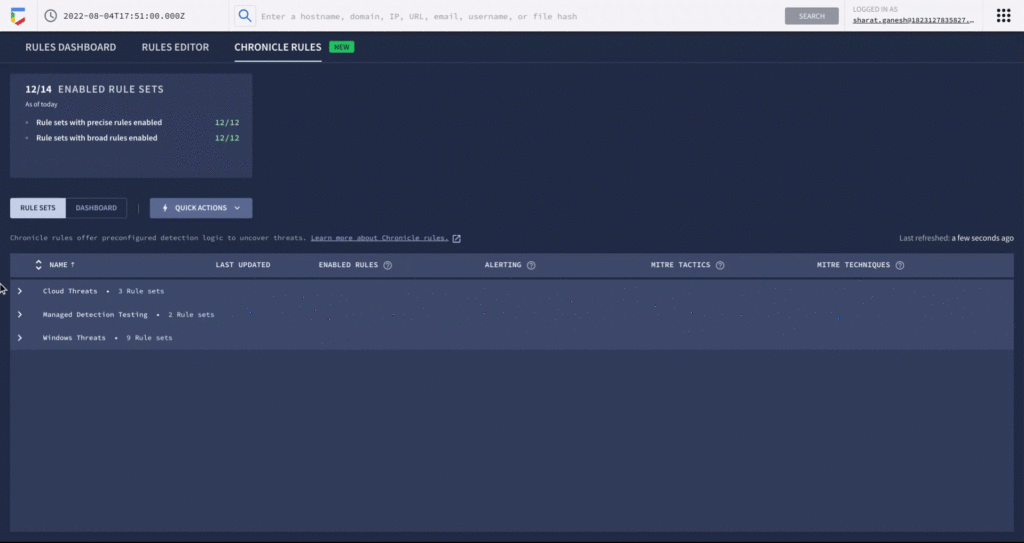
An analyst can learn more details around specific detections and understand how they map to the MITRE ATT&CK framework. There are customized settings to configure deployment and alerting, and specify exceptions via reference lists.
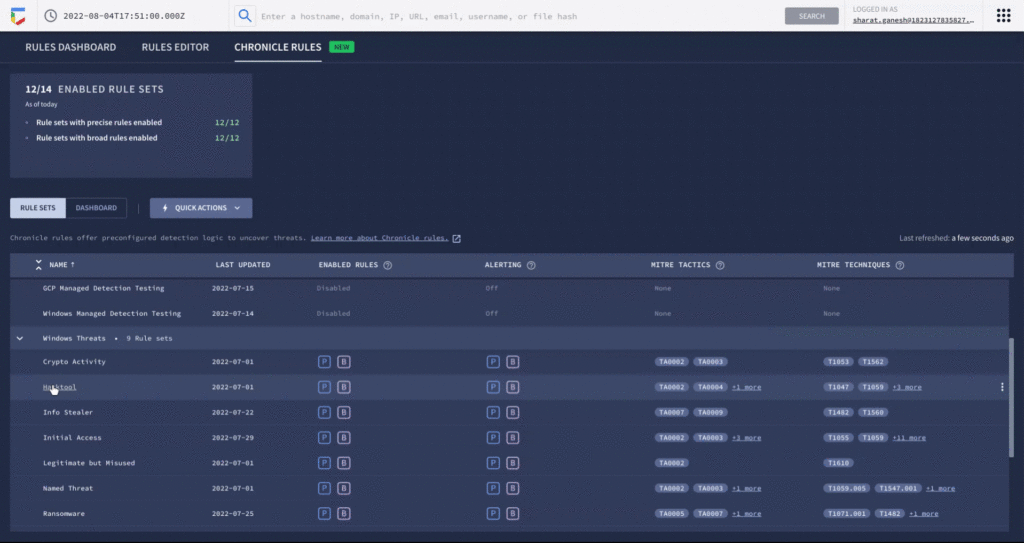
You can see each rule which has generated a detection against your log data in the Chronicle rules dashboard. You can observe detections associated with the rule and pivot to investigative views. For example, here is the detection view from the timeline of an Empire Powershell Stager launch triggered by the Windows RAT rule set. You can also easily pivot to associated information and investigate the asset on which it was triggered.
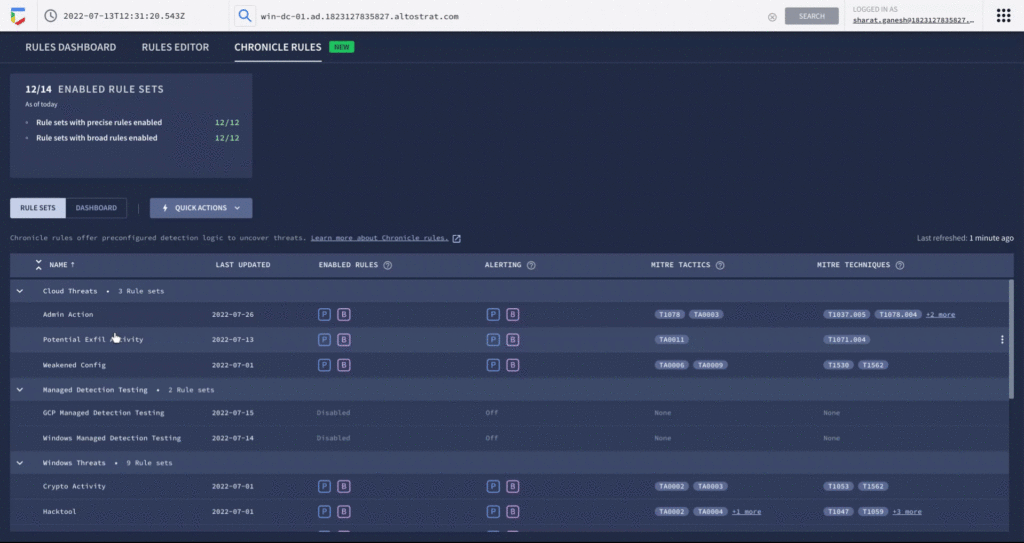
By surfacing impactful, high-efficacy detections, Chronicle can enable analysts to spend time responding to actual threats and reduce alert fatigue. Our customers who used curated detections during our public preview were able to detect malicious activity and take actions to prevent threats earlier in their lifecycle. And there’s more to come. We will be delivering a steady release of new detection categories covering a wide variety of threats, community-driven content, and other out-of-the-box analytics.
Ready to put Google’s intelligence to work in your Security Operations Center? Contact Google Cloud sales or your customer success CSM team. You can also learn more about all these new capabilities in Google Chronicle in our product documentation.
Defining cloud’s future: How autonomic data security can help

2553
Of your peers have already read this article.
1:30 Minutes
The most insightful time you'll spend today!
“Ninety percent of all data today was created in the last two years—that’s 2.5 quintillion bytes of data per day,” according to business data analytics company Domo. That would be a mind-bending statistic, except that it’s already five years old.
As data usage has undergone drastic expansion and changes in the past five years, so have your business needs for data. Technology such as cloud computing and AI have changed how we use data, derive value from data, and glean insights from data. Your organization is no longer just crunching and re-crunching the same data sets. Data moves, shifts, and replicates, as you mingle data sets and gain new value in the process, as we say in our Data Cloud story. All the while, your data resides in—and is being created in—new places.
Data lives in a myriad of locations now and requires access from different locations and mediums, yet many of today’s security models are not geared towards this. In short, your data has fallen out of love with your security model, but attackers have not. So, how do we realign data and security so they are once again in a healthy relationship?
Google Cloud, as a leader in cloud data management and cloud security, is positioned uniquely to define and lead this effort. We’ve identified some challenges around the classic approach to data security and the changes triggered by the near-ubiquity of the cloud. The case is compelling for adopting a modern approach to data security. We contend that the optimal way forward is with autonomic data security.
A relatively new concept, autonomic data security is security that’s been integrated with data throughout its lifecycle. It can make things easier on users by freeing them from defining and redefining myriad rules about who can do what, when, where. It’s an approach that keeps pace with constantly evolving cyberthreats and business changes.
Autonomic data security can help you keep your IT assets more secure and can make your business and IT processes speedier. For example, data sharing with partners and data access decisions simultaneously becomes faster and more secure. This may sound like magic, but in fact relies on a constant willingness to change and adapt to both business changes and threat evolution.

Taking the precepts, concepts, and forward-looking solutions presented in this paper into consideration, we strongly believe that now is the right time to assess where you and your business are when it comes to data security. Cloud also brings an incredible scale of computing. Where gigabytes once roamed, petabytes are now common. This means that many data security approaches, especially the manual ones, are no longer practical.
To prepare for the future of data security, we recommend you challenge your current model and assumptions and ask critical questions, evaluate where you are, and then start to put a plan in place of how you could start incorporating the autonomic data security pillars into your data security model.
There are two sets of questions organizations need to discover the answers to as they start this journey. The first set of questions will help you identify the nature and status of your data, and inform the answers to the second set.
- What data do I have?
- Who owns it?
- Is it sensitive?
- How is it used?
- What is the value in storing the data?
The second set focuses on higher-level problems:
- What is my current approach to data security?
- Where does it fail to support the business and counter the threats?
- Does it support my business?
- Should I consider making a change? And if yes, in what direction?
The path to improved data security starts by asking the right questions. You can read the full Autonomic Data Security paper for a more in-depth exploration here and learn more about the idea in this podcast episode.
Nine Interesting Google Cloud Identity and Environment Features to Know About!

2906
Of your peers have already read this article.
2:00 Minutes
The most insightful time you'll spend today!
I’ve been at Google Cloud just a few weeks, following years of experience as an AWS Hero and building on other clouds. So last week’s Google Cloud Next–my first!—was a bit of a culture shock. On the GCP podcast, I used the word “intentionality” to describe what I’m seeing: a thoughtful, holistic approach that informs so much of how Google Cloud is put together. Not just in the headline-grabbing new announcements like Google Distributed Cloud, but in the everyday things too.
Things like IAM and project setup. Step 1 of any cloud project is to provision access to an environment, and that’s why I always found it so frustrating in my past life when I had to deal with outdated or clunky stuff like:
- Homebrewed, sketchy SSO tooling and config files
- No centralized identity—I was a different person in every cloud account
- Mysterious logouts, redirects, and missing project context within the cloud console
- Account organization features that were “bolted-on” rather than designed the right way from the beginning
In contrast, I recently shared a Twitter thread about how shockingly right Google Cloud gets identity and environments. It’s probably my favorite thing about Google Cloud so far, and so in this post I want to expand on what I’ve learned. If you’re searching for a better way to access and organize your cloud, let me make you one of today’s lucky 10,000.
Nine things to love about Google Cloud identity and environments
1. You are YOU!
Every user is just a Google account (personal or corporate) that works across projects. For beginners, this lowers the barrier to entry and makes cloud feel like an extension of things you already know. For experts, it reduces the friction of having to juggle a bunch of unrelated identities. I love that you can permit any Google account into a cloud project as a collaborator—even a contributor from outside your organization!
2. No non-IAM root accounts
Google Cloud has been designed from the ground up to avoid the chicken/egg problem of requiring a manually configured superuser that sits outside the rest of the identity management infrastructure. In the Google world, humans use Google accounts, and services use IAM-based service accounts —it’s as straightforward as that. (Even non-Google services can be IAM—yay, workload identity federation!)
3. Project discovery for humans
Project, folder, and organization discovery are baked into the console, like browsing a file system scoped to your access level. This hardly even feels like a feature, it’s so subtle and yet absolutely fundamental. But once you see it, you can’t imagine going back to a world where environments exist in a vacuum with no contextual awareness of each other.
The hierarchical organization model also means that project-per-application-per-environment best practices are the path of least resistance; if anything, I’ve erred on the side of setting up *too many* logical groupings. It’s just too much fun to play with projects and folders!
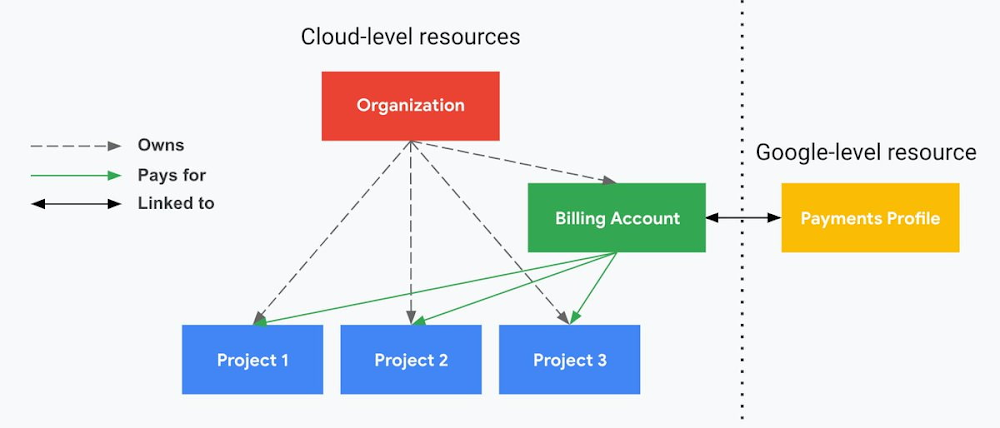
4. Billing that protects you from yourself
The project context gives you a logical container for the cost of the resources contained within it. My favorite part of this is that your billing entity is managed separately from the project itself. So you can delete a project and feel sure that all associated resources are gone and no longer racking up charges … without also trashing your ability to pay for future projects you might spin up.
(Related: the free tier does not charge you money unless you click a big button that basically says “YES, IT’S OK TO CHARGE ME MONEY.” This guarantee, combined with the familiarity of Google Accounts for access, are the main reasons I now recommend Google Cloud to beginners in my network who are looking for a safe place to learn and explore cloud.)
5. Organizational structure != billing structure
For organizations, billing is decoupled from the organization root. So permissions inheritance is a separate design decision from chargeback, as it should be. This keeps your Google Cloud footprint from converging toward Conway’s Law.
6. SSO that just works
Want to use the CLI? You get SSO out of the box with your Google Account—no corporate organization required, and no manual shuffling with config files and access keys. Or, better yet, you can use Cloud Shell to run gcloud commands right in your browser, even (especially?) on the docs pages. (Random trivia: I think Cloud Shell is the only native cloud service that has the same name across AWS, Azure, and Google Cloud–but Google’s version has been around the longest and as far as I can tell is the most fully-featured.)
7. One group to rule them all
Remember how user entities are just Google accounts? Guess what: you can use Google Groups to manage group access to IAM roles! That’s right: one set of users with permissions across docs, email, and cloud. It’s one reason why Google Workspace makes sense as a core piece of Google Cloud; it really does function like just another cloud service from an identity standpoint.
8. Never lose your place
In other clouds, I’ve experienced a problem I call the Timeout of Doom: when your console session expires, you’re left on a generic error screen and it’s up to you to figure out how to rebuild your context from scratch–starting with remembering what account you used in the first place. Imagine my delight to realize that reaching your Google Cloud console is as easy as bookmarking a single URL. console.cloud.google.com works and remembers who you are (or, at least, suggests the set of people you might be)—no mystery logouts or redirects.
9. Progressive complexity FTW
In my experience it’s been common for cloud providers to design most of their account features for organizations: if you’re an independent developer, you get more exposure to dangerous bills, less access to helpful SSO features, and generally must fend for yourself in a world that wasn’t really created with you in mind.
I love that Google Cloud has found a way to work with enterprises while still maintaining their roots as a cloud that developers love to use. Sign in with your personal Google account, attach it to an organization when-and-if you’re ready, and in the meantime you get the same thoughtfulness around SSO and billing as the giant shop down the street.
I’m not going to tell you my experience has been seamless; there are footguns here (every Google Workspace integration creates a new project?), and I’m still learning. But it’s that “intentionality” thing again. The Google Cloud identity and environment experience feels like it was designed, not just accreted; there’s an elegant simplicity to it that makes cloud feel fresh and exciting to me all over again. I can’t wait to see what’s next.
In the meantime, I highly encourage you to do what I did and spin up a free trial to try things out for yourself. Then hit me up on Twitter with your favorite Google Cloud identity or environment feature!
Announcement: Merger of Google’s Data Processing Terms into CDPA

2897
Of your peers have already read this article.
1:30 Minutes
The most insightful time you'll spend today!
At Google, we are constantly looking to improve our products, services, and contracts so that we can better serve our customers. To this end, we are pleased to announce that we have updated and merged our data processing terms for Google Cloud, Google Workspace (including Workspace for Education), and Cloud Identity (when purchased separately) into one combined Cloud Data Processing Addendum (the “CDPA”).
The CDPA maintains the benefits of the previously separate Data Processing and Security Terms for Google Cloud customers and Data Processing Amendment for Google Workspace and Cloud Identity customers, while streamlining and strengthening Google’s data processing commitments. A corresponding new CDPA (Partners) offers equivalent commitments to Google Cloud partners.
As part of this update, we have also incorporated the new international data transfer addendum issued by the U.K. Information Commissioner (“U.K. Addendum”). The U.K. Addendum allows the EU Standard Contractual Clauses (“SCCs”) to be used for transfers of personal data under the U.K. GDPR, replacing the separate U.K. SCCs that previously formed part of our terms. For an overview of the European legal rules for data transfers and our approach to implementing the EU SCCs and U.K. Addendum, please see our updated whitepaper. You can view our SCCs here.
While our data processing terms have been renamed, consolidated, and updated, our commitment to protecting the data of all Google Cloud, Workspace and Cloud Identity customers and all Google Cloud partners, and to enabling their compliance with data transfer and other regulatory requirements, remains unchanged.
For more information about our privacy commitments for Google Cloud, Google Workspace, and Cloud Identity, please see our Privacy Resource Center.
Public Cloud’s Zero Trust Architecture Keeps Enterprise Data Safe

4610
Of your peers have already read this article.
5:00 Minutes
The most insightful time you'll spend today!
Over the past decade, cybersecurity has posed an increasing risk for organizations. In fact, cyber incidents topped the recent Allianz Risk Barometer for only the second time in the survey’s history. The challenges in combating these risks only continue to grow. Adversaries tend to be agile and are consistently looking for new ways to land within your digital environments. They also drive attack vectors that work, which means enterprise risk leaders are now forced to look for new ways of securing infrastructure and data.
Cloud comes of age in the modern day cybersecurity threat landscape
When cloud, in its various delivery models, was first introduced, it didn’t fit neatly into the security frameworks that had seemingly protected networks for many decades. Public cloud was the answer to ongoing IT challenges: scale, resources, security capabilities, and budget cycle limitations. Now, public cloud is meeting the increasing challenge of implementing cybersecurity controls and frameworks that are capable of protecting today’s global enterprise.
Cloud adoption – with all its scale and redistribution of longstanding security paradigms – is the optimal choice for infrastructure and security, particularly as organizations grapple with the need to engage in digital transformation. We assert that successful digital transformation is impossible without incorporating the use of the scale, security architecture, and resiliency of the cloud.
Consequently, cloud adoption becomes a necessary component of roadmap discussions and planning as your organization looks to reduce overall risk. Risk leaders and enterprise cybersecurity leaders must consider that moving data, digital processes, and priority workloads to the public cloud is a crucial step for meeting the current and future digital needs of the enterprise. Going forward, this digital transformation increasingly will include hybrid infrastructure environments composed of a combination of on-premises and cloud solutions.
Pinpointing where threats thrive
As digital environments become more complex within a given organization, proactively countering adversaries becomes all the more difficult. It’s harder to implement, scale, and adhere to existing security and control frameworks. It’s also increasingly challenging to apply framework guidance to new applications, build and support infrastructure within a secure foundation, and maintain good cyber hygiene through the digital lifecycle.
As reported by TechTarget, the 2020 hack of the SolarWinds Orion IT performance monitoring system is a prime example. It grabbed headlines “not because a single company was breached, but because it triggered a much larger software supply chain incident.” This vulnerability in popular, commercially available, and widely utilized software compromised the data, networks, and systems of thousands of companies when a routine software update turned out to be backdoor malware.
A close look at the root problems behind high-profile security breaches reveals that it’s a lack of agility and an inability to scale resources that prohibit the modern security organization’s ability to respond quickly enough to counter new challenges. Look even closer and you’ll often find an insufficient implementation of best practices and ineffective solutions, leaving an organization continually chasing the next tool or solution and scrambling to stay ahead of emerging threats.
While the cost to individual businesses is high, most organizations struggle with the needed skills and resources to rigorously maintain data security basics and ensure readiness for inevitable attacks. The previous sentence is especially true when you consider that maintaining an effective state of cybersecurity readiness is a costly practice that requires the continual development of expertise, the evaluation of new tools, and an ongoing element of vigilance.
Threat visibility is a big part of the problem. You can’t protect your company from what you can’t see. For individual enterprises – with critical data workloads housed in a combination of on-premises servers, a variety of endpoints, and both private and public cloud instances – staying ahead in the ongoing battle requires a new approach.
The identification of actionable alerts and other data contributes to a better overall state of readiness. Thought leadership and discussions related to Autonomic Security Operations provide a promising outlook for security organizations willing to lean into the changing technology landscape – a landscape that now benefits from leveraging automation and machine learning currently used in security stacks. Reducing the chance of introducing vulnerabilities or missing-critical alerts starts with ensuring full visibility into an increasingly expanding and complex environment.
The evolution of a shared responsibility to a shared fate
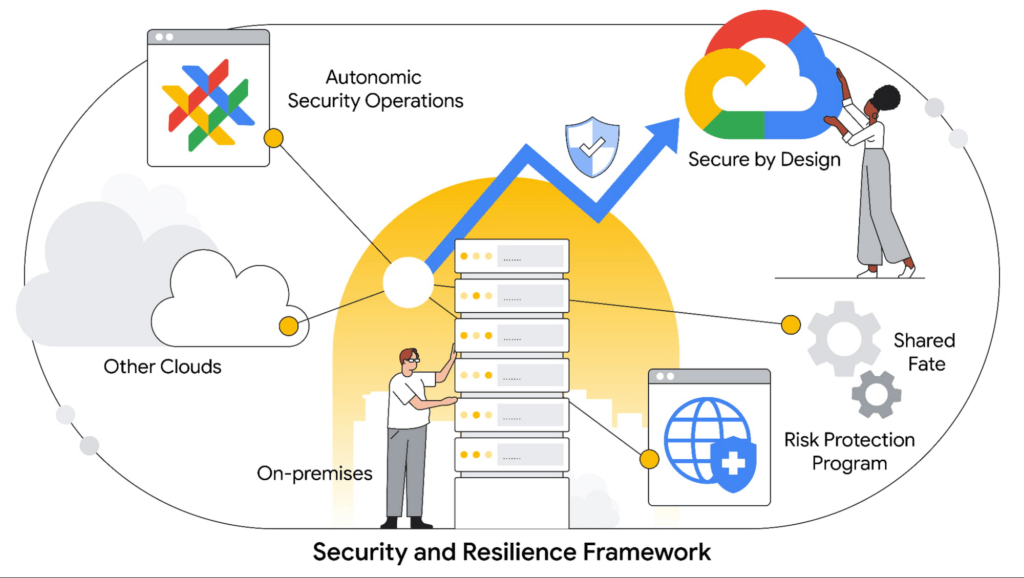
Industry megatrends are driving cloud adoption and with it a path to improved cybersecurity. Among these trends is the concept of shared fate as an evolution of the historical shared-responsibility model. Shared fate drives a flywheel of increasing trust which develops as more enterprises transition to the cloud. This compels an even higher security investment and a more vested interest from cloud service providers.
At Google Cloud, shared fate means we take an active stake in our customers’ security posture, offering capabilities and defaults that help ensure secure deployments and configurations in the public cloud. We also offer experience-based guidance on how to configure cloud workloads for security, and can assist with risk management, reduction, and transfer.
The Google Cloud Risk Protection Program represents the continuing evolution of the shared-fate model. The program offers a practical solution that provides the modern enterprise a snapshot comparison of its current security state against well-adopted cloud-security frameworks. It also give you an opportunity to explore cyber insurance designed to meet your needs from our partners Allianz and Munich Re.
When performed with diligence, cloud adoption can help increase your overall cybersecurity effectiveness. Using a hybrid approach – and steadily reducing which data assets remain on premises – can strengthen your overall security posture and reduce risks to the organization.
Cloud security and the ability to reduce risk
In comparison to the enterprise-by-enterprise security scramble to protect data and workloads in individual private clouds, global public cloud solutions like Google Cloud can be a force multiplier when adhering to established best practices. By that, we mean, quite literally, that you get more security at every touchpoint – from infrastructure and software to access and data security.
Strong security in the public cloud starts with the foundational pieces: the hardware and design elements. At Google, for example, we take a security-by-design approach within both the data center and purpose-built components themselves. Within Google Cloud, data is encrypted by default – both at rest and in transit. Google’s baseline security architecture adheres to the zero trust principles, meaning that every network, device, person, or service initially cannot be trusted.
Embarking on a zero trust architecture journey gives modern security practitioners the ability to methodically shut down traditional attack vectors. Zero trust also provides more granular visibility and control of rapidly expanding environments. The recent emphasis of its benefits, as the U.S. White House set forth through an executive order on increasing cybersecurity resilience, is an example of the wide-scale recognition by both government and industry on the benefits of this approach.
Since adopting a zero trust approach more than a decade ago, Google has achieved a recognizable level of maturity, reflected by our internal infrastructure and multiple enterprise offerings, enabling different aspects of the zero trust security journey.
Compliance and privacy drive critical elements of the cloud adoption cycle
Privacy frameworks, regulatory compliance, and data sovereignty are driving critical elements of the cloud adoption cycle. Cloud providers must ensure they have the necessary controls, attestations, and abilities to audit in order to provide organizations with the tools to preemptively satisfy regulatory and compliance mandates across the globe.
Now consistently expected to be part of a design feature that’s built into the cloud journey, it cannot simply be an add-on capability. The direction of this evolution promises to play more of a role in the future of cloud adoption, not less. Because this is an ongoing component of enterprise risk evaluation, your business must consider cloud providers that can partner on this critical aspect of the journey – and not leave you without the resources to respond to this growing critical need.
Building trust into your digital transformation journey
Digital transformation is difficult because the modern enterprise must build and design for both today and tomorrow. From a security perspective, the challenge has often been that security industry practitioners cannot always predict what the future will look like. That said, there are clear steps you can take to mitigate all-around risk throughout the process.
How you approach the cloud is, of course, integral to your journey, but it doesn’t need to be an all-or-nothing proposition. And although technology debt continues to persist with legacy systems, that doesn’t mean you shouldn’t begin to move forward.
Google Cloud enables you to modernize at your own pace and understand what’s realistic. We recommend you move what data you can to a more secure public cloud today, followed by a phased approach to move more in the months and years that follow. The key tenets of our approach to security in the public cloud include:
- The security-by-design posture of Google Cloud can help modern-day enterprises scale security capabilities and reduce risk with an architecture built on zero trust principles.
- The Google Cloud approach to security and resiliency includes a framework to help you protect against adverse cyber events by using our comprehensive suite of solutions.
- Google Cloud can help ensure your organization adheres to the requirements of a growing and increasingly complex regulatory and compliance environment.
- The ideal model of a future organization is one where cloud plays a major role in infrastructure design and architecture. Your organization should begin to view public cloud as an enabler of the business and a core component of digital transformation.
As you transition more data to the public cloud, it’s paramount that trust is ingrained in every step you take with your cloud service provider. Many service providers readily take on a shared responsibility with your organization when it comes to security. At Google, we take it several steps further with our shared fate model to help ensure data security in the public cloud. Your future and our’s are part of the same data security journey.
More Relevant Stories for Your Company

Learn to Use reCAPTCHA Enterprise to Protect Your Website from Fraud
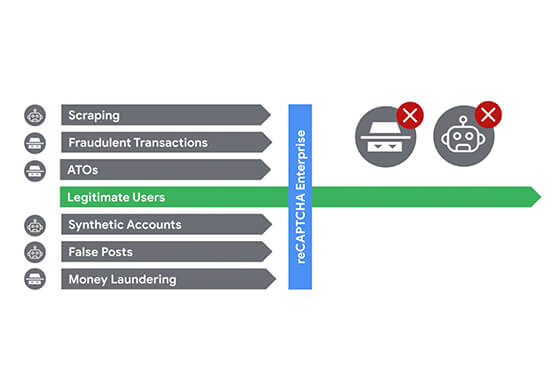
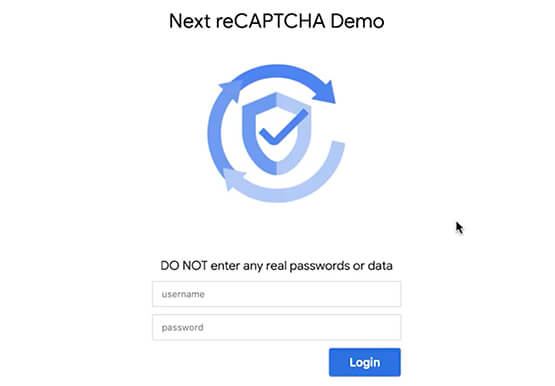
One of the top questions enterprises have is: How can I use reCAPTCHA Enterprise to protect my website from online fraudulent activity? Fraudulent web activities cost enterprises billions of dollars each year. Security teams need to keep the bad actors out of their websites and ensure that their customers can

Encryption in Transit: The Next Level in Cloud Security
Security is often a deciding factor when choosing a public cloud provider. At Google Cloud, security is of the utmost importance and the security strategy encompass authentication, integrity, and encryption, for both data at rest and in transit. Hence, Google Cloud encrypts and authenticates all data in transit at one

The Ultimate Guide to VPC Service Controls: Strengthening Your Security Posture
While cloud security skeptics might believe that data in the cloud is just one access configuration mistake away from a breach, the reality is that a well-designed set of defense in depth controls can help minimize the risk of configuration mistakes and other security issues. Our Virtual Private Cloud (VPC) Service Controls can play

Google Launches Smart Canvas to Stir-up Collaboration in Google Workspace
After more than a year of remote collaboration, many people are showing signs of digital fatigue. Throughout the pandemic, millions of employees bridged the physical distances with their colleagues by making themselves more available, joining a deluge of virtual meetings, and leaning into a dizzying array of tools and applications.
