





Secrets Management Risk Analysis: Mitigating Threats with Secret Manager

913
Of your peers have already read this article.
2:30 Minutes
The most insightful time you'll spend today!
Can you keep a secret? Many people struggle to keep secrets. So do organizations. An organization’s digital credentials — its passwords, API keys, tokens, and encryption keys baked into its software code — are its vital secrets, used to authenticate access to protected resources and services.
The security of these secrets represent one of the biggest risks that enterprises must manage when securing application infrastructure and environments. Fortunately, we have an important tool to help our customers better manage their secrets: Google Cloud Secret Manager.
Secret Manager is a secure and efficient tool to centrally store, access, manage, and audit your organization’s secrets. As we noted in our April 2023 Threat Horizons Report, insufficient management of credentials and keys is now one of the top security issues facing cloud customers today. In particular, we have observed service account keys being used for everything from insider threats to cross-cloud breaches to intellectual property espionage.
Along with the increasing popularity of DevOps, secrets are used throughout development. In some cases, secrets are coded as plaintext into configuration files or directly into functions, where they can end up exposed in code repositories. If compromised, secrets can be used to gain unauthorized privileged access to enterprise data, infiltrate critical systems, and launch attacks.
Secret Manager can help organizations better manage their secrets even as concerns over potential security breaches grow. Organizations must consider the following four points during their secrets management risk analysis:
- Secrets sprawl: As organizations move more workloads to the cloud, the number of secrets they need to manage increases exponentially. This can lead to secrets sprawl, where secrets are stored in a variety of different locations, making it difficult to track and manage them.
- Human error: Humans are fallible, and this is especially true when it comes to managing secrets. Mistakes, such as accidentally sharing a secret with the wrong person or the misconfiguration of a secret management tool, can have serious consequences.
- Compliance violations: Organizations that handle sensitive data are subject to a variety of compliance regulations, including PCI-DSS, SOC 2, HIPAA, and GDPR. Without proper management, secrets could lead to potential compliance violations.
- Downtime: If secrets are not properly managed or rotated, it could lead to downtime for applications and services that rely on them.
Secret Manager can enable IT teams to keep track of secrets by providing a centralized place to store and manage them. You can access secrets directly from the Secret Manager console, or use the Secret Manager API or SDKs. Secret Manager is also designed to scale with your application. You can store as many secrets as you need without performance issues, and its API-first design lets you extend and integrate into other existing systems.
Secret Manager integrations in Google Cloud
In many cases, developers save secret configuration details as plaintext in code for ease of use. There are two main risks associated with this approach:
- Anyone with access to secrets can see and copy them. There is no way to enforce any auditing or access controls practices here.
- It becomes difficult to move code between dev, test, and production environments.
Cloud-centered integrations supported by Secret Manager with other Google Cloud services in the software supply chain make it easier and safer to store and access sensitive information.
The tool is about the secret information being made securely available in build or runtime.
Secret Manager integrations also can play a role in securing sensitive information in the software supply chain:
1. Integration with CI/CD systems used to build and deploy your software
Cloud Code integration can help developers build more secure applications by preventing hard-coding of sensitive configuration data such as passwords, credentials, and tokens in the codebase. It replaces them with secrets which can be programmatically fetched as required. You can create, access, and modify secrets directly from within your favorite IDE without having to navigate away from it. Integration is available for VS Code, IntelliJ, and Cloud Shell Editor.
Cloud Functions integration lets you access and expose secrets as environment variables or as a volume via the filesystem.
Cloud Build: To handle sensitive data in builds, you can store them in Secret Manager and then configure the build steps to access the information directly. In the build steps, you can associate the value of a secret to an environment and you can access this value via an environment variable from scripts or processes. Two common uses for fetching sensitive dependencies during build time are:
- Storing Docker authentication credentials for pull/push of images to Docker hub.
- Creating GitHub pull requests in response to builds.
2. Integration with runtime engines
Cloud Run: Native integration makes it easy to mount secrets in cloud run services. Using this integration, secrets can be made available to containers either as volume mounts or as env variables. Sensitive dependencies can be stored in environment variables, by referencing a secret name stored in Secret Manager instead of storing it as a plain text environment variable. This secret access operation can be done directly from the Cloud Run console without changing a single line of source code.
If code reads secrets from a file instead of an env variable, the “mounted as volume” option can be used to make secrets look like files to the env vars. During service deployment, the service account used to run the containers are checked to see if they have the required permissions or not, preventing any unwanted access.
Kubernetes and GKE: The CSI driver–provider solution is an open-source work that provides integration with K8s. The driver lets customers centrally store their secrets in Google Secret Manager and consume them in a kubernetes native manner, as files mounted in K8s pods. The solution also comes with additional syncing capabilities. This method of consuming secrets also allows users to take advantage of SM’s capabilities like versioning, managed rotation, default/CMEK encryption and cloud-focused integrations with other Google Cloud services. Work is currently ongoing to provide official support to the driver solution as a GKE component.
Is Secret Manager right for my organization?
Developers carry a big responsibility to protect the sensitive data they are entrusted to work with, and keep secrets out of their code. However, organizations also have a responsibility to provide the tools and solutions needed to help their teams deliver on these expectations. Secret Manager makes it straightforward for developers to store and manage secrets while improving security.
To learn more about Secret Manager, please review these resources:
Read the previous Best Kept Security Secrets blogs here:
Aiming for successful cloud security transformations to help CISOs prepare for future threats

2944
Of your peers have already read this article.
3:30 Minutes
The most insightful time you'll spend today!
Many security leaders head into the cloud armed mostly with tools, practices, skills and ultimately the mental models for how security works that were developed on premise. This leads to cost and efficiency problems that can be solved by mapping their existing mental models to those of the cloud.
When it comes to understanding the differences between on-premises cybersecurity mental models and their cloud cybersecurity counterparts, a helpful place to start is by looking at the kinds of threats each one is attempting to block, detect, or investigate.
Traditional on-premise threats focused on stealing data from databases, file storage, and other corporate resources. The most common defenses of these resources rely on layers of network, endpoint, and sometimes application security controls. The proverbial “crown jewels” of corporate data were not made accessible with an API to the outside world or stored in publicly accessible storage buckets. Other threats aimed to disrupt operations or deploy malware for various purposes, ranging from outright data theft to holding data for ransom.
There are some threats that are specifically aimed at the cloud. Bad actors are always trying to take advantage of the ubiquitous nature of the cloud. One common cloud-centered attack vector that they pursue is constantly scanning IP address space for open storage buckets or internet-exposed compute resources.
As Gartner points out, securing the cloud requires significant changes in strategy from the approach we take to protect on-prem data centers. Processes, tools, and architectures need to be designed using cloud-native approaches to protect critical cloud deployments. And when you are in the early stages of cloud adoption, it’s critical for you to be aware of the division of security responsibilities between your cloud service provider and your organization to make sure you are less vulnerable to attacks targeting cloud resources.
Successful cloud security transformations can help better prepare CISOs for threats today, tomorrow, and beyond, but they require more than just a blueprint and a set of projects. CISOs and cybersecurity team leaders need to envision a new set of mental models for thinking about security, one that will require you to map your current security knowledge to cloud realities.
As a way to set the groundwork for this discussion, the cloud security transformation can start with a meaningful definition of what “cloud native” means. Cloud native is really an architecture that takes full advantage of the distributed, scalable, and flexible nature of the public cloud. (To be fair, the term implies that you need to be born in the cloud to be a native, but we’re not trying to be elitist about it. Perhaps a better term would be “cloud-focused” or doing the security “the cloudy way.”)
However we define it, adopting cloud is a way to maximize your focus on writing code, creating business value, and keeping your customers happy while taking advantage of cloud-native inherent properties—including security. One sure way to import legacy mistakes, some predating cloud by decades, into the future would be to merely lift-and-shift your current security tools and practices into the public cloud environment.
Going cloud-native means abstracting away many layers of infrastructure, whether it’s network servers, security appliances, or operating systems. It’s about using modern tools built for the cloud and built in the cloud. Another way to think about it: You’ll worry less about all these things because you’re going to build code on top of that to help you move more quickly. Abandoning legacy security hardware maintenance requirements is part of the win here. To put another way, security will follow in the steps of IT that has been transformed by the SRE and DevOps revolution.
You can extend this thinking to cloud native security, where some of your familiar tools combine with solutions provided by cloud service providers to take advantage of cloud native architecture to secure what’s built and launched in the cloud. While we talked about the differences between on-prem targeted threats compared to threats targeting cloud infrastructure, here are other vital areas to re-evaluate in terms of a cloud security mental model.
Network security
Some organizations practice network security in the cloud as if it were a rented data center. While many traditional practices that worked reasonably well on-premise for decades, along with many traditional network architectures, are either not applicable in the cloud or not optimal for cloud computing.
However, concepts like a demilitarized zone (DMZ) can be adapted to today’s cloud environments. For example, a more modern approach to DMZ would use microsegmentation and govern access by identity in context. Making sure that the right identity, in the right context, has access to the correct resource gives you strong control. Even if you get it wrong, microsegmentation can limit a breach blast radius.
Becoming cloud native also drives the adoption of new approaches to enterprise network security, such as BeyondProd. It also benefits organizations because it gets them away from traditional network perimeter security to focus on who and what can access your services—rather than where requests for access originated.
Although network security changes driven by cloud adoption can be enormous and transformational, not all areas shift in the same way.
Endpoint security
In the cloud, the concept of a security endpoint changes. Think of it this way: A virtual server is a server. But what about a container? What about microservices and SaaS? With software as a service cloud model, there’s no real endpoint there. All along your cloud security path, users only need to know what happens where.
Here is a helpful mental model translation: An API can be seen as sort of an endpoint. Some of the security thinking developed for endpoints applies to cloud APIs as well. Securing access, permissions, privileged access thinking can be carried over, but the concept of endpoint operating system maintenance does not.
Even with automation of service agents on virtual machines in the cloud, insecure agents may increase risks because they are operating at scale in the cloud. Case in point: This major Microsoft Azure cross-tenant vulnerability highlighted a new type of risk that wasn’t even on the radar of many of its customers.
In light of this, across the spectrum of endpoint security approaches, some disappear (such as patching operating systems for SaaS and PaaS), some survive (such as the need to secure privileged access,) and yet others are transformed.
Detection and response
With a move to the cloud comes changes to the threats you’ll face, and changes to how you detect and respond to them. This means that using on-prem detection technology and approaches as a foundation for future development may not work well. Copying all your on-premises detection tools and their threat detection content won’t reduce risks in the way that most cloud-first organizations will need..
Moving to the cloud provides the opportunity to rethink how you can achieve your security goals of confidentiality, integrity, availability, and reliability with the new opportunities created by cloud process and technology.
Cloud is distributed, often immutable, API-driven, automatically scalable, and centered on the identity layer and often contains ephemeral workloads created for a particular task. All these things combine to affect how you handle threat detection for the cloud environment and necessitate new detection methods and mechanisms.
There are six key domains where threats in the cloud can be best detected: identify, API, managed services, network, compute, and Kubernetes. These provide the coverage needed related to network, identity, compute, and container infrastructure. They also provide specific detection mechanisms for API access logs and network traffic captures.
As with endpoint security, some approaches become less important (such as network IDS on encrypted links), others can grow in importance (such as detecting access anomalies,) while others transform (such as detecting threats from the provider backplane).
Data security
The cloud is changing data security in significant ways, and that includes new ways of looking at data loss prevention, data encryption, data governance, and data access.
Cloud adoption sets you on a path to what we at Google call “autonomic data security.” Autonomic data security means security has been integrated throughout the data lifecycle and is improving over time. At the same time, it makes things easier on users, freeing them from having to define and redefine myriad rules about who can do what, when, and with which data. It lets you keep pace with constantly evolving cyberthreats and business changes, so you can keep your IT assets more secure and make your business decisions faster.
Similar to other categories, some data security approaches wane in importance or disappear (such as manual data classification at cloud scale), some retain their importance from on-prem to cloud unchanged, while others transform (such as pervasive encryption with effective and secure key management).
Identity and access management
The context for identity and access management (IAM) in the cloud is obviously different from your on-premise data center. In the cloud, every person and service has its own identity and you want to be able to control access.
Within the cloud, IAM gives you fine-grained access control and visibility for centrally managing cloud resources. Your administrators authorize who can act on specific resources, giving you full control and visibility to manage cloud resources centrally. What’s more, if you have complex organizational structures, hundreds of workgroups, and a multitude of projects, IAM gives you a unified view into security policy across your entire organization.
With identity and access management tools, you’re able to grant access to cloud resources at fine-grained levels, well beyond project-level access. You can create more granular access control policies to resources based on attributes like device security status, IP address, resource type, and date and time. These policies help ensure that the appropriate security controls are in place when granting access to cloud resources.
The concept of Zero Trust is strongly in play here. It’s the idea that implicit trust in any single component of a complex, interconnected system can create significant security risks. Instead, trust needs to be established via multiple mechanisms and continuously verified. To protect a cloud-native environment, a zero trust security framework requires all users to be authenticated, authorized, and validated for security configuration and posture before being granted or keeping access to cloud-based applications and data.
This means that IAM mental models from on premise security mostly survive, but a lot of underlying technology changes dramatically, and the importance of IAM in security grows significantly as well.
Shared fate for greater trust in cloud security
Clearly, cloud is much more than “someone else’s computer.” That’s why trust is such a critical component of your relationship with your chosen cloud service providers. Many cloud service providers acknowledge shared responsibility, meaning that they supply the underlying infrastructure but leave you responsible for many seemingly inscrutable security tasks.
With Google Cloud, we operate in a shared fate model for risk management in conjunction with our customers. We believe that it’s our responsibility to be active partners as our customers deploy securely on our platform, not delineators of where our responsibility ends. We stand with you from day one, helping you implement best practices for safely migrating to and operating in a trusted cloud.
Get ready to go cloud native
We offer you several great resources to help you prepare for cloud migration, and guide you as you review your current security approaches for signs of on-prem thinking.
Listen to our podcast series where Phil Venables, Vice President, CISO at Google Cloud, and
Nick Godfrey, Director, Financial Services Security & Compliance and member of Office of the CISO at Google Cloud, join me in a discussion on preparing for cloud migration (Podcast 1, Podcast 2). You can deepen your cloud native skills by earning a Professional Cloud Security Engineer certification from Google.
How to Configure GCP for Live Network Forensics

3041
Of your peers have already read this article.
3:00 Minutes
The most insightful time you'll spend today!
Forensics is the application of science to criminal and civil laws. It is a proven approach for gathering and processing evidence at a crime scene. An integral step in the forensics process is the isolation of the scene without contaminating or modifying the evidence. The isolation step prevents any further contamination or tampering with possible evidence. The same philosophy can be applied to the investigation of digital events.
In this post we will review methods, tactics and architecture designs to isolate an infected VM while still making it accessible to forensic tools. The goal is to allow access so that data and evidence can be captured while protecting other assets. There are many forensic tools for networking that can be used to analyze the captured traffic. This post does not cover these tools but rather how to configure GCP to capture live traffic in the most efficient and secured way. Once traffic is captured, customers can use whatever tools they prefer to run the analysis. More details about these tools and required agents can be found here and details about open source tooling that Google and others are developing are available here.
In cloud security context, when a VM shows signs of compromise, the most common immediate reaction is to take a snapshot, shut down the instance and relocate the image snapshot to an isolated environment, a method known as “dead analysis”. However, shutting down the instance will impede an important step in the investigation and digital forensics, as some important information in a buffer or the RAM may be lost.
The other forensic approach is “live analysis”, in which the VM is kept on and evidence is gathered from the VM directly. Live forensics enables the imaging of RAM, bypasses most hard drives and software encryption, determines the cause of abnormal traffic, and is extremely useful when dealing with active network intrusions. This process is usually performed by forensic analysts. For example, if there is a good chance the malware resides only in memory then live forensics is, in some cases, the only way to capture and analyze the malware. In this method, in addition to disk and memory evidence, a forensic analysis can also capture live-network from data sent over the compromised VM network interfaces. Some of the benefits of collecting live networks are reconstruction and visualizing traffic flow in real-time, in particular during active network intrusions or attacks.
In the cloud, a VM must be isolated when it becomes apparent that an incident has happened, in order to protect other VMs from being infected. Our Cloud Forensics 101 session covers the process and required artifacts, such as logs, that need to be collected for cloud forensics.
What happens when your image is compromised
Let’s now assume that one of the VMs in your infrastructure has been compromised and alarms are coming from products such as GCP’s Cloud Security and Command Center, Chronicle backstory or your SIEM.
An incident response plan consists of 3 phases: preparation (actions taken before an attack), detection (actions taken during an attack) and response (actions taken after an attack). During the detection phase, the Computer Security Incident Response Team (CSIRT) or threat analysts decide whether live acquisition analysis is required. If live forensics is required, for example when it is vital to acquire a VM’s RAM, then one of the first courses of action is to isolate and contain the VM from the rest of the world and connect the Forensics VPC to the VM for investigation. The forensics VPC resides in a forensics GCP project, it includes digital forensics tools to capture evidence from the VM such as SANS Investigative Forensics Toolkit – SIFT, The Sleuth Kit, Autopsy, Encase, FTK and alike. These tools are already installed, configured, tested and ready to use. The forensics project will also save and preserve evidence such as disk and memory images for forensic review.
We’ll cover two scenarios in this post, the first scenario is to isolate the image and connect the forensics VPC to the image for live acquisition.
In the second scenario we will also capture live traffic from the isolated image for live network digital forensics. To capture live traffic from the infected VM, we will leverage the GCP Packet Mirroring service to duplicate all traffic going in and out of the VM and send it to a Forensics VPC for analysis. Network forensics analysis tools such as Palo Alto VM-Series for IDS, ExtraHop Reveal(x), CheckPoint CloudGuard, Arkime (formerly Moloch), Corelight are installed, configured and ready for deployment in the Forensics VPC, these tools will be used to analyze the duplicate network traffic.
Isolating the infected VM from other resources and connecting the forensics VPC
As part of the Incident Response plan preparation phase, the CSIRT created a Google Cloud Forensics Project. Since the Forensics project will be used only when needed, it’s better to automate the creation of the project and its resources with a tool such as Terraform. It is important to grant access to this project only to individuals and groups who deal with incident response and forensics, such as CSIRT. As shown in figure 1, the Forensics project on the right includes its own VPC, non-overlapped subnet and VM images with pre-installed and pre-configured forensics tools. Internal load-balancer and instance-groups are also configured, we will use these resources to capture live traffic, as described later in this post.
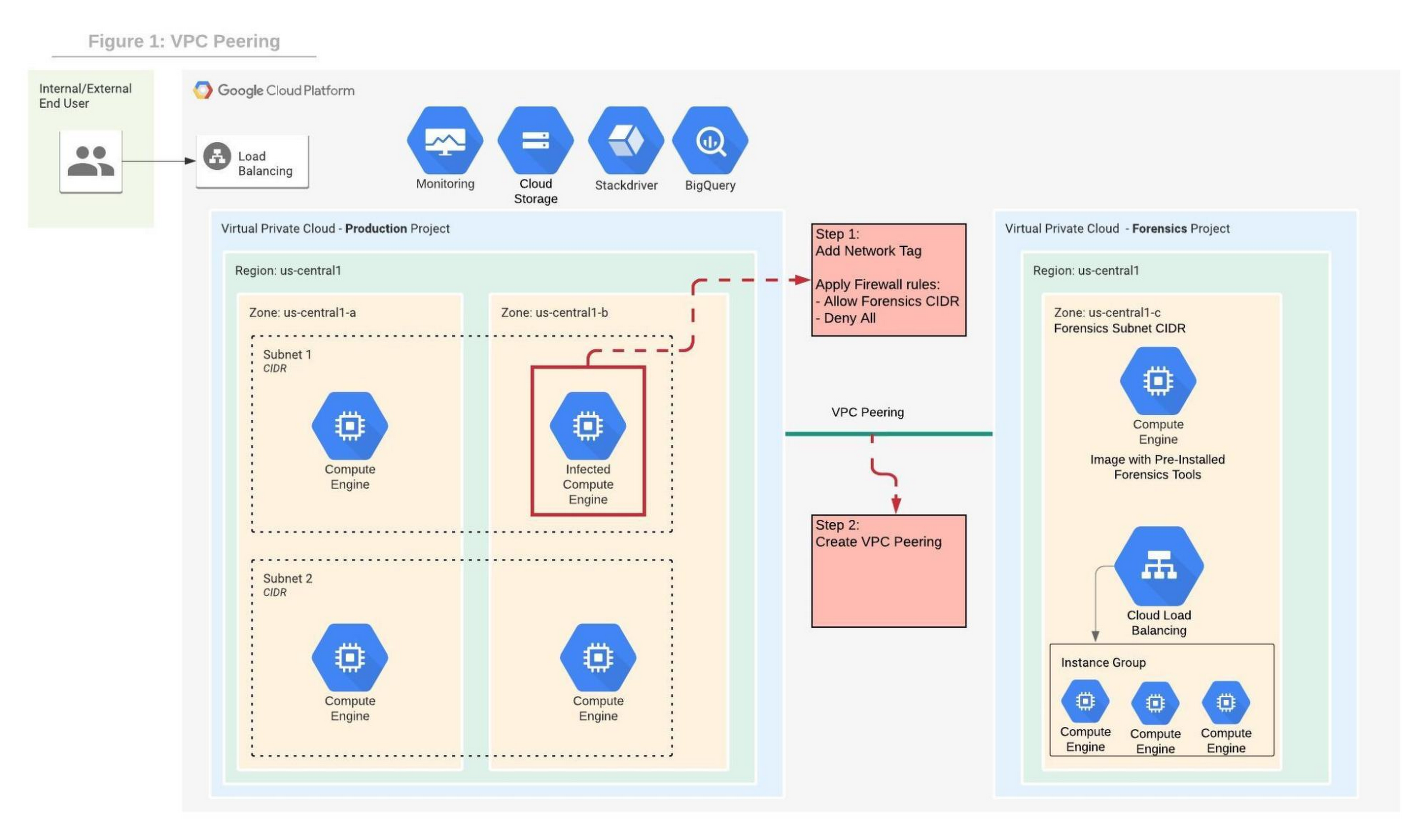
In order to contain the spread of any malware or network activity, such as data exfiltration, we’ll isolate the VM with VPC firewall rules. The GCP VPC firewall is a distributed firewall that always enforces its rules, protecting the instances regardless of their configuration and operating systems. In other words, the compromised VM cannot override the firewall enforcement if its policies follow the principle of least privilege . Rules can be applied to all instances in the network, target network tags or service accounts.
Step 1 in the diagram above shows how an infected VM is isolated from the rest of the network by firewall rules that deny any ingress and egress traffic from any CIDR beside the forensics subnet CIDR. The infected VM is tagged with a unique network tag, for example “<image-name>_InfectedVM”, then firewalls rules are applied on the network tag. This ensures that the infected VM is isolated from the project and the Internet while enabling access to the VM via VPC peering which we’ll configure in step-2. You can learn more about VPC firewalls rules here.
In step 2, the VPC from the forensics project is peered with the VPC in the production project. When VPC peering is established routes are exchanged between the VPCs. By default, VPC peering exchanges all subnet routes, however, custom routes can also be filtered if required. At this point, the VM from the forensics project can communicate with the infected VM and start the live forensics analysis job using the pre-installed and pre-configured forensics tools.
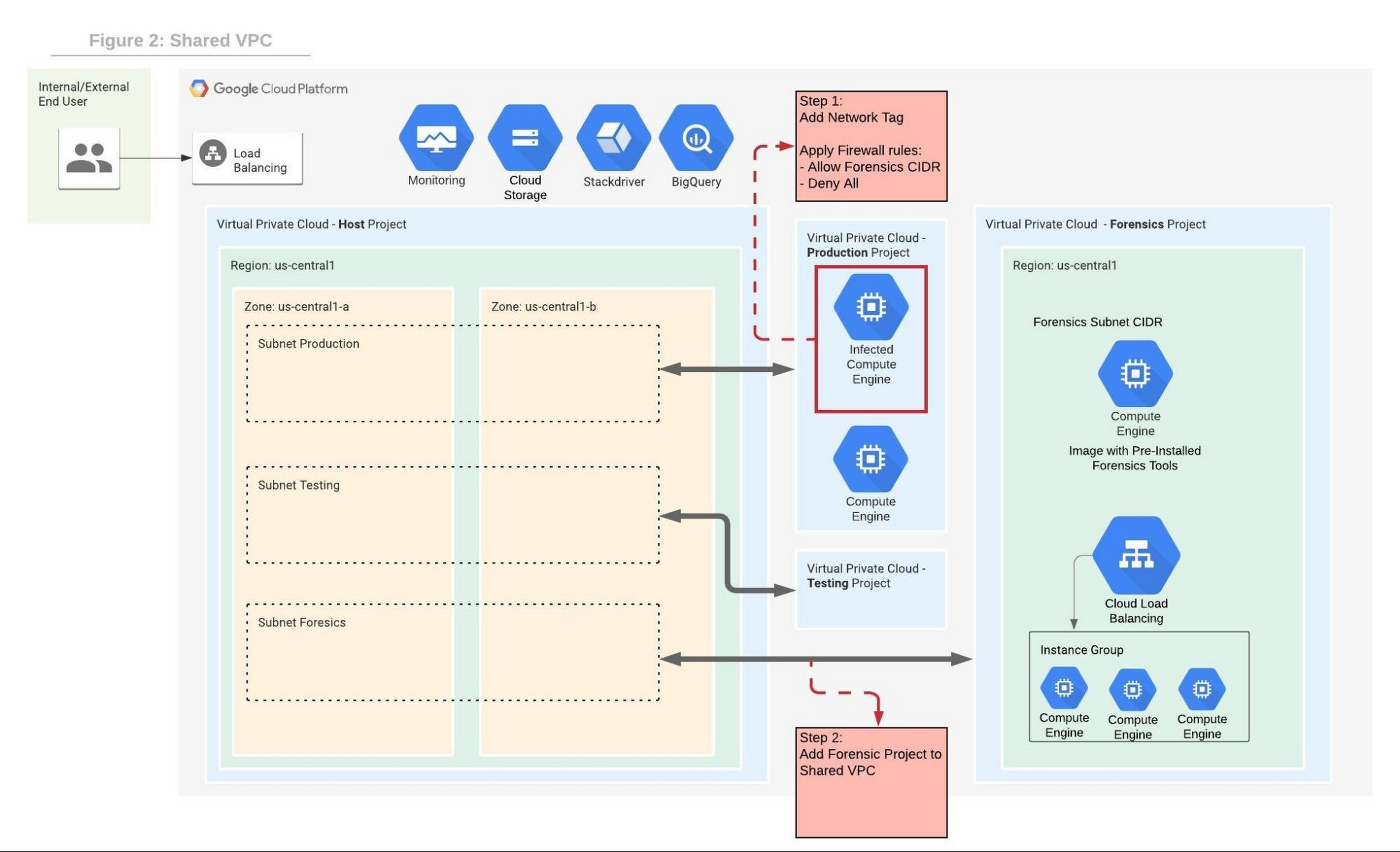
Shared VPC is a network construct that allows you to connect resources from multiple projects, called service-projects, to a common VPC in a host-project. VPCs from different projects can securely communicate with each other via the hosted project network while centralizing the network administration. Figure 2 depicts Shared VPC topology, rather than using VPC peering, during step 2 the Forensics project is simply attached to the host project. After the attachment, the Shared VPC allows the forensics tools to communicate with the infected VMs.
Capturing live network traffic with Google Traffic Mirroring
If live network forensics is required, for example during active network intrusions, then the incoming and outgoing traffic needs to be duplicated and captured. While VPC Flow logs capture the networking metadata telemetry, this is not enough for live network forensics analysis. GCP Packet Mirroring clones the traffic of a specified instance in a VPC and forwards it to a specified internal load balancer which collects the mirrored traffic and sends it to an attached instance group. Packet mirroring captures all the traffic from the specified subnet, network tags, or instance name.
Figure 3 depicts the steps that allow the compromised VM to communicate with the rest of the world (for example beaconing with C&C) while capturing all traffic for investigation in a peered VPC deployment.
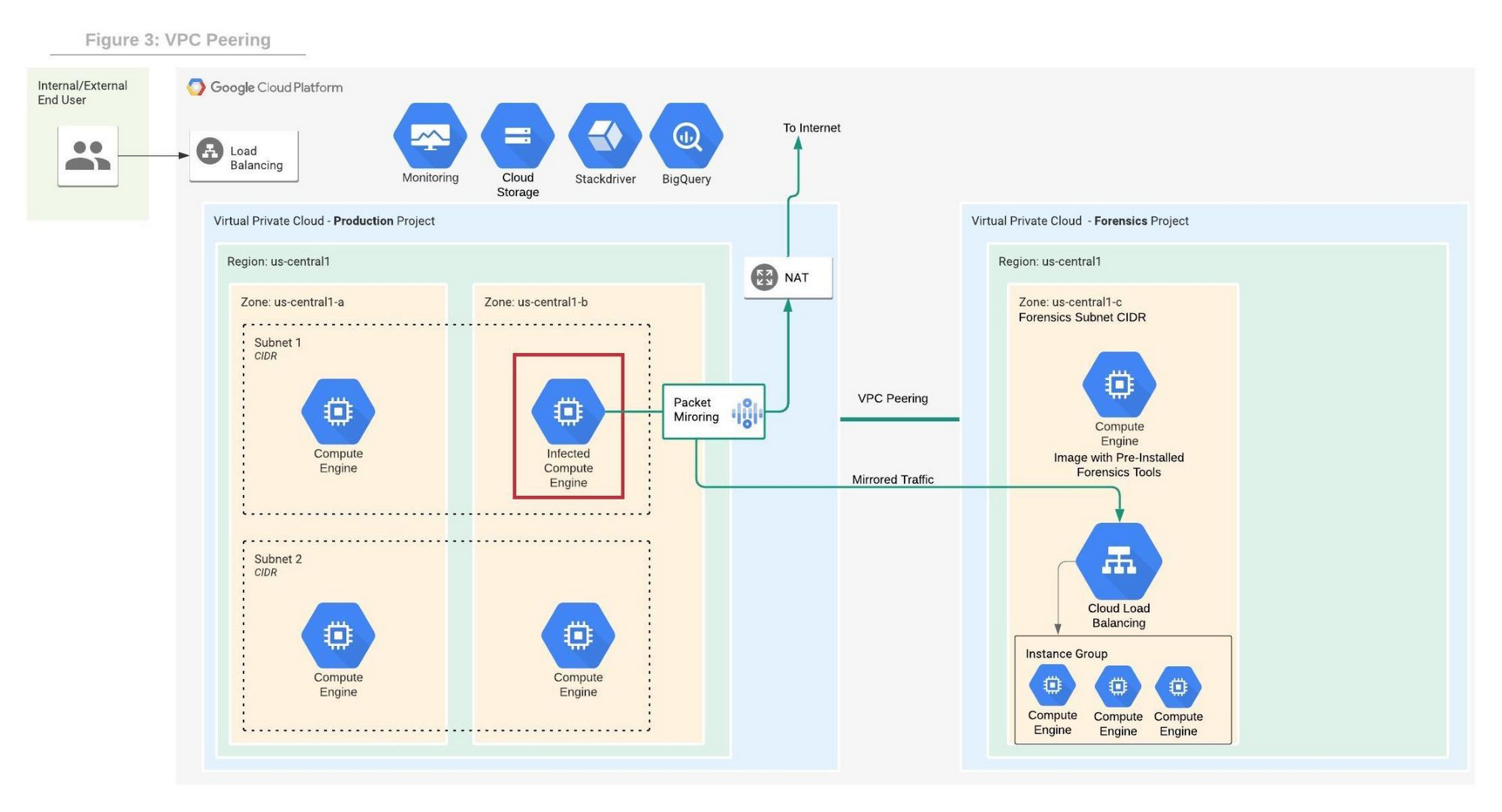
Figure 4 depicts the steps that allow the compromised VM to communicate with the rest of the world while capturing all traffic for investigation in a shared VPC deployment.
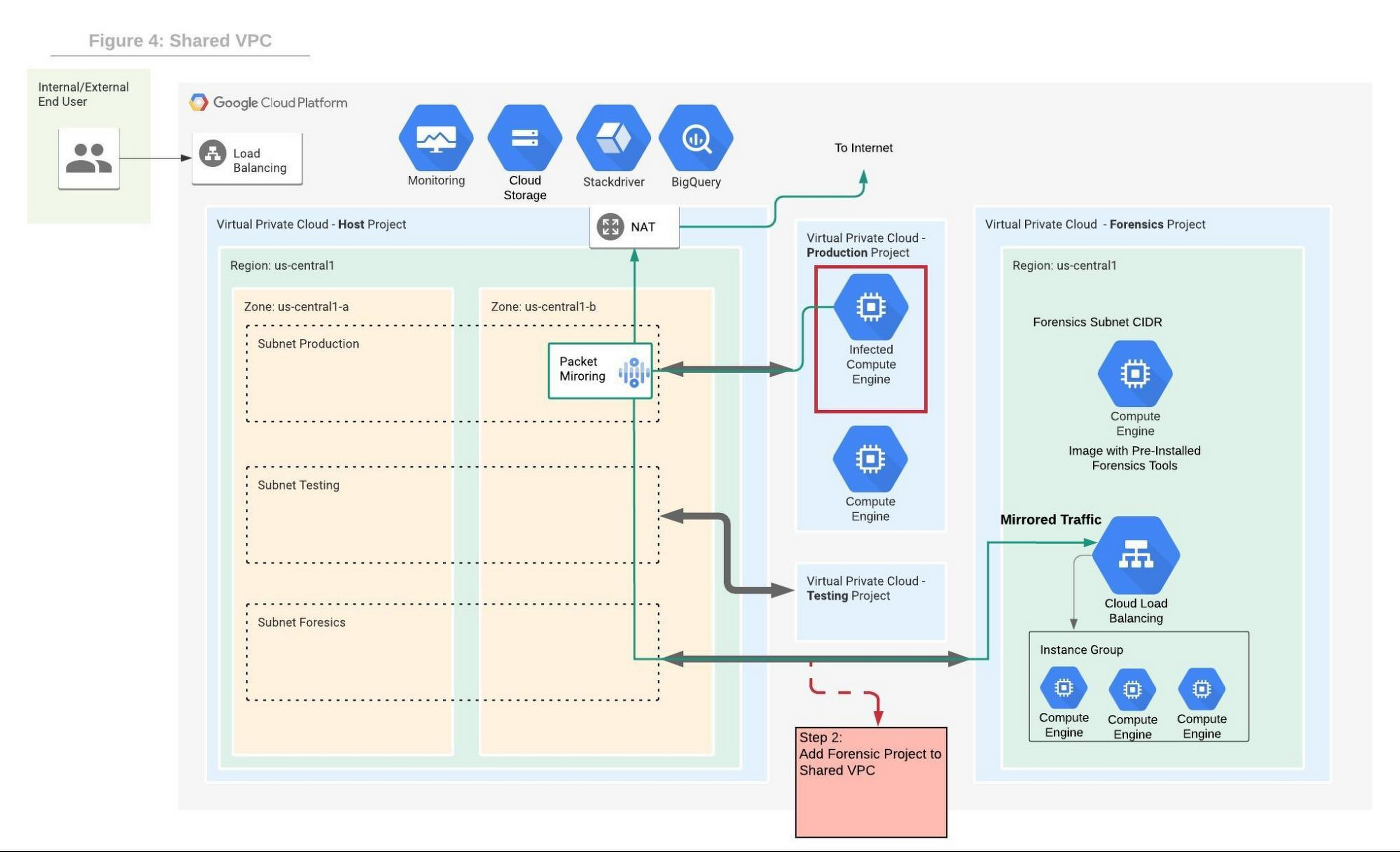
We will use the Forensics’ project internal load balancer and the instance group VMs which include packet capture and analysis tools. Note that production and forensics networks must be in the same region. Detailed steps to configure packet mirroring are available on this page.
If you are using a Shared VPC then check the Packet Mirroring configuration for Shared VPC for configuration details. Figure 4 depicts the packet mirroring flow in a shared VPC topology.
It is recommended to automate and periodically test the process to make sure that in case of an incident, the entire setup and Forensics toolchain can be quickly deployed. If after initial investigation a suspicious destination, such as a Command and Control [C&C] Server, has been identified, then the Packet Mirroring policy can be adjusted with a policy filter that only mirrors traffic from that C&C server IP address.
An incident management plan must be in place for companies using cloud services, and this plan should also include the option of using live acquisition when necessary. design and preparation for forensics acquisition allows the company to build the infrastructure that can be deployed and connected to the appropriate VM automatically. The architectures described in this post can help the process of collecting and preserving vital evidence for the forensic process, while the incident response team resolves the incident.
How AI-powered ML Models Helps Run Unemployment Claims Verification at Scale

8371
Of your peers have already read this article.
2:00 Minutes
The most insightful time you'll spend today!
With unemployment application submissions reaching record numbers over the past year, state and local agencies in the United States have faced the challenge of processing unprecedented numbers of claims per week. The digital infrastructure most agencies have in place is unable to handle this volume, resulting in constituents waiting longer, and bad actors taking advantage of vulnerable systems. The Department of Labor Inspector General estimates that $63 billion in claims distributed is either an improper payment or fraud.
Validating claims also requires secure data sharing with other agencies for document and identity verification. Government leaders need a way to allow case adjudicators to quickly and confidently release backlogged claims, integrate with existing systems, and segment legitimate claims from potentially fraudulent ones — all within limited government budgets — securely and at scale.
Implementing a fraud detection solution on Google Cloud
States were under pressure to release payments, while also filtering out potentially fraudulent claims. SpringML and Google Cloud developed a framework to give adjudicators a reliable verification process that quickly filters potentially fraudulent claims, while processing the remaining claims so benefits reach citizens in a timely manner. SpringML and Google Cloud, applied AI-powered machine learning models to detect anomalous patterns in large datasets. Using Google Cloud tools, SpringML implemented a solution to streamline workflows, improve efficiencies, automate processes and identify potentially fraudulent claims.
SpringML used a variety of Google Cloud products to deliver a fraud detection solution, including:
- Google Cloud Storage to store and manage data
- BigQuery to store tabular data and BigQuery Machine Learning (BQML) to conduct machine learning on that data
- AutoML solutions to build predictive models and risk scoring
- Visualization tools such as Looker and Data Studio to present data and help government leaders make informed decisions.
Implementing machine learning to detect improper payments allows agencies to classify claims as “fraud” or “not fraud” based on the number of flags, as well as prioritize the most urgent claims. Deploying intelligent virtual agents to handle frequently asked questions meant that live agents could focus their time on more challenging cases.
Even once the pandemic is behind us, there will be bad actors trying to take advantage of overwhelmed or legacy systems. We’ve identified a few best practices for agencies managing enormous case loads and looking to improve improper payment analytics:
- Move your systems to the cloud. Many on-premises legacy systems can’t update their applications and scale to meet the volume of claims. Moving to a cloud environment enables rapid solution deployment and ingestion of large amounts of data without fear of overloading the system. The cloud scales with you–cost-effectively and securely.
- Understand patterns in the data. The answer is always in the data — we used deep analysis to help uncover suspicious patterns in large data sets. We implemented unsupervised machine learning to learn behaviors and create configurable rules that adjust to new information that comes into the system. We can uncover patterns that are likely associated with fraud – ones that a human might have missed.
- Use AI/ML tools to automate your existing systems and teams. These tools enable humans to work smarter and more efficiently. We automate anomaly detection and create dashboards for adjudicators to rapidly process claims. We are enabling the Wisconsin Department of Workforce Development by implementing automatic calculations and processing of recharge amounts, resulting in faster processing times and fewer human errors. Proactive fraud detection and timely calculation of recharge payment allowed DWD to ensure the benefits reached the right individuals.
- Build flexibility into your systems. We discovered that fraud patterns change over time. For instance,flags for fraud during March-May 2020 were vastly different from those we found in June-July 2020. Google Cloud tools make it easy to continually update algorithms to detect patterns and integrate external data sources.
Using Google Cloud tools, we can update digital infrastructure and incorporate machine learning best practices to help organizations efficiently process large volumes of claims and identify high probability fraudulent ones. SpringML provides consulting and implementation services and industry-specific analytics solutions that deliver high-impact business value to accelerate data-driven digital transformation. Learn more about fraud detection and how to improve improper payments analytics by watching our webinar.
Collaboration with Google Cloud: Introducing Cloud Analytics by MITRE Engenuity Center

3024
Of your peers have already read this article.
3:30 Minutes
The most insightful time you'll spend today!
The cybersecurity industry is faced with the tremendous challenge of analyzing growing volumes of security data in a dynamic threat landscape with evolving adversary behaviors. Today’s security data is heterogeneous, including logs and alerts, and often comes from more than one cloud platform. In order to better analyze that data, we’re excited to announce the release of the Cloud Analytics project by the MITRE Engenuity Center for Threat-Informed Defense, and sponsored by Google Cloud and several other industry collaborators.
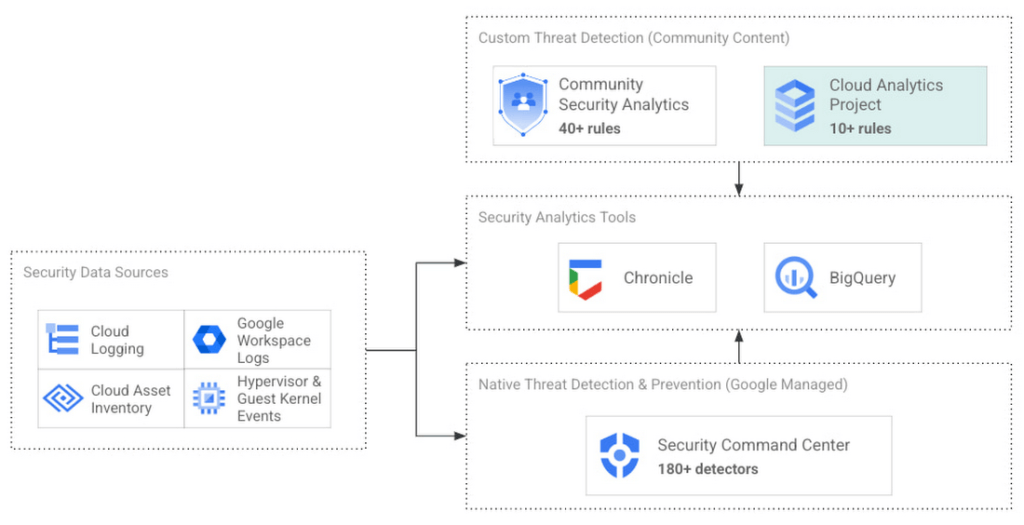
Since 2021, Google Cloud has partnered with the Center to help level the playing field for everyone in the cybersecurity community by developing open-source security analytics. Earlier this year, we introduced Community Security Analytics (CSA) in collaboration with the Center to provide pre-built and customizable queries to help detect threats to your workloads and to audit your cloud usage. The Cloud Analytics project is designed to complement CSA.
The Cloud Analytics project includes a foundational set of detection analytics for key tactics, techniques and procedures (TTPs) implemented as vendor-agnostic Sigma rules, along with their adversary emulation plans implemented with CALDERA framework. Here’s a overview of Cloud Analytics project, how it complements Google Cloud’s CSA to benefit threat hunters, and how they both embrace Autonomic Security Operations principles like automation and toil reduction (adopted from SRE) in order to advance the state of threat detection development and continuous detection and response (CD/CR).
Both CSA and the Cloud Analytics project are community-driven security analytics resources. You can customize and extend the provided queries, but they take a more do-it-yourself approach—you’re expected to regularly evaluate and tune them to fit your own requirements in terms of threat detection sensitivity and accuracy. For managed threat detection and prevention, check out Security Command Center Premium’s realtime and continuously updated threat detection services including Event Threat Detection, Container Threat Detection, and Virtual Machine Threat Detection. Security Command Center Premium also provides managed misconfiguration and vulnerability detection with Security Health Analytics and Web Security Scanner.
Cloud Analytics vs Community Security Analytics
Similar to CSA, Cloud Analytics can help lower the barrier for threat hunters and detection engineers to create cloud-specific security analytics. Security analytics is complex because it requires:
- Deep knowledge of diverse security signals (logs, alerts) from different cloud providers along with their specific schemas;
- Familiarity with adversary behaviors in cloud environments;
- Ability to emulate such adversarial activity on cloud platforms;
- Achieving high accuracy in threat detection with low false positives, to avoid alert fatigue and overwhelming your SOC team.
The following table summarizes the key differences between Cloud Analytics and CSA:
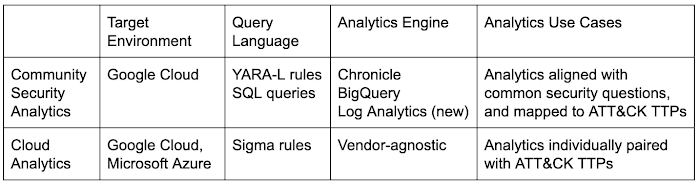
Together, CSA and Cloud Analytics can help you maximize your coverage of the MITRE ATT&CK® framework, while giving you the choice of detection language and analytics engine to use. Given the mapping to TTPs, some of these rules by CSA and Cloud Analytics overlap. However, Cloud Analytics queries are implemented as Sigma rules which can be translated to vendor-specific queries such as Chronicle, Elasticsearch, or Splunk using Sigma CLI or third party-supported uncoder.io, which offers a user interface for query conversion. On the other hand, CSA queries are implemented as YARA-L rules (for Chronicle) and SQL queries (for BigQuery and now Log Analytics). The latter could be manually adapted to specific analytics engines due to the universal nature of SQL
Getting started with Cloud Analytics
To get started with the Cloud Analytics project, head over to the GitHub repo to view the latest set of Sigma rules, the associated adversary emulation plan to automatically trigger these rules, and a development blueprint on how to create new Sigma rules based on lessons learned from this project.
The following is a list of Google Cloud-specific Sigma rules (and their associated TTPs) provided in this initial release; use these as examples to author new ones covering more TTPs.
Sigma rule example
Using the canonical use case of detecting when a storage bucket is modified to be publicly accessible, here’s an example Sigma rule (copied below and redacted for brevity):
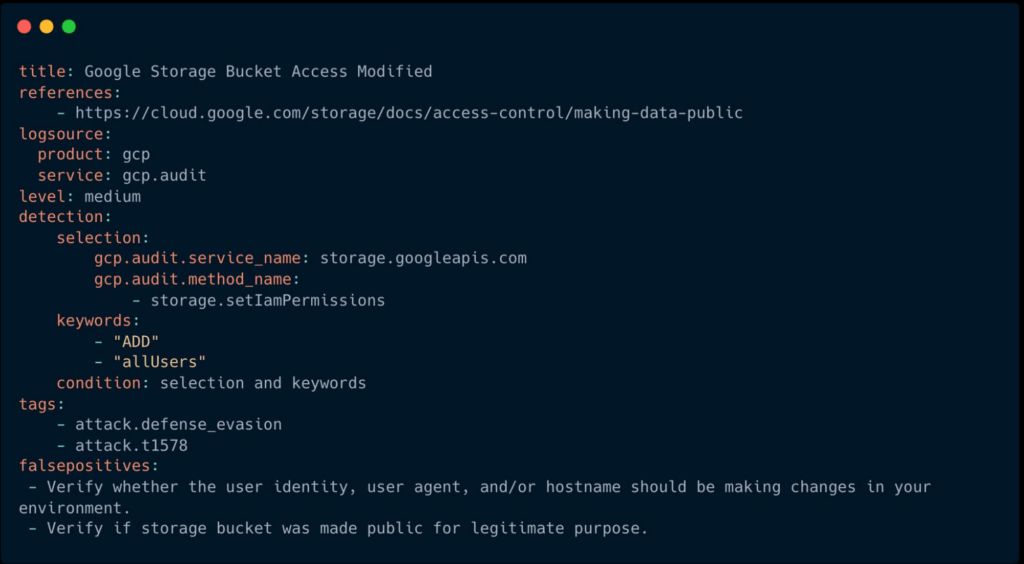
The rule specifies the log source (gcp.audit), the log criteria ( storage.googleapis.com service and storage.setIamPermissions method) and the keywords to look for (allUsers, ADD) signaling that a role was granted to all users over a given bucket. To learn more about Sigma syntax, refer to public Sigma docs.
However, there could still be false positives such as a Cloud Storage bucket made public for a legitimate reason like publishing static assets for a public website. To avoid alert fatigue and reduce toil on your SOC team, you could build more sophisticated detections based on multiple individual Sigma rules using Sigma Correlations.
Using our example, let’s refine the accuracy of this detection by correlating it with another pre-built Sigma rule which detects when a new user identity is added to a privileged group. Such privilege escalation likely occurred before the adversary gained permission to modify access of the Cloud Storage bucket. Cloud Analytics provides an example of such correlation Sigma rule chaining these two separate events.
What’s next
The Cloud Analytics project aims to make cloud-based threat detection development easier while also consolidating collective findings from real-world deployments. In order to scale the development of high-quality threat detections with minimum false positives, CSA and Cloud Analytics promote an agile development approach for building these analytics, where rules are expected to be continuously tuned and evaluated.
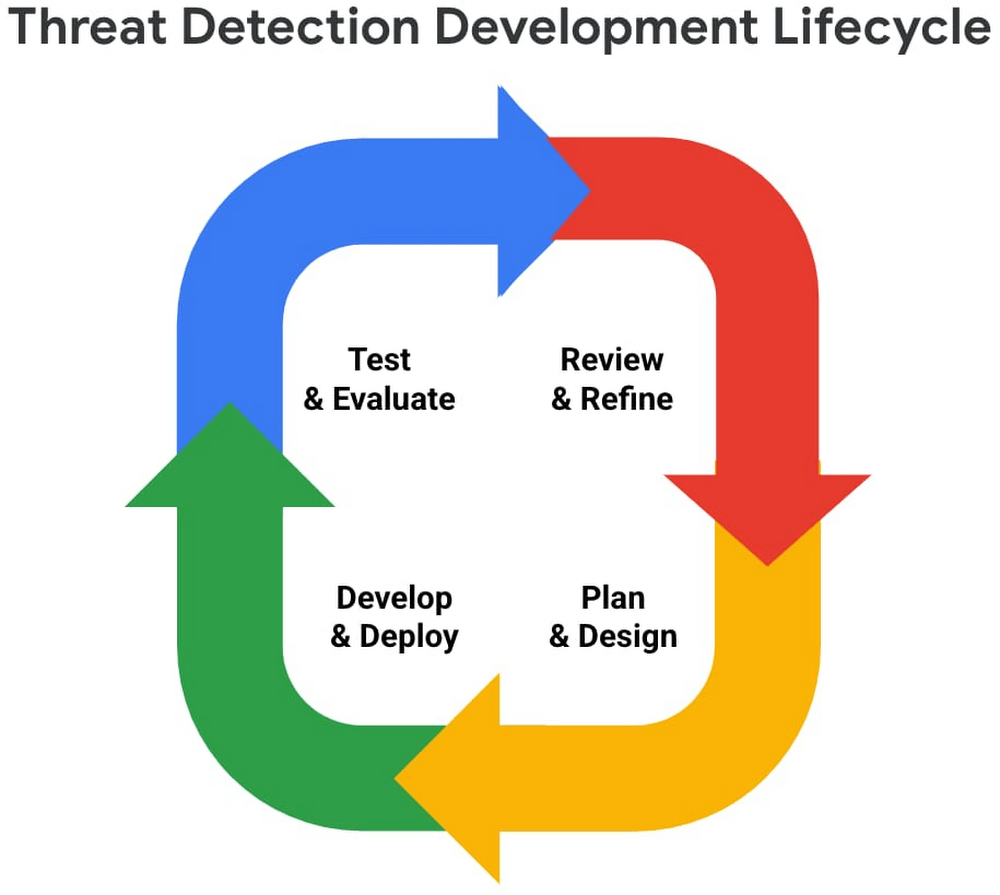
We look forward to wider industry collaboration and community contributions (from rules consumers, designers, builders, and testers) to refine existing rules and develop new ones, along with associated adversary emulations in order to raise the bar for minimum self-service security visibility and analytics for everyone.
Acknowledgements
We’d like to thank our industry partners and acknowledge several individuals across both Google Cloud and the Center for Threat-Informed Defense for making this research project possible:
Desiree Beck, Principal Cyber Operations Engineer, MITRE
Michael Butt, Lead Offensive Security Engineer, MITRE
Iman Ghanizada, Head of Autonomic Security Operations, Google Cloud
Anton Chuvakin, Senior Staff, Office of the CISO, Google Cloud
Nine Interesting Google Cloud Identity and Environment Features to Know About!

2909
Of your peers have already read this article.
2:00 Minutes
The most insightful time you'll spend today!
I’ve been at Google Cloud just a few weeks, following years of experience as an AWS Hero and building on other clouds. So last week’s Google Cloud Next–my first!—was a bit of a culture shock. On the GCP podcast, I used the word “intentionality” to describe what I’m seeing: a thoughtful, holistic approach that informs so much of how Google Cloud is put together. Not just in the headline-grabbing new announcements like Google Distributed Cloud, but in the everyday things too.
Things like IAM and project setup. Step 1 of any cloud project is to provision access to an environment, and that’s why I always found it so frustrating in my past life when I had to deal with outdated or clunky stuff like:
- Homebrewed, sketchy SSO tooling and config files
- No centralized identity—I was a different person in every cloud account
- Mysterious logouts, redirects, and missing project context within the cloud console
- Account organization features that were “bolted-on” rather than designed the right way from the beginning
In contrast, I recently shared a Twitter thread about how shockingly right Google Cloud gets identity and environments. It’s probably my favorite thing about Google Cloud so far, and so in this post I want to expand on what I’ve learned. If you’re searching for a better way to access and organize your cloud, let me make you one of today’s lucky 10,000.
Nine things to love about Google Cloud identity and environments
1. You are YOU!
Every user is just a Google account (personal or corporate) that works across projects. For beginners, this lowers the barrier to entry and makes cloud feel like an extension of things you already know. For experts, it reduces the friction of having to juggle a bunch of unrelated identities. I love that you can permit any Google account into a cloud project as a collaborator—even a contributor from outside your organization!
2. No non-IAM root accounts
Google Cloud has been designed from the ground up to avoid the chicken/egg problem of requiring a manually configured superuser that sits outside the rest of the identity management infrastructure. In the Google world, humans use Google accounts, and services use IAM-based service accounts —it’s as straightforward as that. (Even non-Google services can be IAM—yay, workload identity federation!)
3. Project discovery for humans
Project, folder, and organization discovery are baked into the console, like browsing a file system scoped to your access level. This hardly even feels like a feature, it’s so subtle and yet absolutely fundamental. But once you see it, you can’t imagine going back to a world where environments exist in a vacuum with no contextual awareness of each other.
The hierarchical organization model also means that project-per-application-per-environment best practices are the path of least resistance; if anything, I’ve erred on the side of setting up *too many* logical groupings. It’s just too much fun to play with projects and folders!
4. Billing that protects you from yourself
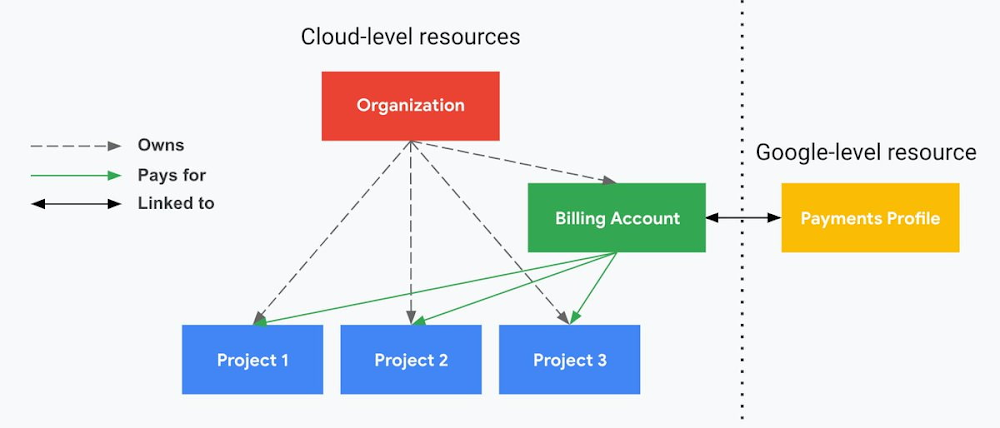
The project context gives you a logical container for the cost of the resources contained within it. My favorite part of this is that your billing entity is managed separately from the project itself. So you can delete a project and feel sure that all associated resources are gone and no longer racking up charges … without also trashing your ability to pay for future projects you might spin up.
(Related: the free tier does not charge you money unless you click a big button that basically says “YES, IT’S OK TO CHARGE ME MONEY.” This guarantee, combined with the familiarity of Google Accounts for access, are the main reasons I now recommend Google Cloud to beginners in my network who are looking for a safe place to learn and explore cloud.)
5. Organizational structure != billing structure
For organizations, billing is decoupled from the organization root. So permissions inheritance is a separate design decision from chargeback, as it should be. This keeps your Google Cloud footprint from converging toward Conway’s Law.
6. SSO that just works
Want to use the CLI? You get SSO out of the box with your Google Account—no corporate organization required, and no manual shuffling with config files and access keys. Or, better yet, you can use Cloud Shell to run gcloud commands right in your browser, even (especially?) on the docs pages. (Random trivia: I think Cloud Shell is the only native cloud service that has the same name across AWS, Azure, and Google Cloud–but Google’s version has been around the longest and as far as I can tell is the most fully-featured.)
7. One group to rule them all
Remember how user entities are just Google accounts? Guess what: you can use Google Groups to manage group access to IAM roles! That’s right: one set of users with permissions across docs, email, and cloud. It’s one reason why Google Workspace makes sense as a core piece of Google Cloud; it really does function like just another cloud service from an identity standpoint.
8. Never lose your place
In other clouds, I’ve experienced a problem I call the Timeout of Doom: when your console session expires, you’re left on a generic error screen and it’s up to you to figure out how to rebuild your context from scratch–starting with remembering what account you used in the first place. Imagine my delight to realize that reaching your Google Cloud console is as easy as bookmarking a single URL. console.cloud.google.com works and remembers who you are (or, at least, suggests the set of people you might be)—no mystery logouts or redirects.
9. Progressive complexity FTW
In my experience it’s been common for cloud providers to design most of their account features for organizations: if you’re an independent developer, you get more exposure to dangerous bills, less access to helpful SSO features, and generally must fend for yourself in a world that wasn’t really created with you in mind.
I love that Google Cloud has found a way to work with enterprises while still maintaining their roots as a cloud that developers love to use. Sign in with your personal Google account, attach it to an organization when-and-if you’re ready, and in the meantime you get the same thoughtfulness around SSO and billing as the giant shop down the street.
I’m not going to tell you my experience has been seamless; there are footguns here (every Google Workspace integration creates a new project?), and I’m still learning. But it’s that “intentionality” thing again. The Google Cloud identity and environment experience feels like it was designed, not just accreted; there’s an elegant simplicity to it that makes cloud feel fresh and exciting to me all over again. I can’t wait to see what’s next.
In the meantime, I highly encourage you to do what I did and spin up a free trial to try things out for yourself. Then hit me up on Twitter with your favorite Google Cloud identity or environment feature!
More Relevant Stories for Your Company

Learn to Use reCAPTCHA Enterprise to Protect Your Website from Fraud
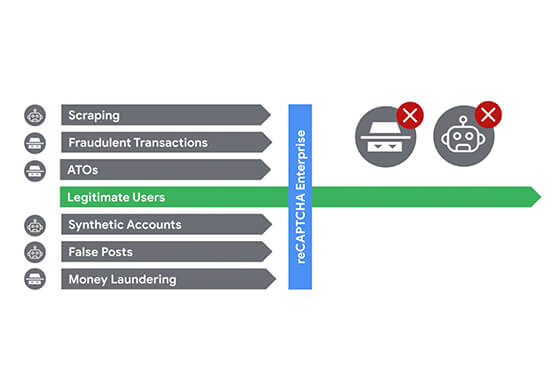
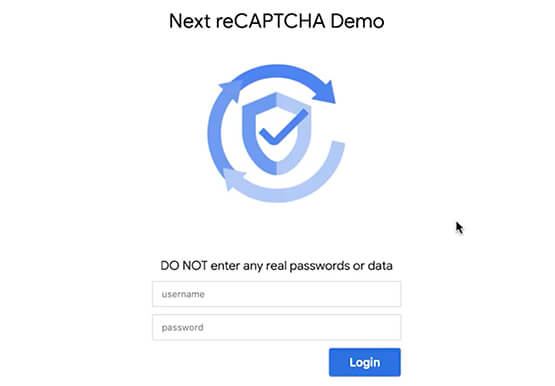
One of the top questions enterprises have is: How can I use reCAPTCHA Enterprise to protect my website from online fraudulent activity? Fraudulent web activities cost enterprises billions of dollars each year. Security teams need to keep the bad actors out of their websites and ensure that their customers can

Protect Corporate Apps with BeyondCorp Enterprise
As part of our efforts to democratize Zero Trust, Google Cloud has designed our BeyondCorp Enterprise solution to be an extensible platform where customers can choose to integrate signals from other technology vendors and incorporate these into their Zero Trust access policies. Following our integrations announcements earlier this year, we

Taking Maps Further: New Website Experience for Product Discovery, Budgeting and Access to Dev Documentation
For more than 15 years, developers have used Google Maps Platform to deliver location-based experiences to their end users and used location intelligence to optimize their businesses. Along this journey, we’ve made a variety of changes to better support our community as needs have changed and new industries and technologies

Workforce Identity Federation: A Seamless Experience for Users
At Google Cloud, we’re focused on giving customers new ways to strengthen their security posture. Managing identities and authorization is a core security control that underpins interactions inside and collaboration outside the organization. To address fraud, identity theft, and other security challenges associated with the proliferation of online accounts, many
