





reCAPTCHA Keeps Unemployment Claims and COVID Vaccine Registration Portals Threat-free

3002
Of your peers have already read this article.
1:30 Minutes
The most insightful time you'll spend today!
More people than ever have been conducting more of their lives online due to the COVID-19 pandemic. This creates a new landscape for fraudsters to create and release new attacks. Research commissioned by Forrester Consulting showed 84% of companies have seen an increase in bot attacks. 71% of organizations have seen an increase in the amount of successful attacks. 65% of businesses have experienced more frequent attacks and greater revenue loss due to bot attacks. With so many people visiting government websites to learn more about the COVID-19 vaccine, make vaccine appointments, or file for unemployment, these web pages have become prime targets for bot attacks and other abusive activities. But reCAPTCHA Enterprise has helped state governments protect COVID-19 vaccine registration portals and unemployment claims portals from abusive activities.
Assisting with unemployment claims during COVID-19
Alongside the wave of unemployment claims caused by COVID-19, many state government agencies, such as Wisconsin’s Workforce Development, have seen an increase in attempted malicious bot logins on their external websites. Many states have had malicious actors visit unemployment claims portals and enter stolen credentials to file fraudulent unemployment claims. Because many unemployment claims portals are mandated to pay a recipient within 2 weeks, the claims portal processes this fraudulent information and bad actors receive unemployment checks weeks before their false claims are recognized. By then, the fraudsters have their money and have repeated this process using other stolen credentials.
reCAPTCHA Enterprise helps state governments reduce false claims by preventing adversaries from automatically reusing credentials on unemployment claims portals. reCAPTCHA Enterprise’s scale and speed to determine fraudster behavior across the Internet helped some of the largest states in the United States, such as Texas.
Registering for the COVID-19 Vaccine and accessing state-sponsored resources
Several states, such as Pennsylvania, are challenged by web traffic that fluctuates based on the COVID-19 Vaccine Phase. For example, during Phase 1, there was a large increase in web traffic from both humans and bots because of the demand for the very few available vaccination slots. As more states move into Phase 2 and Phase 3, and the vaccine is more widely available, traffic is increasing because bad actors know more people are coming to these websites to register to be vaccinated.
reCAPTCHA Enterprise was implemented to stop bad actors from scripting bots to book vaccine appointments and then sell those appointment slots on another website for profit. These fake web pages are falsely promoted as websites where people can register for the vaccine. Vaccine appointments are not the only government system from which fraudsters try to profit. Transportation and social service departments also face frequent attacks, wherein fraudsters try to profit by booking and then selling appointments with those organizations.
Fending off these attacks was made easier thanks to reCAPTCHA Enterprise, a frictionless fraud detection service that leverages our experience from more than a decade of defending the internet and data for our network of more than 5 million sites. The reCAPTCHA Enterprise platform can understand fraudulent behavior, introduce friction to block bots from booking appointments, and allow legitimate users to access the vaccine portals and other state portals.
Because reCAPTCHA Enterprise does not require end users to complete captcha challenges, several state governments installed reCAPTCHA Enterprise across search, login, and registration web pages. State governments are also placing reCAPTCHA Enterprise on webpages where end users can access healthcare, receive assistance for housing or food, register motor vehicles, or propose legislation. With reCAPTCHA Enterprise on more pages, it becomes more difficult for malicious software or bots to carry out their attacks against different pages, but not for end users to browse, login into accounts, book appointments, or apply for resources. Because reCAPTCHA Enterprise requires no action from end users to stop fraud, state governments implemented reCAPTCHA Enterprise on all points of interaction on their webpages to ensure maximum security without impacting the user experience.
Providing security everywhere and pricing for all
Many state governments are familiar with buying cloud services in a pay-as-you-go model. reCAPTCHA Enterprise eased the purchasing process by providing state governments with predictable, scalable, and customizable pricing. State governments know up front how much they can expect to pay each month based on the number of assessments reCAPTCHA Enterprise performs. reCAPTCHA Enterprise’s flexible pricing model keeps pace with the natural fluctuations of visitors to vaccination registration and unemployment claims. reCAPTCHA Enterprise has a dedicated sales team that can tailor pricing to your specific use cases so both your webpages and budget are not compromised.
reCAPTCHA Enterprise has helped many state governments serve their constituents by making it easier to get vaccinated and collect unemployment. It helps constituents take advantage of public services and makes it more difficult for fraudsters to manipulate and interfere with them.
To start protecting your web pages from credential stuffing and other attacks, get started with reCAPTCHA Enterprise today.
Best Kept Security Secrets: How Assured Workloads Accelerates Security

1224
Of your peers have already read this article.
5:00 Minutes
The most insightful time you'll spend today!
Digital transformation is now a strategic imperative for organizations across every industry. For governments and regulated businesses, moving services to the cloud poses a unique set of challenges.
As a vital enabler of transformation, the cloud can unlock innovation and help keep pace with the accelerating pace of digital business. Unfortunately, many government agencies and firms in regulated industries don’t have the luxury of adopting new systems at will. They must deal with issues such as limited resources, lack of digital skills, and siloed operations. However, they also face cloud-specific challenges, including:
- Data sovereignty: Regulated industries and the public sector often have concerns about the location of data, how it is protected, who else can access it, and whether it is stored in a secure location.
- Compliance: Government agencies and regulated businesses must ensure that their data and cloud use are compliant with all applicable government requirements, privacy and data protection laws, and other regulations.
- Security: Compliance is a natural component of any strong approach to security. As a result, government regulations and industry standards mandate a responsibility to secure and protect data from unauthorized access or use.
- Cost: Every organization wants to ensure it’s getting good value for their money when using cloud computing, but especially government agencies that are more likely to be working with fixed budgets and fewer resources.
To address the unique requirements of governments and other highly regulated organizations, some cloud providers have built separate government clouds (“GovClouds”) that run in specialized, stand-alone data centers that make it easier to meet specific requirements around data residency, personnel controls, and other government standards. However, isolated GovCloud environments come with limitations: They can restrict the ability to integrate regulated data with data from other sources, they create siloed infrastructure that can slow down access to new features and technologies, and they usually require more resources to manage and maintain, which translates into higher costs for end-users of GovCloud services.
But what if you could get the features of a government cloud — the certifications and strict controls on data residency and personnel access — on a commercial cloud?
This is where Assured Workloads comes in. Assured Workloads is a unique Google Cloud service that allows governments and organizations from regulated industries to meet stringent compliance requirements at scale on commercial cloud infrastructure.
What is Assured Workloads?
Assured Workloads provides a set of security controls and guardrails you can apply to your cloud environments, making it easier to achieve compliance while maintaining the advantages of a full commercial cloud. It includes features like data residency controls for specific compliance types, data and personnel access controls, and real-time monitoring for compliance violations to ensure you implement and maintain the cloud controls required by your compliance regimes.
Check out our Best Kept Security Secrets series
- Tap into the power of Organization Policy Service
- How VPC Service Controls can help build defense in depth
- How Cloud EKM can help resolve the cloud trust paradox
Assured Workloads can make it easier for agencies and businesses in regulated sectors to meet compliance requirements by providing:
- A secure and compliant environment: With Assured Workloads, you can create controlled environments for your regulated workloads and automatically enforce data location and resource deployment. It’s designed for customers that need to meet strict security and compliance requirements, such as the government, healthcare, and financial services sectors.
- Broad security capabilities: Assured Workloads provides comprehensive security for your regulated workloads. Data is encrypted at rest and in transit by default and includes additional features, such as encryption key management according to your compliance regime and Identity and Access Management (IAM) for authentication, authorization, and user access management.
- Support for multiple compliance frameworks: Assured Workloads is designed to create regulated boundaries on public cloud infrastructure that support multiple compliance frameworks across sectors, including FedRAMP, IL5, PCI DSS, SOC 2, HIPAA, and HITRUST, allowing customers to segment and label their regulated data.
- Control data residency: Assured Workloads gives you the ability to control the regions where data at rest is stored.
- Assured support: Assured Workloads’ approach ensures only Google Cloud support personnel meeting specific geographical locations and personnel conditions support customers’ workloads.
Instead of having to configure, manage, and maintain the right controls and guardrails yourself, you select the regulatory framework you need to follow. Assured Workloads automatically configures and deploys the controls needed to help meet your requirements.
With these specific capabilities, governments can simplify compliance configurations and monitor for violations without missing out on Google Cloud’s innovative technologies, scalability, performance, reliability, and cost savings that are hallmarks of our commercial Cloud offering.
How it works
When you use Assured Workloads to create controlled environments in Google Cloud, you will be required to set up an Assured Workloads folder. This folder acts as the regulatory boundary to help enforce your chosen compliance framework. They are created with preconfigured platform controls, which are packaged based on the specified regulated data type, personnel controls, and data location.
Assured Workloads automatically restricts developers to using products and services that are in-scope for your selected compliance framework. Security controls are mapped to Assured Workloads folders, so any Google Cloud resources you deploy in an Assured Workloads folder inherit the same controls. This also helps ensure that only Google Cloud personnel who meet your compliance requirements have the ability to support your resources and prevents resources from being deployed outside of compliant regions.
Depending on your compliance regime, Assured Workloads supports several different options for encryption. You can use any Google key management service unless your compliance requirements mandate otherwise, including Cloud Key Management Service, Cloud External Key Manager, or customer-managed encryption keys (CMEK). You can also choose Google-managed keys, which provide on-by-default FIPS-validated encryption.
Here are a few common use cases that companies are already accomplishing with Assured Workloads:
- Iron Mountain uses Assured Workloads to serve our customers’ compliance needs
- Implementing EU Data Sovereignty
- Running CJIS workloads
However, Assured Workloads is more than a better government cloud or a tool for highly regulated businesses. Assured Workloads is a packaged solution that provides security by default and removes toil and complexity for users. Users can reduce the time and effort required to meet their compliance requirements and also improve the security of their data.
Do I need Assured Workloads?
We believe that cloud adoption for governments, government suppliers and contractors, and other strictly regulated businesses shouldn’t have to happen in a separate, isolated cloud environment that forces tradeoffs in terms of service availability, scale, and cost. Assured Workloads is a new approach to running regulated workloads that transforms the “govcloud” into a capability that cuts down on the friction of compliance without sacrificing any of the cloud-y goodness.
To learn more about Assured Workloads, please review these resources:
Request a free trial today and experience how Aside Assured Workloads helps you achieve compliance-based outcomes.
Create and Protect Admin Accounts

4861
Of your peers have already read this article.
1:30 Minutes
The most insightful time you'll spend today!
Setting up your new cloud infrastructure is scary. Extra scary when you realize that someone (is it gonna be you?) gets to have phenomenal cosmic power over the whole thing.
Yes, I’m talking about the admin account, and today we’ll dig into why they are important, dangerous and different.
When the team at pistach.io got their nuts-as-a-service business growing fruitfully, they knew they needed to think carefully about admin accounts. These people would have tremendous control over their use of Google Cloud, and they could potentially cause very big problems if any were compromised. Definitely resources that require a protective shell.

Early in pistach.io’s development, an employee named Walter Nutt wanted to play a prank by changing his co-worker’s profile photo from an almond to a peanut (pretty devious, since a peanut is actually a legume). He didn’t have access to his friend’s computer, but he did have access to the company’s Cloud Storage bucket. While searching for the profile photo in question, Wally inadvertently deleted the entire contents of the bucket!
As he searched for ways to restore its contents, Wally modified access to two other pistach.io buckets. The company was ground to a halt for a week while teams worked to crack through the permissions issues.
Time to rethink permissions a bit, so this couldn’t spoil their buttery smooth operations in the future.
Following the resource manager guide, the team made a super admin email address that wasn’t tied to a particular individual or Workspace account, and secured it with strong multi-factor authentication. This would be their backup in case an admin account were to be compromised, so they could recover and repair.
The team already uses Google Workspace, so they have an organization set up already. That creation process established initial super administrators, allowing them to create and modify all other resources inside the organization. As they looked toward using Google Cloud, the super administrators could:
- Give the admin role to people, for Cloud
- Act as a point of contact for account recovery
- Modify or delete the organization if needed
Making admin users for the organization allows other people to then flesh out the resources and policies for pistach.io, before they go nuts and give everyone all the permissions. While that would speed things up, it would make it easy for an attacker to crack through the security shell because any account compromise could give ousize access. Yikes!

Instead, the IT leads specified certain people to act as organization admins, and then gave them permissions to:
- Define Identity and Access Management policies
- Structure the Resource Hierarchy
- Delegate control of specific Cloud elements to others on the team
Once those organization admins were set up, they could give management and oversight of Compute, Storage, Networking and other resource types to the relevant leads, making sure each person had just the right amount of permission for the role they needed to perform. The organization admins don’t have permissions themselves to make these resources. They just delegate.
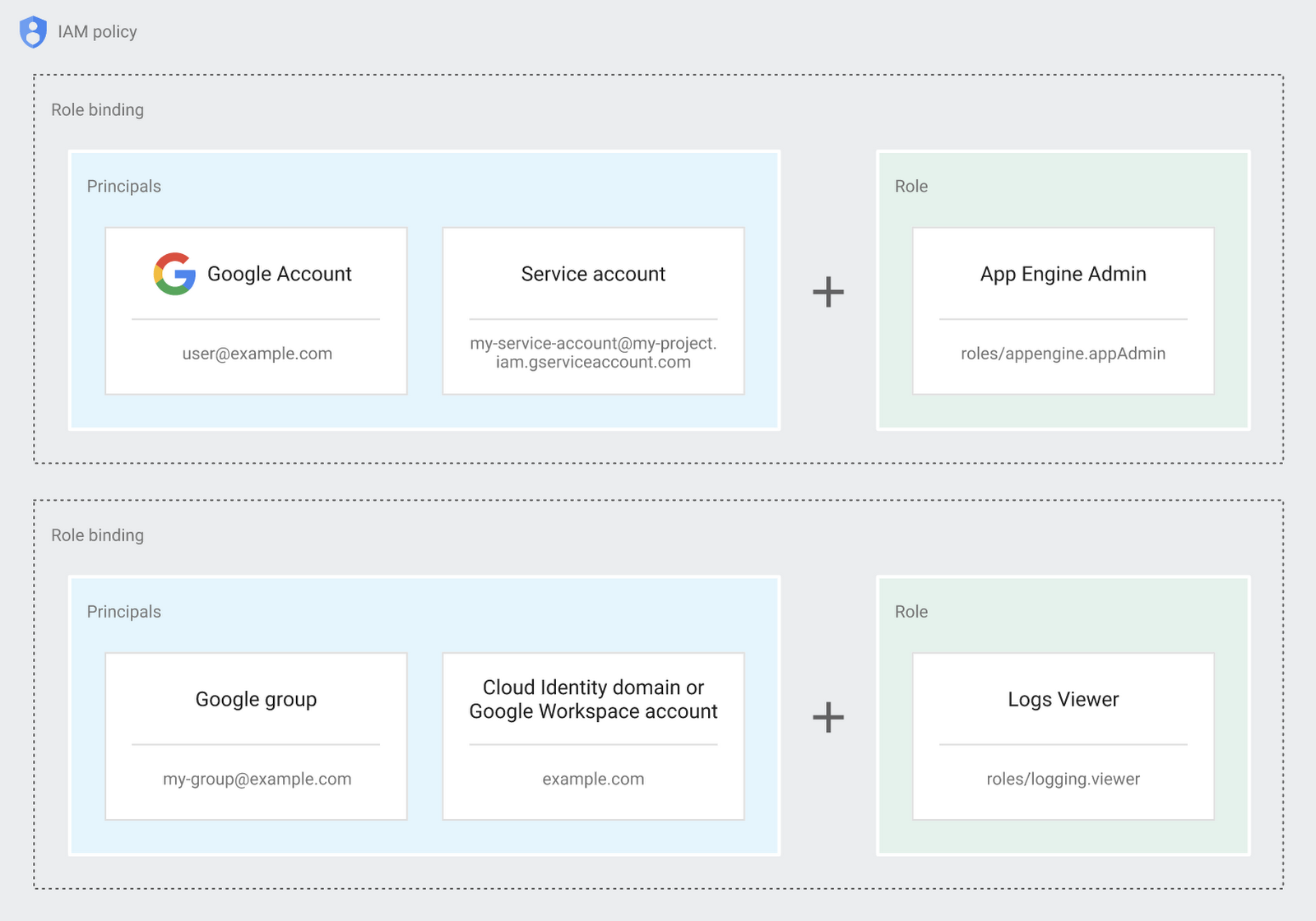
Now each person can accomplish the job they’re responsible for, but doesn’t have overly permissive access. Delegating like this keeps the entire organization safer, and limits the blast radius if someone does manage to break in.
You can go through these steps yourself with this tutorial.
By default the creation of an organization resource for the domain gives everyone the ability to create projects and billing accounts. Once they set up their Organization Admin at pistach.io they decided to remove some of these wide permissions and, in a nutshell, bring everything down to a much finer control. So people could get permissions for a folder or a project, but not the entire organization!
Remember to take care of your admin roles, as they have the power, and responsibility, to cause serious harm if not used safely. Be safe with your Identity and Access Management. And keep your data yours!
Next time we join you we’ll take a crack at creating and provisioning an app to run inside the policies and resource management frameworks created today.
Improving Your Security Posture: Integrating Cloud DLP with Security Command Center

1203
Of your peers have already read this article.
4:00 Minutes
The most insightful time you'll spend today!
Our Cloud Data Loss Prevention (Cloud DLP) discovery service can monitor and profile your data warehouse to bring awareness of where sensitive data is stored and processed. Profiling is also useful for confirming that data is not being stored and processed where you don’t want it.
But how can you make use of this intelligence within your existing security and governance workflows so you can reduce risk? Starting today, we have integrated Cloud DLP’s sensitive-data discovery service with Security Command Center, our platform-native security and risk management solution. By bringing together sensitive data intelligence with your security controls, security teams can identify and act quickly on the vulnerabilities and help address threats that matter for your organization.
Data sensitivity and risk prioritization
Not all security threats, vulnerabilities, and misconfigurations generate an equal degree of risk. Some affect only test data or development environments. But others can place your organization’s sensitive information at risk of exposure or misuse. Understanding what to prioritize is often a big challenge for security professionals.
When this awareness is fed into Security Command Center, it allows your team to prioritize the Security Command Center findings that are driving greater security and compliance risk, and to help make informed decisions as to how to address those issues.
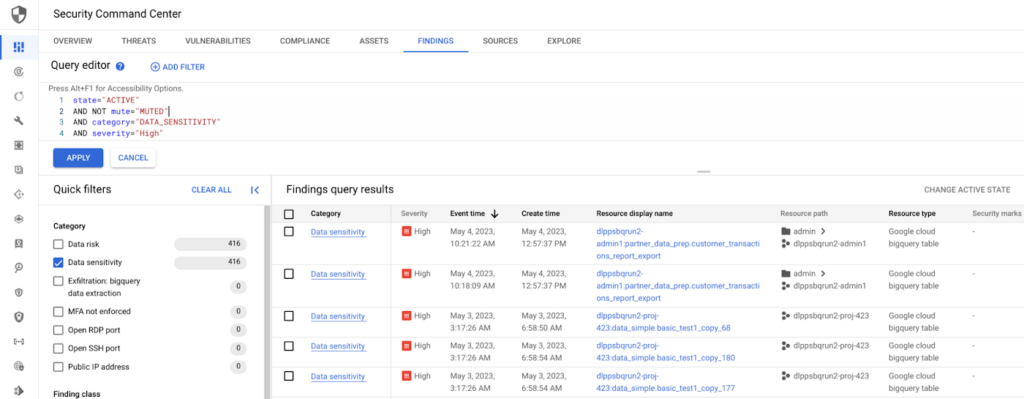
Understanding BigQuery data exfiltration threats
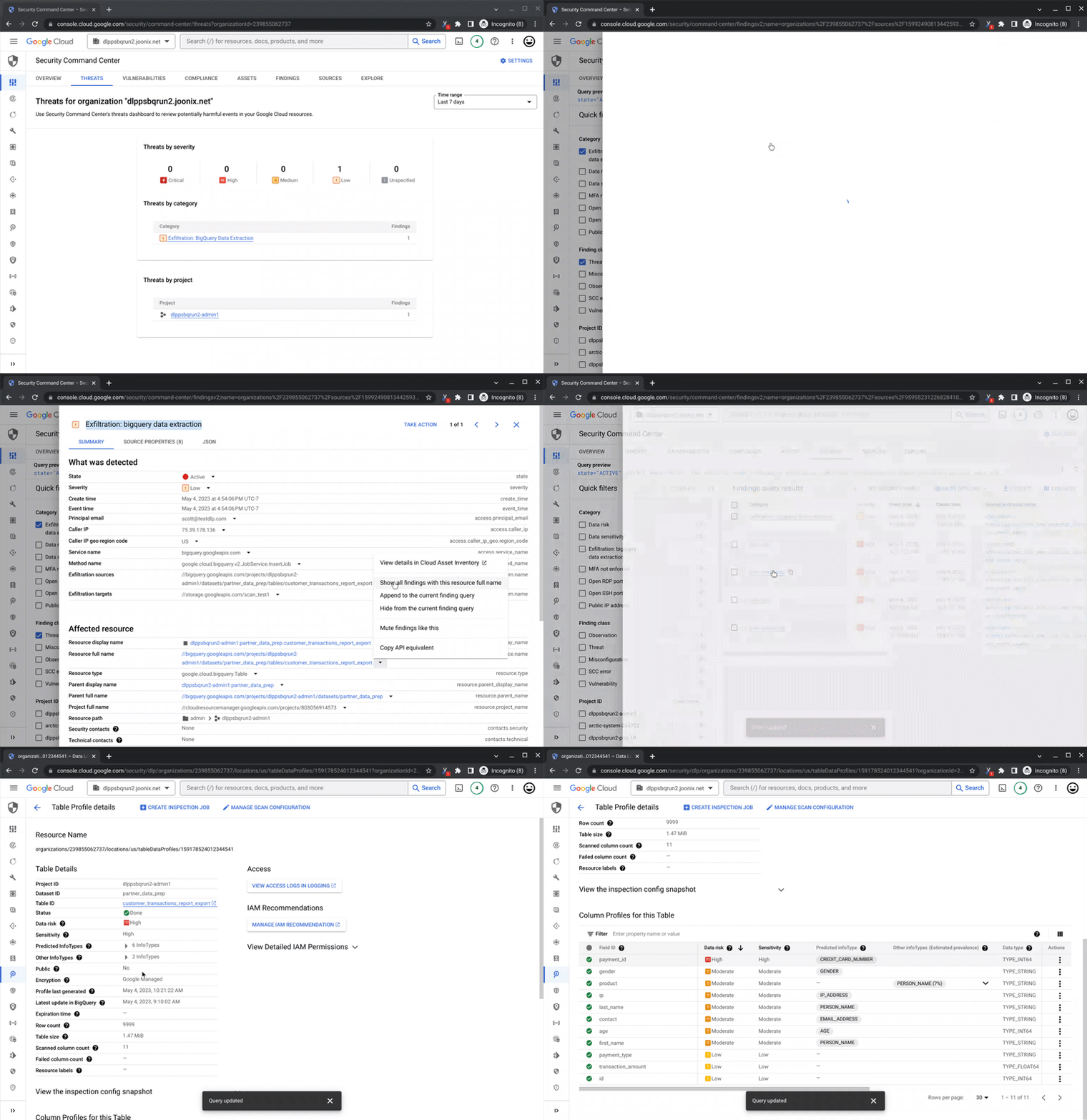
Security Command Center’s threat detection capability can analyze access and copy behavior of BigQuery data to help detect potential risk of exfiltration. With Cloud DLP intelligence on where sensitive data lives in BigQuery tables and datasets, you can now focus and prioritize on the exfiltration findings tied to your sensitive assets.
Remediation and data security posture management
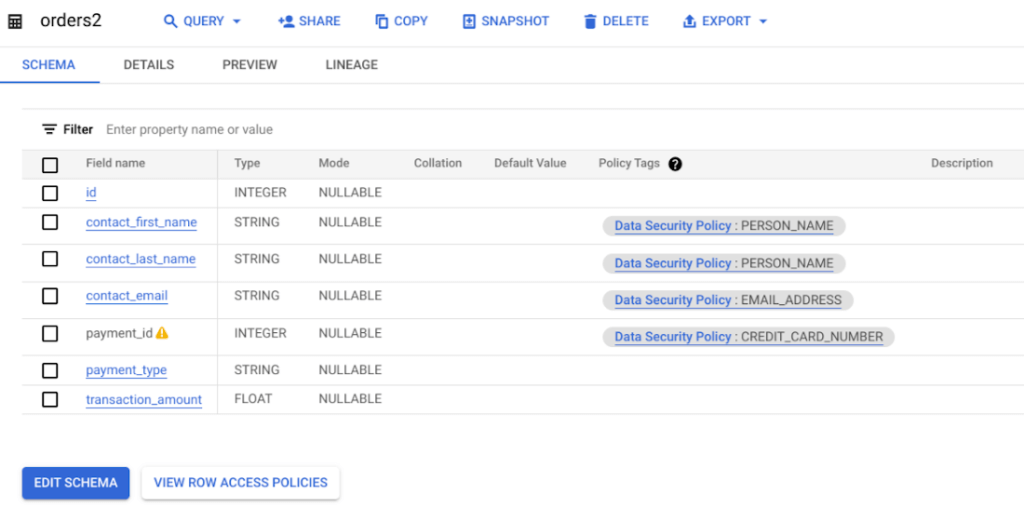
The intelligence from Cloud DLP’s sensitive-data discovery service helps you take a data-first approach to securing your assets. Use insights like Cloud DLP’s predicted infoType to apply column-level, fine-grained access or dynamic masking policies and consider de-identification to further help reduce the risk of data use operations and improve your overall security, privacy, and compliance posture.
Get started
To get started with richer sensitive data intelligence, enable the connection between Cloud DLP’s discovery service and Security Command Center. There is no additional cost to enable the integration for users of both products.
As soon as it’s enabled, you can begin to use your sensitive data intelligence to supercharge your security and support your compliance teams’ work.
Read more about how the sensitive data discovery service can meet your organization’s needs, and how you can get started managing your security posture with Security Command Center.
The SolarWinds Attack: A Case Study in Supply Chain Threats

2593
Of your peers have already read this article.
2:30 Minutes
The most insightful time you'll spend today!
Our quarterly Security Talks series brings together experts from Google Cloud Security teams and the industry to share information on our latest security products, innovations and best practices. Below is an introduction to Mandiant’s Security Talks presentation on Dec. 7, Mandiant Tales from the Front Lines: Activate Cyber Defenses Against Supply Chain Compromise.
The discovery in December 2020 of the SolarWinds supply chain compromise, a global computer intrusion campaign, caused organizations and security leaders to completely reassess their Cyber Threat Profiles, risk assessments, and defensive postures. It was a rare, watershed event that savvy security leaders and IT decision makers have been using to improve how security teams protect systems, networks, and data across industries and sectors, especially critical infrastructure. Two years later, we’re looking back at the security incident, what we’ve learned, and how it continues to drive change across security teams and organizations.
The SolarWinds compromise leveraged access to the software maker’s Orion business software in order to distribute a malicious update containing malware. Mandiant has since attributed this operation to APT29, a Russia-based espionage group assessed to be sponsored by the Russian Foreign Intelligence Service (SVR). This operation afforded APT29 with unparalleled access to an estimated 18,000 global organizations for follow-on targeting based on the attacker’s discretion and collection priorities.
While the security industry has yet to see anything that rivals the scale and scope of the SolarWinds compromise since it was discovered, a recent Google Cloud research report on software supply chain security found that there’s been a sharp increase in software supply chain attacks across nearly every sector.
Mandiant analysis identified supply chain compromise as the second-most prevalent initial infection vector in 2021. When the initial infection vector was identified, supply chain compromise accounted for 17% of intrusions in 2021 compared to less than 1% of intrusions in 2020. Further, 86% of supply chain compromise intrusions in 2021 were related to the SolarWinds breach.
Since 2020, Mandiant has also observed an increase in financially-motivated threat actors targeting the software supply chain. These actors compromised popular software packages and even mobile applications in order to deploy ransomware, cryptocurrency miners, and banking trojans. In one case, malicious code was inserted into a popular package, prompting the U.S. Cybersecurity and Infrastructure Agency (CISA) to issue an alert about the compromise.
Mitigation recommendations
The discovery of the SolarWinds incident resulted in increased global attention around supply chain compromise threats. Government authorities and technology organizations have responded with several initiatives, legislation, and studies seeking to reduce software supply chain and software dependency risk. Although these initiatives may make it more difficult for threat actors to conduct these operations, organizations should also take steps to mitigate supply chain threats.
Mandiant suggests that organizations contemplate applying multiple layers of security policies, plans, and solutions to maximize opportunities to provide early threat detection and prevent an anomaly or compromise stemming from the supply chain. This guidance is aligned with best practices Google Cloud has recommended for organizations to improve their software supply chain security.
Mandiant has also provided the following additional recommendations for organizations to consider more generally:
- Establish a vendor vetting process to evaluate vendor security practices before deploying hardware or software.
- Create a change control process and board for all enterprise hardware and software changes, which could include a centralized IT or IT security managed process for downloading, testing, and pushing updates to users.
- Use an advanced endpoint security solution, such as an endpoint detection and response (EDR), to detect malicious behavior when a tainted software package is downloaded and executed.
- Ensure proper logging and monitoring is in place between the software, hardware, and the internet.
- Implement the software and hardware using network segmentation with minimal access to the internet.
- Enact employee training programs and policies to encourage security best practices, including security audits of code in development.
Next steps
You can watch the Google Cloud Security Talks presentation on SolarWinds and the current state of supply chain threats here. You can learn more about Google Cloud’s solutions to help improve software supply chain security here, or for more general inquiries, please contact us or reach out to your sales representative to learn how we can assist.
Bringing Multiple Security Elements Together: Chrome

5377
Of your peers have already read this article.
2:00 Minutes
The most insightful time you'll spend today!
Security and the way we’ve been able to advance user protections over the years is hands down one of my favorite topics when it comes to Chrome. I’ve been on the Chrome team for over 14 years and have seen the browser evolve to become a critical tool that helps people get work done at home or in the office. At the same time, Chrome is often the best line of defense to protect users against malicious software on the internet.
Now more than ever, security has to be top of mind for IT and security teams. Cybercrime is up 600% due to the COVID-19 pandemic, and remote work has increased the average cost of a data breach by $137,000. Those numbers are staggering. And IT teams need to make sure every piece of their tech stack helps support their security needs.
Chrome has worked for years to quickly mitigate risks, block malicious sites and content, and proactively improve web security to keep your users and corporate data safe, pioneering new layered defenses like sandboxing and site isolation. When we think of security and Chrome, we believe it takes multiple elements of security coming together to give organizations the best protection possible.
Security you don’t have to think about: Chrome has many built in protections in place by default that benefit all users. This includes our team’s work to minimize zero days and roll out fixes quickly. With auto updates enabled, Chrome offers enterprises fast and automatic fixes for zero day vulnerabilities. The Chrome security team recently published a post explaining the state of in-wild-bugs that’s worth a read. More examples of the defense-in-depth Chrome offers include capabilities like site isolation and sandboxing that keep malicious code from affecting other visited sites or impacting user machines. Our scanning infrastructure helps us detect and remove harmful extensions from the Chrome Web Store (in fact, last year we saw an almost 90% drop in malware) to prevent your end users from getting infected with malicious extensions. These are protections built directly into Chrome that automatically keep your users and organization safe.
Protections for Chrome users: We provide additional layers of protection that keep your end users safe while they’re on the web and give them helpful information whenever there are potential security risks. For example, Safe Browsing, offered natively in Chrome, helps protect devices by showing warnings to users when they attempt to navigate to dangerous sites or download malicious files. We also give users insights into the safety of their passwords, letting them know if their passwords have been compromised, or even prompting them to change their corporate password if they try to re-use it against company policies. You users are working hard to get things done, and Chrome’s layered security supports their workflows while helping them stay safe on the web.
Enterprise Controls: Every organization has unique security needs. That’s why Chrome provides enterprises with advanced safeguards and granular policy management to help meet those security goals. With hundreds of policy options, admins can use a variety of management tools, including Chrome Browser Cloud Management, to customize the browser. Chrome Browser Cloud Management goes even further, providing powerful enterprise extension management, a security priority for many organizations. Our extension request workflow allows end users to request extensions and admins to allow or deny extension requests. We also recently released extension pinning that allows admins to pin to specific versions of extensions to support any internal security review processes.
Visibility and reporting is another focus area to support IT teams. Through Chrome Browser Cloud Management, administrators can get more insight into their browser environment. This data can help IT teams make security decisions, better understand the devices running Chrome and investigate if issues arise.
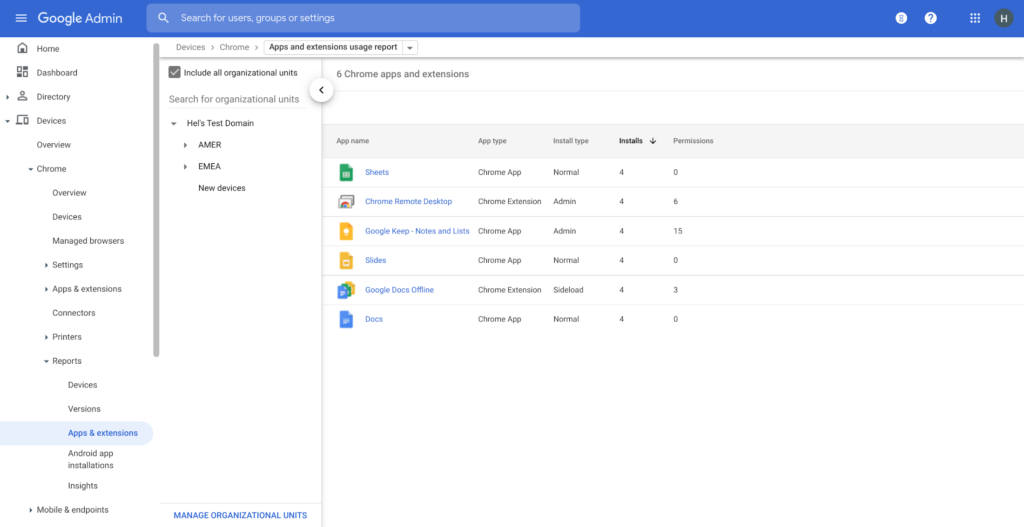
Zero trust security: Finally, Chrome can help modernize an enterprise’s security strategy by migrating to Zero Trust access models. BeyondCorp Enterprise helps secure endpoints by directly integrating Threat and Data Protection in Chrome. This protects against intentional or accidental data loss and prevents malware and phishing in real-time. Additionally, Chrome and BeyondCorp Enterprise provide device trust and endpoint security signals directly from the browser, significantly easing deployment of zero-trust in your environment. In 2022, we plan to partner with leading players in the cybersecurity and zero trust space to add additional integrations.
For security recommendations, check out the new Chrome 2.1 CIS Benchmark that covers independent recommendations on which Chrome policies to configure to help support organizations’ security and compliance needs.
More Relevant Stories for Your Company

Register to Watch July’s Security Summit
Together we can solve for the future of cloud security. Join us to learn how you can stay ahead of the next generation of threats with Google Cloud – whether you need to keep your organization secure in the cloud, on-premises, or in a hybrid environment. Get fresh insights from

Defining cloud’s future: How autonomic data security can help
“Ninety percent of all data today was created in the last two years—that’s 2.5 quintillion bytes of data per day,” according to business data analytics company Domo. That would be a mind-bending statistic, except that it’s already five years old. As data usage has undergone drastic expansion and changes in

Google Unveils New Cloud Region in Delhi NCR to Power India’s Digitization
In the past year, Google has worked to surface timely and reliable health information, amplify public health campaigns, and help nonprofits get urgent support to Indians in need. Now, we are continuing to focus on helping India’s businesses accelerate their digital transformation, deepening our commitment to India’s digitization and economic recovery.

Conversations on Government Security with Dmitri Alperovitch, CrowdStrike’s Founder and Former CTO
As I was preparing for my fireside chat with Dmitri Alperovitch, Founder and Former CTO of CrowdStrike and Executive Chairman of the Silverado Policy Accelerator, for the Google Cloud Government Security Summit taking place on Tuesday, July 20th, I was reflecting about recent developments in cybersecurity, Zero Trust best practices – including aspects
